How to Earn Support for a Website Redesign With Audience Research

A redesign earns support when it’s presented as a response to evidence, not a preference for a new look. The practical answer to how to get buy-in for a website redesign project is to connect audience research and website problems to measurable business goals, then show stakeholders how the proposed changes address them. A full website redesign typically takes 3 to 9 months, so communicate the expected timeline early.

A redesign pitch needs more than polished visuals. Decision-makers need to understand what isn’t working, who it affects, and why fixing it matters to the organization. Research grounds the case in evidence, while candid conversations reveal stakeholders’ priorities and concerns.

This article explains how to define redesign goals, investigate audience needs and current-site issues, and connect the project to business priorities. You’ll also learn to tailor the presentation to its audience, explain risks and expected results, and make the next steps easier for stakeholders to assess.

Key Takeaways

  • Build a redesign case around documented website problems and the audience needs behind them, not visual preferences alone.
  • Set measurable goals and account for content, migration, optimization, and post-launch support when shaping the project budget.
  • Tailor the pitch to stakeholder priorities, address likely concerns directly, and make the key points easy to grasp at a glance.
  • Connect proposed changes to business objectives and explain the consequences of leaving important site issues unresolved.
  • Use clear research findings to show where the current experience falls short and which improvements deserve priority.

1. How Do You Start a Website Redesign?

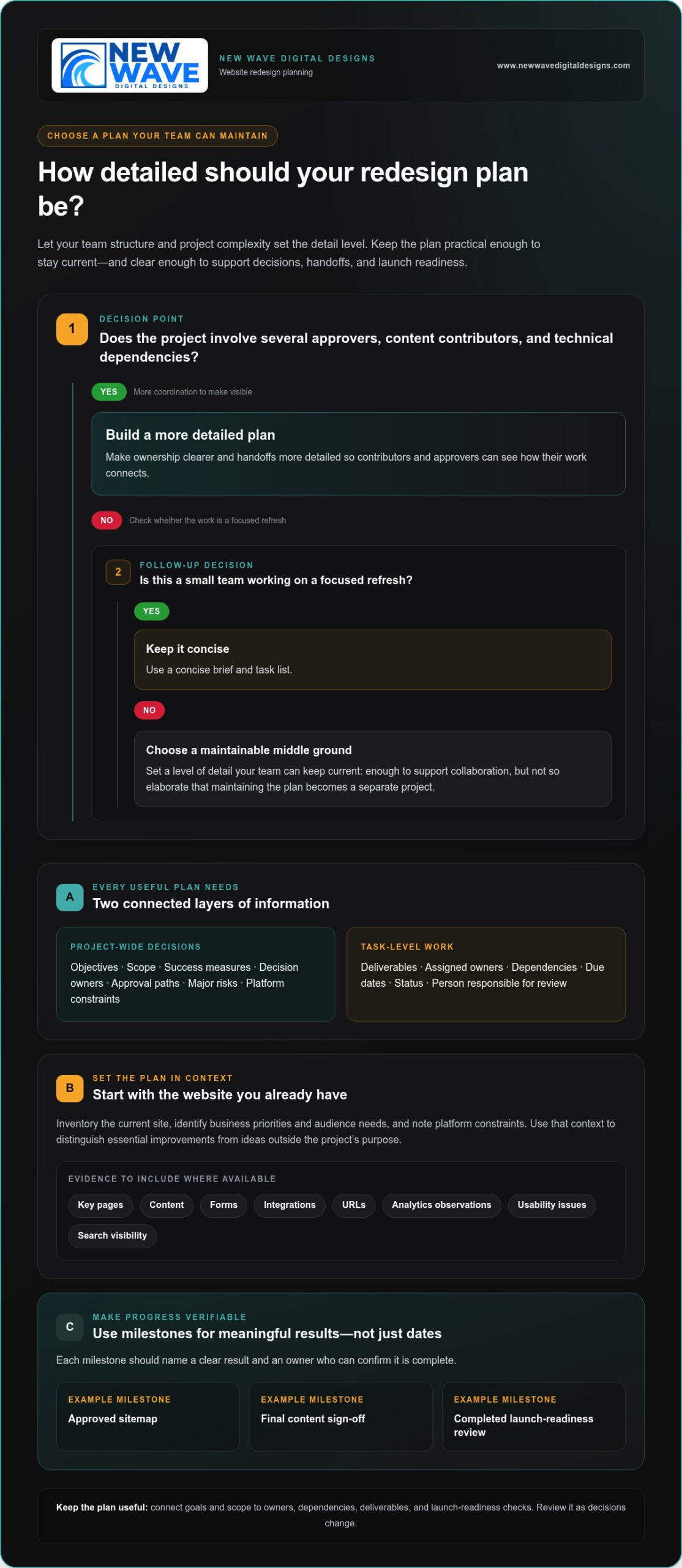
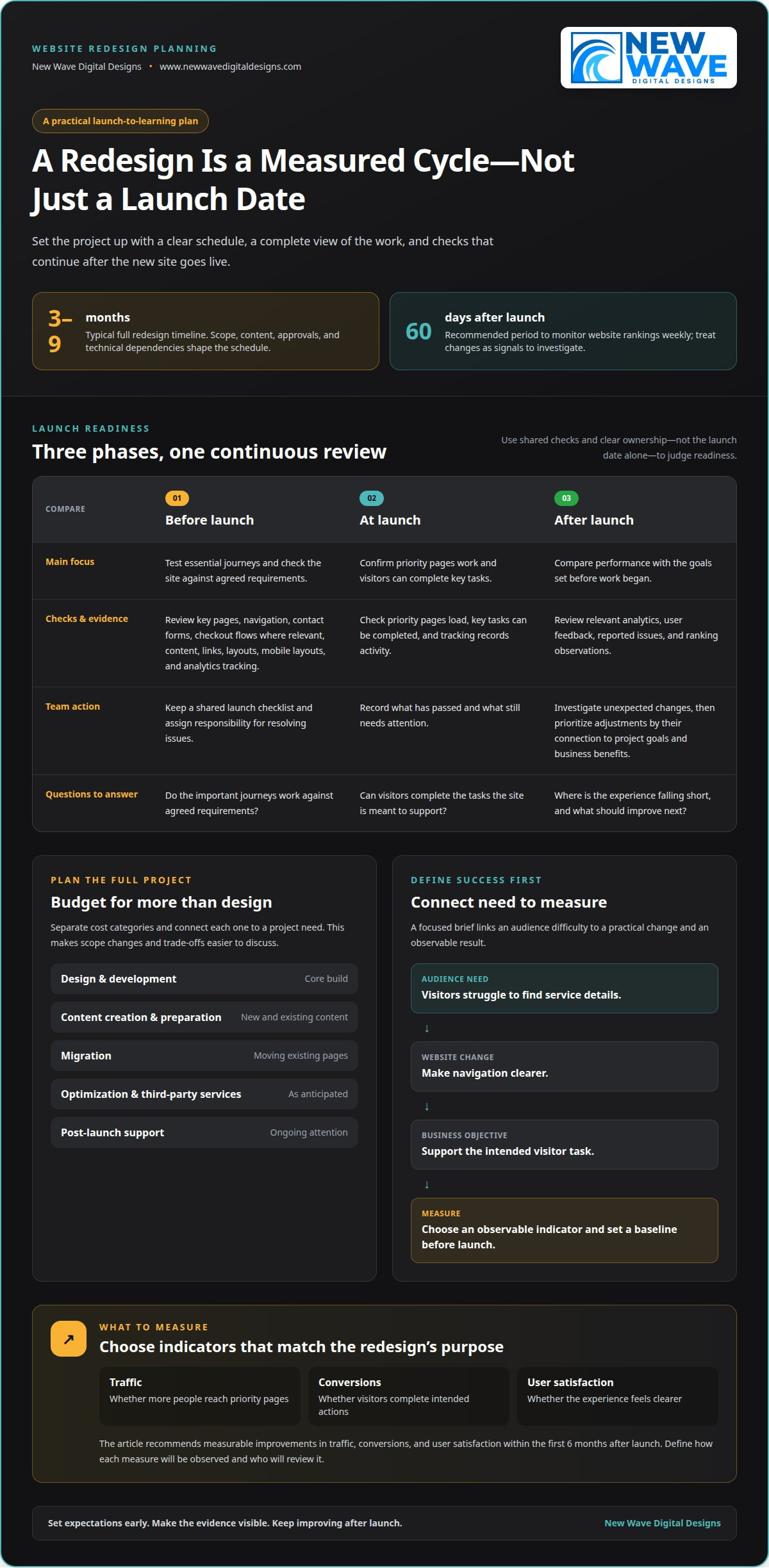
Start with a business case that connects website problems to clear project decisions. A full website redesign typically takes 3 to 9 months, so communicate the timeline to stakeholders before work begins. Some projects may take a few months or an entire year; scope, content, approvals, and technical dependencies shape the schedule. Explain the expected phases, decision points, and launch window so teams can plan their contributions.

Build the budget around the full project, not just design and development. Include content creation, migration, optimization, potential third-party services, and other anticipated resources. Account for post-launch support, too, because the new site will need attention after launch. This fuller view helps stakeholders weigh benefits against the work required and reduces the risk of overlooking necessary resources during planning.

Organize the estimate into clear categories. For example, separate design and development from content preparation, migration, and post-launch support. List third-party services and additional resources separately, then connect each category to a project need, such as moving existing pages or preparing new content. This makes trade-offs easier to discuss: if the scope changes, stakeholders can see which activities and resources may change with it.

Define quality checks before development is complete. Before launch, test essential journeys, including navigation, contact forms, and checkout flows where relevant. Review page content, links, layouts, and analytics tracking across the site. A launch checklist gives the team a shared record of what has passed and what still needs attention. Assign responsibility for resolving issues instead of treating the launch date as the only measure of readiness.

  • Before launch: Test key pages, forms, links, mobile layouts, and analytics events against agreed requirements.
  • At launch: Confirm that priority pages load, visitors can complete key tasks, and tracking records activity.
  • After launch: Review analytics, user feedback, and reported issues to identify the next improvements.

Use post-launch analysis to compare performance with the goals set before work began. Review relevant analytics, such as traffic to priority pages or completed inquiries, and investigate unexpected changes. The recommended approach is to monitor website rankings weekly for the first 60 days after launch. Treat those observations as signals for investigation, not automatic proof that the redesign caused a change.

Iteration keeps the new site aligned with audience needs. If analytics show visitors leaving a key page without taking its intended action, inspect the content, navigation, and calls to action. Prioritize adjustments based on their connection to the project’s goals and business benefits. Sharing this review process with stakeholders shows that launch begins a measured cycle of learning, refinement, and ongoing support.

2. Defining website redesign needs and goals

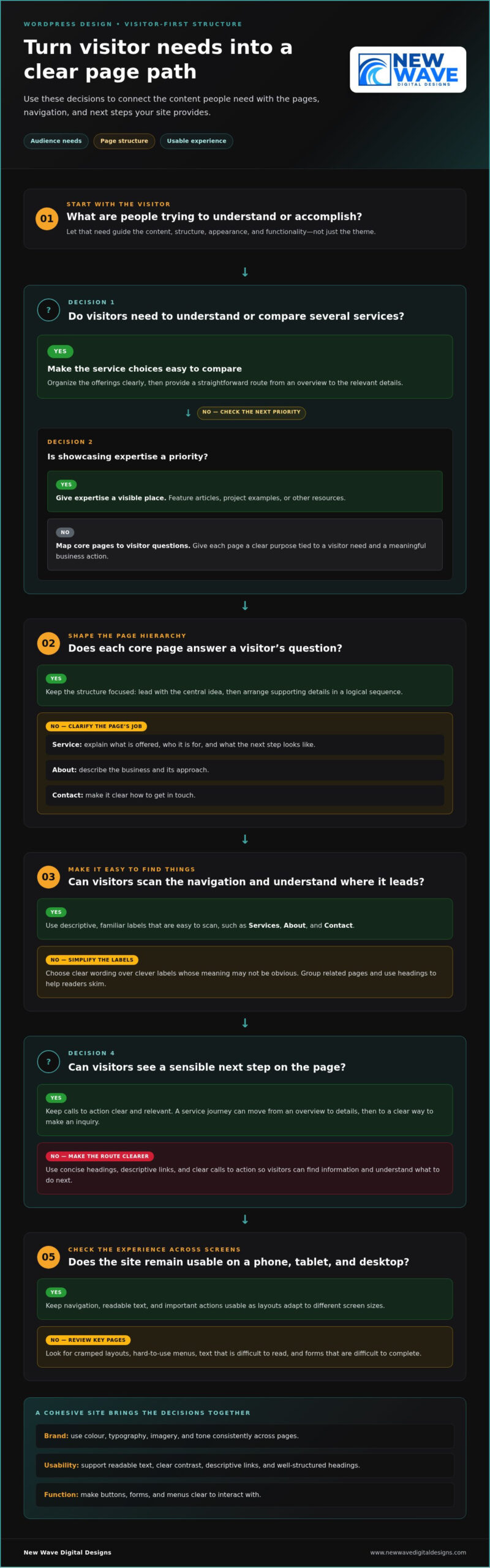
A redesign brief is more persuasive when it distinguishes visible preferences from demonstrated needs. Start by documenting the audience’s task, the website obstacle, and the business consequence. For example, if visitors struggle to find service details, the need is clearer navigation, not simply a different visual style. This level of detail connects the user experience to a practical change and gives stakeholders a shared basis for discussing priorities.

Next, translate each need into a goal and a success measure. The Americans for the Arts redesign team defined project goals and success measures before beginning its redesign. That order matters: goals guide decisions about content, structure, and functionality, while measures show whether the finished site serves its intended purpose. If the goal is to make key services easier to understand, a measure might track engagement with those pages alongside inquiries.

Use a simple chain to keep the strategy coherent: audience need, website change, business objective, measure. A goal such as “improve the website” is too broad to guide design choices. Instead, specify the experience to improve and the result to observe. For instance, a team could set a 30% improvement as an example of a measurable objective, then define the relevant metric and baseline before work starts.

Choose measures that reflect the redesign’s actual purpose. Traffic can indicate whether more people reach priority pages; conversions can show whether visitors complete intended actions; user satisfaction can reveal whether the experience feels clearer. A good redesign should deliver measurable improvements in traffic, conversions, and user satisfaction within the first 6 months after launch. These measures work best when the team identifies how each will be observed and who will review the results.

Strategy also requires decisions about what to retain, revise, create, or remove. The Americans for the Arts team reviewed existing content and involved content experts from every department. That approach helps surface outdated information and preserve material that still serves an audience need. A redesign vision document can record the audience, goals, content direction, and key requirements; the same team created a 60-page vision document before hiring a designer or developer.

  • Need: Describe the audience difficulty with a specific page or task.
  • Goal: State the experience or business outcome the redesign should improve.
  • Measure: Select an observable indicator and set a baseline before launch.

Use this framework to turn research into a focused design brief. If translating priorities into a structured site plan is the next challenge, website design planning can help connect goals with the site’s architecture and visual direction.

3. Tailoring the pitch to stakeholder interests

Involve decision-makers and the people closest to the website’s daily work. Planning and approvals often involve an executive sponsor, marketing, sales, customer support, content owners, and technical staff. Their perspectives reveal different constraints: sales may need clearer product journeys, while support may hear repeated questions caused by confusing pages. Bring these voices into early discussions, then clarify who recommends, approves, and carries out each decision.

A presentation can address different priorities without losing its central case. For executives, explain how the redesign supports business objectives and manages risk. For marketing, show how site structure supports campaigns, analytics, and Google search visibility. For sales and support, give examples of visitor friction, such as a hard-to-find service page or a contact form that disrupts an inquiry. An at-a-glance summary helps each audience understand the proposal before reviewing the details.

When leaders ask how to get buy-in for a website redesign project, connect each concern to a practical decision. A finance stakeholder questioning the budget needs a clear view of the scope and resources involved. Staff concerned about workload need defined review responsibilities and decision points. Technical teams raising migration or security concerns need to see those risks addressed in the project plan. Direct, honest conversations can reveal barriers to approval and help shape a pitch around genuine priorities.

Support matters because approvals, expertise, and timely decisions affect project progress. Keep contributors informed so they can raise concerns before they become launch blockers. The Americans for the Arts redesign team used regular emails, meetings, progress demonstrations, and informal check-ins. Adapt that approach by sharing decisions, upcoming reviews, open questions, and visible progress in each project update.

A useful proposal makes the approval request explicit. State whether leadership is being asked to approve the project vision, assign decision owners, or agree to a review process. To show how to get buy-in for a website redesign project, link stakeholder input to those specific decisions. Use examples of successful proposals carefully: describe their methods and documented outcomes, but don’t claim business results without evidence.

  • Executive stakeholders: Emphasize business priorities, risks, and decisions requiring approval.
  • Functional teams: Connect changes to workflows, audience needs, and the expertise each team contributes.
  • All contributors: Use a concise summary and regular updates to clarify progress and next steps.

Close by inviting stakeholders to identify what would make the proposal workable. Record their input and reflect it in the project plan. This exchange turns approval into shared ownership, while a clear follow-up record keeps commitments and responsibilities visible.
How to Earn Support for a Website Redesign With Audience Research

4. Aligning a redesign with strategic business objectives

Position the redesign as a business initiative, not a cosmetic upgrade. Begin with a leadership priority, such as improving qualified inquiries or making service information easier to find. Then show how the current website supports or obstructs that objective. This connection grounds the proposal in business goals and gives executives a reason to consider the work alongside other priorities.

Draw a clear line from objective to improvement. For example, if the business wants more qualified inquiries, identify which audience journey should support that outcome. A confusing service page or unclear next step may create friction. The redesign should address that specific obstacle, and a defined measure can help evaluate whether the change supports the objective after launch.

Leadership needs to understand both the opportunity and the risks of inaction. A proposal can explain how technical failures, security breaches, declining search rankings, and poor user perception may affect business performance. Tie each risk to a relevant part of the current site rather than presenting abstract dangers. This makes the case more credible and helps leaders compare potential improvements with the consequences of delay.

Connect the project scope to the organization’s actual strategy. If growth depends on a new service line, explain how the site will make that offer clear to its intended audience. If the business is focused on retention, show how clearer support information could help existing customers find answers. These examples show why redesign decisions should follow business goals, rather than introduce features without a defined purpose.

Internal alignment improves when teams see how their work contributes to shared objectives. Marketing may need campaign landing pages, while sales may need stronger product explanations. Leadership can resolve competing priorities by agreeing which audience journeys matter most. Use those decisions to ground the project scope, establish decision ownership, and prevent unrelated requests from displacing agreed improvements.

  • Objective: Name the business priority the redesign should support.
  • Evidence: Link a current website problem to an audience or operational impact.
  • Change: Describe the improvement that addresses that problem.
  • Measure: Identify an indicator that can show progress toward the objective.

Present the proposal in terms of business impact, not design preference. Explain how the planned changes support revenue, customer experience, or operational priorities, using the measures already selected for the project. A visually refreshed homepage may be part of the work, but its appearance alone doesn’t establish strategic value. Its purpose should be clear, such as guiding visitors toward a priority service or making essential information easier to act on.

Before seeking approval, connect each major scope decision to an agreed objective. If a proposed feature doesn’t serve a priority audience, improve a defined experience, or support a business measure, reconsider its place in the project. This discipline keeps the pitch focused and gives leadership a sound basis for approving the redesign.

5. Researching audience needs and current website problems

Start with evidence from the people who use the site and the paths they take. Website analytics can reveal which pages attract visits, where visitors leave, and whether they complete important actions. Pair those patterns with audience research, such as interviews, surveys, or usability sessions. Together, these methods show what visitors do and what may prevent them from finding information or completing a task.

Keep the research question specific. If visitors reach a service page but don’t continue, review its content, navigation, and next steps. Ask users what they expected to find and observe how they move through the page. This combination helps distinguish a content gap from a visual or structural problem. Record the affected audience, the page involved, and the task that became difficult.

Review current performance before proposing changes. Examine analytics for priority pages, traffic sources, inquiry paths, and completed conversions. Compare these observations with the goals established for the redesign. For example, if a key page receives visits but few users continue to an inquiry form, investigate the path between those points. Treat analytics as a signal to investigate, then use audience feedback to understand possible causes.

Benchmarking puts those findings in context. Compare the current website with relevant industry standards and competitor experiences, focusing on useful dimensions such as navigation clarity, content organization, and task completion. The goal isn’t to copy another site’s visual design, but to identify meaningful gaps and opportunities, then connect each observation to an audience need or business objective. Graphs, charts, and heat maps can make complex patterns easier for leadership to interpret.

Research also takes deliberate time. The Americans for the Arts redesign team spent 4-5 months researching before moving ahead with the project. That example shows how discovery can inform the project’s direction before design decisions take shape. Organize findings into themes, such as unclear service descriptions or difficult page navigation, and support each theme with relevant analytics or user observations.

  • Audience evidence: Capture user questions, task difficulties, and expectations from research sessions.
  • Website evidence: Connect analytics patterns to specific pages and visitor actions.
  • Benchmark evidence: Show where the site differs from relevant standards and experiences.

A concise evidence summary should connect each problem to its audience impact and proposed improvement. This gives stakeholders clear points to assess, rather than asking them to rely on design preferences. If you’re ready to turn research findings into a considered redesign, plan your website redesign around the needs and evidence you’ve gathered.

Use the evidence summary to clarify the next decision. For each issue, connect the affected audience and task with the page or journey involved, then show the supporting observation. Distinguish interpretation from evidence: a chart may show where visitors leave, while research notes can describe what they expected or found confusing. This keeps a proposed explanation open to review rather than presenting it as an established cause.

Use graphs, charts, and heat maps when they help leadership see a pattern, and explain each visual in plain language. Pair visuals with concise labels and a short takeaway so the concern is clear without losing context. Close with questions that still need investigation and the evidence that could help resolve them, keeping recommendations tied to observed audience needs.

New Wave Digital Designs

New Wave Digital Designs can help turn your redesign priorities into a considered website project. Bring your audience findings, current-site concerns, and business objectives to shape a clear direction. The team designs websites for Shopify, WordPress, and SquareSpace, and provides website maintenance to support ongoing site needs.

This is a natural next step when stakeholders agree the website needs improvement but want a considered path from evidence to design decisions. A focused discussion can connect your priorities with the right platform design approach and clarify how ongoing maintenance fits after launch.

Contact New Wave Digital Designs to discuss your website redesign goals.

Turn Research Into a Shared Direction

Ultimately, how to get buy-in for a website redesign project comes down to creating a direction people can support together. Use evidence as a starting point for decisions, not a document that goes untouched after approval. As the project moves forward, keep audience needs visible in discussions about content, design, and priorities. That steady connection helps teams make purposeful choices and gives the redesign room to evolve as new insights emerge.

A thoughtful partner can help translate research and business priorities into a website direction that reflects the organization’s character. New Wave Digital Designs works with businesses on website design and ongoing site needs, bringing strategic thinking and creative craft to the process.

If you’re ready to shape the next steps around your audience and business goals, start a conversation about your redesign. A clear direction can turn stakeholder support into purposeful progress.

Frequently Asked Questions

How Do You Start a Website Redesign?

Start by identifying the decision the redesign needs to enable, such as approving a new site structure or improving an online inquiry path. Then appoint a project lead, confirm who owns content and technical decisions, and gather existing materials. A simple project brief can capture the business trigger, audience, constraints, and approval process. This gives contributors a shared reference before detailed design discussions begin.

Examples of successful website redesign proposals and outcomes

The Americans for the Arts team set goals and success measures, researched for 4-5 months, and created a vision document before hiring a designer or developer. A proposal can define outcomes such as improved traffic, conversions, and user satisfaction within the first 6 months after launch.

How to calculate the ROI of a website redesign

Compare the redesign’s expected business effects with its full costs, including design and development, content creation, migration, optimization, third-party services, and post-launch support. Track relevant measures, such as traffic to priority pages and completed inquiries, against a baseline set before launch.

Signs You Need a New E-commerce Website to Improve Sales

A beautiful storefront can still lose sales if shoppers can’t navigate it easily. The clearest signs you need a new e-commerce website include persistently weak conversions, a frustrating mobile experience, slow-loading pages, and products that are hard to find. When several problems appear together, the cause may run deeper than outdated images or buttons.

It’s frustrating to invest in attracting visitors only to see them leave before buying. Start by identifying where the shopping journey breaks down and whether targeted updates could fix it or the site needs a broader redesign. This guide covers warning signs, from declining performance and mobile friction to slow pages and confusing product discovery, to help you decide what your store needs.

Key Takeaways

  • Compare conversion trends and checkout drop-offs over time to distinguish a persistent usability problem from a temporary dip.
  • Test the complete shopping journey on a phone, from product browsing through checkout, and note where effort or confusion builds.
  • Use Core Web Vitals to pinpoint whether loading, responsiveness, or visual stability is undermining the experience.
  • Ask people unfamiliar with your store to find specific products and observe where navigation or search leaves them stuck.
  • Match the remedy to the problem: a focused refresh may be enough when the site’s underlying structure still supports your business.

1. Bounce rates, conversion rates, and abandoned carts

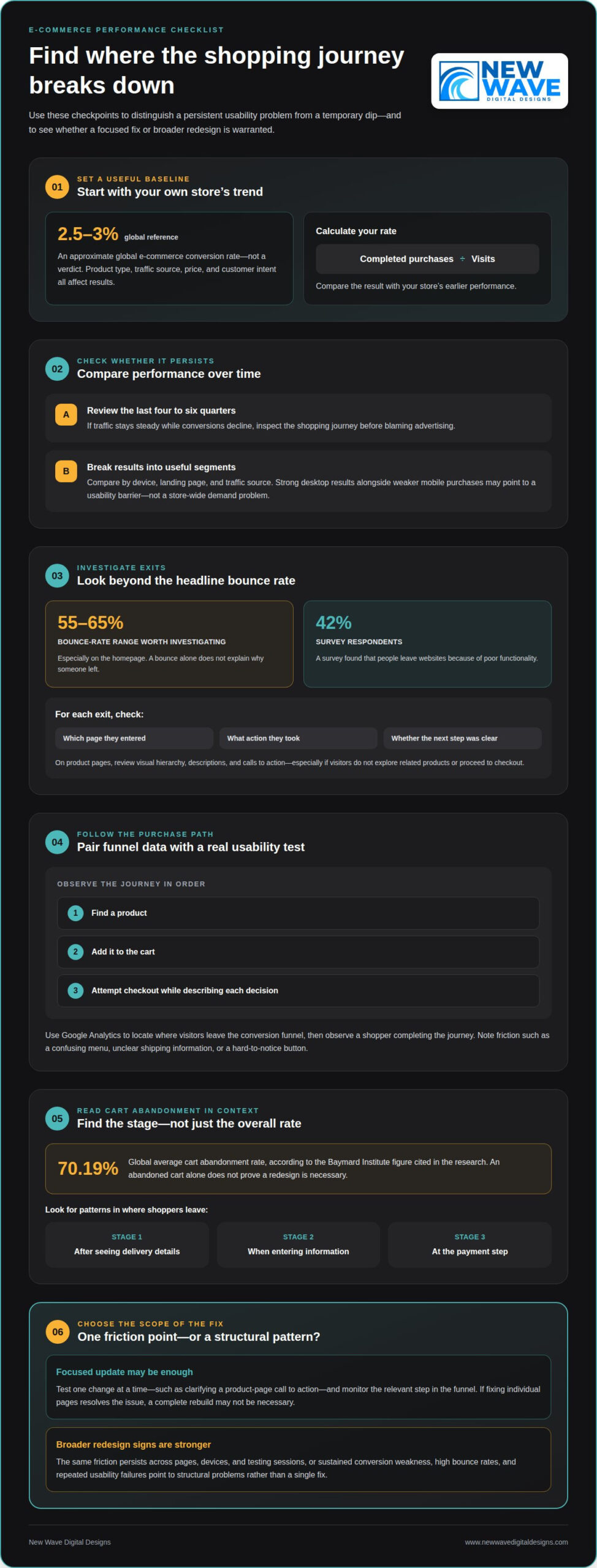
A good e-commerce conversion rate is approximately 2.5-3% globally. Treat that as a broad reference, not a verdict: product type, traffic source, price, and customer intent all affect results. Calculate your store’s rate by dividing completed purchases by visits, then compare it with your own earlier performance.

When traffic stays steady but conversions decline, inspect the shopping journey before blaming advertising. Compare conversion trends across the last four to six quarters to see whether the change persists. Then break down the data by device, landing page, and traffic source. Strong desktop results alongside weaker mobile purchases, for example, may point to a usability barrier rather than a store-wide demand problem.

Bounce rate adds another clue. Ecommerce bounce rates above 55-65% are worth investigating, especially on the homepage. A bounce alone doesn’t explain why someone left, so examine the page they entered, the action they took, and whether the next step was clear. If visitors arrive on a product page but don’t explore related products or proceed to checkout, review its visual hierarchy, descriptions, and calls to action.

Use Google Analytics to identify where visitors leave the conversion funnel, then pair that data with usability testing. Ask a shopper to find a product, add it to the cart, and attempt checkout while describing each decision. A confusing menu, unclear shipping information, or a button that’s hard to notice can turn interest into hesitation. A survey found that 42% of people leave websites because of poor functionality, making observed friction worth addressing.

Cart abandonment needs similar investigation. The global average cart abandonment rate is 70.19%, according to the Baymard Institute figure cited in the research, so an abandoned cart isn’t automatically proof that a redesign is necessary. Look for patterns: do shoppers leave after seeing delivery details, when entering information, or at the payment step? A consistent drop at one stage gives you a more useful target than the overall rate.

Test one change at a time, such as clarifying a product-page call to action, then monitor the relevant step in the purchase funnel. If the same friction persists across pages, devices, and testing sessions, the signs you need a new e-commerce website become stronger. A redesign is more compelling when sustained conversion weakness, high bounce rates, and repeated usability failures suggest structural problems rather than a single fix.

2. Mobile-friendly design

An outdated e-commerce website often shows its age through cramped mobile layouts, tiny controls, crowded menus, or product details that disappear off-screen. If customers have to pinch, zoom, or scroll repeatedly to take action, the design is creating avoidable friction. Google uses mobile-first indexing, so the mobile version also matters when pages are assessed for search.

Check the entire shopping journey on a phone, not just the homepage. Open a category, select a product, review its details, add it to the cart, and proceed to checkout. Look for cut-off buttons, overlapping text, difficult-to-use filters, and forms that reset unexpectedly. A layout that looks polished on desktop can still make these steps difficult on a smaller screen.

Compare mobile and desktop analytics to spot differences in product views, cart additions, and completed orders. If mobile visitors arrive but often leave before taking key actions, test the affected pages at different screen sizes and identify the exact point of friction.

Business growth can also outpace an existing design. A store that adds product categories, for example, may find its original homepage and menu no longer guide customers clearly. New audiences, a wider product range, or a changed brand identity can make the old structure feel restrictive. For creative brand owners and designers scaling their digital presence, platforms like IAMFASHION highlight how critical it is that an online store matches brand evolution. Compare current customer needs with the pages and features your website supports. A persistent mismatch may require more than visual updates.

Compare your visual presentation with customer expectations in your market, rather than copying another store’s style. Faded product photography, inconsistent typography, or an unclear value proposition can make a site feel neglected. Cluttered navigation adds to the problem: if customers have to scan competing menu labels to find a category, the site structure needs attention. A modern design should make the next action easy to spot.

Security and payment warning signs include browser security alerts, checkout errors, failed payment attempts, or payment steps that don’t work smoothly on mobile. These issues can interrupt a purchase and undermine customer confidence. Review the full checkout flow, from product selection to confirmation, and note error messages, broken buttons, or confusing transitions.

A redesign can bring risks such as broken links, missing product information, and disrupted customer journeys. Reduce them by documenting current pages, recording important URLs, and testing key paths before launch. For example, confirm that returning customers can still find a product category and complete checkout on a phone.

Before deciding, list the mobile problems, the pages they affect, and the customer action each one blocks. If fixing individual pages resolves the issues, a complete rebuild may not be necessary. If outdated design, changing business needs, and mobile usability problems affect the store more broadly, they’re stronger signs you need a new e-commerce website, leading many growing brands to consult specialists like Mosster Services Limited to craft a streamlined digital presence.

3. Page speed and Core Web Vitals

A slow e-commerce website keeps shoppers waiting before they can examine products or act. Many users expect pages to load within two seconds, and pages taking more than two to three seconds can lose potential customers before they see the offer. If most of your pages take longer than three seconds, investigate promptly whether the underlying site needs an update.

Speed affects more than first impressions. Slower loading can be associated with weaker conversion performance. That doesn’t mean every slow page requires a complete website redesign; first identify which pages are slow and what’s delaying them. Large product images, unnecessary scripts, and complex page layouts can all contribute to longer waits.

Core Web Vitals help assess the experience beyond a single load-time number. Good targets include Largest Contentful Paint, or LCP, under 2.5 seconds; Interaction to Next Paint, or INP, under 200 milliseconds; and Cumulative Layout Shift, or CLS, under 0.1. These measures focus on how quickly key content appears, how promptly pages respond, and whether elements shift unexpectedly.

Test the same URLs consistently: homepage, category pages, product pages, cart, and checkout. Check them on both mobile and desktop, since a page that feels quick on one device may lag on another. Record the slowest page and its Core Web Vitals results, then retest after each update. This comparison helps distinguish a troublesome template from a broader performance problem.

Pay attention to what visitors experience as a page loads. A product image that appears late, an unresponsive menu, or a checkout button that shifts as content loads can interrupt the shopping journey. If category pages repeatedly load slowly while simpler pages perform well, examine shared images and scripts on that template before replacing the whole site.

A redesign makes more sense when slow performance affects most pages, persists after targeted improvements, and reflects limitations in the site’s structure. If the issue is limited to a few images or one template, focused changes may be enough. Use measured load times and Core Web Vitals, alongside the customer actions affected, to decide whether a targeted update or a broader rebuild is more practical.

Signs You Need a New E-commerce Website to Improve Sales

4. Mobile usability and device-level performance

A page can fit a phone screen and still be difficult to use. Responsive web design needs to adapt more than page width: menus, product images, filters, and purchase controls must remain clear and usable. A category page, for example, may resize correctly while a large promotional banner hides its filter button. Check that essential actions stay visible as the layout changes.

Test the store on a mid-range phone, not just a recent flagship device. Open the homepage, browse a category, and inspect a product page at a customer’s natural pace. Check whether text is readable without zooming, buttons respond to taps, and menus close after a selection. Testing on a device can reveal friction a desktop preview misses.

Review touch interactions separately. Try selecting a product option, opening an image, and closing a pop-up with one hand. If controls are too close together, customers may tap the wrong option or lose their place. On product pages, keep key details and the add-to-cart action easy to find as shoppers scroll through images and descriptions.

Compare key pages across screen sizes and orientations. A homepage may look balanced in portrait mode but feel crowded when a customer turns a phone sideways. Check that navigation doesn’t cover product content, text doesn’t collide with images, and important actions remain clear. Record each issue by page and device to see whether it’s isolated or part of a wider design problem.

A responsive website can deliver a mobile experience without requiring a separate mobile application. That keeps the store consistent across devices rather than sending customers to another destination. Check whether your current web design presents the same product details, categories, and purchase steps on each device. Missing or inconsistent information can create doubt even when every page loads.

Distinguish a mobile usability issue from a broader platform limitation. If a homepage banner blocks navigation, revising that component may solve the problem. If product pages, filters, and checkout all require awkward workarounds on a mid-range phone, the underlying structure may be holding the store back. Document the customer action affected and test the revised experience on the same device. Repeated barriers across the site are stronger evidence that a redesign should address mobile usability from the ground up.

Customers should be able to find relevant products without decoding your menu. Test product discovery by asking five people outside your team to find three products. Watch where they pause, select the wrong category, or abandon the task. Their first attempts can reveal labels that make sense internally but don’t match the words shoppers use.

Review the journey from the homepage to a product page. Group related categories under clear names, use consistent menu labels, and make search easy to find. If customers have to open several unrelated dropdowns to find a product type, for example, simplify the hierarchy. Treat site search as part of navigation, too: test whether a familiar product name returns the right result.

Readability can hinder product discovery even when the right pages exist. Long menus, dense category descriptions, low-contrast text, and inconsistent labels slow shoppers down. Ask testers to complete a task, then note how long it takes and where they hesitate. The three-click rule suggests people should find what they need in three clicks, but that idea has been challenged. Judge the experience by successful task completion, not a rigid click count.

Google rankings shouldn’t be the only reason to change navigation. A clear structure helps visitors understand how products relate, while descriptive category names make pages easier to interpret. Check whether key categories are reachable from the homepage and whether each product page links back to a useful category. If shoppers and search engines encounter unclear paths, reorganizing the site may support both discovery and visibility.

Separate a navigation problem from a platform limitation before choosing a solution. If clearer labels, reordered categories, or improved search settings resolve the issue, a focused redesign may be enough. Consider migration if the current platform prevents essential changes, such as building a workable category structure or supporting product discovery. Compare your business’s current requirements with what its system can handle.

Test the experience before committing to a solution: give people a specific product-finding task, observe their route, and record where they get confused. Repeat after adjusting labels or page hierarchy. If people still struggle because the site structure can’t accommodate the catalog, a broader rebuild or platform migration may make sense. If improved navigation solves the task, keep the structure and refine the experience instead.

If product discovery remains difficult across key categories, get help planning a clearer e-commerce website around how customers browse and shop.

New Wave Digital Designs: Shopify Website Design

New Wave Digital Designs creates Shopify websites for businesses that need clearer structure, stronger product presentation, or a more usable shopping journey. A purpose-built redesign can align your storefront with your goals as your business evolves. The team also designs websites on WordPress and Squarespace and provides Website Maintenance for ongoing site needs.

Bring your priorities into the conversation: where customers struggle, which pages need attention, and what your store should support next. These details give the design work a practical foundation, shaped around your business rather than visual changes alone.

To discuss your e-commerce website needs, contact New Wave Digital Designs or visit www.newwavedigitaldesigns.com.

Turn your findings into a clear next step

Recognizing the signs you need a new e-commerce website is only the beginning. Next, decide what a better customer journey should make possible, then use that goal to guide design choices. Start with the business outcome you want your storefront to support, such as helping shoppers understand your offer or explore your catalog. A clear goal gives your redesign direction beyond simply looking newer.

Before making changes, write down the customer tasks your website must support and the obstacles you want to remove. This gives you a practical basis for planning and evaluating options, while keeping the experience aligned with your business as it evolves. New Wave Digital Designs can turn those priorities into a considered website design.

Contact New Wave Digital Designs to discuss a thoughtful next step for your e-commerce website. With a clear purpose guiding the work, your storefront can better reflect your business and welcome customers into a more intuitive experience.

Frequently Asked Questions

How do I know if my ecommerce website needs a redesign?

Consider a redesign when recurring problems affect several parts of the shopping journey, not just one page. Look for patterns such as staff relying on workarounds to update products, customers struggling to compare options, or new business goals the current layout can’t accommodate. Document each issue, its impact, and the pages involved. This helps distinguish a design problem from a content or process issue that can be changed separately.

How do slow page speeds affect e-commerce conversion rates?

Slow pages can interrupt a purchase before shoppers reach the details they need to decide. Delays on a product page may prevent images or options from appearing promptly, while sluggish cart updates can leave customers unsure whether an action worked. Review performance throughout the purchase path, including filtering and cart interactions. This shows whether delays cluster around one feature or affect the store more broadly.

How can I tell if my e-commerce site is not mobile-friendly?

Try completing a purchase on your phone in its default browser, with the screen set to its normal text size. Check whether product information stays readable, forms are comfortable to use, and the checkout summary remains clear as you enter details. Test browser back navigation, too: if it unexpectedly clears selected products or entered information, the mobile journey needs attention. Repeat the test on another phone or browser to uncover device-specific inconsistencies.

How do high bounce rates and cart abandonment indicate website problems?

High exit rates can signal friction, but their location and context matter. Compare pages with similar traffic sources, then check whether visitors leave before viewing product details, after selecting options, or during checkout. A campaign landing page may attract the wrong audience, while repeated exits at one checkout field may point to a confusing step. Consider session patterns and customer feedback together before deciding what to change.

When should a business redesign or rebuild its e-commerce website?

Redesign when the existing foundation can still support the store but its presentation or customer journey needs restructuring. Rebuild when essential requirements depend on capabilities the current setup can’t provide, such as a different product organization or connections to business systems. Before deciding, identify what must remain stable, including product records and essential customer journeys. Those requirements help define a practical project plan.

How can I audit an e-commerce website before deciding to rebuild it?

Start by inventorying important pages, products, integrations, and customer tasks. Review analytics for changes in performance by page and traffic source, then test common tasks as a shopper. Ask staff which updates require repeated workarounds and record each issue’s business impact. Group findings into content, design, usability, and technical needs to see whether targeted improvements or a broader rebuild is the better fit.

Should I redesign my website or optimize it? How to decide

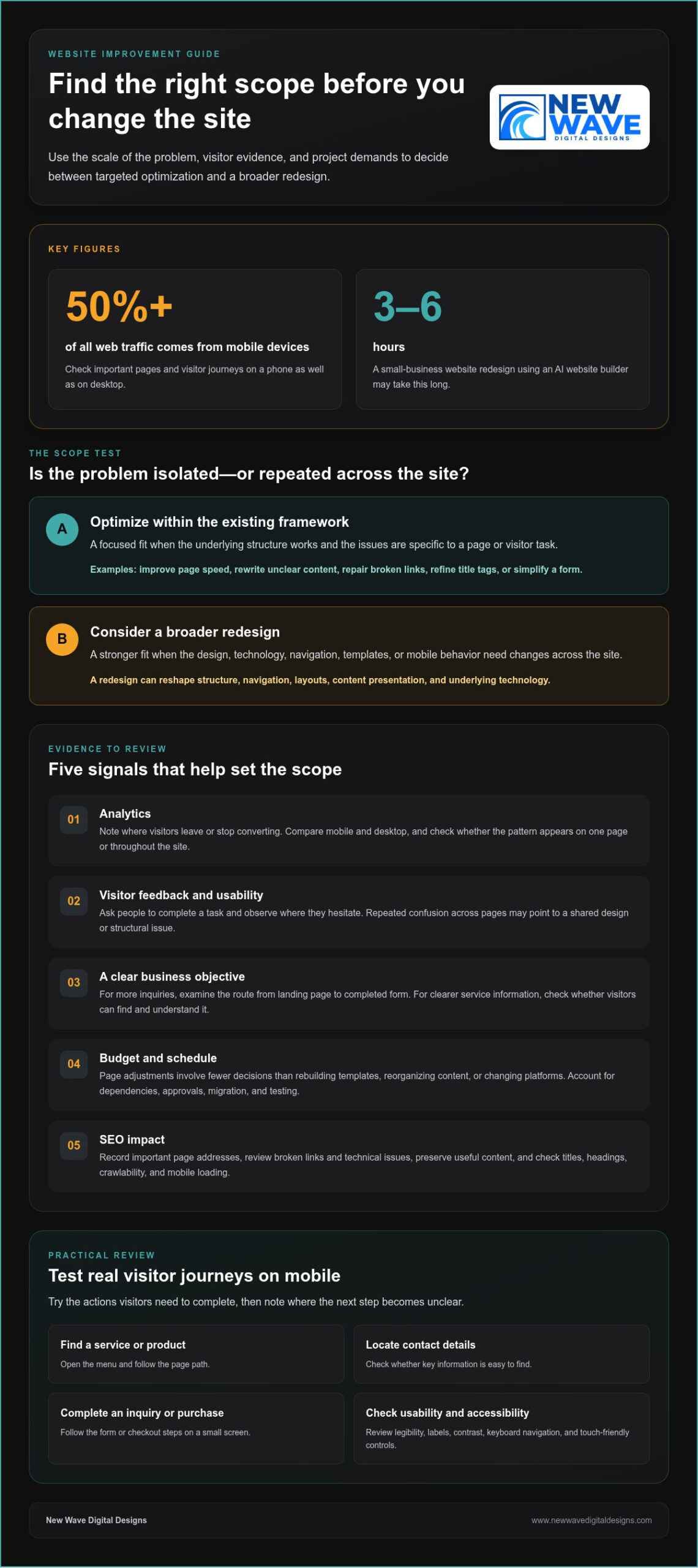
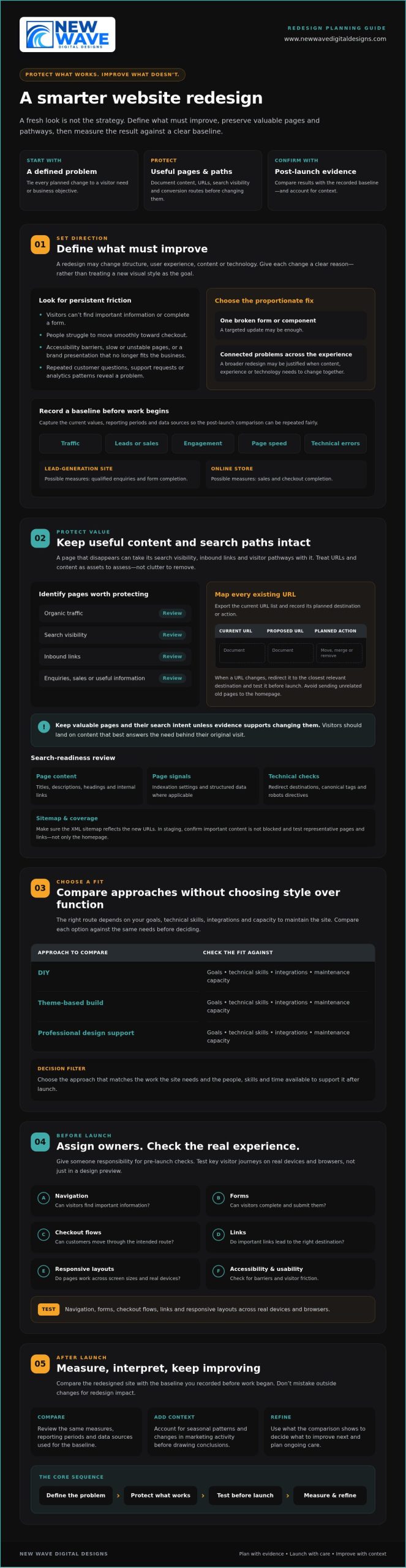
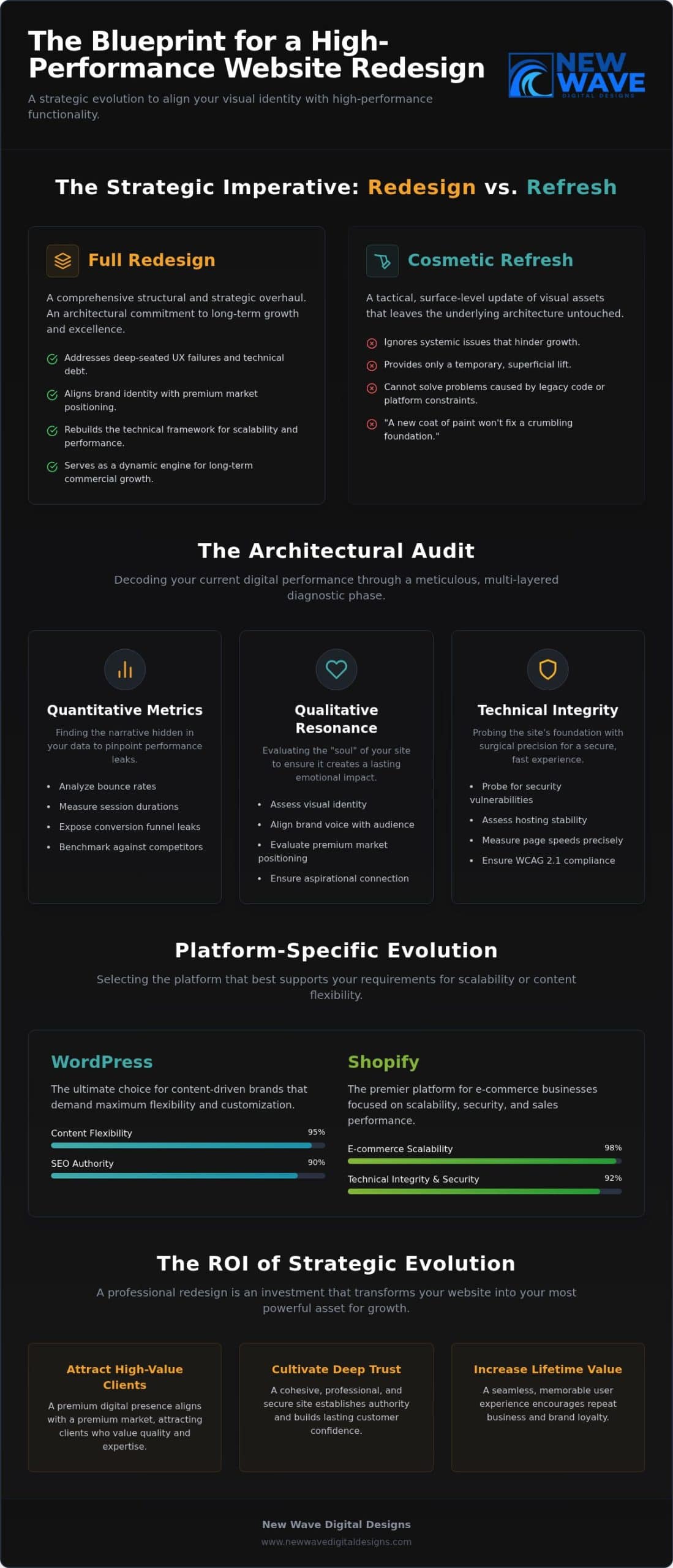
A full redesign isn’t always the right fix. If your website’s structure still works but specific pages, content, or visitor journeys need attention, optimization is usually the more focused starting point. If the site’s design, technology, or overall experience no longer supports your business, a redesign may make more sense. Whether you should redesign your website or optimize it depends on the scale and source of the problems you’re trying to solve.

It’s understandable to consider a fresh start when your site feels dated or isn’t performing as you’d like. But reviewing user feedback, analytics, brand changes, maintenance needs, and SEO can show whether targeted improvements are enough or the site’s overall structure needs rethinking.

This guide will help you weigh cost and timing alongside practical signals, then choose an approach that supports your goals without replacing what already works. Website improvement doesn’t have to end at launch: thoughtful optimization can remain part of your site’s ongoing care.

Key Takeaways

  • Choose targeted optimization when the site’s underlying structure works and the problems are specific; consider a redesign when broader foundations need attention.
  • Use visitor feedback and site performance to identify which changes matter most before setting scope, budget, and timing.
  • Align the site with your current brand while preserving content and pathways that still serve visitors well.
  • Weigh the effort of maintaining existing technology against the benefits of a refreshed foundation.
  • Treat launch as one stage in a continuing cycle of testing, maintenance, and improvement.

1. What is website redesign?

A website redesign reshapes more than colors or images. It can change the site’s structure, navigation, layouts, content presentation, and underlying technology. Optimization, by contrast, targets specific issues within the existing framework, such as a slow page or confusing form. Updating a call-to-action button is a focused improvement; reorganizing the main menu and rebuilding page templates is closer to a redesign.

Mobile responsiveness is a practical test of whether the site’s design adapts to different screen sizes. More than 50% of all web traffic comes from mobile devices, so check key pages on a phone as well as a desktop. Look for text that requires zooming, images that overflow, and buttons that are difficult to tap. A responsive layout should adjust content and elements to the screen rather than simply shrinking the desktop page.

Test the navigation by completing real visitor tasks on a mobile device. Open the menu, find a service or product, locate contact details, and follow the steps to an inquiry or purchase. Note where the next step becomes unclear on a small screen. Touch-friendly buttons, visible menu labels, and concise page paths can often be improved without replacing the entire site.

Usability also depends on how easily people can read and understand each page. Check whether headings describe the content that follows, paragraphs are easy to scan, and important details appear where visitors expect them. If visitors must open several menu layers to find shipping information, simplify the route. If the same problem appears across many pages, the site’s information architecture may need broader changes.

Include accessibility in your review. Check that text is legible, links and buttons have clear labels, and visitors can navigate menus and forms using a keyboard. Review color contrast, and make sure meaning isn’t communicated through color alone. These checks help show whether the design serves visitors with different needs, not just whether it looks polished on one device.

Before launch, test redesigned pages on the devices and browsers your visitors use. Submit forms, follow links, check images, and confirm that menus work at narrow screen widths. Review page loading, mobile layouts, and security elements such as plugins and backups. Google prioritizes mobile-ready websites in search results, so a broken mobile experience can affect visibility as well as usability. If the structure works and problems are isolated, optimize first. If navigation, templates, and mobile behavior need changes across the site, a redesign may be the more coherent solution.

2. Budget, schedule, user feedback, and SEO considerations

You can improve page speed, rewrite unclear content, repair broken links, refine title tags, and simplify forms without rebuilding the whole site. These targeted changes suit problems limited to specific pages or visitor tasks. To decide whether you should redesign your website or optimize it, first identify whether the barriers are isolated or repeated across the site.

Start with analytics and note where visitors leave or stop converting. If a service page attracts visitors but few reach its inquiry form, inspect its message, form placement, and next step. Compare performance on mobile and desktop, then see whether the pattern appears on one page or throughout the site. That distinction helps define the project’s scope.

Analytics show what visitors do; usability tests can help explain why. Ask people to complete a task, such as finding a product detail or submitting an inquiry, and observe where they hesitate. Pair those observations with customer feedback and site data. If several people misunderstand the same label, revise it. If tasks repeatedly fail across different pages, investigate the shared design or structure.

Set a business objective before choosing changes. If the goal is more inquiries, examine the visitor’s route from landing page to completed form. If the priority is clearer service information, assess whether visitors can find and understand it. Tie visual changes to that objective. A more prominent contact button may help on one page, while inconsistent layouts could point to a broader need.

Budget and timing depend on scope. Adjusting a page involves fewer decisions than rebuilding templates, reorganizing content, or changing platforms. List the tasks, dependencies, and approval steps before setting a budget or launch date. Include content migration and testing when multiple pages are affected. Deciding whether you should redesign your website or optimize it becomes clearer when you compare the work required with the outcomes each approach supports.

Protect organic search visibility by recording important page addresses and reviewing an SEO audit for broken links and technical issues. Keep useful content, write accurate page titles and headings, and ensure search engines can crawl the site. After changes, test links, forms, and loading on mobile devices. If a broader rebuild is under consideration, a website redesign and optimization plan can help connect user needs with business goals.

When considering a redesign or refresh, assess budget, schedule, user feedback, and SEO impact. High bounce rates or low conversions may point to issues such as weak calls to action, missing customer testimonials or reviews, hard-to-find contact information, or poorly designed forms and checkout processes.

SEO considerations include keywords in content and meta tags, loading speed, mobile experience, crawlable code, and relevant, high-quality content. For businesses preparing for modern search shifts, teams like YourProfitWeb focus on AI-driven SEO and search optimization to help sites appear as top answers in AI results. A redesign can rethink the experience around current and future organizational goals. A small business website redesign using an AI website builder may take 3–6 hours.

3. Aligning a website with an evolved brand

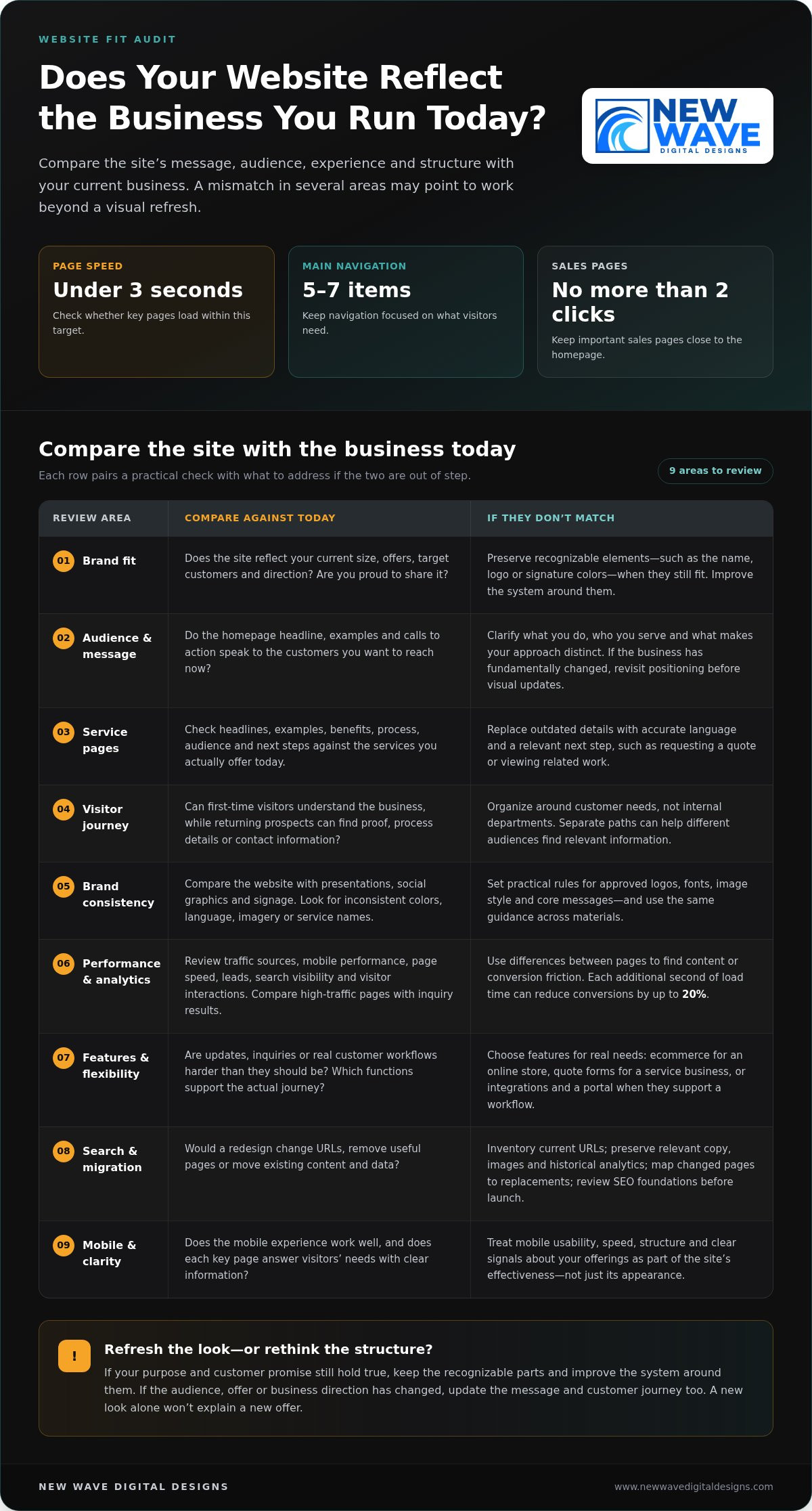
A brand can evolve before its website catches up. A new logo, color palette, typography, or set of services may make existing pages feel inconsistent. Compare the homepage, service pages, and contact page with current brand guidelines. If only a few visual details or phrases are outdated, targeted updates may be enough. If the structure and messaging no longer express the business, a redesign can bring the overall digital experience into alignment.

Review the brand’s promise before changing the visuals. Write down what the business does, who it serves, and what visitors should understand after reading the homepage. Then compare those points with the page’s headline, supporting copy, imagery, and calls to action. For example, a company that now emphasizes custom work shouldn’t lead with generic language that suggests standard packages. The message and design should tell the same story, a standard practice for creative web design agencies like Insight Multimedia when reshaping a company’s digital presence.

Feedback can reveal where the current site creates a mismatch. Ask customers what they expected to find, then compare their answers with the language and service descriptions on key pages. If visitors consistently misunderstand an offering, revise its name, explanation, or placement. If the same confusion appears across the homepage, navigation, and service pages, the issue may call for broader messaging and structural changes.

A content audit helps distinguish material to keep from content to revise or remove. Review each page for accuracy, brand voice, and purpose. Mark outdated service descriptions for rewriting, preserve useful guidance, and remove copy that no longer supports the business’s direction. Check headings, page titles, and calls to action too. This creates a clear content map before design work begins, rather than carrying old assumptions into a new layout.

Consider the content management system alongside the brand update. If the current system supports the required page layouts and staff can update text and images reliably, a visual refresh may be enough. If the site’s templates make it hard to organize new services or messaging clearly, the structure may need to change. The key question is whether the current framework can support the brand’s next chapter.

Before launch, review the updated site page by page. Confirm that the logo, colors, typography, service descriptions, and calls to action form a coherent experience. Check that the homepage sets accurate expectations and detail pages deliver on them. A new identity doesn’t automatically require a redesign; focused changes can work when the underlying structure still fits. Choose a broader rebuild when branding, content, and page architecture need to change together.

Should I redesign my website or optimize it? How to decide

4. Maintenance costs and legacy technology

A redesign and ongoing optimization distribute effort differently. A redesign concentrates work in a larger project, while optimization addresses defined tasks over time. Redesign costs depend on project scope and customization; ongoing costs depend on the pages and technical issues being maintained. Updating a few pages, for example, differs from rebuilding templates and moving content to another platform.

For a site with fewer than 10 pages, a small website redesign typically takes 4-6 weeks. A medium site with 10–50 pages typically takes 8-12 weeks; a large site with 50+ pages typically takes 3-6 months. An enterprise redesign typically takes 6-12 months. Content migration, approvals, and testing all shape the schedule.

A refresh often costs less and takes less time than building a site from scratch because it can reuse the existing structure and functionality. It may also preserve the current content management system, avoiding the need to learn a new editing process. This approach suits a site with a sound foundation that needs updated pages or a more responsive, mobile-friendly presentation.

Existing technology can change that calculation. List recurring maintenance tasks, such as updating the content management system, reviewing plugins, and addressing security issues. Then identify whether outdated components create repeated work or prevent needed changes. Flash, for example, is no longer supported and should be replaced with newer technology. If essential functions depend on fragile legacy components, piecemeal fixes may extend the maintenance burden.

A redesign also carries SEO risks if important URLs, content, or internal links change without a migration plan. Before launch, record pages that attract traffic, map old URLs to relevant destinations, and test links and crawlability. Keep valuable page content and search-focused titles where they still serve visitors. A refreshed visual design alone doesn’t require changing every URL.

Optimization has a narrower scope and lets teams address specific problems while preserving what works. Its drawback is that repeated fixes can become inefficient when the underlying platform or templates limit progress. A redesign can provide a coherent new structure and replace legacy technology, but it requires more planning and migration work. Compare maintenance tasks, required changes, and SEO dependencies before choosing.

Use a practical decision rule: if the site remains secure, maintainable, and capable of supporting current goals, prioritize focused optimization. If technology creates recurring obstacles, necessary changes affect multiple templates, or maintenance consumes effort without resolving core problems, plan a redesign. The right choice resolves the source of the work, not just its most visible symptom.

5. Redesign timing and ongoing optimization

Signs that point toward a redesign include outdated functionality, recurring layout problems across templates, and messaging that no longer reflects the business. If a required service cannot fit the current structure, or visitors encounter the same obstacle on multiple pages, isolated optimization may not address the underlying issue. A single slow page or unclear button, however, may need only a focused adjustment.

A full redesign every two to three years is described as typical in many industries, but the calendar alone is a weak trigger. Review whether the site still supports the audience, business goals, content, and technology it needs today. A newer site may still need an overhaul if its structure blocks essential functionality; an older one may need only continued updates if its foundations remain useful.

Use a clear decision process. First, define the outcome, such as more inquiries or clearer service information. Next, identify where visitors struggle and whether the problem affects one page or the wider site. Then compare targeted fixes with changes to templates, content organization, and technology, and choose the scope that addresses the root cause.

Keep optimization in the plan after launch, whether the project is a refresh or a full rebuild. Track the pages tied to your goal, review visitor behavior, and make adjustments when evidence points to a specific friction point. If people reach a booking page but abandon the process, for example, inspect the steps and messaging before changing unrelated pages.

Plan the launch around the complexity of the overhaul. A typical website overhaul can take 3-12 months, depending on its complexity, so define approvals, content preparation, and testing milestones early. After launch, monitor the site closely during the first 24–48 hours. Test key functionality, check important pages, and confirm forms and links work before treating the new design as complete.

The strongest approach is continuous rather than calendar-bound: redesign when the site’s foundations no longer serve its purpose, then optimize as audience needs and business goals evolve. That rhythm helps prevent a cycle of waiting until the site feels outdated, then attempting to solve every problem in one overhaul. To map a practical redesign or optimization path, plan your website’s next improvements with a clear view of goals, scope, and ongoing needs.

New Wave Digital Designs: Shopify Website Design

New Wave Digital Designs can help shape a website that better supports your business goals, whether the right path is a redesign or ongoing maintenance. If your Shopify store needs a clearer structure, a refreshed customer journey, or a cohesive visual direction, Shopify Website Design can address those needs. WordPress Website Design and SquareSpace Website Design are also available for businesses building or reworking sites on those platforms.

For a site whose foundation still works, Website Maintenance can support its ongoing care instead of replacing it. Start with the scope of the problem: isolated issues may need focused improvements, while changes across the site may call for a broader design project. Contact New Wave Digital Designs to discuss the next step for your website.

Shape your website’s next chapter

Deciding whether you should redesign your website or optimize it is ultimately about what will best support your next stage of growth. Let your priorities guide the work: preserve what serves visitors, address what gets in their way, and make room for the changes your business needs. A website doesn’t have to stay fixed after launch. It can evolve with your audience, services, and goals.

New Wave Digital Designs offers Shopify Website Design, WordPress Website Design, and SquareSpace Website Design for businesses planning a new site or a considered redesign. A clear conversation about your goals can turn the decision into a practical direction for your website.

Contact New Wave Digital Designs to discuss your website’s next step. A thoughtful change, made with purpose, can set the stage for what comes next.

Frequently Asked Questions

What is website redesign?

A website redesign is a coordinated rebuild or substantial reworking of a site’s appearance, structure, content presentation, or platform. Unlike changing one element, it may alter how visitors move from a landing page to a purchase or inquiry. A business might, for example, reorganize service pages and rebuild templates so new offerings fit naturally. The defining feature is the scope of change, not a particular visual style.

How can I audit website performance, UX, SEO, and conversion issues?

Pair analytics with hands-on task testing. Record which pages visitors enter, leave, and convert on, then test a key journey, such as finding a service and submitting its form. Review search impressions and landing-page queries in Google Search Console, and inspect mobile loading and broken links. Finally, compare visitor comments with the data. A page with traffic but few inquiries needs different attention from one visitors rarely find.

How can a redesign affect SEO rankings, traffic, and conversions?

A redesign can change how search engines discover pages and how visitors complete tasks. Changing URLs without relevant redirects can send existing search results to dead ends; removing useful page content may also weaken its relevance. Clearer page paths and forms, on the other hand, can make it easier for visitors to act. Preserve valuable destinations and monitor search visits, inquiries, and sales after launch.

What risks should I plan for when redesigning a website?

Plan for broken forms, missing content, incorrect redirects, and analytics tags that stop recording visits. Create an inventory of key pages and conversion actions before development, then test each on the finished site. Keep a copy of the previous version and establish a rollback plan in case a critical function fails. Assign someone to review visitor reports after launch so overlooked problems surface quickly.

How do I measure whether website optimization or a redesign improved results?

Before work begins, record a baseline for the specific goal, such as completed inquiries, sales, or search visits to priority pages. After launch or optimization, compare the same measures and separate results by traffic source and device. Check whether more visitors complete the intended action, not just whether total visits rise. Also review support questions and user feedback for signs that the experience has become clearer.

How to Use a Website Redesign ROI Calculator to Estimate Revenue and Payback

A website redesign ROI calculator is only as useful as the numbers behind it. Use one to estimate whether a redesign could earn back its investment by comparing current and projected revenue, lead value, close rates, and ongoing costs such as hosting. The result is a practical forecast, not a promise.

It’s easy to focus on the visible transformation: a clearer layout, a more polished brand, and a smoother path to action. But the business case depends on what those changes may do for conversions and revenue, measured against the full cost of the work.

This guide shows you how to build that estimate step by step. You’ll learn how to set a baseline, project leads and sales using conversion and close rates, calculate ROI and payback, and include hosting and maintenance in the total. With a sound formula and realistic assumptions, you can turn a redesign from a hopeful idea into a decision grounded in business outcomes.

Key Takeaways

  • Set a reliable baseline with recent traffic, conversion, lead, and revenue data before projecting what a redesign could change.
  • Translate conversion improvements into business outcomes by factoring in lead quality, close rates, and the value of each sale.
  • Use a clear ROI formula and payback period to compare projected gains with the full redesign investment.
  • Include recurring hosting and maintenance expenses so the calculation reflects the ongoing cost of running the site.
  • Track qualitative benefits such as stronger brand trust and improved sales enablement alongside revenue measures.

What is a website redesign ROI calculator?

A website redesign ROI calculator estimates whether a new site could generate enough financial value to justify its investment. It connects traffic, conversion rate, lead value, and projected revenue, rather than treating visual change as success on its own.

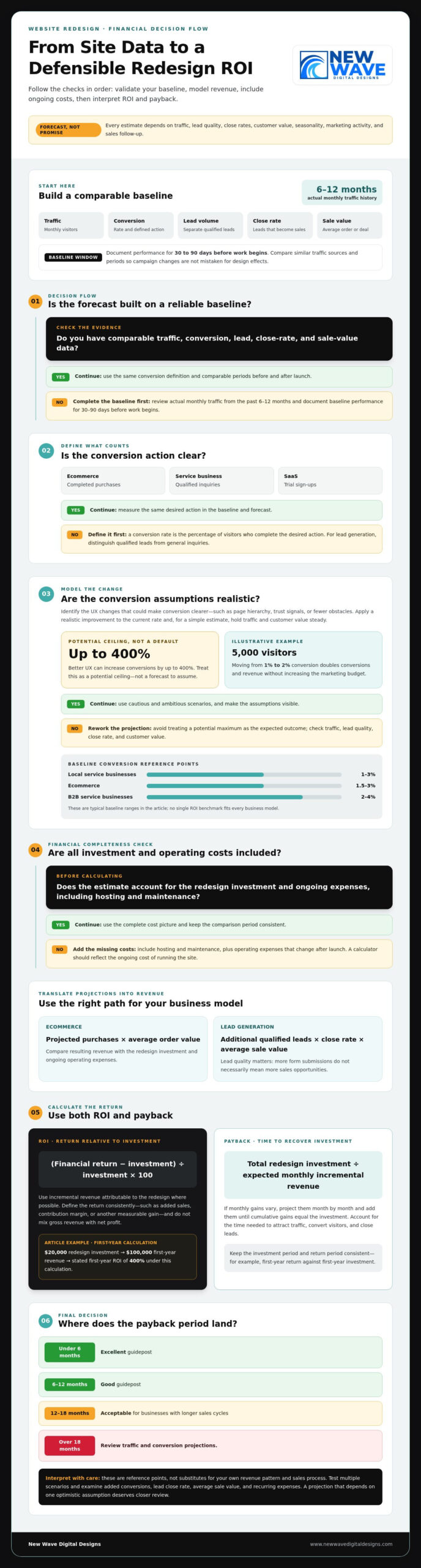
For small businesses, ecommerce, and B2B sites, there is no single ROI benchmark that fits every model. Typical baseline conversion rates are 1 to 3% for local service businesses, 1.5 to 3% for ecommerce, and 2 to 4% for B2B service businesses.

Measure benefits by comparing conversions before the redesign with projected conversions, then translating the difference into sales or lead revenue. For a service business, multiply additional qualified leads by the proportion that close and the average value of each sale.

Compare traffic, conversion rate, qualified leads, close rate, average order or deal value, and resulting revenue before and after launch. Use actual monthly traffic from the past 6-12 months and document baseline performance for 30 to 90 days before work begins.

Estimate conversion improvements by applying a realistic increase to your current rate, then holding traffic and customer value steady. For example, at 5,000 visitors, moving from a 1% conversion rate to 2% doubles conversions and revenue without increasing the marketing budget.

Every estimate depends on assumptions about traffic, lead quality, close rates, and customer value. Seasonality, marketing activity, and sales follow-up can also affect results, so treat the projection as a model, not proof of future performance.

  1. Choose the conversion that matters. Count completed purchases for ecommerce, qualified inquiries for a service business, or trial sign-ups for a SaaS site. The conversion rate is the percentage of website visitors who complete the desired action. Define that action clearly so your baseline and forecast measure the same outcome.
  2. Set a credible baseline. Record monthly traffic, conversion rate, lead volume, close rate, and average sale value. Separate qualified leads from general inquiries, since a redesigned form might attract more submissions without increasing sales opportunities. Compare similar traffic sources and periods to avoid mistaking campaign changes for design effects.
  3. Model design and user-experience changes. Identify what will make the path to conversion clearer, such as stronger page hierarchy, useful trust signals, or fewer obstacles in a purchase or inquiry flow. Better UX can increase conversions by up to 400%; use that as a potential ceiling, not a default forecast. Build conservative and ambitious scenarios instead.
  4. Translate projections into revenue. Multiply projected ecommerce conversions by average order value, or multiply lead-generation conversions by close rate and average deal value. Compare the resulting revenue with the redesign investment and ongoing operating expenses. A calculator makes assumptions visible, helping you judge whether improved conversion, traffic, or both could support financial success.

Website redesign ROI and payback formulas

Use two complementary measures: ROI shows the return relative to investment, while payback shows how long recovery takes. Calculate both using consistent revenue assumptions and a clearly defined investment period.

  1. Calculate Website Redesign ROI

    Calculate ROI by subtracting the redesign investment from its financial return, dividing the result by the investment, then multiplying by 100. For example, a $20,000 redesign generating $100,000 in first-year revenue produces a stated first-year ROI of 400% under this calculation. Use incremental revenue attributable to the redesign where possible, rather than crediting the new site with revenue it would have generated anyway.

    Before comparing results, define which return counts: added sales, contribution margin, or another measurable financial gain. Keep the period consistent, such as first-year return against first-year investment, and avoid mixing gross revenue with net profit. If operating expenses change after launch, include them in the investment or ongoing costs. This makes the calculation more useful when deciding whether the project supports your business goals.

  2. Estimate the Payback Period

    Estimate payback by dividing the total redesign investment by the expected monthly incremental revenue from the new site. If monthly gains vary, project them month by month and add them until cumulative gains equal the investment. Account for the time it takes to attract traffic, convert visitors, and close leads, especially when sales take longer.

    Use these calculator guideposts to interpret the result: a payback period under 6 months is excellent, 6-12 months is good, and 12-18 months is acceptable for businesses with longer sales cycles. A period over 18 months is a reason to review traffic and conversion projections. These ranges are reference points, not substitutes for examining your own revenue pattern and sales process.

Test the estimate with multiple scenarios. Compare cautious assumptions with a stronger improvement goal, then identify which factors have the greatest effect on the payback date: added conversions, lead close rate, average sale value, or recurring expenses. A result that depends on one optimistic assumption deserves closer examination before you act.

Once the projected return and investment period are clear, align the rebuild with the platform and experience your business needs. A Shopify project may pair the financial plan with Shopify website design focused on the customer journey.

Lead value, close rates, and revenue projections

Turn lead performance into revenue by connecting qualified inquiries, close rates, and deal value. Then project the change across monthly and annual periods, accounting for ongoing costs and revenue attribution.

  1. Estimate Lead Value and Close Rates

    Start with monthly sales-qualified leads, your close rate, and average deal size. For example, 10 qualified leads closing at 20% produce two sales; at $50,000 per deal, that represents $100,000 in monthly revenue. Use qualified leads, not all form submissions, and apply the close rate to the same lead group.

    Next, estimate how improved engagement or conversion rates could affect qualified lead volume. If performance rises by 10%, the example projects $10,000 in incremental monthly revenue. Treat that lift as a scenario, then test a lower or higher projection against your sales history.

  2. Project Revenue Increases

    Calculate projected monthly revenue first, then extend it across a year using the same assumptions. Separate current revenue from incremental revenue so existing sales aren’t counted as redesign gains. Subtract recurring operating expenses from the projected uplift to see how much remains to offset the initial investment.

    For a longer view, compare outcomes over 12-24 months rather than judging performance after 90 days. A website redesign example may use an anticipated project lifetime of 5 years, but extend projections only while the underlying traffic, conversion, and sales assumptions remain relevant.

  3. Attribute revenue carefully. Record the source of each lead and connect it to the resulting sale. Compare post-launch results with the pre-redesign baseline while tracking changes in advertising, seasonality, or sales follow-up. This helps distinguish revenue associated with the redesigned experience from growth driven by other factors.

    For sales with a long decision process, track qualified leads and pipeline movement alongside closed revenue. A lead generated through the site may close later, so assign revenue to a consistent period and avoid counting the same opportunity twice.

  4. Build a transparent estimate. Keep a simple forecast with monthly visitors, conversion rates, qualified leads, close rate, average deal value, projected revenue, and ongoing expenses. Calculate monthly uplift before annualizing it; multiplying one unusually strong month by 12 can distort the estimate.

    Finally, compare conservative and stronger growth scenarios. If the forecast relies on a large conversion increase but assumes lead quality stays the same, test whether the sales team can handle the added pipeline. This makes the revenue projection more useful for planning than a single optimistic total.

How to Use a Website Redesign ROI Calculator to Estimate Revenue and Payback

Do I need to include my hosting costs in the ROI calculation?

Yes. Include hosting, maintenance, and security expenses alongside the redesign investment to calculate a more complete return. Website operating costs are recurring expenses that 41 percent of enterprise CFOs scrutinize during procurement reviews.

  1. Build a complete cost baseline. Add development fees, internal labor, technology and licensing, and any temporary traffic dip to the project investment. Then list recurring hosting and maintenance expenses separately, using the billing period shown in your records. This distinction keeps a one-time redesign investment separate from the annual cost of running the site.
  2. Calculate direct, measurable returns. Compare incremental revenue with the full costs tied to the redesigned site. Subtract expenses from revenue to find net return, then divide net return by investment and multiply by 100 for ROI. Keep the time period consistent: compare annual returns with annual operating expenses, not a single month’s revenue against a year of costs.
  3. Track qualitative returns beside revenue. Brand recognition, buyer confidence, and sales enablement can influence decisions before a customer converts. Record practical indicators such as repeat visits, engagement with key product pages, and sales-team use of website content. Poor website experiences leave 88 percent of online shoppers less likely to return, making retention and user experience relevant signals alongside direct sales.
  4. Separate short-term results from long-term value. A digital strategy may create immediate gains through clearer calls to action, while stronger brand trust develops through repeated customer interactions. Review measurable conversion and revenue results separately from qualitative indicators. For example, track completed purchases in one group and sales-team feedback about content usefulness in another.
  5. Review costs and returns over matching periods. Include ongoing hosting and maintenance in each annual projection, then compare the remaining revenue uplift with the original investment. If hosting or support needs change as traffic grows, update the operating-cost forecast. This shows whether the site’s long-term value continues to outweigh the expenses needed to keep it secure, available, and effective.

Website redesign ROI formula

Use actual performance metrics to build a forecast you can revisit after launch. The key is to separate profit created by the redesign from revenue the existing site would have earned.

  1. Set the measurement period. Record baseline results before work begins, then compare them with post-launch performance over matching periods. Document metrics for 30 to 90 days before the project begins, and use average monthly traffic from the past 6-12 months to ground projections. Note changes in campaigns or seasonality that could affect the comparison.
  2. Calculate the full investment. Include agency or build-team fees, internal labor, technology and licensing, and the cost of a temporary traffic dip. Add recurring operating expenses for the period being assessed. Leaving out internal work or ongoing costs can make projected profit appear stronger than the actual return.
  3. Estimate incremental profit. Project the added conversions attributable to the redesigned site, then multiply them by revenue per conversion. Subtract the costs required to deliver those sales, such as product or service fulfillment. For lead-generation sites, use the close rate to translate added qualified leads into revenue.
  4. Apply the ROI equation. Use this formula: ROI = ((incremental profit − total investment) ÷ total investment) × 100. Keep the period and cost definitions consistent, and avoid treating total website revenue as incremental profit.
  5. Check the forecast against actual results. For example, 10,000 monthly visitors at a 1% conversion rate generate 100 conversions. A 0.5% conversion-rate increase adds 50 monthly sales in the provided example. Multiply those additional conversions by actual revenue per sale, then compare the result with analytics and sales records.
  6. Use payback to guide decisions. Divide total investment by average monthly incremental profit to estimate the payback period. If monthly gains vary, add each month’s incremental profit until cumulative gains recover the investment. Review ROI during months 6 to 12 after launch, then consider performance across 12-24 months.

Turn the formula into a working project plan by connecting measurable goals with the site’s structure and design. Plan a website redesign around the metrics that matter to your business.

New Wave Digital Designs: Shopify Website Design

New Wave Digital Designs shapes Shopify, WordPress, and SquareSpace websites around business goals, customer journeys, and brand identity. If your ROI estimate points to friction in the shopping experience, Shopify Website Design can create a clearer path from product discovery to purchase. Website Maintenance supports your site after launch as your content and business needs evolve.

Bring your goals, current site metrics, and projected outcomes into the redesign conversation. This gives the project a practical foundation: the experience you want to create, the platform that fits, and the results you plan to measure. To discuss your website needs, contact New Wave Digital Designs or visit www.newwavedigitaldesigns.com.

Turn your forecast into a thoughtful next step

A website redesign ROI calculator can inform a stronger brief, but its real value lies in the decisions it helps you make. Identify the customer action your site should support, the impression your brand should leave, and the signals you’ll use to assess progress. This gives your redesign a clear direction before creative and technical choices begin.

New Wave Digital Designs can translate that direction into a considered website experience. Its Shopify Website Design, WordPress Website Design, and SquareSpace Website Design offerings give businesses platform options for shaping their online presence. Bring your priorities and the assumptions behind your estimate into the conversation so the project can start with shared goals and a clear sense of purpose.

Contact New Wave Digital Designs to discuss your website plans. With a thoughtful brief and a defined direction, you can move from projection to purposeful progress.

Frequently Asked Questions

How Fast Does a Website Design Pay for Itself?

Payback time is when cumulative incremental profit covers the redesign investment, and it varies by business model. Typical estimates range from 2 to 6 months for local service businesses, 3 to 9 months for B2B services, 1 to 6 months for ecommerce, and 6 to 18 months for SaaS. Compare these benchmarks with your own sales cycle and contribution margin; revenue alone can overstate how quickly cash is recovered.

How do I choose the right numbers to enter into the calculator?

Enter actual inputs from comparable periods, not aspirational targets: monthly visitors, conversion rate, qualified leads, close rate, average order or deal value, and ongoing expenses. Use the same conversion event and traffic sources for your baseline and forecast. Then create a conservative case and a stretch case, changing one assumption at a time. This reveals whether projected gains depend mainly on more traffic, stronger conversion, or sales follow-up.

How long does it usually take to see a positive ROI after a redesign?

Many businesses begin seeing positive redesign ROI within 6 to 18 months, but the timeline depends on sales cycles and how quickly added leads become revenue. Positive ROI means cumulative financial gains have exceeded the investment over the period measured. A site can show stronger engagement earlier, while sales attributed to longer B2B buying journeys may take more time to close and appear in revenue reports.

Is a New Website Worth the Investment?

A new website can be worth investing in when it addresses a specific business constraint, such as a confusing purchase journey or pages that fail to explain your offer. Set a measurable objective first, such as improving qualified inquiries or completed purchases, then compare the expected benefit with project and operating costs. If the existing site already supports those outcomes, targeted improvements may be more appropriate than a full rebuild.

Is it possible for a redesign to have a negative ROI?

Yes. ROI is negative when attributable incremental profit falls short of the total investment during the measured period. This can happen if the redesign reduces conversions, attracts less qualified traffic, or adds operating expenses without improving results. For a fair assessment, compare equivalent periods and include relevant costs. Also account for changes in advertising or sales activity, which could otherwise make the redesigned site appear responsible for unrelated gains or losses.

What factors have the biggest impact on website ROI?

The strongest drivers are often traffic quality, conversion rate, average order or deal value, lead close rate, and ongoing costs. Their importance depends on your business model: an ecommerce forecast depends heavily on order value, while a B2B projection relies on lead qualification and sales conversion. Test each assumption separately. If changing one input sharply shifts projected profit or payback, prioritize validating that input.

How do you calculate website redesign ROI?

Calculate ROI by subtracting the total investment from incremental profit, dividing that result by the investment, then multiplying by 100. The key is defining incremental profit: count gains linked to the redesigned experience, not all revenue flowing through the site. For example, compare sales from similar traffic sources before and after launch, while accounting for changes in campaigns, pricing, and sales processes.

What costs should a website redesign ROI calculator include?

Include build-team or agency fees, internal labor, technology and licensing, temporary traffic losses, and recurring hosting and maintenance expenses. Separate one-time project costs from ongoing operating costs, then assign each to the period used in your forecast. Avoid double counting: if maintenance is included in annual operating costs, don’t add it again as part of the initial redesign investment.

Signs Your Business Has Outgrown Its Website and How to Decide What Comes Next

A polished website can still be the wrong fit for a growing business. The clearest signs your business has outgrown its website include outdated messaging, difficulty reaching the customers you want, a poor mobile experience, and updates or inquiries that are harder than they should be. Several signs together are a reason to consider an upgrade, but the right next step depends on what no longer works.

It’s natural to think a new look will solve the problem, but a redesign works best when it addresses the site’s structure and purpose as well as its visuals. Your website should reflect what your business offers today, guide the right visitors to useful information, and make the next step clear.

This article will help you assess whether your brand and website still fit your business, spot friction in your content and customer journey, and decide whether a focused refresh or a complete redesign makes sense. You’ll also find practical questions to help shape a site that supports your next stage of growth.

Key Takeaways

  • Compare your current brand, offerings, and goals with what your website communicates to spot where the message has fallen out of step.
  • Review whether your content speaks to the customers you want to reach today and guides them toward a clear next step.
  • Identify which DIY limitations are slowing updates, restricting flexibility, or making the site harder to manage as the business grows.
  • Separate visual updates from deeper structural needs before deciding whether to refresh existing pages or plan a broader redesign.
  • Use visitor behavior, mobile usability, content priorities, and future business needs to shape a practical redesign plan.

Evaluating whether a brand reflects the current business

Start by comparing your website with the business you run today. A strong brand helps visitors understand what you do and what sets your business apart. Review your current size, offers, target customers, brand consistency, and whether you’re proud to share the site. A mismatch across several areas can signal that the website no longer reflects your direction.

Growth doesn’t always call for a complete rebrand. If customers still recognize your name, logo, or signature colors, preserve those distinctive elements while improving the system around them. For example, keep a familiar logo but refine its typography, imagery, and use across key pages. Having to repeatedly explain what your company offers now is another sign your business has outgrown its website.

Compare your website with your presentations, social graphics, and signage. When employees or suppliers create assets at different times, colors, language, and imagery can gradually become inconsistent. Set practical brand rules for approved logos, fonts, image style, and core messages. Apply the same guidance when updating pages or creating new materials.

Next, read your homepage and main service pages as a prospective customer. Do they describe your current offers, explain what makes the business distinct, and speak to the customers you want to reach? If the homepage targets an old audience or a service page describes a past offer, update its wording and images. Brand positioning includes these choices, not just visual design.

Website analytics can help reveal where the experience falls short. Review traffic sources, mobile performance, page speed, leads, search visibility, and visitor interactions. Compare pages with strong traffic but few inquiries with pages that generate useful actions. The differences can point to content or conversion friction.

Slow pages can frustrate visitors and weaken conversion opportunities; each additional second of load time can reduce conversions by up to 20%. Search engines also prioritize speed, structure, mobile performance, and clear signals about a business’s offerings. Check whether key pages load in under three seconds and whether their content answers visitors’ needs.

Choose features from actual customer journeys, not a generic checklist. An online store may need ecommerce, while a service business may benefit from quote forms; integrations or a customer portal matter when they support a real workflow. Keep navigation focused, with 5-7 main items, and place important sales pages no more than 2 clicks from the homepage.

A redesign also carries practical risks. Changing URLs or removing useful pages can disrupt search traffic, while migrating content without an inventory can leave copy, images, or historical analytics behind. Before launch, document current URLs, preserve relevant content and data, map changed pages to their replacements, and review the redesigned site’s SEO foundations.

2. Changing audiences and outdated positioning

A growing business can outpace the audience its homepage was designed to reach. For example, a company once focused on individual buyers may now serve procurement teams, business owners, and larger organizations. If the homepage still speaks to its original customer, new visitors may struggle to see whether the business fits their needs. Review the headline, examples, and calls to action against the customers you want to reach now.

Positioning can change even when the company name and core expertise remain familiar. A firm that once sold one service may now offer several related solutions or serve a different market with deeper expertise. Check whether the website explains what the business does, who it serves, and what makes its approach distinct. If visitors need a sales call to understand those points, the site’s message may be outdated.

Audit each service page for details that no longer match the actual offer. A page may still appear in search results while describing an outdated process, audience, or scope. Review its headline, examples, benefits, and next step, then compare them with current sales materials. Replace outdated claims with accurate language and guide visitors toward an action suited to the service, such as requesting a quote or viewing relevant work.

Audience changes can also expose structural problems. A site organized around internal departments may force visitors to guess which page answers their questions. Map the customer journey instead: first-time visitors need a clear explanation, while returning prospects may want proof, process details, or a direct route to contact. If your business serves both homeowners and commercial clients, separate paths can help each group find relevant information without creating competing messages.

Decide whether to refresh the existing brand or rethink its positioning by examining what still holds true. If the company’s purpose and customer promise remain sound, preserve recognizable elements such as its logo, name, or signature colors, then build a clearer system around them. If the business has fundamentally changed, revisit the core message before making visual updates. New colors alone can’t explain a new offer.

Consistency matters as the business grows. Create practical guidance for employees and suppliers covering approved logos, typography, photography, and key phrases. For example, use the same service names on the website, proposal, and presentation. A considered brand design approach can help translate updated positioning into a coherent visual language across marketing materials.

3. Moving from a DIY site to a professionally built website

A DIY website can be a practical starting point, especially when a business needs to publish essential information quickly. The strain appears when routine changes become difficult: adding a service page disrupts the layout, updating a form takes repeated effort, or the marketing team can’t publish without outside help. Track which tasks stall, who handles them, and how often they interrupt customer work.

Growth may expose limits in customization and integrations. A builder that supports a simple contact page may not adapt easily when the business needs ecommerce, quote requests, or a connection to customer-management tools. List the functions you need, identify which the current platform supports, and note where manual workarounds remain. Repeatedly copying information between systems, for example, signals workflow friction.

Search optimization can reveal another constraint. Some website builders provide basic SEO tools but limit control over technical details as a site expands. Check whether staff can edit page titles and descriptions, organize URLs, and add useful structured information. If new service pages can’t be optimized consistently with existing ones, the platform may be restricting your search strategy.

Review mobile layouts separately. DIY templates can look polished on desktop while buttons, forms, or page sections become awkward on a phone. Test the same key journey on both screen sizes: open a service page, find the main action, and complete the contact form. If a small desktop edit repeatedly breaks the mobile layout, the design system may be too fragile for your team’s needs.

Moving platforms also calls for a deliberate transition. Inventory current pages, forms, images, and analytics before rebuilding, then identify what still supports business goals. Map useful old URLs to their new destinations, preserve key copy and records, and test forms before launch. These steps reduce the risk of losing valuable content or sending visitors to broken pages.

Signs Your Business Has Outgrown Its Website and How to Decide What Comes Next

4. Outdated design and competitor comparisons

A website may feel outdated when its layout, imagery, or content no longer fits the business, or when visitors struggle to find information and take the next step. A site built several years ago can look dated as design conventions and business needs evolve. Age alone isn’t proof that you need a rebuild; persistent friction is a stronger signal.

Consider visitors’ first moments on the homepage. They can form an impression quickly, so a cluttered layout, hard-to-read text, or generic imagery can weaken trust before they explore. Check whether the page clearly explains what you offer, who you serve, and what visitors can do next. If those details are buried beneath decorative elements, simplify the visual hierarchy.

Design patterns from more than five years ago may feel dated, but a full rebuild isn’t always necessary. If the structure still supports current needs, updating photography, typography, page layouts, and copy may be enough. If the navigation, mobile experience, or content management repeatedly creates obstacles, a broader redesign may provide a more useful foundation. Many businesses reassess their websites every 3-5 years as technology, design, and business needs change.

Test the same journey on a phone and desktop. Can visitors read the main message, use the navigation, and reach a contact form without pinching to zoom or struggling with the layout? Google uses mobile performance in ranking sites, so a usable mobile experience matters to both visitors and search visibility. Record awkward steps, then prioritize the pages customers use most.

Website analytics may help you understand which pages attract visitors and where they leave. Compare those observations with customer questions and sales feedback. A high-traffic page without a clear next step may need stronger content or a more visible action. A service page with little engagement may need clearer information, better internal navigation, or a renewed purpose.

Before choosing a rebuild, separate visual symptoms from structural problems. Create a short review with three columns: what works, what confuses visitors, and what the business needs next. For example, retain a recognizable logo, revise a dated homepage, and reorganize service pages only if customers struggle to find them. This evidence-based approach keeps a refresh focused and gives a larger redesign a clear rationale.

Questions to guide a redesign

Start with the business decision your website must support. Are you prioritizing qualified inquiries, online sales, bookings, or stronger support for sales conversations? Choose the primary outcome, then define what a useful visitor action looks like. For a service business, that might be a completed quote request; for a shop, a completed purchase.

Ask whether the current site still serves that goal. A website can look polished yet lose opportunities through unclear calls to action, confusing forms, or pages that attract the wrong audience. Compare visits, engagement, form starts, completed submissions, and sales in your analytics. If visitors reach a sales page but leave before acting, examine its message, proof, and next step.

To see whether a website is hurting conversions or generating too few leads, compare lead and sales activity with relevant traffic, then trace where visitors drop off. Review analytics and conversion tracking by page and source, and inspect the path from landing page to inquiry or purchase. The problem becomes clearer when pages attract visitors but produce few meaningful actions.

Use customer questions to shape the redesign strategy. Which offerings matter most now? What must a new prospect understand before contacting you? Where do prospects hesitate, and what proof would address their concerns? For example, a consulting firm may need current case studies near a service explanation, while an online retailer may need clearer product details before checkout.

Review existing content before deciding what to replace. A case study may no longer represent your strongest work, while a popular blog post may attract readers without supporting current goals. Keep pages that serve customers or bring relevant traffic; revise, combine, or remove content that no longer fits. Record the purpose of each important page before design work begins.

Assess mobile usability and accessibility through real tasks, not appearance alone. On a phone, test navigation, text readability, buttons, forms, and checkout. With a keyboard, move through links and form fields without a mouse. Check that images have useful text alternatives, form fields have clear labels, and text contrasts with its background. These checks reveal barriers a desktop review can miss.

Finally, decide how the site should be maintained after launch. Identify who will update text, images, blog posts, and service pages through the content management system. Set priorities for flexible page patterns, analytics review, performance, and search visibility. A redesign plan grounded in customer needs, measured behavior, and clear ownership gives the new structure room to evolve with the business.

New Wave Digital Designs: Shopify Website Design

New Wave Digital Designs helps businesses shape websites around their current goals, customer journeys, and next stage of growth. If your online store needs a more considered structure, Shopify Website Design can align the shopping experience with your brand and business needs. WordPress Website Design and SquareSpace Website Design are also available for businesses with other platform needs.

If a redesign isn’t your immediate priority, Website Maintenance can keep an existing site supported as its content and needs evolve. The right next step depends on what’s holding your website back, whether that’s a platform mismatch, an unclear customer journey, or upkeep that has become difficult to manage.

To discuss your website’s next chapter, get in touch with New Wave Digital Designs.

Build a Website for the Business You’re Becoming

The signs your business has outgrown its website point to a useful question: what should your next digital chapter make possible? Let your priorities lead. A clearer customer journey, a more flexible platform, or a stronger connection between your brand and its online experience can each shape the way forward.

New Wave Digital Designs offers Shopify Website Design, WordPress Website Design, and SquareSpace Website Design. The right platform depends on how your business serves customers and what you need your website to support. A thoughtful redesign can give your next stage a more intentional foundation, without treating change as an end in itself.

If you’re ready to explore that next step, start a conversation about your website. Your business is still evolving, and its digital presence can evolve with it.

Frequently Asked Questions

So What Now?

Turn your observations into a short, prioritized action plan. Choose one business goal, such as increasing qualified inquiries, then identify the website change most likely to support it. Assign an owner and define how you’ll measure progress, using a relevant measure like completed forms or product sales. If a small content change can solve the obstacle, start there; if the site’s structure blocks the goal, plan a broader upgrade.

What are the biggest limitations of website builders?

Common limitations involve customization, integrations, search controls, and room to scale. A builder may handle a simple brochure site well but make a specialized booking flow or connection to business software difficult. Distinguish a temporary inconvenience from a platform ceiling: note the workaround, who maintains it, and whether it prevents a necessary customer task. This comparison helps show whether the builder still fits your needs.

What does it mean to outgrow a DIY website?

It means the site’s setup or upkeep no longer matches the business’s needs. For example, a founder may have built a basic site alone, then added services, staff, and new customer journeys. If each change creates layout problems or depends on the founder’s limited technical time, the site has become a constraint. The issue isn’t that DIY is inherently wrong, but whether the current approach remains workable.

When should you upgrade your website?

Consider an upgrade when you recognize several signs, such as poor mobile usability, outdated service information, or a difficult path to inquiry. Start by documenting the affected pages and customer tasks, then determine whether updates can resolve the issues. If several problems share a cause, such as a rigid structure or platform limits, address that root issue instead of repeatedly patching individual pages.

When should a business redesign its website versus make incremental updates?

Choose incremental updates when the site’s core structure still serves customers and the problems are contained, such as stale copy or dated images on a few pages. A redesign makes more sense when navigation, page structure, or the underlying platform repeatedly obstructs essential tasks. Before deciding, map the customer journeys that must work and list the obstacles. If resolving them requires changing the site’s foundation, plan a redesign.

Website Redesign Project Plan Template: A Practical 2026 Guide

What if the biggest risk in a website redesign isn’t the new design, but decisions no one owns? A website redesign project plan template brings goals, scope, approvals, and launch safeguards into one clear view, helping prevent missed content and unclear responsibilities from disrupting milestones.

It’s understandable to want a fresh, more effective website and still worry about what could go wrong along the way. A redesign touches more than appearance: content, search visibility, technical setup, and day-to-day business operations all need a place in the plan.

This practical guide shows you how to shape an adaptable plan around your team and project. You’ll clarify deliverables, owners, dependencies, and approval points, then map the work from discovery and content preparation through testing, launch, and post-launch measurement. You’ll also learn how to protect essential pages and search visibility while keeping business continuity in view.

Think of the plan as shared architecture: a structure that helps creative decisions and technical tasks support the same outcome. With clear stages and safeguards, progress is easier to track and launch readiness is easier to assess.

Key Takeaways

  • Shape the website redesign project plan template around clear goals, measurable baselines, and decisions with named owners.
  • Use evidence from your existing site, including priority pages, search visibility, analytics, and usability issues, to guide scope.
  • Choose a checklist, spreadsheet, or detailed brief based on your project’s complexity and how your team collaborates.
  • Sequence work from discovery through post-launch review, making dependencies, deliverables, and completion criteria visible at each stage.
  • Before launch, bring content, approvals, technical needs, and safeguards together so your redesigned site is ready for ongoing care.

Why a Website Redesign Project Plan Template Needs More Than a Timeline

A timeline can show when work is expected to happen. On its own, it can’t explain why a page is changing, who approves the change, what needs to be ready first, or how the team will know the site is ready to launch. A website redesign project plan template should function as a shared decision document, connecting goals and scope to owners, dependencies, deliverables, and launch-readiness checks.

That distinction matters because a redesign starts with an existing digital foundation. The team needs to decide which pages and features to retain, improve, consolidate, or retire, and use current performance to inform those choices. A new website plan may focus on building the initial structure. A redesign plan must also account for the site people already use, along with the content and search visibility it has built.

What a website redesign project plan template should contain

Start with project-wide context, then record the work that moves the project forward. This makes leadership decisions easy to scan while giving contributors enough detail to act.

  • Project-wide decisions: Objectives, scope, success measures, decision owners, approval paths, major risks, and platform constraints.
  • Task-level work: Deliverables, assigned owners, dependencies, due dates, status, and the person responsible for review.

For example, “preserve key organic landing pages” is a scope decision. Reviewing and updating a specific page is a task. Linking the two shows why the work matters and who needs to approve it. Use milestones to mark meaningful progress, not just dates on a calendar. Examples include an approved sitemap, final content sign-off, or completed launch-readiness review. Each milestone should have a clear result and an owner who can confirm it’s complete.

How to adapt the template to your redesign

Begin with what exists. Inventory the current site, identify business priorities and audience needs, and note platform constraints that could shape design or development decisions. This context helps distinguish essential improvements from attractive ideas that fall outside the project’s purpose. For broader design context, this professional website redesign guide explores how strategy and design work together.

Next, choose a level of detail your team can keep current. A small team with a focused refresh may need a concise brief and task list. A larger project with several approvers, content contributors, and technical dependencies will benefit from clearer ownership and more detailed handoffs. Make the plan substantial enough to support collaboration, but not so elaborate that maintaining it becomes a separate project.

Think of the plan as a practical map through the web development lifecycle, adapted to the realities of your existing site. Review it as decisions change, and use project evidence to guide the next steps.

Build the Redesign Plan Around Goals, Scope, and Site Evidence

A redesign plan becomes actionable when it connects business goals with evidence from the current site. Record the objective, the audience need behind it, the evidence you’ll use as a baseline, and the person responsible for the decision. This keeps the project anchored in business priorities rather than visual preferences alone.

For example, if the goal is to make it easier for prospective customers to submit an inquiry, document the user need, the existing form and its performance, the intended change, and who approves the new experience. The objective’s owner should also decide how progress will be reviewed, using the business’s own baseline and goals rather than an arbitrary target.

Turn business goals into project requirements

Translate broad priorities into outcomes the team can observe. “Increase sales” could prompt a review of the purchase path to identify where customers encounter friction. “Make navigation clearer” could lead to testing whether users can locate priority information. Assign each outcome an owner, a measure, and a review method so the team knows what evidence will inform decisions and who will interpret it.

  • Objective: What business priority should the redesign support?
  • User need: What should visitors be able to find or do?
  • Baseline and measure: What current evidence will provide a comparison?
  • Decision owner: Who approves the requirement and reviews the outcome?

For broader planning prompts across goals, content, search, and technical considerations, the website redesign checklist can serve as a useful companion. Use it to surface questions, then record project-specific decisions in your own plan.

Set scope using an inventory of the existing website

Before deciding what to build, create an inventory of key pages, content, forms, integrations, and URLs. Add available analytics observations, known usability issues, and search visibility information. This evidence helps the team see which elements support current needs and which require attention. For search planning, consider how page changes, content decisions, and URL changes fit together, with guidance from this organic SEO services guide.

Give each inventory item a clear disposition: keep, revise, consolidate, remove, or create. A priority service page might stay but need rewritten content, while overlapping articles could be consolidated. Record the rationale and approver, especially when a decision affects a URL or a page that draws search traffic.

Finally, capture constraints that shape the solution: platform and integrations, accessibility needs, responsive design requirements, and brand standards. Separate what’s included from what’s excluded, retained, rewritten, or newly created. If the project calls for experienced design and implementation, collaborative website design support can help bring those requirements into alignment.

Compare Project Plan Formats and Make Ownership Visible

The right format is the one your team can understand, update, and use to make decisions. A compact checklist may be enough for a contained refresh, while a redesign with multiple contributors and approvals needs a clearer view of task relationships. Choose a format that fits the work, not just one that looks polished.

Choose a format your team will keep current

Use this comparison to select a starting point. You can combine formats, such as keeping project-wide decisions in a brief and tracking day-to-day work in a spreadsheet.

Format Best fit Strengths Limitations Essential fields
One-page checklist A small, straightforward redesign with few contributors Quick to scan, easy to share, simple to maintain Limited space for dependencies, detailed ownership, and status updates Goals, key deliverables, owner, approver, milestone, completion check
Spreadsheet A project with multiple tasks, contributors, and handoffs Brings owners, dependencies, due dates, and status into one view Can become difficult to interpret if fields and updates aren’t consistent Task, accountable owner, approver, input, dependency, status, review date
Detailed project brief A complex redesign involving substantial content, technical work, or approvals Preserves context, scope decisions, requirements, and approval paths Takes more effort to prepare and may need a separate task tracker Objectives, scope, audiences, constraints, risks, decisions, milestones

A website redesign project plan template can start in any of these formats. Keep the project-wide brief focused on why the work is happening and what boundaries guide it. Use task tracking to show how the team will deliver it. If contributors struggle to find the latest decision or update, simplify the structure before adding more fields.

Map roles, approvals, and dependencies

Every major deliverable needs one accountable owner: the person responsible for moving it forward and confirming it’s complete. Name the approver separately when a decision affects scope, brand direction, content, or launch readiness. Contributors can supply expertise without leaving responsibility unclear.

  • Responsible owner: Coordinates the work and reports its status.
  • Approver: Makes or confirms the decision at the required review point.
  • Input providers: Supply content, technical details, or business context.

Make dependencies visible in the task record. For example, page design may depend on approved content, and launch may depend on completed testing and sign-off. Set review windows based on the people involved and the complexity of the decision, rather than assuming a standard duration. Add an escalation step for stalled approvals, such as naming who resolves a conflict or resets priorities.

Set dates according to the actual work sequence, review cycles, and team capacity. A proposed date is useful when its assumptions are visible; it becomes misleading when it ignores a dependency or competing workload. Revisit dates as decisions change, and record the reason for adjustments so the plan remains a reliable guide.

Website Redesign Project Plan Template: A Practical 2026 Guide

Use the Website Redesign Project Plan Template to Sequence Work

A clear sequence turns decisions into coordinated work. Use the website redesign project plan template to connect each phase to its inputs, deliverables, decision owner, dependencies, and completion criteria. Adjust the order where your platform or project requires it, but make handoffs explicit so teams know what must be ready before work advances.

Copy-ready fields for each phase

Give every task a consistent record. Copy these fields into your tracker, add phase-specific prompts, and keep planned dates separate from actual completion dates. The difference shows where approvals or dependencies have shifted the plan.

  • Task: What work or decision is required?
  • Owner and approver: Who completes it, and who signs off?
  • Due date and actual completion: What was planned, and when was it finished?
  • Dependency and status: What needs to happen first, and where does the task stand?
  • Acceptance criteria: What observable result means the task is complete?

Use the fields across this adaptable phase sequence:

  1. Discovery: Inputs include business priorities, audience needs, and current-site observations. Deliver a concise findings record; the business decision owner confirms the priorities. Complete the phase when goals and evidence are reviewed.
  2. Scope: Use discovery findings and the site inventory to define what stays, changes, or is added. Deliver an approved scope and requirements; the project decision owner signs off. Complete it when exclusions and dependencies are recorded.
  3. Content and design: Inputs include approved scope, content inventory, and brand requirements. Deliver reviewed content and approved designs; content and design approvers provide sign-off. Don’t begin page design until its content and requirements are clear.
  4. Development: Use approved designs, content, and technical requirements. Deliver implemented pages, integrations, and handoff notes; the development owner confirms readiness for testing.
  5. Quality assurance: Test the developed site against requirements across key page types, responsive layouts, forms, and integrations. The QA owner records defects and retests fixes; completion requires agreed launch issues to be resolved and sign-off recorded.
  6. Launch and review: Use approved QA results and launch checks. The launch owner coordinates release, then records post-launch observations with the relevant decision owner. Complete the review by documenting issues, measurement checks, and follow-up work.

Keep a simple risk register beside the sequence. Track each risk, its likelihood or impact, its owner, mitigation, and trigger for action. Include delayed content, integration issues, approval bottlenecks, and launch readiness. For instance, a missed content approval can affect design and development. Name an escalation owner and agree how a blocked decision will be resolved.

Protect search visibility and business continuity

Before launch, compare old and new URLs and document appropriate redirects for changed or retired pages. Review priority page titles, metadata, indexability, analytics, and conversion paths. Confirm forms work, backups are available, and post-launch checks have owners. Ongoing website maintenance services can support care after the redesign is live.

For a redesign that needs coordinated design, development, and launch planning, explore website redesign support.

Move from a Project Plan Template to a Supported Redesign

A completed plan should make the next decision clear: is your team ready to lead the work internally, or would experienced design, development, SEO, or maintenance support help bring the pieces together? The answer depends on your team’s skills, available capacity, platform, and project complexity. A website redesign project plan template helps you make that choice; it doesn’t require you to hand off every task.

Review the completed plan before work begins

Use a final readiness review to catch assumptions before they become delays. Check that goals and scope are agreed, and that every deliverable has a named owner, an approver, its dependencies, and an observable completion condition. Then verify that the people responsible for content, brand assets, platform requirements, technical decisions, and launch activities are identified.

  • Goals and scope: Does the planned work support the agreed priorities, and are exclusions clear?
  • People and approvals: Is there one accountable owner for each deliverable, with the right approver and contributors named?
  • Content and assets: Are owners assigned to writing, review, and supplying brand materials?
  • Technical dependencies: Are platform needs, integrations, and required handoffs recorded?
  • Risks and launch: Does each meaningful risk have a response owner, and are launch checks and post-launch measurement included?

If a field is blank, decide whether it signals a real gap or simply doesn’t apply. For example, a small team may combine content creation and approval, but the plan should still make that responsibility explicit. Treat launch readiness and post-launch review as planned work, not as tasks that will somehow happen once the site is live.

Connect the plan to design, development, and ongoing care

Internal teams may be well placed to manage a redesign when they have the capacity, platform knowledge, and expertise to coordinate content, design, technical work, and approvals. Additional support can help when a project calls for specialist implementation, existing workloads make ownership difficult, or design, development, and search considerations need to be aligned. A coordinated engagement can connect visual identity with business requirements while keeping platform and content needs in view.

New Wave Digital Designs creates websites for Shopify, WordPress, and Squarespace, and offers related website maintenance, managed hosting, security, and organic SEO. These ongoing services can be part of planning beyond launch, helping teams account for site care as well as the redesign itself. Define which responsibilities remain with your team and which are supported, so the handoff is clear.

With the plan in hand, you can discuss the redesign in the context of your goals and platform. Explore website design and digital services to consider support that fits the work ahead.

Turn Your Redesign Plan Into the Next Step

A well-shaped plan is more than a project document. It gives your team a way to make decisions with intention, adapt when priorities shift, and keep the experience you’re building connected to business needs. Treat it as a living guide: revisit it when new information emerges, and make sure changes are understood by the people whose work depends on them.

To move forward, bring the key decision-makers together, review the plan’s open questions, and agree on what needs to happen first. A collaborative perspective can help turn your priorities into a workable redesign.

Your website redesign project plan template can be the beginning of a more deliberate digital presence, shaped by clear choices and a shared sense of direction. Explore website design and digital services to discuss support for your redesign.

Frequently Asked Questions

What should a website redesign project plan include?

A useful website redesign project plan template includes the decisions and work needed to move from the current site to the new one. Alongside goals, scope, roles, dependencies, milestones, risks, content tasks, and launch checks, record page-level decisions and URL changes. Define what “done” means for each deliverable, such as a form being tested with a successful submission. Keep the plan accessible to contributors and note when key decisions change.

How do I create a website redesign project plan?

Start by stating the business outcome and reviewing the site’s current pages, user journeys, and available performance data. Turn that review into a defined scope, then identify the people who will create, review, and approve each deliverable. Build the schedule around actual task dependencies and team availability. As a practical check, ask a contributor unfamiliar with the plan to locate their next task and its approval path without extra explanation.

How long does a website redesign project take?

There’s no dependable universal duration: content preparation, integrations, decision-making, and available team capacity can all affect the schedule. Estimate work with the people responsible for completing it, and include time for review and revisions rather than scheduling only production tasks. Track planned dates beside actual completion dates. If a milestone moves, record the reason and which later tasks depend on it, so the team can adjust expectations based on project conditions.

Can a website redesign affect SEO?

Yes. Search performance may be affected if important pages disappear, URLs change without suitable redirects, or content and indexability settings are altered. Before changes go live, capture a reference list of priority pages and their addresses. After launch, investigate unexpected shifts by checking affected URLs, page availability, analytics, and search performance together. This gives the team a clearer basis for diagnosing whether a change is related to the redesign or another factor.

What is the difference between a website redesign plan and a website project plan?

A website project plan can guide a new build, feature update, or other web initiative; a redesign plan must also manage the transition from an existing site. That means documenting current URLs, important content, and business-critical journeys before changing the experience. For example, if a support page is being replaced, plan where its content will live and how visitors reaching the old address will be handled.

Can I use a website redesign project plan template for Shopify, WordPress, or Squarespace?

Yes. The planning framework can apply to Shopify, WordPress, or Squarespace, but the technical tasks should reflect the actual site rather than a generic platform checklist. For an online store, document the purchase journey and relevant integrations; for a content-led site, clarify how pages and their relationships will be maintained. Record platform-specific requirements with the person responsible for implementation, then test the features visitors rely on before launch.

WordPress Web Design: Sites That Work as Hard as You

A polished WordPress site should do more than look current. It should help your business move forward. If your existing website feels dated, difficult to use, or out of step with your brand, consider what wordpress website design services should deliver beyond a fresh visual layer.

A strong site starts with your goals, audience, and content, then brings them together in a clear, responsive experience. The right structure helps visitors find information, understand your services, and take a useful next step. It also gives you a foundation you can build on without having to manage every technical detail yourself.

This article explains how strategic WordPress design can turn business priorities into a practical digital experience. You’ll find guidance on brand, navigation, responsive design, project planning, and ongoing support, along with ways to compare design approaches. The aim is a website shaped around your business, not just a theme.

Key Takeaways

  • Understand what wordpress website design services should include, from strategic planning to a site experience that guides visitors toward useful next steps.
  • Learn how to connect your brand, audience needs, page hierarchy, and navigation into a cohesive website.
  • Compare template-led setups, tailored designs, and redesigns to identify the approach that best fits your content and future plans.
  • Use a focused project brief to clarify goals, audience, existing content, brand assets, and required functionality.
  • See how New Wave Digital Designs brings strategy, design, and development together to prepare a responsive WordPress website for launch.

Why WordPress Website Design Services Matter for Your Business

A business website can shape a visitor’s first impression and influence whether they take a closer look. A polished appearance helps a site feel professional, but visitors also need to understand what you offer, find answers, and see what to do next. Effective wordpress website design services connect those needs to business goals, creating an experience that is both visually coherent and useful.

WordPress website design services combine planning, visual design, development, and launch preparation to turn business goals and content into a functional website. They involve more than installing a theme. A theme provides a starting point, but it doesn’t decide which pages matter, how information should flow, or how the experience should reflect your brand. Those decisions depend on your business and the people you want to reach.

WordPress, a popular content management system, provides a platform for creating and managing website content. The platform is only one part of the result. Strategy, design, and technical execution determine how well the site serves visitors and supports your business.

What do WordPress website design services include?

A project typically starts by clarifying business priorities, intended audiences, existing content, and the actions the site should support. Next, information architecture organizes pages and their relationships. Visual design establishes the look and feel, while development brings the approved layouts and functions to life in WordPress. Before launch, content and site functions need to be reviewed so the finished pages are ready to use.

The scope should fit the project. A service business with a few core offerings may need a different page structure from a company with detailed resources or several audience groups. Design and development create the website; ongoing maintenance, hosting and security, and marketing support such as organic SEO can help support it after launch.

How does a business website serve its audience?

Visitors arrive with questions, not a map of your organization. A clear page hierarchy helps them find essential information: concise headings set expectations, navigation groups related pages, and calls to action point to a sensible next step. For example, someone comparing services should be able to move from an overview to relevant details, then find a clear way to make an inquiry.

Consistent branding helps the experience feel like one business across every page. Colour, typography, imagery, and tone can reinforce recognition and make information feel cohesive. Clear contrast, readable text, descriptive links, and well-structured headings also make content easier to use. Treat these details as part of the design, not as finishing touches.

Responsive design adapts layouts and interactions to different screen sizes, keeping the site usable on a phone, tablet, or desktop. Navigation may need to change form, text must remain readable, and important actions should be easy to reach. Review key pages at different screen sizes to catch cramped layouts, hard-to-use menus, and forms that are difficult to complete.

How a Thoughtful WordPress Design Connects Brand, Content, and Function

A cohesive website takes more than arranging attractive elements on a screen. It requires deliberate choices about what your business needs to communicate, what visitors are trying to accomplish, and how the site can help them connect. Discovery brings those questions into focus and turns business priorities and audience needs into requirements for the content, structure, appearance, and functionality.

For example, if visitors need to understand several services, make the offerings easy to compare and provide a clear path to more detail. If the priority is showcasing expertise, give articles, project examples, or other resources a visible place. Strong wordpress website design services align these choices so the content and interface work as one experience.

How should WordPress website content be structured?

Start by matching core pages to the questions visitors are likely to have. A service page can explain what’s offered, who it’s for, and what the next step looks like. An about page can describe the business and its approach, while a contact page should make it clear how to get in touch. Give each page a purpose tied to a visitor need and a meaningful business action.

Choose navigation labels that are descriptive, familiar, and easy to scan. Terms such as “Services,” “About,” and “Contact” orient visitors more quickly than clever labels whose meaning isn’t obvious. Within each page, use a logical sequence of headings and sections. Lead with the central idea, then organize supporting details so readers can skim and understand.

How do visual design and functionality work together?

Visual choices influence how content feels and how easily people can use it. Typography should support comfortable reading and make headings distinct from body text. Colour can express your brand while maintaining sufficient contrast. Imagery and graphic details can add personality, but they should reinforce the message rather than compete with it. Buttons, forms, and menus should make it clear how to interact with the site.

Plan responsive layouts from the start. Consider how headings wrap, how navigation changes, and whether important actions remain usable on narrower screens. A layout designed only for desktop can feel cramped on a phone or make interactions awkward. Responsive design, clear navigation, and usable interactions work together to make the next step easier on every screen.

When a site needs a distinctive visual system, custom WordPress theme design can shape the experience around your brand’s content and functional needs. Thoughtful customization lets design and structure work together instead of forcing the business into a generic pattern. New Wave Digital Designs provides custom WordPress website design tailored to your goals, bringing brand, content, and function into a coherent whole. Explore WordPress website design as a foundation for your next stage.

Template, Tailored Design, or Redesign: Which WordPress Approach Fits?

There isn’t one right route for every business. A template-led setup can suit a focused set of needs, while tailored design offers more control over brand expression and site structure. A redesign may make sense when an existing website no longer reflects the business or helps visitors find their way. Compare the options against your current priorities and likely changes, rather than assuming one approach is always better.

Template-led setup

Brand flexibility: Works within the selected theme’s visual system, with room for project-specific adjustments.

Content needs: A practical fit when the page types and content are relatively straightforward.

Functionality: Assess the theme’s available layouts against the site’s actual requirements.

Future changes: Consider whether the starting structure can accommodate planned pages and evolving needs.

Tailored WordPress design

Brand flexibility: Allows visual direction and page structure to be shaped around the business.

Content needs: Useful when pages need a distinct hierarchy or content has specific presentation needs.

Functionality: Design and build decisions can reflect the functions the project calls for.

Future changes: Plan the structure with anticipated content and business developments in mind.

Redesign of an existing site

Brand flexibility: Creates an opportunity to bring an outdated or inconsistent presentation into alignment with the current brand.

Content needs: Begins with reviewing what remains useful, what needs revision, and what’s missing.

Functionality: Can address friction such as confusing navigation or pages that no longer support current priorities.

Future changes: Reconsider the site’s structure so it can serve the business as its goals evolve.

When can a template-led WordPress site be a practical fit?

A theme provides a defined starting point, with established page layouts and a visual framework that can be configured for a project. This can work well when the site has a focused purpose, familiar page types, and functionality that fits the theme. Flexibility varies, so compare immediate needs with how distinctive the brand experience needs to be. A theme that fits today may become restrictive if the site’s content or requirements expand.

When should a business consider tailored design or redesign?

Look beyond appearance. An outdated presentation, unclear navigation, content that’s difficult to organize, or changing business goals can all signal that the current structure needs attention. Tailored design can align page layouts and visual direction with the brand, while a redesign can reshape an existing site around current priorities. Neither requires rebuilding everything by default. Match the scope to the problem you need to solve.

Whichever approach you choose, plan for support after launch. Website maintenance services help keep a site updated and functional as its content and needs change. The best wordpress website design services start with a clear view of what your business needs now and what it may need next.

WordPress Web Design: Sites That Work as Hard as You

Prepare for a WordPress Website Design Project with a Clear Brief

A focused brief gives a website project a clear starting point. It turns broad ambitions into decisions about what the site needs to say, who it needs to serve, and what visitors should be able to do. Clear goals and organized content give design decisions useful direction. They also help keep scope, page priorities, and visual choices connected as the work moves toward launch.

What should a WordPress design brief contain?

Before design begins, gather the information that will shape the project. You don’t need every detail resolved, but a practical brief should distinguish essential requirements from ideas to consider later. Use this checklist to prepare:

  1. Business objectives: Identify what the website should support, such as explaining services, generating inquiries, or presenting expertise.
  2. Audience and actions: Describe the people the site is for, their likely questions, and the useful next step you want each priority page to encourage.
  3. Priority services and pages: Name the offerings that need the clearest presentation and the pages visitors will need to understand them.
  4. Existing content: Gather current website copy and resources, noting what should be kept, updated, replaced, or created.
  5. Brand assets and visual direction: Collect logos, brand colours, typography guidance, and examples that illustrate the look and feel you’re aiming for. Use examples to clarify preferences, not dictate a copy.
  6. Required functionality: Describe essential features, such as forms or specific content displays. Separate must-haves from optional ideas so they don’t become fixed requirements without a clear purpose.

This preparation helps clarify the project as a whole. It also makes it easier to spot missing content or competing priorities before they affect the site structure.

How can content and feedback keep a project focused?

Assign responsibility for supplying, reviewing, and approving content. If several people contribute, decide who will gather edits and provide consolidated feedback. This keeps the process coherent and makes conflicting suggestions easier to resolve. Set review points before work progresses, so feedback arrives in time to inform design decisions.

Keep feedback anchored to the brief: Does a proposed change serve an audience need, a priority page, or a stated business objective? That question is more useful than isolated preferences because it gives everyone a shared basis for decisions. Search visibility can also inform content planning. Consider relevant topics and page purposes early to align what the site communicates with what prospective visitors may be looking for. Organic SEO can be part of that planning.

A well-prepared brief won’t dictate every design detail. It creates room for creative thinking while keeping the work grounded in business priorities. New Wave Digital Designs brings strategy, brand, and development together through custom WordPress website design. Start planning your WordPress website with a clear sense of what it needs to accomplish.

Work with New Wave Digital Designs on Your WordPress Website

A strong website takes thoughtful decisions, not a one-size-fits-all formula. New Wave Digital Designs creates custom, responsive, brand-aligned WordPress websites for small and medium-sized businesses. The work brings business goals, visual identity, and technical execution together to shape a site that reflects your brand and gives visitors a clear, useful experience.

Each project is tailored to its goals and content. Start by identifying what the website needs to do, then use those priorities to guide its design and structure. Keep page content, visual choices, and functionality connected to the purpose of the site as it takes shape.

What does a collaborative website design process look like?

A WordPress website design project starts with understanding the business, audience, existing content, and intended outcomes. Those insights inform the site structure and visual direction, from the pages visitors need to the way the brand comes through in typography, colour, and layout.

Design and development bring that direction to life in WordPress. Reviewing the developing site helps identify details to refine and keeps the work aligned with agreed priorities. Before launch, review key content and functions so the site is ready for visitors. Each decision should build on the project’s goals and content.

Clear communication helps keep collaboration productive. Bring feedback together around the project’s goals to distinguish useful refinements from personal preferences that don’t serve the visitor or the brand. That shared focus makes it easier to move from the initial direction to a coherent, launch-ready website.

How can the website continue to evolve after launch?

Launch is a milestone, not the end of a website’s life. Ongoing website maintenance helps keep a site updated and functional as content and business needs change. Managed hosting and security support the care of its underlying environment. These services complement design by helping businesses plan for the site beyond its initial build.

As priorities develop, organic SEO can inform how site content is organized and presented for people searching for relevant information. Google Ads and Bing Ads management can also support broader digital marketing plans. These services serve different purposes, and their role depends on your goals. Treat them as considered parts of an overall approach, not automatic outcomes of a new design.

If you’re ready to explore a custom WordPress website shaped around your business, audience, and content, explore WordPress website design services with New Wave Digital Designs. Start planning a responsive, brand-aligned site built with room to grow.

Give Your Website a Clear Direction

Your next website doesn’t need to solve every future challenge at once. It needs a thoughtful foundation that reflects where your business is headed and can adapt as your priorities develop. Treat the project as a chance to make intentional choices about the experience you want people to have, not simply to replace what’s already on the screen.

The right wordpress website design services can turn that direction into a digital presence built around your business. With a clear vision and a collaborative process, it’s easier to shape the path from early ideas to a launch-ready site.

Ready to take the next step? Explore WordPress website design services with New Wave Digital Designs and start shaping a website that can grow with your business.

Frequently Asked Questions

Can a WordPress website be designed to match my business brand?

Yes. A WordPress website can be designed around your brand’s visual identity, audience, content, and goals. Beyond using a logo and brand colours, consider how photography, button styles, page layouts, and tone work together across the site. A service page and an about page, for example, can serve different purposes while still feeling like parts of the same business. Consistency helps visitors recognize your brand and move through the site with confidence.

Can I redesign my WordPress website without changing its domain?

Yes. A redesign can often keep your current domain because the domain name and site design are separate. Before launch, make an inventory of important existing pages and their URLs. If a page address needs to change, plan an appropriate redirect so visitors and search engines have a path to the updated page. Include hosting and technical setup in your project planning alongside the design work.

Does WordPress website design include search engine optimization?

Design can support SEO, but it isn’t a complete search optimization strategy or a promise of rankings. Clear page organization, descriptive headings, and content that addresses visitor questions can give search engines and people useful context. Broader SEO work may involve keyword research, content development, and technical considerations. wordpress website design services can be planned alongside organic SEO, with activities shaped by your business priorities and website needs.

Can a WordPress website support online sales?

Yes, WordPress can support a website with online selling functionality. The right structure depends on what you sell and what customers need to do, from reviewing product details to completing a purchase. Before design begins, outline the customer journey, the information each product needs, and the essential selling functions. That clarity helps define a suitable project scope without treating every possible feature as a requirement.

Do I need to provide website copy and images for a WordPress design project?

You’ll need a content plan, though every item doesn’t have to be final before a project starts. Gather current copy, service or product details, logos, and images that represent the business. Decide who will draft missing materials, review edits, and approve final content. Assigning one person to collect feedback, for example, can prevent conflicting revisions and help ensure page layouts suit the information visitors will see.

Can an existing WordPress website be maintained after it is redesigned?

Yes. Redesign and maintenance are distinct parts of a website’s lifecycle, and ongoing care can continue after launch. Depending on the site’s needs, this may include website maintenance, managed hosting, and security. Consider how updates, content changes, and site support will be handled before the redesign is complete. Planning for continued care connects the launch to the practical work of managing the site over time.

Will my WordPress website work on phones and tablets?

A responsive WordPress design is intended to adapt to phones, tablets, and desktop screens. Check more than whether the page fits: menus should be easy to use, text should remain readable, and forms and other interactive elements should work in a narrow layout. A contact form, for instance, should be comfortable to complete on a phone. Reviewing key pages at different screen sizes helps identify issues before visitors encounter them.

Avoiding Common Website Redesign Mistakes: A Strategic Checklist

A website redesign can look like progress while quietly erasing pages, search visibility, and conversion paths that already serve your business. The strongest redesigns don’t start with a new look. They start by identifying what works, why it works, and what needs to change. That’s the foundation of avoiding common website redesign mistakes.

It’s natural to want a clearer, more current website, especially when the existing one feels difficult to use or maintain. But visual change alone isn’t a strategy. Without defined goals and a review of current performance, a polished launch can leave visitors struggling to find information and your team unsure whether the investment helped.

This practical checklist will help you plan, launch, and review a redesign with greater confidence. You’ll learn how to protect useful content, URLs, search visibility, analytics, and conversion routes while checking accessibility, mobile usability, and ongoing care. You’ll also find ways to compare a DIY approach, a theme-based build, and professional design support so you can choose what fits your needs and capacity.

Key Takeaways

  • Set measurable redesign goals before choosing layouts, features, or technology, so every change has a clear purpose.
  • When avoiding common website redesign mistakes, document valuable pages, search performance, and conversion paths before changing content or URLs.
  • Choose a DIY, theme-based, or custom design approach according to your goals, technical skills, integrations, and capacity to maintain the site.
  • Assign owners to pre-launch checks for navigation, forms, checkout flows, links, and responsive layouts across real devices and browsers.
  • After launch, compare results with your baseline and account for seasonal patterns or campaign changes before deciding what to refine.

Avoiding website redesign mistakes starts with defining what must improve

A fresh website can reflect how your business has grown, but changing features visitors already rely on carries risk. A redesign isn’t simply a new visual style. It changes some combination of the site’s structure, user experience, content, and technology. Each change should have a clear reason tied to a visitor need or business objective.

Before planning pages or layouts, record how the current site performs. Capture traffic, leads or sales, engagement, page speed, and technical errors, along with the dates and reporting periods. This baseline gives you a fair comparison after launch and helps distinguish progress from seasonal shifts or changes in marketing activity. In a concise project brief, connect each planned change to the problem it addresses and how you’ll assess the result.

Which website problems justify a redesign?

Look for persistent friction, not just a visual style you’ve grown tired of. Repeated customer questions, support requests, and analytics patterns can show that visitors can’t find key information, complete a form, or move smoothly toward checkout. Accessibility barriers, slow or unstable pages, and a brand presentation that no longer reflects the business may also justify broader work. These concerns connect to the wider web design principles of usability and user experience.

Separate critical defects from refinements. A broken lead form may need immediate attention; a preference for different colours may not justify rebuilding the site. If a problem is limited to one page or component, a targeted update could be the more proportionate response. Reserve a full redesign for connected problems that require changes across the experience, content, or underlying technology.

How to set redesign goals and a baseline

Choose a focused set of measures that match your objectives. A lead-generation site might track qualified enquiries and form completion. An online store could monitor sales and checkout completion. Record each measure’s current value, reporting period, and data source before work begins. Otherwise, post-launch comparisons may be difficult to interpret or repeat.

Map who the site serves, what those visitors need to do, and which pages help them do it. Then make the brief specific: “make service information easier to find” is more useful than “make the site modern.” For broader planning context, explore this 2026 web design guide. A sound brief gives design, content, and technical decisions a shared direction while protecting what already works.

Protect search traffic and useful content before changing the website

A page that disappears during a redesign can take more than its words with it. Search engines may need to discover and understand its replacement, while visitors following old links can land on an error page instead of the information they expected. To support avoiding common website redesign mistakes, treat URLs and content as assets to assess, not clutter to clear away.

Before implementation, export the current URL list and identify pages with organic traffic, search visibility, inbound links, enquiries, sales, or useful information. Create a simple mapping document with the current URL, proposed URL, and planned action for each page. Mark pages that will move, merge, or be removed. When a URL changes, map it to the closest relevant destination and test the redirect before launch. Avoid sending unrelated old pages to the homepage. Visitors should land on content that best answers their original need.

A redesign should preserve valuable pages and their search intent unless evidence supports changing them. This keeps visual and structural improvements grounded in what visitors actually seek. Forbes also outlines common website redesign mistakes, including overlooking search visibility and user experience.

How to prevent avoidable SEO losses

Compare the existing and planned site structures before the new version goes live. Review page titles, descriptions, headings, internal links, indexation settings, and structured data where applicable. In a staging environment, check that redirects lead to the intended pages, canonical tags point to preferred versions, robots directives don’t block important content, and the XML sitemap reflects the new URLs. Test representative pages and links throughout the site, not just the homepage.

Which content should survive the redesign?

Use several signals together. Analytics can show visits and engagement; search performance can reveal queries and visibility; backlink data can identify pages other sites reference; and conversion records can show content that supports enquiries or purchases. A page with modest traffic may still answer an important customer question or attract valuable links.

Improve weak or outdated material deliberately. Update facts, clarify the page’s purpose, or combine overlapping content when there’s a clear reason. Don’t delete a page simply because it doesn’t fit a new template. First decide whether its information belongs in a refreshed page, then update internal links to point to the right destination. Businesses assessing search strategy support may also want to explore organic SEO services. A carefully planned redesign can bring content, structure, and search intent into closer alignment; review website design and SEO support as one possible next step.

Compare redesign approaches without choosing style over function

The right redesign approach depends on what the site must do, the skills available internally, and who will care for it after launch. A DIY builder, a theme-based implementation, and custom professional design can each be a sound choice. The risk is choosing a platform or visual direction before documenting functional requirements, integrations, content, and maintenance needs. That sequence matters when avoiding common website redesign mistakes.

Use this comparison as a starting point. Actual control and support vary by platform, provider, and agreement, so confirm responsibilities before committing.

Approach Control and customization Technical responsibility and scalability Ongoing support
DIY tools Direct control, typically within the builder’s available features. The owner handles setup and troubleshooting; growth may be constrained by skills or available functionality. Owner-managed, with platform resources where available.
Theme-based implementation Theme options provide a foundation, with customization shaped by the theme and implementation. Requires someone to manage configuration, updates, and compatibility; check that the setup can accommodate future needs. Clarify who maintains the theme, content, and technical setup.
Custom professional design Design can be shaped around defined requirements, subject to agreed scope and platform capabilities. Useful for more involved requirements, but future changes still need clear ownership and technical planning. Confirm handoff, documentation, maintenance, and support responsibilities in advance.

When is a DIY redesign a reasonable choice?

DIY can suit a simple site with well-understood needs, limited integrations, and an owner who has time and confidence to maintain it. Include more than page building in your effort estimate. Content migration, accessibility checks, performance review, analytics setup, and troubleshooting all need attention. Identify limits early, especially around custom functionality, commerce requirements, and the technical skills available internally.

When does professional redesign support add value?

Consider professional help when a project involves complex commerce, a platform migration, multiple integrations, or substantial organic search exposure. Compare proposals by discovery, scope, testing, handoff, and post-launch responsibilities, not mockups alone. Ask who handles content transfer and technical checks, and what your team will need to manage afterward. For Shopify-specific commerce requirements, explore custom Shopify store design as a relevant example of platform-focused design support.

Avoiding Common Website Redesign Mistakes: A Strategic Checklist

Pre-launch checklist to catch common redesign mistakes

A calm launch is prepared well before launch day. In staging, walk through the tasks that matter most to visitors, then confirm that tracking, search settings, and recovery plans are ready. For avoiding common website redesign mistakes, make each check visible, assign an owner, and record whether it passed or needs attention.

What should be tested on staging?

Test complete journeys, not isolated page elements. Start from a landing page and continue through a contact form, purchase, or other defined conversion. Repeat the checks on real phones, tablets, and computers using browsers your audience relies on. Check keyboard navigation, responsive layouts, form validation and error messages, checkout steps, links, and third-party integrations.

  • Owner: Content or design lead. Check navigation labels, page content, links, and layouts at mobile and desktop sizes.
  • Owner: Accessibility reviewer. Test keyboard access, focus visibility, form labels, and whether errors are clear and usable.
  • Owner: Developer or platform administrator. Check forms, checkout, integrations, redirects, and page performance.
  • Owner: Analytics lead. Confirm key events and tags fire as intended, consent choices are respected, and reporting still captures meaningful activity.
  • Owner: SEO lead or site administrator. Verify important pages can be indexed and that staging restrictions won’t accidentally carry over to the live site.

Test redirects from old URLs as well as links within the new site. Confirm that consent behavior works as expected, and that analytics handles events appropriately when a visitor’s choice changes what can be recorded.

How to prepare a controlled launch

Before release, name the people responsible for backups, DNS or hosting changes, redirect checks, and the decision to proceed. Confirm that a recent backup exists and that the team knows how to restore it, or has a practical remediation plan suited to the platform and hosting environment. Agree on who will monitor the site and how issues will be reported after the change.

Launch readiness means critical user journeys, tracking, redirects, and recovery steps have all been tested. Keep the checklist open during launch and mark an item complete only after its owner has verified it. If a critical path fails, pause or follow the agreed response plan rather than assuming the issue will resolve itself.

Ongoing technical care can help keep a site updated and functional after launch. Website maintenance services may be one option to consider. For support with a redesigned site, discuss website maintenance and support.

After launch, measure results and keep improving the redesigned website

Going live is a transition, not a finish line. A redesigned site can look complete while a form, redirect, analytics event, or key page behaves differently under real visitor traffic. Keep the launch team engaged long enough to check the experience and technical health, then use what you learn to guide the next improvements.

What to monitor in the first weeks after launch

Check priority landing pages, forms, checkout steps, redirects, indexation, and analytics for unexpected changes. Compare organic visibility and conversions with the baseline you documented before the redesign. If a measure shifts, investigate the pages and user journeys involved before drawing conclusions. A campaign change, seasonal pattern, or tracking issue may affect results independently of the new site.

Keep a simple issue log so observations lead to action rather than scattered fixes. For each issue, record the page or journey, evidence, user or business impact, owner, decision, and resolution. Prioritize problems that block important tasks or affect key business outcomes. A brief fluctuation in one metric may deserve observation, while a broken enquiry form calls for prompt attention.

Turn launch feedback into a sustainable improvement plan

Use the issue log to build a considered improvement backlog. Combine analytics and technical checks with customer feedback and observed behavior; each can reveal friction that assumptions alone might miss. Schedule content reviews and platform-appropriate checks for software, security, backups, and performance. Clear ownership helps routine care continue after the redesign project team has moved on.

This measured approach is central to avoiding common website redesign mistakes: keep a record of what changed, what the evidence shows, and what should happen next. Some adjustments may be small, such as clarifying a page or refining a user journey. Others may call for a deeper review of design, organic SEO, hosting, or website maintenance.

New Wave Digital Designs offers support with website design, organic SEO, managed hosting, security, and ongoing maintenance. You can plan a website redesign conversation to discuss which areas need attention.

Build your next website around what matters

A successful redesign isn’t measured by how different the site looks. It’s measured by whether it better serves visitors and supports your business. Start with clear goals, protect valuable content and search pathways, then test essential journeys before launch. Afterward, compare results with your baseline and use evidence to guide improvements.

That’s the practical heart of avoiding common website redesign mistakes: make thoughtful changes without losing sight of what already works. The right approach depends on your platform, requirements, and internal capacity. New Wave Digital Designs provides website design for Shopify, WordPress, and Squarespace, with related services including SEO, managed hosting, security, and ongoing maintenance.

If you’re considering a redesign, contact New Wave Digital Designs to discuss your goals and the support you need. Plan a thoughtful website redesign with New Wave Digital Designs.

Frequently Asked Questions

What are the most common website redesign mistakes?

Common mistakes include redesigning without measurable goals, removing useful content, changing URLs without mapping redirects, and prioritizing appearance over usability. Teams may also overlook mobile layouts, accessibility, analytics, and post-launch maintenance. Avoiding common website redesign mistakes starts with documenting what the current site does well and where visitors encounter friction. That evidence helps distinguish essential improvements from personal design preferences and keeps decisions focused on user and business needs.

How can I redesign my website without losing SEO rankings?

Reduce avoidable search disruption by recording important URLs, organic landing pages, search visibility, backlinks, and conversions before development begins. Map each changed or retired URL to the closest relevant destination, then test redirects in staging. Preserve useful content and its search intent where possible, and review page titles, internal links, canonical tags, indexation settings, and the XML sitemap. Rankings can still change, so compare post-launch results with your baseline and investigate meaningful shifts.

Should I redesign my website myself or hire a professional?

Choose based on the site’s complexity, your internal skills, and who can maintain it afterward. DIY can suit a simple site with clear requirements, few integrations, and an owner able to handle content migration, testing, and troubleshooting. Professional support may be worth considering for complex commerce, migrations, or substantial search exposure. New Wave Digital Designs provides website design for Shopify, WordPress, and Squarespace, alongside related SEO and maintenance services.

How do I know whether my website needs a redesign?

Look for persistent problems that affect visitors or business outcomes, such as confusing navigation, inaccessible content, slow or unreliable pages, or a brand presentation that no longer fits the business. Check analytics for recurring drop-offs, and review customer questions and support requests for signs that people can’t find information or complete key tasks. If an issue affects only one page or feature, a targeted update may be more appropriate than a full redesign.

What should I check before launching a redesigned website?

Test complete user journeys on real devices and across relevant browsers, including navigation, forms, checkout, links, and third-party integrations. Check keyboard access, responsive layouts, form errors, page performance, analytics events, consent behavior, redirects, and search visibility settings. Confirm that backups are ready and that named owners understand launch responsibilities and recovery steps. Mark checks complete only after they’ve been verified, not simply because the site appears finished in a preview.

Can a website redesign reduce traffic or conversions?

Yes. Removing useful pages, misdirecting old URLs, introducing technical errors, or disrupting forms and checkout can affect organic traffic or conversions. A redesign can also improve the experience, but results depend on implementation and visitor needs. Compare performance with the pre-launch baseline, and check for tracking changes, seasonality, and campaign activity before attributing a shift to the new site. Investigate specific pages and journeys rather than reacting to one short-term fluctuation.

How long should I monitor a website after a redesign launch?

Monitor the site closely during the first weeks, then continue reviewing performance as part of regular website care. Check priority pages, forms, checkout, redirects, analytics, organic visibility, and conversions against the baseline. There isn’t one ideal end date: extend focused monitoring if problems emerge, data is limited, or seasonal patterns make comparisons difficult. Keep an issue log with evidence, owners, and fixes so launch observations become a practical improvement plan.

Professional Website Redesign: A Strategic Blueprint for Digital Evolution in 2026

Your website isn’t just a digital address; it’s the architectural foundation of your brand’s legacy and the primary engine of your commercial growth. You’ve likely felt the sting of high bounce rates or the quiet anxiety that your current site no longer mirrors the sophisticated spirit of your business. It’s natural to hesitate, fearing that a major transition might compromise your SEO rankings or disrupt your technical stability. A professional website redesign is not merely a cosmetic facelift. Instead, it’s a deliberate, strategic evolution that aligns your visual identity with high-performance functionality.

In this guide, you’ll discover how to transform your digital presence into a high-speed, secure, and intuitive masterpiece that drives lead generation. We’ll examine the meticulous process of building on Shopify, WordPress, or Squarespace while maintaining the technical integrity your brand demands. From the latest WordPress 7.1 standards to the nuances of WCAG 2.1 compliance, we’ll outline a blueprint for a site that’s built for longevity. You’re about to see how visionary design, technical precision, and strategic partnership can turn your website into your most powerful asset.

Key Takeaways

  • Understand how a professional website redesign serves as a strategic architectural overhaul that aligns your technical performance with your brand’s visionary goals.
  • Learn to evaluate your current site through both quantitative metrics and qualitative brand resonance to identify critical gaps in your digital presence.
  • Explore the distinct advantages of Shopify and WordPress to select the platform that best supports your specific requirements for scalability or content flexibility.
  • Gain a clear blueprint for a secure migration that preserves your SEO authority and ensures a flawless experience during the launch phase.
  • Discover why a long-term partnership model and continuous data analysis are essential for your site’s ongoing evolution after the initial launch.

The Strategic Imperative: Redesign vs. Refresh

Choosing between a subtle update and a total transformation is the first critical decision in your digital journey. A professional website redesign represents a comprehensive structural and strategic overhaul of your brand’s identity, technical framework, and commercial functionality. It’s an architectural commitment to excellence that goes far beneath the surface. Conversely, a “refresh” is a tactical update of visual assets, such as typography or color palettes, that leaves the underlying architecture untouched. While a refresh might provide a temporary lift, it rarely addresses the systemic issues that hinder long-term growth.

You’ll recognize the need for a deeper shift when conversions begin to plateau, platform limitations stifle your growth, or your brand pivots toward a new, more sophisticated audience. We view this process through the lens of Digital Craftsmanship, where innovation, meticulousness, and a premium level of service converge. This philosophy ensures that technical performance and artistic vision aren’t competing interests but rather two halves of a single, high-performance whole. By adhering to core web design principles, we build digital environments that resonate emotionally, perform flawlessly, and scale effortlessly.

When a Cosmetic Refresh Isn’t Enough

A new coat of paint won’t fix a crumbling foundation. When your growth is hampered by technical debt, legacy code becomes a barrier to innovation that no visual update can resolve. You may encounter deep-seated User Experience (UX) failures where friction points in the customer journey lead to abandoned carts and lost trust. Often, the issue lies in platform constraints. Moving from rigid, entry-level builders to scalable ecosystems like Shopify or WordPress allows your business to breathe, expand, and integrate complex features that were previously impossible. These structural changes require a visionary guide rather than a simple graphic update.

The ROI of Strategic Brand Evolution

Investing in a professional website redesign aligns your digital presence with a premium market positioning that attracts higher-value clients. A cohesive brand identity does more than look good; it cultivates deep trust, establishes authority, and increases customer lifetime value by creating a seamless, memorable experience. This strategic evolution ensures your site isn’t just a digital brochure but a dynamic engine for growth. Ultimately, a redesign serves as the vital bridge between your current digital performance and your most ambitious future vision.

The Architectural Audit: Decoding Your Current Digital Performance

A professional website redesign begins with a meticulous diagnostic phase. We treat this as an architectural audit; it’s a deep dive into the complex layers of your existing digital presence to understand what truly moves your audience. This process is bifurcated into quantitative and qualitative analysis. We scrutinize the cold numbers to find the narrative hidden within your data. Simultaneously, we evaluate the “soul” of your site, ensuring your brand voice resonates with authority and creates a lasting emotional impact. This qualitative review ensures your site isn’t just functional but also deeply aspirational. Our audit typically focuses on three core pillars:

  • Quantitative Metrics: We analyze bounce rates that signal immediate disinterest, session durations that reveal engagement depth, and conversion funnels that expose exactly where your revenue leaks.
  • Qualitative Resonance: We assess how your visual identity and brand voice align with your premium market positioning.
  • Technical Integrity: Our team probes for security vulnerabilities, assesses hosting stability, and measures page speeds with surgical precision.

By benchmarking against your competitors, we identify the silent gaps in your market that your redesign can exploit. We look for the missed opportunities in their user journeys, turning their technical or creative weaknesses into your strategic advantages. This methodical approach reinforces the brand’s image as a reliable and thorough partner, moving beyond superficial fixes to address the root causes of underperformance.

Data-Driven Discovery

To truly improve user experience, we must move beyond assumptions and into the realm of recorded behavior. We utilize heatmaps and user recordings to observe actual visitor interactions in real-time, identifying the exact moments of friction that a static report might miss. This data-driven discovery includes a rigorous SEO performance audit to protect your hard-earned rankings while identifying new growth keywords. With more than 60% of web traffic now originating from mobile devices, we ensure your responsiveness is fluid and flawless across every possible screen size.

Defining the Visionary Blueprint

Every transformative project requires a “North Star” to guide the creative process. We define clear, visionary goals: perhaps a 30% increase in lead quality or a significant reduction in checkout abandonment. We map the entire user journey, from the first spark of discovery to the final moment of conversion, ensuring every step feels intuitive and deliberate. You can see how we approach visionary digital craftsmanship through this lens of strategic architecture. If your current metrics feel like a mystery, our team is ready to provide the expert website support needed to illuminate your path forward and set the stage for your digital evolution.

Platform-Specific Evolution: Tailoring the Redesign

Choosing a platform is about selecting the digital soil where your brand will grow and flourish. A professional website redesign must be built on a foundation that supports your specific commercial goals, technical requirements, and visionary ambitions for the next five years. Whether you require the transactional power of Shopify, the infinite flexibility of WordPress, or the curated elegance of Squarespace, each ecosystem demands a unique architectural approach. This choice is the first step in creating a high-performance engine for brand growth and technical excellence.

Shopify Redesign: The E-commerce Powerhouse

For brands driven by conversion, Shopify offers a robust environment for e-commerce scalability and fluid transactional experiences. We prioritize custom theme development over restrictive, off-the-shelf templates to ensure your brand identity remains distinct, evocative, and premium. A high-performance redesign in this space involves meticulous technical SEO, specifically managing complex redirect maps and canonical tags to preserve your existing search authority. By integrating bespoke functionality and high-conversion checkout flows, we transform your digital shop into a seamless, high-performance engine for growth.

WordPress and Squarespace: Crafting Fluid Experiences

WordPress remains the gold standard for content-rich brands that demand complex technical integrations and total creative ownership. It’s in this ecosystem that the distinction of a professional web designer vs Wix becomes most apparent; true customization requires a level of craftsmanship that DIY builders simply cannot replicate. We focus on hardening technical security, optimizing site speed, and leveraging the platform’s flexibility to build a site that evolves alongside your business needs.

Squarespace serves as a sanctuary for boutique businesses that value aesthetic minimalism and intuitive management. Our approach balances this curated beauty with robust SEO and marketing features, proving that a site can be both visually stunning and strategically sound. We ensure that site speed and technical security are prioritized across these diverse CMS ecosystems, providing you with a secure, easy-to-manage platform. This methodical selection process ensures your professional website redesign isn’t just a change in appearance, but a strategic leap in digital capability and technical excellence.

Professional Website Redesign: A Strategic Blueprint for Digital Evolution in 2026

The Anatomy of a Successful Redesign: A Case Study Framework

Every professional website redesign tells a story of metamorphosis, moving from a state of digital stagnation to one of visionary authority. The “Before” state often reveals a brand trapped within the confines of a generic template, where a lack of emotional resonance creates a glass ceiling for commercial growth. These legacy sites suffer from fragmented messaging and subtle friction points that quietly erode visitor trust. By identifying these specific missed opportunities, we execute a strategic pivot. This involves making core creative and technical decisions that align the site’s architecture with the true spirit of the business, setting the stage for a dramatic transformation in market perception.

The “After” state is characterized by measurable success and elevated brand prestige. We see the tangible impact through increased lead quality, improved revenue streams, and a cohesive digital identity that commands attention. This evolution ensures your brand remains competitive across every touchpoint. For those seeking multi-device excellence, our approach to responsive web design creates a seamless experience that feels intentional and fluid on every screen size.

Visual and Brand Transformation

Moving from a standard, off-the-shelf layout to a custom visual identity is where digital craftsmanship truly shines. Our professional graphic design services elevate the digital experience from a mere technical task to a form of evocative storytelling. We focus on consistency across all touchpoints, ensuring that your web presence, digital marketing, and brand assets speak with a unified voice. This polished and authoritative presence builds deep trust, as every visual element is meticulously crafted to reflect a premium level of service. It’s about creating a sensory experience that resonates with your audience long after they leave the page.

Technical and SEO Performance Wins

A successful project also secures the technical longevity of your brand through rigorous optimization. We focus on achieving “Green” Core Web Vitals, ensuring that your redesigned architecture is fast, stable, and secure. A strategic professional website redesign can double organic search visibility within six months by establishing a more logical and crawlable site structure. It’s a documented reality that every millisecond of improved page speed directly correlates to a significant lift in conversion rates. By prioritizing these performance wins, we turn your website into a high-performance engine for long-term growth. If your current site no longer mirrors your professional excellence, Partner with New Wave Digital Designs to realize your brand’s full potential.

Realizing the Vision: Implementation and Continuous Growth

The culmination of a professional website redesign is not a static endpoint but the commencement of a dynamic new era for your brand. We implement a rigorous Launch Protocol that treats deployment as a high-stakes performance, ensuring every technical element is synchronized for a seamless transition. This methodical approach involves detailed migration maps, exhaustive pre-testing, and zero-downtime deployments to protect your commercial momentum. After the initial launch, the focus shifts to post-launch optimization, where we utilize real-world data to fine-tune the user experience and maximize conversion efficiency. By treating your website as a living asset, we ensure it remains a high-performance engine for brand growth and technical excellence.

The Launch and Migration Strategy

A successful deployment relies on a meticulously executed 301 redirect map, a critical step that preserves your existing SEO authority and prevents the frustration of broken links. We conduct comprehensive cross-browser and cross-device testing to ensure your visionary new site performs flawlessly for every visitor, regardless of their technology. This level of technical precision is a hallmark of our approach to Shopify website design, where e-commerce stability meets artistic excellence. Our migration strategy is designed to be invisible to the user, providing a fluid transition that maintains your professional standing and search engine rankings.

Long-term Maintenance and Partnership

The security imperative dictates that managed hosting and maintenance are the lifeblood of your new digital home. We provide managed hosting solutions that ensure 99.9% uptime, robust technical security, and the peace of mind that comes from a dedicated digital partnership. To maintain peak performance, we conduct quarterly audits that address emerging technical debt, platform updates, and evolving user behaviors. These checkpoints allow us to refine your digital architecture and ensure your site stays at the forefront of your industry. By integrating ongoing SEO and SEM management, we drive consistent, high-quality traffic to your platform, ensuring your investment continues to yield significant returns. This commitment to continuous evolution transforms your website from a simple tool into a passionate, forward-thinking partner in your long-term success.

Shaping Your Digital Legacy

A professional website redesign is the vital bridge between your current digital standing and a future defined by visionary growth. This journey transforms your site from a static address into a high-performance engine, built on a foundation of technical excellence and artistic craftsmanship. By selecting a platform that supports your specific ambitions and conducting a rigorous architectural audit, you align your brand’s true spirit with the functional demands of a modern marketplace. Your evolution doesn’t end at deployment; it requires a steady commitment to meticulous maintenance and strategic foresight.

We’re dedicated to your long-term success through custom Shopify, WordPress, and Squarespace expertise. Our approach includes managed hosting and technical security to ensure your digital home remains a secure, high-speed asset that never falters. As your strategic partner, we focus on continuous growth and the meticulous details that elevate your brand above the noise. Elevate your digital presence with a visionary website redesign from New Wave Digital Designs. Your brand’s most powerful chapter is ready to be written.

Frequently Asked Questions

How often should a business undergo a professional website redesign?

Industry standards suggest a comprehensive update every three to five years to maintain technical relevance and security. However, the true indicator is when your current site no longer reflects your brand’s visionary goals or when performance metrics begin to plateau. A professional website redesign ensures your digital architecture evolves alongside shifting consumer behaviors and web standards, preventing your business from appearing stagnant in a fast-moving national marketplace.

Will a website redesign hurt my current SEO rankings?

A professional website redesign should preserve and eventually enhance your organic rankings if executed with a meticulous migration strategy. We utilize comprehensive 301 redirect maps and technical audits to ensure search engines recognize your new structure without losing historical authority. While minor fluctuations can occur during the initial re-indexing phase, the long-term gains in site speed and mobile responsiveness typically result in a significant boost to search visibility.

What is the average timeline for a custom website redesign project?

Most comprehensive redesign projects span between 10 and 16 weeks, depending on the complexity of your technical requirements and the depth of the initial architectural audit. This methodical timeline allows for a thorough discovery phase, bespoke creative development, and rigorous pre-launch testing. Every project is treated with a high degree of personal care, moving through each stage at a pace that ensures professional precision and fluid execution without frantic urgency.

Is it better to redesign on my current platform or migrate to a new one?

The decision depends entirely on whether your current ecosystem supports your five-year growth plan. If you are experiencing rigid platform constraints or high technical debt, migrating to a more scalable solution like Shopify or WordPress may be essential for long-term success. We evaluate your specific needs for e-commerce functionality, content management, and security to determine which digital soil will best allow your brand to flourish and evolve.

How do I measure the success and ROI of a website redesign?

Success is measured through a combination of quantitative performance data and qualitative brand resonance. We analyze key performance indicators such as lead quality, conversion rates, and reduced bounce rates to determine your tangible return on investment. Additionally, the improved user experience and visual excellence of your new site should result in increased customer trust and a higher lifetime value, turning your digital presence into a high-performance engine for growth.

What are the common pitfalls to avoid during a professional redesign?

The most significant pitfalls include failing to conduct a proper architectural audit and ignoring the technical migration of existing SEO authority. Many businesses also fall into the trap of prioritizing aesthetics over functionality, resulting in a site that looks stunning but fails to convert. Avoiding these errors requires a strategic partnership with a guide who values strategic thinking and meticulous attention to detail over quick, superficial fixes that lead to technical debt.

How much input should I have in the creative design process?

Your involvement is critical to capturing the true spirit of your business, and we view our relationship as a collaborative partnership. While we apply our technical and creative expertise as digital architects, your insights into your brand’s core values and audience are the primary inspiration for the visual identity. We listen intently to your needs before translating them into a visionary digital experience that resonates emotionally with your national audience.

Do I need to update my brand logo and identity along with the website?

An update isn’t mandatory, but a redesign is the ideal moment to ensure your visual identity matches your new, more sophisticated digital presence. Our professional graphic design services can refine your logo and brand assets to create a cohesive experience across all touchpoints. This alignment ensures that your technical performance and artistic vision work in harmony, presenting a polished and authoritative image that commands respect within your industry.