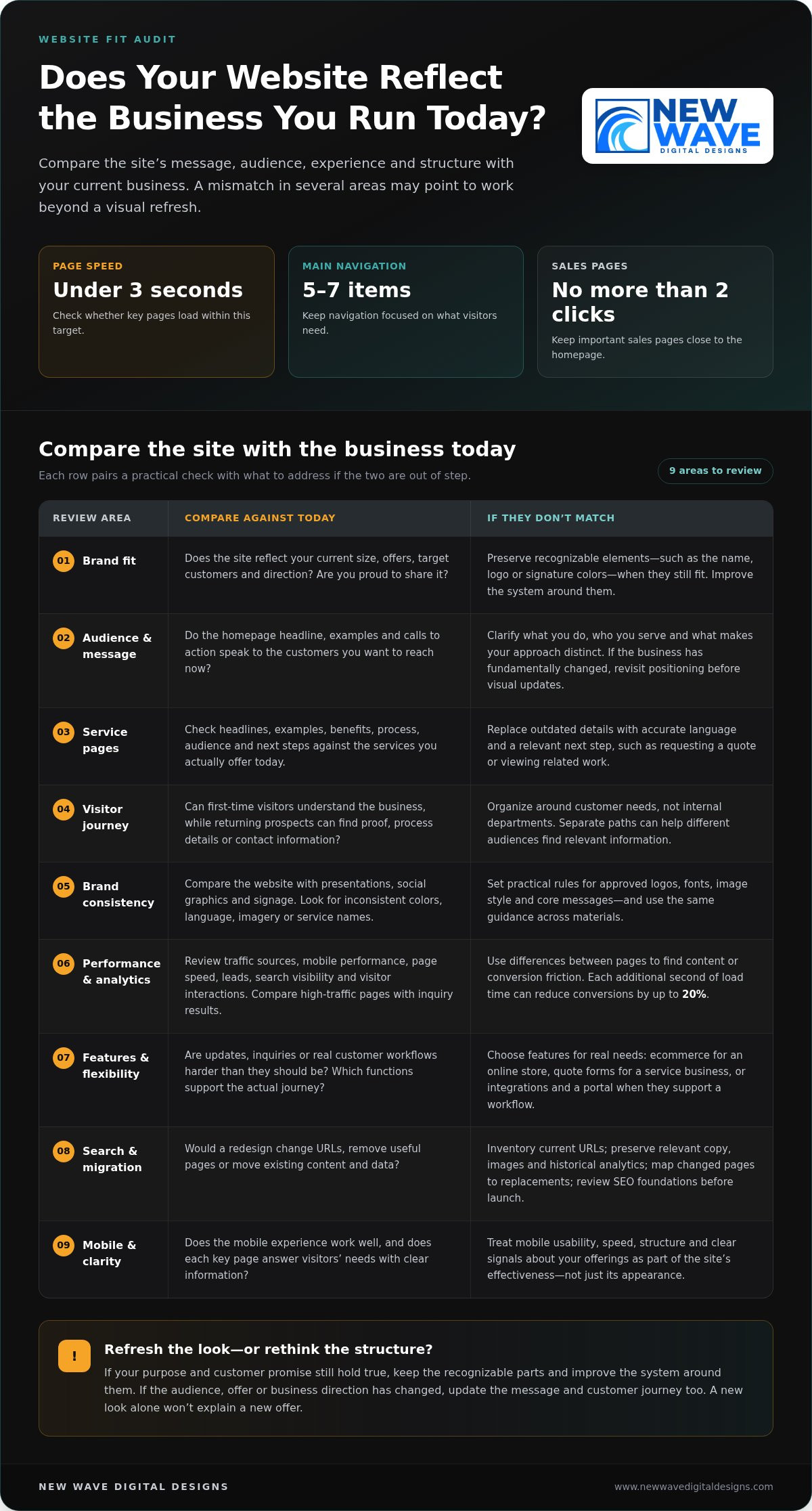
A redesign earns support when it’s presented as a response to evidence, not a preference for a new look. The practical answer to how to get buy-in for a website redesign project is to connect audience research and website problems to measurable business goals, then show stakeholders how the proposed changes address them. A full website redesign typically takes 3 to 9 months, so communicate the expected timeline early.
A redesign pitch needs more than polished visuals. Decision-makers need to understand what isn’t working, who it affects, and why fixing it matters to the organization. Research grounds the case in evidence, while candid conversations reveal stakeholders’ priorities and concerns.
This article explains how to define redesign goals, investigate audience needs and current-site issues, and connect the project to business priorities. You’ll also learn to tailor the presentation to its audience, explain risks and expected results, and make the next steps easier for stakeholders to assess.
Key Takeaways
- Build a redesign case around documented website problems and the audience needs behind them, not visual preferences alone.
- Set measurable goals and account for content, migration, optimization, and post-launch support when shaping the project budget.
- Tailor the pitch to stakeholder priorities, address likely concerns directly, and make the key points easy to grasp at a glance.
- Connect proposed changes to business objectives and explain the consequences of leaving important site issues unresolved.
- Use clear research findings to show where the current experience falls short and which improvements deserve priority.
1. How Do You Start a Website Redesign?
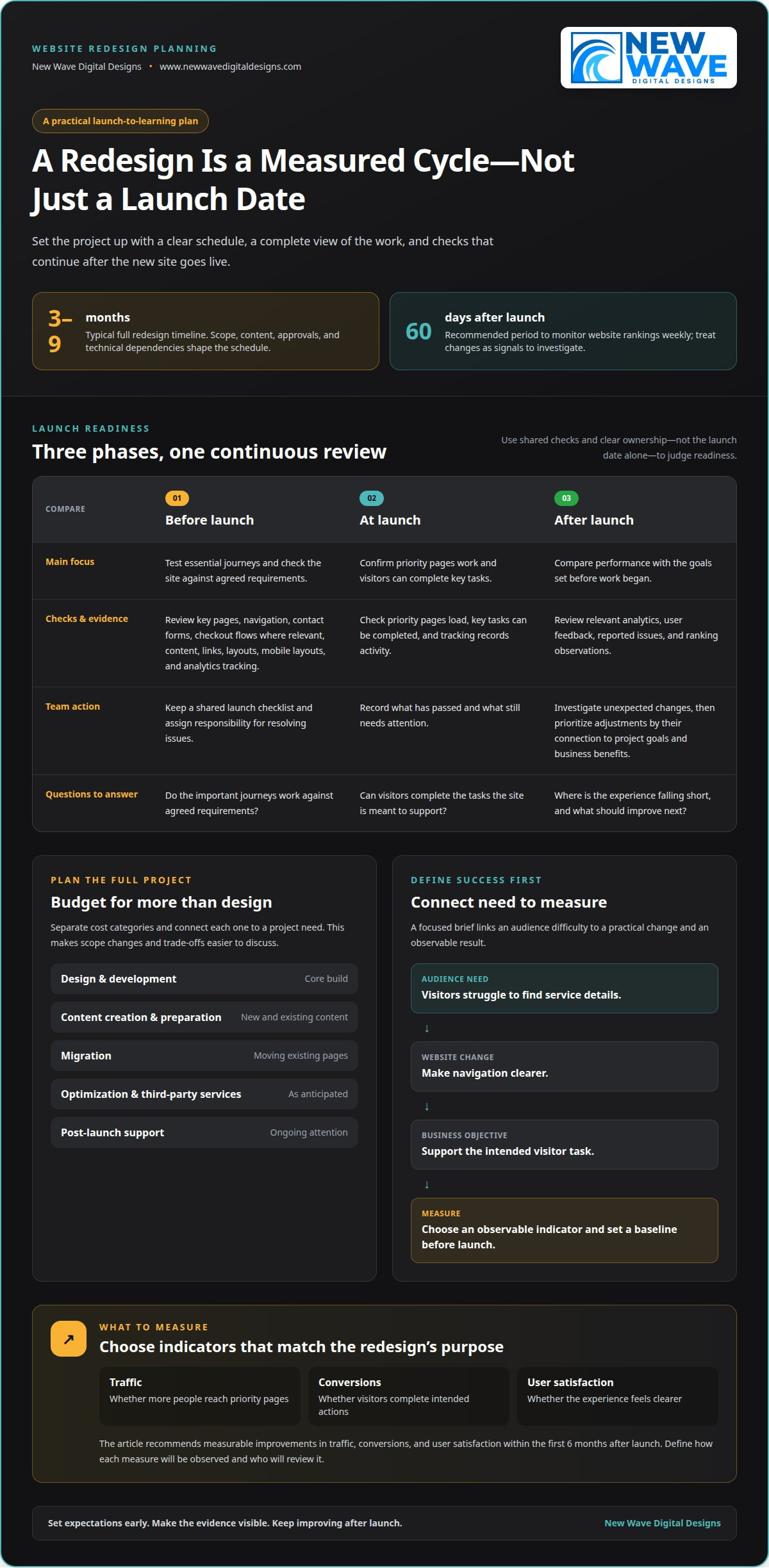
Start with a business case that connects website problems to clear project decisions. A full website redesign typically takes 3 to 9 months, so communicate the timeline to stakeholders before work begins. Some projects may take a few months or an entire year; scope, content, approvals, and technical dependencies shape the schedule. Explain the expected phases, decision points, and launch window so teams can plan their contributions.
Build the budget around the full project, not just design and development. Include content creation, migration, optimization, potential third-party services, and other anticipated resources. Account for post-launch support, too, because the new site will need attention after launch. This fuller view helps stakeholders weigh benefits against the work required and reduces the risk of overlooking necessary resources during planning.
Organize the estimate into clear categories. For example, separate design and development from content preparation, migration, and post-launch support. List third-party services and additional resources separately, then connect each category to a project need, such as moving existing pages or preparing new content. This makes trade-offs easier to discuss: if the scope changes, stakeholders can see which activities and resources may change with it.
Define quality checks before development is complete. Before launch, test essential journeys, including navigation, contact forms, and checkout flows where relevant. Review page content, links, layouts, and analytics tracking across the site. A launch checklist gives the team a shared record of what has passed and what still needs attention. Assign responsibility for resolving issues instead of treating the launch date as the only measure of readiness.
- Before launch: Test key pages, forms, links, mobile layouts, and analytics events against agreed requirements.
- At launch: Confirm that priority pages load, visitors can complete key tasks, and tracking records activity.
- After launch: Review analytics, user feedback, and reported issues to identify the next improvements.
Use post-launch analysis to compare performance with the goals set before work began. Review relevant analytics, such as traffic to priority pages or completed inquiries, and investigate unexpected changes. The recommended approach is to monitor website rankings weekly for the first 60 days after launch. Treat those observations as signals for investigation, not automatic proof that the redesign caused a change.
Iteration keeps the new site aligned with audience needs. If analytics show visitors leaving a key page without taking its intended action, inspect the content, navigation, and calls to action. Prioritize adjustments based on their connection to the project’s goals and business benefits. Sharing this review process with stakeholders shows that launch begins a measured cycle of learning, refinement, and ongoing support.
2. Defining website redesign needs and goals
A redesign brief is more persuasive when it distinguishes visible preferences from demonstrated needs. Start by documenting the audience’s task, the website obstacle, and the business consequence. For example, if visitors struggle to find service details, the need is clearer navigation, not simply a different visual style. This level of detail connects the user experience to a practical change and gives stakeholders a shared basis for discussing priorities.
Next, translate each need into a goal and a success measure. The Americans for the Arts redesign team defined project goals and success measures before beginning its redesign. That order matters: goals guide decisions about content, structure, and functionality, while measures show whether the finished site serves its intended purpose. If the goal is to make key services easier to understand, a measure might track engagement with those pages alongside inquiries.
Use a simple chain to keep the strategy coherent: audience need, website change, business objective, measure. A goal such as “improve the website” is too broad to guide design choices. Instead, specify the experience to improve and the result to observe. For instance, a team could set a 30% improvement as an example of a measurable objective, then define the relevant metric and baseline before work starts.
Choose measures that reflect the redesign’s actual purpose. Traffic can indicate whether more people reach priority pages; conversions can show whether visitors complete intended actions; user satisfaction can reveal whether the experience feels clearer. A good redesign should deliver measurable improvements in traffic, conversions, and user satisfaction within the first 6 months after launch. These measures work best when the team identifies how each will be observed and who will review the results.
Strategy also requires decisions about what to retain, revise, create, or remove. The Americans for the Arts team reviewed existing content and involved content experts from every department. That approach helps surface outdated information and preserve material that still serves an audience need. A redesign vision document can record the audience, goals, content direction, and key requirements; the same team created a 60-page vision document before hiring a designer or developer.
- Need: Describe the audience difficulty with a specific page or task.
- Goal: State the experience or business outcome the redesign should improve.
- Measure: Select an observable indicator and set a baseline before launch.
Use this framework to turn research into a focused design brief. If translating priorities into a structured site plan is the next challenge, website design planning can help connect goals with the site’s architecture and visual direction.
3. Tailoring the pitch to stakeholder interests
Involve decision-makers and the people closest to the website’s daily work. Planning and approvals often involve an executive sponsor, marketing, sales, customer support, content owners, and technical staff. Their perspectives reveal different constraints: sales may need clearer product journeys, while support may hear repeated questions caused by confusing pages. Bring these voices into early discussions, then clarify who recommends, approves, and carries out each decision.
A presentation can address different priorities without losing its central case. For executives, explain how the redesign supports business objectives and manages risk. For marketing, show how site structure supports campaigns, analytics, and Google search visibility. For sales and support, give examples of visitor friction, such as a hard-to-find service page or a contact form that disrupts an inquiry. An at-a-glance summary helps each audience understand the proposal before reviewing the details.
When leaders ask how to get buy-in for a website redesign project, connect each concern to a practical decision. A finance stakeholder questioning the budget needs a clear view of the scope and resources involved. Staff concerned about workload need defined review responsibilities and decision points. Technical teams raising migration or security concerns need to see those risks addressed in the project plan. Direct, honest conversations can reveal barriers to approval and help shape a pitch around genuine priorities.
Support matters because approvals, expertise, and timely decisions affect project progress. Keep contributors informed so they can raise concerns before they become launch blockers. The Americans for the Arts redesign team used regular emails, meetings, progress demonstrations, and informal check-ins. Adapt that approach by sharing decisions, upcoming reviews, open questions, and visible progress in each project update.
A useful proposal makes the approval request explicit. State whether leadership is being asked to approve the project vision, assign decision owners, or agree to a review process. To show how to get buy-in for a website redesign project, link stakeholder input to those specific decisions. Use examples of successful proposals carefully: describe their methods and documented outcomes, but don’t claim business results without evidence.
- Executive stakeholders: Emphasize business priorities, risks, and decisions requiring approval.
- Functional teams: Connect changes to workflows, audience needs, and the expertise each team contributes.
- All contributors: Use a concise summary and regular updates to clarify progress and next steps.
Close by inviting stakeholders to identify what would make the proposal workable. Record their input and reflect it in the project plan. This exchange turns approval into shared ownership, while a clear follow-up record keeps commitments and responsibilities visible.
4. Aligning a redesign with strategic business objectives
Position the redesign as a business initiative, not a cosmetic upgrade. Begin with a leadership priority, such as improving qualified inquiries or making service information easier to find. Then show how the current website supports or obstructs that objective. This connection grounds the proposal in business goals and gives executives a reason to consider the work alongside other priorities.
Draw a clear line from objective to improvement. For example, if the business wants more qualified inquiries, identify which audience journey should support that outcome. A confusing service page or unclear next step may create friction. The redesign should address that specific obstacle, and a defined measure can help evaluate whether the change supports the objective after launch.
Leadership needs to understand both the opportunity and the risks of inaction. A proposal can explain how technical failures, security breaches, declining search rankings, and poor user perception may affect business performance. Tie each risk to a relevant part of the current site rather than presenting abstract dangers. This makes the case more credible and helps leaders compare potential improvements with the consequences of delay.
Connect the project scope to the organization’s actual strategy. If growth depends on a new service line, explain how the site will make that offer clear to its intended audience. If the business is focused on retention, show how clearer support information could help existing customers find answers. These examples show why redesign decisions should follow business goals, rather than introduce features without a defined purpose.
Internal alignment improves when teams see how their work contributes to shared objectives. Marketing may need campaign landing pages, while sales may need stronger product explanations. Leadership can resolve competing priorities by agreeing which audience journeys matter most. Use those decisions to ground the project scope, establish decision ownership, and prevent unrelated requests from displacing agreed improvements.
- Objective: Name the business priority the redesign should support.
- Evidence: Link a current website problem to an audience or operational impact.
- Change: Describe the improvement that addresses that problem.
- Measure: Identify an indicator that can show progress toward the objective.
Present the proposal in terms of business impact, not design preference. Explain how the planned changes support revenue, customer experience, or operational priorities, using the measures already selected for the project. A visually refreshed homepage may be part of the work, but its appearance alone doesn’t establish strategic value. Its purpose should be clear, such as guiding visitors toward a priority service or making essential information easier to act on.
Before seeking approval, connect each major scope decision to an agreed objective. If a proposed feature doesn’t serve a priority audience, improve a defined experience, or support a business measure, reconsider its place in the project. This discipline keeps the pitch focused and gives leadership a sound basis for approving the redesign.
5. Researching audience needs and current website problems
Start with evidence from the people who use the site and the paths they take. Website analytics can reveal which pages attract visits, where visitors leave, and whether they complete important actions. Pair those patterns with audience research, such as interviews, surveys, or usability sessions. Together, these methods show what visitors do and what may prevent them from finding information or completing a task.
Keep the research question specific. If visitors reach a service page but don’t continue, review its content, navigation, and next steps. Ask users what they expected to find and observe how they move through the page. This combination helps distinguish a content gap from a visual or structural problem. Record the affected audience, the page involved, and the task that became difficult.
Review current performance before proposing changes. Examine analytics for priority pages, traffic sources, inquiry paths, and completed conversions. Compare these observations with the goals established for the redesign. For example, if a key page receives visits but few users continue to an inquiry form, investigate the path between those points. Treat analytics as a signal to investigate, then use audience feedback to understand possible causes.
Benchmarking puts those findings in context. Compare the current website with relevant industry standards and competitor experiences, focusing on useful dimensions such as navigation clarity, content organization, and task completion. The goal isn’t to copy another site’s visual design, but to identify meaningful gaps and opportunities, then connect each observation to an audience need or business objective. Graphs, charts, and heat maps can make complex patterns easier for leadership to interpret.
Research also takes deliberate time. The Americans for the Arts redesign team spent 4-5 months researching before moving ahead with the project. That example shows how discovery can inform the project’s direction before design decisions take shape. Organize findings into themes, such as unclear service descriptions or difficult page navigation, and support each theme with relevant analytics or user observations.
- Audience evidence: Capture user questions, task difficulties, and expectations from research sessions.
- Website evidence: Connect analytics patterns to specific pages and visitor actions.
- Benchmark evidence: Show where the site differs from relevant standards and experiences.
A concise evidence summary should connect each problem to its audience impact and proposed improvement. This gives stakeholders clear points to assess, rather than asking them to rely on design preferences. If you’re ready to turn research findings into a considered redesign, plan your website redesign around the needs and evidence you’ve gathered.
Use the evidence summary to clarify the next decision. For each issue, connect the affected audience and task with the page or journey involved, then show the supporting observation. Distinguish interpretation from evidence: a chart may show where visitors leave, while research notes can describe what they expected or found confusing. This keeps a proposed explanation open to review rather than presenting it as an established cause.
Use graphs, charts, and heat maps when they help leadership see a pattern, and explain each visual in plain language. Pair visuals with concise labels and a short takeaway so the concern is clear without losing context. Close with questions that still need investigation and the evidence that could help resolve them, keeping recommendations tied to observed audience needs.
New Wave Digital Designs
New Wave Digital Designs can help turn your redesign priorities into a considered website project. Bring your audience findings, current-site concerns, and business objectives to shape a clear direction. The team designs websites for Shopify, WordPress, and SquareSpace, and provides website maintenance to support ongoing site needs.
This is a natural next step when stakeholders agree the website needs improvement but want a considered path from evidence to design decisions. A focused discussion can connect your priorities with the right platform design approach and clarify how ongoing maintenance fits after launch.
Contact New Wave Digital Designs to discuss your website redesign goals.
Turn Research Into a Shared Direction
Ultimately, how to get buy-in for a website redesign project comes down to creating a direction people can support together. Use evidence as a starting point for decisions, not a document that goes untouched after approval. As the project moves forward, keep audience needs visible in discussions about content, design, and priorities. That steady connection helps teams make purposeful choices and gives the redesign room to evolve as new insights emerge.
A thoughtful partner can help translate research and business priorities into a website direction that reflects the organization’s character. New Wave Digital Designs works with businesses on website design and ongoing site needs, bringing strategic thinking and creative craft to the process.
If you’re ready to shape the next steps around your audience and business goals, start a conversation about your redesign. A clear direction can turn stakeholder support into purposeful progress.
Frequently Asked Questions
How Do You Start a Website Redesign?
Start by identifying the decision the redesign needs to enable, such as approving a new site structure or improving an online inquiry path. Then appoint a project lead, confirm who owns content and technical decisions, and gather existing materials. A simple project brief can capture the business trigger, audience, constraints, and approval process. This gives contributors a shared reference before detailed design discussions begin.
Examples of successful website redesign proposals and outcomes
The Americans for the Arts team set goals and success measures, researched for 4-5 months, and created a vision document before hiring a designer or developer. A proposal can define outcomes such as improved traffic, conversions, and user satisfaction within the first 6 months after launch.
How to calculate the ROI of a website redesign
Compare the redesign’s expected business effects with its full costs, including design and development, content creation, migration, optimization, third-party services, and post-launch support. Track relevant measures, such as traffic to priority pages and completed inquiries, against a baseline set before launch.