Website Audit and Optimization Services: Turn Site Insights Into Growth

What if the issue holding your website back isn’t one obvious flaw, but a gap between its technical foundation, content, and customer experience? That’s the question website audit and optimization services should help answer. A site can look polished yet remain difficult to find, navigate, or use effectively.

An audit is less useful when it produces a long list of problems without showing what matters most. You need more than observations: you need to know which issues affect your goals, what to address first, and how improvements can work together.

This article explains what a structured website audit examines and how to turn its findings into practical priorities. You’ll learn how technical health, search visibility, content, and usability connect, and how recommendations can support business objectives. For Shopify, WordPress, and Squarespace sites, a platform-aware approach helps shape improvements that strengthen the site, clarify the experience, and support growth.

Key Takeaways

  • A website audit can reveal why a polished redesign may not resolve barriers to visibility, usability, or performance.
  • Explore how website audit and optimization services connect technical health, search visibility, content, user experience, and measurement.
  • Use impact, urgency, effort, and confidence to rank findings instead of treating every warning as equally important.
  • Turn validated findings into a focused plan that balances quick improvements with coordinated design, development, content, or marketing work.
  • See how platform-aware recommendations for Shopify, WordPress, and Squarespace can align website improvements with business goals.

Why website audit and optimization services matter before you redesign or market

A website audit is a structured review of how effectively a site supports business goals and serves visitors. It looks beyond appearance to consider how people find the site, move through it, understand its content, and take meaningful next steps. A useful review connects those observations instead of treating design, search, and technology as separate concerns.

That distinction matters before investing in a redesign or marketing campaign. A refreshed visual style may make pages feel more current, but it won’t automatically resolve unclear navigation, hard-to-find content, or technical barriers that affect how a site is reached and used. An audit identifies potential obstacles and opportunities. Optimization is the deliberate work of selecting and implementing changes that address the most relevant findings.

Site health, user experience, and business objectives form one connected picture. Each should inform how a website is assessed and improved.

What a website audit can reveal

As an overview, What is a Website Audit? describes the broad purpose of examining a site’s performance and potential weaknesses. In practice, an audit can bring several useful lenses together:

  • Technical health: Can visitors and search engines reach and use important pages?
  • Search visibility: Are key pages discoverable for relevant searches?
  • Content clarity: Does each page communicate its purpose and help visitors find useful information?
  • Usability and conversion: Can people navigate the site and complete the actions the business values?

The appropriate depth depends on the platform, site structure, and business objectives. A Shopify store, a WordPress service site, and a Squarespace portfolio may call for different questions. Hypothetical example: If a store attracts search visits to a product category but shoppers struggle to reach relevant products, the review could consider search visibility, page content, navigation, and the path to purchase together. This illustrates an audit approach, not a client result.

When an audit is more useful than guesswork

An audit can be a useful starting point when engagement declines, visitors struggle with navigation, or organic visibility is unclear. Those symptoms point to questions, not automatic explanations. A change in analytics may show that visits or interactions shifted, but it doesn’t reveal by itself whether the cause relates to page content, a navigation path, a technical issue, or a change in traffic sources. Looking across evidence helps distinguish a surface-level signal from a problem worth addressing.

This is especially useful before committing to a broad redesign or increasing marketing activity. If the underlying issue is unclear, new creative or additional traffic may not address it. Website audit and optimization services can organize observations around the site’s goals, giving a team a considered basis for deciding what to investigate and improve.

An audit is diagnosis; ongoing upkeep is a separate part of caring for a site. For practical guidance on routine updates and maintenance, explore the website maintenance services guide.

What website audit and optimization services should examine

A useful review connects five lenses: technical health, search visibility, content clarity, user experience, and measurement. Together, they show whether the site is accessible to visitors and search engines, answers the questions people bring, and makes the next step clear. Website audit and optimization services are most valuable when they interpret these areas in context, rather than treating every automated warning as equally urgent.

The right checks depend on the site’s structure and purpose. A Shopify store may need attention to product and category journeys; a WordPress site may have different page structures and plugins to consider; a Squarespace site has its own design and content setup. A platform-aware review helps distinguish a meaningful obstacle from a generic tool alert.

Technical health, mobile experience, and accessibility signals

A technical review can examine whether important pages can be crawled and indexed, whether links lead to the intended destinations, and whether pages work well on mobile screens. Performance is another diagnostic lens. Google’s Core Web Vitals are user-focused measures of loading, interactivity, and visual stability, represented by Largest Contentful Paint, Interaction to Next Paint, and Cumulative Layout Shift. They can help identify friction, but no single metric guarantees search rankings.

Accessibility checks also matter to usability. Clear labels, readable content, keyboard navigation, and sufficient visual distinction can help more people interact with a site. These observations can inform improvements, but they aren’t legal advice or a guarantee of compliance.

Search, content, and visitor journey

A page can attract attention yet leave visitors unsure where to go. Review whether each page’s topic and title match its purpose, whether internal links guide people to related information, and whether calls to action fit visitor intent. For example, someone comparing services may need useful explanatory content before a prominent enquiry prompt feels relevant.

Google Search Console can surface information about search visibility and indexing, giving teams evidence to investigate rather than assumptions to act on. Pair those signals with the page experience and business objective: a visibility concern, confusing page, and unclear next step may intersect, but each calls for a different response. For broader search planning beyond audit findings, explore organic SEO services.

Measurement completes the picture. First clarify what the site is meant to support, then review relevant signals, such as organic visits to key pages, engagement with important content, or completion of a meaningful action. Compare like with like and account for context, including changes to campaigns or site content. A single fluctuation is a prompt to investigate, not proof of cause.

The result should be a reasoned view of what to address, why it matters, and what evidence could help assess the change. To explore how design, maintenance, and marketing can work together around a website’s goals, visit New Wave Digital Designs.

How to prioritize audit findings without chasing every warning

An audit can surface a crowded field of warnings, but a longer list isn’t a better action plan. Rank each finding by four factors: its likely impact on a user or business goal, its urgency, the effort required to address it, and confidence that the underlying issue is real. This helps distinguish a verified obstacle from a hypothesis that needs more investigation.

First separate critical concerns from refinements. A suspected security issue or a problem preventing visitors from accessing an important page may need prompt attention. A performance improvement can be valuable, but its priority depends on which pages are affected and how that friction relates to user needs. Minor visual polish can wait when higher-impact work remains unresolved.

A practical framework for ranking recommendations

Use this sample matrix to start the conversation. The examples are scenarios, not findings from a client website. Add urgency and confidence to each item before deciding what to address.

  • High impact, low effort: A verified broken link on a key enquiry path could be a focused fix that helps visitors complete an important action.
  • High impact, high effort: A difficult navigation structure across many important pages may warrant coordinated design or development work. Confirm the pattern and affected journeys before committing resources.
  • Low impact, low effort: A small wording inconsistency on a secondary page may be easy to refine, but shouldn’t displace a more consequential issue.
  • Low impact, high effort: A broad visual adjustment with no clear relationship to a user or business goal may be better deferred until stronger priorities are resolved.

For every recommendation, record the goal it supports, the evidence behind it, its urgency, and the confidence level. For example, a finding based on repeated errors on a key page is more substantiated than a concern inferred from one unusual data point. If confidence is low, identify what would validate the issue before treating it as a confirmed priority. This keeps the plan grounded and makes trade-offs easier to explain.

How analytics helps validate the priority

Google Analytics 4 can help interpret engagement and conversion patterns, such as which pages people view before taking a tracked action or where activity appears to drop off. The data is most useful when measurement is configured to reflect meaningful actions. A missing or inconsistently tracked event can make a healthy journey look like a problem, or conceal a genuine point of friction.

Pair quantitative signals with a direct review of the relevant pages and visitor journey. If a report suggests that people leave before an important action, examine the content, navigation, and path they encounter. Treat analytics as evidence to investigate, not a verdict about cause. Reported outcomes elsewhere shouldn’t serve as a benchmark for your site: results depend on context, measurement, and implementation.

A thoughtful prioritization process connects findings to business aims, then aligns the work across design, content, maintenance, and marketing. To explore how those digital disciplines can support your website’s objectives, explore New Wave Digital Designs’ digital services.

Website Audit and Optimization Services: Turn Site Insights Into Growth

From audit findings to a focused website optimization plan

An audit becomes useful when its observations lead to considered action. Move from diagnosis to implementation in a clear sequence: validate what the evidence shows, agree on which findings matter most, make the selected changes, then measure signals related to the goal. This keeps recommendations connected to purpose instead of turning them into an unstructured task list.

  1. Validate findings: Confirm the issue on the relevant page or journey, and separate observed facts from assumptions that need further review.
  2. Agree on priorities: Align the team on the intended outcome, urgency, effort, and dependencies for each proposed change.
  3. Implement changes: Assign ownership and coordinate the work across the people and disciplines involved.
  4. Measure relevant signals: Compare results with a documented baseline and interpret them in the context of other site or marketing changes.

Some actions may be contained, such as clarifying a page heading or correcting a broken link. Others require structural work: redesigning navigation, reshaping a content journey, or addressing a technical issue across multiple templates. Optimization should be measured against defined goals, not isolated score changes.

Turn recommendations into manageable work

For each action, document an owner, dependencies, estimated effort, and intended outcome. This makes the sequence easier to plan: content revisions may depend on an agreed page structure, while a design change may require development and testing. Maintenance and SEO considerations can also intersect with redesign decisions. A thoughtful web design guide can help frame how structure and presentation support the experience, while specific recommendations should reflect the site and its goals.

Measure what changes after optimization

Choose measures that reflect the objective. A site focused on generating enquiries might track qualified inquiries; a search visibility initiative might monitor relevant organic visibility; a usability change could be assessed by whether visitors can complete a key task. Google Search Console and Google Analytics 4 can provide useful observations, but neither guarantees that a selected change will produce a particular outcome.

Before implementation, record the relevant baseline, the pages or journeys involved, and the review period the team will use. Choose a period that fits the change and available data rather than assuming one timeline works for every site. Afterward, recheck the work itself, then review the signals. A completed change isn’t automatically evidence of impact; consider other changes that may have influenced the same measures.

Website audit and optimization services are most effective as a coordinated process, connecting technical, design, content, and marketing decisions to the same objectives. If you’re ready to shape findings into a considered plan, explore website design and digital services.

Choose website audit and optimization services built around your business

A website review is most useful when it begins with your business, not a generic checklist. The right questions depend on what the site needs to support, which pages matter most, and how visitors are expected to move through them. Website audit and optimization services should turn those priorities into a shared direction, connecting observations about the site with practical decisions about what to improve.

New Wave Digital Designs provides website design, maintenance, hosting, security, and marketing services. Its design work spans Shopify, WordPress, and Squarespace, while organic SEO and Google Ads and Bing Ads can connect site considerations with search and campaign goals. Each platform has its own structure, so recommendations should reflect the website in front of the team rather than assume identical review steps or fixes.

That broader view matters because site changes can overlap. A content adjustment may affect search visibility; a navigation change may involve both design and development; maintenance, hosting, or security considerations may shape how a proposed improvement is approached. The aim isn’t to address every discipline at once, but to understand how each relevant decision supports the site’s purpose.

What a collaborative optimization relationship should feel like

A collaborative process starts by listening. Clear explanations connect site observations to the goals they’re intended to serve. Creative, technical, and marketing perspectives can then inform a coherent direction, rather than leaving a business with disconnected notes or unexplained technical language. The result is a considered conversation about priorities, trade-offs, and next steps.

Prepare for a productive website review

You don’t need to arrive with a solution already chosen. A little context can make the first conversation more useful:

  • Clarify your primary site goals, such as supporting enquiries, sales, or organic visibility.
  • Identify important pages and describe what visitors should be able to do there.
  • Gather available context, including analytics, search data, and technical concerns you’ve noticed.

These details help connect the site’s current state with its next priorities. They also give the discussion a practical starting point, whether the focus is improving an existing experience, planning design work, or coordinating changes across content and marketing.

If you’re considering improvements, start with a conversation about your website goals and the pages that matter most. Explore New Wave Digital Designs and begin shaping a thoughtful direction for your site.

Give your website a clearer path forward

Your next website improvement doesn’t have to begin with a sweeping redesign or a long list of fixes. It can start with one well-chosen question: what would help your site serve your business and visitors more effectively? Website audit and optimization services turn that question into a practical starting point for deciding where to focus and how each change can support a wider goal.

New Wave Digital Designs brings together website design for Shopify, WordPress, and Squarespace with maintenance, hosting, security, and digital marketing services. This range makes it possible to consider how a site’s structure, upkeep, and visibility work together, while keeping recommendations grounded in your priorities.

Share what you want your website to make possible, and take the next step toward a thoughtful plan. Discuss your website’s next opportunity with New Wave Digital Designs. Your site can evolve with purpose, one considered improvement at a time.

Frequently Asked Questions

Is a website audit worth it if my site already gets traffic?

Yes. Traffic shows that people are arriving, but it doesn’t reveal whether the right visitors are landing on the right pages or finding a useful next step. Website audit and optimization services help you look beyond visit totals. For example, compare how visitors arrive at a service page with whether they continue to relevant information or submit an enquiry. That context can show where attention and business intent diverge.

Can website optimization improve conversions without a full redesign?

Yes, targeted changes may support conversions without replacing the whole site, depending on what’s causing friction. If visitors overlook an enquiry form, adjusting its placement or clarifying the surrounding message may be worth testing. If the underlying issue involves the site’s structure or a consistent usability problem across multiple pages, broader design work may be appropriate. Match the scale of the change to the evidence.

How often should a business website be audited?

There’s no universal audit schedule. Consider a review after a significant change, such as a redesign, platform migration, major content expansion, or a shift in business priorities. A smaller site that changes infrequently may need a different rhythm from a complex site with regular updates. Instead of choosing a calendar interval by default, decide what changes or performance signals would prompt your team to review the site again.

What happens if an audit finds technical problems?

Technical findings should be explained in plain language and assessed according to their effect on visitors and the business. For example, an issue that blocks access to a key page deserves different attention from a warning on a page with little relevance to current goals. Some findings may need further investigation before action. A practical response clarifies the issue, who should address it, and what site function to check afterward.

Does a website audit include SEO and user experience?

A well-rounded review can consider both, since visibility and usability work together in the visitor journey. For example, a page might appear in search results for a relevant topic but leave visitors uncertain about what to do next. Reviewing its topic, content, navigation, and next step can reveal whether the experience matches the visitor’s intent. The review’s scope should reflect the site’s goals, rather than rely on disconnected scores.

How long do website audit and optimization services take?

The time needed varies with site size, platform, technical complexity, available data, and the review’s scope. Implementation is a separate stage: updating page copy differs from coordinating changes that involve design, development, or marketing. To make planning clearer, define which parts of the site are in scope, what information is available, and which recommendations need action. A focused scope helps set expectations without assuming one timeline fits every website.

Squarespace Website Customization: Shape a Site Around Your Brand

A Squarespace template is a starting point, not the finish line. Squarespace website customization can turn that framework into a site that feels unmistakably yours, helping visitors understand what you offer and what to do next.

If your site still looks much like its original template, or every design option seems equally urgent, you’re not alone. It’s easy to focus on colors and visual flourishes before considering how each choice affects clarity, mobile usability, and business goals. A distinctive website needs more than attractive details. It needs a clear order of decisions.

This guide explains how to customize your Squarespace site with purpose, from defining your visual identity to refining page layouts, typography, imagery, and calls to action. You’ll also learn how to review the experience on mobile screens and build a polished, responsive site that supports your business. With a considered approach, the template becomes a foundation, not a limitation.

Key Takeaways

  • Thoughtful squarespace website customization can make a template feel distinct by aligning its structure, visuals, and content with your brand.
  • Start with business goals and visitor needs, then shape the visual direction and refine pages in a deliberate sequence.
  • Built-in editing tools work well for straightforward changes; more complex requirements can benefit from professional design support.
  • Review navigation, readability, mobile layouts, and calls to action to keep the experience clear across screens.
  • A tailored Squarespace design process can bring brand expression, responsive usability, and business priorities together in one cohesive site.

What Squarespace Website Customization Can Do for Your Brand

A template gives a website a starting structure, but it can’t define what makes your business distinct. Effective squarespace website customization brings brand expression and visitor needs into the same design process. It adapts structure, visuals, content, and interactions so the site feels recognizably yours and helps people find the information or next step they came for.

Customization is a coordinated set of brand, structure, and usability decisions, not a collection of decorative edits. Changing colors or replacing stock imagery can help, but those changes won’t fix unclear navigation or explain your offer more effectively. Strong website design principles connect appearance with organization and function. Start with what visitors need to know and do, then use those priorities to guide visual choices.

Which parts of a Squarespace website can you customize?

Customization can shape page sections, content blocks, typography, color, spacing, imagery, and navigation. Site-wide design settings establish a consistent foundation, such as shared type styles and a coherent palette. Page-specific adjustments then give each page a clear purpose. A service page may need an explanation of the offering and an inquiry path, while an about page may bring the business story forward.

Think in layers. First, set visual rules that should carry across the site. Then refine individual page layouts, choosing content order and spacing to make important information easy to scan. Give navigation the same strategic attention: organize it around visitor tasks rather than internal department names. Editor terminology and available controls can change, so consult current Squarespace documentation when following interface-specific instructions.

When does a template need more than surface-level changes?

Look beyond the color palette if pages feel inconsistent, visitors have to guess where to go, or the overall impression could belong to almost any business in your field. These can be signs that the issue is with the site’s structure or message, not just its visual finish. A polished homepage can’t compensate for service pages that explain offerings differently or bury essential details.

Use your business positioning and audience expectations to set priorities. For a service business, a prospective customer may want to understand what a service covers, who it is for, and how to take the next step. Make those answers easy to find before adding decorative effects. This keeps design choices connected to the work the site needs to do.

If the template’s basic arrangement doesn’t support your content or brand character, consider a deeper redesign instead of layering on disconnected adjustments. New Wave Digital Designs creates custom Squarespace designs around each business’s brand and goals. The custom Squarespace website design guide explores how a template can become a more distinctive digital experience. A thoughtful result feels cohesive because every element has a purpose.

How to Customize Squarespace Around Your Brand and Visitors

A strong customization process starts with purpose, not a font menu. Decide what the site needs to accomplish, what visitors need to understand, and which design choices will help them move forward. This keeps squarespace website customization focused on meaningful improvements rather than a series of unrelated edits.

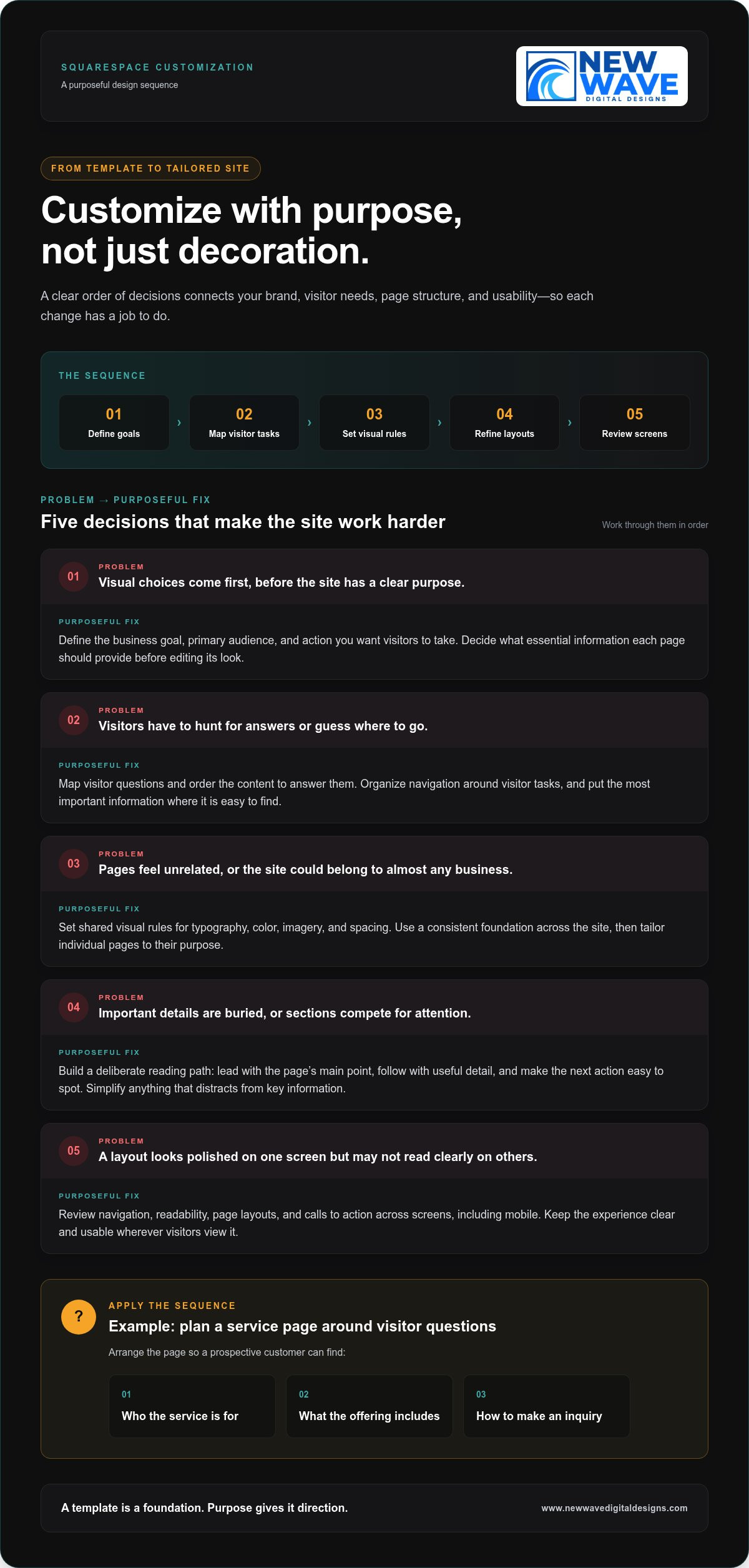
Define your goals, map visitor tasks, set visual rules, refine page layouts, and test the experience across screens. Keep that sequence in view as you work. Each step gives the next one a foundation, helping the site’s appearance and function develop together.

Start with brand direction and the visitor journey

Identify your primary audience, the action you want them to take, and the essential information each page should provide. A service business, for example, might organize a service page to explain who an offering is for, what it includes, and how to make an inquiry. Treat this as a planning example, not a formula. Let real customer questions guide the page’s content and order.

Before editing, establish visual priorities for typography, color, imagery, and spacing. A short set of shared rules helps pages feel related, even when their layouts differ. Arrange content in the order visitors need it, answering immediate questions before adding detail. The U.S. Web Design System principles also emphasize user needs and consistency. Use these as touchstones when deciding whether a design choice clarifies the visitor journey or merely decorates it.

Refine page layouts, content blocks, and visual hierarchy

Once the direction is clear, use page sections and content blocks to create a deliberate reading path. Lead with the page’s main point, follow with the details visitors need to assess it, then make the next action easy to spot. Headings should tell visitors what each section covers. Calls to action should use clear language and appear where they make sense in the journey.

Build consistency through repeatable choices, such as heading styles, button treatments, and spacing patterns. A shared design system prevents each page from taking on an unrelated look, while still allowing layouts to serve different purposes. Avoid adding sections or visual effects just to fill space. If an element competes with key information, simplify it.

  • Define: Write down the main business goal and the visitor action each page should support.
  • Map: List visitors’ questions and arrange the content in the order those questions arise.
  • Set: Establish shared rules for type, color, imagery, and spacing.
  • Refine: Adjust sections, blocks, and calls to action to strengthen the page hierarchy.
  • Test: Review finished pages on desktop and mobile, then fix anything that feels unclear or crowded.

For a deeper look at how brand needs can shape a site beyond its starting layout, explore this custom Squarespace design approach. If you’re ready to bring those priorities into a tailored, responsive website, learn about Squarespace website design with New Wave Digital Designs.

Built-In Squarespace Tools or Professional Customization?

There isn’t one right level of customization for every business. Built-in Squarespace editing tools give site owners control over many routine updates, while professional design can bring strategy and cohesion to more complex needs. The useful question isn’t which option is universally better. It’s which one fits your goals, available time, brand clarity, and the complexity of the changes you’re considering.

Compare the options across four dimensions: control, time, consistency, and complexity. DIY editing lets you make straightforward changes yourself, but you’ll also make the design decisions and review each page. A design partner brings an experienced perspective and can coordinate details across the site, particularly when changes affect structure, content, and visitor pathways together.

When are Squarespace’s built-in editing tools enough?

Built-in editing is often a good fit when your site structure already works and your brand direction is clear. You might update text, replace imagery, adjust page sections, refine spacing, or make a modest navigation change using the editor’s controls. These focused adjustments are manageable when you know what needs to change and can check the finished pages for consistency.

Before following a step-by-step tutorial, review current Squarespace documentation. Interface labels and capabilities can change, so an older walkthrough may not match the controls you see. Keep a simple record of your brand choices, too. Shared rules for typography, colors, and button styles make future DIY edits less likely to leave each page looking like a separate design.

A practical test: if you can describe the change, make it with the available controls, and assess its effect across relevant pages and screen sizes, a professional redesign may not be necessary. Preserve your time for work only you can do, such as shaping your business’s message and checking whether each page communicates it clearly.

When can a custom design partner add value?

Professional design can help when your brand has nuanced needs, page styles have drifted apart, or visitors struggle to find important information. The challenge may go deeper than an isolated visual adjustment. A designer can consider how imagery, typography, content hierarchy, and navigation work together, then align those decisions with your audience and business goals.

For example, if a service page has strong visuals but leaves visitors unsure what the service involves or how to proceed, adding decorative elements won’t resolve the underlying issue. A considered redesign can clarify the order of information and make the next step more apparent while keeping the visual language coherent across the site.

  • Use built-in editing for focused updates to a sound structure and established brand system.
  • Consider professional customization when the work involves connected changes to content, page structure, brand expression, and visitor pathways.

New Wave Digital Designs creates custom, responsive Squarespace websites tailored to brand and business needs. For a broader perspective on how strategic decisions shape a digital experience, explore this web design strategy guide. The right level of squarespace website customization makes your site clearer and more cohesive without adding complexity for its own sake.

Squarespace Website Customization: Shape a Site Around Your Brand

A Practical Squarespace Customization Checklist for Quality and Usability

A site can look polished on a desktop and still be difficult to use on a phone. Treat your review as a quality check, not just a final visual glance. A successful design must remain clear, usable, and consistent across screens. Work through the checklist below on key pages, checking whether each design choice helps visitors understand information and take the next step.

Check responsive design, readability, and accessibility

Review important pages on desktop and mobile. Look for cramped text, content that feels out of order, buttons that are hard to reach, and elements that distract from the main action. Test navigation and calls to action directly. A layout that looks balanced on a large screen may not be as clear on a smaller one.

  • Hierarchy: Can visitors identify the page’s main heading and most important information quickly?
  • Navigation: Are labels understandable, and can visitors find key pages without guesswork?
  • Readability: Is body text comfortable to read, with enough spacing between paragraphs and sections?
  • Contrast and links: Is text distinguishable from its background? Do linked words describe where they lead instead of using vague labels such as “click here”?
  • Images and actions: Do image descriptions convey useful meaning where needed, and are calls to action easy to recognize?

Visuals should support the content, not obscure it. A large decorative element may establish a mood, but it shouldn’t push essential details out of view or make a page harder to scan. Accessibility controls and editor options can change, so consult current Squarespace guidance for specific settings. Assess the result on the actual page, not only in the editor.

Review content structure and search foundations

Check that each page communicates one clear subject. Its page title, headings, body copy, and internal links should reinforce the same topic rather than pull visitors in different directions. A page about a specific service, for example, should explain that service clearly and guide visitors toward a relevant next step. Remove headings that add no context and links whose purpose isn’t apparent.

  • Confirm that the page title accurately describes the content.
  • Use headings in a logical order to make sections easier to scan.
  • Link descriptive phrases to relevant pages so visitors know what to expect.
  • Give every page a useful purpose and a clear next action.

These checks connect usability with discoverability: clear content structure helps people and search engines understand what a page covers. For more on aligning site content with organic search, explore the organic SEO strategy guide. Thoughtful squarespace website customization brings presentation, accessibility-minded choices, and page purpose into one coherent experience.

If you want a tailored review of how your design and usability work together, explore Squarespace website design with New Wave Digital Designs.

Turn Squarespace Customization Into a Thoughtful Design Partnership

A website should reflect your business’s character and make its purpose clear to the people it serves. New Wave Digital Designs creates custom, responsive Squarespace websites tailored to each business’s brand and needs. The process brings visual identity and practical decisions together, shaping the site around more than a template’s default look.

A collaborative design process starts with your goals, audience, existing content, and priorities. From there, design choices take shape around how your business needs to communicate, while page structure gives visitors a coherent route through the site. Squarespace website customization is more considered when every decision has a reason, whether it clarifies an offer or makes a page easier to use.

What a tailored Squarespace design process should accomplish

Tailored design brings brand expression, page structure, and visitor needs together. That means developing a visual direction aligned with your business while organizing content so visitors can understand what you offer and where to go next. The goal is a cohesive experience, not simply a collection of distinctive-looking pages.

Responsive design carries that experience across screen sizes. Content should remain legible, navigation understandable, and important actions easy to find on desktop or phone. The layout may adapt, but the site’s character and purpose should remain recognizable. Make design decisions with these practical checks in mind, without assuming every screen should display content in exactly the same arrangement.

Plan your next Squarespace customization step

Before beginning a project, put together a short brief. Identify the pages that matter most, the business goals those pages should support, and the visual or structural issues you want to address. Note what already works, too. Preserving effective elements helps keep the work focused on meaningful improvements rather than change for its own sake.

  • Priority pages: Which pages matter most to your visitors and business?
  • Business goals: What should each page help visitors understand or do?
  • Design challenges: Where does the current experience feel unclear, inconsistent, or unlike your brand?

New Wave Digital Designs can shape a Squarespace design around those priorities and bring in related capabilities where they suit the project. Graphic design can support a consistent visual identity; organic SEO can inform how site content is organized and discovered. After launch, website maintenance and support can help you care for the site as your business and content evolve. These connected services can be tailored to the project’s needs.

A clear first step is to describe what you want your website to express and where the current experience falls short. Discuss a custom Squarespace website design with New Wave Digital Designs and start shaping a responsive site around your business, your brand, and the people you want to reach.

Shape Your Next Website Chapter

Your next step doesn’t need to be a complete redesign. Start with the page or experience that feels least connected to your brand, then decide what you want visitors to understand or do there. That clarity can reveal where your website has room to grow and which changes deserve attention first.

Thoughtful squarespace website customization turns that direction into a more cohesive digital presence. New Wave Digital Designs brings custom Squarespace website design and development together with graphic design, organic SEO, maintenance, hosting, and security, supporting both a site’s creation and its continued care.

Bring your priorities, questions, and ideas into the conversation. Discuss a custom Squarespace website design with New Wave Digital Designs and explore an approach shaped around your business. Your brand deserves a site that can evolve with it. A clear next step can begin that process.

Frequently Asked Questions

Can I customize a Squarespace website without coding?

Yes. You can make many common updates through Squarespace’s visual editing controls without writing code. For example, you can revise page text, replace images, adjust layouts, and update design settings using the available editor options. Code may be useful for specialized behavior or styling beyond those controls, but it isn’t a prerequisite for a distinctive site. Check Squarespace’s current help materials for interface instructions, since editor labels and options can change.

How much of a Squarespace website can I customize?

You can customize a broad range of a site’s presentation and content, including page structure, text, images, navigation, and visual styling. The practical limits depend on the platform’s current options and the change you have in mind. Squarespace website customization can also involve custom code, but more control may bring added complexity. Before changing several pages, test a small adjustment and check how it affects the wider site.

Can Squarespace customizations be reversed?

Many visual or content changes can be changed again by editing the affected page or design settings. Still, don’t assume every action has a simple undo path, especially if you remove content or alter code. Before a substantial round of edits, keep copies of important text and custom code, and record the original settings. Make changes in manageable stages so you can identify what to restore if the result doesn’t work.

Does custom CSS transfer when changing Squarespace templates?

Don’t assume custom CSS will work unchanged after a template or layout change. Styles written for one page structure may target elements that appear differently elsewhere, causing rules to stop working or affect unintended areas. Before a structural change, save a copy of your CSS and note what each rule is meant to do. Afterward, review the affected pages and revise or remove styles that no longer fit.

Can I customize a Squarespace website built by someone else?

Yes, if you have authorized access to the site, you can make changes even if someone else created it. First review its page structure, design settings, content, and any custom code so you understand how the elements relate. A quick audit can reveal which styling is shared across pages and where edits may have a wider effect. If the setup is unclear or inconsistent, a Squarespace design professional can assess the existing foundation before refining it.

Will a customized Squarespace website still be easy to update?

It can be, especially when the site follows clear design rules and the people maintaining it understand how key pages are structured. Keep commonly reused elements consistent, document unusual code or design choices, and avoid adding complexity that future editors won’t understand. Before handoff, walk through routine tasks such as changing service descriptions or updating contact details. Ongoing website maintenance can also support the site as its content and needs evolve.

Can Squarespace customization connect with third-party tools?

Yes, a Squarespace site may connect with third-party tools through available integrations or other supported methods, depending on the tool and the site’s requirements. Before building around a connection, review current Squarespace documentation and the tool provider’s instructions for compatibility, setup, and ongoing changes. Consider what information needs to pass between systems and how the connection will be maintained. This helps you choose an approach that supports the site without adding avoidable complexity.

Managed WordPress Maintenance Plans: How to Choose the Right Fit

What if the best maintenance plan is the one with fewer services but clearer responsibilities? When comparing managed wordpress maintenance plans, it’s easy to focus on long feature lists and still be unsure what happens when an update causes a conflict or a security issue puts your site at risk.

That uncertainty is reasonable. WordPress needs ongoing care, but not every task belongs in every plan. Managed hosting alone may not address problems within your site’s themes, plugins, or forms. The right fit depends on how your site works, which tasks you can handle, and where you want expert support.

This guide explains what maintenance can and can’t do, then shows you how to compare service scope, hosting, security, and support. You’ll learn to match updates, backups, and technical help to your site’s needs, rather than paying for features that don’t serve a clear purpose.

Key Takeaways

  • Managed wordpress maintenance plans can cover different areas of care, so compare responsibilities rather than counting features.
  • Separate hosting, site updates, security, and technical support to understand where each service begins and ends.
  • Assess your website’s business importance, complexity, and in-house maintenance capacity before choosing a level of support.
  • Match ongoing services to real site needs, and avoid paying for extras that don’t add meaningful value.
  • New Wave Digital Designs provides maintenance, support, managed hosting, and security to help care for your WordPress site.

Managed WordPress Maintenance Plans: What Ongoing Care Actually Solves

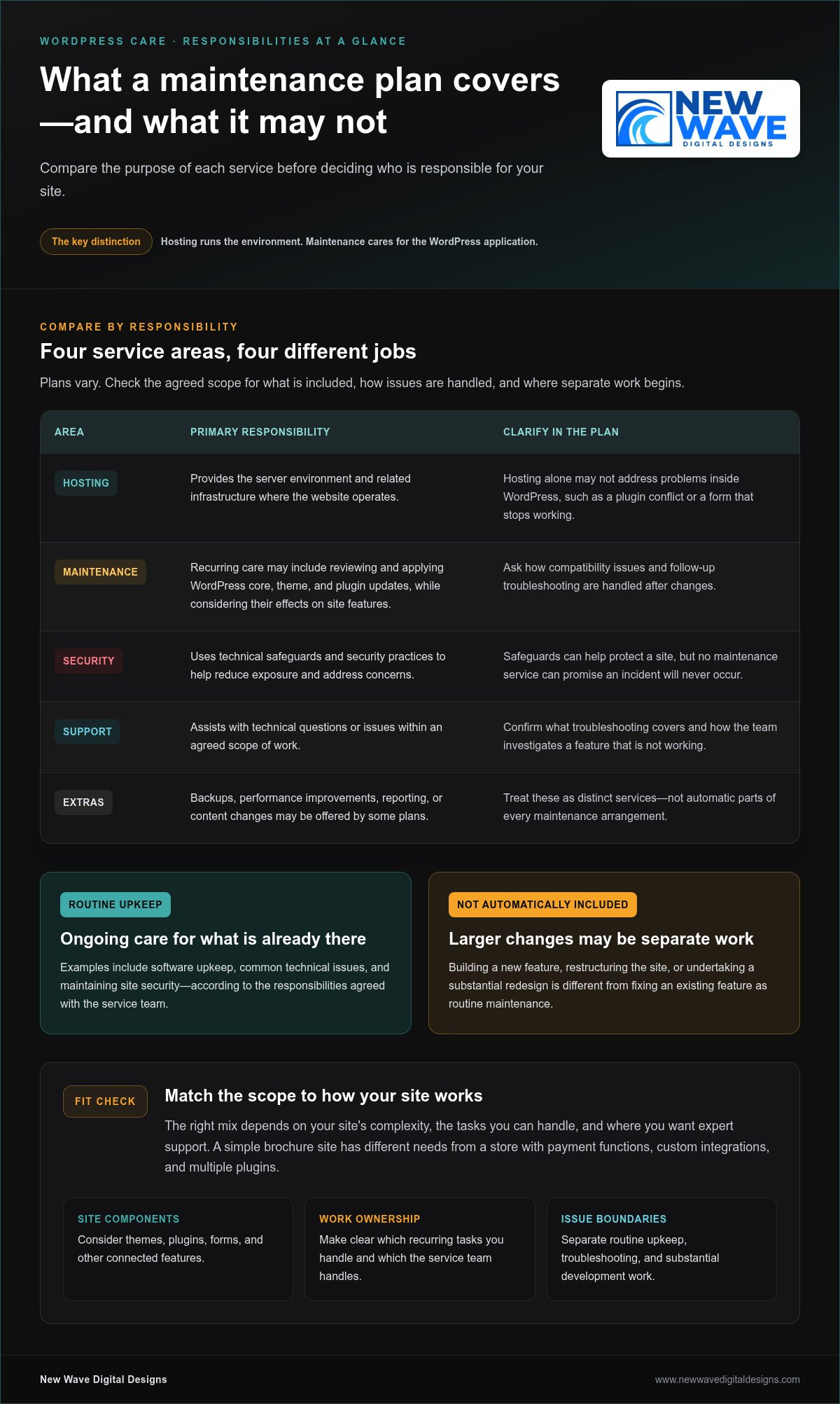
A website can look finished and still need attention behind the scenes. WordPress core software, themes, plugins, and hosting environments change over time. Your site may also gain new features or serve different business needs. A managed WordPress maintenance plan provides recurring technical care for a live website, focused on upkeep and support rather than hosting alone. That distinction is a useful starting point: maintenance looks after the application, while hosting provides the environment where it runs.

For a plain-language overview of the platform, What is WordPress? explains its role as a content management system. For site owners, the practical point is that WordPress consists of interconnected parts. A change to one part can affect another, so ongoing care involves understanding how those pieces work together, not simply keeping the site available on a server.

What does managed WordPress maintenance mean?

Managed care means recurring oversight of a website’s technical condition, with responsibilities agreed between the site owner and the service team. Routine upkeep may include reviewing and applying software updates, addressing common technical issues, and maintaining site security. Because the scope varies, a clear plan should distinguish included maintenance from work handled separately.

That boundary matters. Fixing a problem with an existing feature is different from building a new feature, restructuring the site, or undertaking a substantial redesign. Those are development projects, not automatically part of routine upkeep. A maintenance relationship can provide a way to discuss larger projects, but defining the boundary in advance helps avoid confusion when a request comes up.

Hosting and support may accompany maintenance, but each describes a different responsibility. Hosting concerns the server environment and its operation. Maintenance focuses on the WordPress site and its components. Support is the assistance available when a question or issue arises. These services can work together, but hosting alone doesn’t necessarily address a plugin conflict or a form that stops working after a site change.

Why does an active website need ongoing care?

A functioning site is not a finished technical system. WordPress, its plugins and themes, and the hosting environment can change independently. Site owners may also add content, adjust settings, or rely more heavily on a feature as the business grows. Over time, those changes can introduce compatibility issues or leave software out of date. Neglected upkeep doesn’t make a failure inevitable, but it can make problems harder to notice and resolve.

For example, a contact form may appear normal but stop sending inquiries after a software change. A theme update might also alter the display of a carefully arranged page. Regular attention helps surface changes and gives someone responsibility for investigating their effects. It can’t promise uninterrupted performance, but it can support a more dependable foundation for everyday business activity.

That’s the purpose of managed wordpress maintenance plans: to establish an ongoing rhythm of technical care and clear ownership when a question or problem arises. New Wave Digital Designs provides website maintenance and support alongside managed hosting and technical security solutions, connecting related responsibilities in an approach to WordPress care.

What Managed WordPress Maintenance Plans May Include

A useful plan is more than a bundle of features. It groups work by purpose and makes clear who handles each responsibility. Common components include software upkeep, security measures, hosting, and technical support, though the scope differs. The right mix depends in part on site complexity: a simple brochure site has different needs from a store with payment functions, custom integrations, and multiple plugins.

  • Software upkeep: Reviewing and applying WordPress core, theme, and plugin updates, while considering whether changes affect site features.
  • Security: Using technical safeguards and security practices to help reduce exposure and address concerns.
  • Hosting: Providing the server environment and related infrastructure where the website operates.
  • Support: Helping investigate technical questions or issues within an agreed scope of work.

Some plans may also include backups, performance improvements, reporting, or content changes. Treat these as distinct services, not automatic parts of every maintenance arrangement. The U.S. Department of Energy’s Government Web Maintenance Standards offers a useful reference for the broader role of web maintenance, including technical upkeep, accessibility, and performance. Its guidance provides context, not a universal checklist for every WordPress site.

Updates, security, and hosting responsibilities

Updates keep core software, plugins, and themes current, but applying them is only one part of the task. A change can affect a form, checkout, or page layout, so plans may differ in how they handle compatibility and follow-up troubleshooting. Security is layered too: safeguards can help protect a site, but no maintenance service can promise that an incident will never occur. Hosting supports the site at the server level; it doesn’t necessarily cover issues within WordPress itself. A managed arrangement can connect these responsibilities while making their boundaries clear.

Support, troubleshooting, and work beyond routine care

Support describes how technical questions or problems are handled. A maintenance task is a defined piece of recurring upkeep; troubleshooting may require investigation to find out why a feature isn’t working. Repairing an existing form differs from building a new booking system, adding a custom feature, or redesigning several pages. Larger requests may need a separate project scope.

Clear descriptions help set expectations before work begins. Look for plain language about what routine care covers, how hosting responsibilities relate to site-level work, and where additional development begins. This clarity becomes more important as a site accumulates plugins, integrations, and business-critical features. Managed wordpress maintenance plans should fit the way your site operates, rather than simply offering the longest feature list.

New Wave Digital Designs provides website maintenance and support alongside managed hosting and technical security solutions. Explore ongoing WordPress website care to see how these connected responsibilities can align with your site’s needs.

How to Compare Managed WordPress Maintenance Plans Fairly

Feature lists can make two plans look similar while leaving the most important question unanswered: who takes responsibility when something needs attention? Compare responsibilities and fit before counting features. A focused plan may suit a straightforward site whose owner can handle some tasks. A broader managed arrangement may make more sense for a complex site or a team with limited in-house technical capacity. Neither approach is automatically better.

Which plan dimensions deserve a side-by-side comparison?

Compare the work itself, who performs it, and how it connects to the rest of your website’s operation. For each task, note whether it’s covered, excluded, or handled separately. This makes gaps easier to spot, especially when one plan bundles hosting with maintenance and another treats them as separate responsibilities.

Comparison area Focused arrangement Broader managed arrangement
Routine upkeep May cover a defined set of maintenance tasks, with other work left to the site owner. May assign a wider range of recurring site-care responsibilities to the service team.
Hosting May be separate, leaving server-related matters with the hosting provider. May bring managed hosting into the same relationship as site maintenance.
Security May focus on specified technical measures, with boundaries around investigation or remediation. May connect security services with broader technical oversight.
Support and extra work May limit assistance to defined tasks or handle additional requests separately. May provide a wider support scope, while still distinguishing routine care from project work.

Use the table as a framework, not a rating system. For each area, clarify what the plan covers, who does the work, and what happens if an issue falls outside the stated scope. An explicit exclusion is easier to plan around than one that comes to light only after a problem arises.

How should you assess support expectations?

Distinguish a routine request, such as asking about a planned maintenance task, from an urgent incident or complex development work. Don’t compare plans only by whether they advertise support. Find out what kinds of issues the support covers, how requests are submitted, and how out-of-scope work is handled. Clear expectations make for a more useful working relationship than broad, undefined promises.

Look for plain descriptions of communication, responsibility, and next steps. A vague promise of “complete care” tells you less than a defined scope that explains who investigates a plugin conflict or how a new feature is treated. If your site has e-commerce, custom integrations, or other business-critical functions, check that the described responsibilities account for that complexity. Managed wordpress maintenance plans are easier to compare when their limits are as clear as their included services.

Managed WordPress Maintenance Plans: How to Choose the Right Fit

Choose a Managed WordPress Maintenance Plan for Your Site

The right level of care depends on more than the number of features listed. Start with what your website supports, how complex its setup is, and what your team can reliably manage. These factors help distinguish essential ongoing care from added services that may not contribute much to your site’s operation.

Match maintenance needs to site complexity

Start by assessing the site’s role in your business. A website that mainly shares information has different operational demands from one that processes orders, captures leads, publishes frequently, or gives customers access to accounts. Technical complexity matters, but it’s only part of the picture: a simple site may still be business-critical if customers rely on it to reach you.

  1. Measure business importance. Identify the site’s main purpose and the likely impact of a disruption. Would visitors lose access to purchases, inquiry forms, customer resources, or time-sensitive information?
  2. Map technical complexity. Consider the number and role of plugins, external integrations, custom features, and how often the site changes. A store connecting payments, inventory, and email tools has more moving parts than a static set of service pages.
  3. Review maintenance capacity. Decide who can oversee updates, identify issues, and coordinate technical work. Count only the tasks your team can handle consistently, not the ones someone might have time for in an ideal week.

Frequent publishing can add review needs as themes, layouts, and plugins interact with new content. Custom functionality and integrations can make troubleshooting more involved because an issue may affect several connected tools. Your needs can also change as the business adds features or relies more heavily on the site. Revisit your assessment when the site changes.

Set priorities before comparing plan options

Turn your assessment into a short priority list. Note the functions that must work, the likely impact if each is disrupted, and the responsibilities you’ll retain in-house. This gives you a practical basis for comparing managed wordpress maintenance plans without assuming the broadest scope is automatically the best fit.

  • List critical functions, such as checkout, lead forms, account access, or core publishing tools.
  • Identify the maintenance responsibilities your team can own and sustain.
  • Separate essential care from optional additions, such as performance work or content updates, based on actual site needs.
  • Flag complex features that may need clearer technical oversight or a defined project scope.

A focused arrangement may suit a site with few integrations and an owner who can take responsibility for some upkeep. A more involved site may call for support that reflects its connected features and business importance. The aim is a thoughtful fit, not the longest feature list. For ongoing website maintenance and support, explore WordPress maintenance support as part of a considered approach to your site’s needs.

Ongoing WordPress Maintenance with New Wave Digital Designs

A maintenance plan is most useful when it reflects how your website works. New Wave Digital Designs provides ongoing website maintenance and support, managed hosting, and technical security solutions. Together, these services address the site itself, the environment it runs in, and the technical help that supports its continued operation.

A considered approach to ongoing site care

Maintenance is continued technical stewardship, not a one-time intervention. A site’s structure, plugins, integrations, and business purpose all shape the care it needs. Experience designing WordPress websites provides context for understanding how those elements fit together, where a change may have wider effects, and which responsibilities need clear ownership.

That perspective matters as a website evolves. A business may add a lead-generation feature, expand its content, or change how visitors use an existing function. Ongoing care helps keep technical needs in view as those changes take shape. It doesn’t remove every risk or promise a particular outcome; it gives you a considered basis for addressing work within the agreed scope.

New Wave Digital Designs connects website maintenance and support with managed hosting and security solutions. This brings related responsibilities together instead of treating each technical concern as an isolated task. A clear understanding of what the site depends on, what support it needs, and where larger development work begins helps keep the arrangement aligned with business priorities.

Move from comparison to a clear next step

You’ve compared the kinds of care a plan may cover and considered where responsibility sits. Now apply those decisions to your own site: identify its essential functions, note the work your team can manage consistently, and prioritize support that matches its complexity. The best-fit arrangement has relevant scope and understandable boundaries, not simply the longest service list.

Your website’s maintenance needs may change as the site evolves. Adding integrations or custom functionality, for example, may call for a different balance of upkeep and technical support. Revisit your priorities when those changes occur so your maintenance arrangement continues to reflect how the website serves your business.

Explore New Wave Digital Designs’ website maintenance services to learn how ongoing care can support your site. For a maintenance approach suited to your WordPress website, connect with New Wave Digital Designs and take the next step toward clearly defined support.

Choose Care That Can Grow With Your Website

Your website will keep changing as your business evolves. Revisit its maintenance needs when you add features, change how customers use it, or shift who manages its technical upkeep. This helps keep your support arrangement relevant instead of letting it become a checklist built for an earlier version of your site.

The strongest managed wordpress maintenance plans make room for clear responsibilities and changing needs. New Wave Digital Designs brings ongoing maintenance and technical support together with managed hosting and security solutions, informed by experience designing WordPress websites. The goal is an approach to ongoing care shaped around your site, rather than a one-size-fits-all checklist.

Explore WordPress maintenance and support with New Wave Digital Designs and take a thoughtful next step toward support that fits your website. Start by outlining your site’s key functions and the responsibilities you want ongoing help with.

Frequently Asked Questions

What is included in a managed WordPress maintenance plan?

A managed WordPress maintenance plan may include core, theme, and plugin upkeep, security measures, backups, and technical assistance, but the exact scope varies. Match the tasks in a plan to the parts of your site they affect. For example, if a booking plugin is central to your business, clarify whether the arrangement covers investigating compatibility issues or only routine software upkeep. This helps uncover practical gaps before they interrupt day-to-day work.

Are managed WordPress hosting and maintenance the same thing?

No. Managed hosting focuses on the server environment that runs your website, while maintenance focuses on the WordPress application and its components. Services can overlap, but one doesn’t automatically include the other. For instance, a hosting provider may manage server settings without being responsible for investigating why a booking plugin conflicts with another feature. Compare responsibilities at both levels so you know who handles infrastructure concerns and who looks after site-specific issues.

Do small business websites need a WordPress maintenance plan?

Some small business sites benefit from ongoing professional care, especially when the owner can’t reliably manage technical tasks. The decision depends on what the site does and how much the business relies on it. A simple page with contact details may need a different level of oversight from a site that accepts appointment requests or customer inquiries. Consider the impact of a missed form submission, not just the site’s size or appearance.

How often should a WordPress website be maintained?

There isn’t one schedule that suits every WordPress site. Review maintenance needs regularly, and pay attention to available updates, security notices, and changes to important site functions. A major plugin change or new checkout feature may warrant a review beyond routine upkeep. Rather than relying on a calendar alone, consider how quickly you need to respond when a change could affect visitors, inquiries, or transactions.

Can a WordPress maintenance plan prevent every security problem?

No maintenance plan can guarantee that a website will never face a security issue. Technical safeguards and attentive upkeep can help reduce exposure, but risks may also involve compromised passwords, third-party services, or mistakes in site configuration. Treat security as ongoing risk management, not a promise of invulnerability. Understand which protections and incident-related responsibilities are in scope, and maintain sensible access practices for everyone who can sign in to your website.

What is the difference between WordPress maintenance and website support?

Maintenance usually refers to planned technical upkeep, while support is assistance with questions or problems as they arise. They can be part of the same relationship, but they aren’t identical. Applying a software update is a maintenance task; asking why an editor can’t publish a page is a support request. A clear scope explains which requests are handled as routine care and which may need separate troubleshooting or project work.

How do I choose the right managed WordPress maintenance plan?

Choose based on your site’s essential functions, technical complexity, and the work your team can manage consistently. Write down what would be most disruptive if it stopped working, such as a payment form or customer login, then compare plans for responsibilities around hosting, security, and support. The right fit addresses meaningful needs without adding unnecessary services. Revisit your choice as your website gains features or changes purpose.

WordPress Maintenance vs. Self-Hosting: Which Is Right for You?

Choosing between wordpress maintenance vs self hosting can seem like a choice between doing everything yourself and handing over your site. The distinction is more specific: hosting determines where your WordPress site runs, while maintenance covers the work of keeping it healthy. Self-hosting doesn’t mean you have to manage every technical task alone.

It’s worth weighing the control of managing your own setup against the time and ongoing responsibility it requires. Updates, backups, security, and troubleshooting need clear owners, whether you handle them yourself or delegate them. If those roles aren’t clear, you may assume your hosting plan covers work that is actually your responsibility.

This guide separates hosting from maintenance, compares the practical responsibilities involved, and explains how managed hosting and ongoing support can work together. Use the guidance to assess the control, time, and reliability your setup requires, then choose an approach that suits your website and the attention you can give it.

Key Takeaways

  • Hosting and maintenance address different needs: hosting provides the environment for your site, while maintenance covers its ongoing care.
  • When comparing wordpress maintenance vs self hosting, focus on who owns updates, backups, security, and troubleshooting rather than relying on labels alone.
  • Self-management gives you direct oversight, but requires consistent time and attention for routine upkeep and unexpected issues.
  • Use your site’s importance, complexity, and your available time to decide which responsibilities you can realistically manage.
  • You can keep a self-hosted WordPress site and delegate technical upkeep through managed hosting, security, and maintenance support.

WordPress Maintenance vs. Self-Hosting: Understand the Difference First

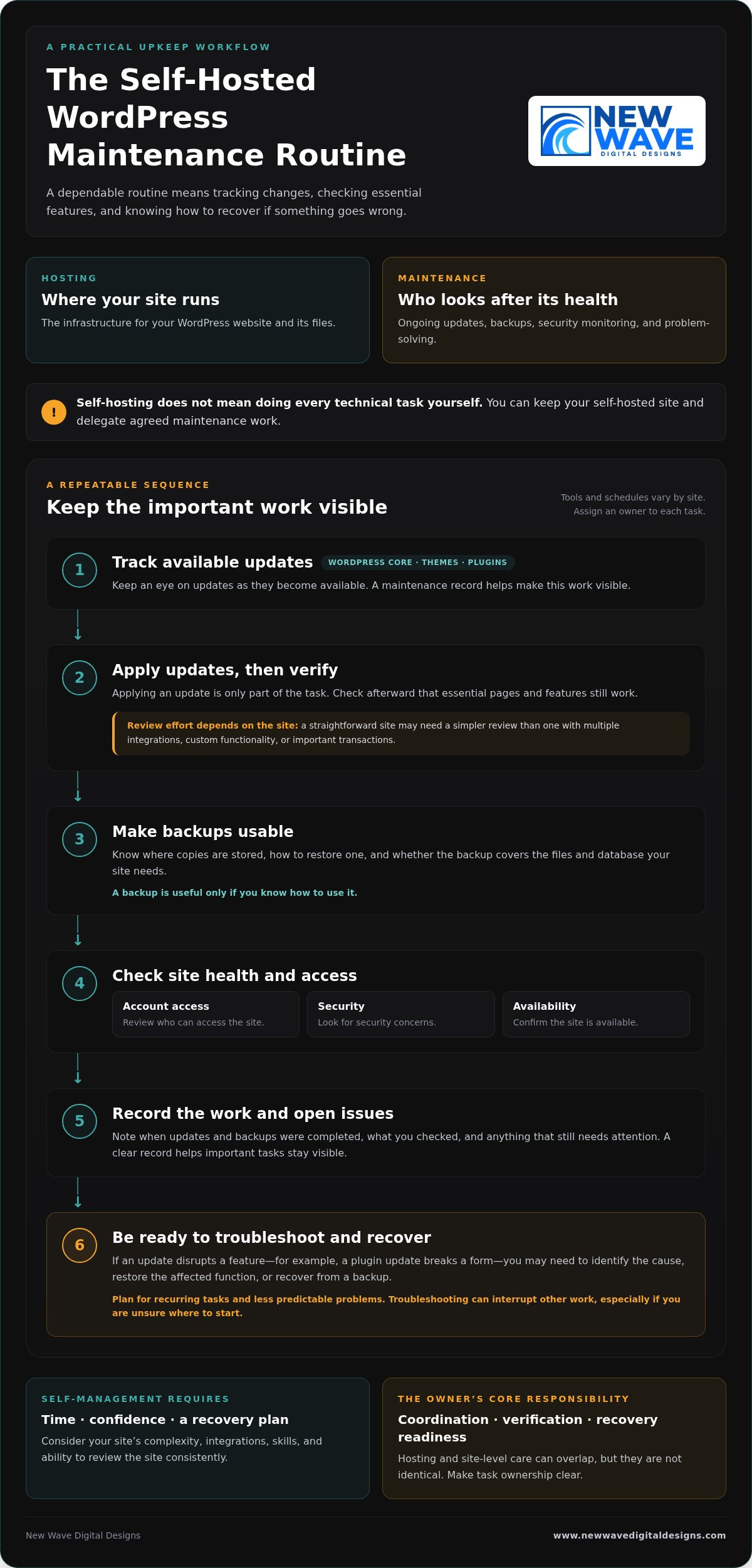
“Self-hosting” and “self-maintenance” can sound like two sides of the same choice, but they describe different decisions. Hosting is the infrastructure where your WordPress website and its files run. Maintenance is the ongoing work of keeping the site updated, backed up, monitored, and functioning.

Hosting determines where your site operates; maintenance determines who looks after its ongoing health. That distinction is central to wordpress maintenance vs self hosting. A self-hosted WordPress site can still receive professional maintenance support, so self-hosting doesn’t automatically mean taking on every technical task yourself.

What does self-hosted WordPress mean?

With self-hosted WordPress, you use the WordPress software and arrange hosting separately. The hosting environment can be configured and managed in different ways. Depending on the arrangement, you may have access to some infrastructure settings without personally administering every server detail.

The broader idea of hosting your own online services also involves trade-offs around control and upkeep, as described in Self-hosting (network). For a WordPress site, the practical question is which parts your hosting arrangement handles and which remain your responsibility.

What does WordPress maintenance include?

Maintenance covers care of the WordPress site itself: applying updates, creating or checking backups, monitoring security, and resolving problems. It can also involve investigating an update that disrupts a form or another site feature. These are recurring responsibilities, although the tools and schedule may vary by site.

Hosting care and site-level care can overlap, but they aren’t identical. A hosting service may look after parts of the infrastructure, while WordPress updates, plugin compatibility, and site recovery need separate attention. If you manage the site yourself, you’re responsible for the tasks assigned to you. With professional maintenance support, you can delegate agreed technical upkeep while retaining your WordPress website.

To see where responsibilities sit, list who handles hosting, updates, backups, security, and troubleshooting. Assign an owner to each task. A clear division makes it easier to spot gaps before a routine task or unexpected issue affects the site.

What You Take On When You Maintain a Self-Hosted WordPress Site

Managing maintenance yourself is less about a one-time overhaul and more about following a dependable routine. The exact tools and schedule depend on your site, but someone needs to track changes, check that key features still work, and know what to do if something goes wrong. This responsibility can fit into your routine when the site is simple and you have the time and confidence to manage it.

Which tasks need regular attention?

WordPress core software, themes, and plugins all need attention as updates become available. Applying an update is only part of the task: check afterward that essential pages and features still work. A straightforward site may need a simpler review process than one with multiple integrations, custom functionality, or important transactions.

Backups are useful only if you know how to use them. Know where copies are stored, how to restore one, and whether the backup covers the files and database your site needs. Routine checks should also include reviewing account access, looking for security concerns, and confirming the site is available. These habits can help prevent a small oversight from becoming a larger interruption.

A maintenance record keeps the work visible. Note when updates and backups were completed, what you checked, and any issue that still needs attention. The goal isn’t to follow the same checklist on every site, but to make sure important tasks don’t fall through the cracks.

How much time and technical confidence does self-maintenance require?

The workload depends on your site’s complexity, integrations, and your existing skills. Routine checks may be manageable, but a failed update can take more than a quick review. For example, if a plugin update disrupts a form, you may need to identify the cause, restore the affected function, or recover from a backup. Troubleshooting can interrupt other work, especially if you’re unsure where to start.

Plan for both recurring tasks and less predictable problems. Ask yourself whether you can make time to review the site consistently and feel prepared to investigate an issue when it appears. Self-management isn’t just a question of technical ability; it also requires a workable plan for recovery.

The owner’s core responsibility is coordination, verification, and recovery readiness. If you’d rather delegate recurring technical upkeep while retaining your WordPress site, explore WordPress maintenance support as part of your site’s ongoing care.

Managed WordPress Maintenance vs. Self-Management: Compare the Trade-Offs

The choice isn’t simply control or convenience. Self-management gives you direct oversight of site upkeep, while professional maintenance support delegates agreed tasks. You can also retain a self-hosted WordPress site and have someone else manage its maintenance. For wordpress maintenance vs self hosting, treat hosting and support as separate decisions, then choose a balance that suits your site and capacity.

Responsibility Self-management Managed maintenance
Control You decide when and how to handle site-level tasks. You retain business and content decisions while delegating agreed technical work.
Routine workload You track and carry out updates and other upkeep. Defined recurring tasks are handled as part of the support arrangement.
Security You monitor relevant site settings and follow up on concerns. Security responsibilities depend on the support scope and hosting setup.
Backups You arrange backups and verify you can restore the site. Backup tasks may be delegated, but responsibilities and recovery processes should be clear.
Troubleshooting You investigate issues and coordinate any fixes. You have defined technical support for the issues covered by the arrangement.

The table is a guide, not a universal division of duties. Support arrangements differ, so establish who handles each task, especially backups, recovery, and problems involving both hosting infrastructure and the WordPress site.

When does self-management make sense?

Self-management can suit site owners with the time, technical confidence, and reliable routine to keep tasks moving. A simple site may have fewer moving parts than one with several integrations, but it still needs care. Direct oversight works best when you don’t just start updates and backups, but check that they completed and know how restoration works.

When can professional maintenance support be a better fit?

Delegating upkeep may suit businesses that would rather spend their time on customers, content, and operations. Defined support for WordPress updates, hosting, and security clarifies who handles recurring technical work. Be clear about the scope: managed support doesn’t guarantee that problems can’t happen, and it doesn’t automatically include every task a site might need.

Think of maintenance as a set of responsibilities, not a hosting label. You can keep control of your site’s direction and content while delegating recurring technical upkeep. That balance can make self-hosting practical without requiring you to manage every part of the site yourself.

WordPress Maintenance vs. Self-Hosting: Which Is Right for You?

Match WordPress Maintenance to Your Site and Capacity

The right maintenance arrangement should reflect what your website does and how much attention you can realistically give it. Use this process to assess your needs before deciding which tasks to manage yourself and which to delegate.

  1. Assess the site’s importance. Does it support sales, lead generation, customer enquiries, or essential daily operations? If a problem would disrupt an important business activity, make sure there’s a clear plan for maintenance and recovery.
  2. Consider its complexity. A site with custom features or several integrations may need more careful update testing and troubleshooting than a simpler site. Identify the features and connections your website depends on.
  3. Be honest about your capacity. Do you have the time and technical confidence to handle routine tasks and respond if an update causes an issue? Account for both regular upkeep and unexpected work.
  4. Identify what’s already covered. Review your hosting arrangement and support to understand who handles updates, backups, security checks, and recovery. Don’t assume a task is covered just because another technical service is in place.

Build a responsibility checklist before deciding

Write down each task and assign an owner. A checklist can reveal where work is being duplicated or overlooked:

  • Hosting and infrastructure: who manages the hosting account and related settings?
  • Updates: who applies updates, and who checks that important site features still work?
  • Backups: who creates them, verifies they’re usable, and knows how to restore the site?
  • Security: who monitors relevant site settings and follows up on concerns?
  • Recovery: who investigates a problem and coordinates the steps to resolve it?

Look for gaps in backup verification, update testing, or issue resolution. Assign tasks according to your actual capacity, not the assumption that you’ll find time later. Some owners prefer direct oversight of every task; others retain control of business and content decisions while delegating technical upkeep.

Revisit the checklist as your website and business evolve. A new integration, a shift toward online sales, or a change in your team can affect the site’s importance and support needs. The wordpress maintenance vs self hosting decision isn’t fixed for the life of a website; task ownership can change as your priorities do.

If you’d like professional help with recurring upkeep, explore WordPress maintenance support as part of your site’s ongoing care.

A Managed WordPress Maintenance Plan Can Keep Self-Hosting Practical

Choosing where your WordPress site is hosted doesn’t determine who maintains it. You can keep a self-hosted site and arrange professional help with its ongoing technical care. This makes wordpress maintenance vs self hosting less of an either-or decision: hosting provides the environment, while maintenance support helps keep the site’s technical foundation attended to.

Managed hosting and security services can complement WordPress maintenance, but they cover related, distinct responsibilities. Hosting and security support can address aspects of the environment your site runs on, while maintenance focuses on ongoing care of the WordPress site. A clear division prevents important tasks from being assumed rather than assigned.

What to expect from ongoing website support

Good maintenance means planned, recurring attention, not just a response to a visible fault. The support scope should make clear which tasks are handled, where your responsibilities remain, and how communication works when an issue needs attention. Clear ownership helps you understand how updates, security, backups, and troubleshooting fit together without assuming every support arrangement covers the same work.

This support doesn’t remove the need to make business and content decisions. It gives you a way to delegate technical upkeep while staying involved in your website’s direction.

Keep your WordPress site aligned with your business

A website changes as the business behind it changes. New content, added functionality, integrations, and shifting priorities can all affect the site’s technical needs. An approach that suited a simple information site may need to change if the website becomes central to enquiries, sales, or daily operations.

Review hosting, security, and maintenance responsibilities regularly. Confirm who owns each recurring task and how issues are handled, then adjust the arrangement when the site or your available time changes. Steady upkeep supports the website’s role over time, rather than treating maintenance as a one-off task.

New Wave Digital Designs provides WordPress website maintenance, managed hosting, and security support to help site owners delegate technical upkeep while retaining their WordPress website. Explore WordPress website maintenance services and take the next step toward support that fits your site’s needs.

Choose a WordPress Setup That Supports Your Next Step

Hosting and maintenance answer different questions: where your WordPress site runs, and who takes care of its ongoing technical needs. The choice in wordpress maintenance vs self hosting doesn’t have to be all or nothing. You can retain a self-hosted site while delegating recurring upkeep, or manage maintenance yourself if you have the time and confidence to do it consistently.

Start by matching responsibilities to your site’s importance, complexity, and your capacity. Make sure someone owns updates, backups, security, and recovery, then revisit the plan as your website and business evolve. A clear arrangement can help your site keep pace with changing needs without taking attention away from the work it supports.

New Wave Digital Designs provides ongoing website maintenance and technical support, with managed hosting and security services as part of its web support offering. Explore professional WordPress maintenance and support to find an approach suited to your site. With the right balance of oversight and support, you can move forward with greater clarity and confidence.

Frequently Asked Questions

Is WordPress maintenance the same as self-hosting?

No. Self-hosting describes where your WordPress site runs and how its hosting is arranged; maintenance is the ongoing care that keeps the site updated, backed up, monitored, and functioning. You can self-host and maintain the site yourself, or delegate selected tasks to professional support. Keeping these decisions separate makes the wordpress maintenance vs self hosting comparison clearer and helps you identify who is responsible for each part of your site’s care.

Can I use managed WordPress maintenance with self-hosted WordPress?

Yes. Hosting and maintenance are separate choices, so you can arrange hosting for your WordPress site and have a professional handle agreed upkeep. That support might include updates, backups, or security tasks, depending on its scope. Make responsibilities clear across hosting infrastructure, WordPress maintenance, and site recovery. You can delegate technical work while retaining decisions about your website’s content, functionality, and business direction.

What happens if I do not maintain my WordPress site?

Neglected updates, unverified backups, and unattended issues can increase the risk of compatibility or security problems. The impact depends on your site’s software, plugins, themes, and setup, so it won’t be the same for every website. Assign an owner to routine updates, backup checks, and issue monitoring so important tasks aren’t left to assumption or postponed indefinitely.

Is self-hosted WordPress cheaper than managed maintenance?

There’s no universal answer because hosting and maintenance are different responsibilities, and the total depends on what your setup includes. Compare hosting, any tools or support you need, and the time you’ll spend managing the site. If you maintain it yourself, account for the effort involved in checking updates, verifying backups, and resolving problems. A lower direct expense may still require more of your time and attention.

How often should WordPress be maintained?

WordPress maintenance is ongoing, but the right schedule depends on your website, its themes and plugins, and how the site supports your business. Review available updates regularly, verify that backups are usable, and monitor for security or availability concerns. Establish a repeatable routine that suits your site rather than relying on a single annual check. Most importantly, make sure a specific person or support arrangement owns the tasks.

Can I switch from self-managing WordPress to professional maintenance later?

Yes. You can move from self-management to professional support as your site or available time changes. Before handing over recurring tasks, organize access details, hosting information, a list of themes and plugins, backup procedures, and known issues. This gives the person handling maintenance a clearer picture of the site and helps identify what needs attention. Agreeing on task ownership also helps keep ongoing work from falling through the cracks.

Does managed WordPress maintenance mean I lose control of my website?

Not necessarily. Delegating technical upkeep doesn’t automatically transfer ownership of your website or control over its content. A well-defined arrangement distinguishes maintenance tasks from business decisions, such as what to publish or how the site should serve customers. Clarify access, responsibilities, and how technical changes are communicated. You can remain involved in your site’s direction while assigning recurring technical work to professional support.

Improving User Experience on My Website: A Practical Guide

Improving user experience on my website often has less to do with adding features and more to do with removing moments that make visitors hesitate. A confusing menu, an unclear next step, or a form that feels like hard work can disrupt an otherwise promising journey. When analytics and customer comments point in different directions, it can be difficult to know which problem deserves attention first.

Rather than redesigning everything on instinct, look closely at the journeys that matter: where visitors arrive, what they’re trying to do, and where they lose momentum. Use evidence to distinguish a meaningful barrier from a minor preference, so each improvement has a clear purpose.

This guide explains how to spot friction in important visitor journeys, turn behavior and feedback into practical fixes, and prioritize changes without letting a technical project lose focus. You’ll also learn how clear navigation, accessible content, trustworthy design, and ongoing technical care work together to make a website easier to use and act on.

Key Takeaways

  • Understand how usability and visual design shape the experience of finding information and completing tasks.
  • Trace priority visitor journeys to uncover specific points of confusion, then record evidence before choosing a fix.
  • Rank potential improvements by impact, effort, and confidence to focus on changes most likely to help.
  • Use a practical checklist to review mobile layouts, content, forms, navigation, and accessibility when improving user experience on my website.
  • Build a repeatable cycle of observation, implementation, testing, and refinement, and recognize when connected issues call for coordinated design or development.

What improving user experience on your website really means

Website user experience (UX) is the complete journey a person has while finding information and completing a task on your site. It includes whether visitors can understand your offer, move between pages, and take a next step without unnecessary effort. User experience design is a broader discipline, but its central idea applies to every business website: shape the experience around people’s needs, not just the site’s appearance.

Strong UX helps visitors understand, navigate, and act with confidence. Usability is about how clearly and easily someone can use the site. Visual design gives that experience its form and feeling, establishing hierarchy, expressing your brand, and making important information easier to notice. The two work together: an attractive page can still frustrate visitors if its navigation is unclear, while a usable site can be harder to trust if its design feels inconsistent or unfinished.

Clarity, accessibility, trust, and performance shape everyday journeys, from learning what a business offers to deciding whether to enquire or buy. A slow page, hard-to-read text, or unclear next step can interrupt that journey. Improving user experience on my website starts with examining what visitors can actually do, not simply what the design is intended to communicate.

Which signs suggest your website experience needs attention?

Look for recurring signals: customers asking for information that should be easy to find, visitors abandoning forms, or people hesitating because the next step isn’t clear. Check whether someone landing on an important page can quickly identify what you offer and what to do next. These observations can point to where the journey is breaking down.

Separate evidence from assumptions. A comment such as “I couldn’t find your service details” points to a specific issue to investigate. Thinking visitors would prefer a different color or layout is a hypothesis, not proof. Record what happened, where it happened, and what the visitor was trying to do before deciding on a change.

Why user experience matters to small-business websites

For a small business, each page should help visitors move toward a useful outcome, such as understanding a service, comparing options, submitting an enquiry, or making a purchase. A straightforward journey removes avoidable obstacles and gives people a clearer basis for deciding what to do. Consistent design, accurate information, and visible next steps can also make a business feel more considered and trustworthy, without promising a particular conversion result.

Clear, accessible experiences serve people with different abilities, devices, levels of familiarity, and browsing contexts. Readable content and predictable navigation help visitors find their way, including people using assistive technology or viewing the site on a small screen. Good UX makes the path easier to follow for more people.

How to diagnose friction across your website’s key user journeys

A useful UX review follows real tasks, not just a checklist of separate pages. Choose journeys that matter to your business, such as finding a service, comparing options, or submitting an enquiry. Then follow each path as a visitor would, from the page they enter to the action they want to complete. This gives you a practical starting point for improving user experience on my website without jumping straight to a redesign.

Use this five-step audit to turn observations into a focused set of improvements:

  • 1. Choose a task. Define a clear goal, such as finding service details or sending an enquiry.
  • 2. Trace the journey. Follow the path from the likely entry page through each click, decision, and form field.
  • 3. Observe friction. Note confusing labels, unexpected detours, missing information, or steps that don’t work as expected.
  • 4. Record evidence. Capture the page, device context, task outcome, and what you observed or heard.
  • 5. Rank fixes. Prioritize recurring issues or barriers to important tasks, rather than changes based only on personal preference.

Combine different perspectives: analytics can show where visitors enter or leave, Search Console can reveal what people expect from search results, customer feedback adds context, and direct observation shows what happens during a task. The user experience basics also connect research, usability evaluation, information architecture, and accessibility, which are useful lenses for a rounded review.

What website data can reveal about user experience

Use analytics to examine entry pages, exits, and incomplete task flows, where tracking is available. Search Console queries can help you compare what people searched for with the information they find on a landing page. Treat unusual exits or low engagement as reasons to investigate, not automatic proof that a page is broken. A measurable signal shows where to look; it doesn’t, by itself, confirm the cause.

How to run a simple usability review

Ask a few people who resemble your intended visitors to complete realistic tasks without coaching. Watch for hesitation, misclicks, unclear labels, and questions. Record their words rather than interpreting them too quickly, and note the device used and whether the task was completed. Repeated difficulty deserves investigation, but a small review doesn’t prove what every visitor thinks.

When observations point to connected design or development issues, a coordinated website design approach can address the journey as a whole instead of patching one symptom at a time.

Which website UX improvements should you prioritize first?

Once you’ve identified friction, choose what to fix first. Start with barriers that affect important tasks, such as understanding an offer or completing an enquiry. A decorative refinement may improve a page’s appearance, but it shouldn’t outrank a confusing form or a navigation path that repeatedly blocks visitors.

Compare potential changes across five areas: content clarity (is essential information easy to understand?), navigation (can visitors find the right page?), forms (can they complete the task without unnecessary effort?), accessibility (can people with different needs use the content and controls?), and performance (does the site respond smoothly?). Base the fix on the problem you observed, not on which area sounds most urgent.

Use a simple impact, effort, and confidence matrix to make your decision clear. Rate each proposed change as high, medium, or low across all three dimensions. Impact reflects how much it could improve an important journey; effort estimates the work involved; confidence reflects the strength of your evidence. Prioritize changes with high impact, manageable effort, and solid evidence. If the potential impact is high but confidence is low, gather more observations before committing.

  • High impact, low effort, high confidence: consider doing it first.
  • High impact, high effort: plan the work and identify dependencies.
  • Low impact or low confidence: defer the change or investigate further.

Which usability fixes can you make without rebuilding the site?

Many improvements can start with the content and components already in place. Clarify page headings, make calls to action specific, replace vague link labels, and make essential service information easy to find. Remove form fields that aren’t needed for the task, and explain beside each required field why the information is requested. Where the existing design allows, strengthen visual hierarchy and use styles consistently so visitors can recognize what matters and what they can interact with.

When does a redesign become the more considered option?

A redesign may make sense when friction spans several templates, the navigation structure, and the way the brand is presented. Compare recurring issues, their shared causes, and the dependencies between fixes. If changes to one page keep creating problems elsewhere, coordinated design and development may be more coherent than a series of isolated patches. Not every UX concern calls for a new platform or full rebuild; match the scope to the evidence. For broader principles, explore this 2026 web design guide.

Improving user experience on my website doesn’t mean changing everything at once. It means choosing the next useful change with care, then checking whether it actually makes the visitor’s task clearer.

Improving User Experience on My Website: A Practical Guide

How to improve website UX across mobile, accessibility, and performance

A page can look polished on a large monitor yet become difficult to use on a phone, with a cramped menu, hard-to-read text, or an awkward form. A repeatable review helps uncover these gaps. Apply the same checks to key pages after updates, not just during a redesign.

  • Mobile layout: Check that content fits the screen, headings and body text remain readable, and images don’t obscure important information.
  • Navigation: Open the menu, follow links, and make sure visitors can reach important pages without losing their place.
  • Forms: Complete the form on a phone. Check that fields are easy to select, instructions are clear, and errors can be understood and corrected.
  • Accessibility: Test keyboard navigation, visible focus, contrast, descriptive labels, and a logical heading structure.
  • Performance: Review available performance reports and investigate pages that load or respond slowly. Treat speed as one part of the experience, alongside clarity and accessibility.

How to review mobile usability and website performance

Test representative mobile screen sizes and complete real tasks, such as finding a service or submitting an enquiry. Don’t stop at the homepage: menus, buttons, images, and forms can behave differently on deeper pages. Look for controls that are difficult to tap, text that requires awkward zooming, or images that push useful content out of view.

Use performance reports to identify pages for closer testing. Core Web Vitals offer a current framework for assessing loading, interactivity, and visual stability; responsiveness is measured by Interaction to Next Paint (INP). A report can point to a potential issue, but testing the affected page helps reveal what visitors actually experience.

What accessibility checks belong in a UX review?

Try using the site with a keyboard alone. Can you reach links and controls in a sensible order, see which item has focus, and operate the navigation? Check that form fields have descriptive labels, headings create a logical outline, and text and controls have sufficient contrast. Alternative text should convey an image’s relevant meaning, rather than repeat nearby copy or describe decorative details unnecessarily.

Automated accessibility scans can flag some issues, but they can’t judge every page in context. Use WCAG 2.2 as a current reference point, and review applicable requirements before making compliance claims. Accessibility is an ongoing part of improving user experience on my website, not a one-time scan.

Mobile usability, accessibility, and performance need continued attention as content and technology change. Include these checks in routine website maintenance, or plan ongoing website care to support a functional experience over time.

How ongoing design, testing, and maintenance keep UX improving

A website experience is never entirely finished. Content changes, new features are added, and visitor needs evolve. A steady improvement cycle helps you respond without turning every issue into a major project: observe, prioritize, implement, test, and refine.

  • Observe: Review visitor feedback, task completion, and recurring points of confusion.
  • Prioritize: Choose a problem that affects an important journey and is supported by evidence.
  • Implement: Make a focused change, such as clarifying content or adjusting a page flow.
  • Test: Check that the change works as intended across the relevant pages and devices.
  • Refine: Keep what helps, revise what doesn’t, and note any new friction that appears.

Your team may be able to handle a small, contained edit when the issue is clear and the change is easy to review. If several pages share structural problems, or navigation, visual hierarchy, and brand presentation need to work together differently, coordinated design or development can provide a more coherent path. Improving user experience on my website is more sustainable when each change addresses a clear need and is checked after it goes live.

How to measure whether a UX change helped

Before changing a page or flow, define the task you want to make easier and note a baseline signal. For an enquiry form, that might be completion activity, form errors, or recurring questions about what information to provide. After implementation, review the same signals and test the task directly. Look for a pattern, not a single data point, and consider whether traffic, seasonality, or other site changes could have affected the result. This helps you avoid crediting one adjustment for a change it may not have caused.

When professional website design or maintenance can help

When friction connects page structure, visual hierarchy, and visitor journeys, a coordinated design project can address those elements as one experience. New Wave Digital Designs creates custom websites on Shopify, WordPress, and Squarespace, tailoring the design to the business and its goals. Ongoing website maintenance and secure hosting support a site’s technical function as it evolves.

If you’re ready to turn your observations into a considered plan, explore website design and maintenance support as a collaborative next step.

Make your next website improvement count

A clearer website isn’t built by changing everything at once. It grows through deliberate steps: follow important visitor journeys, use evidence to find friction, and prioritize fixes that make key tasks easier. Then test the changes and keep refining the experience across mobile, accessibility, and performance.

That steady approach makes improving user experience on my website more manageable and purposeful. When issues connect across page structure, visual hierarchy, and development, a considered design partnership can bring them together. New Wave Digital Designs creates custom websites for Shopify, WordPress, and Squarespace, with website maintenance, managed hosting, and security services to support ongoing care.

Explore a more thoughtful website experience with New Wave Digital Designs and take the next step toward a site that feels clear, trustworthy, and easier to use. Every well-chosen improvement can help your website better reflect your business and guide visitors with confidence.

Frequently Asked Questions

What is the fastest way to improve user experience on my website?

Start with one important visitor task and observe where people hesitate, abandon, or ask for help. A practical first fix might be clarifying a vague page heading, simplifying navigation labels, or removing an unnecessary form field. Choose a barrier you’ve actually observed, make one focused change, then check whether the task becomes easier through direct testing or relevant website data.

How can I tell if my website has a poor user experience?

Look for recurring difficulties across visitor behavior and feedback. People may struggle to find essential information, abandon a form, ask questions the site should answer, or fail to complete a key task during testing. No single metric confirms a UX problem by itself. Compare analytics with customer comments and direct observation to identify patterns, then investigate the cause before deciding what to change.

Can I improve my website UX without redesigning it?

Yes, many UX improvements can be made within an existing website. You can clarify page copy, use more descriptive links, simplify forms, improve navigation labels, or create a clearer visual hierarchy with existing design elements. Start with a high-priority visitor journey and test the changes. If friction is connected across the site’s structure, page templates, and brand presentation, a coordinated redesign may offer a more cohesive solution.

How do I prioritize website user experience improvements?

Rank each potential change by its likely impact on an important task, the effort involved, and the strength of the evidence behind it. Address repeated barriers on high-priority journeys before lower-impact refinements. A simple list or matrix can make your reasoning clear and keep decisions grounded in observed needs. Revisit the ranking as feedback and website data reveal new patterns or show whether earlier changes helped.

Does website speed affect user experience?

Yes, slow or inconsistent loading can interrupt browsing and make tasks harder to complete. Speed is one part of UX, alongside clear content, usable navigation, accessibility, and reliable forms. Use available performance reports to identify pages that deserve closer investigation, then test the complete visitor journey. A single speed score can point to a concern, but it won’t explain every usability issue or show the full experience on its own.

How often should I review my website’s user experience?

Review important visitor journeys after substantial content, design, or technical changes, and establish a recurring check that fits your site’s activity. Watch for repeated support questions, shifts in task completion, and new usability feedback. A steady review helps you notice friction without overreacting to every small fluctuation. If a pattern emerges, investigate its context before deciding whether a targeted adjustment or broader work is appropriate.

Do I need special tools to improve website UX?

No, you can begin with your website, available analytics, customer questions, and observed usability sessions. Specialized tools may help when you need deeper behavior or feedback analysis, but they can’t replace a clear question and a practical test. Decide what you need to learn first, then choose tools that support that purpose. This keeps research focused on useful next steps rather than collecting data without a plan.

Local SEO Services: A Practical Framework for Sustainable Visibility

If you’re searching for local seo services, you likely want to understand what this work involves, which deliverables matter, and how to assess progress without relying on promises of instant rankings. A useful starting point is to look at how your business information, website, and measurement work together.

Local SEO is an ongoing process, not a quick fix. A clear strategy connects the information people see in search with a website that explains your services and helps visitors decide what to do next. Organic SEO can also work alongside thoughtful website design, maintenance, and paid search to create a more coordinated digital presence.

This practical framework from New Wave Digital Designs covers the core elements of local discoverability, signals that can reveal meaningful progress, and why visibility is about more than website visits. You’ll also learn how to connect organic SEO with broader business goals and choose practical next steps.

Key Takeaways for a Search Like “local seo services branchburg nj”

  • Local SEO supports discovery by connecting accurate business information, relevant website content, and a sound digital foundation.
  • Assess an SEO strategy by its clear priorities, useful reporting, and collaboration, not ranking guarantees.
  • Use a flexible framework to review your current digital presence, prioritize work, measure results, and refine the approach.
  • Match organic SEO with your business goals and internal capacity. Website design, maintenance, or paid search may complement the work.

What Local SEO Services Do for a Business Seeking Nearby Customers

Local SEO helps a business become easier to discover when people search for relevant products or services in a particular area. Unlike broader organic SEO, which can support visibility for searches from anywhere, local SEO focuses on searches with geographic intent. A query such as “local seo services branchburg nj” shows how a searcher may pair a service with a location to find relevant options.

Local SEO improves how a business is represented and discovered in search results for relevant, location-focused queries. It brings together signals from a business’s online presence and website, while supporting a useful experience for people deciding where to turn. For a neutral introduction to the discipline, see Local search engine optimization.

How local search visibility differs from general SEO

Local search can reflect three broad considerations: proximity to the searcher, relevance to the query, and prominence, or how established and well-known a business appears online. These concepts help explain why results can vary by search and location. Google Search and Google Business Profile are part of this ecosystem, alongside a business’s own website.

Compare “how does roof insulation work?” with “roof insulation company near me.” The first is largely informational; the second suggests someone is looking for a relevant business nearby. A query like “local seo services branchburg nj” also expresses local intent. A sound approach considers what the searcher wants instead of treating every query as a broad keyword to target.

Which businesses may benefit from local SEO

Service-area businesses, professional firms, and organizations that serve customers face to face may all have reason to consider local visibility. Someone might search for an accountant or a repair service nearby. In either case, accurate, helpful information makes it easier to assess whether a business fits the need.

Local SEO isn’t automatically the same priority for every organization. Consider how customers search, where the business serves them, and what the business wants its digital presence to accomplish. A business serving a broad market may emphasize general organic SEO, while one seeking nearby customers may benefit from a strategy shaped around local intent. The right balance depends on its goals and starting point.

Visibility isn’t determined by one profile or page alone. Relevance, local competition, website quality, and consistent attention can all influence discoverability over time. Treat organic SEO as an ongoing part of a considered digital presence, not a promise of a particular search position.

What Local SEO Services Include: Profiles, Pages, and Technical Foundations

A local SEO strategy is a set of priorities shaped around the business, not a one-size-fits-all checklist. It considers how clearly a business is represented online, whether its website answers customer questions, and whether the site is accessible to search engines and visitors. The right emphasis depends on business goals and the digital foundation already in place. Mailchimp’s overview, Why Local SEO Matters, offers additional context on local discoverability.

Organic SEO focuses on earning visibility in unpaid search results. Paid placements, such as Google Ads or Bing Ads, are advertising. Directory profiles are separate online references to a business. These channels can complement one another, but they serve different roles. A clear plan distinguishes them so responsibilities and progress are easier to understand.

Business profiles and consistent business information

Google Business Profile and Bing Places for Business are among the profiles people may encounter while searching. Accurate, complete information helps customers understand what a business does and how to reach it. Consistency across relevant profiles and directories can also reduce confusion when details such as the business name, address, phone number, or hours appear in multiple places. Prioritize the profiles that make sense for the business and its goals.

Website content, technical SEO, and local relevance

A website gives searchers more context than a brief profile can provide. Useful service pages explain what a business does, who it serves, and what a potential customer can expect. Clear navigation helps visitors find those details. Mobile usability and a crawlable structure help people and search engines access the site. Where appropriate, structured data such as schema.org LocalBusiness can also be assessed as part of the technical picture.

Build local relevance with meaningful information, not repeated place names. Explain the services offered and the areas served in natural language, and answer real customer questions. Repeating location phrases without adding useful detail can make content harder to read.

A coordinated review may consider:

  • Business profile accuracy and consistency across relevant references
  • Service pages that address customer needs and business goals
  • Navigation, mobile usability, crawlability, and relevant technical foundations
  • Measurement that connects search visibility with meaningful customer actions

These are areas to assess, not a checklist that every business needs to follow in the same way. Organic SEO can work alongside website design, ongoing maintenance, and paid search when they support shared business objectives. To explore how those capabilities can fit together, visit organic SEO and digital design.

How to Evaluate Local SEO Services Without Ranking Guarantees

A credible SEO conversation should make the work understandable. Look for a strategy that connects business goals with clear priorities, useful reporting, and ongoing collaboration rather than a promised position in search.

Measurable progress means seeing useful changes in visibility and customer behavior, not receiving a guarantee of a specific search position. Rankings can fluctuate as search results and competitors change, so a particular spot cannot be responsibly promised. Evaluate several indicators over time and ask whether they relate to the outcomes that matter to your business.

Evaluation area What to look for
Strategic clarity Priorities explained in relation to your goals, audience, website condition, and competitive environment.
Deliverables A clear description of the planned work, why it matters, and how it supports the strategy.
Reporting Reporting that distinguishes search visibility and site activity from inquiries, conversions, and other business measures.
Collaboration Open communication, clear explanations, and room to adjust priorities as your needs evolve.

Questions that reveal whether a strategy is tailored

Ask how proposed priorities connect to your goals and customers. What does your current website make easy or difficult? Which services or audiences matter most? How might competition affect the plan? Clear answers should explain the reasoning behind the strategy, rather than rely on jargon or apply an identical checklist to every business.

New Wave Digital Designs provides organic SEO as a collaborative effort tied to business goals and a well-crafted digital presence. The focus is on what the work is intended to support, not on presenting rankings as a guaranteed outcome.

Reports that connect search activity to business goals

Different metrics answer different questions. Impressions indicate how often a page appears in search results; clicks show visits from those results. Engagement measures what visitors do on the site, while conversions track meaningful actions defined for the business, such as submitting an inquiry. Google Search Console can help assess search visibility and clicks, while Google Analytics 4 can help examine site activity and conversions.

Interpret these signals in context. A rise in impressions may indicate broader visibility, but it doesn’t by itself show that more qualified customers are getting in touch. Look for trends across reporting periods, relate them to the work completed, and compare them with business measures. A single ranking snapshot offers a narrow view; a consistent, well-explained report can reveal a more useful picture of progress.

Local SEO Services: A Practical Framework for Sustainable Visibility

How a Local SEO Strategy Develops From Audit to Ongoing Improvement

A useful organic SEO strategy develops in stages. First, understand the business and its current digital presence. Then decide which changes deserve attention, put them into practice, and review the resulting signals. This creates a shared framework for thoughtful decisions instead of a collection of disconnected tasks.

From discovery and audit to a prioritized plan

Start with context: business goals, audience needs, website structure, and current search visibility. An audit can reveal technical or content issues that make it harder for people to find useful information or for search engines to understand the site. Turn findings into a clear, practical order of work.

  • 1. Discovery: Clarify business objectives, audiences, services, and the role organic search should play.
  • 2. Audit: Review the existing site structure, content, technical foundations, and available visibility information.
  • 3. Prioritization: Weigh potential actions by relevance to customer needs, effort, and contribution to business goals.
  • 4. Implementation: Make agreed-upon improvements, which may include refining website content or addressing site issues.
  • 5. Measurement: Review changes in search visibility, qualified visits, and meaningful conversions.
  • 6. Refinement: Use what the data and business context reveal to adjust priorities and guide the next round of work.

This is a planning framework, not a fixed timeline or a promise of a particular result. The pace and emphasis depend on the website, available resources, and business priorities. Website updates and stronger content can support organic SEO when they help visitors understand services and find relevant information. Design and maintenance can also help when the site needs attention to support that experience.

Measurement, learning, and refinement

Review results over time to distinguish a brief fluctuation from a broader pattern. For example, search visibility or qualified visits may shift alongside seasonal customer demand. Interpreting those changes in context can guide sensible next steps. Conversion signals, such as meaningful inquiries, offer another perspective, but consider them alongside visibility and site activity rather than in isolation.

New Wave Digital Designs takes a collaborative, goal-led approach to organic SEO, connecting the work to business objectives and the wider digital presence. The framework supports informed adjustments, not guarantees of growth. For a closer look at how this work can fit your goals, explore organic SEO services.

Choosing Local SEO Services That Fit Your Digital Growth Goals

The right SEO direction starts with your business, not a standard package of tasks. Consider what you want organic search to support, which services matter most, how much time your team can contribute, and whether your website gives visitors a clear next step. A location-specific search query reflects a searcher’s intent; it does not define where a business must operate.

When organic SEO should work alongside other digital services

Organic SEO can support visibility over time by strengthening the connection between what people search for and the information your website provides. Paid search, including Google Ads or Bing Ads, offers campaign-based visibility. The two can complement each other, but they play distinct roles and should be assessed against the goals they’re meant to serve.

A site that’s difficult to use or maintain may need attention alongside SEO. Website design can establish a clear structure and customer journey, while ongoing maintenance can help keep the digital foundation in good order. New Wave Digital Designs brings organic SEO together with website design, maintenance, hosting, security, and paid search as related digital capabilities. To consider how organic search fits into your plans, think about what an organic SEO strategy should accomplish.

A practical readiness checklist before starting

A little preparation can make planning more focused. Before work begins, outline:

  • Business goals: What should organic visibility help you achieve?
  • Priority services: Which offerings are most important to feature?
  • Target audiences: Who are you trying to reach, and what information do they need?
  • Website constraints: Are there structural, content, or maintenance needs that could affect the work?
  • Meaningful measures: Which signals, such as qualified visits, inquiries, or conversions, would help you judge progress?

Your answers can help shape priorities around your internal capacity and existing site, rather than pushing every possible task into the plan. If the website needs a stronger foundation, reviewing its structure and customer journey through the lens of website design foundations may clarify what to address alongside SEO.

Thoughtful local SEO services connect visibility with the wider digital experience while keeping the work aligned with your goals and realistic measures of progress. If you’re ready to explore how organic SEO and related digital services can fit your plans, discuss your digital growth goals.

Build a Stronger Foundation for Lasting Visibility

Sustainable local visibility comes from connected work: clear business information, useful website content, and sound technical foundations. A thoughtful organic SEO strategy starts with your goals and current digital presence, then uses relevant indicators to guide ongoing improvement. Rankings can shift, so assess progress through a broader view of visibility, qualified visits, and customer actions.

The right approach should also fit the rest of your digital experience. New Wave Digital Designs offers organic SEO alongside website design, maintenance, hosting, security, and paid search, bringing these capabilities together in support of broader goals without promising a particular search position.

Your next step is to identify what you want your digital presence to accomplish and which priorities make sense for your business. Discuss your digital growth goals with New Wave Digital Designs and plan a considered approach to stronger discoverability.

Frequently Asked Questions

What do local SEO services include?

Local SEO services can involve reviewing business profile information, website relevance, technical foundations, and how progress is measured. The work may assess whether business details are clear and consistent, whether website pages answer customer needs, and whether search engines can access important content. Priorities depend on business goals and the site’s current condition. Measurement should distinguish search visibility from visits and meaningful customer actions.

How long does local SEO take to show results?

There isn’t a guaranteed timeline for local SEO results. The pace depends on factors such as competition, the website’s current condition, the scale of needed updates, and how consistently agreed-upon improvements are implemented. Search visibility can shift as the digital environment changes, so an isolated ranking snapshot offers limited insight. Reviewing trends over time helps show whether visibility, qualified visits, and customer actions are moving in a useful direction.

Can local SEO help a business without a storefront?

Local SEO may be relevant to a business without a customer-facing storefront, but eligibility for specific business profiles depends on the business model and current platform guidelines. Service-area businesses should represent their operations accurately and follow the rules that apply to their profile. A suitable strategy also depends on how customers find and engage with the business. The goal is to communicate relevant information clearly, not to imply a storefront exists.

How do you measure whether local SEO is working?

Measure local SEO through distinct signals: visibility, qualified traffic, and business conversions. Google Search Console can show search impressions and clicks, while Google Analytics 4 can help examine site activity and configured conversions, such as inquiry submissions. Profile interactions may provide additional context. No single metric tells the whole story, so compare trends over time and connect search activity with the customer actions that matter to the business.

Is local SEO different from regular SEO?

Local SEO focuses on searches that suggest a person wants a relevant business or service in a particular area. It considers local context, including business profile information, alongside the website. Broader organic SEO can target informational or national searches without a nearby-business intent. The disciplines overlap: useful website content and technical foundations can support both. The right emphasis depends on customer behavior, business goals, and the audiences a company wants to reach.

How much do local SEO services cost?

The cost of local SEO services depends on the scope of work, business goals, website condition, competitive environment, and priorities identified for the strategy. A business with an established website may need a different level of support from one whose digital foundations need attention. A clear proposal should explain the planned work and how it relates to objectives. There isn’t one scope or fee that fits every business.

Can local SEO work alongside paid search?

Yes. Organic SEO and paid search can support shared business goals while serving different roles. Organic SEO builds a considered foundation for visibility in unpaid search results over time, while campaigns on platforms such as Google Ads or Bing Ads provide paid placements. They can be planned together as part of a broader digital presence, with performance assessed according to each channel’s purpose rather than treating them as interchangeable.

Professional Web Development: From Brand Vision to Business Growth

People searching for “professional web development” may be comparing more than visual styles. Strong web development connects your brand, platform, and customer journey to the goals your website needs to support. The key is turning your vision into a site that works for your customers and for the business behind it, an approach championed by New Wave Digital Designs.

It’s understandable to feel unsure where to begin. Your brand and priorities may be clear, yet translating them into a site structure, choosing between Shopify, WordPress, and Squarespace, and planning for future growth can feel less certain. This article explains the main decisions involved in professional web development, from shaping a responsive, brand-aligned experience to selecting a platform that fits your needs. You’ll also learn how thoughtful design, technical foundations, and ongoing care can support a cohesive customer journey shaped around your business goals.

Key Takeaways

  • Professional web development connects brand strategy, useful content, and reliable functionality to create a website that serves visitors and business goals.
  • Compare Shopify, WordPress, and Squarespace by your commerce needs, content plans, and preferred approach to site management.
  • Evaluate web development beyond visual polish by considering the process, platform fit, mobile experience, security, and ongoing support.
  • A clear process from discovery through testing and launch helps shape the site structure and resolve key decisions before implementation.
  • Plan for maintenance and hosting after launch so your website can be reviewed, updated, and supported as your business evolves.

What Professional Web Development Builds Beyond a Good-Looking Website

A polished visual identity can invite visitors in. Professional web development gives that experience structure by bringing strategy, design, implementation, testing, and continued technical care together. A well-built website translates a brand into a usable, consistent digital experience shaped around real business needs.

Design and development are closely connected, but serve distinct roles. Design shapes the site’s visual language and how information is presented. Development turns that direction into working pages, navigation, and functionality. The broader discipline of Web development includes both the work visitors see and the technical systems that make a website function.

What is included in professional web development?

The work often begins with discovery: understanding the business, its audience, and what visitors need to do. Information architecture then organizes pages and content into a clear hierarchy. Visual design establishes the brand’s look, and responsive implementation adapts layouts and functions to different screen sizes. Quality assurance checks that key pages, links, and features work as intended.

Each decision should reflect the customer journey. Someone looking for service details may need clear descriptions and an easy next step. A shopper may need useful product categories, informative product pages, and a straightforward route to purchase. Project scope depends on the business, platform, content, and required functionality, so the plan should fit the actual needs rather than follow a one-size-fits-all template.

How does a professionally developed website support business goals?

Clear structure helps visitors find relevant information without needless searching. Focused content can answer common questions and point to an appropriate next step, whether the goal is to inform customers, encourage inquiries, or support online sales. These are ways a website can serve business goals, not promises of a particular outcome.

Mobile usability, accessible content, and dependable performance belong in planning from the outset, not as finishing touches. Responsive layouts help keep information and functions usable across screen sizes. Readable text, descriptive links, and clear controls make pages easier to follow, while testing can reveal issues before launch. These foundations support a coherent customer experience and give a business a site it can continue to maintain and evolve.

Shopify, WordPress, or Squarespace: Match the Platform to the Work

A platform should fit the website’s purpose, not dictate it. The right choice depends on what visitors need to do, what content the business needs to manage, and how the site may develop over time. Compare platforms by practical requirements rather than popularity alone.

Platform Typical use Content and commerce needs Management considerations
Shopify Businesses building and managing an online store Product catalogs, shopping journeys, and store functions are central Designed around managing commerce activity and store content
WordPress Businesses that need a flexible, content-managed website Useful for a range of structured pages and regularly updated content; commerce needs depend on the planned setup Offers flexibility, with site management shaped by its configuration and ongoing care
Squarespace Businesses prioritizing managed site-building and visual presentation Can suit brand-led pages and content, with commerce needs considered during planning Provides a managed site-building environment with platform-specific editing tools

Selection principle: Start with required functions, content, and future plans. This helps keep the site practical now while leaving room for the business to evolve.

When does Shopify fit an e-commerce website?

Shopify is built for businesses creating and managing an online store. Start planning with the product catalog, how shoppers will browse and compare items, and the steps from product discovery to purchase. Organize categories so products are easy to find, provide the details shoppers need to understand each item, and make the next step clear. Businesses considering a broader cross-border ecommerce strategy can use the International Trade Administration’s guidance as a reference while defining their plans. For store-specific design considerations, explore the Shopify website design guide.

How do WordPress and Squarespace serve different website needs?

WordPress may suit a business that values flexibility in organizing and managing a range of content. Squarespace may be a fit when a managed site-building environment and visual presentation are priorities. Neither platform is right for every organization. Compare the pages you’ll maintain, the functions visitors need, and how your team wants to manage the site. If online sales are important, include the planned shopping experience in that comparison rather than treating the platform choice as a purely visual decision.

These decisions are most useful when tied to the customer experience and the work the website must perform. New Wave Digital Designs creates custom websites for Shopify, WordPress, and Squarespace, with platform and design choices shaped around business needs. Explore custom website design to learn more.

From Discovery to Launch: What a Professional Development Process Looks Like

A website project can feel complex when brand decisions, content, platform choices, and technical details arrive all at once. A structured process breaks the work into manageable stages. Each stage clarifies what the site needs to do and gives the next decisions a clear starting point.

Discovery defines the goals, planning shapes the structure, design establishes the experience, development brings it to life, testing checks the details, and launch moves the site into active use. This sequence creates clarity while allowing scope to reflect each project’s needs.

What happens during discovery, planning, and design?

The first stage connects business priorities with audience needs. What should visitors understand, find, or do? Reviewing existing content and required functionality helps set the project scope, identify missing information, and separate essential features from optional ones.

  1. Discovery and scope: Define business priorities, intended audiences, content needs, and the functions the website must support.
  2. Structure and design: Organize pages around visitor needs, then develop a visual direction that reflects the brand and supports the intended experience.

Consider page structure before implementation. Agreeing on how information fits together and where key actions belong can prevent avoidable revisions later. Feedback at this stage helps refine the emerging site while changes are still focused on structure and design. It also gives each design decision a purpose: pages should feel connected to the brand and make sense within the visitor’s journey.

How are development, testing, and launch handled?

Once the structure and visual direction are ready, development turns them into a responsive, functioning website. Content is added, page layouts are built, and planned features are implemented. Working from an agreed scope keeps the build aligned with the project’s goals, while regular collaboration helps resolve questions before they accumulate.

  1. Development: Build responsive pages, integrate content, and implement the agreed functionality.
  2. Quality assurance: Review the site on relevant screen sizes and check links, forms, page behavior, and presentation across important user journeys.
  3. Launch: Put the reviewed website into active use, then continue stewardship through appropriate maintenance, hosting, and security attention.

Testing should follow real visitor tasks, not just a visual review. Submit a contact form, follow the main navigation, and check that important content remains readable across screen sizes. For an online store, review the product-browsing and purchase path. Launch marks a transition, not the end of caring for the website. Continued reviews and maintenance help keep its technical foundation aligned with changing business needs.

Professional Web Development: From Brand Vision to Business Growth

How to Evaluate Web Development Quality Before You Commit

A strong portfolio can catch your eye, but polished visuals are only one part of a well-built website. Look for evidence that the work supports a real business purpose: visitors can find what they need, pages work across devices, and the site’s structure fits its intended use.

Use this checklist to assess the approach as well as the finished appearance:

  • Process and scope: Does discovery connect your priorities, audience, brand, and required functionality to a clear project plan?
  • Platform fit: Are platform decisions explained in practical terms, based on your content needs and the tasks the website must support?
  • Responsive experience: Review examples on a smaller screen. Are navigation, text, forms, and key actions easy to use?
  • Security and performance: Are security, hosting, and performance testing included in the site plan, with findings evaluated rather than replaced by a blanket promise?
  • Ongoing support: Is there a clear path for maintenance and functional reviews after launch?

Portfolio examples are most useful when you examine how they work. Move through the pages and note whether the purpose is clear and the next steps are easy to find. Look for projects with needs similar to yours, then consider whether their layouts, content structure, and functions are relevant to your goals. Visual polish matters, but usability and fit reveal more about the thinking behind a site.

Which technical and user-experience signals matter?

Test the basics as a visitor. Navigate between important pages, try the forms, and check whether essential content is readable and easy to locate. Performance should be measured as part of quality review, not reduced to an unsupported guarantee. Security, hosting, and maintenance also belong in the website plan because a launch-ready site still needs appropriate care as it evolves.

How can you judge whether the process fits your business?

A productive partnership begins with listening. The project plan should reflect your brand and priorities, and platform and functionality choices should be explained in language you can act on. Defined feedback points help you shape the work as it develops; clear responsibilities reduce uncertainty about decisions and content. A thoughtful process also sets out how the site will be supported after launch.

New Wave Digital Designs combines custom website design and development with responsive, brand-aligned experiences and ongoing website support. Explore New Wave Digital Designs to see how a collaborative approach can shape a website around your business. You can also explore web development services.

Build for the Long Term: Launch, Maintenance, and What Comes Next

A website launch is a milestone, not the end of the work. Platforms evolve, content changes, and features that once worked well may need review as the business grows. Planning for care after launch helps keep the site aligned with its purpose and gives the business a clear way to address technical needs over time.

What website maintenance and hosting contribute after launch

Design and development create the site; maintenance and hosting support its continued operation. Site care can include platform and software updates, technical checks, security attention, and reviews of important functions such as forms or shopping paths. Hosting provides the environment where the website operates, while maintenance keeps its components under review. The right plan depends on the platform, site functionality, and business priorities.

These responsibilities are distinct from the initial design and development scope. A site may be complete at launch yet still need recurring attention as its content, technical requirements, and business needs change. New Wave Digital Designs provides website maintenance, managed hosting, and security services. Explore the website maintenance services guide for a closer look at ongoing care.

How can marketing support the website over time?

A well-structured website can provide a foundation for related marketing efforts. Organic SEO can help align site content and structure with search visibility goals, while Google Ads and Bing Ads can support paid search campaigns. These services complement one another, but do not guarantee outcomes. Their role and direction should reflect the business’s objectives, audience, and website content.

Website launch and ongoing support are connected parts of a larger plan. Custom website design and development, maintenance, managed hosting, security, and marketing services can work together to support a cohesive digital presence as needs evolve.

How to take the next step toward a developed website

Before starting a project, consider who the website needs to reach, what visitors should be able to do, which features are essential, what content is ready, and whether Shopify, WordPress, or Squarespace fits the plan. You don’t need every detail settled. A collaborative discussion can help clarify priorities and shape a practical direction around your brand and business needs.

Start a website project conversation to explore the needs and direction of your website.

Shape a Website That Can Grow With Your Business

A website built around your brand and business needs is more than a visual showcase. It brings strategy, useful content, and dependable functionality together to guide visitors through a clear experience. Choosing Shopify, WordPress, or Squarespace based on your content and required features helps create a practical foundation, while a considered process turns an initial vision into a responsive site.

Strong development also looks beyond launch. Website maintenance, managed hosting, and security support ongoing site care, while organic SEO and paid search can complement the website as part of a broader digital approach. Lasting value comes from connecting these decisions to real priorities rather than treating design alone as the measure of success.

New Wave Digital Designs creates custom websites for Shopify, WordPress, and Squarespace, with responsive, brand-aligned design for small and midsize businesses. Ongoing maintenance, hosting, and security services support the site as needs evolve. A cohesive digital presence starts with a website shaped around clear business priorities.

Frequently Asked Questions

What does professional web development include?

Professional web development typically includes planning, design, implementation, testing, and technical care after launch. The process may cover defining goals, organizing pages and content, creating a brand-aligned visual direction, building responsive layouts, and checking that links, forms, and other functions work. The precise scope depends on the business, platform, content, and features the website needs. Development brings these parts together into a useful, cohesive experience.

How do I choose between Shopify, WordPress, and Squarespace?

Choose based on the website’s main purpose, the content you’ll manage, and the functions visitors need. Shopify is designed for businesses building and managing an online store. WordPress can suit businesses that need a flexible, content-managed website, while Squarespace may appeal to those prioritizing managed site-building and visual presentation. Consider future plans, too. The best fit is the platform that supports your practical needs, rather than one selected simply for popularity.

Can a professional website be built around my existing brand?

Yes. A website can be designed around your existing brand identity, including its visual language, messaging, and customer experience. Sharing brand assets and explaining what customers should understand or do helps guide page structure and design choices. If some elements need refinement, the site can still be shaped to feel consistent and recognizable. The goal is to translate the brand into a responsive digital experience that reflects the business across its pages.

How long does professional web development take?

Project duration depends on the website’s scope, platform, content readiness, required functionality, and feedback process. A site with a focused set of pages and straightforward needs differs from one requiring extensive content or more involved features. Clear decisions about goals, structure, and responsibilities can help the work proceed with fewer uncertainties. A project plan should account for actual requirements rather than rely on a one-size-fits-all timeline.

What should I look for in a professional web development partner?

Look for a collaborative process that connects discovery to your brand, audience, and business priorities. A strong partner explains platform and functionality decisions in clear language, defines project scope and responsibilities, and makes room for feedback as the site develops. Review portfolio examples for usability and relevance, not just visual polish. Also consider responsive behavior, security, hosting, maintenance, and how support can continue after launch.

Does a website need maintenance after it launches?

Yes. Websites may need platform updates, technical checks, security attention, and reviews of important functions after launch. Maintenance needs vary according to the platform, site features, and business priorities. Hosting is also an ongoing consideration because it provides the environment where the website operates. Planning for these responsibilities helps distinguish the initial design and development project from the recurring care that supports the site as it evolves.

Can web development support SEO and digital advertising?

Yes. A clear site structure, useful content, and functional pages provide a foundation that can support organic SEO and paid search efforts. SEO can inform how website content and pages are organized, while Google Ads and Bing Ads can direct campaigns toward relevant landing pages. These services can work together as part of a broader digital approach, but website development or marketing alone can’t guarantee rankings, traffic, or business results.

Start a conversation with New Wave Digital Designs about your website project.

Hiring a Web Designer for a Small Business: A 2026 Guide

The most impressive portfolio may not lead to the right website for your business. When hiring a web designer for small business growth, look beyond visual style to the decisions behind the work: what your site needs to accomplish, how customers will use it, and who will maintain it after launch.

It’s understandable to feel unsure when project requirements are still taking shape or proposals are full of unfamiliar design and technical terms. A website is a meaningful investment, so start by identifying the customer actions it should support, the content those customers need, and the tools you’ll use to manage the site. That gives you a practical basis for comparing proposals.

This guide will help you define a project scope tied to your goals, compare freelancers, agencies, and DIY website tools, and assess which approach fits your needs. You’ll also learn what to look for in a collaborative design partner, how to think about platforms such as Shopify, WordPress, and Squarespace, and why maintenance and marketing belong in the plan from the start. The aim is to make a considered choice and build a website that can support your business beyond launch.

Key Takeaways

  • Start with the outcomes your website should support, then shape the project scope around your customers and business priorities.
  • When hiring a web designer for small business, consider relevant experience, clear communication, platform fit, and ongoing needs, not just visual style.
  • Compare DIY tools, freelancers, and agencies by the time, customization, coordination, and continuing support each requires.
  • Choose a platform to suit your site’s structure and business requirements, then plan for content, testing, maintenance, and growth beyond launch.
  • A thoughtful design partnership can align your brand and website strategy while creating a more maintainable digital foundation.

Hiring a Web Designer for a Small Business Starts With the Right Goals

Finding the right designer can feel like one more demanding task on a small-business owner’s already full schedule. Limited time and resources make it important to know what you’re investing in. Hiring a web designer for small business works best as a partnership: you bring knowledge of your customers and operations, while the designer brings creative and technical skills to shape a useful digital experience.

Begin with the outcome, not a list of visual effects. Do you need to generate qualified leads, sell products online, build credibility, or help customers find essential information? A website can serve several purposes, but choosing its primary job helps guide the pages, content, and features. For example, a service business may need clear service descriptions and a straightforward inquiry path, while an online store needs an easy way to browse products and complete purchases. Since web design brings together visual presentation, structure, and usability, exploring what web design entails can clarify the range of decisions involved.

Visual polish can earn attention; a website shaped around customer needs and business goals gives that attention a useful next step.

Identify the business outcome before discussing design

Connect every proposed page or feature to a real customer need. A services page should explain what customers are considering and how to take the next step. An online checkout should make product details, cart review, and purchasing clear. Sort requirements into launch essentials and later enhancements so extra features don’t crowd out the tasks customers need to complete first.

  • Lead generation: Track qualified inquiries, not just form submissions. Review whether inquiries match the services you offer.
  • Online sales: Measure completed purchases and check whether visitors can move from product information to checkout without confusion.
  • Customer information: Look for useful engagement, such as visits to key information pages and whether visitors can find answers without contacting you.

These measures make it easier to assess the site after launch and keep design choices tied to a practical purpose. Pick measures that reflect what the website is meant to do, rather than relying on visits alone.

Recognize when a small business is ready to hire

An outdated experience, cumbersome content updates, or a customer journey that leaves visitors unsure what to do can signal that the current site needs attention. A redesign may suit a business whose brand, services, or priorities have changed. A new site may make more sense when the existing one can’t support core needs, such as explaining services clearly or selling products. Neither situation automatically calls for a fully custom build.

You don’t need every detail settled before defining an initial scope. Identify the main audience, the website’s primary job, the essential launch requirements, and the areas causing friction. Bring examples of sites or features you like, but describe what works about them, such as clear navigation or concise product information, rather than requesting a visual copy. That gives the project a clear starting point while leaving room to refine details collaboratively.

How to Evaluate a Web Designer for Your Small Business

A portfolio can catch your eye, but hiring a web designer for small business success calls for a broader assessment. Look for evidence that the designer can understand your audience, explain their decisions, and shape a site around the outcomes you’ve defined. A polished presentation is only one part of a strong proposal. Ask how the proposed work addresses your project, not just whether you like the examples.

Use this checklist to compare how each potential design partner approaches the work:

  • Relevant work: Do examples speak to a similar audience, business model, or project goal? An online store and a service business site have different customer journeys.
  • Communication: Are explanations clear, and is there a practical way to share feedback and make decisions?
  • Process: Does the proposal describe deliverables, review stages, and responsibilities? Look for a clear account of what you need to provide.
  • Platform fit: Is the recommended platform suited to the site’s structure and the way you’ll manage it?
  • Ongoing needs: Are hosting, security, maintenance, and post-launch support considered?

These points help reveal whether a proposal is built on thoughtful reasoning or simply attractive visuals. The U.S. Small Business Administration’s guidance on marketing and sales strategy can also help you place the website within your broader business efforts.

Read portfolios for problem-solving, not visual trends

Compare portfolio examples by audience, business model, and project goals. A service business site and an online store have different customer journeys, even if both look refined. Notice whether navigation is clear, content is readable, layouts adapt to different screen sizes, and the brand feels consistent. A beautiful example alone can’t prove business results. Look for an explanation of the challenge, the design choices, and the intended customer experience. That reasoning is more revealing than a trend-led screenshot.

Understand scope, communication, and project responsibilities

Read the proposed scope closely. It should identify the pages and features included, who supplies or prepares content, how feedback and revisions work, and what launch support covers. Check whether the proposal names responsibilities for items such as copy, images, and final content approval. Clear responsibilities reduce confusion and help keep decisions aligned as the project takes shape. Make sure you understand how communication will happen and how feedback will be gathered.

Think beyond launch, too. Add hosting, security, website maintenance, and ongoing support to your planning checklist so these needs aren’t an afterthought. New Wave Digital Designs brings brand-aligned website design together with ongoing digital services. Explore its website design services as you consider what a collaborative project could include.

Freelancer, Agency, or DIY: Which Web Design Route Fits?

There’s no single right way to build a small-business website. The best fit depends on how much time you can contribute, how complex the project is, and who will handle the site after launch. Compare the trade-offs in owner time, customization, coordination, and support before choosing a route.

DIY website builder

Owner time: Higher, since you plan, build, and manage updates. Customization: Often suited to straightforward needs, within the builder’s options. Coordination and support: You handle setup and ongoing tasks, using the platform’s available resources. May fit: A simple launch when you’re comfortable learning the tool and maintaining the site yourself.

Independent freelancer

Owner time: You provide direction and feedback, while a designer handles the agreed work. Customization: Can be tailored to the project scope. Coordination and support: Technical and ongoing responsibilities depend on the agreement and the freelancer’s role. May fit: A defined project, such as a focused redesign or a store with clear requirements.

Agency partnership

Owner time: You contribute business knowledge and make decisions, while project work is coordinated through the partnership. Customization: Can address connected design and business needs. Coordination and support: Multiple services may be aligned through one working relationship, depending on the project scope. May fit: A more involved store or a broader growth plan that connects the site with ongoing marketing or maintenance.

These are general patterns, not promises about every provider. A freelancer may handle a complex project, and a DIY site can grow alongside a business. The important question in hiring a web designer for small business is whether the responsibilities match your desired level of involvement and the work your website needs to do.

When DIY website builders may be a practical starting point

A builder can be a sensible route for a straightforward site with a small set of pages, especially if you’re comfortable making updates yourself. You retain direct control, but that means investing your own time in setup, content, and maintenance. Before choosing, list the pages and functions you need, then compare them with the builder’s available design and management options. Don’t assume DIY is automatically limiting or suitable for every project.

When a freelancer or agency partnership may help

Specialist support can help coordinate design, development, and business requirements when the project has more moving parts. An agency relationship may be useful if the website connects with services such as organic SEO, advertising, graphic design, or ongoing maintenance. If you are exploring experienced creative partners, learn more about Studio Murschetz to see how a professional design studio aligns brand identity with digital execution. Clarify roles, deliverables, and post-launch responsibilities so the working model fits the project.

Hiring a Web Designer for a Small Business: A 2026 Guide

Plan the Web Design Project, Platform, and Ongoing Support

A clear project plan turns business priorities into a website customers can use and the owner can maintain. Map the work in sequence: define the brief, choose a suitable platform, prepare content, develop the design, test key tasks, and launch. Keep these stages connected so platform or visual decisions don’t outrun the site’s purpose.

Choose a platform around the business model

Shopify is designed for businesses building an online store and managing product sales. WordPress and Squarespace are additional options to assess against the site’s structure, content needs, and the owner’s preferred workflow. No platform is right for every small business. Consider what customers need to do, what the business needs to manage, and how the site may develop. For example, write down whether visitors primarily need to browse and buy products, read information, or contact you, then use those tasks to guide the platform discussion.

Prepare content and design for real use

Gather the core ingredients before design takes shape: services or products, intended audience, brand assets, page content, and the actions visitors should take. For each page, decide what a visitor needs to understand and what the next step should be. Then build for more than appearance. Responsive layouts should work across screen sizes, navigation should make important information easy to find, and content should be readable and accessible. Search-friendly foundations include clear page structure and descriptive content that helps people and search engines understand what each page offers.

Before launch, test the experience on different devices and check essential journeys, such as finding a service, submitting an inquiry, or completing a purchase. Review links, page content, and forms as part of those tasks. A deliberate review catches confusing navigation, missing information, and layout issues while there’s still time to address them.

Prepare for life after launch

A website needs care beyond its debut. Plan for hosting, security, software and content updates, and ongoing support so the site remains functional as the business changes. A website maintenance services guide can help frame the questions to consider. Organic visibility also develops over time, making an organic SEO strategy guide a useful reference when planning how site content supports discovery.

During hiring a web designer for small business, include these long-term responsibilities in the project conversation. New Wave Digital Designs creates responsive, brand-aligned websites and provides website maintenance, managed hosting and security, and organic SEO. Explore website design and ongoing support to consider how these pieces can work together.

Work With New Wave Digital Designs to Build a Small-Business Website

A strong website brings business goals, brand expression, and customer needs into one coherent experience. New Wave Digital Designs partners with small and medium-sized businesses to create responsive, brand-aligned websites, with design for Shopify, WordPress, and Squarespace. The right platform depends on the project: an online store, a content-rich site, and a straightforward business website can call for different structures and workflows.

That strategic fit matters when hiring a web designer for small business growth. The aim isn’t simply to create attractive pages. It’s to shape a useful customer journey and a digital foundation the business can continue to care for as its needs evolve.

Bring design, platform, and brand into one coherent experience

Responsive design helps make the experience usable across screen sizes, while clear structure guides visitors toward the information or action they need. Shopify website design can support businesses building an online store, with the platform selected to match the project’s requirements. A consistent visual identity matters beyond the website, too. Graphic design can help align digital and print materials, creating a recognizable presence wherever customers encounter the brand.

For businesses considering an online store, exploring a Shopify website design guide can help clarify the questions to bring into a platform and design discussion.

Build a website that can evolve beyond launch

Launch is a beginning, not the end of a website’s life. Ongoing maintenance, managed hosting, and security support the site’s continued functionality and care. Organic SEO and paid search can complement that foundation in different ways: SEO supports visibility through useful, search-friendly content, while Google Ads and Bing Ads provide paid search options. Graphic design can reinforce brand consistency across these efforts. The right mix depends on the business’s goals and priorities.

New Wave Digital Designs brings website design together with ongoing support and digital marketing services, so the plan can account for both the experience customers see and the work that supports it over time. Explore New Wave Digital Designs’ website design and digital marketing services to consider a thoughtful next step for your business.

Set Your Website Up for What Comes Next

A lasting website starts with a clear purpose, a practical scope, and a platform suited to the way your business works. As you consider hiring a web designer for small business growth, look beyond the launch: choose a partner and plan that account for customer needs, ongoing care, and future priorities.

New Wave Digital Designs creates custom websites for Shopify, WordPress, and Squarespace, with each platform considered in light of the project. The work can continue beyond design through website maintenance, managed hosting and security, organic SEO, and Google Ads or Bing Ads management. Together, these services can support a considered digital presence as your business evolves.

Every business has its own story and goals. Take the next step by exploring website design for your small business and start shaping a website that reflects your brand and serves your customers. A thoughtful plan today can give your next stage of growth a stronger foundation.

Frequently Asked Questions

Can a small business afford to hire a web designer?

Affordability depends on the project’s scope, complexity, platform, content readiness, and ongoing requirements. Start by identifying essential pages and functions, such as service information, an inquiry form, or product checkout, then separate launch needs from later enhancements. Consider project fees separately from continuing services like maintenance or hosting. A focused scope makes planning clearer without requiring a predetermined budget or assuming a particular return.

What should I look for when hiring a web designer for a small business?

Look for relevant portfolio work, clear communication, a defined process, experience with a suitable platform, mobile usability, a precise scope, and post-launch support. A useful standard for hiring a web designer for small business projects is whether the designer understands the goal behind the visual choices. Assess how the proposed work addresses your audience and needs. Don’t choose solely on appearance or broad promises that aren’t tied to specific deliverables.

Should a small business hire a freelance web designer or an agency?

Either can be a good fit, depending on the project. A freelancer may offer a flexible, direct working relationship for a clearly defined scope. An agency can coordinate multiple disciplines when a project connects design, development, marketing, or ongoing services. Consider complexity, how involved you want to be, and who will handle responsibilities after launch. Choose the model whose working relationship and capabilities align with the actual work.

How long does it take to design a small-business website?

Timelines vary with the site’s size, custom functionality, content readiness, feedback process, and platform requirements. Rather than assume a standard duration, plan milestones for discovery, content preparation, design, development, testing, and launch. Having materials ready and making decisions promptly can help keep work moving, while changes to scope or delayed feedback may affect the schedule. Agree on project stages and expectations as part of planning.

Which website platform is best for a small business?

The best fit depends on whether you need e-commerce, flexible content management, straightforward owner updates, or particular features. Shopify is suited to businesses building an online store; WordPress and Squarespace are also options to assess against your site structure and workflow. These platforms have different strengths, so start with how customers will use the site and how you’ll manage it, then consider future business needs.

Do small businesses need website maintenance after launch?

Yes. A launched site still needs attention to hosting, security, updates, functionality, and content. The specific maintenance tasks depend on the platform and how the site is set up, but planning for them helps prevent launch from being treated as the finish line. Decide who will manage ongoing care and include it in your website plan. New Wave Digital Designs provides website maintenance, managed hosting, and security services to support sites over time.

Can a web designer help with SEO and online advertising?

Web design can establish useful foundations for search visibility, but organic SEO and paid search require distinct ongoing strategies. New Wave Digital Designs provides organic SEO and manages Google Ads and Bing Ads. These efforts work best when aligned with business goals, relevant landing pages, and clear next steps for visitors. Neither design nor marketing guarantees rankings, traffic volumes, or advertising results, so plan around meaningful objectives and continued evaluation.

When Your Web Developer Disappears: A 2026 Checklist

A vanished web developer doesn’t automatically mean your website is lost, but waiting without a plan can put your domain, customer inquiries, and sales at risk. If you’re wondering what to do when your web developer disappears, start by finding out who controls the domain. That account determines where your website address points.

It’s understandable to feel stuck if you don’t know who holds the registrar login, hosting account, site files, or administrator access. You don’t have to decide immediately whether to start over. First, protect what’s still working, preserve evidence, and establish which accounts and assets you can access.

This checklist walks you through a measured recovery: review your agreement, document contact attempts, identify domain and hosting accounts, secure logins, and locate or request a backup before making changes. Then assess whether the existing site and unfinished work are recoverable. Choose the least disruptive path: continue with a clear handoff, change developers, or rebuild. The goal isn’t a rushed rescue. It’s restoring control and choosing your next step with confidence.

Key Takeaways

  • Separate a missed reply from an active outage or security concern before deciding what needs immediate attention.
  • Find out who controls your domain, hosting, CMS, business email, and account recovery methods.
  • Assess access, backups, site condition, and project scope before choosing whether to rescue, replace, or rebuild.
  • Use a written handoff to document files, open tasks, known issues, and ownership of essential accounts.
  • Learn what to do when your web developer disappears, then plan a steady next step with clearly defined support and responsibilities.

Your Web Developer Disappeared: Stabilize the Website Before Making Changes

A delayed reply can be unsettling, but one missed message doesn’t prove your developer has abandoned the project. Before deciding what to do when your web developer disappears, distinguish between an unresponsive project contact and a live website that’s down or may be compromised. The first calls for a clear record and a specific request for an update. The second calls for prompt contact with the platform or hosting provider through an account you can verify.

Start by preserving the current picture. Save your agreement, invoices, emails, messages, agreed milestones, and notes about open requests. Record dates and the last confirmed project status, including what’s complete and what remains unclear. Avoid deleting accounts, changing site settings, or installing fixes before you understand their effect. Preserve any files, access details, and backups you can legitimately reach. Don’t send passwords in an ordinary email.

How can you tell a delay from a disappearing developer?

Compare missed commitments with the agreed timeline and the developer’s usual communication pattern. Ask for a specific status, remaining tasks, current blockers, and a realistic date for the next update. Keep a dated log of each contact attempt, noting the channel and any reply. This creates a factual record without assuming why communication has stopped.

Send one concise, professional message through the usual channel, then retain a copy. For example: “I’m checking on the project status. Please confirm what’s complete, what remains, and when you can provide a handoff of the files and access details. Please reply by [date].” Review your agreement for terms about project abandonment, ownership, or handoff. The Work for Hire Doctrine is one U.S. copyright concept that may be relevant to ownership, but the contract and circumstances matter. Don’t assume that paying for development automatically answers every rights question.

What should you do if your live website is affected?

Check the public site from more than one device, then test essential customer journeys, such as submitting an inquiry or completing a purchase. Note what fails and when. If the site appears disrupted, contact the hosting provider through a verified account, not just contact details supplied by the developer. If you suspect unauthorized access, follow the platform’s or host’s current security process. Avoid experimenting with changes that could complicate recovery.

Keep the immediate goal simple: protect evidence, preserve what still works, and establish whether the issue is project communication, service disruption, or a security concern. With those facts in hand, you can begin account recovery without making the situation harder to untangle.

Recover Website Control: Inventory Your Domain, Hosting, and Admin Access

Once you’ve documented the situation, map the accounts and assets that keep the website running. A site may look like one connected structure, but its domain, hosting, content management system (CMS), business email, and supporting services can each be controlled through separate accounts. Knowing who owns each account, who pays for it, and how access can be recovered is the foundation of a safe handoff.

Which website accounts and files should you locate?

Build an inventory that captures more than login names. For each account, record its provider, account owner, billing status, recovery email or phone, multi-factor authentication method, and your current access level. Don’t put passwords or recovery codes in a document you plan to share broadly.

  • Core access: Domain registrar, hosting provider, DNS management, CMS, and business email.
  • Connected services: Analytics and other accounts used to manage or measure the site.
  • Project assets: Website files, database exports, design files, available backups and their dates, contracts, invoices, and project records.

Save dated screenshots of account details and relevant correspondence where you’re authorized to access them. Store sensitive records securely, with access limited to people who need them. Note what’s missing, too. The inventory is useful because it separates confirmed access from assumptions.

How can you regain access without creating more risk?

For accounts you control, use the provider’s official recovery process or support channel. Before changing credentials, confirm you can access the recovery email or phone and understand which business functions depend on the account. Follow the platform’s current instructions, especially for domain, hosting, and administrator changes. If ownership is disputed, avoid altering records or removing users. Ask a qualified professional to assess the situation first.

Payment records help establish a history, but paying for development alone may not settle ownership of every file or other intellectual property. Review the contract, invoices, and written handoff terms. The legal definition of work for hire illustrates why ownership can depend on legal and contractual details, not just who commissioned or paid for the work. For a specific dispute, consult a qualified legal professional.

Keep the inventory current as access is confirmed, recovered, or transferred. Clear records make it easier to brief the next provider and agree who will administer each account. Once you understand your recovery needs, you can also explore website maintenance and support as a possible part of a more deliberate ongoing plan.

Rescue, Replace, or Rebuild? Compare Your Website Recovery Options

Once you know what you can access, decide what’s worth preserving. The best path depends on the actual platform, available files and backups, account permissions, site condition, and remaining work. An unfinished site may still have a usable structure. A site that appears complete may rely on missing files or services no one has documented.

Compare your options against the same criteria:

  • Access: Can a new professional reach the CMS, hosting, and necessary files?
  • Assets: Are usable backups, database exports, and design materials available?
  • Condition and scope: What works, what is broken, and what remains unfinished?
  • Continuity: Can customer-facing functions stay available while the work proceeds?

Ask for an independent technical assessment before discarding existing work or approving major changes. The assessment should distinguish verified facts from assumptions. General online searches and external web directories can offer leads, but browsing third-party index links is not a substitute for checking your own platform, files, and permissions directly.

When is it reasonable to continue or rescue the existing site?

A rescue is plausible if the CMS or hosting is accessible, usable files or backups exist, and the remaining work can be clearly defined. Ask a new professional to identify functioning components, missing dependencies, and risks before making changes. Request a written scope that separates recovery and repair from new features. That makes it easier to judge the work against its actual requirements.

When might a new developer or rebuild be the clearer path?

Replacing the developer doesn’t necessarily mean replacing the website. A handoff may make sense if the current site is maintainable and the remaining tasks fit your goals. Consider rebuilding if essential assets are unavailable or recovery would no longer serve the project’s needs. Don’t choose a rebuild from frustration alone. Base the decision on an independent review and the effect on business continuity.

If you’re weighing what to do when your web developer disappears, treat the assessment as a decision record: what can be preserved, what must change, and why. That gives you a grounded basis for continuing, changing providers, or partnering with an agency like New Wave Digital Designs for a clean foundation.

When Your Web Developer Disappears: A 2026 Checklist

A Web Developer Handoff Checklist for Protecting the Next Project

A strong handoff turns a difficult transition into a clear working foundation. Whether you’re continuing the existing build or bringing in a new provider, document what exists, who controls each account, and what decisions remain. If you’re weighing what to do when your web developer disappears, treat the handoff as a practical safeguard, not just a transfer of files.

What should a new developer receive during the handoff?

Share a verified account inventory, available backups, project files, design assets, contracts, and outstanding requirements. Grant only the access needed for the assigned work, using the platform’s supported user permissions rather than sharing your personal login. Ask the incoming provider to record access gaps, dependencies they discover, and proposed recovery steps before making substantial changes.

  • Accounts: Confirm who owns and administers the domain, hosting, CMS, business email, and connected services.
  • Project state: List completed work, open tasks, known issues, and the next agreed milestone.
  • Technical notes: Request documentation for updates, integrations, licenses, and platform-specific dependencies.
  • Working agreement: Set communication channels, response expectations, approval responsibilities, and how scope changes will be handled.

Put ownership and responsibilities in writing. Your business should know who can administer essential accounts, approve changes, and maintain access if the provider relationship ends. Document what the provider will deliver, how progress will be reviewed, and who must approve work before it moves forward.

What should you ask before hiring a replacement?

Ask how the provider will assess the existing platform, account access, backups, and project risks before proposing a path forward. Request a written scope with milestones, a communication process, and a clear method for approving changes. Confirm relevant experience with your site’s platform, whether Shopify, WordPress, or Squarespace. The web design guide offers broader considerations for planning a website project.

Once responsibilities are clear, consider what support the site will need after the handoff. The website maintenance services guide can help you think through ongoing care. After establishing your recovery needs and project scope, you can explore website maintenance and support.

Choose a Steady Website Support Partner and Set the Next Steps

With access secured and the project assessed, turn recovery into a clear plan. Confirm what you can access, preserve the records you’ve gathered, identify which assets are usable, and define the remaining work. If you’re still asking what to do when your web developer disappears, be cautious of promises of a quick fix before someone has reviewed the platform, permissions, files, and available backups.

Ongoing support should match the site’s actual needs. Website maintenance may include ongoing technical support, while managed hosting and security address other aspects of keeping a site hosted and protected. Ask a prospective provider to spell out what each responsibility includes, how it will be handled, and what falls outside the agreed scope. New Wave Digital Designs offers website design for Shopify, WordPress, and Squarespace, as well as website maintenance, managed hosting, and security services for businesses evaluating their next step.

How do you evaluate a website maintenance provider?

Ask who handles updates, hosting, security, backups, and technical issues, and how those tasks are documented and communicated. Clarify how you retain account access and how you’ll be informed about planned work or discovered concerns. The website maintenance services guide can help you compare ongoing-care needs and identify which responsibilities you want covered.

What should your first recovery conversation cover?

Give the provider a concise briefing: the platform, current symptoms, project status, confirmed access, known backups, unresolved tasks, and business-critical functions such as inquiry or checkout forms. Share a dated timeline and distinguish what you’ve verified from what you’re unsure about. Ask for an assessment, a proposed sequence of work, and a written scope before authorizing substantial changes.

A useful first conversation should leave you with clearer choices, not pressure to commit before the facts are understood. Confirm who will administer essential accounts, how progress will be communicated, and what approvals are needed before changes go live. That structure makes the next provider relationship more transparent, whether the work is a recovery, a continuation, or a new design.

Once you’ve defined the support you need, you can discuss website support with New Wave Digital Designs as one option for planning a considered path forward.

Build a Clearer Path Forward for Your Website

When you’re deciding what to do when your web developer disappears, begin with facts, not assumptions. Secure the accounts you control, preserve project records and available backups, then get an informed assessment before choosing whether to continue, change providers, or rebuild. A documented handoff and clear account responsibilities can make the next working relationship more transparent from the start.

The right ongoing support depends on what your website needs after recovery. New Wave Digital Designs offers website design for Shopify, WordPress, and Squarespace, along with website maintenance, managed hosting, and security services. Defining your priorities first can help you have a focused conversation about which options may fit.

Discuss your website support needs when you’re ready to plan the next step. With access, evidence, and scope in view, you can move forward with greater clarity and build a steadier foundation for your website.

Frequently Asked Questions

What should I do first if my web developer stops responding?

First, check whether the website is functioning and whether there’s an active security concern. If it’s live, document the project status, missed commitments, and contact attempts before making changes. Review your agreement, then send a concise, dated message asking for a status update, remaining tasks, and a handoff of accessible files and accounts. This calm record helps you decide what to do when your web developer disappears without relying on assumptions.

How long should I wait before finding a new web developer?

There’s no universal waiting period. Review the project agreement and timeline, consider how overdue the work is, and weigh the effect on your business. Send a clear request for a response with a reasonable date based on the commitments already made. If that date passes without a useful reply, you can begin seeking an independent assessment or replacement while preserving your records and avoiding disruptive changes.

Can I get my website back if my developer controls the domain or hosting?

Possibly, but the steps depend on who owns the accounts and what access you can verify. Contact the registrar or hosting provider through its official support channel and ask about account recovery, transfer, or dispute procedures. Gather business records, invoices, contracts, and correspondence that may help establish your connection to the site. Don’t attempt to bypass account protections or make ownership claims you can’t support.

What if my web developer deleted my website?

Don’t assume the site is permanently lost. Contact the hosting provider and platform through verified support channels to ask whether site files, database exports, or backups are available. Preserve messages and records related to the deletion, and avoid making changes that could overwrite recoverable material. A qualified professional can assess available assets and explain what might be restored. Recovery depends on the platform, account access, and surviving files or backups.

Should I rebuild my website or hire someone to finish it?

Get an independent assessment before choosing. If the platform, usable files, and a clear scope are available, another professional may be able to continue or repair the existing site. A rebuild may be more appropriate if essential assets are missing or the current work no longer fits your goals. Compare site condition, remaining tasks, business-critical functions, and continuity needs rather than deciding from frustration alone.

Who owns the website, domain, and design files if I paid a developer?

Payment alone doesn’t necessarily determine ownership of every website asset. Check your contract and written agreements for terms about the domain, code, design files, licenses, and handoff. Domain registration and intellectual property can involve different rights and account holders. If ownership is disputed, preserve invoices and correspondence, and seek qualified legal advice before asserting rights or transferring assets. The answer depends on the agreement and circumstances.

How can I prevent a web developer from disappearing again?

Keep essential accounts under your business’s control, use your own billing details, and confirm that you can access recovery methods. Agree in writing on scope, milestones, communication channels, approvals, and handoff responsibilities. Request documented access, available backups, project files, and known issues as work progresses. Before hiring, ask how the provider will report progress and manage changes. Clear ownership and records make a future transition easier if circumstances change.

How to Choose a Web Design Company: A Practical 2026 Guide

When you search for top web design companies, a polished portfolio can be an appealing starting point, but it won’t tell you whether a company understands your goals, recommends a suitable platform, or supports your site after launch. The right partner should be able to explain how its approach fits your business, not just show attractive designs.

Proposals can be difficult to compare. One may emphasize visual design, another technical features, and a third ongoing services, while leaving scope, responsibilities, or ownership unclear. The best fit depends on how well the full project meets your needs, not on a single feature or presentation.

This guide offers a practical framework for evaluating web design partners by strategy, platform fit, process, and ongoing support. You’ll learn how to assess Shopify, WordPress, and Squarespace against your requirements, clarify what a project includes, and understand who handles launch responsibilities and maintenance. With those details in view, you can choose a partner like New Wave Digital Designs with greater confidence and build a site designed to serve your business over time.

Key Takeaways

  • Compare agencies by how their strategy supports your business goals, not by portfolio visuals alone.
  • Use your site’s purpose, content needs, and preferred level of control to assess Shopify, WordPress, and Squarespace.
  • When comparing web design companies, look for clear scope, responsibilities, ownership, and launch planning.
  • Confirm who will provide content and images, manage domain access, and coordinate third-party services before committing.
  • Consider whether maintenance, hosting, security, SEO, or paid search fits your needs after launch. Don’t assume every service is essential.

What Should a Web Design Company Do for Your Business?

A website should do more than look polished. It should help people understand what you offer, find the information they need, and take a useful next step. A web design company can help plan the site’s structure, visual design, and user journey, then build a website around your business priorities.

Web design is the visual and interactive expression of a website; the website itself is a business tool that guides visitors toward information, inquiry, or purchase. The work can involve user experience, interface design, and development, as outlined in this overview of what web design encompasses. The exact balance depends on your goals and the agreement you make with your provider.

Which business goals can a website support?

Start with the outcome you want visitors to reach. A service business seeking qualified inquiries needs clear service information and an easy way to get in touch. A company focused on presenting its expertise may prioritize useful content and well-organized service pages. An online store needs a straightforward path from product discovery to checkout.

Before requesting proposals, identify a few outcomes you can assess, such as completed inquiry forms, product purchases, or visits to priority pages. These goals help determine the site’s features, structure, and platform. They also give you a more useful basis for comparing web design companies than appearance alone.

What is included in website design and development?

A project may move through discovery, information architecture, visual design, development, testing, and launch. Discovery clarifies the audience and objectives. Information architecture organizes pages and content. Design establishes the visual language, and development turns those plans into a working site. Testing helps identify issues before launch. Ask the provider to define each stage and its deliverables, since project scope varies.

Be clear about what falls outside the initial build. Website maintenance, hosting, security, organic SEO, and advertising may be available as separate services, but they aren’t automatically included in design and development. A launch plan, for example, might cover publishing the site while leaving future updates or search marketing to a separate agreement.

Review the written scope for who supplies copy and images, who manages domain access, what testing is included, and who handles launch tasks. Clarifying those responsibilities early helps align the design, build, and ongoing care with your business needs.

How to Compare Web Design Companies Beyond Their Portfolios

A portfolio is a useful first impression, not a complete measure of fit. Compare how each company approaches a project, communicates decisions, and designs a site for its audience. Strong work should look considered, but it should also make information easy to find and important actions easy to take.

How can you assess a company’s portfolio?

Review several examples, not just the most visually striking one. Ask who each site serves, what the business needed, and how the structure supports that purpose. Check the navigation, page hierarchy, mobile experience, and accessibility features. Can you quickly understand the offer? Are calls to action easy to find? A compelling visual style shows creative range, but it doesn’t guarantee results for your business.

Consider whether the examples reflect your business model, content, and required functionality. An online store, for instance, has different needs from a service website designed to encourage inquiries. If you can, explore live sites on a phone as well as a desktop. Notice whether menus, forms, and key information remain easy to use.

What should you ask before choosing an agency?

Ask who leads strategy, design, development, content coordination, and quality assurance. Clarify how discovery works, how often you’ll receive updates, who approves designs, and how revisions or scope changes are handled. Before committing, ask what testing and launch support are included and which responsibilities remain yours.

References or case studies can add useful context. Ask what the original challenge was, what work the company completed, and how the client found the collaboration. Treat outcomes as examples, not promises: your audience, offer, content, and business conditions may differ.

Use a simple scorecard to compare providers on the same terms:

  • Goals: Does the proposal connect the work to your business priorities?
  • Platform expertise: Can the company explain why its recommended platform fits your requirements?
  • Deliverables: Are pages, features, content responsibilities, testing, and launch tasks clearly described?
  • Communication: Are updates, feedback, approvals, and change requests explained?
  • Post-launch support: Is ongoing maintenance or other support available, and what does it include?

Compare the answers, not just the score. A thoughtful partner should explain trade-offs and help you understand what’s included before work begins. If you’re exploring custom website design, review website design services as one point of comparison.

Shopify, WordPress, or Squarespace: Which Platform Fits Your Website?

The right platform is the one that supports your site’s purpose and the way you plan to manage it. Start with your requirements: Are you selling products, publishing a range of content, or building an online presence for your services? Then consider who will update the site, what functions it needs, and how much control you want over its design and administration. Popularity alone isn’t a sound reason to choose.

Platform | May suit | Questions to consider

Shopify | Businesses centered on selling products online | How will the platform support your catalogue, store workflows, and required integrations?

WordPress | Sites with evolving content or specific customization needs | Who will manage updates, and how much flexibility does the site require?

Squarespace | Businesses seeking a managed site to present services, work, or content | Does its editing and design approach suit the way your team will maintain the site?

When might Shopify suit an online store?

If selling products online is central to your business, Shopify is a platform worth evaluating. Map the customer’s path from browsing to purchase, then list what your catalogue and store workflows require. Note any integrations the business depends on. Discuss those requirements with prospective providers rather than assuming a platform or proposed setup will support every need. For a closer look, explore this Shopify website design guide.

When might WordPress or Squarespace be a better fit?

WordPress and Squarespace are both options to consider for content-focused or service-based websites. Compare how each fits your content structure, customization needs, and preferred editing experience. Ask who will make routine updates and whether your team wants to manage the site directly or rely on support. The right choice should remain practical after launch, not simply look appealing in a design preview. If Squarespace is on your shortlist, this guide to custom Squarespace website design offers another perspective.

Before choosing, ask each provider to explain its platform recommendation in relation to your requirements, future content changes, and ongoing maintenance. A clear rationale lets you compare proposals on fit and practical trade-offs, not preference alone.

How to Choose a Web Design Company: A Practical 2026 Guide

What Should a Web Design Proposal Include Before You Commit?

A proposal should turn your goals into a clear plan, not leave key decisions hidden behind a headline price. Scope and requirements shape each project, so compare proposals based on the same brief. This makes it easier to see what each provider will deliver, what you’ll need to supply, and what support continues after launch.

How do you clarify scope, timeline, and responsibilities?

Look for a written description of the work, review points, and each party’s responsibilities. Before signing, use this checklist:

  1. Scope and deliverables: Identify the pages, design work, functionality, and other specific outputs included.
  2. Content and assets: Confirm who writes or supplies copy, selects images, and prepares other materials.
  3. Schedule and approvals: Request a project schedule tied to the agreed scope, with milestones, review periods, and approval responsibilities.
  4. Changes and exclusions: Ask what isn’t included and how additional requests are evaluated, approved, and documented.
  5. Testing and launch: Clarify what will be tested, who gives final approval, and who is responsible for launch tasks.

Timelines should reflect the actual project plan, not an assumed standard. Ask how delays in feedback, content delivery, or approvals affect the schedule. Clear answers help you compare proposals on substance rather than presentation.

Who owns the website and its accounts after launch?

Confirm how access and ownership will work for the finished website, domain, content, and relevant third-party accounts. Ask which accounts will be created or used in your business’s name, who can access them, and how credentials will be transferred or managed. If training or handover documentation is included, have the proposal describe what you’ll receive.

Give ongoing arrangements the same attention as the build. Check whether hosting, security, updates, maintenance, and support are included or handled separately. Ask what each arrangement covers and who to contact for routine changes. Don’t assume that paying for a site automatically includes its continued care.

Before choosing among web design companies, review each proposal against the same requirements: scope, responsibilities, schedule, ownership, and post-launch arrangements. If an item is vague, request clarification in writing before you commit. To discuss website design and support options, explore New Wave Digital Designs.

Choose a Web Design Partner for Launch and Long-Term Growth

A sound choice brings four elements into alignment: your business goals, a suitable platform, a clearly defined proposal, and a realistic plan for support after launch. Keep that framework in view as you compare partners. A thoughtful design should serve the business now while leaving room to manage and refine the site as needs evolve.

Post-launch services aren’t automatic requirements for every project. Consider what your team can manage, what needs specialist attention, and what responsibilities the proposal assigns to you. New Wave Digital Designs offers website design for Shopify, WordPress, and Squarespace, along with maintenance, hosting and security, organic SEO, Google Ads, and Bing Ads. These are options to discuss based on your requirements, not a checklist every business must buy.

What support might a website need after launch?

Think of maintenance, hosting, and security as distinct needs. Maintenance concerns ongoing care for the website; hosting is where the site is made available online; security involves protecting the site and its access. Ask what each service covers, who handles it, how you request help, and whether it’s included in the proposal or arranged separately.

If you’re planning for ongoing care, read this website maintenance services guide. Before agreeing to support, clarify its scope and communication expectations. Don’t assume a service includes round-the-clock emergency coverage or a specific response time unless the provider confirms that in writing.

How can design connect with search and advertising?

Organic SEO may be relevant if you want your site’s content to support discovery through search. Paid search, such as Google Ads or Bing Ads, is separate from website design. If you’re considering advertising, define its objective and how you’ll assess whether it serves that goal. A coordinated plan can connect the site experience with search activity, but these services should reflect your priorities rather than being added by default.

Before launch, make sure you know who will maintain the site, manage hosting and security, and oversee any search or advertising work you choose. That clarity creates a stronger handoff and helps you plan for the next stage without committing to services you don’t need.

With your scope and priorities in hand, you can explore web design and digital marketing services and discuss which options fit your project.

Choose a Partner for What Comes Next

The strongest web design partnership begins with clear business goals, a platform that fits your needs, and a proposal that spells out scope and responsibilities. Look beyond visual polish: consider how the site will guide visitors, who will manage it, and what support is available after launch. Those details can help you choose a website that works as a business asset, not simply a finished design.

New Wave Digital Designs provides custom website design for Shopify, WordPress, and Squarespace, with website maintenance, managed hosting, and security available for ongoing needs. Organic SEO and Google Ads or Bing Ads management may also be relevant when they align with your goals, but they aren’t automatic requirements for every project.

Ready to explore an approach suited to your business? Explore New Wave Digital Designs’ website services and consider which capabilities fit your project. With a thoughtful brief and clear expectations, you can move forward with confidence and build a digital presence ready to evolve alongside your business.

Frequently Asked Questions

What does a web design company do?

A web design company can plan and build a website’s structure, appearance, and user experience. Depending on the provider and agreed scope, its work may also include development, testing, and launch support. Ongoing maintenance, hosting, security, and marketing may be separate services rather than part of the initial build. Before hiring a provider, clarify the deliverables in writing and match the project scope to your business goals.

How do I choose a web design company?

Start by defining your website’s goals, audience, required features, and support needs. Then compare relevant portfolio work, platform experience, written deliverables, communication practices, and post-launch arrangements. If you’re searching for “web design companies in somerset county nj,” use the same questions to assess each provider rather than relying on visual style alone. Choose a partner whose recommendations fit your requirements and whose proposal makes responsibilities clear.

How much does it cost to hire a web design company?

Project scope and requirements shape the proposal, so there isn’t one amount that applies to every website. An online store, a redesign, and an informational site can involve different platforms, functionality, content needs, and services. Give each provider the same project brief, then compare written proposals by deliverables and exclusions. Ask which ongoing services are separate, and don’t judge a proposal by its headline figure alone.

Which platform is best for a small business website?

No single platform is best for every small business. Shopify may suit a business focused on online product sales, while WordPress or Squarespace may better match other content, customization, or administration needs. Consider the site’s purpose, required functions, and who will update it. Ask a prospective web design company to explain its recommendation in relation to your goals, content, and available resources.

What should a web design proposal include?

A proposal should clearly describe the project scope, deliverables, responsibilities, milestones, and approval process. It should also explain what’s excluded, how additional requests are handled, and whether content, testing, launch, training, or post-launch support is included. Confirm arrangements for website and account access and ownership. If an important detail is unclear, ask the provider to clarify it in writing before you commit.

Do web design companies provide website maintenance?

Some web design companies offer maintenance, while others focus on the initial design and build. The arrangement varies, so ask what ongoing care covers, how requests are handled, and which responsibilities remain yours. New Wave Digital Designs offers website maintenance, managed hosting, and security services. Confirm the specific scope and support arrangements for your website rather than assuming they’re automatically included in a design project.

Should SEO be included in a web design project?

SEO may inform a website’s structure and content, but ongoing search work isn’t automatically included in a design project. Ask which SEO-related tasks are part of the build and which require a separate service. If organic search or paid advertising supports your goals, define the objectives and responsibilities clearly. New Wave Digital Designs offers organic SEO and Google Ads and Bing Ads management as services to consider based on your needs.