5 fixes to consider when your website isn’t generating leads

The first fix for a website that isn’t generating leads may not be a redesign. To decide what to do when your website isn’t generating leads, review the last 90 days of analytics and identify whether the problem is traffic, conversion, or what happens after an enquiry.

It’s frustrating when a site attracts visitors but doesn’t turn their interest into conversations. The answer is to follow the evidence: check whether the right people are arriving, whether key pages make the value clear, and whether the next step is easy to take. This article walks through five practical fixes, from refining calls to action and checking mobile performance to building trust and connecting your website with your sales process. You’ll learn how to prioritize improvements, estimate how long they may take, and focus on the changes that better match buyer needs.

Key Takeaways

  • Use recent analytics to identify whether the main obstacle is traffic, conversion, or enquiry follow-up before choosing a fix.
  • Give each priority page one clear next step that matches what visitors are ready to do.
  • Separate focused changes, such as simplifying a form, from broader work on messaging or site structure when estimating timelines.
  • Assess mobile usability, page speed, and trust-building details as part of the visitor’s path to contacting you.
  • Connect website enquiries to a defined sales process so you can see which leads progress and where prospects lose momentum.

1. Writing specific, stage-appropriate calls to action

Start with the visitor’s intent, not a generic “Contact us” button. Someone reading a service overview may want to compare approaches, while someone on a service page may be ready to request a quote. Give each priority page one clear next step, and make its wording fit the decision that page helps visitors make.

For example, a page explaining a problem could invite visitors to “Explore your options.” A service page could offer “Request a project quote.” A detailed guide might direct readers to a related service page before inviting them to get in touch. Keep the message consistent from the headline to the call to action, so visitors know what to expect after clicking.

Make the action easy to find. Place the main call to action near the top of key pages, then repeat it where it fits, including on landing pages and blog posts. A long article can introduce a relevant next step beside the section that answers the reader’s question, then repeat it near the end. This creates a clear path without turning every paragraph into a sales pitch.

Reduce form friction by requesting only information your team will use. A simple starting point is three fields: name, email, and a brief description. If a form asks for 10 or more fields when three would do, remove fields that aren’t essential to responding. Keep any necessary extra questions tied to a clear purpose, such as understanding the project type or preferred contact method.

To improve website conversion rates and lead generation, review the last 90 days of analytics, choose a high-traffic page, and test one change at a time. Compare a specific call to action with the current wording, or simplify the form and observe what changes. If the page receives fewer than approximately 100 monthly visitors, prioritize attracting relevant traffic before drawing strong conclusions from small numbers of submissions.

Agency fees depend on the project’s scope, the pages involved, analytics setup, and any testing or design work. Conversion rates also vary by industry, audience intent, traffic source, and the action being measured. Rather than relying on a broad benchmark, compare similar pages and lead types on your own site.

When deciding what to do when your website isn’t generating leads, start with the page’s purpose, the visitor’s next decision, and the effort needed to act. A full redesign won’t fix a confusing call to action by itself. First try a clearer message, a more relevant next step, or a shorter form.

2. Estimating how long website lead-generation fixes take

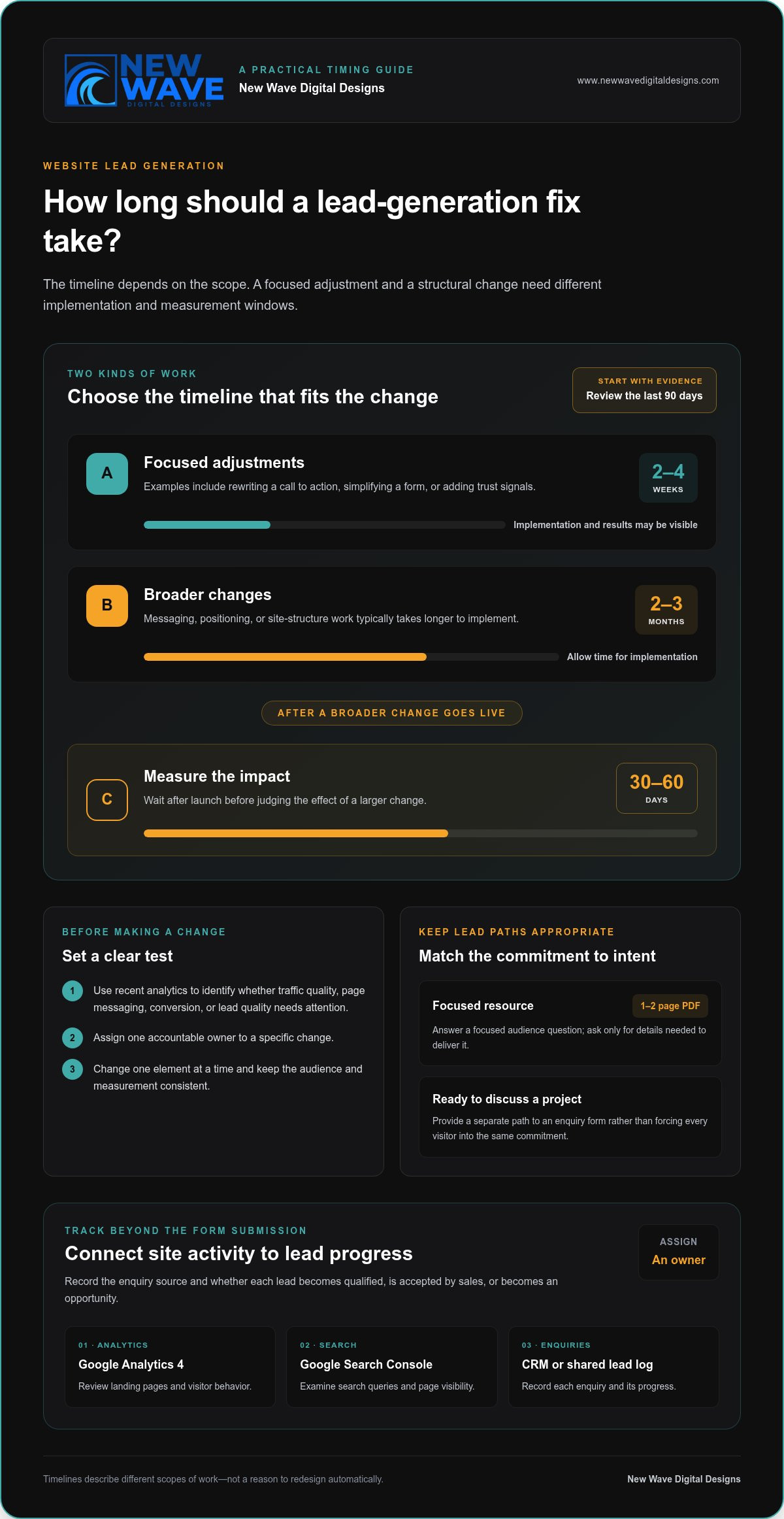
Set a realistic measurement window before changing your site. Quick adjustments, such as rewriting calls to action, simplifying forms, or adding trust signals, can produce results in 2-4 weeks. Changes to messaging, positioning, or the site’s structure typically take 2-3 months to implement. After larger changes go live, allow another 30-60 days to measure their impact.

Those timelines describe different kinds of work, not a reason to redesign automatically. First, review the last 90 days of analytics and identify whether traffic quality, page messaging, conversion mechanics, or lead quality needs attention. Then assign one accountable owner to a specific change and set its measurement window. If traffic is low or poorly matched to the offer, rebuilding pages alone won’t address the underlying reasons.

Lead magnets can give visitors different levels of commitment. A useful starting option is a 1-2 page PDF that answers a focused question for your audience. Offer it on a relevant article, and make the form request only details needed to deliver it. Visitors who are ready to discuss a project can follow a separate path to an enquiry form, rather than being pushed through the same commitment level.

Tracking should continue after submission. Use Google Analytics 4 to review landing pages and visitor behavior, Google Search Console to examine search queries and page visibility, and a CRM or shared lead log to record each enquiry. Assign an owner, record the enquiry’s source, and track whether it becomes qualified, accepted by sales, or an opportunity. A defined process makes it easier to distinguish a traffic issue from a follow-up gap.

To attract more qualified website leads, create SEO content around the questions buyers ask before choosing a service. Link each article to a relevant service page, and make sure the page delivers on the search query’s promise. When testing changes, compare versions with one element changed, such as the headline or call to action. Keep the audience and measurement consistent, then use what you learn to guide the next test.

Before beginning a redesign, check whether a targeted change can address the problem. Structural issues may justify broader work; an isolated form or message problem usually calls for a focused fix. For planned website lead-generation improvements, keep the scope tied to the evidence, the buyer’s needs, and the sales process.

3. Website speed, mobile usability, and technical performance

More than 50% of web traffic comes from mobile devices. A visitor arriving from a phone should be able to understand the page, use its navigation, and reach a useful next step without pinching or hunting. Test important pages on an actual phone, not only in a desktop preview.

Speed shapes that first interaction. A mobile page taking more than three seconds to load can lose visitors before they see its content. A one-second delay in website loading can reduce conversions by 7%. Start with your homepage, top landing pages, and contact form, then identify which elements delay their visible content.

Google’s Core Web Vitals guidance helps assess loading, responsiveness, and visual stability. Use these targets to identify technical work: Largest Contentful Paint under 2.5 seconds, Total Blocking Time under 200ms, and a mobile PageSpeed score above 70. A time to first byte above 800ms can flag an underpowered host. These measures point toward issues to investigate; they don’t replace testing the actual visitor journey.

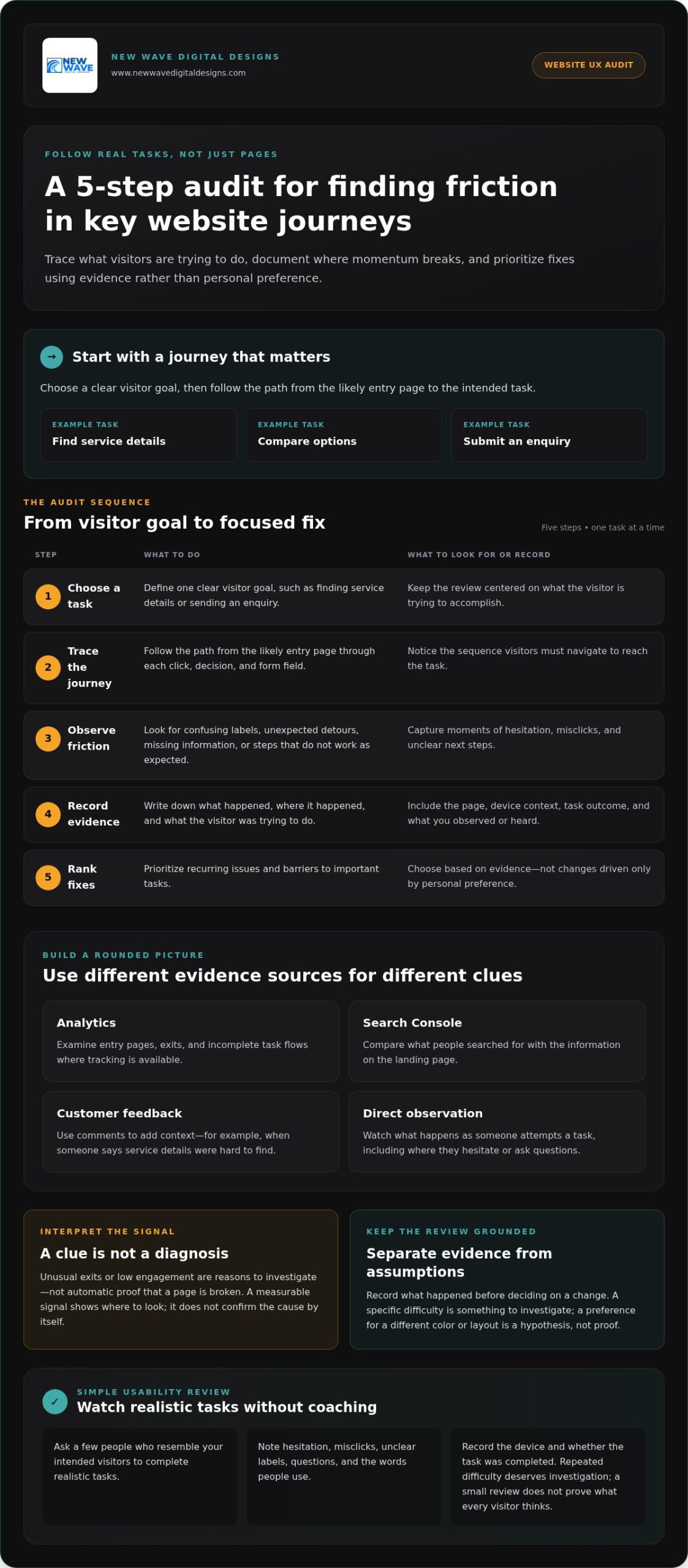
Responsive design should do more than shrink a desktop layout. Check that headings wrap cleanly, buttons are easy to tap, and forms fit the screen without sideways scrolling. Then follow the route from a service page to its enquiry form. If phone users need to zoom, dismiss an obstructive banner, or hunt for the next step, simplify the journey.

Review how content appears on mobile, too. A long case study needs readable paragraphs, clear section labels, and visible links to related services. Keep essential details near the top, including what the business offers and whom it helps. This makes key information easier to find without forcing visitors through a dense wall of copy.

Use a practical diagnostic sequence: test your most visited pages, check mobile loading and layout, then submit each form yourself. Note where the experience slows down or breaks. If large media files make a case study slow to load, optimize them; if the mobile menu hides the enquiry route, adjust its layout. Fix the observed problem before considering a wider redesign.

  • Check mobile loading and layout on priority pages.
  • Use Core Web Vitals to locate performance issues.
  • Complete the enquiry journey on a phone, including form submission.

After each technical change, repeat the same tests and review how visitors use the page. Speed matters most when visitors can also find relevant information and complete the intended action. Track technical performance alongside enquiries, so improvements support lead generation rather than becoming an isolated score.
5 fixes to consider when your website isn’t generating leads

4. Building buyer trust and supporting decisions

Visitors need to understand your offer before they can trust it. Make the homepage messaging answer three questions: what you do, whom you help, and why visitors should keep reading. A headline should communicate what the business does, who it serves, and where within five seconds. Remove broad claims that leave people guessing, and explain the specific problem your service solves.

Support each claim with relevant evidence. Use testimonials that describe the customer’s situation, the work completed, and the outcome they experienced. A vague “great service” quote gives less context than one that explains how a project addressed a particular need. Place testimonials beside the service or decision they support, instead of gathering every quote on a disconnected page.

For a more considered purchase, case studies can show how a business approaches real challenges. Structure each one around the customer’s starting point, the decisions made, and the result. In complex B2B sales, a buying group may include multiple people who need different evidence. A technical lead may want process details, while a decision-maker may need to understand business value. Use analytics and sales conversations to learn which questions visitors seek to answer.

Local trust signals matter when customers want to know whether a business serves their area. Show the relevant location or service area clearly, and keep business details consistent across the site. Pair those details with local testimonials or case studies when available. A visitor should not have to search several pages to establish where a business works or whether its offer fits their needs.

Make proof easy to assess. Use named customer testimonials only with permission, and keep quotations faithful to the customer’s words. Label case studies clearly, distinguish examples from guarantees, and explain the scope of any result. If you display credentials or partner logos, explain what they represent. A badge without context may add visual weight without addressing a buyer’s concern.

Review the homepage from a first-time visitor’s perspective. In 10 seconds, can someone identify the business’s location, price range, and differentiator? If not, bring those details into clearer view. Ask a colleague unfamiliar with the site to describe its offer after a brief glance. Their response can reveal whether the design and messaging communicate the intended meaning.

Finally, make trust actionable. Place relevant proof near the next step, such as a testimonial beside a service enquiry form. Keep any response-time statements realistic and make promises only when you can consistently meet them. Clear evidence, accurate details, and credible expectations help buyers make informed decisions.

5. Alignment between website and sales process

A website can attract visitors and collect enquiries yet still lose potential sales. The gap often appears after the click: an ad promises one thing, the landing page says another, or no one owns the incoming enquiry. Treat lead generation as a connected path from first message to sales outcome, not just a count of form submissions.

Map the buyer’s journey from each major channel. If a Google Ads campaign promotes a specific service, send visitors to a page that continues the same promise. Explain the service, answer likely buyer questions, and offer a relevant next step. Sending everyone to the homepage makes visitors search again for the information that earned their click.

Next, write down what happens after someone submits a form. Assign an owner for reviewing each enquiry, define how it is routed, and set a clear follow-up process. Every website enquiry should trigger an immediate response. That response can acknowledge the request, explain what happens next, and give the prospect a useful way to continue the conversation.

Make the handoff visible to both marketing and sales. Track each enquiry through qualification, sales acceptance, and opportunity creation. Record its source, landing page, requested service, and outcome in a shared CRM or lead log. These stages help show whether the problem is unqualified traffic, a poor page-to-offer match, or a follow-up gap. A form fill is a starting signal, not proof of sales progress.

Use sales conversations to improve your website strategy. Ask the team which questions prospects raise, what concerns delay decisions, and which details help a lead move forward. Then update the homepage, service pages, and relevant content to answer those questions. For example, if prospects repeatedly ask what a project includes, explain the process and deliverables before the enquiry step. Useful content supports real decisions, not simply a higher page count.

Close the loop with regular reviews. Compare lead sources with qualification and opportunity outcomes, then share what you learn between marketing and sales. If a channel generates enquiries that rarely fit, refine its targeting or destination page. If qualified leads stall after submitting a form, examine who owns the response and how follow-up works. Tie each improvement to a specific stage instead of relying on traffic or form totals alone.

When your website and sales process need a more coherent structure, discuss your website strategy and how its pages can better support the buyer journey.

New Wave Digital Designs: Shopify Website Design

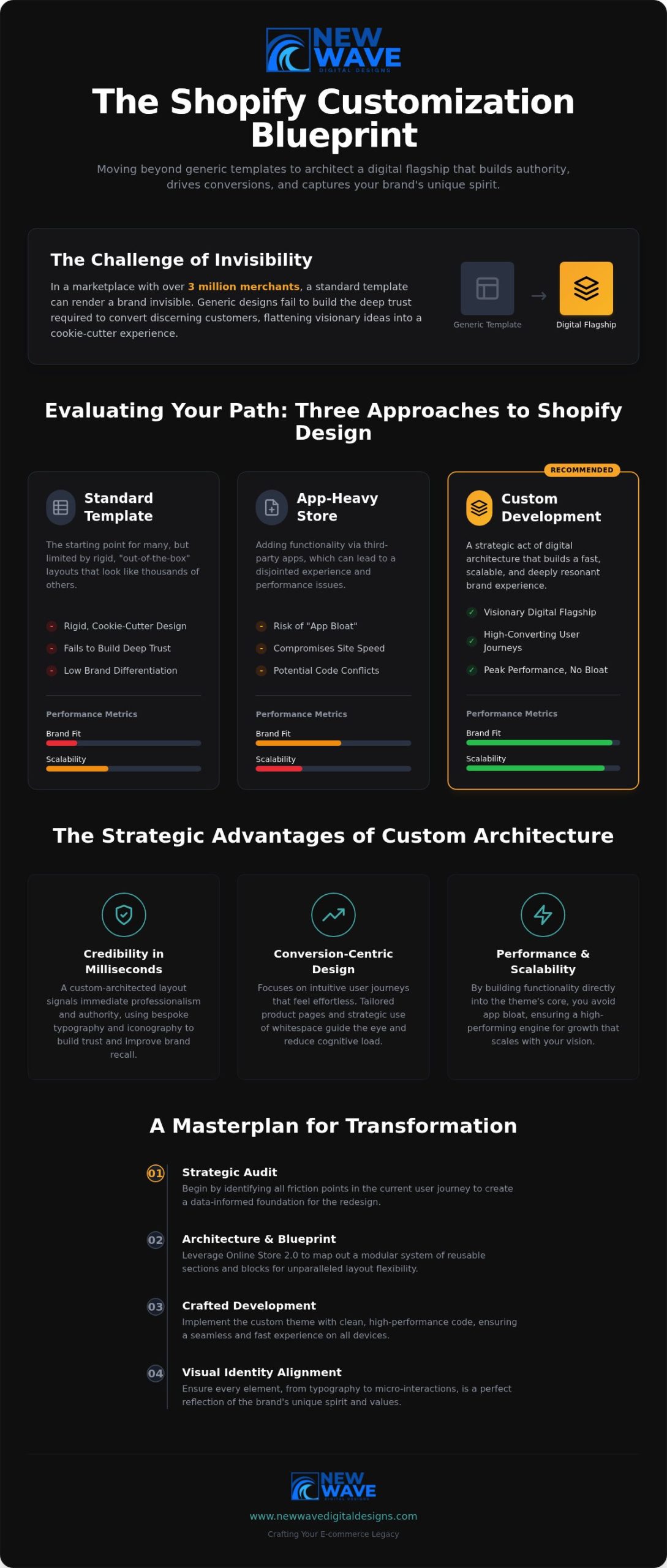
New Wave Digital Designs offers Shopify Website Design for businesses that need an online store with a clearer path from discovery to enquiry or purchase. If your analytics point to confusing page structure, inconsistent messaging, or a difficult visitor journey, a focused design review can help shape the site around your products and customers. Website Maintenance supports ongoing updates after launch, keeping key pages aligned as your business evolves.

A redesign makes sense when structural issues affect several parts of the customer journey. If the problem is limited to one form or page, a targeted improvement may be the better first step. Choose the change that addresses the evidence you’ve gathered and supports your sales process.

Contact New Wave Digital Designs to discuss your website goals and next steps.

Choose the next step that fits your site

Your next move doesn’t need to start with a blank canvas. Decide whether your current site needs focused refinements or a new structure that better reflects how customers explore and choose your services. This distinction keeps improvements grounded in your business priorities.

If you’re weighing what to do when your website isn’t generating leads, identify where the experience stops matching customer expectations. A new design may suit a business whose platform or page structure no longer supports its goals. New Wave Digital Designs offers Shopify Website Design, WordPress Website Design, and SquareSpace Website Design, with each project shaped around the platform and business needs.

Bring your goals, customer questions, and strongest sales insights into that conversation. They can help guide a website experience that feels cohesive and makes the path forward clearer. Contact New Wave Digital Designs to discuss your website and take the next step with confidence.

Frequently Asked Questions

How do you decide what to fix first?

Fix the earliest point where the buyer journey breaks. If the right audience never reaches relevant pages, examine acquisition; if visitors arrive but don’t engage, review the page experience; if enquiries come in but stall, inspect follow-up. Compare customer questions with the pages they visit, then make one change that addresses the clearest obstacle. This keeps your effort focused on a cause, not a cosmetic preference.

How many leads should a small business website generate?

There isn’t one useful target for every small business. Lead volume depends on audience size, traffic relevance, the offer, and how many enquiries your team can handle. A site that attracts a few highly suitable prospects may serve the business better than one that generates more unqualified requests. Set a baseline using your own enquiry and sales history, then assess whether leads meet your goals.

Is the problem my website or my marketing?

The issue may be the traffic, the page, or a disconnect between them. Compare the promise in your ads, search listings, or email campaigns with the page visitors land on. If the wording attracts people seeking something the page doesn’t address, the traffic and destination are misaligned. If the audience is appropriate but visitors leave without taking a relevant action, inspect the page itself. Review each channel separately before making broad changes.

Why is my website getting traffic but no leads?

Traffic alone doesn’t show whether visitors are potential buyers or can find a suitable next step. A blog post may attract people seeking general information, while a service page should address purchase concerns. Check which pages attract visits, what search intent brought people there, and whether the content connects naturally to an offer. Test the enquiry journey yourself, too, since a broken link or form can block interested prospects.

How do you diagnose why a website is not generating leads?

Trace a visitor’s path from the entry page through key interactions to the enquiry stage. Review landing-page behavior, traffic sources, form submissions, and where visitors exit. Then test the site as a prospective customer: follow a navigation link, complete a form, and check that the confirmation appears. Compare tracked submissions with actual enquiries to identify measurement gaps before interpreting a low conversion count.

How do you optimize landing pages, forms, and calls to action for more leads?

Make the landing page match the message that brought visitors there, then remove distractions around its main action. For example, a page promoting an estimate should explain what it covers and what information the form needs. Test one meaningful adjustment at a time, such as changing the opening message or removing an unnecessary field. Review completed enquiries as well as form starts to see whether the change attracts suitable prospects.

How does website speed and mobile usability affect lead generation?

A slow or awkward mobile experience can stop visitors before they understand your offer or finish an enquiry. Test key pages on a phone, including dropdown menus, phone links, and form fields. Check that buttons remain visible when the keyboard opens and that text can be read without zooming. If a page is difficult to use, identify whether loading, layout, or an interactive element is the obstacle, then address it.

How can you tell whether website leads are high quality and converting into sales?

Define lead quality using criteria sales can apply consistently, such as service fit, project readiness, and the information provided. Record each enquiry’s source and track its progress through qualification, sales acceptance, and opportunity stages. Review outcomes with the sales team to identify which pages and campaigns attract prospects who advance. This separates useful demand from form submissions that don’t match your offer or become sales conversations.

Improve Google Ads Conversion Rate With Relevant Keywords

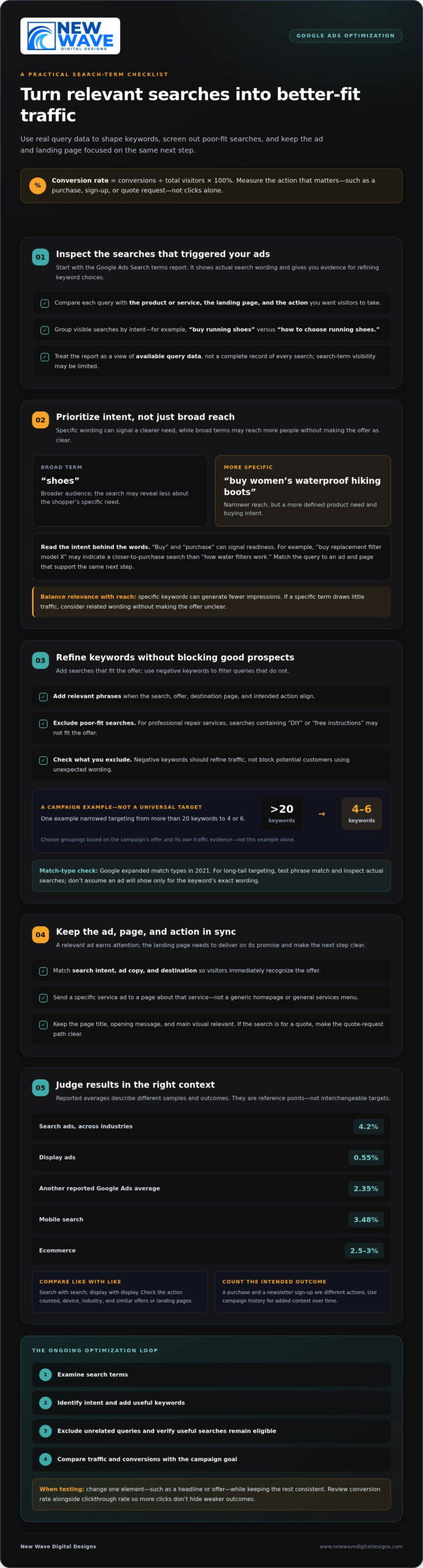
A click is not a conversion; the action that follows is what counts. Google Ads conversion rate is the percentage of people who click an ad and complete a desired action, calculated by dividing conversions by total visitors and multiplying by 100%. To understand how to improve Google Ads conversion rate, first make sure you’re measuring the action that matters to your business.

If your ads attract clicks but few people buy, sign up, or request a quote, the gap may be between the search, the ad, and the landing page. Measuring those steps gives you a practical starting point, rather than leaving you to judge performance by clicks alone.

This guide explains how conversion tracking works, how to interpret the rate in context, and how to refine keywords, landing pages, and calls to action. You’ll see how each element can help bring the right visitors closer to taking the next step.

Key Takeaways

  • Measure conversion rate by connecting ad clicks to meaningful actions, such as purchases, sign-ups, or quote requests.
  • Use search-term insights to refine keyword targeting and exclude searches unlikely to lead to action.
  • Judge performance in context: search and display campaigns can behave differently, and results depend on the audience and offer.
  • Make each landing page deliver the same message and offer as the ad that brought visitors there.
  • Use a clear, action-focused call to action, then test variations to learn which best encourages the next step.

1. Adding relevant search terms as keywords

Start with the Search terms report in Google Ads. It shows the actual words people searched before your ads appeared, providing evidence to refine keyword choices. Compare each search with the product or service promoted, its landing page, and the action you want visitors to take. A search that aligns with all three is a stronger candidate than one that merely shares a broad topic.

Specific keywords can attract people with clearer intent, but they may generate fewer impressions than general terms. For example, “shoes” reaches a broad audience, while “buy women’s waterproof hiking boots” signals a more defined need. The longer phrase narrows who sees the ad, so weigh relevance against reach. If a specific term draws little traffic, consider related wording rather than broadening the keyword so much that the offer becomes unclear.

Search intent matters as much as the words themselves. Someone searching “buy replacement filter model X” may be closer to purchasing than someone searching “how water filters work.” Action words such as “buy” and “purchase” can signal readiness. Match those terms to an ad and page that support the same next step, such as ordering the exact product or requesting a quote.

Use negative keywords to screen out searches that don’t fit your offer. If a paid campaign promotes professional repair services, searches containing “DIY” or “free instructions” may be poor matches. After reviewing the report, add irrelevant terms as negatives, then check that useful searches aren’t being excluded too. Negative keywords should refine traffic, not block potential customers who use unexpected wording.

Reviewing search terms is an ongoing optimization step, not a one-time setup. Add relevant phrases as keywords, exclude unrelated queries, and revisit results as new searches appear. One campaign example reduced targeting from more than 20 keywords to 4 or 6; that illustrates a possible refinement, not a universal target. Choose keyword groupings according to the campaign’s offer and evidence from its own traffic.

Match types also shape reach. Google expanded match types in 2021, and the resulting changes may still influence which searches trigger ads. For long-tail targeting, test phrase match and inspect the search terms report to see whether the queries remain aligned. Don’t assume a chosen keyword will show your ad only for its exact wording. Review actual searches, then adjust keywords and negatives based on relevance and conversion activity.

Use a simple cycle: examine search terms, identify intent, add useful keywords, and exclude poor-fit queries. Then compare the traffic and conversions with the campaign’s goal. This measured approach helps optimize keyword coverage without mistaking more impressions for success.

2. Average conversion rates for search and display ads

Conversion benchmarks vary by campaign type and audience. Reported figures include a 4.2% average for search ads across industries and 0.55% for display ads. Another reported average for Google Ads is 2.35%, while mobile search is reported at 3.48%. Ecommerce conversion rates average 2.5-3%. These figures describe different samples and contexts, so they aren’t interchangeable targets.

Compare like with like: review search campaigns against search campaigns, and display campaigns against display campaigns. Check which action is counted, the device, and the industry before drawing conclusions. A purchase is not the same outcome as a newsletter sign-up. Your campaign history also provides context, especially when comparing similar offers and landing pages over time.

Use the Search terms report to assess which queries trigger ads and which lead to conversions. Search-term visibility may be limited, so treat the report as a view of available query data, not a complete record of every search. Group visible terms by intent, such as “buy running shoes” and “how to choose running shoes,” then compare conversion activity for each group.

To improve ad copy, responsive search ads, and offers, provide headline and description variations that reflect search intent and the landing-page offer. Google’s machine learning optimizes eligible combinations over time. Keep the message and offer consistent, then review which combinations support conversions.

Smart Bidding strategies such as Target CPA use conversion-focused bidding to pursue the campaign’s target cost per action. Choose a meaningful conversion action, review its recorded performance, and assess whether the target reflects the value of that action.

To find higher-converting traffic, compare search terms with audience segments and location targeting in your campaign. For example, review whether quote requests come from particular service areas or audience groups, then adjust targeting based on conversion results.

Run a Google Ads experiment by changing one element, such as a headline or offer, while keeping the rest of the test consistent. Compare variations, rotate ads, and review conversion rates alongside clickthrough rates so increased clicks don’t obscure weaker outcomes.

3. Landing page and ad message alignment

A relevant ad earns attention, but the landing page must deliver on its promise. If someone searches for a particular product, clicks an ad about it, and lands on a generic homepage, the next step becomes harder to follow. Align search intent, ad copy, and destination so visitors recognize the offer immediately. This connection creates a clearer experience and a more focused path to purchase.

Start by matching the page to the ad group’s central theme. For an ad promoting a specific service, use a landing page that explains that service rather than sending every visitor to a general services menu. Keep the page title, opening message, and main visual relevant to the search. A visitor looking for a quote should see a clear way to request one, not a page focused on an unrelated offer.

Offer consistency is equally important. If an ad promises a 20% discount, the landing page should show that same discount and explain how it applies. If the ad highlights a particular product feature, the page should make that feature easy to find. Differences between the ad and page can create doubt, especially when visitors need to search for the terms that first prompted their click.

Reduce friction by making the next step visible and the page easy to navigate. Put essential product or service details near the top, organize supporting information under clear headings, and make the main action easy to find. For example, a page promoting a consultation can explain what the visitor will receive, then show the request form without sending them through several menus. Check load speed too, since a slow page can interrupt the visit before the offer appears.

  • Match the message: Use the same product, service, and offer in the ad and page.
  • Make details accessible: Place relevant information where visitors can find it quickly.
  • Remove obstacles: Keep navigation clear and the intended action easy to reach.

Review the landing page from the visitor’s perspective after each campaign change. Search a promoted term, read the ad, and follow its destination. Ask whether the page answers the search, delivers on the ad’s promise, and makes the next action clear. If a campaign introduces a new offer, update the corresponding page before directing traffic there. This sequence helps maintain relevance throughout the journey, from search to decision.

When visits don’t lead to action, compare the ad’s promise with the page’s content before changing targeting. A relevant message and a well-structured destination give interested visitors a coherent experience, helping them evaluate the offer and decide whether to proceed.

Improve Google Ads Conversion Rate With Relevant Keywords

4. Specific and emotionally compelling calls to action

A clear call to action tells visitors what to do next. “Get a quote,” “Book a demo,” and “Shop the collection” describe distinct actions; “Learn more” may leave the next step less obvious. Choose wording that matches the offer and the visitor’s intent, so the action feels like a natural continuation rather than a demand.

Give people enough information to decide before asking them to act. For a demo, explain what it covers and who it suits, then use “Book your product demo.” For a newsletter, say what subscribers will receive, then invite them to “Get practical marketing tips.” Specific context makes the action meaningful and helps visitors understand what happens after the click.

Emotional resonance comes from relevance, not pressure. Someone browsing a gift page may respond to “Find a thoughtful gift,” while someone comparing software may prefer “See how the platform works.” Let the offer, audience targeting, and search intent guide the tone. Avoid urgency claims or promises the business can’t support.

  • For a purchase: “Choose your color” or “Add to cart.”
  • For an inquiry: “Request a project quote” or “Tell us what you need.”
  • For consideration: “Compare plan features” or “View the product details.”

Place the primary action where visitors can find it when they’re ready to decide. On a product page, put a purchase button near the item’s essential details. On a service page, a request form can follow a concise explanation of the service. Keep secondary actions visually distinct so “View examples” doesn’t compete with “Request a quote.”

Test alternative calls to action with an A/B comparison. For example, compare “Request a quote” with “Plan your project” while keeping the audience, landing page, and offer consistent. Review completed actions, not just clicks: a button can attract attention without producing the conversion the campaign seeks. Record the wording and result, then use the better fit as the starting point for your next test.

Make the action easy to complete after the click. If “Book a demo” opens a form, ask only for the information needed to arrange it, and label each field clearly. If “Shop now” leads to a product, make the item and its purchase options easy to identify. Matching the CTA to the destination creates a clear path from browsing to response.

Review CTA language whenever the offer or campaign targeting changes. An invitation to “Download the guide” won’t fit a page that now promotes a consultation. Keep the call to action, ad promise, and page destination aligned, then test changes against the same conversion goal.

5. Google Ads conversion rate definition and formula

Conversion rate describes how often ad traffic completes a chosen action. That action could be an online purchase, demo booking, phone call, quote request, newsletter sign-up, or gated-asset download. Choose an action that reflects meaningful progress, rather than counting every visit as success.

Use this formula: conversion rate = conversions ÷ total visitors × 100%. For example, divide recorded quote requests by the visitors who arrived from ads, then multiply by 100%. The result expresses how often that traffic completed the selected action. Keep the numerator and denominator tied to the same campaign and reporting period.

Conversion tracking connects ad interactions with actions on your website, such as purchases or sign-ups. Before judging a campaign, confirm that tracking records the intended action and that the report uses the right conversion goal. If purchases and newsletter sign-ups both count, the combined rate describes two different outcomes, not purchase performance alone. Separate goals when you need to understand each result.

A rate can exceed 100% when Google Ads counts multiple conversions for each ad interaction. That does not automatically indicate an error; it may reflect repeat actions, depending on the selected conversion settings. For a purchase-focused campaign, examine purchase counts separately. For a lead campaign, distinguish completed quote requests from other tracked actions.

In the United States, Google Ads policies and privacy requirements for data collection, consent, and use can affect which conversions tracking records. Configure measurement to respect user permissions and platform policies, then interpret reported conversions within those limits.

Allow enough time for conversions to appear in reporting before interpreting a campaign change. A visitor might click today and submit a quote request later, so a recent period can undercount actions still in progress. Check whether the data includes the full path from ad click to conversion, and compare equivalent periods with consistent goals and settings.

The data needed to draw a conclusion depends on how often the chosen action occurs and how consistently tracking captures it. A campaign with infrequent purchases needs more observation than one generating regular sign-ups before a pattern becomes persuasive. Avoid reacting to a single conversion or short-lived shift; look for a stable direction across comparable traffic and campaign conditions.

To improve your conversion rate, use the formula as a diagnostic tool: identify the action, verify its tracking, and examine the traffic that leads to it. Review your Google Ads measurement approach to make campaign decisions from clearer conversion data.

New Wave Digital Designs: Shopify Website Design

New Wave Digital Designs can help when your campaign sends visitors to an online store that needs a clearer, more relevant experience. Its Shopify Website Design service can shape product pages around the offer in your ads, creating a focused path from product details to purchase. WordPress Website Design and SquareSpace Website Design are also available for sites on those platforms. Website Maintenance can support your existing site as its content and needs evolve.

Consider this next step when your ads attract relevant traffic, but visitors struggle to understand the offer or take action on the destination page. A cohesive design can better align the message, page structure, and next step. Contact New Wave Digital Designs to discuss your website needs.

Make Your Next Improvement Deliberate

Better campaign performance grows from observation and thoughtful adjustment. Choose one point in the visitor journey that could be clearer, make a focused change, and assess how people respond. This disciplined process turns “how to improve Google Ads conversion rate” into practical work, not a search for a single clever setting.

Consider whether your website gives each campaign a destination that reflects its purpose. New Wave Digital Designs offers Shopify Website Design, WordPress Website Design, and SquareSpace Website Design, shaping sites around their platform and business goals. Considered design can give your advertising a cohesive destination for interested visitors.

When you’re ready to explore how your website can better support your campaigns, contact New Wave Digital Designs. Take the next step with clarity, and keep building an experience that earns each visitor’s attention.

Frequently Asked Questions

What is conversion rate?

Conversion rate is the proportion of ad-driven visitors who complete a defined business goal. For example, a visitor who clicks an ad and submits a lead form can count as a conversion. The rate distinguishes traffic that advances a business objective from traffic that merely arrives. Its meaning depends on the action selected, so clarify whether you’re measuring purchases, qualified leads, or another outcome.

What Qualifies as a Conversion Activity?

A conversion activity is a meaningful action you choose to measure, such as an online purchase, subscription upgrade, demo booking, phone call, free-account sign-up, quote request, newsletter subscription, or gated-asset download. Select actions tied to a business goal. For example, a retailer may prioritize completed purchases, while a consultant may track qualified quote requests. Don’t treat low-intent interactions, such as viewing a page, as equivalent to completed sales.

Why the low CVR?

A low conversion rate can point to a mismatch between the search and the completed action. Check whether the ad attracts the intended audience, the page answers their needs, and the form or checkout works as expected. A form asking for unnecessary details, for example, may discourage submissions. Compare mobile and desktop performance, and confirm that tracking records successful completions rather than button clicks alone.

What is a good Google Ads conversion rate by industry and campaign type?

There isn’t one benchmark that fits every industry and campaign. Reported averages include 4.2% for search ads across industries, 0.55% for display ads, and 2.5-3% for ecommerce conversion rates. Compare only similar campaign types and conversion goals. A search campaign measuring purchases shouldn’t be judged directly against display ads measuring newsletter sign-ups. Use benchmarks as context, then assess progress against your own campaign’s past performance.

How do you calculate Google Ads conversion rate, and which conversions should count?

Divide conversions by the relevant total visitors, then multiply by 100%. Choose actions that represent real progress toward your goal, such as completed orders or qualified inquiries. If you count several actions together, the resulting rate may obscure which one drives value. For clearer reporting, keep purchases, form submissions, and other goals distinct, and ensure the visitor total matches the campaign and reporting period you’re evaluating.

How do you set up and troubleshoot Google Ads conversion tracking and GA4 imports?

Define the desired action first, then configure tracking to record its successful completion. For a GA4 import, link the relevant accounts and select the event that represents the goal, such as a completed purchase. Test the full journey from ad landing page to confirmation, and compare recorded events across platforms. If counts differ, review event triggers, attribution settings, duplicate tags, and whether both systems measure the same action.

How can you improve Google Ads conversion rates with better keyword targeting and negative keywords?

Build keyword groups around distinct offers and search intent rather than placing unrelated terms in one group. Review search terms for patterns that indicate research, employment, or a different product need, then exclude unsuitable queries with negative keywords. For example, a paid repair service might exclude searches clearly seeking free do-it-yourself instructions. Keep useful variations eligible, and check query quality again after changes affect campaign traffic.

How do landing page speed, relevance, and design affect Google Ads conversion rates?

A slow or confusing page can interrupt a visitor before they complete an action. Check load performance on mobile and desktop, then test the page as a new visitor. Keep the headline, product details, and offer relevant to the ad, and make the next step easy to find. Clear navigation, readable content, and a working checkout or form help remove friction between arrival and conversion.

How to Reduce Shopping Cart Abandonment: A Practical 2026 Guide

What if the best way to recover abandoned carts isn’t a discount, but a clearer checkout? If you’re wondering how to reduce shopping cart abandonment, start by finding out why shoppers leave. Unexpected delivery costs, limited payment options, confusing forms, or simply browsing can all lead to an unfinished order. Treating every exit as a request for a discount can cut into margins without addressing the friction that matters.

It’s understandable to look for one quick fix, especially when cart exits are difficult to explain. But checkout is part of the wider ecommerce experience, shaped by the information shoppers see and the steps they’re asked to take. The most useful improvements begin with evidence, not assumptions.

This guide shows you how to identify where shoppers drop off, form testable explanations, and prioritize changes by customer impact, effort, and evidence. You’ll also learn how to test checkout improvements and measure what changes, from making delivery details easier to find to simplifying payment and form choices. The goal is a repeatable process that makes buying clearer and easier without relying on blanket discounts.

Key Takeaways

  • Learn how to reduce shopping cart abandonment by tracing exits across cart, checkout, and purchase steps instead of treating every unfinished order alike.
  • Use analytics, customer feedback, and usability observations to investigate potential friction before choosing a fix.
  • Separate checkout improvements that prevent barriers from recovery efforts that invite shoppers back, then measure each by its intended outcome.
  • Follow a repeatable test process: establish a baseline, form a hypothesis, prioritize a change, and review the results.
  • Shape checkout as part of the wider ecommerce experience, aligning product, delivery, payment, and policy information with customer needs.

How to Reduce Shopping Cart Abandonment Starts with Measuring the Problem

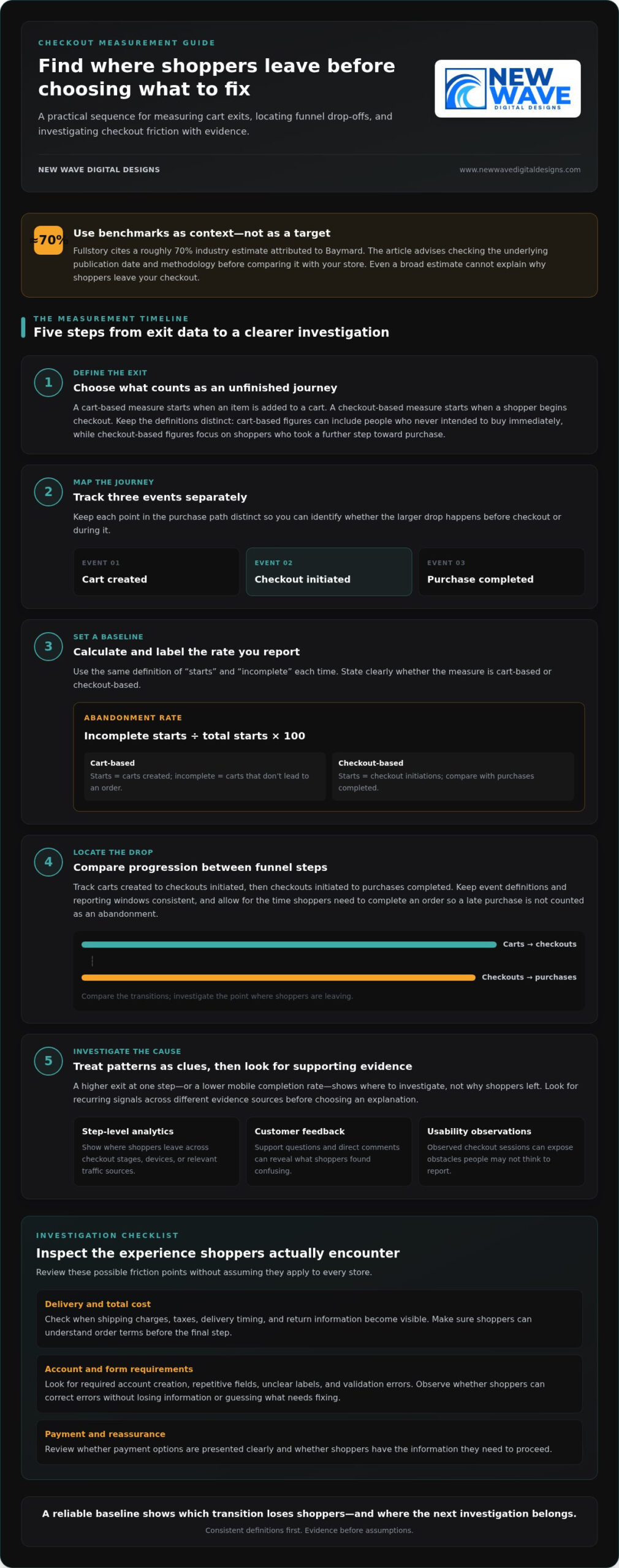
Cart exits are common, but the reasons behind them differ from store to store. A shopper may add an item and leave to compare options, or begin checkout and stop when a required step creates friction. Those actions can look alike in an overall abandonment figure, yet they raise different questions. To learn how to reduce shopping cart abandonment, first define what counts as an exit and measure the same events consistently.

Map the path from a shopper’s first cart action to a completed order. Keep cart creation, checkout initiation, and purchase completion as distinct events. This makes it easier to see whether the larger drop happens before checkout or during it, rather than treating every incomplete journey as the same problem.

What does shopping cart abandonment mean?

Shopping cart abandonment is when a shopper leaves without completing the intended transaction. The rate depends on where you begin counting. A cart-based measure starts when an item is added to a cart; a checkout-based measure starts when a shopper begins checkout. The first can include people who never intended to buy immediately, while the second focuses on shoppers who took a further step toward purchase.

Benchmarks can mislead if they use different definitions, time windows, or analytics events. Fullstory cites a roughly 70% industry estimate attributed to Baymard. Treat it as context, not a performance target: check the underlying publication date and methodology before comparing it with your store’s data. Baymard’s broader estimate aggregates 50 studies, but it still can’t explain why shoppers leave your particular checkout.

Which numbers reveal where shoppers leave?

Abandonment rate is the share of carts or checkouts that don’t result in a completed purchase, calculated as incomplete starts divided by total starts, multiplied by 100. For a cart-based rate, define “starts” as carts created and “incomplete” as those that don’t lead to an order. For a checkout-based rate, use checkout initiations and the purchases completed from them. State which version you report.

Track that overall trend alongside progression between funnel steps. For example, measure carts created to checkouts initiated, then checkouts initiated to purchases completed. Use consistent event definitions and a consistent reporting window, and allow for the time it takes shoppers to complete an order. Otherwise, a late purchase may be incorrectly counted as an abandonment.

  • Compare rates by device, traffic source, and product category to spot patterns worth investigating.
  • Check that each segment uses the same events, attribution rules, and time window.
  • Treat a difference as a clue, not proof of cause. A lower mobile completion rate, for instance, signals where to investigate, not why shoppers left.

A reliable baseline shows which transition loses shoppers and helps direct your next investigation to the right part of the journey.

Find the Checkout Friction Behind Shopping Cart Abandonment

A sharp drop at a checkout step can point to friction, but it doesn’t identify the cause on its own. Shoppers may be comparing prices, waiting to decide, or interrupted before they can finish. Treat each possible explanation as a hypothesis to test. That distinction is central to how to reduce shopping cart abandonment without changing parts of checkout that aren’t causing the problem.

Look for patterns across different kinds of evidence. Step-level analytics show where shoppers leave; support questions and direct feedback reveal what they found confusing; usability observations can expose obstacles people may not think to report. When the signals point in the same direction, you have a stronger basis for choosing what to investigate next.

How do you identify the point where shoppers hesitate?

Compare exits across checkout stages, devices, and relevant traffic sources. If a particular step has higher exits on mobile, inspect how it appears and works on a smaller screen. Then look for supporting evidence in shopper comments, support conversations, and observed checkout sessions. A single session or segment difference is a lead, not proof that every shopper faces the same issue.

Keep alternative explanations in view. A shopper who leaves after viewing delivery options may have found the information unclear, or may simply be comparing delivery choices. Look for recurring signals before deciding which explanation is more likely.

Which checkout barriers deserve a closer look?

Review checkout as a shopper experiences it. Note when essential details appear and what shoppers must do before placing an order. The aim isn’t to assume a familiar issue applies to your store, but to spot where the journey may create uncertainty or unnecessary effort.

  • Delivery and total cost: Check when shipping charges, taxes, delivery timing, and return information become visible. Make sure shoppers can understand the order’s terms before they reach the final step.
  • Account and form requirements: Look for required account creation, repetitive fields, unclear labels, and validation errors. Observe whether shoppers can recover from an error without losing information or having to guess what needs correcting.
  • Payment and reassurance: Review whether payment options are presented clearly and whether shoppers can find relevant security and policy information. Don’t assume that adding a payment method or trust message will solve exits without evidence.
  • Performance and interruptions: Check for slow-loading steps, buttons that don’t respond as expected, and disruptions that may be more pronounced on particular devices or traffic sources.

Use your findings to describe a specific, testable concern, such as “shoppers may be leaving because delivery timing appears too late to inform their decision.” That’s more useful than labeling the whole checkout “confusing.” A thoughtfully arranged custom ecommerce website design can bring product, delivery, payment, and policy information into a more coherent experience, guided by evidence about what shoppers need.

Compare Cart-Abandonment Fixes: Prevent Checkout Friction or Recover Shoppers?

Once you have a plausible explanation for where shoppers leave, match your response to the evidence. Prevention removes a barrier from the active buying journey. Recovery uses a later reminder or return visit to re-engage someone who left. The approaches can work together, but recovery shouldn’t replace fixing a checkout obstacle that continues to affect shoppers.

When should you improve checkout rather than launch recovery marketing?

Prioritize prevention when step-level exits, feedback, or usability observations point to recurring friction during checkout. If shoppers struggle to understand delivery details or correct form errors, address that experience first. Consider recovery when the checkout is clear and functional but some shoppers still leave. A reminder may create another opportunity to complete a purchase, but it won’t remove the original barrier.

Guest checkout or simpler forms
Friction addressed: Unnecessary account steps or repetitive fields.
Evidence required: Exits at account creation or observed difficulty completing forms.
Measurement: Compare checkout completion and form-step exits.

Clearer order and delivery details
Friction addressed: Uncertainty about shipping, taxes, delivery timing, or returns.
Evidence required: Feedback or exits around the point those details appear.
Measurement: Track progression past that step and completed purchases.

Payment presentation or usability fixes
Friction addressed: Confusing payment choices, unclear errors, or a technical obstacle.
Evidence required: Payment-step exits, error patterns, or observed usability issues.
Measurement: Monitor payment completion, errors, and checkout progression.

Abandoned-cart email
Friction addressed: A shopper may need a reminder to return.
Evidence required: Available contact details and appropriate consent under applicable rules and platform requirements.
Measurement: Measure return visits and purchases attributed to the message.

Retargeting
Friction addressed: Re-engagement after a shopper leaves the site.
Evidence required: Suitable audience data, permissions, and platform eligibility.
Measurement: Assess return visits and completed purchases against campaign exposure.

How do common interventions differ in effort and trade-offs?

Guest checkout and form simplification change the steps a shopper must complete. Clearer delivery or payment information changes what shoppers understand before deciding. Recovery email and retargeting instead depend on being able to reach eligible shoppers later. Their requirements differ: email needs usable contact information and appropriate permission, while retargeting depends on audience data and platform rules. Implementation effort varies by store, platform, and the change involved.

Discounts aren’t a default solution. First establish that price is a verified barrier, then weigh any offer against its effect on margin. A discount may encourage a return without correcting unclear terms or a difficult checkout. Choose the smallest change that addresses the evidence, then measure its intended outcome. Custom ecommerce website design can align checkout details with the broader customer journey.

How to Reduce Shopping Cart Abandonment: A Practical 2026 Guide

How to Test Shopping Cart Abandonment Improvements Step by Step

A checkout change is a hypothesis, not a result. A clear testing sequence helps you learn whether an improvement addresses the friction you observed and prevents competing changes from obscuring the lesson. This is how to reduce shopping cart abandonment through deliberate iteration rather than guesswork.

Use this workflow to move from a customer signal to a measured decision:

  1. Set a baseline. Record current checkout progression and completed purchases before making changes. Keep event definitions, reporting windows, and relevant audience segments consistent so you can make a fair comparison.
  2. Gather evidence. Bring together analytics, shopper feedback, support questions, and usability observations. Look for a recurring issue, not just one unusual session or an isolated comment.
  3. Write a hypothesis. State the suspected barrier, the change you propose, and the outcome you expect. For example: “If delivery timing is easier to find before payment, more shoppers will progress from delivery selection to purchase.”
  4. Prioritize the change. Rank possible improvements by customer impact, strength of evidence, and implementation effort. Start with a repeated issue supported by multiple signals, especially if it affects a meaningful checkout step.
  5. Run a focused test. When practical, change one meaningful element at a time, such as the placement of delivery information. If a change necessarily affects several connected elements, document what changed and avoid introducing unrelated updates during the test.
  6. Review and record. Compare the results with the baseline, note any changes in checkout progression and purchases, and record what the test can and can’t tell you. Keep supported improvements, revise weak hypotheses, and plan the next test.

How do you prioritize which checkout change to test first?

Choose the test with the clearest connection between observed friction and a measurable checkout outcome. A repeated form error backed by session observations may deserve attention before a speculative redesign. Balance likely customer impact against effort, then define success in advance. Clicks can help explain interaction, but they don’t establish that more shoppers completed an order.

How should you interpret and maintain test results?

Measure completed purchases alongside the relevant step-to-step progression, using the same event definitions as your baseline. Give a test enough time and shopper activity to produce useful evidence. The required duration and sample depend on traffic and conversion volume, so avoid arbitrary cutoffs. Don’t declare a winner from a small sample or changes made simultaneously.

An inconclusive result is still useful if you capture what was tested, the evidence behind it, the outcome, and any limitations. Revisit the assumption, check whether the change worked as intended, and continue monitoring the journey after implementation. A disciplined testing process can turn each result into a clearer foundation for the next improvement.

Build a More Resilient Ecommerce Checkout with Thoughtful Website Design

Checkout isn’t a standalone form. It’s the final part of a connected ecommerce experience, shaped by what shoppers learn about a product, delivery, payment, and store policies before they’re ready to buy. Thoughtful design brings those details together, helping the journey feel coherent while reflecting the brand behind the store.

What does a considered ecommerce redesign address?

A considered redesign reviews the whole journey, from product discovery through purchase completion. It asks whether shoppers can find essential information, understand their choices, and move between pages without losing context. Clear headings, well-placed details, and consistent page patterns help customers make sense of each step. The aim is a more usable experience, not a promised conversion lift or guaranteed reduction in abandonment.

Design decisions should respond to what measurement and customer evidence reveal. If shoppers hesitate before selecting delivery, make relevant details easier to locate. If a form creates difficulty, examine its labels, sequence, and error messages. Custom website design for Shopify, WordPress, or Squarespace can bring brand presentation and practical usability into alignment. Organic SEO also supports the wider journey by helping shoppers discover relevant products and reach useful pages.

How can ongoing digital support sustain improvements?

Design changes need attentive site stewardship after launch. Website maintenance provides ongoing care, while managed hosting and security support the technical environment the site relies on. These are distinct responsibilities that help keep a website cared for as content and business needs evolve. Ongoing website maintenance services can support that continuity, while regular review helps identify when a once-clear journey needs refinement.

Improving checkout is a continuing practice. Measure the journey, make evidence-led changes, and keep the wider store experience in view. If you’re considering checkout refinements or a broader ecommerce design project, New Wave Digital Designs can help shape a website around your store’s needs.

Make Your Next Checkout Improvement Count

The next step doesn’t need to be a sweeping redesign. Choose one customer need your evidence has brought into focus, then shape an improvement that fits the store as a whole. That steady, considered approach turns learning into lasting progress and makes how to reduce shopping cart abandonment an ongoing part of building a more thoughtful ecommerce experience.

When the opportunity calls for a broader design perspective, New Wave Digital Designs creates custom ecommerce websites for Shopify, WordPress, and Squarespace, with ongoing maintenance, managed hosting, security, organic SEO, and Google Ads and Bing Ads management. Together, these services can support a cohesive path from discovery through purchase and continued site care.

Explore ecommerce website design from New Wave Digital Designs and take the next step toward a clearer, more customer-centered checkout experience.

Frequently Asked Questions

What is shopping cart abandonment?

Shopping cart abandonment happens when a shopper adds a product or starts checkout but leaves before placing an order. Someone might add an item while comparing options, while another shopper might reach payment and stop there. Those journeys have different implications, so define the starting event your report uses. Keeping that definition consistent helps you interpret changes over time instead of mistaking a shift in tracking for a change in shopper behavior.

How do you calculate the shopping cart abandonment rate?

Divide the number of carts or checkouts that don’t lead to a purchase by the total number of carts or checkouts started, then multiply by 100. If you begin counting at checkout initiation, use completed purchases from those initiated checkouts as the comparison. Apply the same event rules and reporting window each time. Before comparing your figure with an industry benchmark, check that its starting event and calculation are comparable.

What is a good shopping cart abandonment rate?

There isn’t one ideal abandonment rate for every store. Product type, shopping behavior, device mix, and measurement choices can all affect the figure. Rather than treating a published average as a target, build a reliable baseline for your own store and monitor it consistently. A more useful goal is to identify a specific step where shoppers are leaving, test a relevant improvement, and see whether that pattern changes.

Why do customers abandon shopping carts?

Customers may leave because of unclear delivery details, difficult forms, account requirements, unavailable payment choices, confusing policies, or technical problems. They may also be browsing, comparing options, or interrupted by something unrelated to checkout. For example, a spike in exits at a particular step is a reason to investigate that point, not proof of a single cause. Combine analytics with shopper feedback and usability observations to find stronger clues.

Can abandoned-cart emails reduce shopping cart abandonment?

Abandoned-cart emails can remind eligible shoppers to return, but they don’t repair a confusing or faulty checkout. Their use depends on having suitable contact information and meeting applicable consent requirements and platform rules. If you send them, assess whether they lead to completed purchases, not just opens or clicks. A shopper who returns but encounters the same obstacle may still leave, so consider recovery messages alongside improvements to the buying experience.

How can I reduce cart abandonment without offering discounts?

To learn how to reduce shopping cart abandonment without discounts, first connect shopper exits to a specific point in the journey. If customers hesitate before confirming delivery, make those details easier to understand earlier. If they struggle with a form, remove unnecessary fields or clarify error messages. Then monitor the relevant checkout step and completed orders. This focuses effort on reducing friction instead of lowering the order value without evidence that price is the issue.

Does a slow website cause shopping cart abandonment?

A slow or unreliable page can disrupt shopping, but speed shouldn’t be assumed to explain every incomplete order. Look for performance problems on product, cart, or checkout pages, then compare those findings with where shoppers leave. For instance, repeated loading issues during payment would give you a concrete area to investigate. After addressing a confirmed issue, track the same checkout events and purchase outcomes to see whether the pattern changes.

How long should I run an A/B test for checkout changes?

There’s no fixed test length that suits every store. The time needed depends on how much relevant traffic and purchase activity your checkout receives, as well as how often the measured outcome occurs. Decide what you’ll measure before the test begins, and avoid stopping because of a brief favorable fluctuation. If the result is unclear, record that limitation and gather more evidence instead of treating a small or inconclusive sample as a decisive answer.

How to Create Effective Landing Pages for Google Ads

What if your landing page is the missing link between a promising Google Ads click and a qualified lead? When visitors arrive and can’t find the offer they expected, even a polished page can leave them unsure what to do next. Learning how to create effective landing pages for Google Ads starts with treating the page as a continuation of the ad, not a separate design exercise.

If paid clicks aren’t producing enough leads or sales, it can be difficult to know which change to make first. Start by checking whether the page matches the ad, explains the offer clearly, and makes the next step easy to take. This guide walks through how to align campaign intent with page content, create a smooth experience on desktop and mobile, and measure what happens after each click. Use these steps to bring your ad, page design, and visitor needs into closer alignment.

Key Takeaways

  • Learn how to create effective landing pages for Google Ads by carrying the ad’s promise through to a relevant page and clear next step.
  • Shape the page around one offer, one audience, and one primary action, with supporting details that build confidence without competing for attention.
  • Compare a dedicated landing page with an existing website page to choose a destination suited to your campaign and visitor journey.
  • Follow a practical process from campaign research and page planning to review and launch, keeping each page tied to a specific campaign theme.
  • Measure meaningful actions and lead or purchase quality, then use documented, focused changes to guide ongoing refinement.

What makes a Google Ads landing page effective?

A Google Ads landing page is a focused destination that continues the ad’s promise and helps visitors take a relevant action. They should recognize the offer, understand why it matters, and see what to do next without searching through unrelated content. For a basic overview, see What is a Landing Page?

A landing page doesn’t have to be a separate website or a unique URL for every campaign. A homepage introduces the broader business and gives visitors several paths to explore. A landing page puts one campaign’s message and visitor need first. A relevant service page on your existing site can also work when it provides the information the visitor needs and makes the next step clear.

Message match builds confidence: when the page reflects the ad’s offer and audience, visitors can understand what happens after the click and what to do next. That alignment is central to how to create effective landing pages for Google Ads. Focus the page, but don’t hide useful information or make it difficult to navigate.

How does a landing page connect to a Google Ad?

The journey begins with a search query, continues through the ad, and ends at a page where the visitor can take an intended action, such as submitting an enquiry or making a purchase. Each step should feel connected. If an ad promotes Google Ads management, for example, the page should identify that service, explain what the visitor can learn or do, and present a relevant next step.

Google Ads reports landing page experience as one component in its Quality Score diagnostics, alongside ad relevance and expected click-through rate. Use it as a reason to investigate the visitor experience, not as a conversion guarantee or a score to optimize in isolation. If the ad and page seem misaligned, review the wording of the offer, the intended audience, and the expectations the page sets.

When is a dedicated landing page useful?

A dedicated page is useful when a campaign promotes a distinct offer or targets a specific search intent that needs a tailored explanation. An ad about Google Ads management, for instance, may lead to a page focused on that service, while a broad search for a business name may be better served by the homepage. Choose a destination based on visitor intent, the complexity of the offer, and the quality of the relevant content already on your site.

Before creating a page, ask what the visitor needs to understand before acting. A straightforward offer may need only a concise explanation and a clear action. A more considered decision may require extra context, supporting details, and answers to likely questions. In both cases, the page should make the path from interest to action feel natural.

Evaluate the page with three questions: does it reflect the search and ad, give the visitor enough context to decide, and make the intended action easy to find? A homepage can work if it answers those questions for the campaign. A dedicated landing page can be a better fit when the wider site would force visitors to navigate through unrelated choices. The goal is a purposeful journey, not simply a shorter page.

Build the page around one offer, one audience, and one clear action

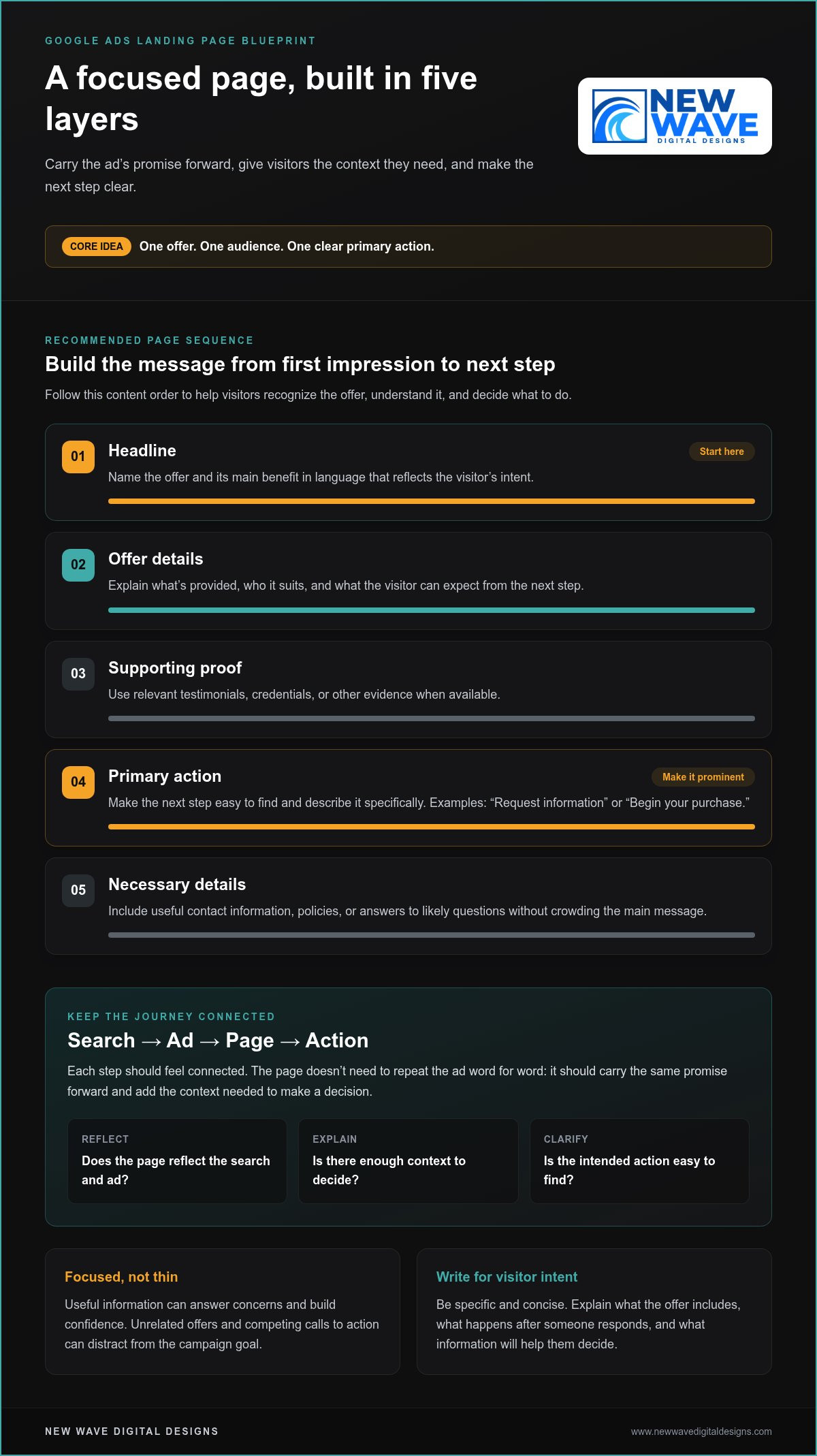
Once visitors arrive, the page structure should make their decision straightforward. Lead with a headline that names the offer and its value. Explain who it’s for and what to do next, then add concise supporting details and a prominent call to action. This order helps visitors move from recognizing the offer to understanding it and deciding whether to act.

Keep the page focused, not thin. Useful information can answer concerns and build confidence, while unrelated offers and competing calls to action can distract from the campaign goal. Use a simple content plan:

  • Headline: State the offer and its main benefit in language that reflects the visitor’s intent.
  • Offer details: Explain what’s provided, who it suits, and what the visitor can expect from the next step.
  • Supporting proof: Include relevant testimonials, credentials, or other evidence when available.
  • Primary action: Make the next step easy to find and describe it specifically.
  • Necessary details: Add useful contact information, policies, or answers to likely questions without crowding the main message.

Message match means maintaining continuity between a person’s search, the ad they choose, and the page they reach. The page doesn’t need to repeat the ad word for word. It should carry the same promise forward and add the context the visitor needs to make a decision. This is a practical foundation for how to create effective landing pages for Google Ads.

What should the headline and page copy communicate?

Write the headline for the visitor’s likely intent, not just the business’s internal description of its service. If the ad promotes Google Ads management, make that subject clear at the top of the page. Use the following copy to explain who the service is for and what the visitor can do next. Specific, concise language helps people quickly decide whether they’re in the right place.

Answer the questions that matter at this stage: What does the offer include? What happens after someone responds? What information will help them decide? Prioritize those answers over broad claims or mechanical repetition of the ad.

How should forms, calls to action, and trust elements work together?

Use a CTA that names the action, such as “Request information” or “Begin your purchase,” instead of a vague label. Make the primary action visually prominent and limit secondary links that could pull attention away. For forms, ask only for details needed for the next meaningful step. Every additional question should have a clear purpose.

Place trust details where they can help with a decision. A testimonial may support the offer, while a relevant policy or contact detail can address a concern near a form. Keep these elements clear and accurate. Thoughtful Google Ads and website design can help bring campaign intent and page structure into closer alignment.

Dedicated landing page or existing website page: which should you choose?

The best destination is the page that answers the searcher’s need with the least friction. A dedicated landing page gives a campaign more control over its message and layout. An existing product or service page may already provide the right detail and a clear path to action. Neither option is automatically better. Choose based on how closely the page fits the campaign and how much work it needs.

Consideration Dedicated landing page Existing website page
Message match Can be tailored closely to a specific ad, audience, or offer. Works well if its content already reflects the ad’s promise and search intent.
Setup effort Requires planning, writing, design, tracking, and ongoing upkeep. May be ready to use, though content or layout changes could be needed.
Page flexibility Offers more control over campaign-specific content and journey. Must fit within the existing site structure and page purpose.
Measurement Can make campaign actions easier to isolate, provided tracking is configured appropriately. Can be measured too, but shared content or multiple actions may require careful interpretation.

When does a dedicated campaign page make sense?

Consider a dedicated destination when the campaign has a distinct offer, targets a clearly defined audience, or needs a focused conversion journey. A time-sensitive promotion, for example, may need terms and a call to action that aren’t prominent on a general service page. A campaign for one service can also benefit from copy that directly addresses the visitor’s questions instead of asking them to navigate a broad menu.

That control comes with responsibility. Each additional page needs accurate content, thoughtful design, functioning measurement, and updates as the offer changes. An outdated campaign page can undermine the relevance it was created to provide.

When can an existing page be the better destination?

Use an existing page if it already answers the search query, supports the ad’s promise, and makes the intended action clear. Someone searching for a particular product may be better served by its detailed product page than by a new page that repeats the same information. A general homepage is less suitable if visitors have to sift through unrelated services to find that product.

Review the page from the visitor’s perspective. Does the main heading reflect the ad’s offer? Are competing calls to action or unrelated sections drawing attention away? Could a modest edit to the headline, opening copy, or placement of the primary action make the page more relevant? If so, refine what’s already there before building another destination.

Use this decision rule: choose a dedicated page when the campaign needs an experience the current site doesn’t provide; choose an existing page when it already fits the visitor’s intent and supports the next step. This balance is part of how to create effective landing pages for Google Ads without adding pages that have no clear purpose.

How to Create Effective Landing Pages for Google Ads

How to create and launch a Google Ads landing page step by step

A dependable launch starts before design work. Establish what the campaign promises, who it’s meant to reach, and what action the page should support. Then build and review the destination as a complete journey, from the first screen to the confirmation visitors see after submitting a form or completing a purchase.

Test the complete visitor journey before directing paid traffic. A page can look polished and still fail if its form, links, or measurement don’t work as intended.

  1. Research the campaign. Review its search themes, ad language, audience, offer, and intended action. Connect each landing page to a specific campaign theme rather than combining unrelated search intents on one destination.
  2. Write a page brief. Record the visitor’s likely need, the offer, supporting evidence, and the primary conversion action. Map the ad’s central promise to the page headline, key content, and call to action.
  3. Plan the visitor journey. Decide what a person needs to know before acting, such as what the offer involves or what happens after an enquiry. Arrange the content in a logical order and make the next step easy to find.
  4. Build the page. Create or refine the destination using the brief. Check that the layout adapts to mobile and desktop, text is readable, controls are easy to use, and links and forms work correctly.
  5. Review the experience. Check accessibility, loading issues, clear privacy information, accurate content, and distractions that could interrupt the intended journey. Confirm that the final destination URL matches the campaign plan.
  6. Verify measurement and launch. Test that the intended action, such as a form submission or purchase, is recorded accurately. Review the relevant Google Ads, Google Analytics 4, or Google Tag Manager configuration against current product documentation before relying on the data. Then direct campaign traffic to the tested page.

What belongs in the landing page brief?

Make the brief specific enough that a designer or writer can understand the campaign before building begins. Include the audience, search intent, offer, available supporting evidence, primary conversion action, and questions visitors may need answered. Note the ad’s central promise and how it should carry through to the headline, supporting content, and CTA. This gives you a clear reference for reviewing the finished page and helps keep copy and design aligned with campaign intent.

What should you check before sending Google Ads traffic?

Test common mobile and desktop screen sizes, including the full form process and what visitors see after submission or purchase. Check that buttons and links lead to the right places, text remains legible, the page loads reliably, and privacy disclosures are easy to find wherever personal information is collected. Confirm the final destination URL and verify that tracking records the action you want to measure, not just a button click that may not represent a completed conversion.

Building a strong destination takes coordinated campaign thinking, design, and measurement. New Wave Digital Designs provides website design and paid search services to help align those elements.

Measure, refine, and connect landing page design with Google Ads

A landing page’s results involve more than the number of conversions. A page may generate many enquiries but attract people who aren’t a good fit. Pair performance data with lead or purchase quality, then identify where the visitor journey works smoothly and where it creates friction. That fuller view helps distinguish useful improvements from changes that only make a dashboard look better.

Which landing page metrics can guide improvements?

Conversion rate is the share of measured visitors who complete a defined action. It’s useful for tracking a page over time, but interpret it alongside traffic sources and conversion quality. A form submission matters more when it represents a relevant prospect than when it’s an unqualified enquiry. For purchases, consider order quality as well as completed transactions.

Review multiple signals together. If visitors arrive but few begin a form, the offer, page content, or action may not be clear enough. If they start but don’t complete it, check for unnecessary questions or usability barriers. Engagement measures can show where visitors spend time or leave, but no single metric explains why. Combine the data with a careful page review and, where possible, feedback on lead or customer quality.

Use Google Ads and Google Analytics 4 reports only after checking that tracking records the intended actions accurately. Confirm that a conversion represents a completed enquiry or purchase, rather than an incidental click, and that reporting is configured consistently. Review current Google product documentation before drawing conclusions from the data.

How can design and campaign management work together?

Campaign intent sets the direction: which audience the ad reaches, what the offer promises, and what action the page should support. Website structure and visual design make that journey easier to understand, while measurement shows where it may need refinement. These elements inform one another. If visitors engage with the ad but don’t complete the intended action, review both traffic relevance and the page experience before deciding what to change.

Make each test deliberate. Write down the issue you’re investigating, the change you’ll make, and the result you expect. When practical, change one important element at a time, such as the headline or form layout. Then compare the outcome with your original hypothesis, including lead or purchase quality. If several elements change together, it’s harder to tell which adjustment mattered. Keep a record of what changed and what the evidence suggests, even when a test has no clear result.

Website design, graphic design, and Google Ads management can work together to align brand expression, campaign intent, page structure, and measurement. New Wave Digital Designs offers these services alongside organic SEO, helping businesses develop a coherent digital presence. This cycle of observing, refining, and learning is central to how to create effective landing pages for Google Ads without relying on guesswork.

Give your next campaign a clearer path forward

The next step doesn’t have to be a complete rebuild. Choose one campaign, review the experience from a visitor’s perspective, and identify the most useful improvement to explore. A thoughtful, measured approach to how to create effective landing pages for Google Ads can turn each insight into a stronger foundation for future decisions.

New Wave Digital Designs provides website design for Shopify, WordPress, and Squarespace, along with Google Ads and Bing Ads management, graphic design, hosting, and website maintenance. These services can support a coherent experience from campaign to page and ongoing site care, shaped around your business needs.

Work with New Wave Digital Designs on a landing page aligned with your campaign goals.

Frequently Asked Questions

Can I use my homepage as a Google Ads landing page?

Yes, your homepage can work if it directly addresses the ad’s subject and makes the intended action easy to find. It may suit branded searches from people looking for your business, but be less useful for an ad promoting one specific service if visitors have to search through a broad menu. Review the page on mobile, too. If the offer and next step aren’t immediately clear, a more focused destination may serve the campaign better.

How many landing pages should a Google Ads campaign have?

There’s no fixed number. Build or select pages around meaningful differences in search intent, audience, or offer, rather than creating a separate page for every keyword. Several search terms seeking the same service may fit one page, while a product promotion and a service enquiry may need distinct experiences. Keep the number of pages manageable so you can maintain accurate content, functioning tracking, and relevant information as campaigns change.

What is a good conversion rate for a Google Ads landing page?

There isn’t one conversion rate that’s good for every campaign. The right interpretation depends on the action being measured, the audience, the offer, and whether conversions lead to qualified enquiries or purchases. Compare similar traffic and actions over time, and examine quality alongside volume. A higher rate isn’t necessarily better if it comes from less relevant enquiries. Treat benchmarks as context, not as a target that overrides business value.

How long should I wait before changing a landing page?

Wait until you have enough relevant data to make a considered comparison, rather than reacting to a short-term fluctuation. The time needed depends on traffic volume, conversion frequency, and how consistent the campaign has been. Before making changes, check that tracking works and review whether visitors match the intended audience. If you find a clear technical problem, such as a broken form, fix it promptly instead of waiting for more data.

Do Google Ads landing pages need a privacy policy?

If a page collects personal information, explain clearly how that data will be used and make the relevant privacy notice easy to find near the form. This helps visitors understand what they’re sharing before they submit it. The exact disclosures that apply can depend on your business and the data collected, so avoid generic copy that doesn’t reflect your practices. Keep the notice current when your data collection or use changes.

Can I test two landing page versions with Google Ads?

Yes, you can compare page versions, but structure the test so the result is useful. Decide what you’re testing, such as a headline or form layout, and keep the audience, offer, and conversion definition consistent where practical. Confirm that both versions load correctly and that tracking records the same intended action. Review current Google Ads experiment options and setup guidance before launching, since available controls can change.

Website Audit and Optimization Services: Turn Site Insights Into Growth

What if the issue holding your website back isn’t one obvious flaw, but a gap between its technical foundation, content, and customer experience? That’s the question website audit and optimization services should help answer. A site can look polished yet remain difficult to find, navigate, or use effectively.

An audit is less useful when it produces a long list of problems without showing what matters most. You need more than observations: you need to know which issues affect your goals, what to address first, and how improvements can work together.

This article explains what a structured website audit examines and how to turn its findings into practical priorities. You’ll learn how technical health, search visibility, content, and usability connect, and how recommendations can support business objectives. For Shopify, WordPress, and Squarespace sites, a platform-aware approach helps shape improvements that strengthen the site, clarify the experience, and support growth.

Key Takeaways

  • A website audit can reveal why a polished redesign may not resolve barriers to visibility, usability, or performance.
  • Explore how website audit and optimization services connect technical health, search visibility, content, user experience, and measurement.
  • Use impact, urgency, effort, and confidence to rank findings instead of treating every warning as equally important.
  • Turn validated findings into a focused plan that balances quick improvements with coordinated design, development, content, or marketing work.
  • See how platform-aware recommendations for Shopify, WordPress, and Squarespace can align website improvements with business goals.

Why website audit and optimization services matter before you redesign or market

A website audit is a structured review of how effectively a site supports business goals and serves visitors. It looks beyond appearance to consider how people find the site, move through it, understand its content, and take meaningful next steps. A useful review connects those observations instead of treating design, search, and technology as separate concerns.

That distinction matters before investing in a redesign or marketing campaign. A refreshed visual style may make pages feel more current, but it won’t automatically resolve unclear navigation, hard-to-find content, or technical barriers that affect how a site is reached and used. An audit identifies potential obstacles and opportunities. Optimization is the deliberate work of selecting and implementing changes that address the most relevant findings.

Site health, user experience, and business objectives form one connected picture. Each should inform how a website is assessed and improved.

What a website audit can reveal

As an overview, What is a Website Audit? describes the broad purpose of examining a site’s performance and potential weaknesses. In practice, an audit can bring several useful lenses together:

  • Technical health: Can visitors and search engines reach and use important pages?
  • Search visibility: Are key pages discoverable for relevant searches?
  • Content clarity: Does each page communicate its purpose and help visitors find useful information?
  • Usability and conversion: Can people navigate the site and complete the actions the business values?

The appropriate depth depends on the platform, site structure, and business objectives. A Shopify store, a WordPress service site, and a Squarespace portfolio may call for different questions. Hypothetical example: If a store attracts search visits to a product category but shoppers struggle to reach relevant products, the review could consider search visibility, page content, navigation, and the path to purchase together. This illustrates an audit approach, not a client result.

When an audit is more useful than guesswork

An audit can be a useful starting point when engagement declines, visitors struggle with navigation, or organic visibility is unclear. Those symptoms point to questions, not automatic explanations. A change in analytics may show that visits or interactions shifted, but it doesn’t reveal by itself whether the cause relates to page content, a navigation path, a technical issue, or a change in traffic sources. Looking across evidence helps distinguish a surface-level signal from a problem worth addressing.

This is especially useful before committing to a broad redesign or increasing marketing activity. If the underlying issue is unclear, new creative or additional traffic may not address it. Website audit and optimization services can organize observations around the site’s goals, giving a team a considered basis for deciding what to investigate and improve.

An audit is diagnosis; ongoing upkeep is a separate part of caring for a site. For practical guidance on routine updates and maintenance, explore the website maintenance services guide.

What website audit and optimization services should examine

A useful review connects five lenses: technical health, search visibility, content clarity, user experience, and measurement. Together, they show whether the site is accessible to visitors and search engines, answers the questions people bring, and makes the next step clear. Website audit and optimization services are most valuable when they interpret these areas in context, rather than treating every automated warning as equally urgent.

The right checks depend on the site’s structure and purpose. A Shopify store may need attention to product and category journeys; a WordPress site may have different page structures and plugins to consider; a Squarespace site has its own design and content setup. A platform-aware review helps distinguish a meaningful obstacle from a generic tool alert.

Technical health, mobile experience, and accessibility signals

A technical review can examine whether important pages can be crawled and indexed, whether links lead to the intended destinations, and whether pages work well on mobile screens. Performance is another diagnostic lens. Google’s Core Web Vitals are user-focused measures of loading, interactivity, and visual stability, represented by Largest Contentful Paint, Interaction to Next Paint, and Cumulative Layout Shift. They can help identify friction, but no single metric guarantees search rankings.

Accessibility checks also matter to usability. Clear labels, readable content, keyboard navigation, and sufficient visual distinction can help more people interact with a site. These observations can inform improvements, but they aren’t legal advice or a guarantee of compliance.

Search, content, and visitor journey

A page can attract attention yet leave visitors unsure where to go. Review whether each page’s topic and title match its purpose, whether internal links guide people to related information, and whether calls to action fit visitor intent. For example, someone comparing services may need useful explanatory content before a prominent enquiry prompt feels relevant.

Google Search Console can surface information about search visibility and indexing, giving teams evidence to investigate rather than assumptions to act on. Pair those signals with the page experience and business objective: a visibility concern, confusing page, and unclear next step may intersect, but each calls for a different response. For broader search planning beyond audit findings, explore organic SEO services.

Measurement completes the picture. First clarify what the site is meant to support, then review relevant signals, such as organic visits to key pages, engagement with important content, or completion of a meaningful action. Compare like with like and account for context, including changes to campaigns or site content. A single fluctuation is a prompt to investigate, not proof of cause.

The result should be a reasoned view of what to address, why it matters, and what evidence could help assess the change. To explore how design, maintenance, and marketing can work together around a website’s goals, visit New Wave Digital Designs.

How to prioritize audit findings without chasing every warning

An audit can surface a crowded field of warnings, but a longer list isn’t a better action plan. Rank each finding by four factors: its likely impact on a user or business goal, its urgency, the effort required to address it, and confidence that the underlying issue is real. This helps distinguish a verified obstacle from a hypothesis that needs more investigation.

First separate critical concerns from refinements. A suspected security issue or a problem preventing visitors from accessing an important page may need prompt attention. A performance improvement can be valuable, but its priority depends on which pages are affected and how that friction relates to user needs. Minor visual polish can wait when higher-impact work remains unresolved.

A practical framework for ranking recommendations

Use this sample matrix to start the conversation. The examples are scenarios, not findings from a client website. Add urgency and confidence to each item before deciding what to address.

  • High impact, low effort: A verified broken link on a key enquiry path could be a focused fix that helps visitors complete an important action.
  • High impact, high effort: A difficult navigation structure across many important pages may warrant coordinated design or development work. Confirm the pattern and affected journeys before committing resources.
  • Low impact, low effort: A small wording inconsistency on a secondary page may be easy to refine, but shouldn’t displace a more consequential issue.
  • Low impact, high effort: A broad visual adjustment with no clear relationship to a user or business goal may be better deferred until stronger priorities are resolved.

For every recommendation, record the goal it supports, the evidence behind it, its urgency, and the confidence level. For example, a finding based on repeated errors on a key page is more substantiated than a concern inferred from one unusual data point. If confidence is low, identify what would validate the issue before treating it as a confirmed priority. This keeps the plan grounded and makes trade-offs easier to explain.

How analytics helps validate the priority

Google Analytics 4 can help interpret engagement and conversion patterns, such as which pages people view before taking a tracked action or where activity appears to drop off. The data is most useful when measurement is configured to reflect meaningful actions. A missing or inconsistently tracked event can make a healthy journey look like a problem, or conceal a genuine point of friction.

Pair quantitative signals with a direct review of the relevant pages and visitor journey. If a report suggests that people leave before an important action, examine the content, navigation, and path they encounter. Treat analytics as evidence to investigate, not a verdict about cause. Reported outcomes elsewhere shouldn’t serve as a benchmark for your site: results depend on context, measurement, and implementation.

A thoughtful prioritization process connects findings to business aims, then aligns the work across design, content, maintenance, and marketing. To explore how those digital disciplines can support your website’s objectives, explore New Wave Digital Designs’ digital services.

Website Audit and Optimization Services: Turn Site Insights Into Growth

From audit findings to a focused website optimization plan

An audit becomes useful when its observations lead to considered action. Move from diagnosis to implementation in a clear sequence: validate what the evidence shows, agree on which findings matter most, make the selected changes, then measure signals related to the goal. This keeps recommendations connected to purpose instead of turning them into an unstructured task list.

  1. Validate findings: Confirm the issue on the relevant page or journey, and separate observed facts from assumptions that need further review.
  2. Agree on priorities: Align the team on the intended outcome, urgency, effort, and dependencies for each proposed change.
  3. Implement changes: Assign ownership and coordinate the work across the people and disciplines involved.
  4. Measure relevant signals: Compare results with a documented baseline and interpret them in the context of other site or marketing changes.

Some actions may be contained, such as clarifying a page heading or correcting a broken link. Others require structural work: redesigning navigation, reshaping a content journey, or addressing a technical issue across multiple templates. Optimization should be measured against defined goals, not isolated score changes.

Turn recommendations into manageable work

For each action, document an owner, dependencies, estimated effort, and intended outcome. This makes the sequence easier to plan: content revisions may depend on an agreed page structure, while a design change may require development and testing. Maintenance and SEO considerations can also intersect with redesign decisions. A thoughtful web design guide can help frame how structure and presentation support the experience, while specific recommendations should reflect the site and its goals.

Measure what changes after optimization

Choose measures that reflect the objective. A site focused on generating enquiries might track qualified inquiries; a search visibility initiative might monitor relevant organic visibility; a usability change could be assessed by whether visitors can complete a key task. Google Search Console and Google Analytics 4 can provide useful observations, but neither guarantees that a selected change will produce a particular outcome.

Before implementation, record the relevant baseline, the pages or journeys involved, and the review period the team will use. Choose a period that fits the change and available data rather than assuming one timeline works for every site. Afterward, recheck the work itself, then review the signals. A completed change isn’t automatically evidence of impact; consider other changes that may have influenced the same measures.

Website audit and optimization services are most effective as a coordinated process, connecting technical, design, content, and marketing decisions to the same objectives. If you’re ready to shape findings into a considered plan, explore website design and digital services.

Choose website audit and optimization services built around your business

A website review is most useful when it begins with your business, not a generic checklist. The right questions depend on what the site needs to support, which pages matter most, and how visitors are expected to move through them. Website audit and optimization services should turn those priorities into a shared direction, connecting observations about the site with practical decisions about what to improve.

New Wave Digital Designs provides website design, maintenance, hosting, security, and marketing services. Its design work spans Shopify, WordPress, and Squarespace, while organic SEO and Google Ads and Bing Ads can connect site considerations with search and campaign goals. Each platform has its own structure, so recommendations should reflect the website in front of the team rather than assume identical review steps or fixes.

That broader view matters because site changes can overlap. A content adjustment may affect search visibility; a navigation change may involve both design and development; maintenance, hosting, or security considerations may shape how a proposed improvement is approached. The aim isn’t to address every discipline at once, but to understand how each relevant decision supports the site’s purpose.

What a collaborative optimization relationship should feel like

A collaborative process starts by listening. Clear explanations connect site observations to the goals they’re intended to serve. Creative, technical, and marketing perspectives can then inform a coherent direction, rather than leaving a business with disconnected notes or unexplained technical language. The result is a considered conversation about priorities, trade-offs, and next steps.

Prepare for a productive website review

You don’t need to arrive with a solution already chosen. A little context can make the first conversation more useful:

  • Clarify your primary site goals, such as supporting enquiries, sales, or organic visibility.
  • Identify important pages and describe what visitors should be able to do there.
  • Gather available context, including analytics, search data, and technical concerns you’ve noticed.

These details help connect the site’s current state with its next priorities. They also give the discussion a practical starting point, whether the focus is improving an existing experience, planning design work, or coordinating changes across content and marketing.

If you’re considering improvements, start with a conversation about your website goals and the pages that matter most. Explore New Wave Digital Designs and begin shaping a thoughtful direction for your site.

Give your website a clearer path forward

Your next website improvement doesn’t have to begin with a sweeping redesign or a long list of fixes. It can start with one well-chosen question: what would help your site serve your business and visitors more effectively? Website audit and optimization services turn that question into a practical starting point for deciding where to focus and how each change can support a wider goal.

New Wave Digital Designs brings together website design for Shopify, WordPress, and Squarespace with maintenance, hosting, security, and digital marketing services. This range makes it possible to consider how a site’s structure, upkeep, and visibility work together, while keeping recommendations grounded in your priorities.

Share what you want your website to make possible, and take the next step toward a thoughtful plan. Discuss your website’s next opportunity with New Wave Digital Designs. Your site can evolve with purpose, one considered improvement at a time.

Frequently Asked Questions

Is a website audit worth it if my site already gets traffic?

Yes. Traffic shows that people are arriving, but it doesn’t reveal whether the right visitors are landing on the right pages or finding a useful next step. Website audit and optimization services help you look beyond visit totals. For example, compare how visitors arrive at a service page with whether they continue to relevant information or submit an enquiry. That context can show where attention and business intent diverge.

Can website optimization improve conversions without a full redesign?

Yes, targeted changes may support conversions without replacing the whole site, depending on what’s causing friction. If visitors overlook an enquiry form, adjusting its placement or clarifying the surrounding message may be worth testing. If the underlying issue involves the site’s structure or a consistent usability problem across multiple pages, broader design work may be appropriate. Match the scale of the change to the evidence.

How often should a business website be audited?

There’s no universal audit schedule. Consider a review after a significant change, such as a redesign, platform migration, major content expansion, or a shift in business priorities. A smaller site that changes infrequently may need a different rhythm from a complex site with regular updates. Instead of choosing a calendar interval by default, decide what changes or performance signals would prompt your team to review the site again.

What happens if an audit finds technical problems?

Technical findings should be explained in plain language and assessed according to their effect on visitors and the business. For example, an issue that blocks access to a key page deserves different attention from a warning on a page with little relevance to current goals. Some findings may need further investigation before action. A practical response clarifies the issue, who should address it, and what site function to check afterward.

Does a website audit include SEO and user experience?

A well-rounded review can consider both, since visibility and usability work together in the visitor journey. For example, a page might appear in search results for a relevant topic but leave visitors uncertain about what to do next. Reviewing its topic, content, navigation, and next step can reveal whether the experience matches the visitor’s intent. The review’s scope should reflect the site’s goals, rather than rely on disconnected scores.

How long do website audit and optimization services take?

The time needed varies with site size, platform, technical complexity, available data, and the review’s scope. Implementation is a separate stage: updating page copy differs from coordinating changes that involve design, development, or marketing. To make planning clearer, define which parts of the site are in scope, what information is available, and which recommendations need action. A focused scope helps set expectations without assuming one timeline fits every website.

Improving User Experience on My Website: A Practical Guide

Improving user experience on my website often has less to do with adding features and more to do with removing moments that make visitors hesitate. A confusing menu, an unclear next step, or a form that feels like hard work can disrupt an otherwise promising journey. When analytics and customer comments point in different directions, it can be difficult to know which problem deserves attention first.

Rather than redesigning everything on instinct, look closely at the journeys that matter: where visitors arrive, what they’re trying to do, and where they lose momentum. Use evidence to distinguish a meaningful barrier from a minor preference, so each improvement has a clear purpose.

This guide explains how to spot friction in important visitor journeys, turn behavior and feedback into practical fixes, and prioritize changes without letting a technical project lose focus. You’ll also learn how clear navigation, accessible content, trustworthy design, and ongoing technical care work together to make a website easier to use and act on.

Key Takeaways

  • Understand how usability and visual design shape the experience of finding information and completing tasks.
  • Trace priority visitor journeys to uncover specific points of confusion, then record evidence before choosing a fix.
  • Rank potential improvements by impact, effort, and confidence to focus on changes most likely to help.
  • Use a practical checklist to review mobile layouts, content, forms, navigation, and accessibility when improving user experience on my website.
  • Build a repeatable cycle of observation, implementation, testing, and refinement, and recognize when connected issues call for coordinated design or development.

What improving user experience on your website really means

Website user experience (UX) is the complete journey a person has while finding information and completing a task on your site. It includes whether visitors can understand your offer, move between pages, and take a next step without unnecessary effort. User experience design is a broader discipline, but its central idea applies to every business website: shape the experience around people’s needs, not just the site’s appearance.

Strong UX helps visitors understand, navigate, and act with confidence. Usability is about how clearly and easily someone can use the site. Visual design gives that experience its form and feeling, establishing hierarchy, expressing your brand, and making important information easier to notice. The two work together: an attractive page can still frustrate visitors if its navigation is unclear, while a usable site can be harder to trust if its design feels inconsistent or unfinished.

Clarity, accessibility, trust, and performance shape everyday journeys, from learning what a business offers to deciding whether to enquire or buy. A slow page, hard-to-read text, or unclear next step can interrupt that journey. Improving user experience on my website starts with examining what visitors can actually do, not simply what the design is intended to communicate.

Which signs suggest your website experience needs attention?

Look for recurring signals: customers asking for information that should be easy to find, visitors abandoning forms, or people hesitating because the next step isn’t clear. Check whether someone landing on an important page can quickly identify what you offer and what to do next. These observations can point to where the journey is breaking down.

Separate evidence from assumptions. A comment such as “I couldn’t find your service details” points to a specific issue to investigate. Thinking visitors would prefer a different color or layout is a hypothesis, not proof. Record what happened, where it happened, and what the visitor was trying to do before deciding on a change.

Why user experience matters to small-business websites

For a small business, each page should help visitors move toward a useful outcome, such as understanding a service, comparing options, submitting an enquiry, or making a purchase. A straightforward journey removes avoidable obstacles and gives people a clearer basis for deciding what to do. Consistent design, accurate information, and visible next steps can also make a business feel more considered and trustworthy, without promising a particular conversion result.

Clear, accessible experiences serve people with different abilities, devices, levels of familiarity, and browsing contexts. Readable content and predictable navigation help visitors find their way, including people using assistive technology or viewing the site on a small screen. Good UX makes the path easier to follow for more people.

How to diagnose friction across your website’s key user journeys

A useful UX review follows real tasks, not just a checklist of separate pages. Choose journeys that matter to your business, such as finding a service, comparing options, or submitting an enquiry. Then follow each path as a visitor would, from the page they enter to the action they want to complete. This gives you a practical starting point for improving user experience on my website without jumping straight to a redesign.

Use this five-step audit to turn observations into a focused set of improvements:

  • 1. Choose a task. Define a clear goal, such as finding service details or sending an enquiry.
  • 2. Trace the journey. Follow the path from the likely entry page through each click, decision, and form field.
  • 3. Observe friction. Note confusing labels, unexpected detours, missing information, or steps that don’t work as expected.
  • 4. Record evidence. Capture the page, device context, task outcome, and what you observed or heard.
  • 5. Rank fixes. Prioritize recurring issues or barriers to important tasks, rather than changes based only on personal preference.

Combine different perspectives: analytics can show where visitors enter or leave, Search Console can reveal what people expect from search results, customer feedback adds context, and direct observation shows what happens during a task. The user experience basics also connect research, usability evaluation, information architecture, and accessibility, which are useful lenses for a rounded review.

What website data can reveal about user experience

Use analytics to examine entry pages, exits, and incomplete task flows, where tracking is available. Search Console queries can help you compare what people searched for with the information they find on a landing page. Treat unusual exits or low engagement as reasons to investigate, not automatic proof that a page is broken. A measurable signal shows where to look; it doesn’t, by itself, confirm the cause.

How to run a simple usability review

Ask a few people who resemble your intended visitors to complete realistic tasks without coaching. Watch for hesitation, misclicks, unclear labels, and questions. Record their words rather than interpreting them too quickly, and note the device used and whether the task was completed. Repeated difficulty deserves investigation, but a small review doesn’t prove what every visitor thinks.

When observations point to connected design or development issues, a coordinated website design approach can address the journey as a whole instead of patching one symptom at a time.

Which website UX improvements should you prioritize first?

Once you’ve identified friction, choose what to fix first. Start with barriers that affect important tasks, such as understanding an offer or completing an enquiry. A decorative refinement may improve a page’s appearance, but it shouldn’t outrank a confusing form or a navigation path that repeatedly blocks visitors.

Compare potential changes across five areas: content clarity (is essential information easy to understand?), navigation (can visitors find the right page?), forms (can they complete the task without unnecessary effort?), accessibility (can people with different needs use the content and controls?), and performance (does the site respond smoothly?). Base the fix on the problem you observed, not on which area sounds most urgent.

Use a simple impact, effort, and confidence matrix to make your decision clear. Rate each proposed change as high, medium, or low across all three dimensions. Impact reflects how much it could improve an important journey; effort estimates the work involved; confidence reflects the strength of your evidence. Prioritize changes with high impact, manageable effort, and solid evidence. If the potential impact is high but confidence is low, gather more observations before committing.

  • High impact, low effort, high confidence: consider doing it first.
  • High impact, high effort: plan the work and identify dependencies.
  • Low impact or low confidence: defer the change or investigate further.

Which usability fixes can you make without rebuilding the site?

Many improvements can start with the content and components already in place. Clarify page headings, make calls to action specific, replace vague link labels, and make essential service information easy to find. Remove form fields that aren’t needed for the task, and explain beside each required field why the information is requested. Where the existing design allows, strengthen visual hierarchy and use styles consistently so visitors can recognize what matters and what they can interact with.

When does a redesign become the more considered option?

A redesign may make sense when friction spans several templates, the navigation structure, and the way the brand is presented. Compare recurring issues, their shared causes, and the dependencies between fixes. If changes to one page keep creating problems elsewhere, coordinated design and development may be more coherent than a series of isolated patches. Not every UX concern calls for a new platform or full rebuild; match the scope to the evidence. For broader principles, explore this 2026 web design guide.

Improving user experience on my website doesn’t mean changing everything at once. It means choosing the next useful change with care, then checking whether it actually makes the visitor’s task clearer.

Improving User Experience on My Website: A Practical Guide

How to improve website UX across mobile, accessibility, and performance

A page can look polished on a large monitor yet become difficult to use on a phone, with a cramped menu, hard-to-read text, or an awkward form. A repeatable review helps uncover these gaps. Apply the same checks to key pages after updates, not just during a redesign.

  • Mobile layout: Check that content fits the screen, headings and body text remain readable, and images don’t obscure important information.
  • Navigation: Open the menu, follow links, and make sure visitors can reach important pages without losing their place.
  • Forms: Complete the form on a phone. Check that fields are easy to select, instructions are clear, and errors can be understood and corrected.
  • Accessibility: Test keyboard navigation, visible focus, contrast, descriptive labels, and a logical heading structure.
  • Performance: Review available performance reports and investigate pages that load or respond slowly. Treat speed as one part of the experience, alongside clarity and accessibility.

How to review mobile usability and website performance

Test representative mobile screen sizes and complete real tasks, such as finding a service or submitting an enquiry. Don’t stop at the homepage: menus, buttons, images, and forms can behave differently on deeper pages. Look for controls that are difficult to tap, text that requires awkward zooming, or images that push useful content out of view.

Use performance reports to identify pages for closer testing. Core Web Vitals offer a current framework for assessing loading, interactivity, and visual stability; responsiveness is measured by Interaction to Next Paint (INP). A report can point to a potential issue, but testing the affected page helps reveal what visitors actually experience.

What accessibility checks belong in a UX review?

Try using the site with a keyboard alone. Can you reach links and controls in a sensible order, see which item has focus, and operate the navigation? Check that form fields have descriptive labels, headings create a logical outline, and text and controls have sufficient contrast. Alternative text should convey an image’s relevant meaning, rather than repeat nearby copy or describe decorative details unnecessarily.

Automated accessibility scans can flag some issues, but they can’t judge every page in context. Use WCAG 2.2 as a current reference point, and review applicable requirements before making compliance claims. Accessibility is an ongoing part of improving user experience on my website, not a one-time scan.

Mobile usability, accessibility, and performance need continued attention as content and technology change. Include these checks in routine website maintenance, or plan ongoing website care to support a functional experience over time.

How ongoing design, testing, and maintenance keep UX improving

A website experience is never entirely finished. Content changes, new features are added, and visitor needs evolve. A steady improvement cycle helps you respond without turning every issue into a major project: observe, prioritize, implement, test, and refine.

  • Observe: Review visitor feedback, task completion, and recurring points of confusion.
  • Prioritize: Choose a problem that affects an important journey and is supported by evidence.
  • Implement: Make a focused change, such as clarifying content or adjusting a page flow.
  • Test: Check that the change works as intended across the relevant pages and devices.
  • Refine: Keep what helps, revise what doesn’t, and note any new friction that appears.

Your team may be able to handle a small, contained edit when the issue is clear and the change is easy to review. If several pages share structural problems, or navigation, visual hierarchy, and brand presentation need to work together differently, coordinated design or development can provide a more coherent path. Improving user experience on my website is more sustainable when each change addresses a clear need and is checked after it goes live.

How to measure whether a UX change helped

Before changing a page or flow, define the task you want to make easier and note a baseline signal. For an enquiry form, that might be completion activity, form errors, or recurring questions about what information to provide. After implementation, review the same signals and test the task directly. Look for a pattern, not a single data point, and consider whether traffic, seasonality, or other site changes could have affected the result. This helps you avoid crediting one adjustment for a change it may not have caused.

When professional website design or maintenance can help

When friction connects page structure, visual hierarchy, and visitor journeys, a coordinated design project can address those elements as one experience. New Wave Digital Designs creates custom websites on Shopify, WordPress, and Squarespace, tailoring the design to the business and its goals. Ongoing website maintenance and secure hosting support a site’s technical function as it evolves.

If you’re ready to turn your observations into a considered plan, explore website design and maintenance support as a collaborative next step.

Make your next website improvement count

A clearer website isn’t built by changing everything at once. It grows through deliberate steps: follow important visitor journeys, use evidence to find friction, and prioritize fixes that make key tasks easier. Then test the changes and keep refining the experience across mobile, accessibility, and performance.

That steady approach makes improving user experience on my website more manageable and purposeful. When issues connect across page structure, visual hierarchy, and development, a considered design partnership can bring them together. New Wave Digital Designs creates custom websites for Shopify, WordPress, and Squarespace, with website maintenance, managed hosting, and security services to support ongoing care.

Explore a more thoughtful website experience with New Wave Digital Designs and take the next step toward a site that feels clear, trustworthy, and easier to use. Every well-chosen improvement can help your website better reflect your business and guide visitors with confidence.

Frequently Asked Questions

What is the fastest way to improve user experience on my website?

Start with one important visitor task and observe where people hesitate, abandon, or ask for help. A practical first fix might be clarifying a vague page heading, simplifying navigation labels, or removing an unnecessary form field. Choose a barrier you’ve actually observed, make one focused change, then check whether the task becomes easier through direct testing or relevant website data.

How can I tell if my website has a poor user experience?

Look for recurring difficulties across visitor behavior and feedback. People may struggle to find essential information, abandon a form, ask questions the site should answer, or fail to complete a key task during testing. No single metric confirms a UX problem by itself. Compare analytics with customer comments and direct observation to identify patterns, then investigate the cause before deciding what to change.

Can I improve my website UX without redesigning it?

Yes, many UX improvements can be made within an existing website. You can clarify page copy, use more descriptive links, simplify forms, improve navigation labels, or create a clearer visual hierarchy with existing design elements. Start with a high-priority visitor journey and test the changes. If friction is connected across the site’s structure, page templates, and brand presentation, a coordinated redesign may offer a more cohesive solution.

How do I prioritize website user experience improvements?

Rank each potential change by its likely impact on an important task, the effort involved, and the strength of the evidence behind it. Address repeated barriers on high-priority journeys before lower-impact refinements. A simple list or matrix can make your reasoning clear and keep decisions grounded in observed needs. Revisit the ranking as feedback and website data reveal new patterns or show whether earlier changes helped.

Does website speed affect user experience?

Yes, slow or inconsistent loading can interrupt browsing and make tasks harder to complete. Speed is one part of UX, alongside clear content, usable navigation, accessibility, and reliable forms. Use available performance reports to identify pages that deserve closer investigation, then test the complete visitor journey. A single speed score can point to a concern, but it won’t explain every usability issue or show the full experience on its own.

How often should I review my website’s user experience?

Review important visitor journeys after substantial content, design, or technical changes, and establish a recurring check that fits your site’s activity. Watch for repeated support questions, shifts in task completion, and new usability feedback. A steady review helps you notice friction without overreacting to every small fluctuation. If a pattern emerges, investigate its context before deciding whether a targeted adjustment or broader work is appropriate.

Do I need special tools to improve website UX?

No, you can begin with your website, available analytics, customer questions, and observed usability sessions. Specialized tools may help when you need deeper behavior or feedback analysis, but they can’t replace a clear question and a practical test. Decide what you need to learn first, then choose tools that support that purpose. This keeps research focused on useful next steps rather than collecting data without a plan.

Shopify Theme Customization: A Strategic Guide to Brand Evolution (2026)

Your digital storefront isn’t a static billboard; it’s a living, breathing extension of your brand’s unique spirit. In an era where over three million merchants compete for a fraction of consumer focus, a generic template is often a silent admission of invisibility. You’ve likely felt the limitations of the standard editor, or perhaps you’ve hesitated to pursue Shopify theme customization for fear of compromising site speed with a heavy layer of third-party apps. It’s frustrating to watch your visionary ideas get flattened by the rigid walls of a cookie-cutter design that fails to build the deep trust your business deserves.

True customization is an act of digital architecture that balances artistic inspiration, technical precision, and strategic foresight. This guide promises to transform your perspective, moving you from the realm of mere decoration into a world of purposeful craftsmanship. We’ll explore how to leverage Online Store 2.0, implement immersive 3D models, and utilize Shopify Functions to create a high-converting experience. By the end of this journey, you’ll understand how to build a storefront that’s fast, scalable, and deeply resonant with every visitor who enters your digital world.

Key Takeaways

  • Elevate your storefront from a standard template to a visionary digital flagship that captures your brand’s unique spirit and builds authority.
  • Harness the modular power of Online Store 2.0 architecture to achieve unparalleled layout flexibility through the strategic use of sections and blocks.
  • Avoid the common “app bloat” trap by prioritizing high-quality Shopify theme customization, ensuring a high-converting experience without sacrificing site performance.
  • Navigate a methodical roadmap for transformation, beginning with a strategic audit to identify friction points and ending with a seamless visual identity alignment.
  • Learn how a boutique partnership approach transforms digital development into a form of craftsmanship that supports your long-term evolution.

Beyond the Template: Why Strategic Shopify Customization Matters

A standard template is a starting point, not a destination. For a brand to evolve, it must transcend the boundaries of “out-of-the-box” design. Choosing Shopify theme customization means you’re no longer settling for a generic storefront that looks like a thousand others. You’re building a digital flagship. This distinction is vital. A visionary store captures the essence of your craftsmanship, turning a simple transaction into a brand experience. It’s a strategic investment in your business legacy. By moving beyond the default, you signal to your audience that your brand is permanent, authoritative, and deeply invested in quality. Within the vast Shopify ecosystem, those who treat their site as an architectural feat are the ones who command lasting loyalty. It’s about capturing the true spirit of your business through meticulous attention to detail.

The Psychology of First Impressions

Credibility is earned in milliseconds. When a visitor lands on a custom-architected layout, they perceive immediate professionalism. Standard templates often feel hollow because they lack the specific visual vocabulary of your brand. Strategic design uses visual storytelling to communicate values without a single word of copy. It’s about the deliberate choice of unique typography that carries the right weight and bespoke iconography that mirrors your product’s refinement. These elements improve brand recall. They ensure that when a customer leaves, the memory of your store remains distinct and polished. This emotional resonance is the most effective tool for reducing bounce rates. It builds a bridge of trust that generic designs simply can’t support.

Conversion-Centric Customization

Design must serve a purpose. Great Shopify theme customization focuses on intuitive user journeys that feel effortless. Every click should feel like a natural progression toward the checkout. Custom product pages allow you to address specific buyer objections through tailored layouts that highlight what truly matters to your audience. Whether it’s unique sizing guides or immersive storytelling blocks, these details matter. It’s not just about adding features. It’s about the strategic use of whitespace and architectural balance. These elements give your products room to breathe. They guide the eye, reduce cognitive load, and create a sense of premium calm. This methodical approach ensures your storefront isn’t just beautiful; it’s a high-performing engine for growth that scales alongside your vision.

The Architecture of Customization: Navigating the 2026 Shopify Ecosystem

The modern Shopify ecosystem is defined by a modular philosophy that empowers merchants to think like architects rather than just shopkeepers. In 2026, Online Store 2.0 remains the foundational standard, offering a “sections everywhere” architecture that dismantles the rigid barriers of legacy systems. This flexibility is now augmented by AI-driven personalization, which serves as a core component of Shopify theme customization. These intelligent tools allow for dynamic content adjustments based on user behavior, ensuring your storefront evolves in real-time to meet customer needs. Integrating these technical advancements requires a deep foundation in strategic digital commerce, where every design choice aligns with broader business KPIs and international scaling goals. It’s a marriage of logic, artistry, and foresight.

Mastering Sections and Blocks

Layout flexibility is achieved through the meticulous orchestration of sections and blocks. By creating reusable elements, you ensure a consistent brand experience across every page, from the homepage to custom landing zones. This “drag-and-drop” foundation is liberating for non-technical teams, but it requires a “Digital Architect” to build the initial framework correctly. We focus on mapping dynamic data to specific blocks, allowing for a personalized shopping experience that feels bespoke yet remains incredibly easy to manage. If you’re looking to build this level of technical scalability, our team provides professional Shopify design that balances administrative ease with visual excellence. This methodical approach prevents the clutter of “app bloat” by building functionality directly into the theme’s core.

Advanced Data with Metaobjects

Metaobjects represent the next frontier of data organization in 2026. They allow us to move beyond simple text fields to build complex, structured stories within your theme architecture. Imagine a “Brand Story” section that pulls from a centralized Metaobject, or “Expert Profiles” that link automatically to specific product categories across your entire site. These custom data structures do more than just organize content; they improve long-term SEO by creating a clear, logical hierarchy for search engines to crawl. We use these tools to create immersive Bento Grid layouts and interactive 3D models that engage the modern consumer. This strategic use of data ensures your site remains clean, fast, and ready for the next stage of your brand’s evolution. It’s about building a digital legacy that is both beautiful and technically sound.

Evaluating the Path: DIY Editor, App Integration, or Custom Development?

Deciding on the right path for your storefront is a fundamental strategic choice that influences your brand’s trajectory for years. It’s a crossroads where technical health meets visionary design. While the native Shopify editor serves as a functional starting point, ambitious brands quickly encounter its structural limits. You might feel pressured to bridge these gaps with a patchwork of third-party tools, but sophisticated Shopify theme customization demands a more cohesive, architectural mindset. Your development strategy has a direct impact on marketing strategy and how deeply customers trust your professional presence. It’s the difference between a fragile, superficial facade and a resilient digital flagship. For brands arriving from another platform, understanding this distinction is especially critical — a well-executed Squarespace to Shopify migration sets the architectural foundation that makes all future customization more powerful and sustainable.

The Risks of Over-Apping

The vast library of the Shopify App Store offers a seductive promise of instant functionality, but it often leads to the “app bloat” trap. Every third-party script you install adds weight to your site’s foundation, frequently degrading the mobile user experience and frustrating potential buyers. This isn’t just a matter of performance. It’s also a matter of security. Unmanaged integrations can open doors to vulnerabilities that put your customer data at risk. To maintain an elite level of site speed, you must prioritize lean, integrated solutions. Building features directly into your theme’s architecture ensures that your site remains fast, secure, and entirely under your control.

The Artisan’s Choice: Custom Liquid and CSS

Custom Liquid and CSS represent the artisan’s path to e-commerce excellence. This approach offers a level of design freedom and technical precision that standard settings simply cannot match. By choosing bespoke development, you’re investing in a storefront that is uniquely yours, unburdened by the generic constraints of popular templates. This isn’t just about aesthetics; it’s about future-proofing. Custom-coded solutions are more resilient to platform updates and don’t require the ongoing monthly costs of heavy app subscriptions. When you work with Shopify experts, you’re hiring digital architects to build a legacy. It’s a strategic shift from temporary fixes to a high-converting, visionary storefront that captures your brand’s true spirit.

Shopify Theme Customization: A Strategic Guide to Brand Evolution (2026)

The Masterplan: A Step-by-Step Roadmap for Theme Transformation

Evolution is never accidental; it’s meticulously engineered. To move your brand from a standard template to a visionary digital flagship, you need a process that respects both the artistry of design and the cold logic of conversion. This roadmap isn’t a checklist but a strategic journey. It begins with deep introspection, moves through technical craftsmanship, and concludes with a rigorous pursuit of perfection. By treating Shopify theme customization as a multi-phase evolution, you ensure that every pixel serves your business legacy. This methodical approach builds trust, authority, and long-term scalability.

Conducting a Strategic Store Audit

Transformation starts with a clear understanding of your current friction points. We analyze heatmaps and user recordings to see exactly where customers hesitate or abandon their journey. This data-driven audit reveals design flaws that copy alone cannot fix. Before any code is written, we evaluate site speed and performance to establish a technical baseline. Finally, we define your “North Star” goals. This singular vision guides every subsequent choice, ensuring the final storefront design isn’t just a collection of features but a resonant brand statement. It’s about identifying what’s broken so we can build something unbreakable.

Executing the Visionary Build

The build phase is where abstract values become tangible digital assets. We prioritize a mobile-first design philosophy, recognizing that for the 2026 consumer, the smartphone is the primary window into your brand. Risk management is central to this stage; we utilize a staging environment for all development. This ensures your live store remains stable while we implement custom sections, blocks, and Liquid logic. Integrating custom Shopify store design with your overarching marketing strategy ensures that every visitor experience is consistent and high-converting. We test for responsiveness and performance with meticulous care, ensuring the final product is as fast as it is beautiful.

Your brand deserves a digital home that is as unique as your vision. If you are ready to move beyond the limitations of standard templates, our team can help you navigate a professional Shopify design journey that prioritizes your long-term growth and digital craftsmanship.

The New Wave Approach: Crafting Your E-commerce Legacy

At New Wave Digital Designs, we believe that an e-commerce platform should be more than a functional tool; it should be a digital sanctuary for your brand’s ambitions. We view every project as an architectural feat, requiring a delicate balance of structural integrity, aesthetic beauty, and emotional resonance. Unlike high-volume service factories that prioritize speed over substance, our boutique partnership model ensures that your business receives the meticulous attention it deserves. We don’t just apply superficial fixes. We build foundations that protect your creative and technical investment for the long term.

A Partnership Built on Trust

Our collaboration begins with a deep discovery process. We listen intently to the spirit of your business, understanding your history, your values, and your ultimate vision. This empathetic approach allows us to translate your brand’s essence into a high-performing digital reality. We believe that true Shopify theme customization must be holistic. This means we naturally integrate organic SEO, graphic design, and digital marketing strategy into the very fabric of your theme. Our Shopify website design services are crafted to support sustainable growth, ensuring your storefront remains a powerful asset as your market influence expands. It’s a journey of mutual investment and shared success.

Continuous Evolution and Maintenance

The digital landscape is in a state of constant flux, and your storefront must evolve to stay relevant. Launching your site is simply the first milestone in a much larger narrative of growth. We provide ongoing website maintenance and security hardening to ensure your technical foundation remains impenetrable. Our team helps you pivot, scale, and refine your experience as consumer behaviors shift. We offer a steady hand through the complexities of professional growth:

  • Regular technical updates to leverage the latest platform innovations.
  • Strategic security audits that protect your customer data and brand reputation.
  • Performance optimization that keeps your visionary storefront fast and responsive.

Your business is a legacy in the making. It deserves a partner that values depth, strategy, and meticulous craftsmanship over quick fixes. Begin your brand’s digital transformation with us today.

Architecting Your Digital Future

Your storefront is the most visible manifestation of your brand’s spirit. It’s time to move beyond the limitations of generic templates. By treating Shopify theme customization as a strategic architectural feat, you create a digital sanctuary that builds trust, drives conversion, and secures your legacy. We’ve navigated the technical landscape of 2026, from the modular power of Online Store 2.0 to the precision of custom Liquid code, all with one goal: your brand’s evolution.

New Wave Digital Designs offers a boutique agency approach that prioritizes personal care and meticulous detail. With deep expertise across Shopify, WordPress, and Squarespace, we focus on the marriage of emotional resonance and technical performance. We’re here to be your digital architect, translating your visionary ideas into a high-converting reality that scales with your ambition.

Elevate your brand with visionary Shopify customization

The path toward an extraordinary digital presence is clear. Let’s build something that truly reflects the artistry of your business.

Frequently Asked Questions

Can I customize my Shopify theme without knowing how to code?

Yes, the Online Store 2.0 architecture allows for significant changes through a drag-and-drop interface. You can adjust colors, fonts, and layout sections without touching the underlying Liquid code. However, deep strategic customization that captures a brand’s unique spirit often requires professional development. For high-growth stores, the standard editor’s limitations can eventually stifle the visionary design needed to stand out in a competitive national market.

Will customizing my theme prevent me from receiving future Shopify updates?

Standard customizations made through the theme editor don’t interfere with platform updates. If you modify core theme files directly with custom Liquid, those specific files may not auto-update when the theme developer releases a new version. We recommend using a staging environment and a methodical approach to ensure your technical foundation remains secure. Proper architectural planning allows you to enjoy bespoke features while maintaining the long-term health of your storefront.

How does theme customization affect my store’s loading speed?

Strategic Shopify theme customization actually improves loading speed by replacing bloated third-party apps with lean, native code. While adding heavy unoptimized images or excessive scripts can slow a site down, a digital architect focuses on performance-first development. By building functionality directly into the theme’s architecture, we reduce external requests. This ensures your high-converting storefront remains fast, responsive, and efficient for every visitor regardless of their device.

What is the difference between a theme setting and a custom Liquid change?

Theme settings are the built-in toggles and fields provided by the theme developer for basic adjustments like logo placement or primary colors. Custom Liquid changes involve writing bespoke code to create entirely new functionality or unique layout structures that don’t exist in the standard template. While settings are convenient for minor tweaks, Liquid development is the path to true digital craftsmanship. It allows for a level of brand-aligned visionary design that settings alone cannot achieve.

Should I use a page builder app or a custom-coded section?

Custom-coded sections are almost always superior for long-term growth and site performance. Page builder apps often inject heavy code and “app bloat” that can degrade your mobile user experience and slow down page loads. A custom-coded section is integrated directly into your theme’s core, offering a seamless administrative experience without the recurring monthly costs. This methodical approach protects your technical investment and ensures your storefront remains scalable as your business evolves.

How much does professional Shopify theme customization typically cost?

The investment for professional customization varies based on the complexity of your vision and the depth of the strategic audit required. Simple layout refinements represent a different tier of craftsmanship than a ground-up architectural build. We treat every project as a boutique partnership, focusing on the long-term ROI of a distinctive brand identity. Rather than providing a single number, we look at the specific technical and creative requirements needed to capture your brand’s unique spirit.

How do I ensure my custom theme is mobile-responsive?

We utilize a mobile-first design philosophy, ensuring that your storefront is architected for the smartphone experience from the very first line of code. This involves testing across multiple viewports and using flexible CSS grid systems to maintain architectural balance on any screen size. Meticulous QA testing in a staging environment allows us to identify and fix responsiveness issues before they impact your customers. A truly visionary design must feel effortless on every device.

What are Metaobjects and how do they help with customization?

Metaobjects are advanced data structures that allow you to manage complex content, such as brand stories or expert profiles, outside of standard product fields. They are a cornerstone of modern Shopify theme customization, enabling us to build structured, reusable data that search engines can easily crawl. By decoupling content from specific pages, Metaobjects offer unparalleled flexibility for scaling your store. They transform your site from a simple shop into a sophisticated, data-driven digital flagship.

Shopify Store Development NJ: Crafting Visionary E-commerce Experiences

Your digital storefront isn’t just a collection of product pages; it’s the architectural foundation of your brand’s future. Many ambitious merchants find themselves hindered by the invisible ceilings of DIY templates, where stagnant conversion rates and technical limitations stall momentum. It’s a common frustration to feel that your online presence lacks consistency or fails to capture the true spirit of your business. This is why professional Shopify store development NJ has evolved into a discipline of precision, blending technical rigor with creative soul to build platforms that don’t just exist, but perform.

This article reveals how professional development transforms a standard site into a high-converting, scalable brand asset through strategic artistry and technical excellence. We’ll examine the shift from generic templates to bespoke experiences, the necessity of seamless marketing tool integration, and how to build a foundation that grows alongside your vision. From leveraging the latest features of the Spring ’26 Edition to ensuring compliance with New Jersey’s evolving data privacy standards, you’ll learn how to turn your e-commerce presence into a masterpiece of commercial efficiency and visual excellence.

Key Takeaways

  • Distinguish between a standard technical setup and strategic digital architecture designed to capture the true essence of your business.
  • Unlock the potential of mobile-first design and intuitive user journeys to transform your storefront into a high-converting, scalable brand asset.
  • Discover how bespoke Shopify store development NJ provides the artistic freedom and technical excellence needed to transcend the constraints of “off-the-shelf” templates.
  • Follow a methodical development lifecycle that moves from deep strategic discovery to the meticulous realization of your digital vision.
  • Learn why a collaborative partnership model ensures long-term success through dedicated maintenance and a commitment to continuous evolution.

Understanding Professional Shopify Store Development in NJ

A basic Shopify setup often feels like a digital placeholder. It’s a functional box that holds products but lacks the resonance of a true brand experience. Professional Shopify store development NJ transcends this entry-level approach by treating the Shopify platform not just as a tool, but as a canvas for strategic growth. While anyone can install a theme, a digital architect analyzes your business model, customer psychology, and long-term goals before writing a single line of code. This high-touch, boutique advantage ensures your digital presence is built on a foundation of national-quality excellence while maintaining the personal investment of a dedicated partner.

Shopify development is the intersection where technical precision meets brand artistry to create a seamless commercial ecosystem.

The Distinction Between Design and Development

Visual aesthetics capture attention, but robust technical architecture sustains success. A beautiful storefront is hollow if the back-end optimization fails to support rapid load times or secure transactions. Professional development ensures every elegant design choice is anchored by clean code and efficient logic. This meticulous approach to the unseen parts of your store is what guarantees long-term scalability. It allows your platform to evolve as your inventory grows and your marketing strategies become more complex, avoiding the brittle limitations of standard templates. True craftsmanship means building a site that performs as beautifully as it looks.

The Strategic Value of a Boutique Partner

Choosing a boutique partner means moving away from high-volume service factories that prioritize quantity over quality. Every digital touchpoint must resonate with your brand’s core spirit to build lasting trust with your audience. This collaborative model involves deep listening and visionary thinking to ensure your store isn’t just another website in a crowded market. For example, a specialized retailer like the Designer Watch Store UK illustrates how a clear brand identity and curated value can differentiate a business. By integrating organic SEO directly into the build process, a boutique developer ensures your brand is discovered by the right audience from the moment of launch. It’s a journey from initial discovery to final realization where meticulous attention to detail defines every step of the process.

The Architecture of Conversion: Strategic Shopify Features

Conversion is the ultimate expression of a brand’s digital health. It isn’t just about a “Buy” button; it’s about the invisible threads of navigation that guide a visitor through curiosity, confidence, and commitment. When you invest in professional Shopify store development NJ, you’re building a journey that feels effortless and inevitable. By prioritizing the user’s emotional state and technical needs simultaneously, you can transform your e-commerce journey into a high-performing engine of growth.

Responsive Design as a Conversion Catalyst

Mobile devices drive the majority of e-commerce traffic today. If your store feels sluggish or awkward on a smartphone, you’re essentially closing your doors to over half of your potential market. A fluid interface does more than just look good; it reduces the cognitive load on the shopper. Technical requirements for high-speed performance include fluid grid systems, optimized image assets, and touch-friendly navigation elements that prevent user frustration. This isn’t just a technical checklist. It’s about creating a sense of reliability and meticulous care that reflects the quality of your products.

Third-Party Integrations and App Optimization

The temptation to install every “shiny” new app is high, but bloated code kills conversion rates. Strategic Shopify store development NJ focuses on selecting tools that create synergy between organic SEO, marketing efforts, and user experience. Whether it’s a loyalty program or a sophisticated review system, every integration must serve a distinct purpose. We often find that bespoke development is more efficient than stacking third-party apps. A clean codebase ensures your site remains lightning-fast, even as you expand functionality. This deliberate approach to technical implementation prevents the “slow leak” of abandoned carts caused by technical friction.

Trust is the currency of the internet. It’s built through secure hosting, rapid response times, and a digital environment that feels curated rather than cluttered. If you’re ready to elevate your platform, exploring a dedicated Shopify website design partner can bridge the gap between a standard store and a visionary brand asset. By focusing on the architecture of conversion, you ensure your brand is prepared for the next stage of its evolution.

Custom Development vs. Templates: The Value of Craft

In a digital marketplace crowded with similar facades, the choice between a generic template and a custom-built solution is often the difference between a temporary storefront and a lasting legacy. While off-the-shelf themes offer immediate convenience, they frequently lack the structural integrity required to support a growing brand’s unique needs. Visionary entrepreneurs recognize that true artistry in Shopify store development NJ isn’t just about surface-level beauty. It’s about creating a digital environment where every interaction feels intentional, exclusive, and deeply aligned with the brand’s core spirit. This meticulous approach ensures your platform is a unique commercial asset rather than a digital commodity.

The Hidden Costs of Generic Templates

Templates often arrive with a heavy burden of technical debt. These multi-purpose themes are designed to appeal to the widest possible audience, which means they contain excessive code for features your specific business may never use. This bloat creates performance bottlenecks that frustrate users and diminish search rankings. When you attempt to push a template beyond its rigid boundaries, the structure often becomes brittle. Future customizations become expensive and complex, leading to a cycle of technical compromises that stifle innovation. A slow, clunky experience eventually damages your brand’s authority, as customers equate technical friction with a lack of professionalism. Understanding the full implications of this decision is essential, and a deeper exploration of hiring a Shopify expert vs DIY can illuminate the hidden costs that accumulate over time.

Forging a Unique Brand Identity

Bespoke development offers the artistic freedom to translate abstract values into tangible digital experiences. Every color choice, typography selection, and layout transition serves to reinforce your brand’s narrative. Professional graphic design plays a pivotal role here, ensuring that visual excellence is woven into the very fabric of the site. By investing in Custom Shopify Store Design, you secure a digital asset that stands out in a sea of uniformity. This process ensures your brand doesn’t just fit into the market; it redefines it through a sophisticated, cohesive journey that resonates with your audience’s desires. Merchants who want to go even further can explore Shopify theme customization as a strategic tool for brand evolution, transforming their storefront from a static design into a purposeful, high-performing commercial experience.

The long-term return on investment for a custom digital build is found in its scalability and resilience. A store built with precision grows with you, seamlessly integrating new marketing tools and handling increased traffic without faltering. It’s an investment in craftsmanship over convenience. This decision signals to your customers that your brand values quality at every touchpoint, from the initial discovery to the final checkout. By choosing a dedicated partner for your Shopify store development NJ, you build a foundation that is as ambitious as your vision for the future.

Shopify Store Development NJ: Crafting Visionary E-commerce Experiences

The Development Lifecycle: From Vision to Realization

A successful e-commerce platform isn’t born from a checklist. It’s forged through a methodical process that honors your brand’s unique identity. This lifecycle transforms abstract ideas into a high-performing digital reality through a series of deliberate, interconnected stages. By engaging in professional Shopify store development NJ, you’re not just launching a site; you’re initiating a continuous cycle of growth and refinement. It’s a journey from initial discovery to final realization where meticulous attention to detail defines every step of the process.

The Discovery and Planning Phase

Every great project begins with silence. We listen intently to understand the soul of your business, identifying the values that set you apart from competitors. This deep discovery allows us to map a user journey designed for maximum emotional resonance, ensuring every click feels like a natural step toward a purchase. We establish technical benchmarks for SEO and performance early, creating a blueprint that balances visionary aesthetics with the cold, hard logic of commercial efficiency. It’s about building a foundation that is both inspiring and resilient, providing a clear path for your brand’s digital evolution.

Implementation and Quality Assurance

Coding is a form of craftsmanship. Our developers focus on clean, efficient logic that avoids the bloat common in generic builds, ensuring your store remains agile and fast. During this phase, we prioritize security hardening and hosting stability to protect your brand’s integrity and customer data. We also prepare the store for immediate digital marketing success, ensuring that search engines can crawl and index your pages effectively from day one. Rigorous testing across multiple device architectures ensures the experience remains flawless under any conditions, providing a steady and composed flow for every visitor who enters your digital space.

The launch is merely the beginning of the story. Many merchants make the mistake of viewing the go-live date as the finish line. In reality, a visionary store requires ongoing care to adapt to shifting market trends, platform updates, and evolving consumer behaviors. A boutique partner views the launch as a transition to continuous evolution, offering the technical support needed to refine the experience based on real-world user data and performance metrics. This methodical approach reinforces your image as a reliable and thorough brand, ensuring you never fall behind in a competitive market. If you’re ready to start this journey, consider how a dedicated website maintenance plan can safeguard your investment and drive ongoing growth.

Choosing Your Digital Architect for Shopify Success

The choice of a developer is the most critical architectural decision you’ll make for your brand. Many providers offer a transactional service, treating your project as a one-time task to be completed and forgotten. However, visionary Shopify store development NJ requires a boutique partner who views the launch as the beginning of a lifelong collaboration. This partnership model ensures that your digital presence is not just a static website, but a living, breathing extension of your brand’s core spirit. New Wave Digital Designs bridges the gap between technical precision and brand artistry, offering a sophisticated approach that prioritizes your long-term commercial performance. Before making this pivotal decision, merchants often benefit from carefully weighing the Shopify expert vs DIY approach to fully understand the transformative value a professional architect brings to their e-commerce legacy.

For those seeking a truly bespoke experience, exploring Shopify Website Design New Jersey reveals how meticulous attention to detail transforms a standard storefront into a masterpiece of digital craftsmanship.

The Power of Continuous Evolution

A website is never truly finished in a marketplace that demands constant innovation. Consumer behaviors shift, platform technologies evolve, and search engine algorithms require regular refinement to maintain visibility. Ongoing SEO and SEM strategies are not optional additions; they’re the fuel that drives sustainable growth and market authority. To maximize your reach through expert advertising strategies, check out Social: Managed. Professional maintenance packages act as a safeguard for your digital investment, ensuring your site remains secure, fast, and technically sound. This methodical approach to post-launch care prevents the technical decay that often plagues stores built in high-volume factories. It’s about maintaining a standard of excellence that keeps your brand at the forefront of your industry. Part of that ongoing excellence involves revisiting your visual presentation through strategic Shopify theme customization, ensuring your storefront evolves alongside your brand rather than becoming a relic of its early days.

We believe that every digital touchpoint is an opportunity to resonate emotionally with your audience. Our commitment to artistic excellence means we don’t settle for superficial fixes or generic solutions. Instead, we apply a meticulous level of care to every custom build, ensuring that your Shopify store development NJ project results in a store as unique as the vision behind it. This is a collaborative journey, one where we listen intently to your needs before applying our technical and creative expertise. By choosing a digital architect who values deep understanding and strategic thinking, you ensure your brand is prepared for continuous evolution.

Ready to elevate your online presence? Contact us to begin your store development journey and discover the difference that professional craftsmanship makes for your brand’s future.

Building Your Digital Legacy

Your e-commerce platform is more than a utility; it’s a living testament to your brand’s ambition. We’ve explored how moving beyond generic templates allows for true artistic freedom and technical resilience. By following a methodical lifecycle that prioritizes deep discovery and rigorous testing, you ensure your store remains a high-performing asset in a dynamic market. Professional Shopify store development NJ isn’t just about the initial launch. It’s about a commitment to continuous evolution and meticulous detail. At New Wave Digital Designs, we provide a full-service integration of design, development, and marketing to bridge the gap between vision and reality. Our boutique approach ensures your project receives the personal care it deserves, delivering national-standard quality with a focus on visionary craftsmanship.

Partner with a Digital Architect for your Shopify Store

Your brand’s next chapter starts with a foundation built for growth. It’s time to transcend the ordinary and build a digital experience that resonates with your audience’s deepest desires. Let’s create something extraordinary together.

Frequently Asked Questions

What is the typical timeline for Shopify store development in NJ?

Timelines for a professional build vary based on the complexity of your vision and the specific features required. A standard setup might take a few weeks; however, a bespoke architectural project often spans several months. We prioritize a meticulous discovery phase to ensure every technical and artistic detail aligns with your brand’s soul. This deliberate pace ensures that your digital presence is built on a foundation of excellence rather than rushed through a factory model.

How much does professional Shopify development cost?

The investment for professional Shopify store development NJ is determined by the scope of your unique project and the level of custom craftsmanship required. Factors such as advanced third-party integrations, bespoke graphic design, and strategic architectural planning influence the final cost. Rather than a one-size-fits-all price, we focus on providing a boutique service that delivers long-term ROI through scalability and conversion optimization. Every project is a unique collaboration tailored to your brand’s specific needs.

Can you migrate my existing store from Squarespace or WordPress to Shopify?

Yes, migrating your digital presence between platforms is a core part of our technical expertise. We ensure a seamless transition of your product data, customer information, and content while maintaining your brand’s visual integrity. Our process includes meticulous SEO mapping to protect your existing search rankings and rigorous testing to ensure functionality. This transition is handled with the care of a digital architect, turning a complex technical task into a smooth evolution for your business.

Do I need a custom Shopify theme or can I use a template?

While templates offer a quick start, a custom build provides the artistic freedom and technical efficiency needed for a truly visionary brand. Custom themes eliminate the code bloat often found in generic templates, resulting in faster load times and better performance. Choosing a bespoke approach ensures your store isn’t a digital commodity but a unique commercial asset. This investment in craftsmanship allows your platform to grow without the technical debt that hinders future innovation.

What kind of ongoing support and maintenance do you offer after launch?

We provide comprehensive maintenance and support packages designed to safeguard your digital investment. These services include secure hosting, technical security updates, and regular performance optimizations to ensure your store remains agile. Our partnership model focuses on continuous evolution rather than a transactional hand-off. While we don’t offer 24/7 emergency support, our methodical approach ensures your platform stays updated and functional, allowing you to focus on growing your business with confidence.

How does Shopify development impact my organic SEO rankings?

Strategic development is the foundation of long-term search visibility. By integrating organic SEO best practices directly into the Shopify store development NJ process, we ensure your site is built to be discovered. This includes optimizing site structure, improving page load speeds, and ensuring a mobile-first responsive design. A clean codebase and intuitive navigation signal quality to search engines, helping your brand achieve higher rankings and attract a more qualified audience through sustainable growth.

Do you handle the graphic design and branding for the store as well?

Yes, we offer professional graphic design services to create a cohesive and impactful brand identity across your entire digital journey. Our digital architects work closely with you to translate your brand values into sensory visual assets that resonate with your audience. This holistic integration of design and development ensures that every digital touchpoint reflects your brand’s true spirit. By maintaining visual consistency, we build the deep trust and emotional resonance necessary for long-term customer loyalty.

Is Shopify the right platform for my small business growth?

Shopify is an exceptionally scalable platform that grows alongside your brand’s ambition. It offers a robust ecosystem of tools and integrations that streamline everything from inventory management to digital marketing. Whether you’re a boutique start-up or an established merchant, Shopify provides the reliability and technical excellence needed to compete in a dynamic market. Its user-friendly interface combined with our professional development ensures you have a high-performing store that is both easy to manage and built for expansion.

Custom Shopify Store Design: Crafting Visionary E-commerce Experiences

What if your digital storefront wasn’t just a place to process transactions, but a living, breathing extension of your brand’s soul? In an era where e-commerce sales account for over 21.8% of global retail, the bridge between a casual visitor and a loyal advocate is built on the first few seconds of interaction. You’ve likely felt the frustration of a generic template that fails to capture your unique value, or perhaps you’re battling the technical limitations and slow speeds of a bloated site. Investing in a custom shopify store design is more than a visual upgrade; it’s a strategic commitment to brand resonance, technical excellence, and sustainable growth.

We believe your business deserves a digital home that reflects its true spirit through meticulous craftsmanship and visionary thinking. This guide reveals how bespoke Shopify architecture transforms your digital storefront into a high-converting brand legacy that evolves with your ambitions. We’ll explore the anatomy of conversion, the power of immersive product visualization, and the methodical process of building a platform that offers seamless user experiences, artistic integrity, and uncompromising performance.

Key Takeaways

  • Learn why moving beyond standard templates is essential for scaling brands and how bespoke architecture prevents the “template ceiling” from stifling your growth.
  • Discover the meticulous UX strategies and brand-aligned storytelling elements that transform a digital storefront into a high-converting, intuitive customer journey.
  • Understand the technical nuances between custom Liquid themes and headless commerce to choose the right custom shopify store design framework for your brand’s specific performance needs.
  • Explore a collaborative design roadmap that prioritizes deep discovery and strategic wireframing to ensure your platform is built on a foundation of your core business values.
  • Gain insight into how a partnership-based development model creates a scalable, future-proof platform capable of evolving alongside your business’s long-term vision.

Beyond the Template: Why Custom Shopify Store Design is a Strategic Necessity

A digital storefront is more than a simple catalog; it’s a profound expression of a brand’s identity and a critical engine for growth. Many businesses begin their journey using standardized themes, which offer a predictable framework on the Shopify platform. However, as a brand matures, these pre-built structures often transform into a “Template Ceiling.” This invisible barrier limits your ability to innovate, stifles your narrative, and forces your unique vision into a rigid, predetermined box. Real custom shopify store design isn’t a superficial skin applied to a generic frame. It’s a ground-up architectural process that prioritizes your specific business objectives over convenience.

Psychological resonance plays a vital role in modern commerce. Consumers don’t just buy products; they invest in stories and trust. When a website looks identical to a dozen competitors, that trust begins to erode. A unique visual language fosters deep loyalty by signaling meticulousness and professional authority. Custom Shopify design exists at the delicate intersection of brand artistry and technical performance. Before committing to any platform, it’s worth understanding how your foundational choice shapes everything that follows — our in-depth look at wordpress vs shopify for ecommerce can help clarify which architecture best serves your brand’s long-term vision.

The Limitations of Out-of-the-Box Themes

Standard themes carry an inherent structural rigidity that makes implementing unique brand interactions nearly impossible. You’re often left fighting the code to make small adjustments, leading to a fragmented user experience. This frustration frequently drives merchants toward “App Bloat.” By stacking third-party apps to compensate for missing features, you inadvertently sacrifice site speed and security for basic functionality. In a saturated market, this technical debt makes your store look and feel like every other generic merchant, stripping away your competitive edge before a customer even scrolls.

The Strategic Advantage of Bespoke Architecture

Building a custom shopify store design allows us to tailor the customer journey to the specific nuances of your user personas. Instead of following a generic path, we craft fluid, intuitive transitions that mirror your customers’ actual buying behaviors. This level of UX/UI craftsmanship allows for precise optimization of the conversion funnel through data-driven decisions rather than guesswork. A bespoke approach also future-proofs your business. It creates a scalable platform capable of handling rapid growth and complex integrations without the need for a total rebuild every few years. We design for where your business is today, and more importantly, where it’s destined to be tomorrow. For brands based in the region, our dedicated Shopify website design New Jersey services bring this bespoke architectural philosophy to life with local market insight and boutique-level attention.

The Anatomy of Conversion: Key Elements of Professional Shopify Development

Conversion isn’t a happy accident. It’s the result of meticulous engineering and artistic intent. A professional custom shopify store design treats every interaction as a strategic opportunity to build trust and guide the visitor toward a purchase. We move beyond stock imagery and generic layouts, opting instead for evocative assets that speak to the soul of your brand. This level of craftsmanship establishes the usability in e-commerce that modern, discerning consumers expect from a premium digital storefront.

User Experience (UX) as a Revenue Driver

Mobile commerce is no longer a secondary consideration. With 74% of e-commerce traffic originating from mobile devices, your site must feel effortless on every screen. We focus on reducing friction by implementing custom product filtering and sophisticated search discovery tailored to your specific inventory. Integrating AI-driven product recommendations can also significantly boost your bottom line; in fact, personalized suggestions have been shown to increase revenue per visitor by an average of 26%. Even the checkout journey is a canvas for consistency. While we leverage Shopify’s world-class security, we style the interface to ensure the transition from cart to completion feels like a natural extension of your brand’s narrative.

Technical Performance and Speed Optimization

Speed is the foundation upon which trust is built. While many stores suffer from “App Bloat,” our approach utilizes lean, custom Liquid code to minimize unnecessary JavaScript dependencies. This architectural precision ensures your site remains lightning-fast, even with high-resolution imagery. Industry studies indicate that even a 1-second delay in page load time can result in a significant and measurable decline in conversion rates, making performance engineering a financial necessity. We balance visual excellence with technical speed through intelligent image optimization and lazy loading, ensuring your custom shopify store design performs as beautifully as it looks.

Strategic visibility starts at the source. We integrate organic SEO principles directly into the site’s architecture from day one. This proactive approach includes:

  • Architecting clean, logical URL structures and site hierarchy.
  • Implementing advanced schema markup for rich search results.
  • Optimizing metadata and heading tags for national search relevance.

Our goal is to build a platform that doesn’t just exist, but thrives. If you’re ready to transform your storefront into a high-performing brand legacy, New Wave Digital Designs is your partner in digital craftsmanship.

Evaluating Architectural Frameworks: Custom Themes vs. Headless Shopify

Selecting the right architectural foundation is a pivotal decision that defines how your brand breathes in the digital space. As a digital architect, I view this choice as more than a technical requirement; it’s a strategic alignment of your brand’s soul with its functional needs. For brands seeking a custom shopify store design, two primary paths emerge: the sophisticated craftsmanship of Custom Liquid Themes and the limitless, decoupled potential of Headless Commerce. Each path offers a unique set of tools to bridge the gap between artistic vision and technical performance. Understanding the broader platform landscape — including how wordpress vs shopify for ecommerce compares in terms of creative freedom and operational stability — can further inform this critical architectural decision.

When to Choose a Custom Liquid Theme

Custom Liquid themes represent the gold standard for high-growth boutique brands that value a balance between uniqueness and operational efficiency. By building ground-up within Shopify’s native language, we create a storefront that is entirely your own without the layers of complexity found in headless builds. This approach is ideal if your internal marketing teams need to maintain full control through the intuitive Shopify admin. It ensures that every daily update or seasonal campaign remains simple to execute. Furthermore, staying within the native ecosystem guarantees seamless compatibility with the vast array of Shopify apps, allowing you to scale your store’s functionality with total confidence and zero friction.

The Visionary Potential of Headless Shopify

For brands that view their digital presence as a piece of performance art, Headless Shopify offers the ultimate creative freedom. By decoupling the frontend presentation layer from the backend commerce logic, we gain total authority over every pixel and micro-interaction. Utilizing modern frameworks like Hydrogen and Oxygen, we can deliver ultra-fast, omnichannel experiences that remain consistent across web, mobile, and even IoT devices. This is a forward-thinking trend for 2026, where “agentic commerce” and immersive product visualization require a platform that can evolve at the speed of your imagination. It’s an investment in a custom shopify store design that removes all creative boundaries, allowing for a truly bespoke user journey.

The decision between these frameworks often depends on your specific scale and long-term objectives. While a custom Liquid build provides an exceptional return on investment for most, enterprise-level brands often leverage the advanced infrastructure of Shopify Plus to support more complex, headless architectures. We believe in a partnership model where we listen to your needs before recommending the path that best supports your evolution. Whether you choose the elegant efficiency of a native theme or the raw power of a headless storefront, the goal is to build a high-converting brand legacy that stands the test of time. Working with the best Shopify developers in New Jersey ensures you have the strategic foresight and technical expertise to make the right architectural choice for your brand’s future.

Custom Shopify Store Design: Crafting Visionary E-commerce Experiences

The Design Roadmap: A Collaborative Journey from Discovery to Launch

Crafting a visionary digital presence requires a methodical, deliberate approach that treats your business as a unique landscape rather than a generic plot of land. We view custom shopify store design as a transformative journey, moving through specific stages of professional realization. This process isn’t a hasty assembly; it’s a layered architecture designed for longevity and resonance. We begin by listening intently to your story, then we build meticulously to ensure every technical detail supports your artistic vision.

  • Phase 1: Deep Discovery. We capture the spirit and objectives of your business to ensure the foundation is true.
  • Phase 2: Strategic Wireframing. Mapping the digital architecture allows us to visualize the user flow before a single line of code is written.
  • Phase 3: Visual Realization. We apply sophisticated design and evocative assets to the strategic framework.
  • Phase 4: Technical Development. Our team handles meticulous coding and complex third-party integrations with surgical precision.
  • Phase 5: Quality Assurance and Launch. We conduct rigorous stress tests to ensure security and performance at scale.

The Importance of a Strategic Discovery Phase

A successful project starts long before the design phase. We analyze competitor landscapes to identify unique market opportunities that others might overlook. This phase defines your visual brand identity, focusing on how typography, color theory, and emotional resonance influence consumer behavior. By setting measurable KPIs, such as Average Order Value (AOV) and conversion rates, we ground our creative decisions in practical results. This strategic alignment ensures that your new custom shopify store design doesn’t just look beautiful but functions as a high-performing asset for your brand.

Ongoing Maintenance and Evolution

The launch of your store is the beginning of a continuous digital evolution. A custom build requires professional care to maintain its competitive edge. We provide managed hosting and security monitoring to protect your investment from emerging threats. Regular updates and technical support ensure that your platform evolves alongside the latest Shopify API versions, such as the quarterly releases we’ve seen throughout 2026. To keep your brand at the forefront, we integrate continuous SEO and SEM management, driving targeted traffic to your storefront. If you’re ready to start your journey, begin your custom Shopify project with us today.

Elevating Your Vision with New Wave Digital Designs

At New Wave Digital Designs, we don’t just build websites; we architect digital legacies. Choosing a custom shopify store design is the first step in a long-term partnership built on deep trust, strategic thinking, and shared ambition. We position ourselves as Digital Architects who listen intently to the heartbeat of your business before applying a single pixel. Our philosophy is rooted in the belief that digital development is a form of craftsmanship, where every line of code serves the higher purpose of capturing your brand’s true spirit. We bridge the gap between conceptual art and practical results by offering a comprehensive suite of services that move your business forward.

Our methodology integrates the artistic soul of Graphic Design with the technical rigor of Organic SEO and Google Ads management. This tripartite approach ensures your site is visually stunning, technically sound, and strategically visible. We also provide ongoing website maintenance and hosting and security, ensuring your digital architecture remains resilient against the tests of time and traffic. This commitment to continuous evolution is what separates a mere service provider from a dedicated boutique partner. Much like the design-led philosophy at summerstreetstudio.com.au, we’re invested in your growth, your narrative, and your long-term success.

The journey from a generic template to a custom masterpiece is transformative. It’s the difference between blending in and standing out; between settling for technical limitations and embracing ultimate creative freedom. Your vision deserves a digital home that reflects its depth, quality, and visual excellence. Moving beyond the standard “Template Ceiling” allows you to foster deep consumer trust and loyalty through a unique visual language. For businesses across the state seeking a broader perspective on professional digital craftsmanship, our comprehensive web design New Jersey guide explores how visionary architecture across platforms can elevate your entire digital presence. We invite you to move beyond the superficial and invest in a storefront that truly resonates with your audience. Start your visionary journey today and build a brand legacy that lasts.

Schedule Your Custom Shopify Discovery Session

Architecting Your Future: The Path to Digital Distinction

Transitioning from a standard theme to a bespoke platform is the definitive way to secure your brand’s legacy. We’ve explored how a meticulous custom shopify store design integrates high-performance engineering with evocative visual storytelling to move beyond the limitations of generic templates. By choosing a framework that aligns with your specific scale, whether through Liquid themes or headless commerce, you create a seamless journey that resonates with your audience and drives measurable results.

Our “Digital Architect” approach ensures your storefront is built on a foundation of integrated SEO, performance optimization, and ongoing security management. We view every project as a form of collaborative craftsmanship, aiming to capture the true spirit of your business while providing the technical support needed for continuous evolution. It’s time to elevate your vision and transform your digital presence into a high-converting masterpiece that evolves with your ambitions.

Begin Your Brand Transformation with a Custom Shopify Design

We look forward to realizing your visionary goals together and building a storefront that stands as a testament to your brand’s excellence.

Frequently Asked Questions

How long does a custom Shopify store design project typically take?

A typical project lifecycle spans 8 to 12 weeks, depending on the architectural complexity and depth of the brand narrative. We begin with a methodical discovery phase and move through strategic wireframing before entering technical development. This steady rhythm ensures that every detail is polished and every integration is secure. We prioritize meticulous craftsmanship over frantic speed, ensuring your digital storefront is built to endure as a high-performing brand legacy.

Will a custom design make it harder for my team to manage the store?

A custom design often makes store management more intuitive by aligning the backend interface with your specific operational workflows. We build within the native Shopify environment to ensure your marketing team retains full control over content, products, and seasonal updates. By removing the clutter of unnecessary third-party apps, we create a streamlined administrative experience. Our goal is to empower your team with a platform that is both technologically sophisticated and effortlessly functional.

What is the difference between a custom Shopify theme and a modified template?

A custom shopify store design is a ground-up architectural build tailored specifically to your brand’s soul, while a modified template is a pre-existing frame with surface-level tweaks. Templates often carry hidden technical debt and structural rigidity that stifle long-term growth. In contrast, a bespoke build offers total creative freedom and performance optimization. We treat every project as a unique digital ecosystem, ensuring your storefront is free from the “Template Ceiling” that hinders high-growth brands.

How does custom Shopify design impact my search engine rankings (SEO)?

Custom architecture provides a superior foundation for organic visibility by allowing for clean code, logical site hierarchy, and advanced schema markup. Unlike bloated templates that suffer from slow load times and poor indexability, a bespoke build is engineered for speed and search engine resonance. We integrate SEO principles into the very bones of the site from day one. This proactive strategy ensures your brand is positioned for national reach and sustainable traffic growth in a competitive marketplace.

Do I need Shopify Plus for a custom store design?

You don’t necessarily need Shopify Plus to benefit from a custom shopify store design, as bespoke Liquid themes perform beautifully on Basic and Advanced plans. While Shopify Plus offers enterprise-grade features and enhanced API access, our digital architects can craft stunning, high-converting experiences for brands at various stages of growth. We listen to your specific business objectives before recommending the most strategic plan. Our focus remains on delivering quality and depth, regardless of the underlying subscription tier.

Can you integrate custom third-party software or ERPs into my Shopify store?

We specialize in integrating sophisticated third-party software, ERPs, and fulfillment systems to create a unified digital ecosystem. By utilizing Shopify’s robust API, we ensure that your inventory, customer data, and financial reporting flow seamlessly between platforms. This methodical integration reduces manual friction and enhances operational efficiency. We treat these technical tasks as essential components of your digital craftsmanship, ensuring your backend is as powerful and refined as your frontend presentation.

What kind of ongoing support do you offer after the custom store launches?

Our partnership extends far beyond the initial launch through comprehensive website maintenance, hosting, and security monitoring. We provide regular technical updates to ensure your store remains compatible with the latest Shopify API versions and industry standards. This ongoing care includes performance audits and continuous SEO management to drive targeted growth. We view ourselves as your long-term digital guide, committed to the meticulous attention to detail required for your platform’s continuous evolution and success.

How do you ensure the custom design remains fast and mobile-responsive?

We ensure peak performance by utilizing clean code architecture and minimizing JavaScript dependencies that often bloat generic themes. Every visual asset is optimized for lightning-fast loads, while our mobile-first methodology guarantees a fluid experience on every screen. With 74% of e-commerce traffic coming from mobile devices, we prioritize responsive design as a technical necessity. This performance engineering balances visual excellence with technical speed, ensuring your visitors enjoy a seamless, high-converting journey regardless of their device. Businesses throughout the region can explore how our Shopify website design New Jersey expertise delivers these performance standards within a locally attuned, boutique development framework.