
Measuring a New Website Launch Through Goals, Metrics, and Feedback

Traffic alone can make a new website look successful while hiding whether it’s helping the business. Measuring the success of a new website launch means comparing performance with clear goals and interpreting feedback, conversions, active users, traffic, and page views together. The right measures depend on what the website is meant to achieve.

A rise in visitors can be encouraging, but it’s only part of the picture. You also need to understand what people do after they arrive, where they leave, and whether the experience meets their needs.

This guide explains how to set practical launch goals and choose metrics that make progress visible. You’ll learn how to interpret customer feedback, track conversions and active users, and put traffic and page views in context, so you can see what’s working and what to refine next.

Key Takeaways

  • Gather feedback from customers and prospects to understand not only whether they try the new site, but whether they continue using it.
  • Set measurable launch goals that connect to business outcomes, then choose metrics that show progress toward them.
  • Track each step in the conversion path to spot where visitors lose momentum and where the experience may need refinement.
  • Define what meaningful activity looks like for your website before interpreting daily or monthly active-user measures.
  • Read traffic and page views alongside conversions and feedback to distinguish visits from genuine progress.

1. Customer and prospect feedback

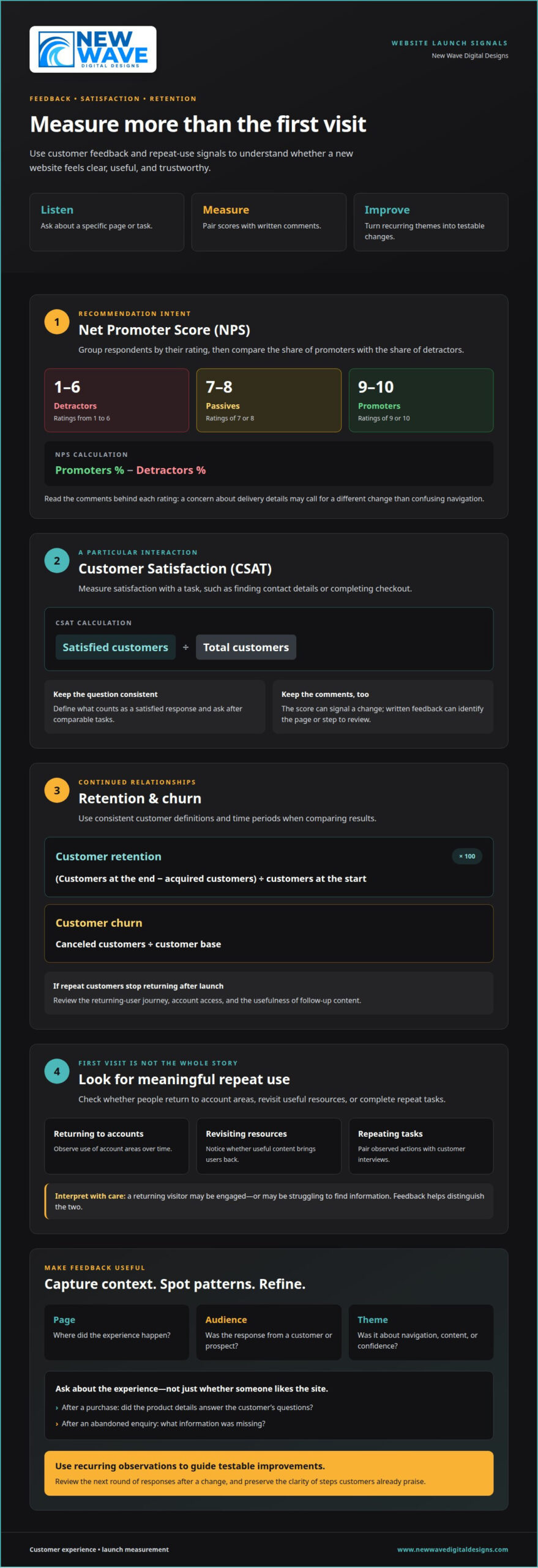
Customer and prospect feedback reveals whether a new website feels clear, useful, and trustworthy. Analytics may show that visitors leave a page, but a short follow-up can help explain why. Ask customers to describe a task they completed, then invite prospects to say what stopped them. Look for recurring comments about navigation, content, or confidence. One response may reflect personal preference; repeated feedback about the same checkout step points to a stronger pattern.

Make feedback specific to the experience. After a purchase, ask whether the product details answered the customer’s questions. After an abandoned enquiry, ask what information was missing. Focus questions on a page or task instead of asking whether someone simply likes the website. Record the page, audience type, and feedback theme. This makes comments more useful alongside conversion data and helps distinguish a content issue from a technical obstacle.

Net Promoter Score (NPS) adds a structured view of recommendation intent. Respondents rating the experience from 1 to 6 are detractors; ratings of 7 or 8 are passives; ratings of 9 or 10 are promoters. Calculate NPS by subtracting the percentage of detractors from the percentage of promoters. Read the comments behind each rating, too. A low score tied to confusing delivery details suggests a different improvement than a low score tied to difficult navigation.

Customer Satisfaction (CSAT) measures satisfaction with a particular interaction. Calculate it by dividing satisfied customers by total customers. Define what counts as a satisfied response and ask the same question after comparable tasks, such as finding contact details or completing checkout. Track the result alongside written comments. The score can signal a change, while comments often explain which page or step deserves attention.

Retention and churn show whether the website supports continued customer relationships. Calculate customer retention as customers at the end minus acquired customers, divided by customers at the start, multiplied by 100. Calculate churn as canceled customers divided by the customer base. Apply consistent time periods and customer definitions when comparing results. If repeat customers stop returning after launch, review the returning-user journey, account access, and the usefulness of follow-up content.

Customer usage matters beyond the first visit. Product adoption tracking should show whether customers continue using a product over time, not just whether they try it once. For a website, examine whether users return to account areas, revisit useful resources, or complete repeat tasks. Pair observed actions with customer interviews: a returning visitor may be engaged, while another may be struggling to find information. This distinction keeps launch activity connected to real customer value.

Close the feedback loop by turning recurring observations into testable improvements. If prospects say service details are hard to compare, refine the page and review the next round of responses. If customers praise a streamlined booking path, preserve its clarity while assessing other steps. This cycle connects feedback, satisfaction, retention, and usage to specific design decisions, bringing a human perspective to numerical measures.

2. Defining goals and tracking launch metrics

Start with a business outcome, then choose a measurable website goal. A retailer might track online sales; a service business might track qualified leads or booked consultations. Set relevant targets for revenue, price point, sales, prospects, leads, and conversions. Give each target a clear definition, an owner, and a review period. This makes measuring the success of a new website launch more meaningful than watching activity without a decision in mind.

Which analytics tools are best for measuring a new website launch? Google Analytics 4 can help track website traffic and on-site actions, while Google Search Console can show search visibility and organic clicks. Choose tools that capture your defined goals, and confirm that key actions, such as form submissions, are recorded consistently.

What are realistic website launch benchmarks for traffic, engagement, and conversions? There is no single useful benchmark for every site: results depend on the audience, offer, channel, and starting point. Set a baseline using comparable pre-launch performance, then compare similar periods and traffic sources against your goals. A conversion target should reflect the value of the action and the visitors’ intent.

For a launch campaign, connect each channel to a purpose. Track campaign visits, qualified prospects, leads, and completed conversions, then compare the outcomes with the campaign’s objectives. Align product and marketing teams around the same launch goals and key performance indicators. Otherwise, one team may celebrate reach while another measures sales, making the overall result difficult to interpret. For small and mid-sized B2B organizations seeking senior guidance to unify these metrics, Budget Boosters offers fractional CMO services that bridge the gap between marketing initiatives and revenue outcomes.

Use results to refine the launch rather than merely report them. Businesses that track key metrics are twice as likely to achieve their business targets. Mantic Point’s new website generated 12 product demo enquiries in its first month. It also produced a 400% increase in organic contacts in March compared with March 2015. These examples show why goals should connect website activity with business outcomes.

What are common website launch measurement mistakes and risks? Common errors include tracking page views without a business goal, counting duplicate submissions, and comparing different date ranges or channels. A missing event can make a working form appear ineffective. Before launch, test each important action, document its definition, and check that reports distinguish genuine leads from repeated or incomplete entries.

Review performance consistently and make one focused adjustment at a time. If a campaign brings visits but few qualified leads, inspect the landing-page message and next step. If leads rise but sales do not, examine lead quality and follow-up. For teams seeking an evidence-led approach to campaign optimisation, resources like freshfacedmarketing.co.uk can assist in turning web analytics into practical marketing strategies. Record each change alongside its metric so later reviews can connect the outcome to the decision.

3. Conversion rates and funnel drop-offs

A conversion is a completed action that supports a website’s purpose, such as an enquiry or purchase. Calculate the conversion rate by dividing completed actions by eligible visits, then express the result as a percentage. Define the action and audience first. A product purchase and a newsletter signup serve different purposes, so combining them can obscure which outcome the launch supports.

Map the visitor journey as a sequence of observable steps. An online store funnel might run from product page to cart, checkout, and completed order. A service website might move from landing page to service details, contact form, and submitted enquiry. Track each stage separately. Where progress slows, visitors may need clearer information or a more direct next step.

Check that every meaningful action is recorded once. For an enquiry form, distinguish opening it from submitting it. For checkout, distinguish adding an item from completing the purchase. Test these events before interpreting launch results. Duplicate tracking can inflate activity, while a missing completion event can hide conversions that actually occur.

Review funnel movement by relevant audience and traffic source. Visitors arriving through a product search may behave differently from those following a campaign link. Compare similar groups and periods, then examine the page visitors leave from. If they view a service page but don’t reach the contact form, the next step may be unclear or key details may be missing.

Mantic Point’s new website generated a 100% increase in all contacts month-on-month, with February 2016 mentioned in its reporting. This result illustrates why contact volume matters alongside visits. To understand the change, connect each contact to its source and journey through the site. More submissions provide context, but the funnel reveals which paths contributed to them.

Investigate a drop-off before changing the page. Check whether the button works, the form loads, and required information is easy to find. Then review the wording, page sequence, and mobile layout. For example, if visitors reach checkout but don’t finish, inspect the checkout experience rather than rewriting unrelated homepage content.

Make one focused improvement at a time, then compare the same funnel stages. If a clearer call to action moves more visitors from a service page to a form, keep the change and continue examining later steps. Changing several elements at once makes it harder to identify what influenced the result.

Use conversion rates to assess outcomes and drop-off points to locate friction. A launch report becomes actionable when it connects a defined goal, a recorded event, and a specific page. This turns a broad performance signal into a practical decision about what to refine next.
Measuring a New Website Launch Through Goals, Metrics, and Feedback

4. Daily and monthly active users

Daily Active Users (DAU) and Monthly Active Users (MAU) measure people who perform a defined, meaningful action. For a website, that action might be signing in, using a key feature, or returning to complete a task. A page view alone may not indicate meaningful engagement. Define “active” before launch and apply the same rule consistently in every report.

How soon after launch should you evaluate website success? Check tracking as soon as the site launches so you can correct broken events or missing actions early. Assess active-user patterns over a period that reflects how often visitors are expected to return, then compare the results with the launch goal.

DAU captures daily activity; MAU shows users active during a month. The measures answer different questions. A tool people need every day may benefit from daily tracking, while a resource used occasionally may be better understood through monthly activity. Choose the measure that fits the website’s purpose rather than assuming frequent visits always indicate greater value.

Set an active-user goal around a real business outcome. For example, a launch goal can be to acquire 500 active users within one month. Define what counts as active before measuring progress. If a site supports appointment booking, completing or managing a booking could be more informative than visiting the homepage. A clear action gives the target practical meaning.

Choose the minimum action carefully. For a messaging app, sending one message might define an active user. A business website needs its own relevant action, such as saving a product or accessing a customer account. Avoid counting passive events that don’t indicate use. Keep the definition stable after launch, or comparisons between reporting periods lose their meaning.

Separate new users from returning users to understand whether people come back after their first visit. Group users by when they first became active, then compare their later activity. For example, users who registered during a launch campaign may behave differently from existing customers. This view can reveal whether the site provides value beyond initial curiosity.

Interpret DAU and MAU alongside the action that defines activity. If monthly active users rise but key tasks remain untouched, the headline metric may overstate engagement. A smaller group that repeatedly completes useful tasks may offer a stronger signal. Pair user counts with task completion and feedback to understand both the scale and quality of use.

Document the definition, reporting period, and audience for each active-user measure. A launch dashboard might label a measure “monthly users completing account tasks” rather than simply “active users.” Clear labels make reports easier to interpret and help teams compare like with like as the website evolves.

5. Website traffic and page views

Traffic shows how many visits reach a website, while page views show which pages attract attention. Neither measure proves visitors found what they needed. Read both alongside the launch goal: a service site may value visits to enquiry pages, while a store may focus on product pages. Treat traffic as a signal, not a verdict.

Mantic Point’s new website received 504 organic visits in March 2016, compared with 167 in March 2015. Its previous website received 247 organic visits in January 2016, the last full month before launch. The new site produced an increase of over 100% in organic visits compared with that January baseline. These figures show why the comparison period matters: March-to-March and launch-to-last-full-month answer different questions.

How do you compare website performance across devices, traffic sources, and time periods? Use consistent metric definitions and comparable date ranges, then segment results by device and source. Compare organic visits with paid or referral visits separately. Check whether mobile and desktop visitors view important pages or complete key actions.

Page views add detail to traffic patterns. If a product page draws visits but few people continue to related information, inspect its links and content hierarchy. If a landing page attracts organic traffic, check whether visitors take the intended next step. Compare page views with entrances, exits, and conversions to understand the journey, not just its volume.

Use a baseline before judging launch performance. Compare the same month across years when seasonal patterns may matter, or compare with the last full month of the previous site. Mantic Point’s January 2016 baseline and March comparisons illustrate these distinct approaches. Keep the date ranges and traffic sources consistent, and note any campaign activity that could influence the pattern.

How do you measure website speed, accessibility, and technical performance? Test important pages on mobile and desktop, note loading delays, and check that links, forms, and navigation work. Review keyboard access, image descriptions, form labels, and text contrast. These checks can reveal barriers that traffic totals cannot show.

When traffic rises without deeper page engagement, inspect the pages visitors enter and leave. When page views increase alongside useful actions, the added attention may be supporting the site’s purpose. A practical review connects source, device, page, and next action, then identifies the specific experience to improve. Improve your website’s traffic experience by shaping clearer pathways from discovery to useful content.

New Wave Digital Designs: Shopify Website Design

New Wave Digital Designs offers Shopify Website Design for businesses creating an online store or refining an existing one. If launch metrics show that visitors aren’t moving from product pages toward purchases, look beyond the numbers at the experience behind them. A considered design can align product information, navigation, and shopping pathways more clearly with your goals.

For websites built on other platforms, New Wave Digital Designs also offers WordPress Website Design, SquareSpace Website Design, and Website Maintenance. These services can help when the next step is improving the website itself or maintaining its performance, rather than changing marketing goals alone.

Bring your launch goals and performance questions to New Wave Digital Designs. Contact the team to discuss Shopify Website Design.

Shape the next stage of your website

Measuring the success of a new website launch is most useful when it informs what you build next. Treat each finding as a design decision: clarify a confusing pathway, strengthen an important page, or refine how the site reflects your business. Keep observing how visitors respond as your priorities evolve.

New Wave Digital Designs can turn those priorities into a website experience through Shopify Website Design, WordPress Website Design, or SquareSpace Website Design. Choose a platform and design direction that support how your business serves its audience, not just how the site looks.

If you’re ready to discuss the next step for your website, contact New Wave Digital Designs. A thoughtful next iteration can give your digital presence room to grow.

Frequently Asked Questions

What KPIs should you track after launching a new website?

Track a focused set of KPIs that connects site performance to business priorities. Pair an outcome measure, such as qualified enquiries or completed purchases, with diagnostic measures that help explain it, such as landing-page visits or form starts. For example, a rise in enquiries is more meaningful when you can identify which pages and channels attracted suitable prospects. Tie each KPI to a clear decision, not just a dashboard display.

How do you set baseline goals and measure website performance before and after launch?

Record pre-launch results using consistent definitions, date ranges, and traffic segments, then compare equivalent periods after launch. Note context that could affect results, such as a seasonal promotion, campaign, or major content update. For example, if you redesign a product page, record the change date and compare engagement and the sales journey with the earlier version. This creates a more useful reference than comparing totals without context.

How do you measure SEO performance and organic traffic after a website launch?

Assess organic search through impressions, clicks, search queries, and the landing pages receiving visits. Check whether important pages appear for relevant searches, then see whether visitors continue toward useful actions. For example, if a refreshed service page gains search visibility but attracts irrelevant queries, refine its content to better match the intended audience. Also monitor pages that were moved or renamed so search engines can find and understand their updated destinations.

How do you track website conversion rates, leads, and sales?

Set up a distinct tracked event for each valuable action, such as a valid form submission, completed order, or phone enquiry. Check that test submissions and duplicate events don’t inflate totals. Connect digital events with lead or sales records to distinguish an enquiry from a qualified opportunity or completed sale. For example, compare form submissions with sales records to see whether enquiries progress beyond initial contact.

5 fixes to consider when your website isn’t generating leads

The first fix for a website that isn’t generating leads may not be a redesign. To decide what to do when your website isn’t generating leads, review the last 90 days of analytics and identify whether the problem is traffic, conversion, or what happens after an enquiry.

It’s frustrating when a site attracts visitors but doesn’t turn their interest into conversations. The answer is to follow the evidence: check whether the right people are arriving, whether key pages make the value clear, and whether the next step is easy to take. This article walks through five practical fixes, from refining calls to action and checking mobile performance to building trust and connecting your website with your sales process. You’ll learn how to prioritize improvements, estimate how long they may take, and focus on the changes that better match buyer needs.

Key Takeaways

  • Use recent analytics to identify whether the main obstacle is traffic, conversion, or enquiry follow-up before choosing a fix.
  • Give each priority page one clear next step that matches what visitors are ready to do.
  • Separate focused changes, such as simplifying a form, from broader work on messaging or site structure when estimating timelines.
  • Assess mobile usability, page speed, and trust-building details as part of the visitor’s path to contacting you.
  • Connect website enquiries to a defined sales process so you can see which leads progress and where prospects lose momentum.

1. Writing specific, stage-appropriate calls to action

Start with the visitor’s intent, not a generic “Contact us” button. Someone reading a service overview may want to compare approaches, while someone on a service page may be ready to request a quote. Give each priority page one clear next step, and make its wording fit the decision that page helps visitors make.

For example, a page explaining a problem could invite visitors to “Explore your options.” A service page could offer “Request a project quote.” A detailed guide might direct readers to a related service page before inviting them to get in touch. Keep the message consistent from the headline to the call to action, so visitors know what to expect after clicking.

Make the action easy to find. Place the main call to action near the top of key pages, then repeat it where it fits, including on landing pages and blog posts. A long article can introduce a relevant next step beside the section that answers the reader’s question, then repeat it near the end. This creates a clear path without turning every paragraph into a sales pitch.

Reduce form friction by requesting only information your team will use. A simple starting point is three fields: name, email, and a brief description. If a form asks for 10 or more fields when three would do, remove fields that aren’t essential to responding. Keep any necessary extra questions tied to a clear purpose, such as understanding the project type or preferred contact method.

To improve website conversion rates and lead generation, review the last 90 days of analytics, choose a high-traffic page, and test one change at a time. Compare a specific call to action with the current wording, or simplify the form and observe what changes. If the page receives fewer than approximately 100 monthly visitors, prioritize attracting relevant traffic before drawing strong conclusions from small numbers of submissions.

Agency fees depend on the project’s scope, the pages involved, analytics setup, and any testing or design work. Conversion rates also vary by industry, audience intent, traffic source, and the action being measured. Rather than relying on a broad benchmark, compare similar pages and lead types on your own site.

When deciding what to do when your website isn’t generating leads, start with the page’s purpose, the visitor’s next decision, and the effort needed to act. A full redesign won’t fix a confusing call to action by itself. First try a clearer message, a more relevant next step, or a shorter form.

2. Estimating how long website lead-generation fixes take

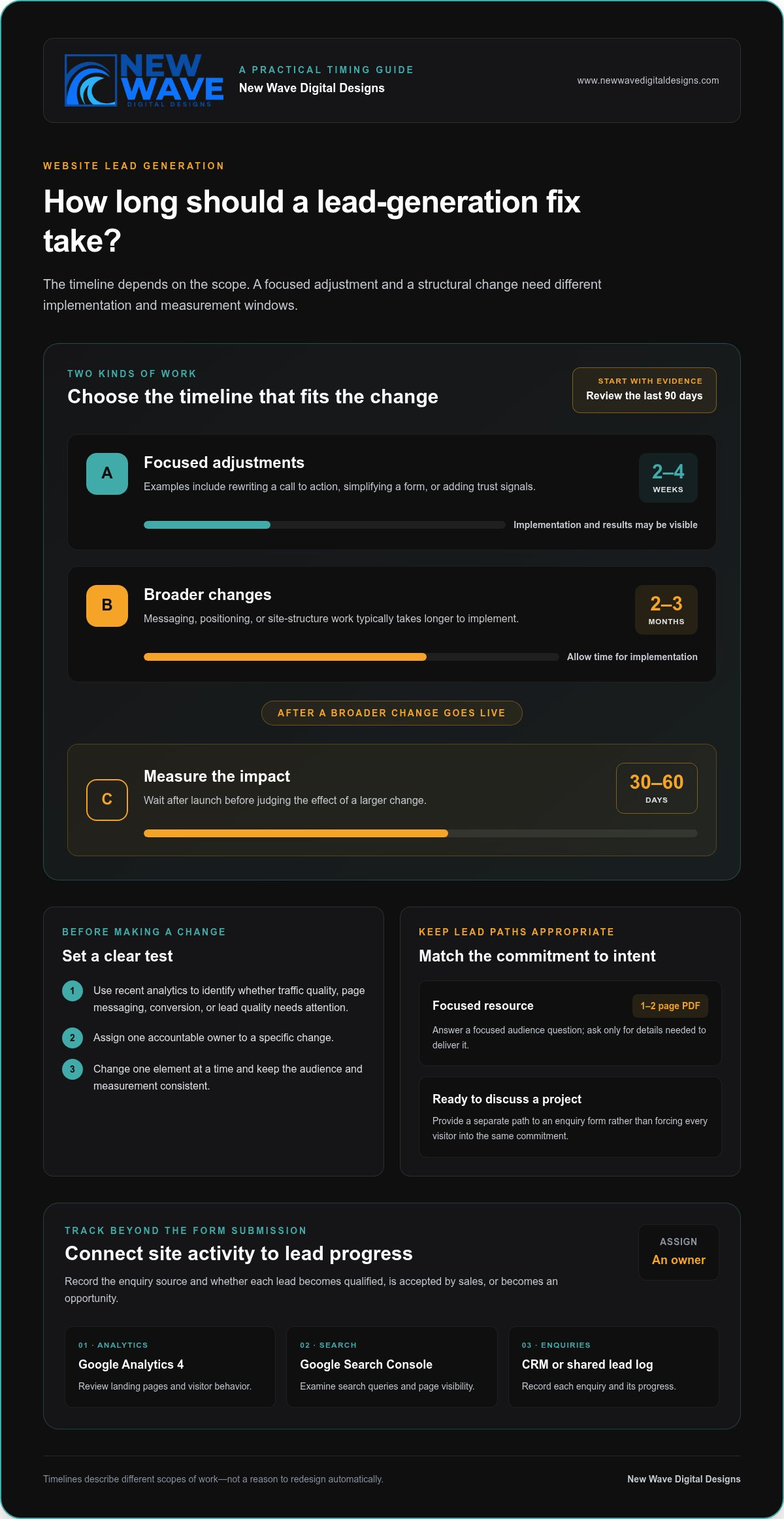
Set a realistic measurement window before changing your site. Quick adjustments, such as rewriting calls to action, simplifying forms, or adding trust signals, can produce results in 2-4 weeks. Changes to messaging, positioning, or the site’s structure typically take 2-3 months to implement. After larger changes go live, allow another 30-60 days to measure their impact.

Those timelines describe different kinds of work, not a reason to redesign automatically. First, review the last 90 days of analytics and identify whether traffic quality, page messaging, conversion mechanics, or lead quality needs attention. Then assign one accountable owner to a specific change and set its measurement window. If traffic is low or poorly matched to the offer, rebuilding pages alone won’t address the underlying reasons.

Lead magnets can give visitors different levels of commitment. A useful starting option is a 1-2 page PDF that answers a focused question for your audience. Offer it on a relevant article, and make the form request only details needed to deliver it. Visitors who are ready to discuss a project can follow a separate path to an enquiry form, rather than being pushed through the same commitment level.

Tracking should continue after submission. Use Google Analytics 4 to review landing pages and visitor behavior, Google Search Console to examine search queries and page visibility, and a CRM or shared lead log to record each enquiry. Assign an owner, record the enquiry’s source, and track whether it becomes qualified, accepted by sales, or an opportunity. A defined process makes it easier to distinguish a traffic issue from a follow-up gap.

To attract more qualified website leads, create SEO content around the questions buyers ask before choosing a service. Link each article to a relevant service page, and make sure the page delivers on the search query’s promise. When testing changes, compare versions with one element changed, such as the headline or call to action. Keep the audience and measurement consistent, then use what you learn to guide the next test.

Before beginning a redesign, check whether a targeted change can address the problem. Structural issues may justify broader work; an isolated form or message problem usually calls for a focused fix. For planned website lead-generation improvements, keep the scope tied to the evidence, the buyer’s needs, and the sales process.

3. Website speed, mobile usability, and technical performance

More than 50% of web traffic comes from mobile devices. A visitor arriving from a phone should be able to understand the page, use its navigation, and reach a useful next step without pinching or hunting. Test important pages on an actual phone, not only in a desktop preview.

Speed shapes that first interaction. A mobile page taking more than three seconds to load can lose visitors before they see its content. A one-second delay in website loading can reduce conversions by 7%. Start with your homepage, top landing pages, and contact form, then identify which elements delay their visible content.

Google’s Core Web Vitals guidance helps assess loading, responsiveness, and visual stability. Use these targets to identify technical work: Largest Contentful Paint under 2.5 seconds, Total Blocking Time under 200ms, and a mobile PageSpeed score above 70. A time to first byte above 800ms can flag an underpowered host. These measures point toward issues to investigate; they don’t replace testing the actual visitor journey.

Responsive design should do more than shrink a desktop layout. Check that headings wrap cleanly, buttons are easy to tap, and forms fit the screen without sideways scrolling. Then follow the route from a service page to its enquiry form. If phone users need to zoom, dismiss an obstructive banner, or hunt for the next step, simplify the journey.

Review how content appears on mobile, too. A long case study needs readable paragraphs, clear section labels, and visible links to related services. Keep essential details near the top, including what the business offers and whom it helps. This makes key information easier to find without forcing visitors through a dense wall of copy.

Use a practical diagnostic sequence: test your most visited pages, check mobile loading and layout, then submit each form yourself. Note where the experience slows down or breaks. If large media files make a case study slow to load, optimize them; if the mobile menu hides the enquiry route, adjust its layout. Fix the observed problem before considering a wider redesign.

  • Check mobile loading and layout on priority pages.
  • Use Core Web Vitals to locate performance issues.
  • Complete the enquiry journey on a phone, including form submission.

5 fixes to consider when your website isn’t generating leads

4. Building buyer trust and supporting decisions

Visitors need to understand your offer before they can trust it. Make the homepage messaging answer three questions: what you do, whom you help, and why visitors should keep reading. A headline should communicate what the business does, who it serves, and where within five seconds. Remove broad claims that leave people guessing, and explain the specific problem your service solves.

Support each claim with relevant evidence. Use testimonials that describe the customer’s situation, the work completed, and the outcome they experienced. A vague “great service” quote gives less context than one that explains how a project addressed a particular need. Place testimonials beside the service or decision they support, instead of gathering every quote on a disconnected page.

For a more considered purchase, case studies can show how a business approaches real challenges. Structure each one around the customer’s starting point, the decisions made, and the result. In complex B2B sales, a buying group may include multiple people who need different evidence. A technical lead may want process details, while a decision-maker may need to understand business value. Use analytics and sales conversations to learn which questions visitors seek to answer.

Local trust signals matter when customers want to know whether a business serves their area. Show the relevant location or service area clearly, and keep business details consistent across the site. Pair those details with local testimonials or case studies when available. A visitor should not have to search several pages to establish where a business works or whether its offer fits their needs.

Make proof easy to assess. Use named customer testimonials only with permission, and keep quotations faithful to the customer’s words. Label case studies clearly, distinguish examples from guarantees, and explain the scope of any result. If you display credentials or partner logos, explain what they represent. A badge without context may add visual weight without addressing a buyer’s concern.

Review the homepage from a first-time visitor’s perspective. In 10 seconds, can someone identify the business’s location, price range, and differentiator? If not, bring those details into clearer view. Ask a colleague unfamiliar with the site to describe its offer after a brief glance. Their response can reveal whether the design and messaging communicate the intended meaning.

Finally, make trust actionable. Place relevant proof near the next step, such as a testimonial beside a service enquiry form. Keep any response-time statements realistic and make promises only when you can consistently meet them. Clear evidence, accurate details, and credible expectations help buyers make informed decisions.

5. Alignment between website and sales process

A website can attract visitors and collect enquiries yet still lose potential sales. The gap often appears after the click: an ad promises one thing, the landing page says another, or no one owns the incoming enquiry. Treat lead generation as a connected path from first message to sales outcome, not just a count of form submissions.

Map the buyer’s journey from each major channel. If a Google Ads campaign promotes a specific service, send visitors to a page that continues the same promise. Explain the service, answer likely buyer questions, and offer a relevant next step. Sending everyone to the homepage makes visitors search again for the information that earned their click.

Next, write down what happens after someone submits a form. Assign an owner for reviewing each enquiry, define how it is routed, and set a clear follow-up process. Every website enquiry should trigger an immediate response. That response can acknowledge the request, explain what happens next, and give the prospect a useful way to continue the conversation.

Make the handoff visible to both marketing and sales. Track each enquiry through qualification, sales acceptance, and opportunity creation. Record its source, landing page, requested service, and outcome in a shared CRM or lead log. These stages help show whether the problem is unqualified traffic, a poor page-to-offer match, or a follow-up gap. A form fill is a starting signal, not proof of sales progress.

Use sales conversations to improve your website strategy. Ask the team which questions prospects raise, what concerns delay decisions, and which details help a lead move forward. Then update the homepage, service pages, and relevant content to answer those questions. For example, if prospects repeatedly ask what a project includes, explain the process and deliverables before the enquiry step. Useful content supports real decisions, not simply a higher page count.

Close the loop with regular reviews. Compare lead sources with qualification and opportunity outcomes, then share what you learn between marketing and sales. If a channel generates enquiries that rarely fit, refine its targeting or destination page. If qualified leads stall after submitting a form, examine who owns the response and how follow-up works. Tie each improvement to a specific stage instead of relying on traffic or form totals alone.

When your website and sales process need a more coherent structure, discuss your website strategy and how its pages can better support the buyer journey.

New Wave Digital Designs: Shopify Website Design

New Wave Digital Designs offers Shopify Website Design for businesses that need an online store with a clearer path from discovery to enquiry or purchase. If your analytics point to confusing page structure, inconsistent messaging, or a difficult visitor journey, a focused design review can help shape the site around your products and customers. Website Maintenance supports ongoing updates after launch, keeping key pages aligned as your business evolves.

A redesign makes sense when structural issues affect several parts of the customer journey. If the problem is limited to one form or page, a targeted improvement may be the better first step. Choose the change that addresses the evidence you’ve gathered and supports your sales process.

Contact New Wave Digital Designs to discuss your website goals and next steps.

Choose the next step that fits your site

Your next move doesn’t need to start with a blank canvas. Decide whether your current site needs focused refinements or a new structure that better reflects how customers explore and choose your services. This distinction keeps improvements grounded in your business priorities.

If you’re weighing what to do when your website isn’t generating leads, identify where the experience stops matching customer expectations. A new design may suit a business whose platform or page structure no longer supports its goals. New Wave Digital Designs offers Shopify Website Design, WordPress Website Design, and SquareSpace Website Design, with each project shaped around the platform and business needs.

Bring your goals, customer questions, and strongest sales insights into that conversation. They can help guide a website experience that feels cohesive and makes the path forward clearer. Contact New Wave Digital Designs to discuss your website and take the next step with confidence.

Frequently Asked Questions

How do you decide what to fix first?

Fix the earliest point where the buyer journey breaks. If the right audience never reaches relevant pages, examine acquisition; if visitors arrive but don’t engage, review the page experience; if enquiries come in but stall, inspect follow-up. Compare customer questions with the pages they visit, then make one change that addresses the clearest obstacle. This keeps your effort focused on a cause, not a cosmetic preference.

How many leads should a small business website generate?

There isn’t one useful target for every small business. Lead volume depends on audience size, traffic relevance, the offer, and how many enquiries your team can handle. A site that attracts a few highly suitable prospects may serve the business better than one that generates more unqualified requests. Set a baseline using your own enquiry and sales history, then assess whether leads meet your goals.

Is the problem my website or my marketing?

The issue may be the traffic, the page, or a disconnect between them. Compare the promise in your ads, search listings, or email campaigns with the page visitors land on. If the wording attracts people seeking something the page doesn’t address, the traffic and destination are misaligned. If the audience is appropriate but visitors leave without taking a relevant action, inspect the page itself. Review each channel separately before making broad changes.

Why is my website getting traffic but no leads?

Traffic alone doesn’t show whether visitors are potential buyers or can find a suitable next step. A blog post may attract people seeking general information, while a service page should address purchase concerns. Check which pages attract visits, what search intent brought people there, and whether the content connects naturally to an offer. Test the enquiry journey yourself, too, since a broken link or form can block interested prospects.

How do you diagnose why a website is not generating leads?

Trace a visitor’s path from the entry page through key interactions to the enquiry stage. Review landing-page behavior, traffic sources, form submissions, and where visitors exit. Then test the site as a prospective customer: follow a navigation link, complete a form, and check that the confirmation appears. Compare tracked submissions with actual enquiries to identify measurement gaps before interpreting a low conversion count.

How do you optimize landing pages, forms, and calls to action for more leads?

Make the landing page match the message that brought visitors there, then remove distractions around its main action. For example, a page promoting an estimate should explain what it covers and what information the form needs. Test one meaningful adjustment at a time, such as changing the opening message or removing an unnecessary field. Review completed enquiries as well as form starts to see whether the change attracts suitable prospects.

How does website speed and mobile usability affect lead generation?

A slow or awkward mobile experience can stop visitors before they understand your offer or finish an enquiry. Test key pages on a phone, including dropdown menus, phone links, and form fields. Check that buttons remain visible when the keyboard opens and that text can be read without zooming. If a page is difficult to use, identify whether loading, layout, or an interactive element is the obstacle, then address it.

How can you tell whether website leads are high quality and converting into sales?

Define lead quality using criteria sales can apply consistently, such as service fit, project readiness, and the information provided. Record each enquiry’s source and track its progress through qualification, sales acceptance, and opportunity stages. Review outcomes with the sales team to identify which pages and campaigns attract prospects who advance. This separates useful demand from form submissions that don’t match your offer or become sales conversations.

Website Analytics: Tracking and Analyzing User Data

Introduction

In the fast-paced digital landscape, understanding user behavior is paramount for the success of your online presence. At New Wave Digital Designs, we recognize the power of website analytics in unraveling valuable insights. This article delves into website analytics, emphasizing its role in tracking and analyzing user data for informed decision-making. Explore how our integrated approach and organic SEO strategies can leverage analytics to elevate your online performance.

Comprehensive Data Collection

Website analytics is the compass that guides your online strategy. We collect comprehensive data, including visitor demographics, page views, and user interactions, through tools like Google Analytics. At New Wave Digital Designs, we prioritize robust data collection to gain a holistic understanding of user engagement, providing a solid foundation for strategic decisions.

User Journey Mapping

Understanding the user journey is vital for optimizing the customer experience. Website analytics allows us to map the user journey from conversion entry. By analyzing user interactions, bounce rates, and navigation patterns, we tailor your website’s structure and content to enhance engagement. This strategic approach and organic SEO ensure a seamless user experience aligned with search engine best practices.

Conversion Rate Optimization (CRO)

Website analytics is instrumental in identifying conversion bottlenecks. Through meticulous user data analysis, we pinpoint improvement areas in the conversion funnel. Our experts at New Wave Digital Designs utilize CRO techniques to optimize landing pages, calls-to-action, and overall user pathways, maximizing your website’s potential for conversions while aligning with organic SEO principles.

Content Performance Evaluation

Content is the backbone of online engagement, and analytics allows us to evaluate its performance. By tracking which pages resonate most with your audience, we fine-tune content strategies for maximum impact. At New Wave Digital Designs, our approach integrates website analytics to refine your content continuously, ensuring it attracts, retains, and converts visitors organically.

SEO Insights and Refinement

The synergy between website analytics and organic SEO is undeniable. Analytics provides valuable insights into keyword performance, organic search traffic, and user engagement. By analyzing this data, we refine your SEO strategy, optimizing for keywords that resonate with your audience. The result is an online presence that not only attracts but maintains high visibility in search engine results.

Conclusion

In the digital age, knowledge is power, and website analytics is the key to unlocking invaluable insights. At New Wave Digital Designs, our approach to website analytics goes beyond numbers; it’s about understanding your audience, optimizing user experiences, and refining strategies for sustained success. By integrating organic SEO practices with comprehensive analytics, we empower your online presence to thrive. Contact us today to embark on a journey of data-driven decision-making and elevate your website to new heights of success.