
What if your landing page is the missing link between a promising Google Ads click and a qualified lead? When visitors arrive and can’t find the offer they expected, even a polished page can leave them unsure what to do next. Learning how to create effective landing pages for Google Ads starts with treating the page as a continuation of the ad, not a separate design exercise.
If paid clicks aren’t producing enough leads or sales, it can be difficult to know which change to make first. Start by checking whether the page matches the ad, explains the offer clearly, and makes the next step easy to take. This guide walks through how to align campaign intent with page content, create a smooth experience on desktop and mobile, and measure what happens after each click. Use these steps to bring your ad, page design, and visitor needs into closer alignment.
Key Takeaways
- Learn how to create effective landing pages for Google Ads by carrying the ad’s promise through to a relevant page and clear next step.
- Shape the page around one offer, one audience, and one primary action, with supporting details that build confidence without competing for attention.
- Compare a dedicated landing page with an existing website page to choose a destination suited to your campaign and visitor journey.
- Follow a practical process from campaign research and page planning to review and launch, keeping each page tied to a specific campaign theme.
- Measure meaningful actions and lead or purchase quality, then use documented, focused changes to guide ongoing refinement.
What makes a Google Ads landing page effective?
A Google Ads landing page is a focused destination that continues the ad’s promise and helps visitors take a relevant action. They should recognize the offer, understand why it matters, and see what to do next without searching through unrelated content. For a basic overview, see What is a Landing Page?
A landing page doesn’t have to be a separate website or a unique URL for every campaign. A homepage introduces the broader business and gives visitors several paths to explore. A landing page puts one campaign’s message and visitor need first. A relevant service page on your existing site can also work when it provides the information the visitor needs and makes the next step clear.
Message match builds confidence: when the page reflects the ad’s offer and audience, visitors can understand what happens after the click and what to do next. That alignment is central to how to create effective landing pages for Google Ads. Focus the page, but don’t hide useful information or make it difficult to navigate.
How does a landing page connect to a Google Ad?
The journey begins with a search query, continues through the ad, and ends at a page where the visitor can take an intended action, such as submitting an enquiry or making a purchase. Each step should feel connected. If an ad promotes Google Ads management, for example, the page should identify that service, explain what the visitor can learn or do, and present a relevant next step.
Google Ads reports landing page experience as one component in its Quality Score diagnostics, alongside ad relevance and expected click-through rate. Use it as a reason to investigate the visitor experience, not as a conversion guarantee or a score to optimize in isolation. If the ad and page seem misaligned, review the wording of the offer, the intended audience, and the expectations the page sets.
When is a dedicated landing page useful?
A dedicated page is useful when a campaign promotes a distinct offer or targets a specific search intent that needs a tailored explanation. An ad about Google Ads management, for instance, may lead to a page focused on that service, while a broad search for a business name may be better served by the homepage. Choose a destination based on visitor intent, the complexity of the offer, and the quality of the relevant content already on your site.
Before creating a page, ask what the visitor needs to understand before acting. A straightforward offer may need only a concise explanation and a clear action. A more considered decision may require extra context, supporting details, and answers to likely questions. In both cases, the page should make the path from interest to action feel natural.
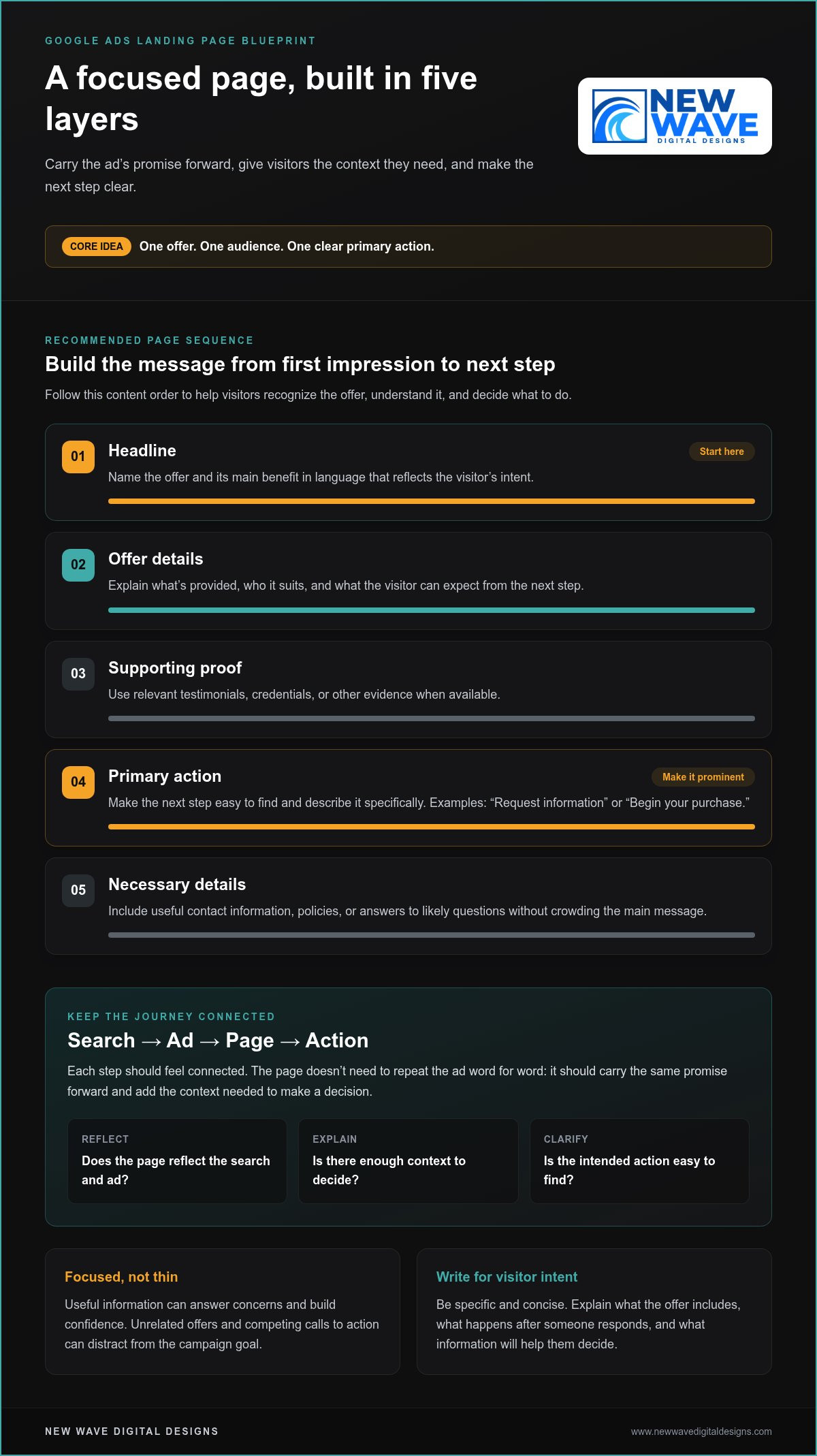
Evaluate the page with three questions: does it reflect the search and ad, give the visitor enough context to decide, and make the intended action easy to find? A homepage can work if it answers those questions for the campaign. A dedicated landing page can be a better fit when the wider site would force visitors to navigate through unrelated choices. The goal is a purposeful journey, not simply a shorter page.
Build the page around one offer, one audience, and one clear action
Once visitors arrive, the page structure should make their decision straightforward. Lead with a headline that names the offer and its value. Explain who it’s for and what to do next, then add concise supporting details and a prominent call to action. This order helps visitors move from recognizing the offer to understanding it and deciding whether to act.
Keep the page focused, not thin. Useful information can answer concerns and build confidence, while unrelated offers and competing calls to action can distract from the campaign goal. Use a simple content plan:
- Headline: State the offer and its main benefit in language that reflects the visitor’s intent.
- Offer details: Explain what’s provided, who it suits, and what the visitor can expect from the next step.
- Supporting proof: Include relevant testimonials, credentials, or other evidence when available.
- Primary action: Make the next step easy to find and describe it specifically.
- Necessary details: Add useful contact information, policies, or answers to likely questions without crowding the main message.
Message match means maintaining continuity between a person’s search, the ad they choose, and the page they reach. The page doesn’t need to repeat the ad word for word. It should carry the same promise forward and add the context the visitor needs to make a decision. This is a practical foundation for how to create effective landing pages for Google Ads.
What should the headline and page copy communicate?
Write the headline for the visitor’s likely intent, not just the business’s internal description of its service. If the ad promotes Google Ads management, make that subject clear at the top of the page. Use the following copy to explain who the service is for and what the visitor can do next. Specific, concise language helps people quickly decide whether they’re in the right place.
Answer the questions that matter at this stage: What does the offer include? What happens after someone responds? What information will help them decide? Prioritize those answers over broad claims or mechanical repetition of the ad.
How should forms, calls to action, and trust elements work together?
Use a CTA that names the action, such as “Request information” or “Begin your purchase,” instead of a vague label. Make the primary action visually prominent and limit secondary links that could pull attention away. For forms, ask only for details needed for the next meaningful step. Every additional question should have a clear purpose.
Place trust details where they can help with a decision. A testimonial may support the offer, while a relevant policy or contact detail can address a concern near a form. Keep these elements clear and accurate. Thoughtful Google Ads and website design can help bring campaign intent and page structure into closer alignment.
Dedicated landing page or existing website page: which should you choose?
The best destination is the page that answers the searcher’s need with the least friction. A dedicated landing page gives a campaign more control over its message and layout. An existing product or service page may already provide the right detail and a clear path to action. Neither option is automatically better. Choose based on how closely the page fits the campaign and how much work it needs.
| Consideration | Dedicated landing page | Existing website page |
|---|---|---|
| Message match | Can be tailored closely to a specific ad, audience, or offer. | Works well if its content already reflects the ad’s promise and search intent. |
| Setup effort | Requires planning, writing, design, tracking, and ongoing upkeep. | May be ready to use, though content or layout changes could be needed. |
| Page flexibility | Offers more control over campaign-specific content and journey. | Must fit within the existing site structure and page purpose. |
| Measurement | Can make campaign actions easier to isolate, provided tracking is configured appropriately. | Can be measured too, but shared content or multiple actions may require careful interpretation. |
When does a dedicated campaign page make sense?
Consider a dedicated destination when the campaign has a distinct offer, targets a clearly defined audience, or needs a focused conversion journey. A time-sensitive promotion, for example, may need terms and a call to action that aren’t prominent on a general service page. A campaign for one service can also benefit from copy that directly addresses the visitor’s questions instead of asking them to navigate a broad menu.
That control comes with responsibility. Each additional page needs accurate content, thoughtful design, functioning measurement, and updates as the offer changes. An outdated campaign page can undermine the relevance it was created to provide.
When can an existing page be the better destination?
Use an existing page if it already answers the search query, supports the ad’s promise, and makes the intended action clear. Someone searching for a particular product may be better served by its detailed product page than by a new page that repeats the same information. A general homepage is less suitable if visitors have to sift through unrelated services to find that product.
Review the page from the visitor’s perspective. Does the main heading reflect the ad’s offer? Are competing calls to action or unrelated sections drawing attention away? Could a modest edit to the headline, opening copy, or placement of the primary action make the page more relevant? If so, refine what’s already there before building another destination.
Use this decision rule: choose a dedicated page when the campaign needs an experience the current site doesn’t provide; choose an existing page when it already fits the visitor’s intent and supports the next step. This balance is part of how to create effective landing pages for Google Ads without adding pages that have no clear purpose.
How to create and launch a Google Ads landing page step by step
A dependable launch starts before design work. Establish what the campaign promises, who it’s meant to reach, and what action the page should support. Then build and review the destination as a complete journey, from the first screen to the confirmation visitors see after submitting a form or completing a purchase.
Test the complete visitor journey before directing paid traffic. A page can look polished and still fail if its form, links, or measurement don’t work as intended.
- Research the campaign. Review its search themes, ad language, audience, offer, and intended action. Connect each landing page to a specific campaign theme rather than combining unrelated search intents on one destination.
- Write a page brief. Record the visitor’s likely need, the offer, supporting evidence, and the primary conversion action. Map the ad’s central promise to the page headline, key content, and call to action.
- Plan the visitor journey. Decide what a person needs to know before acting, such as what the offer involves or what happens after an enquiry. Arrange the content in a logical order and make the next step easy to find.
- Build the page. Create or refine the destination using the brief. Check that the layout adapts to mobile and desktop, text is readable, controls are easy to use, and links and forms work correctly.
- Review the experience. Check accessibility, loading issues, clear privacy information, accurate content, and distractions that could interrupt the intended journey. Confirm that the final destination URL matches the campaign plan.
- Verify measurement and launch. Test that the intended action, such as a form submission or purchase, is recorded accurately. Review the relevant Google Ads, Google Analytics 4, or Google Tag Manager configuration against current product documentation before relying on the data. Then direct campaign traffic to the tested page.
What belongs in the landing page brief?
Make the brief specific enough that a designer or writer can understand the campaign before building begins. Include the audience, search intent, offer, available supporting evidence, primary conversion action, and questions visitors may need answered. Note the ad’s central promise and how it should carry through to the headline, supporting content, and CTA. This gives you a clear reference for reviewing the finished page and helps keep copy and design aligned with campaign intent.
What should you check before sending Google Ads traffic?
Test common mobile and desktop screen sizes, including the full form process and what visitors see after submission or purchase. Check that buttons and links lead to the right places, text remains legible, the page loads reliably, and privacy disclosures are easy to find wherever personal information is collected. Confirm the final destination URL and verify that tracking records the action you want to measure, not just a button click that may not represent a completed conversion.
Building a strong destination takes coordinated campaign thinking, design, and measurement. New Wave Digital Designs provides website design and paid search services to help align those elements.
Measure, refine, and connect landing page design with Google Ads
A landing page’s results involve more than the number of conversions. A page may generate many enquiries but attract people who aren’t a good fit. Pair performance data with lead or purchase quality, then identify where the visitor journey works smoothly and where it creates friction. That fuller view helps distinguish useful improvements from changes that only make a dashboard look better.
Which landing page metrics can guide improvements?
Conversion rate is the share of measured visitors who complete a defined action. It’s useful for tracking a page over time, but interpret it alongside traffic sources and conversion quality. A form submission matters more when it represents a relevant prospect than when it’s an unqualified enquiry. For purchases, consider order quality as well as completed transactions.
Review multiple signals together. If visitors arrive but few begin a form, the offer, page content, or action may not be clear enough. If they start but don’t complete it, check for unnecessary questions or usability barriers. Engagement measures can show where visitors spend time or leave, but no single metric explains why. Combine the data with a careful page review and, where possible, feedback on lead or customer quality.
Use Google Ads and Google Analytics 4 reports only after checking that tracking records the intended actions accurately. Confirm that a conversion represents a completed enquiry or purchase, rather than an incidental click, and that reporting is configured consistently. Review current Google product documentation before drawing conclusions from the data.
How can design and campaign management work together?
Campaign intent sets the direction: which audience the ad reaches, what the offer promises, and what action the page should support. Website structure and visual design make that journey easier to understand, while measurement shows where it may need refinement. These elements inform one another. If visitors engage with the ad but don’t complete the intended action, review both traffic relevance and the page experience before deciding what to change.
Make each test deliberate. Write down the issue you’re investigating, the change you’ll make, and the result you expect. When practical, change one important element at a time, such as the headline or form layout. Then compare the outcome with your original hypothesis, including lead or purchase quality. If several elements change together, it’s harder to tell which adjustment mattered. Keep a record of what changed and what the evidence suggests, even when a test has no clear result.
Website design, graphic design, and Google Ads management can work together to align brand expression, campaign intent, page structure, and measurement. New Wave Digital Designs offers these services alongside organic SEO, helping businesses develop a coherent digital presence. This cycle of observing, refining, and learning is central to how to create effective landing pages for Google Ads without relying on guesswork.
Give your next campaign a clearer path forward
The next step doesn’t have to be a complete rebuild. Choose one campaign, review the experience from a visitor’s perspective, and identify the most useful improvement to explore. A thoughtful, measured approach to how to create effective landing pages for Google Ads can turn each insight into a stronger foundation for future decisions.
New Wave Digital Designs provides website design for Shopify, WordPress, and Squarespace, along with Google Ads and Bing Ads management, graphic design, hosting, and website maintenance. These services can support a coherent experience from campaign to page and ongoing site care, shaped around your business needs.
Work with New Wave Digital Designs on a landing page aligned with your campaign goals.
Frequently Asked Questions
Can I use my homepage as a Google Ads landing page?
Yes, your homepage can work if it directly addresses the ad’s subject and makes the intended action easy to find. It may suit branded searches from people looking for your business, but be less useful for an ad promoting one specific service if visitors have to search through a broad menu. Review the page on mobile, too. If the offer and next step aren’t immediately clear, a more focused destination may serve the campaign better.
How many landing pages should a Google Ads campaign have?
There’s no fixed number. Build or select pages around meaningful differences in search intent, audience, or offer, rather than creating a separate page for every keyword. Several search terms seeking the same service may fit one page, while a product promotion and a service enquiry may need distinct experiences. Keep the number of pages manageable so you can maintain accurate content, functioning tracking, and relevant information as campaigns change.
What is a good conversion rate for a Google Ads landing page?
There isn’t one conversion rate that’s good for every campaign. The right interpretation depends on the action being measured, the audience, the offer, and whether conversions lead to qualified enquiries or purchases. Compare similar traffic and actions over time, and examine quality alongside volume. A higher rate isn’t necessarily better if it comes from less relevant enquiries. Treat benchmarks as context, not as a target that overrides business value.
How long should I wait before changing a landing page?
Wait until you have enough relevant data to make a considered comparison, rather than reacting to a short-term fluctuation. The time needed depends on traffic volume, conversion frequency, and how consistent the campaign has been. Before making changes, check that tracking works and review whether visitors match the intended audience. If you find a clear technical problem, such as a broken form, fix it promptly instead of waiting for more data.
Do Google Ads landing pages need a privacy policy?
If a page collects personal information, explain clearly how that data will be used and make the relevant privacy notice easy to find near the form. This helps visitors understand what they’re sharing before they submit it. The exact disclosures that apply can depend on your business and the data collected, so avoid generic copy that doesn’t reflect your practices. Keep the notice current when your data collection or use changes.
Can I test two landing page versions with Google Ads?
Yes, you can compare page versions, but structure the test so the result is useful. Decide what you’re testing, such as a headline or form layout, and keep the audience, offer, and conversion definition consistent where practical. Confirm that both versions load correctly and that tracking records the same intended action. Review current Google Ads experiment options and setup guidance before launching, since available controls can change.