
How to Create Effective Landing Pages for Google Ads

What if your landing page is the missing link between a promising Google Ads click and a qualified lead? When visitors arrive and can’t find the offer they expected, even a polished page can leave them unsure what to do next. Learning how to create effective landing pages for Google Ads starts with treating the page as a continuation of the ad, not a separate design exercise.

If paid clicks aren’t producing enough leads or sales, it can be difficult to know which change to make first. Start by checking whether the page matches the ad, explains the offer clearly, and makes the next step easy to take. This guide walks through how to align campaign intent with page content, create a smooth experience on desktop and mobile, and measure what happens after each click. Use these steps to bring your ad, page design, and visitor needs into closer alignment.

Key Takeaways

  • Learn how to create effective landing pages for Google Ads by carrying the ad’s promise through to a relevant page and clear next step.
  • Shape the page around one offer, one audience, and one primary action, with supporting details that build confidence without competing for attention.
  • Compare a dedicated landing page with an existing website page to choose a destination suited to your campaign and visitor journey.
  • Follow a practical process from campaign research and page planning to review and launch, keeping each page tied to a specific campaign theme.
  • Measure meaningful actions and lead or purchase quality, then use documented, focused changes to guide ongoing refinement.

What makes a Google Ads landing page effective?

A Google Ads landing page is a focused destination that continues the ad’s promise and helps visitors take a relevant action. They should recognize the offer, understand why it matters, and see what to do next without searching through unrelated content. For a basic overview, see What is a Landing Page?

A landing page doesn’t have to be a separate website or a unique URL for every campaign. A homepage introduces the broader business and gives visitors several paths to explore. A landing page puts one campaign’s message and visitor need first. A relevant service page on your existing site can also work when it provides the information the visitor needs and makes the next step clear.

Message match builds confidence: when the page reflects the ad’s offer and audience, visitors can understand what happens after the click and what to do next. That alignment is central to how to create effective landing pages for Google Ads. Focus the page, but don’t hide useful information or make it difficult to navigate.

How does a landing page connect to a Google Ad?

The journey begins with a search query, continues through the ad, and ends at a page where the visitor can take an intended action, such as submitting an enquiry or making a purchase. Each step should feel connected. If an ad promotes Google Ads management, for example, the page should identify that service, explain what the visitor can learn or do, and present a relevant next step.

Google Ads reports landing page experience as one component in its Quality Score diagnostics, alongside ad relevance and expected click-through rate. Use it as a reason to investigate the visitor experience, not as a conversion guarantee or a score to optimize in isolation. If the ad and page seem misaligned, review the wording of the offer, the intended audience, and the expectations the page sets.

When is a dedicated landing page useful?

A dedicated page is useful when a campaign promotes a distinct offer or targets a specific search intent that needs a tailored explanation. An ad about Google Ads management, for instance, may lead to a page focused on that service, while a broad search for a business name may be better served by the homepage. Choose a destination based on visitor intent, the complexity of the offer, and the quality of the relevant content already on your site.

Before creating a page, ask what the visitor needs to understand before acting. A straightforward offer may need only a concise explanation and a clear action. A more considered decision may require extra context, supporting details, and answers to likely questions. In both cases, the page should make the path from interest to action feel natural.

Evaluate the page with three questions: does it reflect the search and ad, give the visitor enough context to decide, and make the intended action easy to find? A homepage can work if it answers those questions for the campaign. A dedicated landing page can be a better fit when the wider site would force visitors to navigate through unrelated choices. The goal is a purposeful journey, not simply a shorter page.

Build the page around one offer, one audience, and one clear action

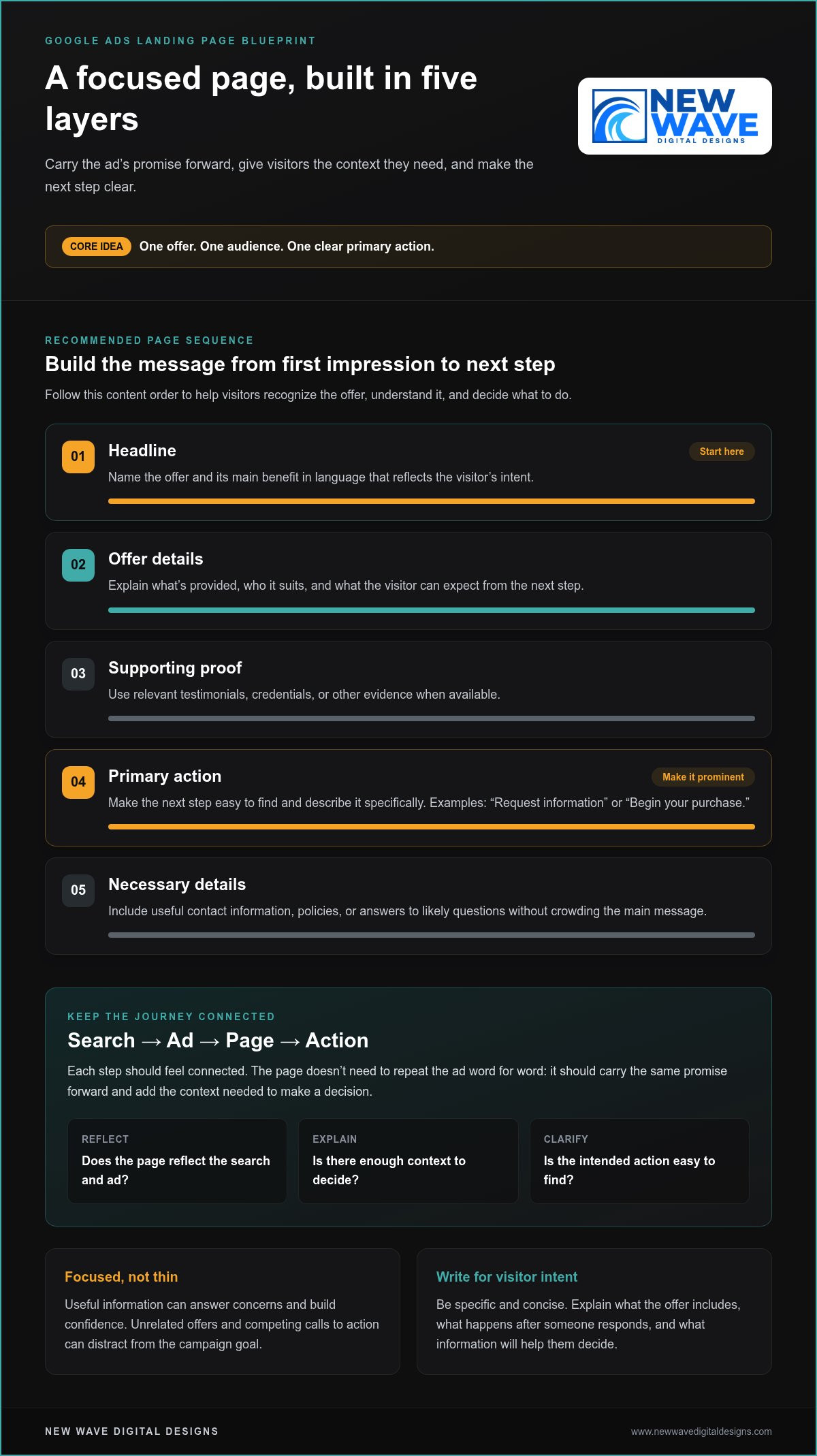
Once visitors arrive, the page structure should make their decision straightforward. Lead with a headline that names the offer and its value. Explain who it’s for and what to do next, then add concise supporting details and a prominent call to action. This order helps visitors move from recognizing the offer to understanding it and deciding whether to act.

Keep the page focused, not thin. Useful information can answer concerns and build confidence, while unrelated offers and competing calls to action can distract from the campaign goal. Use a simple content plan:

  • Headline: State the offer and its main benefit in language that reflects the visitor’s intent.
  • Offer details: Explain what’s provided, who it suits, and what the visitor can expect from the next step.
  • Supporting proof: Include relevant testimonials, credentials, or other evidence when available.
  • Primary action: Make the next step easy to find and describe it specifically.
  • Necessary details: Add useful contact information, policies, or answers to likely questions without crowding the main message.

Message match means maintaining continuity between a person’s search, the ad they choose, and the page they reach. The page doesn’t need to repeat the ad word for word. It should carry the same promise forward and add the context the visitor needs to make a decision. This is a practical foundation for how to create effective landing pages for Google Ads.

What should the headline and page copy communicate?

Write the headline for the visitor’s likely intent, not just the business’s internal description of its service. If the ad promotes Google Ads management, make that subject clear at the top of the page. Use the following copy to explain who the service is for and what the visitor can do next. Specific, concise language helps people quickly decide whether they’re in the right place.

Answer the questions that matter at this stage: What does the offer include? What happens after someone responds? What information will help them decide? Prioritize those answers over broad claims or mechanical repetition of the ad.

How should forms, calls to action, and trust elements work together?

Use a CTA that names the action, such as “Request information” or “Begin your purchase,” instead of a vague label. Make the primary action visually prominent and limit secondary links that could pull attention away. For forms, ask only for details needed for the next meaningful step. Every additional question should have a clear purpose.

Place trust details where they can help with a decision. A testimonial may support the offer, while a relevant policy or contact detail can address a concern near a form. Keep these elements clear and accurate. Thoughtful Google Ads and website design can help bring campaign intent and page structure into closer alignment.

Dedicated landing page or existing website page: which should you choose?

The best destination is the page that answers the searcher’s need with the least friction. A dedicated landing page gives a campaign more control over its message and layout. An existing product or service page may already provide the right detail and a clear path to action. Neither option is automatically better. Choose based on how closely the page fits the campaign and how much work it needs.

Consideration Dedicated landing page Existing website page
Message match Can be tailored closely to a specific ad, audience, or offer. Works well if its content already reflects the ad’s promise and search intent.
Setup effort Requires planning, writing, design, tracking, and ongoing upkeep. May be ready to use, though content or layout changes could be needed.
Page flexibility Offers more control over campaign-specific content and journey. Must fit within the existing site structure and page purpose.
Measurement Can make campaign actions easier to isolate, provided tracking is configured appropriately. Can be measured too, but shared content or multiple actions may require careful interpretation.

When does a dedicated campaign page make sense?

Consider a dedicated destination when the campaign has a distinct offer, targets a clearly defined audience, or needs a focused conversion journey. A time-sensitive promotion, for example, may need terms and a call to action that aren’t prominent on a general service page. A campaign for one service can also benefit from copy that directly addresses the visitor’s questions instead of asking them to navigate a broad menu.

That control comes with responsibility. Each additional page needs accurate content, thoughtful design, functioning measurement, and updates as the offer changes. For broader outreach initiatives, digital marketing insights from Fireheart Digital highlight how critical it is to align distinct audience needs with strategic messaging. An outdated campaign page can undermine the relevance it was created to provide.

When can an existing page be the better destination?

Use an existing page if it already answers the search query, supports the ad’s promise, and makes the intended action clear. Someone searching for a particular product may be better served by its detailed product page than by a new page that repeats the same information. A general homepage is less suitable if visitors have to sift through unrelated services to find that product.

Review the page from the visitor’s perspective. Does the main heading reflect the ad’s offer? Are competing calls to action or unrelated sections drawing attention away? Could a modest edit to the headline, opening copy, or placement of the primary action make the page more relevant? If so, refine what’s already there before building another destination.

Use this decision rule: choose a dedicated page when the campaign needs an experience the current site doesn’t provide; choose an existing page when it already fits the visitor’s intent and supports the next step. This balance is part of how to create effective landing pages for Google Ads without adding pages that have no clear purpose.
How to Create Effective Landing Pages for Google Ads

How to create and launch a Google Ads landing page step by step

A dependable launch starts before design work. Establish what the campaign promises, who it’s meant to reach, and what action the page should support. Then build and review the destination as a complete journey, from the first screen to the confirmation visitors see after submitting a form or completing a purchase.

Test the complete visitor journey before directing paid traffic. A page can look polished and still fail if its form, links, or measurement don’t work as intended.

  1. Research the campaign. Review its search themes, ad language, audience, offer, and intended action. Connect each landing page to a specific campaign theme rather than combining unrelated search intents on one destination.
  2. Write a page brief. Record the visitor’s likely need, the offer, supporting evidence, and the primary conversion action. Map the ad’s central promise to the page headline, key content, and call to action.
  3. Plan the visitor journey. Decide what a person needs to know before acting, such as what the offer involves or what happens after an enquiry. Arrange the content in a logical order and make the next step easy to find.
  4. Build the page. Create or refine the destination using the brief. Check that the layout adapts to mobile and desktop, text is readable, controls are easy to use, and links and forms work correctly.
  5. Review the experience. Check accessibility, loading issues, clear privacy information, accurate content, and distractions that could interrupt the intended journey. Confirm that the final destination URL matches the campaign plan.
  6. Verify measurement and launch. Test that the intended action, such as a form submission or purchase, is recorded accurately. Review the relevant Google Ads, Google Analytics 4, or Google Tag Manager configuration against current product documentation before relying on the data. Then direct campaign traffic to the tested page.

What belongs in the landing page brief?

Make the brief specific enough that a designer or writer can understand the campaign before building begins. Include the audience, search intent, offer, available supporting evidence, primary conversion action, and questions visitors may need answered. Note the ad’s central promise and how it should carry through to the headline, supporting content, and CTA. This gives you a clear reference for reviewing the finished page and helps keep copy and design aligned with campaign intent.

What should you check before sending Google Ads traffic?

Test common mobile and desktop screen sizes, including the full form process and what visitors see after submission or purchase. Check that buttons and links lead to the right places, text remains legible, the page loads reliably, and privacy disclosures are easy to find wherever personal information is collected. Confirm the final destination URL and verify that tracking records the action you want to measure, not just a button click that may not represent a completed conversion.

Building a strong destination takes coordinated campaign thinking, design, and measurement. New Wave Digital Designs provides website design and paid search services to help align those elements.

Measure, refine, and connect landing page design with Google Ads

A landing page’s results involve more than the number of conversions. A page may generate many enquiries but attract people who aren’t a good fit. Pair performance data with lead or purchase quality, then identify where the visitor journey works smoothly and where it creates friction. That fuller view helps distinguish useful improvements from changes that only make a dashboard look better.

Which landing page metrics can guide improvements?

Conversion rate is the share of measured visitors who complete a defined action. It’s useful for tracking a page over time, but interpret it alongside traffic sources and conversion quality. A form submission matters more when it represents a relevant prospect than when it’s an unqualified enquiry. For purchases, consider order quality as well as completed transactions.

Review multiple signals together. If visitors arrive but few begin a form, the offer, page content, or action may not be clear enough. If they start but don’t complete it, check for unnecessary questions or usability barriers. Engagement measures can show where visitors spend time or leave, but no single metric explains why. Combine the data with a careful page review and, where possible, feedback on lead or customer quality.

Use Google Ads and Google Analytics 4 reports only after checking that tracking records the intended actions accurately. Confirm that a conversion represents a completed enquiry or purchase, rather than an incidental click, and that reporting is configured consistently. Review current Google product documentation before drawing conclusions from the data.

How can design and campaign management work together?

Campaign intent sets the direction: which audience the ad reaches, what the offer promises, and what action the page should support. Website structure and visual design make that journey easier to understand, while measurement shows where it may need refinement. These elements inform one another. If visitors engage with the ad but don’t complete the intended action, review both traffic relevance and the page experience before deciding what to change. For organizations seeking a comprehensive growth partner to connect search campaigns with conversion-focused funnels, Tools N Tactics | Local SEO & Digital Marketing Solutions provides integrated marketing strategies designed to scale service businesses.

Make each test deliberate. Write down the issue you’re investigating, the change you’ll make, and the result you expect. When practical, change one important element at a time, such as the headline or form layout. Then compare the outcome with your original hypothesis, including lead or purchase quality. If several elements change together, it’s harder to tell which adjustment mattered. Keep a record of what changed and what the evidence suggests, even when a test has no clear result.

Website design, graphic design, and Google Ads management can work together to align brand expression, campaign intent, page structure, and measurement. New Wave Digital Designs offers these services alongside organic SEO, helping businesses develop a coherent digital presence. This cycle of observing, refining, and learning is central to how to create effective landing pages for Google Ads without relying on guesswork.

Give your next campaign a clearer path forward

The next step doesn’t have to be a complete rebuild. Choose one campaign, review the experience from a visitor’s perspective, and identify the most useful improvement to explore. A thoughtful, measured approach to how to create effective landing pages for Google Ads can turn each insight into a stronger foundation for future decisions.

New Wave Digital Designs provides website design for Shopify, WordPress, and Squarespace, along with Google Ads and Bing Ads management, graphic design, hosting, and website maintenance. These services can support a coherent experience from campaign to page and ongoing site care, shaped around your business needs.

Work with New Wave Digital Designs on a landing page aligned with your campaign goals.

Frequently Asked Questions

Can I use my homepage as a Google Ads landing page?

Yes, your homepage can work if it directly addresses the ad’s subject and makes the intended action easy to find. It may suit branded searches from people looking for your business, but be less useful for an ad promoting one specific service if visitors have to search through a broad menu. Review the page on mobile, too. If the offer and next step aren’t immediately clear, a more focused destination may serve the campaign better.

How many landing pages should a Google Ads campaign have?

There’s no fixed number. Build or select pages around meaningful differences in search intent, audience, or offer, rather than creating a separate page for every keyword. Several search terms seeking the same service may fit one page, while a product promotion and a service enquiry may need distinct experiences. Keep the number of pages manageable so you can maintain accurate content, functioning tracking, and relevant information as campaigns change.

What is a good conversion rate for a Google Ads landing page?

There isn’t one conversion rate that’s good for every campaign. The right interpretation depends on the action being measured, the audience, the offer, and whether conversions lead to qualified enquiries or purchases. Compare similar traffic and actions over time, and examine quality alongside volume. A higher rate isn’t necessarily better if it comes from less relevant enquiries. Treat benchmarks as context, not as a target that overrides business value.

How long should I wait before changing a landing page?

Wait until you have enough relevant data to make a considered comparison, rather than reacting to a short-term fluctuation. The time needed depends on traffic volume, conversion frequency, and how consistent the campaign has been. Before making changes, check that tracking works and review whether visitors match the intended audience. If you find a clear technical problem, such as a broken form, fix it promptly instead of waiting for more data.

Do Google Ads landing pages need a privacy policy?

If a page collects personal information, explain clearly how that data will be used and make the relevant privacy notice easy to find near the form. This helps visitors understand what they’re sharing before they submit it. The exact disclosures that apply can depend on your business and the data collected, so avoid generic copy that doesn’t reflect your practices. Keep the notice current when your data collection or use changes.

Can I test two landing page versions with Google Ads?

Yes, you can compare page versions, but structure the test so the result is useful. Decide what you’re testing, such as a headline or form layout, and keep the audience, offer, and conversion definition consistent where practical. Confirm that both versions load correctly and that tracking records the same intended action. Review current Google Ads experiment options and setup guidance before launching, since available controls can change.

Lead Generation Website Design: Build a Site That Turns Visits Into Inquiries

What if your website’s biggest lead-generation problem isn’t how it looks, but what it asks visitors to do next? A polished design can make a strong first impression, yet still leave people unsure what you offer, who it’s for, or how to take the next step. Effective lead generation website design looks beyond visual polish to map a clear path from a visitor’s first question to a useful action.

If visits aren’t turning into inquiries, it can be hard to tell whether the issue is your website, your traffic, or a disconnect between the two. Start by matching each page to your offer, audience, and the marketing channel that brought someone there. This article provides a practical way to assess that experience, make the next action easier to find, and build trust along the way. You’ll learn how clear messaging, intuitive paths, and alignment with SEO or paid search can help your site serve your business and the people you want to reach.

Key Takeaways

  • Build your site around the actions relevant visitors need to take, not visual appeal alone.
  • Map a clear journey from visitor need to useful information, supporting proof, and an easy-to-find contact option.
  • Assess traffic separately from qualified inquiries to understand whether the challenge is reach, relevance, or the visitor experience.
  • Use a practical planning sequence: define your audience, clarify your offer, map pages, shape actions, and measure results.
  • Thoughtful lead generation website design can align your brand, audience, and marketing channels across custom Shopify, WordPress, and Squarespace websites.

What Makes Lead Generation Website Design Different From a Standard Business Website?

A website can look polished and still leave visitors uncertain about what the business offers or where to go next. Lead generation website design treats each page as part of a purposeful journey, connecting what a visitor is looking for with relevant information and a clear way to get in touch.

Lead generation website design is the planning of a website’s audience-focused content, page structure, and conversion actions to help relevant visitors move from interest to inquiry. The goal isn’t to make every visitor submit a form. It’s to give people who may be a good fit enough clarity and confidence to take an appropriate next step. For a foundation on the marketing process behind this approach, see What is Lead Generation?

This work goes beyond choosing colours, images, or an appealing layout. Visual design expresses a brand, but it needs to work alongside understandable messaging, intuitive navigation, relevant proof, and a purposeful action. As small business website providers like Go Mylo Web Design recognize, a beautiful homepage won’t do enough if the offer is vague, visitors can’t find service details, or the contact option is hard to spot. Design can support inquiries, but it can’t guarantee how many arrive or whether each one is a qualified prospect.

Which businesses benefit from a lead-focused website?

A lead-focused structure can suit service businesses and other companies whose sales process begins with a conversation, estimate request, consultation, or project inquiry. In specialized sectors like construction, firms such as H&A Marketing focus on aligning project scopes and estimates directly with targeted digital campaigns. The website helps visitors understand the offer, decide whether it fits their needs, and make contact with useful context.

That journey differs from a direct ecommerce checkout, where a visitor may be able to select a product and purchase online. Neither model suits every business. A custom service may need pages that explain process and scope before a prospect reaches out; a product retailer may prioritize product details and a straightforward checkout. In either case, shape the page around what the audience needs to know, the decision they’re making, and the action that fits the offer.

What should a visitor understand within moments?

A new visitor should quickly grasp three things: who the business serves, what it offers, and what to do next. A clear headline gives the page an immediate focus. Compare a broad claim such as “Quality you can trust” with “Custom websites for growing service businesses.” The second tells visitors more about the offer and its intended audience.

Make the next action specific to the page and the visitor’s readiness. Someone comparing options may want to explore a service; someone ready to discuss a project may look for a contact form. Keep the primary action easy to recognize, and use supporting copy to explain what happens when it’s selected.

Consistent typography, colour, imagery, and tone create a cohesive experience and reinforce brand recognition. Keep visual elements focused on the offer rather than competing with it. A well-composed page combines brand expression with practical guidance, helping visitors understand what makes the business distinctive and how to continue.

How Conversion Architecture Guides Visitors From First Impression to Inquiry

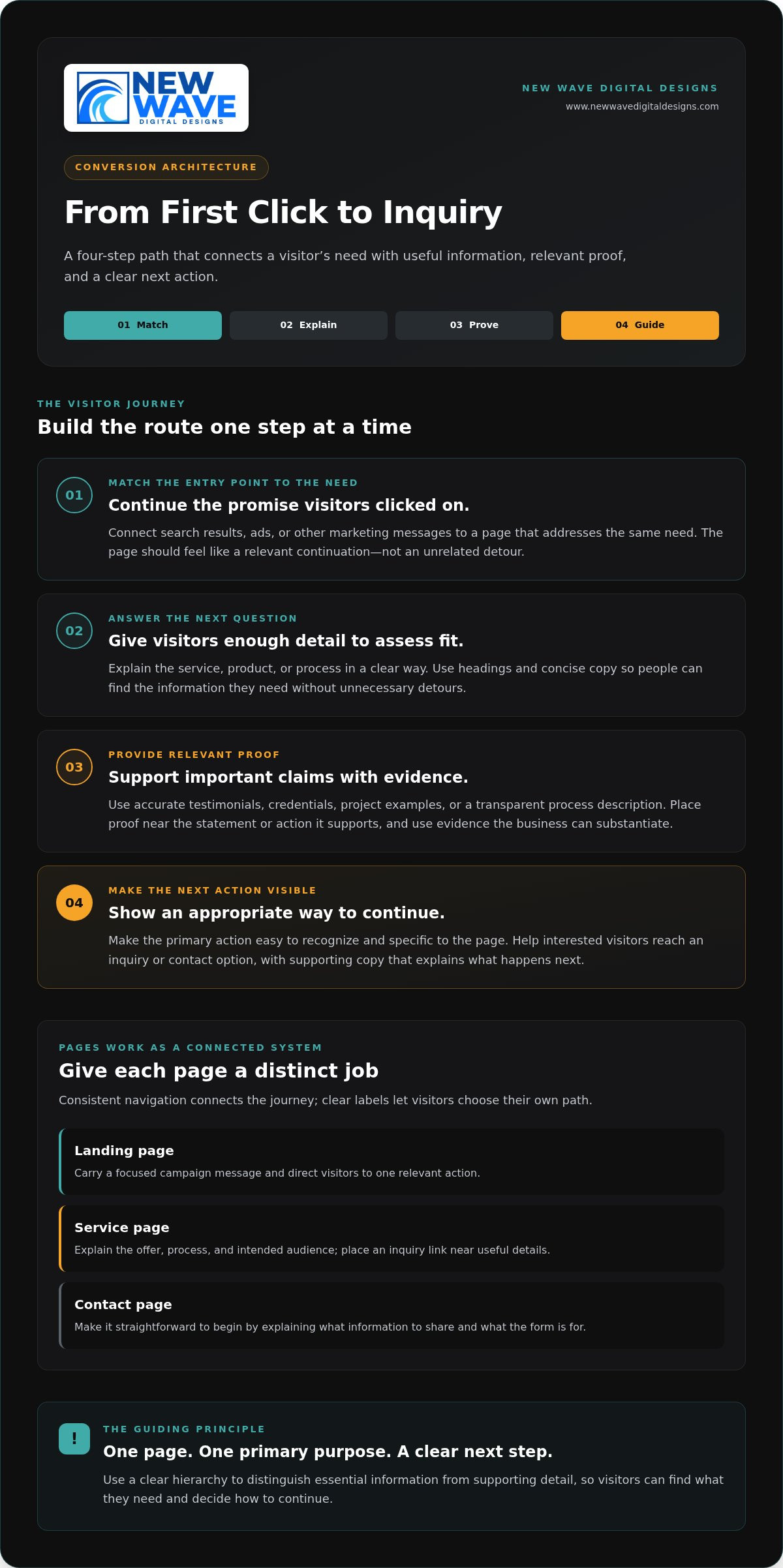
Conversion architecture is the deliberate arrangement of pages, information, and actions that helps visitors move from an initial question toward a useful next step. It makes the website a connected journey rather than a collection of unrelated pages. For example, someone searching for a particular service should land on a page that addresses that need, find information supporting the business’s claims, and see a clear way to start a conversation.

Make the route easy to follow. Visitors shouldn’t have to guess which menu item leads to relevant details or scan several pages to find contact information. Give each page a primary purpose, then use headings, concise copy, and visible links to guide attention. A clear hierarchy helps people distinguish essential information from supporting detail and find what they need without unnecessary detours.

  1. Match the entry point to the need. Connect search results, ads, or other marketing messages to a page that continues the promise visitors clicked on.
  2. Answer the next question. Explain the service, product, or process in enough detail for someone to assess fit.
  3. Provide relevant proof. Support important claims with evidence related to the offer.
  4. Make the next action visible. Guide interested visitors toward an appropriate inquiry or contact option.

How should landing pages, service pages, and contact pages work together?

Give each page a distinct job. A landing page can carry a focused campaign message and direct visitors to one relevant action. A service page can explain the offer, process, and intended audience, with an inquiry link near useful details. A contact page should make it straightforward to begin by explaining what information to share and what the form is for. Consistent navigation connects the pages, while clear labels let visitors choose their own path.

Which trust signals help visitors feel ready to reach out?

Trust grows when proof is specific and relevant. Accurate testimonials, credentials, project examples, or a transparent process description can help visitors assess a claim. Place each signal near the statement or action it supports. A testimonial about a particular service, for example, is most useful beside information about that service, not buried on an unrelated page. Use evidence the business can substantiate; inflated claims and unrelated praise can weaken confidence.

Keep inquiry forms proportionate to the first conversation. Ask for the details needed to understand and respond to an initial request, such as contact information and a short description of the visitor’s needs. Avoid asking for extensive background before someone has had a chance to speak with you. Clear field labels and a brief explanation of what happens after submission can make the process easier to understand.

Thoughtful lead generation website design connects each stage, from a relevant first impression to a confident inquiry. If your pages feel disconnected, learn about New Wave Digital Designs’ approach to website design, which brings brand expression and practical visitor journeys together.

How to Tell Whether Your Website Design Is Attracting the Right Leads

More visits tell you that people are arriving. They don’t show whether those people are a good fit, whether the page answers their questions, or whether the website helps them take a useful next step. To assess lead generation website design, look at the path from visit to inquiry, then assess whether the inquiries are relevant to the business.

Start by defining a qualified lead in terms your team can apply consistently. For example, distinguish a request that matches your services and intended audience from an unrelated query. Then track key actions, such as form submissions and calls, alongside their source and what happens after the inquiry. A high number of inquiries alone doesn’t establish lead quality or business impact.

Observed symptom
Possible friction point
Data to inspect
Visitors arrive but rarely explore the page.
The page may not match their intent, or its key message may be difficult to find.
Traffic source, landing-page engagement, and the search term or campaign message where available.
Visitors view an inquiry form but don’t complete it.
The form may be unclear, ask for unnecessary details, or be difficult to use.
Form starts and completions, field-level issues where tracked, and device or page context.
Inquiries arrive, but few fit the offer.
Targeting, page messaging, or expectations may be attracting a mismatched audience.
Inquiry source, submitted details, service requested, and the team’s lead-quality classification.

Which website metrics help diagnose conversion friction?

Review landing-page engagement to see whether visitors interact with a page, form completion to spot potential breaks in the inquiry path, and inquiry sources to learn which channels bring visitors who take action. Consider these measures together: a short visit could mean a page didn’t answer the visitor’s need, or that it provided the answer quickly. Tracking setup, event definitions, and consistent reporting all affect what the numbers mean. Avoid treating a universal conversion benchmark as a verdict on your site.

How can you distinguish a design issue from a traffic issue?

Compare visitor intent with the page they land on before changing visual elements. Check whether an ad or search result promises a particular service, then confirm that the destination page clearly addresses it. If the message aligns but visitors struggle to find information or complete an inquiry, the page structure or usability may need attention. If the audience or landing-page promise is mismatched, traffic quality may be part of the problem. Performance data is a diagnostic signal, not proof of a single cause.

Review patterns over a consistent period and apply the same lead-quality definition across channels. Pair analytics with the inquiries the business actually receives. Together, they give a more grounded view of whether the website attracts relevant prospects and where their journey may be losing clarity.

Lead Generation Website Design: Build a Site That Turns Visits Into Inquiries

A Practical Blueprint for Planning Lead Generation Website Design

A considered plan gives every page a role. Before choosing layouts or refining visual details, establish who the site is for, what they need to understand, and how each page can help them move forward. This makes design decisions easier to evaluate and connects visitor needs with the business offer and marketing journey.

  1. Define the audience. Describe the people or organizations you want to reach, what they need, and how they decide whether an offer is right for them.
  2. Clarify the offer. State what you provide, who it serves, and why it’s relevant. Make the promise specific enough to guide page content and visitor expectations.
  3. Map the pages. Assign each page a purpose, from answering an early research question to explaining a service or inviting an inquiry.
  4. Shape the actions. Choose a primary action for each page, such as exploring a service or starting a conversation. Keep supporting information available without letting it obscure the main path.
  5. Measure and refine. Review how visitors use key pages and whether inquiries fit the intended audience. Use what you learn to make considered improvements over time.

How do you turn audience insight into a page plan?

Write down the audience’s main problems, likely objections, and questions at each decision stage. Assign each question to the page or section best equipped to answer it. Someone comparing services may need process details, while someone ready to act may need a direct route to an inquiry form. Give each page one primary action while retaining the context visitors need to make an informed choice.

Design for varied screens and abilities. Responsive layouts should keep text legible, navigation understandable, and important actions usable across devices. Accessible choices, including clear labels and sufficient contrast, help more people use essential content. Test pages at different screen sizes and check that key information and actions remain easy to find.

How should forms and calls to action reduce unnecessary friction?

Use action labels that make the next step clear, such as “Request a project discussion” rather than a vague “Submit.” Ask only for information needed to begin a useful conversation, and label every field plainly. Explain how submitted details will be used and what follow-up visitors can expect, keeping those statements accurate to the business’s process.

Connect the page plan to the way people arrive. Organic SEO content should address the intent behind a search and lead to a relevant next step. Paid-search landing pages should continue the message and offer that prompted the click. Aligning those elements creates a more coherent experience, but it doesn’t guarantee rankings, inquiries, or sales.

For a website shaped around your offer, audience, and visitor journey, explore lead-focused website design with New Wave Digital Designs.

How New Wave Digital Designs Brings Lead-Focused Websites to Life

A lead-focused website brings together the character of your brand, the substance of your offer, and the needs of your audience. New Wave Digital Designs creates custom websites for Shopify, WordPress, and Squarespace, with design and development tailored to each business. Those choices shape the site’s content, structure, and visual direction, helping visitors understand the offer and find a relevant next step.

What can a tailored website design project bring together?

A custom website can unite brand-aligned design, responsive development, and purposeful page structure in one coherent experience. The right platform depends on what the business needs its website to do and how its content will be organized. New Wave Digital Designs builds custom websites for Shopify, WordPress, and Squarespace, tailoring the design to the platform and project instead of treating every site as interchangeable.

Planning also considers how visitors will arrive. Organic SEO can inform how pages address relevant search topics, while Google Ads and Bing Ads can bring visitors to pages shaped around specific campaign intent. When the message and landing page work together, the experience feels consistent from click to content. These services can support a considered digital strategy, but no design or marketing approach can promise a particular volume of leads or search rankings.

Site care matters after launch, too. Maintenance helps keep a website updated and functional as content and business needs evolve, while managed hosting and security services support the site’s ongoing operation. A website maintenance plan makes site care part of the project rather than an afterthought.

What happens after a lead-focused website launches?

Launch is a beginning, not a finish line. Reviewing relevant site activity and inquiry patterns can help identify pages that need clearer content or pathways that could be easier to follow. Refinements should respond to what the business learns over time, with care taken to distinguish useful patterns from isolated results. The aim is a site that continues to reflect the offer and serve its audience as both develop.

Ongoing maintenance, managed hosting, and security services help support website functionality over time. New Wave Digital Designs brings website design together with organic SEO and paid search management, creating a connected foundation for your online presence without treating any single service as a guarantee of business outcomes.

If you’re ready to shape a website around your brand, offer, and audience, start a conversation about your website project with New Wave Digital Designs.

Give Your Website a Clearer Path Forward

Your website doesn’t need a complete rebuild to become more purposeful. Start by identifying one moment where a potential customer could lose confidence or struggle to decide what to do next. That observation can be the first step toward a more considered digital experience, one that grows alongside your business and stays grounded in what your audience needs.

Strong lead generation website design is an ongoing practice, not a promise of instant results. As your offer evolves and you learn from visitor behaviour, your pages can evolve too. A thoughtful design partner can help turn those insights into a website that reflects your brand and gives visitors a clearer way to engage.

Start a conversation about your website project with New Wave Digital Designs to discuss a website built around your brand, offer, and audience.

Frequently Asked Questions

What is lead generation website design?

Lead generation website design shapes a website to help potential customers find relevant information and express interest in an offer. For example, a consulting firm might create a page for a particular service, answer common questions there, and provide a clear inquiry route. Useful content and purposeful interactions support that journey. Design can make reaching out easier, but it can’t ensure every visitor will become a suitable lead.

How does website design help generate qualified leads?

Website design helps by setting accurate expectations and making it easier for visitors to find information that fits their needs. A page for a specific service can explain who it’s intended for, what problem it addresses, and what details to include in an inquiry. That clarity may discourage mismatched requests while helping suitable prospects feel more confident about contacting the business. Lead quality also depends on factors beyond design, including the offer, audience, and traffic source.

What pages should a lead generation website include?

Start with pages that explain the business, its main offers, and how to get in touch. Depending on the sales process, useful additions may include individual service pages, a portfolio or project examples, customer testimonials, and answers to common questions. A business with several distinct audiences may need separate pages for each group’s needs. Prioritize pages that answer real customer questions rather than adding sections simply to make the site larger.

How many fields should a lead generation form have?

There’s no universal ideal number. Include only the fields needed to understand and respond to an initial inquiry. A basic form might request a name, contact method, and brief description of the need; a project with several important requirements may call for one or two focused questions. Remove fields that don’t inform the first conversation. Check that each question serves a clear purpose, and mark optional details as optional.

Can a website generate leads without paid advertising?

Yes. A website can attract visitors through organic search, direct visits, referrals, and other unpaid sources. Helpful pages that address relevant questions can support organic visibility, while a clear inquiry route gives interested visitors a way to respond. Results depend on factors such as audience demand, competition, and the usefulness of the site’s content. Paid advertising is one way to bring visitors, not a requirement for a website to support inquiries.

How do I measure whether my website is generating leads?

Track meaningful actions, such as completed inquiry forms and calls, and record where inquiries originated when your analytics setup allows it. Then review whether each inquiry fits your services and intended audience. For example, separate requests for a service you provide from unrelated messages. Define “qualified lead” consistently with the people who assess inquiries, and ensure tracking records completed actions rather than form views or button clicks alone.

How often should a lead generation website be updated?

Update a page whenever its offer, process, contact details, or supporting information changes, and review key pages on a regular schedule that suits the business. Check that forms still work, links lead to the right destinations, and service descriptions reflect what you currently provide. Website maintenance helps keep a site functional over time. Performance reviews can also reveal when content needs refinement, even if the underlying offer remains the same.