How to Create a Website That Builds Trust Through Clear, Helpful Choices

Trust starts before a visitor is asked to commit. To create a website that builds trust, keep information current, make essential details easy to find, show authentic evidence of your work, and explain what happens next. Give visitors a comfortable next step instead of pushing for personal information or a purchase too soon.

Polished design matters, but appearance alone cannot answer the questions a cautious visitor has: Is this business credible? Does it understand what I need? Are the terms clear? A trustworthy website answers through useful content, intuitive navigation, authentic testimonials or case studies, accessible contact details, and transparent privacy and service information.

This guide covers practical ways to strengthen those signals, from reviewing pages and links to designing for different devices and presenting credible proof. You’ll also learn how to clarify costs and terms and build confidence before asking visitors to share information or make a decision.

Key Takeaways

  • Build a simple review routine to catch outdated pages, broken links, and content that no longer reflects your business.
  • Make it easy for visitors to find their way around and use your site across devices and abilities.
  • Use genuine testimonials and relevant examples of your work to support your claims with credible proof.
  • Explain contact options, privacy practices, and service terms in clear, approachable language.
  • Offer useful information and low-pressure next steps before asking visitors to share details or make a commitment.

Record a pre-launch baseline, then compare the same analytics events after a redesign. Track completed enquiries or purchases, form abandonment, and visits to key pages. Compare similar time periods and traffic sources to avoid misleading conclusions. Conversion changes show whether visitors act; task completion and page engagement add context about trust.

Start with a content inventory. Review every page for outdated service details, former staff information, expired event dates, and broken links. Use a link checker to find broken destinations, and redirect visitors when you remove or rename a page. Test key journeys, such as moving from a service page to its contact form, to catch dead ends.

Keep navigation simple so first-time visitors can find essential information. Group related pages under familiar labels, put key actions where visitors expect them, and use the same menu structure throughout. Someone looking for opening hours shouldn’t have to search unrelated blog posts. Clear headings and concise, error-free writing also make pages easier to scan.

Schedule maintenance instead of waiting for a visible problem. Update the site and its plugins, check links, and review pages after changes to your services or business details. For a simple five-page business website without projected high traffic, allow 5-10 hours monthly for maintenance. The actual workload rises with frequent content changes, added features, and more complex site structures.

Nonprofits have recurring content to review. Keep the latest annual report in a prominent, accessible location, and update the impact page annually. Set calendar reminders to review the team, events, and impact pages quarterly. This helps supporters find current information instead of relying on details that no longer reflect the organization’s work.

Educational content builds credibility when it answers real audience questions. Create a clear guide to a recurring customer concern, then review it when your process or terminology changes. Invite focused feedback by asking readers which step remains unclear. Use their responses to improve explanations, and avoid promises your business can’t support.

Comprehensive content doesn’t mean including every possible detail. Give each page a clear purpose, explain unfamiliar terms, and link to related information where useful. A service page, for example, can outline what’s included, the steps involved, and what visitors need to provide. This helps people decide whether the service suits them before getting in touch.

Make content upkeep routine: assign an owner, set review reminders, and record completed updates. A shared calendar can flag seasonal pages before dates pass, while a change log shows when key information was last checked. Together, these habits help keep the site accurate, navigable, and useful as the business evolves.

2. Designing for visitors’ needs and initial skepticism

Common trust mistakes include slow pages, confusing menus, hard-to-read text, and visuals that don’t match the business. Google suggests 53% of mobile visitors leave if a page takes longer than two seconds to load, so speed can affect whether visitors see your proof at all.

Design around the task a visitor wants to complete. Put the main navigation in a predictable place, choose familiar labels, and make clickable elements look clickable. A “Contact” link, for example, should stand apart from ordinary paragraph text. Clear headings and consistent page layouts help visitors understand where they are and what to do next.

A strong first impression should establish credibility quickly. The research recommends making a positive impression within three seconds of a visitor landing on a page. Use a clear headline, briefly explain what the business does, and offer one prominent next step. Too many competing calls to action can leave visitors unsure whether to read, browse, or get in touch.

Choose high-quality images that support the page’s message. A professional photo of a real team or workspace can give visitors a more concrete sense of the business than a generic stock image. Keep image style, color, and cropping consistent across pages. Each image should serve a purpose, such as showing a product, explaining a process, or adding context to a case study.

Responsive design should work across desktop, tablet, and smartphone screens. Check that menus, forms, buttons, and text remain usable on smaller displays, not simply that the layout shrinks. Visitors should be able to read a service description and complete its form without zooming or scrolling sideways.

Accessibility is part of usability. Roughly one in four U.S. adults lives with some type of disability, so make sure visitors can navigate with a keyboard and read text with sufficient color contrast. Add alt text so screen readers can describe meaningful images, caption videos for deaf or hard-of-hearing visitors, and avoid flashing content that could trigger seizures.

Test the design with real tasks before launch. Ask someone unfamiliar with the site to find a service, locate contact details, and complete a form on a phone. Note where they hesitate, then adjust labels, spacing, or page order. These observations reveal whether visitors can move through the site confidently and easily.

3. Testimonials, case studies, and third-party reviews

Testimonials, reviews, case studies, and relevant awards give visitors evidence beyond a business’s own claims. More than 9 out of 10 people check online reviews before making decisions, so make authentic feedback easy to find. Place a concise testimonial beside the service it describes, rather than gathering every endorsement on one distant page.

Choose testimonials that describe a genuine experience. With permission, include the customer’s name and relevant context, such as the service used or challenge addressed. Don’t edit praise until it sounds like marketing copy. A short, specific account of a smoother booking process is more useful than a vague claim that a business is “the best.”

Verify testimonials and reviews by checking their origin, confirming the customer’s permission, and preserving the meaning of the original feedback. For trust badges, identify the issuing organization and make sure the badge represents a current, genuine credential. Never manufacture reviews, credentials, or other social proof.

Case studies turn claims into clear accounts of work and outcomes. Structure each around the customer’s starting point, the approach taken, and the result. A local service business, for example, could explain how it simplified appointment requests and describe the change using real records. Label hypothetical examples clearly, and never present invented results as customer evidence.

Use high-quality photography to support a story, not merely decorate it. A genuine project image, product detail, or team portrait can connect a written account with visible work. Keep captions accurate and relevant. When a before-and-after comparison is appropriate, use images from the same project and explain what changed.

Third-party reviews can add perspective because they appear outside the company’s own website. A G2 and Heinze Marketing survey found that 40% of B2B buyers say negative reviews help build product credibility. Don’t conceal criticism with selective editing. Respond calmly, address the concern, and explain any practical step taken without exposing private customer details.

Social media can support credibility when profiles show consistent business details and genuine customer interaction. Keep the business name, visual identity, and contact information aligned across channels. A dormant profile or mismatched branding can create uncertainty, so link only to active accounts and review their public information during routine upkeep.

Place proof where it can help visitors decide. Add a short review near a relevant service description, a case study beside a related project, or a customer quote near an enquiry form. Visitors should be able to see who is speaking, what experience they describe, and why it matters before taking action.

How to Create a Website That Builds Trust Through Clear, Helpful Choices

4. Transparent contact information, costs, and terms

Make it easy to start a conversation. Put a clear contact link in the main navigation and repeat it on service pages, where visitors are deciding whether to reach out. Offer practical options such as a form, email address, or phone number, and label each clearly. Remove pop-ups that obscure contact details or interrupt visitors before they understand the offer.

For a U.S. website, explain in a privacy policy what information you collect and why. Describe cookie use and visitor choices in clear language, and make terms and any applicable notices easy to find. Cookie and data-protection obligations depend on the site’s practices and applicable rules, so align notices and consent controls with those obligations.

Show accurate contact information where visitors expect it, such as the footer and contact page. Include the business name, a working email address, and other useful contact methods. If a nonprofit uses a contact form, the page can set a response expectation, such as a reply within 24 hours, only when that matches its actual process. Clear expectations help visitors decide what to do next.

Secure the connection before inviting visitors to submit personal details. HTTPS is the secure version of HTTP, which sends data between a browser and a website. A site using HTTPS displays a padlock beside its URL. Use HTTPS on forms and other pages that collect information, and maintain the site’s security arrangements.

Explain costs and the conditions that affect them. A service page can state what an estimate includes, what might change the scope, and what visitors need to provide. For example, clarify whether content preparation or additional features affect the work involved. If you provide a price after receiving a quote request, say so clearly and describe the factors used to prepare it.

Make terms easy to read before visitors commit. Use descriptive headings, short paragraphs, and direct language to explain cancellation conditions, payment steps, delivery expectations, or data handling where relevant. Keep important details near the related action. Visitors shouldn’t have to search unrelated pages to learn what happens after submitting a form or making a purchase.

Accessible contact details support visitors using different devices or assistive tools. Give form fields clear labels, identify required information, and provide useful error messages, such as “Enter a valid email address.” Keep keyboard focus visible and use descriptive text for contact links. These details make the next step easier to find, understand, and complete.

5. Building trust gradually before requesting commitment

Trust grows through a sequence of useful interactions, not a single dramatic ask. Over 81% of consumers need to trust a brand before considering a purchase. To understand how to create a website that builds trust, design each page to offer value first, then invite a next step that matches the visitor’s readiness.

Start with a low-pressure action. Someone reading a guide might explore a related service page before sharing contact details. Offer helpful explanations, a clear comparison, or a practical checklist without putting a form in front of every answer. This gives visitors room to understand your approach and decide whether it suits them.

Create a visible hierarchy of commitment. A page might offer three paths: learn more, request details, or make a purchase. Keep the first step easy, and request sensitive information only when it’s genuinely needed. A general inquiry form, for example, can ask for a name and email, while a detailed project brief can come later.

Explain the value of each request beside the form. If visitors provide an email to receive a guide, say what they’ll receive and whether the business will contact them again. If a form asks about project goals, explain how those details help shape a useful response. Specific context makes the exchange feel fair rather than one-sided.

Let visitors move toward a decision at their own pace. A product page can link to a detailed guide, then customer examples, and finally a purchase step. A service business can explain its approach before inviting a conversation. Each transition should answer a new question, not repeat the same sales message.

Reduce pressure at the point of commitment. Use action labels that explain what happens, such as “Send my question” instead of “Submit.” Show what follows with a confirmation message stating that the inquiry was received. Avoid countdowns, preselected add-ons, or repeated pop-ups that make a careful decision feel rushed.

Review the journey from a first visit to the final action. Map each page, form, and message, then ask whether visitors get something useful before each new request. If a newsletter prompt appears before the page’s main guidance, move it lower. If checkout asks for information unrelated to the purchase, remove that friction. These steps show how thoughtful choices help create a website that builds trust.

For campaigns, align the promise in an ad with the landing page’s next step. Align your Google Ads with a clear visitor journey so the click leads to relevant information and a proportionate invitation. A coherent path respects attention, supports confidence, and gives the relationship space to develop.

New Wave Digital Designs: Shopify Website Design

New Wave Digital Designs can help when your website needs clearer structure, more useful content, or a design that better reflects your business. Shopify Website Design supports businesses building an online store, while WordPress and SquareSpace Website Design serve other website needs. Website Maintenance helps keep a site’s content and technical details current after launch.

Consider a design service when visitors struggle to understand your offer or find a clear next step. For an existing site that needs ongoing attention, Website Maintenance may be the better fit. A thoughtful website aligns its message, navigation, and customer journey, helping visitors make informed choices.

Contact New Wave Digital Designs to discuss your website needs, or visit www.newwavedigitaldesigns.com.

Shape the Next Chapter of Your Website

A website isn’t a finished artifact. As your business evolves, its structure and digital experience can evolve too. Start by identifying the one change that would make visitors’ decisions clearer, then build from there. Knowing how to create a website that builds trust means treating each design choice as part of an ongoing relationship, not a one-time launch.

New Wave Digital Designs offers Shopify Website Design, WordPress Website Design, and SquareSpace Website Design. If your current site no longer reflects your business or helps visitors move forward, a considered redesign can bring its purpose and presentation into alignment.

Share what you want your website to help visitors understand or do, and explore a path that fits your goals. Contact New Wave Digital Designs to discuss your website. Clear choices create a stronger foundation for what comes next.

Frequently Asked Questions

What website design elements build trust with visitors?

Consistent visual design, clear page hierarchy, and predictable interactions make a site feel coherent. Use the same button style for similar actions, for example, and give each page one clear purpose. Pair a concise headline with supporting information that answers the visitor’s likely next question. Avoid decorative effects that compete with important content. These choices make the experience easier to understand and clarify what the business offers.

How do HTTPS, SSL certificates, and security badges affect website trust?

HTTPS encrypts the connection between a visitor’s browser and a website, helping protect information sent through the site. An SSL/TLS certificate supports HTTPS, and browsers show a padlock beside the site address when a secure connection is active. A security badge builds confidence only when it represents a genuine, relevant credential or service. Don’t use graphics that imply a security review or certification that hasn’t taken place.

What trust signals should a business website include, such as reviews, testimonials, and certifications?

Use evidence visitors can understand and assess: attributable customer feedback, specific case studies, and relevant awards or certifications. For a certification, name the issuing organization and explain what it covers rather than displaying a logo alone. Distinguish documented outcomes from illustrative examples in case studies. Place proof near the claim it supports, such as a customer quote beside the service they used.

How can clear contact information and an About page make a website more trustworthy?

Clear contact details show visitors how to reach the business, while an About page explains the people and purpose behind it. Keep business details consistent and explain who handles common enquiries. For example, introduce team members, describe the company’s approach, and use real photographs with accurate captions. This helps visitors connect the business they see online with a clear, understandable human presence.

How should a website display pricing, fees, refunds, and guarantees transparently?

Show the price and any additional fees beside the relevant offer, then explain what affects the total. State refund conditions, exclusions, and guarantee limits clearly near the purchase decision, not only in dense terms. For services, clarify what an estimate includes and which project factors can change its scope. Avoid broad claims such as “risk-free” unless visitors can see the exact conditions.

What website accessibility and usability practices improve visitor trust?

Make key tasks possible without relying on a mouse, sound, or color alone. Use descriptive link labels, visible keyboard focus, form labels, and error messages that explain how to fix a problem. Pair a red error state with text identifying the field that needs attention, for example. Add video captions and useful alternative text to meaningful images. Test forms and navigation with a keyboard as well as a touchscreen.

Lead Generation Website Design: Build a Site That Turns Visits Into Inquiries

What if your website’s biggest lead-generation problem isn’t how it looks, but what it asks visitors to do next? A polished design can make a strong first impression, yet still leave people unsure what you offer, who it’s for, or how to take the next step. Effective lead generation website design looks beyond visual polish to map a clear path from a visitor’s first question to a useful action.

If visits aren’t turning into inquiries, it can be hard to tell whether the issue is your website, your traffic, or a disconnect between the two. Start by matching each page to your offer, audience, and the marketing channel that brought someone there. This article provides a practical way to assess that experience, make the next action easier to find, and build trust along the way. You’ll learn how clear messaging, intuitive paths, and alignment with SEO or paid search can help your site serve your business and the people you want to reach.

Key Takeaways

  • Build your site around the actions relevant visitors need to take, not visual appeal alone.
  • Map a clear journey from visitor need to useful information, supporting proof, and an easy-to-find contact option.
  • Assess traffic separately from qualified inquiries to understand whether the challenge is reach, relevance, or the visitor experience.
  • Use a practical planning sequence: define your audience, clarify your offer, map pages, shape actions, and measure results.
  • Thoughtful lead generation website design can align your brand, audience, and marketing channels across custom Shopify, WordPress, and Squarespace websites.

What Makes Lead Generation Website Design Different From a Standard Business Website?

A website can look polished and still leave visitors uncertain about what the business offers or where to go next. Lead generation website design treats each page as part of a purposeful journey, connecting what a visitor is looking for with relevant information and a clear way to get in touch.

Lead generation website design is the planning of a website’s audience-focused content, page structure, and conversion actions to help relevant visitors move from interest to inquiry. The goal isn’t to make every visitor submit a form. It’s to give people who may be a good fit enough clarity and confidence to take an appropriate next step. For a foundation on the marketing process behind this approach, see What is Lead Generation?

This work goes beyond choosing colours, images, or an appealing layout. Visual design expresses a brand, but it needs to work alongside understandable messaging, intuitive navigation, relevant proof, and a purposeful action. A beautiful homepage won’t do enough if the offer is vague, visitors can’t find service details, or the contact option is hard to spot. Design can support inquiries, but it can’t guarantee how many arrive or whether each one is a qualified prospect.

Which businesses benefit from a lead-focused website?

A lead-focused structure can suit service businesses and other companies whose sales process begins with a conversation, estimate request, consultation, or project inquiry. The website helps visitors understand the offer, decide whether it fits their needs, and make contact with useful context.

That journey differs from a direct ecommerce checkout, where a visitor may be able to select a product and purchase online. Neither model suits every business. A custom service may need pages that explain process and scope before a prospect reaches out; a product retailer may prioritize product details and a straightforward checkout. In either case, shape the page around what the audience needs to know, the decision they’re making, and the action that fits the offer.

What should a visitor understand within moments?

A new visitor should quickly grasp three things: who the business serves, what it offers, and what to do next. A clear headline gives the page an immediate focus. Compare a broad claim such as “Quality you can trust” with “Custom websites for growing service businesses.” The second tells visitors more about the offer and its intended audience.

Make the next action specific to the page and the visitor’s readiness. Someone comparing options may want to explore a service; someone ready to discuss a project may look for a contact form. Keep the primary action easy to recognize, and use supporting copy to explain what happens when it’s selected.

Consistent typography, colour, imagery, and tone create a cohesive experience and reinforce brand recognition. Keep visual elements focused on the offer rather than competing with it. A well-composed page combines brand expression with practical guidance, helping visitors understand what makes the business distinctive and how to continue.

How Conversion Architecture Guides Visitors From First Impression to Inquiry

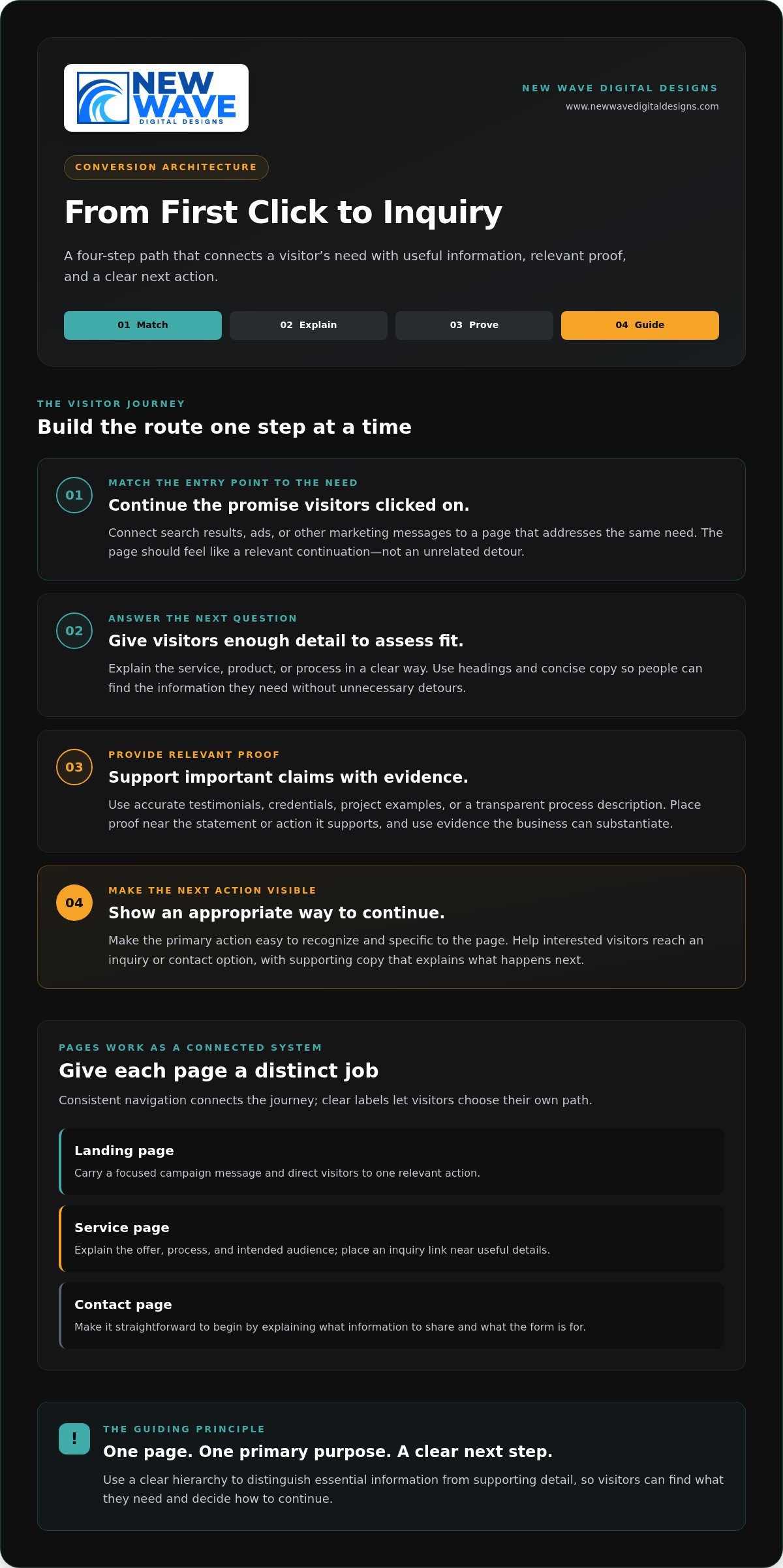
Conversion architecture is the deliberate arrangement of pages, information, and actions that helps visitors move from an initial question toward a useful next step. It makes the website a connected journey rather than a collection of unrelated pages. For example, someone searching for a particular service should land on a page that addresses that need, find information supporting the business’s claims, and see a clear way to start a conversation.

Make the route easy to follow. Visitors shouldn’t have to guess which menu item leads to relevant details or scan several pages to find contact information. Give each page a primary purpose, then use headings, concise copy, and visible links to guide attention. A clear hierarchy helps people distinguish essential information from supporting detail and find what they need without unnecessary detours.

  1. Match the entry point to the need. Connect search results, ads, or other marketing messages to a page that continues the promise visitors clicked on.
  2. Answer the next question. Explain the service, product, or process in enough detail for someone to assess fit.
  3. Provide relevant proof. Support important claims with evidence related to the offer.
  4. Make the next action visible. Guide interested visitors toward an appropriate inquiry or contact option.

How should landing pages, service pages, and contact pages work together?

Give each page a distinct job. A landing page can carry a focused campaign message and direct visitors to one relevant action. A service page can explain the offer, process, and intended audience, with an inquiry link near useful details. A contact page should make it straightforward to begin by explaining what information to share and what the form is for. Consistent navigation connects the pages, while clear labels let visitors choose their own path.

Which trust signals help visitors feel ready to reach out?

Trust grows when proof is specific and relevant. Accurate testimonials, credentials, project examples, or a transparent process description can help visitors assess a claim. Place each signal near the statement or action it supports. A testimonial about a particular service, for example, is most useful beside information about that service, not buried on an unrelated page. Use evidence the business can substantiate; inflated claims and unrelated praise can weaken confidence.

Keep inquiry forms proportionate to the first conversation. Ask for the details needed to understand and respond to an initial request, such as contact information and a short description of the visitor’s needs. Avoid asking for extensive background before someone has had a chance to speak with you. Clear field labels and a brief explanation of what happens after submission can make the process easier to understand.

Thoughtful lead generation website design connects each stage, from a relevant first impression to a confident inquiry. If your pages feel disconnected, learn about New Wave Digital Designs’ approach to website design, which brings brand expression and practical visitor journeys together.

How to Tell Whether Your Website Design Is Attracting the Right Leads

More visits tell you that people are arriving. They don’t show whether those people are a good fit, whether the page answers their questions, or whether the website helps them take a useful next step. To assess lead generation website design, look at the path from visit to inquiry, then assess whether the inquiries are relevant to the business.

Start by defining a qualified lead in terms your team can apply consistently. For example, distinguish a request that matches your services and intended audience from an unrelated query. Then track key actions, such as form submissions and calls, alongside their source and what happens after the inquiry. A high number of inquiries alone doesn’t establish lead quality or business impact.

Observed symptom
Possible friction point
Data to inspect
Visitors arrive but rarely explore the page.
The page may not match their intent, or its key message may be difficult to find.
Traffic source, landing-page engagement, and the search term or campaign message where available.
Visitors view an inquiry form but don’t complete it.
The form may be unclear, ask for unnecessary details, or be difficult to use.
Form starts and completions, field-level issues where tracked, and device or page context.
Inquiries arrive, but few fit the offer.
Targeting, page messaging, or expectations may be attracting a mismatched audience.
Inquiry source, submitted details, service requested, and the team’s lead-quality classification.

Which website metrics help diagnose conversion friction?

Review landing-page engagement to see whether visitors interact with a page, form completion to spot potential breaks in the inquiry path, and inquiry sources to learn which channels bring visitors who take action. Consider these measures together: a short visit could mean a page didn’t answer the visitor’s need, or that it provided the answer quickly. Tracking setup, event definitions, and consistent reporting all affect what the numbers mean. Avoid treating a universal conversion benchmark as a verdict on your site.

How can you distinguish a design issue from a traffic issue?

Compare visitor intent with the page they land on before changing visual elements. Check whether an ad or search result promises a particular service, then confirm that the destination page clearly addresses it. If the message aligns but visitors struggle to find information or complete an inquiry, the page structure or usability may need attention. If the audience or landing-page promise is mismatched, traffic quality may be part of the problem. Performance data is a diagnostic signal, not proof of a single cause.

Review patterns over a consistent period and apply the same lead-quality definition across channels. Pair analytics with the inquiries the business actually receives. Together, they give a more grounded view of whether the website attracts relevant prospects and where their journey may be losing clarity.

Lead Generation Website Design: Build a Site That Turns Visits Into Inquiries

A Practical Blueprint for Planning Lead Generation Website Design

A considered plan gives every page a role. Before choosing layouts or refining visual details, establish who the site is for, what they need to understand, and how each page can help them move forward. This makes design decisions easier to evaluate and connects visitor needs with the business offer and marketing journey.

  1. Define the audience. Describe the people or organizations you want to reach, what they need, and how they decide whether an offer is right for them.
  2. Clarify the offer. State what you provide, who it serves, and why it’s relevant. Make the promise specific enough to guide page content and visitor expectations.
  3. Map the pages. Assign each page a purpose, from answering an early research question to explaining a service or inviting an inquiry.
  4. Shape the actions. Choose a primary action for each page, such as exploring a service or starting a conversation. Keep supporting information available without letting it obscure the main path.
  5. Measure and refine. Review how visitors use key pages and whether inquiries fit the intended audience. Use what you learn to make considered improvements over time.

How do you turn audience insight into a page plan?

Write down the audience’s main problems, likely objections, and questions at each decision stage. Assign each question to the page or section best equipped to answer it. Someone comparing services may need process details, while someone ready to act may need a direct route to an inquiry form. Give each page one primary action while retaining the context visitors need to make an informed choice.

Design for varied screens and abilities. Responsive layouts should keep text legible, navigation understandable, and important actions usable across devices. Accessible choices, including clear labels and sufficient contrast, help more people use essential content. Test pages at different screen sizes and check that key information and actions remain easy to find.

How should forms and calls to action reduce unnecessary friction?

Use action labels that make the next step clear, such as “Request a project discussion” rather than a vague “Submit.” Ask only for information needed to begin a useful conversation, and label every field plainly. Explain how submitted details will be used and what follow-up visitors can expect, keeping those statements accurate to the business’s process.

Connect the page plan to the way people arrive. Organic SEO content should address the intent behind a search and lead to a relevant next step. Paid-search landing pages should continue the message and offer that prompted the click. Aligning those elements creates a more coherent experience, but it doesn’t guarantee rankings, inquiries, or sales.

For a website shaped around your offer, audience, and visitor journey, explore lead-focused website design with New Wave Digital Designs.

How New Wave Digital Designs Brings Lead-Focused Websites to Life

A lead-focused website brings together the character of your brand, the substance of your offer, and the needs of your audience. New Wave Digital Designs creates custom websites for Shopify, WordPress, and Squarespace, with design and development tailored to each business. Those choices shape the site’s content, structure, and visual direction, helping visitors understand the offer and find a relevant next step.

What can a tailored website design project bring together?

A custom website can unite brand-aligned design, responsive development, and purposeful page structure in one coherent experience. The right platform depends on what the business needs its website to do and how its content will be organized. New Wave Digital Designs builds custom websites for Shopify, WordPress, and Squarespace, tailoring the design to the platform and project instead of treating every site as interchangeable.

Planning also considers how visitors will arrive. Organic SEO can inform how pages address relevant search topics, while Google Ads and Bing Ads can bring visitors to pages shaped around specific campaign intent. When the message and landing page work together, the experience feels consistent from click to content. These services can support a considered digital strategy, but no design or marketing approach can promise a particular volume of leads or search rankings.

Site care matters after launch, too. Maintenance helps keep a website updated and functional as content and business needs evolve, while managed hosting and security services support the site’s ongoing operation. A website maintenance plan makes site care part of the project rather than an afterthought.

What happens after a lead-focused website launches?

Launch is a beginning, not a finish line. Reviewing relevant site activity and inquiry patterns can help identify pages that need clearer content or pathways that could be easier to follow. Refinements should respond to what the business learns over time, with care taken to distinguish useful patterns from isolated results. The aim is a site that continues to reflect the offer and serve its audience as both develop.

Ongoing maintenance, managed hosting, and security services help support website functionality over time. New Wave Digital Designs brings website design together with organic SEO and paid search management, creating a connected foundation for your online presence without treating any single service as a guarantee of business outcomes.

If you’re ready to shape a website around your brand, offer, and audience, start a conversation about your website project with New Wave Digital Designs.

Give Your Website a Clearer Path Forward

Your website doesn’t need a complete rebuild to become more purposeful. Start by identifying one moment where a potential customer could lose confidence or struggle to decide what to do next. That observation can be the first step toward a more considered digital experience, one that grows alongside your business and stays grounded in what your audience needs.

Strong lead generation website design is an ongoing practice, not a promise of instant results. As your offer evolves and you learn from visitor behaviour, your pages can evolve too. A thoughtful design partner can help turn those insights into a website that reflects your brand and gives visitors a clearer way to engage.

Start a conversation about your website project with New Wave Digital Designs to discuss a website built around your brand, offer, and audience.

Frequently Asked Questions

What is lead generation website design?

Lead generation website design shapes a website to help potential customers find relevant information and express interest in an offer. For example, a consulting firm might create a page for a particular service, answer common questions there, and provide a clear inquiry route. Useful content and purposeful interactions support that journey. Design can make reaching out easier, but it can’t ensure every visitor will become a suitable lead.

How does website design help generate qualified leads?

Website design helps by setting accurate expectations and making it easier for visitors to find information that fits their needs. A page for a specific service can explain who it’s intended for, what problem it addresses, and what details to include in an inquiry. That clarity may discourage mismatched requests while helping suitable prospects feel more confident about contacting the business. Lead quality also depends on factors beyond design, including the offer, audience, and traffic source.

What pages should a lead generation website include?

Start with pages that explain the business, its main offers, and how to get in touch. Depending on the sales process, useful additions may include individual service pages, a portfolio or project examples, customer testimonials, and answers to common questions. A business with several distinct audiences may need separate pages for each group’s needs. Prioritize pages that answer real customer questions rather than adding sections simply to make the site larger.

How many fields should a lead generation form have?

There’s no universal ideal number. Include only the fields needed to understand and respond to an initial inquiry. A basic form might request a name, contact method, and brief description of the need; a project with several important requirements may call for one or two focused questions. Remove fields that don’t inform the first conversation. Check that each question serves a clear purpose, and mark optional details as optional.

Can a website generate leads without paid advertising?

Yes. A website can attract visitors through organic search, direct visits, referrals, and other unpaid sources. Helpful pages that address relevant questions can support organic visibility, while a clear inquiry route gives interested visitors a way to respond. Results depend on factors such as audience demand, competition, and the usefulness of the site’s content. Paid advertising is one way to bring visitors, not a requirement for a website to support inquiries.

How do I measure whether my website is generating leads?

Track meaningful actions, such as completed inquiry forms and calls, and record where inquiries originated when your analytics setup allows it. Then review whether each inquiry fits your services and intended audience. For example, separate requests for a service you provide from unrelated messages. Define “qualified lead” consistently with the people who assess inquiries, and ensure tracking records completed actions rather than form views or button clicks alone.

How often should a lead generation website be updated?

Update a page whenever its offer, process, contact details, or supporting information changes, and review key pages on a regular schedule that suits the business. Check that forms still work, links lead to the right destinations, and service descriptions reflect what you currently provide. Website maintenance helps keep a site functional over time. Performance reviews can also reveal when content needs refinement, even if the underlying offer remains the same.

Avoiding Common Website Redesign Mistakes: A Strategic Checklist

A website redesign can look like progress while quietly erasing pages, search visibility, and conversion paths that already serve your business. The strongest redesigns don’t start with a new look. They start by identifying what works, why it works, and what needs to change. That’s the foundation of avoiding common website redesign mistakes.

It’s natural to want a clearer, more current website, especially when the existing one feels difficult to use or maintain. But visual change alone isn’t a strategy. Without defined goals and a review of current performance, a polished launch can leave visitors struggling to find information and your team unsure whether the investment helped.

This practical checklist will help you plan, launch, and review a redesign with greater confidence. You’ll learn how to protect useful content, URLs, search visibility, analytics, and conversion routes while checking accessibility, mobile usability, and ongoing care. You’ll also find ways to compare a DIY approach, a theme-based build, and professional design support so you can choose what fits your needs and capacity.

Key Takeaways

  • Set measurable redesign goals before choosing layouts, features, or technology, so every change has a clear purpose.
  • When avoiding common website redesign mistakes, document valuable pages, search performance, and conversion paths before changing content or URLs.
  • Choose a DIY, theme-based, or custom design approach according to your goals, technical skills, integrations, and capacity to maintain the site.
  • Assign owners to pre-launch checks for navigation, forms, checkout flows, links, and responsive layouts across real devices and browsers.
  • After launch, compare results with your baseline and account for seasonal patterns or campaign changes before deciding what to refine.

Avoiding website redesign mistakes starts with defining what must improve

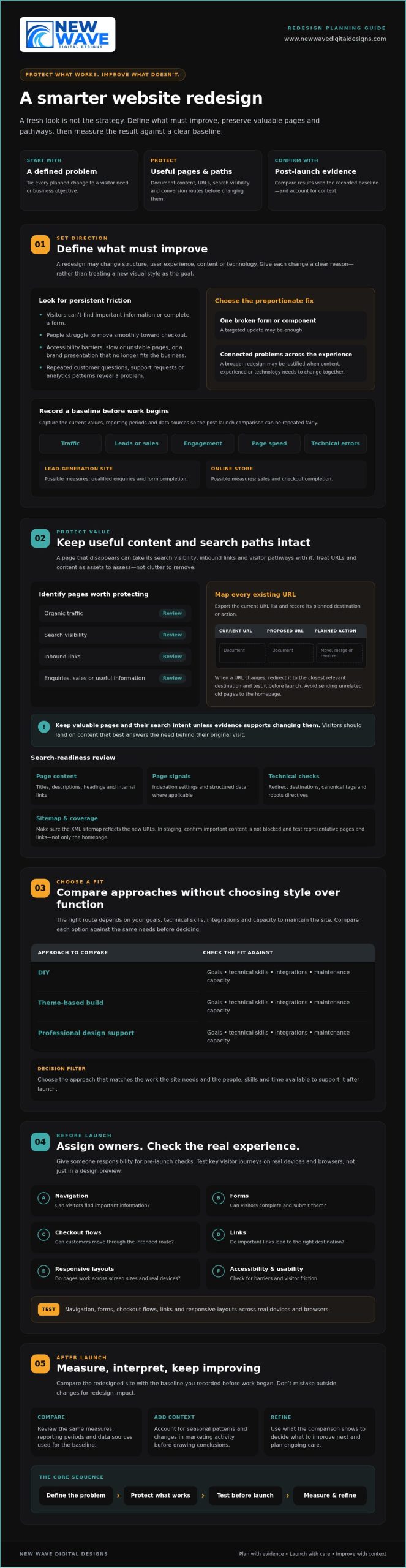
A fresh website can reflect how your business has grown, but changing features visitors already rely on carries risk. A redesign isn’t simply a new visual style. It changes some combination of the site’s structure, user experience, content, and technology. Each change should have a clear reason tied to a visitor need or business objective.

Before planning pages or layouts, record how the current site performs. Capture traffic, leads or sales, engagement, page speed, and technical errors, along with the dates and reporting periods. This baseline gives you a fair comparison after launch and helps distinguish progress from seasonal shifts or changes in marketing activity. In a concise project brief, connect each planned change to the problem it addresses and how you’ll assess the result.

Which website problems justify a redesign?

Look for persistent friction, not just a visual style you’ve grown tired of. Repeated customer questions, support requests, and analytics patterns can show that visitors can’t find key information, complete a form, or move smoothly toward checkout. Accessibility barriers, slow or unstable pages, and a brand presentation that no longer reflects the business may also justify broader work. These concerns connect to the wider web design principles of usability and user experience.

Separate critical defects from refinements. A broken lead form may need immediate attention; a preference for different colours may not justify rebuilding the site. If a problem is limited to one page or component, a targeted update could be the more proportionate response. Reserve a full redesign for connected problems that require changes across the experience, content, or underlying technology.

How to set redesign goals and a baseline

Choose a focused set of measures that match your objectives. A lead-generation site might track qualified enquiries and form completion. An online store could monitor sales and checkout completion. Record each measure’s current value, reporting period, and data source before work begins. Otherwise, post-launch comparisons may be difficult to interpret or repeat.

Map who the site serves, what those visitors need to do, and which pages help them do it. Then make the brief specific: “make service information easier to find” is more useful than “make the site modern.” For broader planning context, explore this 2026 web design guide. A sound brief gives design, content, and technical decisions a shared direction while protecting what already works.

Protect search traffic and useful content before changing the website

A page that disappears during a redesign can take more than its words with it. Search engines may need to discover and understand its replacement, while visitors following old links can land on an error page instead of the information they expected. To support avoiding common website redesign mistakes, treat URLs and content as assets to assess, not clutter to clear away.

Before implementation, export the current URL list and identify pages with organic traffic, search visibility, inbound links, enquiries, sales, or useful information. Create a simple mapping document with the current URL, proposed URL, and planned action for each page. Mark pages that will move, merge, or be removed. When a URL changes, map it to the closest relevant destination and test the redirect before launch. Avoid sending unrelated old pages to the homepage. Visitors should land on content that best answers their original need.

A redesign should preserve valuable pages and their search intent unless evidence supports changing them. This keeps visual and structural improvements grounded in what visitors actually seek. Forbes also outlines common website redesign mistakes, including overlooking search visibility and user experience.

How to prevent avoidable SEO losses

Compare the existing and planned site structures before the new version goes live. Review page titles, descriptions, headings, internal links, indexation settings, and structured data where applicable. In a staging environment, check that redirects lead to the intended pages, canonical tags point to preferred versions, robots directives don’t block important content, and the XML sitemap reflects the new URLs. Test representative pages and links throughout the site, not just the homepage.

Which content should survive the redesign?

Use several signals together. Analytics can show visits and engagement; search performance can reveal queries and visibility; backlink data can identify pages other sites reference; and conversion records can show content that supports enquiries or purchases. A page with modest traffic may still answer an important customer question or attract valuable links.

Improve weak or outdated material deliberately. Update facts, clarify the page’s purpose, or combine overlapping content when there’s a clear reason. Don’t delete a page simply because it doesn’t fit a new template. First decide whether its information belongs in a refreshed page, then update internal links to point to the right destination. Businesses assessing search strategy support may also want to explore organic SEO services. A carefully planned redesign can bring content, structure, and search intent into closer alignment; review website design and SEO support as one possible next step.

Compare redesign approaches without choosing style over function

The right redesign approach depends on what the site must do, the skills available internally, and who will care for it after launch. A DIY builder, a theme-based implementation, and custom professional design can each be a sound choice. The risk is choosing a platform or visual direction before documenting functional requirements, integrations, content, and maintenance needs. That sequence matters when avoiding common website redesign mistakes.

Use this comparison as a starting point. Actual control and support vary by platform, provider, and agreement, so confirm responsibilities before committing.

Approach Control and customization Technical responsibility and scalability Ongoing support
DIY tools Direct control, typically within the builder’s available features. The owner handles setup and troubleshooting; growth may be constrained by skills or available functionality. Owner-managed, with platform resources where available.
Theme-based implementation Theme options provide a foundation, with customization shaped by the theme and implementation. Requires someone to manage configuration, updates, and compatibility; check that the setup can accommodate future needs. Clarify who maintains the theme, content, and technical setup.
Custom professional design Design can be shaped around defined requirements, subject to agreed scope and platform capabilities. Useful for more involved requirements, but future changes still need clear ownership and technical planning. Confirm handoff, documentation, maintenance, and support responsibilities in advance.

When is a DIY redesign a reasonable choice?

DIY can suit a simple site with well-understood needs, limited integrations, and an owner who has time and confidence to maintain it. Include more than page building in your effort estimate. Content migration, accessibility checks, performance review, analytics setup, and troubleshooting all need attention. Identify limits early, especially around custom functionality, commerce requirements, and the technical skills available internally.

When does professional redesign support add value?

Consider professional help when a project involves complex commerce, a platform migration, multiple integrations, or substantial organic search exposure. Compare proposals by discovery, scope, testing, handoff, and post-launch responsibilities, not mockups alone. Ask who handles content transfer and technical checks, and what your team will need to manage afterward. For Shopify-specific commerce requirements, explore custom Shopify store design as a relevant example of platform-focused design support.

Avoiding Common Website Redesign Mistakes: A Strategic Checklist

Pre-launch checklist to catch common redesign mistakes

A calm launch is prepared well before launch day. In staging, walk through the tasks that matter most to visitors, then confirm that tracking, search settings, and recovery plans are ready. For avoiding common website redesign mistakes, make each check visible, assign an owner, and record whether it passed or needs attention.

What should be tested on staging?

Test complete journeys, not isolated page elements. Start from a landing page and continue through a contact form, purchase, or other defined conversion. Repeat the checks on real phones, tablets, and computers using browsers your audience relies on. Check keyboard navigation, responsive layouts, form validation and error messages, checkout steps, links, and third-party integrations.

  • Owner: Content or design lead. Check navigation labels, page content, links, and layouts at mobile and desktop sizes.
  • Owner: Accessibility reviewer. Test keyboard access, focus visibility, form labels, and whether errors are clear and usable.
  • Owner: Developer or platform administrator. Check forms, checkout, integrations, redirects, and page performance.
  • Owner: Analytics lead. Confirm key events and tags fire as intended, consent choices are respected, and reporting still captures meaningful activity.
  • Owner: SEO lead or site administrator. Verify important pages can be indexed and that staging restrictions won’t accidentally carry over to the live site.

Test redirects from old URLs as well as links within the new site. Confirm that consent behavior works as expected, and that analytics handles events appropriately when a visitor’s choice changes what can be recorded.

How to prepare a controlled launch

Before release, name the people responsible for backups, DNS or hosting changes, redirect checks, and the decision to proceed. Confirm that a recent backup exists and that the team knows how to restore it, or has a practical remediation plan suited to the platform and hosting environment. Agree on who will monitor the site and how issues will be reported after the change.

Launch readiness means critical user journeys, tracking, redirects, and recovery steps have all been tested. Keep the checklist open during launch and mark an item complete only after its owner has verified it. If a critical path fails, pause or follow the agreed response plan rather than assuming the issue will resolve itself.

Ongoing technical care can help keep a site updated and functional after launch. Website maintenance services may be one option to consider. For support with a redesigned site, discuss website maintenance and support.

After launch, measure results and keep improving the redesigned website

Going live is a transition, not a finish line. A redesigned site can look complete while a form, redirect, analytics event, or key page behaves differently under real visitor traffic. Keep the launch team engaged long enough to check the experience and technical health, then use what you learn to guide the next improvements.

What to monitor in the first weeks after launch

Check priority landing pages, forms, checkout steps, redirects, indexation, and analytics for unexpected changes. Compare organic visibility and conversions with the baseline you documented before the redesign. If a measure shifts, investigate the pages and user journeys involved before drawing conclusions. A campaign change, seasonal pattern, or tracking issue may affect results independently of the new site.

Keep a simple issue log so observations lead to action rather than scattered fixes. For each issue, record the page or journey, evidence, user or business impact, owner, decision, and resolution. Prioritize problems that block important tasks or affect key business outcomes. A brief fluctuation in one metric may deserve observation, while a broken enquiry form calls for prompt attention.

Turn launch feedback into a sustainable improvement plan

Use the issue log to build a considered improvement backlog. Combine analytics and technical checks with customer feedback and observed behavior; each can reveal friction that assumptions alone might miss. Schedule content reviews and platform-appropriate checks for software, security, backups, and performance. Clear ownership helps routine care continue after the redesign project team has moved on.

This measured approach is central to avoiding common website redesign mistakes: keep a record of what changed, what the evidence shows, and what should happen next. Some adjustments may be small, such as clarifying a page or refining a user journey. Others may call for a deeper review of design, organic SEO, hosting, or website maintenance.

New Wave Digital Designs offers support with website design, organic SEO, managed hosting, security, and ongoing maintenance. You can plan a website redesign conversation to discuss which areas need attention.

Build your next website around what matters

A successful redesign isn’t measured by how different the site looks. It’s measured by whether it better serves visitors and supports your business. Start with clear goals, protect valuable content and search pathways, then test essential journeys before launch. Afterward, compare results with your baseline and use evidence to guide improvements.

That’s the practical heart of avoiding common website redesign mistakes: make thoughtful changes without losing sight of what already works. The right approach depends on your platform, requirements, and internal capacity. New Wave Digital Designs provides website design for Shopify, WordPress, and Squarespace, with related services including SEO, managed hosting, security, and ongoing maintenance.

If you’re considering a redesign, contact New Wave Digital Designs to discuss your goals and the support you need. Plan a thoughtful website redesign with New Wave Digital Designs.

Frequently Asked Questions

What are the most common website redesign mistakes?

Common mistakes include redesigning without measurable goals, removing useful content, changing URLs without mapping redirects, and prioritizing appearance over usability. Teams may also overlook mobile layouts, accessibility, analytics, and post-launch maintenance. Avoiding common website redesign mistakes starts with documenting what the current site does well and where visitors encounter friction. That evidence helps distinguish essential improvements from personal design preferences and keeps decisions focused on user and business needs.

How can I redesign my website without losing SEO rankings?

Reduce avoidable search disruption by recording important URLs, organic landing pages, search visibility, backlinks, and conversions before development begins. Map each changed or retired URL to the closest relevant destination, then test redirects in staging. Preserve useful content and its search intent where possible, and review page titles, internal links, canonical tags, indexation settings, and the XML sitemap. Rankings can still change, so compare post-launch results with your baseline and investigate meaningful shifts.

Should I redesign my website myself or hire a professional?

Choose based on the site’s complexity, your internal skills, and who can maintain it afterward. DIY can suit a simple site with clear requirements, few integrations, and an owner able to handle content migration, testing, and troubleshooting. Professional support may be worth considering for complex commerce, migrations, or substantial search exposure. New Wave Digital Designs provides website design for Shopify, WordPress, and Squarespace, alongside related SEO and maintenance services.

How do I know whether my website needs a redesign?

Look for persistent problems that affect visitors or business outcomes, such as confusing navigation, inaccessible content, slow or unreliable pages, or a brand presentation that no longer fits the business. Check analytics for recurring drop-offs, and review customer questions and support requests for signs that people can’t find information or complete key tasks. If an issue affects only one page or feature, a targeted update may be more appropriate than a full redesign.

What should I check before launching a redesigned website?

Test complete user journeys on real devices and across relevant browsers, including navigation, forms, checkout, links, and third-party integrations. Check keyboard access, responsive layouts, form errors, page performance, analytics events, consent behavior, redirects, and search visibility settings. Confirm that backups are ready and that named owners understand launch responsibilities and recovery steps. Mark checks complete only after they’ve been verified, not simply because the site appears finished in a preview.

Can a website redesign reduce traffic or conversions?

Yes. Removing useful pages, misdirecting old URLs, introducing technical errors, or disrupting forms and checkout can affect organic traffic or conversions. A redesign can also improve the experience, but results depend on implementation and visitor needs. Compare performance with the pre-launch baseline, and check for tracking changes, seasonality, and campaign activity before attributing a shift to the new site. Investigate specific pages and journeys rather than reacting to one short-term fluctuation.

How long should I monitor a website after a redesign launch?

Monitor the site closely during the first weeks, then continue reviewing performance as part of regular website care. Check priority pages, forms, checkout, redirects, analytics, organic visibility, and conversions against the baseline. There isn’t one ideal end date: extend focused monitoring if problems emerge, data is limited, or seasonal patterns make comparisons difficult. Keep an issue log with evidence, owners, and fixes so launch observations become a practical improvement plan.

Hire Shopify Expert vs DIY: Architecting Your E-commerce Legacy in 2026

A digital storefront in 2026 is no longer a mere collection of product listings. It is a living, breathing monument to your brand’s ambition. You likely recognize that Shopify offers a robust foundation for growth, yet the increasing complexity of AI shopping agents, checkout extensibility, and headless architecture can make the platform feel like an impenetrable labyrinth. It’s natural to fear the technical dead ends that stall your momentum or the weight of an app ecosystem that demands constant attention.

The choice to hire Shopify expert vs DIY represents the most critical strategic decision you’ll make for your brand’s digital future. We promise to provide the clarity you need to move from technical anxiety to creative authority. By the end of this exploration, you’ll understand the hidden costs of a makeshift build, the transformative power of professional artistry, and how to architect a scalable foundation that converts your vision into a lasting revenue stream. We’ll dissect the technical requirements of the modern web, evaluate the true ROI of expert partnership, and reveal how to protect your store’s performance in an evolving marketplace.

Key Takeaways

  • Understand the nuances of the hire Shopify expert vs DIY debate, balancing immediate cost savings against the long-term architectural integrity of your brand.
  • Learn how bespoke design transcends mere functionality to create an emotional resonance that turns casual visitors into loyal brand advocates.
  • Identify the critical technical thresholds where a self-built store may falter under the weight of increased traffic and complex commerce requirements.
  • Discover the specific indicators, from stagnating conversion rates to security vulnerabilities, that signal it’s time to transition to professional craftsmanship.
  • Explore the strategic benefits of a boutique partnership that prioritizes managed hosting and security to safeguard your digital legacy as you scale.

The Allure and Reality of the DIY Shopify Path

The dream of digital entrepreneurship often begins with a blank canvas and a Shopify login. For many, the DIY path represents an empowering entry point, characterized by the use of native themes and intuitive drag-and-drop interfaces. This approach is fueled by a desire for absolute control and a need to preserve initial capital. To balance these needs, many entrepreneurs explore Starter Website Package options that provide professional quality at an accessible price point. It feels accessible. It feels manageable. It feels like the logical first step in building a brand from the ground up.

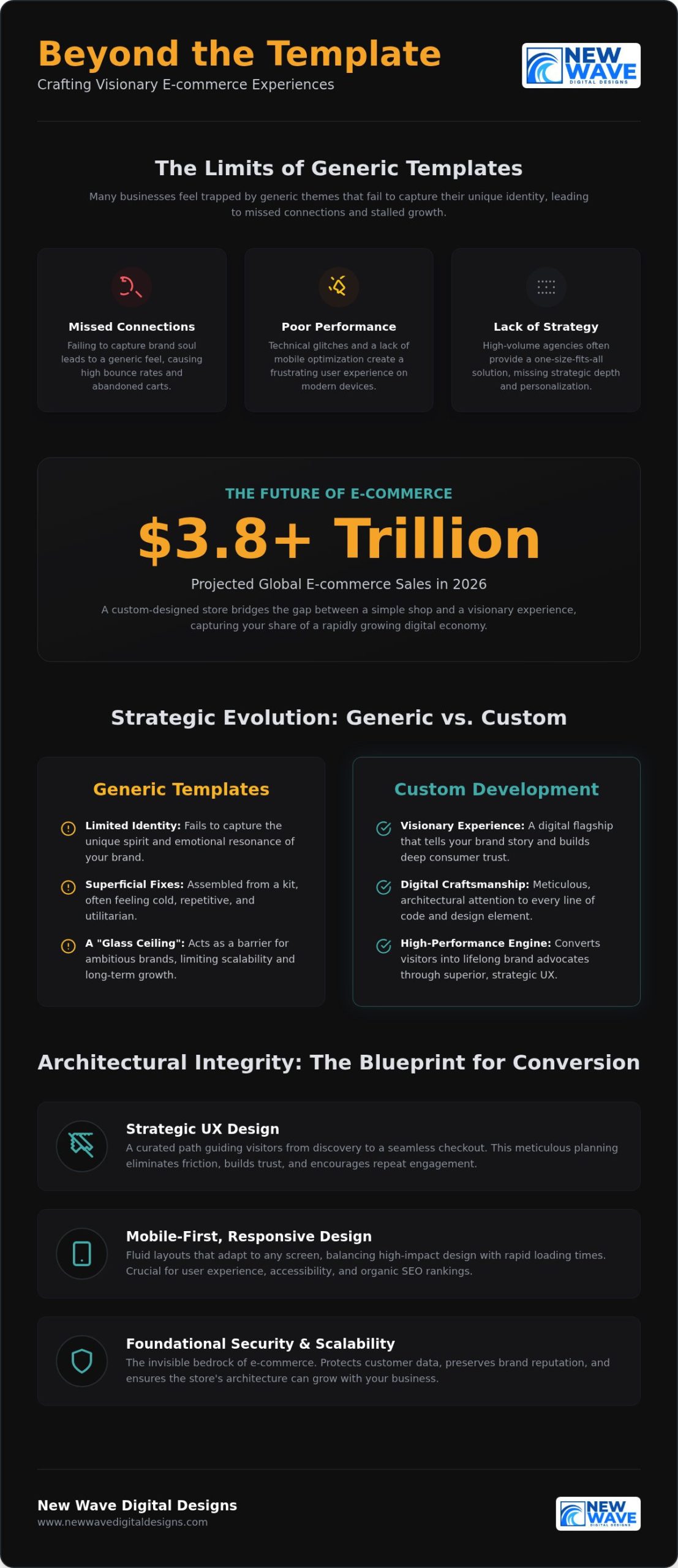
However, a profound accessibility paradox exists within this model. While Shopify makes it incredibly simple to open a shop, mastering the platform to a professional standard is an entirely different endeavor. The initial excitement of going live often gives way to the Time Tax. This is the hidden cost where hours, days, and weeks are consumed by troubleshooting minor technical glitches or wrestling with layout shifts. Every minute spent fixing a broken button is a minute stolen from product development, customer relationship building, and strategic scaling. When weighing the choice to hire Shopify expert vs DIY, you must consider if your time is best spent as a technician or a visionary.

The Template Trap: When Convenience Limits Vision

Templates offer a seductive speed-to-market, yet they often function as a creative cage. In a 2026 marketplace saturated with over 3 million active stores, a generic design is a recipe for invisibility. Relying on out-of-the-box themes frequently leads to App Bloat, where users stack third-party plugins to compensate for missing native features. This clutter slows down performance, complicates the user journey, and risks the security of your digital assets. True brand identity requires a bespoke touch that a standard template simply cannot provide. It is the difference between living in a pre-fabricated house and commissioning a custom estate, a level of distinction that Senses Group helps global brands achieve through integrated branding and ecommerce strategy. Brands serious about standing out should explore Shopify theme customization as a strategic path to a distinctive, high-converting storefront that transcends the limitations of generic templates.

The Technical Learning Curve

Beneath the user-friendly surface lies a complex architecture of code and logic. Gaining a deep understanding e-commerce requires more than just listing products; it involves mastering Liquid, Shopify’s proprietary templating language, and managing intricate SEO metadata. Without an expert eye, critical tasks like image optimization and the configuration of complex shipping or tax rules become minefields. These technical layers are not mere hurdles. They are the structural pillars of a secure, high-converting storefront. Meticulousness in these details separates a functional website from a scalable digital legacy that commands respect and trust.

The Value of Professional Craftsmanship: Why Hire a Shopify Expert?

Choosing to hire Shopify expert vs DIY moves your business from a state of mere existence to one of strategic dominance. While a DIY approach focuses on basic assembly, professional craftsmanship treats your storefront as a piece of digital engineering. This commitment to excellence is shared by multi-award winning agencies like C Me Online, who specialize in professional web design and e-commerce development. An expert doesn’t just install a theme; they architect a system. This involves developing an e-commerce strategy that aligns your technical infrastructure with your long-term commercial goals. It’s about precision. It’s about vision. It’s about the relentless pursuit of excellence.

Bespoke design serves as the heartbeat of this process. It creates a visual identity that resonates emotionally with your audience, fostering a sense of trust that generic templates cannot replicate. Beyond aesthetics, performance engineering ensures your site excels in core web vitals and mobile responsiveness. We design conversion-centric user experiences that guide customers naturally from discovery to checkout, removing friction and maximizing the value of every visitor. This level of meticulousness transforms a simple website into a high-performance engine for growth.

If your project involves building a custom MVP or modernizing a legacy application to support your store’s growth, you can learn more about Founders Workshop to see how their software development expertise can help you architect a robust digital foundation.

Standard features and third-party apps often come with technical debt. Custom-coded solutions offer a cleaner, more efficient way to achieve specific business logic without the baggage of “app bloat” discussed earlier. By ensuring a seamless custom shopify store design, you create a backend that is as elegant as the frontend. This administrative efficiency allows your team to manage operations with fluidity and grace. If you’re ready to elevate your presence, our team at New Wave Digital Designs can help you refine your digital footprint.

A Partnership Built on Trust and Vision

An expert acts as a strategic guide rather than a simple service provider. This partnership is built on a shared commitment to your brand’s evolution. Professional insights help you anticipate market shifts and prevent costly mistakes before they manifest. Instead of reacting to technical hurdles, you follow a deliberate roadmap for growth. For brands seeking a partner that offers a high level of strategic oversight, you can learn more about jWeb Media and their full-service digital solutions. This collaborative spirit ensures that your digital assets are not just maintained, but are constantly evolving to capture new opportunities in a competitive marketplace. The decision to hire Shopify expert vs DIY ultimately hinges on whether you want a vendor or a visionary partner invested in your legacy.

Determining whether to hire Shopify expert vs DIY requires a cold, analytical look at your brand’s trajectory. It is a choice between immediate capital preservation and long-term foundational integrity. While the DIY path may seem cost-effective at the outset, it often ignores the hidden expenses of lost conversions and technical debt. If you are architecting a legacy, you must evaluate if your current build can gracefully withstand a 500% surge in traffic during a seasonal peak. A self-built store often buckles under such pressure, leading to lost revenue and a tarnished reputation. Conversely, professional Shopify store development ensures your infrastructure is elastic, secure, and optimized for performance from the very first line of code.

Security and digital integrity have become the non-negotiable standards of 2026. DIY builds are frequently vulnerable to misconfigured permissions or outdated third-party scripts that can compromise customer data. An expert-managed storefront provides a fortress of protection, integrating advanced security protocols that safeguard your digital assets. This meticulousness extends to SEO dominance. While a DIY setup might cover basic meta tags, an architected solution builds SEO into the site’s structural DNA, ensuring your brand remains visible in an increasingly crowded marketplace.

Assessing Your Technical Threshold

A professional digital presence is a direct reflection of your product’s quality. “Good enough” is no longer a viable strategy for brands that aspire to lead. To determine if you possess the skills to manage a professional build, consider this brief self-assessment. Can you optimize Core Web Vitals to meet the latest search engine requirements? Do you have the expertise to implement complex schema markup for AI-driven search? Are you comfortable managing API integrations without breaking your checkout flow? A professional eye for Shopify website design identifies subtle friction points that a DIY builder would overlook, ensuring your reputation remains untarnished by technical mediocrity.

The Opportunity Cost of Your Time

Your role as a CEO is to innovate, lead, and expand. When you spend dozens of hours wrestling with CSS or shipping configurations, you aren’t just saving money; you’re losing momentum. Every hour dedicated to web development is an hour stolen from product innovation and market expansion. Delegating these technical burdens to a visionary partner accelerates your time-to-market and allows you to focus on the high-level strategy that drives growth. The decision to hire Shopify expert vs DIY ultimately hinges on the value you place on your own time and the speed at which you wish to see your vision realized.

Hire Shopify Expert vs DIY: Architecting Your E-commerce Legacy in 2026

Signs It’s Time to Transition from DIY to Professional Help

For those who prefer to remain hands-on but want to reduce the time spent on trial and error, working with a digital confidence coach NZ can provide the necessary technology training to streamline your learning curve. This allows you to maintain control over your digital storefront while still freeing up valuable time to focus on your brand’s expansion.

Recognizing the tipping point in the hire Shopify expert vs DIY journey is vital for preserving your brand’s momentum. Often, the signs aren’t catastrophic failures but subtle erosions of potential. You might observe stagnating conversion rates despite healthy traffic volumes, a clear indicator that your user journey contains invisible friction points. Perhaps technical glitches have begun to haunt your checkout experience, particularly as Shopify moves toward mandatory checkout extensibility. When your current design no longer mirrors the premium evolution of your business, you risk alienating the very customers you’ve worked so hard to attract. As you look toward advanced integrations like ERP systems, CRM platforms, or custom fulfillment logic, the limitations of a DIY foundation become a ceiling you can no longer ignore. For those who want to ensure their technical foundation is optimized for search visibility, FNP Digital offers comprehensive solutions to support your brand’s digital transition.

The High Cost of Technical Debt

In the rush to launch, many entrepreneurs rely on a patchwork of apps and “quick fixes” that eventually conflict with one another. These choices create a fragile ecosystem where a single platform update can cause a systemic collapse. Technical debt is the cumulative cost of choosing easy solutions over correct ones. To move forward with confidence, a professional audit is necessary to identify these hidden bottlenecks and restore the structural integrity of your storefront. Transitioning to a partner like New Wave Digital Designs allows you to clear this debt and build upon a clean, optimized foundation that prioritizes long-term stability over short-term convenience.

Scaling Beyond the Basics

Your digital presence must grow in parallel with your global ambitions. Scaling for international commerce requires more than just a simple currency toggle; it demands a sophisticated approach to localized experiences and robust multi-currency support. If you are currently operating on a template-driven platform and have reached its limits, following a comprehensive Squarespace to Shopify migration checklist can help you make the architectural leap without sacrificing your search rankings or brand equity. Implementing advanced E-commerce SEO strategies ensures your brand achieves national reach and remains visible as search algorithms become more complex. This evolution also necessitates professional graphic design to elevate your brand identity, ensuring every visual touchpoint exudes the artistry and quality your customers expect. When you reach this threshold, the decision to hire Shopify expert vs DIY becomes less about initial expenditure and more about your commitment to professional excellence. True growth requires a digital architecture that can support the weight of your success without bending under the pressure of expansion. A comprehensive approach to Shopify theme customization becomes essential at this stage, enabling your storefront to deliver localized, immersive experiences that resonate with a global audience.

New Wave Digital Designs: Your Visionary Shopify Partner

At New Wave Digital Designs, we view digital services through the lens of meticulous craftsmanship. The choice to hire Shopify expert vs DIY is ultimately a decision about the caliber of your brand’s foundation. We don’t just build sites; we architect experiences that capture the true spirit of your business. Our approach is characterized by a sophisticated blend of professional confidence and artistic inspiration. We believe every project deserves a level of personal care that high-volume factories simply cannot provide. By choosing a partnership over a transaction, you ensure that your digital storefront is built to endure. To see how professional infrastructure supports this level of growth, you can explore Web Development and Managed IT Services tailored for small businesses.

A visionary brand requires a secure harbor. We provide managed hosting and security services that act as a safeguard for your digital assets. This isn’t just about technical uptime. It’s about protecting the integrity of your brand’s legacy in an era of increasing digital volatility. By handling the complex science of server management and security protocols, we allow you to focus on the art of your business. This peace of mind is the cornerstone of a scalable digital strategy, allowing for fearless innovation.

Our process begins with listening. We believe that to build a successful Shopify website design, we must first understand the heartbeat of your brand. This deep understanding allows us to bridge the gap between a philosophical vision and a practical, high-converting result. We are personally invested in your long-term success, building trust through transparency and meticulous attention to detail. As your digital architects, we manage both the aesthetic “art” and the technical “science” of your site, ensuring a harmonious balance that resonates with your target audience. This commitment to a unified brand identity is why we recommend resources like The CEO Creative for businesses that need high-quality custom branding products to complement their digital storefront. You aren’t just another project in a queue; you are a partner in a shared creative journey.

Growth is not a static event but a process of continuous evolution. Beyond the initial launch, we offer comprehensive website maintenance and support to ensure your storefront remains at the cutting edge of performance. We integrate organic SEO and sophisticated SEM strategies, including Google Ads and Bing Ads, to drive consistent, high-quality traffic to your store. This tripartite approach—design, maintenance, and marketing—creates a comprehensive growth engine that propels your brand forward. For those aiming for measurable scaling, resources like petermontoya.com illustrate how performance marketing can secure market dominance. We invite you to transform your digital presence through a collaborative partnership that values strategy over quick fixes. Together, we can architect a digital legacy that stands the test of time and market shifts.

The journey from a functional storefront to a formidable digital legacy requires a transition from mere assembly to intentional architecture. We’ve explored how the decision to hire Shopify expert vs DIY is not simply a matter of initial budget, but a strategic choice regarding your long-term brand trajectory. A DIY build serves as a functional entry point, yet a professionally engineered store provides the resilient foundation required for global expansion and technical integrity. You don’t just need a website; you deserve a digital monument that reflects your craftsmanship and ambition.

Our commitment to your success extends far beyond the initial launch. We provide professional website maintenance and support, managed hosting and security solutions, and strategic organic SEO and SEM management to ensure your evolution is steady and secure. This holistic approach transforms your vision into a high-performance reality that commands trust. It’s time to stop wrestling with technical debt and start leading your industry with confidence. Partner with a visionary Shopify expert to architect your digital future. Your brand’s evolution is a masterpiece in progress, and we are ready to help you realize its full potential.

Frequently Asked Questions

Is Shopify easy enough for a beginner to build a professional store?

Shopify is designed for accessibility, allowing beginners to launch a basic storefront quickly using native templates. However, when weighing the choice to hire Shopify expert vs DIY, consider that creating a professional grade experience requires deep technical knowledge. A beginner often lacks the expertise to optimize for core web vitals or implement complex business logic. While you can build a functional shop, architecting a scalable digital legacy usually necessitates professional intervention to avoid mediocrity.

How much time does it typically take to DIY a Shopify store vs hiring an expert?

A DIY build often consumes 40 to 100 hours of a business owner’s time as they navigate the technical learning curve. This “Time Tax” diverts your focus from core growth strategies and product innovation. In contrast, hiring an expert typically involves a project timeline of four to eight weeks. While the duration may seem similar, the expert path results in a fully optimized, high performance store, whereas the DIY path often ends in a work-in-progress state.

Can I start with a DIY store and hire a Shopify expert to fix it later?

You can start solo and transition later, though this often requires a professional audit to address accumulated technical debt. Many entrepreneurs find that the cost to hire Shopify expert vs DIY increases when an architect must first dismantle conflicting apps and “quick fixes.” Starting with a professional foundation is more efficient, but we frequently help brands refine and elevate their existing DIY stores into sophisticated, high converting digital assets that command trust.

What are the main risks of building a Shopify store without professional help?

The primary risks include security vulnerabilities, poor site performance, and a diluted brand identity. Without professional guidance, many stores suffer from “App Bloat,” where excessive third party plugins slow down load times and create checkout friction. Additionally, DIY builds often miss critical SEO structural elements and legal compliance standards; for example, you can discover 216digital to see how legislation like Colorado’s web compliance law impacts e-commerce. These technical oversights can lead to lost revenue and a tarnished reputation that is difficult to repair over time.

Will hiring a Shopify expert improve my search engine rankings?

Hiring an expert significantly enhances your visibility through meticulous structural SEO and targeted marketing. Professional architects build search optimization into the site’s DNA, rather than just filling out basic meta tags. To better understand the technical metrics behind this visibility, you can learn more about PurpleCow Digital and their guide to domain authority and page rank. At New Wave Digital Designs, we complement organic strategies with strategic SEM management, including Google Ads and Bing Ads. This comprehensive approach ensures your brand isn’t just functional, but actively attracting and converting the right audience across the national landscape.

A developer typically focuses on the technical execution of specific tasks, while a Shopify expert acts as a visionary digital architect. Experts offer a holistic perspective that integrates design artistry with strategic engineering. While a developer might write code to solve a single problem, an expert ensures that every feature aligns with your brand’s long term commercial goals. This partnership focuses on craftsmanship and long term success rather than just fulfilling a technical checklist.

How do I know if my DIY store is actually hurting my sales?

You can identify sales friction through metrics like high cart abandonment rates and stagnating conversions despite steady traffic. If your site feels unpolished or lacks a cohesive visual identity, it likely fails to build the trust necessary for high value transactions. Technical glitches during the checkout process are a definitive sign that your DIY store is hindering your growth. A professional audit can reveal these invisible bottlenecks that are quietly draining your potential revenue.

What ongoing maintenance does a Shopify store require after launch?

Post launch success requires consistent website maintenance and support to safeguard your digital assets. This includes proactive security monitoring, managed hosting updates, and regular performance audits to prevent downtime. Beyond the technical basics, your store needs ongoing SEO refinements and content updates to stay relevant in an evolving market. For those who also manage WordPress assets alongside their commerce platform, you can check out Digital Junction to find specialized care plans that keep your broader web presence in peak condition. We treat maintenance as a form of continuous evolution, ensuring your storefront remains a secure, high performing monument to your brand’s ambition.

Shopify Website Design New Jersey: Crafting Visionary E-commerce Experiences

What if your online store was more than a digital catalog, but a living, breathing extension of your brand’s soul? Many businesses searching for custom Shopify website design feel trapped by generic templates that fail to capture their unique identity, leading to missed connections and abandoned carts. It’s frustrating to watch potential growth stall because of technical glitches, poor mobile optimization, or a lack of strategic guidance from high-volume agencies that treat your vision like a line item on a spreadsheet.

A truly exceptional online presence requires a blend of artistic inspiration, technical precision, and architectural foresight. With global e-commerce sales projected to exceed $3.8 trillion in 2026, choosing a boutique partner allows you to bridge the gap between a simple shop and a visionary experience. We’ll explore how a custom-designed store captures your brand’s true spirit, elevates user engagement, and builds a scalable foundation that grows with your ambition. This guide reveals the meticulous process of crafting a digital masterpiece that doesn’t just look stunning but converts with effortless efficiency.

Key Takeaways

  • Learn how to move beyond the limitations of generic templates to capture the true spirit and emotional resonance of your unique brand.
  • Discover how professional Shopify website design New Jersey integrates strategic UX and fluid mobile layouts to maximize your store’s conversion rates.
  • Understand the importance of architectural integrity and scalability when choosing between custom development and standard DIY builders.
  • Gain insight into a collaborative design process where artistic inspiration meets technical precision to realize your business goals for 2026.
  • Explore the value of a boutique partnership that offers dedicated craftsmanship, ongoing maintenance, and strategic growth support for your digital storefront.

The Art of E-commerce: Why Professional Shopify Design Matters

The digital landscape is crowded with storefronts that look identical. While standard templates offer a quick entry into the world of e-commerce, they often act as a glass ceiling for ambitious brands. True success isn’t just about listing products; it’s about creating an atmosphere that resonates with your audience. When you invest in professional Shopify website design New Jersey, you’re choosing to elevate your business from a mere transaction point to a storied destination. This transformation relies on professional craftsmanship that evokes deep emotional resonance. A store that feels built with intention rather than assembled from a kit commands immediate consumer trust. It bridges the gap between your conceptual vision and the practical reality of sales, turning casual visitors into lifelong brand advocates through aesthetic excellence and strategic clarity.

The Visionary Approach to Digital Storefronts

Think of your online store as a digital flagship. Just as a physical boutique in a high-end district uses lighting, texture, and curated layouts to tell a story, your Shopify store must use visual hierarchy and rhythmic design to guide the visitor. This requires integrating custom graphic design to ensure your visual identity remains cohesive across all digital media. A custom Shopify store design serves as the foundational architecture for your long-term digital growth. It isn’t just a temporary skin over a generic platform. It’s a strategic framework designed to scale alongside your ambitions. By treating the design process as a visionary endeavor, you ensure that every element serves a specific purpose, from reinforcing brand authority to streamlining the path to purchase for your customers.

From Technical Task to Digital Craftsmanship

Many agencies operate like high-volume service factories, churning out sites that feel cold, repetitive, and utilitarian. We believe in a different path that prioritizes the artistry of development. Digital craftsmanship means applying meticulous, architectural attention to every line of code and every design element. This boutique approach ensures your project receives the personal care and strategic thinking it deserves, avoiding the superficial fixes common in mass-market services. Your website shouldn’t be a static page that eventually becomes obsolete. Instead, it should be an evolving asset that adapts to market shifts and customer behaviors. By partnering with dedicated experts in web design New Jersey, you gain a sophisticated guide committed to the continuous evolution of your storefront. If you want to see the results of this approach, you can find out more about the potential of custom-built Shopify experiences. This level of meticulous detail builds deep trust, proving to your audience that your brand values quality, innovation, and craftsmanship.

Architectural Integrity: Key Features of a High-Converting Shopify Store

A high-converting storefront isn’t a happy accident; it’s the result of deliberate architectural integrity. When we approach Shopify website design New Jersey, we view the customer journey as a curated path where every interaction serves a specific purpose. Strategic UX design guides visitors from the moment of initial discovery, through thoughtful engagement, to a seamless checkout. This meticulous planning eliminates friction, builds trust, and encourages repeat engagement. By weaving a brand’s narrative into the functional layout, we transform a simple site into a high-performance engine for growth that reflects your core values.

Responsive Design for a Mobile-First World

In 2026, the modern shopper’s device of choice is almost always in their palm. We craft layouts that adapt fluidly to any screen size, ensuring that visual elegance isn’t sacrificed for functionality. This involves balancing high-impact graphic design with rapid loading times to keep performance sharp across all platforms. A robust e-commerce strategy recognizes that mobile optimization isn’t just about appearance; it’s about accessibility and ease of use. It directly influences your organic SEO rankings and determines whether a user stays or bounces. Our approach ensures your store remains fast, responsive, and intuitively navigable on every device, from smartphones to tablets.

Foundational Security and Technical Support

While we focus on digital inclusivity for e-commerce, it is important to remember that accessibility is a universal right. If you are in the New York region and believe you have encountered barriers or unfair treatment, you can visit ADA Help – NY disability discrimination claims to explore your legal options.

Security is the invisible bedrock of every successful e-commerce venture. Protecting customer data and preserving your brand reputation requires more than just a basic SSL certificate. We implement managed hosting and robust security solutions to prevent vulnerabilities that could lead to costly downtime or data breaches. Ongoing website maintenance services are essential for sustaining the health of your storefront as it scales and evolves. By treating technical support as a form of craftsmanship, we ensure your platform remains a secure and reliable haven for your customers. This proactive care builds a foundation of resilience, reliability, and reputation, allowing you to focus on your visionary business goals.

High-performance site speed is the final pillar of this architectural approach. Every millisecond of delay can lead to a measurable increase in bounce rates, frustrating potential customers and eroding trust. We optimize every pixel, script, and image to ensure instantaneous response times, maximizing your conversion potential in a competitive marketplace. This level of technical precision, combined with an artistic eye, is what defines professional Shopify website design New Jersey. It’s about creating a digital space that feels both secure and inspiring, inviting customers to linger and explore with complete confidence in your brand’s excellence.

Strategic Evolution: Custom Shopify Development vs. Generic Templates

A template is a temporary shelter. Custom design is a permanent foundation. Just as discerning property owners explore General Contracting and Home Renovations to create spaces of lasting value, your digital storefront requires the same level of architectural foresight. While generic themes offer an immediate entry point, they often impose rigid boundaries that stifle a brand’s unique expression and operational flow. Choosing Shopify website design New Jersey through a boutique architectural lens ensures your platform isn’t just a place to sell, but a scalable asset that evolves with your business goals. Professional architectural design moves beyond the one-size-fits-all limitations of DIY builders, providing the structural integrity needed to support sophisticated brand equity and high-volume traffic in 2026. Understanding the full implications of this decision is essential, and exploring the hire Shopify expert vs DIY debate can help you weigh the hidden costs of a makeshift build against the transformative power of professional artistry.

Custom theme development unlocks technical functionalities that standard templates simply cannot accommodate. It allows for the integration of unique features tailored to your specific business operations, from bespoke product builders to advanced inventory logic. For instance, a brand dedicated to performance like Ocean Motion Wear requires a platform that can handle complex product specifications while maintaining a high-end aesthetic. This alignment of form and function creates a memorable user experience that differentiates your storefront from a sea of competitors. By prioritizing meticulous craftsmanship over superficial fixes, you build deep trust with your audience. Your digital flagship becomes a curated environment where every interaction reinforces your brand’s core mission and visionary spirit.

Migrating for Scalability and Performance

Transitioning from platforms like Squarespace or WordPress to a high-volume Shopify environment requires a strategic, methodical approach. Many businesses fear losing their hard-earned search engine rankings during a move, but professional guidance ensures your SEO value remains intact through precise URL mapping and 301 redirect management. Maintaining data integrity and customer history is paramount to preserving long-term loyalty and operational continuity. A successful migration isn’t just about moving files; it’s about preparing your store for the future. By partnering with a dedicated guide for Shopify website design New Jersey, you ensure your transition is fluid, secure, and optimized for the next stage of your digital evolution.

Investing in custom development is a commitment to continuous growth. It transforms your store from a static page into a dynamic, high-performance engine capable of handling the projected $3.8 trillion global e-commerce landscape. This strategic evolution provides the freedom to innovate without technical constraints, ensuring your brand remains a leader in a competitive marketplace. It’s a journey from a conceptual vision to a transformative digital reality that captures your true spirit and drives sustainable success. Businesses ready to take this step can explore Shopify store development NJ to understand how precision-built platforms become lasting brand assets.

Shopify Website Design New Jersey: Crafting Visionary E-commerce Experiences

The New Wave Process: From Visionary Concept to Digital Reality

Realizing a digital masterpiece requires more than technical skill; it demands a methodical journey from abstract vision to tangible performance. Our approach to Shopify website design New Jersey begins by treating your brand as a unique entity with its own soul and story. We move beyond the superficial checklists of high-volume agencies to embrace a process rooted in deep understanding and creative partnership. This ensures that every design choice reflects your core mission while serving the practical needs of your growing business. It’s a transition from a conceptual dream to a functional, high-converting reality.

Collaborative Discovery and Strategic Planning

Listening is the first act of digital craftsmanship. We begin by listening intently to your goals, challenges, and aspirations to forge a personalized strategy that resonates with your audience. During this stage, we define the specific KPIs that will measure the success of your new storefront. We build a comprehensive roadmap that balances immediate visual impact with the long-term structural integrity needed for expansion. This phase ensures that the final product is not just a website, but a strategic asset designed for measurable results. It’s about building a foundation of trust, clarity, and purpose.

Implementation and Continuous Growth

Launching your store is the beginning of a continuous evolution. Once the design phase transitions into development, we apply rigorous testing to ensure every line of code supports a flawless user experience. To drive immediate traffic to your new digital flagship, we deploy targeted Google Ads and Bing Ads that capture high-intent shoppers. Simultaneously, we implement robust organic SEO strategies to build sustainable visibility in search results. This dual approach ensures your brand gains momentum quickly while establishing a foundation for permanent search authority and market leadership.

Maintaining a competitive edge in 2026 requires an evolving platform that stays ahead of technical shifts. We provide professional website maintenance services and support to ensure your store remains secure, fast, and intuitively functional. This partnership approach reflects our commitment to your long-term success as a digital visionary. It’s about meticulous care, constant innovation, and a shared passion for excellence. If you are ready to transform your e-commerce presence into a high-converting masterpiece, start your journey with us today.

Elevate Your Brand: Partnering with New Jersey’s Shopify Experts

Establishing dominance in the digital marketplace requires a partner who sees beyond the code. For those seeking Shopify website design New Jersey, the goal isn’t just a functional site but a platform that commands authority and captures your brand’s true spirit. Leadership comes from a fusion of strategic insight and artistic execution. It’s about ensuring every visitor feels the weight of your brand’s excellence from their very first interaction. When you position your business as a leader, you’re not just selling products; you’re inviting customers into a curated experience—much like how you might check out DNA Events and Production for professional event production—built on a foundation of professional confidence and visionary design.

A Boutique Partnership for Meticulous Results

We reject the high-volume factory model where projects are processed like commodities. Instead, we offer a refined experience centered on meticulous attention to detail. Every pixel and strategy receives personal care from a dedicated creative team invested in your long-term success. By accessing our comprehensive suite of services, including custom graphic design, Google Ads management, and ongoing website maintenance, you ensure a cohesive brand narrative across all touchpoints. This level of craftsmanship builds a deep foundation of trust that generic agencies simply cannot replicate, allowing your business to flourish in a crowded environment where authenticity is the ultimate currency.

Forging Your Digital Future in 2026

The e-commerce landscape of 2026 demands a forward-thinking perspective. Technical requirements are shifting toward deeper AI integration and immersive experiences, making a visionary design partner more essential than ever. We ensure your storefront is ready for these demands, moving beyond temporary fixes to build an evolving digital asset that remains resilient against market shifts. Our role as a digital architect is to guide you through these complexities with professional confidence and artistic inspiration. We help you stay ahead of trends rather than reacting to them, securing your place at the forefront of your industry through continuous innovation and strategic refinement.

New Jersey businesses trust New Wave Digital Designs because we treat their e-commerce vision as our own. Taking the first step toward a transformative digital presence is a journey of discovery and realization. It begins with a shared conversation about your brand’s soul and your most ambitious goals. By choosing a partner for Shopify website design New Jersey that values depth and innovation, you’re not just building a store; you’re crafting a legacy of digital excellence. Businesses looking to establish a comprehensive online presence can also benefit from exploring professional web design New Jersey services that extend beyond e-commerce into full-scale digital architecture. Let us help you realize the visionary storefront your brand deserves, ensuring your business remains a beacon of quality and craftsmanship in the years to come.

Realizing Your Visionary Digital Presence

Transforming a digital storefront from a simple catalog into a high-converting masterpiece requires a fusion of artistic vision and technical precision. We’ve explored how moving beyond generic templates allows your brand’s true spirit to shine while building a foundation of architectural integrity. By prioritizing strategic UX design and fluid mobile experiences, you ensure your business remains a leader in the competitive marketplace. Professional Shopify website design New Jersey is more than a technical task; it’s a form of craftsmanship that fosters deep trust and long-term loyalty.

New Wave Digital Designs brings specialized expertise in Shopify store development NJ, WordPress, and Squarespace to every project. We provide comprehensive maintenance and secure hosting alongside integrated search engine marketing to ensure your store remains a dynamic, evolving asset. Our boutique approach treats every project with the meticulous care it deserves, moving you from a conceptual dream to a transformative reality.

Begin Your Visionary E-commerce Journey with New Wave Digital Designs. Your brand’s future is waiting to be built with purpose and passion.

Frequently Asked Questions

Why should I choose a professional Shopify designer over a DIY template?

Professional design offers architectural integrity and unique brand expression that templates can’t match. It eliminates the glass ceiling of generic layouts, ensuring your store reflects your brand’s true soul. A digital architect builds for conversion and scalability, whereas DIY options often lead to technical friction and a service factory feel. For a deeper look at this critical decision, our guide on hiring a Shopify expert vs DIY outlines the hidden costs and transformative benefits of professional craftsmanship. This boutique approach fosters deep trust through meticulous craftsmanship and strategic foresight rather than superficial fixes.

How long does a custom Shopify website design project typically take?

Project timelines vary based on the complexity of your visionary concept and specific operational needs. A methodical journey from discovery to final realization typically spans several weeks to ensure meticulous attention to detail. This timeline allows for deep strategic planning, artistic design phases, and rigorous testing of all technical functionalities. We prioritize a deliberate process over frantic urgency to guarantee a digital flagship that is ready for long-term growth.

Can you help migrate my existing store from WordPress or Squarespace to Shopify?

We specialize in fluid transitions from platforms like WordPress and Squarespace to high-volume Shopify environments. Our process ensures data integrity and customer history remain intact while protecting your hard-earned SEO value through precise URL mapping. Moving to a more scalable architecture allows your business to evolve without technical constraints. This strategic migration prepares your storefront for the technical demands of 2026 while maintaining total brand consistency.

Do you provide ongoing maintenance and security for Shopify stores?

We offer comprehensive website maintenance and secure hosting to ensure your digital asset remains at the cutting edge. This proactive care involves implementing robust security solutions to prevent vulnerabilities and downtime, protecting both your customer data and brand reputation. By treating maintenance as a form of craftsmanship, we provide a reliable foundation for your business to flourish. Our partnership approach ensures your platform evolves alongside shifting e-commerce trends and consumer behaviors.

How does Shopify website design impact my store’s SEO and Google rankings?

Professional Shopify website design New Jersey directly influences your search visibility through optimized site architecture and rapid loading times. We integrate organic SEO strategies into the design phase, ensuring your store is intuitively navigable for both users and search engines. Mobile-first layouts and clean code minimize bounce rates, which signals authority to Google. This holistic approach builds sustainable search authority, turning your storefront into a high-performing engine for growth.

Will my custom Shopify store be mobile-responsive and tablet-friendly?

Every store we craft is fully responsive and optimized for every screen size, from smartphones to tablets. We balance high-impact graphic design with fast performance to ensure a fluid mobile experience for modern shoppers. Since mobile optimization is a critical ranking factor in 2026, our architectural approach ensures your site adapts seamlessly to any device. This meticulous care guarantees that your brand’s visionary spirit is accessible to customers wherever they choose to shop.

What is the difference between Shopify website design and Shopify store development?

Design focuses on the artistic inspiration and visual hierarchy that captures your brand’s soul, while development involves the technical architecture and code. Shopify website design New Jersey blends these disciplines into a single form of digital craftsmanship. Design ensures emotional resonance and strategic UX, whereas development builds the functional logic and secure foundation. Together, they create a visionary experience that isn’t just a static page but a living, high-converting extension of your business.