
A website redesign can look like progress while quietly erasing pages, search visibility, and conversion paths that already serve your business. The strongest redesigns don’t start with a new look. They start by identifying what works, why it works, and what needs to change. That’s the foundation of avoiding common website redesign mistakes.
It’s natural to want a clearer, more current website, especially when the existing one feels difficult to use or maintain. But visual change alone isn’t a strategy. Without defined goals and a review of current performance, a polished launch can leave visitors struggling to find information and your team unsure whether the investment helped.
This practical checklist will help you plan, launch, and review a redesign with greater confidence. You’ll learn how to protect useful content, URLs, search visibility, analytics, and conversion routes while checking accessibility, mobile usability, and ongoing care. You’ll also find ways to compare a DIY approach, a theme-based build, and professional design support so you can choose what fits your needs and capacity.
Key Takeaways
- Set measurable redesign goals before choosing layouts, features, or technology, so every change has a clear purpose.
- When avoiding common website redesign mistakes, document valuable pages, search performance, and conversion paths before changing content or URLs.
- Choose a DIY, theme-based, or custom design approach according to your goals, technical skills, integrations, and capacity to maintain the site.
- Assign owners to pre-launch checks for navigation, forms, checkout flows, links, and responsive layouts across real devices and browsers.
- After launch, compare results with your baseline and account for seasonal patterns or campaign changes before deciding what to refine.
Avoiding website redesign mistakes starts with defining what must improve
A fresh website can reflect how your business has grown, but changing features visitors already rely on carries risk. A redesign isn’t simply a new visual style. It changes some combination of the site’s structure, user experience, content, and technology. Each change should have a clear reason tied to a visitor need or business objective.
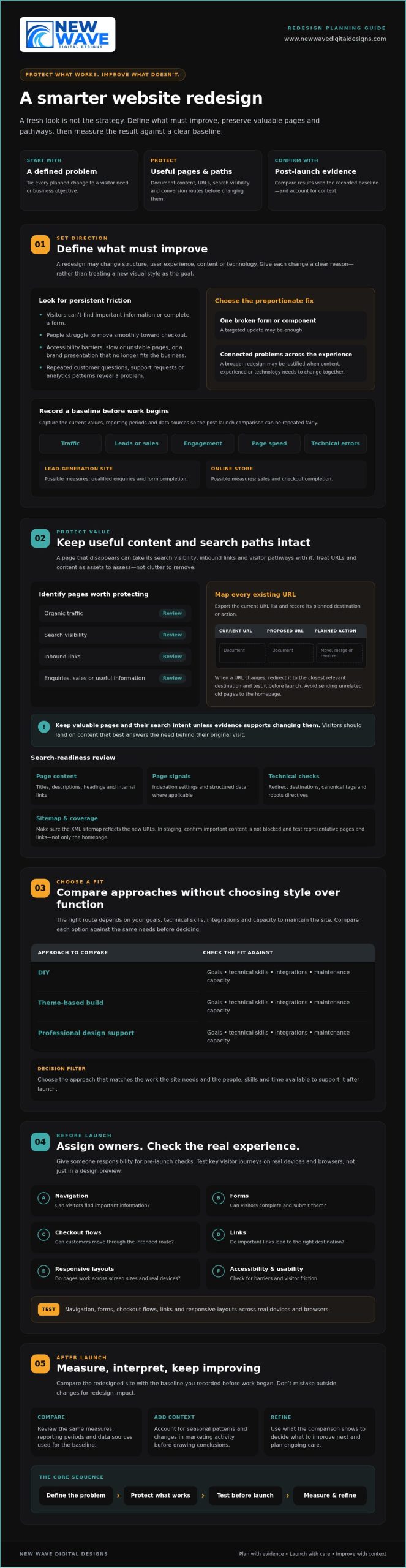
Before planning pages or layouts, record how the current site performs. Capture traffic, leads or sales, engagement, page speed, and technical errors, along with the dates and reporting periods. This baseline gives you a fair comparison after launch and helps distinguish progress from seasonal shifts or changes in marketing activity. In a concise project brief, connect each planned change to the problem it addresses and how you’ll assess the result.
Which website problems justify a redesign?
Look for persistent friction, not just a visual style you’ve grown tired of. Repeated customer questions, support requests, and analytics patterns can show that visitors can’t find key information, complete a form, or move smoothly toward checkout. Accessibility barriers, slow or unstable pages, and a brand presentation that no longer reflects the business may also justify broader work. These concerns connect to the wider web design principles of usability and user experience.
Separate critical defects from refinements. A broken lead form may need immediate attention; a preference for different colours may not justify rebuilding the site. If a problem is limited to one page or component, a targeted update could be the more proportionate response. Reserve a full redesign for connected problems that require changes across the experience, content, or underlying technology.
How to set redesign goals and a baseline
Choose a focused set of measures that match your objectives. A lead-generation site might track qualified enquiries and form completion. An online store could monitor sales and checkout completion. Record each measure’s current value, reporting period, and data source before work begins. Otherwise, post-launch comparisons may be difficult to interpret or repeat.
Map who the site serves, what those visitors need to do, and which pages help them do it. Then make the brief specific: “make service information easier to find” is more useful than “make the site modern.” For broader planning context, explore this 2026 web design guide. A sound brief gives design, content, and technical decisions a shared direction while protecting what already works.
Protect search traffic and useful content before changing the website
A page that disappears during a redesign can take more than its words with it. Search engines may need to discover and understand its replacement, while visitors following old links can land on an error page instead of the information they expected. To support avoiding common website redesign mistakes, treat URLs and content as assets to assess, not clutter to clear away.
Before implementation, export the current URL list and identify pages with organic traffic, search visibility, inbound links, enquiries, sales, or useful information. Create a simple mapping document with the current URL, proposed URL, and planned action for each page. Mark pages that will move, merge, or be removed. When a URL changes, map it to the closest relevant destination and test the redirect before launch. Avoid sending unrelated old pages to the homepage. Visitors should land on content that best answers their original need.
A redesign should preserve valuable pages and their search intent unless evidence supports changing them. This keeps visual and structural improvements grounded in what visitors actually seek. Forbes also outlines common website redesign mistakes, including overlooking search visibility and user experience.
How to prevent avoidable SEO losses
Compare the existing and planned site structures before the new version goes live. Review page titles, descriptions, headings, internal links, indexation settings, and structured data where applicable. In a staging environment, check that redirects lead to the intended pages, canonical tags point to preferred versions, robots directives don’t block important content, and the XML sitemap reflects the new URLs. Test representative pages and links throughout the site, not just the homepage.
Which content should survive the redesign?
Use several signals together. Analytics can show visits and engagement; search performance can reveal queries and visibility; backlink data can identify pages other sites reference; and conversion records can show content that supports enquiries or purchases. A page with modest traffic may still answer an important customer question or attract valuable links.
Improve weak or outdated material deliberately. Update facts, clarify the page’s purpose, or combine overlapping content when there’s a clear reason. Don’t delete a page simply because it doesn’t fit a new template. First decide whether its information belongs in a refreshed page, then update internal links to point to the right destination. Businesses assessing search strategy support may also want to explore organic SEO services. A carefully planned redesign can bring content, structure, and search intent into closer alignment; review website design and SEO support as one possible next step.
Compare redesign approaches without choosing style over function
The right redesign approach depends on what the site must do, the skills available internally, and who will care for it after launch. A DIY builder, a theme-based implementation, and custom professional design can each be a sound choice. The risk is choosing a platform or visual direction before documenting functional requirements, integrations, content, and maintenance needs. That sequence matters when avoiding common website redesign mistakes.
Use this comparison as a starting point. Actual control and support vary by platform, provider, and agreement, so confirm responsibilities before committing.
| Approach | Control and customization | Technical responsibility and scalability | Ongoing support |
|---|---|---|---|
| DIY tools | Direct control, typically within the builder’s available features. | The owner handles setup and troubleshooting; growth may be constrained by skills or available functionality. | Owner-managed, with platform resources where available. |
| Theme-based implementation | Theme options provide a foundation, with customization shaped by the theme and implementation. | Requires someone to manage configuration, updates, and compatibility; check that the setup can accommodate future needs. | Clarify who maintains the theme, content, and technical setup. |
| Custom professional design | Design can be shaped around defined requirements, subject to agreed scope and platform capabilities. | Useful for more involved requirements, but future changes still need clear ownership and technical planning. | Confirm handoff, documentation, maintenance, and support responsibilities in advance. |
When is a DIY redesign a reasonable choice?
DIY can suit a simple site with well-understood needs, limited integrations, and an owner who has time and confidence to maintain it. Include more than page building in your effort estimate. Content migration, accessibility checks, performance review, analytics setup, and troubleshooting all need attention. Identify limits early, especially around custom functionality, commerce requirements, and the technical skills available internally.
When does professional redesign support add value?
Consider professional help when a project involves complex commerce, a platform migration, multiple integrations, or substantial organic search exposure. Compare proposals by discovery, scope, testing, handoff, and post-launch responsibilities, not mockups alone. Ask who handles content transfer and technical checks, and what your team will need to manage afterward. For Shopify-specific commerce requirements, explore custom Shopify store design as a relevant example of platform-focused design support.
Pre-launch checklist to catch common redesign mistakes
A calm launch is prepared well before launch day. In staging, walk through the tasks that matter most to visitors, then confirm that tracking, search settings, and recovery plans are ready. For avoiding common website redesign mistakes, make each check visible, assign an owner, and record whether it passed or needs attention.
What should be tested on staging?
Test complete journeys, not isolated page elements. Start from a landing page and continue through a contact form, purchase, or other defined conversion. Repeat the checks on real phones, tablets, and computers using browsers your audience relies on. Check keyboard navigation, responsive layouts, form validation and error messages, checkout steps, links, and third-party integrations.
- Owner: Content or design lead. Check navigation labels, page content, links, and layouts at mobile and desktop sizes.
- Owner: Accessibility reviewer. Test keyboard access, focus visibility, form labels, and whether errors are clear and usable.
- Owner: Developer or platform administrator. Check forms, checkout, integrations, redirects, and page performance.
- Owner: Analytics lead. Confirm key events and tags fire as intended, consent choices are respected, and reporting still captures meaningful activity.
- Owner: SEO lead or site administrator. Verify important pages can be indexed and that staging restrictions won’t accidentally carry over to the live site.
Test redirects from old URLs as well as links within the new site. Confirm that consent behavior works as expected, and that analytics handles events appropriately when a visitor’s choice changes what can be recorded.
How to prepare a controlled launch
Before release, name the people responsible for backups, DNS or hosting changes, redirect checks, and the decision to proceed. Confirm that a recent backup exists and that the team knows how to restore it, or has a practical remediation plan suited to the platform and hosting environment. Agree on who will monitor the site and how issues will be reported after the change.
Launch readiness means critical user journeys, tracking, redirects, and recovery steps have all been tested. Keep the checklist open during launch and mark an item complete only after its owner has verified it. If a critical path fails, pause or follow the agreed response plan rather than assuming the issue will resolve itself.
Ongoing technical care can help keep a site updated and functional after launch. Website maintenance services may be one option to consider. For support with a redesigned site, discuss website maintenance and support.
After launch, measure results and keep improving the redesigned website
Going live is a transition, not a finish line. A redesigned site can look complete while a form, redirect, analytics event, or key page behaves differently under real visitor traffic. Keep the launch team engaged long enough to check the experience and technical health, then use what you learn to guide the next improvements.
What to monitor in the first weeks after launch
Check priority landing pages, forms, checkout steps, redirects, indexation, and analytics for unexpected changes. Compare organic visibility and conversions with the baseline you documented before the redesign. If a measure shifts, investigate the pages and user journeys involved before drawing conclusions. A campaign change, seasonal pattern, or tracking issue may affect results independently of the new site.
Keep a simple issue log so observations lead to action rather than scattered fixes. For each issue, record the page or journey, evidence, user or business impact, owner, decision, and resolution. Prioritize problems that block important tasks or affect key business outcomes. A brief fluctuation in one metric may deserve observation, while a broken enquiry form calls for prompt attention.
Turn launch feedback into a sustainable improvement plan
Use the issue log to build a considered improvement backlog. Combine analytics and technical checks with customer feedback and observed behavior; each can reveal friction that assumptions alone might miss. Schedule content reviews and platform-appropriate checks for software, security, backups, and performance. Clear ownership helps routine care continue after the redesign project team has moved on.
This measured approach is central to avoiding common website redesign mistakes: keep a record of what changed, what the evidence shows, and what should happen next. Some adjustments may be small, such as clarifying a page or refining a user journey. Others may call for a deeper review of design, organic SEO, hosting, or website maintenance.
New Wave Digital Designs offers support with website design, organic SEO, managed hosting, security, and ongoing maintenance. You can plan a website redesign conversation to discuss which areas need attention.
Build your next website around what matters
A successful redesign isn’t measured by how different the site looks. It’s measured by whether it better serves visitors and supports your business. Start with clear goals, protect valuable content and search pathways, then test essential journeys before launch. Afterward, compare results with your baseline and use evidence to guide improvements.
That’s the practical heart of avoiding common website redesign mistakes: make thoughtful changes without losing sight of what already works. The right approach depends on your platform, requirements, and internal capacity. New Wave Digital Designs provides website design for Shopify, WordPress, and Squarespace, with related services including SEO, managed hosting, security, and ongoing maintenance.
If you’re considering a redesign, contact New Wave Digital Designs to discuss your goals and the support you need. Plan a thoughtful website redesign with New Wave Digital Designs.
Frequently Asked Questions
What are the most common website redesign mistakes?
Common mistakes include redesigning without measurable goals, removing useful content, changing URLs without mapping redirects, and prioritizing appearance over usability. Teams may also overlook mobile layouts, accessibility, analytics, and post-launch maintenance. Avoiding common website redesign mistakes starts with documenting what the current site does well and where visitors encounter friction. That evidence helps distinguish essential improvements from personal design preferences and keeps decisions focused on user and business needs.
How can I redesign my website without losing SEO rankings?
Reduce avoidable search disruption by recording important URLs, organic landing pages, search visibility, backlinks, and conversions before development begins. Map each changed or retired URL to the closest relevant destination, then test redirects in staging. Preserve useful content and its search intent where possible, and review page titles, internal links, canonical tags, indexation settings, and the XML sitemap. Rankings can still change, so compare post-launch results with your baseline and investigate meaningful shifts.
Should I redesign my website myself or hire a professional?
Choose based on the site’s complexity, your internal skills, and who can maintain it afterward. DIY can suit a simple site with clear requirements, few integrations, and an owner able to handle content migration, testing, and troubleshooting. Professional support may be worth considering for complex commerce, migrations, or substantial search exposure. New Wave Digital Designs provides website design for Shopify, WordPress, and Squarespace, alongside related SEO and maintenance services.
How do I know whether my website needs a redesign?
Look for persistent problems that affect visitors or business outcomes, such as confusing navigation, inaccessible content, slow or unreliable pages, or a brand presentation that no longer fits the business. Check analytics for recurring drop-offs, and review customer questions and support requests for signs that people can’t find information or complete key tasks. If an issue affects only one page or feature, a targeted update may be more appropriate than a full redesign.
What should I check before launching a redesigned website?
Test complete user journeys on real devices and across relevant browsers, including navigation, forms, checkout, links, and third-party integrations. Check keyboard access, responsive layouts, form errors, page performance, analytics events, consent behavior, redirects, and search visibility settings. Confirm that backups are ready and that named owners understand launch responsibilities and recovery steps. Mark checks complete only after they’ve been verified, not simply because the site appears finished in a preview.
Can a website redesign reduce traffic or conversions?
Yes. Removing useful pages, misdirecting old URLs, introducing technical errors, or disrupting forms and checkout can affect organic traffic or conversions. A redesign can also improve the experience, but results depend on implementation and visitor needs. Compare performance with the pre-launch baseline, and check for tracking changes, seasonality, and campaign activity before attributing a shift to the new site. Investigate specific pages and journeys rather than reacting to one short-term fluctuation.
How long should I monitor a website after a redesign launch?
Monitor the site closely during the first weeks, then continue reviewing performance as part of regular website care. Check priority pages, forms, checkout, redirects, analytics, organic visibility, and conversions against the baseline. There isn’t one ideal end date: extend focused monitoring if problems emerge, data is limited, or seasonal patterns make comparisons difficult. Keep an issue log with evidence, owners, and fixes so launch observations become a practical improvement plan.