Website Redesign Project Plan Template: A Practical 2026 Guide

What if the biggest risk in a website redesign isn’t the new design, but decisions no one owns? A website redesign project plan template brings goals, scope, approvals, and launch safeguards into one clear view, helping prevent missed content and unclear responsibilities from disrupting milestones.

It’s understandable to want a fresh, more effective website and still worry about what could go wrong along the way. A redesign touches more than appearance: content, search visibility, technical setup, and day-to-day business operations all need a place in the plan.

This practical guide shows you how to shape an adaptable plan around your team and project. You’ll clarify deliverables, owners, dependencies, and approval points, then map the work from discovery and content preparation through testing, launch, and post-launch measurement. You’ll also learn how to protect essential pages and search visibility while keeping business continuity in view.

Think of the plan as shared architecture: a structure that helps creative decisions and technical tasks support the same outcome. With clear stages and safeguards, progress is easier to track and launch readiness is easier to assess.

Key Takeaways

  • Shape the website redesign project plan template around clear goals, measurable baselines, and decisions with named owners.
  • Use evidence from your existing site, including priority pages, search visibility, analytics, and usability issues, to guide scope.
  • Choose a checklist, spreadsheet, or detailed brief based on your project’s complexity and how your team collaborates.
  • Sequence work from discovery through post-launch review, making dependencies, deliverables, and completion criteria visible at each stage.
  • Before launch, bring content, approvals, technical needs, and safeguards together so your redesigned site is ready for ongoing care.

Why a Website Redesign Project Plan Template Needs More Than a Timeline

A timeline can show when work is expected to happen. On its own, it can’t explain why a page is changing, who approves the change, what needs to be ready first, or how the team will know the site is ready to launch. A website redesign project plan template should function as a shared decision document, connecting goals and scope to owners, dependencies, deliverables, and launch-readiness checks.

That distinction matters because a redesign starts with an existing digital foundation. The team needs to decide which pages and features to retain, improve, consolidate, or retire, and use current performance to inform those choices. A new website plan may focus on building the initial structure. A redesign plan must also account for the site people already use, along with the content and search visibility it has built.

The plan gives business owners, marketing leads, content teams, and developers a common reference point. Each group can see how its decisions affect the others. The plan organizes the work, but your team still needs to assess priorities, constraints, and trade-offs as the redesign takes shape.

What a website redesign project plan template should contain

Start with project-wide context, then record the work that moves the project forward. This makes leadership decisions easy to scan while giving contributors enough detail to act.

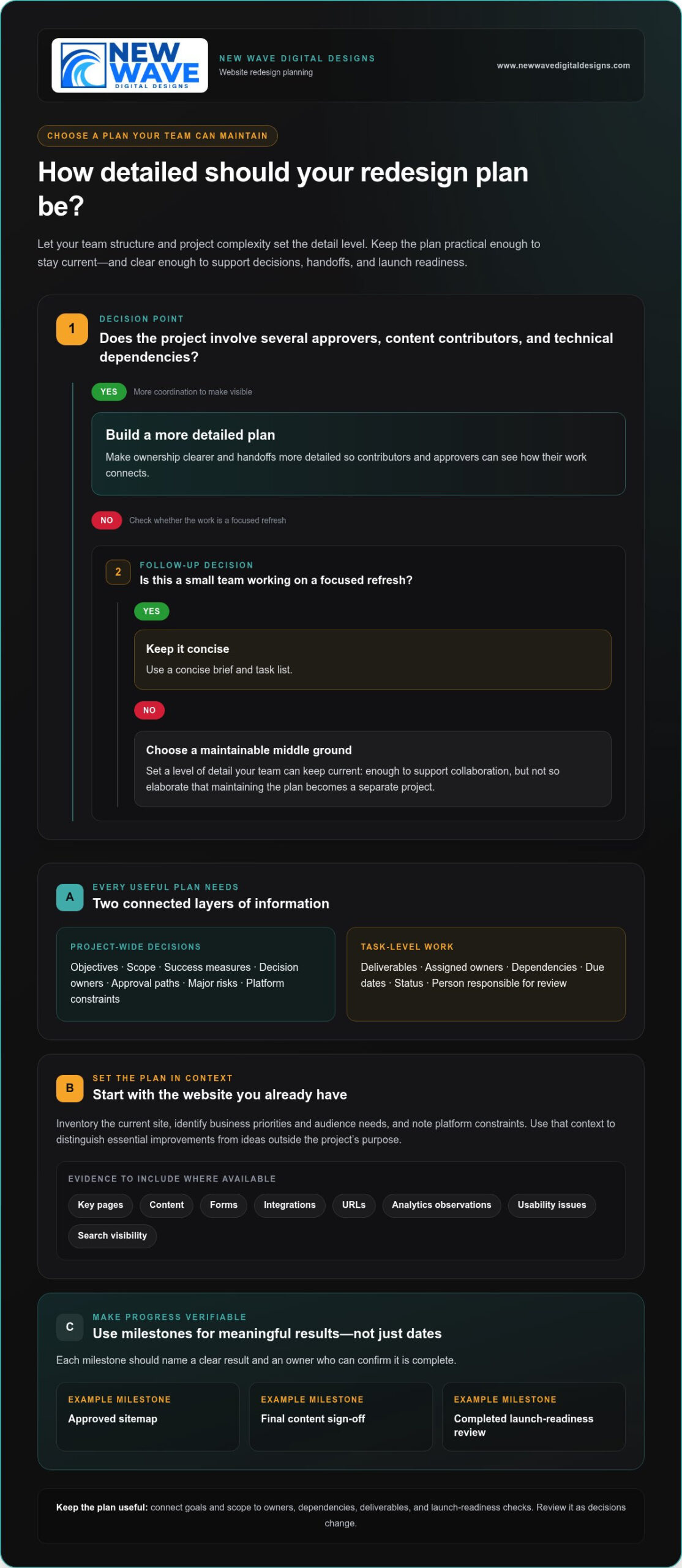
  • Project-wide decisions: Objectives, scope, success measures, decision owners, approval paths, major risks, and platform constraints.
  • Task-level work: Deliverables, assigned owners, dependencies, due dates, status, and the person responsible for review.

For example, “preserve key organic landing pages” is a scope decision. Reviewing and updating a specific page is a task. Linking the two shows why the work matters and who needs to approve it. Use milestones to mark meaningful progress, not just dates on a calendar. Examples include an approved sitemap, final content sign-off, or completed launch-readiness review. Each milestone should have a clear result and an owner who can confirm it’s complete.

How to adapt the template to your redesign

Begin with what exists. Inventory the current site, identify business priorities and audience needs, and note platform constraints that could shape design or development decisions. This context helps distinguish essential improvements from attractive ideas that fall outside the project’s purpose. For broader design context, this professional website redesign guide explores how strategy and design work together.

Next, choose a level of detail your team can keep current. A small team with a focused refresh may need a concise brief and task list. A larger project with several approvers, content contributors, and technical dependencies will benefit from clearer ownership and more detailed handoffs. Make the plan substantial enough to support collaboration, but not so elaborate that maintaining it becomes a separate project.

Think of the plan as a practical map through the web development lifecycle, adapted to the realities of your existing site. Review it as decisions change, and use project evidence to guide the next steps.

Build the Redesign Plan Around Goals, Scope, and Site Evidence

A redesign plan becomes actionable when it connects business goals with evidence from the current site. Record the objective, the audience need behind it, the evidence you’ll use as a baseline, and the person responsible for the decision. This keeps the project anchored in business priorities rather than visual preferences alone.

For example, if the goal is to make it easier for prospective customers to submit an inquiry, document the user need, the existing form and its performance, the intended change, and who approves the new experience. The objective’s owner should also decide how progress will be reviewed, using the business’s own baseline and goals rather than an arbitrary target.

Turn business goals into project requirements

Translate broad priorities into outcomes the team can observe. “Increase sales” could prompt a review of the purchase path to identify where customers encounter friction. “Make navigation clearer” could lead to testing whether users can locate priority information. Assign each outcome an owner, a measure, and a review method so the team knows what evidence will inform decisions and who will interpret it.

  • Objective: What business priority should the redesign support?
  • User need: What should visitors be able to find or do?
  • Baseline and measure: What current evidence will provide a comparison?
  • Decision owner: Who approves the requirement and reviews the outcome?

For broader planning prompts across goals, content, search, and technical considerations, the website redesign checklist can serve as a useful companion. Use it to surface questions, then record project-specific decisions in your own plan.

Set scope using an inventory of the existing website

Before deciding what to build, create an inventory of key pages, content, forms, integrations, and URLs. Add available analytics observations, known usability issues, and search visibility information. This evidence helps the team see which elements support current needs and which require attention. For search planning, consider how page changes, content decisions, and URL changes fit together, with guidance from this organic SEO services guide.

Give each inventory item a clear disposition: keep, revise, consolidate, remove, or create. A priority service page might stay but need rewritten content, while overlapping articles could be consolidated. Record the rationale and approver, especially when a decision affects a URL or a page that draws search traffic.

Finally, capture constraints that shape the solution: platform and integrations, accessibility needs, responsive design requirements, and brand standards. Separate what’s included from what’s excluded, retained, rewritten, or newly created. If the project calls for experienced design and implementation, collaborative website design support can help bring those requirements into alignment.

Compare Project Plan Formats and Make Ownership Visible

The right format is the one your team can understand, update, and use to make decisions. A compact checklist may be enough for a contained refresh, while a redesign with multiple contributors and approvals needs a clearer view of task relationships. Choose a format that fits the work, not just one that looks polished.

Choose a format your team will keep current

Use this comparison to select a starting point. You can combine formats, such as keeping project-wide decisions in a brief and tracking day-to-day work in a spreadsheet.

Format Best fit Strengths Limitations Essential fields
One-page checklist A small, straightforward redesign with few contributors Quick to scan, easy to share, simple to maintain Limited space for dependencies, detailed ownership, and status updates Goals, key deliverables, owner, approver, milestone, completion check
Spreadsheet A project with multiple tasks, contributors, and handoffs Brings owners, dependencies, due dates, and status into one view Can become difficult to interpret if fields and updates aren’t consistent Task, accountable owner, approver, input, dependency, status, review date
Detailed project brief A complex redesign involving substantial content, technical work, or approvals Preserves context, scope decisions, requirements, and approval paths Takes more effort to prepare and may need a separate task tracker Objectives, scope, audiences, constraints, risks, decisions, milestones

A website redesign project plan template can start in any of these formats. Keep the project-wide brief focused on why the work is happening and what boundaries guide it. Use task tracking to show how the team will deliver it. If contributors struggle to find the latest decision or update, simplify the structure before adding more fields.

Map roles, approvals, and dependencies

Every major deliverable needs one accountable owner: the person responsible for moving it forward and confirming it’s complete. Name the approver separately when a decision affects scope, brand direction, content, or launch readiness. Contributors can supply expertise without leaving responsibility unclear.

  • Responsible owner: Coordinates the work and reports its status.
  • Approver: Makes or confirms the decision at the required review point.
  • Input providers: Supply content, technical details, or business context.

Make dependencies visible in the task record. For example, page design may depend on approved content, and launch may depend on completed testing and sign-off. Set review windows based on the people involved and the complexity of the decision, rather than assuming a standard duration. Add an escalation step for stalled approvals, such as naming who resolves a conflict or resets priorities.

Set dates according to the actual work sequence, review cycles, and team capacity. A proposed date is useful when its assumptions are visible; it becomes misleading when it ignores a dependency or competing workload. Revisit dates as decisions change, and record the reason for adjustments so the plan remains a reliable guide.
Website Redesign Project Plan Template: A Practical 2026 Guide

Use the Website Redesign Project Plan Template to Sequence Work

A clear sequence turns decisions into coordinated work. Use the website redesign project plan template to connect each phase to its inputs, deliverables, decision owner, dependencies, and completion criteria. Adjust the order where your platform or project requires it, but make handoffs explicit so teams know what must be ready before work advances.

Copy-ready fields for each phase

Give every task a consistent record. Copy these fields into your tracker, add phase-specific prompts, and keep planned dates separate from actual completion dates. The difference shows where approvals or dependencies have shifted the plan.

  • Task: What work or decision is required?
  • Owner and approver: Who completes it, and who signs off?
  • Due date and actual completion: What was planned, and when was it finished?
  • Dependency and status: What needs to happen first, and where does the task stand?
  • Acceptance criteria: What observable result means the task is complete?

Use the fields across this adaptable phase sequence:

  1. Discovery: Inputs include business priorities, audience needs, and current-site observations. Deliver a concise findings record; the business decision owner confirms the priorities. Complete the phase when goals and evidence are reviewed.
  2. Scope: Use discovery findings and the site inventory to define what stays, changes, or is added. Deliver an approved scope and requirements; the project decision owner signs off. Complete it when exclusions and dependencies are recorded.
  3. Content and design: Inputs include approved scope, content inventory, and brand requirements. Deliver reviewed content and approved designs; content and design approvers provide sign-off. Don’t begin page design until its content and requirements are clear.
  4. Development: Use approved designs, content, and technical requirements. Deliver implemented pages, integrations, and handoff notes; the development owner confirms readiness for testing.
  5. Quality assurance: Test the developed site against requirements across key page types, responsive layouts, forms, and integrations. The QA owner records defects and retests fixes; completion requires agreed launch issues to be resolved and sign-off recorded.
  6. Launch and review: Use approved QA results and launch checks. The launch owner coordinates release, then records post-launch observations with the relevant decision owner. Complete the review by documenting issues, measurement checks, and follow-up work.

Keep a simple risk register beside the sequence. Track each risk, its likelihood or impact, its owner, mitigation, and trigger for action. Include delayed content, integration issues, approval bottlenecks, and launch readiness. For instance, a missed content approval can affect design and development. Name an escalation owner and agree how a blocked decision will be resolved.

Protect search visibility and business continuity

Before launch, compare old and new URLs and document appropriate redirects for changed or retired pages. Review priority page titles, metadata, indexability, analytics, and conversion paths. Confirm forms work, backups are available, and post-launch checks have owners. Ongoing website maintenance services can support care after the redesign is live.

For a redesign that needs coordinated design, development, and launch planning, explore website redesign support.

Move from a Project Plan Template to a Supported Redesign

A completed plan should make the next decision clear: is your team ready to lead the work internally, or would experienced design, development, SEO, or maintenance support help bring the pieces together? The answer depends on your team’s skills, available capacity, platform, and project complexity. A website redesign project plan template helps you make that choice; it doesn’t require you to hand off every task.

Review the completed plan before work begins

Use a final readiness review to catch assumptions before they become delays. Check that goals and scope are agreed, and that every deliverable has a named owner, an approver, its dependencies, and an observable completion condition. Then verify that the people responsible for content, brand assets, platform requirements, technical decisions, and launch activities are identified.

  • Goals and scope: Does the planned work support the agreed priorities, and are exclusions clear?
  • People and approvals: Is there one accountable owner for each deliverable, with the right approver and contributors named?
  • Content and assets: Are owners assigned to writing, review, and supplying brand materials?
  • Technical dependencies: Are platform needs, integrations, and required handoffs recorded?
  • Risks and launch: Does each meaningful risk have a response owner, and are launch checks and post-launch measurement included?

If a field is blank, decide whether it signals a real gap or simply doesn’t apply. For example, a small team may combine content creation and approval, but the plan should still make that responsibility explicit. Treat launch readiness and post-launch review as planned work, not as tasks that will somehow happen once the site is live.

Connect the plan to design, development, and ongoing care

Internal teams may be well placed to manage a redesign when they have the capacity, platform knowledge, and expertise to coordinate content, design, technical work, and approvals. Additional support can help when a project calls for specialist implementation, existing workloads make ownership difficult, or design, development, and search considerations need to be aligned. A coordinated engagement can connect visual identity with business requirements while keeping platform and content needs in view.

New Wave Digital Designs creates websites for Shopify, WordPress, and Squarespace, and offers related website maintenance, managed hosting, security, and organic SEO. These ongoing services can be part of planning beyond launch, helping teams account for site care as well as the redesign itself. Define which responsibilities remain with your team and which are supported, so the handoff is clear.

With the plan in hand, you can discuss the redesign in the context of your goals and platform. Explore website design and digital services to consider support that fits the work ahead.

Turn Your Redesign Plan Into the Next Step

A well-shaped plan is more than a project document. It gives your team a way to make decisions with intention, adapt when priorities shift, and keep the experience you’re building connected to business needs. Treat it as a living guide: revisit it when new information emerges, and make sure changes are understood by the people whose work depends on them.

To move forward, bring the key decision-makers together, review the plan’s open questions, and agree on what needs to happen first. A collaborative perspective can help turn your priorities into a workable redesign.

Your website redesign project plan template can be the beginning of a more deliberate digital presence, shaped by clear choices and a shared sense of direction. Explore website design and digital services to discuss support for your redesign.

Frequently Asked Questions

What should a website redesign project plan include?

A useful website redesign project plan template includes the decisions and work needed to move from the current site to the new one. Alongside goals, scope, roles, dependencies, milestones, risks, content tasks, and launch checks, record page-level decisions and URL changes. Define what “done” means for each deliverable, such as a form being tested with a successful submission. Keep the plan accessible to contributors and note when key decisions change.

How do I create a website redesign project plan?

Start by stating the business outcome and reviewing the site’s current pages, user journeys, and available performance data. Turn that review into a defined scope, then identify the people who will create, review, and approve each deliverable. Build the schedule around actual task dependencies and team availability. As a practical check, ask a contributor unfamiliar with the plan to locate their next task and its approval path without extra explanation.

How long does a website redesign project take?

There’s no dependable universal duration: content preparation, integrations, decision-making, and available team capacity can all affect the schedule. Estimate work with the people responsible for completing it, and include time for review and revisions rather than scheduling only production tasks. Track planned dates beside actual completion dates. If a milestone moves, record the reason and which later tasks depend on it, so the team can adjust expectations based on project conditions.

Can a website redesign affect SEO?

Yes. Search performance may be affected if important pages disappear, URLs change without suitable redirects, or content and indexability settings are altered. Before changes go live, capture a reference list of priority pages and their addresses. After launch, investigate unexpected shifts by checking affected URLs, page availability, analytics, and search performance together. This gives the team a clearer basis for diagnosing whether a change is related to the redesign or another factor.

What is the difference between a website redesign plan and a website project plan?

A website project plan can guide a new build, feature update, or other web initiative; a redesign plan must also manage the transition from an existing site. That means documenting current URLs, important content, and business-critical journeys before changing the experience. For example, if a support page is being replaced, plan where its content will live and how visitors reaching the old address will be handled.

Can I use a website redesign project plan template for Shopify, WordPress, or Squarespace?

Yes. The planning framework can apply to Shopify, WordPress, or Squarespace, but the technical tasks should reflect the actual site rather than a generic platform checklist. For an online store, document the purchase journey and relevant integrations; for a content-led site, clarify how pages and their relationships will be maintained. Record platform-specific requirements with the person responsible for implementation, then test the features visitors rely on before launch.

Avoiding Common Website Redesign Mistakes: A Strategic Checklist

A website redesign can look like progress while quietly erasing pages, search visibility, and conversion paths that already serve your business. The strongest redesigns don’t start with a new look. They start by identifying what works, why it works, and what needs to change. That’s the foundation of avoiding common website redesign mistakes.

It’s natural to want a clearer, more current website, especially when the existing one feels difficult to use or maintain. But visual change alone isn’t a strategy. Without defined goals and a review of current performance, a polished launch can leave visitors struggling to find information and your team unsure whether the investment helped.

This practical checklist will help you plan, launch, and review a redesign with greater confidence. You’ll learn how to protect useful content, URLs, search visibility, analytics, and conversion routes while checking accessibility, mobile usability, and ongoing care. You’ll also find ways to compare a DIY approach, a theme-based build, and professional design support so you can choose what fits your needs and capacity.

Key Takeaways

  • Set measurable redesign goals before choosing layouts, features, or technology, so every change has a clear purpose.
  • When avoiding common website redesign mistakes, document valuable pages, search performance, and conversion paths before changing content or URLs.
  • Choose a DIY, theme-based, or custom design approach according to your goals, technical skills, integrations, and capacity to maintain the site.
  • Assign owners to pre-launch checks for navigation, forms, checkout flows, links, and responsive layouts across real devices and browsers.
  • After launch, compare results with your baseline and account for seasonal patterns or campaign changes before deciding what to refine.

Avoiding website redesign mistakes starts with defining what must improve

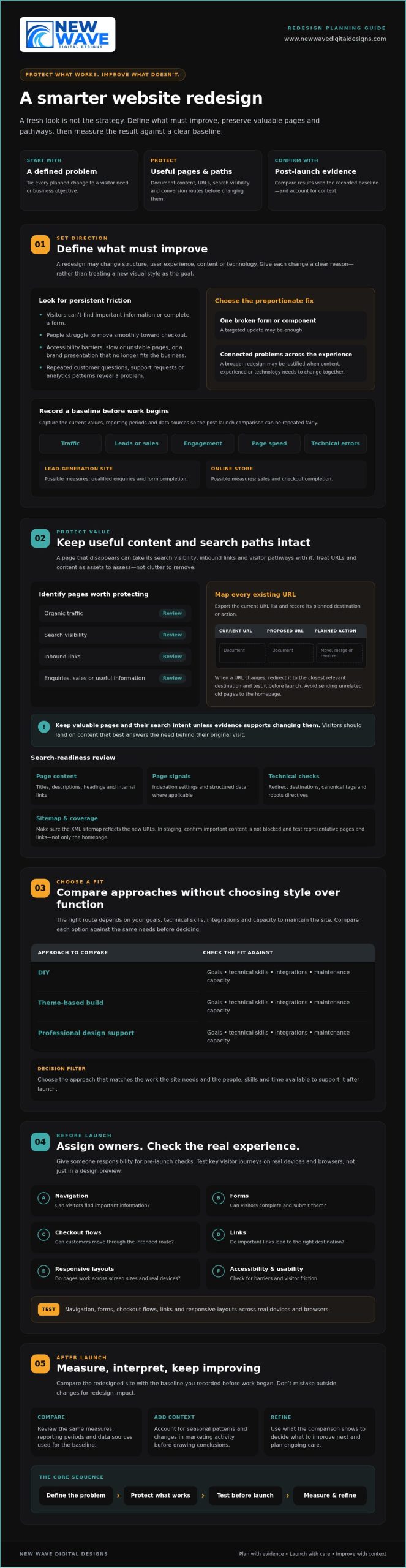
A fresh website can reflect how your business has grown, but changing features visitors already rely on carries risk. A redesign isn’t simply a new visual style. It changes some combination of the site’s structure, user experience, content, and technology. Each change should have a clear reason tied to a visitor need or business objective.

Before planning pages or layouts, record how the current site performs. Capture traffic, leads or sales, engagement, page speed, and technical errors, along with the dates and reporting periods. This baseline gives you a fair comparison after launch and helps distinguish progress from seasonal shifts or changes in marketing activity. In a concise project brief, connect each planned change to the problem it addresses and how you’ll assess the result.

Which website problems justify a redesign?

Look for persistent friction, not just a visual style you’ve grown tired of. Repeated customer questions, support requests, and analytics patterns can show that visitors can’t find key information, complete a form, or move smoothly toward checkout. Accessibility barriers, slow or unstable pages, and a brand presentation that no longer reflects the business may also justify broader work. These concerns connect to the wider web design principles of usability and user experience.

Separate critical defects from refinements. A broken lead form may need immediate attention; a preference for different colours may not justify rebuilding the site. If a problem is limited to one page or component, a targeted update could be the more proportionate response. Reserve a full redesign for connected problems that require changes across the experience, content, or underlying technology.

How to set redesign goals and a baseline

Choose a focused set of measures that match your objectives. A lead-generation site might track qualified enquiries and form completion. An online store could monitor sales and checkout completion. Record each measure’s current value, reporting period, and data source before work begins. Otherwise, post-launch comparisons may be difficult to interpret or repeat.

Map who the site serves, what those visitors need to do, and which pages help them do it. Then make the brief specific: “make service information easier to find” is more useful than “make the site modern.” For broader planning context, explore this 2026 web design guide. A sound brief gives design, content, and technical decisions a shared direction while protecting what already works.

Protect search traffic and useful content before changing the website

A page that disappears during a redesign can take more than its words with it. Search engines may need to discover and understand its replacement, while visitors following old links can land on an error page instead of the information they expected. To support avoiding common website redesign mistakes, treat URLs and content as assets to assess, not clutter to clear away.

Before implementation, export the current URL list and identify pages with organic traffic, search visibility, inbound links, enquiries, sales, or useful information. Create a simple mapping document with the current URL, proposed URL, and planned action for each page. Mark pages that will move, merge, or be removed. When a URL changes, map it to the closest relevant destination and test the redirect before launch. Avoid sending unrelated old pages to the homepage. Visitors should land on content that best answers their original need.

A redesign should preserve valuable pages and their search intent unless evidence supports changing them. This keeps visual and structural improvements grounded in what visitors actually seek. Forbes also outlines common website redesign mistakes, including overlooking search visibility and user experience.

How to prevent avoidable SEO losses

Compare the existing and planned site structures before the new version goes live. Review page titles, descriptions, headings, internal links, indexation settings, and structured data where applicable. In a staging environment, check that redirects lead to the intended pages, canonical tags point to preferred versions, robots directives don’t block important content, and the XML sitemap reflects the new URLs. Test representative pages and links throughout the site, not just the homepage.

Which content should survive the redesign?

Use several signals together. Analytics can show visits and engagement; search performance can reveal queries and visibility; backlink data can identify pages other sites reference; and conversion records can show content that supports enquiries or purchases. A page with modest traffic may still answer an important customer question or attract valuable links.

Improve weak or outdated material deliberately. Update facts, clarify the page’s purpose, or combine overlapping content when there’s a clear reason. Don’t delete a page simply because it doesn’t fit a new template. First decide whether its information belongs in a refreshed page, then update internal links to point to the right destination. Businesses assessing search strategy support may also want to explore organic SEO services. A carefully planned redesign can bring content, structure, and search intent into closer alignment; review website design and SEO support as one possible next step.

Compare redesign approaches without choosing style over function

The right redesign approach depends on what the site must do, the skills available internally, and who will care for it after launch. A DIY builder, a theme-based implementation, and custom professional design can each be a sound choice. The risk is choosing a platform or visual direction before documenting functional requirements, integrations, content, and maintenance needs. That sequence matters when avoiding common website redesign mistakes.

Use this comparison as a starting point. Actual control and support vary by platform, provider, and agreement, so confirm responsibilities before committing.

Approach Control and customization Technical responsibility and scalability Ongoing support
DIY tools Direct control, typically within the builder’s available features. The owner handles setup and troubleshooting; growth may be constrained by skills or available functionality. Owner-managed, with platform resources where available.
Theme-based implementation Theme options provide a foundation, with customization shaped by the theme and implementation. Requires someone to manage configuration, updates, and compatibility; check that the setup can accommodate future needs. Clarify who maintains the theme, content, and technical setup.
Custom professional design Design can be shaped around defined requirements, subject to agreed scope and platform capabilities. Useful for more involved requirements, but future changes still need clear ownership and technical planning. Confirm handoff, documentation, maintenance, and support responsibilities in advance.

When is a DIY redesign a reasonable choice?

DIY can suit a simple site with well-understood needs, limited integrations, and an owner who has time and confidence to maintain it. Include more than page building in your effort estimate. Content migration, accessibility checks, performance review, analytics setup, and troubleshooting all need attention. Identify limits early, especially around custom functionality, commerce requirements, and the technical skills available internally.

When does professional redesign support add value?

Consider professional help when a project involves complex commerce, a platform migration, multiple integrations, or substantial organic search exposure. Compare proposals by discovery, scope, testing, handoff, and post-launch responsibilities, not mockups alone. Ask who handles content transfer and technical checks, and what your team will need to manage afterward. For Shopify-specific commerce requirements, explore custom Shopify store design as a relevant example of platform-focused design support.

Avoiding Common Website Redesign Mistakes: A Strategic Checklist

Pre-launch checklist to catch common redesign mistakes

A calm launch is prepared well before launch day. In staging, walk through the tasks that matter most to visitors, then confirm that tracking, search settings, and recovery plans are ready. For avoiding common website redesign mistakes, make each check visible, assign an owner, and record whether it passed or needs attention.

What should be tested on staging?

Test complete journeys, not isolated page elements. Start from a landing page and continue through a contact form, purchase, or other defined conversion. Repeat the checks on real phones, tablets, and computers using browsers your audience relies on. Check keyboard navigation, responsive layouts, form validation and error messages, checkout steps, links, and third-party integrations.

  • Owner: Content or design lead. Check navigation labels, page content, links, and layouts at mobile and desktop sizes.
  • Owner: Accessibility reviewer. Test keyboard access, focus visibility, form labels, and whether errors are clear and usable.
  • Owner: Developer or platform administrator. Check forms, checkout, integrations, redirects, and page performance.
  • Owner: Analytics lead. Confirm key events and tags fire as intended, consent choices are respected, and reporting still captures meaningful activity.
  • Owner: SEO lead or site administrator. Verify important pages can be indexed and that staging restrictions won’t accidentally carry over to the live site.

Test redirects from old URLs as well as links within the new site. Confirm that consent behavior works as expected, and that analytics handles events appropriately when a visitor’s choice changes what can be recorded.

How to prepare a controlled launch

Before release, name the people responsible for backups, DNS or hosting changes, redirect checks, and the decision to proceed. Confirm that a recent backup exists and that the team knows how to restore it, or has a practical remediation plan suited to the platform and hosting environment. Agree on who will monitor the site and how issues will be reported after the change.

Launch readiness means critical user journeys, tracking, redirects, and recovery steps have all been tested. Keep the checklist open during launch and mark an item complete only after its owner has verified it. If a critical path fails, pause or follow the agreed response plan rather than assuming the issue will resolve itself.

Ongoing technical care can help keep a site updated and functional after launch. Website maintenance services may be one option to consider. For support with a redesigned site, discuss website maintenance and support.

After launch, measure results and keep improving the redesigned website

Going live is a transition, not a finish line. A redesigned site can look complete while a form, redirect, analytics event, or key page behaves differently under real visitor traffic. Keep the launch team engaged long enough to check the experience and technical health, then use what you learn to guide the next improvements.

What to monitor in the first weeks after launch

Check priority landing pages, forms, checkout steps, redirects, indexation, and analytics for unexpected changes. Compare organic visibility and conversions with the baseline you documented before the redesign. If a measure shifts, investigate the pages and user journeys involved before drawing conclusions. A campaign change, seasonal pattern, or tracking issue may affect results independently of the new site.

Keep a simple issue log so observations lead to action rather than scattered fixes. For each issue, record the page or journey, evidence, user or business impact, owner, decision, and resolution. Prioritize problems that block important tasks or affect key business outcomes. A brief fluctuation in one metric may deserve observation, while a broken enquiry form calls for prompt attention.

Turn launch feedback into a sustainable improvement plan

Use the issue log to build a considered improvement backlog. Combine analytics and technical checks with customer feedback and observed behavior; each can reveal friction that assumptions alone might miss. Schedule content reviews and platform-appropriate checks for software, security, backups, and performance. Clear ownership helps routine care continue after the redesign project team has moved on.

This measured approach is central to avoiding common website redesign mistakes: keep a record of what changed, what the evidence shows, and what should happen next. Some adjustments may be small, such as clarifying a page or refining a user journey. Others may call for a deeper review of design, organic SEO, hosting, or website maintenance.

New Wave Digital Designs offers support with website design, organic SEO, managed hosting, security, and ongoing maintenance. You can plan a website redesign conversation to discuss which areas need attention.

Build your next website around what matters

A successful redesign isn’t measured by how different the site looks. It’s measured by whether it better serves visitors and supports your business. Start with clear goals, protect valuable content and search pathways, then test essential journeys before launch. Afterward, compare results with your baseline and use evidence to guide improvements.

That’s the practical heart of avoiding common website redesign mistakes: make thoughtful changes without losing sight of what already works. The right approach depends on your platform, requirements, and internal capacity. New Wave Digital Designs provides website design for Shopify, WordPress, and Squarespace, with related services including SEO, managed hosting, security, and ongoing maintenance.

If you’re considering a redesign, contact New Wave Digital Designs to discuss your goals and the support you need. Plan a thoughtful website redesign with New Wave Digital Designs.

Frequently Asked Questions

What are the most common website redesign mistakes?

Common mistakes include redesigning without measurable goals, removing useful content, changing URLs without mapping redirects, and prioritizing appearance over usability. Teams may also overlook mobile layouts, accessibility, analytics, and post-launch maintenance. Avoiding common website redesign mistakes starts with documenting what the current site does well and where visitors encounter friction. That evidence helps distinguish essential improvements from personal design preferences and keeps decisions focused on user and business needs.

How can I redesign my website without losing SEO rankings?

Reduce avoidable search disruption by recording important URLs, organic landing pages, search visibility, backlinks, and conversions before development begins. Map each changed or retired URL to the closest relevant destination, then test redirects in staging. Preserve useful content and its search intent where possible, and review page titles, internal links, canonical tags, indexation settings, and the XML sitemap. Rankings can still change, so compare post-launch results with your baseline and investigate meaningful shifts.

Should I redesign my website myself or hire a professional?

Choose based on the site’s complexity, your internal skills, and who can maintain it afterward. DIY can suit a simple site with clear requirements, few integrations, and an owner able to handle content migration, testing, and troubleshooting. Professional support may be worth considering for complex commerce, migrations, or substantial search exposure. New Wave Digital Designs provides website design for Shopify, WordPress, and Squarespace, alongside related SEO and maintenance services.

How do I know whether my website needs a redesign?

Look for persistent problems that affect visitors or business outcomes, such as confusing navigation, inaccessible content, slow or unreliable pages, or a brand presentation that no longer fits the business. Check analytics for recurring drop-offs, and review customer questions and support requests for signs that people can’t find information or complete key tasks. If an issue affects only one page or feature, a targeted update may be more appropriate than a full redesign.

What should I check before launching a redesigned website?

Test complete user journeys on real devices and across relevant browsers, including navigation, forms, checkout, links, and third-party integrations. Check keyboard access, responsive layouts, form errors, page performance, analytics events, consent behavior, redirects, and search visibility settings. Confirm that backups are ready and that named owners understand launch responsibilities and recovery steps. Mark checks complete only after they’ve been verified, not simply because the site appears finished in a preview.

Can a website redesign reduce traffic or conversions?

Yes. Removing useful pages, misdirecting old URLs, introducing technical errors, or disrupting forms and checkout can affect organic traffic or conversions. A redesign can also improve the experience, but results depend on implementation and visitor needs. Compare performance with the pre-launch baseline, and check for tracking changes, seasonality, and campaign activity before attributing a shift to the new site. Investigate specific pages and journeys rather than reacting to one short-term fluctuation.

How long should I monitor a website after a redesign launch?

Monitor the site closely during the first weeks, then continue reviewing performance as part of regular website care. Check priority pages, forms, checkout, redirects, analytics, organic visibility, and conversions against the baseline. There isn’t one ideal end date: extend focused monitoring if problems emerge, data is limited, or seasonal patterns make comparisons difficult. Keep an issue log with evidence, owners, and fixes so launch observations become a practical improvement plan.

The Definitive Squarespace to Shopify Migration Checklist for 2026

Moving your digital home is not a mere technical chore; it’s an architectural rebirth that requires a visionary blueprint to protect your brand legacy. You’ve poured your soul into your current site, yet you’ve reached the limits of what a template-driven environment can offer. The prospect of a Squarespace to Shopify migration often brings a wave of anxiety, particularly when you consider the risk of losing search engine rankings or the complexity of moving a vast portfolio. It’s a delicate balance between preserving what you’ve built and embracing the power of a platform designed for scale.

We understand that your data is the lifeblood of your business and your design is its visual heartbeat. This guide promises a meticulous, step-by-step approach to help you transition without the fear of technical data loss or visibility dips. You’ll learn how to navigate the 2026 landscape of agentic storefronts and AI-integrated commerce while maintaining your brand’s unique spirit. From mapping 301 redirects to rebuilding your aesthetic with precision, we’re providing the definitive checklist for a seamless, transformative journey to Shopify.

Key Takeaways

  • Identify the strategic limitations of your current platform and how Shopify’s robust ecosystem provides the architectural freedom required for visionary brand scaling.
  • Conduct a meticulous audit of your digital foundation to streamline content and ensure only high-performing assets move forward into your new store.
  • Execute a disciplined Squarespace to Shopify migration sequence that utilizes pilot testing to verify data integrity before your final realization.
  • Preserve your hard-earned digital equity by implementing a comprehensive 301 redirect strategy that protects search rankings and ensures a seamless customer journey.
  • Master the art of the transition by performing rigorous pre-launch testing and communicating the upgrade as a sophisticated evolution of your brand experience.

The Strategic Pivot: Why Visionary Brands Migrate to Shopify

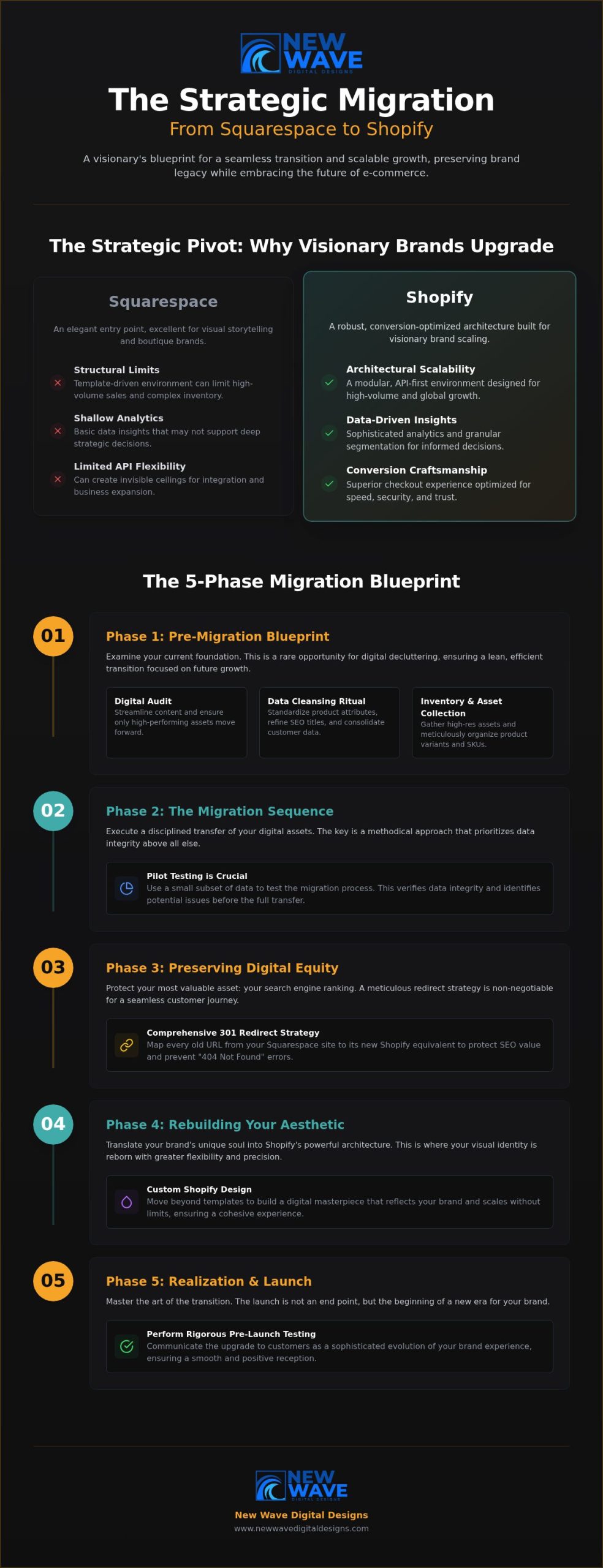
A brand’s digital presence is a living entity. It requires room to breathe, grow, and evolve. While Squarespace offers an elegant entry point for many boutique businesses, high-volume e-commerce demands a more robust framework. A Squarespace to Shopify migration represents a fundamental shift from a “drag-and-drop” aesthetic to a conversion-optimized architecture. Visionary brands recognize that their technological foundation must be as ambitious as their creative goals. This transition is not just a change of address; it’s a strategic evolution toward a data-driven future.

High-volume sales and complex inventory management often expose the structural limits of simpler platforms. When your product catalog expands into the hundreds or your traffic spikes during global events, the need for API flexibility and a deeper app marketplace becomes undeniable. Shopify provides the industrial-grade engine needed to power these experiences, offering a level of scalability that allows your business to expand without hitting invisible ceilings.

Evaluating the Catalyst for Change

Growth is a deliberate process. You know you’ve outgrown your current digital home when analytics feel shallow or inventory syncs begin to fail. A neutral comparison of e-commerce platforms highlights that while some tools excel at visual storytelling, others are built for the heavy lifting of global trade. Identifying these functional gaps is the first step toward technological maturity. Shopify offers the granular customer segmentation and advanced data layering that scaling businesses require to make informed, strategic decisions. It moves your brand beyond simple transactions into the world of sophisticated relationship management.

Shopify as a Foundation for Future Innovation

Shopify serves as a launchpad for multi-channel expansion and international reach. It allows brands to sell across social channels, global marketplaces, and physical locations with a unified, elegant backend. This versatility is amplified through custom Shopify store design, which ensures your brand’s unique soul isn’t lost in the transition. By leveraging a superior checkout experience, you reduce friction and capture revenue that might otherwise vanish. This Squarespace to Shopify migration is your opportunity to build a digital masterpiece that scales without limits.

  • Architectural Scalability: Transitioning from a rigid template system to a modular, API-first environment designed for growth.
  • Data Integrity: Accessing sophisticated analytics that transform raw customer behavior into actionable, visionary insights.
  • Conversion Craftsmanship: Utilizing a checkout flow optimized for speed, security, and global trust to maximize every customer interaction.

Pre-Migration Blueprint: Preparing Your Digital Foundation

Before laying a single brick in your new Shopify environment, you must examine the foundation of your current one. A Squarespace to Shopify migration provides a rare opportunity for digital decluttering. It’s a moment to audit every product, evaluate every blog post, and scrutinize every customer list. Moving outdated or low-performing content only adds weight to your new site without adding value. By purging the unnecessary, you ensure your transition is lean, efficient, and focused on future growth.

The Data Cleansing Ritual

Migrating “dirty data” is a common pitfall that compromises performance. If your product descriptions are inconsistent or your metadata is messy, those flaws will follow you. Use this time to standardize your attributes and refine your SEO titles. It’s also an ideal window to consolidate customer segments for a more personalized post-launch experience. Integrating a sound e-commerce strategy for small businesses early in the process ensures your data supports global aspirations from day one. This methodical cleaning turns raw information into a refined asset.

Inventory and Asset Collection

Your visual brand deserves a high-definition home. Gather all high-resolution assets, including logos, custom photography, and brand guidelines, to ensure they fit Shopify’s logical architecture. Organize your product variants and SKUs meticulously. Shopify handles variants differently than Squarespace; mapping these early prevents technical friction. This is the stage where you also verify that all digital downloads or service descriptions are formatted for the new platform’s delivery systems.

  • Visual Integrity: Collecting original source files for all brand imagery, icons, and specialized graphics.
  • Structural Logic: Mapping variants and SKUs to Shopify’s specific database requirements to ensure inventory accuracy.
  • Digital Readiness: Preparing downloadable files and service descriptions for automated, seamless delivery.

Choosing the right Shopify plan is the final piece of your Squarespace to Shopify migration blueprint. Whether you opt for the Basic, Grow, or Advanced plan, your choice should align with your 2026 growth targets. For those seeking a truly bespoke transition, partnering with a professional digital architect can turn a complex migration into a seamless evolution. Mapping your current URL structure now is vital; it sets the stage for the critical redirect phase that preserves your hard-earned search equity.

The Migration Sequence: A Master Checklist for Data Transfer

The execution phase of your Squarespace to Shopify migration is where strategic planning meets architectural reality. It begins with the precise extraction of product data through CSV files or specialized API tools. This isn’t a simple copy-paste exercise; it’s a meticulous transfer of your brand’s inventory. Once the initial data is pulled, we perform a “pilot migration” to observe how your products render within the Shopify environment. This allows us to refine the variant logic and image resolution before the full-scale transition occurs.

A successful transfer prioritizes the continuity of your business relationships and analytical depth. This methodical approach is central to developing a digital e-commerce strategy that values long-term stability and global reach. Beyond products, the sequence involves moving customer data with an unwavering commitment to privacy standards and account integrity. Order history is also migrated, ensuring your business analytics remain a continuous, unbroken narrative of your brand’s journey and growth.

Manual Craftsmanship vs. Automated Tools

Automated tools like LitExtension or the Shopify Store Importer offer efficiency for large-scale transfers, yet high-touch brands often require an artisanal touch. While automation handles the bulk of the heavy lifting, a human review of every product is essential to ensure visual perfection. This blend of technological speed and meticulous craftsmanship distinguishes a sophisticated migration from a generic data dump. It’s about ensuring every description, tag, and image alignment matches your high standards.

Rebuilding the Visual Narrative

Static pages and blog content must be recreated with an eye for Shopify theme customization. You aren’t just moving content; you’re adapting your Squarespace layouts to Shopify’s section-based editor. This shift offers newfound flexibility, allowing you to build a responsive design that feels intuitive across every digital touchpoint. Your new theme should serve as a sophisticated canvas that reflects your brand’s artistic inspiration while optimizing for conversion.

  • Data Extraction: Exporting inventory via CSV or API to ensure a clean, strategic transfer.
  • Pilot Testing: Rendering a subset of data to verify formatting, image resolution, and variant logic.
  • Relational Continuity: Migrating customer profiles and historical orders to maintain trust and analytical depth.

The Definitive Squarespace to Shopify Migration Checklist for 2026

Preserving Your Digital Equity: The SEO & Redirect Strategy

Your search engine rankings represent years of dedicated brand building. They are your digital equity. A Squarespace to Shopify migration requires a meticulous approach to URL mapping to ensure this hard-earned authority isn’t lost during the transition. This process isn’t a mere technical task; it’s a strategic preservation of your brand’s visibility. Without a visionary blueprint for your redirects, you risk the silence of a digital void where your vibrant community once thrived.

The Architecture of the 301 Redirect

Every page on your Squarespace site has a specific digital address. Shopify utilizes a different logical structure, often shifting from “/store/” or “/shop/” patterns to a strict “/products/” and “/collections/” hierarchy. A single missed link can lead to a catastrophic drop in organic traffic. Industry data indicates that stores failing to map redirects properly can lose 20% to 50% of their organic visibility almost immediately. We utilize precise templates to manage hundreds of URL changes with surgical accuracy. For “orphaned” pages that lack a direct equivalent on the new site, we implement strategic redirects to the most relevant collection, ensuring every drop of link equity is captured and recycled.

SEO Continuity and Metadata Migration

Beyond the URL, your metadata serves as the silent driver of your search performance. Transferring Alt text, Title tags, and Meta descriptions must be executed without loss of detail. This continuity ensures search engines recognize your new Shopify store as the authoritative evolution of your previous site. This phase of Shopify store development also prioritizes technical health. We analyze how the platform change impacts site speed and Core Web Vitals, ensuring your new home is as fast as it is beautiful.

  • Redirect Mapping: Creating a comprehensive 1:1 map of every legacy URL to its new Shopify destination.
  • Metadata Integrity: Migrating every SEO title and description to maintain search engine context.
  • Sitemap Submission: Instantly alerting Google Search Console to your new architectural structure following the launch.

Updating your internal linking structure is the final touch in this phase. Every link within your blog posts and static pages must reflect the new Shopify patterns to prevent broken user journeys. If you want to ensure your brand’s legacy remains intact during your Squarespace to Shopify migration, consult with our digital architects to secure your SEO future.

Realization: Launching the New Era of Your Brand

The launch of your new Shopify store is not merely a technical deployment; it is a debut. It represents the final realization of a vision that began with the first step of your Squarespace to Shopify migration. This is the moment your brand steps into a more expansive, capable environment designed for the next era of e-commerce. A successful launch requires a blend of rigorous technical validation and strategic communication, ensuring your community feels the value of this evolution from their first click.

The Final Quality Assurance Ritual

Before the “Grand Re-opening” begins, your store must undergo a final, meticulous quality assurance ritual. This is the stage where your digital architecture is stress-tested for absolute precision. You must verify that payment gateways, tax calculations, and shipping rules operate with surgical accuracy across all regions. A comprehensive “broken link” sweep ensures that the user journey remains fluid, honoring the redirect strategy established in previous phases. Finally, confirm that every third-party integration, from your CRM to your email marketing suite, is firing correctly to capture every customer interaction without friction.

Post-Launch Evolution and Growth

The first 30 days following your Squarespace to Shopify migration are a critical window for observation and refinement. During this period, monitor site performance and user behavior with intent, using Shopify’s advanced analytics to identify opportunities for further conversion optimization. Establishing a robust website maintenance plan is essential for ensuring long-term security and peak performance as your traffic scales. This ongoing care protects your investment and maintains the polished, premium experience your customers expect.

  • Deployment Precision: Executing a final sweep of checkout flows and mobile responsiveness to ensure a flawless debut.
  • Strategic Communication: Framing the migration as a visionary upgrade that offers customers a faster, more intuitive experience.
  • Legacy Building: Deciding whether to hire a Shopify expert to lead your brand’s ongoing strategic refinement and technological evolution.

Leverage Shopify’s native marketing tools to announce your new era with a campaign that reflects your brand’s artistic soul. By treating this transition as a milestone rather than a chore, you invite your customers to be part of your growth story. This launch is just the beginning of a larger journey toward digital maturity and global reach.

The Dawn of Your New Digital Legacy

Transitioning your store is more than a change of platform; it’s a profound commitment to your brand’s future growth and technological maturity. We have explored how a meticulous Squarespace to Shopify migration protects your digital equity while unlocking the infinite scalability of the Shopify ecosystem. From the initial data cleansing ritual to the precise mapping of 301 redirects, every step is a deliberate move toward a more powerful market presence. You now possess the architectural blueprint required to navigate this evolution with confidence, clarity, and grace.

Realizing this vision requires a partner who treats digital development as a form of craftsmanship. Our methodology combines meticulous attention to detail with a visionary design philosophy to ensure your new store is both high-performing and aesthetically profound. By prioritizing strategic SEO preservation, we safeguard your hard-earned rankings as you enter this new era of commerce. Architect your brand’s future with a professional Shopify migration and transform your digital storefront into a lasting masterpiece. Your brand’s most ambitious chapter is ready to begin.

Frequently Asked Questions

How long does a Squarespace to Shopify migration typically take?

A professional transition typically takes between 6 and 10 weeks to complete with precision. This timeline allows for a methodical approach to data cleansing, custom theme development, and rigorous quality assurance testing. While smaller stores with limited inventory might move faster, visionary brands often require this window to ensure every architectural detail is perfect and that the new store is fully optimized for its debut.

Will I lose my SEO rankings when moving from Squarespace to Shopify?

You won’t lose your hard-earned rankings if you implement a meticulous 301 redirect strategy. A Squarespace to Shopify migration involves significant changes to your URL structures, so mapping every legacy link to its new destination is vital for preserving your digital equity. By maintaining metadata consistency and submitting an updated sitemap to Google Search Console immediately, you prevent the common 20% to 50% traffic drops seen in unmanaged moves.

Can I migrate my blog posts and images from Squarespace?

Yes, you can migrate your blog posts and images, though the process requires careful handling of your visual assets. While the text and raw imagery transfer through CSV or API tools, the specific layouts and custom CSS from Squarespace won’t carry over to the new platform. This is an opportunity to rebuild your blog within a more flexible, section-based Shopify theme that enhances your brand’s storytelling and mobile responsiveness.

Do I need to buy a new domain when I switch to Shopify?

No, you don’t need to purchase a new domain when you transition your brand. You can simply point your existing domain to Shopify’s servers once your new store is ready for its final realization. This maintains your established identity and ensures your loyal customers can find you without interruption. Our team manages the technical DNS configurations to ensure a seamless connection during the launch phase of your project.

What is the cost of migrating a store from Squarespace to Shopify?

The cost of a professional migration varies significantly based on the volume of your data and the complexity of your custom design requirements. While automated tools offer low-cost entry points for raw data, visionary brands typically invest in a bespoke architectural approach to ensure data integrity and SEO preservation. Every project is unique, focusing on creating a scalable foundation that supports your long-term revenue targets and brand evolution.

Can I keep my customer accounts and passwords during the migration?

You can migrate customer profiles and order histories, but passwords cannot be transferred due to Shopify’s secure encryption standards. Once your Squarespace to Shopify migration is complete, you’ll need to invite your customers to activate their accounts and set new passwords on the new platform. This presents a perfect opportunity to communicate the transition as a sophisticated benefit for their security and a fresh upgrade to their shopping experience.

Is it better to use a migration app or do it manually?

The choice depends on the complexity of your brand’s digital presence and data volume. Migration apps are excellent for transferring large amounts of raw data like products and orders efficiently. However, manual craftsmanship is often required for high-touch design elements and complex page layouts that apps cannot replicate. A hybrid approach usually yields the best results, using technology for speed while applying a human touch for visual perfection.

How do I handle my email marketing during the platform transition?

You should prioritize a seamless integration between your new Shopify store and your existing email marketing platform. Most major providers, such as Klaviyo or Mailchimp, offer native Shopify apps that allow for deep data synchronization and automated flows. During the transition, you must verify that your sign-up forms and customer tags are firing correctly to ensure you don’t lose touch with your audience during the “Grand Re-opening” phase of your brand.