
What if the biggest risk in a website redesign isn’t the new design, but decisions no one owns? A website redesign project plan template brings goals, scope, approvals, and launch safeguards into one clear view, helping prevent missed content and unclear responsibilities from disrupting milestones.
It’s understandable to want a fresh, more effective website and still worry about what could go wrong along the way. A redesign touches more than appearance: content, search visibility, technical setup, and day-to-day business operations all need a place in the plan.
This practical guide shows you how to shape an adaptable plan around your team and project. You’ll clarify deliverables, owners, dependencies, and approval points, then map the work from discovery and content preparation through testing, launch, and post-launch measurement. You’ll also learn how to protect essential pages and search visibility while keeping business continuity in view.
Think of the plan as shared architecture: a structure that helps creative decisions and technical tasks support the same outcome. With clear stages and safeguards, progress is easier to track and launch readiness is easier to assess.
Key Takeaways
- Shape the website redesign project plan template around clear goals, measurable baselines, and decisions with named owners.
- Use evidence from your existing site, including priority pages, search visibility, analytics, and usability issues, to guide scope.
- Choose a checklist, spreadsheet, or detailed brief based on your project’s complexity and how your team collaborates.
- Sequence work from discovery through post-launch review, making dependencies, deliverables, and completion criteria visible at each stage.
- Before launch, bring content, approvals, technical needs, and safeguards together so your redesigned site is ready for ongoing care.
Why a Website Redesign Project Plan Template Needs More Than a Timeline
A timeline can show when work is expected to happen. On its own, it can’t explain why a page is changing, who approves the change, what needs to be ready first, or how the team will know the site is ready to launch. A website redesign project plan template should function as a shared decision document, connecting goals and scope to owners, dependencies, deliverables, and launch-readiness checks.
That distinction matters because a redesign starts with an existing digital foundation. The team needs to decide which pages and features to retain, improve, consolidate, or retire, and use current performance to inform those choices. A new website plan may focus on building the initial structure. A redesign plan must also account for the site people already use, along with the content and search visibility it has built.
The plan gives business owners, marketing leads, content teams, and developers a common reference point. Each group can see how its decisions affect the others. The plan organizes the work, but your team still needs to assess priorities, constraints, and trade-offs as the redesign takes shape.
What a website redesign project plan template should contain
Start with project-wide context, then record the work that moves the project forward. This makes leadership decisions easy to scan while giving contributors enough detail to act.
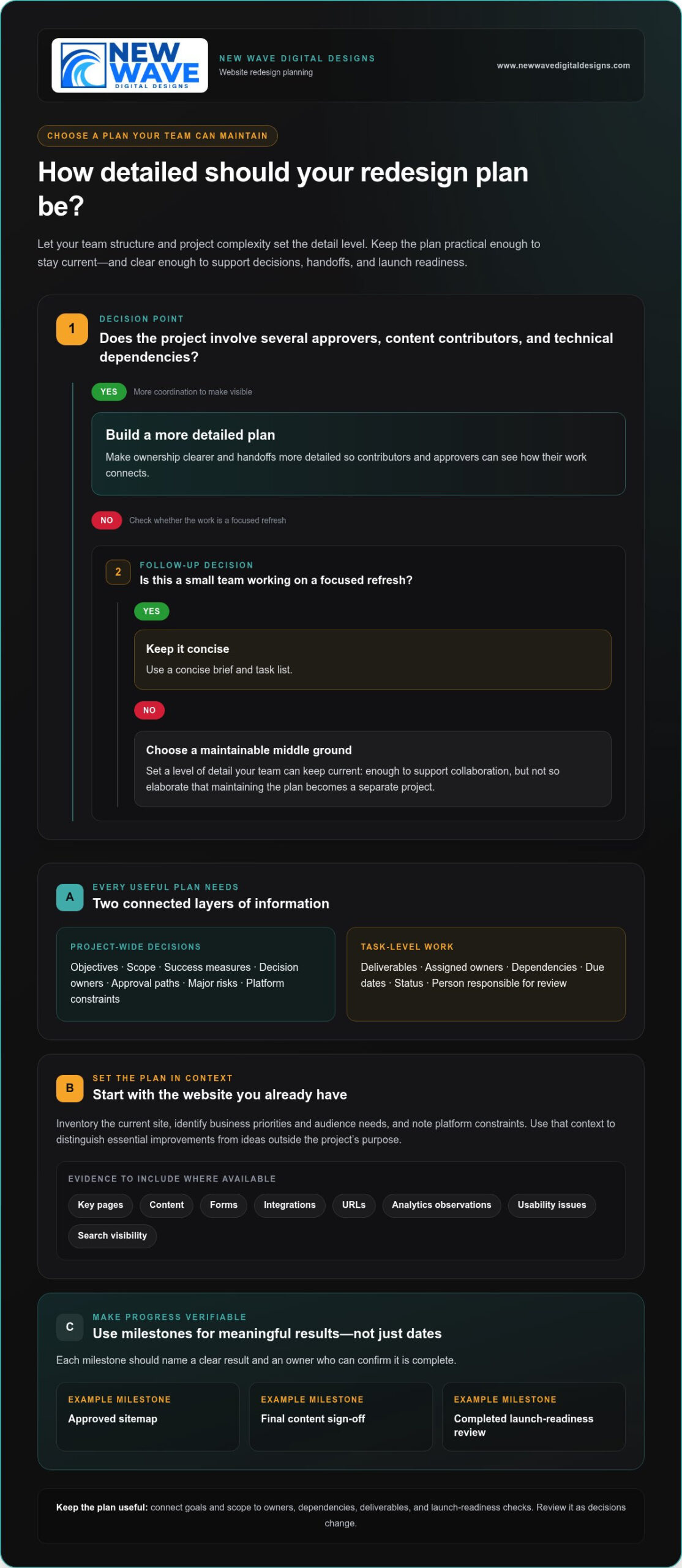
- Project-wide decisions: Objectives, scope, success measures, decision owners, approval paths, major risks, and platform constraints.
- Task-level work: Deliverables, assigned owners, dependencies, due dates, status, and the person responsible for review.
For example, “preserve key organic landing pages” is a scope decision. Reviewing and updating a specific page is a task. Linking the two shows why the work matters and who needs to approve it. Use milestones to mark meaningful progress, not just dates on a calendar. Examples include an approved sitemap, final content sign-off, or completed launch-readiness review. Each milestone should have a clear result and an owner who can confirm it’s complete.
How to adapt the template to your redesign
Begin with what exists. Inventory the current site, identify business priorities and audience needs, and note platform constraints that could shape design or development decisions. This context helps distinguish essential improvements from attractive ideas that fall outside the project’s purpose. For broader design context, this professional website redesign guide explores how strategy and design work together.
Next, choose a level of detail your team can keep current. A small team with a focused refresh may need a concise brief and task list. A larger project with several approvers, content contributors, and technical dependencies will benefit from clearer ownership and more detailed handoffs. Make the plan substantial enough to support collaboration, but not so elaborate that maintaining it becomes a separate project.
Think of the plan as a practical map through the web development lifecycle, adapted to the realities of your existing site. Review it as decisions change, and use project evidence to guide the next steps.
Build the Redesign Plan Around Goals, Scope, and Site Evidence
A redesign plan becomes actionable when it connects business goals with evidence from the current site. Record the objective, the audience need behind it, the evidence you’ll use as a baseline, and the person responsible for the decision. This keeps the project anchored in business priorities rather than visual preferences alone.
For example, if the goal is to make it easier for prospective customers to submit an inquiry, document the user need, the existing form and its performance, the intended change, and who approves the new experience. The objective’s owner should also decide how progress will be reviewed, using the business’s own baseline and goals rather than an arbitrary target.
Turn business goals into project requirements
Translate broad priorities into outcomes the team can observe. “Increase sales” could prompt a review of the purchase path to identify where customers encounter friction. “Make navigation clearer” could lead to testing whether users can locate priority information. Assign each outcome an owner, a measure, and a review method so the team knows what evidence will inform decisions and who will interpret it.
- Objective: What business priority should the redesign support?
- User need: What should visitors be able to find or do?
- Baseline and measure: What current evidence will provide a comparison?
- Decision owner: Who approves the requirement and reviews the outcome?
For broader planning prompts across goals, content, search, and technical considerations, the website redesign checklist can serve as a useful companion. Use it to surface questions, then record project-specific decisions in your own plan.
Set scope using an inventory of the existing website
Before deciding what to build, create an inventory of key pages, content, forms, integrations, and URLs. Add available analytics observations, known usability issues, and search visibility information. This evidence helps the team see which elements support current needs and which require attention. For search planning, consider how page changes, content decisions, and URL changes fit together, with guidance from this organic SEO services guide.
Give each inventory item a clear disposition: keep, revise, consolidate, remove, or create. A priority service page might stay but need rewritten content, while overlapping articles could be consolidated. Record the rationale and approver, especially when a decision affects a URL or a page that draws search traffic.
Finally, capture constraints that shape the solution: platform and integrations, accessibility needs, responsive design requirements, and brand standards. Separate what’s included from what’s excluded, retained, rewritten, or newly created. If the project calls for experienced design and implementation, collaborative website design support can help bring those requirements into alignment.
Compare Project Plan Formats and Make Ownership Visible
The right format is the one your team can understand, update, and use to make decisions. A compact checklist may be enough for a contained refresh, while a redesign with multiple contributors and approvals needs a clearer view of task relationships. Choose a format that fits the work, not just one that looks polished.
Choose a format your team will keep current
Use this comparison to select a starting point. You can combine formats, such as keeping project-wide decisions in a brief and tracking day-to-day work in a spreadsheet.
| Format | Best fit | Strengths | Limitations | Essential fields |
|---|---|---|---|---|
| One-page checklist | A small, straightforward redesign with few contributors | Quick to scan, easy to share, simple to maintain | Limited space for dependencies, detailed ownership, and status updates | Goals, key deliverables, owner, approver, milestone, completion check |
| Spreadsheet | A project with multiple tasks, contributors, and handoffs | Brings owners, dependencies, due dates, and status into one view | Can become difficult to interpret if fields and updates aren’t consistent | Task, accountable owner, approver, input, dependency, status, review date |
| Detailed project brief | A complex redesign involving substantial content, technical work, or approvals | Preserves context, scope decisions, requirements, and approval paths | Takes more effort to prepare and may need a separate task tracker | Objectives, scope, audiences, constraints, risks, decisions, milestones |
A website redesign project plan template can start in any of these formats. Keep the project-wide brief focused on why the work is happening and what boundaries guide it. Use task tracking to show how the team will deliver it. If contributors struggle to find the latest decision or update, simplify the structure before adding more fields.
Map roles, approvals, and dependencies
Every major deliverable needs one accountable owner: the person responsible for moving it forward and confirming it’s complete. Name the approver separately when a decision affects scope, brand direction, content, or launch readiness. Contributors can supply expertise without leaving responsibility unclear.
- Responsible owner: Coordinates the work and reports its status.
- Approver: Makes or confirms the decision at the required review point.
- Input providers: Supply content, technical details, or business context.
Make dependencies visible in the task record. For example, page design may depend on approved content, and launch may depend on completed testing and sign-off. Set review windows based on the people involved and the complexity of the decision, rather than assuming a standard duration. Add an escalation step for stalled approvals, such as naming who resolves a conflict or resets priorities.
Set dates according to the actual work sequence, review cycles, and team capacity. A proposed date is useful when its assumptions are visible; it becomes misleading when it ignores a dependency or competing workload. Revisit dates as decisions change, and record the reason for adjustments so the plan remains a reliable guide.
Use the Website Redesign Project Plan Template to Sequence Work
A clear sequence turns decisions into coordinated work. Use the website redesign project plan template to connect each phase to its inputs, deliverables, decision owner, dependencies, and completion criteria. Adjust the order where your platform or project requires it, but make handoffs explicit so teams know what must be ready before work advances.
Copy-ready fields for each phase
Give every task a consistent record. Copy these fields into your tracker, add phase-specific prompts, and keep planned dates separate from actual completion dates. The difference shows where approvals or dependencies have shifted the plan.
- Task: What work or decision is required?
- Owner and approver: Who completes it, and who signs off?
- Due date and actual completion: What was planned, and when was it finished?
- Dependency and status: What needs to happen first, and where does the task stand?
- Acceptance criteria: What observable result means the task is complete?
Use the fields across this adaptable phase sequence:
- Discovery: Inputs include business priorities, audience needs, and current-site observations. Deliver a concise findings record; the business decision owner confirms the priorities. Complete the phase when goals and evidence are reviewed.
- Scope: Use discovery findings and the site inventory to define what stays, changes, or is added. Deliver an approved scope and requirements; the project decision owner signs off. Complete it when exclusions and dependencies are recorded.
- Content and design: Inputs include approved scope, content inventory, and brand requirements. Deliver reviewed content and approved designs; content and design approvers provide sign-off. Don’t begin page design until its content and requirements are clear.
- Development: Use approved designs, content, and technical requirements. Deliver implemented pages, integrations, and handoff notes; the development owner confirms readiness for testing.
- Quality assurance: Test the developed site against requirements across key page types, responsive layouts, forms, and integrations. The QA owner records defects and retests fixes; completion requires agreed launch issues to be resolved and sign-off recorded.
- Launch and review: Use approved QA results and launch checks. The launch owner coordinates release, then records post-launch observations with the relevant decision owner. Complete the review by documenting issues, measurement checks, and follow-up work.
Keep a simple risk register beside the sequence. Track each risk, its likelihood or impact, its owner, mitigation, and trigger for action. Include delayed content, integration issues, approval bottlenecks, and launch readiness. For instance, a missed content approval can affect design and development. Name an escalation owner and agree how a blocked decision will be resolved.
Protect search visibility and business continuity
Before launch, compare old and new URLs and document appropriate redirects for changed or retired pages. Review priority page titles, metadata, indexability, analytics, and conversion paths. Confirm forms work, backups are available, and post-launch checks have owners. Ongoing website maintenance services can support care after the redesign is live.
For a redesign that needs coordinated design, development, and launch planning, explore website redesign support.
Move from a Project Plan Template to a Supported Redesign
A completed plan should make the next decision clear: is your team ready to lead the work internally, or would experienced design, development, SEO, or maintenance support help bring the pieces together? The answer depends on your team’s skills, available capacity, platform, and project complexity. A website redesign project plan template helps you make that choice; it doesn’t require you to hand off every task.
Review the completed plan before work begins
Use a final readiness review to catch assumptions before they become delays. Check that goals and scope are agreed, and that every deliverable has a named owner, an approver, its dependencies, and an observable completion condition. Then verify that the people responsible for content, brand assets, platform requirements, technical decisions, and launch activities are identified.
- Goals and scope: Does the planned work support the agreed priorities, and are exclusions clear?
- People and approvals: Is there one accountable owner for each deliverable, with the right approver and contributors named?
- Content and assets: Are owners assigned to writing, review, and supplying brand materials?
- Technical dependencies: Are platform needs, integrations, and required handoffs recorded?
- Risks and launch: Does each meaningful risk have a response owner, and are launch checks and post-launch measurement included?
If a field is blank, decide whether it signals a real gap or simply doesn’t apply. For example, a small team may combine content creation and approval, but the plan should still make that responsibility explicit. Treat launch readiness and post-launch review as planned work, not as tasks that will somehow happen once the site is live.
Connect the plan to design, development, and ongoing care
Internal teams may be well placed to manage a redesign when they have the capacity, platform knowledge, and expertise to coordinate content, design, technical work, and approvals. Additional support can help when a project calls for specialist implementation, existing workloads make ownership difficult, or design, development, and search considerations need to be aligned. A coordinated engagement can connect visual identity with business requirements while keeping platform and content needs in view.
New Wave Digital Designs creates websites for Shopify, WordPress, and Squarespace, and offers related website maintenance, managed hosting, security, and organic SEO. These ongoing services can be part of planning beyond launch, helping teams account for site care as well as the redesign itself. Define which responsibilities remain with your team and which are supported, so the handoff is clear.
With the plan in hand, you can discuss the redesign in the context of your goals and platform. Explore website design and digital services to consider support that fits the work ahead.
Turn Your Redesign Plan Into the Next Step
A well-shaped plan is more than a project document. It gives your team a way to make decisions with intention, adapt when priorities shift, and keep the experience you’re building connected to business needs. Treat it as a living guide: revisit it when new information emerges, and make sure changes are understood by the people whose work depends on them.
To move forward, bring the key decision-makers together, review the plan’s open questions, and agree on what needs to happen first. A collaborative perspective can help turn your priorities into a workable redesign.
Your website redesign project plan template can be the beginning of a more deliberate digital presence, shaped by clear choices and a shared sense of direction. Explore website design and digital services to discuss support for your redesign.
Frequently Asked Questions
What should a website redesign project plan include?
A useful website redesign project plan template includes the decisions and work needed to move from the current site to the new one. Alongside goals, scope, roles, dependencies, milestones, risks, content tasks, and launch checks, record page-level decisions and URL changes. Define what “done” means for each deliverable, such as a form being tested with a successful submission. Keep the plan accessible to contributors and note when key decisions change.
How do I create a website redesign project plan?
Start by stating the business outcome and reviewing the site’s current pages, user journeys, and available performance data. Turn that review into a defined scope, then identify the people who will create, review, and approve each deliverable. Build the schedule around actual task dependencies and team availability. As a practical check, ask a contributor unfamiliar with the plan to locate their next task and its approval path without extra explanation.
How long does a website redesign project take?
There’s no dependable universal duration: content preparation, integrations, decision-making, and available team capacity can all affect the schedule. Estimate work with the people responsible for completing it, and include time for review and revisions rather than scheduling only production tasks. Track planned dates beside actual completion dates. If a milestone moves, record the reason and which later tasks depend on it, so the team can adjust expectations based on project conditions.
Can a website redesign affect SEO?
Yes. Search performance may be affected if important pages disappear, URLs change without suitable redirects, or content and indexability settings are altered. Before changes go live, capture a reference list of priority pages and their addresses. After launch, investigate unexpected shifts by checking affected URLs, page availability, analytics, and search performance together. This gives the team a clearer basis for diagnosing whether a change is related to the redesign or another factor.
What is the difference between a website redesign plan and a website project plan?
A website project plan can guide a new build, feature update, or other web initiative; a redesign plan must also manage the transition from an existing site. That means documenting current URLs, important content, and business-critical journeys before changing the experience. For example, if a support page is being replaced, plan where its content will live and how visitors reaching the old address will be handled.
Can I use a website redesign project plan template for Shopify, WordPress, or Squarespace?
Yes. The planning framework can apply to Shopify, WordPress, or Squarespace, but the technical tasks should reflect the actual site rather than a generic platform checklist. For an online store, document the purchase journey and relevant integrations; for a content-led site, clarify how pages and their relationships will be maintained. Record platform-specific requirements with the person responsible for implementation, then test the features visitors rely on before launch.