
Moving your digital home is not a mere technical chore; it’s an architectural rebirth that requires a visionary blueprint to protect your brand legacy. You’ve poured your soul into your current site, yet you’ve reached the limits of what a template-driven environment can offer. The prospect of a Squarespace to Shopify migration often brings a wave of anxiety, particularly when you consider the risk of losing search engine rankings or the complexity of moving a vast portfolio. It’s a delicate balance between preserving what you’ve built and embracing the power of a platform designed for scale.
We understand that your data is the lifeblood of your business and your design is its visual heartbeat. This guide promises a meticulous, step-by-step approach to help you transition without the fear of technical data loss or visibility dips. You’ll learn how to navigate the 2026 landscape of agentic storefronts and AI-integrated commerce while maintaining your brand’s unique spirit. From mapping 301 redirects to rebuilding your aesthetic with precision, we’re providing the definitive checklist for a seamless, transformative journey to Shopify.
Key Takeaways
- Identify the strategic limitations of your current platform and how Shopify’s robust ecosystem provides the architectural freedom required for visionary brand scaling.
- Conduct a meticulous audit of your digital foundation to streamline content and ensure only high-performing assets move forward into your new store.
- Execute a disciplined Squarespace to Shopify migration sequence that utilizes pilot testing to verify data integrity before your final realization.
- Preserve your hard-earned digital equity by implementing a comprehensive 301 redirect strategy that protects search rankings and ensures a seamless customer journey.
- Master the art of the transition by performing rigorous pre-launch testing and communicating the upgrade as a sophisticated evolution of your brand experience.
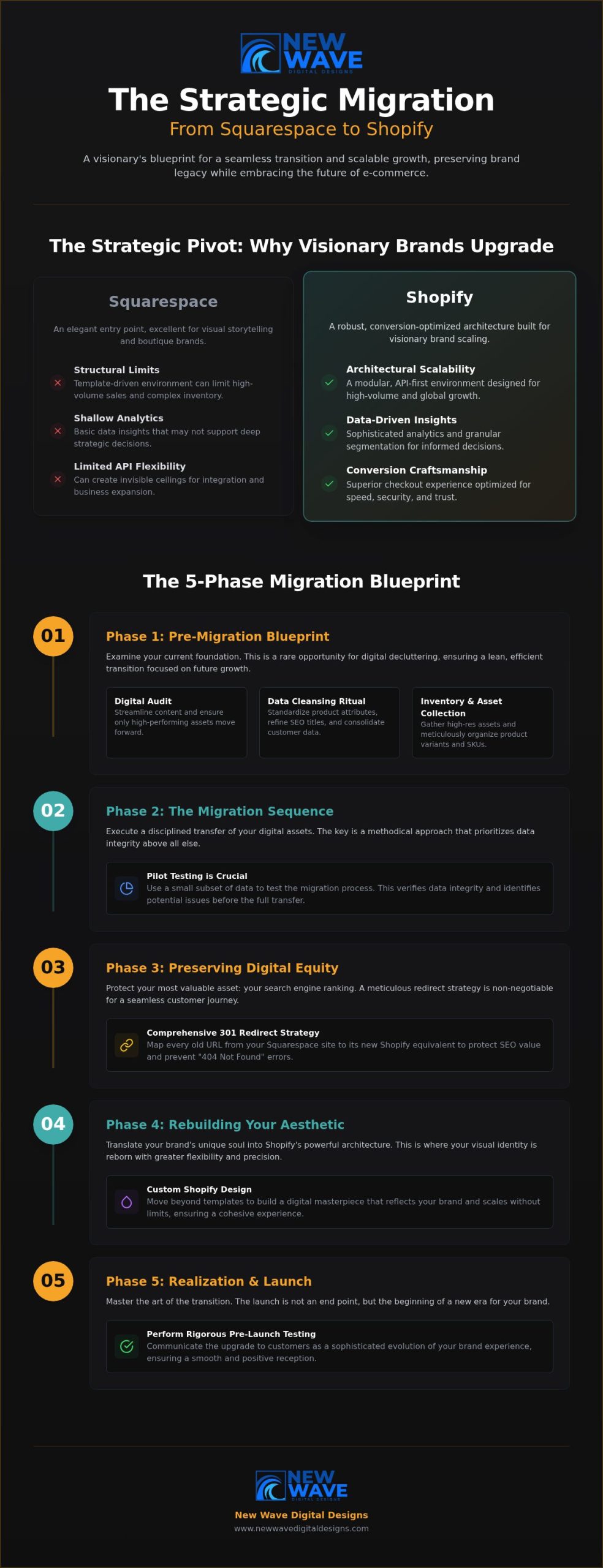
The Strategic Pivot: Why Visionary Brands Migrate to Shopify
A brand’s digital presence is a living entity. It requires room to breathe, grow, and evolve. While Squarespace offers an elegant entry point for many boutique businesses, high-volume e-commerce demands a more robust framework. A Squarespace to Shopify migration represents a fundamental shift from a “drag-and-drop” aesthetic to a conversion-optimized architecture. Visionary brands recognize that their technological foundation must be as ambitious as their creative goals. This transition is not just a change of address; it’s a strategic evolution toward a data-driven future.
High-volume sales and complex inventory management often expose the structural limits of simpler platforms. When your product catalog expands into the hundreds or your traffic spikes during global events, the need for API flexibility and a deeper app marketplace becomes undeniable. Shopify provides the industrial-grade engine needed to power these experiences, offering a level of scalability that allows your business to expand without hitting invisible ceilings.
Evaluating the Catalyst for Change
Growth is a deliberate process. You know you’ve outgrown your current digital home when analytics feel shallow or inventory syncs begin to fail. A neutral comparison of e-commerce platforms highlights that while some tools excel at visual storytelling, others are built for the heavy lifting of global trade. Identifying these functional gaps is the first step toward technological maturity. Shopify offers the granular customer segmentation and advanced data layering that scaling businesses require to make informed, strategic decisions. It moves your brand beyond simple transactions into the world of sophisticated relationship management.
Shopify as a Foundation for Future Innovation
Shopify serves as a launchpad for multi-channel expansion and international reach. It allows brands to sell across social channels, global marketplaces, and physical locations with a unified, elegant backend. This versatility is amplified through custom Shopify store design, which ensures your brand’s unique soul isn’t lost in the transition. By leveraging a superior checkout experience, you reduce friction and capture revenue that might otherwise vanish. This Squarespace to Shopify migration is your opportunity to build a digital masterpiece that scales without limits.
- Architectural Scalability: Transitioning from a rigid template system to a modular, API-first environment designed for growth.
- Data Integrity: Accessing sophisticated analytics that transform raw customer behavior into actionable, visionary insights.
- Conversion Craftsmanship: Utilizing a checkout flow optimized for speed, security, and global trust to maximize every customer interaction.
Pre-Migration Blueprint: Preparing Your Digital Foundation
Before laying a single brick in your new Shopify environment, you must examine the foundation of your current one. A Squarespace to Shopify migration provides a rare opportunity for digital decluttering. It’s a moment to audit every product, evaluate every blog post, and scrutinize every customer list. Moving outdated or low-performing content only adds weight to your new site without adding value. By purging the unnecessary, you ensure your transition is lean, efficient, and focused on future growth.
The Data Cleansing Ritual
Migrating “dirty data” is a common pitfall that compromises performance. If your product descriptions are inconsistent or your metadata is messy, those flaws will follow you. Use this time to standardize your attributes and refine your SEO titles. It’s also an ideal window to consolidate customer segments for a more personalized post-launch experience. Integrating a sound e-commerce strategy for small businesses early in the process ensures your data supports global aspirations from day one. This methodical cleaning turns raw information into a refined asset.
Inventory and Asset Collection
Your visual brand deserves a high-definition home. Gather all high-resolution assets, including logos, custom photography, and brand guidelines, to ensure they fit Shopify’s logical architecture. Organize your product variants and SKUs meticulously. Shopify handles variants differently than Squarespace; mapping these early prevents technical friction. This is the stage where you also verify that all digital downloads or service descriptions are formatted for the new platform’s delivery systems.
- Visual Integrity: Collecting original source files for all brand imagery, icons, and specialized graphics.
- Structural Logic: Mapping variants and SKUs to Shopify’s specific database requirements to ensure inventory accuracy.
- Digital Readiness: Preparing downloadable files and service descriptions for automated, seamless delivery.
Choosing the right Shopify plan is the final piece of your Squarespace to Shopify migration blueprint. Whether you opt for the Basic, Grow, or Advanced plan, your choice should align with your 2026 growth targets. For those seeking a truly bespoke transition, partnering with a professional digital architect can turn a complex migration into a seamless evolution. Mapping your current URL structure now is vital; it sets the stage for the critical redirect phase that preserves your hard-earned search equity.
The Migration Sequence: A Master Checklist for Data Transfer
The execution phase of your Squarespace to Shopify migration is where strategic planning meets architectural reality. It begins with the precise extraction of product data through CSV files or specialized API tools. This isn’t a simple copy-paste exercise; it’s a meticulous transfer of your brand’s inventory. Once the initial data is pulled, we perform a “pilot migration” to observe how your products render within the Shopify environment. This allows us to refine the variant logic and image resolution before the full-scale transition occurs.
A successful transfer prioritizes the continuity of your business relationships and analytical depth. This methodical approach is central to developing a digital e-commerce strategy that values long-term stability and global reach. Beyond products, the sequence involves moving customer data with an unwavering commitment to privacy standards and account integrity. Order history is also migrated, ensuring your business analytics remain a continuous, unbroken narrative of your brand’s journey and growth.
Manual Craftsmanship vs. Automated Tools
Automated tools like LitExtension or the Shopify Store Importer offer efficiency for large-scale transfers, yet high-touch brands often require an artisanal touch. While automation handles the bulk of the heavy lifting, a human review of every product is essential to ensure visual perfection. This blend of technological speed and meticulous craftsmanship distinguishes a sophisticated migration from a generic data dump. It’s about ensuring every description, tag, and image alignment matches your high standards.
Rebuilding the Visual Narrative
Static pages and blog content must be recreated with an eye for Shopify theme customization. You aren’t just moving content; you’re adapting your Squarespace layouts to Shopify’s section-based editor. This shift offers newfound flexibility, allowing you to build a responsive design that feels intuitive across every digital touchpoint. Your new theme should serve as a sophisticated canvas that reflects your brand’s artistic inspiration while optimizing for conversion.
- Data Extraction: Exporting inventory via CSV or API to ensure a clean, strategic transfer.
- Pilot Testing: Rendering a subset of data to verify formatting, image resolution, and variant logic.
- Relational Continuity: Migrating customer profiles and historical orders to maintain trust and analytical depth.
Preserving Your Digital Equity: The SEO & Redirect Strategy
Your search engine rankings represent years of dedicated brand building. They are your digital equity. A Squarespace to Shopify migration requires a meticulous approach to URL mapping to ensure this hard-earned authority isn’t lost during the transition. This process isn’t a mere technical task; it’s a strategic preservation of your brand’s visibility. Without a visionary blueprint for your redirects, you risk the silence of a digital void where your vibrant community once thrived.
The Architecture of the 301 Redirect
Every page on your Squarespace site has a specific digital address. Shopify utilizes a different logical structure, often shifting from “/store/” or “/shop/” patterns to a strict “/products/” and “/collections/” hierarchy. A single missed link can lead to a catastrophic drop in organic traffic. Industry data indicates that stores failing to map redirects properly can lose 20% to 50% of their organic visibility almost immediately. We utilize precise templates to manage hundreds of URL changes with surgical accuracy. For “orphaned” pages that lack a direct equivalent on the new site, we implement strategic redirects to the most relevant collection, ensuring every drop of link equity is captured and recycled.
SEO Continuity and Metadata Migration
Beyond the URL, your metadata serves as the silent driver of your search performance. Transferring Alt text, Title tags, and Meta descriptions must be executed without loss of detail. This continuity ensures search engines recognize your new Shopify store as the authoritative evolution of your previous site. This phase of Shopify store development also prioritizes technical health. We analyze how the platform change impacts site speed and Core Web Vitals, ensuring your new home is as fast as it is beautiful.
- Redirect Mapping: Creating a comprehensive 1:1 map of every legacy URL to its new Shopify destination.
- Metadata Integrity: Migrating every SEO title and description to maintain search engine context.
- Sitemap Submission: Instantly alerting Google Search Console to your new architectural structure following the launch.
Updating your internal linking structure is the final touch in this phase. Every link within your blog posts and static pages must reflect the new Shopify patterns to prevent broken user journeys. If you want to ensure your brand’s legacy remains intact during your Squarespace to Shopify migration, consult with our digital architects to secure your SEO future.
Realization: Launching the New Era of Your Brand
The launch of your new Shopify store is not merely a technical deployment; it is a debut. It represents the final realization of a vision that began with the first step of your Squarespace to Shopify migration. This is the moment your brand steps into a more expansive, capable environment designed for the next era of e-commerce. A successful launch requires a blend of rigorous technical validation and strategic communication, ensuring your community feels the value of this evolution from their first click.
The Final Quality Assurance Ritual
Before the “Grand Re-opening” begins, your store must undergo a final, meticulous quality assurance ritual. This is the stage where your digital architecture is stress-tested for absolute precision. You must verify that payment gateways, tax calculations, and shipping rules operate with surgical accuracy across all regions. A comprehensive “broken link” sweep ensures that the user journey remains fluid, honoring the redirect strategy established in previous phases. Finally, confirm that every third-party integration, from your CRM to your email marketing suite, is firing correctly to capture every customer interaction without friction.
Post-Launch Evolution and Growth
The first 30 days following your Squarespace to Shopify migration are a critical window for observation and refinement. During this period, monitor site performance and user behavior with intent, using Shopify’s advanced analytics to identify opportunities for further conversion optimization. Establishing a robust website maintenance plan is essential for ensuring long-term security and peak performance as your traffic scales. This ongoing care protects your investment and maintains the polished, premium experience your customers expect.
- Deployment Precision: Executing a final sweep of checkout flows and mobile responsiveness to ensure a flawless debut.
- Strategic Communication: Framing the migration as a visionary upgrade that offers customers a faster, more intuitive experience.
- Legacy Building: Deciding whether to hire a Shopify expert to lead your brand’s ongoing strategic refinement and technological evolution.
Leverage Shopify’s native marketing tools to announce your new era with a campaign that reflects your brand’s artistic soul. By treating this transition as a milestone rather than a chore, you invite your customers to be part of your growth story. This launch is just the beginning of a larger journey toward digital maturity and global reach.
The Dawn of Your New Digital Legacy
Transitioning your store is more than a change of platform; it’s a profound commitment to your brand’s future growth and technological maturity. We have explored how a meticulous Squarespace to Shopify migration protects your digital equity while unlocking the infinite scalability of the Shopify ecosystem. From the initial data cleansing ritual to the precise mapping of 301 redirects, every step is a deliberate move toward a more powerful market presence. You now possess the architectural blueprint required to navigate this evolution with confidence, clarity, and grace.
Realizing this vision requires a partner who treats digital development as a form of craftsmanship. Our methodology combines meticulous attention to detail with a visionary design philosophy to ensure your new store is both high-performing and aesthetically profound. By prioritizing strategic SEO preservation, we safeguard your hard-earned rankings as you enter this new era of commerce. Architect your brand’s future with a professional Shopify migration and transform your digital storefront into a lasting masterpiece. Your brand’s most ambitious chapter is ready to begin.
Frequently Asked Questions
How long does a Squarespace to Shopify migration typically take?
A professional transition typically takes between 6 and 10 weeks to complete with precision. This timeline allows for a methodical approach to data cleansing, custom theme development, and rigorous quality assurance testing. While smaller stores with limited inventory might move faster, visionary brands often require this window to ensure every architectural detail is perfect and that the new store is fully optimized for its debut.
Will I lose my SEO rankings when moving from Squarespace to Shopify?
You won’t lose your hard-earned rankings if you implement a meticulous 301 redirect strategy. A Squarespace to Shopify migration involves significant changes to your URL structures, so mapping every legacy link to its new destination is vital for preserving your digital equity. By maintaining metadata consistency and submitting an updated sitemap to Google Search Console immediately, you prevent the common 20% to 50% traffic drops seen in unmanaged moves.
Can I migrate my blog posts and images from Squarespace?
Yes, you can migrate your blog posts and images, though the process requires careful handling of your visual assets. While the text and raw imagery transfer through CSV or API tools, the specific layouts and custom CSS from Squarespace won’t carry over to the new platform. This is an opportunity to rebuild your blog within a more flexible, section-based Shopify theme that enhances your brand’s storytelling and mobile responsiveness.
Do I need to buy a new domain when I switch to Shopify?
No, you don’t need to purchase a new domain when you transition your brand. You can simply point your existing domain to Shopify’s servers once your new store is ready for its final realization. This maintains your established identity and ensures your loyal customers can find you without interruption. Our team manages the technical DNS configurations to ensure a seamless connection during the launch phase of your project.
What is the cost of migrating a store from Squarespace to Shopify?
The cost of a professional migration varies significantly based on the volume of your data and the complexity of your custom design requirements. While automated tools offer low-cost entry points for raw data, visionary brands typically invest in a bespoke architectural approach to ensure data integrity and SEO preservation. Every project is unique, focusing on creating a scalable foundation that supports your long-term revenue targets and brand evolution.
Can I keep my customer accounts and passwords during the migration?
You can migrate customer profiles and order histories, but passwords cannot be transferred due to Shopify’s secure encryption standards. Once your Squarespace to Shopify migration is complete, you’ll need to invite your customers to activate their accounts and set new passwords on the new platform. This presents a perfect opportunity to communicate the transition as a sophisticated benefit for their security and a fresh upgrade to their shopping experience.
Is it better to use a migration app or do it manually?
The choice depends on the complexity of your brand’s digital presence and data volume. Migration apps are excellent for transferring large amounts of raw data like products and orders efficiently. However, manual craftsmanship is often required for high-touch design elements and complex page layouts that apps cannot replicate. A hybrid approach usually yields the best results, using technology for speed while applying a human touch for visual perfection.
How do I handle my email marketing during the platform transition?
You should prioritize a seamless integration between your new Shopify store and your existing email marketing platform. Most major providers, such as Klaviyo or Mailchimp, offer native Shopify apps that allow for deep data synchronization and automated flows. During the transition, you must verify that your sign-up forms and customer tags are firing correctly to ensure you don’t lose touch with your audience during the “Grand Re-opening” phase of your brand.