
The first fix for a website that isn’t generating leads may not be a redesign. To decide what to do when your website isn’t generating leads, review the last 90 days of analytics and identify whether the problem is traffic, conversion, or what happens after an enquiry.
It’s frustrating when a site attracts visitors but doesn’t turn their interest into conversations. The answer is to follow the evidence: check whether the right people are arriving, whether key pages make the value clear, and whether the next step is easy to take. This article walks through five practical fixes, from refining calls to action and checking mobile performance to building trust and connecting your website with your sales process. You’ll learn how to prioritize improvements, estimate how long they may take, and focus on the changes that better match buyer needs.
Key Takeaways
- Use recent analytics to identify whether the main obstacle is traffic, conversion, or enquiry follow-up before choosing a fix.
- Give each priority page one clear next step that matches what visitors are ready to do.
- Separate focused changes, such as simplifying a form, from broader work on messaging or site structure when estimating timelines.
- Assess mobile usability, page speed, and trust-building details as part of the visitor’s path to contacting you.
- Connect website enquiries to a defined sales process so you can see which leads progress and where prospects lose momentum.
1. Writing specific, stage-appropriate calls to action
Start with the visitor’s intent, not a generic “Contact us” button. Someone reading a service overview may want to compare approaches, while someone on a service page may be ready to request a quote. Give each priority page one clear next step, and make its wording fit the decision that page helps visitors make.
For example, a page explaining a problem could invite visitors to “Explore your options.” A service page could offer “Request a project quote.” A detailed guide might direct readers to a related service page before inviting them to get in touch. Keep the message consistent from the headline to the call to action, so visitors know what to expect after clicking.
Make the action easy to find. Place the main call to action near the top of key pages, then repeat it where it fits, including on landing pages and blog posts. A long article can introduce a relevant next step beside the section that answers the reader’s question, then repeat it near the end. This creates a clear path without turning every paragraph into a sales pitch.
Reduce form friction by requesting only information your team will use. A simple starting point is three fields: name, email, and a brief description. If a form asks for 10 or more fields when three would do, remove fields that aren’t essential to responding. Keep any necessary extra questions tied to a clear purpose, such as understanding the project type or preferred contact method.
To improve website conversion rates and lead generation, review the last 90 days of analytics, choose a high-traffic page, and test one change at a time. Compare a specific call to action with the current wording, or simplify the form and observe what changes. If the page receives fewer than approximately 100 monthly visitors, prioritize attracting relevant traffic before drawing strong conclusions from small numbers of submissions.
Agency fees depend on the project’s scope, the pages involved, analytics setup, and any testing or design work. Conversion rates also vary by industry, audience intent, traffic source, and the action being measured. Rather than relying on a broad benchmark, compare similar pages and lead types on your own site.
When deciding what to do when your website isn’t generating leads, start with the page’s purpose, the visitor’s next decision, and the effort needed to act. A full redesign won’t fix a confusing call to action by itself. First try a clearer message, a more relevant next step, or a shorter form.
2. Estimating how long website lead-generation fixes take
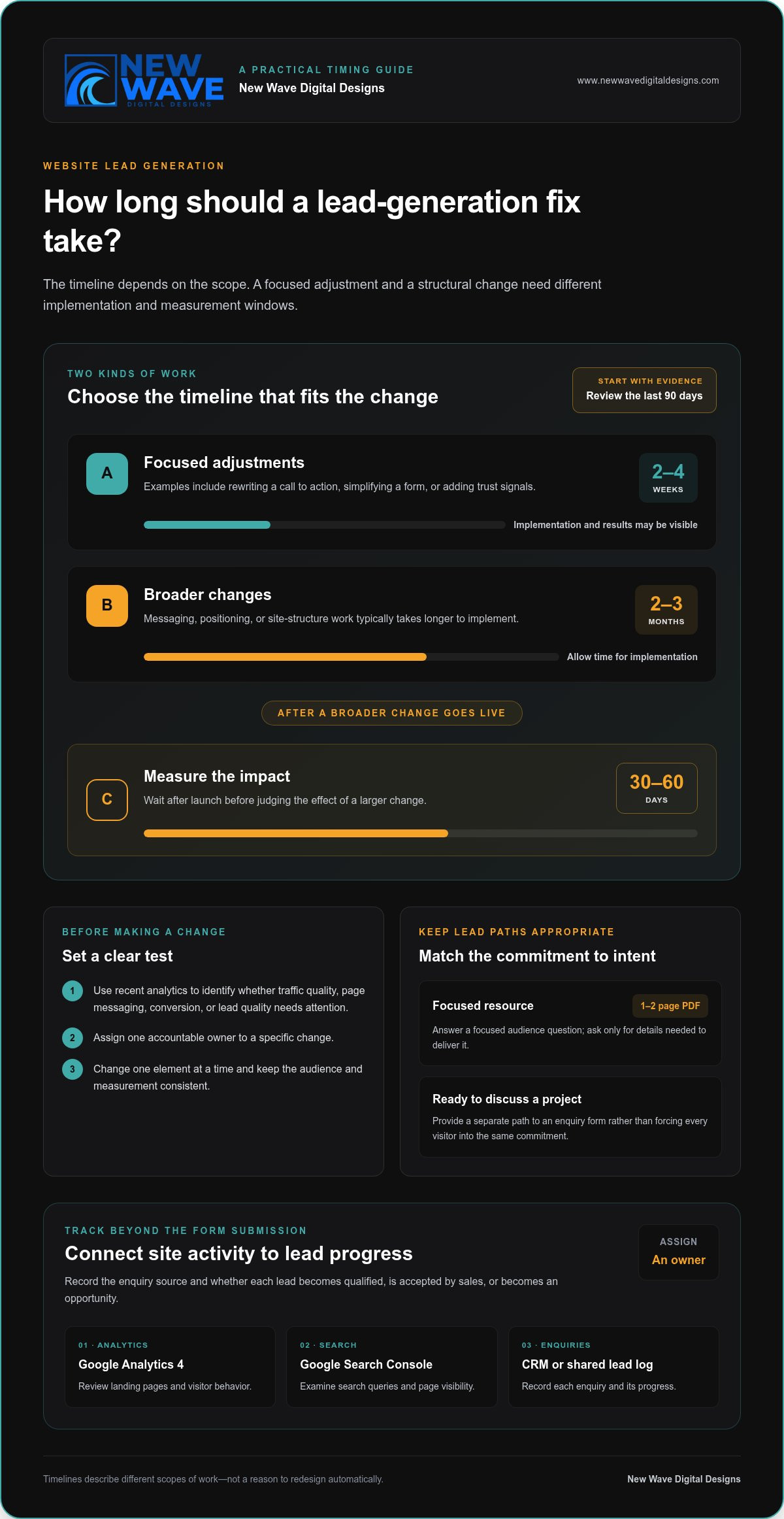
Set a realistic measurement window before changing your site. Quick adjustments, such as rewriting calls to action, simplifying forms, or adding trust signals, can produce results in 2-4 weeks. Changes to messaging, positioning, or the site’s structure typically take 2-3 months to implement. After larger changes go live, allow another 30-60 days to measure their impact.
Those timelines describe different kinds of work, not a reason to redesign automatically. First, review the last 90 days of analytics and identify whether traffic quality, page messaging, conversion mechanics, or lead quality needs attention. Then assign one accountable owner to a specific change and set its measurement window. If traffic is low or poorly matched to the offer, rebuilding pages alone won’t address the underlying reasons.
Lead magnets can give visitors different levels of commitment. A useful starting option is a 1-2 page PDF that answers a focused question for your audience. Offer it on a relevant article, and make the form request only details needed to deliver it. Visitors who are ready to discuss a project can follow a separate path to an enquiry form, rather than being pushed through the same commitment level.
Tracking should continue after submission. Use Google Analytics 4 to review landing pages and visitor behavior, Google Search Console to examine search queries and page visibility, and a CRM or shared lead log to record each enquiry. Assign an owner, record the enquiry’s source, and track whether it becomes qualified, accepted by sales, or an opportunity. A defined process makes it easier to distinguish a traffic issue from a follow-up gap.
To attract more qualified website leads, create SEO content around the questions buyers ask before choosing a service. Link each article to a relevant service page, and make sure the page delivers on the search query’s promise. When testing changes, compare versions with one element changed, such as the headline or call to action. Keep the audience and measurement consistent, then use what you learn to guide the next test.
Before beginning a redesign, check whether a targeted change can address the problem. Structural issues may justify broader work; an isolated form or message problem usually calls for a focused fix. For planned website lead-generation improvements, keep the scope tied to the evidence, the buyer’s needs, and the sales process.
3. Website speed, mobile usability, and technical performance
More than 50% of web traffic comes from mobile devices. A visitor arriving from a phone should be able to understand the page, use its navigation, and reach a useful next step without pinching or hunting. Test important pages on an actual phone, not only in a desktop preview.
Speed shapes that first interaction. A mobile page taking more than three seconds to load can lose visitors before they see its content. A one-second delay in website loading can reduce conversions by 7%. Start with your homepage, top landing pages, and contact form, then identify which elements delay their visible content.
Google’s Core Web Vitals guidance helps assess loading, responsiveness, and visual stability. Use these targets to identify technical work: Largest Contentful Paint under 2.5 seconds, Total Blocking Time under 200ms, and a mobile PageSpeed score above 70. A time to first byte above 800ms can flag an underpowered host. These measures point toward issues to investigate; they don’t replace testing the actual visitor journey.
Responsive design should do more than shrink a desktop layout. Check that headings wrap cleanly, buttons are easy to tap, and forms fit the screen without sideways scrolling. Then follow the route from a service page to its enquiry form. If phone users need to zoom, dismiss an obstructive banner, or hunt for the next step, simplify the journey.
Review how content appears on mobile, too. A long case study needs readable paragraphs, clear section labels, and visible links to related services. Keep essential details near the top, including what the business offers and whom it helps. This makes key information easier to find without forcing visitors through a dense wall of copy.
Use a practical diagnostic sequence: test your most visited pages, check mobile loading and layout, then submit each form yourself. Note where the experience slows down or breaks. If large media files make a case study slow to load, optimize them; if the mobile menu hides the enquiry route, adjust its layout. Fix the observed problem before considering a wider redesign.
- Check mobile loading and layout on priority pages.
- Use Core Web Vitals to locate performance issues.
- Complete the enquiry journey on a phone, including form submission.
After each technical change, repeat the same tests and review how visitors use the page. Speed matters most when visitors can also find relevant information and complete the intended action. Track technical performance alongside enquiries, so improvements support lead generation rather than becoming an isolated score.
4. Building buyer trust and supporting decisions
Visitors need to understand your offer before they can trust it. Make the homepage messaging answer three questions: what you do, whom you help, and why visitors should keep reading. A headline should communicate what the business does, who it serves, and where within five seconds. Remove broad claims that leave people guessing, and explain the specific problem your service solves.
Support each claim with relevant evidence. Use testimonials that describe the customer’s situation, the work completed, and the outcome they experienced. A vague “great service” quote gives less context than one that explains how a project addressed a particular need. Place testimonials beside the service or decision they support, instead of gathering every quote on a disconnected page.
For a more considered purchase, case studies can show how a business approaches real challenges. Structure each one around the customer’s starting point, the decisions made, and the result. In complex B2B sales, a buying group may include multiple people who need different evidence. A technical lead may want process details, while a decision-maker may need to understand business value. Use analytics and sales conversations to learn which questions visitors seek to answer.
Local trust signals matter when customers want to know whether a business serves their area. Show the relevant location or service area clearly, and keep business details consistent across the site. Pair those details with local testimonials or case studies when available. A visitor should not have to search several pages to establish where a business works or whether its offer fits their needs.
Make proof easy to assess. Use named customer testimonials only with permission, and keep quotations faithful to the customer’s words. Label case studies clearly, distinguish examples from guarantees, and explain the scope of any result. If you display credentials or partner logos, explain what they represent. A badge without context may add visual weight without addressing a buyer’s concern.
Review the homepage from a first-time visitor’s perspective. In 10 seconds, can someone identify the business’s location, price range, and differentiator? If not, bring those details into clearer view. Ask a colleague unfamiliar with the site to describe its offer after a brief glance. Their response can reveal whether the design and messaging communicate the intended meaning.
Finally, make trust actionable. Place relevant proof near the next step, such as a testimonial beside a service enquiry form. Keep any response-time statements realistic and make promises only when you can consistently meet them. Clear evidence, accurate details, and credible expectations help buyers make informed decisions.
5. Alignment between website and sales process
A website can attract visitors and collect enquiries yet still lose potential sales. The gap often appears after the click: an ad promises one thing, the landing page says another, or no one owns the incoming enquiry. Treat lead generation as a connected path from first message to sales outcome, not just a count of form submissions.
Map the buyer’s journey from each major channel. If a Google Ads campaign promotes a specific service, send visitors to a page that continues the same promise. Explain the service, answer likely buyer questions, and offer a relevant next step. Sending everyone to the homepage makes visitors search again for the information that earned their click.
Next, write down what happens after someone submits a form. Assign an owner for reviewing each enquiry, define how it is routed, and set a clear follow-up process. Every website enquiry should trigger an immediate response. That response can acknowledge the request, explain what happens next, and give the prospect a useful way to continue the conversation.
Make the handoff visible to both marketing and sales. Track each enquiry through qualification, sales acceptance, and opportunity creation. Record its source, landing page, requested service, and outcome in a shared CRM or lead log. These stages help show whether the problem is unqualified traffic, a poor page-to-offer match, or a follow-up gap. A form fill is a starting signal, not proof of sales progress.
Use sales conversations to improve your website strategy. Ask the team which questions prospects raise, what concerns delay decisions, and which details help a lead move forward. Then update the homepage, service pages, and relevant content to answer those questions. For example, if prospects repeatedly ask what a project includes, explain the process and deliverables before the enquiry step. Useful content supports real decisions, not simply a higher page count.
Close the loop with regular reviews. Compare lead sources with qualification and opportunity outcomes, then share what you learn between marketing and sales. If a channel generates enquiries that rarely fit, refine its targeting or destination page. If qualified leads stall after submitting a form, examine who owns the response and how follow-up works. Tie each improvement to a specific stage instead of relying on traffic or form totals alone.
When your website and sales process need a more coherent structure, discuss your website strategy and how its pages can better support the buyer journey.
New Wave Digital Designs: Shopify Website Design
New Wave Digital Designs offers Shopify Website Design for businesses that need an online store with a clearer path from discovery to enquiry or purchase. If your analytics point to confusing page structure, inconsistent messaging, or a difficult visitor journey, a focused design review can help shape the site around your products and customers. Website Maintenance supports ongoing updates after launch, keeping key pages aligned as your business evolves.
A redesign makes sense when structural issues affect several parts of the customer journey. If the problem is limited to one form or page, a targeted improvement may be the better first step. Choose the change that addresses the evidence you’ve gathered and supports your sales process.
Contact New Wave Digital Designs to discuss your website goals and next steps.
Choose the next step that fits your site
Your next move doesn’t need to start with a blank canvas. Decide whether your current site needs focused refinements or a new structure that better reflects how customers explore and choose your services. This distinction keeps improvements grounded in your business priorities.
If you’re weighing what to do when your website isn’t generating leads, identify where the experience stops matching customer expectations. A new design may suit a business whose platform or page structure no longer supports its goals. New Wave Digital Designs offers Shopify Website Design, WordPress Website Design, and SquareSpace Website Design, with each project shaped around the platform and business needs.
Bring your goals, customer questions, and strongest sales insights into that conversation. They can help guide a website experience that feels cohesive and makes the path forward clearer. Contact New Wave Digital Designs to discuss your website and take the next step with confidence.
Frequently Asked Questions
How do you decide what to fix first?
Fix the earliest point where the buyer journey breaks. If the right audience never reaches relevant pages, examine acquisition; if visitors arrive but don’t engage, review the page experience; if enquiries come in but stall, inspect follow-up. Compare customer questions with the pages they visit, then make one change that addresses the clearest obstacle. This keeps your effort focused on a cause, not a cosmetic preference.
How many leads should a small business website generate?
There isn’t one useful target for every small business. Lead volume depends on audience size, traffic relevance, the offer, and how many enquiries your team can handle. A site that attracts a few highly suitable prospects may serve the business better than one that generates more unqualified requests. Set a baseline using your own enquiry and sales history, then assess whether leads meet your goals.
Is the problem my website or my marketing?
The issue may be the traffic, the page, or a disconnect between them. Compare the promise in your ads, search listings, or email campaigns with the page visitors land on. If the wording attracts people seeking something the page doesn’t address, the traffic and destination are misaligned. If the audience is appropriate but visitors leave without taking a relevant action, inspect the page itself. Review each channel separately before making broad changes.
Why is my website getting traffic but no leads?
Traffic alone doesn’t show whether visitors are potential buyers or can find a suitable next step. A blog post may attract people seeking general information, while a service page should address purchase concerns. Check which pages attract visits, what search intent brought people there, and whether the content connects naturally to an offer. Test the enquiry journey yourself, too, since a broken link or form can block interested prospects.
How do you diagnose why a website is not generating leads?
Trace a visitor’s path from the entry page through key interactions to the enquiry stage. Review landing-page behavior, traffic sources, form submissions, and where visitors exit. Then test the site as a prospective customer: follow a navigation link, complete a form, and check that the confirmation appears. Compare tracked submissions with actual enquiries to identify measurement gaps before interpreting a low conversion count.
How do you optimize landing pages, forms, and calls to action for more leads?
Make the landing page match the message that brought visitors there, then remove distractions around its main action. For example, a page promoting an estimate should explain what it covers and what information the form needs. Test one meaningful adjustment at a time, such as changing the opening message or removing an unnecessary field. Review completed enquiries as well as form starts to see whether the change attracts suitable prospects.
How does website speed and mobile usability affect lead generation?
A slow or awkward mobile experience can stop visitors before they understand your offer or finish an enquiry. Test key pages on a phone, including dropdown menus, phone links, and form fields. Check that buttons remain visible when the keyboard opens and that text can be read without zooming. If a page is difficult to use, identify whether loading, layout, or an interactive element is the obstacle, then address it.
How can you tell whether website leads are high quality and converting into sales?
Define lead quality using criteria sales can apply consistently, such as service fit, project readiness, and the information provided. Record each enquiry’s source and track its progress through qualification, sales acceptance, and opportunity stages. Review outcomes with the sales team to identify which pages and campaigns attract prospects who advance. This separates useful demand from form submissions that don’t match your offer or become sales conversations.