Squarespace vs. WordPress for Small Business: How to Choose in 2026

The easiest platform to launch may not be the easiest one to manage as your business grows. That’s the real question behind squarespace vs wordpress for small business: which foundation suits your goals, your working style, and the time or technical support you can commit to your website?

It’s tempting to focus first on appearance, features, or the monthly plan. But a website also needs ongoing care. Squarespace combines hosting and platform maintenance in one managed system, while self-hosted WordPress offers more control and flexibility, along with more upkeep decisions. Neither is the right choice for every business.

This comparison covers the practical differences in ownership, maintenance, design, content and search tools, commerce, and room to grow. You’ll also find steps to take before building or migrating, so your choice reflects how your business operates, not just how a template looks. With thoughtful design and ongoing support, either platform can provide a useful foundation for what comes next.

Key Takeaways

  • Start with what your website needs to accomplish, whether that’s generating leads, publishing content, taking bookings, or selling online.
  • Understand how Squarespace’s hosted model and self-hosted WordPress differ in ownership and ongoing upkeep.
  • Use the squarespace vs wordpress for small business comparison to weigh design workflows, search tools, content needs, and future growth.
  • Use a practical scorecard to identify must-have features, maintenance capacity, and the support your business can provide.
  • See how custom design for either platform can align your website’s structure and visual direction with your business goals.

Squarespace vs. WordPress for Small Business: Start With the Job Your Website Must Do

The better platform depends on what your website needs to do and who will look after it. Before comparing templates, name its primary job: attracting qualified leads, publishing useful content, managing bookings, or selling online. A consulting firm seeking enquiries has different priorities from a shop managing a growing product catalogue. Start with the task, then choose tools and design that support it.

Next, consider how the site will fit into your working week. Are you comfortable editing pages and adding content? How much time can you set aside for updates and routine upkeep? Would you rather use a managed environment, or make more decisions about hosting, extensions, and technical configuration? These answers matter as much as a feature list. A platform that fits your capacity is easier to maintain.

Squarespace is a managed website platform that combines the site-building experience and hosting in one service. WordPress has two distinct routes: WordPress.com is a hosted service, while WordPress.org provides open-source software commonly installed with a hosting provider. They aren’t interchangeable models. The WordPress Wikipedia article offers a broader overview of the software’s history and its role as a content management system.

Which small businesses may prefer Squarespace?

Squarespace may suit an owner who values a cohesive visual editing experience and wants a managed setup for a business website, portfolio, or service offering. It can be a practical fit if you expect to update service descriptions, team details, and other core pages yourself without building a custom technical stack. The managed model can reduce some operational decisions, but it doesn’t replace planning, regular content updates, or attention to how the site serves customers.

When might WordPress suit a small business better?

WordPress may suit a business that needs more control over its site structure, extensions, or development choices, particularly when its requirements call for a tailored setup. That flexibility comes with decisions about hosting, themes, plugins, and maintenance. A hosted WordPress.com site has a different responsibility profile from self-hosted WordPress. WordPress isn’t automatically the better choice for every growing business; the right fit depends on the complexity you need and the support available.

Use this quick orientation before comparing specific features:

  • Lead generation: Prioritize clear service pages, persuasive calls to action, and a straightforward way to manage enquiries.
  • Publishing: Consider how often you’ll add articles, organize content, and keep a useful library up to date.
  • Bookings or sales: Map the customer journey and the functions the website must support before settling on a design.
  • Limited technical time: Choose an operating model that fits the upkeep you can realistically handle, either personally or with ongoing support.

That is the practical heart of squarespace vs wordpress for small business: choose for the work the site must do and the people who will care for it. Design should make that work clearer, not distract from it.

How Squarespace and WordPress Work: Hosted Platform or More Hands-On Control?

A hosted website platform provides an environment for building and running a site as one managed service. With self-hosted WordPress, you use the open-source software but arrange hosting separately. That distinction shapes who makes decisions about infrastructure, updates, security, and technical configuration. It’s central to understanding squarespace vs wordpress for small business.

Squarespace is a hosted platform. WordPress can mean either WordPress.com, a hosted service, or WordPress.org software installed with a hosting provider. The names are related, but the operating arrangements aren’t identical. Comparisons such as this Forbes comparison of Squarespace vs. WordPress can help orient your research. First, identify which WordPress setup is being considered.

WordPress.com vs. self-hosted WordPress: what is the difference?

WordPress.com hosts websites through its service, with features and responsibilities shaped by the plan. Self-hosted WordPress uses software from WordPress.org, while the site owner or their team selects a hosting arrangement and configures the site. This can allow more control over hosting and development choices, but it also means more decisions. Before comparing platforms, clarify the hosting model, who manages it, and which parts of the site your team will control.

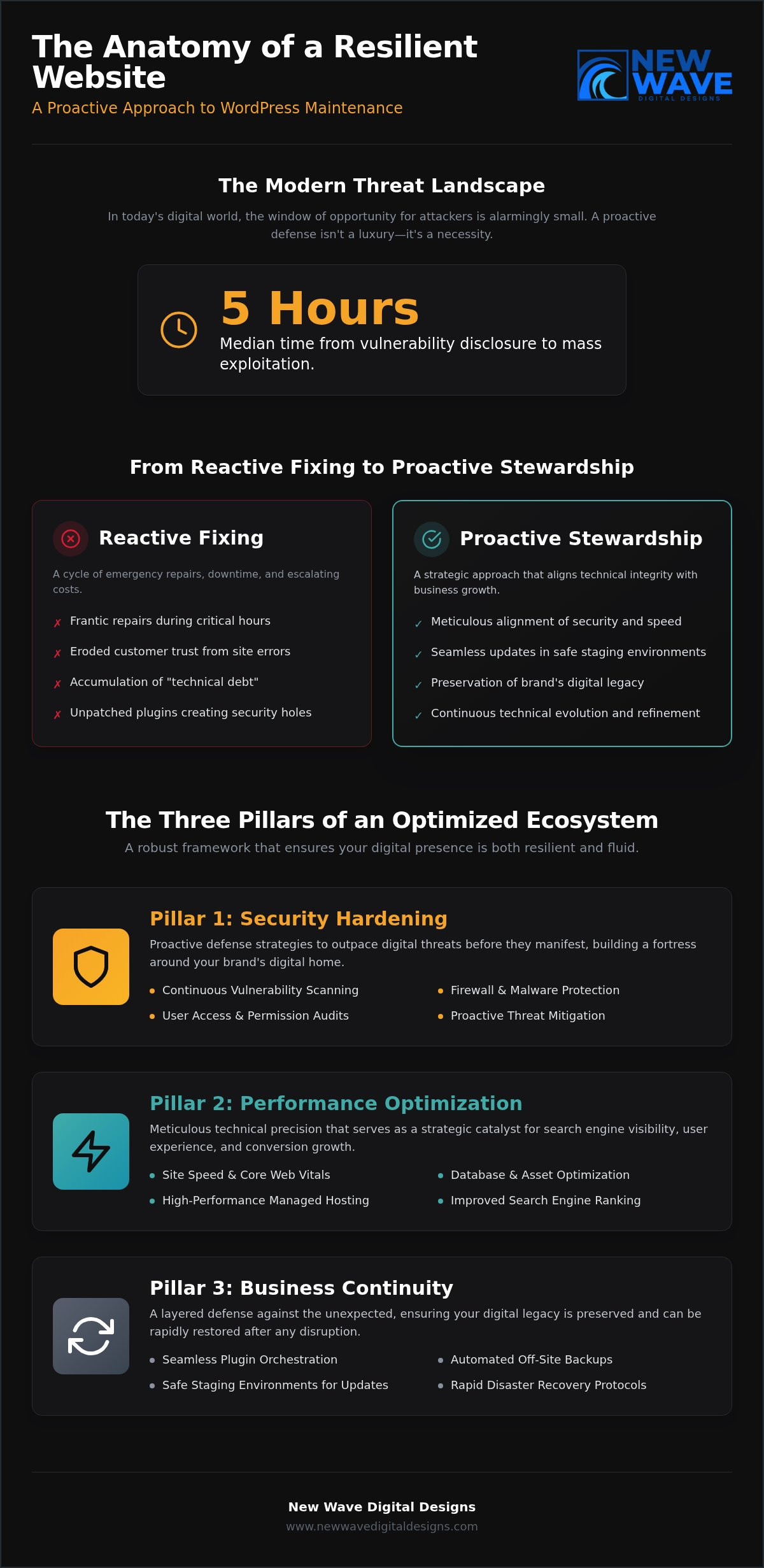
Who handles updates, hosting, and routine upkeep?

Separate platform infrastructure from site-level care. A provider may manage the underlying hosted environment, while the business still needs to maintain content, settings, accounts, and integrations. Self-hosted WordPress generally requires the site owner or a support team to coordinate more of the technical work.

  • Squarespace: The platform manages hosting and platform-level maintenance. The business remains responsible for site content, configuration, and reviewing whether the website continues to meet its needs.
  • WordPress.com: Hosting is part of the service, but plan features and responsibilities can vary. Review the current service details instead of assuming every setup includes the same management.
  • Self-hosted WordPress: Hosting must be arranged separately. Updates to WordPress, themes, and plugins, along with backups and security tasks, need an owner, a hosting arrangement, or a maintenance partner.

Plugins, themes, integrations, and custom development can add capabilities to a self-hosted site, but they also create components that need to stay compatible and maintained. A maintenance partner can support a WordPress or Squarespace site with ongoing care, hosting, or security services. Support can clarify responsibilities and reduce the technical burden, but no platform or maintenance arrangement makes routine attention unnecessary.

Platform features, plan inclusions, and service arrangements can change. Before building or migrating in 2026, review the current platform documentation and spell out who is responsible for hosting, updates, backups, and site-level changes. A clear handoff prevents important tasks from becoming assumptions. Custom website design and ongoing support can help align the platform setup with how your business operates.

Compare Squarespace vs. WordPress on Design, SEO, Content, and Growth

A useful comparison looks beyond headline features. Consider how you’ll shape the site, publish and refine content, connect the tools your business uses, and manage changes over time. In squarespace vs wordpress for small business, those day-to-day realities matter as much as the design you launch with.

Criteria Squarespace considerations WordPress considerations Best-fit signal
Design and editing Visual editing and designed starting points support a cohesive look; layouts can be tailored within the platform’s framework. Block-based editing, themes, and development options offer different ways to shape pages, depending on the setup. Choose the workflow your team can confidently use to maintain the brand experience.
Content and search Built-in tools support common site and SEO tasks; content organization and customization follow the platform’s capabilities. Content workflows and SEO controls can be extended through the chosen configuration, including plugins on self-hosted sites. Match your publishing rhythm and optimization needs to the tools you’ll actually use.
Extensions and integrations Available connections and features depend on the platform and its current offerings. Extensions can broaden functionality, while each added component brings setup and maintenance considerations. List essential integrations first, then assess how they fit the specific setup.
Future changes A more unified environment can suit businesses whose needs fit its available features. More choice in structure and development can support tailored requirements, with added decisions to manage. Consider likely changes, not hypothetical complexity.

Which platform fits your content and search strategy?

Neither platform guarantees stronger search rankings. Results depend on useful content, sound technical execution, and consistent optimization, including clear page structure and relevant internal links. Squarespace provides built-in SEO tools for common needs, while WordPress setups can offer more granular options through plugins and configuration. Consider how your team plans, publishes, and improves pages, and whether it can sustain that work. Regular website maintenance services can help keep content and site elements cared for over time.

How should design needs and future growth affect the comparison?

Start with the visual identity and functionality your business genuinely needs. A service firm may need polished pages and a clear enquiry path; an online shop may need room to manage products and refine the customer journey. Both platforms support design work, but custom requirements, integrations, and editing preferences can affect the best fit. Map the next plausible stage of growth, then weigh each platform’s capabilities against the time and support available to manage them.

For a more precise decision, assess the specific platform configuration rather than relying on broad labels. A carefully designed site can bring structure, content, and function into alignment on either platform. The strongest choice is the one your business can operate well as its needs evolve.

Squarespace vs. WordPress for Small Business: How to Choose in 2026

A Practical Squarespace vs. WordPress Decision Framework for Small Businesses

Turn the platform choice into a sequence of practical decisions, not a contest over which system is universally better. For squarespace vs wordpress for small business, begin with what the website must do, then weigh its capabilities against the time and support available to care for it.

  1. Define the goal. Decide whether the site should explain services, publish regularly, collect enquiries, take bookings, or support transactions. Choose one primary goal to guide the structure.
  2. Map required functions. List the essentials for launch, such as enquiry forms, a blog, a booking flow, or an online store. Separate these from features that would be appealing but can wait.
  3. Assess maintenance capacity. Identify who will create pages, publish updates, review integrations, and handle technical upkeep. Consider the time and expertise actually available, not an ideal future arrangement.
  4. Choose the platform model. Compare your requirements with each platform’s current capabilities, editing workflow, and operational responsibilities. Select the setup that meets your essentials without adding complexity you can’t support.

Match platform requirements to your business model

A service business focused on explaining its offer and receiving enquiries may value a clear, manageable site. A frequent publisher should consider how easily the team can create, organize, and refresh content. A business with custom requirements may value more control over structure or development, provided someone can manage that added flexibility. These are useful starting profiles, not fixed platform prescriptions.

Quick scorecard: Write a short answer in each category before comparing platforms.

  • Must-haves: What must work at launch for the website to serve customers?
  • Nice-to-haves: Which features could wait until there’s a clear reason to add them?
  • Ownership needs: Who controls the domain, content, accounts, and key site decisions?
  • Available support: Who can take responsibility for publishing, technical upkeep, and changes?

Plan for ownership, maintenance, and a future platform change

Before committing, assign recurring tasks to a person or support partner. Include content edits, security practices, backups, and technical updates in the plan, with responsibilities suited to the chosen setup. If a migration may be needed later, record where the domain is managed and organize content and media files. Plan redirects and review what can move; designs and functions may need to be rebuilt rather than transferred unchanged.

Use this pre-build checklist to make the handoff clearer:

  • Content: Gather page copy, images, service details, and publishing priorities.
  • Domain: Record account access and who is responsible for domain settings.
  • Integrations: List essential connected tools and the role each one serves.
  • Accessibility: Review readable text, meaningful headings, image descriptions, and keyboard-friendly navigation.
  • Launch: Assign responsibility for reviewing pages, testing key tasks, and managing post-launch updates.

A considered plan connects platform choice to the realities of ownership. Plan a custom Squarespace or WordPress website around your business goals and available support.

Turn Your Platform Decision Into a Thoughtful Small-Business Website

A platform decision becomes useful when it shapes a website around the business, not just its software. A considered discovery process connects your goals, brand, content, and operational capacity to a practical choice between Squarespace and WordPress. New Wave Digital Designs creates custom websites on both platforms, bringing design and technical planning together so the structure serves the way your business works.

What a platform-aware design process should address

Begin with the brand’s character and the actions visitors need to take. A clear user journey, responsive layouts, and well-organized content help turn visual identity into a site people can use across devices. Project requirements then inform the platform: a focused service site may need a different setup from one with specialized features, complex integrations, or distinct content workflows. For a tailored Squarespace approach, explore custom Squarespace website design.

The squarespace vs wordpress for small business decision shouldn’t stop at launch-day appearance. A strong build also considers how pages will be edited, how new content will fit the site, and who will manage changes. For WordPress, that may include planning the hosting and extensions that support the requirements. For Squarespace, it means shaping the available tools and design framework around the business. Either way, deliberate design can make the site feel cohesive without losing sight of its purpose.

Build for launch and the work that follows

Launch planning brings together content, functionality, and ownership. Prepare page copy and media, review navigation, test key interactions, and clarify who is responsible for routine edits after the site goes live. A clear handoff gives the business a workable path from launch into daily use, whether the owner updates content directly or works with ongoing support.

Care continues after launch. Website maintenance and support can help keep site elements current and functional, while managed hosting and security services address important operational needs. The right arrangement depends on the platform and agreed responsibilities. A thoughtful plan doesn’t remove every technical consideration; it makes ownership clearer and gives the site a considered foundation for future changes.

  • Before launch: Confirm the site’s content, navigation, forms, and other essential functions.
  • At handoff: Document account access and establish who handles content edits and technical tasks.
  • After launch: Review the site as business needs change, and plan updates rather than allowing small issues to accumulate.

New Wave Digital Designs brings custom Squarespace and WordPress design together with website maintenance, hosting, and security support. Explore a website design partnership to shape a website around your goals and the way you’ll care for it.

Set Your Website Up for Its Next Chapter

Turn your platform shortlist into a clear project brief. Note what visitors should understand, what action you hope they’ll take, and what your team can comfortably manage. Then consider how you’ll recognize when the site needs to change: a new service, a shift in your audience, or a different way of working may call for fresh content or functionality.

The decision in squarespace vs wordpress for small business doesn’t need to anticipate every possibility. It should give your business a considered foundation now, with room to reassess priorities as they develop. A thoughtful design partnership can translate those priorities into a digital experience that feels true to your brand and practical to manage.

New Wave Digital Designs creates custom websites on Squarespace and WordPress, with website maintenance, hosting, and security support for the work that continues after launch. Explore a website design partnership to shape a site around your business’s next chapter.

Frequently Asked Questions

Is Squarespace or WordPress easier for a small business to manage?

Squarespace’s managed environment can simplify some routine platform responsibilities, while WordPress management varies with the setup. For squarespace vs wordpress for small business, consider whether you’re using WordPress.com or self-hosted WordPress, how comfortable you are managing site administration, and whether maintenance support is available. Updating a service page, for example, is different from handling a plugin conflict or hosting issue. Neither platform is effortless, and ease depends on your site and support plan.

Can a small business rank on Google with Squarespace?

Yes, a Squarespace site can support search visibility, but no platform guarantees a place in search results. Rankings depend on useful, relevant content, sound technical implementation, and ongoing SEO work. A service business, for example, can build focused pages that explain its services clearly and answer customer questions. Those pages still need to be maintained and improved over time. Platform choice alone doesn’t determine search performance, so set realistic goals and assess results regularly.

Is WordPress.com the same as WordPress.org?

No. WordPress.com is a hosted service, while WordPress.org distributes WordPress software commonly used with separate hosting. That difference affects how much control you have and who handles hosting and maintenance tasks. Details can also depend on the specific plan or hosting arrangement. If a proposal or comparison simply says “WordPress,” clarify which model it means before assessing features, costs, or responsibilities. The distinction can change what your business needs to manage.

Can I move a Squarespace website to WordPress without losing SEO?

A careful migration can preserve important search signals, but it can’t guarantee unchanged rankings. Before moving, document existing URLs and plan redirects for pages whose addresses will change. Carry over relevant metadata and content, then review internal links and test that key pages work on the new site. Some platform-specific features or design elements may need rebuilding. After launch, check for broken links, missing pages, and indexing issues so you can address problems promptly.

What happens to my website if I stop using Squarespace?

Your website relies on an active Squarespace account, so cancelling may affect its availability and included services under the platform’s current terms. Before making changes, review those terms and plan what happens to your domain, content, and files you may need. Squarespace exports may not include every content type or site element, so don’t assume the full site will transfer intact. Make an inventory of essential pages and assets before you cancel or begin a migration.

Do I need a developer to run a WordPress website?

Not necessarily. Some owners can handle routine publishing, such as adding an article or updating a page, without developer help. Technical setup, custom functionality, troubleshooting, or ongoing maintenance may call for specialist support, depending on your skills and site configuration. Editing content is separate from managing hosting, security practices, updates, and backups. Decide who owns each responsibility before launch, so a task doesn’t fall through simply because the site appears easy to edit.

Website Designer: How to Find the Right Fit for Your Business

What if your website looked polished but still left visitors unsure what to do next? Choosing a website designer is about more than colours and layouts. The right design connects your brand promise to a useful digital experience, giving each page a clear purpose and helping visitors take the next step.

It’s understandable to feel uncertain about which platform or design approach will suit your business. A site built to sell products has different needs from one designed to introduce services, and visual appeal alone won’t make either effective. Start with what visitors need to find and do, then consider how the site’s structure, features, and visual style can support those needs.

In this guide, you’ll learn what a designer contributes, how discovery and platform selection shape a project, and what to prepare before work begins. You’ll also see how Shopify, WordPress, and Squarespace can serve different website needs. New Wave Digital Designs creates responsive, brand-aligned websites for these platforms, bringing business goals, design, and functionality into one considered experience.

Key Takeaways

  • A website designer shapes a site’s structure and visual experience around its audience, brand, and business purpose.
  • A clear sequence from discovery through launch preparation helps turn business goals into practical design decisions.
  • Shopify, WordPress, and Squarespace suit different website purposes, so match the platform to the functionality your business needs.
  • Gathering goals, audience insights, brand assets, content, and feature priorities gives your project a stronger foundation.
  • Plan for ongoing website care alongside the initial design to support your site as your business evolves.

What Does a Website Designer Do for a Business?

A business website has two jobs: represent the organisation clearly and help its audience find what they need. Meeting both goals takes more than attractive colours or striking imagery. A website designer shapes the visual experience and site structure around the website’s purpose, bringing brand identity, usability, and business objectives together.

A website designer plans how a site looks, feels, and guides visitors, aligning its visual design and page structure with the brand, audience, and goals. Design and development are related but distinct. Design establishes the layout, visual direction, and user pathways; development builds those plans into a functioning website. Depending on the project, different specialists may handle these disciplines, or they may be coordinated as part of one process. Both matter: a considered design needs sound implementation, while technical functionality needs an intuitive experience around it. For a broader overview of the field, see What is web design?

How website design connects brand identity and user experience

Visual choices create a first impression before visitors read every word. Typography, colour, imagery, spacing, and graphic details can express whether a business feels warm, refined, energetic, or practical. When these elements reflect the brand’s character, the website feels like a cohesive introduction rather than a collection of unrelated pages.

Usability gives that identity a clear path to follow. Descriptive navigation labels, well-organised content, and visible headings help visitors locate services, understand what the business offers, and find a relevant next step. A clear page hierarchy gives important information prominence without crowding out useful details.

Responsive design adapts the presentation to different screen sizes, so layouts, text, and navigation remain usable on phones, tablets, and desktop screens. The goal isn’t simply to shrink a desktop page. It’s to preserve clarity and ease of use as the available space changes.

What a professionally designed website can support

A website’s structure should make intended actions easy to understand. Depending on the business, that might mean exploring services, viewing product information, submitting an enquiry, or completing a purchase. Page layouts can guide visitors towards these actions by placing relevant information and prompts at useful points in their journey.

Consistency matters, too. Shared visual patterns across pages help visitors recognise the brand and understand how to move through the site. A service page, for example, can use the same heading styles and navigation as the home page while presenting information tailored to that service. This creates a coherent experience without making every page identical.

Design is a foundation, not a promise of business results. A polished, easy-to-use website can support business goals, but it can’t guarantee traffic or sales on its own. Performance also depends on factors such as the offer, content, audience reach, and ongoing marketing. New Wave Digital Designs creates responsive, brand-aligned websites that bring visual craft and practical purpose into one considered experience.

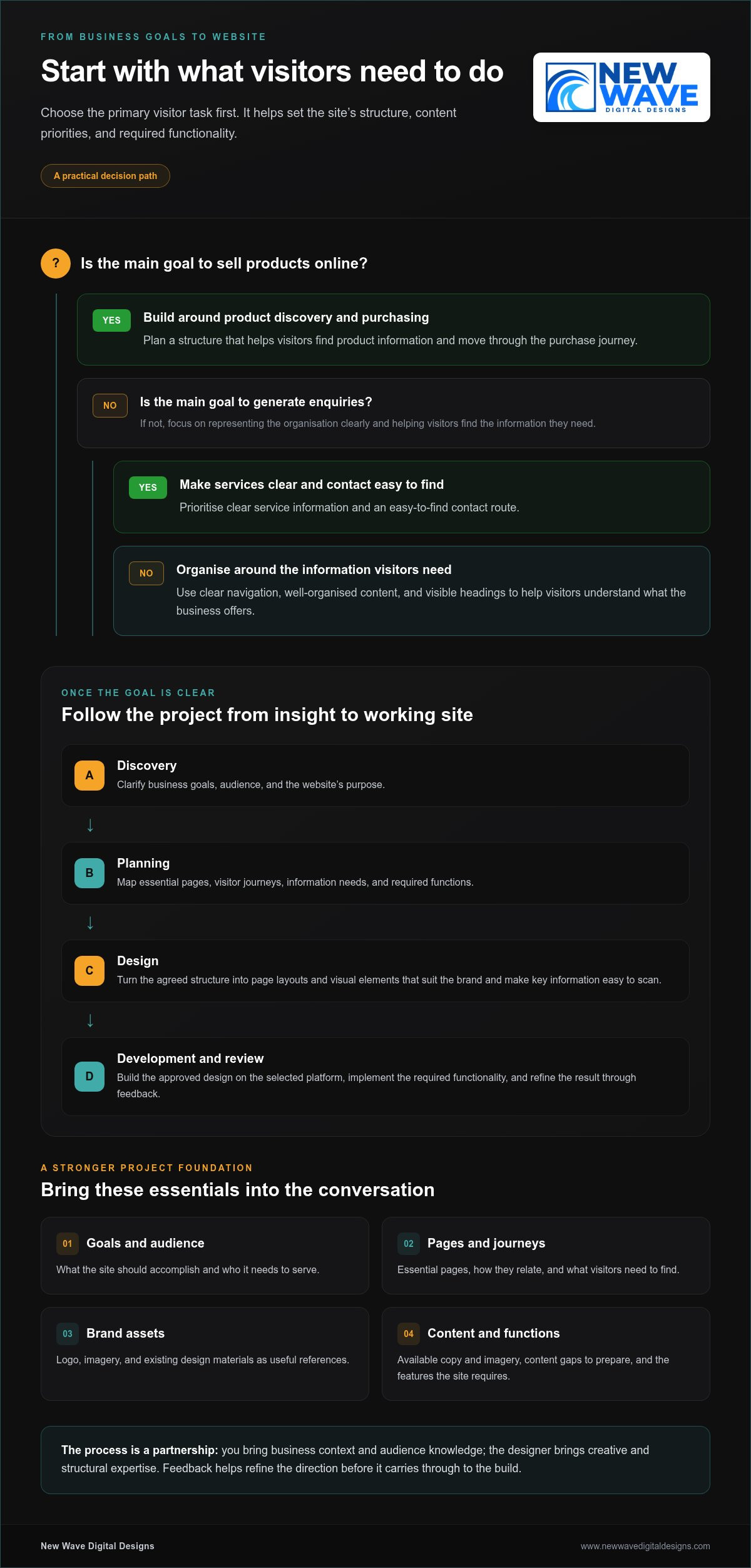
How a Website Designer Turns Business Goals into a Website

A successful website project moves from understanding the business to preparing a practical, considered launch. The website designer brings structure to that journey, while you contribute knowledge of your business, customers, and priorities. The process works best as a partnership: creative direction takes shape through informed decisions and useful feedback, not guesswork.

Discovery clarifies the goals and audience; planning turns those insights into a site structure, and design and development bring that structure to life. Each stage informs the next, helping the finished website reflect the agreed direction.

Discovery and planning establish the design direction

Early conversations clarify what the website needs to accomplish and who it needs to serve. A business focused on enquiries may need clear service information and an easy-to-find contact route, while an online shop needs a structure that supports product discovery and purchasing. These goals help set priorities before visual decisions begin.

Next, the project takes shape through a plan for essential pages and visitor journeys. The designer considers what information visitors need, how pages relate to one another, and which functions the site requires. Brand assets, such as a logo, imagery, and existing design materials, provide useful reference points. Content matters just as much: available copy and imagery can influence page layouts, while gaps show what needs to be prepared.

At this stage, collaboration is an exchange. You bring business context and audience knowledge; the designer brings creative and structural expertise. Resources such as Smashing Magazine for web designers also explore design, user experience, and development considerations that inform thoughtful digital work.

Design, development, and review bring the concept to life

Once the direction and structure are agreed, design translates the plan into page layouts and visual elements. The goal is to create a coherent system that suits the brand and makes key information easy to scan. Feedback at this point helps refine the visual direction before it carries through to the build.

Development applies the approved design to the selected platform and implements the required functionality. This is where layouts become working pages, navigation connects the site’s sections, and features are configured for their intended purpose. The build should reflect the original plan rather than introduce unnecessary complexity.

Review brings the details into focus. Assess whether the pages communicate clearly, whether the content is in place, and whether the experience matches the agreed direction. Specific feedback, such as pointing out a missing detail or a confusing step, gives the designer a clear basis for refinement.

  1. Discovery: Clarify business objectives, audience, and project priorities.
  2. Planning: Map pages, visitor journeys, content, and required functionality.
  3. Design: Develop layouts and visual direction around the agreed plan.
  4. Development: Build the website on the chosen platform and apply its functions.
  5. Review: Refine the site using feedback on its content and experience.
  6. Launch preparation: Organise final checks and prepare the approved site for launch.

For a project grounded in your business goals, explore website design with New Wave Digital Designs, where platform, brand, and purpose come together in a responsive site.

Which Website Platform Fits Your Business and Website Goals?

The right platform is the one that supports what your website needs to do, not simply the one receiving the most attention. An online store, a content-rich website, and a brand-focused business site can have different requirements. Consider what content you’ll publish, which features visitors need, and how you expect the site to develop. These priorities give a website designer a practical foundation for recommending a platform and shaping its design.

When Shopify, WordPress, or Squarespace may suit the project

Each platform can support different kinds of projects, but the best fit depends on your needs. Shopify is a relevant option for businesses planning to sell products online. WordPress and Squarespace can also suit business websites, with the choice shaped by the site’s content, functionality, and presentation goals.

Platform Strength and typical fit Planning consideration
Shopify Designed for businesses building an online store. Plan how products, store content, and customer actions should be organised.
WordPress An option for business websites with content and functionality needs to define. Clarify the kinds of pages, content, and features the site must support.
Squarespace An option for businesses prioritising brand presentation and a cohesive website. Consider how the site’s content and required features fit the design direction.

For an online shop, decisions about product presentation and the path to purchase should inform the site’s structure from the outset. Explore this custom Shopify store design guide for more context on designing around ecommerce needs. For a brand-led site, this custom Squarespace website design guide offers a closer look at shaping a distinctive presentation.

How design requirements shape the platform decision

Start with the work your website must perform. Product sales call for planning around a shopping experience; frequent publishing calls for a clear content structure; a site centred on introducing a brand needs a deliberate visual and informational hierarchy. These needs can overlap, so list essential functions rather than choosing based on a single feature or trend.

Think beyond launch, too. The pages and capabilities you need now, along with directions you may want to take the site later, can influence platform fit. A clear set of priorities helps avoid choosing a design that looks appealing but makes important tasks awkward or leaves future plans out of view. Platform selection shouldn’t rest on blanket claims about which option is best for every business or inherently superior for SEO.

New Wave Digital Designs creates responsive, brand-aligned websites using Shopify, WordPress, and Squarespace. The platform decision can be considered alongside the site’s purpose, required functionality, and visual direction, aligning the technical foundation with the creative approach.

Website Designer: How to Find the Right Fit for Your Business

What Should You Prepare Before Working With a Website Designer?

A clear starting point helps turn your business knowledge into a focused website plan. You don’t need every word perfected or every creative decision made before beginning. Sharing what the site needs to achieve, who it should serve, and what materials you already have gives your website designer a stronger basis for structural and visual choices.

Clarify your goals, audience, and essential website functions

Begin with the website’s main purpose. Is it meant to introduce your services, support online sales, or make it easier for visitors to enquire? Note the key actions you want visitors to take, then identify the audiences the site must serve and what each group needs to understand or do.

Separate launch essentials from possible later additions. This keeps the initial design centred on the most important visitor needs while giving future ideas a place in the plan.

Gather content and visual references for a stronger collaboration

Collect materials that can give the project a clear foundation: existing brand assets, photography, business details, and website copy you’re ready to share. If some content is still being developed, identify what’s missing so page layouts can account for it instead of treating placeholders as final decisions.

Examples of websites or other digital experiences can also help communicate qualities you admire, such as calm navigation, expressive typography, or an editorial feel. Treat these as conversation starters, not designs to reproduce. Explain what appeals to you, and the designer can translate that direction into a distinctive fit for your brand.

Before the project begins, gather:

  • Goals: The site’s primary purpose and the outcomes it should support.
  • Audience: The people the website needs to serve and what they need to find.
  • Brand assets: Logos, colours, photography, and other existing visual materials.
  • Content: Available copy, business information, and a note of what still needs to be created.
  • Functions: Essential features for launch, plus enhancements that can wait.
  • References: Examples that illustrate the mood or experience you want to convey, with notes on why they work for you.

These priorities help shape decisions without requiring you to arrive with a finished blueprint. For smoother collaboration, consolidate feedback from everyone involved before sharing it. A single, considered set of comments makes it easier to distinguish essential changes from personal preferences and keeps creative discussion centred on the agreed goals.

Ready to turn your priorities and materials into a considered website plan? Start planning your website design with New Wave Digital Designs.

Build Your Website With a Designer Who Connects Craft and Purpose

A website becomes a more useful business asset when its visual craft is guided by a clear purpose. The decisions explored in this guide form a practical framework: define what the site needs to achieve, select a platform that suits its functions, prepare content and brand materials, and plan how the site will be cared for after launch.

That framework keeps creative choices connected to real needs. Instead of beginning with a design trend, a website designer can shape the structure and visual direction around your audience, brand, and priorities. The result is a more coherent foundation for the experience you want visitors to have.

Design and platform expertise for distinct business needs

New Wave Digital Designs creates responsive, brand-aligned websites for small and medium-sized businesses. Its design work spans Shopify, WordPress, and Squarespace, allowing the platform and visual approach to reflect each project’s purpose and required functionality.

A business preparing to sell products online may have different structural needs from one focused on sharing service information or presenting its brand. Those differences shape decisions about content, navigation, and how visitors move through the site. Tailoring design to the project brings business identity and practical use together rather than treating appearance as a separate layer.

Clear priorities make that collaboration more grounded. Knowing what visitors should find and do helps guide creative choices, while prepared content and brand assets give the design a meaningful starting point. It’s a partnership between your knowledge of the business and the designer’s experience shaping a cohesive digital presence.

Plan beyond launch with thoughtful website support

A website also needs consideration after it goes live. Maintenance, managed hosting, and security are relevant parts of ongoing site care, supporting the website as it continues to serve the business. Planning for these needs early makes post-launch responsibilities part of the wider website conversation, rather than an afterthought. For a closer look at ongoing care, explore the website maintenance services guide.

Visibility can be supported through distinct forms of marketing. Organic SEO focuses on building a site’s presence in unpaid search results, while paid search management uses campaigns on platforms such as Google Ads and Bing Ads. These services can complement a well-considered website, but they serve different roles and don’t guarantee traffic or sales.

Your next step can be simple: bring your goals, audience, and early ideas into a conversation, then work together to shape the right direction. Whether you’re planning a new site or rethinking an existing one, start a website design conversation with New Wave Digital Designs and turn your priorities into a considered project plan.

Give Your Next Website Idea a Clear Direction

Your next website project doesn’t need to begin with a perfect brief. It can start with a clear ambition: what you want your business to communicate, how you hope visitors will engage, and what you want the site to make possible. From there, a website designer can help turn those intentions into a considered digital experience.

New Wave Digital Designs brings creative direction and practical planning together, with website design for Shopify, WordPress, and Squarespace, plus responsive experiences tailored to business needs. As your needs evolve, related maintenance, hosting, security, and digital marketing services can support the site beyond its initial design. Each element has a distinct role, shaped around your priorities rather than assumed results.

Bring your early ideas, questions, or established plans to the conversation. Let’s shape a website around your vision and business goals. Your next step can be the beginning of a more purposeful online presence.

Frequently Asked Questions

What does a website designer do?

A website designer shapes a site’s visual identity, page structure, and visitor experience around business goals. For example, a service business may need pages that make its offerings easy to compare, while a shop may prioritise product browsing. Design is distinct from development, which builds the site’s technical functionality, though project roles can connect. The scope depends on the site’s needs, platform, and agreed project.

Is a website designer the same as a web developer?

No. A designer usually focuses on visual direction, layout, and usability, while a developer implements functionality and builds the website. The responsibilities can overlap, or specialists can coordinate across the project. Both perspectives matter: a visually strong concept needs thoughtful technical execution, and working features need a clear, usable interface. The project scope determines how these roles are divided and brought together.

How much does it cost to hire a website designer?

The cost depends on the project’s scope, platform, content needs, functionality, and design requirements. A site with a small set of pages and straightforward needs differs from one requiring extensive content or specialised features. Before discussing scope, identify the outcomes that matter most and which functions are essential. This gives the project a clearer basis, so the proposed work can reflect your priorities rather than assumptions.

How long does it take to design and build a website?

There isn’t one timeline that fits every website project. The duration depends on the scope, required functionality, content readiness, and how much review the work needs. You can help keep decisions focused by defining priorities early and gathering feedback from all decision-makers before sharing it. If copy, images, or approvals are still in progress, include those dependencies in the project plan.

Can a website designer improve an existing website without rebuilding it?

Sometimes a project can focus on targeted refinements, such as improving page layouts, visual consistency, or a confusing visitor journey. Other sites may need broader redevelopment to support their goals or required features. The right approach depends on the current platform, the site’s condition, and what you want to change. Reviewing those factors helps determine whether focused updates or more substantial development makes sense.

What should I provide to a website designer before a project begins?

Share your business objectives, audience insights, brand materials, existing content, required features, and examples of digital experiences you like. Add a brief note about what appeals to you in each reference, such as its tone or navigation, rather than expecting a design to be copied. These inputs help set priorities and creative direction. As planning develops, the project team can identify any additional content or decisions needed.

Do I need website maintenance after my new site launches?

A website may need ongoing technical care after launch, depending on its platform and operational needs. Maintenance, hosting, and security are separate considerations from the initial design: they relate to caring for the live site over time. New Wave Digital Designs provides website maintenance, managed hosting, and security services. The right support depends on the website and how the business plans to manage it after launch.

WordPress Maintenance vs. Self-Hosting: Which Is Right for You?

Choosing between wordpress maintenance vs self hosting can seem like a choice between doing everything yourself and handing over your site. The distinction is more specific: hosting determines where your WordPress site runs, while maintenance covers the work of keeping it healthy. Self-hosting doesn’t mean you have to manage every technical task alone.

It’s worth weighing the control of managing your own setup against the time and ongoing responsibility it requires. Updates, backups, security, and troubleshooting need clear owners, whether you handle them yourself or delegate them. If those roles aren’t clear, you may assume your hosting plan covers work that is actually your responsibility.

This guide separates hosting from maintenance, compares the practical responsibilities involved, and explains how managed hosting and ongoing support can work together. Use the guidance to assess the control, time, and reliability your setup requires, then choose an approach that suits your website and the attention you can give it.

Key Takeaways

  • Hosting and maintenance address different needs: hosting provides the environment for your site, while maintenance covers its ongoing care.
  • When comparing wordpress maintenance vs self hosting, focus on who owns updates, backups, security, and troubleshooting rather than relying on labels alone.
  • Self-management gives you direct oversight, but requires consistent time and attention for routine upkeep and unexpected issues.
  • Use your site’s importance, complexity, and your available time to decide which responsibilities you can realistically manage.
  • You can keep a self-hosted WordPress site and delegate technical upkeep through managed hosting, security, and maintenance support.

WordPress Maintenance vs. Self-Hosting: Understand the Difference First

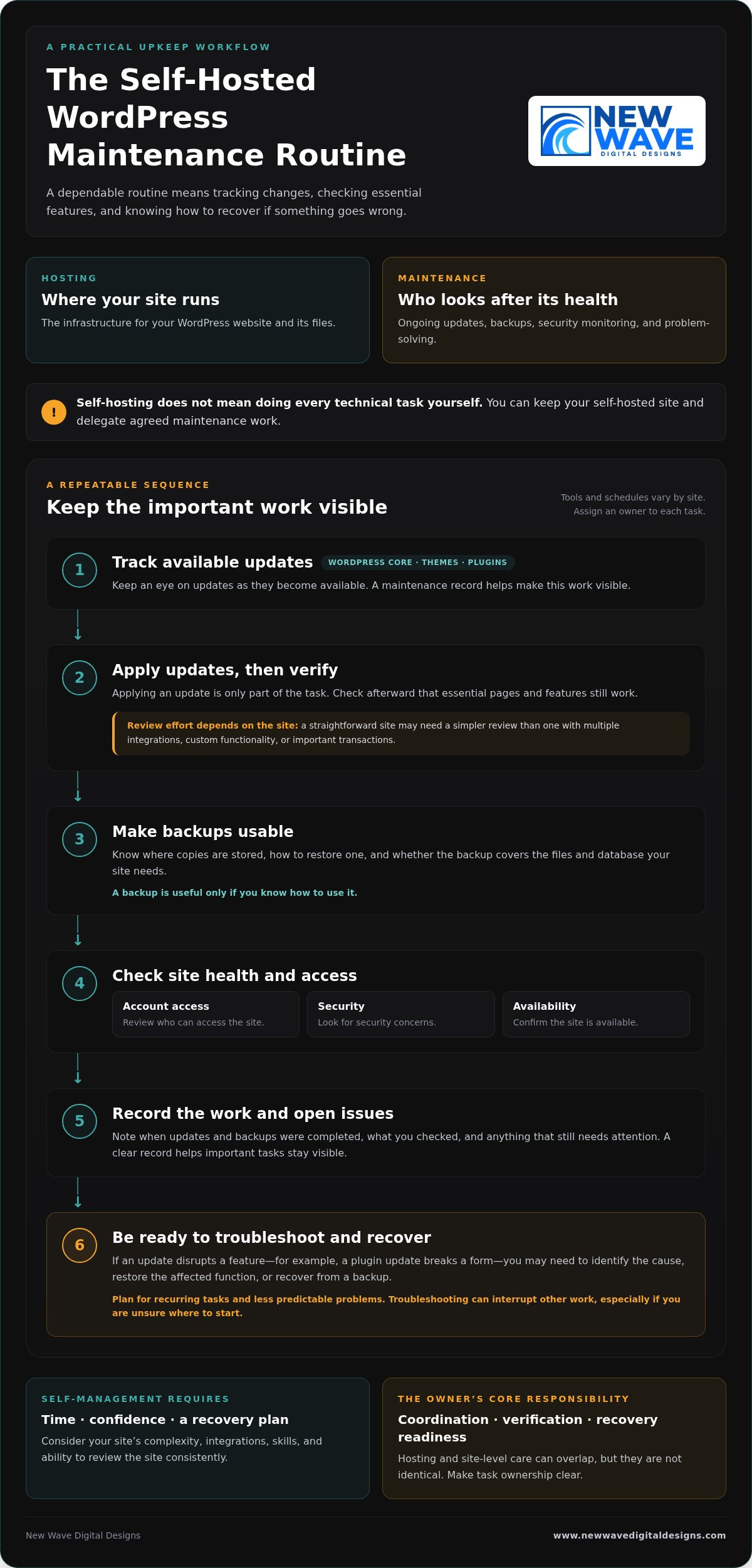
“Self-hosting” and “self-maintenance” can sound like two sides of the same choice, but they describe different decisions. Hosting is the infrastructure where your WordPress website and its files run. Maintenance is the ongoing work of keeping the site updated, backed up, monitored, and functioning.

Hosting determines where your site operates; maintenance determines who looks after its ongoing health. That distinction is central to wordpress maintenance vs self hosting. A self-hosted WordPress site can still receive professional maintenance support, so self-hosting doesn’t automatically mean taking on every technical task yourself.

What does self-hosted WordPress mean?

With self-hosted WordPress, you use the WordPress software and arrange hosting separately. The hosting environment can be configured and managed in different ways. Depending on the arrangement, you may have access to some infrastructure settings without personally administering every server detail.

The broader idea of hosting your own online services also involves trade-offs around control and upkeep, as described in Self-hosting (network). For a WordPress site, the practical question is which parts your hosting arrangement handles and which remain your responsibility.

What does WordPress maintenance include?

Maintenance covers care of the WordPress site itself: applying updates, creating or checking backups, monitoring security, and resolving problems. It can also involve investigating an update that disrupts a form or another site feature. These are recurring responsibilities, although the tools and schedule may vary by site.

Hosting care and site-level care can overlap, but they aren’t identical. A hosting service may look after parts of the infrastructure, while WordPress updates, plugin compatibility, and site recovery need separate attention. If you manage the site yourself, you’re responsible for the tasks assigned to you. With professional maintenance support, you can delegate agreed technical upkeep while retaining your WordPress website.

To see where responsibilities sit, list who handles hosting, updates, backups, security, and troubleshooting. Assign an owner to each task. A clear division makes it easier to spot gaps before a routine task or unexpected issue affects the site.

What You Take On When You Maintain a Self-Hosted WordPress Site

Managing maintenance yourself is less about a one-time overhaul and more about following a dependable routine. The exact tools and schedule depend on your site, but someone needs to track changes, check that key features still work, and know what to do if something goes wrong. This responsibility can fit into your routine when the site is simple and you have the time and confidence to manage it.

Which tasks need regular attention?

WordPress core software, themes, and plugins all need attention as updates become available. Applying an update is only part of the task: check afterward that essential pages and features still work. A straightforward site may need a simpler review process than one with multiple integrations, custom functionality, or important transactions.

Backups are useful only if you know how to use them. Know where copies are stored, how to restore one, and whether the backup covers the files and database your site needs. Routine checks should also include reviewing account access, looking for security concerns, and confirming the site is available. These habits can help prevent a small oversight from becoming a larger interruption.

A maintenance record keeps the work visible. Note when updates and backups were completed, what you checked, and any issue that still needs attention. The goal isn’t to follow the same checklist on every site, but to make sure important tasks don’t fall through the cracks.

How much time and technical confidence does self-maintenance require?

The workload depends on your site’s complexity, integrations, and your existing skills. Routine checks may be manageable, but a failed update can take more than a quick review. For example, if a plugin update disrupts a form, you may need to identify the cause, restore the affected function, or recover from a backup. Troubleshooting can interrupt other work, especially if you’re unsure where to start.

Plan for both recurring tasks and less predictable problems. Ask yourself whether you can make time to review the site consistently and feel prepared to investigate an issue when it appears. Self-management isn’t just a question of technical ability; it also requires a workable plan for recovery.

The owner’s core responsibility is coordination, verification, and recovery readiness. If you’d rather delegate recurring technical upkeep while retaining your WordPress site, explore WordPress maintenance support as part of your site’s ongoing care.

Managed WordPress Maintenance vs. Self-Management: Compare the Trade-Offs

The choice isn’t simply control or convenience. Self-management gives you direct oversight of site upkeep, while professional maintenance support delegates agreed tasks. You can also retain a self-hosted WordPress site and have someone else manage its maintenance. For wordpress maintenance vs self hosting, treat hosting and support as separate decisions, then choose a balance that suits your site and capacity.

Responsibility Self-management Managed maintenance
Control You decide when and how to handle site-level tasks. You retain business and content decisions while delegating agreed technical work.
Routine workload You track and carry out updates and other upkeep. Defined recurring tasks are handled as part of the support arrangement.
Security You monitor relevant site settings and follow up on concerns. Security responsibilities depend on the support scope and hosting setup.
Backups You arrange backups and verify you can restore the site. Backup tasks may be delegated, but responsibilities and recovery processes should be clear.
Troubleshooting You investigate issues and coordinate any fixes. You have defined technical support for the issues covered by the arrangement.

The table is a guide, not a universal division of duties. Support arrangements differ, so establish who handles each task, especially backups, recovery, and problems involving both hosting infrastructure and the WordPress site.

When does self-management make sense?

Self-management can suit site owners with the time, technical confidence, and reliable routine to keep tasks moving. A simple site may have fewer moving parts than one with several integrations, but it still needs care. Direct oversight works best when you don’t just start updates and backups, but check that they completed and know how restoration works.

When can professional maintenance support be a better fit?

Delegating upkeep may suit businesses that would rather spend their time on customers, content, and operations. Defined support for WordPress updates, hosting, and security clarifies who handles recurring technical work. Be clear about the scope: managed support doesn’t guarantee that problems can’t happen, and it doesn’t automatically include every task a site might need.

Think of maintenance as a set of responsibilities, not a hosting label. You can keep control of your site’s direction and content while delegating recurring technical upkeep. That balance can make self-hosting practical without requiring you to manage every part of the site yourself.

WordPress Maintenance vs. Self-Hosting: Which Is Right for You?

Match WordPress Maintenance to Your Site and Capacity

The right maintenance arrangement should reflect what your website does and how much attention you can realistically give it. Use this process to assess your needs before deciding which tasks to manage yourself and which to delegate.

  1. Assess the site’s importance. Does it support sales, lead generation, customer enquiries, or essential daily operations? If a problem would disrupt an important business activity, make sure there’s a clear plan for maintenance and recovery.
  2. Consider its complexity. A site with custom features or several integrations may need more careful update testing and troubleshooting than a simpler site. Identify the features and connections your website depends on.
  3. Be honest about your capacity. Do you have the time and technical confidence to handle routine tasks and respond if an update causes an issue? Account for both regular upkeep and unexpected work.
  4. Identify what’s already covered. Review your hosting arrangement and support to understand who handles updates, backups, security checks, and recovery. Don’t assume a task is covered just because another technical service is in place.

Build a responsibility checklist before deciding

Write down each task and assign an owner. A checklist can reveal where work is being duplicated or overlooked:

  • Hosting and infrastructure: who manages the hosting account and related settings?
  • Updates: who applies updates, and who checks that important site features still work?
  • Backups: who creates them, verifies they’re usable, and knows how to restore the site?
  • Security: who monitors relevant site settings and follows up on concerns?
  • Recovery: who investigates a problem and coordinates the steps to resolve it?

Look for gaps in backup verification, update testing, or issue resolution. Assign tasks according to your actual capacity, not the assumption that you’ll find time later. Some owners prefer direct oversight of every task; others retain control of business and content decisions while delegating technical upkeep.

Revisit the checklist as your website and business evolve. A new integration, a shift toward online sales, or a change in your team can affect the site’s importance and support needs. The wordpress maintenance vs self hosting decision isn’t fixed for the life of a website; task ownership can change as your priorities do.

If you’d like professional help with recurring upkeep, explore WordPress maintenance support as part of your site’s ongoing care.

A Managed WordPress Maintenance Plan Can Keep Self-Hosting Practical

Choosing where your WordPress site is hosted doesn’t determine who maintains it. You can keep a self-hosted site and arrange professional help with its ongoing technical care. This makes wordpress maintenance vs self hosting less of an either-or decision: hosting provides the environment, while maintenance support helps keep the site’s technical foundation attended to.

Managed hosting and security services can complement WordPress maintenance, but they cover related, distinct responsibilities. Hosting and security support can address aspects of the environment your site runs on, while maintenance focuses on ongoing care of the WordPress site. A clear division prevents important tasks from being assumed rather than assigned.

What to expect from ongoing website support

Good maintenance means planned, recurring attention, not just a response to a visible fault. The support scope should make clear which tasks are handled, where your responsibilities remain, and how communication works when an issue needs attention. Clear ownership helps you understand how updates, security, backups, and troubleshooting fit together without assuming every support arrangement covers the same work.

This support doesn’t remove the need to make business and content decisions. It gives you a way to delegate technical upkeep while staying involved in your website’s direction.

Keep your WordPress site aligned with your business

A website changes as the business behind it changes. New content, added functionality, integrations, and shifting priorities can all affect the site’s technical needs. An approach that suited a simple information site may need to change if the website becomes central to enquiries, sales, or daily operations.

Review hosting, security, and maintenance responsibilities regularly. Confirm who owns each recurring task and how issues are handled, then adjust the arrangement when the site or your available time changes. Steady upkeep supports the website’s role over time, rather than treating maintenance as a one-off task.

New Wave Digital Designs provides WordPress website maintenance, managed hosting, and security support to help site owners delegate technical upkeep while retaining their WordPress website. Explore WordPress website maintenance services and take the next step toward support that fits your site’s needs.

Choose a WordPress Setup That Supports Your Next Step

Hosting and maintenance answer different questions: where your WordPress site runs, and who takes care of its ongoing technical needs. The choice in wordpress maintenance vs self hosting doesn’t have to be all or nothing. You can retain a self-hosted site while delegating recurring upkeep, or manage maintenance yourself if you have the time and confidence to do it consistently.

Start by matching responsibilities to your site’s importance, complexity, and your capacity. Make sure someone owns updates, backups, security, and recovery, then revisit the plan as your website and business evolve. A clear arrangement can help your site keep pace with changing needs without taking attention away from the work it supports.

New Wave Digital Designs provides ongoing website maintenance and technical support, with managed hosting and security services as part of its web support offering. Explore professional WordPress maintenance and support to find an approach suited to your site. With the right balance of oversight and support, you can move forward with greater clarity and confidence.

Frequently Asked Questions

Is WordPress maintenance the same as self-hosting?

No. Self-hosting describes where your WordPress site runs and how its hosting is arranged; maintenance is the ongoing care that keeps the site updated, backed up, monitored, and functioning. You can self-host and maintain the site yourself, or delegate selected tasks to professional support. Keeping these decisions separate makes the wordpress maintenance vs self hosting comparison clearer and helps you identify who is responsible for each part of your site’s care.

Can I use managed WordPress maintenance with self-hosted WordPress?

Yes. Hosting and maintenance are separate choices, so you can arrange hosting for your WordPress site and have a professional handle agreed upkeep. That support might include updates, backups, or security tasks, depending on its scope. Make responsibilities clear across hosting infrastructure, WordPress maintenance, and site recovery. You can delegate technical work while retaining decisions about your website’s content, functionality, and business direction.

What happens if I do not maintain my WordPress site?

Neglected updates, unverified backups, and unattended issues can increase the risk of compatibility or security problems. The impact depends on your site’s software, plugins, themes, and setup, so it won’t be the same for every website. Assign an owner to routine updates, backup checks, and issue monitoring so important tasks aren’t left to assumption or postponed indefinitely.

Is self-hosted WordPress cheaper than managed maintenance?

There’s no universal answer because hosting and maintenance are different responsibilities, and the total depends on what your setup includes. Compare hosting, any tools or support you need, and the time you’ll spend managing the site. If you maintain it yourself, account for the effort involved in checking updates, verifying backups, and resolving problems. A lower direct expense may still require more of your time and attention.

How often should WordPress be maintained?

WordPress maintenance is ongoing, but the right schedule depends on your website, its themes and plugins, and how the site supports your business. Review available updates regularly, verify that backups are usable, and monitor for security or availability concerns. Establish a repeatable routine that suits your site rather than relying on a single annual check. Most importantly, make sure a specific person or support arrangement owns the tasks.

Can I switch from self-managing WordPress to professional maintenance later?

Yes. You can move from self-management to professional support as your site or available time changes. Before handing over recurring tasks, organize access details, hosting information, a list of themes and plugins, backup procedures, and known issues. This gives the person handling maintenance a clearer picture of the site and helps identify what needs attention. Agreeing on task ownership also helps keep ongoing work from falling through the cracks.

Does managed WordPress maintenance mean I lose control of my website?

Not necessarily. Delegating technical upkeep doesn’t automatically transfer ownership of your website or control over its content. A well-defined arrangement distinguishes maintenance tasks from business decisions, such as what to publish or how the site should serve customers. Clarify access, responsibilities, and how technical changes are communicated. You can remain involved in your site’s direction while assigning recurring technical work to professional support.

Professional Web Development: From Brand Vision to Business Growth

People searching for “professional web development” may be comparing more than visual styles. Strong web development connects your brand, platform, and customer journey to the goals your website needs to support. The key is turning your vision into a site that works for your customers and for the business behind it, an approach championed by New Wave Digital Designs.

It’s understandable to feel unsure where to begin. Your brand and priorities may be clear, yet translating them into a site structure, choosing between Shopify, WordPress, and Squarespace, and planning for future growth can feel less certain. This article explains the main decisions involved in professional web development, from shaping a responsive, brand-aligned experience to selecting a platform that fits your needs. You’ll also learn how thoughtful design, technical foundations, and ongoing care can support a cohesive customer journey shaped around your business goals.

Key Takeaways

  • Professional web development connects brand strategy, useful content, and reliable functionality to create a website that serves visitors and business goals.
  • Compare Shopify, WordPress, and Squarespace by your commerce needs, content plans, and preferred approach to site management.
  • Evaluate web development beyond visual polish by considering the process, platform fit, mobile experience, security, and ongoing support.
  • A clear process from discovery through testing and launch helps shape the site structure and resolve key decisions before implementation.
  • Plan for maintenance and hosting after launch so your website can be reviewed, updated, and supported as your business evolves.

What Professional Web Development Builds Beyond a Good-Looking Website

A polished visual identity can invite visitors in. Professional web development gives that experience structure by bringing strategy, design, implementation, testing, and continued technical care together. A well-built website translates a brand into a usable, consistent digital experience shaped around real business needs.

Design and development are closely connected, but serve distinct roles. Design shapes the site’s visual language and how information is presented. Development turns that direction into working pages, navigation, and functionality. The broader discipline of Web development includes both the work visitors see and the technical systems that make a website function.

What is included in professional web development?

The work often begins with discovery: understanding the business, its audience, and what visitors need to do. Information architecture then organizes pages and content into a clear hierarchy. Visual design establishes the brand’s look, and responsive implementation adapts layouts and functions to different screen sizes. Quality assurance checks that key pages, links, and features work as intended.

Each decision should reflect the customer journey. Someone looking for service details may need clear descriptions and an easy next step. A shopper may need useful product categories, informative product pages, and a straightforward route to purchase. Project scope depends on the business, platform, content, and required functionality, so the plan should fit the actual needs rather than follow a one-size-fits-all template.

How does a professionally developed website support business goals?

Clear structure helps visitors find relevant information without needless searching. Focused content can answer common questions and point to an appropriate next step, whether the goal is to inform customers, encourage inquiries, or support online sales. These are ways a website can serve business goals, not promises of a particular outcome.

Mobile usability, accessible content, and dependable performance belong in planning from the outset, not as finishing touches. Responsive layouts help keep information and functions usable across screen sizes. Readable text, descriptive links, and clear controls make pages easier to follow, while testing can reveal issues before launch. These foundations support a coherent customer experience and give a business a site it can continue to maintain and evolve.

Shopify, WordPress, or Squarespace: Match the Platform to the Work

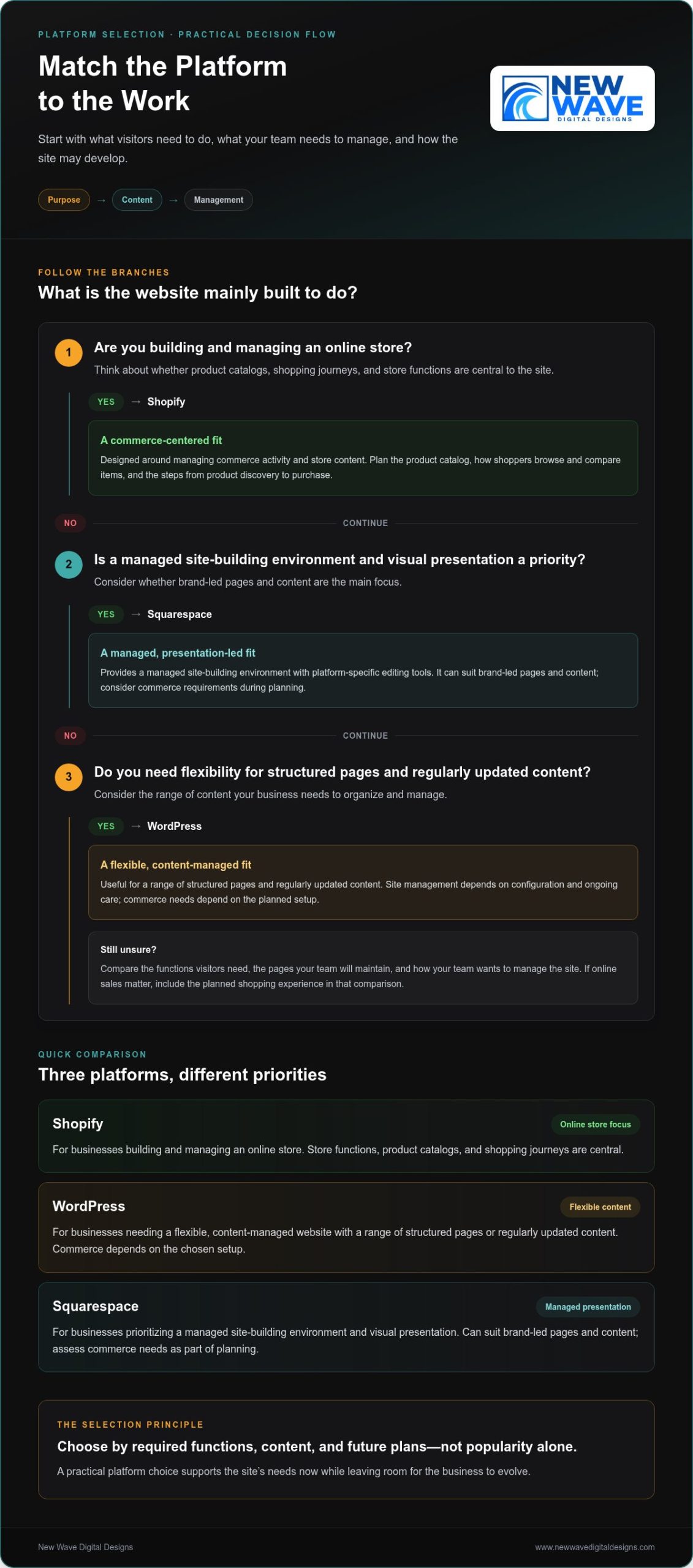
A platform should fit the website’s purpose, not dictate it. The right choice depends on what visitors need to do, what content the business needs to manage, and how the site may develop over time. Compare platforms by practical requirements rather than popularity alone.

Platform Typical use Content and commerce needs Management considerations
Shopify Businesses building and managing an online store Product catalogs, shopping journeys, and store functions are central Designed around managing commerce activity and store content
WordPress Businesses that need a flexible, content-managed website Useful for a range of structured pages and regularly updated content; commerce needs depend on the planned setup Offers flexibility, with site management shaped by its configuration and ongoing care
Squarespace Businesses prioritizing managed site-building and visual presentation Can suit brand-led pages and content, with commerce needs considered during planning Provides a managed site-building environment with platform-specific editing tools

Selection principle: Start with required functions, content, and future plans. This helps keep the site practical now while leaving room for the business to evolve.

When does Shopify fit an e-commerce website?

Shopify is built for businesses creating and managing an online store. Start planning with the product catalog, how shoppers will browse and compare items, and the steps from product discovery to purchase. Organize categories so products are easy to find, provide the details shoppers need to understand each item, and make the next step clear. Businesses considering a broader cross-border ecommerce strategy can use the International Trade Administration’s guidance as a reference while defining their plans. For store-specific design considerations, explore the Shopify website design guide.

How do WordPress and Squarespace serve different website needs?

WordPress may suit a business that values flexibility in organizing and managing a range of content. Squarespace may be a fit when a managed site-building environment and visual presentation are priorities. Neither platform is right for every organization. Compare the pages you’ll maintain, the functions visitors need, and how your team wants to manage the site. If online sales are important, include the planned shopping experience in that comparison rather than treating the platform choice as a purely visual decision.

These decisions are most useful when tied to the customer experience and the work the website must perform. New Wave Digital Designs creates custom websites for Shopify, WordPress, and Squarespace, with platform and design choices shaped around business needs. Explore custom website design to learn more.

From Discovery to Launch: What a Professional Development Process Looks Like

A website project can feel complex when brand decisions, content, platform choices, and technical details arrive all at once. A structured process breaks the work into manageable stages. Each stage clarifies what the site needs to do and gives the next decisions a clear starting point.

Discovery defines the goals, planning shapes the structure, design establishes the experience, development brings it to life, testing checks the details, and launch moves the site into active use. This sequence creates clarity while allowing scope to reflect each project’s needs.

What happens during discovery, planning, and design?

The first stage connects business priorities with audience needs. What should visitors understand, find, or do? Reviewing existing content and required functionality helps set the project scope, identify missing information, and separate essential features from optional ones.

  1. Discovery and scope: Define business priorities, intended audiences, content needs, and the functions the website must support.
  2. Structure and design: Organize pages around visitor needs, then develop a visual direction that reflects the brand and supports the intended experience.

Consider page structure before implementation. Agreeing on how information fits together and where key actions belong can prevent avoidable revisions later. Feedback at this stage helps refine the emerging site while changes are still focused on structure and design. It also gives each design decision a purpose: pages should feel connected to the brand and make sense within the visitor’s journey.

How are development, testing, and launch handled?

Once the structure and visual direction are ready, development turns them into a responsive, functioning website. Content is added, page layouts are built, and planned features are implemented. Working from an agreed scope keeps the build aligned with the project’s goals, while regular collaboration helps resolve questions before they accumulate.

  1. Development: Build responsive pages, integrate content, and implement the agreed functionality.
  2. Quality assurance: Review the site on relevant screen sizes and check links, forms, page behavior, and presentation across important user journeys.
  3. Launch: Put the reviewed website into active use, then continue stewardship through appropriate maintenance, hosting, and security attention.

Testing should follow real visitor tasks, not just a visual review. Submit a contact form, follow the main navigation, and check that important content remains readable across screen sizes. For an online store, review the product-browsing and purchase path. Launch marks a transition, not the end of caring for the website. Continued reviews and maintenance help keep its technical foundation aligned with changing business needs.

Professional Web Development: From Brand Vision to Business Growth

How to Evaluate Web Development Quality Before You Commit

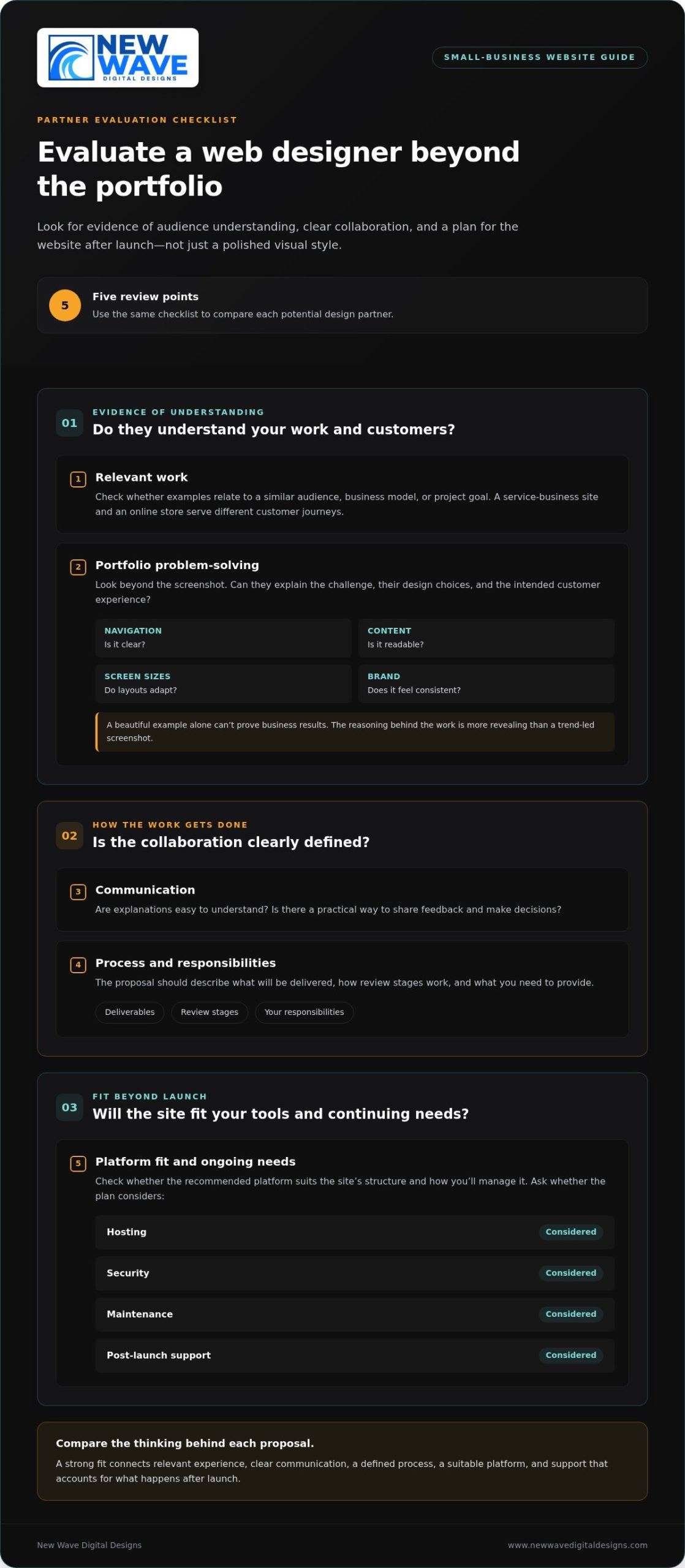
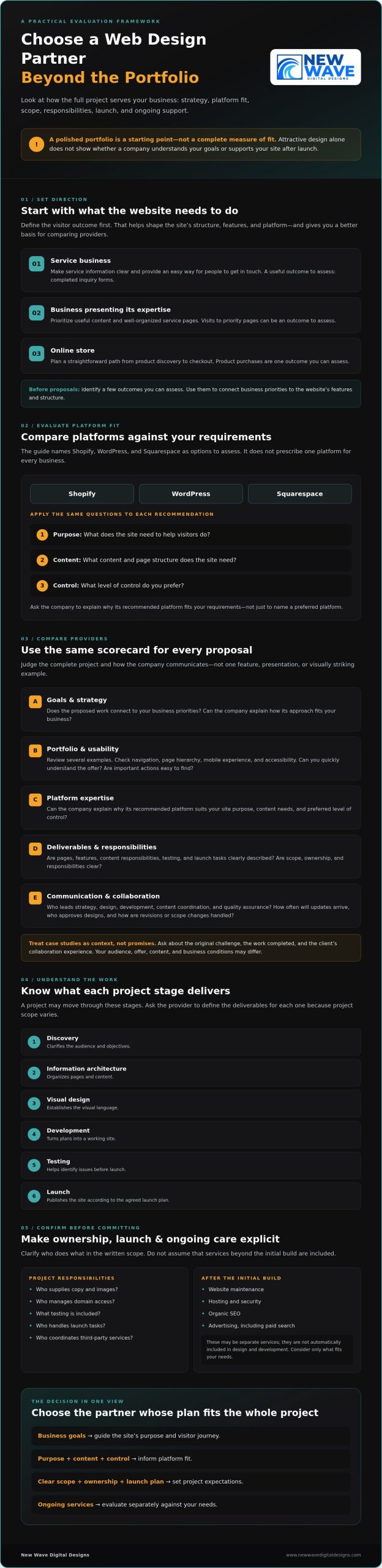
A strong portfolio can catch your eye, but polished visuals are only one part of a well-built website. Look for evidence that the work supports a real business purpose: visitors can find what they need, pages work across devices, and the site’s structure fits its intended use.

Use this checklist to assess the approach as well as the finished appearance:

  • Process and scope: Does discovery connect your priorities, audience, brand, and required functionality to a clear project plan?
  • Platform fit: Are platform decisions explained in practical terms, based on your content needs and the tasks the website must support?
  • Responsive experience: Review examples on a smaller screen. Are navigation, text, forms, and key actions easy to use?
  • Security and performance: Are security, hosting, and performance testing included in the site plan, with findings evaluated rather than replaced by a blanket promise?
  • Ongoing support: Is there a clear path for maintenance and functional reviews after launch?

Portfolio examples are most useful when you examine how they work. Move through the pages and note whether the purpose is clear and the next steps are easy to find. Look for projects with needs similar to yours, then consider whether their layouts, content structure, and functions are relevant to your goals. Visual polish matters, but usability and fit reveal more about the thinking behind a site.

Which technical and user-experience signals matter?

Test the basics as a visitor. Navigate between important pages, try the forms, and check whether essential content is readable and easy to locate. Performance should be measured as part of quality review, not reduced to an unsupported guarantee. Security, hosting, and maintenance also belong in the website plan because a launch-ready site still needs appropriate care as it evolves.

How can you judge whether the process fits your business?

A productive partnership begins with listening. The project plan should reflect your brand and priorities, and platform and functionality choices should be explained in language you can act on. Defined feedback points help you shape the work as it develops; clear responsibilities reduce uncertainty about decisions and content. A thoughtful process also sets out how the site will be supported after launch.

New Wave Digital Designs combines custom website design and development with responsive, brand-aligned experiences and ongoing website support. Explore New Wave Digital Designs to see how a collaborative approach can shape a website around your business. You can also explore web development services.

Build for the Long Term: Launch, Maintenance, and What Comes Next

A website launch is a milestone, not the end of the work. Platforms evolve, content changes, and features that once worked well may need review as the business grows. Planning for care after launch helps keep the site aligned with its purpose and gives the business a clear way to address technical needs over time.

What website maintenance and hosting contribute after launch

Design and development create the site; maintenance and hosting support its continued operation. Site care can include platform and software updates, technical checks, security attention, and reviews of important functions such as forms or shopping paths. Hosting provides the environment where the website operates, while maintenance keeps its components under review. The right plan depends on the platform, site functionality, and business priorities.

These responsibilities are distinct from the initial design and development scope. A site may be complete at launch yet still need recurring attention as its content, technical requirements, and business needs change. New Wave Digital Designs provides website maintenance, managed hosting, and security services. Explore the website maintenance services guide for a closer look at ongoing care.

How can marketing support the website over time?

A well-structured website can provide a foundation for related marketing efforts. Organic SEO can help align site content and structure with search visibility goals, while Google Ads and Bing Ads can support paid search campaigns. These services complement one another, but do not guarantee outcomes. Their role and direction should reflect the business’s objectives, audience, and website content.

Website launch and ongoing support are connected parts of a larger plan. Custom website design and development, maintenance, managed hosting, security, and marketing services can work together to support a cohesive digital presence as needs evolve.

How to take the next step toward a developed website

Before starting a project, consider who the website needs to reach, what visitors should be able to do, which features are essential, what content is ready, and whether Shopify, WordPress, or Squarespace fits the plan. You don’t need every detail settled. A collaborative discussion can help clarify priorities and shape a practical direction around your brand and business needs.

Start a website project conversation to explore the needs and direction of your website.

Shape a Website That Can Grow With Your Business

A website built around your brand and business needs is more than a visual showcase. It brings strategy, useful content, and dependable functionality together to guide visitors through a clear experience. Choosing Shopify, WordPress, or Squarespace based on your content and required features helps create a practical foundation, while a considered process turns an initial vision into a responsive site.

Strong development also looks beyond launch. Website maintenance, managed hosting, and security support ongoing site care, while organic SEO and paid search can complement the website as part of a broader digital approach. Lasting value comes from connecting these decisions to real priorities rather than treating design alone as the measure of success.

New Wave Digital Designs creates custom websites for Shopify, WordPress, and Squarespace, with responsive, brand-aligned design for small and midsize businesses. Ongoing maintenance, hosting, and security services support the site as needs evolve. A cohesive digital presence starts with a website shaped around clear business priorities.

Frequently Asked Questions

What does professional web development include?

Professional web development typically includes planning, design, implementation, testing, and technical care after launch. The process may cover defining goals, organizing pages and content, creating a brand-aligned visual direction, building responsive layouts, and checking that links, forms, and other functions work. The precise scope depends on the business, platform, content, and features the website needs. Development brings these parts together into a useful, cohesive experience.

How do I choose between Shopify, WordPress, and Squarespace?

Choose based on the website’s main purpose, the content you’ll manage, and the functions visitors need. Shopify is designed for businesses building and managing an online store. WordPress can suit businesses that need a flexible, content-managed website, while Squarespace may appeal to those prioritizing managed site-building and visual presentation. Consider future plans, too. The best fit is the platform that supports your practical needs, rather than one selected simply for popularity.

Can a professional website be built around my existing brand?

Yes. A website can be designed around your existing brand identity, including its visual language, messaging, and customer experience. Sharing brand assets and explaining what customers should understand or do helps guide page structure and design choices. If some elements need refinement, the site can still be shaped to feel consistent and recognizable. The goal is to translate the brand into a responsive digital experience that reflects the business across its pages.

How long does professional web development take?

Project duration depends on the website’s scope, platform, content readiness, required functionality, and feedback process. A site with a focused set of pages and straightforward needs differs from one requiring extensive content or more involved features. Clear decisions about goals, structure, and responsibilities can help the work proceed with fewer uncertainties. A project plan should account for actual requirements rather than rely on a one-size-fits-all timeline.

What should I look for in a professional web development partner?

Look for a collaborative process that connects discovery to your brand, audience, and business priorities. A strong partner explains platform and functionality decisions in clear language, defines project scope and responsibilities, and makes room for feedback as the site develops. Review portfolio examples for usability and relevance, not just visual polish. Also consider responsive behavior, security, hosting, maintenance, and how support can continue after launch.

Does a website need maintenance after it launches?

Yes. Websites may need platform updates, technical checks, security attention, and reviews of important functions after launch. Maintenance needs vary according to the platform, site features, and business priorities. Hosting is also an ongoing consideration because it provides the environment where the website operates. Planning for these responsibilities helps distinguish the initial design and development project from the recurring care that supports the site as it evolves.

Can web development support SEO and digital advertising?

Yes. A clear site structure, useful content, and functional pages provide a foundation that can support organic SEO and paid search efforts. SEO can inform how website content and pages are organized, while Google Ads and Bing Ads can direct campaigns toward relevant landing pages. These services can work together as part of a broader digital approach, but website development or marketing alone can’t guarantee rankings, traffic, or business results.

Start a conversation with New Wave Digital Designs about your website project.

Hiring a Web Designer for a Small Business: A 2026 Guide

The most impressive portfolio may not lead to the right website for your business. When hiring a web designer for small business growth, look beyond visual style to the decisions behind the work: what your site needs to accomplish, how customers will use it, and who will maintain it after launch.

It’s understandable to feel unsure when project requirements are still taking shape or proposals are full of unfamiliar design and technical terms. A website is a meaningful investment, so start by identifying the customer actions it should support, the content those customers need, and the tools you’ll use to manage the site. That gives you a practical basis for comparing proposals.

This guide will help you define a project scope tied to your goals, compare freelancers, agencies, and DIY website tools, and assess which approach fits your needs. You’ll also learn what to look for in a collaborative design partner, how to think about platforms such as Shopify, WordPress, and Squarespace, and why maintenance and marketing belong in the plan from the start. The aim is to make a considered choice and build a website that can support your business beyond launch.

Key Takeaways

  • Start with the outcomes your website should support, then shape the project scope around your customers and business priorities.
  • When hiring a web designer for small business, consider relevant experience, clear communication, platform fit, and ongoing needs, not just visual style.
  • Compare DIY tools, freelancers, and agencies by the time, customization, coordination, and continuing support each requires.
  • Choose a platform to suit your site’s structure and business requirements, then plan for content, testing, maintenance, and growth beyond launch.
  • A thoughtful design partnership can align your brand and website strategy while creating a more maintainable digital foundation.

Hiring a Web Designer for a Small Business Starts With the Right Goals

Finding the right designer can feel like one more demanding task on a small-business owner’s already full schedule. Limited time and resources make it important to know what you’re investing in. Hiring a web designer for small business works best as a partnership: you bring knowledge of your customers and operations, while the designer brings creative and technical skills to shape a useful digital experience.

Begin with the outcome, not a list of visual effects. Do you need to generate qualified leads, sell products online, build credibility, or help customers find essential information? A website can serve several purposes, but choosing its primary job helps guide the pages, content, and features. For example, a service business may need clear service descriptions and a straightforward inquiry path, while an online store needs an easy way to browse products and complete purchases. Since web design brings together visual presentation, structure, and usability, exploring what web design entails can clarify the range of decisions involved.

Visual polish can earn attention; a website shaped around customer needs and business goals gives that attention a useful next step.

Identify the business outcome before discussing design

Connect every proposed page or feature to a real customer need. A services page should explain what customers are considering and how to take the next step. An online checkout should make product details, cart review, and purchasing clear. Sort requirements into launch essentials and later enhancements so extra features don’t crowd out the tasks customers need to complete first.

  • Lead generation: Track qualified inquiries, not just form submissions. Review whether inquiries match the services you offer.
  • Online sales: Measure completed purchases and check whether visitors can move from product information to checkout without confusion.
  • Customer information: Look for useful engagement, such as visits to key information pages and whether visitors can find answers without contacting you.

These measures make it easier to assess the site after launch and keep design choices tied to a practical purpose. Pick measures that reflect what the website is meant to do, rather than relying on visits alone.

Recognize when a small business is ready to hire

An outdated experience, cumbersome content updates, or a customer journey that leaves visitors unsure what to do can signal that the current site needs attention. A redesign may suit a business whose brand, services, or priorities have changed. A new site may make more sense when the existing one can’t support core needs, such as explaining services clearly or selling products. Neither situation automatically calls for a fully custom build.

You don’t need every detail settled before defining an initial scope. Identify the main audience, the website’s primary job, the essential launch requirements, and the areas causing friction. Bring examples of sites or features you like, but describe what works about them, such as clear navigation or concise product information, rather than requesting a visual copy. That gives the project a clear starting point while leaving room to refine details collaboratively.

How to Evaluate a Web Designer for Your Small Business

A portfolio can catch your eye, but hiring a web designer for small business success calls for a broader assessment. Look for evidence that the designer can understand your audience, explain their decisions, and shape a site around the outcomes you’ve defined. A polished presentation is only one part of a strong proposal. Ask how the proposed work addresses your project, not just whether you like the examples.

Use this checklist to compare how each potential design partner approaches the work:

  • Relevant work: Do examples speak to a similar audience, business model, or project goal? An online store and a service business site have different customer journeys.
  • Communication: Are explanations clear, and is there a practical way to share feedback and make decisions?
  • Process: Does the proposal describe deliverables, review stages, and responsibilities? Look for a clear account of what you need to provide.
  • Platform fit: Is the recommended platform suited to the site’s structure and the way you’ll manage it?
  • Ongoing needs: Are hosting, security, maintenance, and post-launch support considered?

These points help reveal whether a proposal is built on thoughtful reasoning or simply attractive visuals. The U.S. Small Business Administration’s guidance on marketing and sales strategy can also help you place the website within your broader business efforts.

Read portfolios for problem-solving, not visual trends

Compare portfolio examples by audience, business model, and project goals. A service business site and an online store have different customer journeys, even if both look refined. Notice whether navigation is clear, content is readable, layouts adapt to different screen sizes, and the brand feels consistent. A beautiful example alone can’t prove business results. Look for an explanation of the challenge, the design choices, and the intended customer experience. That reasoning is more revealing than a trend-led screenshot.

Understand scope, communication, and project responsibilities

Read the proposed scope closely. It should identify the pages and features included, who supplies or prepares content, how feedback and revisions work, and what launch support covers. Check whether the proposal names responsibilities for items such as copy, images, and final content approval. Clear responsibilities reduce confusion and help keep decisions aligned as the project takes shape. Make sure you understand how communication will happen and how feedback will be gathered.

Think beyond launch, too. Add hosting, security, website maintenance, and ongoing support to your planning checklist so these needs aren’t an afterthought. New Wave Digital Designs brings brand-aligned website design together with ongoing digital services. Explore its website design services as you consider what a collaborative project could include.

Freelancer, Agency, or DIY: Which Web Design Route Fits?

There’s no single right way to build a small-business website. The best fit depends on how much time you can contribute, how complex the project is, and who will handle the site after launch. Compare the trade-offs in owner time, customization, coordination, and support before choosing a route.

DIY website builder

Owner time: Higher, since you plan, build, and manage updates. Customization: Often suited to straightforward needs, within the builder’s options. Coordination and support: You handle setup and ongoing tasks, using the platform’s available resources. May fit: A simple launch when you’re comfortable learning the tool and maintaining the site yourself.

Independent freelancer

Owner time: You provide direction and feedback, while a designer handles the agreed work. Customization: Can be tailored to the project scope. Coordination and support: Technical and ongoing responsibilities depend on the agreement and the freelancer’s role. May fit: A defined project, such as a focused redesign or a store with clear requirements.

Agency partnership

Owner time: You contribute business knowledge and make decisions, while project work is coordinated through the partnership. Customization: Can address connected design and business needs. Coordination and support: Multiple services may be aligned through one working relationship, depending on the project scope. May fit: A more involved store or a broader growth plan that connects the site with ongoing marketing or maintenance.

These are general patterns, not promises about every provider. A freelancer may handle a complex project, and a DIY site can grow alongside a business. The important question in hiring a web designer for small business is whether the responsibilities match your desired level of involvement and the work your website needs to do.

When DIY website builders may be a practical starting point

A builder can be a sensible route for a straightforward site with a small set of pages, especially if you’re comfortable making updates yourself. You retain direct control, but that means investing your own time in setup, content, and maintenance. Before choosing, list the pages and functions you need, then compare them with the builder’s available design and management options. Don’t assume DIY is automatically limiting or suitable for every project.

When a freelancer or agency partnership may help

Specialist support can help coordinate design, development, and business requirements when the project has more moving parts. An agency relationship may be useful if the website connects with services such as organic SEO, advertising, graphic design, or ongoing maintenance. If you are exploring experienced creative partners, learn more about Studio Murschetz to see how a professional design studio aligns brand identity with digital execution. Clarify roles, deliverables, and post-launch responsibilities so the working model fits the project.

Hiring a Web Designer for a Small Business: A 2026 Guide

Plan the Web Design Project, Platform, and Ongoing Support

A clear project plan turns business priorities into a website customers can use and the owner can maintain. Map the work in sequence: define the brief, choose a suitable platform, prepare content, develop the design, test key tasks, and launch. Keep these stages connected so platform or visual decisions don’t outrun the site’s purpose.

Choose a platform around the business model

Shopify is designed for businesses building an online store and managing product sales. WordPress and Squarespace are additional options to assess against the site’s structure, content needs, and the owner’s preferred workflow. No platform is right for every small business. Consider what customers need to do, what the business needs to manage, and how the site may develop. For example, write down whether visitors primarily need to browse and buy products, read information, or contact you, then use those tasks to guide the platform discussion.

Prepare content and design for real use

Gather the core ingredients before design takes shape: services or products, intended audience, brand assets, page content, and the actions visitors should take. For each page, decide what a visitor needs to understand and what the next step should be. Then build for more than appearance. Responsive layouts should work across screen sizes, navigation should make important information easy to find, and content should be readable and accessible. Search-friendly foundations include clear page structure and descriptive content that helps people and search engines understand what each page offers.

Before launch, test the experience on different devices and check essential journeys, such as finding a service, submitting an inquiry, or completing a purchase. Review links, page content, and forms as part of those tasks. A deliberate review catches confusing navigation, missing information, and layout issues while there’s still time to address them.

Prepare for life after launch

A website needs care beyond its debut. Plan for hosting, security, software and content updates, and ongoing support so the site remains functional as the business changes. A website maintenance services guide can help frame the questions to consider. Organic visibility also develops over time, making an organic SEO strategy guide a useful reference when planning how site content supports discovery.

During hiring a web designer for small business, include these long-term responsibilities in the project conversation. New Wave Digital Designs creates responsive, brand-aligned websites and provides website maintenance, managed hosting and security, and organic SEO. Explore website design and ongoing support to consider how these pieces can work together.

Work With New Wave Digital Designs to Build a Small-Business Website

A strong website brings business goals, brand expression, and customer needs into one coherent experience. New Wave Digital Designs partners with small and medium-sized businesses to create responsive, brand-aligned websites, with design for Shopify, WordPress, and Squarespace. The right platform depends on the project: an online store, a content-rich site, and a straightforward business website can call for different structures and workflows.

That strategic fit matters when hiring a web designer for small business growth. The aim isn’t simply to create attractive pages. It’s to shape a useful customer journey and a digital foundation the business can continue to care for as its needs evolve.

Bring design, platform, and brand into one coherent experience

Responsive design helps make the experience usable across screen sizes, while clear structure guides visitors toward the information or action they need. Shopify website design can support businesses building an online store, with the platform selected to match the project’s requirements. A consistent visual identity matters beyond the website, too. Graphic design can help align digital and print materials, creating a recognizable presence wherever customers encounter the brand.

For businesses considering an online store, exploring a Shopify website design guide can help clarify the questions to bring into a platform and design discussion.

Build a website that can evolve beyond launch

Launch is a beginning, not the end of a website’s life. Ongoing maintenance, managed hosting, and security support the site’s continued functionality and care. Organic SEO and paid search can complement that foundation in different ways: SEO supports visibility through useful, search-friendly content, while Google Ads and Bing Ads provide paid search options. Graphic design can reinforce brand consistency across these efforts. The right mix depends on the business’s goals and priorities.

New Wave Digital Designs brings website design together with ongoing support and digital marketing services, so the plan can account for both the experience customers see and the work that supports it over time. Explore New Wave Digital Designs’ website design and digital marketing services to consider a thoughtful next step for your business.

Set Your Website Up for What Comes Next

A lasting website starts with a clear purpose, a practical scope, and a platform suited to the way your business works. As you consider hiring a web designer for small business growth, look beyond the launch: choose a partner and plan that account for customer needs, ongoing care, and future priorities.

New Wave Digital Designs creates custom websites for Shopify, WordPress, and Squarespace, with each platform considered in light of the project. The work can continue beyond design through website maintenance, managed hosting and security, organic SEO, and Google Ads or Bing Ads management. Together, these services can support a considered digital presence as your business evolves.

Every business has its own story and goals. Take the next step by exploring website design for your small business and start shaping a website that reflects your brand and serves your customers. A thoughtful plan today can give your next stage of growth a stronger foundation.

Frequently Asked Questions

Can a small business afford to hire a web designer?

Affordability depends on the project’s scope, complexity, platform, content readiness, and ongoing requirements. Start by identifying essential pages and functions, such as service information, an inquiry form, or product checkout, then separate launch needs from later enhancements. Consider project fees separately from continuing services like maintenance or hosting. A focused scope makes planning clearer without requiring a predetermined budget or assuming a particular return.

What should I look for when hiring a web designer for a small business?

Look for relevant portfolio work, clear communication, a defined process, experience with a suitable platform, mobile usability, a precise scope, and post-launch support. A useful standard for hiring a web designer for small business projects is whether the designer understands the goal behind the visual choices. Assess how the proposed work addresses your audience and needs. Don’t choose solely on appearance or broad promises that aren’t tied to specific deliverables.

Should a small business hire a freelance web designer or an agency?

Either can be a good fit, depending on the project. A freelancer may offer a flexible, direct working relationship for a clearly defined scope. An agency can coordinate multiple disciplines when a project connects design, development, marketing, or ongoing services. Consider complexity, how involved you want to be, and who will handle responsibilities after launch. Choose the model whose working relationship and capabilities align with the actual work.

How long does it take to design a small-business website?

Timelines vary with the site’s size, custom functionality, content readiness, feedback process, and platform requirements. Rather than assume a standard duration, plan milestones for discovery, content preparation, design, development, testing, and launch. Having materials ready and making decisions promptly can help keep work moving, while changes to scope or delayed feedback may affect the schedule. Agree on project stages and expectations as part of planning.

Which website platform is best for a small business?

The best fit depends on whether you need e-commerce, flexible content management, straightforward owner updates, or particular features. Shopify is suited to businesses building an online store; WordPress and Squarespace are also options to assess against your site structure and workflow. These platforms have different strengths, so start with how customers will use the site and how you’ll manage it, then consider future business needs.

Do small businesses need website maintenance after launch?

Yes. A launched site still needs attention to hosting, security, updates, functionality, and content. The specific maintenance tasks depend on the platform and how the site is set up, but planning for them helps prevent launch from being treated as the finish line. Decide who will manage ongoing care and include it in your website plan. New Wave Digital Designs provides website maintenance, managed hosting, and security services to support sites over time.

Can a web designer help with SEO and online advertising?

Web design can establish useful foundations for search visibility, but organic SEO and paid search require distinct ongoing strategies. New Wave Digital Designs provides organic SEO and manages Google Ads and Bing Ads. These efforts work best when aligned with business goals, relevant landing pages, and clear next steps for visitors. Neither design nor marketing guarantees rankings, traffic volumes, or advertising results, so plan around meaningful objectives and continued evaluation.

How to Choose a Web Design Company: A Practical 2026 Guide

When you search for top web design companies, a polished portfolio can be an appealing starting point, but it won’t tell you whether a company understands your goals, recommends a suitable platform, or supports your site after launch. The right partner should be able to explain how its approach fits your business, not just show attractive designs.

Proposals can be difficult to compare. One may emphasize visual design, another technical features, and a third ongoing services, while leaving scope, responsibilities, or ownership unclear. The best fit depends on how well the full project meets your needs, not on a single feature or presentation.

This guide offers a practical framework for evaluating web design partners by strategy, platform fit, process, and ongoing support. You’ll learn how to assess Shopify, WordPress, and Squarespace against your requirements, clarify what a project includes, and understand who handles launch responsibilities and maintenance. With those details in view, you can choose a partner like New Wave Digital Designs with greater confidence and build a site designed to serve your business over time.

Key Takeaways

  • Compare agencies by how their strategy supports your business goals, not by portfolio visuals alone.
  • Use your site’s purpose, content needs, and preferred level of control to assess Shopify, WordPress, and Squarespace.
  • When comparing web design companies, look for clear scope, responsibilities, ownership, and launch planning.
  • Confirm who will provide content and images, manage domain access, and coordinate third-party services before committing.
  • Consider whether maintenance, hosting, security, SEO, or paid search fits your needs after launch. Don’t assume every service is essential.

What Should a Web Design Company Do for Your Business?

A website should do more than look polished. It should help people understand what you offer, find the information they need, and take a useful next step. A web design company can help plan the site’s structure, visual design, and user journey, then build a website around your business priorities.

Web design is the visual and interactive expression of a website; the website itself is a business tool that guides visitors toward information, inquiry, or purchase. The work can involve user experience, interface design, and development, as outlined in this overview of what web design encompasses. The exact balance depends on your goals and the agreement you make with your provider.

Which business goals can a website support?

Start with the outcome you want visitors to reach. A service business seeking qualified inquiries needs clear service information and an easy way to get in touch. A company focused on presenting its expertise may prioritize useful content and well-organized service pages. An online store needs a straightforward path from product discovery to checkout.

Before requesting proposals, identify a few outcomes you can assess, such as completed inquiry forms, product purchases, or visits to priority pages. These goals help determine the site’s features, structure, and platform. They also give you a more useful basis for comparing web design companies than appearance alone.

What is included in website design and development?

A project may move through discovery, information architecture, visual design, development, testing, and launch. Discovery clarifies the audience and objectives. Information architecture organizes pages and content. Design establishes the visual language, and development turns those plans into a working site. Testing helps identify issues before launch. Ask the provider to define each stage and its deliverables, since project scope varies.

Be clear about what falls outside the initial build. Website maintenance, hosting, security, organic SEO, and advertising may be available as separate services, but they aren’t automatically included in design and development. A launch plan, for example, might cover publishing the site while leaving future updates or search marketing to a separate agreement.

Review the written scope for who supplies copy and images, who manages domain access, what testing is included, and who handles launch tasks. Clarifying those responsibilities early helps align the design, build, and ongoing care with your business needs.

How to Compare Web Design Companies Beyond Their Portfolios

A portfolio is a useful first impression, not a complete measure of fit. Compare how each company approaches a project, communicates decisions, and designs a site for its audience. Strong work should look considered, but it should also make information easy to find and important actions easy to take.

How can you assess a company’s portfolio?

Review several examples, not just the most visually striking one. Ask who each site serves, what the business needed, and how the structure supports that purpose. Check the navigation, page hierarchy, mobile experience, and accessibility features. Can you quickly understand the offer? Are calls to action easy to find? A compelling visual style shows creative range, but it doesn’t guarantee results for your business.

Consider whether the examples reflect your business model, content, and required functionality. An online store, for instance, has different needs from a service website designed to encourage inquiries. If you can, explore live sites on a phone as well as a desktop. Notice whether menus, forms, and key information remain easy to use.

What should you ask before choosing an agency?

Ask who leads strategy, design, development, content coordination, and quality assurance. Clarify how discovery works, how often you’ll receive updates, who approves designs, and how revisions or scope changes are handled. Before committing, ask what testing and launch support are included and which responsibilities remain yours.

References or case studies can add useful context. Ask what the original challenge was, what work the company completed, and how the client found the collaboration. Treat outcomes as examples, not promises: your audience, offer, content, and business conditions may differ.

Use a simple scorecard to compare providers on the same terms:

  • Goals: Does the proposal connect the work to your business priorities?
  • Platform expertise: Can the company explain why its recommended platform fits your requirements?
  • Deliverables: Are pages, features, content responsibilities, testing, and launch tasks clearly described?
  • Communication: Are updates, feedback, approvals, and change requests explained?
  • Post-launch support: Is ongoing maintenance or other support available, and what does it include?

Compare the answers, not just the score. A thoughtful partner should explain trade-offs and help you understand what’s included before work begins. If you’re exploring custom website design, review website design services as one point of comparison.

Shopify, WordPress, or Squarespace: Which Platform Fits Your Website?

The right platform is the one that supports your site’s purpose and the way you plan to manage it. Start with your requirements: Are you selling products, publishing a range of content, or building an online presence for your services? Then consider who will update the site, what functions it needs, and how much control you want over its design and administration. Popularity alone isn’t a sound reason to choose.

Platform | May suit | Questions to consider

Shopify | Businesses centered on selling products online | How will the platform support your catalogue, store workflows, and required integrations?

WordPress | Sites with evolving content or specific customization needs | Who will manage updates, and how much flexibility does the site require?

Squarespace | Businesses seeking a managed site to present services, work, or content | Does its editing and design approach suit the way your team will maintain the site?

When might Shopify suit an online store?

If selling products online is central to your business, Shopify is a platform worth evaluating. Map the customer’s path from browsing to purchase, then list what your catalogue and store workflows require. Note any integrations the business depends on. Discuss those requirements with prospective providers rather than assuming a platform or proposed setup will support every need. For a closer look, explore this Shopify website design guide.

When might WordPress or Squarespace be a better fit?

WordPress and Squarespace are both options to consider for content-focused or service-based websites. Compare how each fits your content structure, customization needs, and preferred editing experience. Ask who will make routine updates and whether your team wants to manage the site directly or rely on support. The right choice should remain practical after launch, not simply look appealing in a design preview. If Squarespace is on your shortlist, this guide to custom Squarespace website design offers another perspective.

Before choosing, ask each provider to explain its platform recommendation in relation to your requirements, future content changes, and ongoing maintenance. A clear rationale lets you compare proposals on fit and practical trade-offs, not preference alone.

How to Choose a Web Design Company: A Practical 2026 Guide

What Should a Web Design Proposal Include Before You Commit?

A proposal should turn your goals into a clear plan, not leave key decisions hidden behind a headline price. Scope and requirements shape each project, so compare proposals based on the same brief. This makes it easier to see what each provider will deliver, what you’ll need to supply, and what support continues after launch.

How do you clarify scope, timeline, and responsibilities?

Look for a written description of the work, review points, and each party’s responsibilities. Before signing, use this checklist:

  1. Scope and deliverables: Identify the pages, design work, functionality, and other specific outputs included.
  2. Content and assets: Confirm who writes or supplies copy, selects images, and prepares other materials.
  3. Schedule and approvals: Request a project schedule tied to the agreed scope, with milestones, review periods, and approval responsibilities.
  4. Changes and exclusions: Ask what isn’t included and how additional requests are evaluated, approved, and documented.
  5. Testing and launch: Clarify what will be tested, who gives final approval, and who is responsible for launch tasks.

Timelines should reflect the actual project plan, not an assumed standard. Ask how delays in feedback, content delivery, or approvals affect the schedule. Clear answers help you compare proposals on substance rather than presentation.

Who owns the website and its accounts after launch?

Confirm how access and ownership will work for the finished website, domain, content, and relevant third-party accounts. Ask which accounts will be created or used in your business’s name, who can access them, and how credentials will be transferred or managed. If training or handover documentation is included, have the proposal describe what you’ll receive.

Give ongoing arrangements the same attention as the build. Check whether hosting, security, updates, maintenance, and support are included or handled separately. Ask what each arrangement covers and who to contact for routine changes. Don’t assume that paying for a site automatically includes its continued care.

Before choosing among web design companies, review each proposal against the same requirements: scope, responsibilities, schedule, ownership, and post-launch arrangements. If an item is vague, request clarification in writing before you commit. To discuss website design and support options, explore New Wave Digital Designs.

Choose a Web Design Partner for Launch and Long-Term Growth

A sound choice brings four elements into alignment: your business goals, a suitable platform, a clearly defined proposal, and a realistic plan for support after launch. Keep that framework in view as you compare partners. A thoughtful design should serve the business now while leaving room to manage and refine the site as needs evolve.

Post-launch services aren’t automatic requirements for every project. Consider what your team can manage, what needs specialist attention, and what responsibilities the proposal assigns to you. New Wave Digital Designs offers website design for Shopify, WordPress, and Squarespace, along with maintenance, hosting and security, organic SEO, Google Ads, and Bing Ads. These are options to discuss based on your requirements, not a checklist every business must buy.

What support might a website need after launch?

Think of maintenance, hosting, and security as distinct needs. Maintenance concerns ongoing care for the website; hosting is where the site is made available online; security involves protecting the site and its access. Ask what each service covers, who handles it, how you request help, and whether it’s included in the proposal or arranged separately.

If you’re planning for ongoing care, read this website maintenance services guide. Before agreeing to support, clarify its scope and communication expectations. Don’t assume a service includes round-the-clock emergency coverage or a specific response time unless the provider confirms that in writing.

How can design connect with search and advertising?

Organic SEO may be relevant if you want your site’s content to support discovery through search. Paid search, such as Google Ads or Bing Ads, is separate from website design. If you’re considering advertising, define its objective and how you’ll assess whether it serves that goal. A coordinated plan can connect the site experience with search activity, but these services should reflect your priorities rather than being added by default.

Before launch, make sure you know who will maintain the site, manage hosting and security, and oversee any search or advertising work you choose. That clarity creates a stronger handoff and helps you plan for the next stage without committing to services you don’t need.

With your scope and priorities in hand, you can explore web design and digital marketing services and discuss which options fit your project.

Choose a Partner for What Comes Next

The strongest web design partnership begins with clear business goals, a platform that fits your needs, and a proposal that spells out scope and responsibilities. Look beyond visual polish: consider how the site will guide visitors, who will manage it, and what support is available after launch. Those details can help you choose a website that works as a business asset, not simply a finished design.

New Wave Digital Designs provides custom website design for Shopify, WordPress, and Squarespace, with website maintenance, managed hosting, and security available for ongoing needs. Organic SEO and Google Ads or Bing Ads management may also be relevant when they align with your goals, but they aren’t automatic requirements for every project.

Ready to explore an approach suited to your business? Explore New Wave Digital Designs’ website services and consider which capabilities fit your project. With a thoughtful brief and clear expectations, you can move forward with confidence and build a digital presence ready to evolve alongside your business.

Frequently Asked Questions

What does a web design company do?

A web design company can plan and build a website’s structure, appearance, and user experience. Depending on the provider and agreed scope, its work may also include development, testing, and launch support. Ongoing maintenance, hosting, security, and marketing may be separate services rather than part of the initial build. Before hiring a provider, clarify the deliverables in writing and match the project scope to your business goals.

How do I choose a web design company?

Start by defining your website’s goals, audience, required features, and support needs. Then compare relevant portfolio work, platform experience, written deliverables, communication practices, and post-launch arrangements. If you’re searching for “web design companies in somerset county nj,” use the same questions to assess each provider rather than relying on visual style alone. Choose a partner whose recommendations fit your requirements and whose proposal makes responsibilities clear.

How much does it cost to hire a web design company?

Project scope and requirements shape the proposal, so there isn’t one amount that applies to every website. An online store, a redesign, and an informational site can involve different platforms, functionality, content needs, and services. Give each provider the same project brief, then compare written proposals by deliverables and exclusions. Ask which ongoing services are separate, and don’t judge a proposal by its headline figure alone.

Which platform is best for a small business website?

No single platform is best for every small business. Shopify may suit a business focused on online product sales, while WordPress or Squarespace may better match other content, customization, or administration needs. Consider the site’s purpose, required functions, and who will update it. Ask a prospective web design company to explain its recommendation in relation to your goals, content, and available resources.

What should a web design proposal include?

A proposal should clearly describe the project scope, deliverables, responsibilities, milestones, and approval process. It should also explain what’s excluded, how additional requests are handled, and whether content, testing, launch, training, or post-launch support is included. Confirm arrangements for website and account access and ownership. If an important detail is unclear, ask the provider to clarify it in writing before you commit.

Do web design companies provide website maintenance?

Some web design companies offer maintenance, while others focus on the initial design and build. The arrangement varies, so ask what ongoing care covers, how requests are handled, and which responsibilities remain yours. New Wave Digital Designs offers website maintenance, managed hosting, and security services. Confirm the specific scope and support arrangements for your website rather than assuming they’re automatically included in a design project.

Should SEO be included in a web design project?

SEO may inform a website’s structure and content, but ongoing search work isn’t automatically included in a design project. Ask which SEO-related tasks are part of the build and which require a separate service. If organic search or paid advertising supports your goals, define the objectives and responsibilities clearly. New Wave Digital Designs offers organic SEO and Google Ads and Bing Ads management as services to consider based on your needs.

Wix vs WordPress for SEO: 2026 Visionary Comparison

What if the foundation you lay today determines the exact height your brand can reach in the shifting skyline of 2026? It’s a daunting thought for any visionary leader. You want your digital presence to be more than a functional tool; it should be a masterpiece of craftsmanship that grows as your ambition does. When weighing Wix vs WordPress for SEO, the fear of outgrowing a restrictive platform or getting lost in a maze of technical jargon often leads to a paralyzing indecision. You’ve likely felt the frustration of slow site speeds or wondered if your current setup is truly optimized for the next generation of AI-driven search engines.

We agree that your digital home should empower your growth rather than limit it. This guide provides a definitive answer for those who refuse to settle for mediocrity, promising to reveal which platform offers the superior technical foundation to elevate your brand’s visibility in the age of AI-driven search. We’ll examine how these platforms differ in architectural precision, technical flexibility, and long-term scalability. By understanding these trade-offs, you can invest with confidence, knowing your site is built to endure, evolve, and excel. We’ll compare Wix’s streamlined elegance against the boundless potential of a WordPress foundation to help you align your infrastructure with your brand’s true spirit.

Key Takeaways

  • Understand the fundamental shift in the 2026 search landscape and why the architectural ceiling of your platform matters more than simply checking SEO boxes.
  • Learn how lean, custom code and optimized code-to-content ratios provide a distinct advantage in the age of AI-driven Search Generative Experience.
  • Discover the critical impact of Core Web Vitals like INP and LCP on user trust and how managed hosting environments outpace centralized builders.
  • Evaluate the long-term scalability of Wix vs WordPress for SEO to determine which ecosystem best supports a visionary enterprise versus a small boutique.
  • Realize how professional website maintenance services bridge the gap between technical complexity and artistic freedom, ensuring your WordPress foundation remains secure and seamless.

The 2026 SEO Landscape: Defining the Wix vs. WordPress Paradigm

The conversation surrounding Wix vs WordPress for SEO has shifted from simple feature comparisons to a deep examination of structural integrity. In the current era of search, visibility is earned through technical precision and architectural clarity. Wix functions as a closed-ecosystem website builder, offering a curated, managed environment where the platform maintains the infrastructure. In contrast, WordPress is an open-source Content Management System (CMS) that provides a vast, modular landscape for those who demand total control. Many people ask if they can rank on either platform; the answer is yes. However, the more strategic question is: how high is the ceiling? Digital Architecture is the defining factor for 2026 search algorithms. It represents the difference between occupying a high-end, pre-designed suite and architecting a bespoke estate from the ground up.

Wix: The Polished Convenience of a Closed Ecosystem

Wix offers the inviting appeal of a pre-fabricated world. Its native SEO tools and integrated setup provide a seamless experience for those who value speed and aesthetic consistency. Everything is handled within a single interface, which removes the burden of managing separate hosting or security protocols. When evaluating Wix vs WordPress for SEO, it’s clear that Wix serves the boutique brand or the local service provider exceptionally well. The trade-off is found in the lack of server-side access. You’re working within a beautiful, yet fixed, framework where you cannot alter the underlying code to meet highly specific technical requirements. It is a reliable solution for those whose goals fit within its defined boundaries.

WordPress: The Boundless Freedom of Open-Source Craftsmanship

For the visionary brand, WordPress represents the gold standard of digital scalability. It isn’t merely a platform; it’s an expansive foundation for long-term growth. By utilizing Custom WordPress theme design, you’re not just building a site; you’re crafting a unique digital signature that search engines view as both authoritative and meticulous. You own the database, the files, and the server environment. This level of autonomy allows for a degree of optimization that centralized builders cannot match. WordPress is built for those who refuse to compromise on technical control, ensuring that as your business evolves, your digital home evolves with it. It transforms the complexity of SEO into a form of craftsmanship, where every technical detail serves a larger strategic purpose.

Technical Infrastructure and AI-Readiness: The Hidden SEO Engine

In the 2026 search environment, Google’s Search Generative Experience (SGE) has transformed from a novelty into the primary way users consume information. This shift demands a technical infrastructure that doesn’t just host content but communicates it with absolute clarity. When comparing Wix vs WordPress for SEO, we must look beyond the visible page. AI crawlers prioritize “entities” over mere keywords. This requires a site structure that is both semantically rich and technically lean. Your platform must act as a translator, turning your brand’s story into a format that AI can synthesize with confidence. Strategic growth requires a partner who understands these invisible mechanics. If you’re ready to refine your technical foundation, exploring professional organic SEO services can help align your infrastructure with your long-term vision.

Schema and Structured Data: Granularity vs. Automation

Wix has made significant strides with its automated schema generators, providing a consistent safety net for standard business types. It’s a reliable solution for those who need basic visibility. However, modern SEO demands more than just the basics. WordPress excels by allowing for the surgical injection of custom JSON-LD. This enables you to define complex relationships between data points that a “one-size-fits-all” tool might miss. Precise schema is the specialized language of AI search engines. It’s how you ensure your brand is understood as a distinct entity rather than a generic entry. For brands with intricate services or unique niche requirements, the ability to hand-craft this data is indispensable. It transforms your metadata from a simple label into a rich, interconnected narrative.

Crawl Budget and Code Efficiency

Efficiency is the cornerstone of digital craftsmanship. Wix often relies on heavy JavaScript execution, which can create a “bloated” environment that slows down mobile crawlers. WordPress offers a different path. It allows architects to select lightweight frameworks and custom-coded themes that minimize the digital footprint. This lean approach ensures that search engine robots spend their time indexing your valuable insights rather than struggling through unnecessary scripts. Crawl budget optimization is the art of making your site easy for robots to digest. By refining the code-to-content ratio, you ensure that every visit from a search engine counts toward your authority. A cleaner digital footprint isn’t just about speed; it’s about respecting the resources of the algorithms you wish to attract. Choosing the right engine today ensures you aren’t left behind by the algorithms of tomorrow.

On-Page Flexibility: Navigating the Content Management Journey

Managing a digital presence is a journey of meticulous stewardship. When choosing between Wix vs WordPress for SEO, the ease of your daily workflow often dictates the longevity of your strategy. Wix offers a streamlined, native experience that feels intuitive for smaller portfolios, providing reliability through its integrated tools. WordPress, however, provides a specialized power that transforms content management into a strategic advantage. For brands that prioritize high-impact visuals but seek more flexibility than a standard builder, Custom Squarespace website design offers a compelling middle ground. It bridges the gap between polished templates and artistic freedom, ensuring your visual identity remains uncompromised.

URL Structures and Redirect Management

Clarity is the foundation of digital trust. Wix often imposes specific URL patterns that can complicate site migrations or hierarchical organization. This can lead to frustration when trying to maintain a clean, professional appearance at scale. WordPress empowers you with total control over permalinks and complex regex redirect strategies. This level of precision ensures that as your brand evolves, your link equity remains intact and your site structure remains transparent to both users and search engines. Clean URLs aren’t just a technical detail; they’re a pillar of search clarity that signals authority to the algorithms of 2026.

Content Scalability: Handling 100 vs. 10,000 Pages

Scaling a brand requires an infrastructure that breathes with your growth. A platform that serves a hundred pages may falter when managing ten thousand. Wix can experience dashboard lag or organizational friction as the content volume increases, making it a challenge for rapidly expanding enterprises. WordPress stands as a true Content Management System, utilizing custom post types to create a sophisticated content ecosystem. It allows for hierarchical growth that maintains performance, ensuring your visionary enterprise never feels constrained by its own success. This scalability is essential for building a robust internal linking architecture, which guides search engines through your most valuable assets and establishes your brand as a meticulous leader in your field.

When you evaluate Wix vs WordPress for SEO at scale, the difference lies in the ceiling of your potential. WordPress doesn’t just host your content; it organizes it with architectural precision. By leveraging a modular approach, you can create interconnected data sets that serve both human readers and AI crawlers with equal efficiency. This ensures your digital home remains a source of truth and inspiration, regardless of how large your library grows.

Wix vs WordPress for SEO: 2026 Visionary Comparison

Performance and Core Web Vitals: The Speed of Trust

Speed is the silent language of digital trust. In 2026, search engines don’t just observe how fast a page loads; they measure the grace with which it responds to human touch. This shift makes Core Web Vitals, specifically Largest Contentful Paint (LCP) and Interaction to Next Paint (INP), the ultimate benchmarks of architectural quality. When evaluating Wix vs WordPress for SEO, the distinction lies in how much control you have over these vital signs. A visionary brand requires a site that feels alive and immediate, ensuring that every visitor interaction is met with fluid precision. Maintaining this level of performance requires more than a one-time setup; it demands WordPress maintenance services that act as meticulous stewards for your digital estate. It’s about preserving the integrity of your digital home through every algorithm update and traffic surge.

Server-Side Control and Global Delivery

Wix provides a global Content Delivery Network (CDN) that offers a consistent, hands-off experience. It’s a reliable choice for many, yet it lacks the ability to tune specific server configurations or choose high-performance stacks like Litespeed or Nginx. This limitation can impact Time to First Byte (TTFB), which remains the silent killer of search rankings. WordPress allows for a “managed excellence” approach. You can select specialized hosting environments that are surgically optimized for your specific content. By leveraging advanced caching and global server placement, you ensure your site reaches its audience with uncompromising speed. If you’re ready to build a faster future, our team is here to provide expert website support tailored to your unique needs. This level of technical stewardship ensures that your infrastructure never becomes a bottleneck for your brand’s growth.

Optimizing for Interaction to Next Paint (INP)

The 2026 focus on responsiveness has elevated INP as a critical ranking factor. It measures the time it takes for a site to react to a user’s click or keypress. Wix often relies on heavy client-side JavaScript to power its visual effects, which can create a bottleneck for mobile performance and lead to higher INP scores. WordPress offers the freedom to defer and delay non-essential code. You can prioritize what the user needs to see and do first, creating a snappier, more intuitive experience. This granular control over code execution is what separates a generic template from a high-performance digital masterpiece. By removing the bloat of unnecessary third-party scripts, you create a cleaner path for both users and algorithms to follow. It’s about respecting the user’s time and providing a seamless journey from the first click to the final conversion. A snappier interface doesn’t just rank better; it converts better. For a deeper exploration of how to achieve this level of refinement, our guide on WordPress site speed optimization provides a comprehensive roadmap for elevating your Core Web Vitals without sacrificing your brand’s aesthetic vision.

The Verdict: Choosing Your Digital Foundation for 2026

Choosing between Wix vs WordPress for SEO is a decision that defines the trajectory of your brand’s digital presence. It’s the difference between leasing a temporary space and owning a permanent estate. Wix serves the hobbyist or the small boutique with elegance and speed, providing a structured path for those just beginning their journey. WordPress, however, is the definitive choice for the visionary enterprise that refuses to be constrained by a pre-defined ceiling. The common myth that WordPress is too complex often ignores the modern reality of professional stewardship. High-tier Website maintenance services remove the technical burden from your shoulders, allowing you to focus on your craft while we handle the architecture. View your site as a Digital Estate. It’s an investment in your brand’s legacy, a testament to your quality, and a vehicle for your long-term growth. It isn’t a monthly subscription expense to be minimized, but a cornerstone of your business identity to be nurtured with care.

When Wix is the Right Move

Wix excels when speed-to-market is your primary objective. If you require a simple portfolio or a digital business card where organic search isn’t the main lead driver, its closed ecosystem offers a polished, secure environment. Solo entrepreneurs often find psychological comfort in a managed platform where they don’t have to worry about updates, server settings, or security patches. It’s a reliable harbor for those whose current needs are modest and whose focus is immediate. It provides a sense of simplicity that suits a specific stage of business development, offering a clean aesthetic without the need for deep technical involvement or custom development.

Why Visionary Brands Invariably Pivot to WordPress

Many successful brands eventually hit what we call the “Migration Wall.” They discover that the polished ceiling of a website builder cannot accommodate their growing ambitions, their complex data needs, or their desire for total SEO dominance. Moving from Wix to WordPress later is a painful, though often necessary, evolution to reclaim technical control. When you weigh Wix vs WordPress for SEO, the synergy between custom design, technical SEO, and long-term ROI is only fully realized when you own the foundation. A strategic consultation can help identify your unique architectural needs before you lay the first stone. To build a foundation that never limits your vision, Partner with New Wave Digital Designs. We’ll help you architect a presence that is as enduring as it is inspiring, ensuring your digital home reflects the true spirit of your brand and scales with your success.

Architecting Your Digital Legacy

The choice between Wix vs WordPress for SEO is ultimately a commitment to the depth and durability of your brand’s digital footprint. We’ve explored how technical precision, architectural flexibility, and lean code define the leaders of the 2026 search landscape. While Wix offers a polished entry point for emerging boutiques, WordPress remains the gold standard for visionary enterprises seeking a limitless foundation. Your digital presence is a form of craftsmanship; it deserves a structure that bridges aspirational design with technical excellence. By prioritizing meticulous stewardship and managed performance, you ensure your brand doesn’t just exist online but thrives as a distinct, authoritative entity. It’s time to move beyond the constraints of pre-fabricated templates and embrace a foundation that scales with your ambition. Elevate your digital architecture with a custom WordPress solution from New Wave Digital Designs. Our expertise in technical SEO and digital craftsmanship ensures your investment is protected and your vision is realized. Your journey toward a more resonant and visible brand begins with the right foundation. Build it with intention.

Frequently Asked Questions

Is Wix still bad for SEO in 2026?

Wix isn’t inherently flawed for search visibility; it has evolved into a competent tool for smaller boutiques and standard portfolios. It provides a reliable, managed environment that handles basic technical requirements with consistency. However, when evaluating Wix vs WordPress for SEO, the distinction lies in the architectural ceiling. Wix offers polished convenience, while WordPress provides the granular control needed for visionary brands to dominate complex, competitive landscapes through meticulous technical precision.

Can I move my Wix site to WordPress without losing my Google rankings?

You can absolutely migrate from Wix to WordPress while preserving your hard-earned authority through a meticulous redirection strategy. This process requires mapping every existing URL to its new destination to ensure search engine equity remains intact. While it’s a technical undertaking, the long-term benefit of a more robust foundation often outweighs the temporary effort. Professional website support ensures that your digital transition is seamless, secure, and strategically sound for future growth.

Does WordPress require a developer to manage SEO effectively?

While intuitive tools make basic optimization accessible to everyone, achieving a truly visionary digital presence often benefits from professional craftsmanship. You don’t need to be a coder to manage daily content; however, fine-tuning server-side performance or complex schema requires a deeper technical understanding. Many brands choose managed website maintenance to bridge this gap. This partnership allows you to focus on your creative vision while experts handle the intricate machinery of your digital estate.

Which platform is faster for mobile users, Wix or WordPress?

WordPress typically offers superior mobile performance because it allows for the surgical removal of unnecessary code and the use of high-performance hosting stacks. Wix provides a reliable, centralized experience, yet its reliance on heavy client-side scripts can sometimes hinder responsiveness on mobile devices. In the 2026 era of Core Web Vitals, the ability to prioritize Interaction to Next Paint (INP) through custom optimization gives WordPress a distinct advantage for high-traffic enterprises. Understanding the full scope of these performance gains is made clearer through a dedicated WordPress site speed optimization strategy that addresses everything from hosting selection to image refinement.

How does AI search (SGE) change the Wix vs. WordPress debate?

AI-driven search generative experiences prioritize deep, structured data and clear entity relationships. When comparing Wix vs WordPress for SEO in this new paradigm, WordPress stands out for its ability to host complex, custom JSON-LD schema. This granular control allows you to speak the precise language of AI crawlers with more clarity than automated builders. It transforms your website from a collection of pages into a rich, interconnected narrative that AI can confidently synthesize.

Is it more expensive to do SEO on WordPress than on Wix?

Viewing SEO as an investment rather than an expense reveals that WordPress often provides a higher long-term return on identity. While Wix has a predictable monthly subscription, the technical limitations can create an opportunity cost as your brand scales. WordPress might require a more significant initial investment in digital craftsmanship and managed hosting. However, this foundation supports a level of organic growth and architectural precision that centralized platforms simply cannot replicate for visionary brands.

What are the must-have WordPress plugins for SEO in 2026?

The most effective toolkit for 2026 focuses on performance, schema granularity, and image optimization. While industry standards like Yoast or Rank Math remain useful, the true power of WordPress lies in its modularity. You might employ specialized tools for advanced caching, script management, and custom structured data. Rather than a long list of plugins, the focus should be on a lean, meticulously curated stack that enhances your site’s speed and clarity without introducing unnecessary technical bloat.

Does Wix offer better security for SEO than WordPress?

Wix offers a closed-ecosystem security model that is inherently low-maintenance for the user. It’s a safe harbor for those who prefer a hands-off approach. WordPress provides a more expansive security landscape that, when paired with professional hosting and security services, offers a fortress-like environment. This meticulous stewardship ensures that your digital estate remains resilient against vulnerabilities. For a visionary brand, the ability to implement custom security protocols often provides a more robust and scalable defense.

WordPress Maintenance Services: Meticulous Stewardship for Visionary Brands

Did you know that the median time from a vulnerability disclosure to its mass exploitation is now just five hours? For a brand built on vision and excellence, that window represents a precarious gap between digital integrity and sudden disruption. You’ve likely experienced the frustration of a sluggish interface or the creeping anxiety of unpatched plugins during a critical business hour. It’s a common struggle to balance high-level growth with the demanding technical minutiae that keep a site standing. Entrusting your platform to professional WordPress maintenance services ensures your digital presence remains a polished, secure, and high-performing asset that reflects your true standards.

We believe that your website is not just a tool, but a digital legacy in the making. This article outlines how meticulous stewardship blends technical precision with visionary growth strategies to protect your brand’s future. You’ll discover a proactive approach to security, a commitment to seamless performance, and a roadmap for continuous technical evolution. We’re moving beyond simple fixes to explore how a digital architect can refine your site into a resilient masterpiece that thrives in an ever-shifting landscape.

Key Takeaways

  • Shift your perspective from reactive fixing to proactive stewardship to protect your brand’s digital home.
  • Explore the three architectural pillars of security, performance, and continuity that sustain a visionary website.
  • Learn how professional WordPress maintenance services utilize security hardening to outpace modern digital threats before they manifest.
  • Discover how optimizing site speed and technical precision serves as a strategic catalyst for search engine visibility and growth.
  • Understand the value of a digital architect who treats your technical evolution as a form of craftsmanship rather than a series of tasks.

The Art of Digital Stewardship: Why Professional WordPress Maintenance Matters

Your website is far more than a collection of static files; it’s the digital home where your brand’s vision resides and breathes. True professional maintenance transcends the mundane task of checking boxes. It represents a fundamental shift from reactive repairing to proactive stewardship. While many view technical care as a burden, we see it as a form of craftsmanship. Digital stewardship is the meticulous alignment of security, speed, and software integrity. Neglecting this balance leads to the silent accumulation of technical debt, a burden that eventually compromises your site’s foundation and requires a costly, frantic reckoning.

By investing in high-caliber WordPress maintenance services, you ensure that every technical update serves a greater strategic purpose. We don’t just keep the lights on. We refine the environment so your brand can flourish without the looming shadow of digital decay.

Beyond the Update Button

The WordPress content management system is a sophisticated ecosystem of interconnected themes, plugins, and core files. It’s powerful, yet inherently fragile. Many site owners believe clicking a single button is enough to stay current. In reality, manual updates often trigger catastrophic plugin conflicts that can dismantle your layout or disable critical conversion paths. Professional oversight acts as a safeguard. It provides the architectural integrity needed to navigate these complexities, ensuring that every evolution of your software is tested, stable, and seamless.

Protecting Your Brand’s Digital Legacy

A website is the living embodiment of your brand’s spirit and its most visible ambassador. When performance issues arise or pages load with agonizing slowness, it does more than hinder a transaction; it erodes consumer trust. This friction suggests a lack of care that visitors subconsciously associate with your products or services. Meticulous WordPress maintenance services position your digital presence as a lasting legacy. It’s a commitment to long-term brand resonance, ensuring your site remains a fast, fluid, and faithful representation of your excellence.

Anatomy of an Optimized Ecosystem: Core Maintenance Pillars

A visionary website requires more than a beautiful facade; it demands a robust, invisible framework that sustains its brilliance. We view this framework through three essential pillars: Security, Performance, and Continuity. These pillars form the bedrock of your digital architecture, ensuring that your brand’s online presence is both resilient and fluid. While Custom WordPress theme design provides the artistic blueprint, professional WordPress maintenance services act as the structural engineering that keeps the vision alive. This synergy is most evident in the relationship between managed hosting and core software updates, where high-performance servers provide the stable ground required for seamless technical evolution.

By treating these elements as a single, breathing ecosystem, we ensure your platform remains a high-performing asset. Technical care shouldn’t be a series of disconnected tasks. Instead, it’s a unified strategy that protects your investment and fuels future growth.

Seamless Software and Plugin Orchestration

Maintaining a complex site is an act of meticulous orchestration. We never apply updates directly to a live environment where they might cause friction or unexpected downtime. Instead, every change is carefully tested in isolated staging environments to ensure total compatibility. This process is vital for identifying abandoned plugins, which are third-party tools no longer supported by their creators. These neglected components often harbor vulnerabilities that we must proactively mitigate. By utilizing version control, we maintain a precise record of your site’s code, allowing for surgical precision in every adjustment and keeping your digital home stable.

Automated Continuity: Backups and Disaster Recovery

True continuity requires a layered defense against the unexpected. While server-level backups offer immediate recovery options, a visionary approach demands off-site redundancy to ensure your data is never confined to a single point of failure. This meticulous backup strategy creates a fail-safe for your digital legacy, preserving your content and configurations across multiple secure locations. Should a disruption occur, our restoration process ensures business continuity, returning your site to its peak state with minimal delay. It’s about creating a sense of permanence in a volatile digital world. If you’re ready to secure your platform, our website maintenance solutions provide the sophisticated care your brand requires.

Security Hardening and Proactive Defense Strategies

The 2026 threat landscape presents a formidable challenge for even the most established brands. In 2025 alone, 11,334 new vulnerabilities were identified within the WordPress ecosystem, marking a sharp 42% increase from the prior year. With roughly 13,000 WordPress sites compromised every day, security is no longer a peripheral concern; it’s a central pillar of digital craftsmanship. We treat security hardening as a proactive architectural strategy that builds resilience into every layer of your platform. By integrating technical protection directly into your site’s DNA, we transform security from a technical hurdle into a sophisticated shield for your brand’s reputation. To understand the broader context of these shifts, read our companion piece, The Visionary Guide to Website Maintenance Services.

Technical Protection and Vulnerability Management

The speed of modern cyber threats is breathtaking. The median time between the disclosure of a vulnerability and its mass exploitation is now a mere five hours. This narrow window demands a level of vigilance that traditional, manual updates simply can’t provide. Elite WordPress maintenance services utilize advanced firewalls and automated malware scanning to detect and neutralize threats in real-time. We also manage the complexities of SSL certificates and encrypted data transmission, ensuring that your visitors’ information remains private and secure. By patching vulnerabilities before they’re exploited, we maintain the structural integrity of your site and prevent the costly disruption that follows a breach.

The Human Element: Access Control and Monitoring

True security requires a balance of technical precision and strategic oversight. We implement rigorous user role management to control who interacts with your site’s core, preventing unauthorized changes that could destabilize your architecture. Real-time monitoring acts as a dedicated Digital Sentry, providing a continuous pulse on your website’s health and security status. This isn’t just about stopping attacks; it’s about fostering a collaborative partnership where you feel supported and protected. This proactive technical protection allows you to lead your business with confidence, knowing that the technical details of your security are handled with meticulous care. It’s the difference between hoping for the best and being prepared for anything.

WordPress Maintenance Services: Meticulous Stewardship for Visionary Brands

The Strategic Edge: Performance Optimization and Growth

In the digital world, speed is the silent ambassador of your brand’s excellence. It represents a profound respect for your audience’s time and an unwavering commitment to quality. When a site loads with effortless fluidity, it signals to your visitors that every detail of their experience has been curated with care. This performance isn’t just about aesthetics; it’s a critical component of modern search engine rankings. Google prioritizes sites that demonstrate technical health, making speed a foundational element of your visibility. Professional WordPress maintenance services transform your platform from a static brochure into a living, breathing asset that evolves alongside your business goals. We view optimization as a sophisticated artistic endeavor, where technical precision meets visionary growth and brand resonance.

Stagnation is the enemy of a premium digital presence. Without constant refinement, technical debt accumulates, slowing down your site and frustrating your users. By treating performance as a continuous journey rather than a one-time fix, we ensure your brand remains at the forefront of your industry. This proactive stewardship allows you to focus on your vision while we handle the intricate mechanics of your digital evolution.

Mastering Core Web Vitals

Google’s Core Web Vitals serve as the definitive benchmark for site quality in 2026. A primary target for any visionary brand is achieving a Largest Contentful Paint (LCP) of under 2.5 seconds, a goal that requires meticulous attention to detail. Achieving this level of performance involves more than just a fast server. It requires surgical code cleaning, advanced image optimization, and sophisticated caching strategies that reduce server load. Our comprehensive approach to WordPress site speed optimization ensures that your site remains responsive and nimble while preserving the visual integrity of your brand. This technical rigor improves user experience, reduces bounce rates, and strengthens your brand’s authority in a crowded marketplace.

Evolving with Your Audience

Maintenance is not a defensive posture; it is a catalyst for continuous evolution. A visionary maintenance plan allows for incremental design improvements that keep your brand’s aesthetic current without the need for a total overhaul. As new devices and screen sizes emerge, keeping your site responsive is essential for maintaining a seamless connection with your audience. We integrate organic SEO strategies directly into our maintenance workflow, ensuring that your content and structure remain optimized for discovery. This proactive approach prevents technical stagnation and ensures your digital home remains a vibrant reflection of your brand’s spirit. If you’re ready to elevate your site’s performance, explore our WordPress maintenance services to see how we can fuel your long-term growth.

Partnering with New Wave: Meticulous Maintenance for Visionary Brands

At New Wave Digital Designs, we view your website as a masterwork of digital architecture. It’s not a static entity but a breathing extension of your brand’s identity. Our WordPress maintenance services are designed for those who demand more than generic technical support. We offer a form of craftsmanship that aligns technical precision with your long-term business trajectory. By choosing a boutique partner, you move away from high-volume service factories and enter a collaborative relationship where your site’s health is treated with personal care. This philosophy of meticulous stewardship ensures that every technical decision supports the true spirit of your business.

We believe that a website should be a source of confidence, not a constant source of technical anxiety. Our maintenance packages provide the stable foundation required for visionary growth, allowing you to focus on the broad concepts that drive your success while we handle the intricate details of your platform’s evolution.

Managed Hosting and Integrated Security

Security is woven into the very fabric of our hosting solutions. We provide managed hosting and security that acts as a secure fortress for your custom site. This isn’t off-the-shelf protection; it’s a technical security solution specifically tailored to mitigate the 11,334 new vulnerabilities identified in the WordPress ecosystem in 2025. Every layer of our hosting environment is optimized for speed and resilience, ensuring that your digital home remains fast, secure, and ready for growth. We apply the same level of artistry to our technical protection as we do to our visual designs, creating a seamless synergy between form and function.

A Visionary Path Forward

The transition from managing technical minutiae to leading as a visionary starts with a single decision. Maintenance should be a strategic partnership that empowers you to focus on the future of your brand while we handle the technical evolution. Our WordPress maintenance services offer a methodical journey from initial discovery to final realization. We listen intently to your needs before applying our expertise, ensuring that your site remains a faithful representation of your spirit. It’s time to stop reacting to technical problems and start anticipating growth opportunities. Elevate your digital presence with professional maintenance and secure your brand’s legacy with a partner who values excellence as much as you do.

Orchestrating Your Brand’s Technical Future

Your digital presence is a living masterpiece that requires more than mere technical updates. It demands a dedicated partner who understands that every line of code and every security patch is a brick in your brand’s fortress. By embracing proactive stewardship, you ensure your platform remains a fast, resilient, and faithful representation of your vision. High-caliber WordPress maintenance services transition your site from a static asset into a dynamic catalyst for growth. We’ve explored how managed security hardening and strategic performance optimization provide the necessary stability to outpace modern threats and search engine requirements.

This isn’t just about functionality; it’s about the artistry of digital development and the preservation of your legacy. This is your opportunity to step away from the technical minutiae and lead with clarity. Our commitment to expert digital architecture and meticulous technical protection ensures your site evolves as gracefully as your business. Secure your digital vision with our professional WordPress maintenance services and entrust your platform to an expert digital architect who values your success as much as you do.

Frequently Asked Questions

What exactly are WordPress maintenance services and why are they necessary?

WordPress maintenance services represent the meticulous stewardship of your digital home, ensuring software integrity through proactive updates and security hardening. They’re necessary because a website is a living ecosystem that requires constant vigilance against the 11,334 new vulnerabilities identified in 2025. Without this professional oversight, technical debt accumulates, leading to performance decay and security risks. We treat these services as a form of craftsmanship, preserving your brand’s digital legacy while you focus on visionary leadership.

Can I perform my own WordPress maintenance to save on costs?

How do professional maintenance services improve my website’s SEO?

Professional WordPress maintenance services directly influence search engine rankings by optimizing the technical foundations Google prioritizes. We focus on mastering Core Web Vitals, specifically targeting a Largest Contentful Paint of under 2.5 seconds to enhance user experience. Consistent uptime, secure data transmission through SSL certificates, and clean, optimized code signal to search engines that your site is a reliable authority. This technical rigor ensures your brand remains visible and competitive in a crowded digital landscape. Understanding how your platform choice affects these outcomes is equally important, and our in-depth look at Wix vs WordPress for SEO reveals which foundation gives your brand the superior technical edge in 2026.

What happens if my WordPress site is hacked while on a maintenance plan?

Our proactive defense strategies utilize advanced firewalls and real-time monitoring to neutralize threats before they manifest. Should a breach occur, we employ a sophisticated restoration process using off-site backups to ensure business continuity and data redundancy. This methodical approach minimizes disruption and returns your digital home to its peak state. Our ongoing stewardship significantly reduces the likelihood of successful attacks by patching vulnerabilities before they’re exploited, providing you with essential peace of mind and protection.

Do maintenance services include hosting and security updates?

Yes, our comprehensive maintenance packages include managed hosting and security updates as essential pillars of your digital architecture. We integrate technical protection directly into your site’s DNA through advanced firewalls, malware scanning, and SSL management. This synergy between hosting and software updates provides a stable environment for visionary growth. By housing your website in a secure, high-performance environment, we protect your brand’s reputation and ensure a seamless experience for every visitor who interacts with your presence.

How often should a WordPress site be updated and audited?

A visionary site requires continuous monitoring rather than occasional check-ins. While core software and plugin updates should occur as soon as stable versions are vetted, a comprehensive technical audit should be performed regularly to address technical debt and performance bottlenecks. This methodical rhythm ensures that your platform evolves alongside emerging technologies and device standards. Our stewardship involves real-time monitoring to act as a digital sentry, providing the constant vigilance necessary to maintain a high-performing digital asset.

What is the difference between standard hosting and managed WordPress hosting?

Standard hosting provides a generic space for files, but managed WordPress hosting offers a tailored environment optimized specifically for the WordPress ecosystem. It’s the difference between a basic plot of land and a custom-designed estate with a dedicated architect. Managed solutions include integrated security hardening, automated off-site backups, and server-level caching designed for speed. This premium infrastructure supports the specific needs of custom sites, ensuring your digital home is resilient, fast, and perfectly aligned with your standards.

Will maintenance services help with my website’s loading speed?

Speed is a primary focus of professional WordPress maintenance services. We employ sophisticated optimization techniques, including surgical code cleaning, advanced image optimization, and server-side caching to reduce loading times. By refining these technical metrics, we help your site achieve the fluid performance required for modern brand resonance. For a deeper dive into the specific techniques that drive measurable results, our architect’s guide to WordPress site speed optimization outlines the precise strategies we use to elevate your Core Web Vitals in 2026. This commitment to technical precision ensures that your visitors enjoy a seamless experience, which reduces bounce rates and encourages deeper engagement with your brand’s visionary content and high-quality offerings.

Custom WordPress Theme Design: The Artistry of Digital Architecture

What if your digital presence was not merely a collection of pages, but a masterfully crafted extension of your brand’s soul? You likely understand the quiet frustration of a website that feels like a borrowed suit. It’s often too loose in the wrong places, burdened by unnecessary code, and ultimately incapable of reflecting your unique identity. Investing in custom WordPress theme design allows you to move beyond these restrictive confines to build something enduring, efficient, and evocative. We believe your site should be a high-performance engine that accelerates growth rather than a static brochure that holds you back.

By choosing bespoke craftsmanship, you reclaim control over your Core Web Vitals, your security, and your story. This article explores how a tailored approach to WordPress 7.1 transcends template limitations to create a unique digital presence, a streamlined backend workflow, and a foundation for continuous evolution. Discover how the artistry of digital architecture can eliminate technical debt while delivering a brand-aligned experience that truly stands out. Through a blend of technical precision and creative vision, you can transform your website into a powerful asset that resonates with every visitor.

Key Takeaways

  • Recognize the limitations of the “Template Trap” and learn how bespoke digital architecture preserves the true spirit of your brand.
  • Explore the technical advantages of lightweight code, which naturally enhances Core Web Vitals and elevates your standing in search results.
  • Understand the security benefits of custom WordPress theme design, where purposeful craftsmanship reduces the risks often found in mass-market plugins.
  • Identify how strategic integration between design and organic SEO creates a high-performance engine capable of driving meaningful conversions.
  • Follow a methodical journey from discovery to realization, ensuring your digital presence is built to scale and evolve alongside your business.

Beyond the Template: Why Bespoke WordPress Design Defines Modern Brands

Your website serves as the digital cornerstone of your professional legacy. While many attempt to shortcut the development process with pre-packaged solutions, the result is often a generic experience that fails to capture the true spirit of a brand. Custom WordPress theme design offers a departure from the mundane, allowing for a sophisticated blend of form and function that templates simply cannot replicate. This transition from a commodity mindset to a craftsmanship mindset ensures that every element of your site serves a distinct purpose, from the underlying code to the final visual flourish. When you choose to build rather than buy, you’re investing in an asset that grows with your vision, rather than a temporary fix that limits your potential.

The Limitations of Pre-Made WordPress Themes

The allure of off-the-shelf themes lies in their immediate gratification, yet they often carry a heavy burden of technical debt. These multipurpose products are designed to serve everyone, which means they include excessive code for features you’ll never use. This code bloat directly impacts mobile responsiveness, leading to sluggish load times and user frustration. Beyond the surface, the hidden costs of “easy” templates emerge through constant maintenance requirements, fragile plugin conflicts, and rigid layouts that refuse to bend to your evolving business needs. In competitive national markets, a generic design dilutes your authority. It makes your business look like a carbon copy of a dozen others, which can quietly erode user trust before a single word of your copy is read.

The Visionary Approach to Digital Craftsmanship

True digital architecture begins with empathy, seeking to understand the specific rhythms and goals of your business before a single line of code is written. By exploring the core of WordPress architecture, a skilled developer can craft a custom theme that mirrors the spirit of your brand with meticulous precision. This approach ensures pixel-perfect alignment between your visual identity and your digital interface. A bespoke UI/UX isn’t just about aesthetics; it’s about creating intuitive workflows that guide users toward conversion with ease. When you invest in custom WordPress theme design, you’re not just launching a site; you’re establishing a scalable foundation that supports your long-term evolution and fosters deep, lasting resonance with your audience.

Exemplifying Excellence: The Pillars of High-Performance Custom Themes

High-performance digital architecture is built on a foundation of restraint. Unlike multipurpose themes that carry heavy baggage, custom WordPress theme design focuses on lean, lightweight code that serves your specific business objectives. This meticulousness effectively bakes security into the very fabric of your site by eliminating unnecessary third-party dependencies. It’s a proactive approach that reduces the attack surface while ensuring your platform remains agile and responsive. We believe that every line of code should earn its place, contributing directly to a faster, safer, and more reliable user journey.

Empowering your team is just as vital as the user experience itself. By developing bespoke Gutenberg blocks, we provide an editing environment that is both intuitive and brand-safe. This ensures your content creators can maintain visual excellence without risking the site’s structural integrity or performance. For a deeper look at these strategic choices, you can consult this complete guide to custom theme development. It’s about creating a tool that feels like a natural extension of your internal workflow.

Performance as a Competitive Advantage

Speed is a silent ambassador for your brand. There’s a direct correlation between instantaneous page loads and national SEO rankings; search engines prioritize sites that respect a user’s time. By optimizing Core Web Vitals from the ground up, we reduce bounce rates and ensure smooth transitions that keep visitors engaged. Performance-first design is the foundational blueprint that transforms digital interactions into measurable ROI. It’s the difference between a visitor who bounces and a client who stays to explore your story.

Tailored User Interfaces and Bespoke Functionality

Your business data is unique, and your website’s structure should reflect that complexity. We design custom post types that align perfectly with your internal needs, whether you’re managing intricate portfolios, directories, or catalogs. This tailored approach allows for unique interactive elements that off-the-shelf templates simply cannot replicate without relying on heavy, performance-draining plugins. Every interface undergoes rigorous responsive testing to guarantee a seamless experience across all devices. If you’re ready to elevate your digital presence, exploring professional WordPress website design can turn these technical advantages into a lasting competitive edge.

The Technical Craftsmanship of Custom Development vs. Pre-Made Themes

Choosing between a pre-made template and a custom-built solution is the difference between purchasing a mass-produced kit and commissioning a bespoke architectural masterpiece. While templates offer the illusion of speed, they frequently arrive burdened with technical debt. This hidden cost manifests as a labyrinth of unnecessary features, bloated scripts, and rigid structures that eventually stifle your brand’s growth. In contrast, custom WordPress theme design prioritizes a clean, purposeful codebase where every line serves a specific strategic intent. This meticulous approach ensures that your digital engine remains lean, fast, and remarkably easy to maintain over the long term.

A Comparison of Flexibility and Control

A custom build grants you 100% control over your digital environment. You aren’t fighting against a developer’s pre-conceived notions of how a site should behave; you are defining the rules yourself. Templates often rely on a “Plugin Overload” strategy to achieve basic functionality, creating a fragile ecosystem where one update can bring the entire site down. Custom themes integrate these features directly into the core architecture, ensuring a more stable and future-proof platform. This streamlined foundation makes WordPress core updates a seamless transition rather than a source of technical anxiety. It’s about building a site that is agile, resilient, and ready for whatever the future holds.

Security Hardening and Technical Protection

Security is not a feature added at the end; it’s a value woven into the initial design. Commercial themes are high-value targets for automated hacking bots because a single vulnerability can compromise thousands of sites simultaneously. Unique, custom code is naturally less attractive to these broad-spectrum attacks. By partnering with Secure website hosting services, your custom theme operates within a fortified perimeter designed for your specific traffic patterns. This synergy between bespoke development and professional WordPress security solutions creates a resilient digital presence that protects your reputation, your data, and your peace of mind with unwavering vigilance. We believe your site should be a sanctuary for your brand, not a liability.

Custom WordPress Theme Design: The Artistry of Digital Architecture

Strategic Integration: Designing Themes for Conversion and Scalability

Semantic HTML and schema markup are the silent languages of search. By building a site that search engines understand perfectly, we ensure your content reaches the right audience at the right moment. This efficiency optimizes your crawl budget by stripping away code bloat and unnecessary redirects. If you’re evaluating your platform options from an organic search perspective, our in-depth analysis of Wix vs WordPress for SEO reveals which foundation offers the superior technical advantage for long-term visibility. It is a philosophy of excellence we also apply to Custom Squarespace website design, ensuring that every platform we touch adheres to the highest technical standards. These optimizations provide a superior foundation for ongoing Organic SEO services, turning your site into a beacon for qualified traffic.

Designing for Conversion Excellence

Visual hierarchy is the invisible hand that guides your visitor’s journey. Through strategic CTA placement and meticulous A/B testing, we refine the user experience until every interaction feels natural and inevitable. Custom themes allow for this level of iteration without the constraints of rigid templates. They provide the flexibility to test new layouts, adjust messaging, and optimize flows in real time. Maintaining this brand consistency across all digital touchpoints, from your primary site to a Custom Shopify store design, builds the deep trust necessary for long-term loyalty. We believe that your digital presence should be as cohesive as it is compelling, reflecting a unified brand identity that resonates with every click. If you are ready to transform your site into a conversion-focused asset, our team is here to help you build a strategic digital presence that delivers measurable results.

Realizing Your Vision: The Collaborative Journey to a Custom Digital Presence

The realization of a visionary digital presence is never a solitary endeavor. It is a methodical, shared journey that begins long before the first line of code is written. By prioritizing discovery and strategy, we ensure a deep understanding of your business’s “why” before we ever address the “how”. This phase is about more than technical requirements; it’s about capturing the soul of your brand and translating it into a functional masterpiece. Custom WordPress theme design thrives in this space of mutual understanding, where strategic goals meet artistic inspiration to create something truly unique.

The design phase follows this strategic foundation with collaborative wireframing and high-fidelity visual concepts. We treat this stage as a dialogue, refining every interaction and aesthetic detail until the vision is perfectly clear. Once the blueprint is set, our development process brings that vision to life through sustainable, clean code that prioritizes longevity and performance. The journey doesn’t end at launch, however. True digital excellence requires continuous care through professional WordPress maintenance services to ensure your site remains secure, fast, and aligned with your evolving goals.

The Partnership Approach to Web Design

Working with a “Digital Architect” offers a stark contrast to the high-volume service factories that dominate the market. We believe in meticulous attention to detail, especially during the final polishing phase where a project truly begins to shine. This boutique approach fosters a long-term relationship centered on partnership, empathy, and a shared commitment to your success. It’s a journey of continuous evolution, ensuring your digital home grows alongside your business. For organizations looking to pair bespoke website design with expanded audience outreach, you can discover Web Bridge to explore how integrated digital marketing supports long-term brand momentum. We don’t just build sites; we nurture digital ecosystems that reflect your professional excellence.

Preparing for Your Custom WordPress Project

Success in a custom build requires thoughtful preparation and a commitment to quality. Start by clearly defining your brand goals and functional requirements, moving beyond superficial aesthetics to identify what your site must achieve. Gather visual inspiration and technical must-haves that reflect your unique identity. Finally, set a realistic timeline that respects the craftsmanship required for a bespoke build. A project rooted in quality cannot be rushed; it demands a thorough, deliberate process that yields an extraordinary result. When you invest in custom WordPress theme design, you’re choosing a path of precision, innovation, and lasting value.

Building Your Digital Legacy

Transitioning from generic templates to bespoke digital architecture is more than a technical upgrade; it’s a strategic commitment to your brand’s future. We’ve explored how performance-optimized architecture, visionary digital craftsmanship, and meticulous attention to brand detail create a site that doesn’t just exist but excels. By choosing custom WordPress theme design, you’re investing in a lean, secure, and highly scalable engine that eliminates the bloat of pre-made solutions. This approach ensures your digital home is built on a foundation of technical excellence and creative intent.

Your website should be a reflection of your professional spirit and a catalyst for long-term evolution. If you’re ready to move beyond the limitations of the “template trap” and realize a unique digital vision, we invite you to partner with us to craft a platform that truly distinguishes your business. Elevate your brand with a custom WordPress theme designed by New Wave Digital Designs. Let’s build a digital masterpiece that resonates with your audience and stands the test of time.

Frequently Asked Questions

What is the difference between a custom WordPress theme and a premium template?

A custom theme is a bespoke digital architecture designed specifically for your brand’s unique goals and identity. Unlike premium templates, which are multipurpose products built for a mass audience, custom designs eliminate unnecessary code bloat and rigid layout constraints. This tailored approach ensures your site is lean, fast, and perfectly aligned with your visual strategy. It transforms your website from a generic digital brochure into a high-performance engine.

How much does a custom WordPress theme design project typically cost?

The investment for a custom project varies based on the complexity of your requirements and the depth of strategic integration needed. Every brand has distinct functional needs, such as custom post types or unique API integrations, which influence the final scope. We focus on delivering visionary craftsmanship that provides long-term value rather than a quick fix. By prioritizing quality over commodity pricing, you ensure your digital presence is built to scale and endure.

Will I be able to update my own content with a custom WordPress theme?

Yes, you’ll have complete control over your content through a tailored backend experience. We build custom Gutenberg blocks that are both intuitive and brand-safe, allowing your team to manage text, images, and layouts without risking the site’s structural integrity. This empowerment is a core part of our collaborative journey. It ensures your site remains a living, breathing extension of your business that can evolve daily without requiring constant technical intervention.

How long does the custom WordPress design and development process take?

A project rooted in quality and craftsmanship typically spans several weeks to several months depending on its complexity. A mid-market build often takes between nine and fourteen weeks from the initial discovery phase to the final launch. This timeline allows for the methodical journey of strategy, high-fidelity design, and meticulous coding. We prioritize a thorough process to ensure every detail is polished and the final architecture is performance-optimized.

Are custom WordPress themes better for SEO than pre-made themes?

Custom WordPress theme design offers significant advantages for organic SEO by prioritizing clean, semantic HTML and lightweight code architecture. Pre-made themes often suffer from technical debt and excessive scripts that slow down page loads and negatively impact Core Web Vitals. By building only what is necessary, your site becomes more crawlable and ranks more naturally in search results. For those still weighing their platform options, our comprehensive guide on Wix vs WordPress for SEO in 2026 provides a definitive comparison of which foundation best supports long-term digital visibility. This performance-first approach creates a superior foundation for your long-term digital visibility.

What happens to my custom theme when WordPress releases a major update?

Custom themes are built using core WordPress standards, making them remarkably resilient to major software updates. Unlike complex multipurpose templates that rely on fragile third-party page builders, a custom architecture is streamlined and future-proof. We focus on sustainable code that minimizes conflicts during core transitions. When combined with professional WordPress maintenance services, your site remains secure and functional as the WordPress ecosystem continues its continuous evolution.

Do I need special hosting for a custom WordPress website?

While custom themes run on most standard servers, we recommend managed hosting and security services to fully leverage your site’s performance. High-performance architecture deserves an environment that supports its speed and technical precision. Professional hosting solutions provide the fortified perimeter and server-side optimizations necessary to protect your investment. This synergy between bespoke code and secure hosting ensures your digital presence remains fast, reliable, and visionary for every visitor.

Can you convert my existing template-based site into a custom theme?

We can certainly transition your existing digital presence into a bespoke custom theme. This process involves a deep discovery phase to identify what is working and where the current template is holding you back. We then rebuild the site from the ground up, stripping away technical debt and refining the user experience. It’s a transformative journey that elevates your brand from a borrowed suit to a masterfully tailored digital masterpiece using custom WordPress theme design.

Professional Website Redesign: A Strategic Blueprint for Digital Evolution in 2026

Your website isn’t just a digital address; it’s the architectural foundation of your brand’s legacy and the primary engine of your commercial growth. You’ve likely felt the sting of high bounce rates or the quiet anxiety that your current site no longer mirrors the sophisticated spirit of your business. It’s natural to hesitate, fearing that a major transition might compromise your SEO rankings or disrupt your technical stability. A professional website redesign is not merely a cosmetic facelift. Instead, it’s a deliberate, strategic evolution that aligns your visual identity with high-performance functionality.

In this guide, you’ll discover how to transform your digital presence into a high-speed, secure, and intuitive masterpiece that drives lead generation. We’ll examine the meticulous process of building on Shopify, WordPress, or Squarespace while maintaining the technical integrity your brand demands. From the latest WordPress 7.1 standards to the nuances of WCAG 2.1 compliance, we’ll outline a blueprint for a site that’s built for longevity. You’re about to see how visionary design, technical precision, and strategic partnership can turn your website into your most powerful asset.

Key Takeaways

  • Understand how a professional website redesign serves as a strategic architectural overhaul that aligns your technical performance with your brand’s visionary goals.
  • Learn to evaluate your current site through both quantitative metrics and qualitative brand resonance to identify critical gaps in your digital presence.
  • Explore the distinct advantages of Shopify and WordPress to select the platform that best supports your specific requirements for scalability or content flexibility.
  • Gain a clear blueprint for a secure migration that preserves your SEO authority and ensures a flawless experience during the launch phase.
  • Discover why a long-term partnership model and continuous data analysis are essential for your site’s ongoing evolution after the initial launch.

The Strategic Imperative: Redesign vs. Refresh

Choosing between a subtle update and a total transformation is the first critical decision in your digital journey. A professional website redesign represents a comprehensive structural and strategic overhaul of your brand’s identity, technical framework, and commercial functionality. It’s an architectural commitment to excellence that goes far beneath the surface. Conversely, a “refresh” is a tactical update of visual assets, such as typography or color palettes, that leaves the underlying architecture untouched. While a refresh might provide a temporary lift, it rarely addresses the systemic issues that hinder long-term growth.

You’ll recognize the need for a deeper shift when conversions begin to plateau, platform limitations stifle your growth, or your brand pivots toward a new, more sophisticated audience. We view this process through the lens of Digital Craftsmanship, where innovation, meticulousness, and a premium level of service converge. This philosophy ensures that technical performance and artistic vision aren’t competing interests but rather two halves of a single, high-performance whole. By adhering to core web design principles, we build digital environments that resonate emotionally, perform flawlessly, and scale effortlessly.

When a Cosmetic Refresh Isn’t Enough

A new coat of paint won’t fix a crumbling foundation. When your growth is hampered by technical debt, legacy code becomes a barrier to innovation that no visual update can resolve. You may encounter deep-seated User Experience (UX) failures where friction points in the customer journey lead to abandoned carts and lost trust. Often, the issue lies in platform constraints. Moving from rigid, entry-level builders to scalable ecosystems like Shopify or WordPress allows your business to breathe, expand, and integrate complex features that were previously impossible. These structural changes require a visionary guide rather than a simple graphic update.

The ROI of Strategic Brand Evolution

Investing in a professional website redesign aligns your digital presence with a premium market positioning that attracts higher-value clients. A cohesive brand identity does more than look good; it cultivates deep trust, establishes authority, and increases customer lifetime value by creating a seamless, memorable experience. This strategic evolution ensures your site isn’t just a digital brochure but a dynamic engine for growth. Ultimately, a redesign serves as the vital bridge between your current digital performance and your most ambitious future vision.

The Architectural Audit: Decoding Your Current Digital Performance

A professional website redesign begins with a meticulous diagnostic phase. We treat this as an architectural audit; it’s a deep dive into the complex layers of your existing digital presence to understand what truly moves your audience. This process is bifurcated into quantitative and qualitative analysis. We scrutinize the cold numbers to find the narrative hidden within your data. Simultaneously, we evaluate the “soul” of your site, ensuring your brand voice resonates with authority and creates a lasting emotional impact. This qualitative review ensures your site isn’t just functional but also deeply aspirational. Our audit typically focuses on three core pillars:

  • Quantitative Metrics: We analyze bounce rates that signal immediate disinterest, session durations that reveal engagement depth, and conversion funnels that expose exactly where your revenue leaks.
  • Qualitative Resonance: We assess how your visual identity and brand voice align with your premium market positioning.
  • Technical Integrity: Our team probes for security vulnerabilities, assesses hosting stability, and measures page speeds with surgical precision.

By benchmarking against your competitors, we identify the silent gaps in your market that your redesign can exploit. We look for the missed opportunities in their user journeys, turning their technical or creative weaknesses into your strategic advantages. This methodical approach reinforces the brand’s image as a reliable and thorough partner, moving beyond superficial fixes to address the root causes of underperformance.

Data-Driven Discovery

To truly improve user experience, we must move beyond assumptions and into the realm of recorded behavior. We utilize heatmaps and user recordings to observe actual visitor interactions in real-time, identifying the exact moments of friction that a static report might miss. This data-driven discovery includes a rigorous SEO performance audit to protect your hard-earned rankings while identifying new growth keywords. With more than 60% of web traffic now originating from mobile devices, we ensure your responsiveness is fluid and flawless across every possible screen size.

Defining the Visionary Blueprint

Every transformative project requires a “North Star” to guide the creative process. We define clear, visionary goals: perhaps a 30% increase in lead quality or a significant reduction in checkout abandonment. We map the entire user journey, from the first spark of discovery to the final moment of conversion, ensuring every step feels intuitive and deliberate. You can see how we approach visionary digital craftsmanship through this lens of strategic architecture. If your current metrics feel like a mystery, our team is ready to provide the expert website support needed to illuminate your path forward and set the stage for your digital evolution.

Platform-Specific Evolution: Tailoring the Redesign

Choosing a platform is about selecting the digital soil where your brand will grow and flourish. A professional website redesign must be built on a foundation that supports your specific commercial goals, technical requirements, and visionary ambitions for the next five years. Whether you require the transactional power of Shopify, the infinite flexibility of WordPress, or the curated elegance of Squarespace, each ecosystem demands a unique architectural approach. This choice is the first step in creating a high-performance engine for brand growth and technical excellence.

Shopify Redesign: The E-commerce Powerhouse

For brands driven by conversion, Shopify offers a robust environment for e-commerce scalability and fluid transactional experiences. We prioritize custom theme development over restrictive, off-the-shelf templates to ensure your brand identity remains distinct, evocative, and premium. A high-performance redesign in this space involves meticulous technical SEO, specifically managing complex redirect maps and canonical tags to preserve your existing search authority. By integrating bespoke functionality and high-conversion checkout flows, we transform your digital shop into a seamless, high-performance engine for growth.

WordPress and Squarespace: Crafting Fluid Experiences

WordPress remains the gold standard for content-rich brands that demand complex technical integrations and total creative ownership. It’s in this ecosystem that the distinction of a professional web designer vs Wix becomes most apparent; true customization requires a level of craftsmanship that DIY builders simply cannot replicate. We focus on hardening technical security, optimizing site speed, and leveraging the platform’s flexibility to build a site that evolves alongside your business needs.

Squarespace serves as a sanctuary for boutique businesses that value aesthetic minimalism and intuitive management. Our approach balances this curated beauty with robust SEO and marketing features, proving that a site can be both visually stunning and strategically sound. We ensure that site speed and technical security are prioritized across these diverse CMS ecosystems, providing you with a secure, easy-to-manage platform. This methodical selection process ensures your professional website redesign isn’t just a change in appearance, but a strategic leap in digital capability and technical excellence.

Professional Website Redesign: A Strategic Blueprint for Digital Evolution in 2026

The Anatomy of a Successful Redesign: A Case Study Framework

Every professional website redesign tells a story of metamorphosis, moving from a state of digital stagnation to one of visionary authority. The “Before” state often reveals a brand trapped within the confines of a generic template, where a lack of emotional resonance creates a glass ceiling for commercial growth. These legacy sites suffer from fragmented messaging and subtle friction points that quietly erode visitor trust. By identifying these specific missed opportunities, we execute a strategic pivot. This involves making core creative and technical decisions that align the site’s architecture with the true spirit of the business, setting the stage for a dramatic transformation in market perception.

The “After” state is characterized by measurable success and elevated brand prestige. We see the tangible impact through increased lead quality, improved revenue streams, and a cohesive digital identity that commands attention. This evolution ensures your brand remains competitive across every touchpoint. For those seeking multi-device excellence, our approach to responsive web design creates a seamless experience that feels intentional and fluid on every screen size.

Visual and Brand Transformation

Moving from a standard, off-the-shelf layout to a custom visual identity is where digital craftsmanship truly shines. Our professional graphic design services elevate the digital experience from a mere technical task to a form of evocative storytelling. We focus on consistency across all touchpoints, ensuring that your web presence, digital marketing, and brand assets speak with a unified voice. This polished and authoritative presence builds deep trust, as every visual element is meticulously crafted to reflect a premium level of service. It’s about creating a sensory experience that resonates with your audience long after they leave the page.

Technical and SEO Performance Wins

A successful project also secures the technical longevity of your brand through rigorous optimization. We focus on achieving “Green” Core Web Vitals, ensuring that your redesigned architecture is fast, stable, and secure. A strategic professional website redesign can double organic search visibility within six months by establishing a more logical and crawlable site structure. It’s a documented reality that every millisecond of improved page speed directly correlates to a significant lift in conversion rates. By prioritizing these performance wins, we turn your website into a high-performance engine for long-term growth. If your current site no longer mirrors your professional excellence, Partner with New Wave Digital Designs to realize your brand’s full potential.

Realizing the Vision: Implementation and Continuous Growth

The culmination of a professional website redesign is not a static endpoint but the commencement of a dynamic new era for your brand. We implement a rigorous Launch Protocol that treats deployment as a high-stakes performance, ensuring every technical element is synchronized for a seamless transition. This methodical approach involves detailed migration maps, exhaustive pre-testing, and zero-downtime deployments to protect your commercial momentum. After the initial launch, the focus shifts to post-launch optimization, where we utilize real-world data to fine-tune the user experience and maximize conversion efficiency. By treating your website as a living asset, we ensure it remains a high-performance engine for brand growth and technical excellence.

The Launch and Migration Strategy

A successful deployment relies on a meticulously executed 301 redirect map, a critical step that preserves your existing SEO authority and prevents the frustration of broken links. We conduct comprehensive cross-browser and cross-device testing to ensure your visionary new site performs flawlessly for every visitor, regardless of their technology. This level of technical precision is a hallmark of our approach to Shopify website design, where e-commerce stability meets artistic excellence. Our migration strategy is designed to be invisible to the user, providing a fluid transition that maintains your professional standing and search engine rankings.

Long-term Maintenance and Partnership

The security imperative dictates that managed hosting and maintenance are the lifeblood of your new digital home. We provide managed hosting solutions that ensure 99.9% uptime, robust technical security, and the peace of mind that comes from a dedicated digital partnership. To maintain peak performance, we conduct quarterly audits that address emerging technical debt, platform updates, and evolving user behaviors. These checkpoints allow us to refine your digital architecture and ensure your site stays at the forefront of your industry. By integrating ongoing SEO and SEM management, we drive consistent, high-quality traffic to your platform, ensuring your investment continues to yield significant returns. This commitment to continuous evolution transforms your website from a simple tool into a passionate, forward-thinking partner in your long-term success.

Shaping Your Digital Legacy

A professional website redesign is the vital bridge between your current digital standing and a future defined by visionary growth. This journey transforms your site from a static address into a high-performance engine, built on a foundation of technical excellence and artistic craftsmanship. By selecting a platform that supports your specific ambitions and conducting a rigorous architectural audit, you align your brand’s true spirit with the functional demands of a modern marketplace. Your evolution doesn’t end at deployment; it requires a steady commitment to meticulous maintenance and strategic foresight.

We’re dedicated to your long-term success through custom Shopify, WordPress, and Squarespace expertise. Our approach includes managed hosting and technical security to ensure your digital home remains a secure, high-speed asset that never falters. As your strategic partner, we focus on continuous growth and the meticulous details that elevate your brand above the noise. Elevate your digital presence with a visionary website redesign from New Wave Digital Designs. Your brand’s most powerful chapter is ready to be written.

Frequently Asked Questions

How often should a business undergo a professional website redesign?

Industry standards suggest a comprehensive update every three to five years to maintain technical relevance and security. However, the true indicator is when your current site no longer reflects your brand’s visionary goals or when performance metrics begin to plateau. A professional website redesign ensures your digital architecture evolves alongside shifting consumer behaviors and web standards, preventing your business from appearing stagnant in a fast-moving national marketplace.

Will a website redesign hurt my current SEO rankings?

A professional website redesign should preserve and eventually enhance your organic rankings if executed with a meticulous migration strategy. We utilize comprehensive 301 redirect maps and technical audits to ensure search engines recognize your new structure without losing historical authority. While minor fluctuations can occur during the initial re-indexing phase, the long-term gains in site speed and mobile responsiveness typically result in a significant boost to search visibility.

What is the average timeline for a custom website redesign project?

Most comprehensive redesign projects span between 10 and 16 weeks, depending on the complexity of your technical requirements and the depth of the initial architectural audit. This methodical timeline allows for a thorough discovery phase, bespoke creative development, and rigorous pre-launch testing. Every project is treated with a high degree of personal care, moving through each stage at a pace that ensures professional precision and fluid execution without frantic urgency.

Is it better to redesign on my current platform or migrate to a new one?

The decision depends entirely on whether your current ecosystem supports your five-year growth plan. If you are experiencing rigid platform constraints or high technical debt, migrating to a more scalable solution like Shopify or WordPress may be essential for long-term success. We evaluate your specific needs for e-commerce functionality, content management, and security to determine which digital soil will best allow your brand to flourish and evolve.

How do I measure the success and ROI of a website redesign?

Success is measured through a combination of quantitative performance data and qualitative brand resonance. We analyze key performance indicators such as lead quality, conversion rates, and reduced bounce rates to determine your tangible return on investment. Additionally, the improved user experience and visual excellence of your new site should result in increased customer trust and a higher lifetime value, turning your digital presence into a high-performance engine for growth.

What are the common pitfalls to avoid during a professional redesign?

The most significant pitfalls include failing to conduct a proper architectural audit and ignoring the technical migration of existing SEO authority. Many businesses also fall into the trap of prioritizing aesthetics over functionality, resulting in a site that looks stunning but fails to convert. Avoiding these errors requires a strategic partnership with a guide who values strategic thinking and meticulous attention to detail over quick, superficial fixes that lead to technical debt.

How much input should I have in the creative design process?

Your involvement is critical to capturing the true spirit of your business, and we view our relationship as a collaborative partnership. While we apply our technical and creative expertise as digital architects, your insights into your brand’s core values and audience are the primary inspiration for the visual identity. We listen intently to your needs before translating them into a visionary digital experience that resonates emotionally with your national audience.

Do I need to update my brand logo and identity along with the website?

An update isn’t mandatory, but a redesign is the ideal moment to ensure your visual identity matches your new, more sophisticated digital presence. Our professional graphic design services can refine your logo and brand assets to create a cohesive experience across all touchpoints. This alignment ensures that your technical performance and artistic vision work in harmony, presenting a polished and authoritative image that commands respect within your industry.