WordPress Maintenance vs. Self-Hosting: Which Is Right for You?

Choosing between wordpress maintenance vs self hosting can seem like a choice between doing everything yourself and handing over your site. The distinction is more specific: hosting determines where your WordPress site runs, while maintenance covers the work of keeping it healthy. Self-hosting doesn’t mean you have to manage every technical task alone.

It’s worth weighing the control of managing your own setup against the time and ongoing responsibility it requires. Updates, backups, security, and troubleshooting need clear owners, whether you handle them yourself or delegate them. If those roles aren’t clear, you may assume your hosting plan covers work that is actually your responsibility.

This guide separates hosting from maintenance, compares the practical responsibilities involved, and explains how managed hosting and ongoing support can work together. Use the guidance to assess the control, time, and reliability your setup requires, then choose an approach that suits your website and the attention you can give it.

Key Takeaways

  • Hosting and maintenance address different needs: hosting provides the environment for your site, while maintenance covers its ongoing care.
  • When comparing wordpress maintenance vs self hosting, focus on who owns updates, backups, security, and troubleshooting rather than relying on labels alone.
  • Self-management gives you direct oversight, but requires consistent time and attention for routine upkeep and unexpected issues.
  • Use your site’s importance, complexity, and your available time to decide which responsibilities you can realistically manage.
  • You can keep a self-hosted WordPress site and delegate technical upkeep through managed hosting, security, and maintenance support.

WordPress Maintenance vs. Self-Hosting: Understand the Difference First

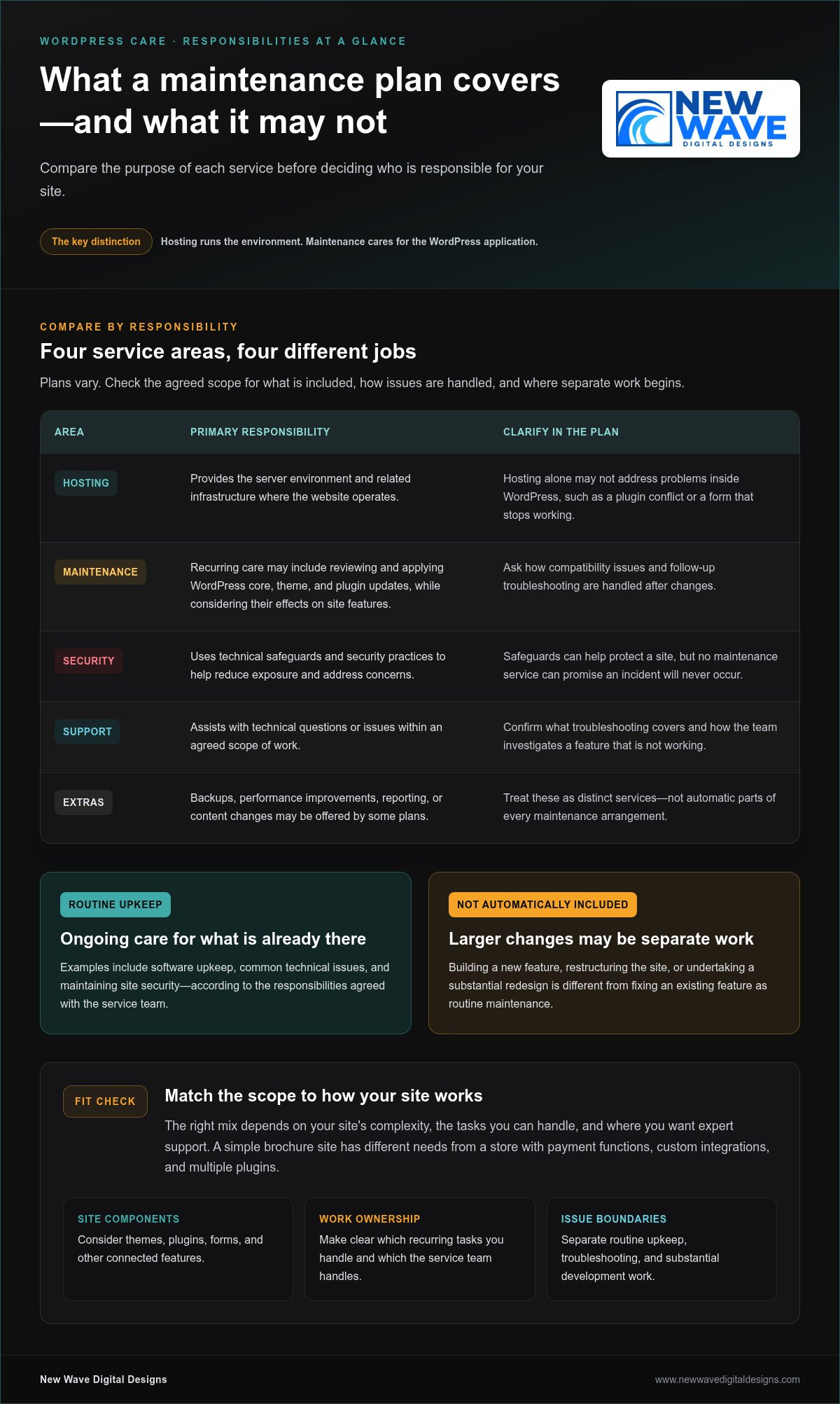
“Self-hosting” and “self-maintenance” can sound like two sides of the same choice, but they describe different decisions. Hosting is the infrastructure where your WordPress website and its files run. Maintenance is the ongoing work of keeping the site updated, backed up, monitored, and functioning.

Hosting determines where your site operates; maintenance determines who looks after its ongoing health. That distinction is central to wordpress maintenance vs self hosting. A self-hosted WordPress site can still receive professional maintenance support, so self-hosting doesn’t automatically mean taking on every technical task yourself.

What does self-hosted WordPress mean?

With self-hosted WordPress, you use the WordPress software and arrange hosting separately. The hosting environment can be configured and managed in different ways. Depending on the arrangement, you may have access to some infrastructure settings without personally administering every server detail.

The broader idea of hosting your own online services also involves trade-offs around control and upkeep, as described in Self-hosting (network). For a WordPress site, the practical question is which parts your hosting arrangement handles and which remain your responsibility.

What does WordPress maintenance include?

Maintenance covers care of the WordPress site itself: applying updates, creating or checking backups, monitoring security, and resolving problems. It can also involve investigating an update that disrupts a form or another site feature. These are recurring responsibilities, although the tools and schedule may vary by site.

Hosting care and site-level care can overlap, but they aren’t identical. A hosting service may look after parts of the infrastructure, while WordPress updates, plugin compatibility, and site recovery need separate attention. If you manage the site yourself, you’re responsible for the tasks assigned to you. With professional maintenance support, you can delegate agreed technical upkeep while retaining your WordPress website.

To see where responsibilities sit, list who handles hosting, updates, backups, security, and troubleshooting. Assign an owner to each task. A clear division makes it easier to spot gaps before a routine task or unexpected issue affects the site.

What You Take On When You Maintain a Self-Hosted WordPress Site

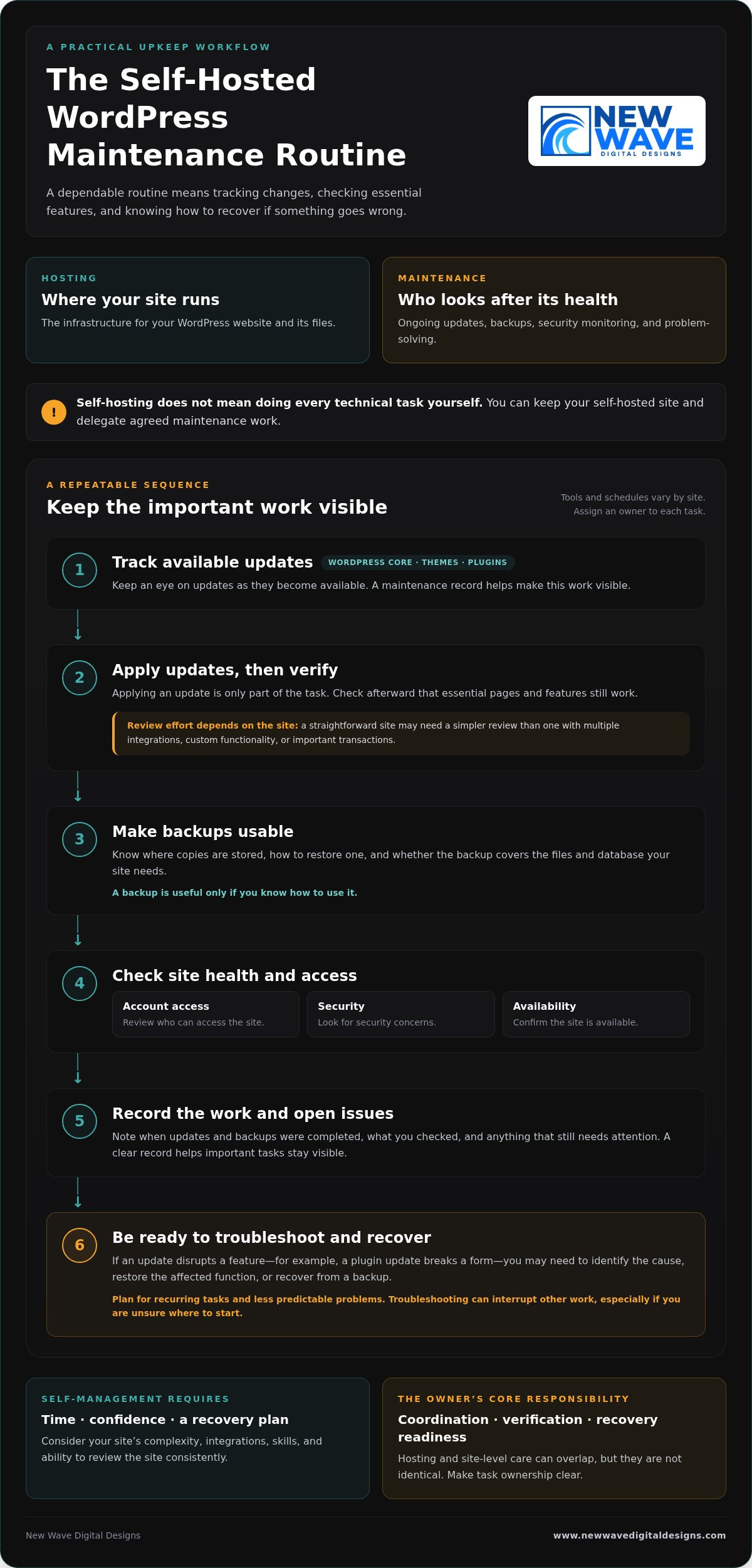
Managing maintenance yourself is less about a one-time overhaul and more about following a dependable routine. The exact tools and schedule depend on your site, but someone needs to track changes, check that key features still work, and know what to do if something goes wrong. This responsibility can fit into your routine when the site is simple and you have the time and confidence to manage it.

Which tasks need regular attention?

WordPress core software, themes, and plugins all need attention as updates become available. Applying an update is only part of the task: check afterward that essential pages and features still work. A straightforward site may need a simpler review process than one with multiple integrations, custom functionality, or important transactions.

Backups are useful only if you know how to use them. Know where copies are stored, how to restore one, and whether the backup covers the files and database your site needs. Routine checks should also include reviewing account access, looking for security concerns, and confirming the site is available. These habits can help prevent a small oversight from becoming a larger interruption.

A maintenance record keeps the work visible. Note when updates and backups were completed, what you checked, and any issue that still needs attention. The goal isn’t to follow the same checklist on every site, but to make sure important tasks don’t fall through the cracks.

How much time and technical confidence does self-maintenance require?

The workload depends on your site’s complexity, integrations, and your existing skills. Routine checks may be manageable, but a failed update can take more than a quick review. For example, if a plugin update disrupts a form, you may need to identify the cause, restore the affected function, or recover from a backup. Troubleshooting can interrupt other work, especially if you’re unsure where to start.

Plan for both recurring tasks and less predictable problems. Ask yourself whether you can make time to review the site consistently and feel prepared to investigate an issue when it appears. Self-management isn’t just a question of technical ability; it also requires a workable plan for recovery.

The owner’s core responsibility is coordination, verification, and recovery readiness. If you’d rather delegate recurring technical upkeep while retaining your WordPress site, explore WordPress maintenance support as part of your site’s ongoing care.

Managed WordPress Maintenance vs. Self-Management: Compare the Trade-Offs

The choice isn’t simply control or convenience. Self-management gives you direct oversight of site upkeep, while professional maintenance support delegates agreed tasks. You can also retain a self-hosted WordPress site and have someone else manage its maintenance. For wordpress maintenance vs self hosting, treat hosting and support as separate decisions, then choose a balance that suits your site and capacity.

Responsibility Self-management Managed maintenance
Control You decide when and how to handle site-level tasks. You retain business and content decisions while delegating agreed technical work.
Routine workload You track and carry out updates and other upkeep. Defined recurring tasks are handled as part of the support arrangement.
Security You monitor relevant site settings and follow up on concerns. Security responsibilities depend on the support scope and hosting setup.
Backups You arrange backups and verify you can restore the site. Backup tasks may be delegated, but responsibilities and recovery processes should be clear.
Troubleshooting You investigate issues and coordinate any fixes. You have defined technical support for the issues covered by the arrangement.

The table is a guide, not a universal division of duties. Support arrangements differ, so establish who handles each task, especially backups, recovery, and problems involving both hosting infrastructure and the WordPress site.

When does self-management make sense?

Self-management can suit site owners with the time, technical confidence, and reliable routine to keep tasks moving. A simple site may have fewer moving parts than one with several integrations, but it still needs care. Direct oversight works best when you don’t just start updates and backups, but check that they completed and know how restoration works.

When can professional maintenance support be a better fit?

Delegating upkeep may suit businesses that would rather spend their time on customers, content, and operations. Defined support for WordPress updates, hosting, and security clarifies who handles recurring technical work. Be clear about the scope: managed support doesn’t guarantee that problems can’t happen, and it doesn’t automatically include every task a site might need.

Think of maintenance as a set of responsibilities, not a hosting label. You can keep control of your site’s direction and content while delegating recurring technical upkeep. That balance can make self-hosting practical without requiring you to manage every part of the site yourself.

WordPress Maintenance vs. Self-Hosting: Which Is Right for You?

Match WordPress Maintenance to Your Site and Capacity

The right maintenance arrangement should reflect what your website does and how much attention you can realistically give it. Use this process to assess your needs before deciding which tasks to manage yourself and which to delegate.

  1. Assess the site’s importance. Does it support sales, lead generation, customer enquiries, or essential daily operations? If a problem would disrupt an important business activity, make sure there’s a clear plan for maintenance and recovery.
  2. Consider its complexity. A site with custom features or several integrations may need more careful update testing and troubleshooting than a simpler site. Identify the features and connections your website depends on.
  3. Be honest about your capacity. Do you have the time and technical confidence to handle routine tasks and respond if an update causes an issue? Account for both regular upkeep and unexpected work.
  4. Identify what’s already covered. Review your hosting arrangement and support to understand who handles updates, backups, security checks, and recovery. Don’t assume a task is covered just because another technical service is in place.

Build a responsibility checklist before deciding

Write down each task and assign an owner. A checklist can reveal where work is being duplicated or overlooked:

  • Hosting and infrastructure: who manages the hosting account and related settings?
  • Updates: who applies updates, and who checks that important site features still work?
  • Backups: who creates them, verifies they’re usable, and knows how to restore the site?
  • Security: who monitors relevant site settings and follows up on concerns?
  • Recovery: who investigates a problem and coordinates the steps to resolve it?

Look for gaps in backup verification, update testing, or issue resolution. Assign tasks according to your actual capacity, not the assumption that you’ll find time later. Some owners prefer direct oversight of every task; others retain control of business and content decisions while delegating technical upkeep.

Revisit the checklist as your website and business evolve. A new integration, a shift toward online sales, or a change in your team can affect the site’s importance and support needs. The wordpress maintenance vs self hosting decision isn’t fixed for the life of a website; task ownership can change as your priorities do.

If you’d like professional help with recurring upkeep, explore WordPress maintenance support as part of your site’s ongoing care.

A Managed WordPress Maintenance Plan Can Keep Self-Hosting Practical

Choosing where your WordPress site is hosted doesn’t determine who maintains it. You can keep a self-hosted site and arrange professional help with its ongoing technical care. This makes wordpress maintenance vs self hosting less of an either-or decision: hosting provides the environment, while maintenance support helps keep the site’s technical foundation attended to.

Managed hosting and security services can complement WordPress maintenance, but they cover related, distinct responsibilities. Hosting and security support can address aspects of the environment your site runs on, while maintenance focuses on ongoing care of the WordPress site. A clear division prevents important tasks from being assumed rather than assigned.

What to expect from ongoing website support

Good maintenance means planned, recurring attention, not just a response to a visible fault. The support scope should make clear which tasks are handled, where your responsibilities remain, and how communication works when an issue needs attention. Clear ownership helps you understand how updates, security, backups, and troubleshooting fit together without assuming every support arrangement covers the same work.

This support doesn’t remove the need to make business and content decisions. It gives you a way to delegate technical upkeep while staying involved in your website’s direction.

Keep your WordPress site aligned with your business

A website changes as the business behind it changes. New content, added functionality, integrations, and shifting priorities can all affect the site’s technical needs. An approach that suited a simple information site may need to change if the website becomes central to enquiries, sales, or daily operations.

Review hosting, security, and maintenance responsibilities regularly. Confirm who owns each recurring task and how issues are handled, then adjust the arrangement when the site or your available time changes. Steady upkeep supports the website’s role over time, rather than treating maintenance as a one-off task.

New Wave Digital Designs provides WordPress website maintenance, managed hosting, and security support to help site owners delegate technical upkeep while retaining their WordPress website. Explore WordPress website maintenance services and take the next step toward support that fits your site’s needs.

Choose a WordPress Setup That Supports Your Next Step

Hosting and maintenance answer different questions: where your WordPress site runs, and who takes care of its ongoing technical needs. The choice in wordpress maintenance vs self hosting doesn’t have to be all or nothing. You can retain a self-hosted site while delegating recurring upkeep, or manage maintenance yourself if you have the time and confidence to do it consistently.

Start by matching responsibilities to your site’s importance, complexity, and your capacity. Make sure someone owns updates, backups, security, and recovery, then revisit the plan as your website and business evolve. A clear arrangement can help your site keep pace with changing needs without taking attention away from the work it supports.

New Wave Digital Designs provides ongoing website maintenance and technical support, with managed hosting and security services as part of its web support offering. Explore professional WordPress maintenance and support to find an approach suited to your site. With the right balance of oversight and support, you can move forward with greater clarity and confidence.

Frequently Asked Questions

Is WordPress maintenance the same as self-hosting?

No. Self-hosting describes where your WordPress site runs and how its hosting is arranged; maintenance is the ongoing care that keeps the site updated, backed up, monitored, and functioning. You can self-host and maintain the site yourself, or delegate selected tasks to professional support. Keeping these decisions separate makes the wordpress maintenance vs self hosting comparison clearer and helps you identify who is responsible for each part of your site’s care.

Can I use managed WordPress maintenance with self-hosted WordPress?

Yes. Hosting and maintenance are separate choices, so you can arrange hosting for your WordPress site and have a professional handle agreed upkeep. That support might include updates, backups, or security tasks, depending on its scope. Make responsibilities clear across hosting infrastructure, WordPress maintenance, and site recovery. You can delegate technical work while retaining decisions about your website’s content, functionality, and business direction.

What happens if I do not maintain my WordPress site?

Neglected updates, unverified backups, and unattended issues can increase the risk of compatibility or security problems. The impact depends on your site’s software, plugins, themes, and setup, so it won’t be the same for every website. Assign an owner to routine updates, backup checks, and issue monitoring so important tasks aren’t left to assumption or postponed indefinitely.

Is self-hosted WordPress cheaper than managed maintenance?

There’s no universal answer because hosting and maintenance are different responsibilities, and the total depends on what your setup includes. Compare hosting, any tools or support you need, and the time you’ll spend managing the site. If you maintain it yourself, account for the effort involved in checking updates, verifying backups, and resolving problems. A lower direct expense may still require more of your time and attention.

How often should WordPress be maintained?

WordPress maintenance is ongoing, but the right schedule depends on your website, its themes and plugins, and how the site supports your business. Review available updates regularly, verify that backups are usable, and monitor for security or availability concerns. Establish a repeatable routine that suits your site rather than relying on a single annual check. Most importantly, make sure a specific person or support arrangement owns the tasks.

Can I switch from self-managing WordPress to professional maintenance later?

Yes. You can move from self-management to professional support as your site or available time changes. Before handing over recurring tasks, organize access details, hosting information, a list of themes and plugins, backup procedures, and known issues. This gives the person handling maintenance a clearer picture of the site and helps identify what needs attention. Agreeing on task ownership also helps keep ongoing work from falling through the cracks.

Does managed WordPress maintenance mean I lose control of my website?

Not necessarily. Delegating technical upkeep doesn’t automatically transfer ownership of your website or control over its content. A well-defined arrangement distinguishes maintenance tasks from business decisions, such as what to publish or how the site should serve customers. Clarify access, responsibilities, and how technical changes are communicated. You can remain involved in your site’s direction while assigning recurring technical work to professional support.

Website Security & Hosting: A Practical Guide for 2026

What if your website’s weakest security link isn’t a flaw in its design, but a gap between where it’s hosted and how it’s cared for? Website security and hosting services work together to keep a site available and better protected, but their roles are different. Hosting provides the foundation; security controls and ongoing maintenance help keep that foundation resilient.

If you’re unsure what protection your site needs, start by listing the tasks someone must handle: updates, account access, backups, monitoring, and recovery. A hosting plan, maintenance service, and security support can cover different responsibilities, so check what is included and who owns each task. This guide explains the protections to evaluate, practical questions to ask providers, and how to compare self-managed hosting with managed support. Use the guidance to choose an approach that suits your platform, your site’s needs, and the expertise available to you.

Key Takeaways

  • Clarify which responsibilities belong to your hosting provider, maintenance support, and security process.
  • Assess several layers of protection, including access controls, software updates, encrypted connections, monitoring, and recovery.
  • Compare website security and hosting services by their written scope and assigned responsibilities, not just by plan names.
  • Before comparing providers, note your platform, business needs, traffic, and current technical capacity.
  • Decide whether managed support fits your site’s complexity, available time, and need for continuity, then confirm the exact deliverables.

Website Security and Hosting Services: What Each One Does for Your Site

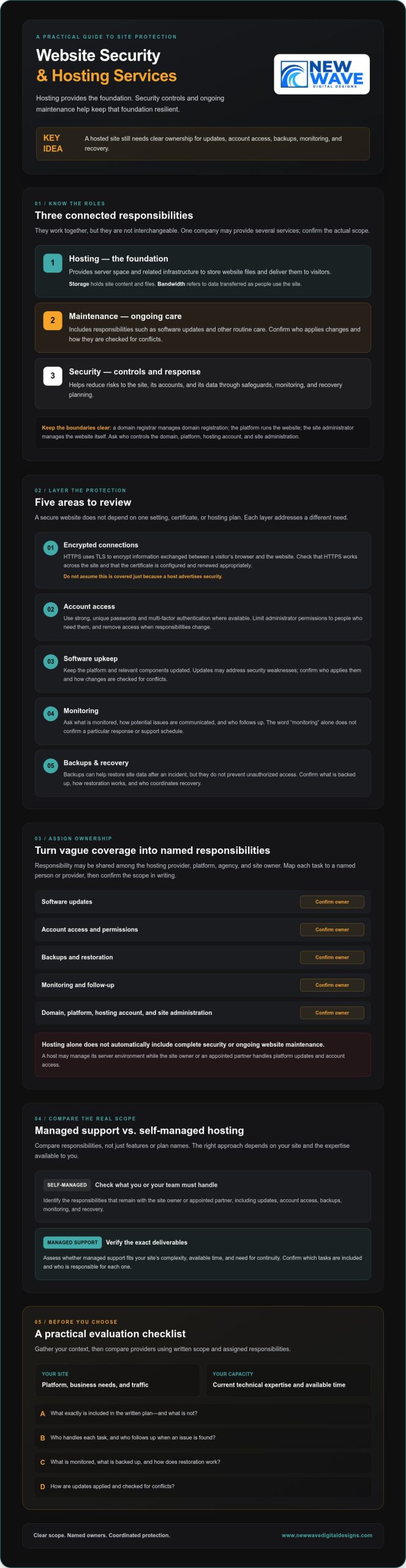
A business website needs to stay accessible, function as intended, and earn visitors’ trust. It’s reasonable to ask who is responsible if the site goes offline, software becomes outdated, or an account is compromised. Hosting and security are connected, but they address different needs: hosting provides the environment for the site, while security practices and controls help reduce risks to the site, its accounts, and its data.

What do website hosting services actually provide?

Hosting provides server space and related infrastructure to store a website’s files and deliver them to visitors over the internet. Storage holds site content and files; bandwidth refers to the data transferred as people use the site. A domain connects a memorable web address to the services that direct visitors to the site. Providers package these services differently, so check the written plan details rather than relying on a feature name. For a foundational overview, see Web hosting service.

Hosting is distinct from the domain registrar, which manages domain registration; the website platform, such as WordPress, Shopify, or Squarespace; and the site administrator, who manages the website itself. One company may provide several of these services, but that doesn’t make their responsibilities interchangeable. When comparing providers, ask who controls the domain, platform, hosting account, and site administration.

Why hosting and security need to work together

A hosted site still needs safeguards and ongoing care. Software updates can address known weaknesses, account protections help limit unauthorized access, and encrypted connections help protect information exchanged between a site and its visitors. Monitoring and recovery planning are separate considerations. Ask what each service includes, who handles the task, and what happens if a problem affects availability or data.

Responsibility may be shared among the hosting provider, platform, agency, and site owner. For example, a host may manage its server environment while the site owner or an appointed partner handles platform updates and account access. Hosting alone doesn’t automatically include complete security or ongoing website maintenance.

To understand how routine updates and other care fit into the picture, see the guide Website Maintenance Services. When comparing website security and hosting services, map each responsibility to a named person or provider, then confirm the scope in writing. New Wave Digital Designs offers managed hosting and security alongside website maintenance and support for WordPress, Shopify, and Squarespace sites. Confirm which deliverables fit your platform and needs.

How Website Security Layers Protect a Hosted Site

A secure website doesn’t depend on one setting, certificate, or hosting plan. It relies on coordinated controls and consistent maintenance, with clear responsibility for each layer. Protections included in a hosting or support plan vary, so distinguish general good practice from features a provider has confirmed in writing. IBM’s overview of What is web hosting offers context on the infrastructure beneath a site, but the site’s wider security needs still require attention.

Which security controls should site owners understand?

Think of security as several connected areas, each addressing a different risk:

  • Encrypted connections: HTTPS uses TLS to encrypt information exchanged between a visitor’s browser and the website. Check that HTTPS works across the site and that its certificate is configured and renewed appropriately. Don’t assume this is covered just because a host advertises security.
  • Account access: Use strong, unique passwords and multi-factor authentication where available. Limit administrator permissions to people who need them, and remove access when responsibilities change.
  • Software upkeep: Keep the platform and relevant components updated. Updates may address security weaknesses, but confirm who applies them and how changes are checked for conflicts.
  • Monitoring: Ask what is monitored, how potential issues are communicated, and who follows up. The word “monitoring” alone doesn’t confirm a particular response or support schedule.
  • Backups and recovery: Backups can help restore site data after an incident, but they don’t prevent unauthorized access. Confirm what is backed up, how restoration works, and who coordinates recovery.

How platform choice changes security responsibilities

With WordPress, a site may rely on separately maintained core software, themes, and plugins. Those components can have different update schedules, so establish who reviews and applies updates and how changes are managed. Hosting support may cover some tasks, but confirm the scope for your specific arrangement.

Shopify and Squarespace manage their platform infrastructure, which changes what the site owner needs to oversee. It doesn’t remove every security responsibility: account access, staff permissions, content, and connected services still need thoughtful management. Across platforms, ask where the provider’s responsibility ends and yours begins.

These distinctions make website security and hosting services easier to assess: look for coordinated care, not a promise that risk can be eliminated. To discuss how hosting, security, and maintenance responsibilities fit your platform, explore managed hosting and security support with New Wave Digital Designs, then confirm the specific scope that meets your site’s needs.

Managed Hosting vs. Self-Managed Hosting: Compare Responsibilities, Not Just Features

A site can appear to run smoothly while still relying on updates, access reviews, and recovery plans that nobody has clearly taken ownership of. Managed support may seem unnecessary if nothing is wrong, but the useful comparison isn’t simply which plan has more features. Consider who has the time and expertise to handle essential tasks consistently, and what happens when a problem needs attention.

The labels “managed” and “self-managed” don’t guarantee a standard set of services. Use this table as a starting point, then check the provider’s written scope. The CISA website security guidelines also offer context on the different areas that contribute to protecting a website.

Responsibility Self-managed hosting Managed hosting
Infrastructure Owner selects and oversees the hosting environment. Provider may manage some infrastructure tasks; confirm which ones.
Updates and security checks Owner or appointed administrator schedules and carries them out. May be included in the service scope, but frequency and coverage vary.
Troubleshooting Owner investigates issues or coordinates with separate providers. Provider may assist within agreed responsibilities and channels.
Backups and recovery coordination Owner arranges backup processes and identifies who will restore the site. Confirm whether backups, restoration, and recovery coordination are included.

When can self-managed hosting be a reasonable fit?

Self-management can suit an owner or team with the technical skills, time, and documented process to care for the site. Assign responsibility for applying updates, reviewing alerts, managing account access, and coordinating recovery. If those tasks have clear owners and aren’t left until something breaks, self-managed hosting may be practical. It isn’t inherently unsafe; the quality of the operating plan matters.

What should managed website support clarify?

Ask which hosting, maintenance, and security tasks are included, excluded, or billed separately. Confirm support channels and expectations, responsibility boundaries, and how backups and recovery are handled. Get the details in writing instead of assuming a plan name describes the service. The guide Website Maintenance Services can also help clarify how ongoing care fits alongside hosting.

Choose the model that fits your site’s complexity and your team’s capacity. For website security and hosting services, clear ownership is as important as the feature list.

Website Security & Hosting: A Practical Guide for 2026

How to Evaluate Website Security and Hosting Services: A Practical Checklist

Start with your website as it exists today, not with a provider’s feature list. Identify your platform, what the business needs the site to do, expected traffic patterns, and which technical tasks someone already handles. This context helps you compare website security and hosting services against real responsibilities rather than assumptions.

Questions to ask before choosing a hosting provider

Ask the provider where its service scope, availability commitments, support hours, and exclusions are documented. Request specific details about backups and restoration, migration steps, and tasks relevant to your platform. Don’t infer backup frequency, performance, or response times from a plan name or general marketing language.

  • 1. Map your platform and requirements. Record whether the site uses WordPress, Shopify, Squarespace, or another platform. Note essential functions, expected traffic needs, and any technical responsibilities your team wants to retain or delegate.
  • 2. Clarify what the service covers. Ask who manages hosting infrastructure, platform or software updates, security checks, troubleshooting, and recovery coordination. For each task, identify what’s included, excluded, or handled separately.
  • 3. Verify support and availability terms. Find the written commitments, support hours, contact channels, and escalation process. Ask how the provider communicates planned changes or issues that could affect the live site.
  • 4. Understand backup and migration procedures. Ask what data is backed up, how restoration requests are handled, and what steps a migration involves. Confirm who coordinates platform-specific tasks and how the process is planned to limit avoidable disruption.
  • 5. Create a secure site record. Document administrator accounts, domain and hosting renewal dates, backup arrangements, and support contacts. Store this information securely, restrict access to people who need it, and keep credentials in an appropriate password manager rather than an open document.
  • 6. Review the current security posture. Inventory administrator access, active themes, plugins, and other software, then note who manages hosting and domain access. Check whether HTTPS is active and whether update and recovery procedures are documented. Direct unresolved questions to the relevant host, platform provider, or qualified website professional.
  • 7. Coordinate changes before they go live. Agree who will make technical changes, when they’ll happen, and how the site will be checked afterward. Updates, migrations, and access changes should be coordinated to reduce avoidable disruption to a working site.

Use the completed checklist to compare providers or uncover gaps in your current arrangement. If you’d like a partner to help assess hosting, security, and ongoing site-care responsibilities, explore hosting and security support from New Wave Digital Designs and confirm which services fit your platform and needs.

When Managed Website Security and Hosting Support Makes Sense

Managed support isn’t automatically the right choice for every website. The decision depends on whether your team can reliably handle ongoing responsibilities, how complex the site is, and how important continuity is to your business. A simple site with a capable owner and a documented care routine may be manageable in-house. A site that supports sales or daily operations may need clearer ownership and coordinated help, especially if downtime would interrupt important work.

Signs your site may benefit from ongoing support

Consider a review if nobody is clearly responsible for site updates, administrator access, or recovery planning. The same applies if essential website tasks compete with other work and are often postponed. These aren’t reasons to panic; they’re signs to establish who does what.

Start by asking whether your current arrangement gives you a dependable way to maintain the site and address issues. If the website plays a meaningful role in sales or operations, assess how an interruption would affect customers and staff. A measured review can reveal real gaps without assuming every site needs the same level of support.

What to discuss with a managed hosting and security partner

Bring a clear picture of your site: its platform, current host, key functions, and any concerns you’ve noticed. Explain what technical knowledge and time your team can contribute. This gives a potential partner context to discuss a workable division of responsibilities rather than offering a generic plan.

Ask for a written scope that separates hosting, website maintenance, and security tasks. Clarify what’s included and excluded, how communication works, and who is responsible for updates, backups, restoration, and recovery coordination. Confirm that the proposed arrangement fits your platform. Managed services may help align hosting and ongoing care, but the service name alone doesn’t explain what will be delivered.

New Wave Digital Designs provides managed hosting and security alongside website maintenance and support for WordPress, Shopify, and Squarespace sites. The next step is a practical conversation about your setup and responsibilities, followed by confirmation of the specific scope that fits your needs.

Discuss website hosting and security support

Build a Care Plan That Fits Your Website

A resilient website starts with clear ownership. Hosting provides the foundation, while security and maintenance require coordinated attention to access, updates, and recovery. The right balance depends on your platform, your team’s expertise, and the responsibilities you’re prepared to manage.

As you compare website security and hosting services, look beyond a plan’s label. Ask what’s included, who handles each task, and how support fits your site’s needs. Written answers make it easier to spot gaps and choose a practical approach, whether you manage the work in-house or bring in a partner.

New Wave Digital Designs offers managed hosting and security alongside ongoing website maintenance and support for WordPress, Shopify, and Squarespace websites. Confirm the specific scope for your platform and requirements. If you’re ready to review your setup, discuss website hosting and security support.

With clear responsibilities and thoughtful ongoing care, you can give your website a steadier foundation for what comes next.

Frequently Asked Questions

What is the difference between website hosting and website security?

Hosting provides the infrastructure that stores website files and makes them available to visitors. Website security refers to practices and controls that help reduce risks to the site, its accounts, and its data. For example, a host may provide server space, while account permissions, software updates, encrypted connections, and recovery planning involve additional responsibilities. One provider may handle some of both, so check the actual scope instead of assuming they’re one service.

Do website hosting services include security automatically?

Not necessarily. A hosting plan may include certain safeguards, but features and responsibilities differ by provider and plan. Ask specifically whether security checks, software updates, monitoring, backups, and recovery support are included, and who performs each task. Also clarify what’s excluded or handled by your platform provider, agency, or site administrator. A general “secure hosting” label doesn’t tell you which protections are active or how issues are handled.

Can a website be secure without managed hosting?

Yes. A website can be cared for without managed hosting if you or a qualified administrator can consistently manage the necessary responsibilities. Assign clear ownership for updates, account access, security checks, and recovery planning. Keep a record of procedures and review it as the site changes. Managed support can be useful when time or expertise is limited, but the right choice depends on your site’s needs and who can maintain it reliably.

How do I know whether my website hosting is secure?

Review the provider’s written scope and check your site’s current setup. Confirm that HTTPS is active, identify who manages software updates and administrator access, and ask what monitoring, backups, and recovery options are included. Check that you know how to contact the relevant provider and where support expectations are documented. These checks can reveal unanswered questions, but no single indicator proves that a site is fully protected.

What happens if my website is hacked while it is hosted?

The response depends on your platform, provider, and support agreement. Contact the host and platform provider through their documented channels, then follow their guidance. Avoid making uncoordinated changes that could complicate investigation or recovery. Review account access and preserve relevant messages or incident details. Ask in advance who investigates, who can restore the site, and whether recovery assistance is part of the service, since hosting alone doesn’t establish those responsibilities.

Does managed hosting include website backups and updates?

Sometimes, but the label “managed” doesn’t confirm that backups or updates are included. Ask whether backups cover your site’s relevant files and data, how restoration requests work, and who handles platform, theme, or plugin updates. Confirm the details in writing, including exclusions and any separate responsibilities. New Wave Digital Designs offers managed hosting and security alongside website maintenance and support, but confirm the specific deliverables for your site.

Are WordPress, Shopify, and Squarespace security responsibilities different?

Yes. WordPress sites may use separately maintained core software, themes, and plugins, so clarify who manages their updates. Shopify and Squarespace manage their platform infrastructure, but site owners still need to manage account access, staff permissions, content, and connected services. Each setup has different responsibility boundaries. Ask your platform provider, host, or website professional which tasks they handle and which remain yours, then document the division.

Secure Website Hosting Services: The Visionary Foundation for Small Business Growth

Did you know that 43% of all cyberattacks target small businesses, yet less than 14% of these enterprises are adequately prepared to defend their digital assets? For the visionary entrepreneur, a website is far more than a collection of code; it’s a digital sanctuary, a brand legacy, and a primary touchpoint for customer trust. You’ve poured your passion into your business, but the looming threat of data breaches and the confusion of technical jargon can make the digital landscape feel like a minefield rather than a playground for growth.

We believe that your online presence deserves the same level of craftsmanship as the products or services you provide. You need a partner who views security as an art form and performance as a promise. This article explores how secure website hosting for NJ small businesses provides the meticulous protection and architectural stability required to scale with confidence. You’ll learn how to safeguard your digital artistry, replace technical anxiety with peace of mind, and leverage superior loading speeds to delight your audience. Let’s build a foundation that is as resilient as it is beautiful.

Key Takeaways

  • Learn to recognize the hidden risks within high-volume, discount hosting environments and how these shared vulnerabilities can compromise your brand’s digital craftsmanship.
  • Understand how secure website hosting for NJ small businesses acts as a multi-layered architectural shield, protecting your creative assets with meticulous encryption and hardened protocols.
  • Evaluate the strategic benefits of a managed hosting partnership, which liberates you from technical burdens so you can focus entirely on your visionary growth.
  • Gain a strategic checklist for hardening your digital sanctuary, from implementing multi-factor authentication to verifying your provider’s rigorous security standards.
  • Discover how integrating secure hosting into a holistic maintenance strategy ensures your brand’s continuous evolution and builds lasting trust with your audience.

The Hidden Vulnerabilities of Standard Small Business Hosting

Many entrepreneurs believe their digital presence is safe simply because they’ve purchased a standard package from a high-volume provider. This is an illusion. Standard web hosting service models often prioritize density over depth, packing thousands of sites onto a single server to maximize profit. For your brand, this isn’t just a technical compromise; it’s a structural risk to your digital craftsmanship. When your site is treated as a commodity, its unique spirit is left vulnerable to the flaws of others. Actually, 43% of all cyberattacks now target small businesses. This isn’t a coincidence; it’s a strategy. Cybercriminals seek the path of least resistance, and discount hosting environments provide exactly that: vulnerability, instability, and risk.

The Risk of Shared Digital Environments

In these high-volume environments, you’re essentially living in a digital tenement. The “bad neighbor” effect is a very real threat to your brand’s integrity. If another site on your shared server has weak code, an outdated plugin, or a compromised password, an attacker can leap from their vulnerability into your sanctuary. This cross-site contamination bypasses your individual security efforts because the breach happens at the server level. True secure website hosting for NJ small businesses requires an isolated architecture where your data exists in a dedicated, meticulously hardened space. Without this isolation, your brand’s integrity depends on the weakest link in a chain you don’t control. You deserve a foundation that offers:

  • Resource Isolation: Ensuring that one site’s traffic spike or security breach doesn’t impact your performance.
  • Dedicated Security Layers: Moving beyond generic filters to implement site-specific protection.
  • Architectural Integrity: Building a digital home that is private, secure, and resilient.

The Evolution of Modern Cyber Threats

The landscape has shifted dramatically as we move through 2026. Automated scripts and AI-driven bots have made small businesses the primary target for sophisticated attacks. These threats don’t discriminate based on your company’s size; they simply look for open doors. We’re seeing a rise in complex database injections and phishing schemes that target the very heart of your customer data. When your site goes down or your data is leaked, the cost isn’t just financial. It’s the loss of customer resonance, the erosion of trust, and the fracturing of your professional image. Holistic security goes beyond a simple firewall. It involves continuous evolution, proactive monitoring, and a deep understanding of how technical protection supports your long-term vision. It’s about preserving the artistry you’ve worked so hard to create.

The Architecture of Technical Protection: Defining Secure Hosting

Secure website hosting is a multi-layered architectural shield that preserves the integrity, availability, and confidentiality of your digital assets through continuous, proactive defense. It transforms your online presence from a vulnerable page into a fortified digital sanctuary. This isn’t just about installing a plugin; it’s about a holistic strategy that anticipates threats before they manifest. When your hosting is treated as craftsmanship rather than a utility, every technical detail serves to protect your brand’s unique spirit and long-term vision.

Layers of a Secure Hosting Shield

A visionary hosting environment begins at the hardware level. We prioritize data centers with rigorous physical security and redundant power systems to ensure your brand’s foundation is unshakable. Beyond the physical, a Web Application Firewall (WAF) serves as a sophisticated digital sentry. It inspects incoming traffic in real-time, blocking malicious requests and mitigating DDoS attacks that could otherwise silence your voice. For those seeking secure website hosting for NJ small businesses, this level of technical guardianship is essential to maintain customer trust. Finally, automated daily backups provide the ultimate safety net, ensuring your creative investment can be restored instantly if a disruption occurs. This redundancy isn’t just a backup; it’s your insurance against the unpredictable.

Encryption and Identity Verification

Meticulous protection requires moving beyond the basic Domain Validation (DV) SSL certificates that have become a commodity. While the majority of small business websites now use HTTPS, the depth of that encryption varies significantly. Data from 2026 shows that 6% of small business websites still lack basic encryption, leaving them exposed to simple interceptions. We utilize advanced SSL/TLS protocols to create a private, encrypted tunnel for all data transmission. This commitment to security extends to how we manage your files. By exclusively using SFTP (Secure File Transfer Protocol) instead of standard FTP, we eliminate the risk of credentials being intercepted in plain text. This methodical approach ensures that every interaction on your site remains a private dialogue between you and your client. If you’re ready to elevate your digital infrastructure, our team can help you design a customized security strategy that reflects your brand’s excellence. It’s about ensuring that your database integrity is never compromised and your customer data remains a private sanctuary.

Managed vs. Unmanaged Hosting: Evaluating the Strategic Investment

Choosing a hosting environment is a pivotal moment in your brand’s journey. It’s the decision between being a tenant who must also act as the building’s janitor, or being a visionary resident in a meticulously curated estate. While unmanaged hosting is often marketed as a budget-friendly option, it demands a significant sacrifice of your most precious resource: time. When you invest in secure website hosting for NJ small businesses, you aren’t just buying server space; you’re securing a partnership that protects your creative energy from being consumed by technical minutiae.

The Hidden Labor of Unmanaged Solutions

Unmanaged hosting places the full weight of technical maintenance on the business owner. You become the one responsible for the architecture. Who handles the critical security patches when a new vulnerability is discovered? Who manages the server updates to ensure compatibility with PHP 8.5? In an unmanaged environment, these tasks often fall by the wayside, leading to digital stagnation and increased risk. A single manual error during a routine update can shatter your site’s functionality, causing downtime that erodes customer resonance and trust. The “cheap” price tag of these services rarely accounts for the hidden costs of stress, security lapses, and the missed opportunities that occur when you’re stuck in the technical weeds rather than focusing on your brand’s evolution.

Managed Services as a Growth Catalyst

Managed hosting functions as a sophisticated extension of your own creative team. It’s a boutique approach where a “Digital Architect” listens to your needs and applies technical expertise to ensure your site evolves alongside your business. This partnership includes proactive hardening of your environment, performance optimization that keeps your site fluid, and the peace of mind that comes from expert oversight. By integrating these hosting solutions with comprehensive website maintenance services, you create a holistic defense system for your brand. Investing in managed secure website hosting for NJ small businesses ensures that your performance, security, and scalability are always evaluated in tandem by professionals who care about your long-term success. This allows you to step away from the server logs and return to the visionary work that truly moves the needle. Secure hosting should be a catalyst for your growth, not a barrier to it, ensuring your digital presence remains as resilient as it is beautiful.

Secure Website Hosting Services: The Visionary Foundation for Small Business Growth

A Strategic Checklist for Hardening Your Digital Presence

A visionary digital presence requires more than just a beautiful facade; it demands a structural integrity that withstands the tests of the modern web. Think of this checklist as your architectural blueprint for fortification. By moving beyond passive observation and into active guardianship, you ensure your brand’s story remains uninterrupted and its data remains a private sanctuary. High-quality secure website hosting for NJ small businesses provides the essential foundation, but your ongoing strategy determines the height of your digital resilience. It’s about creating a culture of security that mirrors the excellence of your brand.

Core Security Fundamentals

The first step in any hardening process is the verification of your hosting provider’s technical protocols. While secure website hosting for NJ small businesses handles much of the heavy lifting at the server level, your internal administrative policies must be equally robust. You must ensure your provider prioritizes hardware-level security, real-time threat detection, and isolated server environments. Beyond the provider, administrative access is your site’s most sensitive entry point. Implementing multi-factor authentication (MFA) is no longer optional; it’s a fundamental requirement for any serious enterprise. This single layer of identity verification can prevent the vast majority of automated credential attacks. Additionally, your brand benefits from:

  • Malware Scanning: Regularly scheduled deep scans to identify and remove malicious code before it can take root.
  • Password Governance: Enforcing complex password policies that prevent brute-force entry across all user accounts.
  • Plugin Audits: Meticulous reviews of third-party software to eliminate outdated or vulnerable components that could compromise your craftsmanship.

For those utilizing specific platforms, our specialized WordPress maintenance services provide the deep-level security hardening required to protect your digital artistry from evolving threats. For a comprehensive approach to platform-specific protection, our WordPress security solutions guide offers a visionary roadmap to digital hardening that addresses 2026’s most sophisticated threats.

Performance and Speed as Security

Speed is often discussed in the context of SEO resonance, but it’s also a critical component of your security architecture. Slow, bloated websites are frequently the result of inefficient code or unoptimized assets, making them easier targets for bot-driven attacks. When a site responds slowly, it can mask the early signs of a DDoS attempt or a database injection. By using Content Delivery Networks (CDNs), you distribute your brand’s presence across a global network of servers. This doesn’t just improve loading times for your audience; it provides a distributed shield that absorbs and mitigates malicious traffic before it ever reaches your core hosting environment. Meticulous code optimization ensures your site is leaner, faster, and inherently safer. If you’re ready to audit your current infrastructure, we invite you to request a comprehensive security consultation to ensure your foundation is truly visionary.

Elevating Your Brand with Visionary Hosting and Maintenance

Transforming your digital foundation into a fortress of innovation requires a shift in perspective. You’ve worked tirelessly to build a brand that resonates with your audience, and your hosting strategy should reflect that same level of commitment. We position ourselves as your boutique digital architect, ensuring that your technical infrastructure is as inspiring as your creative vision. Integrating secure website hosting for NJ small businesses into a holistic brand evolution strategy isn’t just a safety measure; it’s a strategic move that empowers you to scale without fear. We craft partnerships built on trust, meticulousness, and expertise, allowing you to reclaim your time and focus on the future.

Our Meticulous Approach to Protection

We understand that every platform has its own unique spirit and structural requirements. Whether your brand lives on Shopify, WordPress, or Squarespace, our security solutions are customized to meet the specific demands of your digital environment. We reject the high-volume service factory model, opting instead for a boutique approach that treats every project with personal care. In an era of digital volatility, having a dedicated partner means your security is never static. We focus on continuous evolution, constantly hardening your defenses and optimizing your performance to stay ahead of emerging threats. For e-commerce brands in particular, pairing your secure hosting environment with the right Shopify maintenance packages ensures your storefront remains both resilient and conversion-ready as the digital landscape evolves. This meticulous attention to detail ensures your digital sanctuary remains uncompromised and your brand’s integrity stays intact.

The Next Step in Your Digital Realization

Visionary hosting is the silent engine behind your long-term SEO and marketing goals. When your site is secure, fast, and resilient, search engines reward that stability with higher visibility and better conversion rates. More importantly, the peace of mind that comes from expert-managed security allows you to lead with confidence. You don’t have to worry about technical jargon or the threat of downtime; instead, you can focus on capturing the true spirit of your business. True secure website hosting for NJ small businesses provides the architectural stability needed for continuous growth and customer trust. It’s time to elevate your digital presence and ensure your brand’s longevity. Secure your vision with New Wave Digital Designs and begin your journey toward a more resilient digital future. We invite you to transform your foundation into a lasting legacy of excellence.

Securing Your Digital Legacy and Future Growth

Your digital presence is the living heart of your business vision. We’ve explored how standard environments can compromise your brand’s integrity and why a multi-layered shield is essential for long-term resilience. By choosing a managed path, you move beyond the daily struggle of server maintenance and step into a space of strategic growth. This transition ensures that your performance, security, and scalability remain in perfect harmony, allowing your creative energy to remain focused on your brand’s evolution.

True secure website hosting for NJ small businesses isn’t just a technical necessity; it’s the invisible craftsmanship that preserves your artistry. At New Wave Digital Designs, we combine sophisticated security hardening protocols with a visionary approach to digital craftsmanship. Our meticulous technical support for Shopify and WordPress ensures your foundation is as resilient as it is beautiful. For Shopify store owners seeking to protect their e-commerce investment, exploring dedicated Shopify maintenance packages is an essential next step in building a truly fortified digital presence. Don’t let your digital sanctuary remain vulnerable to the generic risks of high-volume environments.

Partner with a Digital Architect for Secure Hosting today to transform your infrastructure into a fortress of innovation. Your brand’s evolution is a journey, and we’re here to ensure every step is taken with confidence and poise.

Frequently Asked Questions

What is the difference between standard and secure website hosting?

Standard hosting often prioritizes server density, packing thousands of sites into a single environment with minimal isolation. Secure hosting provides a multi-layered architectural shield that includes hardware-level security, real-time threat detection, and hardened server configurations. It’s the difference between a high-volume tenement and a private digital sanctuary. Secure website hosting for NJ small businesses focuses on structural integrity and proactive defense to ensure your creative assets remain uncompromised and resilient.

Why do small businesses need managed hosting services in 2026?

Small businesses have become the primary targets for automated, AI-driven cyberattacks that exploit minor technical oversights. In 2026, the complexity of modern threats requires expert oversight that most business owners cannot manage while running their companies. Managed hosting acts as a sophisticated extension of your creative team, handling critical security patches and software updates. This partnership allows you to focus on your brand vision while digital architects maintain your foundation.

Does secure hosting help with my website’s Google ranking?

Security is a confirmed ranking signal because search engines prioritize sites that provide a safe experience for users. Google favors websites that utilize HTTPS and maintain stable uptime without malicious interruptions. Secure website hosting for NJ small businesses prevents the injections that could lead to your site being blacklisted. Fast, resilient foundations also improve Core Web Vitals, which are essential for long-term search engine visibility and audience resonance.

Is an SSL certificate enough to make my website hosting secure?

No, an SSL certificate only encrypts data in transit between the server and the visitor’s browser. While this is essential for privacy, it doesn’t protect your site from server-side vulnerabilities, brute-force attacks, or malware injections. True security requires a holistic strategy, including Web Application Firewalls, regular software audits, and secure file transfer protocols. Think of an SSL as a locked front door; you still need a perimeter fence and a monitoring system.

How often should my website be backed up by my hosting provider?

Your website should be backed up automatically every single day to ensure your creative investment is always protected. These backups must be stored in an isolated, off-site location so they remain untainted if a server-level event occurs. In a visionary hosting environment, redundancy is treated as a core architectural principle. Having a fresh restore point ensures that your brand can be recovered instantly, preserving your professional continuity and customer trust.

Can I migrate my existing site to a more secure hosting environment?

Migration is a standard part of evolving your digital infrastructure and can be handled with meticulous attention to detail. A professional partner can transition your Shopify, WordPress, or Squarespace site to a hardened environment without data loss or significant downtime. This process involves a full audit of your current assets followed by a strategic move to a safer server. It’s an opportunity to rebuild your foundation on a platform that supports growth.

What happens if my website is hacked while on a secure server?

A secure environment significantly reduces risk, but no system is entirely impenetrable. If a breach occurs, a managed provider acts immediately to isolate the threat and restore your site from a clean, daily backup. Proactive monitoring often catches anomalies before they escalate into full crises. Your partner will then conduct a forensic audit to identify the entry point and implement additional hardening to prevent future vulnerabilities, ensuring your digital sanctuary remains protected.

How does secure hosting impact my website’s loading speed?

Secure hosting often improves speed by utilizing high-performance hardware and Content Delivery Networks. By filtering out malicious bot traffic at the firewall level, your server resources remain dedicated to serving legitimate customers rather than processing attacks. Lean, optimized code and advanced caching protocols further enhance this fluidity. This synergy between protection and performance ensures that your audience enjoys a seamless, fast experience that builds brand authority and increases customer conversion.