Website Maintenance Checklist 2026: Tasks, Tools, and Prevention

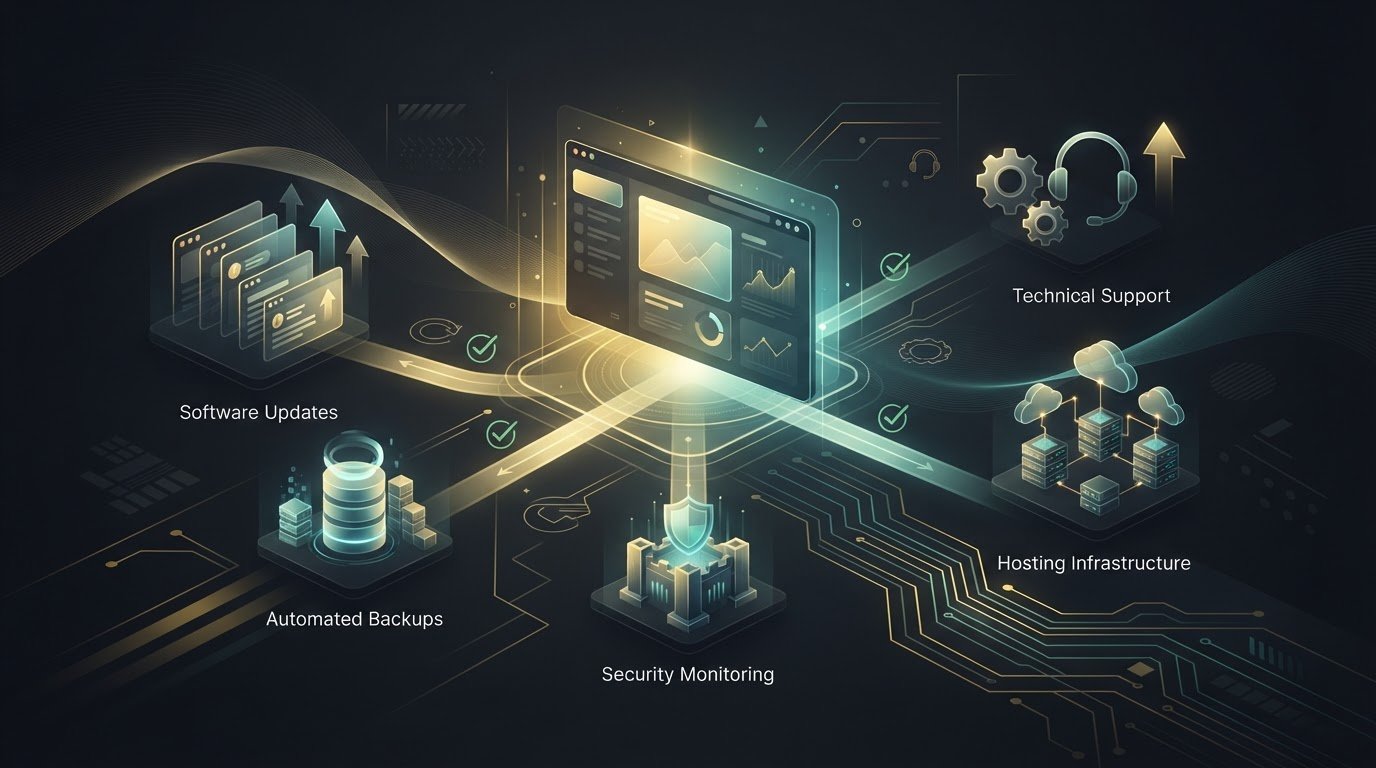
Preventive maintenance is a schedule, not a scramble after something breaks. A website maintenance checklist for 2026 should cover routine backups and restore checks, software updates, security reviews, performance, forms, and links. The right cadence depends on the site, but regular checks help surface small issues before they disrupt the experience.

It’s easy to think of website maintenance as simply updating software. That matters, but a reliable routine also protects site data, keeps key visitor journeys working, and helps content and performance stay aligned with business goals.

Here, you’ll learn what preventive website maintenance involves, which tasks to schedule daily through annually, and which tools can help monitor uptime, security, speed, and links. You’ll also see how routines differ across WordPress, Shopify, WooCommerce, and Magento, so you can build a practical checklist around your platform instead of relying on a one-size-fits-all approach.

Key Takeaways

  • Build a recurring schedule for backups, software updates, security, performance, forms, and content so essential checks don’t get overlooked.
  • Use monitoring and testing tools to spot downtime, broken links, security concerns, and speed issues before they undermine key site journeys.
  • Shape preventive maintenance around your site’s complexity and business needs, and recognize when ongoing technical work calls for professional support.
  • Adjust your checklist to your platform: WordPress, Shopify, WooCommerce, and Magento each have different maintenance priorities.
  • Track completed checks and follow up on issues to turn routine upkeep into a dependable process for your website.

Daily, weekly, monthly, quarterly, and annual maintenance tasks

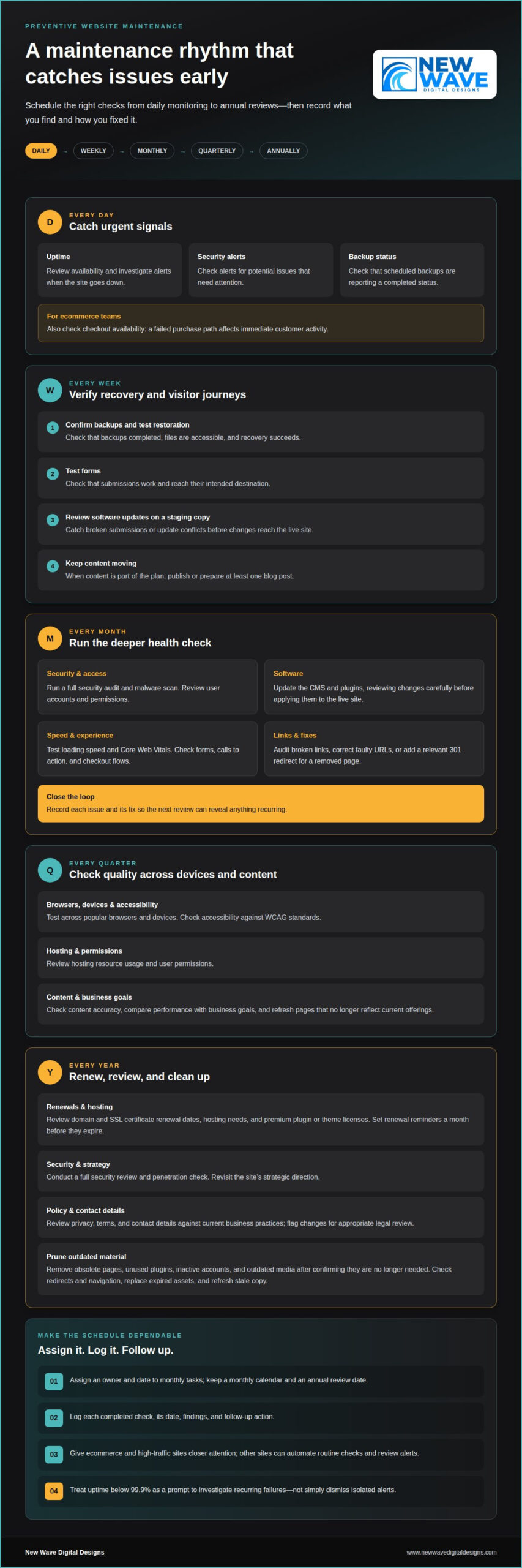
A useful schedule assigns each task a frequency, an owner, and a recorded outcome. Ecommerce and high-traffic sites need closer attention; other sites can automate routine checks and review alerts. Keep a monthly calendar and an annual review date so renewals and deeper audits don’t get lost among everyday updates.

  • Daily: Review uptime, security alerts, and backup status. Ecommerce teams should also check checkout availability because a failed purchase path affects immediate customer activity.
  • Weekly: Confirm backups completed and test that restoration works. A backup is useful only when its files are accessible and recovery succeeds.
  • Weekly: Test forms and review software updates on a staging copy. This catches broken submissions and update conflicts before changes reach the live site.
  • Weekly: Publish or prepare at least one blog post when content is part of your plan. A scheduled editorial action helps maintain a consistent publishing rhythm.

Use the monthly review for deeper checks. Run a full security audit and malware scan, update the CMS and plugins, and review user accounts and permissions. Test loading speed, Core Web Vitals, forms, calls to action, and checkout flows. Audit broken links, correct faulty URLs, or add a relevant 301 redirect for a removed page. Record each issue and its fix, so the next monthly review can identify anything recurring.

  • Quarterly: Test the site across popular browsers and devices, then check accessibility against WCAG standards. These checks can reveal display or interaction problems missed during routine updates.
  • Quarterly: Review hosting resource usage, user permissions, and content accuracy. Compare performance with business goals and refresh pages that no longer reflect current offerings.
  • Annual: Review domain and SSL certificate renewal dates, hosting needs, and the site’s strategic direction. Set renewal reminders a month before domain names, SSL certificates, and premium plugin or theme licenses expire.
  • Annual: Conduct a full security review and penetration check. Review privacy, terms, and contact details against current business practices, and flag changes for appropriate legal review.

During an annual cleanup, remove obsolete pages, unused plugins, inactive accounts, and outdated media after confirming they’re no longer needed. Check that redirects preserve useful paths and that navigation still points to current content. Replace expired assets and stale copy with accurate material so visitors don’t encounter outdated information.

Plan monthly tasks by assigning owners and dates, then reserve an annual review for strategic decisions and renewals. Keep a simple log of each completed check, its date, findings, and follow-up action. This makes missed tasks visible and helps you prioritize when several issues appear at once.

Use monitoring tools to turn site checks into visible signals and documented follow-up. Uptime monitors can check availability every few minutes and alert you when a site goes down. Review the alert history for repeated downtime, then compare incidents with hosting logs to identify patterns. Treat uptime below 99.9% as a prompt to investigate recurring failures, not just dismiss isolated alerts.

How do you check website security, SSL certificates, malware, and vulnerabilities? Review SSL certificate status, scan for malware and known vulnerabilities, and inspect access logs for unusual activity. Record the findings and confirm that fixes resolve the problem without disrupting the live site.

Backups need a clear record, not just a success message. Review logs for failed or incomplete runs, confirm copies are stored securely off-site, and test restoration in a separate environment. Choose a backup tool that makes the recovery point and completion status easy to identify, so you can respond to a missing or damaged copy.

  • Uptime: Configure alerts for outages and review incident history to spot repeat interruptions.
  • Security: Run malware and vulnerability scans, then document findings and remediation.
  • Backups: Check logs, off-site storage, and restoration results.
  • Speed: Compare load performance and Core Web Vitals, including on mobile.
  • Links: Run a broken-link audit, then correct URLs or redirect obsolete pages.

Speed tools can pinpoint slow pages and reveal whether mobile visitors face different friction. Compare performance across key landing pages, product pages, and checkout steps. If uptime monitoring detects an interruption, check whether those pages are also responding slowly. Together, these checks connect a visitor-facing problem to a specific page or service.

What accessibility checks should be included in a 2026 website maintenance checklist? Review pages against WCAG standards, checking keyboard navigation, visible focus, text alternatives, and readable contrast. Test important flows with assistive technology and record barriers for correction.

How should website analytics, forms, links, and checkout flows be tested? Compare analytics events with real actions, then submit each form and complete a test checkout. Confirm that submissions arrive, confirmation messages appear, and link destinations match their labels.

What website maintenance tasks support SEO and content accuracy? Review search performance, page titles, metadata, redirects, and broken links, then check important claims against current business information. Make sure updated pages remain discoverable and old URLs direct visitors to relevant content.

Pairing analytics with user-experience checks helps explain what visitors do and where they encounter friction. Review traffic and conversion paths alongside mobile layouts, form completion, and checkout results. Keep a dated issue log with the affected page, evidence, and corrective action. For ongoing help with these checks, explore website maintenance support.

What qualifies as preventive maintenance?

Preventive maintenance is planned work carried out before a website issue interrupts visitors or business operations. It turns observations into scheduled action: test an update in staging, investigate a recurring error, and record the result. A maintenance plan also assigns responsibility, so tasks don’t depend on someone happening to notice a problem.

Consider a product page that loads correctly but shows an outdated price or an unavailable item. A routine content review can catch the mismatch before customers rely on it. Similarly, checking plugin compatibility before an update can reveal conflicts before they affect the live site. The aim is to reduce avoidable disruption, not to promise that every fault can be prevented.

  • Define the work: List software updates, backup reviews, security checks, and key user journeys. A clear task description makes completion easier to verify.
  • Set ownership: Assign each check to a person or role. For example, one person can review form submissions while another handles platform updates.
  • Keep a record: Note the date, finding, action, and follow-up. A log helps reveal repeated errors and unfinished fixes.

DIY maintenance can suit a straightforward website when the owner has time to monitor the platform, perform updates, and test important pages. The trade-off is the skill and attention required: a rushed update without a restore plan can create more repair work. Professional support can help when a site has ecommerce flows, custom integrations, persistent errors, or updates that need technical testing.

Compare the ongoing effort with the cost of disruption. A maintenance plan should make clear which tasks it covers, how often they occur, who performs them, and how work is documented. For professional website maintenance, price depends on the case and is given after a quote request; relevant factors include platform, site complexity, ecommerce functions, update frequency, and support scope.

To assess return on investment, track practical signals rather than assuming every task creates a fixed saving. Record downtime, recurring errors, failed forms, and time spent on urgent repairs, then compare those records with the preventive work completed. If the same failure keeps returning, review whether the fix addresses its cause or only the visible symptom.

For a United States website, assess the platform, business-critical journeys, security needs, and internal capacity when shaping a maintenance budget. These factors help determine which tasks can be handled in-house and where specialist attention is valuable. Revisit the plan when the site adds a store, new integrations, or a substantial redesign, and adjust its scope to match the work required.
Website Maintenance Checklist 2026: Tasks, Tools, and Prevention

Website maintenance definition and benefits

Website maintenance is the planned work that keeps a digital site secure, accurate, and functioning as intended. It includes technical care, content reviews, and checks of important visitor journeys. For example, a business can review a service page, confirm its contact details, and test the route from landing page to inquiry form.

Consistent maintenance supports business operations by reducing avoidable friction. A working product filter helps shoppers narrow their choices; an accurate service page helps prospects understand an offer. Regularly reviewing these functions protects the connection between what a business promises and what its website delivers.

A maintenance checklist turns broad intentions into visible tasks. Each item should name the page or system, the action, the owner, and the completion record. Instead of writing “check the site,” specify “review the pricing page for outdated details” or “confirm the contact form reaches its intended inbox.”

  • Clarify the task: Name the feature, such as the navigation menu or account login, so checks stay focused.
  • Record the outcome: Note whether the feature works, what failed, and what follow-up action is needed.
  • Assign ownership: Give each recurring check to a person or role, so important work has a clear home.
  • Track patterns: Compare recurring issues across reviews to distinguish isolated faults from problems needing deeper investigation.

Preventive work also supports better decisions. Records of broken visitor journeys, outdated copy, or recurring errors help teams prioritize changes based on actual site needs. Repeated confusion about a service description may call for clearer wording, while a form that fails to deliver submissions needs technical investigation.

Checklists provide continuity when responsibilities change. A new site administrator can see which pages matter, what was tested, and which actions remain open. Make instructions specific enough for someone else to repeat each check, and revise them when the site adds a feature or changes its structure.

Maintenance supports brand consistency as well as technical function. Compare page titles, service descriptions, calls to action, and visual elements with current business information. If an offering changes, update affected pages and navigation together, then review the visitor journey to ensure the new message is clear.

Use the checklist as a working document, not a fixed artifact. After each review, close completed tasks, assign follow-ups, and note new risks. This simple tracking cycle helps keep the site aligned with current needs and makes future maintenance more precise and accountable.

Platform-specific maintenance for WordPress, Shopify, WooCommerce, and Magento

Your platform shapes what to inspect, update, and test. A WordPress content site, Shopify storefront, WooCommerce shop, and Magento store can share core checks, but their software and dependencies differ. Build a shared maintenance framework, then add platform-specific checks for the features visitors use most.

What are the steps to update website software, plugins, themes, and dependencies safely? First, record current versions and create a restorable backup. Apply updates to a staging copy, test key pages and visitor journeys, then update the live site and confirm it still works.

  • WordPress: Review core, plugin, and theme updates together, since component compatibility can affect the site. Check the PHP version and compatibility, then test the editor, navigation, and key forms after changes.
  • Shopify: Review theme changes, installed apps, and storefront content. Test product discovery, product pages, cart behavior, and checkout after changes that affect the shopping journey.
  • WooCommerce: Check WordPress, WooCommerce, extensions, and themes as a connected set. Test product variations, cart calculations, payment steps, and order notifications after relevant updates.
  • Magento: Track the platform software, extensions, themes, and connected dependencies. After changes, test catalog browsing, search, customer accounts, and checkout, then review errors that could interrupt those journeys.

For WordPress, the number of installed plugins matters less than whether each serves a current purpose and remains compatible. Remove unused components only after confirming they don’t support a page or integration. For Shopify, review app permissions and storefront changes together so a theme adjustment doesn’t obscure important product information.

WooCommerce and Magento stores need especially careful testing around the purchase path. Use a test product or controlled process to check product selection, cart changes, and confirmation messages. Confirm that changes don’t unexpectedly affect shipping details, customer-facing text, or order handling. Document the steps and result for each test.

Review available software updates weekly, but don’t treat every update as an automatic live change. First assess its relevance, compatibility, and potential effect on site functions. Staging tests are useful on any platform, especially when an update affects checkout, a theme, or an integration. Confirm the live site afterward and log any issue with the affected page and corrective action.

A practical platform checklist names the software, dependency, feature, and test required. For example, “WordPress: check PHP compatibility” is more useful than “update site.” Tailor those entries to the actual build and repeat critical tests after relevant changes. Get help with platform-specific website maintenance when updates or integrations need a more structured review.

New Wave Digital Designs: Shopify Website Design

New Wave Digital Designs helps businesses build and maintain websites that support their goals. If your Shopify store needs clearer structure or a more considered visual experience, Shopify Website Design can shape its storefront around your business. For an existing site that needs ongoing technical attention, Website Maintenance helps organize routine upkeep.

The right next step depends on what your website needs: a new Shopify build, a WordPress or SquareSpace design, or ongoing maintenance. A focused conversation can clarify the scope and the work involved, without treating every platform or site as the same.

Contact New Wave Digital Designs to discuss your website project and maintenance needs.

Make your next maintenance step intentional

A website maintenance checklist for 2026 is most useful when it becomes part of how your team operates, not a document that sits untouched. Choose one recurring task, assign an owner, and record what changes after each review. That first cycle can reveal whether your process needs clearer responsibilities, more technical attention, or a platform designed around your business.

For a new site or a considered rebuild, New Wave Digital Designs offers Shopify Website Design, WordPress Website Design, and SquareSpace Website Design. Its Website Maintenance service supports ongoing site upkeep. Start with your current platform, your goals, and the maintenance tasks you want handled.

Give your website a considered next step. Contact New Wave Digital Designs to discuss your website plans, and move forward with clarity.

Frequently Asked Questions

Frequently Asked Questions?

This FAQ addresses practical decisions that shape a website maintenance routine. Use the answers to identify who owns each task, what evidence shows it succeeded, and what needs attention next. After a checkout change, for example, record the test order result and assign someone to resolve any failure. That brief record turns a general intention into a repeatable practice.

What are the risks of not having a documented maintenance process?

Without a documented process, important tasks can be missed, performed inconsistently, or left without an owner. A staff change may leave nobody knowing how to restore the site or who receives form submissions. During an incident, teams may lose time locating account access, recent changes, or the right escalation contact. Keep responsibilities, recovery steps, and key system dependencies in a secure, accessible record.

What is Website Maintenance?

Website maintenance is the ongoing care that keeps a site’s technical systems and published information aligned with its intended use. It involves more than fixing visible errors. If a business changes a service name, for example, update references in navigation, page titles, inquiry forms, and confirmation messages. Reviewing connected elements helps prevent mixed messages and makes the site easier to manage.

What should a website maintenance checklist include in 2026?

A useful checklist identifies what to inspect, the expected result, the responsible role, and what to do if the check fails. Include critical paths such as account access, lead delivery, product discovery, and customer notifications. Add a priority field so a broken checkout gets attention before a minor formatting issue. Keep sensitive credentials out of the checklist and store them securely elsewhere.

How often should websites be updated, backed up, and tested?

Set the maintenance frequency according to site activity, platform changes, and the cost of an interruption. A high-traffic store may need closer monitoring than a static portfolio, while major releases should trigger extra checks regardless of the routine calendar. Test important functions after changes to themes, integrations, or checkout settings. Record the last successful test so teams can distinguish a new issue from an older one.

How should website backups be scheduled and tested for recovery?

Schedule backups daily to weekly, depending on how often site data changes, and review logs for failed runs. Store copies off-site and test recovery in a separate environment rather than overwriting the live site during a drill. Include the database and essential site files in the recovery plan. Record what was restored and whether pages, uploaded content, and key functions remained intact.

How do you monitor website uptime, speed, and Core Web Vitals?

Use an uptime monitor for availability alerts, then compare incidents with server or hosting records to investigate the cause. Review page performance and Core Web Vitals for key templates, such as product pages and checkout. Compare mobile and desktop results because layout or asset issues can affect them differently. Keep dated results to see whether a change improved performance or introduced a slowdown.

How much does website maintenance cost in the United States in 2026?

Website maintenance pricing depends on the project and is provided after a quote request. Key cost factors include platform, site complexity, ecommerce functionality, integrations, update frequency, security needs, and support scope. A simple informational site requires different work from a store with custom purchasing flows. To assess a plan, define the tasks you need handled and the technical responsibilities your team can retain.

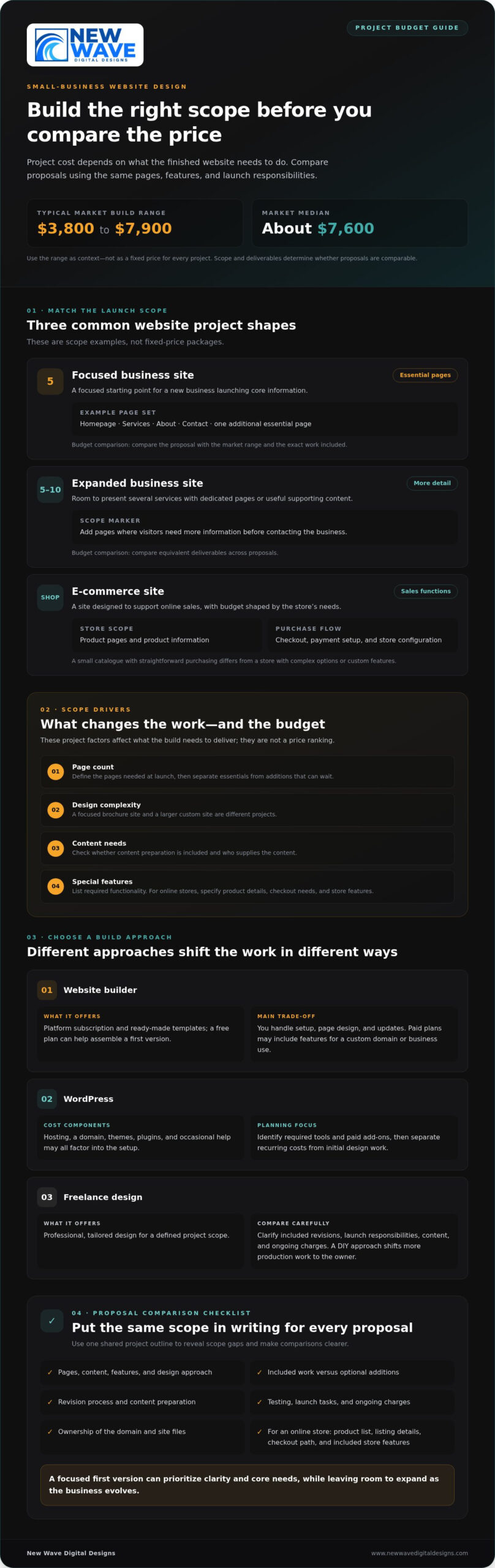
Small business website costs: compare design and ongoing expenses

On the market, a small-business website build typically costs between $3,800 and $7,900, with a median of about $7,600. If you’re weighing how much a small business website should cost in 2026, the right budget depends on what the site needs to do and how much design and development it requires.

It’s reasonable to want a clear figure before committing, especially when a project quote may not show what you’ll spend to keep the site running. A useful comparison separates the initial build from recurring expenses, so you can see what’s included and plan for the long term.

This guide explains the factors that shape design costs, then covers hosting, domains, SSL certificates, and WordPress upkeep. You’ll have a practical framework for comparing options and matching your budget to the website your business needs.

Key Takeaways

  • Set your budget around the site’s purpose, required features, and content needs, not just the number of pages.
  • Compare website builders, WordPress, and freelance design by weighing both upfront work and ongoing commitments.
  • A starter project can focus on essential pages first, leaving room to expand as your business evolves.
  • Plan separately for hosting, domain renewal, SSL, and WordPress care so recurring expenses don’t catch you by surprise.
  • Use the cost breakdowns to identify which parts of a website project matter most for your business.

How much should a full website design cost?

In the United States, a small-business website build typically falls within the market range of $3,800 to $7,900, with a median of about $7,600. To limit hidden costs and contract risks, define the deliverables, revision process, ownership terms, launch responsibilities, and any ongoing charges in writing before work begins.

New Business Budget Recommendations

For a new business, begin with the essential pages and functions needed to explain the offer and help visitors take the next step. A five-page site can provide a focused starting structure, while a 5-10-page site allows room for additional services or useful supporting content. Compared with a larger custom build, a lean launch prioritizes clarity and core needs over extra features.

Before setting a budget, list the pages, content, and features you need at launch. Separate essentials from additions that can wait, then use the same written scope to compare proposals. This keeps the first version focused and makes future expansion easier to plan.

Small Business Website Budget Examples

Consider a local service business that needs a homepage, service information, an about page, and a contact page. That five-page example offers a clear baseline for comparing design proposals. A business with several distinct services may need a 5-10-page version, adding dedicated pages where visitors need more detail before reaching out.

These examples differ mainly in scope, not in a universal fixed price. The market range of $3,800 to $7,900 provides a comparison point for a build, while the median is about $7,600. Use your page list and required functionality to judge whether a proposal fits the project.

Website Project Budgets and Ranges

A project budget reflects what the finished site needs: page count, design complexity, content, and special features. A focused brochure site and a larger custom site are different projects, even if both serve a small business. Compare proposals against the same written scope, including what the design and development work will deliver.

For a practical comparison, ask each proposal to separate included work from optional additions and ongoing charges. Check whether content preparation, revisions, testing, and launch tasks are covered. General price ranges offer context, but the clearest comparison is between proposals based on identical deliverables.

E-commerce Website Budgets

An e-commerce site has a different budget profile because it needs to support sales, not just introduce a business. Product pages, checkout, payment setup, and store configuration all shape the work. A small catalogue with straightforward purchasing needs differs from a store with complex product options or custom features.

To scope an e-commerce launch, prepare a product list, note the information each listing needs, and map the customer journey from product selection to checkout. Then compare proposals by their included store features and launch tasks. This shows whether the design supports the shop you need, without treating every online store as the same project.

Option Scope Budget comparison Best suited to
Focused business site Five essential pages Compare against the market range New businesses launching core information
Expanded business site 5-10 pages Compare equivalent deliverables Businesses presenting several services
E-commerce site Product and checkout functions Assess store scope and launch work Businesses selling online

Choose an option by matching its written scope to the pages and features your business needs at launch.

DIY builders trade hands-on setup for platform fees, WordPress separates hosting and upkeep, and freelance design covers professional project work. Each approach balances your time, control, and support differently.

Website Builder Costs

Website builders offer a platform subscription and ready-made templates, making them a lower-cost route for businesses willing to build their own pages. A free plan can help you assemble a first version, while paid plans may include features needed for a custom domain or business use.

Compare the plan’s monthly price with its included features before choosing. The main trade-off is time: you handle setup, page design, and updates yourself.

WordPress Costs

WordPress costs can combine hosting, a domain, themes, plugins, and occasional help, rather than a single builder subscription. The final setup depends on which tools the site needs and how much work you manage yourself.

WordPress offers flexibility, but owners need to account for the components behind the platform. List the required features, identify paid add-ons, and separate recurring costs from initial design work. This breakdown makes it easier to compare a WordPress proposal with a builder plan.

At this budget, define a focused scope: page count, design approach, included revisions, and launch responsibilities. A freelancer can provide a tailored design without the broader structure of a full-service agency project, while a DIY approach shifts more production work to the business owner.

Compare build methods by separating project fees from recurring site costs:

Before choosing a template or signing a freelance agreement, write down the pages, features, and launch tasks you expect. Clarify who supplies the content, how revisions work, who controls the domain and site files, and which charges recur after launch. These details can reveal scope gaps and contract risks hidden by a headline price.

If you’re weighing a custom build against a platform-led approach, explore a website design approach that fits your project’s scope.

Website pricing for starter projects

A starter project can establish a polished online presence while keeping the initial scope focused. Prices can vary by state or city as provider rates and project requirements differ, but the deliverables remain central to comparing quotes.

Factors That Affect Website Pricing

Page count, custom design, functionality, and content shape a website quote. The amount of design, development, and writing required varies from project to project.

Platform choice matters, too. A Squarespace template-based build can use an existing design structure, while custom functionality adds development work. Before requesting proposals, list the pages, features, content responsibilities, and launch tasks your business needs. A shared scope makes estimates easier to compare.

Freelancer and Agency Pricing

The right comparison depends on the work each quote includes.

Review proposals line by line: identify who handles planning, design, development, revisions, and launch. A lower quote may cover fewer deliverables, while a larger agency project may include a broader set of services. Compare the scope and responsibilities, not just the total.

Custom Website Pricing

Custom builds suit businesses that need a distinct design or features beyond a standard template.

For a starter build, define which custom elements are essential now and which can wait. For example, prioritize core service pages and the contact journey, then plan additional functionality for a later phase. A written scope helps prevent optional features from becoming unexpected project costs.

Ongoing care is a separate budget line from the initial build. Confirm which tasks and support each plan includes.

Project option Typical market range Compare by
Landing page Page scope and launch tasks
Freelancer build Deliverables and responsibilities
Boutique agency build Strategy, design, and development
Custom agency project Custom functionality and scope

Choose a starter project by matching its deliverables to your launch priorities, then budget separately for ongoing care.

Small business website costs: compare design and ongoing expenses

Hosting, domain names, and SSL certificates

Domain registration, hosting, SSL, and business email are recurring expenses, often billed on different schedules.

Budget for each separately: the domain identifies your site, hosting keeps it available online, SSL supports a secure connection, and email provides business addresses.

Domain and Hosting Expenses

A domain and hosting serve different roles, so compare their renewal periods and service levels separately. A .com domain generally falls within the same annual domain range.

Before selecting a plan, list the domain renewal, hosting term, and any introductory pricing separately. Then note what the hosting plan covers and when regular billing begins.

SSL and Security Costs

SSL certificate costs can vary substantially, so include renewal terms in your budget rather than assuming a certificate is always a separate paid purchase.

For a clear annual budget, record SSL renewal and email billing alongside domain and hosting dates. Identify who handles security and updates, and whether that work is included in hosting or billed separately. This separates infrastructure charges from ongoing website upkeep.

Use a simple cost ledger to avoid mixing monthly and annual amounts. Record each item, its billing period, and its next renewal date. For example, list a domain as an annual cost, shared hosting as a monthly cost, and email by user and month. This makes expenses easier to review without confusing one-time setup with recurring fees.

  • Domain: Record the annual registration and renewal cost.
  • Hosting: Compare shared and managed plans by monthly rate and included service.
  • SSL: Track certificate cost and renewal period separately.
  • Email: Multiply the per-user monthly charge by the number of business accounts you need.

Hosting promotions can make the first bill differ from later renewals, so distinguish introductory rates from standard charges. A shared plan and a managed WordPress plan also offer different service levels; compare features rather than choosing on price alone. Include updates and security responsibilities in your plan, especially when they are not part of hosting.

For a practical final check, group expenses into setup and recurring costs, then note the billing period for each. A domain may renew annually while hosting and email are billed monthly. Keeping those schedules visible helps you prepare for renewals and understand the cost of maintaining the site beyond its initial build.

WordPress themes, plugins, and maintenance

Ongoing WordPress costs combine software, hosting, and care for the site. Typical maintenance and support costs depend on whether the plan covers updates, security monitoring, fixes, and hands-on help; those service prices aren’t included here.

Treat that as a planning range, not a maintenance-plan price.

Theme and Plugin Expenses

A WordPress theme shapes the site’s visual framework, while plugins add specific functions.

Before purchasing, map each plugin to a site requirement, such as a form or booking feature. Avoid overlapping tools, and check whether each subscription renews annually or monthly. This inventory helps keep software costs visible as the site grows.

Maintenance and Support Budgeting

Maintenance is separate from web design or a custom design project. It covers work that keeps an existing site current and functioning, including software updates, security, and technical fixes. The cost of a plan depends on its tasks and level of support.

To build a useful budget, note which updates happen regularly, who handles problems, and whether performance work is included. Then compare that checklist with the care plan’s scope. This shows whether the plan fits your site’s needs, rather than covering tasks you don’t require.

Planning for Ongoing Care

A lean WordPress site with few paid plugins has different upkeep needs from a site relying on several subscriptions and custom features. Track hosting, domain renewal, add-ons, and support separately. For example, don’t mistake an annual plugin renewal for a monthly maintenance charge.

Use this short review to shape your budget:

  • Inventory: List themes, plugins, and software subscriptions, including each renewal period.
  • Assign: Decide who handles updates, security checks, and troubleshooting.
  • Compare: Match each care plan’s included tasks to your list before selecting a service level.

As the site changes, revisit the list after adding a plugin or custom feature. New software can bring renewals and extra upkeep, so update the budget as the site grows. A clear record helps distinguish essential care from optional enhancements.

For help planning WordPress website maintenance, identify the updates and support your site needs, then align the service scope with that checklist.

New Wave Digital Designs: Shopify Website Design

New Wave Digital Designs offers Shopify Website Design for small businesses planning to sell online. When comparing website budgets, decide whether your project needs an online store, a business information site, or ongoing care. The right scope depends on your platform and required features.

For store projects, New Wave Digital Designs offers Shopify Website Design; for other platform needs, it also provides WordPress Website Design and SquareSpace Website Design. Website Maintenance supports businesses planning for ongoing site care after launch. Outline your goals, required pages, key features, and maintenance needs so the conversation can focus on scope.

Contact New Wave Digital Designs to discuss your website project and the approach that fits your business.

Shape a website budget around your next move

A website budget is most useful when it reflects what your business needs next, not every feature it might someday add. As you decide how much a small business website should cost in 2026, focus on the experience you want customers to have, the work required to create it, and the care needed after launch.

Turn your vision into a practical brief: describe your audience, outline what you want visitors to do, and identify a platform that suits your plans. New Wave Digital Designs offers Shopify Website Design, WordPress Website Design, and SquareSpace Website Design to shape a site around those priorities.

A well-considered project starts with clear goals and a scope that can evolve with your business. Contact New Wave Digital Designs today to discuss your website plans and take the next step with confidence.

Frequently Asked Questions

What should a small business expect to pay for a website?

For a small-business website build, the collected market range is $3,800 to $7,900, with a median of about $7,600. Treat that as a reference point, not a fixed quote: a five-page informational site and an online store have different scopes. To judge a proposed budget, compare the same pages, functions, content tasks, and launch responsibilities across estimates.

What will it actually cost?

To answer how much a small business website should cost in 2026, first separate the initial build from recurring expenses. Your actual total depends on the build method and the work the finished site requires. For example, a DIY platform has a different cost structure from a custom project. List required features, then sort expenses by whether they are one-time, monthly, or annual.

Can I build my own website?

Yes. DIY can suit a business with a straightforward site and someone available to create the pages. Start by listing the required content and features, then decide whether you can maintain the site as well as build it.

Is a More Expensive Website Worth It?

It can be, if the added investment supports requirements your business genuinely has. Custom design, additional service pages, or e-commerce features can require more planning and development than a simple template site. For instance, an online shop needs a customer journey that supports browsing and checkout. Compare the added deliverables with your business goals rather than assuming a higher quote is automatically a better fit.

Is professional web design still worth paying for in 2026?

Professional design can be worthwhile when you need cohesive branding, custom features, or a site structure that is difficult to create yourself. It also shifts design and development tasks away from your team. Before choosing, define what you want visitors to do, such as request a service or explore products. Then assess whether professional support addresses a real project need.

So what should you actually budget?

How much a small business website should cost in 2026 depends on the work and expenses your site needs. Set out the pages, functions, content, and launch tasks first. Then add recurring costs for hosting, domain renewal, email, paid plugins, and maintenance where applicable. A simple spreadsheet with separate one-time and recurring columns can show which expenses affect launch and which continue afterward.

Want a Real Number for Your Site?

A project-specific price depends on scope and is provided after a quote request. To make the estimate useful, prepare a brief with your audience, required pages, desired features, platform preference, and content responsibilities. Include ongoing care needs, too. Clear inputs help define the project and clarify what the proposed work covers.

What is the cost of hiring a freelancer to build a small business website in 2026?

In the United States, a small-business website built by a freelancer typically costs in 2026. The project scope shapes where an estimate falls within that range: page count, custom design, content work, and required functions all affect the build. Compare proposals using one shared list of deliverables, and distinguish project work from recurring hosting or maintenance expenses.

Managed WordPress Maintenance Plans: How to Choose the Right Fit

What if the best maintenance plan is the one with fewer services but clearer responsibilities? When comparing managed wordpress maintenance plans, it’s easy to focus on long feature lists and still be unsure what happens when an update causes a conflict or a security issue puts your site at risk.

That uncertainty is reasonable. WordPress needs ongoing care, but not every task belongs in every plan. Managed hosting alone may not address problems within your site’s themes, plugins, or forms. The right fit depends on how your site works, which tasks you can handle, and where you want expert support.

This guide explains what maintenance can and can’t do, then shows you how to compare service scope, hosting, security, and support. You’ll learn to match updates, backups, and technical help to your site’s needs, rather than paying for features that don’t serve a clear purpose.

Key Takeaways

  • Managed wordpress maintenance plans can cover different areas of care, so compare responsibilities rather than counting features.
  • Separate hosting, site updates, security, and technical support to understand where each service begins and ends.
  • Assess your website’s business importance, complexity, and in-house maintenance capacity before choosing a level of support.
  • Match ongoing services to real site needs, and avoid paying for extras that don’t add meaningful value.
  • New Wave Digital Designs provides maintenance, support, managed hosting, and security to help care for your WordPress site.

Managed WordPress Maintenance Plans: What Ongoing Care Actually Solves

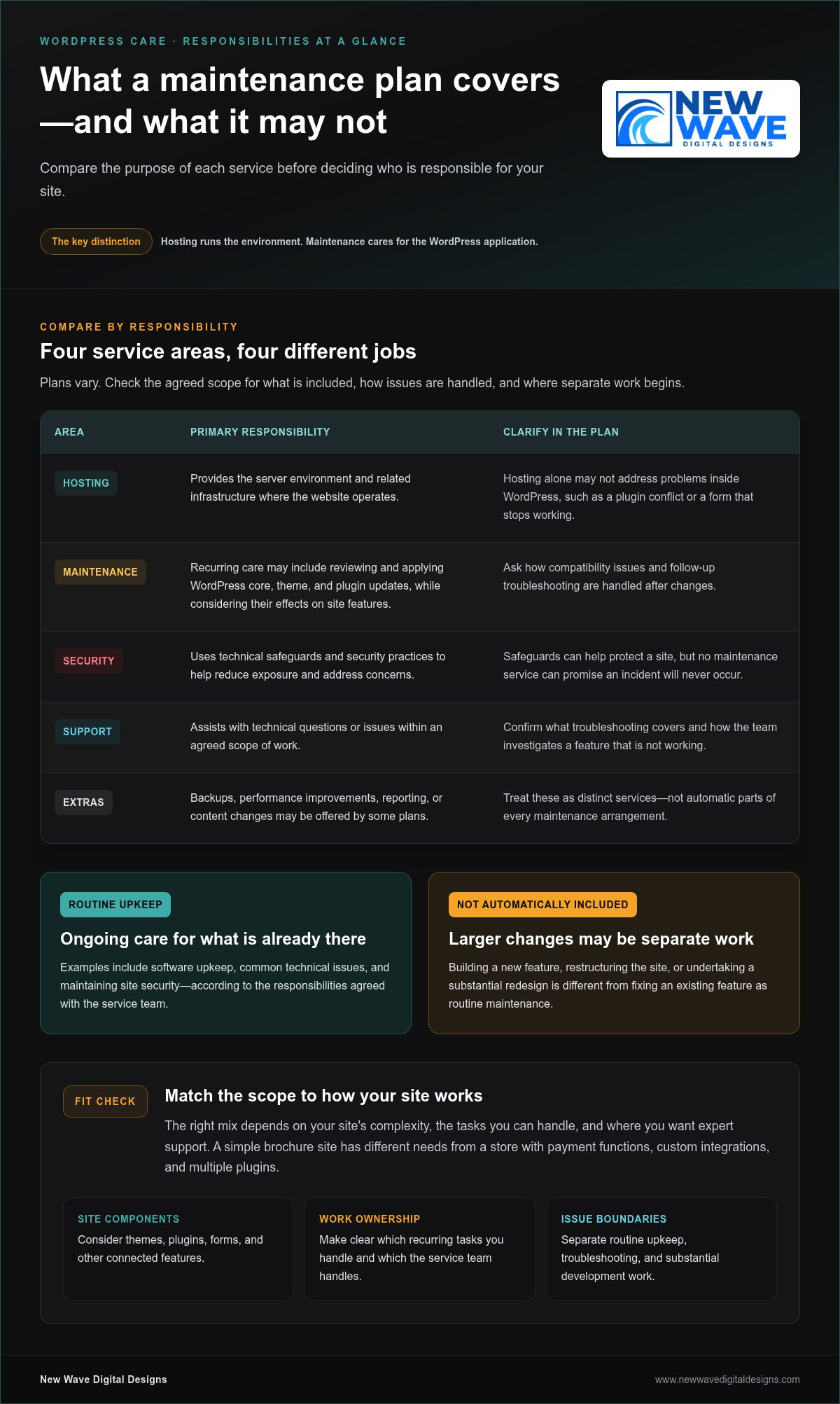
A website can look finished and still need attention behind the scenes. WordPress core software, themes, plugins, and hosting environments change over time. Your site may also gain new features or serve different business needs. A managed WordPress maintenance plan provides recurring technical care for a live website, focused on upkeep and support rather than hosting alone. That distinction is a useful starting point: maintenance looks after the application, while hosting provides the environment where it runs.

For a plain-language overview of the platform, What is WordPress? explains its role as a content management system. For site owners, the practical point is that WordPress consists of interconnected parts. A change to one part can affect another, so ongoing care involves understanding how those pieces work together, not simply keeping the site available on a server.

What does managed WordPress maintenance mean?

Managed care means recurring oversight of a website’s technical condition, with responsibilities agreed between the site owner and the service team. Routine upkeep may include reviewing and applying software updates, addressing common technical issues, and maintaining site security. Because the scope varies, a clear plan should distinguish included maintenance from work handled separately.

That boundary matters. Fixing a problem with an existing feature is different from building a new feature, restructuring the site, or undertaking a substantial redesign. Those are development projects, not automatically part of routine upkeep. A maintenance relationship can provide a way to discuss larger projects, but defining the boundary in advance helps avoid confusion when a request comes up.

Hosting and support may accompany maintenance, but each describes a different responsibility. Hosting concerns the server environment and its operation. Maintenance focuses on the WordPress site and its components. Support is the assistance available when a question or issue arises. These services can work together, but hosting alone doesn’t necessarily address a plugin conflict or a form that stops working after a site change.

Why does an active website need ongoing care?

A functioning site is not a finished technical system. WordPress, its plugins and themes, and the hosting environment can change independently. Site owners may also add content, adjust settings, or rely more heavily on a feature as the business grows. Over time, those changes can introduce compatibility issues or leave software out of date. Neglected upkeep doesn’t make a failure inevitable, but it can make problems harder to notice and resolve.

For example, a contact form may appear normal but stop sending inquiries after a software change. A theme update might also alter the display of a carefully arranged page. Regular attention helps surface changes and gives someone responsibility for investigating their effects. It can’t promise uninterrupted performance, but it can support a more dependable foundation for everyday business activity.

That’s the purpose of managed wordpress maintenance plans: to establish an ongoing rhythm of technical care and clear ownership when a question or problem arises. New Wave Digital Designs provides website maintenance and support alongside managed hosting and technical security solutions, connecting related responsibilities in an approach to WordPress care.

What Managed WordPress Maintenance Plans May Include

A useful plan is more than a bundle of features. It groups work by purpose and makes clear who handles each responsibility. Common components include software upkeep, security measures, hosting, and technical support, though the scope differs. The right mix depends in part on site complexity: a simple brochure site has different needs from a store with payment functions, custom integrations, and multiple plugins.

  • Software upkeep: Reviewing and applying WordPress core, theme, and plugin updates, while considering whether changes affect site features.
  • Security: Using technical safeguards and security practices to help reduce exposure and address concerns.
  • Hosting: Providing the server environment and related infrastructure where the website operates.
  • Support: Helping investigate technical questions or issues within an agreed scope of work.

Some plans may also include backups, performance improvements, reporting, or content changes. Treat these as distinct services, not automatic parts of every maintenance arrangement. The U.S. Department of Energy’s Government Web Maintenance Standards offers a useful reference for the broader role of web maintenance, including technical upkeep, accessibility, and performance. Its guidance provides context, not a universal checklist for every WordPress site.

Updates, security, and hosting responsibilities

Updates keep core software, plugins, and themes current, but applying them is only one part of the task. A change can affect a form, checkout, or page layout, so plans may differ in how they handle compatibility and follow-up troubleshooting. Security is layered too: safeguards can help protect a site, but no maintenance service can promise that an incident will never occur. Hosting supports the site at the server level; it doesn’t necessarily cover issues within WordPress itself. A managed arrangement can connect these responsibilities while making their boundaries clear.

Support, troubleshooting, and work beyond routine care

Support describes how technical questions or problems are handled. A maintenance task is a defined piece of recurring upkeep; troubleshooting may require investigation to find out why a feature isn’t working. Repairing an existing form differs from building a new booking system, adding a custom feature, or redesigning several pages. Larger requests may need a separate project scope.

Clear descriptions help set expectations before work begins. Look for plain language about what routine care covers, how hosting responsibilities relate to site-level work, and where additional development begins. This clarity becomes more important as a site accumulates plugins, integrations, and business-critical features. Managed wordpress maintenance plans should fit the way your site operates, rather than simply offering the longest feature list.

New Wave Digital Designs provides website maintenance and support alongside managed hosting and technical security solutions. Explore ongoing WordPress website care to see how these connected responsibilities can align with your site’s needs.

How to Compare Managed WordPress Maintenance Plans Fairly

Feature lists can make two plans look similar while leaving the most important question unanswered: who takes responsibility when something needs attention? Compare responsibilities and fit before counting features. A focused plan may suit a straightforward site whose owner can handle some tasks. A broader managed arrangement may make more sense for a complex site or a team with limited in-house technical capacity. Neither approach is automatically better.

Which plan dimensions deserve a side-by-side comparison?

Compare the work itself, who performs it, and how it connects to the rest of your website’s operation. For each task, note whether it’s covered, excluded, or handled separately. This makes gaps easier to spot, especially when one plan bundles hosting with maintenance and another treats them as separate responsibilities.

Comparison area Focused arrangement Broader managed arrangement
Routine upkeep May cover a defined set of maintenance tasks, with other work left to the site owner. May assign a wider range of recurring site-care responsibilities to the service team.
Hosting May be separate, leaving server-related matters with the hosting provider. May bring managed hosting into the same relationship as site maintenance.
Security May focus on specified technical measures, with boundaries around investigation or remediation. May connect security services with broader technical oversight.
Support and extra work May limit assistance to defined tasks or handle additional requests separately. May provide a wider support scope, while still distinguishing routine care from project work.

Use the table as a framework, not a rating system. For each area, clarify what the plan covers, who does the work, and what happens if an issue falls outside the stated scope. An explicit exclusion is easier to plan around than one that comes to light only after a problem arises.

How should you assess support expectations?

Distinguish a routine request, such as asking about a planned maintenance task, from an urgent incident or complex development work. Don’t compare plans only by whether they advertise support. Find out what kinds of issues the support covers, how requests are submitted, and how out-of-scope work is handled. Clear expectations make for a more useful working relationship than broad, undefined promises.

Look for plain descriptions of communication, responsibility, and next steps. A vague promise of “complete care” tells you less than a defined scope that explains who investigates a plugin conflict or how a new feature is treated. If your site has e-commerce, custom integrations, or other business-critical functions, check that the described responsibilities account for that complexity. Managed wordpress maintenance plans are easier to compare when their limits are as clear as their included services.

Managed WordPress Maintenance Plans: How to Choose the Right Fit

Choose a Managed WordPress Maintenance Plan for Your Site

The right level of care depends on more than the number of features listed. Start with what your website supports, how complex its setup is, and what your team can reliably manage. These factors help distinguish essential ongoing care from added services that may not contribute much to your site’s operation.

Match maintenance needs to site complexity

Start by assessing the site’s role in your business. A website that mainly shares information has different operational demands from one that processes orders, captures leads, publishes frequently, or gives customers access to accounts. Technical complexity matters, but it’s only part of the picture: a simple site may still be business-critical if customers rely on it to reach you.

  1. Measure business importance. Identify the site’s main purpose and the likely impact of a disruption. Would visitors lose access to purchases, inquiry forms, customer resources, or time-sensitive information?
  2. Map technical complexity. Consider the number and role of plugins, external integrations, custom features, and how often the site changes. A store connecting payments, inventory, and email tools has more moving parts than a static set of service pages.
  3. Review maintenance capacity. Decide who can oversee updates, identify issues, and coordinate technical work. Count only the tasks your team can handle consistently, not the ones someone might have time for in an ideal week.

Frequent publishing can add review needs as themes, layouts, and plugins interact with new content. Custom functionality and integrations can make troubleshooting more involved because an issue may affect several connected tools. Your needs can also change as the business adds features or relies more heavily on the site. Revisit your assessment when the site changes.

Set priorities before comparing plan options

Turn your assessment into a short priority list. Note the functions that must work, the likely impact if each is disrupted, and the responsibilities you’ll retain in-house. This gives you a practical basis for comparing managed wordpress maintenance plans without assuming the broadest scope is automatically the best fit.

  • List critical functions, such as checkout, lead forms, account access, or core publishing tools.
  • Identify the maintenance responsibilities your team can own and sustain.
  • Separate essential care from optional additions, such as performance work or content updates, based on actual site needs.
  • Flag complex features that may need clearer technical oversight or a defined project scope.

A focused arrangement may suit a site with few integrations and an owner who can take responsibility for some upkeep. A more involved site may call for support that reflects its connected features and business importance. The aim is a thoughtful fit, not the longest feature list. For ongoing website maintenance and support, explore WordPress maintenance support as part of a considered approach to your site’s needs.

Ongoing WordPress Maintenance with New Wave Digital Designs

A maintenance plan is most useful when it reflects how your website works. New Wave Digital Designs provides ongoing website maintenance and support, managed hosting, and technical security solutions. Together, these services address the site itself, the environment it runs in, and the technical help that supports its continued operation.

A considered approach to ongoing site care

Maintenance is continued technical stewardship, not a one-time intervention. A site’s structure, plugins, integrations, and business purpose all shape the care it needs. Experience designing WordPress websites provides context for understanding how those elements fit together, where a change may have wider effects, and which responsibilities need clear ownership.

That perspective matters as a website evolves. A business may add a lead-generation feature, expand its content, or change how visitors use an existing function. Ongoing care helps keep technical needs in view as those changes take shape. It doesn’t remove every risk or promise a particular outcome; it gives you a considered basis for addressing work within the agreed scope.

New Wave Digital Designs connects website maintenance and support with managed hosting and security solutions. This brings related responsibilities together instead of treating each technical concern as an isolated task. A clear understanding of what the site depends on, what support it needs, and where larger development work begins helps keep the arrangement aligned with business priorities.

Move from comparison to a clear next step

You’ve compared the kinds of care a plan may cover and considered where responsibility sits. Now apply those decisions to your own site: identify its essential functions, note the work your team can manage consistently, and prioritize support that matches its complexity. The best-fit arrangement has relevant scope and understandable boundaries, not simply the longest service list.

Your website’s maintenance needs may change as the site evolves. Adding integrations or custom functionality, for example, may call for a different balance of upkeep and technical support. Revisit your priorities when those changes occur so your maintenance arrangement continues to reflect how the website serves your business.

Explore New Wave Digital Designs’ website maintenance services to learn how ongoing care can support your site. For a maintenance approach suited to your WordPress website, connect with New Wave Digital Designs and take the next step toward clearly defined support.

Choose Care That Can Grow With Your Website

Your website will keep changing as your business evolves. Revisit its maintenance needs when you add features, change how customers use it, or shift who manages its technical upkeep. This helps keep your support arrangement relevant instead of letting it become a checklist built for an earlier version of your site.

The strongest managed wordpress maintenance plans make room for clear responsibilities and changing needs. New Wave Digital Designs brings ongoing maintenance and technical support together with managed hosting and security solutions, informed by experience designing WordPress websites. The goal is an approach to ongoing care shaped around your site, rather than a one-size-fits-all checklist.

Explore WordPress maintenance and support with New Wave Digital Designs and take a thoughtful next step toward support that fits your website. Start by outlining your site’s key functions and the responsibilities you want ongoing help with.

Frequently Asked Questions

What is included in a managed WordPress maintenance plan?

A managed WordPress maintenance plan may include core, theme, and plugin upkeep, security measures, backups, and technical assistance, but the exact scope varies. Match the tasks in a plan to the parts of your site they affect. For example, if a booking plugin is central to your business, clarify whether the arrangement covers investigating compatibility issues or only routine software upkeep. This helps uncover practical gaps before they interrupt day-to-day work.

Are managed WordPress hosting and maintenance the same thing?

No. Managed hosting focuses on the server environment that runs your website, while maintenance focuses on the WordPress application and its components. Services can overlap, but one doesn’t automatically include the other. For instance, a hosting provider may manage server settings without being responsible for investigating why a booking plugin conflicts with another feature. Compare responsibilities at both levels so you know who handles infrastructure concerns and who looks after site-specific issues.

Do small business websites need a WordPress maintenance plan?

Some small business sites benefit from ongoing professional care, especially when the owner can’t reliably manage technical tasks. The decision depends on what the site does and how much the business relies on it. A simple page with contact details may need a different level of oversight from a site that accepts appointment requests or customer inquiries. Consider the impact of a missed form submission, not just the site’s size or appearance.

How often should a WordPress website be maintained?

There isn’t one schedule that suits every WordPress site. Review maintenance needs regularly, and pay attention to available updates, security notices, and changes to important site functions. A major plugin change or new checkout feature may warrant a review beyond routine upkeep. Rather than relying on a calendar alone, consider how quickly you need to respond when a change could affect visitors, inquiries, or transactions.

Can a WordPress maintenance plan prevent every security problem?

No maintenance plan can guarantee that a website will never face a security issue. Technical safeguards and attentive upkeep can help reduce exposure, but risks may also involve compromised passwords, third-party services, or mistakes in site configuration. Treat security as ongoing risk management, not a promise of invulnerability. Understand which protections and incident-related responsibilities are in scope, and maintain sensible access practices for everyone who can sign in to your website.

What is the difference between WordPress maintenance and website support?

Maintenance usually refers to planned technical upkeep, while support is assistance with questions or problems as they arise. They can be part of the same relationship, but they aren’t identical. Applying a software update is a maintenance task; asking why an editor can’t publish a page is a support request. A clear scope explains which requests are handled as routine care and which may need separate troubleshooting or project work.

How do I choose the right managed WordPress maintenance plan?

Choose based on your site’s essential functions, technical complexity, and the work your team can manage consistently. Write down what would be most disruptive if it stopped working, such as a payment form or customer login, then compare plans for responsibilities around hosting, security, and support. The right fit addresses meaningful needs without adding unnecessary services. Revisit your choice as your website gains features or changes purpose.

WordPress Maintenance vs. Self-Hosting: Which Is Right for You?

Choosing between wordpress maintenance vs self hosting can seem like a choice between doing everything yourself and handing over your site. The distinction is more specific: hosting determines where your WordPress site runs, while maintenance covers the work of keeping it healthy. Self-hosting doesn’t mean you have to manage every technical task alone.

It’s worth weighing the control of managing your own setup against the time and ongoing responsibility it requires. Updates, backups, security, and troubleshooting need clear owners, whether you handle them yourself or delegate them. If those roles aren’t clear, you may assume your hosting plan covers work that is actually your responsibility.

This guide separates hosting from maintenance, compares the practical responsibilities involved, and explains how managed hosting and ongoing support can work together. Use the guidance to assess the control, time, and reliability your setup requires, then choose an approach that suits your website and the attention you can give it.

Key Takeaways

  • Hosting and maintenance address different needs: hosting provides the environment for your site, while maintenance covers its ongoing care.
  • When comparing wordpress maintenance vs self hosting, focus on who owns updates, backups, security, and troubleshooting rather than relying on labels alone.
  • Self-management gives you direct oversight, but requires consistent time and attention for routine upkeep and unexpected issues.
  • Use your site’s importance, complexity, and your available time to decide which responsibilities you can realistically manage.
  • You can keep a self-hosted WordPress site and delegate technical upkeep through managed hosting, security, and maintenance support.

WordPress Maintenance vs. Self-Hosting: Understand the Difference First

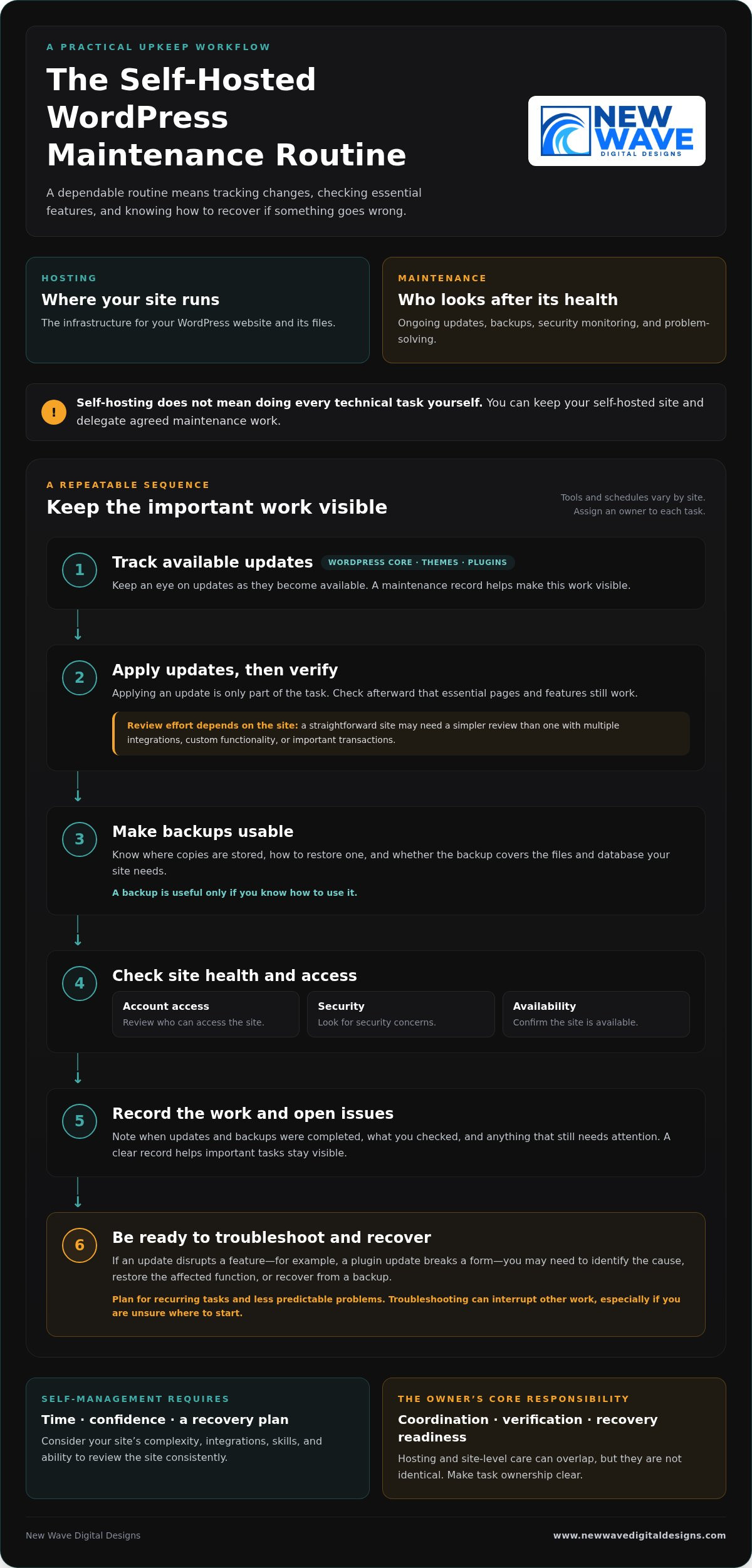
“Self-hosting” and “self-maintenance” can sound like two sides of the same choice, but they describe different decisions. Hosting is the infrastructure where your WordPress website and its files run. Maintenance is the ongoing work of keeping the site updated, backed up, monitored, and functioning.

Hosting determines where your site operates; maintenance determines who looks after its ongoing health. That distinction is central to wordpress maintenance vs self hosting. A self-hosted WordPress site can still receive professional maintenance support, so self-hosting doesn’t automatically mean taking on every technical task yourself.

What does self-hosted WordPress mean?

With self-hosted WordPress, you use the WordPress software and arrange hosting separately. The hosting environment can be configured and managed in different ways. Depending on the arrangement, you may have access to some infrastructure settings without personally administering every server detail.

The broader idea of hosting your own online services also involves trade-offs around control and upkeep, as described in Self-hosting (network). For a WordPress site, the practical question is which parts your hosting arrangement handles and which remain your responsibility.

What does WordPress maintenance include?

Maintenance covers care of the WordPress site itself: applying updates, creating or checking backups, monitoring security, and resolving problems. It can also involve investigating an update that disrupts a form or another site feature. These are recurring responsibilities, although the tools and schedule may vary by site.

Hosting care and site-level care can overlap, but they aren’t identical. A hosting service may look after parts of the infrastructure, while WordPress updates, plugin compatibility, and site recovery need separate attention. If you manage the site yourself, you’re responsible for the tasks assigned to you. With professional maintenance support, you can delegate agreed technical upkeep while retaining your WordPress website.

To see where responsibilities sit, list who handles hosting, updates, backups, security, and troubleshooting. Assign an owner to each task. A clear division makes it easier to spot gaps before a routine task or unexpected issue affects the site.

What You Take On When You Maintain a Self-Hosted WordPress Site

Managing maintenance yourself is less about a one-time overhaul and more about following a dependable routine. The exact tools and schedule depend on your site, but someone needs to track changes, check that key features still work, and know what to do if something goes wrong. This responsibility can fit into your routine when the site is simple and you have the time and confidence to manage it.

Which tasks need regular attention?

WordPress core software, themes, and plugins all need attention as updates become available. Applying an update is only part of the task: check afterward that essential pages and features still work. A straightforward site may need a simpler review process than one with multiple integrations, custom functionality, or important transactions.

Backups are useful only if you know how to use them. Know where copies are stored, how to restore one, and whether the backup covers the files and database your site needs. Routine checks should also include reviewing account access, looking for security concerns, and confirming the site is available. These habits can help prevent a small oversight from becoming a larger interruption.

A maintenance record keeps the work visible. Note when updates and backups were completed, what you checked, and any issue that still needs attention. The goal isn’t to follow the same checklist on every site, but to make sure important tasks don’t fall through the cracks.

How much time and technical confidence does self-maintenance require?

The workload depends on your site’s complexity, integrations, and your existing skills. Routine checks may be manageable, but a failed update can take more than a quick review. For example, if a plugin update disrupts a form, you may need to identify the cause, restore the affected function, or recover from a backup. Troubleshooting can interrupt other work, especially if you’re unsure where to start.

Plan for both recurring tasks and less predictable problems. Ask yourself whether you can make time to review the site consistently and feel prepared to investigate an issue when it appears. Self-management isn’t just a question of technical ability; it also requires a workable plan for recovery.

The owner’s core responsibility is coordination, verification, and recovery readiness. If you’d rather delegate recurring technical upkeep while retaining your WordPress site, explore WordPress maintenance support as part of your site’s ongoing care.

Managed WordPress Maintenance vs. Self-Management: Compare the Trade-Offs

The choice isn’t simply control or convenience. Self-management gives you direct oversight of site upkeep, while professional maintenance support delegates agreed tasks. You can also retain a self-hosted WordPress site and have someone else manage its maintenance. For wordpress maintenance vs self hosting, treat hosting and support as separate decisions, then choose a balance that suits your site and capacity.

Responsibility Self-management Managed maintenance
Control You decide when and how to handle site-level tasks. You retain business and content decisions while delegating agreed technical work.
Routine workload You track and carry out updates and other upkeep. Defined recurring tasks are handled as part of the support arrangement.
Security You monitor relevant site settings and follow up on concerns. Security responsibilities depend on the support scope and hosting setup.
Backups You arrange backups and verify you can restore the site. Backup tasks may be delegated, but responsibilities and recovery processes should be clear.
Troubleshooting You investigate issues and coordinate any fixes. You have defined technical support for the issues covered by the arrangement.

The table is a guide, not a universal division of duties. Support arrangements differ, so establish who handles each task, especially backups, recovery, and problems involving both hosting infrastructure and the WordPress site.

When does self-management make sense?

Self-management can suit site owners with the time, technical confidence, and reliable routine to keep tasks moving. A simple site may have fewer moving parts than one with several integrations, but it still needs care. Direct oversight works best when you don’t just start updates and backups, but check that they completed and know how restoration works.

When can professional maintenance support be a better fit?

Delegating upkeep may suit businesses that would rather spend their time on customers, content, and operations. Defined support for WordPress updates, hosting, and security clarifies who handles recurring technical work. Be clear about the scope: managed support doesn’t guarantee that problems can’t happen, and it doesn’t automatically include every task a site might need.

Think of maintenance as a set of responsibilities, not a hosting label. You can keep control of your site’s direction and content while delegating recurring technical upkeep. That balance can make self-hosting practical without requiring you to manage every part of the site yourself.

WordPress Maintenance vs. Self-Hosting: Which Is Right for You?

Match WordPress Maintenance to Your Site and Capacity

The right maintenance arrangement should reflect what your website does and how much attention you can realistically give it. Use this process to assess your needs before deciding which tasks to manage yourself and which to delegate.

  1. Assess the site’s importance. Does it support sales, lead generation, customer enquiries, or essential daily operations? If a problem would disrupt an important business activity, make sure there’s a clear plan for maintenance and recovery.
  2. Consider its complexity. A site with custom features or several integrations may need more careful update testing and troubleshooting than a simpler site. Identify the features and connections your website depends on.
  3. Be honest about your capacity. Do you have the time and technical confidence to handle routine tasks and respond if an update causes an issue? Account for both regular upkeep and unexpected work.
  4. Identify what’s already covered. Review your hosting arrangement and support to understand who handles updates, backups, security checks, and recovery. Don’t assume a task is covered just because another technical service is in place.

Build a responsibility checklist before deciding

Write down each task and assign an owner. A checklist can reveal where work is being duplicated or overlooked:

  • Hosting and infrastructure: who manages the hosting account and related settings?
  • Updates: who applies updates, and who checks that important site features still work?
  • Backups: who creates them, verifies they’re usable, and knows how to restore the site?
  • Security: who monitors relevant site settings and follows up on concerns?
  • Recovery: who investigates a problem and coordinates the steps to resolve it?

Look for gaps in backup verification, update testing, or issue resolution. Assign tasks according to your actual capacity, not the assumption that you’ll find time later. Some owners prefer direct oversight of every task; others retain control of business and content decisions while delegating technical upkeep.

Revisit the checklist as your website and business evolve. A new integration, a shift toward online sales, or a change in your team can affect the site’s importance and support needs. The wordpress maintenance vs self hosting decision isn’t fixed for the life of a website; task ownership can change as your priorities do.

If you’d like professional help with recurring upkeep, explore WordPress maintenance support as part of your site’s ongoing care.

A Managed WordPress Maintenance Plan Can Keep Self-Hosting Practical

Choosing where your WordPress site is hosted doesn’t determine who maintains it. You can keep a self-hosted site and arrange professional help with its ongoing technical care. This makes wordpress maintenance vs self hosting less of an either-or decision: hosting provides the environment, while maintenance support helps keep the site’s technical foundation attended to.

Managed hosting and security services can complement WordPress maintenance, but they cover related, distinct responsibilities. Hosting and security support can address aspects of the environment your site runs on, while maintenance focuses on ongoing care of the WordPress site. A clear division prevents important tasks from being assumed rather than assigned.

What to expect from ongoing website support

Good maintenance means planned, recurring attention, not just a response to a visible fault. The support scope should make clear which tasks are handled, where your responsibilities remain, and how communication works when an issue needs attention. Clear ownership helps you understand how updates, security, backups, and troubleshooting fit together without assuming every support arrangement covers the same work.

This support doesn’t remove the need to make business and content decisions. It gives you a way to delegate technical upkeep while staying involved in your website’s direction.

Keep your WordPress site aligned with your business

A website changes as the business behind it changes. New content, added functionality, integrations, and shifting priorities can all affect the site’s technical needs. An approach that suited a simple information site may need to change if the website becomes central to enquiries, sales, or daily operations.

Review hosting, security, and maintenance responsibilities regularly. Confirm who owns each recurring task and how issues are handled, then adjust the arrangement when the site or your available time changes. Steady upkeep supports the website’s role over time, rather than treating maintenance as a one-off task.

New Wave Digital Designs provides WordPress website maintenance, managed hosting, and security support to help site owners delegate technical upkeep while retaining their WordPress website. Explore WordPress website maintenance services and take the next step toward support that fits your site’s needs.

Choose a WordPress Setup That Supports Your Next Step

Hosting and maintenance answer different questions: where your WordPress site runs, and who takes care of its ongoing technical needs. The choice in wordpress maintenance vs self hosting doesn’t have to be all or nothing. You can retain a self-hosted site while delegating recurring upkeep, or manage maintenance yourself if you have the time and confidence to do it consistently.

Start by matching responsibilities to your site’s importance, complexity, and your capacity. Make sure someone owns updates, backups, security, and recovery, then revisit the plan as your website and business evolve. A clear arrangement can help your site keep pace with changing needs without taking attention away from the work it supports.

New Wave Digital Designs provides ongoing website maintenance and technical support, with managed hosting and security services as part of its web support offering. Explore professional WordPress maintenance and support to find an approach suited to your site. With the right balance of oversight and support, you can move forward with greater clarity and confidence.

Frequently Asked Questions

Is WordPress maintenance the same as self-hosting?

No. Self-hosting describes where your WordPress site runs and how its hosting is arranged; maintenance is the ongoing care that keeps the site updated, backed up, monitored, and functioning. You can self-host and maintain the site yourself, or delegate selected tasks to professional support. Keeping these decisions separate makes the wordpress maintenance vs self hosting comparison clearer and helps you identify who is responsible for each part of your site’s care.

Can I use managed WordPress maintenance with self-hosted WordPress?

Yes. Hosting and maintenance are separate choices, so you can arrange hosting for your WordPress site and have a professional handle agreed upkeep. That support might include updates, backups, or security tasks, depending on its scope. Make responsibilities clear across hosting infrastructure, WordPress maintenance, and site recovery. You can delegate technical work while retaining decisions about your website’s content, functionality, and business direction.

What happens if I do not maintain my WordPress site?

Neglected updates, unverified backups, and unattended issues can increase the risk of compatibility or security problems. The impact depends on your site’s software, plugins, themes, and setup, so it won’t be the same for every website. Assign an owner to routine updates, backup checks, and issue monitoring so important tasks aren’t left to assumption or postponed indefinitely.

Is self-hosted WordPress cheaper than managed maintenance?

There’s no universal answer because hosting and maintenance are different responsibilities, and the total depends on what your setup includes. Compare hosting, any tools or support you need, and the time you’ll spend managing the site. If you maintain it yourself, account for the effort involved in checking updates, verifying backups, and resolving problems. A lower direct expense may still require more of your time and attention.

How often should WordPress be maintained?

WordPress maintenance is ongoing, but the right schedule depends on your website, its themes and plugins, and how the site supports your business. Review available updates regularly, verify that backups are usable, and monitor for security or availability concerns. Establish a repeatable routine that suits your site rather than relying on a single annual check. Most importantly, make sure a specific person or support arrangement owns the tasks.

Can I switch from self-managing WordPress to professional maintenance later?

Yes. You can move from self-management to professional support as your site or available time changes. Before handing over recurring tasks, organize access details, hosting information, a list of themes and plugins, backup procedures, and known issues. This gives the person handling maintenance a clearer picture of the site and helps identify what needs attention. Agreeing on task ownership also helps keep ongoing work from falling through the cracks.

Does managed WordPress maintenance mean I lose control of my website?

Not necessarily. Delegating technical upkeep doesn’t automatically transfer ownership of your website or control over its content. A well-defined arrangement distinguishes maintenance tasks from business decisions, such as what to publish or how the site should serve customers. Clarify access, responsibilities, and how technical changes are communicated. You can remain involved in your site’s direction while assigning recurring technical work to professional support.