
Small business website costs: compare design and ongoing expenses

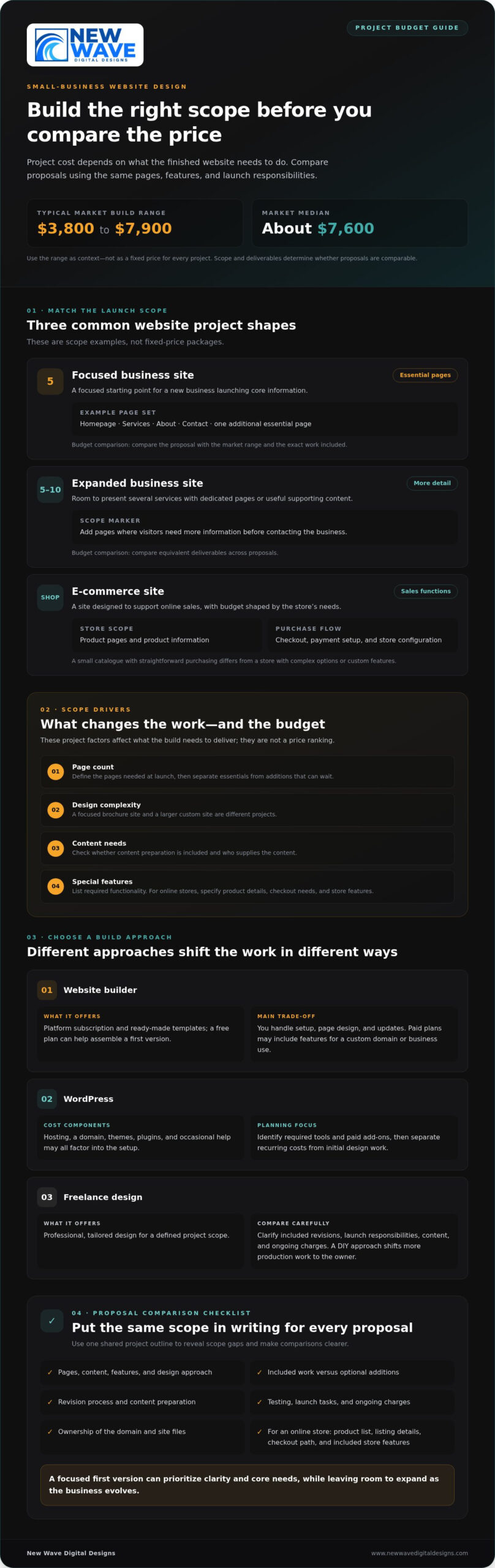
On the market, a small-business website build typically costs between $3,800 and $7,900, with a median of about $7,600. If you’re weighing how much a small business website should cost in 2026, the right budget depends on what the site needs to do and how much design and development it requires.

It’s reasonable to want a clear figure before committing, especially when a project quote may not show what you’ll spend to keep the site running. A useful comparison separates the initial build from recurring expenses, so you can see what’s included and plan for the long term.

This guide explains the factors that shape design costs, then covers hosting, domains, SSL certificates, and WordPress upkeep. You’ll have a practical framework for comparing options and matching your budget to the website your business needs.

Key Takeaways

  • Set your budget around the site’s purpose, required features, and content needs, not just the number of pages.
  • Compare website builders, WordPress, and freelance design by weighing both upfront work and ongoing commitments.
  • A starter project can focus on essential pages first, leaving room to expand as your business evolves.
  • Plan separately for hosting, domain renewal, SSL, and WordPress care so recurring expenses don’t catch you by surprise.
  • Use the cost breakdowns to identify which parts of a website project matter most for your business.

How much should a full website design cost?

In the United States, a small-business website build typically falls within the market range of $3,800 to $7,900, with a median of about $7,600. To limit hidden costs and contract risks, define the deliverables, revision process, ownership terms, launch responsibilities, and any ongoing charges in writing before work begins.

New Business Budget Recommendations

For a new business, begin with the essential pages and functions needed to explain the offer and help visitors take the next step. A five-page site can provide a focused starting structure, while a 5-10-page site allows room for additional services or useful supporting content. Compared with a larger custom build, a lean launch prioritizes clarity and core needs over extra features.

Before setting a budget, list the pages, content, and features you need at launch. Separate essentials from additions that can wait, then use the same written scope to compare proposals. This keeps the first version focused and makes future expansion easier to plan.

Small Business Website Budget Examples

Consider a local service business that needs a homepage, service information, an about page, and a contact page. That five-page example offers a clear baseline for comparing design proposals. A business with several distinct services may need a 5-10-page version, adding dedicated pages where visitors need more detail before reaching out.

These examples differ mainly in scope, not in a universal fixed price. The market range of $3,800 to $7,900 provides a comparison point for a build, while the median is about $7,600. Use your page list and required functionality to judge whether a proposal fits the project.

Website Project Budgets and Ranges

A project budget reflects what the finished site needs: page count, design complexity, content, and special features. A focused brochure site and a larger custom site are different projects, even if both serve a small business. Compare proposals against the same written scope, including what the design and development work will deliver.

For a practical comparison, ask each proposal to separate included work from optional additions and ongoing charges. Check whether content preparation, revisions, testing, and launch tasks are covered. General price ranges offer context, but the clearest comparison is between proposals based on identical deliverables.

E-commerce Website Budgets

An e-commerce site has a different budget profile because it needs to support sales, not just introduce a business. Product pages, checkout, payment setup, and store configuration all shape the work. A small catalogue with straightforward purchasing needs differs from a store with complex product options or custom features.

To scope an e-commerce launch, prepare a product list, note the information each listing needs, and map the customer journey from product selection to checkout. Then compare proposals by their included store features and launch tasks. This shows whether the design supports the shop you need, without treating every online store as the same project.

Option Scope Budget comparison Best suited to
Focused business site Five essential pages Compare against the market range New businesses launching core information
Expanded business site 5-10 pages Compare equivalent deliverables Businesses presenting several services
E-commerce site Product and checkout functions Assess store scope and launch work Businesses selling online

Choose an option by matching its written scope to the pages and features your business needs at launch.

DIY builders trade hands-on setup for platform fees, WordPress separates hosting and upkeep, and freelance design covers professional project work. Each approach balances your time, control, and support differently.

Website Builder Costs

Website builders offer a platform subscription and ready-made templates, making them a lower-cost route for businesses willing to build their own pages. A free plan can help you assemble a first version, while paid plans may include features needed for a custom domain or business use.

Compare the plan’s monthly price with its included features before choosing. The main trade-off is time: you handle setup, page design, and updates yourself.

WordPress Costs

WordPress costs can combine hosting, a domain, themes, plugins, and occasional help, rather than a single builder subscription. The final setup depends on which tools the site needs and how much work you manage yourself.

WordPress offers flexibility, but owners need to account for the components behind the platform. List the required features, identify paid add-ons, and separate recurring costs from initial design work. This breakdown makes it easier to compare a WordPress proposal with a builder plan.

At this budget, define a focused scope: page count, design approach, included revisions, and launch responsibilities. A freelancer can provide a tailored design without the broader structure of a full-service agency project, while a DIY approach shifts more production work to the business owner.

Compare build methods by separating project fees from recurring site costs:

Before choosing a template or signing a freelance agreement, write down the pages, features, and launch tasks you expect. Clarify who supplies the content, how revisions work, who controls the domain and site files, and which charges recur after launch. These details can reveal scope gaps and contract risks hidden by a headline price.

If you’re weighing a custom build against a platform-led approach, explore a website design approach that fits your project’s scope.

Website pricing for starter projects

A starter project can establish a polished online presence while keeping the initial scope focused. Prices can vary by state or city as provider rates and project requirements differ, but the deliverables remain central to comparing quotes.

Factors That Affect Website Pricing

Page count, custom design, functionality, and content shape a website quote. The amount of design, development, and writing required varies from project to project.

Platform choice matters, too. A Squarespace template-based build can use an existing design structure, while custom functionality adds development work. Before requesting proposals, list the pages, features, content responsibilities, and launch tasks your business needs. A shared scope makes estimates easier to compare.

Freelancer and Agency Pricing

The right comparison depends on the work each quote includes.

Review proposals line by line: identify who handles planning, design, development, revisions, and launch. A lower quote may cover fewer deliverables, while a larger agency project may include a broader set of services. Compare the scope and responsibilities, not just the total.

Custom Website Pricing

Custom builds suit businesses that need a distinct design or features beyond a standard template.

For a starter build, define which custom elements are essential now and which can wait. For example, prioritize core service pages and the contact journey, then plan additional functionality for a later phase. A written scope helps prevent optional features from becoming unexpected project costs.

Ongoing care is a separate budget line from the initial build. Confirm which tasks and support each plan includes.

Project option Typical market range Compare by
Landing page Page scope and launch tasks
Freelancer build Deliverables and responsibilities
Boutique agency build Strategy, design, and development
Custom agency project Custom functionality and scope

Choose a starter project by matching its deliverables to your launch priorities, then budget separately for ongoing care.
Small business website costs: compare design and ongoing expenses

Hosting, domain names, and SSL certificates

Domain registration, hosting, SSL, and business email are recurring expenses, often billed on different schedules.

Budget for each separately: the domain identifies your site, hosting keeps it available online, SSL supports a secure connection, and email provides business addresses.

Domain and Hosting Expenses

A domain and hosting serve different roles, so compare their renewal periods and service levels separately. A .com domain generally falls within the same annual domain range.

Before selecting a plan, list the domain renewal, hosting term, and any introductory pricing separately. Then note what the hosting plan covers and when regular billing begins.

SSL and Security Costs

SSL certificate costs can vary substantially, so include renewal terms in your budget rather than assuming a certificate is always a separate paid purchase.

For a clear annual budget, record SSL renewal and email billing alongside domain and hosting dates. Identify who handles security and updates, and whether that work is included in hosting or billed separately. This separates infrastructure charges from ongoing website upkeep.

Use a simple cost ledger to avoid mixing monthly and annual amounts. Record each item, its billing period, and its next renewal date. For example, list a domain as an annual cost, shared hosting as a monthly cost, and email by user and month. This makes expenses easier to review without confusing one-time setup with recurring fees.

  • Domain: Record the annual registration and renewal cost.
  • Hosting: Compare shared and managed plans by monthly rate and included service.
  • SSL: Track certificate cost and renewal period separately.
  • Email: Multiply the per-user monthly charge by the number of business accounts you need.

Hosting promotions can make the first bill differ from later renewals, so distinguish introductory rates from standard charges. A shared plan and a managed WordPress plan also offer different service levels; compare features rather than choosing on price alone. Include updates and security responsibilities in your plan, especially when they are not part of hosting.

For a practical final check, group expenses into setup and recurring costs, then note the billing period for each. A domain may renew annually while hosting and email are billed monthly. Keeping those schedules visible helps you prepare for renewals and understand the cost of maintaining the site beyond its initial build.

WordPress themes, plugins, and maintenance

Ongoing WordPress costs combine software, hosting, and care for the site. Typical maintenance and support costs depend on whether the plan covers updates, security monitoring, fixes, and hands-on help; those service prices aren’t included here.

Treat that as a planning range, not a maintenance-plan price.

Theme and Plugin Expenses

A WordPress theme shapes the site’s visual framework, while plugins add specific functions.

Before purchasing, map each plugin to a site requirement, such as a form or booking feature. Avoid overlapping tools, and check whether each subscription renews annually or monthly. This inventory helps keep software costs visible as the site grows.

Maintenance and Support Budgeting

Maintenance is separate from web design or a custom design project. It covers work that keeps an existing site current and functioning, including software updates, security, and technical fixes. The cost of a plan depends on its tasks and level of support.

To build a useful budget, note which updates happen regularly, who handles problems, and whether performance work is included. Then compare that checklist with the care plan’s scope. This shows whether the plan fits your site’s needs, rather than covering tasks you don’t require.

Planning for Ongoing Care

A lean WordPress site with few paid plugins has different upkeep needs from a site relying on several subscriptions and custom features. Track hosting, domain renewal, add-ons, and support separately. For example, don’t mistake an annual plugin renewal for a monthly maintenance charge.

Use this short review to shape your budget:

  • Inventory: List themes, plugins, and software subscriptions, including each renewal period.
  • Assign: Decide who handles updates, security checks, and troubleshooting.
  • Compare: Match each care plan’s included tasks to your list before selecting a service level.

As the site changes, revisit the list after adding a plugin or custom feature. New software can bring renewals and extra upkeep, so update the budget as the site grows. A clear record helps distinguish essential care from optional enhancements.

For help planning WordPress website maintenance, identify the updates and support your site needs, then align the service scope with that checklist.

New Wave Digital Designs: Shopify Website Design

New Wave Digital Designs offers Shopify Website Design for small businesses planning to sell online. When comparing website budgets, decide whether your project needs an online store, a business information site, or ongoing care. The right scope depends on your platform and required features.

For store projects, New Wave Digital Designs offers Shopify Website Design; for other platform needs, it also provides WordPress Website Design and SquareSpace Website Design. Website Maintenance supports businesses planning for ongoing site care after launch. Outline your goals, required pages, key features, and maintenance needs so the conversation can focus on scope.

Contact New Wave Digital Designs to discuss your website project and the approach that fits your business.

Shape a website budget around your next move

A website budget is most useful when it reflects what your business needs next, not every feature it might someday add. As you decide how much a small business website should cost in 2026, focus on the experience you want customers to have, the work required to create it, and the care needed after launch.

Turn your vision into a practical brief: describe your audience, outline what you want visitors to do, and identify a platform that suits your plans. New Wave Digital Designs offers Shopify Website Design, WordPress Website Design, and SquareSpace Website Design to shape a site around those priorities.

A well-considered project starts with clear goals and a scope that can evolve with your business. Contact New Wave Digital Designs today to discuss your website plans and take the next step with confidence.

Frequently Asked Questions

What should a small business expect to pay for a website?

For a small-business website build, the collected market range is $3,800 to $7,900, with a median of about $7,600. Treat that as a reference point, not a fixed quote: a five-page informational site and an online store have different scopes. To judge a proposed budget, compare the same pages, functions, content tasks, and launch responsibilities across estimates.

What will it actually cost?

To answer how much a small business website should cost in 2026, first separate the initial build from recurring expenses. Your actual total depends on the build method and the work the finished site requires. For example, a DIY platform has a different cost structure from a custom project. List required features, then sort expenses by whether they are one-time, monthly, or annual.

Can I build my own website?

Yes. DIY can suit a business with a straightforward site and someone available to create the pages. Start by listing the required content and features, then decide whether you can maintain the site as well as build it.

Is a More Expensive Website Worth It?

It can be, if the added investment supports requirements your business genuinely has. Custom design, additional service pages, or e-commerce features can require more planning and development than a simple template site. For instance, an online shop needs a customer journey that supports browsing and checkout. Compare the added deliverables with your business goals rather than assuming a higher quote is automatically a better fit.

Is professional web design still worth paying for in 2026?

Professional design can be worthwhile when you need cohesive branding, custom features, or a site structure that is difficult to create yourself. It also shifts design and development tasks away from your team. Before choosing, define what you want visitors to do, such as request a service or explore products. Then assess whether professional support addresses a real project need.

So what should you actually budget?

How much a small business website should cost in 2026 depends on the work and expenses your site needs. Set out the pages, functions, content, and launch tasks first. Then add recurring costs for hosting, domain renewal, email, paid plugins, and maintenance where applicable. A simple spreadsheet with separate one-time and recurring columns can show which expenses affect launch and which continue afterward.

Want a Real Number for Your Site?

A project-specific price depends on scope and is provided after a quote request. To make the estimate useful, prepare a brief with your audience, required pages, desired features, platform preference, and content responsibilities. Include ongoing care needs, too. Clear inputs help define the project and clarify what the proposed work covers.

What is the cost of hiring a freelancer to build a small business website in 2026?

In the United States, a small-business website built by a freelancer typically costs in 2026. The project scope shapes where an estimate falls within that range: page count, custom design, content work, and required functions all affect the build. Compare proposals using one shared list of deliverables, and distinguish project work from recurring hosting or maintenance expenses.

How to Calculate the Total Cost of Ownership for a Website

A website with the lowest launch quote can cost more to own over time. The initial fee is only part of the picture. Knowing how to calculate the total cost of ownership for a website means looking beyond the build to the recurring work and future changes that keep it useful.

When comparing proposals, it’s easy to overlook platform subscriptions, hosting, security, maintenance, and support. Marketing can blur the picture, too. SEO and paid advertising may help a website grow, but they’re better tracked separately from the cost of owning and operating the site. A clear model puts each expense in the right category.

This guide shows you how to build a practical website budget over a defined time horizon, compare options on fair terms, and separate ownership costs from growth investments. You’ll map setup, ongoing operations, and future updates, while considering how scope and platform choice affect the total. Whether you’re evaluating Shopify, WordPress, or Squarespace, you’ll have a clearer basis for choosing a website that fits your business now and as it evolves.

Key Takeaways

  • Calculate website TCO by combining setup, recurring, and planned variable costs across a consistent time horizon.
  • Compare DIY, platform-led, and custom-designed websites using equivalent requirements, including internal effort and future changes.
  • Use a practical worksheet to organize costs by amount, frequency, time horizon, and confidence level.
  • Separate website ownership expenses from marketing investments to keep your budget transparent and useful for decision-making.
  • Account for how design, platform choice, hosting, maintenance, and support shape a website plan that can evolve with your business.

What website total cost of ownership includes, and why the launch price is not enough

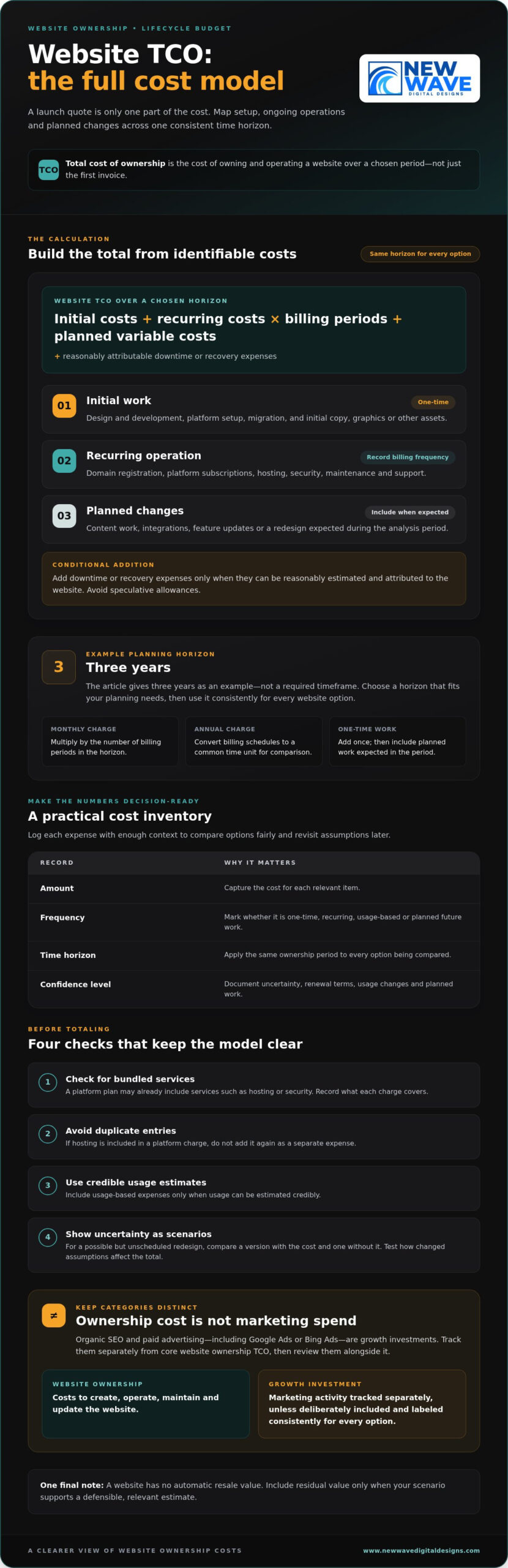
A website’s total cost of ownership (TCO) is the cost of owning and operating it over a chosen period. A launch quote captures a specific scope of work, such as design, development, and tasks agreed for launch. It may not cover the infrastructure, care, and improvements the site needs afterward.

Website TCO is the combined cost of the initial build, recurring operations, maintenance, and planned changes across a defined ownership period. This applies the wider TCO principle, which considers direct and indirect costs throughout a product or service’s lifecycle, to the costs of running a website. Total Cost of Ownership (TCO) is a financial estimate that includes direct and indirect costs over an entire lifecycle.

A useful model clarifies how to calculate the total cost of ownership for a website. Rather than treating the first invoice as the whole budget, list the work and expenses the site is likely to require from setup through the end of your chosen time horizon.

Which website costs belong in the ownership model?

Start with the costs required to create and launch the site, then add what it needs to keep operating. Include expenses relevant to your project rather than assuming every possible website cost applies.

  • Initial work: Design and development, platform setup, migration from an existing site, and initial copy, graphics, or other assets.
  • Recurring operation: Domain registration, platform subscriptions, hosting, security, and website maintenance. Record each expense at its billing frequency so monthly and annual charges can be compared over the same period.
  • Planned changes: Expected content work, integrations, feature updates, or a redesign. If a change is likely during the analysis period, include it as a planned cost instead of leaving it out.

Check for overlap. A platform plan may bundle services that could otherwise appear as separate line items. Hosting and security may also be accounted for in different ways. Record what each charge covers, and avoid counting the same service twice.

What TCO does not automatically measure

TCO describes the cost of owning and operating the website. It does not, by itself, show whether the site generates revenue, delivers a return on investment, or improves wider business performance. Those outcomes matter, but they answer different questions and require separate measures.

How to calculate website TCO: build a complete lifecycle cost model

Start with one rule: assess every website option over the same period. Choose a horizon that suits your planning needs, such as three years, and apply it consistently. Comparing one option’s first-year expenses with another’s longer-term costs can distort the result.

Website TCO over a chosen horizon equals one-time initial costs, plus recurring costs multiplied by the number of billing periods, plus planned variable costs and reasonably attributable downtime or recovery expenses. This formula makes the time frame explicit and ties the total to identifiable expenses.

Gather initial and recurring website expenses

Build an inventory before calculating. Record design, development, setup, migration, and launch work as one-time costs. Then list platform, domain, hosting, security, maintenance, and support costs with their billing periods. Mark each item as one-time, recurring, usage-based, or planned future work. This makes it easier to bring different billing schedules into a common comparison.

For example, if a platform subscription is billed monthly and a domain renews annually, convert both to the same time unit before projecting costs across your chosen horizon. Include usage-based expenses only when you can estimate usage credibly. Keep optional SEO and paid advertising outside core ownership TCO unless your analysis deliberately includes marketing. Label those expenses separately so they remain visible.

Calculate the total and document assumptions

Multiply each recurring expense by the number of billing periods in the chosen horizon. Add one-time costs once, then include planned variable work expected during that period. Check for bundled services and duplicate entries. If hosting is included in a platform charge, for example, don’t add it again as a separate expense.

Include downtime or recovery costs only when you can reasonably estimate them and attribute them to the website. Avoid adding a speculative allowance. Likewise, don’t subtract a residual value simply because a formula used for equipment does so. A website has no automatic resale value. Include one only if your scenario supports a defensible, relevant estimate.

Assumptions are part of the calculation, not fine print. Note uncertain renewal terms, possible changes in usage, and planned work. Then test how the total changes when an assumption changes. If a redesign is possible but not scheduled, show a version with it and one without it rather than presenting uncertainty as a fixed expense. This gives decision-makers a range to discuss without treating estimates as confirmed costs.

To keep the process practical, define the horizon, gather and classify expenses, convert recurring costs to matching periods, then total only the items included in your stated scope. A website planning conversation with New Wave Digital Designs can help define project scope and identify the operating needs to include in your model.

Compare website options fairly: DIY, platform-led, or custom-designed

A comparison is useful only when each approach is measured against the same business needs. First define the required pages, content, functions, ownership period, and expected updates. Then assess DIY, platform-led, and custom-designed options against that shared brief. A lower estimate may simply reflect less scope, fewer responsibilities, or more work left for your team.

Compare Shopify, WordPress, and Squarespace against your requirements rather than treating them as interchangeable. An online store, a content-led site, and a service-business website may need different capabilities. Set the requirements first, then note how each option handles design, setup, maintenance, and future updates.

Compare the work, responsibilities, and internal effort

Use a side-by-side table to show what each scenario requires from your business. Keep the analysis period and content volume consistent, and distinguish cash expenses from staff time. If you assign a value to internal labor, apply the same method to every option. Otherwise, report estimated hours separately rather than implying that the time has no cost.

Approach Initial work Recurring costs Internal effort Planned changes
DIY Build and setup completed in-house Platform, domain, hosting, security, and maintenance as applicable Learning, content entry, and routine tasks Updates the team expects to make
Platform-led Platform configuration and design work Platform and other ongoing site expenses Content management and assigned upkeep Feature, content, or design adjustments
Custom-designed Scoped design, development, setup, and launch work Hosting, security, maintenance, and platform expenses as applicable Content coordination and internal approvals Integrations, new content, or redesign work

Fill each cell with your project’s actual scope, not assumptions about what an approach usually includes. A DIY route may reduce external build work but require more staff time. A custom design may move more initial work outside the business, while future costs still depend on the platform, support needs, and planned changes. The lowest upfront estimate is not automatically the lowest lifecycle total.

Keep ownership and marketing investments distinct

Website ownership costs and marketing budgets answer different questions. Keep organic SEO and paid search, such as Google Ads or Bing Ads, as separate lines in the comparison. For businesses collaborating with web design and marketing agencies like troyerwebsites.com, distinguishing build and hosting needs from promotional campaigns ensures transparency. If you’re evaluating the broader digital investment, show marketing alongside website TCO instead of blending it into the ownership figure. This keeps the site’s operating needs clear and lets you assess growth spending on its own terms.

For a fair view of ongoing technical responsibilities, include the work covered by website maintenance services in the relevant scenarios. With scope, time periods, and labor assumptions held constant, you can compare the total cost of ownership for each website option without confusing a smaller initial commitment with a better long-term fit.

How to Calculate the Total Cost of Ownership for a Website

Use this website TCO worksheet to make the numbers decision-ready

A worksheet turns a list of expenses into a comparison you can review and refine. Start by defining the project scope: pages, content, functions, platform, and expected changes. These professional web design considerations can help you decide what the project needs to include before you enter figures.

Follow a repeatable calculation workflow

Use the same scope and evaluation period for each option. Put initial, recurring, and expected variable costs in separate rows, then record the assumptions behind each estimate. The example below uses fictional planning units, not currency or a market benchmark. It demonstrates the worksheet structure and calculation only.

Cost item Amount Frequency Horizon Confidence
Initial design and setup 100 units One-time 3 years High
Platform and hosting 10 units Monthly 36 months Medium
Maintenance 5 units Monthly 36 months Low
Planned content update 20 units Once in year 2 3 years Medium

In this hypothetical example, the total is 100 + (10 × 36) + (5 × 36) + 20, or 660 planning units. Keep the math visible and place the confidence label beside each estimate so readers can distinguish firm figures from assumptions. If the scope includes an online store, include its specific design and operating requirements. Custom Shopify store design is one example of a project scope that should be represented accurately.

Interpret the result before selecting an approach

After totaling each option, identify the rows that create the largest differences. Then run a sensitivity check: recalculate with maintenance one step lower and higher, adjust an uncertain platform expense, or include and exclude a possible future change. This shows whether the result depends on one uncertain assumption or stays similar across plausible scenarios.

Use the result to understand trade-offs, not to promise a specific return. A lower projected total may involve different scope, internal effort, or planned capabilities. If the figures are close, those distinctions may matter more than the headline total.

To calculate website TCO usefully, make the inputs clear, show the assumptions, and compare like with like. For guidance on your website scope and cost model, explore website planning with New Wave Digital Designs.

Plan website ownership around design, maintenance, and measured growth

A TCO model is valuable when it informs a practical project plan. Use the figures to decide what the website must do, which platform fits its requirements, and who will handle the work after launch. Design, platform, hosting, security, maintenance, and marketing each have a place in the plan, but they are not one undifferentiated expense.

New Wave Digital Designs creates websites for Shopify, WordPress, and Squarespace. The right scope depends on your business goals, content, and required functionality. A clear comparison identifies those needs first, then assigns setup and ongoing responsibilities so the budget reflects the intended website, not just the bare requirements for launch.

Turn TCO findings into a website project brief

Bring the model into a concise brief that records business goals, essential site functions, content requirements, and the evaluation period. Mark each cost as fixed, recurring, variable, or an assumption, and note who owns each responsibility. For example, specify whether hosting, security, and content updates are part of the ongoing operating plan. Website maintenance planning makes continued technical care a deliberate part of the scope.

Separate operating choices from growth choices. Hosting and security support site operations, while maintenance covers ongoing care. Organic SEO and paid search are distinct investments in visibility, while specialized services like Marketing System Solutions focus on streamlining business operations and lead management. These activities may all contribute to a broader digital plan, but keeping their roles and budgets visible makes it easier to identify what the website itself requires.

Build a website that can evolve with the business

Design and development establish the site’s foundation. Plan future content, integrations, platform needs, and maintenance as separate decisions rather than assuming they are included in the initial build. For an online store, define commerce requirements and expected content alongside the design scope to give Shopify project planning a clearer basis.

Choose support arrangements that match the site’s operating needs. Decide who will maintain it, manage hosting and security, and coordinate future updates. These responsibilities can vary by platform and project scope, so documenting them keeps the ownership model useful as the business changes.

With goals, scope, and responsibilities documented, you have a stronger basis for calculating website TCO and comparing it with the value you expect the site to provide. The model does not promise a particular business return, but it can clarify trade-offs and guide a measured next step.

Discuss your website goals with New Wave Digital Designs to shape a project scope around your business needs and ongoing website plans.

Make your website budget a foundation for what comes next

A website budget can do more than guide a launch decision. Treat it as a working guide and revisit priorities as your business, content, and customer needs change. Knowing how to calculate the total cost of ownership for a website gives you a clearer basis for those decisions without mistaking a forecast for a promise of business results.

The next step is to connect your budget to a considered digital plan. New Wave Digital Designs creates custom websites for Shopify, WordPress, and Squarespace, and provides website maintenance, hosting, and security to support ongoing site needs. Organic SEO and Google Ads and Bing Ads management can be planned as separate investments in visibility.

Bring your goals and scope together, then build a website plan around the work that matters to your business.

Frequently Asked Questions

What is the formula for calculating a website’s total cost of ownership?

Add initial costs to recurring expenses and expected variable costs across a defined period. Initial work might include design, development, setup, and migration. Recurring expenses could include a platform subscription or hosting renewal. To calculate the total cost of ownership for a website, match every expense to the period you’re evaluating. Keep assumptions visible, remove duplicate charges, and leave out costs that do not belong to the website scenario you’re comparing.

Which costs should I include when calculating website TCO?

Include expenses required for the website scenario you’re assessing, such as launch work, migration, and initial content creation, followed by relevant recurring services and planned changes. If staff will maintain pages or manage content, note the time involved. You can keep labor hours separate from cash expenses or assign them a value if your business uses a consistent method. Label marketing costs clearly so it’s obvious whether they are included.

Should SEO and advertising be included in website total cost of ownership?

Not by default. Organic SEO and paid advertising support visibility and growth, while core website TCO focuses on the costs of building and operating the site. For a broader digital investment comparison, add SEO or advertising as separate lines rather than folding them into platform or maintenance expenses. This lets you compare a site’s operating budget with a separate Google Ads campaign without confusing their purposes or assuming either guarantees revenue.

How many years should I use to calculate website TCO?

Choose a time horizon that fits the decision, then use the same period for every option. A shorter window may suit a near-term launch decision, while a longer window can reveal more renewals and planned work when you’re comparing ongoing commitments. There is no universal period for every business. Document your chosen horizon and assumptions so another person can understand how you formed the total.

How do I compare website TCO when one option has a lower upfront cost?

Check that both options deliver the same essential functions, content, and level of support over the same period. Compare setup expenses, recurring costs, internal effort, and expected changes separately. A lower initial quote may leave more work with your team or exclude a capability covered by another scope. For a fair decision, identify those differences and test whether the lower-cost scenario still meets your business requirements.

Is website TCO the same as website ROI?

No. TCO estimates the expense of owning and operating a website over a stated period. ROI evaluates returns in relation to an investment’s costs using a chosen method. TCO may inform the cost side of an ROI calculation, but it cannot establish revenue, savings, or business performance on its own. Keep the calculations distinct and state how you define returns so readers do not mistake a cost estimate for a forecast.

How can I estimate website maintenance costs in a TCO model?

List the maintenance work your site is expected to need, such as planned updates, security care, technical support, or content changes. Separate scheduled recurring work from occasional fixes, and note how often you expect each. If the future workload is uncertain, document a reasonable assumption or compare multiple scenarios. This is more useful than a single unsupported figure and clarifies what ongoing care the budget is meant to cover.