
Preventive maintenance is a schedule, not a scramble after something breaks. A website maintenance checklist for 2026 should cover routine backups and restore checks, software updates, security reviews, performance, forms, and links. The right cadence depends on the site, but regular checks help surface small issues before they disrupt the experience.
It’s easy to think of website maintenance as simply updating software. That matters, but a reliable routine also protects site data, keeps key visitor journeys working, and helps content and performance stay aligned with business goals.
Here, you’ll learn what preventive website maintenance involves, which tasks to schedule daily through annually, and which tools can help monitor uptime, security, speed, and links. You’ll also see how routines differ across WordPress, Shopify, WooCommerce, and Magento, so you can build a practical checklist around your platform instead of relying on a one-size-fits-all approach.
Key Takeaways
- Build a recurring schedule for backups, software updates, security, performance, forms, and content so essential checks don’t get overlooked.
- Use monitoring and testing tools to spot downtime, broken links, security concerns, and speed issues before they undermine key site journeys.
- Shape preventive maintenance around your site’s complexity and business needs, and recognize when ongoing technical work calls for professional support.
- Adjust your checklist to your platform: WordPress, Shopify, WooCommerce, and Magento each have different maintenance priorities.
- Track completed checks and follow up on issues to turn routine upkeep into a dependable process for your website.
Daily, weekly, monthly, quarterly, and annual maintenance tasks
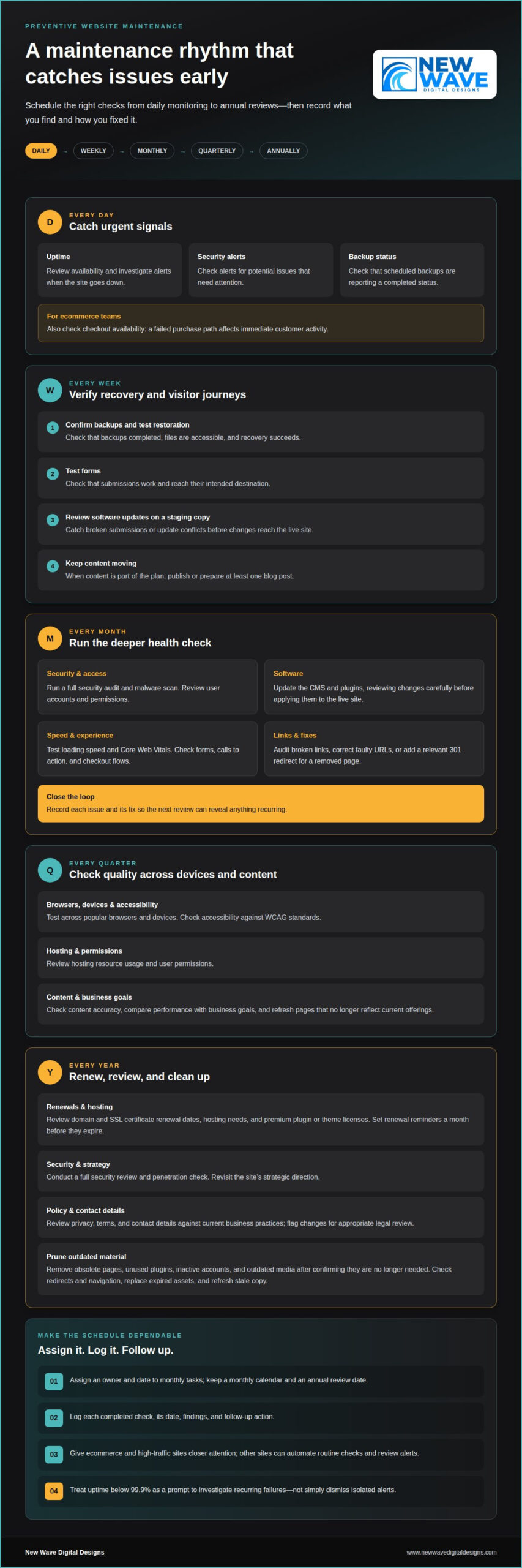
A useful schedule assigns each task a frequency, an owner, and a recorded outcome. Ecommerce and high-traffic sites need closer attention; other sites can automate routine checks and review alerts. Keep a monthly calendar and an annual review date so renewals and deeper audits don’t get lost among everyday updates.
- Daily: Review uptime, security alerts, and backup status. Ecommerce teams should also check checkout availability because a failed purchase path affects immediate customer activity.
- Weekly: Confirm backups completed and test that restoration works. A backup is useful only when its files are accessible and recovery succeeds.
- Weekly: Test forms and review software updates on a staging copy. This catches broken submissions and update conflicts before changes reach the live site.
- Weekly: Publish or prepare at least one blog post when content is part of your plan. A scheduled editorial action helps maintain a consistent publishing rhythm.
Use the monthly review for deeper checks. Run a full security audit and malware scan, update the CMS and plugins, and review user accounts and permissions. Test loading speed, Core Web Vitals, forms, calls to action, and checkout flows. Audit broken links, correct faulty URLs, or add a relevant 301 redirect for a removed page. Record each issue and its fix, so the next monthly review can identify anything recurring.
- Quarterly: Test the site across popular browsers and devices, then check accessibility against WCAG standards. These checks can reveal display or interaction problems missed during routine updates.
- Quarterly: Review hosting resource usage, user permissions, and content accuracy. Compare performance with business goals and refresh pages that no longer reflect current offerings.
- Annual: Review domain and SSL certificate renewal dates, hosting needs, and the site’s strategic direction. Set renewal reminders a month before domain names, SSL certificates, and premium plugin or theme licenses expire.
- Annual: Conduct a full security review and penetration check. Review privacy, terms, and contact details against current business practices, and flag changes for appropriate legal review.
During an annual cleanup, remove obsolete pages, unused plugins, inactive accounts, and outdated media after confirming they’re no longer needed. Check that redirects preserve useful paths and that navigation still points to current content. Replace expired assets and stale copy with accurate material so visitors don’t encounter outdated information.
Plan monthly tasks by assigning owners and dates, then reserve an annual review for strategic decisions and renewals. Keep a simple log of each completed check, its date, findings, and follow-up action. This makes missed tasks visible and helps you prioritize when several issues appear at once.
Uptime, security, backup, speed, analytics, and link-checking tools
Use monitoring tools to turn site checks into visible signals and documented follow-up. Uptime monitors can check availability every few minutes and alert you when a site goes down. Review the alert history for repeated downtime, then compare incidents with hosting logs to identify patterns. Treat uptime below 99.9% as a prompt to investigate recurring failures, not just dismiss isolated alerts.
How do you check website security, SSL certificates, malware, and vulnerabilities? Review SSL certificate status, scan for malware and known vulnerabilities, and inspect access logs for unusual activity. Record the findings and confirm that fixes resolve the problem without disrupting the live site.
Backups need a clear record, not just a success message. Review logs for failed or incomplete runs, confirm copies are stored securely off-site, and test restoration in a separate environment. Choose a backup tool that makes the recovery point and completion status easy to identify, so you can respond to a missing or damaged copy.
- Uptime: Configure alerts for outages and review incident history to spot repeat interruptions.
- Security: Run malware and vulnerability scans, then document findings and remediation.
- Backups: Check logs, off-site storage, and restoration results.
- Speed: Compare load performance and Core Web Vitals, including on mobile.
- Links: Run a broken-link audit, then correct URLs or redirect obsolete pages.
Speed tools can pinpoint slow pages and reveal whether mobile visitors face different friction. Compare performance across key landing pages, product pages, and checkout steps. If uptime monitoring detects an interruption, check whether those pages are also responding slowly. Together, these checks connect a visitor-facing problem to a specific page or service.
What accessibility checks should be included in a 2026 website maintenance checklist? Review pages against WCAG standards, checking keyboard navigation, visible focus, text alternatives, and readable contrast. Test important flows with assistive technology and record barriers for correction.
How should website analytics, forms, links, and checkout flows be tested? Compare analytics events with real actions, then submit each form and complete a test checkout. Confirm that submissions arrive, confirmation messages appear, and link destinations match their labels.
What website maintenance tasks support SEO and content accuracy? Review search performance, page titles, metadata, redirects, and broken links, then check important claims against current business information. Make sure updated pages remain discoverable and old URLs direct visitors to relevant content.
Pairing analytics with user-experience checks helps explain what visitors do and where they encounter friction. Review traffic and conversion paths alongside mobile layouts, form completion, and checkout results. Keep a dated issue log with the affected page, evidence, and corrective action. For ongoing help with these checks, explore website maintenance support.
What qualifies as preventive maintenance?
Preventive maintenance is planned work carried out before a website issue interrupts visitors or business operations. It turns observations into scheduled action: test an update in staging, investigate a recurring error, and record the result. A maintenance plan also assigns responsibility, so tasks don’t depend on someone happening to notice a problem.
Consider a product page that loads correctly but shows an outdated price or an unavailable item. A routine content review can catch the mismatch before customers rely on it. Similarly, checking plugin compatibility before an update can reveal conflicts before they affect the live site. The aim is to reduce avoidable disruption, not to promise that every fault can be prevented.
- Define the work: List software updates, backup reviews, security checks, and key user journeys. A clear task description makes completion easier to verify.
- Set ownership: Assign each check to a person or role. For example, one person can review form submissions while another handles platform updates.
- Keep a record: Note the date, finding, action, and follow-up. A log helps reveal repeated errors and unfinished fixes.
DIY maintenance can suit a straightforward website when the owner has time to monitor the platform, perform updates, and test important pages. The trade-off is the skill and attention required: a rushed update without a restore plan can create more repair work. Professional support can help when a site has ecommerce flows, custom integrations, persistent errors, or updates that need technical testing.
Compare the ongoing effort with the cost of disruption. A maintenance plan should make clear which tasks it covers, how often they occur, who performs them, and how work is documented. For professional website maintenance, price depends on the case and is given after a quote request; relevant factors include platform, site complexity, ecommerce functions, update frequency, and support scope.
To assess return on investment, track practical signals rather than assuming every task creates a fixed saving. Record downtime, recurring errors, failed forms, and time spent on urgent repairs, then compare those records with the preventive work completed. If the same failure keeps returning, review whether the fix addresses its cause or only the visible symptom.
For a United States website, assess the platform, business-critical journeys, security needs, and internal capacity when shaping a maintenance budget. These factors help determine which tasks can be handled in-house and where specialist attention is valuable. Revisit the plan when the site adds a store, new integrations, or a substantial redesign, and adjust its scope to match the work required.
Website maintenance definition and benefits
Website maintenance is the planned work that keeps a digital site secure, accurate, and functioning as intended. It includes technical care, content reviews, and checks of important visitor journeys. For example, a business can review a service page, confirm its contact details, and test the route from landing page to inquiry form.
Consistent maintenance supports business operations by reducing avoidable friction. A working product filter helps shoppers narrow their choices; an accurate service page helps prospects understand an offer. Regularly reviewing these functions protects the connection between what a business promises and what its website delivers.
A maintenance checklist turns broad intentions into visible tasks. Each item should name the page or system, the action, the owner, and the completion record. Instead of writing “check the site,” specify “review the pricing page for outdated details” or “confirm the contact form reaches its intended inbox.”
- Clarify the task: Name the feature, such as the navigation menu or account login, so checks stay focused.
- Record the outcome: Note whether the feature works, what failed, and what follow-up action is needed.
- Assign ownership: Give each recurring check to a person or role, so important work has a clear home.
- Track patterns: Compare recurring issues across reviews to distinguish isolated faults from problems needing deeper investigation.
Preventive work also supports better decisions. Records of broken visitor journeys, outdated copy, or recurring errors help teams prioritize changes based on actual site needs. Repeated confusion about a service description may call for clearer wording, while a form that fails to deliver submissions needs technical investigation.
Checklists provide continuity when responsibilities change. A new site administrator can see which pages matter, what was tested, and which actions remain open. Make instructions specific enough for someone else to repeat each check, and revise them when the site adds a feature or changes its structure.
Maintenance supports brand consistency as well as technical function. Compare page titles, service descriptions, calls to action, and visual elements with current business information. If an offering changes, update affected pages and navigation together, then review the visitor journey to ensure the new message is clear.
Use the checklist as a working document, not a fixed artifact. After each review, close completed tasks, assign follow-ups, and note new risks. This simple tracking cycle helps keep the site aligned with current needs and makes future maintenance more precise and accountable.
Platform-specific maintenance for WordPress, Shopify, WooCommerce, and Magento
Your platform shapes what to inspect, update, and test. A WordPress content site, Shopify storefront, WooCommerce shop, and Magento store can share core checks, but their software and dependencies differ. Build a shared maintenance framework, then add platform-specific checks for the features visitors use most.
What are the steps to update website software, plugins, themes, and dependencies safely? First, record current versions and create a restorable backup. Apply updates to a staging copy, test key pages and visitor journeys, then update the live site and confirm it still works.
- WordPress: Review core, plugin, and theme updates together, since component compatibility can affect the site. Check the PHP version and compatibility, then test the editor, navigation, and key forms after changes.
- Shopify: Review theme changes, installed apps, and storefront content. Test product discovery, product pages, cart behavior, and checkout after changes that affect the shopping journey.
- WooCommerce: Check WordPress, WooCommerce, extensions, and themes as a connected set. Test product variations, cart calculations, payment steps, and order notifications after relevant updates.
- Magento: Track the platform software, extensions, themes, and connected dependencies. After changes, test catalog browsing, search, customer accounts, and checkout, then review errors that could interrupt those journeys.
For WordPress, the number of installed plugins matters less than whether each serves a current purpose and remains compatible. Remove unused components only after confirming they don’t support a page or integration. For Shopify, review app permissions and storefront changes together so a theme adjustment doesn’t obscure important product information.
WooCommerce and Magento stores need especially careful testing around the purchase path. Use a test product or controlled process to check product selection, cart changes, and confirmation messages. Confirm that changes don’t unexpectedly affect shipping details, customer-facing text, or order handling. Document the steps and result for each test.
Review available software updates weekly, but don’t treat every update as an automatic live change. First assess its relevance, compatibility, and potential effect on site functions. Staging tests are useful on any platform, especially when an update affects checkout, a theme, or an integration. Confirm the live site afterward and log any issue with the affected page and corrective action.
A practical platform checklist names the software, dependency, feature, and test required. For example, “WordPress: check PHP compatibility” is more useful than “update site.” Tailor those entries to the actual build and repeat critical tests after relevant changes. Get help with platform-specific website maintenance when updates or integrations need a more structured review.
New Wave Digital Designs: Shopify Website Design
New Wave Digital Designs helps businesses build and maintain websites that support their goals. If your Shopify store needs clearer structure or a more considered visual experience, Shopify Website Design can shape its storefront around your business. For an existing site that needs ongoing technical attention, Website Maintenance helps organize routine upkeep.
The right next step depends on what your website needs: a new Shopify build, a WordPress or SquareSpace design, or ongoing maintenance. A focused conversation can clarify the scope and the work involved, without treating every platform or site as the same.
Contact New Wave Digital Designs to discuss your website project and maintenance needs.
Make your next maintenance step intentional
A website maintenance checklist for 2026 is most useful when it becomes part of how your team operates, not a document that sits untouched. Choose one recurring task, assign an owner, and record what changes after each review. That first cycle can reveal whether your process needs clearer responsibilities, more technical attention, or a platform designed around your business.
For a new site or a considered rebuild, New Wave Digital Designs offers Shopify Website Design, WordPress Website Design, and SquareSpace Website Design. Its Website Maintenance service supports ongoing site upkeep. Start with your current platform, your goals, and the maintenance tasks you want handled.
Give your website a considered next step. Contact New Wave Digital Designs to discuss your website plans, and move forward with clarity.
Frequently Asked Questions
Frequently Asked Questions?
This FAQ addresses practical decisions that shape a website maintenance routine. Use the answers to identify who owns each task, what evidence shows it succeeded, and what needs attention next. After a checkout change, for example, record the test order result and assign someone to resolve any failure. That brief record turns a general intention into a repeatable practice.
What are the risks of not having a documented maintenance process?
Without a documented process, important tasks can be missed, performed inconsistently, or left without an owner. A staff change may leave nobody knowing how to restore the site or who receives form submissions. During an incident, teams may lose time locating account access, recent changes, or the right escalation contact. Keep responsibilities, recovery steps, and key system dependencies in a secure, accessible record.
What is Website Maintenance?
Website maintenance is the ongoing care that keeps a site’s technical systems and published information aligned with its intended use. It involves more than fixing visible errors. If a business changes a service name, for example, update references in navigation, page titles, inquiry forms, and confirmation messages. Reviewing connected elements helps prevent mixed messages and makes the site easier to manage.
What should a website maintenance checklist include in 2026?
A useful checklist identifies what to inspect, the expected result, the responsible role, and what to do if the check fails. Include critical paths such as account access, lead delivery, product discovery, and customer notifications. Add a priority field so a broken checkout gets attention before a minor formatting issue. Keep sensitive credentials out of the checklist and store them securely elsewhere.
How often should websites be updated, backed up, and tested?
Set the maintenance frequency according to site activity, platform changes, and the cost of an interruption. A high-traffic store may need closer monitoring than a static portfolio, while major releases should trigger extra checks regardless of the routine calendar. Test important functions after changes to themes, integrations, or checkout settings. Record the last successful test so teams can distinguish a new issue from an older one.
How should website backups be scheduled and tested for recovery?
Schedule backups daily to weekly, depending on how often site data changes, and review logs for failed runs. Store copies off-site and test recovery in a separate environment rather than overwriting the live site during a drill. Include the database and essential site files in the recovery plan. Record what was restored and whether pages, uploaded content, and key functions remained intact.
How do you monitor website uptime, speed, and Core Web Vitals?
Use an uptime monitor for availability alerts, then compare incidents with server or hosting records to investigate the cause. Review page performance and Core Web Vitals for key templates, such as product pages and checkout. Compare mobile and desktop results because layout or asset issues can affect them differently. Keep dated results to see whether a change improved performance or introduced a slowdown.
How much does website maintenance cost in the United States in 2026?
Website maintenance pricing depends on the project and is provided after a quote request. Key cost factors include platform, site complexity, ecommerce functionality, integrations, update frequency, security needs, and support scope. A simple informational site requires different work from a store with custom purchasing flows. To assess a plan, define the tasks you need handled and the technical responsibilities your team can retain.