
Website Maintenance Checklist 2026: Tasks, Tools, and Prevention

Preventive maintenance is a schedule, not a scramble after something breaks. A website maintenance checklist for 2026 should cover routine backups and restore checks, software updates, security reviews, performance, forms, and links. The right cadence depends on the site, but regular checks help surface small issues before they disrupt the experience.

It’s easy to think of website maintenance as simply updating software. That matters, but a reliable routine also protects site data, keeps key visitor journeys working, and helps content and performance stay aligned with business goals.

Here, you’ll learn what preventive website maintenance involves, which tasks to schedule daily through annually, and which tools can help monitor uptime, security, speed, and links. You’ll also see how routines differ across WordPress, Shopify, WooCommerce, and Magento, so you can build a practical checklist around your platform instead of relying on a one-size-fits-all approach.

Key Takeaways

  • Build a recurring schedule for backups, software updates, security, performance, forms, and content so essential checks don’t get overlooked.
  • Use monitoring and testing tools to spot downtime, broken links, security concerns, and speed issues before they undermine key site journeys.
  • Shape preventive maintenance around your site’s complexity and business needs, and recognize when ongoing technical work calls for professional support.
  • Adjust your checklist to your platform: WordPress, Shopify, WooCommerce, and Magento each have different maintenance priorities.
  • Track completed checks and follow up on issues to turn routine upkeep into a dependable process for your website.

Daily, weekly, monthly, quarterly, and annual maintenance tasks

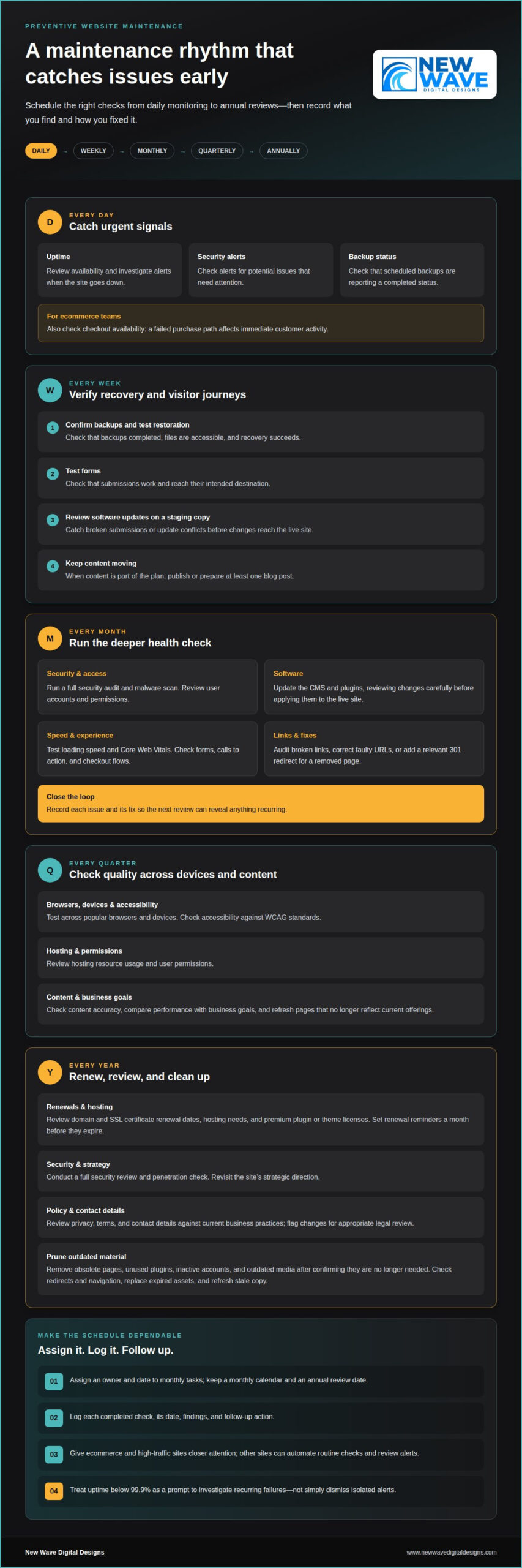
A useful schedule assigns each task a frequency, an owner, and a recorded outcome. Ecommerce and high-traffic sites need closer attention; other sites can automate routine checks and review alerts. Keep a monthly calendar and an annual review date so renewals and deeper audits don’t get lost among everyday updates.

  • Daily: Review uptime, security alerts, and backup status. Ecommerce teams should also check checkout availability because a failed purchase path affects immediate customer activity.
  • Weekly: Confirm backups completed and test that restoration works. A backup is useful only when its files are accessible and recovery succeeds.
  • Weekly: Test forms and review software updates on a staging copy. This catches broken submissions and update conflicts before changes reach the live site.
  • Weekly: Publish or prepare at least one blog post when content is part of your plan. A scheduled editorial action helps maintain a consistent publishing rhythm.

Use the monthly review for deeper checks. Run a full security audit and malware scan, update the CMS and plugins, and review user accounts and permissions. Test loading speed, Core Web Vitals, forms, calls to action, and checkout flows. Audit broken links, correct faulty URLs, or add a relevant 301 redirect for a removed page. Record each issue and its fix, so the next monthly review can identify anything recurring.

  • Quarterly: Test the site across popular browsers and devices, then check accessibility against WCAG standards. These checks can reveal display or interaction problems missed during routine updates.
  • Quarterly: Review hosting resource usage, user permissions, and content accuracy. Compare performance with business goals and refresh pages that no longer reflect current offerings.
  • Annual: Review domain and SSL certificate renewal dates, hosting needs, and the site’s strategic direction. Set renewal reminders a month before domain names, SSL certificates, and premium plugin or theme licenses expire.
  • Annual: Conduct a full security review and penetration check. Review privacy, terms, and contact details against current business practices, and flag changes for appropriate legal review.

During an annual cleanup, remove obsolete pages, unused plugins, inactive accounts, and outdated media after confirming they’re no longer needed. Check that redirects preserve useful paths and that navigation still points to current content. Replace expired assets and stale copy with accurate material so visitors don’t encounter outdated information.

Plan monthly tasks by assigning owners and dates, then reserve an annual review for strategic decisions and renewals. Keep a simple log of each completed check, its date, findings, and follow-up action. This makes missed tasks visible and helps you prioritize when several issues appear at once.

Use monitoring tools to turn site checks into visible signals and documented follow-up. Uptime monitors can check availability every few minutes and alert you when a site goes down. Review the alert history for repeated downtime, then compare incidents with hosting logs to identify patterns. Treat uptime below 99.9% as a prompt to investigate recurring failures, not just dismiss isolated alerts.

How do you check website security, SSL certificates, malware, and vulnerabilities? Review SSL certificate status, scan for malware and known vulnerabilities, and inspect access logs for unusual activity. Record the findings and confirm that fixes resolve the problem without disrupting the live site.

Backups need a clear record, not just a success message. Review logs for failed or incomplete runs, confirm copies are stored securely off-site, and test restoration in a separate environment. Choose a backup tool that makes the recovery point and completion status easy to identify, so you can respond to a missing or damaged copy.

  • Uptime: Configure alerts for outages and review incident history to spot repeat interruptions.
  • Security: Run malware and vulnerability scans, then document findings and remediation.
  • Backups: Check logs, off-site storage, and restoration results.
  • Speed: Compare load performance and Core Web Vitals, including on mobile.
  • Links: Run a broken-link audit, then correct URLs or redirect obsolete pages.

Speed tools can pinpoint slow pages and reveal whether mobile visitors face different friction. Compare performance across key landing pages, product pages, and checkout steps. If uptime monitoring detects an interruption, check whether those pages are also responding slowly. Together, these checks connect a visitor-facing problem to a specific page or service.

What accessibility checks should be included in a 2026 website maintenance checklist? Review pages against WCAG standards, checking keyboard navigation, visible focus, text alternatives, and readable contrast. Test important flows with assistive technology and record barriers for correction.

How should website analytics, forms, links, and checkout flows be tested? Compare analytics events with real actions, then submit each form and complete a test checkout. Confirm that submissions arrive, confirmation messages appear, and link destinations match their labels.

What website maintenance tasks support SEO and content accuracy? Review search performance, page titles, metadata, redirects, and broken links, then check important claims against current business information. Make sure updated pages remain discoverable and old URLs direct visitors to relevant content.

Pairing analytics with user-experience checks helps explain what visitors do and where they encounter friction. Review traffic and conversion paths alongside mobile layouts, form completion, and checkout results. Keep a dated issue log with the affected page, evidence, and corrective action. For ongoing help with these checks, explore website maintenance support.

What qualifies as preventive maintenance?

Preventive maintenance is planned work carried out before a website issue interrupts visitors or business operations. It turns observations into scheduled action: test an update in staging, investigate a recurring error, and record the result. A maintenance plan also assigns responsibility, so tasks don’t depend on someone happening to notice a problem.

Consider a product page that loads correctly but shows an outdated price or an unavailable item. A routine content review can catch the mismatch before customers rely on it. Similarly, checking plugin compatibility before an update can reveal conflicts before they affect the live site. The aim is to reduce avoidable disruption, not to promise that every fault can be prevented.

  • Define the work: List software updates, backup reviews, security checks, and key user journeys. A clear task description makes completion easier to verify.
  • Set ownership: Assign each check to a person or role. For example, one person can review form submissions while another handles platform updates.
  • Keep a record: Note the date, finding, action, and follow-up. A log helps reveal repeated errors and unfinished fixes.

DIY maintenance can suit a straightforward website when the owner has time to monitor the platform, perform updates, and test important pages. The trade-off is the skill and attention required: a rushed update without a restore plan can create more repair work. Professional support can help when a site has ecommerce flows, custom integrations, persistent errors, or updates that need technical testing.

Compare the ongoing effort with the cost of disruption. A maintenance plan should make clear which tasks it covers, how often they occur, who performs them, and how work is documented. For professional website maintenance, price depends on the case and is given after a quote request; relevant factors include platform, site complexity, ecommerce functions, update frequency, and support scope.

To assess return on investment, track practical signals rather than assuming every task creates a fixed saving. Record downtime, recurring errors, failed forms, and time spent on urgent repairs, then compare those records with the preventive work completed. If the same failure keeps returning, review whether the fix addresses its cause or only the visible symptom.

For a United States website, assess the platform, business-critical journeys, security needs, and internal capacity when shaping a maintenance budget. These factors help determine which tasks can be handled in-house and where specialist attention is valuable. Revisit the plan when the site adds a store, new integrations, or a substantial redesign, and adjust its scope to match the work required.
Website Maintenance Checklist 2026: Tasks, Tools, and Prevention

Website maintenance definition and benefits

Website maintenance is the planned work that keeps a digital site secure, accurate, and functioning as intended. It includes technical care, content reviews, and checks of important visitor journeys. For example, a business can review a service page, confirm its contact details, and test the route from landing page to inquiry form.

Consistent maintenance supports business operations by reducing avoidable friction. A working product filter helps shoppers narrow their choices; an accurate service page helps prospects understand an offer. Regularly reviewing these functions protects the connection between what a business promises and what its website delivers.

A maintenance checklist turns broad intentions into visible tasks. Each item should name the page or system, the action, the owner, and the completion record. Instead of writing “check the site,” specify “review the pricing page for outdated details” or “confirm the contact form reaches its intended inbox.”

  • Clarify the task: Name the feature, such as the navigation menu or account login, so checks stay focused.
  • Record the outcome: Note whether the feature works, what failed, and what follow-up action is needed.
  • Assign ownership: Give each recurring check to a person or role, so important work has a clear home.
  • Track patterns: Compare recurring issues across reviews to distinguish isolated faults from problems needing deeper investigation.

Preventive work also supports better decisions. Records of broken visitor journeys, outdated copy, or recurring errors help teams prioritize changes based on actual site needs. Repeated confusion about a service description may call for clearer wording, while a form that fails to deliver submissions needs technical investigation.

Checklists provide continuity when responsibilities change. A new site administrator can see which pages matter, what was tested, and which actions remain open. Make instructions specific enough for someone else to repeat each check, and revise them when the site adds a feature or changes its structure.

Maintenance supports brand consistency as well as technical function. Compare page titles, service descriptions, calls to action, and visual elements with current business information. If an offering changes, update affected pages and navigation together, then review the visitor journey to ensure the new message is clear.

Use the checklist as a working document, not a fixed artifact. After each review, close completed tasks, assign follow-ups, and note new risks. This simple tracking cycle helps keep the site aligned with current needs and makes future maintenance more precise and accountable.

Platform-specific maintenance for WordPress, Shopify, WooCommerce, and Magento

Your platform shapes what to inspect, update, and test. A WordPress content site, Shopify storefront, WooCommerce shop, and Magento store can share core checks, but their software and dependencies differ. Build a shared maintenance framework, then add platform-specific checks for the features visitors use most.

What are the steps to update website software, plugins, themes, and dependencies safely? First, record current versions and create a restorable backup. Apply updates to a staging copy, test key pages and visitor journeys, then update the live site and confirm it still works.

  • WordPress: Review core, plugin, and theme updates together, since component compatibility can affect the site. Check the PHP version and compatibility, then test the editor, navigation, and key forms after changes.
  • Shopify: Review theme changes, installed apps, and storefront content. Test product discovery, product pages, cart behavior, and checkout after changes that affect the shopping journey.
  • WooCommerce: Check WordPress, WooCommerce, extensions, and themes as a connected set. Test product variations, cart calculations, payment steps, and order notifications after relevant updates.
  • Magento: Track the platform software, extensions, themes, and connected dependencies. After changes, test catalog browsing, search, customer accounts, and checkout, then review errors that could interrupt those journeys.

For WordPress, the number of installed plugins matters less than whether each serves a current purpose and remains compatible. Remove unused components only after confirming they don’t support a page or integration. For Shopify, review app permissions and storefront changes together so a theme adjustment doesn’t obscure important product information.

WooCommerce and Magento stores need especially careful testing around the purchase path. Use a test product or controlled process to check product selection, cart changes, and confirmation messages. Confirm that changes don’t unexpectedly affect shipping details, customer-facing text, or order handling. Document the steps and result for each test.

Review available software updates weekly, but don’t treat every update as an automatic live change. First assess its relevance, compatibility, and potential effect on site functions. Staging tests are useful on any platform, especially when an update affects checkout, a theme, or an integration. Confirm the live site afterward and log any issue with the affected page and corrective action.

A practical platform checklist names the software, dependency, feature, and test required. For example, “WordPress: check PHP compatibility” is more useful than “update site.” Tailor those entries to the actual build and repeat critical tests after relevant changes. Get help with platform-specific website maintenance when updates or integrations need a more structured review.

New Wave Digital Designs: Shopify Website Design

New Wave Digital Designs helps businesses build and maintain websites that support their goals. If your Shopify store needs clearer structure or a more considered visual experience, Shopify Website Design can shape its storefront around your business. For an existing site that needs ongoing technical attention, Website Maintenance helps organize routine upkeep.

The right next step depends on what your website needs: a new Shopify build, a WordPress or SquareSpace design, or ongoing maintenance. A focused conversation can clarify the scope and the work involved, without treating every platform or site as the same.

Contact New Wave Digital Designs to discuss your website project and maintenance needs.

Make your next maintenance step intentional

A website maintenance checklist for 2026 is most useful when it becomes part of how your team operates, not a document that sits untouched. Choose one recurring task, assign an owner, and record what changes after each review. That first cycle can reveal whether your process needs clearer responsibilities, more technical attention, or a platform designed around your business.

For a new site or a considered rebuild, New Wave Digital Designs offers Shopify Website Design, WordPress Website Design, and SquareSpace Website Design. Its Website Maintenance service supports ongoing site upkeep. Start with your current platform, your goals, and the maintenance tasks you want handled.

Give your website a considered next step. Contact New Wave Digital Designs to discuss your website plans, and move forward with clarity.

Frequently Asked Questions

Frequently Asked Questions?

This FAQ addresses practical decisions that shape a website maintenance routine. Use the answers to identify who owns each task, what evidence shows it succeeded, and what needs attention next. After a checkout change, for example, record the test order result and assign someone to resolve any failure. That brief record turns a general intention into a repeatable practice.

What are the risks of not having a documented maintenance process?

Without a documented process, important tasks can be missed, performed inconsistently, or left without an owner. A staff change may leave nobody knowing how to restore the site or who receives form submissions. During an incident, teams may lose time locating account access, recent changes, or the right escalation contact. Keep responsibilities, recovery steps, and key system dependencies in a secure, accessible record.

What is Website Maintenance?

Website maintenance is the ongoing care that keeps a site’s technical systems and published information aligned with its intended use. It involves more than fixing visible errors. If a business changes a service name, for example, update references in navigation, page titles, inquiry forms, and confirmation messages. Reviewing connected elements helps prevent mixed messages and makes the site easier to manage.

What should a website maintenance checklist include in 2026?

A useful checklist identifies what to inspect, the expected result, the responsible role, and what to do if the check fails. Include critical paths such as account access, lead delivery, product discovery, and customer notifications. Add a priority field so a broken checkout gets attention before a minor formatting issue. Keep sensitive credentials out of the checklist and store them securely elsewhere.

How often should websites be updated, backed up, and tested?

Set the maintenance frequency according to site activity, platform changes, and the cost of an interruption. A high-traffic store may need closer monitoring than a static portfolio, while major releases should trigger extra checks regardless of the routine calendar. Test important functions after changes to themes, integrations, or checkout settings. Record the last successful test so teams can distinguish a new issue from an older one.

How should website backups be scheduled and tested for recovery?

Schedule backups daily to weekly, depending on how often site data changes, and review logs for failed runs. Store copies off-site and test recovery in a separate environment rather than overwriting the live site during a drill. Include the database and essential site files in the recovery plan. Record what was restored and whether pages, uploaded content, and key functions remained intact.

How do you monitor website uptime, speed, and Core Web Vitals?

Use an uptime monitor for availability alerts, then compare incidents with server or hosting records to investigate the cause. Review page performance and Core Web Vitals for key templates, such as product pages and checkout. Compare mobile and desktop results because layout or asset issues can affect them differently. Keep dated results to see whether a change improved performance or introduced a slowdown.

How much does website maintenance cost in the United States in 2026?

Website maintenance pricing depends on the project and is provided after a quote request. Key cost factors include platform, site complexity, ecommerce functionality, integrations, update frequency, security needs, and support scope. A simple informational site requires different work from a store with custom purchasing flows. To assess a plan, define the tasks you need handled and the technical responsibilities your team can retain.

Should I redesign my website or optimize it? How to decide

A full redesign isn’t always the right fix. If your website’s structure still works but specific pages, content, or visitor journeys need attention, optimization is usually the more focused starting point. If the site’s design, technology, or overall experience no longer supports your business, a redesign may make more sense. Whether you should redesign your website or optimize it depends on the scale and source of the problems you’re trying to solve.

It’s understandable to consider a fresh start when your site feels dated or isn’t performing as you’d like. But reviewing user feedback, analytics, brand changes, maintenance needs, and SEO can show whether targeted improvements are enough or the site’s overall structure needs rethinking.

This guide will help you weigh cost and timing alongside practical signals, then choose an approach that supports your goals without replacing what already works. Website improvement doesn’t have to end at launch: thoughtful optimization can remain part of your site’s ongoing care.

Key Takeaways

  • Choose targeted optimization when the site’s underlying structure works and the problems are specific; consider a redesign when broader foundations need attention.
  • Use visitor feedback and site performance to identify which changes matter most before setting scope, budget, and timing.
  • Align the site with your current brand while preserving content and pathways that still serve visitors well.
  • Weigh the effort of maintaining existing technology against the benefits of a refreshed foundation.
  • Treat launch as one stage in a continuing cycle of testing, maintenance, and improvement.

1. What is website redesign?

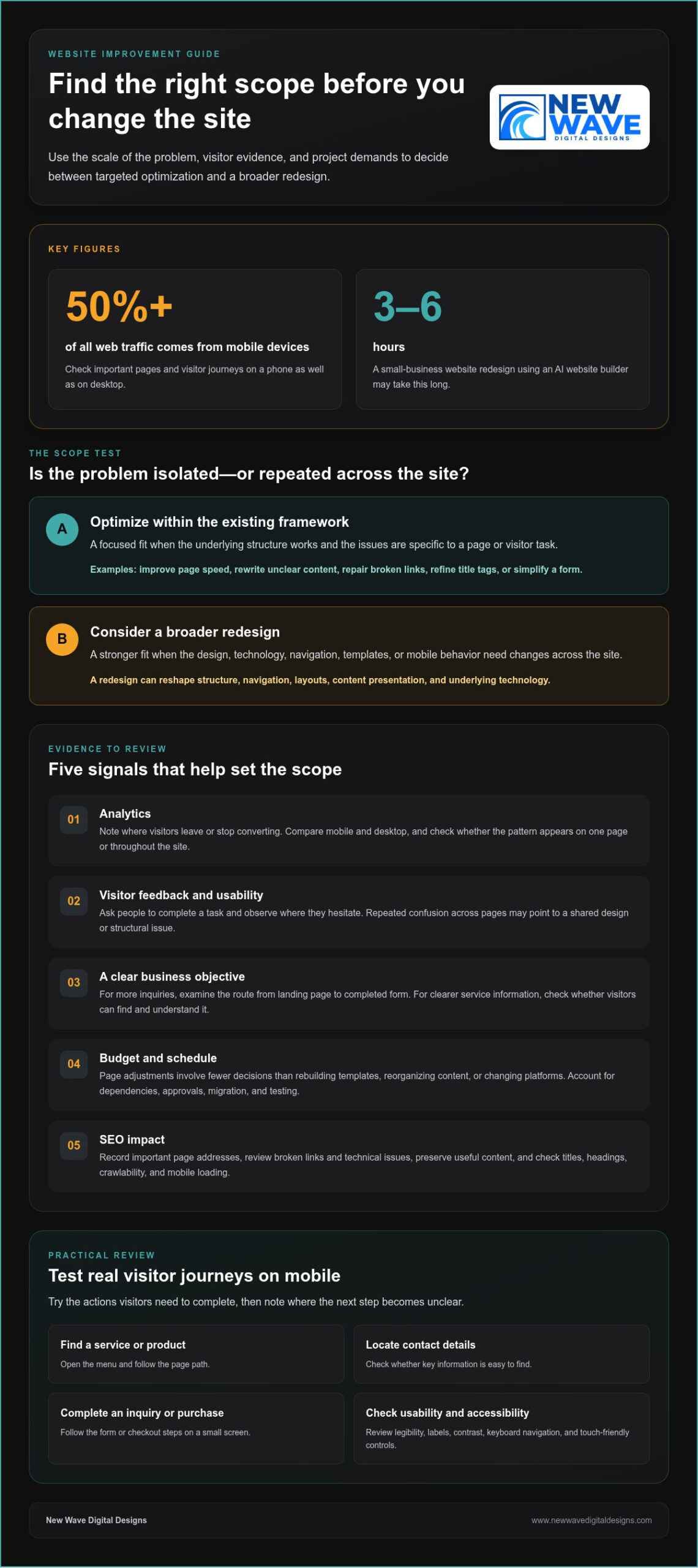
A website redesign reshapes more than colors or images. It can change the site’s structure, navigation, layouts, content presentation, and underlying technology. Optimization, by contrast, targets specific issues within the existing framework, such as a slow page or confusing form. Updating a call-to-action button is a focused improvement; reorganizing the main menu and rebuilding page templates is closer to a redesign.

Mobile responsiveness is a practical test of whether the site’s design adapts to different screen sizes. More than 50% of all web traffic comes from mobile devices, so check key pages on a phone as well as a desktop. Look for text that requires zooming, images that overflow, and buttons that are difficult to tap. A responsive layout should adjust content and elements to the screen rather than simply shrinking the desktop page.

Test the navigation by completing real visitor tasks on a mobile device. Open the menu, find a service or product, locate contact details, and follow the steps to an inquiry or purchase. Note where the next step becomes unclear on a small screen. Touch-friendly buttons, visible menu labels, and concise page paths can often be improved without replacing the entire site.

Usability also depends on how easily people can read and understand each page. Check whether headings describe the content that follows, paragraphs are easy to scan, and important details appear where visitors expect them. If visitors must open several menu layers to find shipping information, simplify the route. If the same problem appears across many pages, the site’s information architecture may need broader changes.

Include accessibility in your review. Check that text is legible, links and buttons have clear labels, and visitors can navigate menus and forms using a keyboard. Review color contrast, and make sure meaning isn’t communicated through color alone. These checks help show whether the design serves visitors with different needs, not just whether it looks polished on one device.

Before launch, test redesigned pages on the devices and browsers your visitors use. Submit forms, follow links, check images, and confirm that menus work at narrow screen widths. Review page loading, mobile layouts, and security elements such as plugins and backups. Google prioritizes mobile-ready websites in search results, so a broken mobile experience can affect visibility as well as usability. If the structure works and problems are isolated, optimize first. If navigation, templates, and mobile behavior need changes across the site, a redesign may be the more coherent solution.

2. Budget, schedule, user feedback, and SEO considerations

You can improve page speed, rewrite unclear content, repair broken links, refine title tags, and simplify forms without rebuilding the whole site. These targeted changes suit problems limited to specific pages or visitor tasks. To decide whether you should redesign your website or optimize it, first identify whether the barriers are isolated or repeated across the site.

Start with analytics and note where visitors leave or stop converting. If a service page attracts visitors but few reach its inquiry form, inspect its message, form placement, and next step. Compare performance on mobile and desktop, then see whether the pattern appears on one page or throughout the site. That distinction helps define the project’s scope.

Analytics show what visitors do; usability tests can help explain why. Ask people to complete a task, such as finding a product detail or submitting an inquiry, and observe where they hesitate. Pair those observations with customer feedback and site data. If several people misunderstand the same label, revise it. If tasks repeatedly fail across different pages, investigate the shared design or structure.

Set a business objective before choosing changes. If the goal is more inquiries, examine the visitor’s route from landing page to completed form. If the priority is clearer service information, assess whether visitors can find and understand it. Tie visual changes to that objective. A more prominent contact button may help on one page, while inconsistent layouts could point to a broader need.

Budget and timing depend on scope. Adjusting a page involves fewer decisions than rebuilding templates, reorganizing content, or changing platforms. List the tasks, dependencies, and approval steps before setting a budget or launch date. Include content migration and testing when multiple pages are affected. Deciding whether you should redesign your website or optimize it becomes clearer when you compare the work required with the outcomes each approach supports.

Protect organic search visibility by recording important page addresses and reviewing an SEO audit for broken links and technical issues. Keep useful content, write accurate page titles and headings, and ensure search engines can crawl the site. After changes, test links, forms, and loading on mobile devices. If a broader rebuild is under consideration, a website redesign and optimization plan can help connect user needs with business goals.

When considering a redesign or refresh, assess budget, schedule, user feedback, and SEO impact. High bounce rates or low conversions may point to issues such as weak calls to action, missing customer testimonials or reviews, hard-to-find contact information, or poorly designed forms and checkout processes.

SEO considerations include keywords in content and meta tags, loading speed, mobile experience, crawlable code, and relevant, high-quality content. For businesses preparing for modern search shifts, teams like YourProfitWeb focus on AI-driven SEO and search optimization to help sites appear as top answers in AI results. A redesign can rethink the experience around current and future organizational goals. A small business website redesign using an AI website builder may take 3–6 hours.

3. Aligning a website with an evolved brand

A brand can evolve before its website catches up. A new logo, color palette, typography, or set of services may make existing pages feel inconsistent. Compare the homepage, service pages, and contact page with current brand guidelines. If only a few visual details or phrases are outdated, targeted updates may be enough. If the structure and messaging no longer express the business, a redesign can bring the overall digital experience into alignment.

Review the brand’s promise before changing the visuals. Write down what the business does, who it serves, and what visitors should understand after reading the homepage. Then compare those points with the page’s headline, supporting copy, imagery, and calls to action. For example, a company that now emphasizes custom work shouldn’t lead with generic language that suggests standard packages. The message and design should tell the same story, a standard practice for creative web design agencies like Insight Multimedia when reshaping a company’s digital presence.

Feedback can reveal where the current site creates a mismatch. Ask customers what they expected to find, then compare their answers with the language and service descriptions on key pages. If visitors consistently misunderstand an offering, revise its name, explanation, or placement. If the same confusion appears across the homepage, navigation, and service pages, the issue may call for broader messaging and structural changes.

A content audit helps distinguish material to keep from content to revise or remove. Review each page for accuracy, brand voice, and purpose. Mark outdated service descriptions for rewriting, preserve useful guidance, and remove copy that no longer supports the business’s direction. Check headings, page titles, and calls to action too. This creates a clear content map before design work begins, rather than carrying old assumptions into a new layout.

Consider the content management system alongside the brand update. If the current system supports the required page layouts and staff can update text and images reliably, a visual refresh may be enough. If the site’s templates make it hard to organize new services or messaging clearly, the structure may need to change. The key question is whether the current framework can support the brand’s next chapter.

Before launch, review the updated site page by page. Confirm that the logo, colors, typography, service descriptions, and calls to action form a coherent experience. Check that the homepage sets accurate expectations and detail pages deliver on them. A new identity doesn’t automatically require a redesign; focused changes can work when the underlying structure still fits. Choose a broader rebuild when branding, content, and page architecture need to change together.

Should I redesign my website or optimize it? How to decide

4. Maintenance costs and legacy technology

A redesign and ongoing optimization distribute effort differently. A redesign concentrates work in a larger project, while optimization addresses defined tasks over time. Redesign costs depend on project scope and customization; ongoing costs depend on the pages and technical issues being maintained. Updating a few pages, for example, differs from rebuilding templates and moving content to another platform.

For a site with fewer than 10 pages, a small website redesign typically takes 4-6 weeks. A medium site with 10–50 pages typically takes 8-12 weeks; a large site with 50+ pages typically takes 3-6 months. An enterprise redesign typically takes 6-12 months. Content migration, approvals, and testing all shape the schedule.

A refresh often costs less and takes less time than building a site from scratch because it can reuse the existing structure and functionality. It may also preserve the current content management system, avoiding the need to learn a new editing process. This approach suits a site with a sound foundation that needs updated pages or a more responsive, mobile-friendly presentation.

Existing technology can change that calculation. List recurring maintenance tasks, such as updating the content management system, reviewing plugins, and addressing security issues. Then identify whether outdated components create repeated work or prevent needed changes. Flash, for example, is no longer supported and should be replaced with newer technology. If essential functions depend on fragile legacy components, piecemeal fixes may extend the maintenance burden.

A redesign also carries SEO risks if important URLs, content, or internal links change without a migration plan. Before launch, record pages that attract traffic, map old URLs to relevant destinations, and test links and crawlability. Keep valuable page content and search-focused titles where they still serve visitors. A refreshed visual design alone doesn’t require changing every URL.

Optimization has a narrower scope and lets teams address specific problems while preserving what works. Its drawback is that repeated fixes can become inefficient when the underlying platform or templates limit progress. A redesign can provide a coherent new structure and replace legacy technology, but it requires more planning and migration work. Compare maintenance tasks, required changes, and SEO dependencies before choosing.

Use a practical decision rule: if the site remains secure, maintainable, and capable of supporting current goals, prioritize focused optimization. If technology creates recurring obstacles, necessary changes affect multiple templates, or maintenance consumes effort without resolving core problems, plan a redesign. The right choice resolves the source of the work, not just its most visible symptom.

5. Redesign timing and ongoing optimization

Signs that point toward a redesign include outdated functionality, recurring layout problems across templates, and messaging that no longer reflects the business. If a required service cannot fit the current structure, or visitors encounter the same obstacle on multiple pages, isolated optimization may not address the underlying issue. A single slow page or unclear button, however, may need only a focused adjustment.

A full redesign every two to three years is described as typical in many industries, but the calendar alone is a weak trigger. Review whether the site still supports the audience, business goals, content, and technology it needs today. A newer site may still need an overhaul if its structure blocks essential functionality; an older one may need only continued updates if its foundations remain useful.

Use a clear decision process. First, define the outcome, such as more inquiries or clearer service information. Next, identify where visitors struggle and whether the problem affects one page or the wider site. Then compare targeted fixes with changes to templates, content organization, and technology, and choose the scope that addresses the root cause.

Keep optimization in the plan after launch, whether the project is a refresh or a full rebuild. Track the pages tied to your goal, review visitor behavior, and make adjustments when evidence points to a specific friction point. If people reach a booking page but abandon the process, for example, inspect the steps and messaging before changing unrelated pages.

Plan the launch around the complexity of the overhaul. A typical website overhaul can take 3-12 months, depending on its complexity, so define approvals, content preparation, and testing milestones early. After launch, monitor the site closely during the first 24–48 hours. Test key functionality, check important pages, and confirm forms and links work before treating the new design as complete.

The strongest approach is continuous rather than calendar-bound: redesign when the site’s foundations no longer serve its purpose, then optimize as audience needs and business goals evolve. That rhythm helps prevent a cycle of waiting until the site feels outdated, then attempting to solve every problem in one overhaul. To map a practical redesign or optimization path, plan your website’s next improvements with a clear view of goals, scope, and ongoing needs.

New Wave Digital Designs: Shopify Website Design

New Wave Digital Designs can help shape a website that better supports your business goals, whether the right path is a redesign or ongoing maintenance. If your Shopify store needs a clearer structure, a refreshed customer journey, or a cohesive visual direction, Shopify Website Design can address those needs. WordPress Website Design and SquareSpace Website Design are also available for businesses building or reworking sites on those platforms.

For a site whose foundation still works, Website Maintenance can support its ongoing care instead of replacing it. Start with the scope of the problem: isolated issues may need focused improvements, while changes across the site may call for a broader design project. Contact New Wave Digital Designs to discuss the next step for your website.

Shape your website’s next chapter

Deciding whether you should redesign your website or optimize it is ultimately about what will best support your next stage of growth. Let your priorities guide the work: preserve what serves visitors, address what gets in their way, and make room for the changes your business needs. A website doesn’t have to stay fixed after launch. It can evolve with your audience, services, and goals.

New Wave Digital Designs offers Shopify Website Design, WordPress Website Design, and SquareSpace Website Design for businesses planning a new site or a considered redesign. A clear conversation about your goals can turn the decision into a practical direction for your website.

Contact New Wave Digital Designs to discuss your website’s next step. A thoughtful change, made with purpose, can set the stage for what comes next.

Frequently Asked Questions

What is website redesign?

A website redesign is a coordinated rebuild or substantial reworking of a site’s appearance, structure, content presentation, or platform. Unlike changing one element, it may alter how visitors move from a landing page to a purchase or inquiry. A business might, for example, reorganize service pages and rebuild templates so new offerings fit naturally. The defining feature is the scope of change, not a particular visual style.

How can I audit website performance, UX, SEO, and conversion issues?

Pair analytics with hands-on task testing. Record which pages visitors enter, leave, and convert on, then test a key journey, such as finding a service and submitting its form. Review search impressions and landing-page queries in Google Search Console, and inspect mobile loading and broken links. Finally, compare visitor comments with the data. A page with traffic but few inquiries needs different attention from one visitors rarely find.

How can a redesign affect SEO rankings, traffic, and conversions?

A redesign can change how search engines discover pages and how visitors complete tasks. Changing URLs without relevant redirects can send existing search results to dead ends; removing useful page content may also weaken its relevance. Clearer page paths and forms, on the other hand, can make it easier for visitors to act. Preserve valuable destinations and monitor search visits, inquiries, and sales after launch.

What risks should I plan for when redesigning a website?

Plan for broken forms, missing content, incorrect redirects, and analytics tags that stop recording visits. Create an inventory of key pages and conversion actions before development, then test each on the finished site. Keep a copy of the previous version and establish a rollback plan in case a critical function fails. Assign someone to review visitor reports after launch so overlooked problems surface quickly.

How do I measure whether website optimization or a redesign improved results?

Before work begins, record a baseline for the specific goal, such as completed inquiries, sales, or search visits to priority pages. After launch or optimization, compare the same measures and separate results by traffic source and device. Check whether more visitors complete the intended action, not just whether total visits rise. Also review support questions and user feedback for signs that the experience has become clearer.

Custom WordPress Theme Design: The Artistry of Digital Architecture

What if your digital presence was not merely a collection of pages, but a masterfully crafted extension of your brand’s soul? You likely understand the quiet frustration of a website that feels like a borrowed suit. It’s often too loose in the wrong places, burdened by unnecessary code, and ultimately incapable of reflecting your unique identity. Investing in custom WordPress theme design allows you to move beyond these restrictive confines to build something enduring, efficient, and evocative. We believe your site should be a high-performance engine that accelerates growth rather than a static brochure that holds you back.

By choosing bespoke craftsmanship, you reclaim control over your Core Web Vitals, your security, and your story. This article explores how a tailored approach to WordPress 7.1 transcends template limitations to create a unique digital presence, a streamlined backend workflow, and a foundation for continuous evolution. Discover how the artistry of digital architecture can eliminate technical debt while delivering a brand-aligned experience that truly stands out. Through a blend of technical precision and creative vision, you can transform your website into a powerful asset that resonates with every visitor.

Key Takeaways

  • Recognize the limitations of the “Template Trap” and learn how bespoke digital architecture preserves the true spirit of your brand.
  • Explore the technical advantages of lightweight code, which naturally enhances Core Web Vitals and elevates your standing in search results.
  • Understand the security benefits of custom WordPress theme design, where purposeful craftsmanship reduces the risks often found in mass-market plugins.
  • Identify how strategic integration between design and organic SEO creates a high-performance engine capable of driving meaningful conversions.
  • Follow a methodical journey from discovery to realization, ensuring your digital presence is built to scale and evolve alongside your business.

Beyond the Template: Why Bespoke WordPress Design Defines Modern Brands

Your website serves as the digital cornerstone of your professional legacy. While many attempt to shortcut the development process with pre-packaged solutions, the result is often a generic experience that fails to capture the true spirit of a brand. Custom WordPress theme design offers a departure from the mundane, allowing for a sophisticated blend of form and function that templates simply cannot replicate. This transition from a commodity mindset to a craftsmanship mindset ensures that every element of your site serves a distinct purpose, from the underlying code to the final visual flourish. When you choose to build rather than buy, you’re investing in an asset that grows with your vision, rather than a temporary fix that limits your potential.

The Limitations of Pre-Made WordPress Themes

The allure of off-the-shelf themes lies in their immediate gratification, yet they often carry a heavy burden of technical debt. These multipurpose products are designed to serve everyone, which means they include excessive code for features you’ll never use. This code bloat directly impacts mobile responsiveness, leading to sluggish load times and user frustration. Beyond the surface, the hidden costs of “easy” templates emerge through constant maintenance requirements, fragile plugin conflicts, and rigid layouts that refuse to bend to your evolving business needs. In competitive national markets, a generic design dilutes your authority. It makes your business look like a carbon copy of a dozen others, which can quietly erode user trust before a single word of your copy is read.

The Visionary Approach to Digital Craftsmanship

True digital architecture begins with empathy, seeking to understand the specific rhythms and goals of your business before a single line of code is written. By exploring the core of WordPress architecture, a skilled developer can craft a custom theme that mirrors the spirit of your brand with meticulous precision. This approach ensures pixel-perfect alignment between your visual identity and your digital interface. A bespoke UI/UX isn’t just about aesthetics; it’s about creating intuitive workflows that guide users toward conversion with ease. When you invest in custom WordPress theme design, you’re not just launching a site; you’re establishing a scalable foundation that supports your long-term evolution and fosters deep, lasting resonance with your audience.

Exemplifying Excellence: The Pillars of High-Performance Custom Themes

High-performance digital architecture is built on a foundation of restraint. Unlike multipurpose themes that carry heavy baggage, custom WordPress theme design focuses on lean, lightweight code that serves your specific business objectives. This meticulousness effectively bakes security into the very fabric of your site by eliminating unnecessary third-party dependencies. It’s a proactive approach that reduces the attack surface while ensuring your platform remains agile and responsive. We believe that every line of code should earn its place, contributing directly to a faster, safer, and more reliable user journey.

Empowering your team is just as vital as the user experience itself. By developing bespoke Gutenberg blocks, we provide an editing environment that is both intuitive and brand-safe. This ensures your content creators can maintain visual excellence without risking the site’s structural integrity or performance. For a deeper look at these strategic choices, you can consult this complete guide to custom theme development. It’s about creating a tool that feels like a natural extension of your internal workflow.

Performance as a Competitive Advantage

Speed is a silent ambassador for your brand. There’s a direct correlation between instantaneous page loads and national SEO rankings; search engines prioritize sites that respect a user’s time. By optimizing Core Web Vitals from the ground up, we reduce bounce rates and ensure smooth transitions that keep visitors engaged. Performance-first design is the foundational blueprint that transforms digital interactions into measurable ROI. It’s the difference between a visitor who bounces and a client who stays to explore your story.

Tailored User Interfaces and Bespoke Functionality

Your business data is unique, and your website’s structure should reflect that complexity. We design custom post types that align perfectly with your internal needs, whether you’re managing intricate portfolios, directories, or catalogs. This tailored approach allows for unique interactive elements that off-the-shelf templates simply cannot replicate without relying on heavy, performance-draining plugins. Every interface undergoes rigorous responsive testing to guarantee a seamless experience across all devices. If you’re ready to elevate your digital presence, exploring professional WordPress website design can turn these technical advantages into a lasting competitive edge.

The Technical Craftsmanship of Custom Development vs. Pre-Made Themes

Choosing between a pre-made template and a custom-built solution is the difference between purchasing a mass-produced kit and commissioning a bespoke architectural masterpiece. While templates offer the illusion of speed, they frequently arrive burdened with technical debt. This hidden cost manifests as a labyrinth of unnecessary features, bloated scripts, and rigid structures that eventually stifle your brand’s growth. In contrast, custom WordPress theme design prioritizes a clean, purposeful codebase where every line serves a specific strategic intent. This meticulous approach ensures that your digital engine remains lean, fast, and remarkably easy to maintain over the long term.

A Comparison of Flexibility and Control

A custom build grants you 100% control over your digital environment. You aren’t fighting against a developer’s pre-conceived notions of how a site should behave; you are defining the rules yourself. Templates often rely on a “Plugin Overload” strategy to achieve basic functionality, creating a fragile ecosystem where one update can bring the entire site down. Custom themes integrate these features directly into the core architecture, ensuring a more stable and future-proof platform. This streamlined foundation makes WordPress core updates a seamless transition rather than a source of technical anxiety. It’s about building a site that is agile, resilient, and ready for whatever the future holds.

Security Hardening and Technical Protection

Security is not a feature added at the end; it’s a value woven into the initial design. Commercial themes are high-value targets for automated hacking bots because a single vulnerability can compromise thousands of sites simultaneously. Unique, custom code is naturally less attractive to these broad-spectrum attacks. By partnering with Secure website hosting services, your custom theme operates within a fortified perimeter designed for your specific traffic patterns. This synergy between bespoke development and professional WordPress security solutions creates a resilient digital presence that protects your reputation, your data, and your peace of mind with unwavering vigilance. We believe your site should be a sanctuary for your brand, not a liability.

Custom WordPress Theme Design: The Artistry of Digital Architecture

Strategic Integration: Designing Themes for Conversion and Scalability

Semantic HTML and schema markup are the silent languages of search. By building a site that search engines understand perfectly, we ensure your content reaches the right audience at the right moment. This efficiency optimizes your crawl budget by stripping away code bloat and unnecessary redirects. If you’re evaluating your platform options from an organic search perspective, our in-depth analysis of Wix vs WordPress for SEO reveals which foundation offers the superior technical advantage for long-term visibility. It is a philosophy of excellence we also apply to Custom Squarespace website design, ensuring that every platform we touch adheres to the highest technical standards. These optimizations provide a superior foundation for ongoing Organic SEO services, turning your site into a beacon for qualified traffic.

Designing for Conversion Excellence

Visual hierarchy is the invisible hand that guides your visitor’s journey. Through strategic CTA placement and meticulous A/B testing, we refine the user experience until every interaction feels natural and inevitable. Custom themes allow for this level of iteration without the constraints of rigid templates. They provide the flexibility to test new layouts, adjust messaging, and optimize flows in real time. Maintaining this brand consistency across all digital touchpoints, from your primary site to a Custom Shopify store design, builds the deep trust necessary for long-term loyalty. We believe that your digital presence should be as cohesive as it is compelling, reflecting a unified brand identity that resonates with every click. If you are ready to transform your site into a conversion-focused asset, our team is here to help you build a strategic digital presence that delivers measurable results.

Realizing Your Vision: The Collaborative Journey to a Custom Digital Presence

The realization of a visionary digital presence is never a solitary endeavor. It is a methodical, shared journey that begins long before the first line of code is written. By prioritizing discovery and strategy, we ensure a deep understanding of your business’s “why” before we ever address the “how”. This phase is about more than technical requirements; it’s about capturing the soul of your brand and translating it into a functional masterpiece. Custom WordPress theme design thrives in this space of mutual understanding, where strategic goals meet artistic inspiration to create something truly unique.

The design phase follows this strategic foundation with collaborative wireframing and high-fidelity visual concepts. We treat this stage as a dialogue, refining every interaction and aesthetic detail until the vision is perfectly clear. Once the blueprint is set, our development process brings that vision to life through sustainable, clean code that prioritizes longevity and performance. The journey doesn’t end at launch, however. True digital excellence requires continuous care through professional WordPress maintenance services to ensure your site remains secure, fast, and aligned with your evolving goals.

The Partnership Approach to Web Design

Working with a “Digital Architect” offers a stark contrast to the high-volume service factories that dominate the market. We believe in meticulous attention to detail, especially during the final polishing phase where a project truly begins to shine. This boutique approach fosters a long-term relationship centered on partnership, empathy, and a shared commitment to your success. It’s a journey of continuous evolution, ensuring your digital home grows alongside your business. For organizations looking to pair bespoke website design with expanded audience outreach, you can discover Web Bridge to explore how integrated digital marketing supports long-term brand momentum. We don’t just build sites; we nurture digital ecosystems that reflect your professional excellence.

Preparing for Your Custom WordPress Project

Success in a custom build requires thoughtful preparation and a commitment to quality. Start by clearly defining your brand goals and functional requirements, moving beyond superficial aesthetics to identify what your site must achieve. Gather visual inspiration and technical must-haves that reflect your unique identity. Finally, set a realistic timeline that respects the craftsmanship required for a bespoke build. A project rooted in quality cannot be rushed; it demands a thorough, deliberate process that yields an extraordinary result. When you invest in custom WordPress theme design, you’re choosing a path of precision, innovation, and lasting value.

Building Your Digital Legacy

Transitioning from generic templates to bespoke digital architecture is more than a technical upgrade; it’s a strategic commitment to your brand’s future. We’ve explored how performance-optimized architecture, visionary digital craftsmanship, and meticulous attention to brand detail create a site that doesn’t just exist but excels. By choosing custom WordPress theme design, you’re investing in a lean, secure, and highly scalable engine that eliminates the bloat of pre-made solutions. This approach ensures your digital home is built on a foundation of technical excellence and creative intent.

Your website should be a reflection of your professional spirit and a catalyst for long-term evolution. If you’re ready to move beyond the limitations of the “template trap” and realize a unique digital vision, we invite you to partner with us to craft a platform that truly distinguishes your business. Elevate your brand with a custom WordPress theme designed by New Wave Digital Designs. Let’s build a digital masterpiece that resonates with your audience and stands the test of time.

Frequently Asked Questions

What is the difference between a custom WordPress theme and a premium template?

A custom theme is a bespoke digital architecture designed specifically for your brand’s unique goals and identity. Unlike premium templates, which are multipurpose products built for a mass audience, custom designs eliminate unnecessary code bloat and rigid layout constraints. This tailored approach ensures your site is lean, fast, and perfectly aligned with your visual strategy. It transforms your website from a generic digital brochure into a high-performance engine.

How much does a custom WordPress theme design project typically cost?

The investment for a custom project varies based on the complexity of your requirements and the depth of strategic integration needed. Every brand has distinct functional needs, such as custom post types or unique API integrations, which influence the final scope. We focus on delivering visionary craftsmanship that provides long-term value rather than a quick fix. By prioritizing quality over commodity pricing, you ensure your digital presence is built to scale and endure.

Will I be able to update my own content with a custom WordPress theme?

Yes, you’ll have complete control over your content through a tailored backend experience. We build custom Gutenberg blocks that are both intuitive and brand-safe, allowing your team to manage text, images, and layouts without risking the site’s structural integrity. This empowerment is a core part of our collaborative journey. It ensures your site remains a living, breathing extension of your business that can evolve daily without requiring constant technical intervention.

How long does the custom WordPress design and development process take?

A project rooted in quality and craftsmanship typically spans several weeks to several months depending on its complexity. A mid-market build often takes between nine and fourteen weeks from the initial discovery phase to the final launch. This timeline allows for the methodical journey of strategy, high-fidelity design, and meticulous coding. We prioritize a thorough process to ensure every detail is polished and the final architecture is performance-optimized.

Are custom WordPress themes better for SEO than pre-made themes?

Custom WordPress theme design offers significant advantages for organic SEO by prioritizing clean, semantic HTML and lightweight code architecture. Pre-made themes often suffer from technical debt and excessive scripts that slow down page loads and negatively impact Core Web Vitals. By building only what is necessary, your site becomes more crawlable and ranks more naturally in search results. For those still weighing their platform options, our comprehensive guide on Wix vs WordPress for SEO in 2026 provides a definitive comparison of which foundation best supports long-term digital visibility. This performance-first approach creates a superior foundation for your long-term digital visibility.

What happens to my custom theme when WordPress releases a major update?

Custom themes are built using core WordPress standards, making them remarkably resilient to major software updates. Unlike complex multipurpose templates that rely on fragile third-party page builders, a custom architecture is streamlined and future-proof. We focus on sustainable code that minimizes conflicts during core transitions. When combined with professional WordPress maintenance services, your site remains secure and functional as the WordPress ecosystem continues its continuous evolution.

Do I need special hosting for a custom WordPress website?

While custom themes run on most standard servers, we recommend managed hosting and security services to fully leverage your site’s performance. High-performance architecture deserves an environment that supports its speed and technical precision. Professional hosting solutions provide the fortified perimeter and server-side optimizations necessary to protect your investment. This synergy between bespoke code and secure hosting ensures your digital presence remains fast, reliable, and visionary for every visitor.

Can you convert my existing template-based site into a custom theme?

We can certainly transition your existing digital presence into a bespoke custom theme. This process involves a deep discovery phase to identify what is working and where the current template is holding you back. We then rebuild the site from the ground up, stripping away technical debt and refining the user experience. It’s a transformative journey that elevates your brand from a borrowed suit to a masterfully tailored digital masterpiece using custom WordPress theme design.

The Visionary Guide to Shopify Maintenance Packages in 2026

What if your e-commerce store wasn’t just a static digital storefront, but a living masterpiece that grows more resilient with every passing second? You’ve likely felt the quiet anxiety that follows a missed security update or the frustration of a slow-loading page that silently erodes your conversion rates. It’s exhausting to manage a creative vision that feels tethered by technical debt or unresponsive developers. We understand that your store is more than just code; it’s the digital heartbeat of your brand’s legacy and deserves meticulous stewardship.

Choosing the right Shopify maintenance packages is no longer a mere technical necessity, but a strategic act of craftsmanship. This guide reveals how to protect your investment and fuel continuous growth through a framework designed for the sophisticated 2026 landscape. We’ll explore the transition to Agentic Commerce, the nuances of API version 2026-07, and the proactive security measures that provide total peace of mind. You’ll discover how a partnership with expert digital architects ensures your site evolves with the same passion you bring to your business, turning technical stability into a foundation for artistic and commercial triumph.

Key Takeaways

  • Learn to transition from reactive troubleshooting to a philosophy of digital stewardship that preserves your brand’s craftsmanship and prevents performance decay.
  • Discover the critical technical elements within high-tier Shopify maintenance packages, including advanced firewall management and precise speed audits tailored for the 2026 landscape.
  • Gain clarity on how to choose between foundational security stability and growth-oriented packages that scale alongside your brand’s increasing complexity.
  • Master a strategic framework for auditing your store’s technical health to ensure your maintenance plan aligns perfectly with your revenue and traffic goals.
  • Explore the benefits of a boutique partner approach where meticulous attention to detail ensures your digital architecture remains resilient and forward-thinking.

The Philosophy of Digital Stewardship: Why Maintenance Matters

Think of your e-commerce store as a grand architectural masterpiece. It requires more than just a sturdy foundation; it demands a watchful eye to ensure the facade remains brilliant and the interior functions with grace. Many merchants view upkeep as a technical chore. We see it as a form of digital craftsmanship. Choosing comprehensive Shopify maintenance packages isn’t about patching leaks after they appear. It’s about the digital stewardship required to protect your brand’s soul, vitality, and future. When you shift your perspective from fixing bugs to preserving excellence, your store transforms from a static tool into a visionary asset.

Neglect carries hidden costs that often go unnoticed until they become catastrophic. Security gaps, performance decay, and broken user paths act like silent erosion, slowly wearing away at your conversion rates. A Digital Architect doesn’t just monitor code; they safeguard the visual and functional integrity of your brand. This meticulous approach ensures that every pixel and every script serves your long-term legacy. By investing in a strategic framework, you prevent the accumulation of technical debt that eventually stifles innovation and scares away sophisticated customers.

Beyond the Update: The Art of Continuous Evolution

A stagnant website is a fading brand. Modern audiences are highly perceptive; they can feel when a digital experience has lost its edge. Resonating with these consumers requires a delicate balance of technical stability, creative growth, and emotional resonance. It’s not enough to simply keep the lights on. Your store must evolve to meet the shifting expectations of the 2026 landscape, where features like Agentic Commerce and AI-ready catalogs are becoming the standard. Meticulous care allows you to maintain the spirit of your original design while seamlessly integrating new technologies. This proactive evolution ensures your brand stays relevant without losing the unique artistry that first attracted your audience.

Mitigating Risk in an Increasingly Vulnerable Digital Landscape

The “set it and forget it” mindset is a dangerous myth. Automated threats and sophisticated scripts scan millions of live stores every hour, looking for the smallest vulnerability to exploit. Proactive stewardship is the only way to stay ahead of these risks. Digital stewardship is the proactive preservation of a brand’s presence. Without regular audits of scripts, permissions, and API versions like the latest 2026-07 release, your store becomes a target. Robust Shopify maintenance packages provide the necessary shield, preventing technical debt from piling up and ensuring your business remains a secure sanctuary for your customers. This level of care isn’t just about safety; it’s about building the deep trust that fuels sustainable growth.

Anatomy of a Premium Website Maintenance Package

A premium maintenance package is far more than a simple checklist of technical tasks; it’s a meticulously designed ecosystem where security, performance, and functionality converge to support your brand’s evolution. When you invest in sophisticated Shopify maintenance packages, you’re not just buying time or offloading chores. You’re securing the expertise of a Digital Architect who ensures your storefront remains as fast as it is beautiful. This involves a tripartite approach to protection: rigorous malware scanning to repel emerging threats, active firewall management to filter malicious traffic, and constant SSL monitoring to preserve the sanctity of customer trust.

Beyond safety, performance optimization breathes life into your site’s user experience. We perform regular database cleaning, meticulous image compression, and deep-dive speed audits to ensure every second of your customer’s journey feels effortless and fluid. We don’t just look at the backend. We verify every link, test every button, and audit every form to ensure your functional integrity remains uncompromised. This level of detail transforms technical support into a strategic asset within our Shopify maintenance packages. Our reporting doesn’t just list dry data; it provides the actionable insights necessary for visionary brand growth, helping you understand where your digital architecture can scale next.

The Foundation: Secure Hosting and Technical Protection

Managed hosting acts as the bedrock of your digital presence. It provides the stability required for a high-growth brand to flourish without the fear of sudden downtime or performance bottlenecks. You can explore the depths of this necessity in our guide on Secure Website Hosting Services: The Visionary Foundation for Small Business Growth. Redundant backups and rapid disaster recovery protocols aren’t luxuries. They are the essential insurance policies that guarantee business continuity regardless of external digital storms, allowing you to focus on your creative vision while we handle the technical resilience.

Platform-Specific Hardening: Shopify and WordPress

Every platform requires a unique form of digital hardening to remain resilient in 2026. While Shopify offers a robust, closed ecosystem, WordPress demands a more hands-on approach to mitigate the risks inherent in its open-source nature. For those operating on both fronts, our WordPress Security Solutions: A Visionary Guide to Digital Hardening in 2026 provides a roadmap for securing complex environments. On Shopify, maintenance focuses on the delicate balance of app integrations and theme updates. We ensure that a single update never disrupts your meticulously crafted user experience, treating each technical tweak with the care of a master craftsman. If you’re ready to elevate your store’s stability, our website maintenance framework is designed to provide that exact peace of mind.

Comparing Tiers: Choosing Your Level of Digital Support

Selecting the ideal level of care for your storefront is a strategic decision that balances technical necessity with creative ambition. It’s not about finding the lowest price point; it’s about identifying the degree of stewardship your digital investment demands. We view Shopify maintenance packages as layers of a protective and generative framework, each designed to meet a specific stage of brand maturity. Whether you require a foundational shield or an architect-led growth strategy, the choice should reflect your commitment to meticulous excellence.

  • Essential Maintenance: This foundational tier provides the bedrock of security, stability, and peace of mind. It’s designed for brands that prioritize a secure, functional environment without the need for frequent strategic shifts.
  • Growth-Focused Packages: These plans integrate proactive SEO monitoring and performance enhancements. They’re built for scaling businesses that require their digital architecture to evolve alongside their expanding market presence.
  • Elite Strategic Support: Crafted for high-volume e-commerce and complex digital products, this tier offers the highest level of personal care. It provides direct access to digital architects who treat your store as a visionary asset.

When comparing these options, look beyond the monthly retainer to evaluate long-term value. A lower-cost plan that lacks proactive audits often leads to performance decay and technical debt. These hidden issues eventually cost more in lost revenue and emergency repairs than a premium tier ever would. True value lies in the preservation of your brand’s spirit and the continuous optimization of the customer journey.

Essential vs. Strategic Support: What Does Your Brand Need?

A basic security-first approach is often sufficient during the initial stages of your journey. However, as your traffic grows and your technical complexity increases, you’ll notice signs that your brand has outgrown simple upkeep. You might experience sluggish load speeds during peak sales or feel frustrated by a lack of direct access to expert guidance. Strategic support solves this by including dedicated hours for functional updates and brand evolution. This collaborative model ensures your site doesn’t just survive; it thrives through intentional, professional craftsmanship.

Platform Considerations: Shopify, WordPress, and Squarespace

Each ecosystem demands a unique focus to remain resilient and resonant. Shopify maintenance focuses heavily on app optimization and the refinement of conversion flows to ensure your checkout remains a high-performing engine. In WordPress environments, the critical nature of plugin management and security hardening cannot be overstated; it requires a watchful eye to mitigate open-source vulnerabilities. For those on Squarespace, support often centers on maintaining design consistency and expanding functionality as your brand matures. Regardless of the platform, your maintenance framework should provide a seamless blend of technical stability and creative growth.

The Visionary Guide to Shopify Maintenance Packages in 2026

How to Select the Perfect Maintenance Framework

Selecting the right framework for your store requires a deep understanding of your current digital pulse and your future trajectory. It’s a strategic alignment between your brand’s needs and the technical stewardship provided by your chosen partner. Evaluating various Shopify maintenance packages requires more than a cursory glance at a price list; it demands a thorough assessment of how a plan protects your revenue, stabilizes your traffic, and simplifies your technical complexity. You aren’t just choosing a service level. You’re choosing the foundation upon which your brand will either stagnate or flourish.

Your growth goals dictate the intensity of the support you need. A brand focused on maintaining current stability has vastly different requirements than one preparing to scale into new markets or launch complex digital products. Transparency in reporting and proactive communication are the hallmarks of a premium framework. You should expect a partner who doesn’t just react to issues but anticipates them, providing a clear window into the health of your digital architecture through actionable insights rather than dense, unhelpful jargon.

The Audit: Identifying Your Digital Vulnerabilities

A visionary maintenance strategy begins with a rigorous audit of your store’s current state. Site speed and mobile responsiveness are the most visible indicators of technical health, yet they often hide deeper issues. We look for the accumulation of technical debt, such as outdated scripts or inefficient app integrations, which can silently hinder future updates and creative redesigns. Addressing these vulnerabilities now prevents the catastrophic failures that occur when a site is pushed to its limits during high-traffic events. You should perform a quarterly audit of load times to ensure your storefront remains as swift as it is beautiful.

The Partnership Test: Finding Your Digital Architect

The distinction between a vendor and a partner lies in their philosophy of care. A vendor treats your store as a ticket in a queue, while a partner acts as a Digital Architect invested in your long-term success. Ask potential agencies about their proactive versus reactive approach; a visionary partner will have protocols for preventing issues before they disrupt your customer experience. Boutique partners offer a level of meticulous attention that high-volume service factories simply cannot replicate. This shared visionary outlook ensures that every technical decision supports your brand’s artistic and commercial goals. If you’re ready to secure a partner who treats your store with the care it deserves, explore our website support and discover the New Wave difference.

The New Wave Approach: Craftsmanship in Digital Evolution

At New Wave Digital Designs, we position ourselves as the sophisticated guide for your brand’s digital journey. We don’t view upkeep as a repetitive chore; we see it as a form of high-register craftsmanship. Our Shopify maintenance packages aren’t mere technical safety nets. They’re blueprints for your brand’s digital realization. We treat every line of code with the same reverence a master builder treats a cornerstone. This ensures that the architectural stability of your site never comes at the expense of your artistic inspiration. We invite you to step into a partnership that values deep understanding and strategic thinking over quick, superficial fixes.

Our commitment to meticulousness means we bridge the gap between the rigid requirements of technical security and the fluid beauty of your creative vision. We act as your Digital Architect, ensuring your store remains a visionary asset that captures the true spirit of your business. This boutique approach allows us to treat every project with a high degree of personal care, moving beyond the standard service factory model to provide something truly transformative.

Meticulous Care for Every Pixel and Protocol

We believe that true digital excellence lies in the details. Our process for ensuring your site remains visually stunning and technically sound involves a rhythmic balance of proactive audits and creative refinements. We don’t just monitor for errors; we seek opportunities to polish your user experience. This blend of professional confidence and strategic thinking defines our approach to stewardship. We guarantee that every technical task, from script optimization to API updates, is performed with meticulous attention to detail. For a deeper exploration of our philosophy, you can consult The Visionary Guide to Website Maintenance Services in 2026.

Your Next Step Toward Digital Realization

Beginning your journey toward a more sophisticated maintenance model is a steady, methodical process. It starts with a discovery phase where we listen intently to your needs, followed by a realization phase where we apply our technical and creative expertise. Our onboarding is designed to feel professional and fluid, mirroring the logical journey from initial stability to continuous growth. We don’t just fix what’s broken; we prepare your digital architecture for its next evolutionary leap. If you’re ready to move beyond standard support and embrace a partnership built on passion and precision, it’s time to Partner with New Wave Digital Designs for Visionary Maintenance.

Cultivating Your Digital Legacy through Meticulous Stewardship

Your storefront is more than a simple collection of scripts; it’s a living testament to your brand’s journey and artistic vision. We’ve explored how shifting from reactive fixes to proactive stewardship preserves the true integrity of your digital investment. By selecting the right Shopify maintenance packages, you secure a foundation where security, speed, and strategic growth coexist in perfect harmony. You deserve a partner who acts as a Digital Architect, meticulously guarding every protocol while fueling your continuous evolution.

Our specialized Shopify and WordPress expertise ensures that your site remains resilient against the complexities of the 2026 landscape. With secure managed hosting included and a boutique approach to every technical detail, we bridge the gap between architectural stability and artistic inspiration. It’s time to stop managing technical debt and start investing in your brand’s future realization through a partnership built on trust and precision. We invite you to embrace a model of maintenance that honors your craftsmanship and protects your legacy.

Elevate Your Store with Visionary Maintenance Packages and transform your storefront into a resilient, lasting digital masterpiece today.

Frequently Asked Questions

What exactly is included in a website maintenance package?

A comprehensive framework includes managed hosting, technical security, and ongoing updates to ensure functional integrity. We perform regular malware scans, firewall management, and database cleaning to preserve your digital architecture. Beyond security, it encompasses content updates, speed audits, and strategic reporting. This meticulous care ensures your store remains a visionary asset, allowing you to focus on your creative growth while we handle the intricate technical craftsmanship.

Do I really need a maintenance package if my Shopify store is working fine?

Proactive stewardship is essential even when a storefront appears to function perfectly. Digital neglect often manifests as silent performance decay or hidden security gaps that eventually lead to catastrophic failure. Strategic Shopify maintenance packages provide a shield against technical debt and automated threats that scan for vulnerabilities daily. Waiting for an issue to arise often costs more in lost revenue and brand trust than the investment in a visionary maintenance framework.

How do maintenance packages improve my site’s SEO ranking?

Technical stability and site speed are foundational pillars of organic search success. Maintenance plans focus on image compression, database optimization, and ensuring mobile responsiveness, all of which are critical signals for search engine algorithms. By maintaining a clean, fast, and secure environment, you create a foundation for long-term growth. We bridge the gap between technical stability and strategic visibility, ensuring your digital presence remains resonant and discoverable for your target audience.

Can I switch between different support tiers as my business grows?

Flexibility is a core component of our boutique partnership approach. As your brand matures and your traffic scales, your technical needs will naturally evolve. You can transition from a foundational security-first tier to a more strategic, growth-focused package that includes dedicated hours for functional expansion. This methodical journey allows your digital architecture to scale alongside your commercial success, ensuring you always have the appropriate level of meticulous care and expert guidance.

What is the difference between hosting and website maintenance?

Hosting provides the digital space where your store resides, while maintenance is the active stewardship of that space. Think of hosting as the land and maintenance as the architect who ensures the building remains secure, beautiful, and functional. While we include secure managed hosting in our offerings, maintenance goes deeper by managing app integrations, performing security hardening, and conducting regular performance audits to ensure your brand’s spirit remains uncompromised.

How does a maintenance package protect my store from being hacked?

We implement a multi-layered defense strategy designed to repel increasingly sophisticated automated threats. This includes active firewall management, regular malware scanning, and SSL monitoring to safeguard customer data. By performing consistent security audits and maintaining the latest API versions, we prevent the vulnerabilities that hackers typically exploit. This proactive hardening provides total peace of mind, allowing your business to remain a secure sanctuary for your customers in a volatile digital landscape.

Will I have a dedicated point of contact for my website support?

Our boutique partner approach prioritizes deep trust and personal investment in your long-term success. You won’t be treated as a ticket in a high-volume factory queue. Instead, you’ll have direct access to expert digital architects who understand the unique nuances of your business. This collaborative relationship ensures that every technical decision is made with a strategic understanding of your brand’s creative vision and commercial goals, fostering a truly visionary partnership.

How often will I receive reports on my store’s performance?

We provide steady, methodical reporting that transitions from raw data into actionable insights. Depending on your chosen Shopify maintenance packages, you’ll receive comprehensive performance audits and security summaries on a regular schedule. These reports go beyond simple metrics to explain the “how” and “why” of your store’s health. This transparency ensures you’re always informed about the state of your digital architecture and the progress of your brand’s continuous evolution.

Secure Website Hosting Services: The Visionary Foundation for Small Business Growth

Did you know that 43% of all cyberattacks target small businesses, yet less than 14% of these enterprises are adequately prepared to defend their digital assets? For the visionary entrepreneur, a website is far more than a collection of code; it’s a digital sanctuary, a brand legacy, and a primary touchpoint for customer trust. You’ve poured your passion into your business, but the looming threat of data breaches and the confusion of technical jargon can make the digital landscape feel like a minefield rather than a playground for growth.

We believe that your online presence deserves the same level of craftsmanship as the products or services you provide. You need a partner who views security as an art form and performance as a promise. This article explores how secure website hosting for NJ small businesses provides the meticulous protection and architectural stability required to scale with confidence. You’ll learn how to safeguard your digital artistry, replace technical anxiety with peace of mind, and leverage superior loading speeds to delight your audience. Let’s build a foundation that is as resilient as it is beautiful.

Key Takeaways

  • Learn to recognize the hidden risks within high-volume, discount hosting environments and how these shared vulnerabilities can compromise your brand’s digital craftsmanship.
  • Understand how secure website hosting for NJ small businesses acts as a multi-layered architectural shield, protecting your creative assets with meticulous encryption and hardened protocols.
  • Evaluate the strategic benefits of a managed hosting partnership, which liberates you from technical burdens so you can focus entirely on your visionary growth.
  • Gain a strategic checklist for hardening your digital sanctuary, from implementing multi-factor authentication to verifying your provider’s rigorous security standards.
  • Discover how integrating secure hosting into a holistic maintenance strategy ensures your brand’s continuous evolution and builds lasting trust with your audience.

The Hidden Vulnerabilities of Standard Small Business Hosting

Many entrepreneurs believe their digital presence is safe simply because they’ve purchased a standard package from a high-volume provider. This is an illusion. Standard web hosting service models often prioritize density over depth, packing thousands of sites onto a single server to maximize profit. For your brand, this isn’t just a technical compromise; it’s a structural risk to your digital craftsmanship. When your site is treated as a commodity, its unique spirit is left vulnerable to the flaws of others. Actually, 43% of all cyberattacks now target small businesses. This isn’t a coincidence; it’s a strategy. Cybercriminals seek the path of least resistance, and discount hosting environments provide exactly that: vulnerability, instability, and risk.

The Risk of Shared Digital Environments

In these high-volume environments, you’re essentially living in a digital tenement. The “bad neighbor” effect is a very real threat to your brand’s integrity. If another site on your shared server has weak code, an outdated plugin, or a compromised password, an attacker can leap from their vulnerability into your sanctuary. This cross-site contamination bypasses your individual security efforts because the breach happens at the server level. True secure website hosting for NJ small businesses requires an isolated architecture where your data exists in a dedicated, meticulously hardened space. Without this isolation, your brand’s integrity depends on the weakest link in a chain you don’t control. You deserve a foundation that offers:

  • Resource Isolation: Ensuring that one site’s traffic spike or security breach doesn’t impact your performance.
  • Dedicated Security Layers: Moving beyond generic filters to implement site-specific protection.
  • Architectural Integrity: Building a digital home that is private, secure, and resilient.

The Evolution of Modern Cyber Threats

The landscape has shifted dramatically as we move through 2026. Automated scripts and AI-driven bots have made small businesses the primary target for sophisticated attacks. These threats don’t discriminate based on your company’s size; they simply look for open doors. We’re seeing a rise in complex database injections and phishing schemes that target the very heart of your customer data. When your site goes down or your data is leaked, the cost isn’t just financial. It’s the loss of customer resonance, the erosion of trust, and the fracturing of your professional image. Holistic security goes beyond a simple firewall. It involves continuous evolution, proactive monitoring, and a deep understanding of how technical protection supports your long-term vision. It’s about preserving the artistry you’ve worked so hard to create.

The Architecture of Technical Protection: Defining Secure Hosting

Secure website hosting is a multi-layered architectural shield that preserves the integrity, availability, and confidentiality of your digital assets through continuous, proactive defense. It transforms your online presence from a vulnerable page into a fortified digital sanctuary. This isn’t just about installing a plugin; it’s about a holistic strategy that anticipates threats before they manifest. When your hosting is treated as craftsmanship rather than a utility, every technical detail serves to protect your brand’s unique spirit and long-term vision.

Layers of a Secure Hosting Shield

A visionary hosting environment begins at the hardware level. We prioritize data centers with rigorous physical security and redundant power systems to ensure your brand’s foundation is unshakable. Beyond the physical, a Web Application Firewall (WAF) serves as a sophisticated digital sentry. It inspects incoming traffic in real-time, blocking malicious requests and mitigating DDoS attacks that could otherwise silence your voice. For those seeking secure website hosting for NJ small businesses, this level of technical guardianship is essential to maintain customer trust. Finally, automated daily backups provide the ultimate safety net, ensuring your creative investment can be restored instantly if a disruption occurs. This redundancy isn’t just a backup; it’s your insurance against the unpredictable.

Encryption and Identity Verification

Meticulous protection requires moving beyond the basic Domain Validation (DV) SSL certificates that have become a commodity. While the majority of small business websites now use HTTPS, the depth of that encryption varies significantly. Data from 2026 shows that 6% of small business websites still lack basic encryption, leaving them exposed to simple interceptions. We utilize advanced SSL/TLS protocols to create a private, encrypted tunnel for all data transmission. This commitment to security extends to how we manage your files. By exclusively using SFTP (Secure File Transfer Protocol) instead of standard FTP, we eliminate the risk of credentials being intercepted in plain text. This methodical approach ensures that every interaction on your site remains a private dialogue between you and your client. If you’re ready to elevate your digital infrastructure, our team can help you design a customized security strategy that reflects your brand’s excellence. It’s about ensuring that your database integrity is never compromised and your customer data remains a private sanctuary.

Managed vs. Unmanaged Hosting: Evaluating the Strategic Investment

Choosing a hosting environment is a pivotal moment in your brand’s journey. It’s the decision between being a tenant who must also act as the building’s janitor, or being a visionary resident in a meticulously curated estate. While unmanaged hosting is often marketed as a budget-friendly option, it demands a significant sacrifice of your most precious resource: time. When you invest in secure website hosting for NJ small businesses, you aren’t just buying server space; you’re securing a partnership that protects your creative energy from being consumed by technical minutiae.

The Hidden Labor of Unmanaged Solutions

Unmanaged hosting places the full weight of technical maintenance on the business owner. You become the one responsible for the architecture. Who handles the critical security patches when a new vulnerability is discovered? Who manages the server updates to ensure compatibility with PHP 8.5? In an unmanaged environment, these tasks often fall by the wayside, leading to digital stagnation and increased risk. A single manual error during a routine update can shatter your site’s functionality, causing downtime that erodes customer resonance and trust. The “cheap” price tag of these services rarely accounts for the hidden costs of stress, security lapses, and the missed opportunities that occur when you’re stuck in the technical weeds rather than focusing on your brand’s evolution.

Managed Services as a Growth Catalyst

Managed hosting functions as a sophisticated extension of your own creative team. It’s a boutique approach where a “Digital Architect” listens to your needs and applies technical expertise to ensure your site evolves alongside your business. This partnership includes proactive hardening of your environment, performance optimization that keeps your site fluid, and the peace of mind that comes from expert oversight. By integrating these hosting solutions with comprehensive website maintenance services, you create a holistic defense system for your brand. Investing in managed secure website hosting for NJ small businesses ensures that your performance, security, and scalability are always evaluated in tandem by professionals who care about your long-term success. This allows you to step away from the server logs and return to the visionary work that truly moves the needle. Secure hosting should be a catalyst for your growth, not a barrier to it, ensuring your digital presence remains as resilient as it is beautiful.

Secure Website Hosting Services: The Visionary Foundation for Small Business Growth

A Strategic Checklist for Hardening Your Digital Presence

A visionary digital presence requires more than just a beautiful facade; it demands a structural integrity that withstands the tests of the modern web. Think of this checklist as your architectural blueprint for fortification. By moving beyond passive observation and into active guardianship, you ensure your brand’s story remains uninterrupted and its data remains a private sanctuary. High-quality secure website hosting for NJ small businesses provides the essential foundation, but your ongoing strategy determines the height of your digital resilience. It’s about creating a culture of security that mirrors the excellence of your brand.

Core Security Fundamentals

The first step in any hardening process is the verification of your hosting provider’s technical protocols. While secure website hosting for NJ small businesses handles much of the heavy lifting at the server level, your internal administrative policies must be equally robust. You must ensure your provider prioritizes hardware-level security, real-time threat detection, and isolated server environments. Beyond the provider, administrative access is your site’s most sensitive entry point. Implementing multi-factor authentication (MFA) is no longer optional; it’s a fundamental requirement for any serious enterprise. This single layer of identity verification can prevent the vast majority of automated credential attacks. Additionally, your brand benefits from:

  • Malware Scanning: Regularly scheduled deep scans to identify and remove malicious code before it can take root.
  • Password Governance: Enforcing complex password policies that prevent brute-force entry across all user accounts.
  • Plugin Audits: Meticulous reviews of third-party software to eliminate outdated or vulnerable components that could compromise your craftsmanship.

For those utilizing specific platforms, our specialized WordPress maintenance services provide the deep-level security hardening required to protect your digital artistry from evolving threats. For a comprehensive approach to platform-specific protection, our WordPress security solutions guide offers a visionary roadmap to digital hardening that addresses 2026’s most sophisticated threats.

Performance and Speed as Security

Speed is often discussed in the context of SEO resonance, but it’s also a critical component of your security architecture. Slow, bloated websites are frequently the result of inefficient code or unoptimized assets, making them easier targets for bot-driven attacks. When a site responds slowly, it can mask the early signs of a DDoS attempt or a database injection. By using Content Delivery Networks (CDNs), you distribute your brand’s presence across a global network of servers. This doesn’t just improve loading times for your audience; it provides a distributed shield that absorbs and mitigates malicious traffic before it ever reaches your core hosting environment. Meticulous code optimization ensures your site is leaner, faster, and inherently safer. If you’re ready to audit your current infrastructure, we invite you to request a comprehensive security consultation to ensure your foundation is truly visionary.

Elevating Your Brand with Visionary Hosting and Maintenance

Transforming your digital foundation into a fortress of innovation requires a shift in perspective. You’ve worked tirelessly to build a brand that resonates with your audience, and your hosting strategy should reflect that same level of commitment. We position ourselves as your boutique digital architect, ensuring that your technical infrastructure is as inspiring as your creative vision. Integrating secure website hosting for NJ small businesses into a holistic brand evolution strategy isn’t just a safety measure; it’s a strategic move that empowers you to scale without fear. We craft partnerships built on trust, meticulousness, and expertise, allowing you to reclaim your time and focus on the future.

Our Meticulous Approach to Protection

We understand that every platform has its own unique spirit and structural requirements. Whether your brand lives on Shopify, WordPress, or Squarespace, our security solutions are customized to meet the specific demands of your digital environment. We reject the high-volume service factory model, opting instead for a boutique approach that treats every project with personal care. In an era of digital volatility, having a dedicated partner means your security is never static. We focus on continuous evolution, constantly hardening your defenses and optimizing your performance to stay ahead of emerging threats. For e-commerce brands in particular, pairing your secure hosting environment with the right Shopify maintenance packages ensures your storefront remains both resilient and conversion-ready as the digital landscape evolves. This meticulous attention to detail ensures your digital sanctuary remains uncompromised and your brand’s integrity stays intact.

The Next Step in Your Digital Realization

Visionary hosting is the silent engine behind your long-term SEO and marketing goals. When your site is secure, fast, and resilient, search engines reward that stability with higher visibility and better conversion rates. More importantly, the peace of mind that comes from expert-managed security allows you to lead with confidence. You don’t have to worry about technical jargon or the threat of downtime; instead, you can focus on capturing the true spirit of your business. True secure website hosting for NJ small businesses provides the architectural stability needed for continuous growth and customer trust. It’s time to elevate your digital presence and ensure your brand’s longevity. Secure your vision with New Wave Digital Designs and begin your journey toward a more resilient digital future. We invite you to transform your foundation into a lasting legacy of excellence.

Securing Your Digital Legacy and Future Growth

Your digital presence is the living heart of your business vision. We’ve explored how standard environments can compromise your brand’s integrity and why a multi-layered shield is essential for long-term resilience. By choosing a managed path, you move beyond the daily struggle of server maintenance and step into a space of strategic growth. This transition ensures that your performance, security, and scalability remain in perfect harmony, allowing your creative energy to remain focused on your brand’s evolution.

True secure website hosting for NJ small businesses isn’t just a technical necessity; it’s the invisible craftsmanship that preserves your artistry. At New Wave Digital Designs, we combine sophisticated security hardening protocols with a visionary approach to digital craftsmanship. Our meticulous technical support for Shopify and WordPress ensures your foundation is as resilient as it is beautiful. For Shopify store owners seeking to protect their e-commerce investment, exploring dedicated Shopify maintenance packages is an essential next step in building a truly fortified digital presence. Don’t let your digital sanctuary remain vulnerable to the generic risks of high-volume environments.

Partner with a Digital Architect for Secure Hosting today to transform your infrastructure into a fortress of innovation. Your brand’s evolution is a journey, and we’re here to ensure every step is taken with confidence and poise.

Frequently Asked Questions

What is the difference between standard and secure website hosting?

Standard hosting often prioritizes server density, packing thousands of sites into a single environment with minimal isolation. Secure hosting provides a multi-layered architectural shield that includes hardware-level security, real-time threat detection, and hardened server configurations. It’s the difference between a high-volume tenement and a private digital sanctuary. Secure website hosting for NJ small businesses focuses on structural integrity and proactive defense to ensure your creative assets remain uncompromised and resilient.

Why do small businesses need managed hosting services in 2026?

Small businesses have become the primary targets for automated, AI-driven cyberattacks that exploit minor technical oversights. In 2026, the complexity of modern threats requires expert oversight that most business owners cannot manage while running their companies. Managed hosting acts as a sophisticated extension of your creative team, handling critical security patches and software updates. This partnership allows you to focus on your brand vision while digital architects maintain your foundation.

Does secure hosting help with my website’s Google ranking?

Security is a confirmed ranking signal because search engines prioritize sites that provide a safe experience for users. Google favors websites that utilize HTTPS and maintain stable uptime without malicious interruptions. Secure website hosting for NJ small businesses prevents the injections that could lead to your site being blacklisted. Fast, resilient foundations also improve Core Web Vitals, which are essential for long-term search engine visibility and audience resonance.

Is an SSL certificate enough to make my website hosting secure?

No, an SSL certificate only encrypts data in transit between the server and the visitor’s browser. While this is essential for privacy, it doesn’t protect your site from server-side vulnerabilities, brute-force attacks, or malware injections. True security requires a holistic strategy, including Web Application Firewalls, regular software audits, and secure file transfer protocols. Think of an SSL as a locked front door; you still need a perimeter fence and a monitoring system.

How often should my website be backed up by my hosting provider?

Your website should be backed up automatically every single day to ensure your creative investment is always protected. These backups must be stored in an isolated, off-site location so they remain untainted if a server-level event occurs. In a visionary hosting environment, redundancy is treated as a core architectural principle. Having a fresh restore point ensures that your brand can be recovered instantly, preserving your professional continuity and customer trust.

Can I migrate my existing site to a more secure hosting environment?

Migration is a standard part of evolving your digital infrastructure and can be handled with meticulous attention to detail. A professional partner can transition your Shopify, WordPress, or Squarespace site to a hardened environment without data loss or significant downtime. This process involves a full audit of your current assets followed by a strategic move to a safer server. It’s an opportunity to rebuild your foundation on a platform that supports growth.

What happens if my website is hacked while on a secure server?

A secure environment significantly reduces risk, but no system is entirely impenetrable. If a breach occurs, a managed provider acts immediately to isolate the threat and restore your site from a clean, daily backup. Proactive monitoring often catches anomalies before they escalate into full crises. Your partner will then conduct a forensic audit to identify the entry point and implement additional hardening to prevent future vulnerabilities, ensuring your digital sanctuary remains protected.

How does secure hosting impact my website’s loading speed?

Secure hosting often improves speed by utilizing high-performance hardware and Content Delivery Networks. By filtering out malicious bot traffic at the firewall level, your server resources remain dedicated to serving legitimate customers rather than processing attacks. Lean, optimized code and advanced caching protocols further enhance this fluidity. This synergy between protection and performance ensures that your audience enjoys a seamless, fast experience that builds brand authority and increases customer conversion.

Mobile Optimization: Ensuring Your Website Is Mobile-Friendly

Introduction

In the ever-evolving digital landscape, the importance of mobile optimization cannot be overstated. As most internet users access websites through their mobile devices. It ensures that your custom website is mobile-friendly is not just a trend but a necessity. At New Wave Digital Designs, we understand the significance of delivering a seamless and engaging user experience across all platforms. In this article, we will explore the key aspects of a custom website’s mobile optimization, emphasizing the need for website optimization and its impact on creating a truly mobile-friendly website.

The Rise of Mobile Usage

With the surge in smartphone usage, users now expect websites to be visually appealing and easy to navigate on their mobile devices. According to recent statistics, more than half of all internet traffic comes from mobile devices. As a result, search engines like Google prioritize mobile-friendly websites, considering mobile optimization as a crucial factor for search rankings.

Importance of Custom Website Design

Custom website design is pivotal in creating a unique and tailored online presence for your business. However, a visually stunning website is insufficient if it doesn’t function seamlessly on mobile devices. New Wave Digital Designs specializes in crafting custom websites that reflect the essence of your brand and are optimized for mobile responsiveness.

Website Optimization: A Game-Changer

Website optimization enhances various elements of your website to ensure optimal performance, speed, and user experience. When it comes to custom website mobile optimization, this involves tailoring the design, content, and functionality to suit the constraints and capabilities of mobile devices. This process is essential for delivering a consistent and user-friendly experience across various screen sizes and resolutions.

Key Aspects of Mobile Optimization

Responsive Design: A responsive design ensures that your website adapts seamlessly to different screen sizes, providing an optimal viewing experience on both desktops and mobile devices. Our custom website designs are inherently responsive at New Wave Digital Designs, prioritizing flexibility and accessibility.

Fast Loading Speed: Mobile users need more patience for slow-loading websites. Optimizing images, leveraging browser caching, and minimizing server requests are just a few techniques we employ to enhance the loading speed of custom websites. A faster website improves user experience and positively impacts search engine rankings. Check the loading speed of your website by clicking here.

Mobile-Friendly Content: Crafting content specifically tailored for mobile users is crucial. It includes concise and easily scannable text, touch-friendly navigation, and appropriately sized buttons. Our custom website designs prioritize content readability and engagement on mobile devices.

Conclusion

In the competitive digital landscape, more than having a custom website is required. Ensuring that your website is optimized for mobile devices is equally, if not more, important. At New Wave Digital Designs, we create custom websites that blend aesthetics with functionality, providing users with a truly mobile-friendly experience. Invest in the future of your online presence by prioritizing your custom website’s mobile optimization and witnessing its positive impact on user satisfaction, search engine rankings, and overall online success. Contact us today for a consultation and take the first step towards a mobile-friendly and highly optimized custom website.

Accelerating Success: A Guide to Optimizing Website Speed and Performance

In the fast-paced digital landscape, website speed and Performance is a decisive factor for success. Join us on a journey to enhance your website’s performance, ensuring seamless user experiences and improved search engine rankings. Tailored for New Wave Digital Designs, this guide explores practical optimizing speed and performance strategies.

Introduction

The need for speed is more critical than ever. Slow-loading websites risk losing visitors and search engine visibility. This guide outlines practical steps to boost your website’s speed and performance, positioning you for digital success.

Assessing Current Performance

Page Speed Insights: Utilize tools like Google PageSpeed Insights to evaluate your website’s current speed and receive actionable recommendations.

Performance Metrics: Analyze critical metrics such as page load times, server response times, and overall page size to identify areas for improvement.

Image Optimization

Compress Images: Reduce image file sizes without compromising quality using compression tools. It enhances loading times and improves overall site performance.

Lazy Loading: Implement lazy loading to prioritize visible content loading first, deferring non-essential elements loading until needed.

Efficient Coding Practices

Minify CSS, HTML, and JavaScript: Streamline your code by removing unnecessary characters and spaces, reducing file sizes, and improving loading speed.

Browser Caching: Enable browser caching to store static elements locally, reducing load times for returning visitors.

Content Delivery Network (CDN)

Global Server Distribution: Utilize a CDN to distribute your website’s assets across multiple servers globally, reducing latency and accelerating content delivery.

Load Balancing: Implement load balancing to distribute incoming traffic evenly across multiple servers, preventing overload and ensuring consistent performance.

Mobile Optimization

Responsive Design: Ensure your website is responsive across various devices, providing a seamless experience for mobile users.

Accelerated Mobile Pages (AMP): Implement AMP to create lightweight versions of pages, optimizing mobile loading times and improving search rankings.

Regular Performance Monitoring

Real-Time Analytics: Use tools like Google Analytics to monitor real-time performance metrics and identify patterns for continuous optimization.

Uptime Monitoring: Employ uptime monitoring services to receive alerts for potential downtime, ensuring immediate resolution and minimal disruption.

Conclusion

At New Wave Digital Designs, we understand the pivotal role of website speed and performance in digital success. By implementing these strategies, you’ll propel your website to new heights of performance, delivering optimal user experiences and maximizing your online presence. Explore more insights on digital optimization at New Wave Digital Designs.

Boosting Success: The Crucial Role of Loading Speed in Website Performance

In the fast-paced digital era, where information is at our fingertips, users demand instantaneous access to content. As websites strive to meet these expectations, the loading speed has emerged as a critical factor influencing overall performance. In this article, we’ll delve into the significance of loading speed and its impact on website performance.

Introduction

Your website’s loading speed is more than just a number; it’s the gateway to user satisfaction and success in the competitive online landscape. According to recent studies, nearly 40% of users abandon a website if it takes more than three seconds to load. This statistic underscores the importance of optimizing loading times to enhance the user experience and boost your website’s performance.

User Experience Matters

Bounce Rates and Conversions

A slow-loading website can significantly contribute to high bounce rates. Users are more likely to abandon a site that doesn’t load quickly, resulting in lost opportunities for engagement and conversions. Optimizing loading speed can reduce bounce rates, increase page views, and enhance the chances of converting visitors into customers.

Search Engine Rankings

Search engines like Google consider loading speed to be a crucial ranking factor. Websites that load quickly are more likely to rank higher in search results, leading to increased visibility and organic traffic. By optimizing loading times, you’re improving user experience and positioning your website for better search engine performance.

Impact on Mobile Users

Mobile devices dominate online traffic, and users expect seamless experiences across various platforms. If your website is optimized for mobile loading speed, you could retain a significant portion of your audience. Mobile optimization caters to user preferences and aligns with Google’s mobile-first indexing, positively impacting your search engine rankings.

Technical Aspects of Loading Speed

Image and File Compression

Large image and file sizes can contribute to slow loading times. Implementing compression techniques reduces file sizes without compromising quality, resulting in faster loading of pages. This practice is particularly crucial for websites heavy on visuals, such as those in the design and digital industry.

Browser Caching

Browser caching allows frequently visited elements of your website to be stored in a user’s browser. When visitors return to your site, certain features load more quickly because they are stored locally. Browser caching is a powerful tool for reducing loading times and improving overall performance.

Tools for Evaluation and Improvement

Google PageSpeed Insights

Google PageSpeed Insights is a valuable tool for assessing your website’s loading speed and receiving recommendations for improvement. It provides insights into various performance metrics and offers suggestions for optimizing elements that may slow down your site.

Content Delivery Network (CDN)

A Content Delivery Network distributes your website’s static assets across multiple servers worldwide, reducing the distance between the user and the server. This results in faster loading times, especially for users accessing your site from different locations.

Conclusion

In the ever-evolving digital landscape, loading speed is a non-negotiable aspect of website performance. By understanding its impact on user experience, search engine rankings, and mobile accessibility, you can make informed decisions to optimize your site effectively. Utilize tools like Google PageSpeed Insights and consider implementing techniques like image compression and browser caching to enhance loading speed.

At New Wave Digital Designs, we recognize loading speed’s crucial role in ensuring our clients’ online success. Stay ahead of the curve by prioritizing loading speed and providing visitors with a seamless, swift, and satisfying online experience.