How to Write a Website Design RFP for Comparing Proposals

A website redesign can look polished and still fall short if support, analytics, or hosting were never discussed. Knowing how to write a website design request for proposal means clearly setting out your goals, audience, scope, and expectations so agencies can prepare useful, comparable proposals.

It’s natural to focus first on appearance and launch day. But a strong RFP also explains what the website needs to do, what resources are available, and how the site will be supported and evaluated after launch.

This guide covers how to define project needs, describe technical requirements in plain language, and set a practical budget and schedule. You’ll also learn to ask about design, integrations, hosting, analytics, maintenance, and support, then compare proposals using consistent criteria. The result is a clearer path from your first brief to a website designed for launch and ongoing use.

Key Takeaways

  • Match the detail in your RFP to the project’s complexity, making the goals and scope clear without overloading the brief with technical jargon.
  • Describe your audience, desired actions, key features, integrations, and accessibility needs; the Centers for Disease Control and Prevention reports that 1 in 4 U.S. adults lives with a disability.
  • Set consistent evaluation criteria and submission instructions so you can compare each proposal’s approach, experience, schedule, and fit.
  • Include your budget range, launch timing, brand guidelines, and required integrations to help agencies shape realistic proposals.
  • Address post-launch support, analytics, and hosting in the RFP so the plan covers what happens after the site goes live.

What is a request for proposal (RFP) for web design?

To understand how to write a website design request for proposal, start with its purpose: explain your organization’s goals, needs, constraints, and selection process. An RFP invites agencies to propose a solution, schedule, and pricing in response to the same project brief.

A website design RFP typically covers organizational background, project goals, audience, scope, technical needs, timeline, budget, deliverables, and proposal instructions. Match its level of detail to the project’s complexity and your team’s knowledge, so agencies understand the desired result and where expert recommendations are welcome.

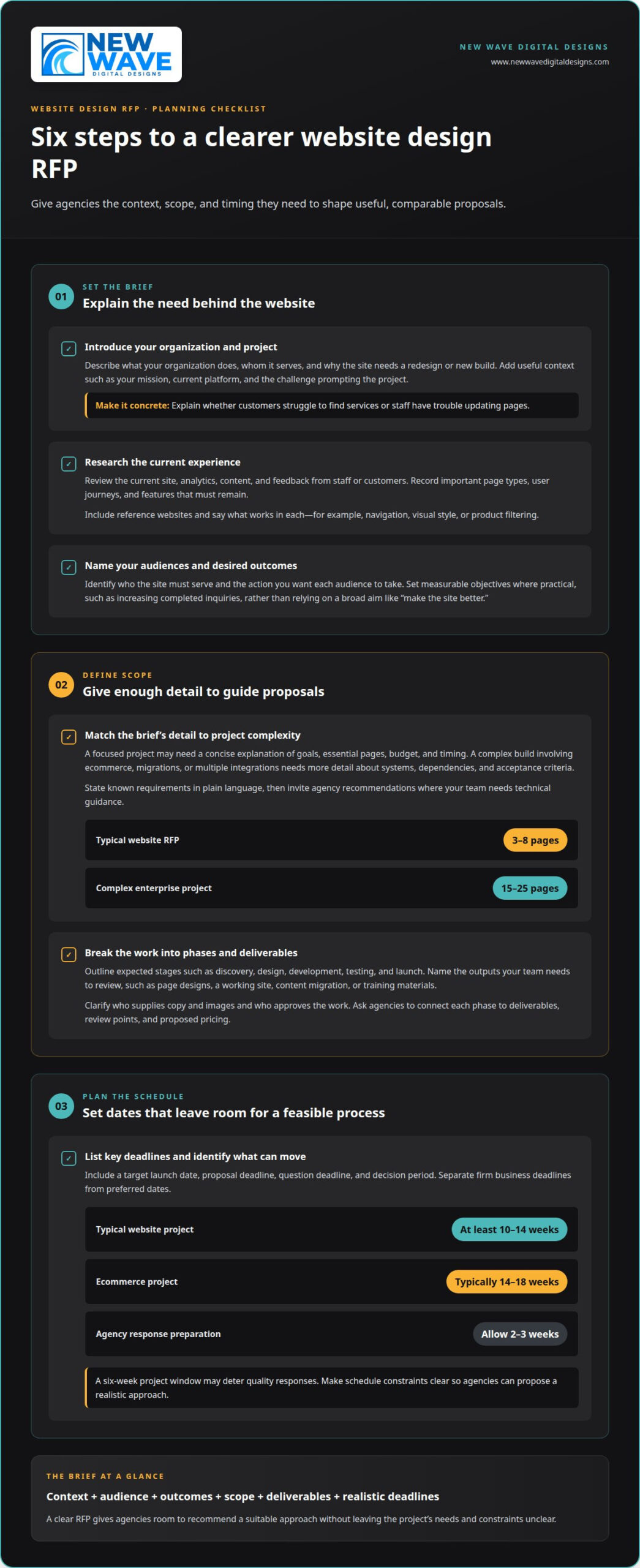
  1. Introduce the organization and project. Explain what your organization does, whom it serves, and why the website needs a redesign or a new build. Include useful context, such as your mission, current site platform, and the challenge prompting the project. For example, describe whether customers have trouble finding services or staff struggle to update pages. This helps agencies connect design decisions to real needs.
  2. Research the project before writing. Review the current site, analytics, existing content, and feedback from staff or customers. Record the kinds of pages, important user journeys, and features that must remain. Include a few reference websites and explain what works in each, such as navigation, visual style, or product filtering. Specific observations make a brief more useful than general preferences.
  3. Define outcomes and audiences. Identify who the site must serve and the action you want each audience to take. A membership organization, for example, might want visitors to find events, understand its mission, and join. Set measurable objectives where practical, such as increasing completed inquiries, instead of relying on broad aims like “make the site better.” This gives agencies a basis for recommending structure and functionality.
  4. Match detail to complexity and your team’s expertise. A focused project may need a concise explanation of goals, essential pages, budget, and timing. A complex build involving ecommerce, migrations, or multiple integrations needs more detail about existing systems, dependencies, and acceptance criteria. Explain known requirements in plain language, then invite agencies to recommend solutions where your team lacks technical knowledge. A typical website RFP is 3-8 pages long, while complex enterprise projects may need 15-25 pages.
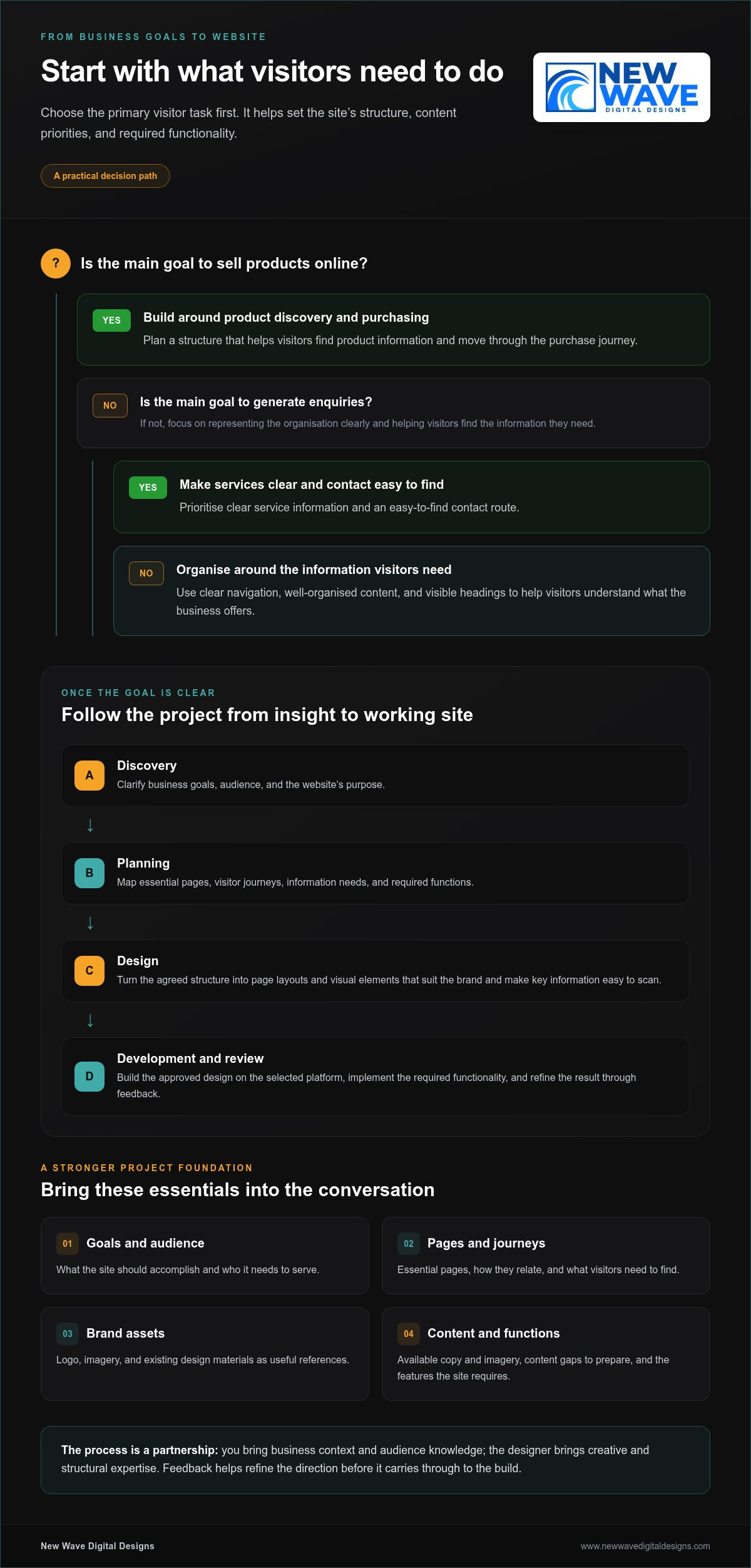
  5. Break the work into phases and deliverables. Outline expected stages, such as discovery, design, development, testing, and launch. Name the outputs your team needs to review, including page designs, a working site, content migration, or training materials. Clarify who provides copy and images and who approves the work. Ask agencies to tie each phase to deliverables, review points, and proposed pricing so you can compare bids more easily.
  6. Set deadlines that support a feasible process. Give a target launch date, proposal deadline, question deadline, and decision period. A typical website project takes at least 10-14 weeks, while ecommerce projects typically take 14-18 weeks. Allow agencies 2-3 weeks to prepare RFP responses, and identify schedule constraints that can move. A six-week project window may deter quality responses, so separate firm business deadlines from preferred dates.

Knowing how to write a website design request for proposal also means giving agencies enough context to recommend a suitable approach without dictating every design decision.

How do you write technical requirements that invite expertise?

Describe the site’s design, functions, integrations, content, and accessibility needs in plain language. Explain what visitors need to accomplish, identify known technical constraints, and invite recommendations wherever your team needs expert guidance.

Specify Website Design and Functionality

Describe the visual direction and user experience you want, using examples such as a clear member directory or simpler event registration. Explain your brand guidelines, including existing logos, colors, typography, and content standards, then identify the most important pages and actions. Avoid prescribing the full design when you want agencies to propose a considered approach.

List Technical Needs and Integrations

List the systems the website needs to connect with, such as a customer relationship management platform, email service, payment tool, or analytics account. For each integration, explain what information it should exchange and what task it should support. Identify the current platform, domain requirements, and any migration needs, then ask agencies to describe their technical approach in accessible language.

Set Accessibility and Compliance Requirements

State the accessibility outcome you want and invite agencies to explain their approach. The Centers for Disease Control and Prevention reports that 1 in 4 U.S. adults lives with a disability, making accessible navigation, readable content, and clear forms important considerations. WCAG 2.2 can serve as an example standard, while Section 508 is often applied to government and public websites.

  1. Separate essential functions from preferences. Distinguish required features, such as searchable services or online donations, from desired refinements, such as animation or personalized recommendations. This helps agencies explain trade-offs without confusing a visual preference with a technical requirement. Include sample content or a page outline when it clarifies how the website should serve your mission.
  2. Describe technical constraints and success criteria. Note relevant systems, existing content, and known URL changes. If a redesign changes page addresses, request a migration plan that includes 301 redirects from old pages to new pages. For SEO, describe the outcomes you need, such as preserving useful search visibility and making key information easy to find, rather than prescribing tactics you may not understand.
  3. Set submission instructions that invite considered answers. Specify the proposal format, required sections, contact person, question deadline, and final submission deadline. Allow agencies 2-3 weeks to prepare responses, and ask them to outline their recommended solution, technical assumptions, project phases, and anticipated delivery points. Clear instructions make proposals easier to compare while leaving room for expertise.

If you’re shaping a redesign brief, website design planning can help turn technical needs into a coherent project scope.

Proposal evaluation criteria and submission format

Set submission rules and evaluation criteria before inviting proposals. A shared format helps your team assess every response against the same goals, evidence, and decision process.

  1. Set Proposal Submission Guidelines

    List the required proposal sections, file format, submission method, deadline, and contact for questions. For example, request an overview of the proposed approach, project phases, schedule, itemized costs, relevant experience, and assumptions. Specify whether agencies should submit a PDF or complete a response template, and provide a subject line or file-naming convention.

    Explain how to submit the proposal, such as by email to a designated contact, and identify who will acknowledge receipt. Set a deadline for questions and explain how answers will be shared with all participants. This keeps information consistent and gives every agency the same opportunity to prepare a complete response.

  2. Define Evaluation Criteria

    Choose criteria that reflect the project’s priorities, then describe what strong evidence looks like for each one. A sample scoring model might assign 30% to design creativity, 30% to technical approach, and 40% to alignment with budget and goals. Treat these percentages as an example, then adjust the weight of each criterion to match your organization’s needs.

    Explain how reviewers will assess each section. For design, they might consider how the proposed experience serves the target audience; for the technical approach, they might assess how it addresses integrations and migration. Name the review team or its roles, such as marketing, operations, and leadership, so agencies know which perspectives matter.

  3. Request comparable evidence. Ask each agency for 3-5 relevant project examples and a short explanation of the challenge, solution, and outcome. Specify what makes an example relevant, such as a similar audience, content structure, or required functionality. You can also request 4-6 client references, with a brief description of the relationship and the work completed.

    Request the same evidence from every respondent. If case studies affect scoring, ask all agencies to explain their role rather than relying on visual samples alone. This helps reviewers distinguish an agency’s contribution from the client’s existing brand, content, or internal resources.

  4. Plan a consistent review. Create a score sheet that mirrors the RFP criteria and gives reviewers space to record evidence, questions, and scores. Decide how the team will resolve differences before making a final selection, and document the reason for its decision. If you invite presentations, give every agency the same agenda and time to discuss its proposal.

    Tell agencies what happens after submission, including the review stages and expected decision window. A defined process helps respondents prepare for a presentation or follow-up discussion and helps your team move from written proposals to an informed selection.
How to Write a Website Design RFP for Comparing Proposals

Asking about budget, launch schedule, brand guidelines, and integrations

Request a budget range and project-specific pricing, and explain the schedule, brand resources, and integrations agencies should account for. These details help respondents build proposals around your needs rather than make assumptions about scope.

  1. Set Budget Expectations

    Share an estimated budget or range, even if tentative, and clarify whether it covers design and development alone. State whether content, hosting, analytics, or ongoing maintenance are also part of the scope. A defined budget helps agencies propose feasible solutions and explain trade-offs instead of recommending work beyond your resources.

    Invite agencies to state assumptions that could affect their proposals. For example, explain whether your team can provide product photography or needs it included in the project. Being clear about available resources helps separate project requirements from optional enhancements.

  2. Request Line-Item Pricing

    Ask agencies to separate costs by phase and deliverable, such as discovery, design, development, content migration, testing, and launch. Request a clear description of what each item includes, along with any recurring charges and optional services. This lets your team compare proposals without treating a single total as a full account of value.

    Ask respondents to identify assumptions, exclusions, and factors that could change the final scope. For instance, a proposal might depend on your team supplying final copy or product data. Ask agencies to explain how changes to those inputs could affect the work, rather than burying uncertainty in a broad estimate.

  3. Set a practical launch schedule. Share your target launch date, key business deadlines, and milestones that cannot move. Say whether the date is fixed or preferred, and ask agencies to map their proposed phases against it. A product launch, seasonal campaign, or membership drive can make timing especially important. Ask about dependencies that could affect progress, including content approvals, access to the current platform, and stakeholder reviews.

    Ask agencies how they would manage schedule pressure. A useful response identifies which decisions need timely input and which deliverables can be staged. This helps your team judge whether the proposed plan supports the launch goal without overlooking essential work.

  4. Provide brand and integration context. Name the brand guidelines, logos, typography, and image assets available for the project. If those materials need refinement, describe the outcome you want rather than assuming every agency interprets “refresh the brand” in the same way. List each required platform or third-party integration, such as a payment processor or email system, and explain the task it must support.

    For example, specify whether an online store needs to send order details to an inventory platform. Ask agencies to flag dependencies, explain their integration approach, and distinguish required connections from future possibilities. This gives proposals a consistent foundation while leaving room for informed recommendations.

Ongoing support, analytics, and hosting

Plan for the website after launch by defining who will maintain it, how you’ll measure performance, and what hosting responsibilities are included. Clear post-launch expectations help agencies address ongoing operations, not just the redesign.

  1. Define post-launch support. Describe the help your team expects after launch, such as fixing defects, troubleshooting forms, or helping staff update content. Ask agencies to distinguish ongoing support from project delivery and explain how requests are submitted, prioritized, and handled. For example, separate routine copy changes from an issue that prevents customers from submitting an inquiry.
  2. Clarify update responsibilities. State which team will update pages, add products, and maintain plugins or platform components. Ask agencies to describe the process for routine changes and identify what falls outside the proposed support scope. If staff will edit content, request a handoff plan that explains how they’ll use the relevant tools after launch.
  3. Specify hosting expectations. Ask agencies to explain the hosting arrangement, account ownership, security responsibilities, and dependencies on third-party services. Clarify who manages renewals, access, and technical changes, and how your organization receives account credentials. If the site uses WordPress, Shopify, or Squarespace, ask how the proposed hosting setup works with that platform.
  4. Set analytics goals before launch. Name the actions you want to measure, such as completed contact forms, purchases, newsletter sign-ups, or visits to key service pages. Ask which analytics tools the agency proposes and how tracking will be configured and tested. State who will have access to reports and how your team plans to use the information when deciding on future updates.
  5. Request a practical reporting plan. Ask agencies what their reports will show, how often they recommend reviewing results, and which decisions the insights can inform. For example, a report might show that visitors reach a service page but don’t complete its inquiry form. Connect that finding to a possible action, such as revising the page or simplifying the form.
  6. Make continuity part of the proposal. Ask respondents to explain how support, hosting, analytics access, and platform updates fit together after launch. Request clear responsibilities for your staff and the agency, along with a process for escalating issues that affect essential tasks. This makes post-launch expectations visible alongside design and development deliverables.

For a site that needs a considered plan for ongoing hosting and security, discuss website hosting and security.

New Wave Digital Designs

New Wave Digital Designs turns clear website briefs into purposeful digital experiences, designing for Shopify, WordPress, and Squarespace. Once your RFP clarifies the audience, scope, and priorities, it gives you a focused starting point for discussing the right platform and design direction.

Consider reaching out when you’re ready to move from comparing proposals to planning a website, or when your existing site needs ongoing care after launch. Website maintenance can support your site’s next phase, while a well-defined brief keeps its goals and expectations in view.

Contact New Wave Digital Designs to discuss your website project and the direction you have in mind.

Shape the next stage of your website

A well-prepared RFP does more than organize agency selection. It can serve as a shared reference as your team moves from initial direction to a digital experience that reflects your organization and serves its audience. Keep it useful after selection by returning to its goals as project decisions take shape.

If you’re considering Shopify, WordPress, or Squarespace for your website, New Wave Digital Designs can help bring your project into focus with platform-specific website design. Your brief is a strong starting point for discussing your goals and the experience you want to create.

Knowing how to write a website design request for proposal helps turn a broad ambition into a clear foundation for collaboration. When you’re ready to discuss what comes next, contact New Wave Digital Designs. Your next step can begin with a thoughtful conversation and a clearer vision for the site ahead.

Frequently Asked Questions

What Is a Web Design RFP?

A web design RFP is a structured invitation for agencies to propose how they would plan and deliver a website project. Unlike an internal design brief, it also explains how proposals should be submitted and assessed. For example, a nonprofit could invite agencies to propose approaches to membership pages, event information, and online donations, then compare responses against shared priorities.

Should I include a budget in my RFP?

Yes. Include an estimated budget or range, even if tentative, so agencies can tailor proposals to your financial boundaries. You can distinguish essential work from optional enhancements, such as a required redesign and a later content expansion. Ask respondents to explain their assumptions and how their recommendations fit the available budget. This makes each proposal’s priorities easier to understand.

How can a template make your proposal creation easier?

A template gives your team a repeatable structure for collecting project details and presenting them consistently. Start with a Word document if several people need to edit it, or use a fillable PDF or Canva template for a guided layout. Add prompts for business goals, audiences, required functions, and submission instructions. Tailor each prompt to the project instead of keeping irrelevant sections.

How do you choose which agencies receive your RFP?

Send the RFP to 3-5 qualified agencies whose experience appears relevant to your project’s platform, audience, and required functionality. For example, an online store with a complex product catalog calls for experience with ecommerce structures, while a membership site has different priorities. Review their public project examples and service focus before inviting proposals, then give every selected agency the same document and deadlines.

How do you define project scope without being prescriptive?

Describe the problem, intended result, and boundaries of the work, while leaving room for agencies to recommend a method. For example, say customers struggle to find support information and ask for a clearer path to answers, rather than dictating the exact navigation. Separate fixed requirements from preferences so proposals can offer creative solutions while meeting essential needs.

How long should I give agencies to respond to an RFP?

Allow agencies 2-3 weeks to prepare responses, giving them time to understand the project and develop a considered approach. The response window should reflect the RFP’s complexity: a project with several systems or content needs requires more preparation than a focused redesign. Set the question deadline before the submission deadline, and share answers consistently so every agency works from the same information.

How do you define website goals, scope, and requirements in an RFP?

Connect each audience to a clear action, then describe the pages and functions that support it. Prospective members, for example, might need to understand benefits, find eligibility details, and complete an application. Separate the required launch scope from future ideas, and explain how you’ll assess success. This helps agencies design a connected experience instead of treating each page as a separate deliverable.

What questions should a website design RFP ask vendors?

Ask agencies to explain their proposed approach, relevant project experience, schedule assumptions, and the people involved. Include questions about content migration, integrations, testing, and handoff when these matter to your project. You can also request references and ask agencies to identify delivery risks or decisions. Keep questions consistent across respondents to make comparisons fair.

Website Design for Consultants: Examples That Build Trust

A consultant’s website builds trust when it makes their specialization clear, connects their work to client outcomes, and guides visitors toward a next step. Thoughtful website design for consultants and professional services can bring these elements together, with a value proposition focused on 3-5 key outcomes. Relevant examples and clear information about working together help prospective clients see whether the consultant’s expertise fits their needs.

Your website is often where a potential client decides whether your expertise fits their challenge. It should do more than look polished: it needs to make your value clear and your approach easy to follow. This article explores examples of website design for consultants and professional services that clarify a specialty, present outcomes, organize essential pages, and communicate pricing. You’ll also see how a defined process and carefully chosen proof can turn separate pages into a cohesive introduction to your work.

Key Takeaways

  • Shape your value proposition around 3-5 outcomes so prospective clients can quickly see whom you help and how your work is relevant.
  • Use focused examples and credible proof to make your expertise tangible, rather than relying on broad claims.
  • Organize essential pages around the questions visitors need answered, from your services and experience to the next step in working together.
  • Write outcome-led headlines and explain your process in clear, concise steps to help visitors understand what happens next.
  • Present pricing information with context, and make the factors that shape an engagement easier to understand.

Clear value propositions and specialization

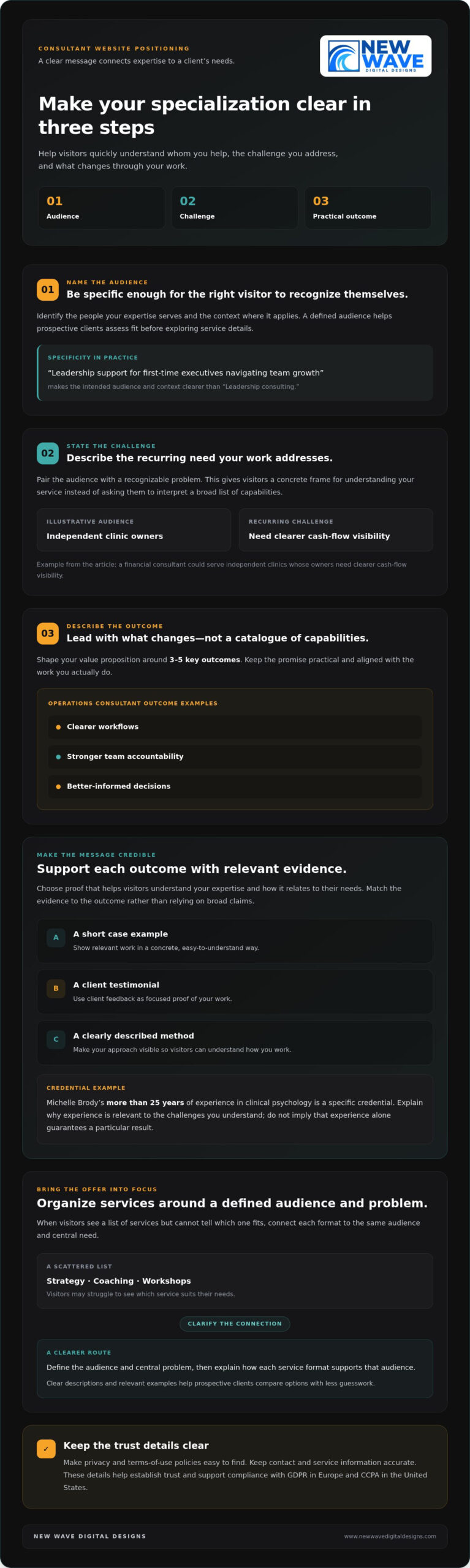
A consulting website needs to answer three questions quickly: whom do you help, what challenge do you address, and what changes through your work? Shape the value proposition around 3-5 key outcomes, not a catalogue of broad capabilities. For example, an operations consultant might focus on clearer workflows, stronger team accountability, and better-informed decisions. Those outcomes give visitors a concrete frame for understanding the service.

Make your specialization specific enough for the right visitor to recognize their needs. Name the audience, the problem, and the context where your expertise applies. “Leadership consulting” describes a field; “leadership support for first-time executives navigating team growth” points to a more defined need. This distinction helps visitors assess fit before exploring service details and gives your homepage and service pages a consistent message.

Build the message from evidence

Use this three-part exercise to sharpen your positioning: identify the audience, state the recurring challenge, then describe the practical outcome. A financial consultant serving independent clinics, for instance, could address owners who need clearer cash-flow visibility. Keep the language aligned with the work you actually do. A precise promise feels more credible than a sweeping claim about transforming every part of a business.

Then select proof that supports each outcome. Relevant evidence might include a short case example, a client testimonial, or a clearly described method. Michelle Brody’s more than 25 years of experience in clinical psychology illustrates how a specific credential can establish expertise. Pair credentials with an explanation of their relevance, such as the kinds of challenges your experience helps you understand. Avoid implying that experience alone guarantees a particular result.

Make the distinction visible

Consider an illustrative case: a consultant’s website lists strategy, coaching, and workshops, but visitors can’t tell which service suits their needs. The consultant groups those capabilities around a defined audience and central problem. Service descriptions then show how each format supports that audience. The result is a clearer route through the offer and less guesswork for prospective clients.

Trust also depends on the details surrounding your expertise. Privacy and terms-of-use policies help establish trust and support compliance with GDPR in Europe and CCPA in the United States. Make those policies easy to find, alongside accurate contact and service information. A defined specialization, relevant proof, and transparent site details make a stronger first impression than vague claims or crowded service lists.

Consultant website examples

Strong consultant websites make the visitor’s next decision easier. Look at how each example presents expertise, organizes evidence, and guides people toward contact. The details matter more than visual style alone.

For consultant and professional-services firms, WordPress, Squarespace, and Shopify can each support a website. The right platform depends on your content, design needs, and how visitors should engage. Choose based on those requirements, not a trend.

A template or website builder can suit a straightforward site with familiar page needs. Custom design can better support distinct content, branding, or visitor journeys, where creative partners such as LYFE Studio help teams execute tailored digital design projects. Choose the approach that lets you present your services clearly and maintain the site confidently.

Dan Pontefract: Make expertise immediate

Situation: A visitor needs to understand Dan Pontefract’s perspective and work quickly. Action: His website includes a 2-minute reel that introduces him through video. Result: The reel offers a concise way to encounter his presentation and ideas before exploring more of the site.

Illustrative case: A specialist with several services

Situation: A people-strategy consultant offers leadership advice, workshops, and speaking, but visitors struggle to distinguish them. Action: The consultant gives each service a clear description and relevant example. Result: Prospective clients can compare the options and identify a useful next step.

Illustrative case: An independent adviser

Situation: An adviser’s homepage relies on credentials, leaving visitors unsure what the work involves. Action: The adviser adds a short process overview and explains what clients receive at each stage. Result: The site presents expertise through a visible working method, not credentials alone.

Accessibility and privacy deserve attention on U.S. professional-services websites. Use readable text, keyboard-friendly navigation, descriptive form labels, and a clear notice explaining what information you collect and how you use it. These choices make the experience easier to understand and help visitors make informed decisions.

For SEO, give each core service a focused page, use descriptive headings, and write page titles that reflect the service and audience. Add useful examples and keep navigation links clear. Improve discoverability by publishing content that answers the questions prospective clients bring to your site.

There’s no single launch timeline for a professional-services website. The schedule depends on the number of pages, content readiness, design complexity, and review rounds. A clear scope and timely feedback help move the work through planning, design, and launch.

If these examples prompt a fresh look at your own site, explore consultant website design options as one way to shape a clearer digital presence.

Consulting website structure and pages

A consulting website should guide visitors from orientation to a relevant next step. Use plain labels in the main navigation: Home, Services, About, Case Studies, Insights, and Contact. These labels make the site structure easy to scan and help visitors find specific details, such as a leadership program or project example.

Start with the homepage, which introduces your focus and directs visitors deeper into the site. A clear headline, concise service summary, and visible navigation give the page a defined purpose. For example, a cybersecurity consultant could guide visitors to separate pages for risk assessments and incident planning. This structure makes different needs easier to explore.

Give each page a distinct role

A Services page should explain what each engagement involves. Follow a consistent pattern: describe the challenge, outline the work, and clarify the intended deliverables. For example, a strategy consultant might distinguish a facilitated planning session from ongoing advisory support. Specific descriptions help visitors understand the difference without scanning a long list of capabilities.

The About page should connect your background to your work. A sustainability adviser could explain how prior experience informs their approach to supply-chain planning. Add relevant credentials or professional affiliations when accurate, then link that context to the appropriate service page. This makes your biography useful to prospective clients rather than a disconnected career history.

Case Studies need their own space because project details need room. Give each example a consistent sequence: situation, action, and result. A fictional operations consultant might describe a client struggling with unclear handoffs, explain a workflow review, and show how responsibilities became easier to follow. Keep client names and sensitive details private unless you have permission to disclose them.

An Insights page can organize articles, guides, or recorded talks around your expertise. A workplace consultant, for instance, might group resources under leadership, team communication, and organizational change. Use descriptive titles and clear categories so visitors can find relevant material. Each resource should offer a useful idea, not simply repeat a service page.

Put contact information on a dedicated Contact page with a simple form and clear expectations. Visitors should know whether to describe a business challenge, request a conversation, or ask about a specific service. Include the same contact route in the site navigation so the next step is easy to find from any page.

Finally, check the journey across your pages. From a Case Study, link to the related service; from an Insight, point to a relevant next resource. For example, an article about team planning could lead to your organizational strategy page. These connections turn separate pages into a coherent path through your expertise.

Website Design for Consultants: Examples That Build Trust

Outcome-focused headlines and persuasive copy

A headline should name the audience, the challenge, and the value of your work. “Strategy for growing companies” feels broad; “Help your leadership team align priorities during growth” gives visitors a clearer picture. Use supporting copy to explain your approach, who benefits, and what the engagement addresses. Keep every claim consistent with the work you deliver.

Show your expertise through relevant experience, a clearly explained method, and examples of client work. Build trust by describing the situation, the action taken, and the result without overstating what changed. For instance, an executive coach could explain how a new manager prepared for difficult team conversations, then describe the coaching approach and resulting next steps.

Specificity makes expertise easier to evaluate. Replace “I help organizations perform better” with a statement about the audience and problem, such as “I help nonprofit directors improve team decision-making.” Follow with a sentence explaining how the work unfolds. Avoid unexplained jargon, sweeping promises, and claims that imply every client will reach the same outcome.

Situation: A fictional operations consultant has strong experience but uses abstract homepage copy. Action: The consultant replaces “transformative business solutions” with a headline about improving handoffs across distributed teams. A short paragraph describes the assessment and recommendations. Result: Visitors can identify the service’s purpose and decide whether it matches their concern.

A consulting website can attract leads by pairing a relevant call to action with a clear next step. “Book a discovery call” works best when nearby copy explains what the conversation covers, such as the visitor’s goals and whether the engagement is a fit. Place the invitation after useful context, such as a service description or case example, rather than repeating it without purpose.

Explain onboarding as a sequence of 3-5 concise steps. For example: an initial conversation, a review of current challenges, a proposed scope, and a project kickoff. The sequence helps visitors picture how an engagement begins. Use labels and short descriptions, so each stage feels distinct and prospective clients understand what information to prepare.

Situation: A fictional organizational consultant receives inquiries from visitors unsure what happens after they get in touch. Action: The consultant adds a short “What happens next” section beside the invitation, describing the first conversation and follow-up process. Result: The website answers an immediate concern and makes the contact step more concrete.

Before publishing, compare each headline with its supporting paragraph and call to action. A page about leadership coaching should keep its message, example, and invitation centered on leadership needs. This alignment creates a coherent path from first impression to inquiry, while measured language keeps your claims credible.

What makes a high-converting website for consultants and professional services?

A conversion path connects a visitor’s question to a useful next action. For a consultant, that might mean reading a relevant case study, completing an inquiry form, or booking a discovery call. Make the route visible on the homepage and service pages. Each page should offer one clear next step that fits its content.

Reduce friction in the inquiry process. A form asking for a name, email, organization, and brief description gives a prospective client a clear starting point. Avoid requesting detailed project information before explaining why you need it. For example, a strategy consultant could invite visitors to outline their current challenge, then explain what happens after submission.

Situation: An illustrative HR consultant receives inquiries without useful context. Action: The consultant adds a prompt asking about the organization’s main people challenge. Result: Visitors understand what to share, and the consultant receives a more relevant introduction.

Build trust beside the action, not only on an About page. A testimonial, relevant credential, or case example near a discovery-call invitation can help visitors assess the next step. For example, a financial adviser could place a client comment beside a service description, with permission and without promising identical results.

Make each call to action specific. “Contact me” gives little context; “Discuss your team’s planning needs” tells visitors what the conversation concerns. Use distinct invitations on different service pages while keeping the next step consistent. This makes each page feel tailored without creating competing routes.

Situation: An illustrative operations consultant uses the same generic button across every page. Action: The consultant aligns each invitation with the page, such as “Explore workflow support” beside process-improvement services. Result: Visitors can connect the action to the information they just reviewed.

Conversion also depends on how your site works on a phone. Check that navigation, form fields, and buttons remain easy to use on smaller screens. Test the inquiry path from the homepage through submission, including the confirmation message. Visitors should know their message was received and understand what happens next.

Review the journey using real visitor questions. If a service page explains team coaching, its next action should lead naturally to an inquiry about coaching, not an unrelated resource. For a more deliberate digital experience, plan a consultant website around clear paths, useful proof, and purposeful contact points.

That journey can continue after an inquiry by making the onboarding process just as clear as the route to contact. Explain it in clearly defined steps: Step 1, Step 2, Step 3. Keep each step focused on what the prospective client should expect, what information they may need to provide, and what follows. This gives visitors a clearer picture of how an initial conversation can lead into working together, rather than leaving the process vague.

Use plain, direct language at each stage and place explanations where visitors are deciding whether to get in touch. Make expectations easy to understand while keeping the invitation visible. A clear sequence helps you explain the process without adding another competing call to action.

New Wave Digital Designs: Shopify Website Design

New Wave Digital Designs helps consultants shape websites around their services, expertise, and next steps. Shopify Website Design can suit a consulting business that also needs a storefront. For a content-led professional practice, WordPress Website Design or SquareSpace Website Design may better align with the site’s structure and goals. Choose a foundation based on what visitors need to explore and how you want to present your work.

Turn to New Wave Digital Designs when your current website no longer reflects your specialization or when you’re planning a new digital presence. Website Maintenance can provide ongoing care as your content and services evolve.

To discuss a website that fits your consulting practice, contact New Wave Digital Designs.

Shape a website that grows with your practice

Your website can evolve alongside your consulting practice. As your expertise, audience, or services shift, revisit how each page reflects your direction. Thoughtful website design for consultants and professional services makes room for that evolution, giving your digital presence a foundation that can adapt as your work develops.

Use website design for consultants and professional services to connect your perspective with a clear experience for prospective clients. Start by deciding what your current site should help visitors understand or do, then shape its design around that purpose. New Wave Digital Designs can help turn your direction into a practical plan.

Contact New Wave Digital Designs to discuss your website goals. Build a digital presence that reflects the expertise and future you’re creating.

Frequently Asked Questions

How much does website design for consultants cost in the United States?

Website design pricing depends on project scope and is provided after a quote request. Key cost factors include the number of pages, design complexity, content preparation, and required functionality. For example, a consultant needing a focused website with a few core pages has different requirements from a firm with several service areas and detailed project content. A clear brief helps define what the site needs before pricing is prepared.

What pages should a consultant or professional services website include?

Most consultant websites need Home, Services, About, Case Studies or testimonials, and Contact pages. An Insights page can also support articles or resources that demonstrate your expertise. Tailor the structure to your practice: a firm with distinct specialties can give each service its own page, while a solo adviser may present related services together. Make privacy information easy to find, especially near forms that collect personal details.

How long does it take to design and launch a professional services website?

There’s no single timeline. It depends on the number of pages, content readiness, design complexity, and review rounds. A clear scope and timely feedback help move the work through planning, design, and launch.

Small business website costs: compare design and ongoing expenses

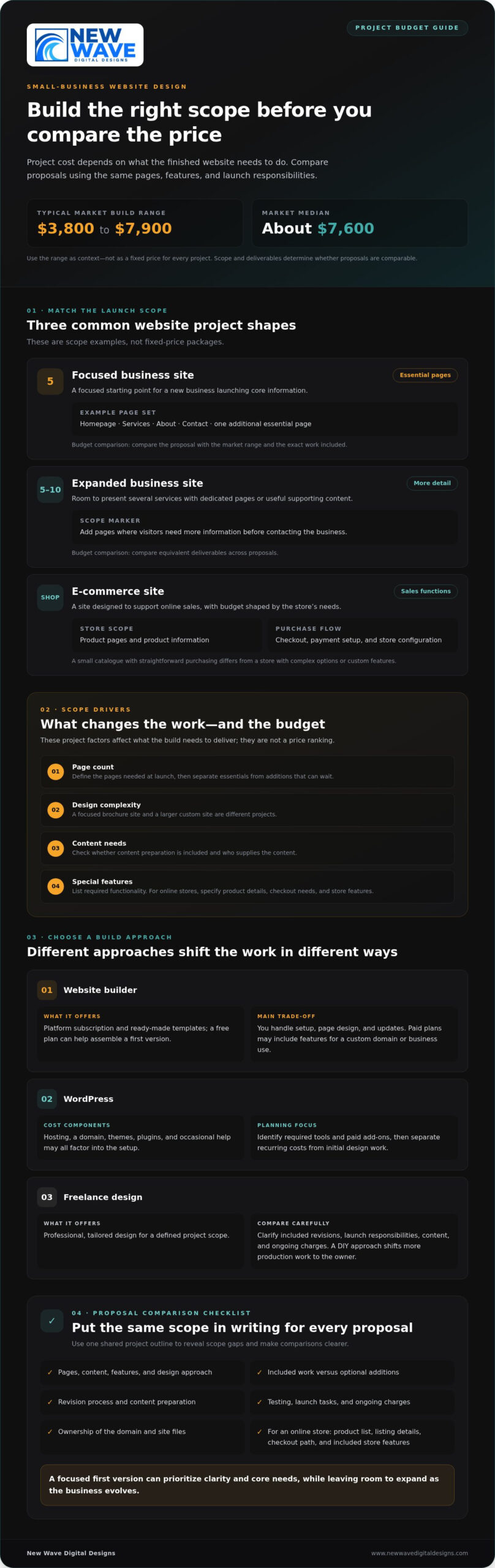
On the market, a small-business website build typically costs between $3,800 and $7,900, with a median of about $7,600. If you’re weighing how much a small business website should cost in 2026, the right budget depends on what the site needs to do and how much design and development it requires.

It’s reasonable to want a clear figure before committing, especially when a project quote may not show what you’ll spend to keep the site running. A useful comparison separates the initial build from recurring expenses, so you can see what’s included and plan for the long term.

This guide explains the factors that shape design costs, then covers hosting, domains, SSL certificates, and WordPress upkeep. You’ll have a practical framework for comparing options and matching your budget to the website your business needs.

Key Takeaways

  • Set your budget around the site’s purpose, required features, and content needs, not just the number of pages.
  • Compare website builders, WordPress, and freelance design by weighing both upfront work and ongoing commitments.
  • A starter project can focus on essential pages first, leaving room to expand as your business evolves.
  • Plan separately for hosting, domain renewal, SSL, and WordPress care so recurring expenses don’t catch you by surprise.
  • Use the cost breakdowns to identify which parts of a website project matter most for your business.

How much should a full website design cost?

In the United States, a small-business website build typically falls within the market range of $3,800 to $7,900, with a median of about $7,600. To limit hidden costs and contract risks, define the deliverables, revision process, ownership terms, launch responsibilities, and any ongoing charges in writing before work begins.

New Business Budget Recommendations

For a new business, begin with the essential pages and functions needed to explain the offer and help visitors take the next step. A five-page site can provide a focused starting structure, while a 5-10-page site allows room for additional services or useful supporting content. Compared with a larger custom build, a lean launch prioritizes clarity and core needs over extra features.

Before setting a budget, list the pages, content, and features you need at launch. Separate essentials from additions that can wait, then use the same written scope to compare proposals. This keeps the first version focused and makes future expansion easier to plan.

Small Business Website Budget Examples

Consider a local service business that needs a homepage, service information, an about page, and a contact page. That five-page example offers a clear baseline for comparing design proposals. A business with several distinct services may need a 5-10-page version, adding dedicated pages where visitors need more detail before reaching out.

These examples differ mainly in scope, not in a universal fixed price. The market range of $3,800 to $7,900 provides a comparison point for a build, while the median is about $7,600. Use your page list and required functionality to judge whether a proposal fits the project.

Website Project Budgets and Ranges

A project budget reflects what the finished site needs: page count, design complexity, content, and special features. A focused brochure site and a larger custom site are different projects, even if both serve a small business. Compare proposals against the same written scope, including what the design and development work will deliver.

For a practical comparison, ask each proposal to separate included work from optional additions and ongoing charges. Check whether content preparation, revisions, testing, and launch tasks are covered. General price ranges offer context, but the clearest comparison is between proposals based on identical deliverables.

E-commerce Website Budgets

An e-commerce site has a different budget profile because it needs to support sales, not just introduce a business. Product pages, checkout, payment setup, and store configuration all shape the work. A small catalogue with straightforward purchasing needs differs from a store with complex product options or custom features.

To scope an e-commerce launch, prepare a product list, note the information each listing needs, and map the customer journey from product selection to checkout. Then compare proposals by their included store features and launch tasks. This shows whether the design supports the shop you need, without treating every online store as the same project.

Option Scope Budget comparison Best suited to
Focused business site Five essential pages Compare against the market range New businesses launching core information
Expanded business site 5-10 pages Compare equivalent deliverables Businesses presenting several services
E-commerce site Product and checkout functions Assess store scope and launch work Businesses selling online

Choose an option by matching its written scope to the pages and features your business needs at launch.

DIY builders trade hands-on setup for platform fees, WordPress separates hosting and upkeep, and freelance design covers professional project work. Each approach balances your time, control, and support differently.

Website Builder Costs

Website builders offer a platform subscription and ready-made templates, making them a lower-cost route for businesses willing to build their own pages. A free plan can help you assemble a first version, while paid plans may include features needed for a custom domain or business use.

Compare the plan’s monthly price with its included features before choosing. The main trade-off is time: you handle setup, page design, and updates yourself.

WordPress Costs

WordPress costs can combine hosting, a domain, themes, plugins, and occasional help, rather than a single builder subscription. The final setup depends on which tools the site needs and how much work you manage yourself.

WordPress offers flexibility, but owners need to account for the components behind the platform. List the required features, identify paid add-ons, and separate recurring costs from initial design work. This breakdown makes it easier to compare a WordPress proposal with a builder plan.

At this budget, define a focused scope: page count, design approach, included revisions, and launch responsibilities. A freelancer can provide a tailored design without the broader structure of a full-service agency project, while a DIY approach shifts more production work to the business owner.

Compare build methods by separating project fees from recurring site costs:

Before choosing a template or signing a freelance agreement, write down the pages, features, and launch tasks you expect. Clarify who supplies the content, how revisions work, who controls the domain and site files, and which charges recur after launch. These details can reveal scope gaps and contract risks hidden by a headline price.

If you’re weighing a custom build against a platform-led approach, explore a website design approach that fits your project’s scope.

Website pricing for starter projects

A starter project can establish a polished online presence while keeping the initial scope focused. Prices can vary by state or city as provider rates and project requirements differ, but the deliverables remain central to comparing quotes.

Factors That Affect Website Pricing

Page count, custom design, functionality, and content shape a website quote. The amount of design, development, and writing required varies from project to project.

Platform choice matters, too. A Squarespace template-based build can use an existing design structure, while custom functionality adds development work. Before requesting proposals, list the pages, features, content responsibilities, and launch tasks your business needs. A shared scope makes estimates easier to compare.

Freelancer and Agency Pricing

The right comparison depends on the work each quote includes.

Review proposals line by line: identify who handles planning, design, development, revisions, and launch. A lower quote may cover fewer deliverables, while a larger agency project may include a broader set of services. Compare the scope and responsibilities, not just the total.

Custom Website Pricing

Custom builds suit businesses that need a distinct design or features beyond a standard template.

For a starter build, define which custom elements are essential now and which can wait. For example, prioritize core service pages and the contact journey, then plan additional functionality for a later phase. A written scope helps prevent optional features from becoming unexpected project costs.

Ongoing care is a separate budget line from the initial build. Confirm which tasks and support each plan includes.

Project option Typical market range Compare by
Landing page Page scope and launch tasks
Freelancer build Deliverables and responsibilities
Boutique agency build Strategy, design, and development
Custom agency project Custom functionality and scope

Choose a starter project by matching its deliverables to your launch priorities, then budget separately for ongoing care.

Small business website costs: compare design and ongoing expenses

Hosting, domain names, and SSL certificates

Domain registration, hosting, SSL, and business email are recurring expenses, often billed on different schedules.

Budget for each separately: the domain identifies your site, hosting keeps it available online, SSL supports a secure connection, and email provides business addresses.

Domain and Hosting Expenses

A domain and hosting serve different roles, so compare their renewal periods and service levels separately. A .com domain generally falls within the same annual domain range.

Before selecting a plan, list the domain renewal, hosting term, and any introductory pricing separately. Then note what the hosting plan covers and when regular billing begins.

SSL and Security Costs

SSL certificate costs can vary substantially, so include renewal terms in your budget rather than assuming a certificate is always a separate paid purchase.

For a clear annual budget, record SSL renewal and email billing alongside domain and hosting dates. Identify who handles security and updates, and whether that work is included in hosting or billed separately. This separates infrastructure charges from ongoing website upkeep.

Use a simple cost ledger to avoid mixing monthly and annual amounts. Record each item, its billing period, and its next renewal date. For example, list a domain as an annual cost, shared hosting as a monthly cost, and email by user and month. This makes expenses easier to review without confusing one-time setup with recurring fees.

  • Domain: Record the annual registration and renewal cost.
  • Hosting: Compare shared and managed plans by monthly rate and included service.
  • SSL: Track certificate cost and renewal period separately.
  • Email: Multiply the per-user monthly charge by the number of business accounts you need.

Hosting promotions can make the first bill differ from later renewals, so distinguish introductory rates from standard charges. A shared plan and a managed WordPress plan also offer different service levels; compare features rather than choosing on price alone. Include updates and security responsibilities in your plan, especially when they are not part of hosting.

For a practical final check, group expenses into setup and recurring costs, then note the billing period for each. A domain may renew annually while hosting and email are billed monthly. Keeping those schedules visible helps you prepare for renewals and understand the cost of maintaining the site beyond its initial build.

WordPress themes, plugins, and maintenance

Ongoing WordPress costs combine software, hosting, and care for the site. Typical maintenance and support costs depend on whether the plan covers updates, security monitoring, fixes, and hands-on help; those service prices aren’t included here.

Treat that as a planning range, not a maintenance-plan price.

Theme and Plugin Expenses

A WordPress theme shapes the site’s visual framework, while plugins add specific functions.

Before purchasing, map each plugin to a site requirement, such as a form or booking feature. Avoid overlapping tools, and check whether each subscription renews annually or monthly. This inventory helps keep software costs visible as the site grows.

Maintenance and Support Budgeting

Maintenance is separate from web design or a custom design project. It covers work that keeps an existing site current and functioning, including software updates, security, and technical fixes. The cost of a plan depends on its tasks and level of support.

To build a useful budget, note which updates happen regularly, who handles problems, and whether performance work is included. Then compare that checklist with the care plan’s scope. This shows whether the plan fits your site’s needs, rather than covering tasks you don’t require.

Planning for Ongoing Care

A lean WordPress site with few paid plugins has different upkeep needs from a site relying on several subscriptions and custom features. Track hosting, domain renewal, add-ons, and support separately. For example, don’t mistake an annual plugin renewal for a monthly maintenance charge.

Use this short review to shape your budget:

  • Inventory: List themes, plugins, and software subscriptions, including each renewal period.
  • Assign: Decide who handles updates, security checks, and troubleshooting.
  • Compare: Match each care plan’s included tasks to your list before selecting a service level.

As the site changes, revisit the list after adding a plugin or custom feature. New software can bring renewals and extra upkeep, so update the budget as the site grows. A clear record helps distinguish essential care from optional enhancements.

For help planning WordPress website maintenance, identify the updates and support your site needs, then align the service scope with that checklist.

New Wave Digital Designs: Shopify Website Design

New Wave Digital Designs offers Shopify Website Design for small businesses planning to sell online. When comparing website budgets, decide whether your project needs an online store, a business information site, or ongoing care. The right scope depends on your platform and required features.

For store projects, New Wave Digital Designs offers Shopify Website Design; for other platform needs, it also provides WordPress Website Design and SquareSpace Website Design. Website Maintenance supports businesses planning for ongoing site care after launch. Outline your goals, required pages, key features, and maintenance needs so the conversation can focus on scope.

Contact New Wave Digital Designs to discuss your website project and the approach that fits your business.

Shape a website budget around your next move

A website budget is most useful when it reflects what your business needs next, not every feature it might someday add. As you decide how much a small business website should cost in 2026, focus on the experience you want customers to have, the work required to create it, and the care needed after launch.

Turn your vision into a practical brief: describe your audience, outline what you want visitors to do, and identify a platform that suits your plans. New Wave Digital Designs offers Shopify Website Design, WordPress Website Design, and SquareSpace Website Design to shape a site around those priorities.

A well-considered project starts with clear goals and a scope that can evolve with your business. Contact New Wave Digital Designs today to discuss your website plans and take the next step with confidence.

Frequently Asked Questions

What should a small business expect to pay for a website?

For a small-business website build, the collected market range is $3,800 to $7,900, with a median of about $7,600. Treat that as a reference point, not a fixed quote: a five-page informational site and an online store have different scopes. To judge a proposed budget, compare the same pages, functions, content tasks, and launch responsibilities across estimates.

What will it actually cost?

To answer how much a small business website should cost in 2026, first separate the initial build from recurring expenses. Your actual total depends on the build method and the work the finished site requires. For example, a DIY platform has a different cost structure from a custom project. List required features, then sort expenses by whether they are one-time, monthly, or annual.

Can I build my own website?

Yes. DIY can suit a business with a straightforward site and someone available to create the pages. Start by listing the required content and features, then decide whether you can maintain the site as well as build it.

Is a More Expensive Website Worth It?

It can be, if the added investment supports requirements your business genuinely has. Custom design, additional service pages, or e-commerce features can require more planning and development than a simple template site. For instance, an online shop needs a customer journey that supports browsing and checkout. Compare the added deliverables with your business goals rather than assuming a higher quote is automatically a better fit.

Is professional web design still worth paying for in 2026?

Professional design can be worthwhile when you need cohesive branding, custom features, or a site structure that is difficult to create yourself. It also shifts design and development tasks away from your team. Before choosing, define what you want visitors to do, such as request a service or explore products. Then assess whether professional support addresses a real project need.

So what should you actually budget?

How much a small business website should cost in 2026 depends on the work and expenses your site needs. Set out the pages, functions, content, and launch tasks first. Then add recurring costs for hosting, domain renewal, email, paid plugins, and maintenance where applicable. A simple spreadsheet with separate one-time and recurring columns can show which expenses affect launch and which continue afterward.

Want a Real Number for Your Site?

A project-specific price depends on scope and is provided after a quote request. To make the estimate useful, prepare a brief with your audience, required pages, desired features, platform preference, and content responsibilities. Include ongoing care needs, too. Clear inputs help define the project and clarify what the proposed work covers.

What is the cost of hiring a freelancer to build a small business website in 2026?

In the United States, a small-business website built by a freelancer typically costs in 2026. The project scope shapes where an estimate falls within that range: page count, custom design, content work, and required functions all affect the build. Compare proposals using one shared list of deliverables, and distinguish project work from recurring hosting or maintenance expenses.

Ways to Make My Business Look Credible Online

Credibility comes from signals customers can verify, not polished claims alone. To answer how to make my business look credible online, strengthen four essentials: genuine customer reviews, active social profiles, clear contact details, and consistent, professional branding. Together, they help visitors see a business that is established, approachable, and trustworthy.

A polished website matters, but it’s only one part of the impression people form. Visitors also look for signs that a business is active, communicates clearly, and follows through on its promises.

This guide explains how to put those signals to work, from presenting genuine customer feedback to aligning your website and messaging. You’ll find practical ways to create a coherent online presence and identify when your site’s design or upkeep may be weakening that impression.

Key Takeaways

  • Feature genuine customer feedback where visitors can easily find it, and use responses to show that you listen and improve.
  • Keep social profiles active with useful, relevant updates that reflect the real work and values of your business.
  • Make contact details easy to locate, then respond clearly and consistently so customers know what to expect.
  • Align your visual identity and messaging across your website, advertising, and customer interactions.
  • Review your website as a whole: clear content, polished design, and ongoing upkeep help create a professional, trustworthy impression.

1. Displaying customer testimonials and positive reviews

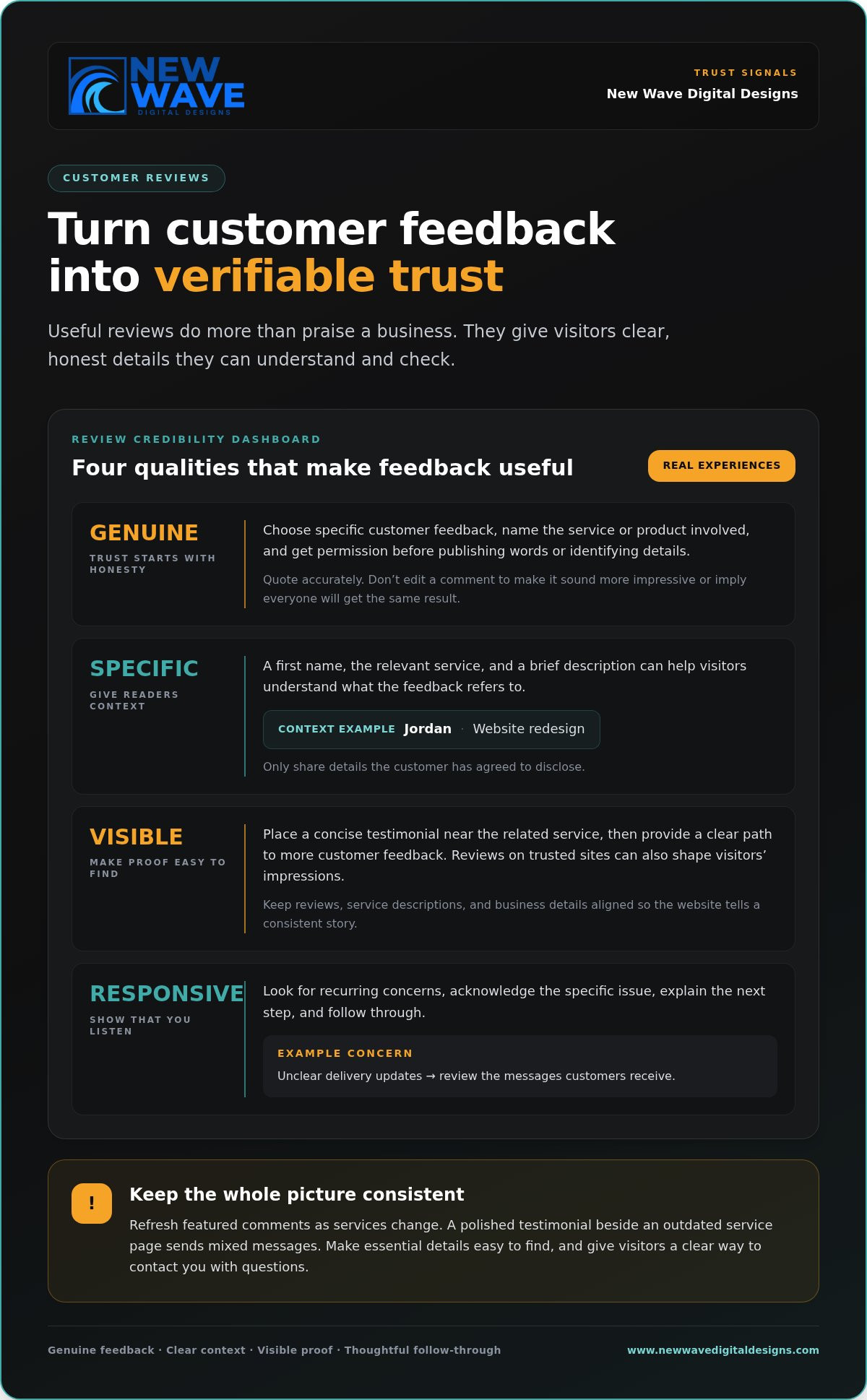
Customer reviews give visitors insight into real experiences, beyond your own claims. A short testimonial can explain what a customer needed, how you helped, and what changed. For example, a home organizer might feature a client’s comment about finding a workable storage system. Choose specific, genuine feedback, name the service or product involved, and get permission before publishing someone’s words or identifying details.

Make feedback easy to find instead of hiding every review on a single page. Feature a concise testimonial near the related service, then offer a clear path to more customer feedback. Reviews on trusted sites can also shape visitors’ impressions. Quote accurately, don’t edit comments to make them sound more impressive, and never present one person’s experience as a promise of the same result for everyone.

Context makes a testimonial more useful. A reviewer’s first name, the relevant service, and a brief description of their experience can help readers understand the feedback. For example, “Jordan, website redesign” gives more context than an unattributed sentence. Share only details the customer has agreed to disclose. Refresh featured comments as your services change, so examples reflect what visitors can expect from your business now.

Reviews are one trust signal among several. Customers may also look for an up-to-date website, consistent branding, clear contact details, and relevant accreditations. A polished testimonial beside an outdated service page sends mixed messages. Check that reviews, service descriptions, and business details tell the same story. Make essential information easy to find, since visitors may spend only a few moments searching online before deciding what to do next.

Your response to feedback matters, too. Look for recurring complaints, such as unclear appointment instructions or confusing product information. Respond directly and calmly: acknowledge the specific concern, explain the next step, and follow through. If a customer says delivery updates were unclear, review the messages customers receive. Listening and making improvements can strengthen credibility more than a page filled only with praise.

Give customers a clear way to reach you when a review raises a question. Link the relevant service page to an easy-to-find contact method, with a direct invitation such as “Ask us about project timelines.” Visitors comparing businesses can move from reading feedback to getting the details they need. Keep the contact route current, and make sure its wording matches the tone and information across your website.

2. Maintaining an active social media presence

An up-to-date social profile gives visitors another way to see what your business does. Regular, relevant posts can show that you’re active and committed to your offerings. Choose platforms your customers use, then set a manageable posting rhythm. A neighborhood bakery, for example, could share seasonal menu updates, explain how to place an order, and introduce the people behind the counter.

Consistency matters more than filling every feed. Make a simple monthly calendar with themes such as product details, helpful answers, and business updates. Before publishing, check that each post has a clear purpose and accurate information. If a restaurant changes its opening hours, update its social profile and website together. Old hours or discontinued services on a neglected profile can undermine the impression you want to create.

Social posts should guide visitors to a polished website, where they can understand your offer and take the next step. Make the homepage, service descriptions, and contact options easy to use on phones and computers. For example, a landscaping company could share a garden project on social media and direct interested visitors to a page explaining its services. Check that the page loads properly, uses current photos, and shows visitors how to ask for details.

What legal disclosures and privacy rules apply to business websites in the United States? Requirements depend on what the site does, what information it collects, and which state or industry rules apply. If your site collects customer details, explain your data practices clearly and review applicable obligations before publishing forms or tracking tools.

How much does it cost to build a credible business website? The cost depends on the site’s design, content, features, and ongoing maintenance needs. A provider sets a price after a quote request, based on the project’s scope and requirements.

Security and transparency go hand in hand. HTTPS encrypts information sent between a visitor’s browser and your website, while a privacy policy explains how collected information is handled. Use HTTPS throughout the site, especially on contact and checkout pages, and make the privacy policy easy to find near forms. Keep software and site components maintained, and remove forms that request information your business doesn’t need.

For a business whose website needs a more cohesive design or reliable upkeep, professional website design and maintenance can help bring its social presence and online experience into alignment.

3. Accessible contact information and prompt responses

Which business details should appear on a website to build trust? Show your business name, a working phone number or email address, and clear service details. Add your location or service area, opening hours, and a contact form when relevant. For example, a healthcare practice like Advanced Dental Care of Dover can clearly state its office hours and treatments, just as a home repair business can list its service area and explain which jobs it handles. Keep every detail accurate and consistent across your website.

Make contact options easy to spot. Put a “Contact” link in the main navigation and repeat a suitable contact method on service pages. A phone number can help with urgent questions, while a form can gather project details. Label form fields clearly, explain what happens after submission, and avoid asking for information unrelated to the enquiry.

A prompt response starts with a simple process. Assign someone to review incoming messages, acknowledge each enquiry, and explain a realistic next step. If a customer asks about a custom order, confirm receipt and say when they can expect a fuller reply. Don’t promise a response time your business can’t consistently meet. Clear expectations make communication feel considered rather than uncertain.

Test the contact process on a phone and a computer. Tap the phone number to see whether it opens the calling function, submit the form, and check that a confirmation message appears. A visitor on a phone, for example, shouldn’t need to zoom in to read an email address. Fix broken buttons and outdated details as soon as you find them.

How can I claim and optimize a Google Business Profile? Follow Google’s process to claim the profile, then complete each relevant field with accurate business information. Add the correct category, service area, hours, phone number, and business description. Use clear photos that represent your actual business, and review the profile whenever your hours or services change.

Consistent details help customers recognize your business across Google and your website. Match the business name, phone number, hours, and service descriptions wherever they appear. If holiday hours change, update both places. A profile with one phone number and a website with another create avoidable friction for someone ready to get in touch.

Make the next step explicit. A consulting firm might invite visitors to describe their project through a short enquiry form, while a local café could display its address and current hours. In each case, the contact option should suit the customer’s needs. Review the journey regularly, from finding your details to receiving a useful response.

Ways to Make My Business Look Credible Online

4. Consistent branding and messaging

Visitors notice when your website, advertisements, and social profiles feel like they belong to different businesses. Align your logo, colors, typography, and tone so each channel reinforces the same identity. A neighborhood bakery, for example, could use the same warm palette and product names on its website, Instagram profile, and printed menu. Consistency helps customers recognize the business and understand its offer.

How can I verify a business on social media and keep profiles consistent? Follow each platform’s own account verification process, and make sure your profile represents the real business. Match the business name, logo, description, contact details, and website across platforms, then review them whenever information changes.

A short brand guide makes alignment easier to maintain. Keep approved logo files, colors, fonts, business descriptions, and preferred phrases in one shared document. Include examples of suitable wording, such as “handmade in small batches,” and phrases to avoid if they overstate what you deliver. Staff and contractors can consult the same guide before creating a post, advertisement, or customer message.

Consistency applies to promises, too. If a service page describes custom work, an advertisement shouldn’t suggest that every project follows a fixed template. A fitness studio promoting beginner classes should describe them the same way on its website and social channels. Compare key phrases side by side, and revise any claim that changes meaning across platforms.

Customer interactions are part of your brand, too. A welcoming website paired with abrupt replies creates a fractured impression. Set a few practical writing principles, such as greeting customers by name when appropriate, answering the question first, and explaining the next step. For instance, a repair business can use a calm, direct tone in both its website copy and enquiry responses.

Give visual assets the same care. Check that logos remain legible in profile images, banners, and mobile layouts. Use consistent image treatments and avoid mixing unrelated fonts or colors in promotional graphics. Thoughtful graphic design can bring campaign materials and your website together, while keeping essential text clear and easy to read.

Make regular reviews part of maintaining consistency. Compare your website, social profiles, advertisements, and customer-facing templates whenever a service or business detail changes. A café updating its menu can check its profile descriptions and promotional posts at the same time. This simple comparison catches outdated claims before they weaken the overall impression.

5. Creating a unified, professional image

A professional image is the sum of details visitors encounter, from your logo to the checkout screen. Review your website as a customer would: open the homepage, choose a service, and follow the path to contacting you. A consultant’s polished homepage can still feel unfinished if service pages have broken buttons or inconsistent design. Make every step feel like part of the same considered experience.

Start with the visual elements customers see repeatedly. Use a legible logo, a restrained color palette, and typography that stays readable on phones. A home renovation company might pair project photos with clean headings and ample space around each image. Don’t stretch a logo or place text over busy photos. These choices help visitors focus on the work, not the layout.

Choose images that accurately represent your business. A restaurant should show its actual dishes and dining space, not generic stock photos that suggest a different experience. A service business can use photos of its team, workspace, or completed work when appropriate. Add concise captions when context helps, and replace visuals that no longer reflect the business.

Presentation also depends on how information is organized. Give each page a clear purpose, use descriptive headings, and make the main action easy to identify. For example, a bookkeeping firm can put each service on a separate page, explain it in plain language, and place an enquiry option nearby. Visitors shouldn’t have to scan unrelated sections to understand what the firm does.

Check for details that can make a site feel neglected. Test navigation links, check spelling, and remove outdated announcements. Open key pages on a phone and computer to catch clipped text, overlapping buttons, or images that load poorly. A seasonal sale banner left online after the promotion ends can undermine confidence, even when the rest of the site looks polished.

Build a simple review habit around real customer journeys. Ask someone unfamiliar with your site to find a specific service, understand what it includes, and locate the next step. Note where they hesitate, then revise those pages. A focused graphic design approach can bring visual elements together while keeping your business’s character clear and recognizable.

Ready to shape a more polished visual identity? Explore graphic design for your business as a way to create a cohesive, professional impression.

New Wave Digital Designs: Shopify Website Design

New Wave Digital Designs creates Shopify websites for businesses ready to present their products through a clear, professional online store. A considered design can bring product information, brand visuals, and the customer journey together, helping visitors understand what the business offers and how to take the next step.

If your website is difficult to navigate, feels out of step with your brand, or needs ongoing attention, New Wave Digital Designs also offers WordPress and Squarespace website design and website maintenance. The right next step depends on your platform and the changes your site needs. A well-structured website supports credibility while giving your business room to evolve.

To discuss a website project, visit New Wave Digital Designs.

Build credibility through your next thoughtful improvement

If you’re considering how to make your business look credible online, choose one part of the customer experience to improve next. A clearer page, a more cohesive visual identity, or a simpler path to an enquiry can make your online presence feel more intentional. Revisit that experience as your business evolves, so your digital impression continues to reflect the care behind your work.

When your website needs a more considered design, New Wave Digital Designs offers Shopify, WordPress, and Squarespace website design. The right platform and structure depend on what you need your website to do, from presenting services to supporting an online store. Focused design can bring your goals and online presence into closer alignment.

Take the next step at a pace that feels right for your business. Contact New Wave Digital Designs to discuss your website project, and keep shaping an online presence that earns confidence through clarity and care.

Frequently Asked Questions

What are the four pillars of credibility?

Four practical pillars of credibility are competence, reliability, honesty, and customer care. Competence comes through in accurate, useful information; reliability in consistent follow-through; honesty in realistic expectations; and care in how a business handles questions or problems. For example, a repair company can explain what a service covers, arrive as agreed, communicate changes, and address concerns respectfully.

What is business credibility?

Business credibility is the extent to which customers, vendors, and partners trust that a business is reliable and keeps its promises. It grows through repeated evidence, not a single claim. A freelance designer, for example, can build trust by explaining project steps clearly, meeting agreed deadlines, and being candid when a request falls outside the project’s scope.

What makes a business look credible online?

If you’re asking how to make my business look credible online, focus on a coherent customer journey that visitors can verify. They should understand what the business does, who it serves, and what happens after an enquiry. For example, a tutoring business can describe its subjects, explain how lessons work, and share a sample of its teaching approach. Specific information helps prospective customers make informed decisions.

How do I create a professional business website?

How do online reviews affect business credibility, and how can I get more?

Reviews give prospective customers firsthand accounts to help them judge whether a business suits their needs. To invite feedback, ask customers shortly after a purchase or service is complete, while the experience is easy to recall. Keep the request neutral and let customers share honest opinions. For example, a cleaning service could send a brief follow-up asking what worked well and what could be improved.

How should a business respond to negative online reviews?

Respond calmly, address the issue, and offer a practical next step without revealing private customer details. A catering business might acknowledge a complaint about a late delivery, apologize for the disruption, and invite the reviewer to discuss the order privately. Avoid arguing point by point in public. After resolving the issue, consider whether a process change could prevent the same problem from recurring.

How can customers verify a business is legitimate online?

Customers can compare your business name, contact information, services, and website details across public profiles. They can also look for clear policies, working contact options, and independent reviews that describe specific experiences. Before sharing sensitive information or making a purchase, make sure you’re interacting with the intended business and understand the transaction terms. A mismatch between profiles is a reason to pause and seek clarity.

Website Designer: How to Find the Right Fit for Your Business

What if your website looked polished but still left visitors unsure what to do next? Choosing a website designer is about more than colours and layouts. The right design connects your brand promise to a useful digital experience, giving each page a clear purpose and helping visitors take the next step.

It’s understandable to feel uncertain about which platform or design approach will suit your business. A site built to sell products has different needs from one designed to introduce services, and visual appeal alone won’t make either effective. Start with what visitors need to find and do, then consider how the site’s structure, features, and visual style can support those needs.

In this guide, you’ll learn what a designer contributes, how discovery and platform selection shape a project, and what to prepare before work begins. You’ll also see how Shopify, WordPress, and Squarespace can serve different website needs. New Wave Digital Designs creates responsive, brand-aligned websites for these platforms, bringing business goals, design, and functionality into one considered experience.

Key Takeaways

  • A website designer shapes a site’s structure and visual experience around its audience, brand, and business purpose.
  • A clear sequence from discovery through launch preparation helps turn business goals into practical design decisions.
  • Shopify, WordPress, and Squarespace suit different website purposes, so match the platform to the functionality your business needs.
  • Gathering goals, audience insights, brand assets, content, and feature priorities gives your project a stronger foundation.
  • Plan for ongoing website care alongside the initial design to support your site as your business evolves.

What Does a Website Designer Do for a Business?

A business website has two jobs: represent the organisation clearly and help its audience find what they need. Meeting both goals takes more than attractive colours or striking imagery. A website designer shapes the visual experience and site structure around the website’s purpose, bringing brand identity, usability, and business objectives together.

A website designer plans how a site looks, feels, and guides visitors, aligning its visual design and page structure with the brand, audience, and goals. Design and development are related but distinct. Design establishes the layout, visual direction, and user pathways; development builds those plans into a functioning website. Depending on the project, different specialists may handle these disciplines, or they may be coordinated as part of one process. Both matter: a considered design needs sound implementation, while technical functionality needs an intuitive experience around it. For a broader overview of the field, see What is web design?

How website design connects brand identity and user experience

Visual choices create a first impression before visitors read every word. Typography, colour, imagery, spacing, and graphic details can express whether a business feels warm, refined, energetic, or practical. When these elements reflect the brand’s character, the website feels like a cohesive introduction rather than a collection of unrelated pages.

Usability gives that identity a clear path to follow. Descriptive navigation labels, well-organised content, and visible headings help visitors locate services, understand what the business offers, and find a relevant next step. A clear page hierarchy gives important information prominence without crowding out useful details.

Responsive design adapts the presentation to different screen sizes, so layouts, text, and navigation remain usable on phones, tablets, and desktop screens. The goal isn’t simply to shrink a desktop page. It’s to preserve clarity and ease of use as the available space changes.

What a professionally designed website can support

A website’s structure should make intended actions easy to understand. Depending on the business, that might mean exploring services, viewing product information, submitting an enquiry, or completing a purchase. Page layouts can guide visitors towards these actions by placing relevant information and prompts at useful points in their journey.

Consistency matters, too. Shared visual patterns across pages help visitors recognise the brand and understand how to move through the site. A service page, for example, can use the same heading styles and navigation as the home page while presenting information tailored to that service. This creates a coherent experience without making every page identical.

Design is a foundation, not a promise of business results. A polished, easy-to-use website can support business goals, but it can’t guarantee traffic or sales on its own. Performance also depends on factors such as the offer, content, audience reach, and ongoing marketing. New Wave Digital Designs creates responsive, brand-aligned websites that bring visual craft and practical purpose into one considered experience.

How a Website Designer Turns Business Goals into a Website

A successful website project moves from understanding the business to preparing a practical, considered launch. The website designer brings structure to that journey, while you contribute knowledge of your business, customers, and priorities. The process works best as a partnership: creative direction takes shape through informed decisions and useful feedback, not guesswork.

Discovery clarifies the goals and audience; planning turns those insights into a site structure, and design and development bring that structure to life. Each stage informs the next, helping the finished website reflect the agreed direction.

Discovery and planning establish the design direction

Early conversations clarify what the website needs to accomplish and who it needs to serve. A business focused on enquiries may need clear service information and an easy-to-find contact route, while an online shop needs a structure that supports product discovery and purchasing. These goals help set priorities before visual decisions begin.

Next, the project takes shape through a plan for essential pages and visitor journeys. The designer considers what information visitors need, how pages relate to one another, and which functions the site requires. Brand assets, such as a logo, imagery, and existing design materials, provide useful reference points. Content matters just as much: available copy and imagery can influence page layouts, while gaps show what needs to be prepared.

At this stage, collaboration is an exchange. You bring business context and audience knowledge; the designer brings creative and structural expertise. Resources such as Smashing Magazine for web designers also explore design, user experience, and development considerations that inform thoughtful digital work.

Design, development, and review bring the concept to life

Once the direction and structure are agreed, design translates the plan into page layouts and visual elements. The goal is to create a coherent system that suits the brand and makes key information easy to scan. Feedback at this point helps refine the visual direction before it carries through to the build.

Development applies the approved design to the selected platform and implements the required functionality. This is where layouts become working pages, navigation connects the site’s sections, and features are configured for their intended purpose. The build should reflect the original plan rather than introduce unnecessary complexity.

Review brings the details into focus. Assess whether the pages communicate clearly, whether the content is in place, and whether the experience matches the agreed direction. Specific feedback, such as pointing out a missing detail or a confusing step, gives the designer a clear basis for refinement.

  1. Discovery: Clarify business objectives, audience, and project priorities.
  2. Planning: Map pages, visitor journeys, content, and required functionality.
  3. Design: Develop layouts and visual direction around the agreed plan.
  4. Development: Build the website on the chosen platform and apply its functions.
  5. Review: Refine the site using feedback on its content and experience.
  6. Launch preparation: Organise final checks and prepare the approved site for launch.

For a project grounded in your business goals, explore website design with New Wave Digital Designs, where platform, brand, and purpose come together in a responsive site.

Which Website Platform Fits Your Business and Website Goals?

The right platform is the one that supports what your website needs to do, not simply the one receiving the most attention. An online store, a content-rich website, and a brand-focused business site can have different requirements. Consider what content you’ll publish, which features visitors need, and how you expect the site to develop. These priorities give a website designer a practical foundation for recommending a platform and shaping its design.

When Shopify, WordPress, or Squarespace may suit the project

Each platform can support different kinds of projects, but the best fit depends on your needs. Shopify is a relevant option for businesses planning to sell products online. WordPress and Squarespace can also suit business websites, with the choice shaped by the site’s content, functionality, and presentation goals.

Platform Strength and typical fit Planning consideration
Shopify Designed for businesses building an online store. Plan how products, store content, and customer actions should be organised.
WordPress An option for business websites with content and functionality needs to define. Clarify the kinds of pages, content, and features the site must support.
Squarespace An option for businesses prioritising brand presentation and a cohesive website. Consider how the site’s content and required features fit the design direction.

For an online shop, decisions about product presentation and the path to purchase should inform the site’s structure from the outset. Explore this custom Shopify store design guide for more context on designing around ecommerce needs. For a brand-led site, this custom Squarespace website design guide offers a closer look at shaping a distinctive presentation.

How design requirements shape the platform decision

Start with the work your website must perform. Product sales call for planning around a shopping experience; frequent publishing calls for a clear content structure; a site centred on introducing a brand needs a deliberate visual and informational hierarchy. These needs can overlap, so list essential functions rather than choosing based on a single feature or trend.

Think beyond launch, too. The pages and capabilities you need now, along with directions you may want to take the site later, can influence platform fit. A clear set of priorities helps avoid choosing a design that looks appealing but makes important tasks awkward or leaves future plans out of view. Platform selection shouldn’t rest on blanket claims about which option is best for every business or inherently superior for SEO.

New Wave Digital Designs creates responsive, brand-aligned websites using Shopify, WordPress, and Squarespace. The platform decision can be considered alongside the site’s purpose, required functionality, and visual direction, aligning the technical foundation with the creative approach.

Website Designer: How to Find the Right Fit for Your Business

What Should You Prepare Before Working With a Website Designer?

A clear starting point helps turn your business knowledge into a focused website plan. You don’t need every word perfected or every creative decision made before beginning. Sharing what the site needs to achieve, who it should serve, and what materials you already have gives your website designer a stronger basis for structural and visual choices.

Clarify your goals, audience, and essential website functions

Begin with the website’s main purpose. Is it meant to introduce your services, support online sales, or make it easier for visitors to enquire? Note the key actions you want visitors to take, then identify the audiences the site must serve and what each group needs to understand or do.

Separate launch essentials from possible later additions. This keeps the initial design centred on the most important visitor needs while giving future ideas a place in the plan.

Gather content and visual references for a stronger collaboration

Collect materials that can give the project a clear foundation: existing brand assets, photography, business details, and website copy you’re ready to share. If some content is still being developed, identify what’s missing so page layouts can account for it instead of treating placeholders as final decisions.

Examples of websites or other digital experiences can also help communicate qualities you admire, such as calm navigation, expressive typography, or an editorial feel. Treat these as conversation starters, not designs to reproduce. Explain what appeals to you, and the designer can translate that direction into a distinctive fit for your brand.

Before the project begins, gather:

  • Goals: The site’s primary purpose and the outcomes it should support.
  • Audience: The people the website needs to serve and what they need to find.
  • Brand assets: Logos, colours, photography, and other existing visual materials.
  • Content: Available copy, business information, and a note of what still needs to be created.
  • Functions: Essential features for launch, plus enhancements that can wait.
  • References: Examples that illustrate the mood or experience you want to convey, with notes on why they work for you.

These priorities help shape decisions without requiring you to arrive with a finished blueprint. For smoother collaboration, consolidate feedback from everyone involved before sharing it. A single, considered set of comments makes it easier to distinguish essential changes from personal preferences and keeps creative discussion centred on the agreed goals.

Ready to turn your priorities and materials into a considered website plan? Start planning your website design with New Wave Digital Designs.

Build Your Website With a Designer Who Connects Craft and Purpose

A website becomes a more useful business asset when its visual craft is guided by a clear purpose. The decisions explored in this guide form a practical framework: define what the site needs to achieve, select a platform that suits its functions, prepare content and brand materials, and plan how the site will be cared for after launch.

That framework keeps creative choices connected to real needs. Instead of beginning with a design trend, a website designer can shape the structure and visual direction around your audience, brand, and priorities. The result is a more coherent foundation for the experience you want visitors to have.

Design and platform expertise for distinct business needs

New Wave Digital Designs creates responsive, brand-aligned websites for small and medium-sized businesses. Its design work spans Shopify, WordPress, and Squarespace, allowing the platform and visual approach to reflect each project’s purpose and required functionality.

A business preparing to sell products online may have different structural needs from one focused on sharing service information or presenting its brand. Those differences shape decisions about content, navigation, and how visitors move through the site. Tailoring design to the project brings business identity and practical use together rather than treating appearance as a separate layer.

Clear priorities make that collaboration more grounded. Knowing what visitors should find and do helps guide creative choices, while prepared content and brand assets give the design a meaningful starting point. It’s a partnership between your knowledge of the business and the designer’s experience shaping a cohesive digital presence.

Plan beyond launch with thoughtful website support

A website also needs consideration after it goes live. Maintenance, managed hosting, and security are relevant parts of ongoing site care, supporting the website as it continues to serve the business. Planning for these needs early makes post-launch responsibilities part of the wider website conversation, rather than an afterthought. For a closer look at ongoing care, explore the website maintenance services guide.

Visibility can be supported through distinct forms of marketing. Organic SEO focuses on building a site’s presence in unpaid search results, while paid search management uses campaigns on platforms such as Google Ads and Bing Ads. These services can complement a well-considered website, but they serve different roles and don’t guarantee traffic or sales.

Your next step can be simple: bring your goals, audience, and early ideas into a conversation, then work together to shape the right direction. Whether you’re planning a new site or rethinking an existing one, start a website design conversation with New Wave Digital Designs and turn your priorities into a considered project plan.

Give Your Next Website Idea a Clear Direction

Your next website project doesn’t need to begin with a perfect brief. It can start with a clear ambition: what you want your business to communicate, how you hope visitors will engage, and what you want the site to make possible. From there, a website designer can help turn those intentions into a considered digital experience.

New Wave Digital Designs brings creative direction and practical planning together, with website design for Shopify, WordPress, and Squarespace, plus responsive experiences tailored to business needs. As your needs evolve, related maintenance, hosting, security, and digital marketing services can support the site beyond its initial design. Each element has a distinct role, shaped around your priorities rather than assumed results.

Bring your early ideas, questions, or established plans to the conversation. Let’s shape a website around your vision and business goals. Your next step can be the beginning of a more purposeful online presence.

Frequently Asked Questions

What does a website designer do?

A website designer shapes a site’s visual identity, page structure, and visitor experience around business goals. For example, a service business may need pages that make its offerings easy to compare, while a shop may prioritise product browsing. Design is distinct from development, which builds the site’s technical functionality, though project roles can connect. The scope depends on the site’s needs, platform, and agreed project.

Is a website designer the same as a web developer?

No. A designer usually focuses on visual direction, layout, and usability, while a developer implements functionality and builds the website. The responsibilities can overlap, or specialists can coordinate across the project. Both perspectives matter: a visually strong concept needs thoughtful technical execution, and working features need a clear, usable interface. The project scope determines how these roles are divided and brought together.

How much does it cost to hire a website designer?

The cost depends on the project’s scope, platform, content needs, functionality, and design requirements. A site with a small set of pages and straightforward needs differs from one requiring extensive content or specialised features. Before discussing scope, identify the outcomes that matter most and which functions are essential. This gives the project a clearer basis, so the proposed work can reflect your priorities rather than assumptions.

How long does it take to design and build a website?

There isn’t one timeline that fits every website project. The duration depends on the scope, required functionality, content readiness, and how much review the work needs. You can help keep decisions focused by defining priorities early and gathering feedback from all decision-makers before sharing it. If copy, images, or approvals are still in progress, include those dependencies in the project plan.

Can a website designer improve an existing website without rebuilding it?

Sometimes a project can focus on targeted refinements, such as improving page layouts, visual consistency, or a confusing visitor journey. Other sites may need broader redevelopment to support their goals or required features. The right approach depends on the current platform, the site’s condition, and what you want to change. Reviewing those factors helps determine whether focused updates or more substantial development makes sense.

What should I provide to a website designer before a project begins?

Share your business objectives, audience insights, brand materials, existing content, required features, and examples of digital experiences you like. Add a brief note about what appeals to you in each reference, such as its tone or navigation, rather than expecting a design to be copied. These inputs help set priorities and creative direction. As planning develops, the project team can identify any additional content or decisions needed.

Do I need website maintenance after my new site launches?

A website may need ongoing technical care after launch, depending on its platform and operational needs. Maintenance, hosting, and security are separate considerations from the initial design: they relate to caring for the live site over time. New Wave Digital Designs provides website maintenance, managed hosting, and security services. The right support depends on the website and how the business plans to manage it after launch.