
Choosing between wordpress maintenance vs self hosting can seem like a choice between doing everything yourself and handing over your site. The distinction is more specific: hosting determines where your WordPress site runs, while maintenance covers the work of keeping it healthy. Self-hosting doesn’t mean you have to manage every technical task alone.
It’s worth weighing the control of managing your own setup against the time and ongoing responsibility it requires. Updates, backups, security, and troubleshooting need clear owners, whether you handle them yourself or delegate them. If those roles aren’t clear, you may assume your hosting plan covers work that is actually your responsibility.
This guide separates hosting from maintenance, compares the practical responsibilities involved, and explains how managed hosting and ongoing support can work together. Use the guidance to assess the control, time, and reliability your setup requires, then choose an approach that suits your website and the attention you can give it.
Key Takeaways
- Hosting and maintenance address different needs: hosting provides the environment for your site, while maintenance covers its ongoing care.
- When comparing wordpress maintenance vs self hosting, focus on who owns updates, backups, security, and troubleshooting rather than relying on labels alone.
- Self-management gives you direct oversight, but requires consistent time and attention for routine upkeep and unexpected issues.
- Use your site’s importance, complexity, and your available time to decide which responsibilities you can realistically manage.
- You can keep a self-hosted WordPress site and delegate technical upkeep through managed hosting, security, and maintenance support.
WordPress Maintenance vs. Self-Hosting: Understand the Difference First
“Self-hosting” and “self-maintenance” can sound like two sides of the same choice, but they describe different decisions. Hosting is the infrastructure where your WordPress website and its files run. Maintenance is the ongoing work of keeping the site updated, backed up, monitored, and functioning.
Hosting determines where your site operates; maintenance determines who looks after its ongoing health. That distinction is central to wordpress maintenance vs self hosting. A self-hosted WordPress site can still receive professional maintenance support, so self-hosting doesn’t automatically mean taking on every technical task yourself.
What does self-hosted WordPress mean?
With self-hosted WordPress, you use the WordPress software and arrange hosting separately. The hosting environment can be configured and managed in different ways. Depending on the arrangement, you may have access to some infrastructure settings without personally administering every server detail.
The broader idea of hosting your own online services also involves trade-offs around control and upkeep, as described in Self-hosting (network). For a WordPress site, the practical question is which parts your hosting arrangement handles and which remain your responsibility.
What does WordPress maintenance include?
Maintenance covers care of the WordPress site itself: applying updates, creating or checking backups, monitoring security, and resolving problems. It can also involve investigating an update that disrupts a form or another site feature. These are recurring responsibilities, although the tools and schedule may vary by site.
Hosting care and site-level care can overlap, but they aren’t identical. A hosting service may look after parts of the infrastructure, while WordPress updates, plugin compatibility, and site recovery need separate attention. If you manage the site yourself, you’re responsible for the tasks assigned to you. With professional maintenance support, you can delegate agreed technical upkeep while retaining your WordPress website.
To see where responsibilities sit, list who handles hosting, updates, backups, security, and troubleshooting. Assign an owner to each task. A clear division makes it easier to spot gaps before a routine task or unexpected issue affects the site.
What You Take On When You Maintain a Self-Hosted WordPress Site
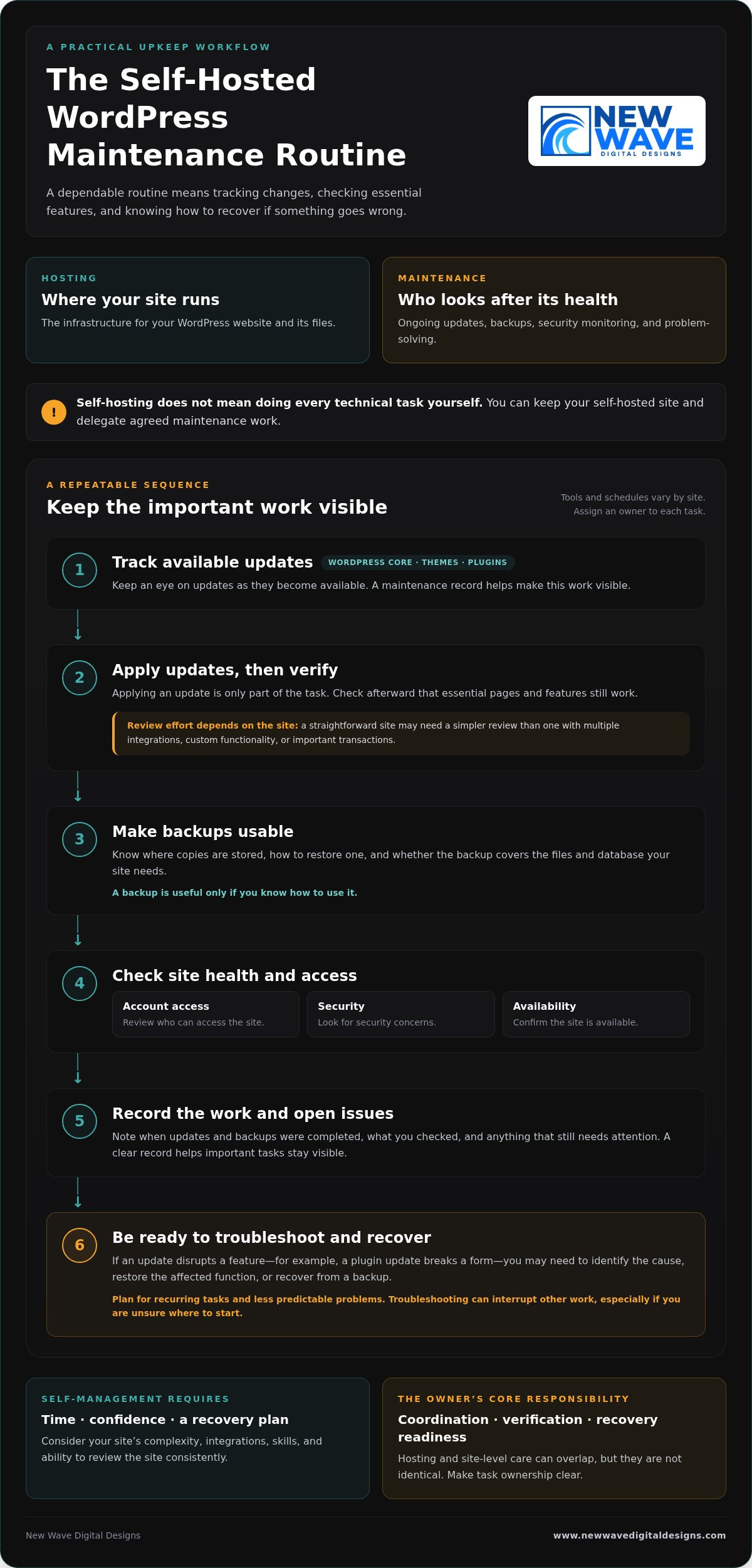
Managing maintenance yourself is less about a one-time overhaul and more about following a dependable routine. The exact tools and schedule depend on your site, but someone needs to track changes, check that key features still work, and know what to do if something goes wrong. This responsibility can fit into your routine when the site is simple and you have the time and confidence to manage it.
Which tasks need regular attention?
WordPress core software, themes, and plugins all need attention as updates become available. Applying an update is only part of the task: check afterward that essential pages and features still work. A straightforward site may need a simpler review process than one with multiple integrations, custom functionality, or important transactions.
Backups are useful only if you know how to use them. Know where copies are stored, how to restore one, and whether the backup covers the files and database your site needs. Routine checks should also include reviewing account access, looking for security concerns, and confirming the site is available. These habits can help prevent a small oversight from becoming a larger interruption.
A maintenance record keeps the work visible. Note when updates and backups were completed, what you checked, and any issue that still needs attention. The goal isn’t to follow the same checklist on every site, but to make sure important tasks don’t fall through the cracks.
How much time and technical confidence does self-maintenance require?
The workload depends on your site’s complexity, integrations, and your existing skills. Routine checks may be manageable, but a failed update can take more than a quick review. For example, if a plugin update disrupts a form, you may need to identify the cause, restore the affected function, or recover from a backup. Troubleshooting can interrupt other work, especially if you’re unsure where to start.
Plan for both recurring tasks and less predictable problems. Ask yourself whether you can make time to review the site consistently and feel prepared to investigate an issue when it appears. Self-management isn’t just a question of technical ability; it also requires a workable plan for recovery.
The owner’s core responsibility is coordination, verification, and recovery readiness. If you’d rather delegate recurring technical upkeep while retaining your WordPress site, explore WordPress maintenance support as part of your site’s ongoing care.
Managed WordPress Maintenance vs. Self-Management: Compare the Trade-Offs
The choice isn’t simply control or convenience. Self-management gives you direct oversight of site upkeep, while professional maintenance support delegates agreed tasks. You can also retain a self-hosted WordPress site and have someone else manage its maintenance. For wordpress maintenance vs self hosting, treat hosting and support as separate decisions, then choose a balance that suits your site and capacity.
| Responsibility | Self-management | Managed maintenance |
|---|---|---|
| Control | You decide when and how to handle site-level tasks. | You retain business and content decisions while delegating agreed technical work. |
| Routine workload | You track and carry out updates and other upkeep. | Defined recurring tasks are handled as part of the support arrangement. |
| Security | You monitor relevant site settings and follow up on concerns. | Security responsibilities depend on the support scope and hosting setup. |
| Backups | You arrange backups and verify you can restore the site. | Backup tasks may be delegated, but responsibilities and recovery processes should be clear. |
| Troubleshooting | You investigate issues and coordinate any fixes. | You have defined technical support for the issues covered by the arrangement. |
The table is a guide, not a universal division of duties. Support arrangements differ, so establish who handles each task, especially backups, recovery, and problems involving both hosting infrastructure and the WordPress site.
When does self-management make sense?
Self-management can suit site owners with the time, technical confidence, and reliable routine to keep tasks moving. A simple site may have fewer moving parts than one with several integrations, but it still needs care. Direct oversight works best when you don’t just start updates and backups, but check that they completed and know how restoration works.
When can professional maintenance support be a better fit?
Delegating upkeep may suit businesses that would rather spend their time on customers, content, and operations. Defined support for WordPress updates, hosting, and security clarifies who handles recurring technical work. Be clear about the scope: managed support doesn’t guarantee that problems can’t happen, and it doesn’t automatically include every task a site might need.
Think of maintenance as a set of responsibilities, not a hosting label. You can keep control of your site’s direction and content while delegating recurring technical upkeep. That balance can make self-hosting practical without requiring you to manage every part of the site yourself.
Match WordPress Maintenance to Your Site and Capacity
The right maintenance arrangement should reflect what your website does and how much attention you can realistically give it. Use this process to assess your needs before deciding which tasks to manage yourself and which to delegate.
- Assess the site’s importance. Does it support sales, lead generation, customer enquiries, or essential daily operations? If a problem would disrupt an important business activity, make sure there’s a clear plan for maintenance and recovery.
- Consider its complexity. A site with custom features or several integrations may need more careful update testing and troubleshooting than a simpler site. Identify the features and connections your website depends on.
- Be honest about your capacity. Do you have the time and technical confidence to handle routine tasks and respond if an update causes an issue? Account for both regular upkeep and unexpected work.
- Identify what’s already covered. Review your hosting arrangement and support to understand who handles updates, backups, security checks, and recovery. Don’t assume a task is covered just because another technical service is in place.
Build a responsibility checklist before deciding
Write down each task and assign an owner. A checklist can reveal where work is being duplicated or overlooked:
- Hosting and infrastructure: who manages the hosting account and related settings?
- Updates: who applies updates, and who checks that important site features still work?
- Backups: who creates them, verifies they’re usable, and knows how to restore the site?
- Security: who monitors relevant site settings and follows up on concerns?
- Recovery: who investigates a problem and coordinates the steps to resolve it?
Look for gaps in backup verification, update testing, or issue resolution. Assign tasks according to your actual capacity, not the assumption that you’ll find time later. Some owners prefer direct oversight of every task; others retain control of business and content decisions while delegating technical upkeep.
Revisit the checklist as your website and business evolve. A new integration, a shift toward online sales, or a change in your team can affect the site’s importance and support needs. The wordpress maintenance vs self hosting decision isn’t fixed for the life of a website; task ownership can change as your priorities do.
If you’d like professional help with recurring upkeep, explore WordPress maintenance support as part of your site’s ongoing care.
A Managed WordPress Maintenance Plan Can Keep Self-Hosting Practical
Choosing where your WordPress site is hosted doesn’t determine who maintains it. You can keep a self-hosted site and arrange professional help with its ongoing technical care. This makes wordpress maintenance vs self hosting less of an either-or decision: hosting provides the environment, while maintenance support helps keep the site’s technical foundation attended to.
Managed hosting and security services can complement WordPress maintenance, but they cover related, distinct responsibilities. Hosting and security support can address aspects of the environment your site runs on, while maintenance focuses on ongoing care of the WordPress site. A clear division prevents important tasks from being assumed rather than assigned.
What to expect from ongoing website support
Good maintenance means planned, recurring attention, not just a response to a visible fault. The support scope should make clear which tasks are handled, where your responsibilities remain, and how communication works when an issue needs attention. Clear ownership helps you understand how updates, security, backups, and troubleshooting fit together without assuming every support arrangement covers the same work.
This support doesn’t remove the need to make business and content decisions. It gives you a way to delegate technical upkeep while staying involved in your website’s direction.
Keep your WordPress site aligned with your business
A website changes as the business behind it changes. New content, added functionality, integrations, and shifting priorities can all affect the site’s technical needs. An approach that suited a simple information site may need to change if the website becomes central to enquiries, sales, or daily operations.
Review hosting, security, and maintenance responsibilities regularly. Confirm who owns each recurring task and how issues are handled, then adjust the arrangement when the site or your available time changes. Steady upkeep supports the website’s role over time, rather than treating maintenance as a one-off task.
New Wave Digital Designs provides WordPress website maintenance, managed hosting, and security support to help site owners delegate technical upkeep while retaining their WordPress website. Explore WordPress website maintenance services and take the next step toward support that fits your site’s needs.
Choose a WordPress Setup That Supports Your Next Step
Hosting and maintenance answer different questions: where your WordPress site runs, and who takes care of its ongoing technical needs. The choice in wordpress maintenance vs self hosting doesn’t have to be all or nothing. You can retain a self-hosted site while delegating recurring upkeep, or manage maintenance yourself if you have the time and confidence to do it consistently.
Start by matching responsibilities to your site’s importance, complexity, and your capacity. Make sure someone owns updates, backups, security, and recovery, then revisit the plan as your website and business evolve. A clear arrangement can help your site keep pace with changing needs without taking attention away from the work it supports.
New Wave Digital Designs provides ongoing website maintenance and technical support, with managed hosting and security services as part of its web support offering. Explore professional WordPress maintenance and support to find an approach suited to your site. With the right balance of oversight and support, you can move forward with greater clarity and confidence.
Frequently Asked Questions
Is WordPress maintenance the same as self-hosting?
No. Self-hosting describes where your WordPress site runs and how its hosting is arranged; maintenance is the ongoing care that keeps the site updated, backed up, monitored, and functioning. You can self-host and maintain the site yourself, or delegate selected tasks to professional support. Keeping these decisions separate makes the wordpress maintenance vs self hosting comparison clearer and helps you identify who is responsible for each part of your site’s care.
Can I use managed WordPress maintenance with self-hosted WordPress?
Yes. Hosting and maintenance are separate choices, so you can arrange hosting for your WordPress site and have a professional handle agreed upkeep. That support might include updates, backups, or security tasks, depending on its scope. Make responsibilities clear across hosting infrastructure, WordPress maintenance, and site recovery. You can delegate technical work while retaining decisions about your website’s content, functionality, and business direction.
What happens if I do not maintain my WordPress site?
Neglected updates, unverified backups, and unattended issues can increase the risk of compatibility or security problems. The impact depends on your site’s software, plugins, themes, and setup, so it won’t be the same for every website. Assign an owner to routine updates, backup checks, and issue monitoring so important tasks aren’t left to assumption or postponed indefinitely.
Is self-hosted WordPress cheaper than managed maintenance?
There’s no universal answer because hosting and maintenance are different responsibilities, and the total depends on what your setup includes. Compare hosting, any tools or support you need, and the time you’ll spend managing the site. If you maintain it yourself, account for the effort involved in checking updates, verifying backups, and resolving problems. A lower direct expense may still require more of your time and attention.
How often should WordPress be maintained?
WordPress maintenance is ongoing, but the right schedule depends on your website, its themes and plugins, and how the site supports your business. Review available updates regularly, verify that backups are usable, and monitor for security or availability concerns. Establish a repeatable routine that suits your site rather than relying on a single annual check. Most importantly, make sure a specific person or support arrangement owns the tasks.
Can I switch from self-managing WordPress to professional maintenance later?
Yes. You can move from self-management to professional support as your site or available time changes. Before handing over recurring tasks, organize access details, hosting information, a list of themes and plugins, backup procedures, and known issues. This gives the person handling maintenance a clearer picture of the site and helps identify what needs attention. Agreeing on task ownership also helps keep ongoing work from falling through the cracks.
Does managed WordPress maintenance mean I lose control of my website?
Not necessarily. Delegating technical upkeep doesn’t automatically transfer ownership of your website or control over its content. A well-defined arrangement distinguishes maintenance tasks from business decisions, such as what to publish or how the site should serve customers. Clarify access, responsibilities, and how technical changes are communicated. You can remain involved in your site’s direction while assigning recurring technical work to professional support.