An online store’s host is part of its security boundary, not just where its pages live. Secure hosting for e-commerce websites combines infrastructure that keeps a shop available with safeguards that help protect shopper data in transit. Many modern hosting services include SSL certificates to encrypt information moving between the site and its customers.
Choosing a host involves more than comparing storage or feature lists. You’re weighing how an option handles sensitive data, maintains uptime, supports reliable performance, and responds when traffic rises. This guide explains what e-commerce hosting does and compares common options against those practical priorities. You’ll also see how to match a hosting approach to your store’s platform, current demand, and growth plans, so your choice supports a secure checkout and a steady shopping experience.
Key Takeaways
- Learn how SSL encryption and PCI DSS compliance relate to protecting shopper data during online transactions.
- See how storage, backups, domains, and certificates fit into setting up an e-commerce site.
- Compare shared, VPS, and dedicated hosting to understand how different options can accommodate store growth and traffic surges.
- Use uptime, reliability, and security features such as malware scanning and DDoS protection as practical comparison criteria.
- Understand how hosting and security support can work alongside Shopify, WordPress, or SquareSpace website design.
How can I secure my website and my shoppers’ data?
Protecting an online store means securing card data in transit and understanding where payment information is handled. SSL encryption, PCI DSS compliance, and the payment gateway each play a different role.
SSL Encryption and PCI DSS Compliance
An SSL certificate encrypts information traveling between a shopper’s browser and your domain. Modern hosting commonly includes SSL certificates, but encryption alone doesn’t make a store PCI DSS compliant. The Payment Card Industry Data Security Standards Council was formed in 2004 by representatives from Visa, Mastercard, Discover, and American Express. Since 2006, companies processing or storing credit-card information have been required to adhere to PCI standards. These protections address different criteria: SSL covers data in transit; PCI DSS covers payment-card security practices.
Hosting Security and Compliance
Hosting security concerns the infrastructure supporting your ecommerce platform, while PCI DSS applies to the handling of payment-card data. A hosting plan’s security features can support a safer store, but the word “secure” in a plan description doesn’t establish compliance. For example, shared hosting may place multiple sites on shared infrastructure, while a payment gateway can handle card entry separately. Experts should assess the store’s payment flow, hosting setup, and access to card data together. A compliant approach depends on the whole payment environment, not one hosting feature.
PCI-Compliant Hosting for Small Stores
Yes. A small online store that processes or stores credit-card information still needs to adhere to PCI standards. Store size doesn’t remove payment-card security requirements. The practical distinction is how the store accepts payment: a gateway-hosted checkout may handle card details outside the store’s own pages, while direct card processing may involve the store’s systems. That difference affects the security responsibilities and controls involved, so assess the actual payment flow rather than relying on traffic or sales volume.
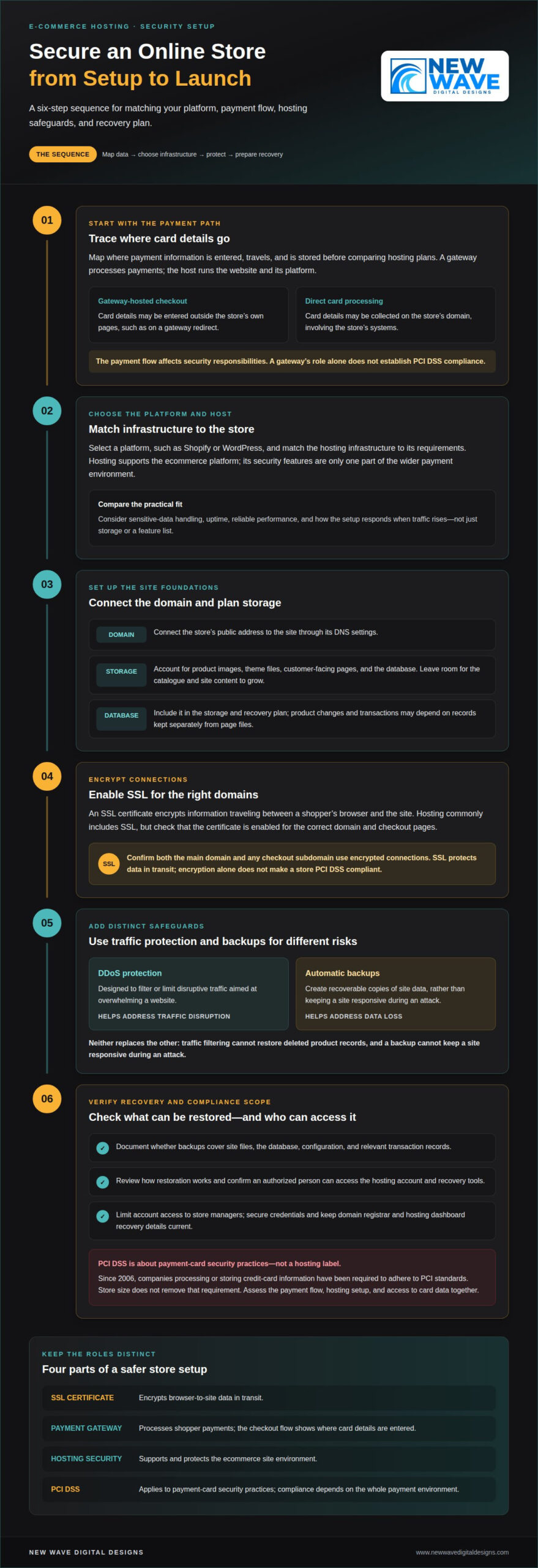
Payment gateways and hosting are complementary, not interchangeable. A gateway processes payments; the host runs the website and its platform. For example, a checkout that redirects shoppers to a gateway to enter card details differs from one that collects card data directly on the store’s domain. The gateway’s role doesn’t by itself establish that the store meets PCI DSS requirements. Map where card information enters, travels, and is stored before comparing hosting plans.
| Option | Primary role | Security criterion | PCI DSS relevance |
|---|---|---|---|
| SSL certificate | Encrypts browser-to-site data | Protects information in transit | Supports security, but isn’t compliance by itself |
| Payment gateway | Processes shopper payments | Shows where card details are entered | Payment flow shapes applicable controls |
| Hosting security | Supports the ecommerce platform | Protects the site environment | Must be considered alongside payment handling |
Choose by tracing card-data handling first, then comparing SSL coverage, hosting safeguards, and the gateway’s role in checkout.
How do I host an ecommerce website?
Build the setup around the store’s platform, domain, files, database, and transaction records. Establish backups and security controls before directing shoppers to the live site.
Storage, Domains, and SSL Certificates
Storage holds the site’s files, product images, and database; a domain gives shoppers a recognizable address. An SSL certificate encrypts information moving between a browser and the site. These components serve different purposes, so compare them separately in a hosting plan. For example, a product catalogue may need more file storage as images and product details grow, while the domain remains the store’s public address.
Start by selecting a platform, such as Shopify or WordPress, and matching the hosting infrastructure to its requirements. Connect the domain to the site through its DNS settings, then install or enable the SSL certificate for the correct domain and checkout pages. Confirm that both the main domain and any checkout subdomain use encrypted connections. This helps avoid sending shoppers to an unsecured version of the store.
Plan storage around the site’s actual content: product images, theme files, customer-facing pages, and the database. Leave room for growth rather than treating the current catalogue as permanent. A hosting plan’s stated storage capacity is useful only if the store can also access and restore its files. Include the database in the plan, since product changes and transactions may depend on records stored separately from page files.
DDoS Protection and Automatic Backups
DDoS protection is designed to filter or limit disruptive traffic aimed at overwhelming a website. Automatic backups serve a different purpose: they create recoverable copies of site data. Neither replaces the other. Traffic filtering cannot restore deleted product records, and a backup cannot keep a site responsive during an attack. Compare both controls as distinct parts of the hosting arrangement.
Before launch, document what each backup covers: site files, the database, configuration, and relevant transaction records. Establish how restoration works and which account can authorize it. Account verification matters because a backup is useful only when an authorized person can access the hosting account and recovery tools. Secure account credentials and keep recovery details for the domain registrar and hosting dashboard current.
- Confirm that backups include both files and database content.
- Review whether backup copies can be restored to the hosting environment.
- Limit account access to people responsible for managing the store.
- Keep a separate record of domain and hosting account recovery details.
For a managed database, determine how its records are backed up alongside the storefront. A database may contain changing product information, customer accounts, and transaction-related records, so a copy of image files alone won’t restore the whole store. Align backup procedures with the platform’s update process: preserve a recoverable copy before software changes, then confirm that essential pages and checkout functions work afterward.
Hosting choices should also account for maintenance. Software updates can change how themes, plugins, and databases interact, so sequence updates carefully rather than applying them during a busy sales period. A considered hosting setup connects storage, domain configuration, SSL, backup access, and traffic protection in one operating plan. This gives the store a clearer path to maintain uptime and recover its infrastructure when changes or disruptions affect it.
Uptime, reliability, and traffic surges
Match hosting capacity to everyday demand and peak traffic. Uptime, storage, bandwidth, and scaling options each shape how reliably shoppers can browse and check out.
Uptime and Traffic Surges
Uptime describes how consistently a store remains accessible; traffic capacity concerns how well it handles visitor demand. Hosting plans should accommodate stores ranging from 100 visitors per day to 1 million or more. Shared hosting may suit stores with no more than 200-300 visitors per day, while low-end VPS/VDS servers can serve stores with 1,000 visitors per day.
For shared hosting, another useful indicator is concurrent demand: an eCommerce website with up to 250 unique visitors online at any time can use shared hosting. These measures describe different things, daily visits and simultaneous visitors, so don’t treat them as interchangeable. Compare your store’s busy periods with the type of traffic limit a plan describes.
As demand grows, VPS/VDS offers a middle step between shared and dedicated infrastructure. The most advanced VPS/VDS servers can serve stores with 50,000 visitors per day. Dedicated servers are recommended for online stores receiving more than 10,000-50,000 visitors per day. Use these figures as capacity distinctions, not as a guarantee of performance for every store.
Storage, Bandwidth, and Traffic Limits
Storage holds site files and data; bandwidth describes the data transferred as shoppers load pages, images, and checkout steps. Traffic limits may be expressed as visits or concurrent users, so compare the unit as carefully as the capacity. A product launch, for example, may raise simultaneous visits even when the store’s usual daily traffic remains modest.
Before choosing a plan, estimate the size of product images and other site assets, then consider the data transfer they generate. A content delivery network (CDN) can distribute site assets across locations, helping deliver them to visitors without relying on one server for every request. CDN support and scalable capacity address different needs: delivery efficiency and available computing resources.
Performance also affects the shopping journey. The difference between a store loading in 2 seconds and one loading in 6 seconds can shape customer experience. One reported figure states that 53% of customers abandon a website if it takes longer than 3 seconds to load. Assess loading speed alongside uptime and capacity, rather than assuming extra storage alone will improve performance.
To compare hosting costs, consider the plan’s capacity, managed support, storage, and scaling path together. A low-cost entry tier may require an upgrade as traffic rises; a scalable option may offer a clearer path without changing the whole setup. Choose shared hosting for modest demand, then consider VPS/VDS or dedicated hosting as the store’s traffic and resource needs increase.
What is eCommerce hosting?
Ecommerce hosting is the infrastructure and hosting service that makes an online store accessible, supports its software, and serves its pages. In 2026, compare hosts by security controls, uptime, and performance, then match their features to your platform and store’s needs.
Which web hosts are best for secure e-commerce websites in 2026? The best fit is a service with suitable security features, an uptime target over 99%, and resources that match the store’s traffic. How do providers compare? Assess each against the same criteria, including encryption, malware scanning, DDoS protection, storage, and performance.
SSL, Malware Scanning, and DDoS Protection
SSL certificates encrypt information in transit between a shopper’s browser and the store. Malware scanning looks for harmful code, while DDoS protection aims to limit disruptive traffic targeting the site. These features address distinct risks, so an SSL certificate alone doesn’t cover malware or traffic attacks. Compare each safeguard separately, including whether it’s part of the hosting service or configured through another tool.
For example, a WordPress store using WooCommerce may rely on extensions, themes, and checkout components. Each adds a maintenance consideration, so pair encryption with a process for scanning and applying software updates. A hosting provider’s security features should fit the platform’s setup rather than appear as disconnected items on a plan comparison page.
Hosting Plan Features and Storage
A hosting plan combines resources and features that support the online store, including file storage and access to computing resources. Its value depends on how well those features fit the store’s platform and workload. For example, image-heavy product pages use more storage than a simple catalogue, while a growing WooCommerce database needs room for expanding store records.
Managed hosting can include provider-led maintenance for parts of the hosting environment, while other plans leave more configuration to the store operator. Compare which tasks the service covers, how storage can scale, and whether the platform is supported. A plan designed around WooCommerce may offer store-specific management features, unlike general-purpose hosting configured for varied websites.
Provider Security and Encryption
Provider security concerns the environment running the site; encryption protects data moving between the store and its visitors. Modern hosting commonly includes SSL certificates, but that feature doesn’t describe every security control. Compare encryption alongside malware scanning, DDoS protection, and how the provider manages the infrastructure. Each addresses a different part of the store’s security.
To make a practical comparison, use the same checklist for each hosting service:
- Confirm the plan supports the store’s platform, such as WordPress with WooCommerce.
- Compare SSL, malware scanning, and DDoS protection as separate features.
- Review storage capacity and the path for scaling resources as the store grows.
- Compare uptime commitments and performance tools, including any CDN support.
An uptime figure over 99% is one feature buyers look for in ecommerce hosting, but uptime alone doesn’t describe page speed or security. Choose the service whose platform support, safeguards, storage, and performance resources align with the store’s current needs and growth plans.
Choosing a web host and evaluating uptime
Compare hosting plans by uptime, platform fit, performance, and available technical support. A feature list matters only when it addresses your store’s actual needs.
How to choose secure hosting for Shopify, WooCommerce, or Magento? Start with the commerce platform, then compare its hosting requirements with each plan’s security, uptime, performance, and support. Shopify, WooCommerce, and Magento have different operating models, so use platform compatibility as the first filter rather than assuming one plan suits every store.
Uptime Guarantees and Customer Support
An uptime commitment describes the availability a web host targets; support explains how it handles technical issues. Uptime over 99% is a feature people look for in e-commerce hosting. Read the commitment alongside its measurement period, exclusions, and stated remedy, since the percentage alone doesn’t describe what happens during downtime.
Support also varies by plan. Compare the available channels, the issues covered, and whether help includes hosting configuration or only account questions. For a WordPress store, for example, distinguish help with the hosting environment from help with the store’s theme or plugins. The right support scope depends on which technical tasks your team manages.
Shopify, WooCommerce, and Magento Hosting
Platform fit is a practical comparison point. Shopify is a hosted commerce platform, while WooCommerce runs on WordPress and Magento has its own hosting needs. Compare whether a hosting plan supports the platform’s setup and how much server management it expects from you. A plan built for WordPress may fit WooCommerce, but don’t assume it suits every commerce platform.
How do e-commerce hosting providers compare on security, uptime, and performance? Use the same checklist for each: compare security controls, uptime terms, loading performance, and platform support. Then consider the workload. A WordPress store with multiple plugins may need different technical oversight from a Shopify shop using its hosted environment. Match the plan to both the platform and your operational responsibilities.
Performance deserves its own measure. The research figures state that 70% of customers would change their minds about buying from a vendor when its website works slowly. Compare page-loading results under ordinary browsing and busy periods, not just a provider’s broad performance claims. Also consider whether a plan can scale resources as store traffic grows.
Use this shortlist to structure the comparison:
- Match the hosting service to Shopify, WooCommerce, or Magento.
- Compare uptime terms and the scope of technical support.
- Assess security features and site performance together.
- Choose a hosting plan with a clear path for changing resource needs.
For a store that needs coordinated website support and hosting security, explore hosting security support as part of its technical plan.
New Wave Digital Designs: Hosting and Security
New Wave Digital Designs provides Hosting and Security for businesses that need help aligning their store’s infrastructure with its platform. This is a natural next step if you’re reviewing safeguards, planning a platform change, or preparing your online store for growth.
For stores built on Shopify, WordPress, or SquareSpace, website design and hosting choices should work together. The platform shapes how a store is built and managed, while hosting and security support the environment behind it. A considered setup brings these pieces together without treating every store as identical.
If you’re ready to discuss your e-commerce website’s hosting or security needs, contact New Wave Digital Designs.
Build a foundation that can grow with your store
Your store’s digital foundation should evolve alongside its catalogue, operations, and customer expectations. Treat secure hosting for e-commerce websites as an ongoing part of planning, not a one-time setup. As your business changes, revisit whether its infrastructure still supports the way you sell and serve shoppers.
New Wave Digital Designs offers Shopify Website Design, WordPress Website Design, and SquareSpace Website Design, helping shape a store around its chosen platform. A cohesive approach to design and hosting can clarify future decisions, from refining the shopping experience to planning the next stage of your online business.
When you’re ready to discuss the right direction for your store, contact New Wave Digital Designs. Thoughtful choices today can give your ecommerce business a more considered foundation for what comes next.
Frequently Asked Questions
Which cloud hosting is best for e-commerce sites?
The best cloud hosting option is the one that fits your commerce platform, expected traffic, and management needs. A store on a hosted platform has different infrastructure responsibilities from a WordPress store running WooCommerce. Compare platform compatibility, available security controls, scaling options, and support scope. For example, a store expecting seasonal traffic changes should prioritize a clear way to increase resources without rebuilding its entire hosting setup.
What security features should e-commerce hosting include?
Look for encryption in transit, malware scanning, DDoS protection, and a practical backup and recovery process. These controls address different situations: encryption protects data moving between a shopper and the site, while backups help restore site information after an incident or change. For a WordPress store, include the hosting environment and installed software in the security review, since both contribute to the store’s overall exposure.
How much does secure e-commerce hosting cost in the United States?
Hosting costs vary with the platform, storage and computing resources, traffic capacity, security features, and level of management. A basic plan and a managed environment for a high-demand store involve different infrastructure needs, so compare what each plan includes rather than price alone. For Hosting and Security services, request a quote; costs depend on the store’s platform, requirements, and support scope.
What PCI DSS requirements apply to e-commerce hosting and payment processing?
Businesses processing or storing credit-card information must adhere to PCI standards; using an online checkout doesn’t make payment security irrelevant. The applicable controls depend on how card data enters, moves through, and is stored in the store’s payment environment. Map the payment flow, including the gateway and any systems handling card information, then align the store’s security practices with that scope. PCI DSS concerns payment-card security, not hosting alone.
What SSL, firewall, malware scanning, and backup protections do hosts provide?
Hosting services differ, so assess each protection as a separate control rather than assuming every plan includes the same package. SSL encrypts connections, malware scanning looks for malicious code, firewalls filter network traffic, and backups preserve recoverable copies of site data. For example, confirm whether the backup process covers the database as well as website files. Also distinguish traffic filtering from data recovery: neither control replaces the other.
What are the risks of shared hosting for an online store?
Shared hosting places a store on infrastructure used by other websites, so resources may be shared. This can matter during traffic peaks or when a store needs more control over its environment. A small shop with modest demand may find shared hosting suitable, but a store expecting sharp surges should compare capacity limits and the upgrade path. Consider the platform, checkout workload, and concurrent traffic together.
How do I evaluate a host’s uptime guarantees, incident response, and support?
Read the uptime commitment alongside its measurement period, exclusions, and stated remedy, then examine the provider’s incident process. Look for clear instructions for reporting an outage, updates during a disruption, and support coverage for the hosting environment. Separate infrastructure troubleshooting from help with store themes or plugins. For example, a WordPress merchant should understand whether technical support covers the server, the WordPress installation, or both.
How to migrate an e-commerce website to a more secure host?
Back up the store’s files and database, and confirm the copies can be restored to the new hosting environment. Connect the domain through its DNS settings, enable SSL for the main domain and checkout pages, then verify that essential pages and checkout functions work.