WordPress Web Design: Sites That Work as Hard as You

A polished WordPress site should do more than look current. It should help your business move forward. If your existing website feels dated, difficult to use, or out of step with your brand, consider what wordpress website design services should deliver beyond a fresh visual layer.

A strong site starts with your goals, audience, and content, then brings them together in a clear, responsive experience. The right structure helps visitors find information, understand your services, and take a useful next step. It also gives you a foundation you can build on without having to manage every technical detail yourself.

This article explains how strategic WordPress design can turn business priorities into a practical digital experience. You’ll find guidance on brand, navigation, responsive design, project planning, and ongoing support, along with ways to compare design approaches. The aim is a website shaped around your business, not just a theme.

Key Takeaways

  • Understand what wordpress website design services should include, from strategic planning to a site experience that guides visitors toward useful next steps.
  • Learn how to connect your brand, audience needs, page hierarchy, and navigation into a cohesive website.
  • Compare template-led setups, tailored designs, and redesigns to identify the approach that best fits your content and future plans.
  • Use a focused project brief to clarify goals, audience, existing content, brand assets, and required functionality.
  • See how New Wave Digital Designs brings strategy, design, and development together to prepare a responsive WordPress website for launch.

Why WordPress Website Design Services Matter for Your Business

A business website can shape a visitor’s first impression and influence whether they take a closer look. A polished appearance helps a site feel professional, but visitors also need to understand what you offer, find answers, and see what to do next. Effective wordpress website design services connect those needs to business goals, creating an experience that is both visually coherent and useful.

WordPress website design services combine planning, visual design, development, and launch preparation to turn business goals and content into a functional website. They involve more than installing a theme. A theme provides a starting point, but it doesn’t decide which pages matter, how information should flow, or how the experience should reflect your brand. Those decisions depend on your business and the people you want to reach.

WordPress, a popular content management system, provides a platform for creating and managing website content. The platform is only one part of the result. Strategy, design, and technical execution determine how well the site serves visitors and supports your business.

What do WordPress website design services include?

A project typically starts by clarifying business priorities, intended audiences, existing content, and the actions the site should support. Next, information architecture organizes pages and their relationships. Visual design establishes the look and feel, while development brings the approved layouts and functions to life in WordPress. Before launch, content and site functions need to be reviewed so the finished pages are ready to use.

The scope should fit the project. A service business with a few core offerings may need a different page structure from a company with detailed resources or several audience groups. Design and development create the website; ongoing maintenance, hosting and security, and marketing support such as organic SEO can help support it after launch.

How does a business website serve its audience?

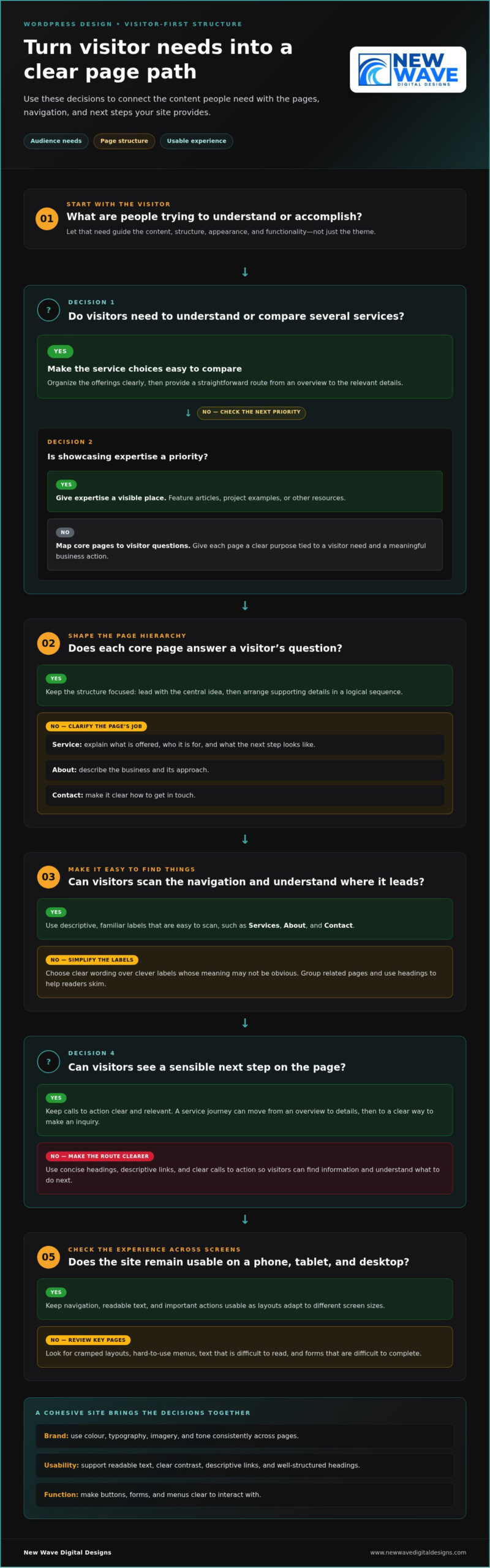
Visitors arrive with questions, not a map of your organization. A clear page hierarchy helps them find essential information: concise headings set expectations, navigation groups related pages, and calls to action point to a sensible next step. For example, someone comparing services should be able to move from an overview to relevant details, then find a clear way to make an inquiry.

Consistent branding helps the experience feel like one business across every page. Colour, typography, imagery, and tone can reinforce recognition and make information feel cohesive. Clear contrast, readable text, descriptive links, and well-structured headings also make content easier to use. Treat these details as part of the design, not as finishing touches.

Responsive design adapts layouts and interactions to different screen sizes, keeping the site usable on a phone, tablet, or desktop. Navigation may need to change form, text must remain readable, and important actions should be easy to reach. Review key pages at different screen sizes to catch cramped layouts, hard-to-use menus, and forms that are difficult to complete.

How a Thoughtful WordPress Design Connects Brand, Content, and Function

A cohesive website takes more than arranging attractive elements on a screen. It requires deliberate choices about what your business needs to communicate, what visitors are trying to accomplish, and how the site can help them connect. Discovery brings those questions into focus and turns business priorities and audience needs into requirements for the content, structure, appearance, and functionality.

For example, if visitors need to understand several services, make the offerings easy to compare and provide a clear path to more detail. If the priority is showcasing expertise, give articles, project examples, or other resources a visible place. Strong wordpress website design services align these choices so the content and interface work as one experience.

How should WordPress website content be structured?

Start by matching core pages to the questions visitors are likely to have. A service page can explain what’s offered, who it’s for, and what the next step looks like. An about page can describe the business and its approach, while a contact page should make it clear how to get in touch. Give each page a purpose tied to a visitor need and a meaningful business action.

Choose navigation labels that are descriptive, familiar, and easy to scan. Terms such as “Services,” “About,” and “Contact” orient visitors more quickly than clever labels whose meaning isn’t obvious. Within each page, use a logical sequence of headings and sections. Lead with the central idea, then organize supporting details so readers can skim and understand.

How do visual design and functionality work together?

Visual choices influence how content feels and how easily people can use it. Typography should support comfortable reading and make headings distinct from body text. Colour can express your brand while maintaining sufficient contrast. Imagery and graphic details can add personality, but they should reinforce the message rather than compete with it. Buttons, forms, and menus should make it clear how to interact with the site.

Plan responsive layouts from the start. Consider how headings wrap, how navigation changes, and whether important actions remain usable on narrower screens. A layout designed only for desktop can feel cramped on a phone or make interactions awkward. Responsive design, clear navigation, and usable interactions work together to make the next step easier on every screen.

When a site needs a distinctive visual system, custom WordPress theme design can shape the experience around your brand’s content and functional needs. Thoughtful customization lets design and structure work together instead of forcing the business into a generic pattern. New Wave Digital Designs provides custom WordPress website design tailored to your goals, bringing brand, content, and function into a coherent whole. Explore WordPress website design as a foundation for your next stage.

Template, Tailored Design, or Redesign: Which WordPress Approach Fits?

There isn’t one right route for every business. A template-led setup can suit a focused set of needs, while tailored design offers more control over brand expression and site structure. A redesign may make sense when an existing website no longer reflects the business or helps visitors find their way. Compare the options against your current priorities and likely changes, rather than assuming one approach is always better.

Template-led setup

Brand flexibility: Works within the selected theme’s visual system, with room for project-specific adjustments.

Content needs: A practical fit when the page types and content are relatively straightforward.

Functionality: Assess the theme’s available layouts against the site’s actual requirements.

Future changes: Consider whether the starting structure can accommodate planned pages and evolving needs.

Tailored WordPress design

Brand flexibility: Allows visual direction and page structure to be shaped around the business.

Content needs: Useful when pages need a distinct hierarchy or content has specific presentation needs.

Functionality: Design and build decisions can reflect the functions the project calls for.

Future changes: Plan the structure with anticipated content and business developments in mind.

Redesign of an existing site

Brand flexibility: Creates an opportunity to bring an outdated or inconsistent presentation into alignment with the current brand.

Content needs: Begins with reviewing what remains useful, what needs revision, and what’s missing.

Functionality: Can address friction such as confusing navigation or pages that no longer support current priorities.

Future changes: Reconsider the site’s structure so it can serve the business as its goals evolve.

When can a template-led WordPress site be a practical fit?

A theme provides a defined starting point, with established page layouts and a visual framework that can be configured for a project. This can work well when the site has a focused purpose, familiar page types, and functionality that fits the theme. Flexibility varies, so compare immediate needs with how distinctive the brand experience needs to be. A theme that fits today may become restrictive if the site’s content or requirements expand.

When should a business consider tailored design or redesign?

Look beyond appearance. An outdated presentation, unclear navigation, content that’s difficult to organize, or changing business goals can all signal that the current structure needs attention. Tailored design can align page layouts and visual direction with the brand, while a redesign can reshape an existing site around current priorities. Neither requires rebuilding everything by default. Match the scope to the problem you need to solve.

Whichever approach you choose, plan for support after launch. Website maintenance services help keep a site updated and functional as its content and needs change. The best wordpress website design services start with a clear view of what your business needs now and what it may need next.
WordPress Web Design: Sites That Work as Hard as You

Prepare for a WordPress Website Design Project with a Clear Brief

A focused brief gives a website project a clear starting point. It turns broad ambitions into decisions about what the site needs to say, who it needs to serve, and what visitors should be able to do. Clear goals and organized content give design decisions useful direction. They also help keep scope, page priorities, and visual choices connected as the work moves toward launch.

What should a WordPress design brief contain?

Before design begins, gather the information that will shape the project. You don’t need every detail resolved, but a practical brief should distinguish essential requirements from ideas to consider later. Use this checklist to prepare:

  1. Business objectives: Identify what the website should support, such as explaining services, generating inquiries, or presenting expertise.
  2. Audience and actions: Describe the people the site is for, their likely questions, and the useful next step you want each priority page to encourage.
  3. Priority services and pages: Name the offerings that need the clearest presentation and the pages visitors will need to understand them.
  4. Existing content: Gather current website copy and resources, noting what should be kept, updated, replaced, or created.
  5. Brand assets and visual direction: Collect logos, brand colours, typography guidance, and examples that illustrate the look and feel you’re aiming for. Use examples to clarify preferences, not dictate a copy.
  6. Required functionality: Describe essential features, such as forms or specific content displays. Separate must-haves from optional ideas so they don’t become fixed requirements without a clear purpose.

This preparation helps clarify the project as a whole. It also makes it easier to spot missing content or competing priorities before they affect the site structure.

How can content and feedback keep a project focused?

Assign responsibility for supplying, reviewing, and approving content. If several people contribute, decide who will gather edits and provide consolidated feedback. This keeps the process coherent and makes conflicting suggestions easier to resolve. Set review points before work progresses, so feedback arrives in time to inform design decisions.

Keep feedback anchored to the brief: Does a proposed change serve an audience need, a priority page, or a stated business objective? That question is more useful than isolated preferences because it gives everyone a shared basis for decisions. Search visibility can also inform content planning. Consider relevant topics and page purposes early to align what the site communicates with what prospective visitors may be looking for. Organic SEO can be part of that planning.

A well-prepared brief won’t dictate every design detail. It creates room for creative thinking while keeping the work grounded in business priorities. New Wave Digital Designs brings strategy, brand, and development together through custom WordPress website design. Start planning your WordPress website with a clear sense of what it needs to accomplish.

Work with New Wave Digital Designs on Your WordPress Website

A strong website takes thoughtful decisions, not a one-size-fits-all formula. New Wave Digital Designs creates custom, responsive, brand-aligned WordPress websites for small and medium-sized businesses. The work brings business goals, visual identity, and technical execution together to shape a site that reflects your brand and gives visitors a clear, useful experience.

Each project is tailored to its goals and content. Start by identifying what the website needs to do, then use those priorities to guide its design and structure. Keep page content, visual choices, and functionality connected to the purpose of the site as it takes shape.

What does a collaborative website design process look like?

A WordPress website design project starts with understanding the business, audience, existing content, and intended outcomes. Those insights inform the site structure and visual direction, from the pages visitors need to the way the brand comes through in typography, colour, and layout.

Design and development bring that direction to life in WordPress. Reviewing the developing site helps identify details to refine and keeps the work aligned with agreed priorities. Before launch, review key content and functions so the site is ready for visitors. Each decision should build on the project’s goals and content.

Clear communication helps keep collaboration productive. Bring feedback together around the project’s goals to distinguish useful refinements from personal preferences that don’t serve the visitor or the brand. That shared focus makes it easier to move from the initial direction to a coherent, launch-ready website.

How can the website continue to evolve after launch?

Launch is a milestone, not the end of a website’s life. Ongoing website maintenance helps keep a site updated and functional as content and business needs change. Managed hosting and security support the care of its underlying environment. These services complement design by helping businesses plan for the site beyond its initial build.

As priorities develop, organic SEO can inform how site content is organized and presented for people searching for relevant information. Google Ads and Bing Ads management can also support broader digital marketing plans. These services serve different purposes, and their role depends on your goals. Treat them as considered parts of an overall approach, not automatic outcomes of a new design.

If you’re ready to explore a custom WordPress website shaped around your business, audience, and content, explore WordPress website design services with New Wave Digital Designs. Start planning a responsive, brand-aligned site built with room to grow.

Give Your Website a Clear Direction

Your next website doesn’t need to solve every future challenge at once. It needs a thoughtful foundation that reflects where your business is headed and can adapt as your priorities develop. Treat the project as a chance to make intentional choices about the experience you want people to have, not simply to replace what’s already on the screen.

The right wordpress website design services can turn that direction into a digital presence built around your business. With a clear vision and a collaborative process, it’s easier to shape the path from early ideas to a launch-ready site.

Ready to take the next step? Explore WordPress website design services with New Wave Digital Designs and start shaping a website that can grow with your business.

Frequently Asked Questions

Can a WordPress website be designed to match my business brand?

Yes. A WordPress website can be designed around your brand’s visual identity, audience, content, and goals. Beyond using a logo and brand colours, consider how photography, button styles, page layouts, and tone work together across the site. A service page and an about page, for example, can serve different purposes while still feeling like parts of the same business. Consistency helps visitors recognize your brand and move through the site with confidence.

Can I redesign my WordPress website without changing its domain?

Yes. A redesign can often keep your current domain because the domain name and site design are separate. Before launch, make an inventory of important existing pages and their URLs. If a page address needs to change, plan an appropriate redirect so visitors and search engines have a path to the updated page. Include hosting and technical setup in your project planning alongside the design work.

Does WordPress website design include search engine optimization?

Design can support SEO, but it isn’t a complete search optimization strategy or a promise of rankings. Clear page organization, descriptive headings, and content that addresses visitor questions can give search engines and people useful context. Broader SEO work may involve keyword research, content development, and technical considerations. wordpress website design services can be planned alongside organic SEO, with activities shaped by your business priorities and website needs.

Can a WordPress website support online sales?

Yes, WordPress can support a website with online selling functionality. The right structure depends on what you sell and what customers need to do, from reviewing product details to completing a purchase. Before design begins, outline the customer journey, the information each product needs, and the essential selling functions. That clarity helps define a suitable project scope without treating every possible feature as a requirement.

Do I need to provide website copy and images for a WordPress design project?

You’ll need a content plan, though every item doesn’t have to be final before a project starts. Gather current copy, service or product details, logos, and images that represent the business. Decide who will draft missing materials, review edits, and approve final content. Assigning one person to collect feedback, for example, can prevent conflicting revisions and help ensure page layouts suit the information visitors will see.

Can an existing WordPress website be maintained after it is redesigned?

Yes. Redesign and maintenance are distinct parts of a website’s lifecycle, and ongoing care can continue after launch. Depending on the site’s needs, this may include website maintenance, managed hosting, and security. Consider how updates, content changes, and site support will be handled before the redesign is complete. Planning for continued care connects the launch to the practical work of managing the site over time.

Will my WordPress website work on phones and tablets?

A responsive WordPress design is intended to adapt to phones, tablets, and desktop screens. Check more than whether the page fits: menus should be easy to use, text should remain readable, and forms and other interactive elements should work in a narrow layout. A contact form, for instance, should be comfortable to complete on a phone. Reviewing key pages at different screen sizes helps identify issues before visitors encounter them.
Squarespace Website Customization: Shape a Site Around Your Brand

A Squarespace template is a starting point, not the finish line. Squarespace website customization can turn that framework into a site that feels unmistakably yours, helping visitors understand what you offer and what to do next.

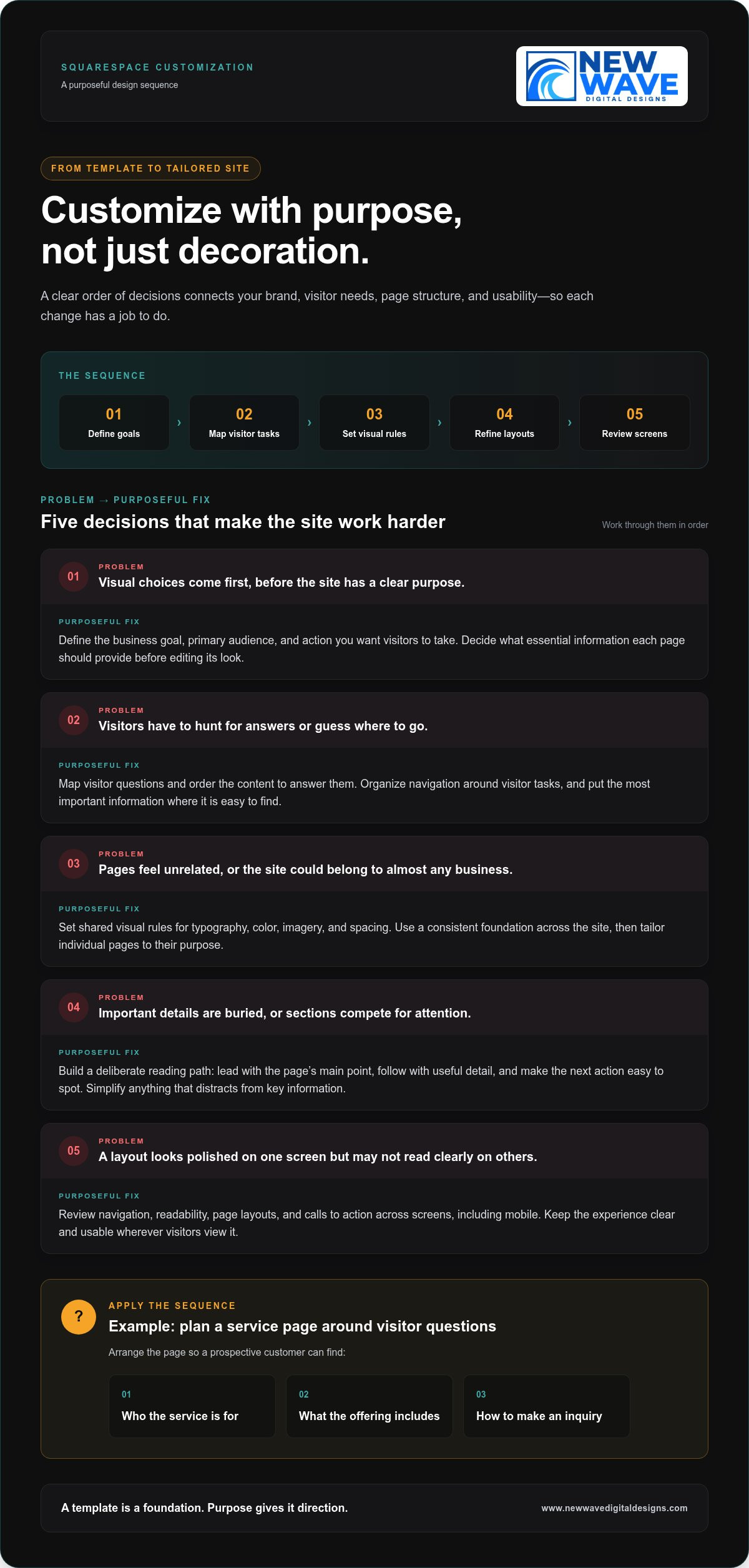
If your site still looks much like its original template, or every design option seems equally urgent, you’re not alone. It’s easy to focus on colors and visual flourishes before considering how each choice affects clarity, mobile usability, and business goals. A distinctive website needs more than attractive details. It needs a clear order of decisions.

This guide explains how to customize your Squarespace site with purpose, from defining your visual identity to refining page layouts, typography, imagery, and calls to action. You’ll also learn how to review the experience on mobile screens and build a polished, responsive site that supports your business. With a considered approach, the template becomes a foundation, not a limitation.

Key Takeaways

  • Thoughtful squarespace website customization can make a template feel distinct by aligning its structure, visuals, and content with your brand.
  • Start with business goals and visitor needs, then shape the visual direction and refine pages in a deliberate sequence.
  • Built-in editing tools work well for straightforward changes; more complex requirements can benefit from professional design support.
  • Review navigation, readability, mobile layouts, and calls to action to keep the experience clear across screens.
  • A tailored Squarespace design process can bring brand expression, responsive usability, and business priorities together in one cohesive site.

What Squarespace Website Customization Can Do for Your Brand

A template gives a website a starting structure, but it can’t define what makes your business distinct. Effective squarespace website customization brings brand expression and visitor needs into the same design process. It adapts structure, visuals, content, and interactions so the site feels recognizably yours and helps people find the information or next step they came for.

Customization is a coordinated set of brand, structure, and usability decisions, not a collection of decorative edits. Changing colors or replacing stock imagery can help, but those changes won’t fix unclear navigation or explain your offer more effectively. Strong website design principles connect appearance with organization and function. Start with what visitors need to know and do, then use those priorities to guide visual choices.

Which parts of a Squarespace website can you customize?

Customization can shape page sections, content blocks, typography, color, spacing, imagery, and navigation. Site-wide design settings establish a consistent foundation, such as shared type styles and a coherent palette. Page-specific adjustments then give each page a clear purpose. A service page may need an explanation of the offering and an inquiry path, while an about page may bring the business story forward.

Think in layers. First, set visual rules that should carry across the site. Then refine individual page layouts, choosing content order and spacing to make important information easy to scan. Give navigation the same strategic attention: organize it around visitor tasks rather than internal department names. Editor terminology and available controls can change, so consult current Squarespace documentation when following interface-specific instructions.

When does a template need more than surface-level changes?

Look beyond the color palette if pages feel inconsistent, visitors have to guess where to go, or the overall impression could belong to almost any business in your field. These can be signs that the issue is with the site’s structure or message, not just its visual finish. A polished homepage can’t compensate for service pages that explain offerings differently or bury essential details.

Use your business positioning and audience expectations to set priorities. For a service business, a prospective customer may want to understand what a service covers, who it is for, and how to take the next step. Make those answers easy to find before adding decorative effects. This keeps design choices connected to the work the site needs to do.

If the template’s basic arrangement doesn’t support your content or brand character, consider a deeper redesign instead of layering on disconnected adjustments. New Wave Digital Designs creates custom Squarespace designs around each business’s brand and goals. The custom Squarespace website design guide explores how a template can become a more distinctive digital experience. A thoughtful result feels cohesive because every element has a purpose.

How to Customize Squarespace Around Your Brand and Visitors

A strong customization process starts with purpose, not a font menu. Decide what the site needs to accomplish, what visitors need to understand, and which design choices will help them move forward. This keeps squarespace website customization focused on meaningful improvements rather than a series of unrelated edits.

Define your goals, map visitor tasks, set visual rules, refine page layouts, and test the experience across screens. Keep that sequence in view as you work. Each step gives the next one a foundation, helping the site’s appearance and function develop together.

Start with brand direction and the visitor journey

Identify your primary audience, the action you want them to take, and the essential information each page should provide. A service business, for example, might organize a service page to explain who an offering is for, what it includes, and how to make an inquiry. Treat this as a planning example, not a formula. Let real customer questions guide the page’s content and order.

Before editing, establish visual priorities for typography, color, imagery, and spacing. A short set of shared rules helps pages feel related, even when their layouts differ. Arrange content in the order visitors need it, answering immediate questions before adding detail. The U.S. Web Design System principles also emphasize user needs and consistency. Use these as touchstones when deciding whether a design choice clarifies the visitor journey or merely decorates it.

Refine page layouts, content blocks, and visual hierarchy

Once the direction is clear, use page sections and content blocks to create a deliberate reading path. Lead with the page’s main point, follow with the details visitors need to assess it, then make the next action easy to spot. Headings should tell visitors what each section covers. Calls to action should use clear language and appear where they make sense in the journey.

Build consistency through repeatable choices, such as heading styles, button treatments, and spacing patterns. A shared design system prevents each page from taking on an unrelated look, while still allowing layouts to serve different purposes. Avoid adding sections or visual effects just to fill space. If an element competes with key information, simplify it.

  • Define: Write down the main business goal and the visitor action each page should support.
  • Map: List visitors’ questions and arrange the content in the order those questions arise.
  • Set: Establish shared rules for type, color, imagery, and spacing.
  • Refine: Adjust sections, blocks, and calls to action to strengthen the page hierarchy.
  • Test: Review finished pages on desktop and mobile, then fix anything that feels unclear or crowded.

For a deeper look at how brand needs can shape a site beyond its starting layout, explore this custom Squarespace design approach. If you’re ready to bring those priorities into a tailored, responsive website, learn about Squarespace website design with New Wave Digital Designs.

Built-In Squarespace Tools or Professional Customization?

There isn’t one right level of customization for every business. Built-in Squarespace editing tools give site owners control over many routine updates, while professional design can bring strategy and cohesion to more complex needs. The useful question isn’t which option is universally better. It’s which one fits your goals, available time, brand clarity, and the complexity of the changes you’re considering.

Compare the options across four dimensions: control, time, consistency, and complexity. DIY editing lets you make straightforward changes yourself, but you’ll also make the design decisions and review each page. A design partner brings an experienced perspective and can coordinate details across the site, particularly when changes affect structure, content, and visitor pathways together.

When are Squarespace’s built-in editing tools enough?

Built-in editing is often a good fit when your site structure already works and your brand direction is clear. You might update text, replace imagery, adjust page sections, refine spacing, or make a modest navigation change using the editor’s controls. These focused adjustments are manageable when you know what needs to change and can check the finished pages for consistency.

Before following a step-by-step tutorial, review current Squarespace documentation. Interface labels and capabilities can change, so an older walkthrough may not match the controls you see. Keep a simple record of your brand choices, too. Shared rules for typography, colors, and button styles make future DIY edits less likely to leave each page looking like a separate design.

A practical test: if you can describe the change, make it with the available controls, and assess its effect across relevant pages and screen sizes, a professional redesign may not be necessary. Preserve your time for work only you can do, such as shaping your business’s message and checking whether each page communicates it clearly.

When can a custom design partner add value?

Professional design can help when your brand has nuanced needs, page styles have drifted apart, or visitors struggle to find important information. The challenge may go deeper than an isolated visual adjustment. A designer can consider how imagery, typography, content hierarchy, and navigation work together, then align those decisions with your audience and business goals.

For example, if a service page has strong visuals but leaves visitors unsure what the service involves or how to proceed, adding decorative elements won’t resolve the underlying issue. A considered redesign can clarify the order of information and make the next step more apparent while keeping the visual language coherent across the site.

  • Use built-in editing for focused updates to a sound structure and established brand system.
  • Consider professional customization when the work involves connected changes to content, page structure, brand expression, and visitor pathways.

New Wave Digital Designs creates custom, responsive Squarespace websites tailored to brand and business needs. For a broader perspective on how strategic decisions shape a digital experience, explore this web design strategy guide. The right level of squarespace website customization makes your site clearer and more cohesive without adding complexity for its own sake.

Squarespace Website Customization: Shape a Site Around Your Brand

A Practical Squarespace Customization Checklist for Quality and Usability

A site can look polished on a desktop and still be difficult to use on a phone. Treat your review as a quality check, not just a final visual glance. A successful design must remain clear, usable, and consistent across screens. Work through the checklist below on key pages, checking whether each design choice helps visitors understand information and take the next step.

Check responsive design, readability, and accessibility

Review important pages on desktop and mobile. Look for cramped text, content that feels out of order, buttons that are hard to reach, and elements that distract from the main action. Test navigation and calls to action directly. A layout that looks balanced on a large screen may not be as clear on a smaller one.

  • Hierarchy: Can visitors identify the page’s main heading and most important information quickly?
  • Navigation: Are labels understandable, and can visitors find key pages without guesswork?
  • Readability: Is body text comfortable to read, with enough spacing between paragraphs and sections?
  • Contrast and links: Is text distinguishable from its background? Do linked words describe where they lead instead of using vague labels such as “click here”?
  • Images and actions: Do image descriptions convey useful meaning where needed, and are calls to action easy to recognize?

Visuals should support the content, not obscure it. A large decorative element may establish a mood, but it shouldn’t push essential details out of view or make a page harder to scan. Accessibility controls and editor options can change, so consult current Squarespace guidance for specific settings. Assess the result on the actual page, not only in the editor.

Review content structure and search foundations

Check that each page communicates one clear subject. Its page title, headings, body copy, and internal links should reinforce the same topic rather than pull visitors in different directions. A page about a specific service, for example, should explain that service clearly and guide visitors toward a relevant next step. Remove headings that add no context and links whose purpose isn’t apparent.

  • Confirm that the page title accurately describes the content.
  • Use headings in a logical order to make sections easier to scan.
  • Link descriptive phrases to relevant pages so visitors know what to expect.
  • Give every page a useful purpose and a clear next action.

These checks connect usability with discoverability: clear content structure helps people and search engines understand what a page covers. For more on aligning site content with organic search, explore the organic SEO strategy guide. Thoughtful squarespace website customization brings presentation, accessibility-minded choices, and page purpose into one coherent experience.

If you want a tailored review of how your design and usability work together, explore Squarespace website design with New Wave Digital Designs.

Turn Squarespace Customization Into a Thoughtful Design Partnership

A website should reflect your business’s character and make its purpose clear to the people it serves. New Wave Digital Designs creates custom, responsive Squarespace websites tailored to each business’s brand and needs. The process brings visual identity and practical decisions together, shaping the site around more than a template’s default look.

A collaborative design process starts with your goals, audience, existing content, and priorities. From there, design choices take shape around how your business needs to communicate, while page structure gives visitors a coherent route through the site. Squarespace website customization is more considered when every decision has a reason, whether it clarifies an offer or makes a page easier to use.

What a tailored Squarespace design process should accomplish

Tailored design brings brand expression, page structure, and visitor needs together. That means developing a visual direction aligned with your business while organizing content so visitors can understand what you offer and where to go next. The goal is a cohesive experience, not simply a collection of distinctive-looking pages.

Responsive design carries that experience across screen sizes. Content should remain legible, navigation understandable, and important actions easy to find on desktop or phone. The layout may adapt, but the site’s character and purpose should remain recognizable. Make design decisions with these practical checks in mind, without assuming every screen should display content in exactly the same arrangement.

Plan your next Squarespace customization step

Before beginning a project, put together a short brief. Identify the pages that matter most, the business goals those pages should support, and the visual or structural issues you want to address. Note what already works, too. Preserving effective elements helps keep the work focused on meaningful improvements rather than change for its own sake.

  • Priority pages: Which pages matter most to your visitors and business?
  • Business goals: What should each page help visitors understand or do?
  • Design challenges: Where does the current experience feel unclear, inconsistent, or unlike your brand?

New Wave Digital Designs can shape a Squarespace design around those priorities and bring in related capabilities where they suit the project. Graphic design can support a consistent visual identity; organic SEO can inform how site content is organized and discovered. After launch, website maintenance and support can help you care for the site as your business and content evolve. These connected services can be tailored to the project’s needs.

A clear first step is to describe what you want your website to express and where the current experience falls short. Discuss a custom Squarespace website design with New Wave Digital Designs and start shaping a responsive site around your business, your brand, and the people you want to reach.

Shape Your Next Website Chapter

Your next step doesn’t need to be a complete redesign. Start with the page or experience that feels least connected to your brand, then decide what you want visitors to understand or do there. That clarity can reveal where your website has room to grow and which changes deserve attention first.

Thoughtful squarespace website customization turns that direction into a more cohesive digital presence. New Wave Digital Designs brings custom Squarespace website design and development together with graphic design, organic SEO, maintenance, hosting, and security, supporting both a site’s creation and its continued care.

Bring your priorities, questions, and ideas into the conversation. Discuss a custom Squarespace website design with New Wave Digital Designs and explore an approach shaped around your business. Your brand deserves a site that can evolve with it. A clear next step can begin that process.

Frequently Asked Questions

Can I customize a Squarespace website without coding?

Yes. You can make many common updates through Squarespace’s visual editing controls without writing code. For example, you can revise page text, replace images, adjust layouts, and update design settings using the available editor options. Code may be useful for specialized behavior or styling beyond those controls, but it isn’t a prerequisite for a distinctive site. Check Squarespace’s current help materials for interface instructions, since editor labels and options can change.

How much of a Squarespace website can I customize?

You can customize a broad range of a site’s presentation and content, including page structure, text, images, navigation, and visual styling. The practical limits depend on the platform’s current options and the change you have in mind. Squarespace website customization can also involve custom code, but more control may bring added complexity. Before changing several pages, test a small adjustment and check how it affects the wider site.

Can Squarespace customizations be reversed?

Many visual or content changes can be changed again by editing the affected page or design settings. Still, don’t assume every action has a simple undo path, especially if you remove content or alter code. Before a substantial round of edits, keep copies of important text and custom code, and record the original settings. Make changes in manageable stages so you can identify what to restore if the result doesn’t work.

Does custom CSS transfer when changing Squarespace templates?

Don’t assume custom CSS will work unchanged after a template or layout change. Styles written for one page structure may target elements that appear differently elsewhere, causing rules to stop working or affect unintended areas. Before a structural change, save a copy of your CSS and note what each rule is meant to do. Afterward, review the affected pages and revise or remove styles that no longer fit.

Can I customize a Squarespace website built by someone else?

Yes, if you have authorized access to the site, you can make changes even if someone else created it. First review its page structure, design settings, content, and any custom code so you understand how the elements relate. A quick audit can reveal which styling is shared across pages and where edits may have a wider effect. If the setup is unclear or inconsistent, a Squarespace design professional can assess the existing foundation before refining it.

Will a customized Squarespace website still be easy to update?

It can be, especially when the site follows clear design rules and the people maintaining it understand how key pages are structured. Keep commonly reused elements consistent, document unusual code or design choices, and avoid adding complexity that future editors won’t understand. Before handoff, walk through routine tasks such as changing service descriptions or updating contact details. Ongoing website maintenance can also support the site as its content and needs evolve.

Can Squarespace customization connect with third-party tools?

Yes, a Squarespace site may connect with third-party tools through available integrations or other supported methods, depending on the tool and the site’s requirements. Before building around a connection, review current Squarespace documentation and the tool provider’s instructions for compatibility, setup, and ongoing changes. Consider what information needs to pass between systems and how the connection will be maintained. This helps you choose an approach that supports the site without adding avoidable complexity.

Professional Web Development: From Brand Vision to Business Growth

People searching for “professional web development” may be comparing more than visual styles. Strong web development connects your brand, platform, and customer journey to the goals your website needs to support. The key is turning your vision into a site that works for your customers and for the business behind it, an approach championed by New Wave Digital Designs.

It’s understandable to feel unsure where to begin. Your brand and priorities may be clear, yet translating them into a site structure, choosing between Shopify, WordPress, and Squarespace, and planning for future growth can feel less certain. This article explains the main decisions involved in professional web development, from shaping a responsive, brand-aligned experience to selecting a platform that fits your needs. You’ll also learn how thoughtful design, technical foundations, and ongoing care can support a cohesive customer journey shaped around your business goals.

Key Takeaways

  • Professional web development connects brand strategy, useful content, and reliable functionality to create a website that serves visitors and business goals.
  • Compare Shopify, WordPress, and Squarespace by your commerce needs, content plans, and preferred approach to site management.
  • Evaluate web development beyond visual polish by considering the process, platform fit, mobile experience, security, and ongoing support.
  • A clear process from discovery through testing and launch helps shape the site structure and resolve key decisions before implementation.
  • Plan for maintenance and hosting after launch so your website can be reviewed, updated, and supported as your business evolves.

What Professional Web Development Builds Beyond a Good-Looking Website

A polished visual identity can invite visitors in. Professional web development gives that experience structure by bringing strategy, design, implementation, testing, and continued technical care together. A well-built website translates a brand into a usable, consistent digital experience shaped around real business needs.

Design and development are closely connected, but serve distinct roles. Design shapes the site’s visual language and how information is presented. Development turns that direction into working pages, navigation, and functionality. The broader discipline of Web development includes both the work visitors see and the technical systems that make a website function.

What is included in professional web development?

The work often begins with discovery: understanding the business, its audience, and what visitors need to do. Information architecture then organizes pages and content into a clear hierarchy. Visual design establishes the brand’s look, and responsive implementation adapts layouts and functions to different screen sizes. Quality assurance checks that key pages, links, and features work as intended.

Each decision should reflect the customer journey. Someone looking for service details may need clear descriptions and an easy next step. A shopper may need useful product categories, informative product pages, and a straightforward route to purchase. Project scope depends on the business, platform, content, and required functionality, so the plan should fit the actual needs rather than follow a one-size-fits-all template.

How does a professionally developed website support business goals?

Clear structure helps visitors find relevant information without needless searching. Focused content can answer common questions and point to an appropriate next step, whether the goal is to inform customers, encourage inquiries, or support online sales. These are ways a website can serve business goals, not promises of a particular outcome.

Mobile usability, accessible content, and dependable performance belong in planning from the outset, not as finishing touches. Responsive layouts help keep information and functions usable across screen sizes. Readable text, descriptive links, and clear controls make pages easier to follow, while testing can reveal issues before launch. These foundations support a coherent customer experience and give a business a site it can continue to maintain and evolve.

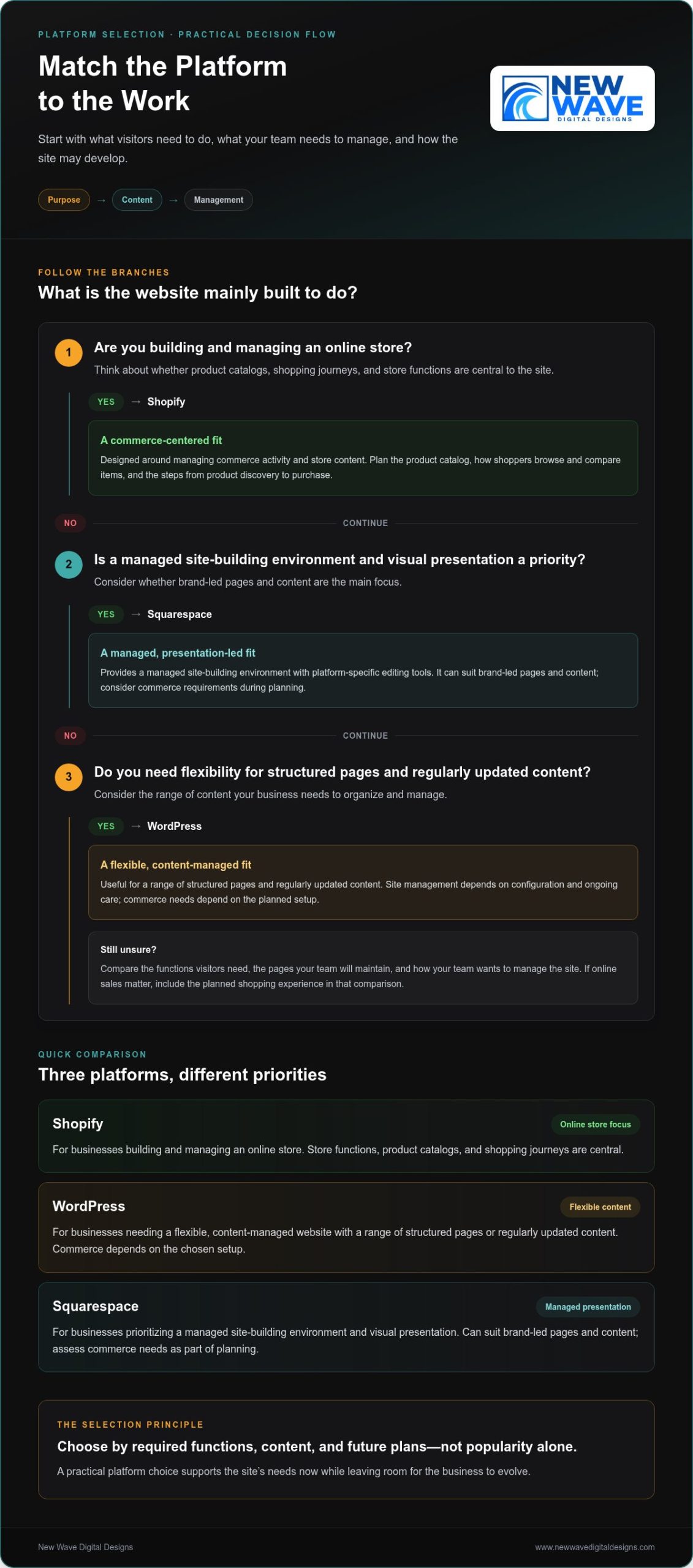
Shopify, WordPress, or Squarespace: Match the Platform to the Work

A platform should fit the website’s purpose, not dictate it. The right choice depends on what visitors need to do, what content the business needs to manage, and how the site may develop over time. Compare platforms by practical requirements rather than popularity alone.

Platform Typical use Content and commerce needs Management considerations
Shopify Businesses building and managing an online store Product catalogs, shopping journeys, and store functions are central Designed around managing commerce activity and store content
WordPress Businesses that need a flexible, content-managed website Useful for a range of structured pages and regularly updated content; commerce needs depend on the planned setup Offers flexibility, with site management shaped by its configuration and ongoing care
Squarespace Businesses prioritizing managed site-building and visual presentation Can suit brand-led pages and content, with commerce needs considered during planning Provides a managed site-building environment with platform-specific editing tools

Selection principle: Start with required functions, content, and future plans. This helps keep the site practical now while leaving room for the business to evolve.

When does Shopify fit an e-commerce website?

Shopify is built for businesses creating and managing an online store. Start planning with the product catalog, how shoppers will browse and compare items, and the steps from product discovery to purchase. Organize categories so products are easy to find, provide the details shoppers need to understand each item, and make the next step clear. Businesses considering a broader cross-border ecommerce strategy can use the International Trade Administration’s guidance as a reference while defining their plans. For store-specific design considerations, explore the Shopify website design guide.

How do WordPress and Squarespace serve different website needs?

WordPress may suit a business that values flexibility in organizing and managing a range of content. Squarespace may be a fit when a managed site-building environment and visual presentation are priorities. Neither platform is right for every organization. Compare the pages you’ll maintain, the functions visitors need, and how your team wants to manage the site. If online sales are important, include the planned shopping experience in that comparison rather than treating the platform choice as a purely visual decision.

These decisions are most useful when tied to the customer experience and the work the website must perform. New Wave Digital Designs creates custom websites for Shopify, WordPress, and Squarespace, with platform and design choices shaped around business needs. Explore custom website design to learn more.

From Discovery to Launch: What a Professional Development Process Looks Like

A website project can feel complex when brand decisions, content, platform choices, and technical details arrive all at once. A structured process breaks the work into manageable stages. Each stage clarifies what the site needs to do and gives the next decisions a clear starting point.

Discovery defines the goals, planning shapes the structure, design establishes the experience, development brings it to life, testing checks the details, and launch moves the site into active use. This sequence creates clarity while allowing scope to reflect each project’s needs.

What happens during discovery, planning, and design?

The first stage connects business priorities with audience needs. What should visitors understand, find, or do? Reviewing existing content and required functionality helps set the project scope, identify missing information, and separate essential features from optional ones.

  1. Discovery and scope: Define business priorities, intended audiences, content needs, and the functions the website must support.
  2. Structure and design: Organize pages around visitor needs, then develop a visual direction that reflects the brand and supports the intended experience.

Consider page structure before implementation. Agreeing on how information fits together and where key actions belong can prevent avoidable revisions later. Feedback at this stage helps refine the emerging site while changes are still focused on structure and design. It also gives each design decision a purpose: pages should feel connected to the brand and make sense within the visitor’s journey.

How are development, testing, and launch handled?

Once the structure and visual direction are ready, development turns them into a responsive, functioning website. Content is added, page layouts are built, and planned features are implemented. Working from an agreed scope keeps the build aligned with the project’s goals, while regular collaboration helps resolve questions before they accumulate.

  1. Development: Build responsive pages, integrate content, and implement the agreed functionality.
  2. Quality assurance: Review the site on relevant screen sizes and check links, forms, page behavior, and presentation across important user journeys.
  3. Launch: Put the reviewed website into active use, then continue stewardship through appropriate maintenance, hosting, and security attention.

Testing should follow real visitor tasks, not just a visual review. Submit a contact form, follow the main navigation, and check that important content remains readable across screen sizes. For an online store, review the product-browsing and purchase path. Launch marks a transition, not the end of caring for the website. Continued reviews and maintenance help keep its technical foundation aligned with changing business needs.

Professional Web Development: From Brand Vision to Business Growth

How to Evaluate Web Development Quality Before You Commit

A strong portfolio can catch your eye, but polished visuals are only one part of a well-built website. Look for evidence that the work supports a real business purpose: visitors can find what they need, pages work across devices, and the site’s structure fits its intended use.

Use this checklist to assess the approach as well as the finished appearance:

  • Process and scope: Does discovery connect your priorities, audience, brand, and required functionality to a clear project plan?
  • Platform fit: Are platform decisions explained in practical terms, based on your content needs and the tasks the website must support?
  • Responsive experience: Review examples on a smaller screen. Are navigation, text, forms, and key actions easy to use?
  • Security and performance: Are security, hosting, and performance testing included in the site plan, with findings evaluated rather than replaced by a blanket promise?
  • Ongoing support: Is there a clear path for maintenance and functional reviews after launch?

Portfolio examples are most useful when you examine how they work. Move through the pages and note whether the purpose is clear and the next steps are easy to find. Look for projects with needs similar to yours, then consider whether their layouts, content structure, and functions are relevant to your goals. Visual polish matters, but usability and fit reveal more about the thinking behind a site.

Which technical and user-experience signals matter?

Test the basics as a visitor. Navigate between important pages, try the forms, and check whether essential content is readable and easy to locate. Performance should be measured as part of quality review, not reduced to an unsupported guarantee. Security, hosting, and maintenance also belong in the website plan because a launch-ready site still needs appropriate care as it evolves.

How can you judge whether the process fits your business?

A productive partnership begins with listening. The project plan should reflect your brand and priorities, and platform and functionality choices should be explained in language you can act on. Defined feedback points help you shape the work as it develops; clear responsibilities reduce uncertainty about decisions and content. A thoughtful process also sets out how the site will be supported after launch.

New Wave Digital Designs combines custom website design and development with responsive, brand-aligned experiences and ongoing website support. Explore New Wave Digital Designs to see how a collaborative approach can shape a website around your business. You can also explore web development services.

Build for the Long Term: Launch, Maintenance, and What Comes Next

A website launch is a milestone, not the end of the work. Platforms evolve, content changes, and features that once worked well may need review as the business grows. Planning for care after launch helps keep the site aligned with its purpose and gives the business a clear way to address technical needs over time.

What website maintenance and hosting contribute after launch

Design and development create the site; maintenance and hosting support its continued operation. Site care can include platform and software updates, technical checks, security attention, and reviews of important functions such as forms or shopping paths. Hosting provides the environment where the website operates, while maintenance keeps its components under review. The right plan depends on the platform, site functionality, and business priorities.

These responsibilities are distinct from the initial design and development scope. A site may be complete at launch yet still need recurring attention as its content, technical requirements, and business needs change. New Wave Digital Designs provides website maintenance, managed hosting, and security services. Explore the website maintenance services guide for a closer look at ongoing care.

How can marketing support the website over time?

A well-structured website can provide a foundation for related marketing efforts. Organic SEO can help align site content and structure with search visibility goals, while Google Ads and Bing Ads can support paid search campaigns. These services complement one another, but do not guarantee outcomes. Their role and direction should reflect the business’s objectives, audience, and website content.

Website launch and ongoing support are connected parts of a larger plan. Custom website design and development, maintenance, managed hosting, security, and marketing services can work together to support a cohesive digital presence as needs evolve.

How to take the next step toward a developed website

Before starting a project, consider who the website needs to reach, what visitors should be able to do, which features are essential, what content is ready, and whether Shopify, WordPress, or Squarespace fits the plan. You don’t need every detail settled. A collaborative discussion can help clarify priorities and shape a practical direction around your brand and business needs.

Start a website project conversation to explore the needs and direction of your website.

Shape a Website That Can Grow With Your Business

A website built around your brand and business needs is more than a visual showcase. It brings strategy, useful content, and dependable functionality together to guide visitors through a clear experience. Choosing Shopify, WordPress, or Squarespace based on your content and required features helps create a practical foundation, while a considered process turns an initial vision into a responsive site.

Strong development also looks beyond launch. Website maintenance, managed hosting, and security support ongoing site care, while organic SEO and paid search can complement the website as part of a broader digital approach. Lasting value comes from connecting these decisions to real priorities rather than treating design alone as the measure of success.

New Wave Digital Designs creates custom websites for Shopify, WordPress, and Squarespace, with responsive, brand-aligned design for small and midsize businesses. Ongoing maintenance, hosting, and security services support the site as needs evolve. A cohesive digital presence starts with a website shaped around clear business priorities.

Frequently Asked Questions

What does professional web development include?

Professional web development typically includes planning, design, implementation, testing, and technical care after launch. The process may cover defining goals, organizing pages and content, creating a brand-aligned visual direction, building responsive layouts, and checking that links, forms, and other functions work. The precise scope depends on the business, platform, content, and features the website needs. Development brings these parts together into a useful, cohesive experience.

How do I choose between Shopify, WordPress, and Squarespace?

Choose based on the website’s main purpose, the content you’ll manage, and the functions visitors need. Shopify is designed for businesses building and managing an online store. WordPress can suit businesses that need a flexible, content-managed website, while Squarespace may appeal to those prioritizing managed site-building and visual presentation. Consider future plans, too. The best fit is the platform that supports your practical needs, rather than one selected simply for popularity.

Can a professional website be built around my existing brand?

Yes. A website can be designed around your existing brand identity, including its visual language, messaging, and customer experience. Sharing brand assets and explaining what customers should understand or do helps guide page structure and design choices. If some elements need refinement, the site can still be shaped to feel consistent and recognizable. The goal is to translate the brand into a responsive digital experience that reflects the business across its pages.

How long does professional web development take?

Project duration depends on the website’s scope, platform, content readiness, required functionality, and feedback process. A site with a focused set of pages and straightforward needs differs from one requiring extensive content or more involved features. Clear decisions about goals, structure, and responsibilities can help the work proceed with fewer uncertainties. A project plan should account for actual requirements rather than rely on a one-size-fits-all timeline.

What should I look for in a professional web development partner?

Look for a collaborative process that connects discovery to your brand, audience, and business priorities. A strong partner explains platform and functionality decisions in clear language, defines project scope and responsibilities, and makes room for feedback as the site develops. Review portfolio examples for usability and relevance, not just visual polish. Also consider responsive behavior, security, hosting, maintenance, and how support can continue after launch.

Does a website need maintenance after it launches?

Yes. Websites may need platform updates, technical checks, security attention, and reviews of important functions after launch. Maintenance needs vary according to the platform, site features, and business priorities. Hosting is also an ongoing consideration because it provides the environment where the website operates. Planning for these responsibilities helps distinguish the initial design and development project from the recurring care that supports the site as it evolves.

Can web development support SEO and digital advertising?

Yes. A clear site structure, useful content, and functional pages provide a foundation that can support organic SEO and paid search efforts. SEO can inform how website content and pages are organized, while Google Ads and Bing Ads can direct campaigns toward relevant landing pages. These services can work together as part of a broader digital approach, but website development or marketing alone can’t guarantee rankings, traffic, or business results.

Start a conversation with New Wave Digital Designs about your website project.

Responsive Web Design NJ: Crafting Fluid Digital Experiences in 2026

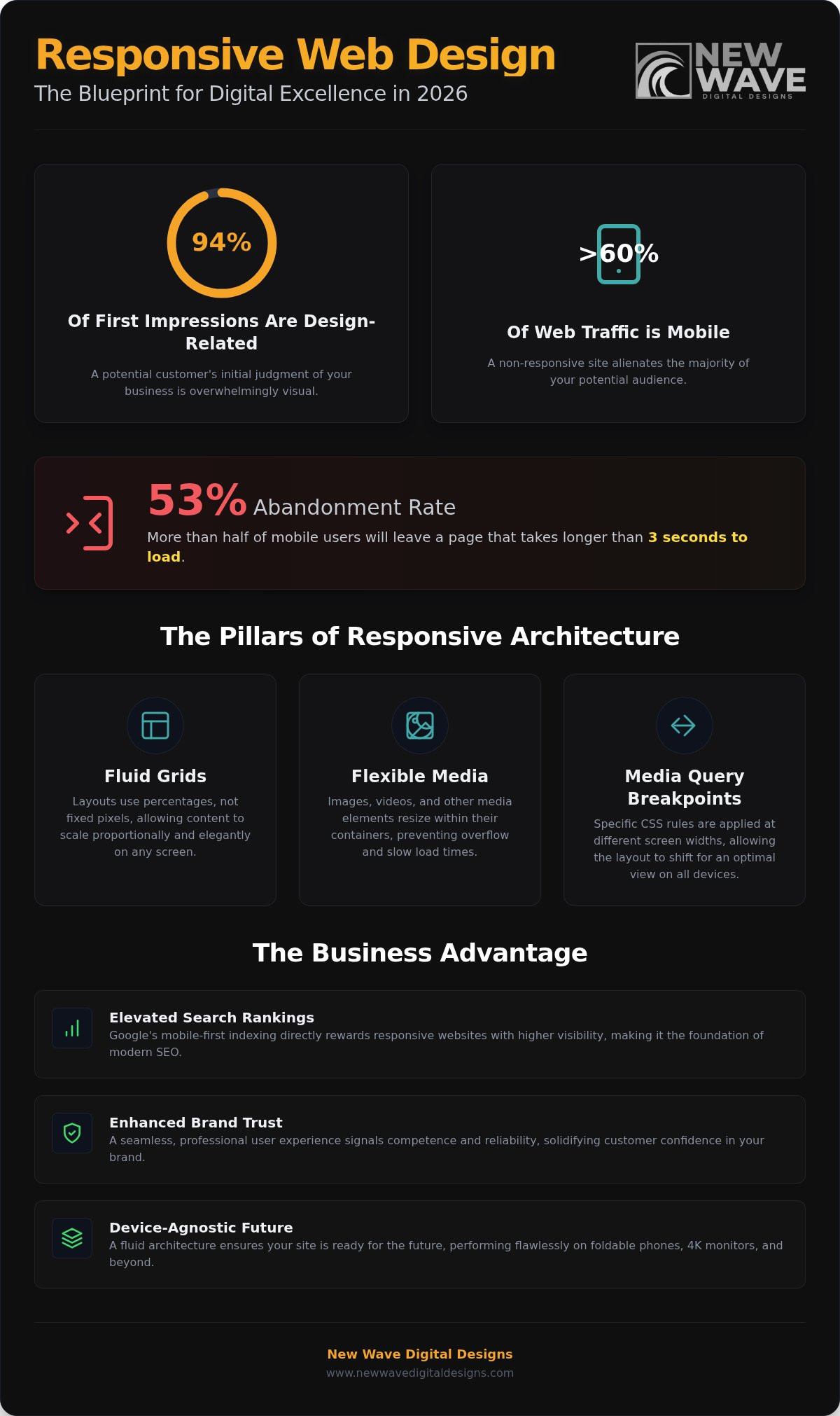
94% of a potential customer’s first impression of your business is influenced by a single factor: your website’s design. In an era where over 60% of global web traffic originates from mobile devices, a static or broken layout isn’t just a technical glitch; it’s a lost opportunity. Searching for responsive web design NJ often starts with the frustration of seeing your brand lose its luster on a smartphone screen. You’ve likely felt the sting of a beautiful desktop layout collapsing into an unreadable mess on a smaller device, alienating the very people you aim to serve.

It’s exhausting to watch 53% of mobile users abandon a site simply because it takes longer than three seconds to load. We believe your digital presence should be a form of craftsmanship, reflecting the true spirit of your professional vision through every pixel. This guide reveals how visionary responsive design transforms your website into a seamless, high-converting masterpiece that performs flawlessly on an iPhone, a tablet, or a 4K monitor. We will explore the intersection of technical precision and creative artistry, covering essential 2026 performance standards, the evolution of search rankings, and the architectural secrets to building a brand that feels inherently professional, polished, and trustworthy.

Key Takeaways

  • Learn why fluid adaptation is the non-negotiable standard for capturing mobile traffic and building brand trust in 2026.
  • Master the architectural principles of Responsive web design NJ, focusing on fluid grids and flexible media that ensure your visuals remain pristine, professional, and trustworthy on every screen.
  • Understand the direct correlation between a seamless responsive layout and elevated search engine rankings through improved page speed and user retention.
  • Use our step-by-step audit checklist to identify technical friction on your current site and eliminate the barriers driving potential leads away.
  • Discover the transformative power of a bespoke digital architecture that moves beyond generic templates to capture the unique spirit of your business.

What is Responsive Web Design and Why is it Critical in 2026?

In the high-stakes digital environment of 2026, your website is no longer just a digital brochure; it’s a living extension of your brand’s craftsmanship. To understand What is Responsive Web Design, one must look beyond simple resizing. It’s a sophisticated digital architecture where a single site fluidly expands, contracts, and reshapes itself to maintain aesthetic and functional integrity across any screen. While older “mobile-friendly” sites often relied on static, scaled-down versions of a desktop page, modern Responsive web design NJ employs a dynamic skeleton that breathes with the user’s environment. It ensures that the soul of your brand remains intact whether viewed on a handheld device or a sprawling monitor.

The mid-2020s have solidified a permanent shift toward mobile-dominance. With over 60% of global web traffic now originating from mobile devices, a “working” site is no longer the benchmark. Today’s users demand perfection. A layout that feels cramped or a navigation menu that requires “pinch-to-zoom” isn’t just a technical flaw; it’s a signal to your audience that your business is behind the curve. Choosing Responsive web design NJ means investing in a seamless journey that eliminates technical friction and honors the visitor’s time.

The Evolution from Desktop-First to Mobile-First

Google has fully committed to mobile-first indexing, meaning the mobile version of your site is the primary lens through which the world discovers you. For New Jersey businesses, this makes responsive architecture the literal foundation of search visibility. Beyond the algorithms, there is a profound psychological impact to consider. When a potential client encounters a broken layout, their trust in your professional competence evaporates instantly. Responsive design is a digital architecture that fluidly adapts its structure to provide a curated, high-impact experience on every possible device.

Beyond the Smartphone: The Multitude of Modern Screens

The digital horizon of 2026 includes more than just phones and laptops. Visionary brands now design for a device-agnostic future, considering everything from ultra-wide 4K monitors to foldable screens and wearable interfaces. This approach is a strategic form of future-proofing. By building a fluid grid rather than a fixed container, your brand stays prepared for whatever hardware enters the market next year. It transforms your website from a rigid document into a versatile asset that scales with your ambition and the evolving habits of your customers.

The Technical Artistry of Responsive Web Design NJ

Technical precision isn’t just a backend requirement; it’s the silent partner of creative excellence. When we approach Responsive web design NJ, we view the layout as a living blueprint rather than a static image. This process begins with the fluid grid, an invisible skeleton that allows every element to scale proportionally with the user’s environment. Instead of the rigid, brittle structures of the past, we build a foundation that expands and contracts, preserving the integrity of your brand’s visual story through every transition.

Fluid Grids vs. Fixed Layouts

The shift from pixel-perfect thinking to percentage-based fluidity is the hallmark of a true digital architect. Fixed layouts often result in awkward gaps, truncated content, or horizontal scrolling when viewed on non-standard devices. By utilizing fluid grids, we ensure that every column, margin, and gutter maintains its mathematical relationship to the whole. This meticulousness prevents the visual dissonance found in amateur designs, creating a sense of balance, depth, and comprehensive expertise that honors your business’s professional standing.

Equally vital are flexible images and media. Visuals must be as adaptive as the grid they inhabit. We implement sophisticated coding techniques to ensure that high-resolution photography and video never “break” the layout or compromise load times. This ensures your site remains a high-converting masterpiece, where the imagery remains crisp and impactful regardless of the screen’s resolution or aspect ratio.

Breakpoints: The Secret to Seamless Transitions

Breakpoints are the specific coordinates where a website’s layout shifts to accommodate a new screen size. While many service factories rely on standard, generic breakpoints, professional Responsive web design NJ requires a more visionary approach. We identify custom breakpoints based on your unique content and user behavior. This ensures that navigation menus, contact forms, and calls-to-action remain prominent and accessible whether your visitor is on a smartphone, a tablet, or a 4K monitor.

This level of detail is a core part of our methodology, aligning with the high standards found in A Responsive Audit Checklist for modern digital experiences. When technical precision meets creative vision, the result is a website that feels both intentional and effortless. If you’re ready to elevate your brand’s digital presence from a simple task to a form of craftsmanship, exploring a partnership with New Wave Digital Designs can transform your technical requirements into a lasting competitive advantage.

Why Responsive Design is the Foundation of Search Engine Visibility

Visibility in the digital landscape of 2026 is earned through a delicate balance of technical precision and artistic intent. Search engines no longer reward mere presence; they prioritize sites that provide an effortless, high-performance journey for every visitor. When we implement Responsive web design NJ, we aren’t just adjusting layouts. We’re building a foundation for organic discovery. This direct link between architecture and visibility is rooted in how Google evaluates the quality of a digital experience. By eliminating the friction of broken layouts and slow load times, a responsive site signals to search algorithms that your brand is a reliable, high-quality destination.

Speed is the currency of the modern web. Verified data from 2026 shows that 53% of mobile users abandon a website if it takes longer than three seconds to load. A truly responsive site optimizes its assets for the specific device in use, ensuring that high-resolution imagery doesn’t become a burden on mobile bandwidth. This efficiency directly impacts your search rankings. When visitors stay longer and interact more deeply with your content, your bounce rates drop and your authority climbs. This seamless performance is built upon the technical principles of responsive design, where every line of code serves the dual purpose of beauty and speed.

Core Web Vitals and User Experience (UX)

Google’s Core Web Vitals serve as the primary metrics for digital health in 2026. Specifically, Largest Contentful Paint (LCP), Interaction to Next Paint (INP), and Cumulative Layout Shift (CLS) are direct ranking signals. A responsive site ensures visual stability, preventing the jarring shifts in content that often plague inferior designs. We prioritize these metrics as a form of digital craftsmanship. This focus ensures that your site feels anchored and professional, providing a sense of reassurance to the user that encourages conversion and builds lasting trust.

Single URL Strategy for Maximum Authority

Managing one responsive site is significantly more efficient than maintaining separate mobile versions. By utilizing a single URL, you consolidate your link equity and simplify the crawling process for search engines. This unified approach ensures that every backlink and social share strengthens your primary domain rather than being diluted across multiple platforms. For a deeper exploration of how these strategies fit into a broader vision, you can consult our Web Design New Jersey pillar. Partnering with a digital architect ensures that your Responsive web design NJ serves as a powerful engine for long-term growth, authority, and visibility.

Responsive Web Design NJ: Crafting Fluid Digital Experiences in 2026

Evaluating Your Current Presence: A Responsive Audit Checklist

Understanding your current digital standing requires a shift from passive observation to active interrogation. Many businesses operate with a “set it and forget it” mentality, yet digital standards evolve with relentless speed. A site that felt modern two years ago may now harbor technical friction that quietly drives away high-value leads. To maintain your professional standing, you must look at your presence through the eyes of a mobile user. When we consult on Responsive web design NJ, we don’t just look for broken links; we look for the emotional dissonance caused by a clumsy interface. Identifying these gaps is the first step toward reclaiming your brand’s authority.

The 5-Minute Responsive Stress Test

You don’t need an engineering degree to perform a preliminary audit. Open your website in a desktop browser, right-click, and select “Inspect” to open the developer tools. By toggling the device icon, you can view your site through various viewports, from the smallest smartphone to a tablet. During this test, you should look for three critical indicators of digital craftsmanship. First, ensure your navigation is “thumb-friendly,” meaning buttons are large enough to be tapped without accidental clicks. Second, check font legibility; if a user has to zoom in to read your message, the design has failed. Finally, watch your images. They should scale gracefully within the grid, never overflowing the screen or causing horizontal scrolling.

Platform Selection: Crafting the Right Foundation

The success of your responsive architecture often depends on the foundation you choose. Different platforms offer varying degrees of flexibility and artistic resonance. For businesses focused on high-converting e-commerce, a Custom Shopify Store Design provides a robust framework that balances technical security with visual excellence. If your brand requires deep, bespoke customization and a unique architectural layout, WordPress remains the industry standard for flexibility. Alternatively, Squarespace serves as a visionary choice for visual-heavy brands that prioritize a polished, cinematic feel across every device.

Choosing the right platform is a strategic decision that future-proofs your brand. While a simple technical patch might fix a single broken element, a professional website redesign ensures that your Responsive web design NJ remains a cohesive, high-performing asset for years to come. If your current audit reveals deep-seated layout issues or inconsistent branding, it’s time to move beyond superficial fixes. We invite you to partner with New Wave Digital Designs to transform your digital presence into a fluid, visionary masterpiece that captures the true spirit of your business.

Partnering with a Visionary: The New Wave Design Methodology

We believe that a digital presence is a form of craftsmanship. While high-volume service factories rely on rigid, generic templates, our approach to Responsive web design NJ is rooted in bespoke architecture. We move beyond the superficial, treating your website as a living extension of your brand’s spirit. This commitment to meticulous detail and artistic resonance ensures that your site isn’t just functional; it’s transformative. By blending technical precision with creative vision, we create fluid experiences that honor your professional standing and captivate your audience across every possible screen.

With 90% of websites having implemented some form of responsive design by 2026, the competitive advantage no longer lies in simply having a mobile version. It lies in the quality of the journey. We prioritize technical precision, creative vision, and long-term partnership to ensure your site remains a high-converting masterpiece. Our methodology is a methodical journey that begins with broad, inspiring concepts and transitions into a structured, high-performance reality.

From Discovery to Realization

We listen intently to your needs before applying our technical and creative expertise. This collaborative process allows us to capture the true spirit of your business and translate it into a digital experience that resonates emotionally with your clients. Our clients view us as Digital Architects because we value deep understanding and strategic thinking over quick, superficial fixes. We don’t just build pages; we design environments that foster trust, encourage engagement, and drive growth. Every project is treated with a high degree of personal care, meticulous attention to detail, and a passionate commitment to continuous evolution.

Continuous Evolution and Support

The digital landscape is never static. A visionary website requires ongoing care to maintain its edge. Our managed website maintenance and secure hosting and security services protect your investment through regular technical updates and performance optimizations. We monitor Core Web Vitals to ensure your site remains fast and stable, preventing the 53% abandonment rate that plagues slow-loading mobile sites. This steady, methodical support reinforces our role as a reliable partner in your long-term success. If you’re ready to elevate your presence and embrace a design that truly reflects your brand’s soul, it’s time to Connect with our visionary design team.

Embracing the Fluid Future of Digital Craftsmanship

Your website’s ability to adapt is the definitive measure of its longevity and impact in 2026. We’ve explored how a single, unified URL strategy consolidates your authority, while custom breakpoints and fluid grids serve as the invisible skeleton of a truly professional presence. By prioritizing technical precision alongside creative vision, you transform a simple digital touchpoint into a lasting engine for brand trust and organic growth. Investing in Responsive web design NJ is more than a technical upgrade; it’s a commitment to honoring your audience’s journey on every device they own.

As an NJ-based agency with a national perspective, New Wave Digital Designs specializes in the meticulous craftsmanship of Shopify, WordPress, and Squarespace platforms. We focus on the intersection of aesthetic excellence, technical security, and peak performance to protect your investment. We invite you to Request a Visionary Design Consultation to ensure your digital architecture remains as resilient as your business. The evolution of your brand deserves a partner who sees the artistry in every line of code. Let’s build something that stands the test of time and technology together.

Frequently Asked Questions

Is responsive web design more expensive than a regular website?

Investing in responsive architecture is a commitment to long-term craftsmanship rather than a simple added expense. In the digital environment of 2026, a regular website is effectively a responsive one. While the initial phase requires meticulous attention to fluid grids, it eliminates the need to build and maintain multiple versions of your site. This unified approach reduces future maintenance fees and prevents the lost revenue associated with an unprofessional mobile experience.

Will a responsive website improve my Google rankings in New Jersey?

Implementing Responsive web design NJ is a direct catalyst for higher organic visibility. Google utilizes mobile-first indexing, meaning your site’s mobile performance is the primary factor in determining your rank. By providing a seamless, high-performance experience that aligns with modern Core Web Vitals, you signal to search algorithms that your brand is authoritative. This reduces bounce rates and encourages the deeper user engagement necessary for sustained growth and search engine discovery.

How do I know if my current website is truly responsive?

You can verify responsiveness by observing how elements reshape themselves across different viewports. A truly responsive site doesn’t just shrink; it reflows content, adjusts navigation menus, and scales imagery without horizontal scrolling. Use browser developer tools to simulate various devices or simply resize your window. If your layout breaks, fonts become illegible, or buttons are too small to tap, your site lacks the fluid architecture required for professional digital standards.

Does responsive design affect my site’s loading speed?

Correctly executed responsive design enhances loading speed by serving optimized assets tailored to the user’s specific device. We prioritize performance-first architecture, ensuring that high-resolution media doesn’t burden mobile bandwidth. Rapid response times are essential for retaining visitors and improving conversion rates. Technical precision in your responsive layout creates a frictionless journey that preserves your brand’s artistic resonance while meeting the high standards users demand from a professional digital partner.

Can I update my own content on a responsive Shopify or WordPress site?

You maintain full creative control over your content through our bespoke Shopify and WordPress implementations. We build intuitive backend environments that allow you to update text, imagery, and products without disrupting the underlying responsive architecture. This partnership ensures you can evolve your message while we provide the managed maintenance and technical security required to keep the foundation stable. It’s a collaborative process designed to support your long-term visionary goals and brand evolution.

What happens if I don’t have a responsive website in 2026?

Lacking a responsive presence in 2026 leads to rapid brand erosion and diminished search visibility. With mobile traffic dominating the global landscape, an unresponsive site alienates a majority of your audience and suggests a lack of professional meticulousness. You risk falling behind competitors who embrace digital craftsmanship, as users will quickly abandon a broken layout for a more fluid experience. This technical friction results in lost leads, lower rankings, and a fractured brand identity.

Do I need a separate mobile app if my website is responsive?

A sophisticated responsive website often eliminates the need for a separate mobile app for most businesses. By creating a fluid, device-agnostic experience, you provide the same level of functionality and aesthetic excellence across all screens. This unified strategy is more efficient, as it consolidates your SEO authority and simplifies maintenance. While some specialized services require apps, a visionary responsive layout usually captures the spirit of your business perfectly on any handheld device or tablet.

How long does it take to redesign a site into a responsive layout?

The timeline for a professional website redesign depends on the complexity of your brand’s digital architecture and specific goals. A meticulous process involves discovery, strategic planning, and artistic realization to ensure the final product is a high-converting masterpiece. We treat every project with personal care, moving steadily from initial concepts to a fully realized, secure environment. This deliberate rhythm ensures that your Responsive web design NJ is built on a foundation of quality rather than a rushed, superficial fix.