
A Squarespace template is a starting point, not the finish line. Squarespace website customization can turn that framework into a site that feels unmistakably yours, helping visitors understand what you offer and what to do next.
If your site still looks much like its original template, or every design option seems equally urgent, you’re not alone. It’s easy to focus on colors and visual flourishes before considering how each choice affects clarity, mobile usability, and business goals. A distinctive website needs more than attractive details. It needs a clear order of decisions.
This guide explains how to customize your Squarespace site with purpose, from defining your visual identity to refining page layouts, typography, imagery, and calls to action. You’ll also learn how to review the experience on mobile screens and build a polished, responsive site that supports your business. With a considered approach, the template becomes a foundation, not a limitation.
Key Takeaways
- Thoughtful squarespace website customization can make a template feel distinct by aligning its structure, visuals, and content with your brand.
- Start with business goals and visitor needs, then shape the visual direction and refine pages in a deliberate sequence.
- Built-in editing tools work well for straightforward changes; more complex requirements can benefit from professional design support.
- Review navigation, readability, mobile layouts, and calls to action to keep the experience clear across screens.
- A tailored Squarespace design process can bring brand expression, responsive usability, and business priorities together in one cohesive site.
What Squarespace Website Customization Can Do for Your Brand
A template gives a website a starting structure, but it can’t define what makes your business distinct. Effective squarespace website customization brings brand expression and visitor needs into the same design process. It adapts structure, visuals, content, and interactions so the site feels recognizably yours and helps people find the information or next step they came for.
Customization is a coordinated set of brand, structure, and usability decisions, not a collection of decorative edits. Changing colors or replacing stock imagery can help, but those changes won’t fix unclear navigation or explain your offer more effectively. Strong website design principles connect appearance with organization and function. Start with what visitors need to know and do, then use those priorities to guide visual choices.
Which parts of a Squarespace website can you customize?
Customization can shape page sections, content blocks, typography, color, spacing, imagery, and navigation. Site-wide design settings establish a consistent foundation, such as shared type styles and a coherent palette. Page-specific adjustments then give each page a clear purpose. A service page may need an explanation of the offering and an inquiry path, while an about page may bring the business story forward.
Think in layers. First, set visual rules that should carry across the site. Then refine individual page layouts, choosing content order and spacing to make important information easy to scan. Give navigation the same strategic attention: organize it around visitor tasks rather than internal department names. Editor terminology and available controls can change, so consult current Squarespace documentation when following interface-specific instructions.
When does a template need more than surface-level changes?
Look beyond the color palette if pages feel inconsistent, visitors have to guess where to go, or the overall impression could belong to almost any business in your field. These can be signs that the issue is with the site’s structure or message, not just its visual finish. A polished homepage can’t compensate for service pages that explain offerings differently or bury essential details.
Use your business positioning and audience expectations to set priorities. For a service business, a prospective customer may want to understand what a service covers, who it is for, and how to take the next step. Make those answers easy to find before adding decorative effects. This keeps design choices connected to the work the site needs to do.
If the template’s basic arrangement doesn’t support your content or brand character, consider a deeper redesign instead of layering on disconnected adjustments. New Wave Digital Designs creates custom Squarespace designs around each business’s brand and goals. The custom Squarespace website design guide explores how a template can become a more distinctive digital experience. A thoughtful result feels cohesive because every element has a purpose.
How to Customize Squarespace Around Your Brand and Visitors
A strong customization process starts with purpose, not a font menu. Decide what the site needs to accomplish, what visitors need to understand, and which design choices will help them move forward. This keeps squarespace website customization focused on meaningful improvements rather than a series of unrelated edits.
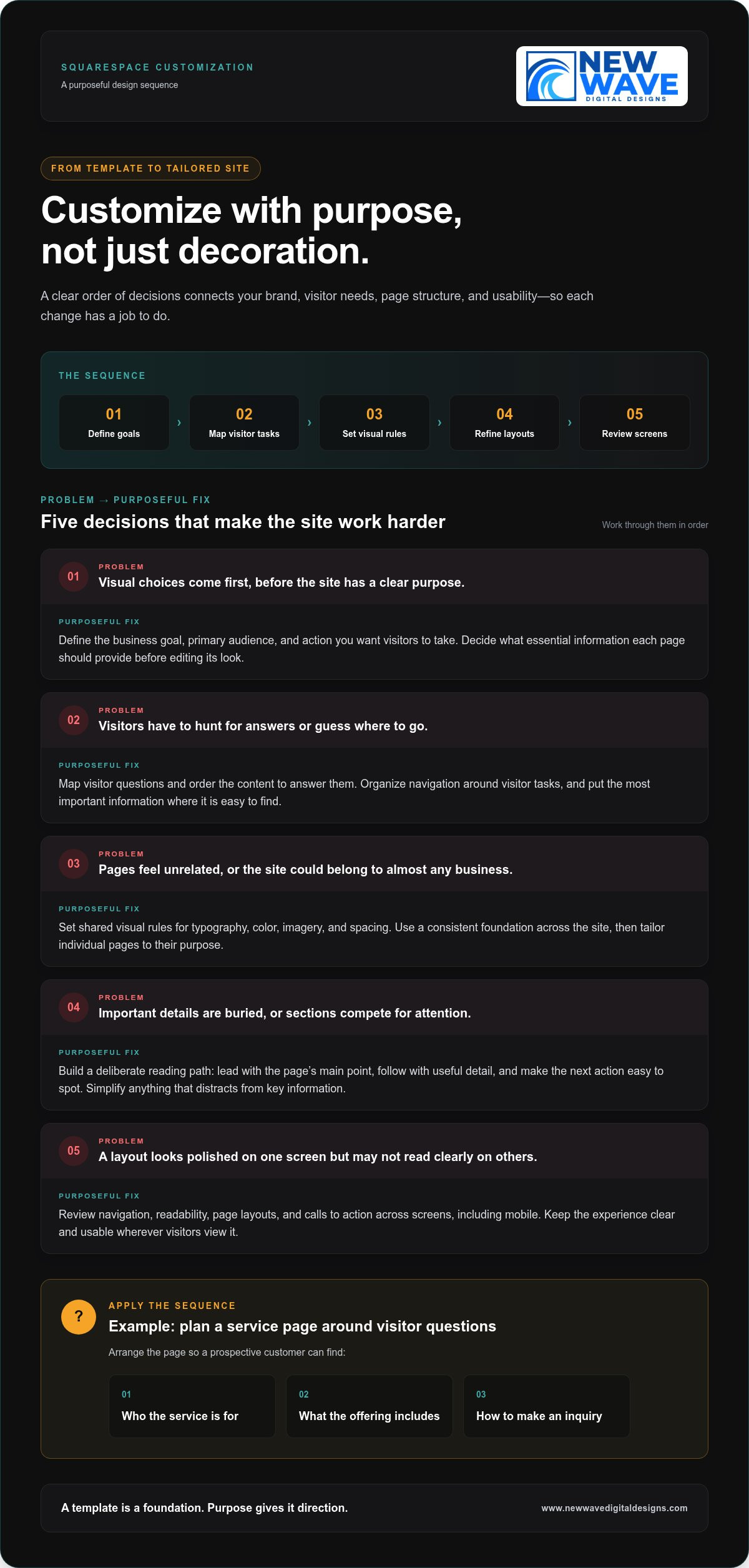
Define your goals, map visitor tasks, set visual rules, refine page layouts, and test the experience across screens. Keep that sequence in view as you work. Each step gives the next one a foundation, helping the site’s appearance and function develop together.
Start with brand direction and the visitor journey
Identify your primary audience, the action you want them to take, and the essential information each page should provide. A service business, for example, might organize a service page to explain who an offering is for, what it includes, and how to make an inquiry. Treat this as a planning example, not a formula. Let real customer questions guide the page’s content and order.
Before editing, establish visual priorities for typography, color, imagery, and spacing. A short set of shared rules helps pages feel related, even when their layouts differ. Arrange content in the order visitors need it, answering immediate questions before adding detail. The U.S. Web Design System principles also emphasize user needs and consistency. Use these as touchstones when deciding whether a design choice clarifies the visitor journey or merely decorates it.
Refine page layouts, content blocks, and visual hierarchy
Once the direction is clear, use page sections and content blocks to create a deliberate reading path. Lead with the page’s main point, follow with the details visitors need to assess it, then make the next action easy to spot. Headings should tell visitors what each section covers. Calls to action should use clear language and appear where they make sense in the journey.
Build consistency through repeatable choices, such as heading styles, button treatments, and spacing patterns. A shared design system prevents each page from taking on an unrelated look, while still allowing layouts to serve different purposes. Avoid adding sections or visual effects just to fill space. If an element competes with key information, simplify it.
- Define: Write down the main business goal and the visitor action each page should support.
- Map: List visitors’ questions and arrange the content in the order those questions arise.
- Set: Establish shared rules for type, color, imagery, and spacing.
- Refine: Adjust sections, blocks, and calls to action to strengthen the page hierarchy.
- Test: Review finished pages on desktop and mobile, then fix anything that feels unclear or crowded.
For a deeper look at how brand needs can shape a site beyond its starting layout, explore this custom Squarespace design approach. If you’re ready to bring those priorities into a tailored, responsive website, learn about Squarespace website design with New Wave Digital Designs.
Built-In Squarespace Tools or Professional Customization?
There isn’t one right level of customization for every business. Built-in Squarespace editing tools give site owners control over many routine updates, while professional design can bring strategy and cohesion to more complex needs. The useful question isn’t which option is universally better. It’s which one fits your goals, available time, brand clarity, and the complexity of the changes you’re considering.
Compare the options across four dimensions: control, time, consistency, and complexity. DIY editing lets you make straightforward changes yourself, but you’ll also make the design decisions and review each page. A design partner brings an experienced perspective and can coordinate details across the site, particularly when changes affect structure, content, and visitor pathways together.
When are Squarespace’s built-in editing tools enough?
Built-in editing is often a good fit when your site structure already works and your brand direction is clear. You might update text, replace imagery, adjust page sections, refine spacing, or make a modest navigation change using the editor’s controls. These focused adjustments are manageable when you know what needs to change and can check the finished pages for consistency.
Before following a step-by-step tutorial, review current Squarespace documentation. Interface labels and capabilities can change, so an older walkthrough may not match the controls you see. Keep a simple record of your brand choices, too. Shared rules for typography, colors, and button styles make future DIY edits less likely to leave each page looking like a separate design.
A practical test: if you can describe the change, make it with the available controls, and assess its effect across relevant pages and screen sizes, a professional redesign may not be necessary. Preserve your time for work only you can do, such as shaping your business’s message and checking whether each page communicates it clearly.
When can a custom design partner add value?
Professional design can help when your brand has nuanced needs, page styles have drifted apart, or visitors struggle to find important information. The challenge may go deeper than an isolated visual adjustment. A designer can consider how imagery, typography, content hierarchy, and navigation work together, then align those decisions with your audience and business goals.
For example, if a service page has strong visuals but leaves visitors unsure what the service involves or how to proceed, adding decorative elements won’t resolve the underlying issue. A considered redesign can clarify the order of information and make the next step more apparent while keeping the visual language coherent across the site.
- Use built-in editing for focused updates to a sound structure and established brand system.
- Consider professional customization when the work involves connected changes to content, page structure, brand expression, and visitor pathways.
New Wave Digital Designs creates custom, responsive Squarespace websites tailored to brand and business needs. For a broader perspective on how strategic decisions shape a digital experience, explore this web design strategy guide. The right level of squarespace website customization makes your site clearer and more cohesive without adding complexity for its own sake.
A Practical Squarespace Customization Checklist for Quality and Usability
A site can look polished on a desktop and still be difficult to use on a phone. Treat your review as a quality check, not just a final visual glance. A successful design must remain clear, usable, and consistent across screens. Work through the checklist below on key pages, checking whether each design choice helps visitors understand information and take the next step.
Check responsive design, readability, and accessibility
Review important pages on desktop and mobile. Look for cramped text, content that feels out of order, buttons that are hard to reach, and elements that distract from the main action. Test navigation and calls to action directly. A layout that looks balanced on a large screen may not be as clear on a smaller one.
- Hierarchy: Can visitors identify the page’s main heading and most important information quickly?
- Navigation: Are labels understandable, and can visitors find key pages without guesswork?
- Readability: Is body text comfortable to read, with enough spacing between paragraphs and sections?
- Contrast and links: Is text distinguishable from its background? Do linked words describe where they lead instead of using vague labels such as “click here”?
- Images and actions: Do image descriptions convey useful meaning where needed, and are calls to action easy to recognize?
Visuals should support the content, not obscure it. A large decorative element may establish a mood, but it shouldn’t push essential details out of view or make a page harder to scan. Accessibility controls and editor options can change, so consult current Squarespace guidance for specific settings. Assess the result on the actual page, not only in the editor.
Review content structure and search foundations
Check that each page communicates one clear subject. Its page title, headings, body copy, and internal links should reinforce the same topic rather than pull visitors in different directions. A page about a specific service, for example, should explain that service clearly and guide visitors toward a relevant next step. Remove headings that add no context and links whose purpose isn’t apparent.
- Confirm that the page title accurately describes the content.
- Use headings in a logical order to make sections easier to scan.
- Link descriptive phrases to relevant pages so visitors know what to expect.
- Give every page a useful purpose and a clear next action.
These checks connect usability with discoverability: clear content structure helps people and search engines understand what a page covers. For more on aligning site content with organic search, explore the organic SEO strategy guide. Thoughtful squarespace website customization brings presentation, accessibility-minded choices, and page purpose into one coherent experience.
If you want a tailored review of how your design and usability work together, explore Squarespace website design with New Wave Digital Designs.
Turn Squarespace Customization Into a Thoughtful Design Partnership
A website should reflect your business’s character and make its purpose clear to the people it serves. New Wave Digital Designs creates custom, responsive Squarespace websites tailored to each business’s brand and needs. The process brings visual identity and practical decisions together, shaping the site around more than a template’s default look.
A collaborative design process starts with your goals, audience, existing content, and priorities. From there, design choices take shape around how your business needs to communicate, while page structure gives visitors a coherent route through the site. Squarespace website customization is more considered when every decision has a reason, whether it clarifies an offer or makes a page easier to use.
What a tailored Squarespace design process should accomplish
Tailored design brings brand expression, page structure, and visitor needs together. That means developing a visual direction aligned with your business while organizing content so visitors can understand what you offer and where to go next. The goal is a cohesive experience, not simply a collection of distinctive-looking pages.
Responsive design carries that experience across screen sizes. Content should remain legible, navigation understandable, and important actions easy to find on desktop or phone. The layout may adapt, but the site’s character and purpose should remain recognizable. Make design decisions with these practical checks in mind, without assuming every screen should display content in exactly the same arrangement.
Plan your next Squarespace customization step
Before beginning a project, put together a short brief. Identify the pages that matter most, the business goals those pages should support, and the visual or structural issues you want to address. Note what already works, too. Preserving effective elements helps keep the work focused on meaningful improvements rather than change for its own sake.
- Priority pages: Which pages matter most to your visitors and business?
- Business goals: What should each page help visitors understand or do?
- Design challenges: Where does the current experience feel unclear, inconsistent, or unlike your brand?
New Wave Digital Designs can shape a Squarespace design around those priorities and bring in related capabilities where they suit the project. Graphic design can support a consistent visual identity; organic SEO can inform how site content is organized and discovered. After launch, website maintenance and support can help you care for the site as your business and content evolve. These connected services can be tailored to the project’s needs.
A clear first step is to describe what you want your website to express and where the current experience falls short. Discuss a custom Squarespace website design with New Wave Digital Designs and start shaping a responsive site around your business, your brand, and the people you want to reach.
Shape Your Next Website Chapter
Your next step doesn’t need to be a complete redesign. Start with the page or experience that feels least connected to your brand, then decide what you want visitors to understand or do there. That clarity can reveal where your website has room to grow and which changes deserve attention first.
Thoughtful squarespace website customization turns that direction into a more cohesive digital presence. New Wave Digital Designs brings custom Squarespace website design and development together with graphic design, organic SEO, maintenance, hosting, and security, supporting both a site’s creation and its continued care.
Bring your priorities, questions, and ideas into the conversation. Discuss a custom Squarespace website design with New Wave Digital Designs and explore an approach shaped around your business. Your brand deserves a site that can evolve with it. A clear next step can begin that process.
Frequently Asked Questions
Can I customize a Squarespace website without coding?
Yes. You can make many common updates through Squarespace’s visual editing controls without writing code. For example, you can revise page text, replace images, adjust layouts, and update design settings using the available editor options. Code may be useful for specialized behavior or styling beyond those controls, but it isn’t a prerequisite for a distinctive site. Check Squarespace’s current help materials for interface instructions, since editor labels and options can change.
How much of a Squarespace website can I customize?
You can customize a broad range of a site’s presentation and content, including page structure, text, images, navigation, and visual styling. The practical limits depend on the platform’s current options and the change you have in mind. Squarespace website customization can also involve custom code, but more control may bring added complexity. Before changing several pages, test a small adjustment and check how it affects the wider site.
Can Squarespace customizations be reversed?
Many visual or content changes can be changed again by editing the affected page or design settings. Still, don’t assume every action has a simple undo path, especially if you remove content or alter code. Before a substantial round of edits, keep copies of important text and custom code, and record the original settings. Make changes in manageable stages so you can identify what to restore if the result doesn’t work.
Does custom CSS transfer when changing Squarespace templates?
Don’t assume custom CSS will work unchanged after a template or layout change. Styles written for one page structure may target elements that appear differently elsewhere, causing rules to stop working or affect unintended areas. Before a structural change, save a copy of your CSS and note what each rule is meant to do. Afterward, review the affected pages and revise or remove styles that no longer fit.
Can I customize a Squarespace website built by someone else?
Yes, if you have authorized access to the site, you can make changes even if someone else created it. First review its page structure, design settings, content, and any custom code so you understand how the elements relate. A quick audit can reveal which styling is shared across pages and where edits may have a wider effect. If the setup is unclear or inconsistent, a Squarespace design professional can assess the existing foundation before refining it.
Will a customized Squarespace website still be easy to update?
It can be, especially when the site follows clear design rules and the people maintaining it understand how key pages are structured. Keep commonly reused elements consistent, document unusual code or design choices, and avoid adding complexity that future editors won’t understand. Before handoff, walk through routine tasks such as changing service descriptions or updating contact details. Ongoing website maintenance can also support the site as its content and needs evolve.
Can Squarespace customization connect with third-party tools?
Yes, a Squarespace site may connect with third-party tools through available integrations or other supported methods, depending on the tool and the site’s requirements. Before building around a connection, review current Squarespace documentation and the tool provider’s instructions for compatibility, setup, and ongoing changes. Consider what information needs to pass between systems and how the connection will be maintained. This helps you choose an approach that supports the site without adding avoidable complexity.

