
A full redesign isn’t always the right fix. If your website’s structure still works but specific pages, content, or visitor journeys need attention, optimization is usually the more focused starting point. If the site’s design, technology, or overall experience no longer supports your business, a redesign may make more sense. Whether you should redesign your website or optimize it depends on the scale and source of the problems you’re trying to solve.
It’s understandable to consider a fresh start when your site feels dated or isn’t performing as you’d like. But reviewing user feedback, analytics, brand changes, maintenance needs, and SEO can show whether targeted improvements are enough or the site’s overall structure needs rethinking.
This guide will help you weigh cost and timing alongside practical signals, then choose an approach that supports your goals without replacing what already works. Website improvement doesn’t have to end at launch: thoughtful optimization can remain part of your site’s ongoing care.
Key Takeaways
- Choose targeted optimization when the site’s underlying structure works and the problems are specific; consider a redesign when broader foundations need attention.
- Use visitor feedback and site performance to identify which changes matter most before setting scope, budget, and timing.
- Align the site with your current brand while preserving content and pathways that still serve visitors well.
- Weigh the effort of maintaining existing technology against the benefits of a refreshed foundation.
- Treat launch as one stage in a continuing cycle of testing, maintenance, and improvement.
1. What is website redesign?
A website redesign reshapes more than colors or images. It can change the site’s structure, navigation, layouts, content presentation, and underlying technology. Optimization, by contrast, targets specific issues within the existing framework, such as a slow page or confusing form. Updating a call-to-action button is a focused improvement; reorganizing the main menu and rebuilding page templates is closer to a redesign.
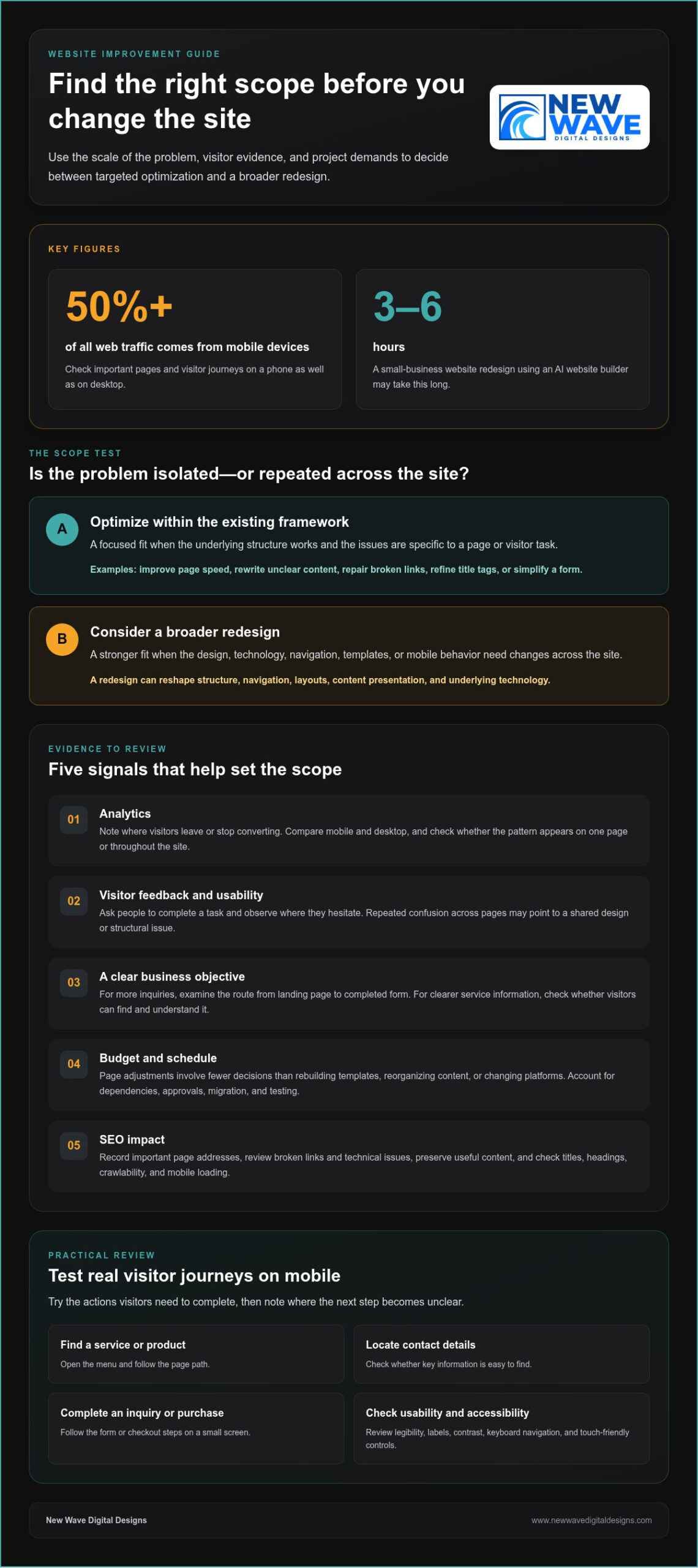
Mobile responsiveness is a practical test of whether the site’s design adapts to different screen sizes. More than 50% of all web traffic comes from mobile devices, so check key pages on a phone as well as a desktop. Look for text that requires zooming, images that overflow, and buttons that are difficult to tap. A responsive layout should adjust content and elements to the screen rather than simply shrinking the desktop page.
Test the navigation by completing real visitor tasks on a mobile device. Open the menu, find a service or product, locate contact details, and follow the steps to an inquiry or purchase. Note where the next step becomes unclear on a small screen. Touch-friendly buttons, visible menu labels, and concise page paths can often be improved without replacing the entire site.
Usability also depends on how easily people can read and understand each page. Check whether headings describe the content that follows, paragraphs are easy to scan, and important details appear where visitors expect them. If visitors must open several menu layers to find shipping information, simplify the route. If the same problem appears across many pages, the site’s information architecture may need broader changes.
Include accessibility in your review. Check that text is legible, links and buttons have clear labels, and visitors can navigate menus and forms using a keyboard. Review color contrast, and make sure meaning isn’t communicated through color alone. These checks help show whether the design serves visitors with different needs, not just whether it looks polished on one device.
Before launch, test redesigned pages on the devices and browsers your visitors use. Submit forms, follow links, check images, and confirm that menus work at narrow screen widths. Review page loading, mobile layouts, and security elements such as plugins and backups. Google prioritizes mobile-ready websites in search results, so a broken mobile experience can affect visibility as well as usability. If the structure works and problems are isolated, optimize first. If navigation, templates, and mobile behavior need changes across the site, a redesign may be the more coherent solution.
2. Budget, schedule, user feedback, and SEO considerations
You can improve page speed, rewrite unclear content, repair broken links, refine title tags, and simplify forms without rebuilding the whole site. These targeted changes suit problems limited to specific pages or visitor tasks. To decide whether you should redesign your website or optimize it, first identify whether the barriers are isolated or repeated across the site.
Start with analytics and note where visitors leave or stop converting. If a service page attracts visitors but few reach its inquiry form, inspect its message, form placement, and next step. Compare performance on mobile and desktop, then see whether the pattern appears on one page or throughout the site. That distinction helps define the project’s scope.
Analytics show what visitors do; usability tests can help explain why. Ask people to complete a task, such as finding a product detail or submitting an inquiry, and observe where they hesitate. Pair those observations with customer feedback and site data. If several people misunderstand the same label, revise it. If tasks repeatedly fail across different pages, investigate the shared design or structure.
Set a business objective before choosing changes. If the goal is more inquiries, examine the visitor’s route from landing page to completed form. If the priority is clearer service information, assess whether visitors can find and understand it. Tie visual changes to that objective. A more prominent contact button may help on one page, while inconsistent layouts could point to a broader need.
Budget and timing depend on scope. Adjusting a page involves fewer decisions than rebuilding templates, reorganizing content, or changing platforms. List the tasks, dependencies, and approval steps before setting a budget or launch date. Include content migration and testing when multiple pages are affected. Deciding whether you should redesign your website or optimize it becomes clearer when you compare the work required with the outcomes each approach supports.
Protect organic search visibility by recording important page addresses and reviewing an SEO audit for broken links and technical issues. Keep useful content, write accurate page titles and headings, and ensure search engines can crawl the site. After changes, test links, forms, and loading on mobile devices. If a broader rebuild is under consideration, a website redesign and optimization plan can help connect user needs with business goals.
When considering a redesign or refresh, assess budget, schedule, user feedback, and SEO impact. High bounce rates or low conversions may point to issues such as weak calls to action, missing customer testimonials or reviews, hard-to-find contact information, or poorly designed forms and checkout processes.
SEO considerations include keywords in content and meta tags, loading speed, mobile experience, crawlable code, and relevant, high-quality content. For businesses preparing for modern search shifts, teams like YourProfitWeb focus on AI-driven SEO and search optimization to help sites appear as top answers in AI results. A redesign can rethink the experience around current and future organizational goals. A small business website redesign using an AI website builder may take 3–6 hours.
3. Aligning a website with an evolved brand
A brand can evolve before its website catches up. A new logo, color palette, typography, or set of services may make existing pages feel inconsistent. Compare the homepage, service pages, and contact page with current brand guidelines. If only a few visual details or phrases are outdated, targeted updates may be enough. If the structure and messaging no longer express the business, a redesign can bring the overall digital experience into alignment.
Review the brand’s promise before changing the visuals. Write down what the business does, who it serves, and what visitors should understand after reading the homepage. Then compare those points with the page’s headline, supporting copy, imagery, and calls to action. For example, a company that now emphasizes custom work shouldn’t lead with generic language that suggests standard packages. The message and design should tell the same story, a standard practice for creative web design agencies like Insight Multimedia when reshaping a company’s digital presence.
Feedback can reveal where the current site creates a mismatch. Ask customers what they expected to find, then compare their answers with the language and service descriptions on key pages. If visitors consistently misunderstand an offering, revise its name, explanation, or placement. If the same confusion appears across the homepage, navigation, and service pages, the issue may call for broader messaging and structural changes.
A content audit helps distinguish material to keep from content to revise or remove. Review each page for accuracy, brand voice, and purpose. Mark outdated service descriptions for rewriting, preserve useful guidance, and remove copy that no longer supports the business’s direction. Check headings, page titles, and calls to action too. This creates a clear content map before design work begins, rather than carrying old assumptions into a new layout.
Consider the content management system alongside the brand update. If the current system supports the required page layouts and staff can update text and images reliably, a visual refresh may be enough. If the site’s templates make it hard to organize new services or messaging clearly, the structure may need to change. The key question is whether the current framework can support the brand’s next chapter.
Before launch, review the updated site page by page. Confirm that the logo, colors, typography, service descriptions, and calls to action form a coherent experience. Check that the homepage sets accurate expectations and detail pages deliver on them. A new identity doesn’t automatically require a redesign; focused changes can work when the underlying structure still fits. Choose a broader rebuild when branding, content, and page architecture need to change together.
4. Maintenance costs and legacy technology
A redesign and ongoing optimization distribute effort differently. A redesign concentrates work in a larger project, while optimization addresses defined tasks over time. Redesign costs depend on project scope and customization; ongoing costs depend on the pages and technical issues being maintained. Updating a few pages, for example, differs from rebuilding templates and moving content to another platform.
For a site with fewer than 10 pages, a small website redesign typically takes 4-6 weeks. A medium site with 10–50 pages typically takes 8-12 weeks; a large site with 50+ pages typically takes 3-6 months. An enterprise redesign typically takes 6-12 months. Content migration, approvals, and testing all shape the schedule.
A refresh often costs less and takes less time than building a site from scratch because it can reuse the existing structure and functionality. It may also preserve the current content management system, avoiding the need to learn a new editing process. This approach suits a site with a sound foundation that needs updated pages or a more responsive, mobile-friendly presentation.
Existing technology can change that calculation. List recurring maintenance tasks, such as updating the content management system, reviewing plugins, and addressing security issues. Then identify whether outdated components create repeated work or prevent needed changes. Flash, for example, is no longer supported and should be replaced with newer technology. If essential functions depend on fragile legacy components, piecemeal fixes may extend the maintenance burden.
A redesign also carries SEO risks if important URLs, content, or internal links change without a migration plan. Before launch, record pages that attract traffic, map old URLs to relevant destinations, and test links and crawlability. Keep valuable page content and search-focused titles where they still serve visitors. A refreshed visual design alone doesn’t require changing every URL.
Optimization has a narrower scope and lets teams address specific problems while preserving what works. Its drawback is that repeated fixes can become inefficient when the underlying platform or templates limit progress. A redesign can provide a coherent new structure and replace legacy technology, but it requires more planning and migration work. Compare maintenance tasks, required changes, and SEO dependencies before choosing.
Use a practical decision rule: if the site remains secure, maintainable, and capable of supporting current goals, prioritize focused optimization. If technology creates recurring obstacles, necessary changes affect multiple templates, or maintenance consumes effort without resolving core problems, plan a redesign. The right choice resolves the source of the work, not just its most visible symptom.
5. Redesign timing and ongoing optimization
Signs that point toward a redesign include outdated functionality, recurring layout problems across templates, and messaging that no longer reflects the business. If a required service cannot fit the current structure, or visitors encounter the same obstacle on multiple pages, isolated optimization may not address the underlying issue. A single slow page or unclear button, however, may need only a focused adjustment.
A full redesign every two to three years is described as typical in many industries, but the calendar alone is a weak trigger. Review whether the site still supports the audience, business goals, content, and technology it needs today. A newer site may still need an overhaul if its structure blocks essential functionality; an older one may need only continued updates if its foundations remain useful.
Use a clear decision process. First, define the outcome, such as more inquiries or clearer service information. Next, identify where visitors struggle and whether the problem affects one page or the wider site. Then compare targeted fixes with changes to templates, content organization, and technology, and choose the scope that addresses the root cause.
Keep optimization in the plan after launch, whether the project is a refresh or a full rebuild. Track the pages tied to your goal, review visitor behavior, and make adjustments when evidence points to a specific friction point. If people reach a booking page but abandon the process, for example, inspect the steps and messaging before changing unrelated pages.
Plan the launch around the complexity of the overhaul. A typical website overhaul can take 3-12 months, depending on its complexity, so define approvals, content preparation, and testing milestones early. After launch, monitor the site closely during the first 24–48 hours. Test key functionality, check important pages, and confirm forms and links work before treating the new design as complete.
The strongest approach is continuous rather than calendar-bound: redesign when the site’s foundations no longer serve its purpose, then optimize as audience needs and business goals evolve. That rhythm helps prevent a cycle of waiting until the site feels outdated, then attempting to solve every problem in one overhaul. To map a practical redesign or optimization path, plan your website’s next improvements with a clear view of goals, scope, and ongoing needs.
New Wave Digital Designs: Shopify Website Design
New Wave Digital Designs can help shape a website that better supports your business goals, whether the right path is a redesign or ongoing maintenance. If your Shopify store needs a clearer structure, a refreshed customer journey, or a cohesive visual direction, Shopify Website Design can address those needs. WordPress Website Design and SquareSpace Website Design are also available for businesses building or reworking sites on those platforms.
For a site whose foundation still works, Website Maintenance can support its ongoing care instead of replacing it. Start with the scope of the problem: isolated issues may need focused improvements, while changes across the site may call for a broader design project. Contact New Wave Digital Designs to discuss the next step for your website.
Shape your website’s next chapter
Deciding whether you should redesign your website or optimize it is ultimately about what will best support your next stage of growth. Let your priorities guide the work: preserve what serves visitors, address what gets in their way, and make room for the changes your business needs. A website doesn’t have to stay fixed after launch. It can evolve with your audience, services, and goals.
New Wave Digital Designs offers Shopify Website Design, WordPress Website Design, and SquareSpace Website Design for businesses planning a new site or a considered redesign. A clear conversation about your goals can turn the decision into a practical direction for your website.
Contact New Wave Digital Designs to discuss your website’s next step. A thoughtful change, made with purpose, can set the stage for what comes next.
Frequently Asked Questions
What is website redesign?
A website redesign is a coordinated rebuild or substantial reworking of a site’s appearance, structure, content presentation, or platform. Unlike changing one element, it may alter how visitors move from a landing page to a purchase or inquiry. A business might, for example, reorganize service pages and rebuild templates so new offerings fit naturally. The defining feature is the scope of change, not a particular visual style.
How can I audit website performance, UX, SEO, and conversion issues?
Pair analytics with hands-on task testing. Record which pages visitors enter, leave, and convert on, then test a key journey, such as finding a service and submitting its form. Review search impressions and landing-page queries in Google Search Console, and inspect mobile loading and broken links. Finally, compare visitor comments with the data. A page with traffic but few inquiries needs different attention from one visitors rarely find.
How can a redesign affect SEO rankings, traffic, and conversions?
A redesign can change how search engines discover pages and how visitors complete tasks. Changing URLs without relevant redirects can send existing search results to dead ends; removing useful page content may also weaken its relevance. Clearer page paths and forms, on the other hand, can make it easier for visitors to act. Preserve valuable destinations and monitor search visits, inquiries, and sales after launch.
What risks should I plan for when redesigning a website?
Plan for broken forms, missing content, incorrect redirects, and analytics tags that stop recording visits. Create an inventory of key pages and conversion actions before development, then test each on the finished site. Keep a copy of the previous version and establish a rollback plan in case a critical function fails. Assign someone to review visitor reports after launch so overlooked problems surface quickly.
How do I measure whether website optimization or a redesign improved results?
Before work begins, record a baseline for the specific goal, such as completed inquiries, sales, or search visits to priority pages. After launch or optimization, compare the same measures and separate results by traffic source and device. Check whether more visitors complete the intended action, not just whether total visits rise. Also review support questions and user feedback for signs that the experience has become clearer.