
The biggest website threats often exploit ordinary gaps, not dramatic flaws. The common website security threats in 2026 include denial-of-service attacks, malware, unpatched vulnerabilities, phishing, and risky third-party access. Each can disrupt a site, expose information, or provide attackers with a foothold.
Keeping a website online and business data private matters, but recognizing early warning signs is important too. Unusual traffic, unexpected changes, suspicious login requests, or unfamiliar activity from tools and accounts connected to your site all warrant attention.
This guide explains how these five threats work, which clues to watch for, and practical ways to strengthen your website’s defences. Routine maintenance, careful access controls, and a considered approach to updates and third-party tools can help protect the digital foundations your business relies on.
Key Takeaways
- Learn to spot unusual traffic, unexpected site changes, and suspicious account activity that may signal a security issue.
- Distinguish common malware types by what they do, then use the warning signs to guide your response.
- Make software and plugin updates part of routine maintenance to reduce exposure to known vulnerabilities.
- Recognize phishing cues such as impersonation, unexpected requests, and links or attachments that prompt hurried action.
- Review third-party tools and access permissions so connections to your website don’t create overlooked security gaps.
1. Denial-of-service and distributed denial-of-service attacks
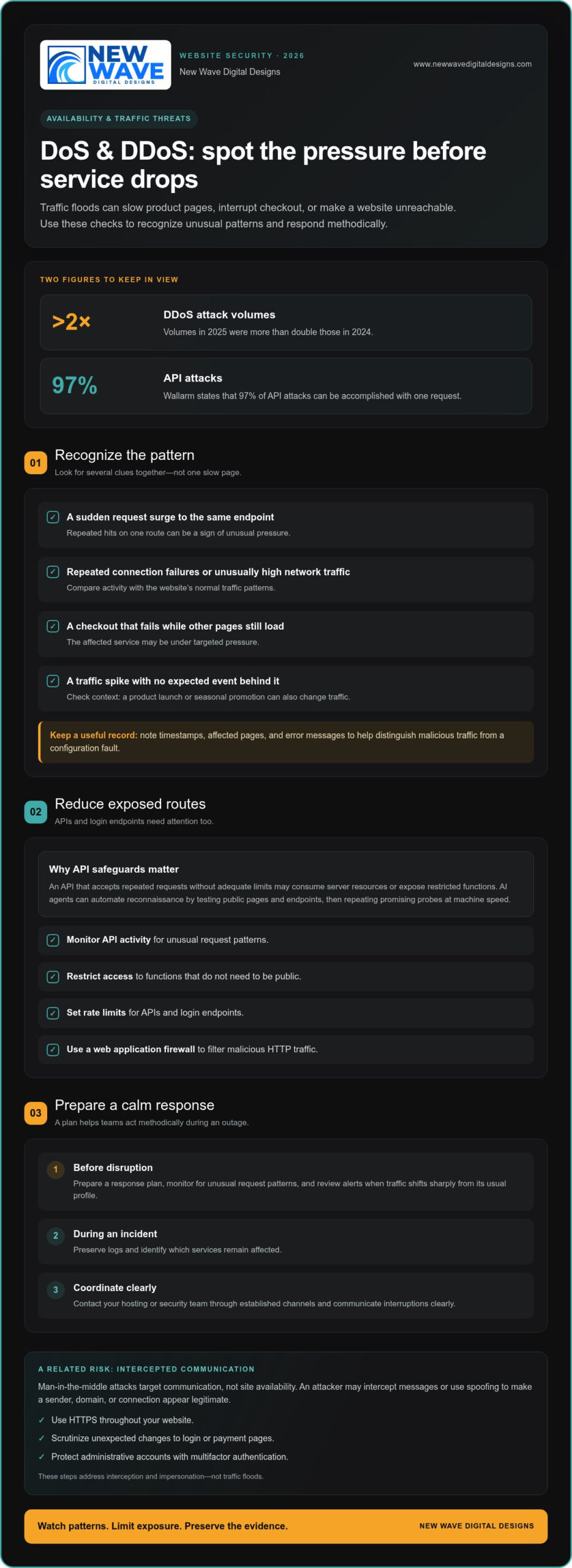
Among the common website security threats in 2026, denial-of-service attacks stand out for their ability to interrupt access. A denial-of-service (DoS) attack overwhelms a website or system until it cannot function properly. A distributed denial-of-service (DDoS) attack uses traffic from multiple sources to create that pressure. DDoS attack volumes in 2025 more than doubled compared with 2024. For an online store, a surge of requests can slow product pages, interrupt checkout, or make the site unreachable.
Look for patterns rather than a single slow page. A sudden surge of requests to the same endpoint, repeated connection failures, or unusually high network traffic can indicate an attack. Compare activity with normal patterns, such as a product launch or seasonal promotion. If checkout fails while other pages load, the affected service may be under targeted pressure. Record timestamps, affected pages, and error messages to help distinguish malicious traffic from a configuration fault.
DDoS remains one of the common website security threats in 2026, and APIs can provide another route to disruption. An API that accepts repeated requests without adequate limits may consume server resources or expose restricted functions. Wallarm states that 97% of API attacks can be accomplished with one request. AI agents can automate reconnaissance by testing public pages and endpoints, then repeating promising probes at machine speed. Monitor API activity and restrict access to functions that don’t need to be public.
Man-in-the-middle attacks target communication rather than site availability. An attacker intercepts messages between parties who believe they’re communicating directly, potentially exposing data in transit. Spoofing can make a sender, domain, or network connection appear legitimate. For example, a fake login page may imitate a real service. Use HTTPS throughout your website, scrutinize unexpected changes to login or payment pages, and protect administrative accounts with multifactor authentication. These steps address interception and impersonation, not just traffic floods.
Prepare a response before an outage occurs. A web application firewall can filter malicious HTTP traffic, while monitoring can reveal unusual request patterns. Set rate limits for APIs and login endpoints, and review alerts when traffic shifts sharply from its usual profile. During an incident, preserve logs and identify which services remain affected. Contact your hosting or security team through established channels, and communicate interruptions clearly. A tested response plan helps teams act methodically instead of making rushed changes that cause further disruption.
2. Malware types, including Trojans, adware, spyware, and ransomware
Malware is software designed to disrupt systems, access information without permission, or monitor online activity. A Trojan may disguise itself as a legitimate download; adware can push unwanted advertisements, while spyware secretly gathers information. Ransomware encrypts files and may demand payment for their release. Microsoft reported an average of 4.5 million net new malware file blocks per day in 2025, illustrating the scale of malicious files security tools must identify.
Some malware targets the browser directly. A compromised advertisement, injected script, or deceptive download can take visitors to a malicious page or attempt to install unwanted software. Infostealers aim to collect credentials, session tokens, or other sensitive data. If an employee signs in through a fake login page, stolen credentials may let an attacker access business accounts without installing malware on the website itself.
Credential theft can turn one infected device into a wider incident. Reports estimated that more than 15 billion sets of compromised credentials were available on the internet. An infostealer may capture saved passwords or browser data, then send them to an attacker for remote use. Watch for unfamiliar logins, unexpected password-reset messages, and changes to administrator accounts. If credentials may be exposed, reset them, revoke active sessions, and review account activity.
Ransomware can halt an organization’s work by encrypting files and disrupting access to essential systems. Some crews shifted toward data theft during 2024–2025, creating pressure to pay even when files can be restored. Cryptojacking takes another route: malicious code secretly uses a device’s processing power to mine cryptocurrency. Unexpectedly high resource use, sluggish performance, or unfamiliar processes can be clues. Preserve relevant logs and isolate affected devices before investigating further.
AI-assisted and polymorphic malware add a layer of adaptability. The Beckage Firm identifies AI-powered and AI-adaptive malware and attacks as emerging cybersecurity threats for 2026. Polymorphic malware changes parts of its code to evade signature-based detection, so relying on a single scanner can leave blind spots. Keep software and security tools updated, limit administrator privileges, and maintain tested backups. A recognizable visual system can help customers distinguish official messages from imitations; professional graphic design can support that consistency, while technical controls address malware itself.
3. Patch management and vulnerability exploitation
An unpatched application leaves a known weakness available for attackers to exploit. More than 30,000 vulnerabilities were disclosed in the year before publication, and the average time from disclosure to exploitation had decreased to five days. That narrow window makes routine patch management essential. Keep an inventory of website software, plugins, themes, server components, and connected services, then prioritize updates that address vulnerabilities attackers are already exploiting.
The CISA Known Exploited Vulnerabilities catalog added 245 vulnerabilities in 2025 and ended the year with 1,484 entries. Use such catalogs to help identify urgent fixes, then apply them in a controlled order: assess the affected component, back up critical data, test the update, and deploy it. Record what changed and confirm the website still works. A legacy system that no longer receives updates needs particular attention because its flaws can remain exposed.
SQL injection shows how a vulnerable application can put sensitive information at risk. If an application handles untrusted input poorly, attackers may alter database queries to view, change, or delete stored data. The OWASP Top 10:2025 injection category included more than 14,000 SQL injection CVEs. Review forms, search fields, and other inputs that pass data to a database. Developers can reduce exposure by validating input and using parameterized queries instead of building database commands from raw user text.
Patch management must also cover software in the supply chain. A vulnerable plugin or library can introduce risk even when the website’s own code hasn’t changed. Keep an up-to-date list of dependencies, remove components the site no longer uses, and watch for security updates from their maintainers. Social engineering can complicate this process: a fake update notice may persuade an administrator to install a malicious file. Use trusted software channels and verify update instructions through established account controls.
Connected devices add another layer. Statista projects more than 40.6 billion Internet of Things devices by 2045, expanding the range of systems that may connect to networks and website services. A vulnerable camera, router, or other device can provide an entry point if it shares access with business systems. Change default credentials, restrict device access to necessary functions, and install available updates. To detect recurring gaps, schedule regular reviews of software versions, access permissions, and unresolved vulnerability alerts.
4. How do you recognize a phishing attack?
Phishing uses impersonation to trick people into sharing sensitive information or downloading malware. A message may use a familiar supplier’s name, imitate a sign-in page, or claim an account needs immediate attention. Check the sender’s full email address, unexpected links, and requests to reveal passwords. Criminals often exploit trust and urgency rather than a technical flaw in the website itself.
Business email compromise can resemble a routine workplace request. For example, a message that appears to come from an executive may ask an employee to change payment details or share account credentials. Verify unusual requests through a separate, established communication channel before acting. Treat unexpected changes to supplier payment information as a warning sign, even when a message includes familiar names, signatures, or project details.
Text-message scams use the same social engineering through SMS. A message might impersonate a delivery company, bank, or website administrator and direct the recipient to a counterfeit login page. The Department of Homeland Security estimated that the Smishing Triad made over $1 billion from U.S. text scam victims over three years. Don’t use the message’s link; open the organization’s known app or type its established address yourself.
AI can make impersonation messages sound polished and context-aware, while voice-cloning tools can imitate a familiar speaker. That doesn’t mean every unusual message is an attack, but it does make a familiar tone less reliable as proof. Assess the request itself: does it demand secrecy, bypass normal approval, or pressure someone to act immediately? Confirm sensitive instructions using a previously known phone number or internal process.
Social engineering can also target people who manage website infrastructure. An attacker might pose as a hosting or security provider, then request administrator access or persuade staff to disable protections. A fake outage alert could encourage hurried changes during a traffic disruption. Keep a clear escalation process, limit account permissions, and have staff report suspicious requests through a designated channel instead of replying directly.
Practical protection combines phishing-resistant multifactor authentication, staff awareness training, and email filtering. For a suspicious message, don’t click links or open attachments. Report it, verify the sender independently, and alert the team responsible for website accounts. If someone has entered credentials, reset them promptly, revoke active sessions, and review sign-in activity. These steps can help contain an incident before stolen access affects customer accounts or site operations.
5. Supply-chain and third-party access risks
Website defenses can be weakened through a trusted plugin, cloud service, or vendor account. Alongside denial-of-service attacks, malware, unpatched vulnerabilities, and phishing, supply-chain compromise is a major website security concern in 2026. A third party may introduce vulnerable software or hold credentials that grant access to customer data, site settings, or connected systems.
Software supply-chain risks arise when attackers compromise code, dependencies, or distribution channels before updates reach a website. In December 2024, a campaign compromised at least 36 Chrome extensions. An extension with broad browser permissions may expose activity or data even though users installed it for a legitimate purpose. Review the software and extensions connected to your site, remove tools no longer needed, and limit permissions to essential functions.
The OWASP Top 10:2025 software supply chain failures category recorded 215,248 total occurrences. OWASP’s score table lists an average incidence rate of 5.72% for this category. These measures underline why software components and update paths deserve regular review. Keep an inventory of plugins, libraries, hosting integrations, and vendor connections. For each, record its purpose, access level, and update source, then remove components that no longer support a business need.
Cloud services can create a separate exposure if storage or access settings are misconfigured. An open storage bucket, default password, or over-permissioned account may expose private data without a sophisticated attack. Require unique credentials and multifactor authentication for third-party accounts, restrict access to what’s necessary, and remove access when a vendor relationship ends. Review account activity for unfamiliar logins, unexpected permission changes, or new integrations.
In the United States, the CCPA and HIPAA are relevant data-protection frameworks, with HIPAA governing healthcare data handling. GDPR also imposes data-protection requirements where it applies. The rules relevant to a website incident depend on the organization, the data involved, and the applicable jurisdiction. There isn’t one universal reporting rule for every website.
Strengthen supply-chain defences by reviewing vendor access, software updates, and cloud configurations as a connected process. Keep a record of who can access sensitive data, which systems each account can reach, and how credentials are managed. Include third-party access in incident response planning so teams can identify affected integrations and revoke compromised credentials promptly. A security review should also assess whether vendors’ software still serves a necessary purpose.
If a website’s vendor access, software, or hosting setup needs a closer security review, explore website security support as a practical next step.
New Wave Digital Designs: Shopify Website Design
New Wave Digital Designs helps businesses create and maintain websites with Shopify Website Design, WordPress Website Design, SquareSpace Website Design, and Website Maintenance. If a security review shows that your site needs structural updates, a platform redesign, or ongoing maintenance, these services can help you address its design and upkeep together. A clear, well-maintained site is easier to manage as your business and digital needs evolve. Contact New Wave Digital Designs to discuss a new Shopify store, a WordPress or SquareSpace redesign, or ongoing website maintenance.
Build Security Into Your Website’s Next Chapter
Understanding the common website security threats in 2026 is a starting point, not a one-time task. As your website changes, its design, connected tools, and access needs change too. Make security part of future decisions: consider how new features will be maintained, who needs access, and how updates fit into your regular website care.
If your next step is creating or reshaping a website, New Wave Digital Designs offers Shopify Website Design, WordPress Website Design, and SquareSpace Website Design. Thoughtful platform design can provide a clearer foundation for ongoing maintenance, while security practices remain essential to managing the site.
Bring your website goals and questions together, then explore a next step that suits your business. Contact New Wave Digital Designs to discuss your website needs and shape a considered path forward.
Frequently Asked Questions
What are the biggest cyber threats in 2026?
Key threats include credential-based attacks, ransomware, software supply-chain compromise, and attacks that use AI to adapt or scale. The Beckage Firm also identifies identity-provider compromise and AI-powered attacks as emerging cybersecurity concerns for 2026. For a business, the most pressing risk depends on what attackers could reach through stolen accounts, connected software, or exposed systems. Start by mapping critical accounts and data, then prioritize protections around those entry points.
How do you recognize a phishing attack?
Look for a mismatch between the sender’s identity and the requested action. For example, a supplier’s familiar display name paired with an unfamiliar reply address deserves scrutiny, especially if the message asks for a password or changed payment details. Don’t reply or use its links. Contact the sender through a previously established channel, report the message internally, and preserve the original email so security staff can examine the sender details and headers.
How has AI changed the cyber threat landscape?
AI can help attackers create convincing messages, automate reconnaissance, and adapt malicious code to evade familiar detection patterns. It also creates risks inside organizations: the Beckage Firm identifies prompt injection, model poisoning, and attacks on AI systems as emerging concerns for 2026. Businesses using AI-connected tools can reduce exposure by limiting sensitive data in prompts, restricting system permissions, and reviewing how model outputs connect to applications and business accounts.
What are Cyber Security Trends?
Cybersecurity trends are shifts in attacker methods and defensive priorities. In 2026, concerns include identity compromise, AI-assisted attacks, supply-chain weaknesses, and unpatched legacy systems, according to the Beckage Firm’s emerging-threat analysis. On the defensive side, organizations are focusing on continuous verification, stronger authentication, and visibility into third-party connections. Treat trends as prompts to review your own systems, not as proof that every business faces the same risks.
What are Web Security Threats?
Web security threats are actions or weaknesses that can affect a website, its users, or the systems connected to it. Examples include data exposure from misconfigured storage, unauthorized access through weak controls, and attacks that misuse application inputs. In OWASP Top 10:2025 data, all tested applications had some form of broken access control and security misconfiguration. Review who can access administrative functions and whether services expose data beyond their intended audience.
What are the most common types of cybersecurity threats?
Common categories include malware, ransomware, phishing, denial-of-service attacks, vulnerable software, and unauthorized access. OWASP’s Top 10:2025 also highlights security misconfiguration and cryptographic failures, showing that risk can stem from both attack techniques and implementation weaknesses. To make the categories useful, connect each one to a real asset: customer accounts, payment functions, staff email, or stored data. That mapping helps teams decide which safeguards and incident procedures deserve attention first.
What do 2026 reports say about website attacks and data breaches?
Reports point to sustained attack activity, but broader cyber incident figures shouldn’t be mistaken for website-only counts. In New Jersey, the NJCCIC received 954 cybersecurity incident reports in 2025, a 92 percent increase over 2024. These figures provide context, not a forecast for any individual website or business.
How do SQL injection and cross-site scripting threaten websites?
SQL injection targets the way an application queries its database, while cross-site scripting (XSS) places malicious scripts in content a browser displays. Injection flaws can allow attackers to manipulate application inputs and affect data or system behavior. Developers can reduce these risks by using parameterized database queries, validating input, and encoding output before displaying it. Test forms, search results, and user-submitted content because each can pass data into application code.