
Credibility comes from signals customers can verify, not polished claims alone. To answer how to make my business look credible online, strengthen four essentials: genuine customer reviews, active social profiles, clear contact details, and consistent, professional branding. Together, they help visitors see a business that is established, approachable, and trustworthy.
A polished website matters, but it’s only one part of the impression people form. Visitors also look for signs that a business is active, communicates clearly, and follows through on its promises.
This guide explains how to put those signals to work, from presenting genuine customer feedback to aligning your website and messaging. You’ll find practical ways to create a coherent online presence and identify when your site’s design or upkeep may be weakening that impression.
Key Takeaways
- Feature genuine customer feedback where visitors can easily find it, and use responses to show that you listen and improve.
- Keep social profiles active with useful, relevant updates that reflect the real work and values of your business.
- Make contact details easy to locate, then respond clearly and consistently so customers know what to expect.
- Align your visual identity and messaging across your website, advertising, and customer interactions.
- Review your website as a whole: clear content, polished design, and ongoing upkeep help create a professional, trustworthy impression.
1. Displaying customer testimonials and positive reviews
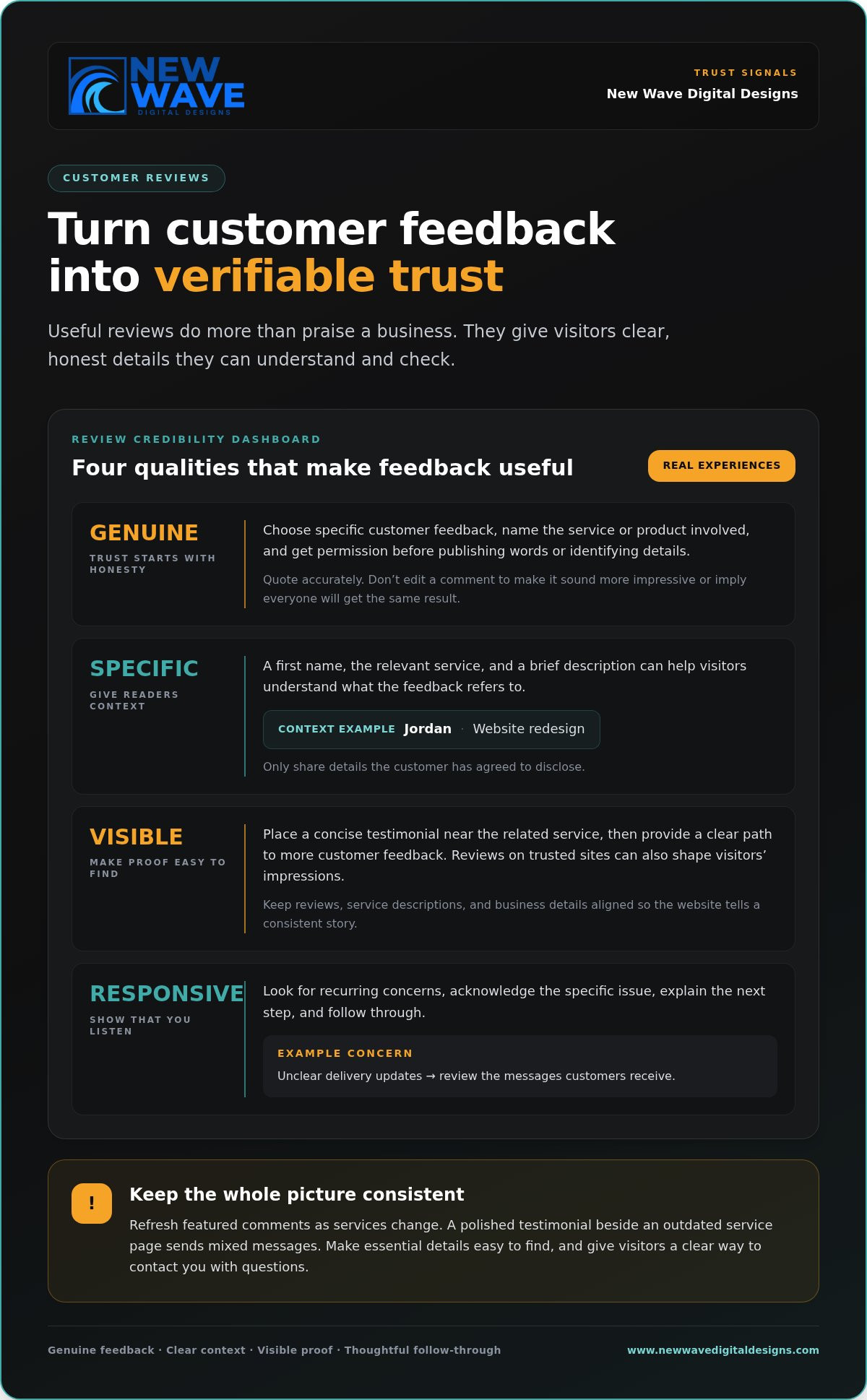
Customer reviews give visitors insight into real experiences, beyond your own claims. A short testimonial can explain what a customer needed, how you helped, and what changed. For example, a home organizer might feature a client’s comment about finding a workable storage system. Choose specific, genuine feedback, name the service or product involved, and get permission before publishing someone’s words or identifying details.
Make feedback easy to find instead of hiding every review on a single page. Feature a concise testimonial near the related service, then offer a clear path to more customer feedback. Reviews on trusted sites can also shape visitors’ impressions. Quote accurately, don’t edit comments to make them sound more impressive, and never present one person’s experience as a promise of the same result for everyone.
Context makes a testimonial more useful. A reviewer’s first name, the relevant service, and a brief description of their experience can help readers understand the feedback. For example, “Jordan, website redesign” gives more context than an unattributed sentence. Share only details the customer has agreed to disclose. Refresh featured comments as your services change, so examples reflect what visitors can expect from your business now.
Reviews are one trust signal among several. Customers may also look for an up-to-date website, consistent branding, clear contact details, and relevant accreditations. A polished testimonial beside an outdated service page sends mixed messages. Check that reviews, service descriptions, and business details tell the same story. Make essential information easy to find, since visitors may spend only a few moments searching online before deciding what to do next.
Your response to feedback matters, too. Look for recurring complaints, such as unclear appointment instructions or confusing product information. Respond directly and calmly: acknowledge the specific concern, explain the next step, and follow through. If a customer says delivery updates were unclear, review the messages customers receive. Listening and making improvements can strengthen credibility more than a page filled only with praise.
Give customers a clear way to reach you when a review raises a question. Link the relevant service page to an easy-to-find contact method, with a direct invitation such as “Ask us about project timelines.” Visitors comparing businesses can move from reading feedback to getting the details they need. Keep the contact route current, and make sure its wording matches the tone and information across your website.
2. Maintaining an active social media presence
An up-to-date social profile gives visitors another way to see what your business does. Regular, relevant posts can show that you’re active and committed to your offerings. Choose platforms your customers use, then set a manageable posting rhythm. A neighborhood bakery, for example, could share seasonal menu updates, explain how to place an order, and introduce the people behind the counter.
Consistency matters more than filling every feed. Make a simple monthly calendar with themes such as product details, helpful answers, and business updates. Before publishing, check that each post has a clear purpose and accurate information. If a restaurant changes its opening hours, update its social profile and website together. Old hours or discontinued services on a neglected profile can undermine the impression you want to create.
Social posts should guide visitors to a polished website, where they can understand your offer and take the next step. Make the homepage, service descriptions, and contact options easy to use on phones and computers. For example, a landscaping company could share a garden project on social media and direct interested visitors to a page explaining its services. Check that the page loads properly, uses current photos, and shows visitors how to ask for details.
What legal disclosures and privacy rules apply to business websites in the United States? Requirements depend on what the site does, what information it collects, and which state or industry rules apply. If your site collects customer details, explain your data practices clearly and review applicable obligations before publishing forms or tracking tools.
How much does it cost to build a credible business website? The cost depends on the site’s design, content, features, and ongoing maintenance needs. A provider sets a price after a quote request, based on the project’s scope and requirements.
Security and transparency go hand in hand. HTTPS encrypts information sent between a visitor’s browser and your website, while a privacy policy explains how collected information is handled. Use HTTPS throughout the site, especially on contact and checkout pages, and make the privacy policy easy to find near forms. Keep software and site components maintained, and remove forms that request information your business doesn’t need.
For a business whose website needs a more cohesive design or reliable upkeep, professional website design and maintenance can help bring its social presence and online experience into alignment.
3. Accessible contact information and prompt responses
Which business details should appear on a website to build trust? Show your business name, a working phone number or email address, and clear service details. Add your location or service area, opening hours, and a contact form when relevant. For example, a healthcare practice like Advanced Dental Care of Dover can clearly state its office hours and treatments, just as a home repair business can list its service area and explain which jobs it handles. Keep every detail accurate and consistent across your website.
Make contact options easy to spot. Put a “Contact” link in the main navigation and repeat a suitable contact method on service pages. A phone number can help with urgent questions, while a form can gather project details. Label form fields clearly, explain what happens after submission, and avoid asking for information unrelated to the enquiry.
A prompt response starts with a simple process. Assign someone to review incoming messages, acknowledge each enquiry, and explain a realistic next step. If a customer asks about a custom order, confirm receipt and say when they can expect a fuller reply. Don’t promise a response time your business can’t consistently meet. Clear expectations make communication feel considered rather than uncertain.
Test the contact process on a phone and a computer. Tap the phone number to see whether it opens the calling function, submit the form, and check that a confirmation message appears. A visitor on a phone, for example, shouldn’t need to zoom in to read an email address. Fix broken buttons and outdated details as soon as you find them.
How can I claim and optimize a Google Business Profile? Follow Google’s process to claim the profile, then complete each relevant field with accurate business information. Add the correct category, service area, hours, phone number, and business description. Use clear photos that represent your actual business, and review the profile whenever your hours or services change.
Consistent details help customers recognize your business across Google and your website. Match the business name, phone number, hours, and service descriptions wherever they appear. If holiday hours change, update both places. A profile with one phone number and a website with another create avoidable friction for someone ready to get in touch.
Make the next step explicit. A consulting firm might invite visitors to describe their project through a short enquiry form, while a local café could display its address and current hours. In each case, the contact option should suit the customer’s needs. Review the journey regularly, from finding your details to receiving a useful response.
4. Consistent branding and messaging
Visitors notice when your website, advertisements, and social profiles feel like they belong to different businesses. Align your logo, colors, typography, and tone so each channel reinforces the same identity. A neighborhood bakery, for example, could use the same warm palette and product names on its website, Instagram profile, and printed menu. Consistency helps customers recognize the business and understand its offer.
How can I verify a business on social media and keep profiles consistent? Follow each platform’s own account verification process, and make sure your profile represents the real business. Match the business name, logo, description, contact details, and website across platforms, then review them whenever information changes.
A short brand guide makes alignment easier to maintain. Keep approved logo files, colors, fonts, business descriptions, and preferred phrases in one shared document. Include examples of suitable wording, such as “handmade in small batches,” and phrases to avoid if they overstate what you deliver. Staff and contractors can consult the same guide before creating a post, advertisement, or customer message.
Consistency applies to promises, too. If a service page describes custom work, an advertisement shouldn’t suggest that every project follows a fixed template. A fitness studio promoting beginner classes should describe them the same way on its website and social channels. Compare key phrases side by side, and revise any claim that changes meaning across platforms.
Customer interactions are part of your brand, too. A welcoming website paired with abrupt replies creates a fractured impression. Set a few practical writing principles, such as greeting customers by name when appropriate, answering the question first, and explaining the next step. For instance, a repair business can use a calm, direct tone in both its website copy and enquiry responses.
Give visual assets the same care. Check that logos remain legible in profile images, banners, and mobile layouts. Use consistent image treatments and avoid mixing unrelated fonts or colors in promotional graphics. Thoughtful graphic design can bring campaign materials and your website together, while keeping essential text clear and easy to read.
Make regular reviews part of maintaining consistency. Compare your website, social profiles, advertisements, and customer-facing templates whenever a service or business detail changes. A café updating its menu can check its profile descriptions and promotional posts at the same time. This simple comparison catches outdated claims before they weaken the overall impression.
5. Creating a unified, professional image
A professional image is the sum of details visitors encounter, from your logo to the checkout screen. Review your website as a customer would: open the homepage, choose a service, and follow the path to contacting you. A consultant’s polished homepage can still feel unfinished if service pages have broken buttons or inconsistent design. Make every step feel like part of the same considered experience.
Start with the visual elements customers see repeatedly. Use a legible logo, a restrained color palette, and typography that stays readable on phones. A home renovation company might pair project photos with clean headings and ample space around each image. Don’t stretch a logo or place text over busy photos. These choices help visitors focus on the work, not the layout.
Choose images that accurately represent your business. A restaurant should show its actual dishes and dining space, not generic stock photos that suggest a different experience. A service business can use photos of its team, workspace, or completed work when appropriate. Add concise captions when context helps, and replace visuals that no longer reflect the business.
Presentation also depends on how information is organized. Give each page a clear purpose, use descriptive headings, and make the main action easy to identify. For example, a bookkeeping firm can put each service on a separate page, explain it in plain language, and place an enquiry option nearby. Visitors shouldn’t have to scan unrelated sections to understand what the firm does.
Check for details that can make a site feel neglected. Test navigation links, check spelling, and remove outdated announcements. Open key pages on a phone and computer to catch clipped text, overlapping buttons, or images that load poorly. A seasonal sale banner left online after the promotion ends can undermine confidence, even when the rest of the site looks polished.
Build a simple review habit around real customer journeys. Ask someone unfamiliar with your site to find a specific service, understand what it includes, and locate the next step. Note where they hesitate, then revise those pages. A focused graphic design approach can bring visual elements together while keeping your business’s character clear and recognizable.
Ready to shape a more polished visual identity? Explore graphic design for your business as a way to create a cohesive, professional impression.
New Wave Digital Designs: Shopify Website Design
New Wave Digital Designs creates Shopify websites for businesses ready to present their products through a clear, professional online store. A considered design can bring product information, brand visuals, and the customer journey together, helping visitors understand what the business offers and how to take the next step.
If your website is difficult to navigate, feels out of step with your brand, or needs ongoing attention, New Wave Digital Designs also offers WordPress and Squarespace website design and website maintenance. The right next step depends on your platform and the changes your site needs. A well-structured website supports credibility while giving your business room to evolve.
To discuss a website project, visit New Wave Digital Designs.
Build credibility through your next thoughtful improvement
If you’re considering how to make your business look credible online, choose one part of the customer experience to improve next. A clearer page, a more cohesive visual identity, or a simpler path to an enquiry can make your online presence feel more intentional. Revisit that experience as your business evolves, so your digital impression continues to reflect the care behind your work.
When your website needs a more considered design, New Wave Digital Designs offers Shopify, WordPress, and Squarespace website design. The right platform and structure depend on what you need your website to do, from presenting services to supporting an online store. Focused design can bring your goals and online presence into closer alignment.
Take the next step at a pace that feels right for your business. Contact New Wave Digital Designs to discuss your website project, and keep shaping an online presence that earns confidence through clarity and care.
Frequently Asked Questions
What are the four pillars of credibility?
Four practical pillars of credibility are competence, reliability, honesty, and customer care. Competence comes through in accurate, useful information; reliability in consistent follow-through; honesty in realistic expectations; and care in how a business handles questions or problems. For example, a repair company can explain what a service covers, arrive as agreed, communicate changes, and address concerns respectfully.
What is business credibility?
Business credibility is the extent to which customers, vendors, and partners trust that a business is reliable and keeps its promises. It grows through repeated evidence, not a single claim. A freelance designer, for example, can build trust by explaining project steps clearly, meeting agreed deadlines, and being candid when a request falls outside the project’s scope.
What makes a business look credible online?
If you’re asking how to make my business look credible online, focus on a coherent customer journey that visitors can verify. They should understand what the business does, who it serves, and what happens after an enquiry. For example, a tutoring business can describe its subjects, explain how lessons work, and share a sample of its teaching approach. Specific information helps prospective customers make informed decisions.
How do I create a professional business website?
How do online reviews affect business credibility, and how can I get more?
Reviews give prospective customers firsthand accounts to help them judge whether a business suits their needs. To invite feedback, ask customers shortly after a purchase or service is complete, while the experience is easy to recall. Keep the request neutral and let customers share honest opinions. For example, a cleaning service could send a brief follow-up asking what worked well and what could be improved.
How should a business respond to negative online reviews?
Respond calmly, address the issue, and offer a practical next step without revealing private customer details. A catering business might acknowledge a complaint about a late delivery, apologize for the disruption, and invite the reviewer to discuss the order privately. Avoid arguing point by point in public. After resolving the issue, consider whether a process change could prevent the same problem from recurring.
How can customers verify a business is legitimate online?
Customers can compare your business name, contact information, services, and website details across public profiles. They can also look for clear policies, working contact options, and independent reviews that describe specific experiences. Before sharing sensitive information or making a purchase, make sure you’re interacting with the intended business and understand the transaction terms. A mismatch between profiles is a reason to pause and seek clarity.