When Your Web Developer Disappears: A 2026 Checklist

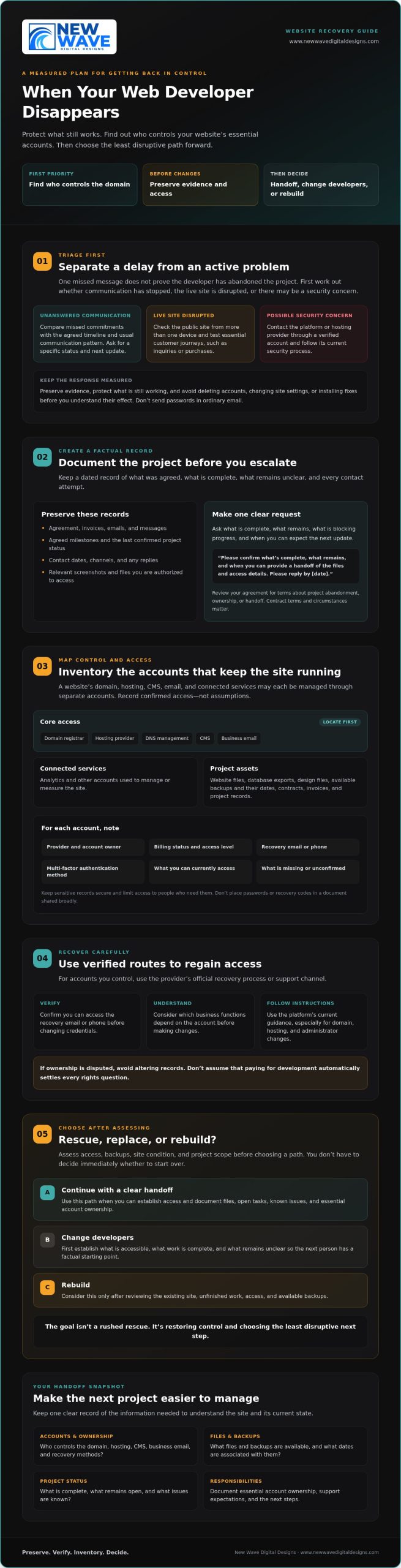
A vanished web developer doesn’t automatically mean your website is lost, but waiting without a plan can put your domain, customer inquiries, and sales at risk. If you’re wondering what to do when your web developer disappears, start by finding out who controls the domain. That account determines where your website address points.

It’s understandable to feel stuck if you don’t know who holds the registrar login, hosting account, site files, or administrator access. You don’t have to decide immediately whether to start over. First, protect what’s still working, preserve evidence, and establish which accounts and assets you can access.

This checklist walks you through a measured recovery: review your agreement, document contact attempts, identify domain and hosting accounts, secure logins, and locate or request a backup before making changes. Then assess whether the existing site and unfinished work are recoverable. Choose the least disruptive path: continue with a clear handoff, change developers, or rebuild. The goal isn’t a rushed rescue. It’s restoring control and choosing your next step with confidence.

Key Takeaways

  • Separate a missed reply from an active outage or security concern before deciding what needs immediate attention.
  • Find out who controls your domain, hosting, CMS, business email, and account recovery methods.
  • Assess access, backups, site condition, and project scope before choosing whether to rescue, replace, or rebuild.
  • Use a written handoff to document files, open tasks, known issues, and ownership of essential accounts.
  • Learn what to do when your web developer disappears, then plan a steady next step with clearly defined support and responsibilities.

Your Web Developer Disappeared: Stabilize the Website Before Making Changes

A delayed reply can be unsettling, but one missed message doesn’t prove your developer has abandoned the project. Before deciding what to do when your web developer disappears, distinguish between an unresponsive project contact and a live website that’s down or may be compromised. The first calls for a clear record and a specific request for an update. The second calls for prompt contact with the platform or hosting provider through an account you can verify.

Start by preserving the current picture. Save your agreement, invoices, emails, messages, agreed milestones, and notes about open requests. Record dates and the last confirmed project status, including what’s complete and what remains unclear. Avoid deleting accounts, changing site settings, or installing fixes before you understand their effect. Preserve any files, access details, and backups you can legitimately reach. Don’t send passwords in an ordinary email.

How can you tell a delay from a disappearing developer?

Compare missed commitments with the agreed timeline and the developer’s usual communication pattern. Ask for a specific status, remaining tasks, current blockers, and a realistic date for the next update. Keep a dated log of each contact attempt, noting the channel and any reply. This creates a factual record without assuming why communication has stopped.

Send one concise, professional message through the usual channel, then retain a copy. For example: “I’m checking on the project status. Please confirm what’s complete, what remains, and when you can provide a handoff of the files and access details. Please reply by [date].” Review your agreement for terms about project abandonment, ownership, or handoff. The Work for Hire Doctrine is one U.S. copyright concept that may be relevant to ownership, but the contract and circumstances matter. Don’t assume that paying for development automatically answers every rights question.

What should you do if your live website is affected?

Check the public site from more than one device, then test essential customer journeys, such as submitting an inquiry or completing a purchase. Note what fails and when. If the site appears disrupted, contact the hosting provider through a verified account, not just contact details supplied by the developer. If you suspect unauthorized access, follow the platform’s or host’s current security process. Avoid experimenting with changes that could complicate recovery.

Keep the immediate goal simple: protect evidence, preserve what still works, and establish whether the issue is project communication, service disruption, or a security concern. With those facts in hand, you can begin account recovery without making the situation harder to untangle.

Recover Website Control: Inventory Your Domain, Hosting, and Admin Access

Once you’ve documented the situation, map the accounts and assets that keep the website running. A site may look like one connected structure, but its domain, hosting, content management system (CMS), business email, and supporting services can each be controlled through separate accounts. Knowing who owns each account, who pays for it, and how access can be recovered is the foundation of a safe handoff.

Which website accounts and files should you locate?

Build an inventory that captures more than login names. For each account, record its provider, account owner, billing status, recovery email or phone, multi-factor authentication method, and your current access level. Don’t put passwords or recovery codes in a document you plan to share broadly.

  • Core access: Domain registrar, hosting provider, DNS management, CMS, and business email.
  • Connected services: Analytics and other accounts used to manage or measure the site.
  • Project assets: Website files, database exports, design files, available backups and their dates, contracts, invoices, and project records.

Save dated screenshots of account details and relevant correspondence where you’re authorized to access them. Store sensitive records securely, with access limited to people who need them. Note what’s missing, too. The inventory is useful because it separates confirmed access from assumptions.

How can you regain access without creating more risk?

For accounts you control, use the provider’s official recovery process or support channel. Before changing credentials, confirm you can access the recovery email or phone and understand which business functions depend on the account. Follow the platform’s current instructions, especially for domain, hosting, and administrator changes. If ownership is disputed, avoid altering records or removing users. Ask a qualified professional to assess the situation first.

Payment records help establish a history, but paying for development alone may not settle ownership of every file or other intellectual property. Review the contract, invoices, and written handoff terms. The legal definition of work for hire illustrates why ownership can depend on legal and contractual details, not just who commissioned or paid for the work. For a specific dispute, consult a qualified legal professional.

Keep the inventory current as access is confirmed, recovered, or transferred. Clear records make it easier to brief the next provider and agree who will administer each account. Once you understand your recovery needs, you can also explore website maintenance and support as a possible part of a more deliberate ongoing plan.

Rescue, Replace, or Rebuild? Compare Your Website Recovery Options

Once you know what you can access, decide what’s worth preserving. The best path depends on the actual platform, available files and backups, account permissions, site condition, and remaining work. An unfinished site may still have a usable structure. A site that appears complete may rely on missing files or services no one has documented.

Compare your options against the same criteria:

  • Access: Can a new professional reach the CMS, hosting, and necessary files?
  • Assets: Are usable backups, database exports, and design materials available?
  • Condition and scope: What works, what is broken, and what remains unfinished?
  • Continuity: Can customer-facing functions stay available while the work proceeds?

Ask for an independent technical assessment before discarding existing work or approving major changes. The assessment should distinguish verified facts from assumptions. General online searches and external web directories can offer leads, but browsing third-party index links is not a substitute for checking your own platform, files, and permissions directly.

When is it reasonable to continue or rescue the existing site?

A rescue is plausible if the CMS or hosting is accessible, usable files or backups exist, and the remaining work can be clearly defined. Ask a new professional to identify functioning components, missing dependencies, and risks before making changes. Request a written scope that separates recovery and repair from new features. That makes it easier to judge the work against its actual requirements.

When might a new developer or rebuild be the clearer path?

Replacing the developer doesn’t necessarily mean replacing the website. A handoff may make sense if the current site is maintainable and the remaining tasks fit your goals. Consider rebuilding if essential assets are unavailable or recovery would no longer serve the project’s needs. Don’t choose a rebuild from frustration alone. Base the decision on an independent review and the effect on business continuity.

If you’re weighing what to do when your web developer disappears, treat the assessment as a decision record: what can be preserved, what must change, and why. That gives you a grounded basis for continuing, changing providers, or partnering with an agency like New Wave Digital Designs for a clean foundation.
When Your Web Developer Disappears: A 2026 Checklist

A Web Developer Handoff Checklist for Protecting the Next Project

A strong handoff turns a difficult transition into a clear working foundation. Whether you’re continuing the existing build or bringing in a new provider, document what exists, who controls each account, and what decisions remain. If you’re weighing what to do when your web developer disappears, treat the handoff as a practical safeguard, not just a transfer of files.

What should a new developer receive during the handoff?

Share a verified account inventory, available backups, project files, design assets, contracts, and outstanding requirements. Grant only the access needed for the assigned work, using the platform’s supported user permissions rather than sharing your personal login. Ask the incoming provider to record access gaps, dependencies they discover, and proposed recovery steps before making substantial changes.

  • Accounts: Confirm who owns and administers the domain, hosting, CMS, business email, and connected services.
  • Project state: List completed work, open tasks, known issues, and the next agreed milestone.
  • Technical notes: Request documentation for updates, integrations, licenses, and platform-specific dependencies.
  • Working agreement: Set communication channels, response expectations, approval responsibilities, and how scope changes will be handled.

Put ownership and responsibilities in writing. Your business should know who can administer essential accounts, approve changes, and maintain access if the provider relationship ends. Document what the provider will deliver, how progress will be reviewed, and who must approve work before it moves forward.

What should you ask before hiring a replacement?

Ask how the provider will assess the existing platform, account access, backups, and project risks before proposing a path forward. Request a written scope with milestones, a communication process, and a clear method for approving changes. Confirm relevant experience with your site’s platform, whether Shopify, WordPress, or Squarespace. The web design guide offers broader considerations for planning a website project.

Once responsibilities are clear, consider what support the site will need after the handoff. The website maintenance services guide can help you think through ongoing care. After establishing your recovery needs and project scope, you can explore website maintenance and support.

Choose a Steady Website Support Partner and Set the Next Steps

With access secured and the project assessed, turn recovery into a clear plan. Confirm what you can access, preserve the records you’ve gathered, identify which assets are usable, and define the remaining work. If you’re still asking what to do when your web developer disappears, be cautious of promises of a quick fix before someone has reviewed the platform, permissions, files, and available backups.

Ongoing support should match the site’s actual needs. Website maintenance may include ongoing technical support, while managed hosting and security address other aspects of keeping a site hosted and protected. Ask a prospective provider to spell out what each responsibility includes, how it will be handled, and what falls outside the agreed scope. New Wave Digital Designs offers website design for Shopify, WordPress, and Squarespace, as well as website maintenance, managed hosting, and security services for businesses evaluating their next step.

How do you evaluate a website maintenance provider?

Ask who handles updates, hosting, security, backups, and technical issues, and how those tasks are documented and communicated. Clarify how you retain account access and how you’ll be informed about planned work or discovered concerns. The website maintenance services guide can help you compare ongoing-care needs and identify which responsibilities you want covered.

What should your first recovery conversation cover?

Give the provider a concise briefing: the platform, current symptoms, project status, confirmed access, known backups, unresolved tasks, and business-critical functions such as inquiry or checkout forms. Share a dated timeline and distinguish what you’ve verified from what you’re unsure about. Ask for an assessment, a proposed sequence of work, and a written scope before authorizing substantial changes.

A useful first conversation should leave you with clearer choices, not pressure to commit before the facts are understood. Confirm who will administer essential accounts, how progress will be communicated, and what approvals are needed before changes go live. That structure makes the next provider relationship more transparent, whether the work is a recovery, a continuation, or a new design.

Once you’ve defined the support you need, you can discuss website support with New Wave Digital Designs as one option for planning a considered path forward.

Build a Clearer Path Forward for Your Website

When you’re deciding what to do when your web developer disappears, begin with facts, not assumptions. Secure the accounts you control, preserve project records and available backups, then get an informed assessment before choosing whether to continue, change providers, or rebuild. A documented handoff and clear account responsibilities can make the next working relationship more transparent from the start.

The right ongoing support depends on what your website needs after recovery. New Wave Digital Designs offers website design for Shopify, WordPress, and Squarespace, along with website maintenance, managed hosting, and security services. Defining your priorities first can help you have a focused conversation about which options may fit.

Discuss your website support needs when you’re ready to plan the next step. With access, evidence, and scope in view, you can move forward with greater clarity and build a steadier foundation for your website.

Frequently Asked Questions

What should I do first if my web developer stops responding?

First, check whether the website is functioning and whether there’s an active security concern. If it’s live, document the project status, missed commitments, and contact attempts before making changes. Review your agreement, then send a concise, dated message asking for a status update, remaining tasks, and a handoff of accessible files and accounts. This calm record helps you decide what to do when your web developer disappears without relying on assumptions.

How long should I wait before finding a new web developer?

There’s no universal waiting period. Review the project agreement and timeline, consider how overdue the work is, and weigh the effect on your business. Send a clear request for a response with a reasonable date based on the commitments already made. If that date passes without a useful reply, you can begin seeking an independent assessment or replacement while preserving your records and avoiding disruptive changes.

Can I get my website back if my developer controls the domain or hosting?

Possibly, but the steps depend on who owns the accounts and what access you can verify. Contact the registrar or hosting provider through its official support channel and ask about account recovery, transfer, or dispute procedures. Gather business records, invoices, contracts, and correspondence that may help establish your connection to the site. Don’t attempt to bypass account protections or make ownership claims you can’t support.

What if my web developer deleted my website?

Don’t assume the site is permanently lost. Contact the hosting provider and platform through verified support channels to ask whether site files, database exports, or backups are available. Preserve messages and records related to the deletion, and avoid making changes that could overwrite recoverable material. A qualified professional can assess available assets and explain what might be restored. Recovery depends on the platform, account access, and surviving files or backups.

Should I rebuild my website or hire someone to finish it?

Get an independent assessment before choosing. If the platform, usable files, and a clear scope are available, another professional may be able to continue or repair the existing site. A rebuild may be more appropriate if essential assets are missing or the current work no longer fits your goals. Compare site condition, remaining tasks, business-critical functions, and continuity needs rather than deciding from frustration alone.

Who owns the website, domain, and design files if I paid a developer?

Payment alone doesn’t necessarily determine ownership of every website asset. Check your contract and written agreements for terms about the domain, code, design files, licenses, and handoff. Domain registration and intellectual property can involve different rights and account holders. If ownership is disputed, preserve invoices and correspondence, and seek qualified legal advice before asserting rights or transferring assets. The answer depends on the agreement and circumstances.

How can I prevent a web developer from disappearing again?

Keep essential accounts under your business’s control, use your own billing details, and confirm that you can access recovery methods. Agree in writing on scope, milestones, communication channels, approvals, and handoff responsibilities. Request documented access, available backups, project files, and known issues as work progresses. Before hiring, ask how the provider will report progress and manage changes. Clear ownership and records make a future transition easier if circumstances change.

How to Choose a Web Design Company: A Practical 2026 Guide

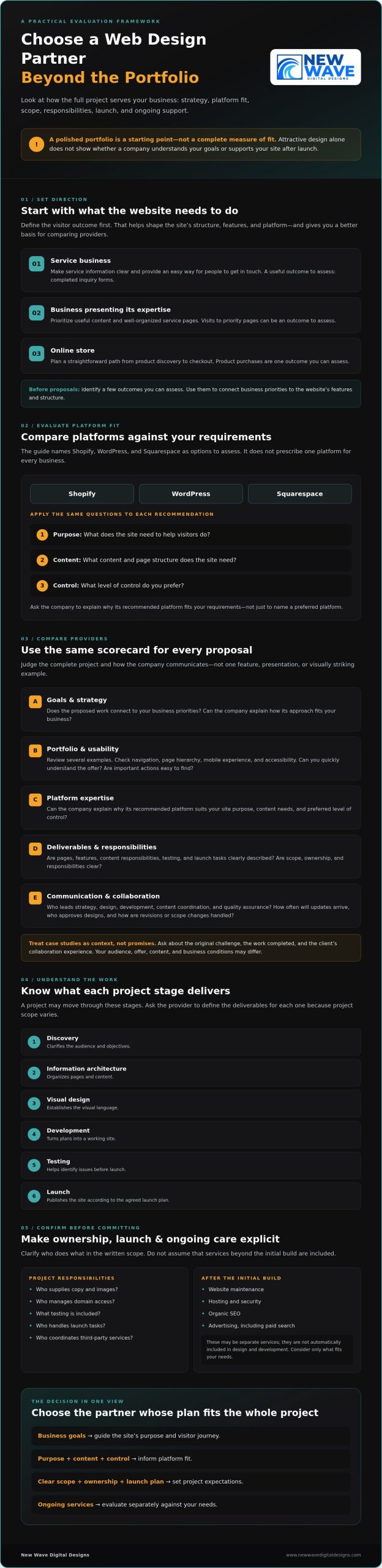
When you search for top web design companies, a polished portfolio can be an appealing starting point, but it won’t tell you whether a company understands your goals, recommends a suitable platform, or supports your site after launch. The right partner should be able to explain how its approach fits your business, not just show attractive designs.

Proposals can be difficult to compare. One may emphasize visual design, another technical features, and a third ongoing services, while leaving scope, responsibilities, or ownership unclear. The best fit depends on how well the full project meets your needs, not on a single feature or presentation.

This guide offers a practical framework for evaluating web design partners by strategy, platform fit, process, and ongoing support. You’ll learn how to assess Shopify, WordPress, and Squarespace against your requirements, clarify what a project includes, and understand who handles launch responsibilities and maintenance. With those details in view, you can choose a partner like New Wave Digital Designs with greater confidence and build a site designed to serve your business over time.

Key Takeaways

  • Compare agencies by how their strategy supports your business goals, not by portfolio visuals alone.
  • Use your site’s purpose, content needs, and preferred level of control to assess Shopify, WordPress, and Squarespace.
  • When comparing web design companies, look for clear scope, responsibilities, ownership, and launch planning.
  • Confirm who will provide content and images, manage domain access, and coordinate third-party services before committing.
  • Consider whether maintenance, hosting, security, SEO, or paid search fits your needs after launch. Don’t assume every service is essential.

What Should a Web Design Company Do for Your Business?

A website should do more than look polished. It should help people understand what you offer, find the information they need, and take a useful next step. A web design company can help plan the site’s structure, visual design, and user journey, then build a website around your business priorities.

Web design is the visual and interactive expression of a website; the website itself is a business tool that guides visitors toward information, inquiry, or purchase. The work can involve user experience, interface design, and development, as outlined in this overview of what web design encompasses. The exact balance depends on your goals and the agreement you make with your provider.

Which business goals can a website support?

Start with the outcome you want visitors to reach. A service business seeking qualified inquiries needs clear service information and an easy way to get in touch. A company focused on presenting its expertise may prioritize useful content and well-organized service pages. An online store needs a straightforward path from product discovery to checkout.

Before requesting proposals, identify a few outcomes you can assess, such as completed inquiry forms, product purchases, or visits to priority pages. These goals help determine the site’s features, structure, and platform. They also give you a more useful basis for comparing web design companies than appearance alone.

What is included in website design and development?

A project may move through discovery, information architecture, visual design, development, testing, and launch. Discovery clarifies the audience and objectives. Information architecture organizes pages and content. Design establishes the visual language, and development turns those plans into a working site. Testing helps identify issues before launch. Ask the provider to define each stage and its deliverables, since project scope varies.

Be clear about what falls outside the initial build. Website maintenance, hosting, security, organic SEO, and advertising may be available as separate services, but they aren’t automatically included in design and development. A launch plan, for example, might cover publishing the site while leaving future updates or search marketing to a separate agreement.

Review the written scope for who supplies copy and images, who manages domain access, what testing is included, and who handles launch tasks. Clarifying those responsibilities early helps align the design, build, and ongoing care with your business needs.

How to Compare Web Design Companies Beyond Their Portfolios

A portfolio is a useful first impression, not a complete measure of fit. Compare how each company approaches a project, communicates decisions, and designs a site for its audience. Strong work should look considered, but it should also make information easy to find and important actions easy to take.

How can you assess a company’s portfolio?

Review several examples, not just the most visually striking one. Ask who each site serves, what the business needed, and how the structure supports that purpose. Check the navigation, page hierarchy, mobile experience, and accessibility features. Can you quickly understand the offer? Are calls to action easy to find? A compelling visual style shows creative range, but it doesn’t guarantee results for your business.

Consider whether the examples reflect your business model, content, and required functionality. An online store, for instance, has different needs from a service website designed to encourage inquiries. If you can, explore live sites on a phone as well as a desktop. Notice whether menus, forms, and key information remain easy to use.

What should you ask before choosing an agency?

Ask who leads strategy, design, development, content coordination, and quality assurance. Clarify how discovery works, how often you’ll receive updates, who approves designs, and how revisions or scope changes are handled. Before committing, ask what testing and launch support are included and which responsibilities remain yours.

References or case studies can add useful context. Ask what the original challenge was, what work the company completed, and how the client found the collaboration. Treat outcomes as examples, not promises: your audience, offer, content, and business conditions may differ.

Use a simple scorecard to compare providers on the same terms:

  • Goals: Does the proposal connect the work to your business priorities?
  • Platform expertise: Can the company explain why its recommended platform fits your requirements?
  • Deliverables: Are pages, features, content responsibilities, testing, and launch tasks clearly described?
  • Communication: Are updates, feedback, approvals, and change requests explained?
  • Post-launch support: Is ongoing maintenance or other support available, and what does it include?

Compare the answers, not just the score. A thoughtful partner should explain trade-offs and help you understand what’s included before work begins. If you’re exploring custom website design, review website design services as one point of comparison.

Shopify, WordPress, or Squarespace: Which Platform Fits Your Website?

The right platform is the one that supports your site’s purpose and the way you plan to manage it. Start with your requirements: Are you selling products, publishing a range of content, or building an online presence for your services? Then consider who will update the site, what functions it needs, and how much control you want over its design and administration. Popularity alone isn’t a sound reason to choose.

Platform | May suit | Questions to consider

Shopify | Businesses centered on selling products online | How will the platform support your catalogue, store workflows, and required integrations?

WordPress | Sites with evolving content or specific customization needs | Who will manage updates, and how much flexibility does the site require?

Squarespace | Businesses seeking a managed site to present services, work, or content | Does its editing and design approach suit the way your team will maintain the site?

When might Shopify suit an online store?

If selling products online is central to your business, Shopify is a platform worth evaluating. Map the customer’s path from browsing to purchase, then list what your catalogue and store workflows require. Note any integrations the business depends on. Discuss those requirements with prospective providers rather than assuming a platform or proposed setup will support every need. For a closer look, explore this Shopify website design guide.

When might WordPress or Squarespace be a better fit?

WordPress and Squarespace are both options to consider for content-focused or service-based websites. Compare how each fits your content structure, customization needs, and preferred editing experience. Ask who will make routine updates and whether your team wants to manage the site directly or rely on support. The right choice should remain practical after launch, not simply look appealing in a design preview. If Squarespace is on your shortlist, this guide to custom Squarespace website design offers another perspective.

Before choosing, ask each provider to explain its platform recommendation in relation to your requirements, future content changes, and ongoing maintenance. A clear rationale lets you compare proposals on fit and practical trade-offs, not preference alone.

How to Choose a Web Design Company: A Practical 2026 Guide

What Should a Web Design Proposal Include Before You Commit?

A proposal should turn your goals into a clear plan, not leave key decisions hidden behind a headline price. Scope and requirements shape each project, so compare proposals based on the same brief. This makes it easier to see what each provider will deliver, what you’ll need to supply, and what support continues after launch.

How do you clarify scope, timeline, and responsibilities?

Look for a written description of the work, review points, and each party’s responsibilities. Before signing, use this checklist:

  1. Scope and deliverables: Identify the pages, design work, functionality, and other specific outputs included.
  2. Content and assets: Confirm who writes or supplies copy, selects images, and prepares other materials.
  3. Schedule and approvals: Request a project schedule tied to the agreed scope, with milestones, review periods, and approval responsibilities.
  4. Changes and exclusions: Ask what isn’t included and how additional requests are evaluated, approved, and documented.
  5. Testing and launch: Clarify what will be tested, who gives final approval, and who is responsible for launch tasks.

Timelines should reflect the actual project plan, not an assumed standard. Ask how delays in feedback, content delivery, or approvals affect the schedule. Clear answers help you compare proposals on substance rather than presentation.

Who owns the website and its accounts after launch?

Confirm how access and ownership will work for the finished website, domain, content, and relevant third-party accounts. Ask which accounts will be created or used in your business’s name, who can access them, and how credentials will be transferred or managed. If training or handover documentation is included, have the proposal describe what you’ll receive.

Give ongoing arrangements the same attention as the build. Check whether hosting, security, updates, maintenance, and support are included or handled separately. Ask what each arrangement covers and who to contact for routine changes. Don’t assume that paying for a site automatically includes its continued care.

Before choosing among web design companies, review each proposal against the same requirements: scope, responsibilities, schedule, ownership, and post-launch arrangements. If an item is vague, request clarification in writing before you commit. To discuss website design and support options, explore New Wave Digital Designs.

Choose a Web Design Partner for Launch and Long-Term Growth

A sound choice brings four elements into alignment: your business goals, a suitable platform, a clearly defined proposal, and a realistic plan for support after launch. Keep that framework in view as you compare partners. A thoughtful design should serve the business now while leaving room to manage and refine the site as needs evolve.

Post-launch services aren’t automatic requirements for every project. Consider what your team can manage, what needs specialist attention, and what responsibilities the proposal assigns to you. New Wave Digital Designs offers website design for Shopify, WordPress, and Squarespace, along with maintenance, hosting and security, organic SEO, Google Ads, and Bing Ads. These are options to discuss based on your requirements, not a checklist every business must buy.

What support might a website need after launch?

Think of maintenance, hosting, and security as distinct needs. Maintenance concerns ongoing care for the website; hosting is where the site is made available online; security involves protecting the site and its access. Ask what each service covers, who handles it, how you request help, and whether it’s included in the proposal or arranged separately.

If you’re planning for ongoing care, read this website maintenance services guide. Before agreeing to support, clarify its scope and communication expectations. Don’t assume a service includes round-the-clock emergency coverage or a specific response time unless the provider confirms that in writing.

How can design connect with search and advertising?

Organic SEO may be relevant if you want your site’s content to support discovery through search. Paid search, such as Google Ads or Bing Ads, is separate from website design. If you’re considering advertising, define its objective and how you’ll assess whether it serves that goal. A coordinated plan can connect the site experience with search activity, but these services should reflect your priorities rather than being added by default.

Before launch, make sure you know who will maintain the site, manage hosting and security, and oversee any search or advertising work you choose. That clarity creates a stronger handoff and helps you plan for the next stage without committing to services you don’t need.

With your scope and priorities in hand, you can explore web design and digital marketing services and discuss which options fit your project.

Choose a Partner for What Comes Next

The strongest web design partnership begins with clear business goals, a platform that fits your needs, and a proposal that spells out scope and responsibilities. Look beyond visual polish: consider how the site will guide visitors, who will manage it, and what support is available after launch. Those details can help you choose a website that works as a business asset, not simply a finished design.

New Wave Digital Designs provides custom website design for Shopify, WordPress, and Squarespace, with website maintenance, managed hosting, and security available for ongoing needs. Organic SEO and Google Ads or Bing Ads management may also be relevant when they align with your goals, but they aren’t automatic requirements for every project.

Ready to explore an approach suited to your business? Explore New Wave Digital Designs’ website services and consider which capabilities fit your project. With a thoughtful brief and clear expectations, you can move forward with confidence and build a digital presence ready to evolve alongside your business.

Frequently Asked Questions

What does a web design company do?

A web design company can plan and build a website’s structure, appearance, and user experience. Depending on the provider and agreed scope, its work may also include development, testing, and launch support. Ongoing maintenance, hosting, security, and marketing may be separate services rather than part of the initial build. Before hiring a provider, clarify the deliverables in writing and match the project scope to your business goals.

How do I choose a web design company?

Start by defining your website’s goals, audience, required features, and support needs. Then compare relevant portfolio work, platform experience, written deliverables, communication practices, and post-launch arrangements. If you’re searching for “web design companies in somerset county nj,” use the same questions to assess each provider rather than relying on visual style alone. Choose a partner whose recommendations fit your requirements and whose proposal makes responsibilities clear.

How much does it cost to hire a web design company?

Project scope and requirements shape the proposal, so there isn’t one amount that applies to every website. An online store, a redesign, and an informational site can involve different platforms, functionality, content needs, and services. Give each provider the same project brief, then compare written proposals by deliverables and exclusions. Ask which ongoing services are separate, and don’t judge a proposal by its headline figure alone.

Which platform is best for a small business website?

No single platform is best for every small business. Shopify may suit a business focused on online product sales, while WordPress or Squarespace may better match other content, customization, or administration needs. Consider the site’s purpose, required functions, and who will update it. Ask a prospective web design company to explain its recommendation in relation to your goals, content, and available resources.

What should a web design proposal include?

A proposal should clearly describe the project scope, deliverables, responsibilities, milestones, and approval process. It should also explain what’s excluded, how additional requests are handled, and whether content, testing, launch, training, or post-launch support is included. Confirm arrangements for website and account access and ownership. If an important detail is unclear, ask the provider to clarify it in writing before you commit.

Do web design companies provide website maintenance?

Some web design companies offer maintenance, while others focus on the initial design and build. The arrangement varies, so ask what ongoing care covers, how requests are handled, and which responsibilities remain yours. New Wave Digital Designs offers website maintenance, managed hosting, and security services. Confirm the specific scope and support arrangements for your website rather than assuming they’re automatically included in a design project.

Should SEO be included in a web design project?

SEO may inform a website’s structure and content, but ongoing search work isn’t automatically included in a design project. Ask which SEO-related tasks are part of the build and which require a separate service. If organic search or paid advertising supports your goals, define the objectives and responsibilities clearly. New Wave Digital Designs offers organic SEO and Google Ads and Bing Ads management as services to consider based on your needs.

Organic SEO Strategy for Small Business: 2026 Guide

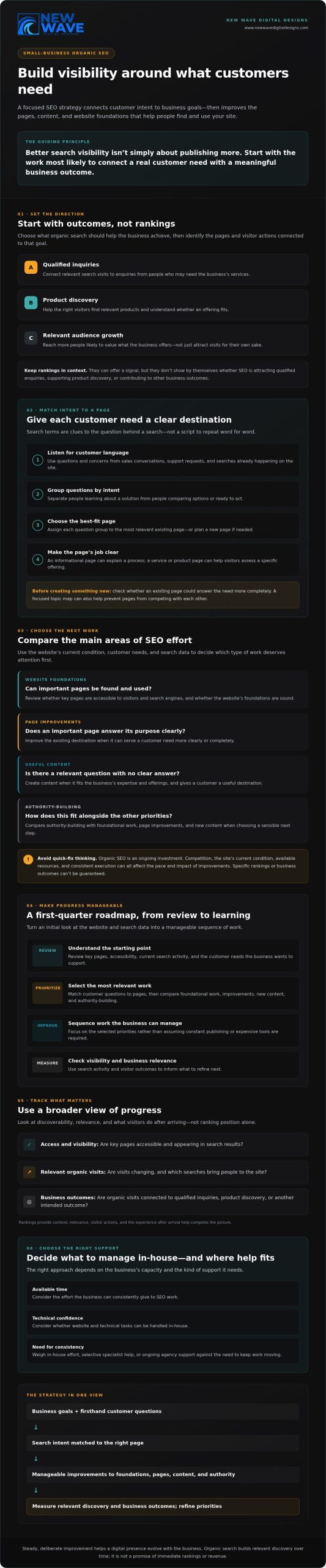
More content isn’t always the first step toward better search visibility. An effective organic SEO strategy for small business starts with the improvements most likely to connect customer needs with business goals, then builds from there.

If you’re unsure whether to update your website, target different searches, or publish another article, you’re not alone. Limited time and resources make it important to focus on the work that can help customers find and use your site. Rankings alone won’t show whether SEO is attracting qualified enquiries or sales. A thoughtful plan can help you set priorities and measure progress without assuming you need constant publishing or expensive tools.

This guide explains how to identify what to tackle first, connect search activity to business outcomes, and decide what you can manage in-house or where expert support may help. We’ll cover customer intent, website foundations, useful content, and practical ways to track progress. The aim is steady, deliberate improvement supported by a digital presence that can evolve with your business.

Key Takeaways

  • Shape an organic SEO strategy for small business around customer intent and business goals, not a list of keywords to repeat.
  • Match customer questions to the pages best equipped to answer them clearly and completely.
  • Compare foundational website work, page improvements, new content, and authority-building to choose a sensible next step.
  • Use a first-quarter roadmap to turn an initial review of your website and search data into a manageable sequence of work.
  • Weigh in-house effort, selective specialist help, and ongoing agency support against your time, technical confidence, and need for consistency.

What an organic SEO strategy for a small business should accomplish

An organic SEO strategy for a small business improves unpaid search visibility by making useful content easier to find, pages accessible to visitors and search engines, and the website’s foundations sound. The goal isn’t simply to appear more often. It’s to help the right people discover relevant information, products, or services and take a meaningful next step.

Search engine optimization (SEO) is a broad practice that includes improving a site’s content and technical accessibility. Organic SEO focuses on unpaid search results, while paid search uses advertising to gain placement for selected searches. Each can serve a different purpose. Advertising may support a time-sensitive promotion, while organic work builds a foundation for relevant discovery over time.

A focused strategy connects search activity to a business outcome. Depending on the business, that might mean more qualified inquiries, better product discovery, or audience growth among people likely to value what it offers. Start by identifying the pages and actions that support those outcomes, so SEO doesn’t become a disconnected checklist of technical tasks and articles.

Start with business goals and the customers you serve

Begin with the service, product, or business outcome you want search to support. Then use firsthand customer knowledge: the questions people ask, concerns they raise before deciding, and words they use to describe their needs. Separate broad awareness searches, such as learning how a solution works, from searches that suggest someone is comparing options or ready to act. This helps you match each need to an appropriate page.

For example, an informational page can explain a process, while a service or product page can help visitors assess whether a specific offering fits. These pages have different jobs. Give each a clear purpose rather than expecting every page to attract every type of searcher.

Set realistic expectations for organic search

Organic SEO is an ongoing investment, not a shortcut to immediate rankings or revenue. The pace and impact of improvements depend on factors such as competition, the website’s current condition, available resources, and consistent execution. No ethical SEO approach can promise specific rankings or business outcomes. Treat projections as planning assumptions, not guarantees.

Measure progress with a broader view than ranking position alone. Useful indicators can include:

  • Whether key pages are accessible and appearing in search results.
  • Changes in relevant organic visits and the searches bringing people to the site.
  • Qualified inquiries, product discovery, or other business outcomes connected to organic visits.

These measures help show whether search visibility is reaching the intended audience and supporting the business. Rankings can offer context, but they’re most useful alongside relevance, visitor actions, and the experience people have after arriving.

Build the strategy around search intent, site structure, and useful content

A strong organic SEO strategy for small business gives each important customer need a clear destination on the website. Keyword research helps reveal how people phrase searches, but the goal isn’t to repeat a phrase as often as possible. It’s to understand the question behind it and create or improve a page that answers it accurately.

Each important search intent deserves a page designed to meet that need. Someone learning about website platforms needs different information from someone comparing website design services. Treating both searches as one topic can leave visitors without a clear answer.

Turn customer questions into a focused keyword and topic map

Gather customer language from sales conversations, support requests, and searches already happening on your site. Group similar questions by intent, then assign each group to the most relevant existing page or a planned one. Prioritize topics that fit your expertise and actual offerings. For example, a website design business could distinguish between a page explaining platform options and a service page describing its design work.

This map can also prevent pages from competing by covering the same ground. Before creating something new, check whether an existing page could serve the need more completely. Use the language customers recognize in titles and headings where it fits naturally, then write the rest for clarity. Search terms are useful signals, not a script to follow word for word.

Give every important page a clear role

Service pages explain what a business offers; product and category pages help visitors explore what’s available; educational pages answer questions and support early research. Give each page a descriptive title, useful headings, and a clear next step. Link related pages naturally so visitors can move from an explanation to a relevant service without having to search the site again.

Good structure serves people first. Clear navigation and links help visitors understand how information fits together and make related pages easier to discover. Digital.gov’s guidance connects SEO with content that enhances user experience and helps people find what they need. Content earns its place when it offers accurate, original insight and a distinct purpose, not simply because it targets a phrase.

For a broader view of how organic search work can fit into a website’s direction, explore this organic SEO services guide. If you’re considering how strategy and website design can work together, you can also learn about coordinated digital support.

Prioritize small-business SEO work without chasing quick fixes

Publishing more pages doesn’t automatically improve organic visibility. New content that repeats existing information, misses customer needs, or sits behind unclear navigation can add maintenance work without strengthening the site. A practical organic SEO strategy for small business prioritizes work by customer impact, business relevance, feasibility, and evidence, not by the number of tasks checked off.

Start with foundations that could prevent important pages from being found or used. Then review existing pages before commissioning new ones. Authority-building, such as earning relevant mentions and links, may support credibility, but it should be based on genuine value rather than shortcuts. Each opportunity has a different purpose and level of effort:

Opportunity Why it matters Effort A suitable next step
Technical foundations Search engines and visitors need to access key pages and use them effectively. Varies by site condition and platform. Check crawlability, indexability, mobile usability, page experience, and descriptive page information.
Existing-page improvements Useful pages may need clearer answers, current details, or closer alignment with search intent. Often focused, though substantial rewrites may take more time. Review important pages for outdated information, unclear explanations, or overlap with other pages.
New content A new page can address a distinct customer need not served elsewhere. Requires research, subject knowledge, writing, and upkeep. Create a page only when you can define its audience, purpose, and unique answer.
Authority-building Relevant references can help people discover and assess a business. Ongoing relationship-building and useful contribution. Look for appropriate opportunities to share expertise; avoid schemes focused on link volume.

Compare foundational improvements with new content

Use evidence to choose what comes first. If a key page isn’t indexed, adding another article may not address the real obstacle. If visitors reach a service page but can’t understand what it offers, improving that page may be more useful than creating a broad awareness post. Add new content when it answers a relevant question clearly and provides something the current site lacks.

Measure meaningful progress instead of chasing vanity metrics

Google Search Console can help you review impressions, clicks, queries, and indexing signals. Google Analytics 4 can help assess relevant organic visits and on-site actions, provided measurement is configured appropriately. Neither tool tells the whole story: attribution can be incomplete, and a click or ranking isn’t a business outcome by itself.

Interpret these signals alongside qualified leads, sales, and business context. A rise in visits matters most when it reaches the right audience or supports a useful action. Choose a small set of measures tied to your goals, review them consistently, and use what you learn to set the next priority.

Organic SEO Strategy for Small Business: 2026 Guide

Turn an organic SEO strategy into a manageable first-quarter roadmap

A useful organic SEO strategy for small business turns priorities into an ordered plan, with clear ownership and a way to check whether each task is complete. The sequence below is a planning example, not a promise of rankings or results within a quarter. Adjust the pace to your capacity, website condition, and business goals.

Use a phased plan to create momentum

Phase one: establish a baseline. Document the business goals SEO should support, review available analytics and search data, and identify key pages. Check whether those pages can be accessed and indexed. Note technical concerns that could interfere with their visibility or use. This gives you a grounded starting point instead of relying on assumptions.

Phase two: address the essentials. Tackle the most consequential site issues first, then improve existing pages that matter to customers and the business. For example, clarify an important service page before creating several new articles. If navigation or page experience needs broader attention, the website design guide offers a related perspective on the role of the site itself.

Phase three: develop and review. Refine or publish selected content where there’s a distinct customer need, then examine early indicators and revisit priorities. Early observations can inform your next steps, but they aren’t proof that a particular task caused a change.

For every priority, record an owner, a realistic cadence, and a definition of completion. “Review key service pages this month and update unclear details” is easier to act on than “improve SEO.” A small set of finished, high-value tasks is more useful than an ambitious list that never leaves the planning document.

Create a repeatable review and learning cycle

Set a review rhythm your team can sustain. At each check-in, look at relevant search queries and page performance, business outcomes such as leads or sales, and technical issues that could affect important pages. Note what changed and when, including page updates or site changes. These records help put shifts in context rather than attributing every movement to the most recent edit.

Then ask what the evidence suggests: Are the right pages being discovered? Are visitors taking useful next steps? Have customer questions or business offerings changed? Reassess priorities as the answers evolve. An organic SEO and website review can help clarify how search priorities and site improvements may fit together when you need a broader perspective.

Decide when to manage SEO in-house or work with a strategic partner

The right support model depends on your team’s time, technical confidence, strategic complexity, and ability to follow through consistently. An organic SEO strategy for small business doesn’t require every task to be outsourced. You might manage customer research and content internally, bring in specialist help for a technical challenge, or work with an agency when you need ongoing strategy and coordinated website support.

When in-house SEO may be a practical fit

In-house work can make sense when someone has relevant expertise, protected time, and access to people who understand the business and can approve changes. Assign clear ownership for research, content review, website updates, and measurement. Some tasks may need technical assistance, but that doesn’t mean every decision or routine improvement requires an agency.

Be candid about capacity. A plan that relies on busy staff to publish, update pages, and review results without dedicated time may lose momentum. Selective specialist support can address a specific skill gap while your team retains responsibility for priorities and business context.

How to evaluate an SEO partner thoughtfully

Ask prospective partners how they’ll learn about your customers, set priorities, define deliverables, and report progress. A sound discussion should connect recommendations to business goals and explain assumptions, risks, measurement limits, and what falls outside the agreed scope. Look for clear communication, not promises of guaranteed rankings or revenue.

Consider whether your needs overlap. Website design, maintenance, hosting and security, and organic SEO can influence different parts of the same digital presence. When site changes and search strategy need to work together, coordinated support may simplify planning. New Wave Digital Designs provides organic SEO alongside website design for Shopify, WordPress, and Squarespace, as well as website maintenance and hosting and security.

  • In-house: Does the team have the expertise and consistent time to carry out the work?
  • Specialist support: Is there a defined technical or strategic gap to address?
  • Agency partnership: Would ongoing guidance and coordination help maintain focus across SEO and website needs?

Use these questions to identify the support that fits your current priorities, rather than choosing a model based on assumptions. To discuss how organic SEO and website support could align with your business needs, explore New Wave Digital Designs.

Build search visibility through deliberate, steady improvements

A strong organic SEO strategy for small business isn’t a race to publish more or chase every ranking change. It’s a considered path from customer needs to useful pages, sound website foundations, and progress you can assess against business goals. Start with work that matters to customers, assign realistic ownership, and refine priorities as you learn.

Keep the focus on meaningful signals: whether the right pages are discoverable, whether visitors find what they need, and whether organic search supports valuable actions. A clear roadmap can help you sustain that work without expecting instant results or treating rankings as the whole story.

New Wave Digital Designs offers organic SEO strategies alongside custom website design, with website maintenance, hosting and security, and paid search also available. If coordinated website and search support could help shape your next steps, explore a thoughtful organic SEO partnership with New Wave Digital Designs.

Make the next improvement deliberate, useful, and aligned with where you want your business to go. Steady progress begins with a clear first step.

Frequently Asked Questions

What is an organic SEO strategy for a small business?

An organic SEO strategy for a small business is a plan to improve unpaid search visibility by helping the right audience find useful, relevant pages. It connects customer needs with website improvements, such as making key information easier to access and strengthening pages that answer real questions. The strategy should support business goals, such as qualified inquiries, product discovery, or audience growth, rather than focusing on rankings alone.

How do I start an SEO strategy for my small business?

Start by choosing a business goal, such as attracting qualified service inquiries or helping customers discover relevant products. Research the questions and language your customers use, then review your website’s key pages, search visibility, and technical accessibility to establish a baseline. Select a small set of actions based on customer impact and feasibility. Assign an owner and a way to measure completion before adding more work.

How long does SEO take to work for a small business?

There’s no fixed timeline for SEO results. Progress depends on factors such as competition, your website’s current condition, available resources, and how consistently improvements are implemented. Some changes may address access or clarity sooner, while broader visibility and business effects can take longer to assess. Set a baseline, review relevant indicators over time, and adjust your plan as evidence develops. Treat any timeline as an estimate, not a guarantee.

Can a small business do SEO without hiring an agency?

Yes. A business can handle tasks such as gathering customer questions, reviewing important pages, improving clear and accurate content, and monitoring search and website data. In-house work is most practical when someone has relevant knowledge, consistent time, and access to people who can approve site changes. Technical issues or complex strategy may call for specialist support. You can also combine internal ownership with outside help for specific needs.

How much should a small business spend on SEO?

There isn’t one appropriate SEO budget for every small business. The right investment depends on your goals, the work your site needs, your team’s capacity, and whether you’re seeking focused guidance or ongoing support. Before setting a budget, define the outcomes you want, the tasks you can handle internally, and the deliverables you expect from outside help. Compare proposals by scope, communication, and measurement, not by promises of guaranteed rankings.

What SEO metrics should a small business track?

Use Google Search Console to review impressions, clicks, search queries, and indexing signals for important pages. In Google Analytics 4, examine relevant organic visits and on-site actions, with measurement configured to reflect your goals. Compare those indicators with qualified leads, sales, or other business outcomes. Attribution has limits, so don’t assume a change in traffic caused a change in revenue. Interpret the data alongside business context and recorded site updates.

Is SEO better than Google Ads for a small business?

Is SEO better than Google Ads for a small business?

Neither is universally better. Organic SEO works toward unpaid visibility by improving relevant pages and the site over time, while Google Ads can provide paid placement for selected searches while campaigns are active. SEO may suit sustained discovery; ads may support a time-sensitive offer or a need for paid visibility. Consider your goals, timeframe, resources, and audience, then decide whether one approach or a coordinated mix fits your business. For businesses seeking specialized search marketing guidance to coordinate paid campaigns alongside organic efforts, agencies such as Digitalix offer dedicated SEM support.

Professional Shopify Setup Services: A 2026 Guide to a Launch-Ready Store

A polished Shopify storefront can still be unready for its first order. Product pages may look complete while payment, shipping, inventory, or checkout workflows remain untested. That’s why professional shopify setup services should be judged by more than appearance. The goal is a store that’s ready to serve customers and manageable for the business behind it.

If you’re unsure what setup should include, who owns each task, or how to distinguish expertise from vague promises, you’re asking the right questions. A thoughtful launch takes more than a theme and a collection of products. It calls for clear decisions, careful configuration, and practical checks before customers arrive.

This guide explains what a well-prepared Shopify store may need, how to compare providers by their deliverables, ownership terms, and quality checks, and what to prepare before launch. You’ll also learn how collaborative design can align your store’s structure with your business and its customers, creating a foundation you can manage and grow.

Key Takeaways

  • Learn how setup, custom design, migration, and ongoing maintenance differ so you can define the help your store actually needs.
  • Use the customer journey, from product discovery to order confirmation, to identify where store content and settings need to work together.
  • Evaluate professional shopify setup services by their documented scope, testing approach, communication, and clear division of responsibilities.
  • Prepare for launch with a practical sequence for confirming content, reviewing settings, testing purchases, and checking the mobile experience.
  • Consider Shopify website design alongside separate ongoing needs such as maintenance, hosting, security, and SEO.

What professional Shopify setup services cover before your store goes live

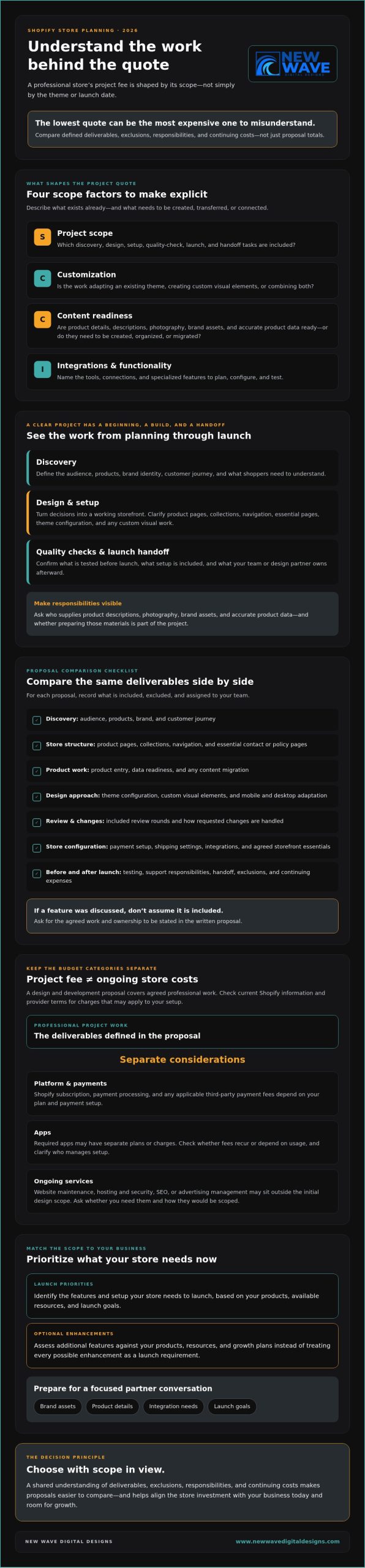
A Shopify store is more than a storefront assembled from pages and products. Professional shopify setup services typically prepare the store’s structure, operational settings, customer journey, and pre-launch checks. The exact work depends on your business, so a useful proposal should explain what’s included, what’s optional, and what remains your responsibility.

In brief: store configuration organizes how a Shopify store operates; a finished, tested customer experience confirms that shoppers can move through it as intended. That distinction matters. Settings can be in place while the store still needs content, design work, or hands-on testing before it’s ready for customers. For neutral background on the platform and its features, see this overview of Shopify.

Which setup tasks belong in the project scope?

A well-defined project starts with discovery: the business’s goals, products, audience, and required functionality. Those decisions guide practical planning, including how shoppers find products, how product information is organized, and how the path to checkout should work. Essential store settings may also be reviewed or configured, depending on the agreed scope and current platform options.

Ask the provider to specify whether the project includes integrations, content creation, product data entry, and post-launch support. These tasks aren’t automatic parts of every setup engagement. Get responsibilities in writing, including what your team must supply, what the provider will configure, and which checks will be completed before launch.

How setup differs from Shopify design and development

Configuration shapes the store’s operating framework. Design shapes its visual presentation, while theme customization adapts a theme’s appearance or behavior to suit the brand. Custom development can involve more specialized functionality, so it may need separate planning, estimates, and specialist work. Migration is another distinct scope: it involves moving store content or data from an existing platform, rather than simply configuring a new storefront.

Ongoing maintenance begins after launch and should be discussed separately from initial setup. New Wave Digital Designs offers custom Shopify website design, but confirm the specific configuration tasks included in the project scope. For a closer look at the visual and strategic side of the work, explore a Shopify website design guide.

How a professional Shopify setup turns store requirements into working customer journeys

A store’s structure only works when each step makes sense to the person shopping. Picture a customer arriving on a collection page, narrowing down options, opening a product page, adding an item to the cart, completing checkout, and receiving an order confirmation. Professional shopify setup services should connect those moments, rather than treat each page or setting as an isolated task.

A launch-ready store connects and tests the customer-facing steps from product discovery through checkout and order confirmation. Use this journey to clarify what shoppers need to see, understand, and do at each stage. A clear value proposition and a suitable platform are also part of the larger picture; Forbes offers a useful overview of comprehensive e-commerce strategy.

How product catalog and navigation choices shape shopping

Product titles, descriptions, images, and variants should help customers identify an item and choose the right option. Collections and menu labels then create a logical route to those products. For example, if a shop groups unrelated items under a broad label customers don’t recognize, shoppers may have to browse several pages to find what they want. Organizing products around familiar categories or shopping needs can make discovery more intuitive.

Agree on who supplies product details and images, who reviews them for accuracy, and who maintains the catalog after launch. A provider may organize supplied content, but don’t assume content creation or entry for every product is included unless the written scope says so.

How payments, shipping, taxes, and policies affect checkout

Reaching checkout is not the finish line. Customers need clear information and working settings that reflect the store’s business model and markets. Confirm which areas are included in setup, and who is responsible for supplying and approving the details behind them:

  • Payments: Which payment methods are intended, and do the selected settings support the store’s needs?
  • Shipping: Do delivery options and charges match the business’s fulfillment approach?
  • Taxes: Have the relevant settings been reviewed for the markets where the business sells?
  • Policies: Are customer-facing policies available and consistent with the business’s practices?

Payment options, tax settings, and third-party integrations can change, so verify current Shopify capabilities and integration requirements before configuration. Store owners should also confirm their current legal and tax obligations with qualified professionals. A provider’s setup work is not legal or tax advice.

A useful scope discussion follows a real shopping journey and asks where each piece of content, setting, or approval comes from. If you’re shaping that journey with a design partner, you can discuss your Shopify store requirements with New Wave Digital Designs.

How to compare professional Shopify setup services without buying more than you need

The right provider isn’t the one promising the longest list of features. It’s the one who can connect specific work to your business needs, explain how decisions will be made, and show how completion will be checked. Professional shopify setup services are valuable when they resolve defined gaps, not simply because extra services are available.

Compare proposals by scope, business fit, communication, testing, documentation, and ownership. A Beginner’s Guide to E-Commerce can help clarify the fundamentals, but a provider’s proposal should explain how the work applies to your store. For visual direction and tailored storefront considerations, see this custom Shopify store design guide.

Area Clearly scoped work Optional or separately scoped Owner responsibility to confirm
Store setup Agreed configuration tasks and documented completion checks Additional functionality or custom development Provide decisions, access, and approvals
Content and products Specific product or content tasks listed in the proposal Photography, copywriting, or extensive data entry Supply and approve accurate business information
Testing and handoff Named checks and handoff documentation Ongoing support or maintenance Retain access to accounts and business assets

Which questions reveal a provider’s process and project boundaries?

Ask how discovery, approvals, revisions, and project communication will work. Find out which tasks depend on your team supplying product details, photography, policies, or account access. Request an example of the documentation or acceptance checks you’ll receive, and ask how the provider records work that falls outside the agreed scope. Examples can help you assess the process, but another store’s experience doesn’t predict yours.

Who owns the Shopify account, content, and connected services?

Confirm that your business will retain appropriate access to its Shopify account and connected assets. Clarify who controls domain access, payment accounts, analytics, and third-party subscriptions, and how access will be handed over when the project ends. Ask which external subscription charges or ongoing service fees are separate from project work. Clear ownership supports a clean handoff and helps you manage the store after launch.

Choose a scope that fits your current requirements, with optional work clearly identified rather than bundled in by default. A strong proposal makes responsibilities visible before the project begins, so you can invest in what the store needs and retain control of what your business owns.

Professional Shopify Setup Services: A 2026 Guide to a Launch-Ready Store

What to prepare and test before launching a professionally set-up Shopify store

A careful launch review turns project decisions into a practical final check. Professional shopify setup services may include some testing, but the business still needs to supply accurate information, make key decisions, and approve the result. Agree on who handles each step before launch so important checks don’t fall between responsibilities.

What store owners should gather before setup begins

Prepare product details, brand assets, business information, shipping requirements, and customer-facing policies. Identify who can approve content and settings, which integrations the store requires, and whether an existing website or data needs to be considered. Share access through an agreed, appropriate method, and don’t send sensitive credentials through insecure channels.

Which checks help catch issues before customers encounter them?

Work through a numbered sequence with the provider. Mark each item complete only after the appropriate person has reviewed or tested it:

  1. Confirm content: Review product details, images, variants, collections, navigation, contact information, and policies. The business should supply and approve accurate content; clarify whether the provider will enter or review it.
  2. Review settings: Check the agreed checkout, payment, shipping, tax, and integration settings. The provider may check configuration against the requirements you’ve supplied, while the business confirms its decisions and obligations.
  3. Test a purchase: Use representative products and purchase scenarios. Check variant selection, intended discount logic, checkout steps, confirmation messages, and the handoff to the fulfillment workflow. Agree in advance who runs the tests and how test orders will be handled.
  4. Inspect mobile and desktop: Follow the shopping path on both screen sizes. Review navigation, links, product information, contact paths, and checkout for errors or confusing details.
  5. Approve the launch: Record completed checks, unresolved issues, owners, and next steps in a shared checklist. Confirm who receives and responds to issue reports after launch.

A storefront isn’t launch-ready just because it’s published; it’s ready when the agreed customer-facing checks have been completed and approved. Testing representative products and purchase paths helps reveal gaps that a visual review alone may miss. The provider can perform agreed technical checks, but only the business can confirm that its content, policies, fulfillment process, and decisions reflect how it operates.

If you’re preparing a store and want to discuss Shopify website design support, talk with New Wave Digital Designs about your store requirements.

How New Wave Digital Designs can support your Shopify setup beyond launch

A clear launch plan can also reveal where you may need support after the store goes live. New Wave Digital Designs offers custom Shopify website design, with a collaborative process that can align the store’s structure and presentation with your business and its customers. Confirm and document the specific configuration tasks, testing, and handoff responsibilities for each project. Professional shopify setup services are most useful when their scope reflects your requirements, rather than an assumed package of features.

What a collaborative Shopify project conversation should establish

Start with the essentials: what you sell, who you serve, what matters most at launch, and what the store needs to do for customers. Then discuss required functionality, available product content and brand assets, account access, and any existing site or data that may affect the work. Be clear about what your team can provide and where you need help.

A written scope can turn that conversation into a shared plan. It should identify what’s included, what depends on your input or approval, and which items remain optional or require separate discussion. This gives both sides a clearer basis for planning and reduces the chance that setup tasks are mistaken for design, custom development, or ongoing support.

How to plan for store growth after the initial setup

Launching the store is one milestone, not a commitment to a particular ongoing arrangement. Website maintenance and security are continuing considerations, while hosting needs should be discussed in relation to your broader website setup. Organic SEO is a separate effort that may help strengthen discoverability over time, but it should be scoped independently from initial store setup. New Wave Digital Designs offers website maintenance, hosting and security, and organic SEO; whether these fit your needs depends on your plans and the support you’re seeking.

Before deciding, clarify what you can manage in-house, what you’d prefer to delegate, and how your needs may change as the store develops. A thoughtful conversation can connect immediate launch priorities with longer-term plans without treating every service as an automatic part of the project.

To discuss your products, customers, current store status, project responsibilities, and the support you need, discuss your Shopify project with New Wave Digital Designs.

Build a Shopify launch you can grow from

A confident launch depends on more than a polished storefront. Define the setup scope in writing, connect the key steps of the customer journey, and test the experience before customers arrive. When comparing professional shopify setup services, look for clear deliverables, responsibilities, ownership, and checks so you can choose support that fits your store rather than paying for work you don’t need.

New Wave Digital Designs provides custom Shopify website design. Website maintenance, hosting, security, and organic SEO are also available as separate areas to discuss and scope based on your needs. The aim is a considered foundation that reflects your business and gives you a clearer path forward.

Ready to explore what your store needs? Discuss your Shopify setup goals with New Wave Digital Designs, including your current store status, priorities, and the responsibilities you’d like support with. Every strong store begins with a clear plan, and yours can start with a focused conversation.

Frequently Asked Questions

What do professional Shopify setup services include?

Professional Shopify setup services may cover store structure, agreed settings, product organization, customer journey planning, and pre-launch checks. The exact scope varies, so ask for a written list of deliverables and responsibilities. Confirm whether content entry, integrations, migration, custom design, testing, or handoff documentation is included or planned separately. A clear scope helps you distinguish a configured store from a complete, tested customer experience.

How long does it take to set up a Shopify store professionally?

There’s no single timeline that applies to every Shopify project. The schedule depends on the agreed scope, store complexity, content readiness, required functionality, and how quickly decisions and approvals are provided. A project involving supplied product information and straightforward configuration differs from one needing custom design, data migration, or additional development. Ask the provider for a proposed schedule, milestones, client dependencies, and how scope changes could affect timing.

Can I hire someone to set up Shopify and manage the store afterward?

Yes, you can arrange setup and ongoing support, but clarify what “manage” means before hiring. Store maintenance or technical support isn’t necessarily the same as handling products, orders, fulfillment, customer service, or day-to-day business decisions. Ask which ongoing tasks are available, how they’re scoped, and who remains responsible for operations. New Wave Digital Designs offers website maintenance and website support; confirm whether those services fit your specific Shopify needs.

Do I need a professional Shopify setup service if I already have a theme?

Not necessarily, but having a theme doesn’t mean the store is fully configured or launch-ready. You may still need help organizing products and navigation, reviewing settings, aligning the customer journey, or testing checkout and order confirmations. First identify what’s already complete and where you need expertise. If the theme meets your visual needs, a clearly scoped setup project may be more suitable than paying for additional design work.

What should I provide before a Shopify setup project begins?

Prepare accurate product details, images and brand assets, business information, shipping requirements, and customer-facing policies. Identify who can approve decisions, what functionality or integrations you need, and whether an existing site or data should be considered. Ask how account access will be shared securely. Also agree on who supplies, enters, reviews, and maintains content, so missing materials or unclear responsibilities don’t impede progress.

Can a professional Shopify setup help improve sales?

A well-planned setup can make it easier for customers to find products, understand their options, and complete a purchase, but it can’t guarantee sales. Results also depend on factors such as the offer, audience, pricing, traffic, and fulfillment experience. Focus on measurable launch-readiness checks, such as working purchase paths, clear product information, and accurate settings. Treat sales performance as something to monitor and improve over time, not a promised setup outcome.

What happens after a Shopify store launches?

After launch, monitor the store’s customer journey and resolve issues through an agreed reporting process. The business still manages operational decisions, including product information and fulfillment, unless other responsibilities are explicitly arranged. Ongoing website maintenance, hosting, security, and organic SEO are separate service areas to discuss and scope. New Wave Digital Designs offers these services, but they aren’t automatically included in Shopify website design or an initial setup project.

Avoiding Common Website Redesign Mistakes: A Strategic Checklist

A website redesign can look like progress while quietly erasing pages, search visibility, and conversion paths that already serve your business. The strongest redesigns don’t start with a new look. They start by identifying what works, why it works, and what needs to change. That’s the foundation of avoiding common website redesign mistakes.

It’s natural to want a clearer, more current website, especially when the existing one feels difficult to use or maintain. But visual change alone isn’t a strategy. Without defined goals and a review of current performance, a polished launch can leave visitors struggling to find information and your team unsure whether the investment helped.

This practical checklist will help you plan, launch, and review a redesign with greater confidence. You’ll learn how to protect useful content, URLs, search visibility, analytics, and conversion routes while checking accessibility, mobile usability, and ongoing care. You’ll also find ways to compare a DIY approach, a theme-based build, and professional design support so you can choose what fits your needs and capacity.

Key Takeaways

  • Set measurable redesign goals before choosing layouts, features, or technology, so every change has a clear purpose.
  • When avoiding common website redesign mistakes, document valuable pages, search performance, and conversion paths before changing content or URLs.
  • Choose a DIY, theme-based, or custom design approach according to your goals, technical skills, integrations, and capacity to maintain the site.
  • Assign owners to pre-launch checks for navigation, forms, checkout flows, links, and responsive layouts across real devices and browsers.
  • After launch, compare results with your baseline and account for seasonal patterns or campaign changes before deciding what to refine.

Avoiding website redesign mistakes starts with defining what must improve

A fresh website can reflect how your business has grown, but changing features visitors already rely on carries risk. A redesign isn’t simply a new visual style. It changes some combination of the site’s structure, user experience, content, and technology. Each change should have a clear reason tied to a visitor need or business objective.

Before planning pages or layouts, record how the current site performs. Capture traffic, leads or sales, engagement, page speed, and technical errors, along with the dates and reporting periods. This baseline gives you a fair comparison after launch and helps distinguish progress from seasonal shifts or changes in marketing activity. In a concise project brief, connect each planned change to the problem it addresses and how you’ll assess the result.

Which website problems justify a redesign?

Look for persistent friction, not just a visual style you’ve grown tired of. Repeated customer questions, support requests, and analytics patterns can show that visitors can’t find key information, complete a form, or move smoothly toward checkout. Accessibility barriers, slow or unstable pages, and a brand presentation that no longer reflects the business may also justify broader work. These concerns connect to the wider web design principles of usability and user experience.

Separate critical defects from refinements. A broken lead form may need immediate attention; a preference for different colours may not justify rebuilding the site. If a problem is limited to one page or component, a targeted update could be the more proportionate response. Reserve a full redesign for connected problems that require changes across the experience, content, or underlying technology.

How to set redesign goals and a baseline

Choose a focused set of measures that match your objectives. A lead-generation site might track qualified enquiries and form completion. An online store could monitor sales and checkout completion. Record each measure’s current value, reporting period, and data source before work begins. Otherwise, post-launch comparisons may be difficult to interpret or repeat.

Map who the site serves, what those visitors need to do, and which pages help them do it. Then make the brief specific: “make service information easier to find” is more useful than “make the site modern.” For broader planning context, explore this 2026 web design guide. A sound brief gives design, content, and technical decisions a shared direction while protecting what already works.

Protect search traffic and useful content before changing the website

A page that disappears during a redesign can take more than its words with it. Search engines may need to discover and understand its replacement, while visitors following old links can land on an error page instead of the information they expected. To support avoiding common website redesign mistakes, treat URLs and content as assets to assess, not clutter to clear away.

Before implementation, export the current URL list and identify pages with organic traffic, search visibility, inbound links, enquiries, sales, or useful information. Create a simple mapping document with the current URL, proposed URL, and planned action for each page. Mark pages that will move, merge, or be removed. When a URL changes, map it to the closest relevant destination and test the redirect before launch. Avoid sending unrelated old pages to the homepage. Visitors should land on content that best answers their original need.

A redesign should preserve valuable pages and their search intent unless evidence supports changing them. This keeps visual and structural improvements grounded in what visitors actually seek. Forbes also outlines common website redesign mistakes, including overlooking search visibility and user experience.

How to prevent avoidable SEO losses

Compare the existing and planned site structures before the new version goes live. Review page titles, descriptions, headings, internal links, indexation settings, and structured data where applicable. In a staging environment, check that redirects lead to the intended pages, canonical tags point to preferred versions, robots directives don’t block important content, and the XML sitemap reflects the new URLs. Test representative pages and links throughout the site, not just the homepage.

Which content should survive the redesign?

Use several signals together. Analytics can show visits and engagement; search performance can reveal queries and visibility; backlink data can identify pages other sites reference; and conversion records can show content that supports enquiries or purchases. A page with modest traffic may still answer an important customer question or attract valuable links.

Improve weak or outdated material deliberately. Update facts, clarify the page’s purpose, or combine overlapping content when there’s a clear reason. Don’t delete a page simply because it doesn’t fit a new template. First decide whether its information belongs in a refreshed page, then update internal links to point to the right destination. Businesses assessing search strategy support may also want to explore organic SEO services. A carefully planned redesign can bring content, structure, and search intent into closer alignment; review website design and SEO support as one possible next step.

Compare redesign approaches without choosing style over function

The right redesign approach depends on what the site must do, the skills available internally, and who will care for it after launch. A DIY builder, a theme-based implementation, and custom professional design can each be a sound choice. The risk is choosing a platform or visual direction before documenting functional requirements, integrations, content, and maintenance needs. That sequence matters when avoiding common website redesign mistakes.

Use this comparison as a starting point. Actual control and support vary by platform, provider, and agreement, so confirm responsibilities before committing.

Approach Control and customization Technical responsibility and scalability Ongoing support
DIY tools Direct control, typically within the builder’s available features. The owner handles setup and troubleshooting; growth may be constrained by skills or available functionality. Owner-managed, with platform resources where available.
Theme-based implementation Theme options provide a foundation, with customization shaped by the theme and implementation. Requires someone to manage configuration, updates, and compatibility; check that the setup can accommodate future needs. Clarify who maintains the theme, content, and technical setup.
Custom professional design Design can be shaped around defined requirements, subject to agreed scope and platform capabilities. Useful for more involved requirements, but future changes still need clear ownership and technical planning. Confirm handoff, documentation, maintenance, and support responsibilities in advance.

When is a DIY redesign a reasonable choice?

DIY can suit a simple site with well-understood needs, limited integrations, and an owner who has time and confidence to maintain it. Include more than page building in your effort estimate. Content migration, accessibility checks, performance review, analytics setup, and troubleshooting all need attention. Identify limits early, especially around custom functionality, commerce requirements, and the technical skills available internally.

When does professional redesign support add value?

Consider professional help when a project involves complex commerce, a platform migration, multiple integrations, or substantial organic search exposure. Compare proposals by discovery, scope, testing, handoff, and post-launch responsibilities, not mockups alone. Ask who handles content transfer and technical checks, and what your team will need to manage afterward. For Shopify-specific commerce requirements, explore custom Shopify store design as a relevant example of platform-focused design support.

Avoiding Common Website Redesign Mistakes: A Strategic Checklist

Pre-launch checklist to catch common redesign mistakes

A calm launch is prepared well before launch day. In staging, walk through the tasks that matter most to visitors, then confirm that tracking, search settings, and recovery plans are ready. For avoiding common website redesign mistakes, make each check visible, assign an owner, and record whether it passed or needs attention.

What should be tested on staging?

Test complete journeys, not isolated page elements. Start from a landing page and continue through a contact form, purchase, or other defined conversion. Repeat the checks on real phones, tablets, and computers using browsers your audience relies on. Check keyboard navigation, responsive layouts, form validation and error messages, checkout steps, links, and third-party integrations.

  • Owner: Content or design lead. Check navigation labels, page content, links, and layouts at mobile and desktop sizes.
  • Owner: Accessibility reviewer. Test keyboard access, focus visibility, form labels, and whether errors are clear and usable.
  • Owner: Developer or platform administrator. Check forms, checkout, integrations, redirects, and page performance.
  • Owner: Analytics lead. Confirm key events and tags fire as intended, consent choices are respected, and reporting still captures meaningful activity.
  • Owner: SEO lead or site administrator. Verify important pages can be indexed and that staging restrictions won’t accidentally carry over to the live site.

Test redirects from old URLs as well as links within the new site. Confirm that consent behavior works as expected, and that analytics handles events appropriately when a visitor’s choice changes what can be recorded.

How to prepare a controlled launch

Before release, name the people responsible for backups, DNS or hosting changes, redirect checks, and the decision to proceed. Confirm that a recent backup exists and that the team knows how to restore it, or has a practical remediation plan suited to the platform and hosting environment. Agree on who will monitor the site and how issues will be reported after the change.

Launch readiness means critical user journeys, tracking, redirects, and recovery steps have all been tested. Keep the checklist open during launch and mark an item complete only after its owner has verified it. If a critical path fails, pause or follow the agreed response plan rather than assuming the issue will resolve itself.

Ongoing technical care can help keep a site updated and functional after launch. Website maintenance services may be one option to consider. For support with a redesigned site, discuss website maintenance and support.

After launch, measure results and keep improving the redesigned website

Going live is a transition, not a finish line. A redesigned site can look complete while a form, redirect, analytics event, or key page behaves differently under real visitor traffic. Keep the launch team engaged long enough to check the experience and technical health, then use what you learn to guide the next improvements.

What to monitor in the first weeks after launch

Check priority landing pages, forms, checkout steps, redirects, indexation, and analytics for unexpected changes. Compare organic visibility and conversions with the baseline you documented before the redesign. If a measure shifts, investigate the pages and user journeys involved before drawing conclusions. A campaign change, seasonal pattern, or tracking issue may affect results independently of the new site.

Keep a simple issue log so observations lead to action rather than scattered fixes. For each issue, record the page or journey, evidence, user or business impact, owner, decision, and resolution. Prioritize problems that block important tasks or affect key business outcomes. A brief fluctuation in one metric may deserve observation, while a broken enquiry form calls for prompt attention.

Turn launch feedback into a sustainable improvement plan

Use the issue log to build a considered improvement backlog. Combine analytics and technical checks with customer feedback and observed behavior; each can reveal friction that assumptions alone might miss. Schedule content reviews and platform-appropriate checks for software, security, backups, and performance. Clear ownership helps routine care continue after the redesign project team has moved on.

This measured approach is central to avoiding common website redesign mistakes: keep a record of what changed, what the evidence shows, and what should happen next. Some adjustments may be small, such as clarifying a page or refining a user journey. Others may call for a deeper review of design, organic SEO, hosting, or website maintenance.

New Wave Digital Designs offers support with website design, organic SEO, managed hosting, security, and ongoing maintenance. You can plan a website redesign conversation to discuss which areas need attention.

Build your next website around what matters

A successful redesign isn’t measured by how different the site looks. It’s measured by whether it better serves visitors and supports your business. Start with clear goals, protect valuable content and search pathways, then test essential journeys before launch. Afterward, compare results with your baseline and use evidence to guide improvements.

That’s the practical heart of avoiding common website redesign mistakes: make thoughtful changes without losing sight of what already works. The right approach depends on your platform, requirements, and internal capacity. New Wave Digital Designs provides website design for Shopify, WordPress, and Squarespace, with related services including SEO, managed hosting, security, and ongoing maintenance.

If you’re considering a redesign, contact New Wave Digital Designs to discuss your goals and the support you need. Plan a thoughtful website redesign with New Wave Digital Designs.

Frequently Asked Questions

What are the most common website redesign mistakes?

Common mistakes include redesigning without measurable goals, removing useful content, changing URLs without mapping redirects, and prioritizing appearance over usability. Teams may also overlook mobile layouts, accessibility, analytics, and post-launch maintenance. Avoiding common website redesign mistakes starts with documenting what the current site does well and where visitors encounter friction. That evidence helps distinguish essential improvements from personal design preferences and keeps decisions focused on user and business needs.

How can I redesign my website without losing SEO rankings?

Reduce avoidable search disruption by recording important URLs, organic landing pages, search visibility, backlinks, and conversions before development begins. Map each changed or retired URL to the closest relevant destination, then test redirects in staging. Preserve useful content and its search intent where possible, and review page titles, internal links, canonical tags, indexation settings, and the XML sitemap. Rankings can still change, so compare post-launch results with your baseline and investigate meaningful shifts.

Should I redesign my website myself or hire a professional?

Choose based on the site’s complexity, your internal skills, and who can maintain it afterward. DIY can suit a simple site with clear requirements, few integrations, and an owner able to handle content migration, testing, and troubleshooting. Professional support may be worth considering for complex commerce, migrations, or substantial search exposure. New Wave Digital Designs provides website design for Shopify, WordPress, and Squarespace, alongside related SEO and maintenance services.

How do I know whether my website needs a redesign?

Look for persistent problems that affect visitors or business outcomes, such as confusing navigation, inaccessible content, slow or unreliable pages, or a brand presentation that no longer fits the business. Check analytics for recurring drop-offs, and review customer questions and support requests for signs that people can’t find information or complete key tasks. If an issue affects only one page or feature, a targeted update may be more appropriate than a full redesign.

What should I check before launching a redesigned website?

Test complete user journeys on real devices and across relevant browsers, including navigation, forms, checkout, links, and third-party integrations. Check keyboard access, responsive layouts, form errors, page performance, analytics events, consent behavior, redirects, and search visibility settings. Confirm that backups are ready and that named owners understand launch responsibilities and recovery steps. Mark checks complete only after they’ve been verified, not simply because the site appears finished in a preview.

Can a website redesign reduce traffic or conversions?

Yes. Removing useful pages, misdirecting old URLs, introducing technical errors, or disrupting forms and checkout can affect organic traffic or conversions. A redesign can also improve the experience, but results depend on implementation and visitor needs. Compare performance with the pre-launch baseline, and check for tracking changes, seasonality, and campaign activity before attributing a shift to the new site. Investigate specific pages and journeys rather than reacting to one short-term fluctuation.

How long should I monitor a website after a redesign launch?

Monitor the site closely during the first weeks, then continue reviewing performance as part of regular website care. Check priority pages, forms, checkout, redirects, analytics, organic visibility, and conversions against the baseline. There isn’t one ideal end date: extend focused monitoring if problems emerge, data is limited, or seasonal patterns make comparisons difficult. Keep an issue log with evidence, owners, and fixes so launch observations become a practical improvement plan.

Cost of a Professional Shopify Store in 2026: What Shapes Your Quote?

The lowest Shopify quote can be the most expensive one to misunderstand. The cost of a professional Shopify store 2026 depends on more than a template or launch date. When proposals cover different design work, setup tasks, and launch support, comparing totals alone can hide important gaps.

It’s reasonable to want a clear picture of what your investment includes and what may sit outside the project fee. Shopify subscription charges, payment-processing fees, apps, and ongoing maintenance or marketing are separate considerations. Ask what applies to your store rather than assuming these costs are bundled together.

This guide explains the work that can shape a professional Shopify proposal, from brand-led design and store setup to the tasks to confirm before launch. You’ll also find a checklist for comparing deliverables and questions to ask about continuing costs. With a shared understanding of scope, you can choose a design partner and store investment that fit your business today and leave room for growth.

Key Takeaways

  • The cost of a professional Shopify store 2026 is shaped by project scope, customization, content readiness, and integrations, not simply by the theme selected.
  • Before comparing providers, clarify which discovery, design, setup, quality-check, and launch handoff tasks each proposal includes.
  • Use a written checklist to compare product setup, integrations, revisions, testing, and support responsibilities side by side.
  • Prioritize the features your store needs to launch, then assess optional enhancements against your products, resources, and growth plans.
  • Prepare brand assets, product details, integration needs, and launch goals to make conversations with potential design partners more focused.

What Shapes the Cost of a Professional Shopify Store in 2026?

A Shopify proposal reflects the work required to bring your store to life: project scope, customization, content readiness, and integrations. A store built around an adapted theme and prepared content calls for a different level of effort than one requiring a distinct brand-led experience, extensive product setup, or migration from another platform. The cost of a professional Shopify store 2026 is best understood through its defined deliverables, not a template label or headline quote.

Keep the project fee separate from the ongoing costs of operating the store. A design and development proposal covers agreed professional work. Shopify subscription and transaction-related charges, app fees, and optional continuing services belong in a separate part of your budget. Shopify’s Shopify ecosystem includes tools and third-party services, so check current Shopify information and provider terms for charges that may apply to your setup.

Which store requirements can change a project quote?

Theme adaptation uses an existing design foundation. A more customized storefront may require additional design and development to reflect your brand and customer needs. The quote may also depend on how many products need setup, whether descriptions and images are ready, and whether content or product information must be migrated. Requested integrations and specialized functionality can add planning, configuration, and testing work.

To make proposals easier to compare, describe the products, content, and store features you already have. Then identify what needs to be created, transferred, or connected.

Which expenses are separate from design and development?

Agency project fees are distinct from recurring platform and payment-related charges. Your Shopify subscription, payment processing, and any applicable third-party payment fees depend on your plan and payment setup. Apps may also have separate plans or charges, so review current terms before including a feature in your budget.

  • Platform and payments: Confirm current subscription and transaction-related charges with Shopify and your payment provider.
  • Apps: Check whether required apps have recurring or usage-based fees, and clarify who manages their setup.
  • Ongoing services: Website maintenance, hosting and security, SEO, and advertising management may be separate from the initial design scope. Ask whether you need them and how they would be scoped.

Before choosing a partner, request a written proposal that names included work, exclusions, and continuing expenses. That clarity helps you align the store’s design with your business goals and plan for costs after launch.

What Should a Professional Shopify Store Project Include?

A clear project has a beginning, a build, and a considered handoff. Discovery defines the audience, products, brand identity, and customer journey. Design and setup turn those decisions into a working storefront, while quality checks help catch issues before launch. The proposal should describe each stage and state what your team and the design partner are responsible for.

Scope should also make the content work tangible. Ask which product pages, collections, navigation menus, and essential pages, such as contact or policy information, are included. Confirm who provides product descriptions, photography, brand assets, and accurate product data. If those materials need to be created or organized, clarify whether that work is part of the project or remains with your team.

How do planning and design become a usable storefront?

Discovery should connect your brand to practical shopping decisions: what customers need to understand, how they’ll find products, and what steps lead them toward checkout. Ask how the design will adapt across mobile and desktop screens, and how navigation and collections will help shoppers move through the catalog.

Get the design approach in writing. Does the scope involve configuring a theme, creating custom visual elements, or both? How many review rounds are included, and how are requested changes handled? For general context on platform plans, review Shopify’s 2026 pricing plans and keep plan details distinct from the design partner’s deliverables. You can also explore the related topic Shopify website design when considering what you want from a design project.

What should be clarified before launch?

Configuration can involve important decisions, so ask explicitly whether the project includes product entry, payment setup, shipping settings, and other agreed storefront essentials. Don’t assume a feature is covered just because it came up in a conversation. The proposal should name each task, its owner, and any information you need to supply.

Testing and handoff deserve the same precision. Confirm who checks checkout, forms, mobile layouts, and key storefront interactions, and how issues are documented. Then ask what training or handoff materials you’ll receive, whether launch support is included, and what post-launch assistance would be scoped separately.

  • Discovery: Goals, audience, products, brand, and customer journey.
  • Design and setup: Theme or custom work, storefront structure, content responsibilities, and revisions.
  • Quality checks and handoff: Testing roles, launch tasks, training, and ongoing support boundaries.

A well-defined scope gives both sides a shared blueprint. Before a Shopify website design discussion, gather your brand assets, product information, and launch priorities. Explore Shopify website design and note which project responsibilities you want to discuss.

How to Compare Shopify Store Design Proposals Fairly

A headline quote tells you little unless you know what work sits behind it. To compare the cost of a professional Shopify store 2026 fairly, place each written proposal beside the same checklist. One provider may include product entry and testing, while another may leave those tasks to you. That difference matters as much as the quoted fee.

Ask each provider to document assumptions, exclusions, dependencies, and how changes are handled. If your team must supply product descriptions or brand assets, establish when they’re due and what happens if they aren’t ready. A clear scope turns proposals into comparable plans rather than competing headline figures.

Compare Questions to ask Clarify in writing
Scope Which design, development, configuration, and launch tasks are included? Deliverables, exclusions, and owner for each task
Customization Is the work theme configuration, custom visual design, or a mix? What is being tailored to your brand and customer needs
Product setup Who adds products, images, descriptions, and collection details? Product information required and setup responsibilities
Integrations Which apps or third-party services are being connected? Setup limits and any separate provider or app charges
Revisions How many review rounds are planned? How extra feedback or new requests affect scope
Testing Who checks checkout, forms, mobile layouts, and key interactions? Testing responsibilities and issue-resolution process
Support What launch or post-launch help is included? Duration, boundaries, and separately scoped assistance

Which questions reveal what a Shopify proposal really covers?

Ask providers to walk through design, development, store configuration, quality assurance, and launch, naming the deliverable for each stage. Confirm the planned review rounds and how a request outside the agreed scope is assessed and approved. Also ask which Shopify, app, payment, and third-party expenses remain your responsibility. For broader business context, Forbes offers guidance on developing a strong e-commerce strategy, which can help you connect project decisions to commercial priorities.

How can you assess fit beyond the quoted scope?

Cost of a Professional Shopify Store in 2026: What Shapes Your Quote?

How to Match Shopify Store Scope to Your Business Priorities

A strong project scope reflects what your store needs to do at launch, not every feature you might want eventually. Start with your products, customer journey, and available resources. A focused scope can give essential tasks the attention they need while keeping future enhancements visible without making them launch dependencies.

Product complexity can guide that decision. A small catalog with consistent options may need a different setup approach from products with many variants, detailed specifications, or distinct collection structures. Content readiness matters too. If product data, descriptions, and brand assets are prepared, the project can focus more directly on building the storefront. If they’re still being developed, clarify who will prepare them and how that affects responsibilities.

Which requirements belong in the first launch?

Prioritize the essentials that let customers understand your offer and complete a purchase: accurate product information, intuitive navigation, consistent brand presentation, and a functional checkout journey. Then identify integrations that support real operational needs, such as a tool your business already relies on. Don’t add apps or features without a clear purpose and an owner responsible for managing them.

Separate the plan into two lists: launch requirements and later enhancements. A new content feature, expanded automation, or additional customization may be valuable, but it doesn’t necessarily need to delay a usable first release. This distinction helps partners scope the work around your priorities and makes the cost of a professional Shopify store 2026 easier to assess against what the business needs now.

How should you plan for ongoing store care?

Decide who will update storefront content, manage technical changes, and oversee security after launch. These responsibilities may sit with your team or be discussed as separate ongoing services. Keep them distinct from one-time design and development work, and clarify what support you may need as the store evolves.

If you’re considering outside help, review the scope of Website Maintenance Services and confirm what the offering covers rather than assuming it’s included in a store project. Small businesses needing flexible assistance can also look to providers like SaaSy Systems & Designs for website design, automation, and ongoing tech support. Marketing needs such as SEO or advertising management should also be discussed separately from the initial build.

Before requesting a proposal, note your launch-critical features, product and content readiness, required integrations, and available internal resources. New Wave Digital Designs offers custom Shopify website design, and a conversation about your requirements can help clarify the scope to consider. Discuss your Shopify store requirements.

Choosing a Professional Shopify Store Partner and Next Steps

The right partner helps translate business goals into a clear store plan, with responsibilities and continuing needs defined before work begins. A proposal should make it easy to see what the design partner will deliver, what your team must provide, and which services or platform expenses sit outside the project. That clarity matters more than choosing a quote based on its headline alone.

Before requesting proposals, assemble a concise project brief. Include what you sell, what customers need to do in your store, and what resources your team can bring to the work. The more clearly you describe the desired customer experience and launch priorities, the easier it is to discuss a suitable scope instead of defaulting to features you may not need.

What information helps a provider prepare a useful proposal?

Gather a product and content inventory, brand materials such as logos and visual guidelines, and details of any existing store or website. List the integrations your operations rely on, practical constraints, and the customer journey you want the store to support. Also identify who will approve design decisions and who can provide product data, copy, and other materials. These details help surface dependencies early.

What should happen before you approve the project?

Review the proposal together before committing. Confirm the deliverables, exclusions, milestones, client responsibilities, and process for handling changes. Make sure both sides understand what must be ready at each stage and how decisions or feedback will be shared. If a point is vague, ask for it to be clarified in writing.

Then separate project work from ongoing costs. Shopify subscription and transaction-related charges, as well as fees for third-party apps or payment services, should be checked against current provider information. If you may need website maintenance, hosting and security, SEO, or advertising management, discuss those as distinct services rather than assuming they’re included in the initial Shopify design scope.

New Wave Digital Designs provides custom Shopify website design, with related services available to discuss according to your needs. A tailored conversation can connect your goals, brand assets, products, and integration requirements to a clearly defined project scope. If you’re weighing the cost of a professional Shopify store 2026, bring your priorities and questions to the discussion.

Discuss your Shopify store project with New Wave Digital Designs.

Shape a Shopify Investment Around Your Next Chapter

The cost of a professional Shopify store 2026 is shaped by the work your business actually needs, from storefront design and product setup to integrations and launch responsibilities. Compare proposals by written deliverables, exclusions, and who owns each task, not by the headline quote alone. Keep ongoing platform, app, maintenance, and marketing expenses distinct from the initial project scope.

A clear brief makes the next conversation more useful. Gather your product details, brand assets, integration needs, and launch goals, then outline what’s essential now and what can evolve later. The right scope should reflect your business priorities and leave room for thoughtful growth.

New Wave Digital Designs offers custom website design for Shopify, WordPress, and Squarespace. Related services, including maintenance, hosting and security, SEO, paid search, and graphic design, can be discussed separately according to your needs. Discuss your Shopify store project with New Wave Digital Designs and take the next step with a clearer vision for your store.

Frequently Asked Questions

How much does a professional Shopify store cost in 2026?

The cost of a professional Shopify store 2026 depends on the agreed project scope, customization, content readiness, product setup, integrations, and launch support. Shopify subscription charges, payment-related fees, and third-party app expenses may be separate from design services. Since requirements and platform terms vary, request a written proposal that details deliverables and exclusions, then verify current Shopify and app charges directly before setting your budget.

What affects the cost of hiring a Shopify designer?

The amount of work required is a central factor. Custom design, product and content setup, integrations, migration, revisions, testing, and launch assistance can all shape a project. Prepared brand assets and accurate product information may also affect the work involved. Ask each provider to list deliverables, assumptions, exclusions, and your team’s responsibilities. Comparing those details side by side gives you a clearer basis for evaluating proposals than comparing headline quotes alone.

Does a professional Shopify store quote include Shopify fees?

Not necessarily. A design proposal may cover professional design and development, while Shopify subscription charges, payment-related fees, and third-party app expenses are paid separately. Ask the provider to identify what its proposal covers and which costs you’ll pay to Shopify or other vendors. Then verify current plan, payment, and app terms with the relevant providers, since charges and options can change. Don’t assume a platform expense is included unless the proposal explicitly says so.

Are custom Shopify stores more expensive than theme-based stores?

Not automatically. The labels alone don’t explain the work involved. A theme-based project might configure an existing design, while a more customized project could include visual changes and development tailored to your brand and customer needs. Ask providers to describe the requested features, customization, revision process, and support included in each proposal. Comparing these deliverables helps you judge whether the proposed scope suits your needs without relying on broad terms like “custom” or “theme-based.”

What should be included in a professional Shopify store proposal?

A useful proposal defines the project from planning through handoff. Look for details about design, store configuration, product and content responsibilities, requested integrations, testing, launch tasks, and handoff materials. It should also state exclusions, dependencies, planned revision rounds, and how additional requests are handled. Ask whether continuing maintenance or marketing is included or would be scoped separately. Written clarity helps you compare providers and understand what your team needs to prepare.

Are there ongoing costs after a Shopify store launches?

There may be recurring Shopify subscription charges, payment-related fees, third-party app expenses, and separately arranged services such as maintenance or marketing. Which apply depends on your store setup and the providers you choose. Keep these expenses distinct from one-time design and development work when planning your budget. Check current terms directly with Shopify, payment providers, and app vendors, and ask any design partner to clarify which ongoing services, if any, are included in its proposal.

Is hiring a professional Shopify designer worth it for a small business?

It depends on your goals, available time, internal skills, and the store experience you want to create. A professional designer can help shape a storefront around your brand and business requirements, while you remain responsible for tasks assigned to your team. Before deciding, compare the written deliverables and responsibilities with the work you can confidently manage yourself. Consider whether the proposed scope addresses your priorities and clarify any continuing support separately.

Website Security & Hosting: A Practical Guide for 2026

What if your website’s weakest security link isn’t a flaw in its design, but a gap between where it’s hosted and how it’s cared for? Website security and hosting services work together to keep a site available and better protected, but their roles are different. Hosting provides the foundation; security controls and ongoing maintenance help keep that foundation resilient.

If you’re unsure what protection your site needs, start by listing the tasks someone must handle: updates, account access, backups, monitoring, and recovery. A hosting plan, maintenance service, and security support can cover different responsibilities, so check what is included and who owns each task. This guide explains the protections to evaluate, practical questions to ask providers, and how to compare self-managed hosting with managed support. Use the guidance to choose an approach that suits your platform, your site’s needs, and the expertise available to you.

Key Takeaways

  • Clarify which responsibilities belong to your hosting provider, maintenance support, and security process.
  • Assess several layers of protection, including access controls, software updates, encrypted connections, monitoring, and recovery.
  • Compare website security and hosting services by their written scope and assigned responsibilities, not just by plan names.
  • Before comparing providers, note your platform, business needs, traffic, and current technical capacity.
  • Decide whether managed support fits your site’s complexity, available time, and need for continuity, then confirm the exact deliverables.

Website Security and Hosting Services: What Each One Does for Your Site

A business website needs to stay accessible, function as intended, and earn visitors’ trust. It’s reasonable to ask who is responsible if the site goes offline, software becomes outdated, or an account is compromised. Hosting and security are connected, but they address different needs: hosting provides the environment for the site, while security practices and controls help reduce risks to the site, its accounts, and its data.

What do website hosting services actually provide?

Hosting provides server space and related infrastructure to store a website’s files and deliver them to visitors over the internet. Storage holds site content and files; bandwidth refers to the data transferred as people use the site. A domain connects a memorable web address to the services that direct visitors to the site. Providers package these services differently, so check the written plan details rather than relying on a feature name. For a foundational overview, see Web hosting service.

Hosting is distinct from the domain registrar, which manages domain registration; the website platform, such as WordPress, Shopify, or Squarespace; and the site administrator, who manages the website itself. One company may provide several of these services, but that doesn’t make their responsibilities interchangeable. When comparing providers, ask who controls the domain, platform, hosting account, and site administration.

Why hosting and security need to work together

A hosted site still needs safeguards and ongoing care. Software updates can address known weaknesses, account protections help limit unauthorized access, and encrypted connections help protect information exchanged between a site and its visitors. Monitoring and recovery planning are separate considerations. Ask what each service includes, who handles the task, and what happens if a problem affects availability or data.

Responsibility may be shared among the hosting provider, platform, agency, and site owner. For example, a host may manage its server environment while the site owner or an appointed partner handles platform updates and account access. Hosting alone doesn’t automatically include complete security or ongoing website maintenance.

To understand how routine updates and other care fit into the picture, see the guide Website Maintenance Services. When comparing website security and hosting services, map each responsibility to a named person or provider, then confirm the scope in writing. New Wave Digital Designs offers managed hosting and security alongside website maintenance and support for WordPress, Shopify, and Squarespace sites. Confirm which deliverables fit your platform and needs.

How Website Security Layers Protect a Hosted Site

A secure website doesn’t depend on one setting, certificate, or hosting plan. It relies on coordinated controls and consistent maintenance, with clear responsibility for each layer. Protections included in a hosting or support plan vary, so distinguish general good practice from features a provider has confirmed in writing. IBM’s overview of What is web hosting offers context on the infrastructure beneath a site, but the site’s wider security needs still require attention.

Which security controls should site owners understand?

Think of security as several connected areas, each addressing a different risk:

  • Encrypted connections: HTTPS uses TLS to encrypt information exchanged between a visitor’s browser and the website. Check that HTTPS works across the site and that its certificate is configured and renewed appropriately. Don’t assume this is covered just because a host advertises security.
  • Account access: Use strong, unique passwords and multi-factor authentication where available. Limit administrator permissions to people who need them, and remove access when responsibilities change.
  • Software upkeep: Keep the platform and relevant components updated. Updates may address security weaknesses, but confirm who applies them and how changes are checked for conflicts.
  • Monitoring: Ask what is monitored, how potential issues are communicated, and who follows up. The word “monitoring” alone doesn’t confirm a particular response or support schedule.
  • Backups and recovery: Backups can help restore site data after an incident, but they don’t prevent unauthorized access. Confirm what is backed up, how restoration works, and who coordinates recovery.

How platform choice changes security responsibilities

With WordPress, a site may rely on separately maintained core software, themes, and plugins. Those components can have different update schedules, so establish who reviews and applies updates and how changes are managed. Hosting support may cover some tasks, but confirm the scope for your specific arrangement.

Shopify and Squarespace manage their platform infrastructure, which changes what the site owner needs to oversee. It doesn’t remove every security responsibility: account access, staff permissions, content, and connected services still need thoughtful management. Across platforms, ask where the provider’s responsibility ends and yours begins.

These distinctions make website security and hosting services easier to assess: look for coordinated care, not a promise that risk can be eliminated. To discuss how hosting, security, and maintenance responsibilities fit your platform, explore managed hosting and security support with New Wave Digital Designs, then confirm the specific scope that meets your site’s needs.

Managed Hosting vs. Self-Managed Hosting: Compare Responsibilities, Not Just Features

A site can appear to run smoothly while still relying on updates, access reviews, and recovery plans that nobody has clearly taken ownership of. Managed support may seem unnecessary if nothing is wrong, but the useful comparison isn’t simply which plan has more features. Consider who has the time and expertise to handle essential tasks consistently, and what happens when a problem needs attention.

The labels “managed” and “self-managed” don’t guarantee a standard set of services. Use this table as a starting point, then check the provider’s written scope. The CISA website security guidelines also offer context on the different areas that contribute to protecting a website.

Responsibility Self-managed hosting Managed hosting
Infrastructure Owner selects and oversees the hosting environment. Provider may manage some infrastructure tasks; confirm which ones.
Updates and security checks Owner or appointed administrator schedules and carries them out. May be included in the service scope, but frequency and coverage vary.
Troubleshooting Owner investigates issues or coordinates with separate providers. Provider may assist within agreed responsibilities and channels.
Backups and recovery coordination Owner arranges backup processes and identifies who will restore the site. Confirm whether backups, restoration, and recovery coordination are included.

When can self-managed hosting be a reasonable fit?

Self-management can suit an owner or team with the technical skills, time, and documented process to care for the site. Assign responsibility for applying updates, reviewing alerts, managing account access, and coordinating recovery. If those tasks have clear owners and aren’t left until something breaks, self-managed hosting may be practical. It isn’t inherently unsafe; the quality of the operating plan matters.

What should managed website support clarify?

Ask which hosting, maintenance, and security tasks are included, excluded, or billed separately. Confirm support channels and expectations, responsibility boundaries, and how backups and recovery are handled. Get the details in writing instead of assuming a plan name describes the service. The guide Website Maintenance Services can also help clarify how ongoing care fits alongside hosting.

Choose the model that fits your site’s complexity and your team’s capacity. For website security and hosting services, clear ownership is as important as the feature list.

Website Security & Hosting: A Practical Guide for 2026

How to Evaluate Website Security and Hosting Services: A Practical Checklist

Start with your website as it exists today, not with a provider’s feature list. Identify your platform, what the business needs the site to do, expected traffic patterns, and which technical tasks someone already handles. This context helps you compare website security and hosting services against real responsibilities rather than assumptions.

Questions to ask before choosing a hosting provider

Ask the provider where its service scope, availability commitments, support hours, and exclusions are documented. Request specific details about backups and restoration, migration steps, and tasks relevant to your platform. Don’t infer backup frequency, performance, or response times from a plan name or general marketing language.

  • 1. Map your platform and requirements. Record whether the site uses WordPress, Shopify, Squarespace, or another platform. Note essential functions, expected traffic needs, and any technical responsibilities your team wants to retain or delegate.
  • 2. Clarify what the service covers. Ask who manages hosting infrastructure, platform or software updates, security checks, troubleshooting, and recovery coordination. For each task, identify what’s included, excluded, or handled separately.
  • 3. Verify support and availability terms. Find the written commitments, support hours, contact channels, and escalation process. Ask how the provider communicates planned changes or issues that could affect the live site.
  • 4. Understand backup and migration procedures. Ask what data is backed up, how restoration requests are handled, and what steps a migration involves. Confirm who coordinates platform-specific tasks and how the process is planned to limit avoidable disruption.
  • 5. Create a secure site record. Document administrator accounts, domain and hosting renewal dates, backup arrangements, and support contacts. Store this information securely, restrict access to people who need it, and keep credentials in an appropriate password manager rather than an open document.
  • 6. Review the current security posture. Inventory administrator access, active themes, plugins, and other software, then note who manages hosting and domain access. Check whether HTTPS is active and whether update and recovery procedures are documented. Direct unresolved questions to the relevant host, platform provider, or qualified website professional.
  • 7. Coordinate changes before they go live. Agree who will make technical changes, when they’ll happen, and how the site will be checked afterward. Updates, migrations, and access changes should be coordinated to reduce avoidable disruption to a working site.

Use the completed checklist to compare providers or uncover gaps in your current arrangement. If you’d like a partner to help assess hosting, security, and ongoing site-care responsibilities, explore hosting and security support from New Wave Digital Designs and confirm which services fit your platform and needs.

When Managed Website Security and Hosting Support Makes Sense

Managed support isn’t automatically the right choice for every website. The decision depends on whether your team can reliably handle ongoing responsibilities, how complex the site is, and how important continuity is to your business. A simple site with a capable owner and a documented care routine may be manageable in-house. A site that supports sales or daily operations may need clearer ownership and coordinated help, especially if downtime would interrupt important work.

Signs your site may benefit from ongoing support

Consider a review if nobody is clearly responsible for site updates, administrator access, or recovery planning. The same applies if essential website tasks compete with other work and are often postponed. These aren’t reasons to panic; they’re signs to establish who does what.

Start by asking whether your current arrangement gives you a dependable way to maintain the site and address issues. If the website plays a meaningful role in sales or operations, assess how an interruption would affect customers and staff. A measured review can reveal real gaps without assuming every site needs the same level of support.

What to discuss with a managed hosting and security partner

Bring a clear picture of your site: its platform, current host, key functions, and any concerns you’ve noticed. Explain what technical knowledge and time your team can contribute. This gives a potential partner context to discuss a workable division of responsibilities rather than offering a generic plan.

Ask for a written scope that separates hosting, website maintenance, and security tasks. Clarify what’s included and excluded, how communication works, and who is responsible for updates, backups, restoration, and recovery coordination. Confirm that the proposed arrangement fits your platform. Managed services may help align hosting and ongoing care, but the service name alone doesn’t explain what will be delivered.

New Wave Digital Designs provides managed hosting and security alongside website maintenance and support for WordPress, Shopify, and Squarespace sites. The next step is a practical conversation about your setup and responsibilities, followed by confirmation of the specific scope that fits your needs.

Discuss website hosting and security support

Build a Care Plan That Fits Your Website

A resilient website starts with clear ownership. Hosting provides the foundation, while security and maintenance require coordinated attention to access, updates, and recovery. The right balance depends on your platform, your team’s expertise, and the responsibilities you’re prepared to manage.

As you compare website security and hosting services, look beyond a plan’s label. Ask what’s included, who handles each task, and how support fits your site’s needs. Written answers make it easier to spot gaps and choose a practical approach, whether you manage the work in-house or bring in a partner.

New Wave Digital Designs offers managed hosting and security alongside ongoing website maintenance and support for WordPress, Shopify, and Squarespace websites. Confirm the specific scope for your platform and requirements. If you’re ready to review your setup, discuss website hosting and security support.

With clear responsibilities and thoughtful ongoing care, you can give your website a steadier foundation for what comes next.

Frequently Asked Questions

What is the difference between website hosting and website security?

Hosting provides the infrastructure that stores website files and makes them available to visitors. Website security refers to practices and controls that help reduce risks to the site, its accounts, and its data. For example, a host may provide server space, while account permissions, software updates, encrypted connections, and recovery planning involve additional responsibilities. One provider may handle some of both, so check the actual scope instead of assuming they’re one service.

Do website hosting services include security automatically?

Not necessarily. A hosting plan may include certain safeguards, but features and responsibilities differ by provider and plan. Ask specifically whether security checks, software updates, monitoring, backups, and recovery support are included, and who performs each task. Also clarify what’s excluded or handled by your platform provider, agency, or site administrator. A general “secure hosting” label doesn’t tell you which protections are active or how issues are handled.

Can a website be secure without managed hosting?

Yes. A website can be cared for without managed hosting if you or a qualified administrator can consistently manage the necessary responsibilities. Assign clear ownership for updates, account access, security checks, and recovery planning. Keep a record of procedures and review it as the site changes. Managed support can be useful when time or expertise is limited, but the right choice depends on your site’s needs and who can maintain it reliably.

How do I know whether my website hosting is secure?

Review the provider’s written scope and check your site’s current setup. Confirm that HTTPS is active, identify who manages software updates and administrator access, and ask what monitoring, backups, and recovery options are included. Check that you know how to contact the relevant provider and where support expectations are documented. These checks can reveal unanswered questions, but no single indicator proves that a site is fully protected.

What happens if my website is hacked while it is hosted?

The response depends on your platform, provider, and support agreement. Contact the host and platform provider through their documented channels, then follow their guidance. Avoid making uncoordinated changes that could complicate investigation or recovery. Review account access and preserve relevant messages or incident details. Ask in advance who investigates, who can restore the site, and whether recovery assistance is part of the service, since hosting alone doesn’t establish those responsibilities.

Does managed hosting include website backups and updates?

Sometimes, but the label “managed” doesn’t confirm that backups or updates are included. Ask whether backups cover your site’s relevant files and data, how restoration requests work, and who handles platform, theme, or plugin updates. Confirm the details in writing, including exclusions and any separate responsibilities. New Wave Digital Designs offers managed hosting and security alongside website maintenance and support, but confirm the specific deliverables for your site.

Are WordPress, Shopify, and Squarespace security responsibilities different?

Yes. WordPress sites may use separately maintained core software, themes, and plugins, so clarify who manages their updates. Shopify and Squarespace manage their platform infrastructure, but site owners still need to manage account access, staff permissions, content, and connected services. Each setup has different responsibility boundaries. Ask your platform provider, host, or website professional which tasks they handle and which remain yours, then document the division.

Graphic Design for Digital Marketing: 2026 Visual Strategy

What if your ads aren’t being ignored because of the offer, but because the visuals aren’t giving people a reason to stop? Graphic design for digital marketing is more than decoration. It helps direct attention, make messages easier to understand, and guide people toward a next step.

Low engagement on social ads, high website bounce rates, and an inconsistent brand presence can point to a disconnect between what your business promises and what people see. Strategic design helps bring those experiences into alignment, creating a recognizable path from first impression to action. It can also support a custom website design project and complement organic SEO by making pages clearer and more consistent.

In this guide, you’ll learn how to connect design choices to campaign goals, decide which visual assets to prioritize, and evaluate a professional design partner. We’ll cover practical principles for building a cohesive visual strategy, from hierarchy and brand consistency to the role of human creative direction alongside AI tools. The goal is a more useful, recognizable brand experience, not simply more visual noise.

Key Takeaways

  • Use graphic design for digital marketing to connect visual choices with campaign goals, audience needs, and desired actions.
  • Apply color, typography, and visual hierarchy consistently so people can recognize your brand and follow your message.
  • Use custom, brand-aligned design when your business needs a distinctive identity across multiple channels.
  • Prioritize the assets your marketing actually uses, including responsive visuals for websites, e-commerce, and advertising.
  • Review visual assets as your business evolves, checking that your website and marketing materials still work together.

The Intersection of Artistry and Analytics: Defining Graphic Design for Digital Marketing

Graphic design for digital marketing is the use of visual elements to communicate a brand’s message and guide people toward actions, such as exploring a service or making a purchase. It puts composition, imagery, color, and typography to work in support of marketing goals. For a foundational overview of the discipline’s history and communication role, see Graphic design.

Digital visuals need to work across screens and platforms, adapt to different placements, and support a consistent experience on websites, search results, and ads. Think of this connected system as visual architecture: a deliberate structure that gives a digital presence clarity and direction. Design makes a brand’s promise easier to understand, while marketing defines the audience, purpose, and outcomes each asset should support.

Beyond Aesthetics: The Functional Role of Visuals

Strong design does more than attract attention. It helps guide a visitor through a marketing funnel by making each next step clear: an ad introduces an offer, a landing page explains it, and a call to action invites a response. Review each element by asking whether it clarifies the message, helps someone act, or distracts from the task.

Visual hierarchy reduces the effort needed to understand a page. Clear headings, readable text, purposeful contrast, and consistent spacing help people find what they came for. Accessibility matters, too. Use legible type, sufficient contrast, meaningful text alternatives for informative images, and layouts that remain usable across devices. These checks help more people engage with the same experience.

The Strategic Advantage of Brand Consistency

A consistent identity connects ads, social content, and a website. Reusing recognizable colors, typography, and image styles helps audiences associate each interaction with the same business, even when the format changes. Consistency doesn’t mean making every asset identical. It means giving each one a shared visual language.

Familiar visual cues can make later interactions easier to recognize and support repeat engagement. A coherent experience can also signal care and reliability. For a custom website design project, consistent visuals help pages feel connected rather than assembled from unrelated parts. Paired with useful content and organic SEO, a clear design can make the website easier to explore and understand.

The Psychology of Visual Persuasion: Why Design Drives Digital Engagement

Before visitors weigh every claim, they form an impression from what they see. A polished, coherent visual experience can signal care and credibility; cluttered or inconsistent creative may give people a reason to hesitate. There’s no universal design formula for earning trust, but thoughtful choices can make a brand feel considered and its message easier to engage with.

That’s where graphic design for digital marketing becomes a practical tool. Color, layout, imagery, and type work together to shape how an offer is perceived and whether someone feels ready to click. As Graphic Design and Digital Marketing explains, the disciplines have different roles but work together to communicate with an audience. Design brings the message into focus; marketing gives it a purpose and a way to assess results.

Professional creative can contribute to the impression of a business, but it does not prove the business will deliver. A well-composed ad, consistent product presentation, and clear website may help communicate that the business takes its work seriously. For digital advertising, give the creative one clear focal point and make the offer easy to read. Treat click-through rate as something to test, not assume: compare creative variations while keeping the audience and offer in view.

Color, Form, and Feeling: The Emotional Blueprint

Color influences tone, but its effect depends on context, audience, and contrast. A restrained palette may support a luxury impression, while vivid accents can add energy or draw attention to an offer. Neither effect is automatic. Check whether the choices fit the brand message and whether text remains readable against them.

White space is an active design choice, not wasted space. It gives important content room and can make a page easier to scan. For social graphics, pattern interruption means using a distinctive visual moment, such as an unexpected crop or strong typographic contrast, to stand out in a crowded feed without losing the connection to the brand.

Typography and the Voice of the Brand

Type communicates personality before a viewer reads the full message. An expressive headline can feel bold; a more structured type system can suggest precision. A strong identity balances personality with clarity.

On mobile, style must serve legibility. Use readable text, clear contrast, and concise headlines that still make sense on a small screen. If people notice an ad but don’t click, check whether the typography makes the offer and next step unmistakable. A professional graphic design partner can help align that visual voice with your brand goals.

Strategic Craftsmanship vs. Commodity Templates: Elevating Your Brand Above the Noise

DIY design tools make it easier to create graphics and assemble a website. The challenge is deciding what can use a familiar layout and what should distinguish your business. If a brand uses the same visual conventions as many others, its specific qualities may be harder to recognize. A polished appearance alone does not give a brand a memorable point of view.

Templates can be a practical starting point, but adapting one to a specific audience, offer, and business goal takes more than changing a logo or color palette. A thoughtful brand identity design connects visual choices to the character of the business. Before committing to a template, check that it can support the content and features you need without adding clutter or workarounds.

The Hidden Costs of “Free” Design Templates

A template may save time at the outset, but its limitations can become apparent as a brand grows. Similar layouts can make recognition harder, while a poor fit may lead to extra elements or plugins that complicate a site. The technical impact depends on the template and how it’s implemented. Review mobile usability, page speed, content flexibility, and how easily your team can make updates before choosing one.

The Artisan’s Edge: Why Customization Matters

Custom design starts with a business objective, then shapes visuals around it. Each element should have a role, whether it clarifies an offer, supports navigation, or helps a campaign stand apart. That’s craftsmanship in practice: creative choices connected to the needs of the business.

Custom assets can be built around enduring brand principles rather than a short-lived trend. They can still be refreshed as the business changes while retaining familiar elements people recognize. For impact-driven organizations, studios like The Ethical Agency demonstrate how tailored design and digital marketing help communicate authentic brand values without relying on cookie-cutter solutions. As part of a custom website design project, this approach can create a more consistent experience and complement organic SEO by helping the brand present itself clearly.

New Wave Digital Designs provides graphic design alongside website design and digital marketing services. Templates and AI tools can assist with execution, but creative direction still determines what belongs in a design and why. Graphic design for digital marketing is most useful when each asset supports a distinct, adaptable brand experience.

Graphic Design for Digital Marketing: 2026 Visual Strategy

The Digital Design Roundup: Essential Visual Assets for a High-Converting Strategy

A useful visual toolkit isn’t a pile of attractive files. It’s a coordinated set of assets, each designed for a specific place in the customer journey. Prioritize the pieces that make your brand recognizable, your offer clear, and the next step easy to find.

  • Logo and identity elements: Establish a recognizable foundation with a logo, supporting color palette, and typography that remain legible across formats.
  • Website graphics: Use hero visuals to introduce a page’s purpose, icons to clarify information, and buttons that look interactive. Treat these as part of the user experience, not decoration.
  • Reusable social templates: Create flexible layouts for announcements, educational posts, and promotions. A shared visual system maintains consistency while leaving room for different messages.
  • Campaign creative: Prepare variations for each offer and placement, keeping the central message and recognizable brand cues consistent. For channels like email marketing, partnering with a specialized team like The Better Creative ensures custom email design and development that render effectively across platforms.
  • Content visuals: Build charts and infographics around useful, original information that readers can understand and share.

Design for the Channel, Not Just the Brand

Each platform asks visuals to do different work. Graphic design for digital marketing should preserve a recognizable identity while adapting the layout, message, and level of detail to the channel.

Google and Bing search ads are primarily text-led, so carry the visual strategy through to the destination page. Match the ad’s promise, make the offer easy to scan, and give visitors a clear next step. For display placements, keep creative focused, use a strong focal point, and check that the offer is understandable at the size it will appear. Test variations instead of assuming one design will earn more clicks.

SEO and content marketing benefit from visuals that clarify information rather than simply repeat the surrounding copy. An infographic can organize research, explain a process, or make a complex idea easier to grasp. Pair it with relevant text and descriptive alternative text so the content remains useful beyond the graphic. Original, valuable visuals may give other publishers a reason to reference your content, though links are never guaranteed.

E-commerce on Shopify or Squarespace calls for product imagery that presents items clearly and consistently. Keep framing, backgrounds, and visual treatment coherent across product pages. Use lifestyle graphics to communicate context without obscuring the product. Check how each asset crops and reads on smaller screens, and balance image quality with page performance. Include these details in custom website design planning rather than treating them as last-minute decoration.

The right mix depends on your goals, channels, and audience. For a coordinated set of brand-aligned assets, explore professional graphic design services.

Forging a Visionary Future: Integrating Professional Design into Your Marketing Ecosystem

A cohesive visual presence doesn’t come from a single logo or campaign. It develops as brand touchpoints are aligned and refined in response to changes in the business, audience, and marketing goals. Design works best as an ongoing part of how a business communicates and supports customer action.

As a business grows, its visual identity may need to express new offerings, campaigns, or channels. Periodic design reviews can uncover practical opportunities for a refresh. Check whether your logo and typography remain legible, campaign assets feel consistent, and website graphics still support current content and user needs.

Let Visual Identity Evolve with the Business

A refresh doesn’t have to mean starting over. Preserve familiar brand cues while refining elements that no longer serve the message, such as outdated layouts or imagery that feels disconnected from the business. A coherent design can complement organic SEO by helping people explore useful content. Design alone doesn’t guarantee search visibility, but it can improve the experience around that content.

Choose a Digital Architect, Not Just an Executor

A design partner should ask how the work will be used, who it needs to reach, and what action it should support. Look for a process that considers visual craft alongside marketing goals, accessibility, responsive use, and consistency across channels. Ask how feedback is handled, how existing brand elements are assessed, and how updates will be approached as priorities change.

A partner with connected expertise can help align graphic design with a custom website design project and related marketing efforts. New Wave Digital Designs offers graphic design, Shopify, WordPress, and Squarespace website design, Google Ads and Bing Ads management, and organic SEO. These services can help bring the website and marketing touchpoints into a more consistent brand experience.

Build for what’s next. Graphic design for digital marketing can give your brand a clear, adaptable visual foundation that reflects your purpose today and leaves room for change. If you’re ready to explore a more cohesive direction, contact New Wave Digital Designs to discuss your brand’s visual needs.

Shape the Next Chapter of Your Brand

Graphic design for digital marketing is most useful when every visual choice serves a purpose: expressing your brand clearly, guiding people through a digital experience, and supporting your marketing goals. A cohesive identity helps connect separate ads, website pages, and content into a recognizable whole. Because businesses evolve, visual systems also need thoughtful review and refinement.

The right partner brings creative work together with strategy. New Wave Digital Designs works across Shopify, WordPress, and Squarespace, and offers graphic design, organic SEO, and paid search management. Its services can help businesses create a more consistent experience across their websites and marketing materials.

Talk with New Wave Digital Designs about graphic design for digital marketing and start with a clearer visual foundation for your brand.

Frequently Asked Questions

What is the difference between graphic design and digital marketing design?

Graphic design is the broader practice of shaping visual communication, while digital marketing design applies those skills to online marketing goals. Graphic design for digital marketing might include ad creative, landing-page graphics, or visuals for content, each tailored to its audience and purpose. Marketing design considers where people will see an asset, what they need to understand, and what action the visual should support.

How does professional graphic design improve my SEO rankings?

Professional graphic design doesn’t guarantee higher search rankings, but it can strengthen the experience around organic content. Clear layouts help visitors read and navigate pages, while relevant visuals can make information easier to understand. Descriptive alternative text can communicate an image’s content to people using assistive technology and provide search engines with context. Pair thoughtful design with useful content, sound site structure, and technical SEO.

Why should I invest in custom graphics instead of using stock photos?

Custom graphics let you express your brand’s specific message, style, and subject matter instead of relying on imagery that may also appear elsewhere. Stock photos can be practical when they fit the brief, but they may feel generic if they don’t align with your identity or audience. Choose visuals based on relevance and authenticity, not simply whether they’re custom. A consistent visual language can make your website and campaigns feel more recognizably yours.

What are the most important visual elements for a high-converting landing page?

Can good graphic design actually lower my Google Ads costs?

Good design may support a more relevant, coherent experience between an ad and its landing page, but it can’t guarantee lower Google Ads costs. Ad costs depend on factors beyond design, including campaign settings, competition, and how well the ad meets its goals. Keep the ad’s message and landing-page content aligned, then assess campaign results. Treat design variations as testable creative choices, not as a promise of reduced spending.

How often should a business update its digital visual identity?

Update your visual identity when it no longer reflects your business, audience, or current marketing goals, rather than following an arbitrary schedule. Review it when you introduce new offerings, refresh your website, or notice that visuals have become inconsistent across channels. A focused design audit can identify what still works and what needs refinement. Preserve recognizable brand elements where possible while updating assets that create confusion or feel disconnected.

What visual assets do I need to launch a new Shopify store?

Prepare a legible logo, a consistent color and typography system, clear product imagery, and branded graphics for key store pages. You may also need homepage visuals, collection graphics, icons, and promotional assets that support your launch message. Check that images display cleanly on mobile and product details remain easy to understand. Plan assets around your catalog and store structure, then review how each visual fits the customer journey.

Is graphic design included in standard website maintenance packages?

Not necessarily. Website maintenance generally focuses on keeping a site updated and functional, while graphic design creates or refines visual assets. The scope varies by provider, so confirm whether design work is included, treated as a separate service, or available by request. New Wave Digital Designs offers both website maintenance and graphic design, but don’t assume a maintenance arrangement includes new graphics unless the agreed scope says so.

Brand Identity Design: 2026 Guide for Growing Businesses

A logo won’t rescue a disjointed customer experience; authentic business growth demands cohesive visual architecture. Investing in professional brand identity design services is frequently misunderstood as merely commissioning an aesthetic emblem or picking a complementary color palette. In truth, stitching together generic DIY templates and disconnected marketing graphics leaves your business looking fragmented, quietly eroding the hard-won trust and credibility you work tirelessly to build.

You already know that an inconsistent visual presence makes prospective clients hesitate, yet deciphering what professional creative packages actually include often feels overwhelming. In this 2026 guide, you’ll discover what comprehensive brand identity design services entail and how deliberate visual systems elevate your enterprise above marketplace noise. We’ll examine the vital deliverables of a complete identity package, distinguish surface styling from enduring strategic systems, and help you confidently select a design partner capable of translating your brand vision seamlessly across every digital touchpoint.

Key Takeaways

  • Discover how comprehensive brand identity design services create an enduring visual ecosystem that goes far beyond a standalone logo.
  • Unpack the complete spectrum of tangible deliverables, from adaptive typographic hierarchies to comprehensive digital style guides.
  • Learn the methodical, multi-phase creative process required to transform abstract business vision into tangible market distinction.
  • Understand how unified design systems translate seamlessly into responsive, high-performing websites built on platforms like Shopify, WordPress, and Squarespace.
  • Gain the strategic clarity needed to evaluate creative partners and choose a visionary team equipped to scale your brand across every digital channel.

What Are Brand Identity Design Services in Modern Business?

True brand development is an architectural discipline, not a cosmetic exercise. Professional brand identity design services construct the unified visual system representing an organization across every physical and digital environment. While casual market perspectives often reduce design to decorative styling or transactional asset generation, comprehensive systems bridge high-level executive vision with genuine market perception. They transform abstract corporate values into an enduring visual grammar that commands instant credibility, builds intuitive customer recognition, and establishes an authoritative market presence.

Defining Brand Identity Beyond Surface Aesthetics

Visual decoration simply occupies space; strategic brand architecture actively directs audience perception. Research in consumer psychology demonstrates that visual inputs govern initial human judgment, triggering immediate subconscious assessments of competence and trust long before a single line of copy is read. By anchoring design choices in a rigorous definition of Corporate Identity, modern creative frameworks deliberately codify organizational ethos into concrete standards. Typography, spatial proportion, and tonal palettes are selected not for fleeting personal tastes, but to signal operational maturity and distinct market value.

The Measurable Value of Systematic Visual Cohesion

Disjointed design fragments your audience’s attention and leaks revenue across marketing channels. Systematic visual cohesion directly impacts bottom-line performance by establishing visual continuity wherever prospects encounter your brand:

  • Reduced Acquisition Friction: Unified visual cues lower cognitive load, ensuring prospects instantly recognize paid search campaigns, display ads, and organic landing pages without confusion.
  • Defensible Pricing Power: Polished, architectural visual systems communicate superior craftsmanship, allowing growing companies to escape price commoditization and justify premium rates.
  • Accelerated Campaign Deployment: Clear graphic standards empower teams to launch new digital marketing initiatives swiftly, eliminating the endless guesswork of reinventing templates from scratch.

When you invest in comprehensive brand identity design services, you gain a dynamic framework engineered for multi-channel growth. Modern identity practices deliberately balance tactile print requirements with the nuanced demands of responsive screens, dark-mode interfaces, and evolving digital touchpoints. It isn’t just art; it’s commercial infrastructure.

Logo Design vs. Brand Identity: Understanding the Critical Distinction

A logo is merely the front door to a much larger residence. While many growing enterprises mistakenly treat purchasing a standalone mark as completing their creative strategy, a logo is simply a visual signature. It identifies your enterprise, but it cannot carry an entire conversation. A comprehensive brand identity, by contrast, represents the complete visual language, spatial logic, and emotional atmosphere that surrounds your organization. Relying on an isolated graphic asset inevitably causes brand fragmentation across digital marketing channels, leaving internal teams guessing how to build marketing materials that look cohesive.

The Functional Limits of Standalone Logo Creation

Procuring a single design file creates an immediate visual vacuum. Without deliberate supporting guidelines, your business lacks the essential typographic rules, secondary palettes, and interface conventions required for modern multi-channel publishing. A complex logo mark might look sharp on desktop software, yet it collapses into an illegible blur inside mobile headers, social favicons, or digital display ads. When unexpected media requirements arise, well-meaning teams end up inventing arbitrary background colors or mismatched fonts just to force assets to fit, instantly breaking market trust.

The Multi-Sensory Ecosystem of a Holistic Visual Identity

Holistic identity systems resolve this disorder through unified design discipline. As highlighted by the American Marketing Association, effective branding encompasses every touchpoint where customers experience your company’s personality and values. A true identity system orchestrates multiple design layers:

  • Typographic Hierarchies: Rigorous pairings that guarantee legibility and character across editorial layouts, digital ad banners, and mobile screens.
  • Dynamic Palette Formulas: Primary, secondary, and accent colors mathematically balanced for digital contrast standards and distinct mood setting.
  • Spatial Grids and Art Direction: Concrete parameters for negative space, iconography styling, and imagery treatments that evoke consistent emotion.

A structured identity functions as a flexible operating system rather than a rigid cage. Partnering with a dedicated studio for professional graphic design services ensures your creative assets work in concert, turning disparate marketing efforts into a unified customer journey. Investing in true brand identity design services eliminates the endless trial and error of isolated design purchases, providing the exact visual architecture your business needs to grow with poise.

Core Deliverables Included in Comprehensive Brand Identity Design

Professional brand identity design services deliver an integrated operational system, not just a folder of disconnected art files. To scale without visual friction, growing businesses require a complete toolkit engineered for both tactile physical media and high-density digital environments. Every component must offer complete clarity for internal team members, creative agencies, and third-party vendors. When executed with architectural precision, these deliverables protect your visual integrity across every medium your business touches.

Responsive Logo Systems and Brand Marks

Modern screens demand dynamic flexibility rather than static rigidity. A comprehensive identity engagement delivers an adaptable hierarchy of marks designed to retain impact at any scale:

  • Primary and Secondary Configurations: The signature hero logo alongside stacked, horizontal, or simplified variants tailored for diverse layout orientations.
  • Submarks and Monograms: Minimalist iconography crafted specifically for browser favicons, compact app viewports, social profile avatars, and embroidery.
  • Production-Ready Vector Kits: Infinitely scalable SVG, EPS, and vector PDF source files accompanied by high-resolution rasters (transparent PNGs and WebPs) formatted in RGB and CMYK color spaces.

Intentional Color Palettes and Typographic Architecture

Color and typography form the sensory foundation of your customer experience. Comprehensive identity design codifies precise formulas for digital screens (HEX, RGB) and commercial print (CMYK, Pantone). Rigorous typographic architecture establishes clear pairings: expressive display fonts for headlines, highly readable editorial typefaces for long-form body copy, and clean monospaced or functional sans-serifs for technical interface details. These systems deliberately incorporate web content accessibility standards, ensuring background-to-text contrast ratios preserve effortless legibility across all screen brightness settings and lighting environments.

Brand Style Guidelines and Governance Playbooks

A design system is only as reliable as its documentation. The centerpiece of modern brand identity design services is a comprehensive brand playbook. This authoritative manual eliminates guesswork by establishing strict rules for logo clearspace, minimum physical and digital display scales, and explicit visual misuses to avoid. In addition to mark governance, the playbook outlines cohesive photographic art direction, establishing tonal filters, lighting treatments, and custom iconography styles. Whether you deploy small business graphic design services in-house or collaborate with specialized creative partners, this playbook acts as the master blueprint that keeps your visual presence immaculate as your product line expands.

Brand Identity Design: 2026 Guide for Growing Businesses

The Step-by-Step Strategic Brand Identity Design Process

Exceptional visual systems don’t emerge from lucky brainstorming sessions or unguided creative intuition. Instead, professional brand identity design services follow a disciplined, architectural progression. This methodical journey transforms your executive aspirations into tangible, market-tested visual assets through deep immersion, creative experimentation, and pragmatic stress-testing. By grounding every artistic decision in strategic intent, this structured pathway ensures your final brand presence is both commercially viable and emotionally compelling.

Phase 1: Discovery, Research, and Positioning

Before drawing a single vector line, a strategic partner conducts deep stakeholder interviews to distill your organizational purpose, target audience psychographics, and long-term business goals. Designers execute a thorough audit of your competitive space, identifying overused category clichés and revealing authentic market white space. This immersion crystallizes into a creative brief, establishing aesthetic guardrails, brand personality attributes, and clear benchmarks for project success.

Phase 2: Creative Exploration and Conceptualization

Armed with strategic clarity, the creative team explores divergent visual territories. Designers assemble moodboards balancing color theory, spatial textures, and typographic moods to define distinct conceptual directions. Rather than presenting isolated marks on a plain canvas, the studio develops holistic design routes displayed across realistic applications:

  • Interactive Digital Prototypes: Showing responsive navigation states, mobile screen treatments, and dark-mode adaptations.
  • Physical Collateral Mockups: Demonstrating packaging materials, tactile print textures, and spatial signage environments.
  • Editorial Content Systems: Testing headline dynamics, editorial grids, and visual hierarchy under real-world reading conditions.

Phase 3: Refinement, Systematization, and Final Handoff

Once a conceptual direction is selected, collaborative feedback guides meticulous refinement cycles. Visual assets undergo rigorous contrast validation, optical alignment, and legibility testing across micro and macro scales. The studio then generates exhaustive vector suites in full color, monochrome, and inverted palettes, organizing them into an intuitive file directory. Accompanied by a comprehensive brand governance manual, the finished system equips your internal staff to execute future campaigns with total confidence.

Ready to transform your commercial presence into an authoritative market leader? Partner with the creative visionaries at New Wave Digital Designs to elevate your brand with custom graphic design tailored to scale your enterprise.

Extending Brand Identity into High-Performing Digital Ecosystems

A visual system truly proves its worth when deployed in interactive environments. While static mockups look pristine inside presentation decks, the actual test of modern brand identity design services lies in how seamlessly those graphic principles translate into responsive digital touchpoints. An identity cannot remain rigid; it must flex gracefully across interactive hover states, dynamic mobile viewports, complex checkout flows, and search results. Whether working with local specialists in bespoke web design Birmingham or building internal digital platforms, bridging the gap between conceptual brand craft and technical web architecture prevents costly translation errors and guarantees your investment drives tangible commercial impact.

Translating Static Brand Systems to Interactive Web Platforms

Moving from a brand manual to an interactive web platform requires multi-platform fluency. Typographic scales that look balanced on a print page must adapt to dynamic content management systems and responsive screens. In e-commerce engines like Shopify or flexible CMS environments like WordPress, brand palettes dictate primary conversion actions, subtle hover interactions, and intuitive layout hierarchy. When developing a bespoke digital storefront or refining your narrative presence through custom Squarespace website design, your design system ensures every landing page, funnel, and automated email reinforces unmistakable brand authority.

Selecting the Right Brand Identity Design Partner

Choosing an identity studio determines whether you receive an enduring business asset or a superficial coat of paint. For organizations seeking specialized expertise in corporate design and web development, visit WOS Management GmbH to see how a dedicated agency approaches integrated digital branding. To find a partner capable of executing at this level, evaluate prospective agencies against clear structural criteria:

  • Proven Multi-Platform Fluency: Seek out teams that understand how graphic design for digital marketing directly influences user experience across modern digital frameworks.
  • Strategic Architectural Thinking: Prioritize studios that showcase comprehensive systems, typographic logic, and real-world deployment over isolated, decorative logo files.
  • Rejection of Transactional Shortcuts: Avoid low-cost marketplace platforms that rely on generic, unprotectable clip art templates that fail to distinguish your business.

An exceptional creative collaborator operates as a digital architect rather than a task-based production mill. When you engage comprehensive brand identity design services from a partner committed to strategic design and functional web execution, you lay a cohesive foundation that fuels high-performing advertising campaigns, boosts organic visibility, and accelerates enterprise growth.

Architecting Your Visual Legacy for Enduring Growth

Sustainable market distinction isn’t built on isolated graphic files or superficial trends. It requires an intentional, multi-layered visual framework that honors your company’s core purpose. Moving away from disjointed design elements gives your business an authoritative presence, turning casual visitors into dedicated brand advocates across every channel. When you invest in comprehensive brand identity design services, you equip your enterprise with an agile creative foundation engineered to scale seamlessly as market demands evolve.

Translating that strategic vision into functional reality requires a collaborative partner who bridges pure design artistry with technical precision. At New Wave Digital Designs, we combine meticulous graphic craftsmanship with multi-platform fluency across Shopify, Squarespace, and WordPress ecosystems. We treat your digital expansion as a tailored architectural discipline, delivering cohesive brand systems that command lasting respect. Take the next step toward defining your market position and partner with New Wave Digital Designs to sculpt an enduring brand identity that propels your business forward.

Frequently Asked Questions

What is typically included in professional brand identity design services?

A comprehensive engagement includes a responsive logo suite with primary, secondary, and submark variations. It also encompasses accessible color palettes, typographic hierarchies, custom iconography rules, and comprehensive brand guidelines. These core components ensure internal teams and external partners deploy your visual presence consistently across digital and physical touchpoints without confusion.

How much time does a complete brand identity design project take?

Most strategic identity projects require several weeks to complete properly, depending on organizational complexity. The timeline accounts for collaborative discovery interviews, competitive market research, concept development, and iterative refinement rounds. Rushing this sequence often compromises the rigorous testing needed to verify readability across diverse digital screens and printed collateral.

Why is a complete brand identity system better than just ordering a logo?

A standalone logo cannot provide the rules needed to structure a cohesive customer experience. Without supporting typography, balanced color systems, and spacing standards, your marketing collateral quickly becomes fragmented. Complete brand identity design services establish an interconnected visual ecosystem that builds recognizable credibility, reducing customer hesitation across advertising and organic channels.

Can an existing logo be refreshed without completely redesigning my brand identity?

Yes, an existing mark can undergo a focused refinement while retaining recognized heritage elements. Designers often adjust letterforms, optimize optical kerning, and clean up line weights for digital legibility. The surrounding identity ecosystem, including color palettes and interface typography, can then expand around the modernized mark to support new business initiatives.

How do brand guidelines help my business maintain visual consistency?

Brand guidelines serve as an authoritative operating manual for internal staff, freelance designers, and developers. By detailing minimum sizing standards, required clearspace, and explicit visual misuses, the manual eliminates arbitrary creative guesswork. This operational clarity ensures your marketing remains cohesive, regardless of which team member designs your next campaign.

What file formats should I expect to receive upon project completion?

You should receive an organized directory containing both vector and high-resolution raster formats. Vector files like SVG, EPS, and PDF are essential for infinite scaling in digital code and large-format print. High-resolution raster assets like PNG and WebP files with transparent backgrounds ensure immediate, crisp application across web pages and social media.

How does professional brand identity design integrate with my website development?

Visual systems provide the foundational style rules directly translated into web code. Typographic selections, color values, and interactive states dictate the styling of custom themes across platforms like Shopify, WordPress, and Squarespace. Aligning graphic design for digital marketing with responsive web development guarantees an intuitive user experience and seamless navigation from the first click through final conversion.

Small Business Graphic Design Services: Strategic Visual Craftsmanship in 2026

What if the visual shortcuts meant to protect your budget are quietly eroding your commercial credibility? If you have spent exhaustive hours vetting unreliable gig freelancers, wrestling with rigid templates, and juggling disjointed visuals across your web platforms and print collateral, you know the frustration intimately. Dedicated small business graphic design services eliminate this friction, replacing fragmented tasks with an intentional visual foundation. Strategic visual architecture builds compound commercial trust that piecemeal graphics simply cannot replicate.

Finding the right creative partner often feels like an impossible dilemma. Which service model delivers refined, production-ready assets without bloated agency retainers or erratic freelancer quality? Discover how dedicated small business graphic design services transform brand identity, elevate marketing assets, and drive commercial growth. Ahead, we evaluate modern collaboration models, establish predictable creative workflows, and demonstrate how meticulous visual craftsmanship turns fleeting consumer attention into lasting market authority.

Key Takeaways

  • Visual coherence transforms everyday customer touchpoints into enduring expressions of credibility, distinction, and commercial authority.
  • Selecting the right small business graphic design services requires weighing the hidden revision costs of gig marketplaces against the holistic value of a dedicated creative partner.
  • Foundational brand architecture, spanning scalable vector assets to tactile print collateral, secures the consistency needed to command premium market positioning.
  • Disciplined creative preparation, grounded in clear demographic objectives and curated visual benchmarks, accelerates production schedules and sharpens design precision.
  • Unifying graphic craftsmanship with custom web design bridges the gap between evocative brand identity and measurable digital performance.

Why Intentional Graphic Design Drives Small Business Growth

Visual aesthetics do far more than decorate an enterprise; they establish its commercial architecture. When prospective clients discover your business, their initial visual impressions dictate whether they perceive you as a fleeting startup or an enduring industry authority. At its foundational core, Graphic design functions as strategic visual communication, balancing deliberate typography, psychological color theory, and spatial harmony to guide consumer perception. Partnering with dedicated small business graphic design services shifts visual creation from an ad-hoc expense into a compounding commercial asset that actively lifts conversion rates across every customer interaction.

The True Cost of Inconsistent Visual Branding

Fragmented design aesthetics silently drain operational capital. When promotional collateral, digital banners, and presentation decks lack unified styling, prospective buyers experience cognitive friction. This lack of alignment chips away at market authority, forcing your sales team to overcome skepticism that polished design could have dispelled instantly. Businesses caught in a cycle of rushed, piecemeal graphics frequently find themselves spending twice as much on reactionary rebranding campaigns to fix previous mistakes. Cluttered visuals signal amateur operational standards, devaluing high-quality products or services before conversations even begin.

  • Eroded buyer confidence: Mismatched typefaces and irregular color palettes make your company appear disorganized, raising doubts about service delivery.
  • Wasted operational resources: Patching together disparate templates repeatedly drains executive hours that belong in business development.
  • Suppressed transaction values: Unrefined visual presentation forces businesses to compete on price rather than commanding market-rate authority.

Building Instant Credibility in Crowded Digital Markets

Disciplined visual craftsmanship provides an immediate competitive advantage. In high-velocity digital channels, consumers make subconscious judgments about brand credibility within milliseconds. A harmonious visual identity, built on balanced layouts and intentional color psychology, signals operational maturity and validates premium pricing models. When your typography, brand marks, and layout grids remain cohesive across custom web properties, print collateral, and advertising, you cultivate memorable brand recognition. Strategic small business graphic design services ensure this aesthetic continuity, turning fleeting consumer glances into sustained commercial trust and measurable customer loyalty.

Evaluating Small Business Graphic Design Services: Sourcing Models Compared

Every commercial enterprise requires visual assets, but the path chosen to acquire them dictates operational efficiency and long-term brand equity. Growing companies generally weigh three primary avenues: transactional gig platforms, dedicated internal hires, or collaborative boutique agencies. Each model presents distinct trade-offs in speed, creative control, and financial commitment. Choosing the right small business graphic design services requires calculating the total cost of ownership, accounting for administrative onboarding hours, recurring revision cycles, and strategic cohesion.

Freelance Marketplaces vs. Dedicated Creative Partners

Open talent platforms offer fast fulfillment for isolated tasks, yet they introduce severe brand fragmentation. Sourcing disparate contractors for individual deliverables forces your leadership team to act as an impromptu creative director. Every new freelancer requires fresh brand briefings, stylistic correction, and file validation. In contrast, a dedicated design partner acts as an architectural steward. They internalize your commercial narrative, preserve institutional design memory, and deliver unified assets that build upon previous collateral rather than starting from scratch.

  • Workflow friction: Decentralized gig networks demand repetitive vetting and communication management for every asset requested.
  • Strategic continuity: Long-term creative partners maintain persistent visual guidelines across print collateral, digital campaigns, and website touchpoints.
  • Asset integrity: Experienced partners supply production-ready vector files, print separations, and digital formats without tedious revision loops.

In-House Hires vs. Agency Collaboration

Hiring a full-time in-house designer provides dedicated focus, but it carries heavy overhead. Small businesses assume recurring payroll liabilities, benefits, software licensing fees, and ongoing hardware investments. Solo internal hires also face inevitable bandwidth caps and skill specialization limits; a specialist in print collateral may lack advanced experience in digital marketing or layout engineering. Engaging a boutique agency bridges this capability gap entirely, offering multidisciplinary creative support that scales naturally alongside seasonal demand.

Boutique agency partnerships blend specialized creative artistry with practical commercial agility. Rather than carrying fixed internal overhead during slower business cycles, you access seasoned craftsmanship on demand. Exploring dedicated collaborative graphic design partnerships enables your team to deploy sophisticated visual assets while keeping internal resources focused entirely on core business operations.

Core Graphic Design Assets Every Thriving Enterprise Requires

Every commercial visual system rests upon interconnected asset pillars. Isolated graphics create fragmented customer journeys, but a unified visual library empowers your enterprise to present a cohesive presence across every channel. Investing in targeted small business graphic design services ensures you build an asset foundation that commands market authority. Grounding your organization in the principles of professional graphic design transforms disparate files into a synchronized toolkit engineered for commercial growth.

Visual Identity Systems and Vector Logo Suites

A resilient identity system extends far past a single standalone emblem. High-performance brands deploy responsive logo suites containing primary lockups, secondary marks, and streamlined favicons tailored for diverse digital viewports. Comprehensive brand guidelines codify exact color specifications, typographic hierarchies, and spatial clear zones. Scalable vector artwork preserves crisp visual clarity whether rendered on a pocket-sized mobile screen or expanded across large-format signage. Investing in professional brand identity design services ensures these foundational elements cohere into a strategic visual system that endures well beyond initial launch.

  • Universal mark collections: Horizontal layouts, stacked badges, and simplified icons suited for versatile display scenarios.
  • Definitive design standards: Exact color codes for digital hex and physical print production paired with strict font hierarchies.
  • Production-grade vector masters: Mathematical line files that eliminate pixel degradation across any screen dimension.

Tangible Print Collateral and Environmental Graphics

Tactile print mediums command exceptional cognitive authority in a screen-saturated commercial environment. Holding a heavyweight, custom-finished collateral piece creates a lasting sensory impression that ephemeral pixels cannot replicate. Premium business cards, bound editorial presentation decks, branded product packaging, and trade show backdrops anchor your business in the physical world. For organizations looking to make a dynamic statement at exhibitions or retail spaces, partnering with innovators like Softmotion for large-format lenticular printing and immersive visual installations creates an unforgettable physical presence. Each physical touchpoint reinforces your brand integrity through intentional material textures, precise dye-cuts, and meticulous typographic execution.

Digital Marketing and Web Visual Assets

Modern commercial acceleration relies heavily on persuasive digital collateral. High-converting display banners for paid advertising require striking visual anchors and deliberate negative space to drive immediate engagement. Custom data infographics and editorial illustrations elevate organic content, turning complex concepts into accessible visual assets that earn industry backlinks. Understanding how graphic design for digital marketing directs attention and guides prospects toward action is essential for maximizing campaign performance. Integrating these assets directly into custom web design architecture guarantees that your digital storefront delivers an uninterrupted, high-trust user journey from initial search click to final commercial transaction.

Small Business Graphic Design Services: Strategic Visual Craftsmanship in 2026

How to Prepare for a Seamless Graphic Design Collaboration

Exceptional design outcomes rely on structured preparation. When creative partnerships flounder, ambiguous expectations and subjective critique are almost always the cause. Approaching professional small business graphic design services with a well-defined strategic blueprint accelerates turnaround times, protects operational focus, and ensures your visual collateral hits precise commercial targets. By establishing clear project guardrails before the first sketch begins, you empower your creative team to build assets that drive authentic market distinction.

Crafting a Crystal-Clear Creative Brief

A strategic brief functions as an architectural blueprint for visual storytelling. Document your primary audience demographics, psychological motivations, and explicit commercial objectives before commissioning new assets. Note precise technical parameters, such as pixel dimensions for digital banners or bleed specifications for physical printing. Include direct competitors alongside aspirational brand benchmarks; contrasting what you admire with what you want to avoid establishes clear aesthetic boundaries right from day one.

  • Target audience profile: Clarify who the asset speaks to, outlining their specific priorities, pain points, and decision triggers.
  • Functional technical parameters: Specify exact deliverable formats, required color profiles, and resolution standards upfront.
  • Sector benchmarks: Provide curated swipe files highlighting visual textures, compositions, and tonal approaches that reflect your vision.

Streamlining Creative Reviews and Asset Sign-Off

Subjective feedback derails productive momentum faster than poor drafts. Comments like “make it pop” offer little actionable direction. Instead, ground your evaluations in functional utility and strategic alignment. Does the typographic hierarchy guide the reader naturally to your primary call to action? Does the visual balance maintain high contrast across both desktop screens and mobile interfaces? Establish a single point of internal contact to synthesize team feedback into consolidated, actionable revision notes.

Disciplined review protocols eliminate chaotic revision loops and keep project delivery on schedule. When your team evaluates visual drafts through an objective lens, every adjustment reinforces your core commercial message. If you want to refine your visual workflow and secure compelling brand collateral, schedule a creative consultation today to discover how an intentional design framework elevates your market presence.

Partnering with New Wave Digital Designs for Holistic Brand Excellence

True commercial distinction requires more than isolated visual assets; it demands a unified creative vision. Many growing businesses find themselves trapped managing disconnected vendors, where graphic designers, web developers, and marketing specialists operate in complete isolation. New Wave Digital Designs dismantles these communication silos through visionary craftsmanship and dedicated creative stewardship. By serving companies nationwide as a boutique creative architect, the agency unites visual identity systems with custom digital architecture, transforming standard small business graphic design services into an engine for long-term commercial performance.

The Synergy of Unified Design and Digital Architecture

Bridging graphic design and technical web development ensures flawless digital execution. When visual assets are crafted with web performance in mind, interface layouts retain their artistic elegance across every responsive screen size. Technical friction disappears because the creative minds shaping your visual assets understand the underlying platforms that host them, whether your enterprise operates on WordPress, Shopify, or Squarespace.

  • Cohesive multi-channel execution: Marketing collateral, print assets, and search advertising graphics share unified art direction.
  • Seamless platform deployment: Visual files are engineered specifically to preserve web speed, structural integrity, and responsive layout fidelity.
  • Integrated digital marketing: Compelling graphic storytelling flows naturally into targeted Google Ads and Bing Ads campaigns to maximize visitor conversions.

A Tailored Collaborative Journey Built for Sustainable Impact

Every business possesses a distinct narrative that generic templates fail to capture. Our collaborative methodology begins by listening intently to your commercial goals, uncovering the emotional resonance behind your brand, and articulating those insights through bespoke visual artistry. You don’t get handed off to an anonymous project manager or rotated through junior freelancers. Instead, you gain an invested creative partner providing continuous visual stewardship as your organization expands its market footprint.

Long-term brand equity forms when strategic design and high-performance digital infrastructure converge. Whether establishing a new market presence or realigning fragmented collateral, choosing dedicated small business graphic design services backed by robust web solutions safeguards your reputation at every customer touchpoint. Connect with New Wave Digital Designs today to establish a refined, cohesive visual presence engineered to turn initial audience engagement into enduring commercial success.

Transforming Visual Craftsmanship into Lasting Commercial Growth

A distinguished visual presence is not a decorative luxury; it is the cornerstone of sustainable commercial authority. Looking beyond generic templates and isolated gig transactions protects your enterprise from the costly erosion of fragmented branding. Dedicated small business graphic design services bridge the vital space between imaginative artistry and measurable business outcomes, establishing visual coherence that commands respect across every print deliverable and digital touchpoint.

Pairing disciplined creative craftsmanship with end-to-end alignment across custom web platforms equips your growing enterprise with a resilient visual architecture. You don’t have to navigate brand evolution alone. Partnering with a dedicated creative steward ensures your visual collateral matures alongside your commercial ambitions. Take the definitive step toward building a brand that captivates audiences and inspires lasting market loyalty: elevate your visual presence with New Wave Digital Designs today, and lead your industry with enduring confidence.

Frequently Asked Questions

What does a comprehensive small business graphic design service include?

A complete suite includes primary and secondary vector logo marks, responsive favicons, brand style guides, print collateral, and digital assets tailored for web platforms and advertising campaigns. Dedicated small business graphic design services unify these assets into an adaptable visual system. This ensures your brand communicates authority consistently across physical packaging, print materials, and custom digital ecosystems.

How do professional design services differ from DIY template builders?

DIY template platforms rely on pre-fabricated layouts that hundreds of competing companies share, resulting in generic visuals that fail to build distinct market equity. Professional design services craft bespoke visual architecture tailored precisely to your commercial narrative and audience psychology. A skilled designer balances spatial harmony, typographic hierarchy, and custom color palettes, ensuring your business projects credible sophistication rather than looking like an interchangeable startup.

What file formats should a small business expect upon project completion?

You should expect a structured asset archive containing vector master files alongside high-resolution raster exports. Vector formats like AI, EPS, and SVG allow infinite scaling for large-scale signage or responsive web headers without pixelation. Raster deliverables should include high-resolution PNGs with transparent backgrounds and compressed JPEGs optimized for screens, alongside print-ready PDFs configured with CMYK color profiles and bleed margins so specialized print providers like ideasfactory can produce custom adhesive labels and packaging materials without visual flaws.

How long does a typical small business branding and design project take?

Most comprehensive identity and collateral projects take between three to six weeks from initial discovery to final asset delivery. This timeline accommodates thorough brand research, conceptual drafting, typography pairing, and disciplined revision rounds. Rushing the process often yields superficial visuals that require premature redesigns. A methodical pace allows your creative partner to stress-test assets across multiple digital screens and physical print mediums.

Why is consistent graphic design critical for digital marketing performance?

Visual continuity directly impacts marketing conversion rates by removing cognitive friction across the customer journey. When promotional ads, landing pages, and custom website interfaces share unified typography, colors, and spatial balance, prospects feel immediate commercial trust. A well-executed graphic design for digital marketing strategy aligns promotional campaign visuals with your core digital platforms, lifting engagement rates and turning casual ad clicks into qualified inquiries. Tailored small business graphic design services align promotional campaign visuals with your core digital platforms, lifting engagement rates and turning casual ad clicks into qualified inquiries.

How should a small business budget for ongoing graphic design needs?

Businesses should plan their design budget around strategic commercial milestones and seasonal campaigns rather than reactive, piecemeal purchases. Aligning design expenditures with quarterly marketing initiatives and scheduled website updates creates predictable operational costs. Partnering with a dedicated creative agency on an ongoing basis often proves far more economical than paying erratic freelancer invoices or absorbing full-time payroll, benefits, and design software subscriptions.