
A vanished web developer doesn’t automatically mean your website is lost, but waiting without a plan can put your domain, customer inquiries, and sales at risk. If you’re wondering what to do when your web developer disappears, start by finding out who controls the domain. That account determines where your website address points.
It’s understandable to feel stuck if you don’t know who holds the registrar login, hosting account, site files, or administrator access. You don’t have to decide immediately whether to start over. First, protect what’s still working, preserve evidence, and establish which accounts and assets you can access.
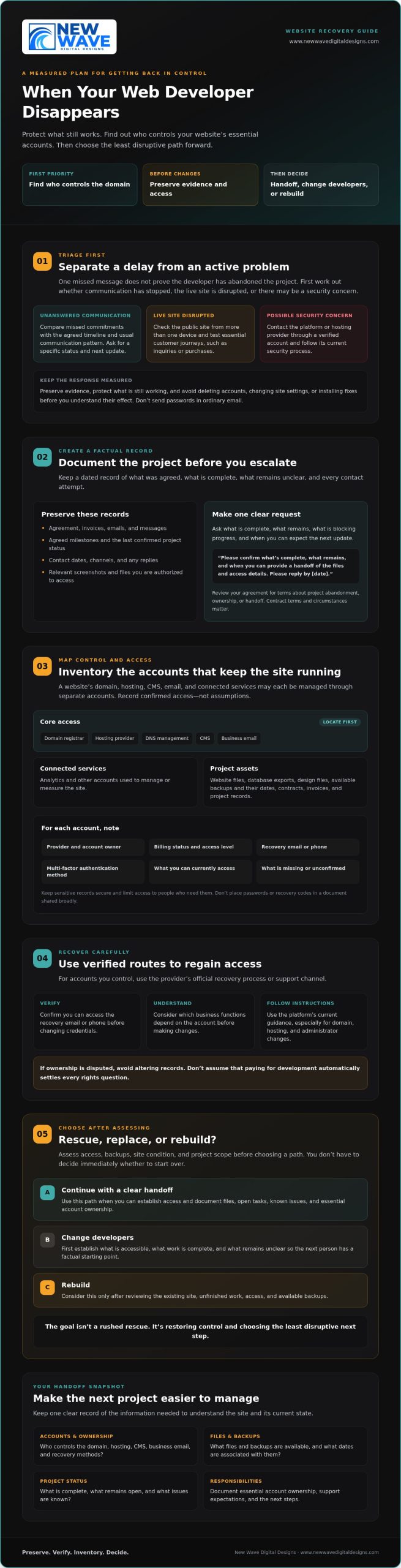
This checklist walks you through a measured recovery: review your agreement, document contact attempts, identify domain and hosting accounts, secure logins, and locate or request a backup before making changes. Then assess whether the existing site and unfinished work are recoverable. Choose the least disruptive path: continue with a clear handoff, change developers, or rebuild. The goal isn’t a rushed rescue. It’s restoring control and choosing your next step with confidence.
Key Takeaways
- Separate a missed reply from an active outage or security concern before deciding what needs immediate attention.
- Find out who controls your domain, hosting, CMS, business email, and account recovery methods.
- Assess access, backups, site condition, and project scope before choosing whether to rescue, replace, or rebuild.
- Use a written handoff to document files, open tasks, known issues, and ownership of essential accounts.
- Learn what to do when your web developer disappears, then plan a steady next step with clearly defined support and responsibilities.
Your Web Developer Disappeared: Stabilize the Website Before Making Changes
A delayed reply can be unsettling, but one missed message doesn’t prove your developer has abandoned the project. Before deciding what to do when your web developer disappears, distinguish between an unresponsive project contact and a live website that’s down or may be compromised. The first calls for a clear record and a specific request for an update. The second calls for prompt contact with the platform or hosting provider through an account you can verify.
Start by preserving the current picture. Save your agreement, invoices, emails, messages, agreed milestones, and notes about open requests. Record dates and the last confirmed project status, including what’s complete and what remains unclear. Avoid deleting accounts, changing site settings, or installing fixes before you understand their effect. Preserve any files, access details, and backups you can legitimately reach. Don’t send passwords in an ordinary email.
How can you tell a delay from a disappearing developer?
Compare missed commitments with the agreed timeline and the developer’s usual communication pattern. Ask for a specific status, remaining tasks, current blockers, and a realistic date for the next update. Keep a dated log of each contact attempt, noting the channel and any reply. This creates a factual record without assuming why communication has stopped.
Send one concise, professional message through the usual channel, then retain a copy. For example: “I’m checking on the project status. Please confirm what’s complete, what remains, and when you can provide a handoff of the files and access details. Please reply by [date].” Review your agreement for terms about project abandonment, ownership, or handoff. The Work for Hire Doctrine is one U.S. copyright concept that may be relevant to ownership, but the contract and circumstances matter. Don’t assume that paying for development automatically answers every rights question.
What should you do if your live website is affected?
Check the public site from more than one device, then test essential customer journeys, such as submitting an inquiry or completing a purchase. Note what fails and when. If the site appears disrupted, contact the hosting provider through a verified account, not just contact details supplied by the developer. If you suspect unauthorized access, follow the platform’s or host’s current security process. Avoid experimenting with changes that could complicate recovery.
Keep the immediate goal simple: protect evidence, preserve what still works, and establish whether the issue is project communication, service disruption, or a security concern. With those facts in hand, you can begin account recovery without making the situation harder to untangle.
Recover Website Control: Inventory Your Domain, Hosting, and Admin Access
Once you’ve documented the situation, map the accounts and assets that keep the website running. A site may look like one connected structure, but its domain, hosting, content management system (CMS), business email, and supporting services can each be controlled through separate accounts. Knowing who owns each account, who pays for it, and how access can be recovered is the foundation of a safe handoff.
Which website accounts and files should you locate?
Build an inventory that captures more than login names. For each account, record its provider, account owner, billing status, recovery email or phone, multi-factor authentication method, and your current access level. Don’t put passwords or recovery codes in a document you plan to share broadly.
- Core access: Domain registrar, hosting provider, DNS management, CMS, and business email.
- Connected services: Analytics and other accounts used to manage or measure the site.
- Project assets: Website files, database exports, design files, available backups and their dates, contracts, invoices, and project records.
Save dated screenshots of account details and relevant correspondence where you’re authorized to access them. Store sensitive records securely, with access limited to people who need them. Note what’s missing, too. The inventory is useful because it separates confirmed access from assumptions.
How can you regain access without creating more risk?
For accounts you control, use the provider’s official recovery process or support channel. Before changing credentials, confirm you can access the recovery email or phone and understand which business functions depend on the account. Follow the platform’s current instructions, especially for domain, hosting, and administrator changes. If ownership is disputed, avoid altering records or removing users. Ask a qualified professional to assess the situation first.
Payment records help establish a history, but paying for development alone may not settle ownership of every file or other intellectual property. Review the contract, invoices, and written handoff terms. The legal definition of work for hire illustrates why ownership can depend on legal and contractual details, not just who commissioned or paid for the work. For a specific dispute, consult a qualified legal professional.
Keep the inventory current as access is confirmed, recovered, or transferred. Clear records make it easier to brief the next provider and agree who will administer each account. Once you understand your recovery needs, you can also explore website maintenance and support as a possible part of a more deliberate ongoing plan.
Rescue, Replace, or Rebuild? Compare Your Website Recovery Options
Once you know what you can access, decide what’s worth preserving. The best path depends on the actual platform, available files and backups, account permissions, site condition, and remaining work. An unfinished site may still have a usable structure. A site that appears complete may rely on missing files or services no one has documented.
Compare your options against the same criteria:
- Access: Can a new professional reach the CMS, hosting, and necessary files?
- Assets: Are usable backups, database exports, and design materials available?
- Condition and scope: What works, what is broken, and what remains unfinished?
- Continuity: Can customer-facing functions stay available while the work proceeds?
Ask for an independent technical assessment before discarding existing work or approving major changes. The assessment should distinguish verified facts from assumptions. General online searches and external web directories can offer leads, but browsing third-party index links is not a substitute for checking your own platform, files, and permissions directly.
When is it reasonable to continue or rescue the existing site?
A rescue is plausible if the CMS or hosting is accessible, usable files or backups exist, and the remaining work can be clearly defined. Ask a new professional to identify functioning components, missing dependencies, and risks before making changes. Request a written scope that separates recovery and repair from new features. That makes it easier to judge the work against its actual requirements.
When might a new developer or rebuild be the clearer path?
Replacing the developer doesn’t necessarily mean replacing the website. A handoff may make sense if the current site is maintainable and the remaining tasks fit your goals. Consider rebuilding if essential assets are unavailable or recovery would no longer serve the project’s needs. Don’t choose a rebuild from frustration alone. Base the decision on an independent review and the effect on business continuity.
If you’re weighing what to do when your web developer disappears, treat the assessment as a decision record: what can be preserved, what must change, and why. That gives you a grounded basis for continuing, changing providers, or partnering with an agency like New Wave Digital Designs for a clean foundation.
A Web Developer Handoff Checklist for Protecting the Next Project
A strong handoff turns a difficult transition into a clear working foundation. Whether you’re continuing the existing build or bringing in a new provider, document what exists, who controls each account, and what decisions remain. If you’re weighing what to do when your web developer disappears, treat the handoff as a practical safeguard, not just a transfer of files.
What should a new developer receive during the handoff?
Share a verified account inventory, available backups, project files, design assets, contracts, and outstanding requirements. Grant only the access needed for the assigned work, using the platform’s supported user permissions rather than sharing your personal login. Ask the incoming provider to record access gaps, dependencies they discover, and proposed recovery steps before making substantial changes.
- Accounts: Confirm who owns and administers the domain, hosting, CMS, business email, and connected services.
- Project state: List completed work, open tasks, known issues, and the next agreed milestone.
- Technical notes: Request documentation for updates, integrations, licenses, and platform-specific dependencies.
- Working agreement: Set communication channels, response expectations, approval responsibilities, and how scope changes will be handled.
Put ownership and responsibilities in writing. Your business should know who can administer essential accounts, approve changes, and maintain access if the provider relationship ends. Document what the provider will deliver, how progress will be reviewed, and who must approve work before it moves forward.
What should you ask before hiring a replacement?
Ask how the provider will assess the existing platform, account access, backups, and project risks before proposing a path forward. Request a written scope with milestones, a communication process, and a clear method for approving changes. Confirm relevant experience with your site’s platform, whether Shopify, WordPress, or Squarespace. The web design guide offers broader considerations for planning a website project.
Once responsibilities are clear, consider what support the site will need after the handoff. The website maintenance services guide can help you think through ongoing care. After establishing your recovery needs and project scope, you can explore website maintenance and support.
Choose a Steady Website Support Partner and Set the Next Steps
With access secured and the project assessed, turn recovery into a clear plan. Confirm what you can access, preserve the records you’ve gathered, identify which assets are usable, and define the remaining work. If you’re still asking what to do when your web developer disappears, be cautious of promises of a quick fix before someone has reviewed the platform, permissions, files, and available backups.
Ongoing support should match the site’s actual needs. Website maintenance may include ongoing technical support, while managed hosting and security address other aspects of keeping a site hosted and protected. Ask a prospective provider to spell out what each responsibility includes, how it will be handled, and what falls outside the agreed scope. New Wave Digital Designs offers website design for Shopify, WordPress, and Squarespace, as well as website maintenance, managed hosting, and security services for businesses evaluating their next step.
How do you evaluate a website maintenance provider?
Ask who handles updates, hosting, security, backups, and technical issues, and how those tasks are documented and communicated. Clarify how you retain account access and how you’ll be informed about planned work or discovered concerns. The website maintenance services guide can help you compare ongoing-care needs and identify which responsibilities you want covered.
What should your first recovery conversation cover?
Give the provider a concise briefing: the platform, current symptoms, project status, confirmed access, known backups, unresolved tasks, and business-critical functions such as inquiry or checkout forms. Share a dated timeline and distinguish what you’ve verified from what you’re unsure about. Ask for an assessment, a proposed sequence of work, and a written scope before authorizing substantial changes.
A useful first conversation should leave you with clearer choices, not pressure to commit before the facts are understood. Confirm who will administer essential accounts, how progress will be communicated, and what approvals are needed before changes go live. That structure makes the next provider relationship more transparent, whether the work is a recovery, a continuation, or a new design.
Once you’ve defined the support you need, you can discuss website support with New Wave Digital Designs as one option for planning a considered path forward.
Build a Clearer Path Forward for Your Website
When you’re deciding what to do when your web developer disappears, begin with facts, not assumptions. Secure the accounts you control, preserve project records and available backups, then get an informed assessment before choosing whether to continue, change providers, or rebuild. A documented handoff and clear account responsibilities can make the next working relationship more transparent from the start.
The right ongoing support depends on what your website needs after recovery. New Wave Digital Designs offers website design for Shopify, WordPress, and Squarespace, along with website maintenance, managed hosting, and security services. Defining your priorities first can help you have a focused conversation about which options may fit.
Discuss your website support needs when you’re ready to plan the next step. With access, evidence, and scope in view, you can move forward with greater clarity and build a steadier foundation for your website.
Frequently Asked Questions
What should I do first if my web developer stops responding?
First, check whether the website is functioning and whether there’s an active security concern. If it’s live, document the project status, missed commitments, and contact attempts before making changes. Review your agreement, then send a concise, dated message asking for a status update, remaining tasks, and a handoff of accessible files and accounts. This calm record helps you decide what to do when your web developer disappears without relying on assumptions.
How long should I wait before finding a new web developer?
There’s no universal waiting period. Review the project agreement and timeline, consider how overdue the work is, and weigh the effect on your business. Send a clear request for a response with a reasonable date based on the commitments already made. If that date passes without a useful reply, you can begin seeking an independent assessment or replacement while preserving your records and avoiding disruptive changes.
Can I get my website back if my developer controls the domain or hosting?
Possibly, but the steps depend on who owns the accounts and what access you can verify. Contact the registrar or hosting provider through its official support channel and ask about account recovery, transfer, or dispute procedures. Gather business records, invoices, contracts, and correspondence that may help establish your connection to the site. Don’t attempt to bypass account protections or make ownership claims you can’t support.
What if my web developer deleted my website?
Don’t assume the site is permanently lost. Contact the hosting provider and platform through verified support channels to ask whether site files, database exports, or backups are available. Preserve messages and records related to the deletion, and avoid making changes that could overwrite recoverable material. A qualified professional can assess available assets and explain what might be restored. Recovery depends on the platform, account access, and surviving files or backups.
Should I rebuild my website or hire someone to finish it?
Get an independent assessment before choosing. If the platform, usable files, and a clear scope are available, another professional may be able to continue or repair the existing site. A rebuild may be more appropriate if essential assets are missing or the current work no longer fits your goals. Compare site condition, remaining tasks, business-critical functions, and continuity needs rather than deciding from frustration alone.
Who owns the website, domain, and design files if I paid a developer?
Payment alone doesn’t necessarily determine ownership of every website asset. Check your contract and written agreements for terms about the domain, code, design files, licenses, and handoff. Domain registration and intellectual property can involve different rights and account holders. If ownership is disputed, preserve invoices and correspondence, and seek qualified legal advice before asserting rights or transferring assets. The answer depends on the agreement and circumstances.
How can I prevent a web developer from disappearing again?
Keep essential accounts under your business’s control, use your own billing details, and confirm that you can access recovery methods. Agree in writing on scope, milestones, communication channels, approvals, and handoff responsibilities. Request documented access, available backups, project files, and known issues as work progresses. Before hiring, ask how the provider will report progress and manage changes. Clear ownership and records make a future transition easier if circumstances change.