What if a wholesale storefront could make complex buying feel straightforward? Shopify for B2B wholesale businesses can bring product discovery, account-specific pricing, and repeat ordering into a digital experience shaped around how trade customers buy. Store design matters, but so do the rules behind the storefront: buyers need clear product information, appropriate quantities, and pricing that reflects their purchasing terms.
Wholesale businesses often need more than a standard retail shopping journey. You may need to serve different customer groups, show tailored catalogs, or support bulk orders without making every purchase a manual process. The right Shopify structure can help balance those requirements with a polished, easy-to-use storefront.
This article explains how to approach B2B storefront design, when headless commerce may be useful, and how quantity rules and volume pricing can shape ordering. It also covers Shopify’s B2B tools, including company profiles, locations, catalogs, and customer-specific pricing, so you can understand which decisions matter when planning a wholesale experience.
Key Takeaways
- Shape the storefront around how wholesale buyers discover products, review account-specific information, and place repeat orders.
- Consider headless commerce when the storefront needs greater design flexibility or a more tailored digital experience.
- Use quantity rules to guide minimums, case packs, and order increments, then align volume pricing with your wholesale strategy.
- Match Shopify’s B2B tools and plan capabilities to the way your business manages buyers, locations, catalogs, and approvals.
- A well-planned Shopify design can bring wholesale workflows and a polished customer experience into one cohesive storefront.
B2B storefront design and headless commerce
A wholesale storefront should make product discovery, account access, and bulk ordering feel like one cohesive journey. Shopify supports standard storefronts and headless builds, allowing design decisions to reflect both buyer workflows and brand identity.
Store Setup and Implementation
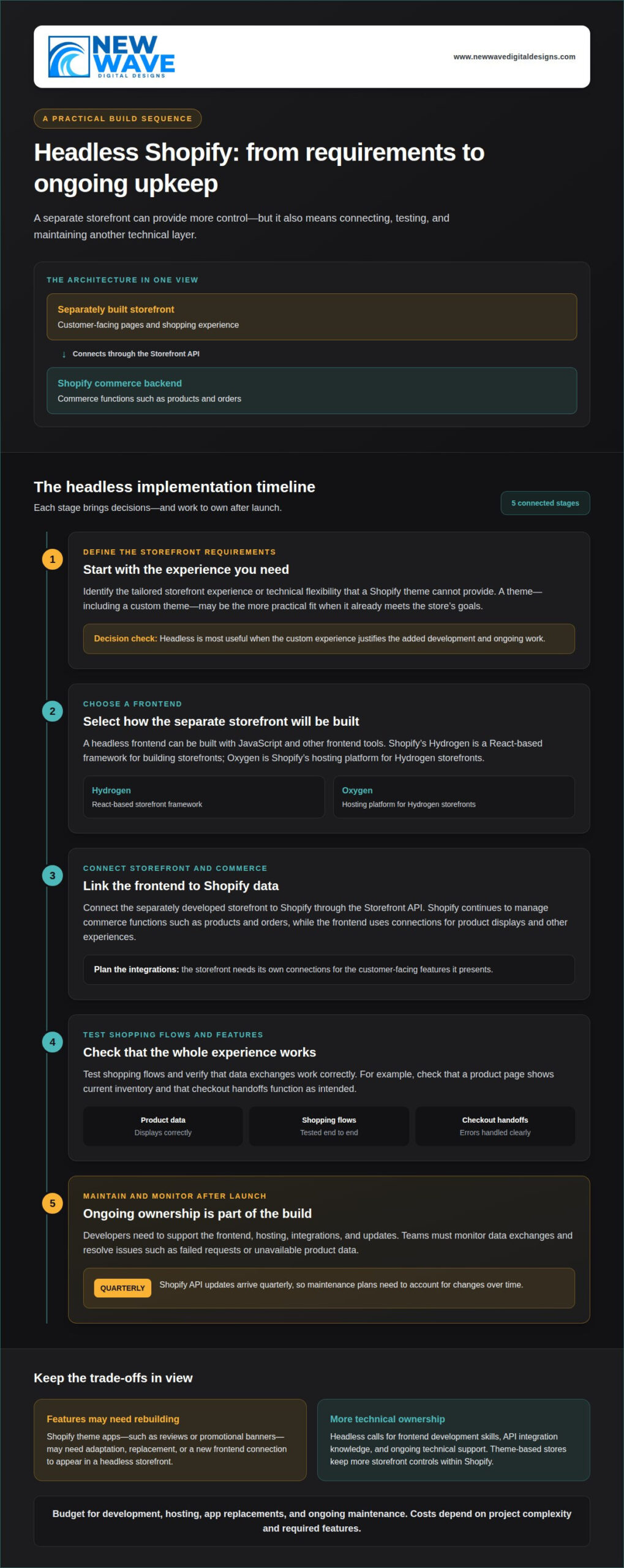
Begin by mapping your catalog, buyer groups, and order process. Organize product pages around trade essentials, including specifications, pack details, and clear ordering steps. A headless storefront separates the customer-facing presentation from commerce functions, giving you more control over the interface, but making development and ongoing integrations more involved.
For U.S. wholesale orders, Shopify settings can reflect your business’s tax configuration. However, resale certificates and exemption treatment depend on applicable state and local rules. Set up a clear process to collect and maintain relevant buyer documentation instead of assuming every wholesale order is exempt.
Platform and Plan Selection
Shopify, BigCommerce, WooCommerce, and dedicated wholesale platforms differ in plan structures, customization, and commerce workflows. Compare how each handles your catalog, account-specific experiences, integrations, and daily order administration. Don’t choose based on storefront appearance alone.
Shopify developed foundational B2B features on Shopify Plus for nearly four years before extending them to other plans. Plan choice therefore depends on which B2B capabilities, customization, and integrations your operation needs. Total implementation effort also varies with design complexity and connected systems. Risks include selecting a plan that misses a required workflow or adding integrations without a clear operational purpose.
Company Accounts and Customer Pricing
Shopify B2B company profiles can organize multiple buyers and locations, with separate permission levels, payment terms, tax exemptions, and order-submission settings. Catalogs can assign customer-specific pricing and product availability. Shopify Plus merchants have access to unlimited catalogs for customer-specific pricing.
For example, you can structure account access around a company’s purchasing locations and tailor its catalog to that customer. U.S. tax treatment still depends on the relevant jurisdiction and documentation: a storefront setting alone doesn’t establish exemption eligibility. A carefully designed account structure helps keep buyer access, product selection, and pricing aligned.
Wholesale Buyer Order Workflows
Shopify B2B supports quick bulk ordering from product pages or a separate order form, with product and variant lists. Sales representatives can access assigned customer accounts and place orders on buyers’ behalf. Buyers can also submit online orders for review and approval before fulfillment.
Define a clear path for quote requests, such as a sales-assisted process that captures products, quantities, and account details. Once terms are agreed, buyers or representatives can place orders through the appropriate workflow. Make repeat products and variants easy to find, and set quantity rules to match each account’s purchasing needs.
Quantity rules and volume pricing
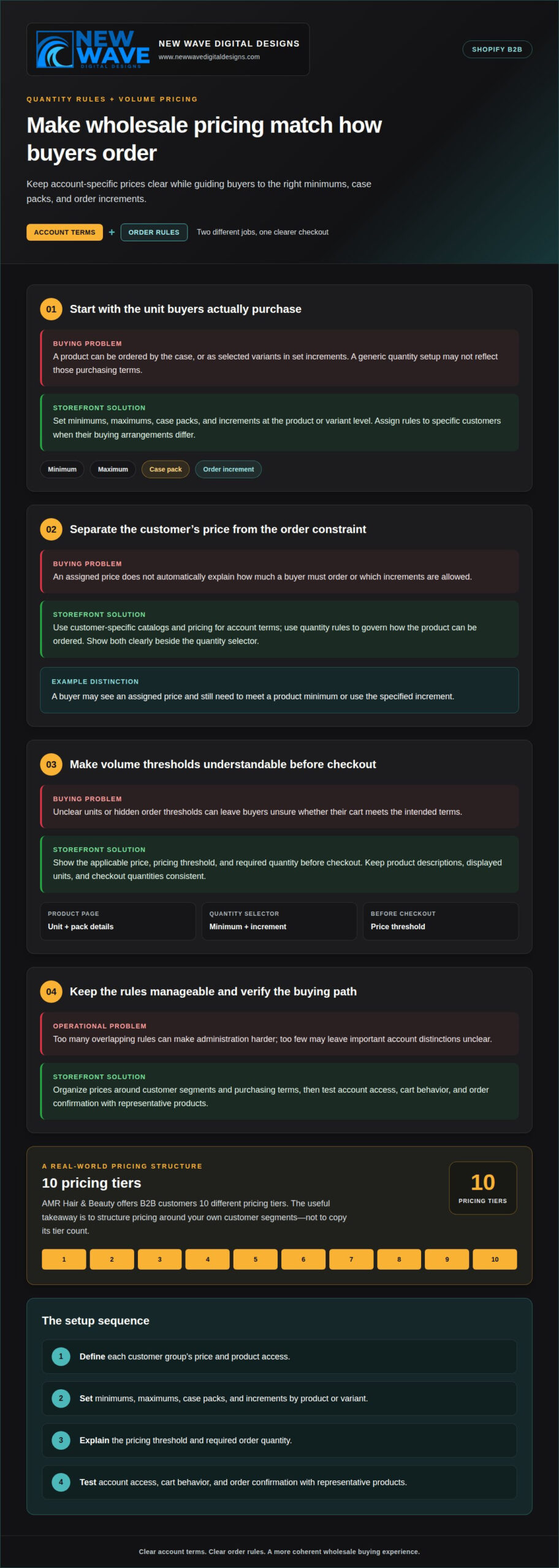
Wholesale pricing works best when checkout reflects how each business buys. In Shopify, quantity rules can set product and variant minimums, maximums, case packs, and order increments for specific customers. These controls align the storefront with purchasing agreements and help reduce orders that need manual correction.
Start by defining the unit customers actually purchase. A distributor might order by the case, while another account buys selected variants in set increments. Shopify rules can structure these conditions at the product or variant level. Assigning rules to specific customers accommodates different buying arrangements without applying one rule to every account.
Next, connect quantity thresholds to your pricing logic. Make the value of a larger order clear before checkout while preserving each customer’s agreed price. For example, show an account’s applicable price and use quantity rules to guide orders toward a case pack or qualifying volume. Keep product descriptions, displayed units, and checkout quantities consistent.
Shopify B2B supports customer-specific catalogs and pricing, while its quantity rules govern how products can be ordered. Together, these tools can distinguish account terms from order constraints. A buyer might see an assigned price but still need to meet a product minimum or use the specified increment. Clear messaging beside the quantity selector helps explain that distinction before an order is submitted.
Volume pricing should follow a deliberate structure:
- Define each customer group’s price and product access.
- Set minimums, maximums, case packs, and increments by product or variant.
- Make the pricing threshold and required order quantity easy to understand.
- Test account access, cart behavior, and order confirmation with representative products.
AMR Hair & Beauty offers B2B customers 10 different pricing tiers, showing how a wholesale catalog may need to serve varied account arrangements. The useful lesson is not to copy its tier count, but to organize pricing around your own customer segments and purchasing terms. Too many overlapping rules can make administration harder; too few may leave important account distinctions unclear.
What are the best Shopify wholesale apps for features not included natively? Choose an app based on the specific gap, such as custom price breaks or quote handling, and assess whether it works cleanly with your catalogs, account pricing, and order flow. A focused Shopify storefront design can make these pricing and quantity rules easier for buyers to understand.
What Shopify plans and pricing support B2B wholesale in the United States?
Shopify B2B is no longer limited to Shopify Plus, but plan capabilities still matter. Shopify developed foundational B2B features on Plus for nearly four years before extending them to other plans. Compare the functions available on your intended plan with the way your wholesale operation handles accounts, catalogs, and orders. Don’t choose from the plan name alone.
Separate plan access from business requirements
Begin with the workflows your store needs. For example, map customer-specific product access, payment terms, order approvals, and representative-assisted orders. Then identify which requirements rely on native Shopify B2B features, which depend on a particular plan, and which require additional implementation. Shopify Plus merchants have access to unlimited catalogs for customer-specific pricing. That distinction matters if your business needs many separate customer catalogs.
Other Shopify plans may suit wholesale operations with simpler account structures. The right fit depends on the number and complexity of pricing arrangements, how buyers submit orders, and how staff manage accounts. List these needs as specific tasks before evaluating plans. Essential workflows make plan comparisons more useful than a broad feature checklist.
Understand the full pricing picture
Shopify plan pricing is only one part of a wholesale store’s operating costs. Implementation scope, custom storefront work, integrations, and paid apps can also affect the total. A standard theme and straightforward catalog require different work from a custom interface connected to business systems. Compare costs against your store’s actual design and operational requirements, not an assumed universal cost.
Payment and order processes also shape the setup. Shopify B2B supports buyers paying by ACH at checkout and storing bank details for later charges. It also supports securely storing customer credit cards for checkout, draft orders, and invoice payments. Consider which payment methods fit your existing workflow, then account for the setup and administration they require.
Choose a plan through practical scenarios
Test each candidate plan against representative scenarios. For example, a buyer might access an assigned catalog and place a repeat order. A sales representative might create an order for an assigned customer, or a buyer might submit an order for review before fulfillment. Record whether each workflow is supported natively or requires another component.
For Shopify for B2B wholesale businesses, the most useful plan is the one that supports required workflows without unnecessary complexity. Revisit the comparison as your catalog, account structure, and sales process evolve. A clear requirements map helps connect plan selection, implementation scope, and ongoing administration.
Teams can evaluate how each scenario succeeds without workarounds, extra apps, or manual intervention, and note who owns each step. Then compare the effort of supporting those cases with the value they bring to your wholesale operation. B2B sales in the United States reached $15 trillion in 2025. That figure offers broad market context, but it does not determine which Shopify plan is right for a particular business. Base the decision on the workflows your team must support today and the capacity it needs as its customer relationships develop.
Does Shopify B2B require Shopify Plus, and what features are included?
No. Shopify has extended native B2B features beyond Shopify Plus, so Plus isn’t a requirement for every wholesale operation. However, plan access matters: Shopify Plus merchants have unlimited catalogs for customer-specific pricing. Choose based on the workflows and account structure your store needs, not simply the presence of B2B in its name.
How B2B capabilities developed
Shopify refined its foundational B2B features on Shopify Plus for nearly four years before extending them to other plans. That history helps explain why plan differences remain relevant. Map the functions your store needs, then compare them with the capabilities available on the plan under consideration. In particular, assess catalog needs, buyer permissions, order handling, and the way staff support customer accounts.
Ordering tools for buyers and sales teams
Shopify B2B supports quick bulk ordering from product pages or a separate order form. Buyers can work from product and variant lists, which helps when a purchase includes several items or options. The ordering interface should make product selection, quantities, and account-specific terms clear before checkout. A practical test is to follow a representative order from product selection through submission.
Sales representatives can access assigned customer accounts and place orders on customers’ behalf, supporting sales-assisted purchasing when a buyer needs help assembling an order. Shopify also lets buyers submit online orders for review and approval before fulfillment. These workflows support internal review without forcing every buyer through the same purchasing path.
Payment and account considerations
Shopify B2B supports buyers paying by ACH at checkout and storing bank details for later charges. It also supports securely storing customer credit cards for checkout, draft orders, and invoice payments. Consider how those options fit existing payment practices, then design the checkout and invoice process around the intended method. Clear payment steps help buyers understand what happens when they submit an order.
Account setup also affects the plan decision. Company profiles can manage multiple buyers and locations, with separate permission levels, payment terms, tax exemptions, and order-submission settings. For example, purchasing staff at different locations can have settings suited to their roles. This structure connects access controls to how wholesale orders are prepared and approved.
Match plan capabilities to the operating model
For Shopify for B2B wholesale businesses, plan selection comes down to the balance between native features and operational complexity. A business with straightforward catalog needs may not require unlimited catalogs. A business serving distinct customer groups may value that Plus capability. Compare real buyer journeys, including bulk ordering, representative support, payment, and approval, before settling on a plan.
How do Shopify company profiles, locations, catalogs, and customer-specific pricing work?
Shopify B2B company profiles create a structure for connecting business buyers with the terms and products relevant to their organization. A profile can include multiple buyers and locations, with separate permission levels, payment terms, tax exemptions, and order-submission settings. That structure lets a wholesale store reflect how a customer actually purchases, rather than treating every login as an unrelated retail account.
Company profiles and locations
Represent each business customer with a company profile, then associate its purchasing locations and buyers. Some staff may place orders while others need different access. Permission levels help define what each buyer can do, and location-specific settings can distinguish ordering arrangements across branches within the same company account.
Include payment terms and order-submission settings in the same account model. A buyer’s ability to submit an order can follow the company’s purchasing process, while tax exemption information can be associated with the relevant account. These settings organize the buying relationship in Shopify, but don’t replace accurate business records or appropriate tax handling.
Catalogs and customer-specific pricing
A Shopify B2B catalog can assign particular products, availability, and pricing to specific customers. This lets a wholesale store shape what each account can browse and buy. For example, a customer may see a catalog designed for its product range and agreed pricing, while another account receives different product access or prices.
Design catalogs around meaningful customer distinctions. Group accounts that share product access and pricing, then create separate catalogs where terms differ. Shopify Plus merchants have access to unlimited catalogs for customer-specific pricing. This capacity can support detailed account structures, provided you use clear names and assignments to keep management orderly.
Keep account relationships coherent
Profiles, locations, and catalogs work together. A company profile represents the business relationship; locations and buyers define how people within that business order; catalogs determine the products and prices available to customers. Keeping these layers aligned helps prevent buyers from seeing an unsuitable assortment or using settings intended for another account.
During setup, test a representative company account from the buyer’s perspective. Review its assigned locations, buyer permissions, catalog, displayed prices, and order-submission path. Then test another account with different product access or terms. These checks can reveal mismatches between account structure and storefront presentation before the workflow becomes routine.
For a considered buyer journey across company accounts and catalogs, plan your Shopify storefront design around the way wholesale customers purchase.
rom each location and buyer role, then confirm that the assigned catalog and terms match the intended account. Mokobara’s Shopify migration was followed by a 30% increase in customer retention, illustrating the value of a well-managed commerce experience. AMR Hair & Beauty’s product catalog included more than 6,000 items, showing how broad assortments can be organized for buyers. Shopify was named a leader and the only Customer Favorite in the Forrester Wave™: Commerce Solutions for Q3’26. Clear assignments help keep complex B2B buying arrangements manageable.
New Wave Digital Designs: Shopify Website Design
New Wave Digital Designs provides Shopify Website Design for wholesale businesses building or refining an online storefront. Turn to the service when your Shopify store needs a considered structure for trade buyers, product discovery, account-specific experiences, and ordering workflows. The design process brings these elements together in a storefront that reflects your business and supports how customers purchase.
A clear project brief can outline your catalog, buyer journeys, pricing needs, and required integrations. These details help shape the storefront’s visual direction and practical layout, from product pages to ordering steps. If your business uses another platform, New Wave Digital Designs also provides WordPress Website Design and SquareSpace Website Design. Website Maintenance supports ongoing site upkeep.
For a thoughtful next step, contact New Wave Digital Designs to discuss your Shopify storefront.
Shape your next wholesale storefront
Your next step is to turn your wholesale requirements into a clear design direction. Define the buyer experience you want to create, the account needs the storefront must support, and how the digital design should express your business. With those priorities in view, Shopify for B2B wholesale businesses can become a more purposeful foundation for customer relationships and future growth.
New Wave Digital Designs offers Shopify Website Design, WordPress Website Design, and SquareSpace Website Design. The right platform and storefront approach depend on your business goals and the experience you want to create. A considered design process can align those choices with how your wholesale customers purchase.
Contact New Wave Digital Designs to discuss your storefront plans. A thoughtful next step can give your wholesale business a confident digital presence built around its customers.
Frequently Asked Questions
What are the best Shopify wholesale apps for features not included natively?
Choose an app to address a specific gap, such as custom price breaks or quote handling. Check that it works with your catalogs, account pricing, and order flow.
How does Shopify B2B compare with BigCommerce, WooCommerce, and dedicated wholesale platforms?
Platforms differ in plan structures, customization, and commerce workflows. Compare how each handles your catalog, account-specific experiences, integrations, and daily order administration rather than choosing based on storefront appearance alone.
What U.S. sales tax, resale certificate, and exemption rules apply to Shopify wholesale orders?
Shopify settings can reflect your business’s tax configuration, but resale certificates and exemption treatment depend on applicable state and local rules. Create a clear process for collecting and maintaining buyer documentation; wholesale orders are not automatically exempt.