
The most advanced Shopify storefront isn’t automatically the better investment. What is headless Shopify, and is it worth it? Headless separates the customer-facing storefront from Shopify’s commerce backend. It makes sense when a business needs a tailored experience or technical flexibility that a theme can’t provide. If a theme already meets your goals, its simpler maintenance and familiar tools may be the better fit.
It’s easy to associate headless architecture with creative freedom and faster storefronts. But those benefits depend on thoughtful design and development. Headless also adds complexity and ongoing technical work.
This article explains how the storefront and backend work together, what headless changes for performance and customer experience, and which costs and trade-offs to weigh. You’ll have a clearer way to decide whether headless Shopify supports your next stage of growth or whether a well-designed Shopify theme is more practical.
Key Takeaways
- Understand how separating Shopify’s storefront from its commerce backend creates more room for tailored experiences, alongside added technical complexity.
- Assess the full cost of a headless setup, including ongoing maintenance and the work of replacing apps that depend on Shopify themes.
- Learn why headless architecture can support a fast, distinctive storefront, but doesn’t guarantee better performance on its own.
- Use business needs, team capabilities, and long-term operating costs to judge whether headless is a stronger fit than a Shopify theme.
- Explore how thoughtful Shopify website design can align your storefront’s structure and visual experience with your business goals.
Costs aside, is a headless store always better?
No. A headless storefront can offer more design freedom, but it also requires development, integrations, and ongoing maintenance. It’s the right choice only if those demands solve problems a Shopify theme can’t.
Build and Maintenance Costs
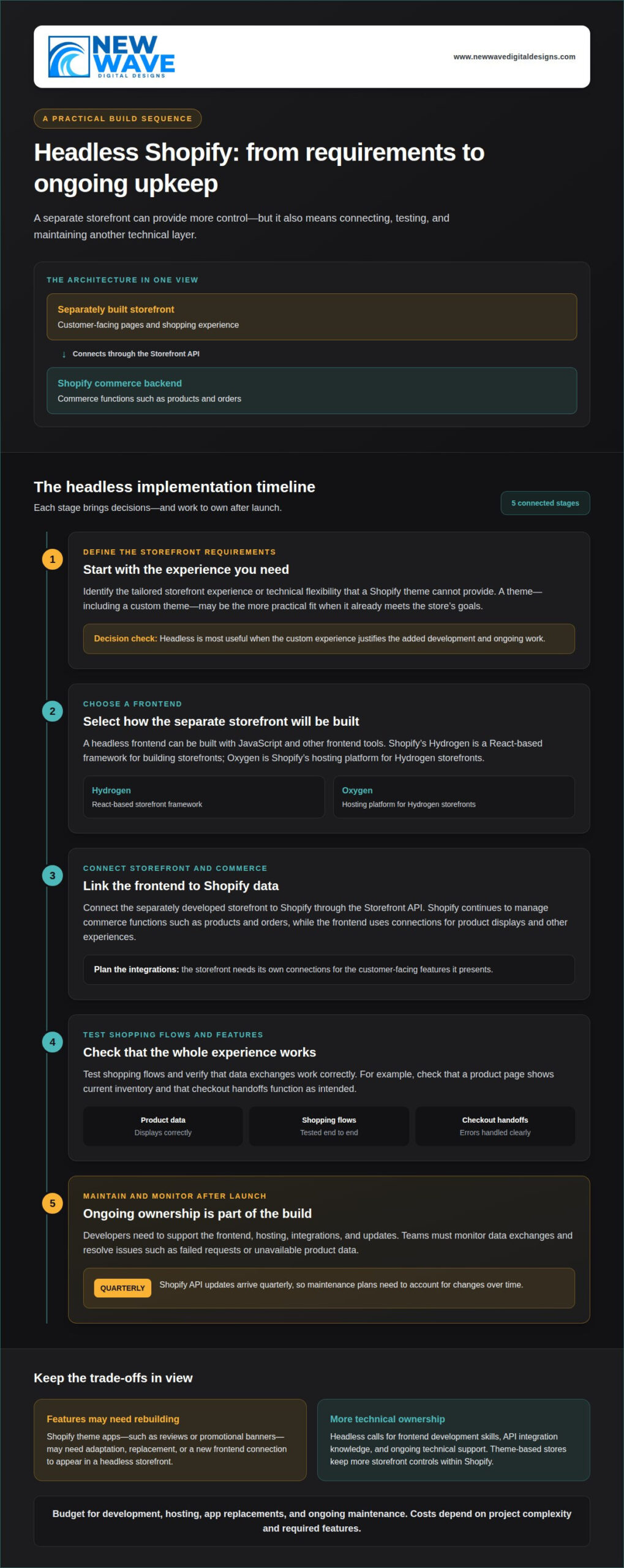
Headless costs include building a separate storefront and maintaining its connections to Shopify. The work continues after launch: developers need to support the frontend, hosting, integrations, and updates. Shopify doesn’t require a Shopify Plus plan for the Storefront API or Hydrogen; both work on paid plans. Budget for development, hosting, app replacements, and ongoing maintenance. Costs depend on the project’s complexity and required features.
A headless storefront may also need custom work for features a theme handles natively. For example, a tailored product page requires its own design, data connection, and testing. Those choices affect both the initial build and ongoing upkeep.
Added Complexity and Team Skills
Headless means coordinating Shopify’s commerce backend with a separately developed storefront. This architecture requires frontend development skills, API integration knowledge, and ongoing technical ownership. By contrast, a theme-based Shopify store keeps more storefront controls within Shopify. With headless, the team takes on more decisions and troubleshooting.
Building a headless store involves a connected sequence: define storefront requirements, choose a frontend, connect it through the Storefront API, and test shopping flows. Teams also need to monitor data exchanges and resolve errors, such as a product page failing to show current inventory. Shopify API updates arrive quarterly, so maintenance plans must account for changes over time.
For a small team without developers, these responsibilities can slow everyday updates. Merchandising changes, content releases, and technical fixes may depend on specialist support instead of familiar theme tools.
App Compatibility and Ongoing Maintenance
Shopify apps built for its theme system may not work in a headless storefront without adaptation. This matters when an app provides a customer-facing feature, such as reviews or a promotional banner: its storefront component may need rebuilding or replacement.
Shopify themes and apps that rely on the theming engine or app proxy can be harder to use headlessly. Before migrating, list the customer-facing features each app supports and decide how the separate storefront will provide them. Shopify can still manage orders, but the frontend needs its own connections for product displays and other experiences.
Integration maintenance means checking that data moves correctly between Shopify and the storefront. Teams need clear error handling for failed requests, unavailable product data, or checkout handoffs. Hosting options such as Oxygen add another operational component to manage alongside the commerce backend.
Headless is most useful when a custom experience justifies the added work. If a theme already meets the storefront’s needs, its simpler operating model may be more practical.
What is Shopify headless commerce?
Shopify headless commerce separates the customer-facing storefront from Shopify’s commerce backend. A traditional Shopify theme connects those layers through Shopify’s storefront system. A headless frontend is built separately and communicates with Shopify through the Storefront API.
That distinction changes how the shopping experience is controlled. A theme uses Shopify’s Liquid templating language and theme editor to manage page structure and content. A custom Shopify theme can still have a distinctive design within that architecture. Headless lets a team build the storefront with JavaScript and other frontend tools, then connect it to Shopify’s product and cart data.
Shopify’s headless tools include Hydrogen, a React-based framework for building storefronts, and Oxygen, Shopify’s hosting platform for Hydrogen storefronts. They support a custom frontend while Shopify continues to manage commerce functions such as products and orders.
For example, a brand could combine Shopify product data with a separately designed editorial experience. A theme can also support custom layouts, but the storefront remains within Shopify’s theme system. Headless changes the architecture, not the need for good design, accessible navigation, and reliable product information.
That freedom comes with a trade-off: features a theme supplies automatically may need separate frontend work. Shopify apps that rely on its theming engine or app proxy can be harder to use in a headless store. An app may still manage its backend function, but its customer-facing feature might not appear without an integration or replacement.
Consider a reviews app that displays ratings through a Shopify theme block. A headless storefront may need a new connection to retrieve and display those reviews. Replacing or rebuilding frontend apps during migration can add development work and cost, depending on how many apps the store uses. Before deciding, list each app’s role and determine whether its existing storefront feature can be retained.
This comparison helps clarify the decision. A Shopify theme, including a custom theme, keeps design and commerce within Shopify’s established storefront architecture. Headless makes the frontend independently configurable, which can suit specific experience requirements but leaves more implementation decisions to the development team.
For a store considering a new visual direction, Shopify website design can help shape a theme-based storefront around its customer experience and business needs.
Shopify warns that headless commerce can be more complex than traditional monolithic setups. It says many merchants can meet customer needs with a theme and recommends headless for brands with established internal technology and product teams.
How headless commerce separates the storefront frontend from Shopify’s commerce backend
Headless architecture gives the storefront and Shopify backend separate roles. APIs connect them, allowing the frontend to present products while Shopify manages commerce data and checkout.
Separating the Storefront from Shopify Services
A headless storefront uses Shopify APIs to request commerce data without relying on Shopify’s theme layer. The Storefront API can provide products, collections, search, and cart functions, then hand customers off to Shopify checkout. This separation lets a Hydrogen frontend shape the shopping experience while Shopify supports core commerce operations.
For example, a product page can request current product details through the Storefront API and then send a customer to checkout. Shopify’s Headless channel can publish products and provide order attribution, analytics, and sales reporting by channel. This helps a business distinguish storefront activity while keeping order processing within Shopify.
Customer accounts use a related but distinct connection. Shopify’s Customer Account API supports sign-in and access to orders, addresses, and profiles. The frontend can present account information in its own design while the API retrieves the customer’s Shopify data.
Separation from the Shopify Theme Layer
A headless frontend doesn’t use Shopify Liquid themes to render storefront pages. Instead, a separate application requests Shopify data and creates the pages customers see. The frontend can use its own components and structure, while developers maintain its connection to Shopify’s commerce backend.
API access and credentials need careful handling. Shopify’s private Storefront API token is secret, so it must not appear in client-side code or a mobile app. Keep private credentials on the server, limit access, and replace or revoke them when access needs change.
Shopify also provides tokenless Storefront API access for products, collections, search, and cart, with a query complexity limit of 1,000. This is distinct from private credentials: the access method determines what the frontend can request and how it authenticates. The Customer Account API handles sign-in and customer-specific data separately.
Credential rotation means replacing an existing credential and updating the systems that use it. When retiring a storefront, remove its related access and credentials as part of decommissioning. This helps prevent an abandoned frontend from retaining access to Shopify services while keeping active storefronts connected to the data and checkout flows they need.
Performance, page speed, and mobile experience
Headless architecture can make performance easier to shape, but it doesn’t guarantee a faster storefront. The framework, integrations, caching strategy, and mobile builds all affect the shopper’s experience.
Real-World Performance Examples
Real storefront results show what careful implementation can achieve, not what every headless build will deliver. Veloretti’s headless Shopify and Contentful store scored 95+ on Lighthouse. That example offers a useful reference point, while also showing why architecture alone isn’t a performance measure.
Shopify warns that a blank-slate ecommerce build can deliver below-average performance. A custom framework can add large scripts, unoptimized images, or extra requests if teams don’t manage them carefully. For example, oversized imagery can delay the main product image on a mobile product page, even with headless technology.
Core Web Vitals help focus performance reviews on real page experience. Largest Contentful Paint, or LCP, measures when the largest visible content element loads. A 2.5-second LCP is described as the industry standard for a good result. Treat it as a target to assess, not proof that every page or device performs equally.
Caching, SEO, and Mobile Experience
Caching can reduce the time needed to serve repeat storefront requests. Cached headless pages may load in under 50 milliseconds, compared with 300-800 milliseconds for Shopify Liquid themes. Those figures describe a possible serving-time difference, not an end-to-end guarantee; scripts, images, and network conditions still affect the shopper’s experience.
Mobile performance needs attention throughout the page, not just at first load. A product page may appear quickly but still feel sluggish if variant selection or cart updates respond slowly. Test key mobile journeys, from product discovery and adding an item to reaching checkout. Each interaction can reveal a different bottleneck.
SEO also depends on deliberate frontend implementation. Headless storefronts need semantic markup, structured data, metadata, and crawlable navigation. If product pages use a nonstandard URL structure, provide a server-side 3XX redirect from the expected product path. For example, a change from Shopify’s flattened product path should still lead search engines and shoppers to the intended product page.
Monitor performance across key templates, devices, and releases. Track LCP, page requests, image weight, and cart interactions before and after framework updates. If a new integration slows collection pages, isolate the change and adjust that component instead of redesigning the whole storefront. Repeating these checks helps teams connect measurable changes to specific updates.
When headless Shopify is worth the investment
Headless Shopify is worth considering when a theme, sales channel, and app combination can’t deliver the required customer experience or support business systems. Weigh the potential business value against development, hosting, and ongoing technical ownership.
A practical screening threshold is annual revenue above $20 million, unless a brand has specific customization needs. Revenue alone isn’t a reason to migrate. A retailer below that threshold may have a strong case if its required experience depends on a storefront architecture that standard themes can’t support.
Shopify recommends considering headless when its sales channels, themes, and apps can’t meet a merchant’s business systems, processes, or desired customer experience. That’s a more useful test than choosing headless because it sounds advanced. For example, a brand may need a distinctive storefront that brings together commerce, editorial content, and customer account information.
Consider the operational commitment, too. Shopify’s guidance pairs headless storefronts with budgets of at least $1 million and timelines of six months or longer. Those requirements make the approach a substantial program, not simply a visual refresh. Developers must build and maintain the frontend, while the business funds hosting and plans for ongoing integration work.
To judge whether that investment can pay off, compare the expected annual gains with the costs of implementation and operation. Account for additional revenue and operational savings, then subtract annual maintenance and implementation investment. Divide the result by the implementation investment and multiply by 100 for the ROI percentage. A faster storefront only supports this case when it contributes to business outcomes, such as improved conversion or reduced operational friction.
Use a clear decision sequence:
- Define the constraint: Identify the customer experience, system, or process that Shopify themes and apps can’t deliver.
- Connect it to value: Explain how solving that constraint could support revenue, efficiency, or customer experience.
- Include ongoing work: Account for hosting, integration maintenance, and developer ownership after launch.
- Compare the alternative: Assess whether a Shopify theme can meet the same need with less operational complexity.
Headless is a stronger fit when a specific business requirement justifies its added architecture and long-term upkeep. If a theme can deliver the experience, a separate frontend may add work without enough value in return. Shopify website design can help shape a storefront around customer journeys and business needs before you decide whether headless is necessary.
New Wave Digital Designs: Shopify Website Design
New Wave Digital Designs creates Shopify storefronts around a business’s brand, customers, and practical requirements. If a Shopify theme can support the experience you want, thoughtful design may offer a more straightforward path than a separate headless frontend.
If you’re assessing headless, start with the customer journey: which storefront features matter, what your team needs to manage, and how the site should evolve. Shopify Website Design can turn those priorities into a cohesive storefront, while Website Maintenance supports ongoing site care after launch.
If you’re considering a new Shopify storefront or refining an existing one, contact New Wave Digital Designs to discuss your website design needs.
Shape the storefront around your next stage
What headless Shopify is and whether it’s worth it becomes clearer when you treat your storefront as part of a longer-term business plan. Choose an architecture that supports the experiences you need now and allows for changes you anticipate. A focused design discussion can help turn that direction into a practical plan.
New Wave Digital Designs offers Shopify Website Design, WordPress Website Design, and SquareSpace Website Design. Whether you’re refining a current storefront or considering a different platform, align the site’s structure and visual expression with your business priorities.
Contact New Wave Digital Designs to discuss the direction you want your website to take. A considered next step can bring your vision into focus.
Frequently Asked Questions
What is headless Shopify and how does it work?
Headless Shopify combines Shopify’s commerce capabilities with a separately built storefront that communicates through APIs. For example, a retailer can use Shopify to manage its catalog while presenting products in a custom editorial experience. The architecture also separates the storefront’s design and content workflows from the systems that manage products and orders. Teams need to coordinate these parts as the store evolves.
How much does a headless Shopify build and ongoing maintenance cost in the US?
There isn’t one fixed US total because scope, technology choices, integrations, and maintenance needs vary by store. A useful estimate accounts separately for frontend development, hosting, adapting app features, and ongoing technical care. A Hydrogen storefront and a custom frontend may require different work. Complexity also affects ongoing support, so compare the full operating plan with the cost and effort of maintaining a theme-based store.
What are the pros and cons of headless Shopify for merchants?
Headless can give merchants more control over how shopping and brand content work together, including distinctive product discovery or editorial-led journeys. The trade-off is that storefront features may require custom development instead of familiar theme settings. For example, a marketing team might need developer support to adjust a campaign component. Weigh the creative and technical flexibility against the need to coordinate updates, integrations, and everyday storefront changes.
When is headless Shopify worth it, and what types of businesses benefit most?
Whether headless Shopify is worth it comes down to a specific business need. It may suit a brand whose customer experience or internal systems can’t be served by its existing themes, sales channels, and apps. Businesses with established technology and product teams are better positioned to manage the added architecture. A merchant whose current theme meets its goals may gain little from separating the storefront.
What are common risks and hidden costs of headless Shopify?
Common risks include underestimating the work to recreate storefront features, maintain integrations, and keep product pages accessible and search-friendly. A feature currently provided by an app may need a new frontend implementation after migration. Plan testing beyond the homepage: check product discovery, cart behavior, customer account journeys, and checkout handoff. Clear ownership of these functions helps prevent technical gaps from becoming customer-facing problems.