
A membership plugin turns a WordPress site into a structured home for exclusive content, member access, and recurring payments. For WordPress membership site development, it provides the rules that connect registration, membership levels, protected content, and payment processing, so the experience can grow beyond a simple login page.
If you’re wondering why a membership plugin is needed, the answer is control: it helps you decide who can access what, and how that access changes when someone joins or pays. A membership model can also guide your audience from free resources to paid content or services, building deeper engagement around what you offer.
This guide covers the essentials of setting up a membership site, including plugins, registration, membership tiers, and payment providers. You’ll also learn how professional development brings these elements together in a secure, coherent experience for your business and its members.
Key Takeaways
- Map how registration, membership levels, and payment processing should work together before shaping the site.
- Choose a membership plugin around the access rules and member experience the business needs.
- Plan professional testing for sign-up, billing, protected content, and member notifications.
- Structure members-only resources and courses so each tier offers a clear, relevant experience.
- Consider how ongoing website maintenance and support can help keep the membership experience running smoothly.
Free registration and third-party payment providers
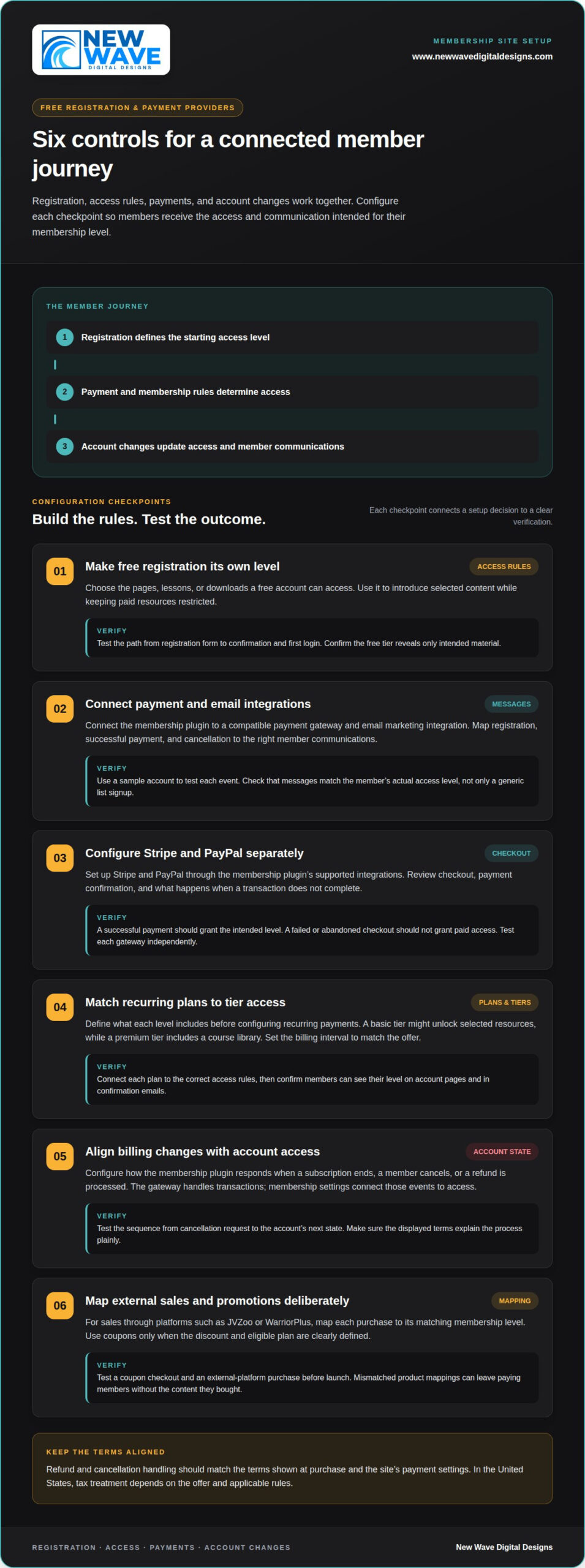
Design registration, access rules, and payment processing as one connected member journey. In the United States, tax treatment depends on the offer and applicable rules. Refund and cancellation handling should match the terms shown at purchase and the site’s payment settings.
-
How a Professional Configures Free Registration
Set up free registration as a distinct membership level, then define which pages, lessons, or downloads it can access. A free account can introduce selected content while keeping paid resources restricted. Test the complete path from registration form to confirmation and first login. Avoid granting broad access by default: the free tier should reveal only material intended for prospective members.
-
How a Professional Connects Payment and Email Integrations
Connect the membership plugin to a compatible payment gateway and email marketing integration. Map key events, such as registration, successful payment, and cancellation, to the right member communications. Email add-ons can support onboarding and reminders. Test each event with a sample account, and confirm that messages reflect the member’s actual access level, not just a generic list signup.
-
How a Professional Sets Up Stripe and PayPal Payments
Configure Stripe and PayPal through the selected membership plugin’s supported integrations. Review checkout, payment confirmation, and what happens when a transaction doesn’t complete. Successful payment should grant the intended membership level; failed or abandoned checkout shouldn’t grant paid access. Test each gateway separately, since members may choose different payment methods.
- Set recurring plans and tier access. Define what each level includes before configuring recurring payments. For example, a basic tier might unlock selected resources, while a premium tier includes a course library. Set the billing interval to match the offer, then connect each plan to the right access rules. Confirm that members can clearly see their level on account pages and in confirmation emails.
- Align billing changes with account access. Configure how the membership plugin responds when a subscription ends, a member cancels, or a refund is processed. The gateway handles transactions, while membership settings link those events to access. Test the sequence from cancellation request to the account’s next state, and make sure the displayed terms explain the process plainly.
- Connect external sales and promotions deliberately. If you sell through platforms such as JVZoo or WarriorPlus, map each purchase to the matching membership level. Use coupons only when the discount and eligible plan are clearly defined. Test a coupon checkout and an external-platform purchase before launch. Mismatched product mappings can leave paying members without the content they bought.
Why Use a Membership Plugin?
A membership plugin connects member accounts with content access, subscription settings, and account management. A professional build selects and configures the plugin to fit the site’s audience, content, and operating needs.
- Plan the build around the membership model. Start by mapping registration, membership levels, protected sections, and the member journey. This sequence guides plugin selection and installation, rather than letting a plugin’s feature list dictate the site’s structure.
- Address security, privacy, SEO, and performance as part of the plan. Limit administrative access, protect member data, and restrict premium pages to the intended levels. Organize public pages for search visibility while keeping private resources out of public navigation. Test page loading and plugin interactions to ensure access controls don’t disrupt browsing.
-
How a Professional Chooses a Plugin for Your Site Needs
Match the membership plugin to the content and subscription model. A site with one resource library may need different access rules from a course platform with several tiers. Review how the plugin handles registration, pricing displays, member accounts, and essential integrations. Don’t choose by feature count alone: prioritize the features your planned experience will use.
-
How a Professional Tests Plugin Selection and Content Restrictions
Install the selected plugin in a controlled environment, then test each membership level against sample pages and sections. Confirm that visitors, free members, and paid members see the intended content. Test account creation, sign-in, and access changes. Check how the plugin works with the existing theme and other essential plugins before activating it on the live site.
- Activate and configure the plugin in a defined sequence. Prepare the site, install the chosen plugin, configure membership rules, and connect the required components. Then test the journey from registration to protected content. This step-by-step approach helps reveal configuration conflicts before members rely on the site.
- Review ongoing fit before adding more tools. Membership needs can evolve as a site adds courses, content, or subscription options. Revisit plugin settings when the model changes, and avoid overlapping plugins that perform the same task. A carefully planned WordPress membership site build aligns the plugin with the site’s structure and future direction.
What Do You Need to Run a WordPress Membership Site?
A membership website needs a WordPress site, a membership plugin, and a way to accept payments. Professional setup also defines access rules and tests the complete member journey.
Development pricing depends on project scope and is provided after a quote request; content volume, access rules, integrations, and testing needs shape the work.
-
How a Professional Sets Content Access Rules
Define which membership levels can open each page, course, or download. Map those rules to the content structure, then configure the plugin to restrict protected sections to eligible accounts. For example, a beginner level might include introductory lessons, while a higher level unlocks advanced material. Test both public and member views to catch exposed pages or blocked content.
-
How a Professional Schedules Drip Content and Expiration
Set a release schedule for lessons members should receive in sequence. Configure drip rules around enrollment or the planned course path, then check that each lesson appears at the intended point. Define what happens when membership access expires, including whether protected pages become unavailable. Clear transitions prevent former members from retaining access to restricted resources.
-
How a Professional Tests Member Access, Billing, and Notifications
Test the membership website with accounts assigned to different levels. Check registration, protected-page access, payment status, and emails triggered by account events. Confirm that new members receive the right confirmation and that access reflects their current account status. Also test unsuccessful payments and membership changes to ensure messages and permissions stay aligned.
- Install the core components in a planned order. Prepare the WordPress website, install the membership plugin, and configure the access structure before connecting related features. Each component should have a defined purpose. For instance, the plugin manages member permissions, while the payment connection processes subscriptions. Keeping these roles clear makes configuration issues easier to locate during review.
- Review the member journey from entry to renewal. Trace a sample account from registration through a protected lesson and billing notification. Check how account pages explain membership levels and where members find course materials. Members should understand what their current access includes and what changes when their subscription or level changes.
- Plan for ongoing upkeep. Plugin settings, WordPress updates, and connected features can affect access over time. Website maintenance and support help address routine technical issues and keep the membership experience aligned with its configured rules. An easy-to-use account layout matters too: labels, navigation, and lesson descriptions should make the next step clear.
How does a membership website work?
A membership platform connects accounts to exclusive resources through defined access rules. In WordPress membership site development, professional setup organizes courses, protected content, and release schedules into a customizable member experience.
-
How a Professional Creates Members-Only Content and Courses
Group the material into a clear course or resource structure before assigning membership access. For example, a course might have an introduction, core lessons, and supporting downloads, with each item linked to its intended level. Give every lesson a descriptive title and purpose. Don’t place premium resources alongside public material without clear access settings.
-
How a Professional Protects Restricted Content
Apply access rules to each members-only page, course, or file. Membership settings determine which accounts can open each resource, while site navigation guides members to available content. For example, restrict a premium course page to its eligible level. Check direct page access as well as menu links: hiding a link alone doesn’t protect its destination.
-
How a Professional Schedules Drip Content
Arrange lessons in the order members should receive them, then set release rules for each item. A course might reveal its first lesson after enrollment and later material according to the chosen schedule. Check how the platform measures each release point, such as from enrollment or a fixed date. Clear sequencing helps members follow the course without seeing future lessons too soon.
- Connect each resource to a membership level. Map the content plan to the site’s access structure. For example, an introductory level could include foundational guides, while a premium level unlocks advanced courses and exclusive downloads. Keep labels consistent across account pages, lessons, and membership descriptions. This mapping is a core part of WordPress membership site development.
- Shape the course experience around member progression. Organize lessons so each section builds on the last. A course on a specific skill might move from core concepts to guided practice and then reference materials. Add concise descriptions to explain each resource’s purpose. This structure makes the membership experience feel intentional, rather than like a collection of unrelated pages.
- Review access whenever content changes. Adding a lesson or moving a page can affect its membership rules. Check the relevant level settings and release schedule after each structural change. Test the member view with a sample account, including a restricted resource and scheduled lesson. This final review keeps the content map aligned with the live platform.
Reasons to create a membership site
A membership model can turn useful expertise into an ongoing relationship. Choose it when members gain continuing value from exclusive resources, guided learning, or a connected community.
- Offer a useful first step. A free tier can provide limited access to selected resources, helping visitors experience the value before committing. For example, a fitness educator might share introductory guides while reserving full programs for paid members. Build the free offer around a real audience need, rather than adding a signup barrier without a clear benefit.
- Build paid access around a clear promise. Paid tiers can offer full access to premium content or services, supporting recurring revenue and deeper engagement. Specify what each tier unlocks, such as a complete course library or specialist downloads. Prospective members should be able to see the difference between free access and each paid level.
- Match the number of options to the business model. A business can offer 100 or more membership options, depending on its model and customer needs. That flexibility doesn’t mean every site needs a large catalog. Start with a small set of distinct offers, then add options only when they serve a clear audience or content purpose.
- Create a reason to return. A membership works best when its resources support an ongoing goal. For example, a professional education platform could organize courses, reference materials, and new downloads around a learner’s progress. Give each resource a purpose, and use the member dashboard to make relevant materials easy to find.
- Connect the offer to a sustainable content plan. Before launching, map the material that supports each membership promise. A course library needs lessons and useful updates; a resource membership may rely on templates or downloads. Choose a publishing rhythm the business can maintain. A friendly, consistent experience comes from delivering value members can understand and use.
- Consider whether the model fits the relationship. Memberships suit offers where people benefit from continuing access, structured learning, or a deeper connection to an area of expertise. They may be less suitable for a one-time service with no natural ongoing content. The subscription e-commerce market is projected to reach $3485.51 billion in 2029, but a broad market projection doesn’t determine whether a specific offer makes sense.
- Plan the experience before building it. Define the audience, the value members receive, and how each tier supports that value. A membership site should make its offer, access, and ongoing purpose clear. Plan your membership site around a model that fits your content and audience.
New Wave Digital Designs
New Wave Digital Designs can help when your membership site needs a clearer website structure or ongoing technical attention. Its web design services can shape the broader site experience, while website support and maintenance address operational needs as the site evolves. If changes to member pages or connected features create technical friction, support can help keep the website functioning as intended.
Turn to New Wave Digital Designs when you’re planning improvements beyond membership settings or need continued care for your website. The right next step depends on where the friction lies: site design, ongoing upkeep, or the way digital systems support your work. Contact New Wave Digital Designs to discuss your website needs.
Shape the Next Stage of Your Membership Site
A membership site can evolve as your audience, content, and goals change. Treat WordPress membership site development as the foundation for a digital experience you can refine over time, not a one-time technical milestone. Start by identifying what should improve first: the member journey, the site’s ongoing care, or the way digital tools support your work.
New Wave Digital Designs offers website maintenance and support for ongoing website needs, as well as AI Agents for businesses exploring new ways to support their operations. These services can complement a broader digital direction while keeping the member experience in focus.
When you’re ready to discuss your website’s next stage, contact New Wave Digital Designs. A clear plan can turn your membership idea into a digital space ready to grow with your work.
Frequently Asked Questions
What Are the Best WordPress Membership Plugins for Your Site, Compared by Features and Pricing?
The best plugin is the one that supports your membership model without adding features you won’t use. Compare how each option handles account management, content rules, payment connections, and email integrations. Review its pricing structure too, including whether essential capabilities require paid extensions or higher plans. For an organization in New Jersey, consider how easily the selected setup can be managed as its audience grows.
What hosting and technical requirements does a WordPress membership site need?
A membership site needs WordPress hosting that reliably runs the chosen theme and plugins. It also needs a domain, secure account access, and a working connection between membership and payment tools. Before launch, review compatibility, backup capability, and the process for restoring the site. These foundations help owners in Somerset County and nearby areas protect member access as the site changes.
How do WordPress membership sites handle subscriptions, payments, and recurring billing?
A payment gateway processes a member’s charge, while the membership system records the related subscription and access status. For example, a renewal can update the account and trigger a payment notification. The site should clearly display the member’s plan and renewal details, and provide a defined way to manage account changes. Aligning these records helps prevent mismatches between billing status and member access.
How can a WordPress membership site restrict content by membership level?
Assign protected pages or resources to the membership level that should access them, then review how those items appear across the site. For example, a public course overview can remain visible while lesson materials require an eligible account. Check menus, search results, and page previews so restricted resources aren’t presented as open content. Clear labels also help members understand what their current level includes.
How Can a Professional Manage User Registration, Login, and Member Accounts in WordPress?
Registration and account pages should focus on the information members need to provide and manage. Give members a clear login path, a password recovery route, and an account area for relevant details. Limit administrative roles to the access needed for each task. For instance, someone managing course content may not need the same permissions as a site administrator.
What ongoing maintenance and support does a WordPress membership site require?
Ongoing care includes reviewing WordPress, theme, and plugin updates, then checking key member journeys after changes. Review account access, important page links, and connections between site components. Site owners serving New Jersey, Somerset County, Hunterdon County, or Morris County should consider how they’ll respond if a technical change disrupts member access. A planned support process helps keep operations organized as the membership evolves.