
The cheapest website can become the most expensive to maintain. The hidden costs of cheap web design services often come from add-on fees, workarounds for limited customization, ongoing hosting, and the effort of moving to a better-fit platform later. The starting price is only part of the total cost.
A low upfront quote can be appealing, especially when you need a site without stretching your budget. But if essential features, ongoing support, or room for future changes aren’t included, savings can shrink as extra work accumulates.
This article explains how those costs arise and what to consider when comparing a budget website with its longer-term demands. You’ll see how hosting and migration affect total cost, why customization limits can lead to extra work, and which details reveal what a quote actually covers.
Key Takeaways
- Look beyond the initial quote: add-ons, content work, and post-launch fixes can change the total investment.
- Include recurring hosting, security, maintenance, and software expenses when planning your website budget.
- Rigid templates may make future changes harder, leading to workarounds or a rebuild when your needs evolve.
- Plan for migration work such as moving content, setting up redirects, and preserving important SEO information.
- Choose a website setup that fits your current needs and gives your business room to grow.
What are the hidden costs of a cheap website?
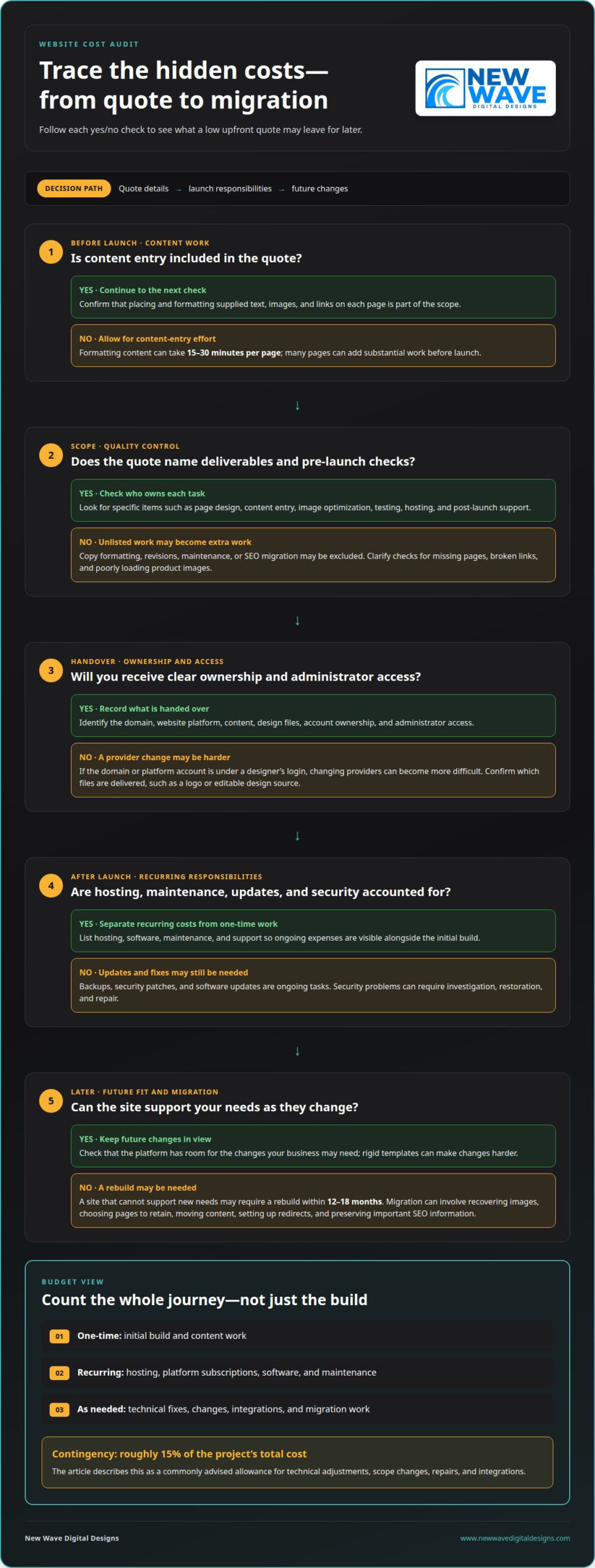
A low initial quote may leave essential work outside the build, shifting effort into content entry, maintenance, security, or a later rebuild. Trace what happens from launch through updates and migration to understand the likely total cost.
Content Entry and Ongoing Updates
Content entry covers placing and formatting supplied text, images, and links on each website page; ongoing updates keep those details accurate after launch. Formatting website content can take 15 to 30 minutes per page, so a business with many pages may have substantial work before launch. If every change requires technical help, even replacing a staff photo or correcting an opening time becomes a separate task.
Quote Inclusions and Red Flags
Compare quotes by matching each deliverable to a specific task, such as page design, content entry, image optimization, testing, hosting, and post-launch support. Cheap web design services may include a template and basic setup but exclude copy formatting, revisions, technical maintenance, or SEO migration. Scrutinize a low quote with an unusually fast turnaround if it doesn’t clearly explain what the work includes.
Ask how the site will be checked for missing pages, broken links, or poorly loading product images. Inadequate quality control can leave broken links, missing content, and unoptimized images for you to discover after launch. A services page, for example, may look complete while its contact button leads to an outdated form. A clear scope assigns responsibility for these checks before launch.
Ownership of Website Assets
Ownership and access depend on the project agreement and how accounts are set up, so the handover should identify the domain, website platform, content, and design files. If the domain or platform account is under a designer’s login, changing providers can become harder. A practical handover records account ownership, administrator access, and which files are delivered, such as a logo or editable design source.
Security and Outdated Software Costs
Outdated software can expose a site to technical problems, while poor security can mean investigation, restoration, and repair work. For example, a compromised contact form may require software updates, an access review, and restoration of affected content from a backup. Hosting and maintenance arrangements matter because updates, backups, and security patches are ongoing tasks, not one-time launch details.
Rebuilds, Migration, and SEO Preservation
A website that cannot support new needs may require a rebuild within 12 to 18 months. Migration then involves more than copying text: teams may need to recover old images, decide which pages to retain, move content, and set up redirects. Preserving important SEO information means carrying relevant page details and links into the new structure, then checking that visitors reach the right destination rather than a broken page.
In summary, what is the real cost of cheap web design?
The hidden costs of cheap web design services become clearer when you look beyond the upfront fee. A first-year budget may also include platform subscriptions, software, maintenance, and technical fixes. Over time, the user experience and the site’s value depend on how well it supports customers’ needs.
First-Year and Ongoing Budgeting
A first-year website budget combines the initial build with recurring and post-launch expenses. This framework helps with planning, though the actual costs depend on hosting, software, updates, and support needs.
Separate one-time work from recurring charges in a simple budget. List the build, content changes, hosting, maintenance, and paid tools, then mark each as a first-year or ongoing expense. A site using several tools can have costs well beyond its launch.
Contingency Planning for Hidden Costs
Contingency planning reserves room for technical adjustments that emerge during or after a website project. A commonly advised allowance is roughly 15% of the project’s total cost for those adjustments. Budgeting for the hidden costs of cheap web design services means treating this reserve as protection against scope changes, repairs, and integrations that need attention.
Make your budget more useful by identifying likely pressure points. For example, adding online bookings may require a compatible tool, setup, and testing. A store adding specialized functions may need paid software. Note each risk alongside its trigger, such as a new payment option or a change to the site’s page structure.
One-Time Fees and Monthly Subscriptions
A one-time website fee pays for a defined build, while a monthly website-builder subscription charges for ongoing platform access. The subscription may not include separate expenses such as paid software, content work, or maintenance.
Compare both models over the period you expect to use the site. A one-time fee can still be followed by hosting, updates, and technical work; a subscription can continue for as long as the site remains active. Separate the initial design work from platform access and future support, then budget for each individually.
Contract and Cancellation Costs
Contract terms define what the agreed fee covers, which changes count as extra work, and what happens if the relationship ends. Review the payment schedule, revision limits, renewal terms, cancellation conditions, and responsibility for transferring site access. Clear terms matter because an unclear handover can turn a provider change into additional technical work.
Also identify recurring charges and their billing cycle before signing. Note whether hosting or software renews automatically, who manages cancellation, and whether outstanding work affects website access. A written scope makes it easier to forecast spending and distinguish included maintenance from separately billed updates. Website planning and design can help align a build with long-term needs.
Customization limits and platform workarounds
A template can provide a polished starting point, but its structure may limit how a business serves customers. Template-driven sites can resemble competitors’ websites, especially when businesses use the same layouts and imagery. This matters when a brand needs a distinctive booking flow, product display, or conversion path. A design that looks finished may still make an important customer task awkward or incomplete.
Workarounds add complexity when a rigid template cannot support a feature cleanly. For example, a store might combine separate plugins for product filters, custom fields, and a special checkout step. Each addition must work with the theme and other tools. If one component changes, the team may need to retest the entire path, from browsing products to completing an order.
That complexity can make routine updates harder. A business changing its service pages, navigation, or image layout may find that one edit affects several templates. Staff may also struggle to repeat a workaround built into a page consistently. Before launch, consider whether core tasks will keep working without fragile patches or repeated developer intervention.
Shared hosting puts multiple websites on the same server. Some low-cost hosting providers may place hundreds or even thousands of websites on overloaded servers. A resource-heavy application or a burst of customer activity can compete for processing capacity. For example, a product catalog with large images and interactive features may feel sluggish when server resources are strained.
Hosting needs depend on what the site does, how much content it serves, and how resource-intensive its features are. A simple brochure site and a high-traffic store place different demands on infrastructure. If traffic grows or the site adds demanding functions, its original hosting setup may no longer be suitable. Moving to more capable hosting can require technical work, configuration, and careful testing.
Limited support can turn a small fault into a business interruption. Some low-cost providers offer little or no help after launch, leaving the owner to diagnose a broken form or an update conflict. If a customer can’t submit an inquiry, for instance, the business needs to determine whether the form, email delivery, or another integration failed.
Post-launch terms determine who handles these issues and what help remains available. A website contract may limit support to a warranty period, then treat later fixes as separate work. Without a clear handover, staff may not know how to update text, replace images, or restore a previous version. Documented access, instructions, and maintenance responsibilities help keep the site manageable as it evolves.
Extra fees for SSL, domain privacy, and email
A website quote may cover the initial design but leave domain registration, hosting, SSL, privacy, and email as separate expenses. These services keep the site reachable and support trusted communication, but their billing cycles and renewal terms can differ. Start by separating one-time setup from recurring services, then note who manages each account.
Domain privacy is another possible add-on, depending on the registrar and plan. It can limit the personal details displayed in public domain registration records. Business email may also have a recurring charge, especially when it uses a separate email service rather than an address bundled with hosting.
Include SSL as a separate budget line. The key question is whether the selected hosting plan includes SSL and whether that inclusion continues at renewal. For example, a site owner might see an attractive introductory hosting offer, then discover that certificate renewal is billed separately.
Hosting and domain expenses aren’t interchangeable. The domain is the site’s registered address; hosting stores and serves its pages. A website package may provide a template and setup while leaving both services in accounts the owner must renew. Record the provider, renewal date, account holder, and payment responsibility for each. This simple inventory helps prevent an expired domain or interrupted hosting from catching a business off guard.
Plugins can add another recurring expense. A business adding a booking function, for example, may need a paid plugin even if the original design quote covered the page itself. Ask how the tool is licensed, who renews it, and what happens if the subscription ends.
For a clean comparison, separate these costs into categories:
- Domain: registration, renewal, and privacy options.
- Hosting: the plan, renewal terms, and included security features.
- SSL: included coverage or a separate certificate renewal.
- Email and plugins: accounts, licenses, and ongoing subscriptions.
These are the practical add-ons people mean when they ask about hidden fees for hosting, domains, plugins, and maintenance. Maintenance may be a separate ongoing agreement rather than part of the template or initial build. Listing each service, renewal, and account owner makes the real commitment clearer before you approve the work.
Hidden hosting and platform migration expenses
A cheap website can cost more when its hosting no longer fits the business or its platform limits growth. The total may involve more than transferring files: content, forms, integrations, redirects, and platform-specific features all need attention. Consider the potential move before the original setup becomes difficult to maintain.
Hosting affects how smoothly a site runs as visitors arrive and its functions expand. A small brochure site and a busy online store have different demands, so the right setup depends on traffic, features, and the resources the site consumes.
An uptime promise also needs context. A 99% uptime promise can still allow about 7 hours of downtime per month. For a business that depends on inquiries or online orders, that time can interrupt customer journeys. A hosting plan’s price alone doesn’t show how interruptions are handled or whether its resources suit the site’s workload.
Migration planning starts with mapping what the existing website does. List key pages, forms, payment steps, booking tools, and integrations that support daily operations. Then identify what must be rebuilt on the new platform and what can transfer. For example, an inquiry form may need its fields and delivery settings recreated, not merely copied as visible page content.
Protect search visibility by carefully handling old page addresses. When a page moves, a redirect can guide visitors and search engines to its new location. Migration also requires checks for missing pages, broken links, and important SEO information. Without this work, customers following an old bookmark may reach an error instead of the right content.
Budget for the work behind a reliable transition, not just the new platform’s subscription. Migration planning may include content transfer, redirect setup, integration checks, testing, and time spent resolving unexpected compatibility issues. The demands vary with site size and complexity. A small site with few functions has a different migration scope from a store with connected tools and many product pages.
Before moving, prepare a simple transition inventory: list the pages and functions to retain, document integrations, and note which addresses receive visitors. That record gives the migration team a clear target and helps identify omissions before launch. If hosting or a platform change is approaching, plan your hosting and security needs alongside the move, so infrastructure and site functions are considered together.
New Wave Digital Designs
New Wave Digital Designs helps businesses make informed choices about website design and ongoing care. If a low-cost site has become difficult to update, needs a rebuild, or no longer fits your business, thoughtful planning can clarify the next step and help reduce avoidable work.
Website design for Shopify, WordPress, and SquareSpace can shape a site around your business needs, while website maintenance supports its care after launch. The right approach considers how the site works today and what it may need to support as your business evolves.
Contact New Wave Digital Designs to discuss your website and the challenges you want to solve.
Build a website ready for what comes next
Understanding the hidden costs of cheap web design services is a starting point, not the final decision. The next step is to shape a website around how your business works now and what it may need to support later. Choose a platform and design approach that can accommodate evolving priorities.
New Wave Digital Designs offers Shopify, WordPress, and SquareSpace website design. Whether you’re planning a new site or reconsidering an existing one, a conversation can help clarify the structure, functionality, and ongoing care that suit your goals. A website should be more than a launch-day image. It should be a considered foundation for how customers experience your business.
Contact New Wave Digital Designs to discuss your website needs and the direction you want to take. A thoughtful next step can turn uncertainty into a clearer path forward.
Frequently Asked Questions
Is it a custom or template website?
A template site uses a prebuilt design structure, while custom design shapes the layout and features around a business’s needs. A template can suit a straightforward site with standard pages. Custom work may be more suitable when a business needs a distinctive customer journey, specialized page layouts, or features a standard theme cannot accommodate. The key is matching the approach to what the site needs to do.
So, how much should you spend on a new website or redesign?
Set a budget around the site’s purpose, required pages, content, integrations, and ongoing care, rather than choosing an amount based only on appearance. A local service business with a few informational pages has different needs from an online store with product catalogs and checkout flows. Include the work needed to make the site usable after launch, such as staff training, content updates, and technical maintenance.
What happens after the website goes live?
After launch, the site needs routine attention: check that important customer tasks still work, keep software current, and refresh content as the business changes. For example, a company adding a service should update the relevant pages and navigation, then test its inquiry form. Assign someone to own these tasks so small changes don’t wait until outdated information or a broken feature affects visitors.
Where should you invest in your website?
Prioritize the parts that help visitors understand the offer and complete a useful task. That often means clear service information, readable page layouts, accessible content, reliable forms, and a smooth mobile experience. For an online store, product details and checkout deserve close attention; for a service business, contact paths and accurate service pages may matter more. First remove friction from the most important customer journey.
What are the average prices for cheap web design versus professional web design in the United States?
An anonymous aggregate of website design and development offers places the market range between $625 and $8,300, with a median of about $3,500. That range doesn’t create a precise dividing line between “cheap” and “professional.” The scope matters: compare the pages, content work, testing, support, and technical setup included, rather than assuming similar prices represent equivalent deliverables.
How much does it cost to fix or rebuild a poorly designed website?
There isn’t one standard cost because a focused repair differs from a full rebuild. The price depends on what can be retained, how many pages need work, which features require replacement, and whether content or integrations must be transferred. A site with a broken form may need a targeted fix; a site with interconnected design and technical problems may require a broader reconstruction. The cost depends on the scope.
Do cheap web design services include mobile responsiveness, accessibility, and cross-browser testing?
Those items aren’t automatically included in every low-cost package; their inclusion depends on the project scope. A site may look acceptable on one screen yet have cramped navigation or a form that’s difficult to use elsewhere. Testing should cover key pages and customer actions across relevant screen sizes and browsers. Accessibility also benefits from deliberate attention to headings, contrast, labels, and keyboard navigation.
What are the SEO risks of low-cost website design?
SEO risks arise when a site launches with weak page structure, missing internal links, or changed addresses without suitable redirects. For example, if a former service page disappears during a redesign, visitors and Google may struggle to find its replacement. A thoughtful migration preserves useful page content and directs old URLs to relevant destinations. Clear titles, descriptive copy, and crawlable navigation also help search engines understand each page.