
A yearly SEO audit is a sound baseline, with another review after a new site launches, major sections are added, or traffic or rankings drop suddenly. Learning how to audit your own website for SEO issues means looking beyond a single score: technical problems, weak content, broken links, slow pages, and unclear conversion paths can all affect performance.
Rankings are only part of the picture. A useful SEO audit connects what search engines can access with what visitors experience, and checks whether the site helps them take the next step.
This guide explains how often to audit your website and what to examine, from technical health and site structure to content, links, speed, rankings, traffic, and conversions. You’ll also learn how to prioritize findings so the most important fixes have a clear place in your plan.
Key Takeaways
- Separate crawling problems from indexing issues so fixes address the reason pages aren’t appearing in search.
- Assess mobile usability and page speed together to identify friction that can affect both visitors and search performance.
- Connect traffic and ranking trends to conversions to see which changes matter to business goals.
- Review technical, on-page, off-page, content, and local SEO as distinct parts of a complete audit.
- Strengthen site structure with clear URLs and relevant internal links that help people and search engines find important pages.
How Often Should a Professional SEO Audit Be Run on My Website?
Use an annual SEO audit as a baseline. Schedule another after launching a new site, adding major sections, or seeing a sudden drop in traffic or rankings. An annual review can catch gradual changes; an event-based audit helps investigate problems connected to a specific update.
A professional audit’s price depends on the site’s size, platform complexity, and scope, and is provided after a quote request. Doing it yourself avoids a professional fee but requires time and technical judgment.
- Set the audit schedule around changes. Plan one full review each year, then add an audit after a launch or major site expansion. A new service section, for example, can create duplicate pages, broken internal links, or pages that search engines can’t reach. A sudden traffic or ranking decline also warrants a timely review rather than waiting for the annual check.
- Crawl the site to uncover technical issues. A site crawl follows links and records responses, redirects, missing pages, and other errors. Check whether important pages are reachable and whether multiple links lead to the same broken destination. Review crawl results alongside the site structure: a page may be technically available but still difficult to discover.
- Separate crawlability from indexability. Crawling means a search engine can access a page; indexing means it can include that page in search results. A robots.txt Disallow rule limits crawling, but doesn’t prevent indexing if search engines discover the URL through links. A noindex directive works only when crawlers can fetch the page, so don’t block a page you intend to noindex.
- Review robots.txt and Search Console together. The robots.txt file belongs in the site’s root directory and can point crawlers to the XML sitemap. Check that its rules don’t unintentionally restrict important sections. Google Search Console can help identify indexing issues and crawl errors, while URL inspection provides a closer look at an individual page. Compare those findings with crawl results rather than treating one report as a complete diagnosis.
- Prioritize fixes by their effect on discovery. Crawl budget is the amount of crawling Google can allocate to a site within a given period. Repetitive URLs, redirect chains, and inaccessible pages can take crawling attention away from important content. Review the sitemap for current, important URLs, then prioritize errors affecting key pages. Check structured data, page titles, and meta descriptions as part of the wider audit, not as substitutes for resolving access and indexing problems.
Mobile-friendliness and page speed
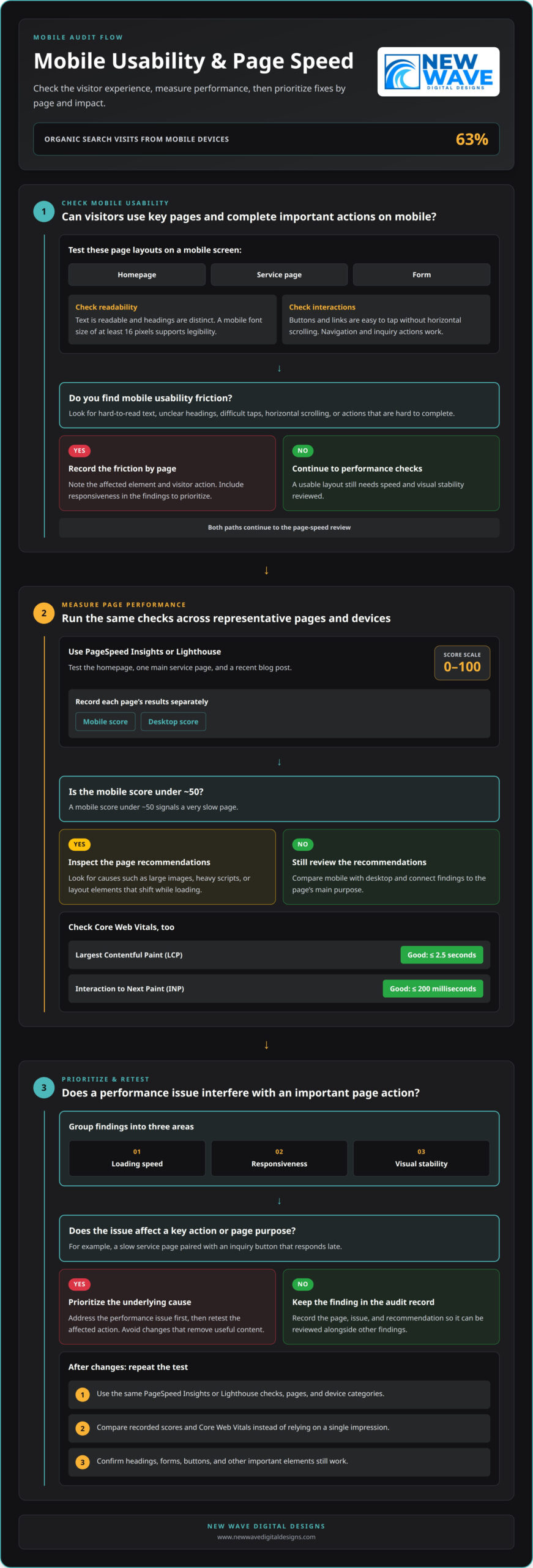
A professional checks mobile usability on real page layouts and compares speed results across mobile and desktop. The review uses PageSpeed Insights or Lighthouse to measure performance and identify fixes that affect loading and interaction.
-
How a Professional Checks Mobile Usability
Test key pages on a mobile screen, including the homepage, a service page, and a form. Check that text remains readable, headings are distinct, and buttons or links are easy to tap without horizontal scrolling. A mobile font size of at least 16 pixels supports legibility. Review each action a visitor needs to take, such as opening navigation or submitting an inquiry.
-
How a Professional Reviews Page Speed and Core Web Vitals
Run PageSpeed Insights or Lighthouse on the homepage, one main service page, and a recent blog post. Record mobile and desktop scores on the 0-100 scale, then review the recommendations for each page. A mobile score under ~50 signals a very slow page. Check Core Web Vitals too: a good Largest Contentful Paint (LCP) result is 2.5 seconds or less, and a good Interaction to Next Paint (INP) result is 200 milliseconds or less.
-
How a Professional Assesses Mobile Optimization
Compare the mobile and desktop experience, then connect performance findings to the page’s main purpose. Large images, heavy scripts, or layout elements that shift while loading can slow pages or disrupt an action. Identify which recommendations address the cause, rather than applying changes that remove useful content. Mobile devices account for 63% of organic search engine visits, so mobile usability deserves focused attention.
- Prioritize changes by page and impact. Group findings under loading speed, responsiveness, and visual stability. If a service page loads slowly and its inquiry button responds late, for example, prioritize the underlying performance issue and retest the button afterward. Record the page, issue, and recommendation so the next review can show whether the change improved the user experience.
- Retest after implementation. Run the same PageSpeed Insights or Lighthouse checks after changes, using the same pages and device categories. Compare the recorded scores and Core Web Vitals rather than relying on a single impression. Then confirm that headings, forms, and other important elements still work. If performance issues need ongoing technical attention, website support for mobile performance can help keep the experience aligned with the site’s needs.
Tracking traffic, rankings, and conversions
- Establish a clear performance baseline. Use Google Search Console to review organic clicks, impressions, queries, and average position. Compare matching time ranges and separate branded searches from non-branded searches where possible. Fewer clicks alongside steady impressions may indicate weaker engagement with search results; falling impressions can point to reduced visibility. Record the pages and queries most relevant to your goals.
- Connect search visibility with website traffic. Review organic sessions in an analytics platform such as Google Analytics, then compare them with Search Console trends. The platforms show different parts of the journey: Search Console reports how people find pages in search, while analytics shows what visitors do afterward. If a landing page loses organic visits, examine its queries, visibility, and content before deciding what to address.
- Define conversions before interpreting results. Identify meaningful actions, such as a completed inquiry form, phone call, or purchase. Confirm that each action is recorded consistently and attributed to the appropriate channel. Traffic growth alone doesn’t show whether visitors are relevant. Comparing landing pages, conversion actions, and sources can reveal where the visitor journey needs attention. Knowing how to audit your own website for SEO issues means connecting search metrics with actions that matter to your business.
- Keep audit access and issue ownership clear. Confirm that the right team members can access Google Search Console and the analytics property. Store the report in a shared location, then track each finding with its affected URL, evidence, priority, owner, and status. Record a missing conversion event separately from a ranking decline, for example, since each needs a different investigation. Clear ownership also helps prevent duplicate work across teams.
- Prioritize findings by impact and effort. Consider how many important pages an issue affects, whether it obstructs discovery or conversion, and how closely it relates to business goals. Reviewing and prioritizing audit findings typically takes 1-2 hours. Put widespread tracking failures or key landing-page declines ahead of minor reporting irregularities. Document the reason for each priority so the sequence stays clear to everyone handling the work.
- Use reports to measure progress after fixes. Preserve a dated baseline and annotate the report when a change is implemented. Then recheck the same Search Console pages, queries, and analytics conversions. Separate completed technical work from later performance changes, since rankings and traffic can shift for several reasons. If a service page gains visibility but conversions stay the same, investigate its content and visitor path. A useful audit tracks whether each fix addresses the original problem.
SEO audit types: technical, on-page, off-page, content, and local
A professional SEO audit examines technical access, page content, external signals, and local visibility as connected parts of search performance. It identifies crawl and indexing barriers, then assesses whether each target page serves a distinct purpose.
A thorough review combines a technical crawl, page-level assessment, backlink review, content comparison, and local presence check. To find duplicate or thin pages and keyword cannibalization, compare page content, intent, and target queries. Then decide whether to improve, combine, or redirect competing URLs.
-
How a Professional Checks for Common SEO Problems
Start with a technical crawl, then review content and local signals against the site’s goals. Check for broken pages, redirect chains, missing titles, absent meta descriptions, and images without useful alternative text. Confirm that the XML sitemap includes important URLs and stays current as pages change. For local SEO, check that location and contact details are clear on relevant pages and that those pages accurately represent the business.
Next, inspect off-page signals, including links from other websites. Assess whether those links point to useful, relevant pages and whether key service pages have suitable internal support. Review technical SEO, content, local visibility, and links as distinct audit areas, then record how each issue affects visitors or search engines.
-
How a Professional Finds Duplicate and Thin Content
Compare pages that target the same keyword or answer similar questions. Check whether each page offers distinct information or whether several URLs compete for the same search intent. Two service pages with near-identical descriptions, for example, may confuse visitors and search engines about which page should rank.
Review thin pages for missing detail, unclear purpose, or content that doesn’t help the target audience make a decision. Similarity alone doesn’t mean pages should be merged. Keep distinct pages when they serve different needs; improve, consolidate, or redirect pages when they repeat the same value. Check canonical tags too: each page should declare one canonical URL, since search engines may ignore conflicting canonical tags.
-
How a Professional Prioritizes Technical and On-Page Fixes
Group findings by impact, affected pages, and implementation effort. Start with access problems, invalid HTTPS setup, and broken pages that block important content. Review whether HTTP pages redirect to HTTPS, whether canonical tags identify a preferred page, and whether redirects form unnecessary chains. Keep a site’s 3XX redirects below 5% of its total pages.
Then work through on-page details: one clear H1 should match each page’s main topic, while titles, descriptions, and images should support its purpose. Check that each URL specifies no more than one language code. Review resource files as clues, not rigid targets: the checklist recommends no more than 30 JavaScript files and 50 CSS files per page. Fix high-impact issues first, then document the remaining recommendations for a sequenced implementation plan.
Site structure, URLs, and internal links
A clear hierarchy helps visitors reach important pages and gives search engines meaningful paths through the site. Review how pages are grouped, named, and connected before making structural changes.
-
How a Professional Reviews Site Structure and URLs
Map the main sections and trace a route from the homepage to each important page. Visitors should be able to find main services within one or two clicks, without passing through unrelated categories. Check that the hierarchy reflects how people understand the business, not simply the order in which pages were created.
Review URLs for clarity and consistency. Keep them short, readable, descriptive, and separated with hyphens. For example, a service URL should indicate its subject instead of containing an unexplained string of numbers. Consolidate duplicate structural variants, such as HTTP and HTTPS, with 301 redirects.
-
How a Professional Traces Internal Links and Finds Orphaned Pages
Trace links from the homepage and navigation to key pages, then compare those URLs with the full page inventory. A page with no internal links is orphaned, making it harder for visitors and search engines to discover. Add relevant links from related content, such as a service page linked from an article about that service.
Inspect link text as well as destinations. Descriptive wording tells visitors what a page contains; generic text such as “click here” offers little context. Check that important pages receive useful links, and update or remove links to obsolete or irrelevant pages.
- Review navigation and page relationships. Check menus, category pages, and breadcrumbs for a logical route to key information. A visitor reading a general services page, for example, should be able to reach a relevant individual service without returning to the homepage. Keep navigation labels concise and consistent so the site’s structure is easy to scan.
- Align titles and meta tags with page purpose. Compare each page title and meta description with its URL, heading, and destination. A page about one service shouldn’t have a title that suggests another. Update mismatched titles and descriptions, and give similar pages distinct wording that accurately reflects their content.
- Recheck links after structural updates. When pages move, change names, or are removed, update internal links and navigation instead of leaving visitors at broken destinations. Review external links too, confirming that each still leads to a relevant resource. For help maintaining structural updates and site links, get website support.
New Wave Digital Designs
New Wave Digital Designs helps turn audit findings into a practical plan for maintaining your website. When technical issues keep returning, Website Support, including website maintenance, hosting, and security, can help manage ongoing site needs and keep changes organized. Bring your audit findings, priority pages, and questions about which fixes to tackle first. This context helps focus next steps on your site’s structure, content, and goals instead of treating every warning as equally urgent.
For websites where AI could support a specific business process, AI Agents and AI Implementation may also be relevant. The right next step depends on what your audit reveals and where you need support. Contact New Wave Digital Designs to discuss your website and its SEO issues.
Turn SEO Findings Into Your Next Move
An audit is valuable when its findings lead to deliberate decisions, not just a longer list of warnings. Choose the next change by asking what blocks a meaningful visitor action, what supports your business goals, and what you can measure after implementation. That focus keeps optimization connected to the people your site is meant to serve.
Understanding how to audit your own website for SEO issues helps you make informed decisions, but complex technical findings may call for experienced support. New Wave Digital Designs can help you move from diagnosis to a considered plan, with attention to your website and business needs. Bring the pages or issues you’re concerned about and start a focused conversation about what should happen next.
Contact New Wave Digital Designs to discuss a practical next step for your website. Each considered improvement can make the path ahead clearer.
Frequently Asked Questions
How Does a Professional Prioritize What to Fix First?
Prioritize issues by their effect on important pages, visitors, and business goals. A page that prevents a key service from appearing in search deserves attention before a minor wording change. Also consider how many URLs share the problem and whether the fix depends on another change. This creates a practical sequence instead of treating every audit warning as equally urgent.
How Often Should You Audit a Large, Decentralized Site?
Set a regular review schedule, then add focused audits when teams publish major changes or introduce new sections. On a decentralized site, assign an owner to each section and review changes against shared standards for titles, links, and page purpose. If a department launches a new service area, for example, review its pages and their links to related content.
Can a Professional SEO Audit Be Done Without Special Tools?
Yes. A manual review can reveal visible issues, while tools help examine larger sites consistently. A browser review can uncover confusing navigation or missing page details; Google Search Console can show search visibility and indexing information. PageSpeed Insights or Lighthouse can assess performance. The right mix depends on the question being investigated and the site’s size and structure.
Why Check Your Website’s SEO?
An SEO audit helps reveal whether people can find useful pages and take the next step after arriving. It can uncover a page targeting the wrong audience, a broken inquiry route, or an outdated service description. For businesses in New Jersey serving nearby communities, a review can also assess whether location pages clearly explain the areas and services they represent.
Which Free Tools Can Professionals Use for a Website SEO Audit?
Professionals can use Google Search Console to review search performance and page indexing, and Google Analytics to examine visitor behavior and conversions. PageSpeed Insights and Lighthouse help assess page performance and provide recommendations. These tools answer different questions, so combine their findings with a review of actual pages. For example, a performance score alone won’t explain why visitors leave a service page without contacting the business.
How Do Professionals Find and Fix Technical SEO Issues Such as Crawl Errors and Broken Links?
Use a site crawl to locate URLs that return errors, redirect unexpectedly, or link to missing pages. Check affected destinations and decide whether to restore a page, update links, or redirect visitors to a relevant replacement. If several articles link to a retired service page, for example, updating those links restores a useful path instead of leaving visitors at an error page.
How Do Professionals Audit Website Indexing, robots.txt, and XML Sitemaps?
Compare important pages with indexing reports, site directives, and sitemap entries to locate mismatches. A key page in an XML sitemap may still be unavailable to crawlers because of a robots.txt rule. Check the page’s intended search visibility before changing directives, then ensure sitemap entries reflect the site’s current important URLs.
How Do Professionals Audit On-Page SEO Elements Like Titles, Meta Descriptions, Headings, and Images?
Review each page’s title, meta description, headings, and images against its topic and intended visitor. A service page titled for a different offering sends an unclear signal and may set the wrong expectation in search results. Check that headings organize the information and image descriptions provide useful context, then tailor recommended edits to each page rather than applying identical wording everywhere.