
The platform with the longest feature list may be the wrong choice. The answer to how to choose a B2B e-commerce platform is to compare how well each option fits your account pricing, catalog, payment, and integration needs, alongside security and scalability. Cloud capabilities matter too, because the right architecture should support growth without compromising performance.
It’s easy to focus on the monthly fee or a polished storefront, but the platform’s real value shows up across the full buying journey and the systems behind it. This guide will help you compare pricing and total cost of ownership, customer account features, ERP and CRM integrations, security, and cloud benefits. You’ll come away with a practical way to weigh the trade-offs and identify the platform that best supports your business model today and as it evolves.
Key Takeaways
- Map how orders, customer data, inventory, and fulfillment move between your commerce platform and core business systems.
- Prioritize B2B buying features such as account-specific catalogs, negotiated pricing, bulk ordering, and contract purchases.
- Compare the full cost of ownership, including transaction fees, integrations, maintenance, and future upgrades.
- Assess security controls, compliance support, and role-based access alongside the platform’s cloud scalability.
- Choose a platform that fits your current operations and can adapt as your business evolves.
ERP, CRM, inventory, and fulfillment integrations
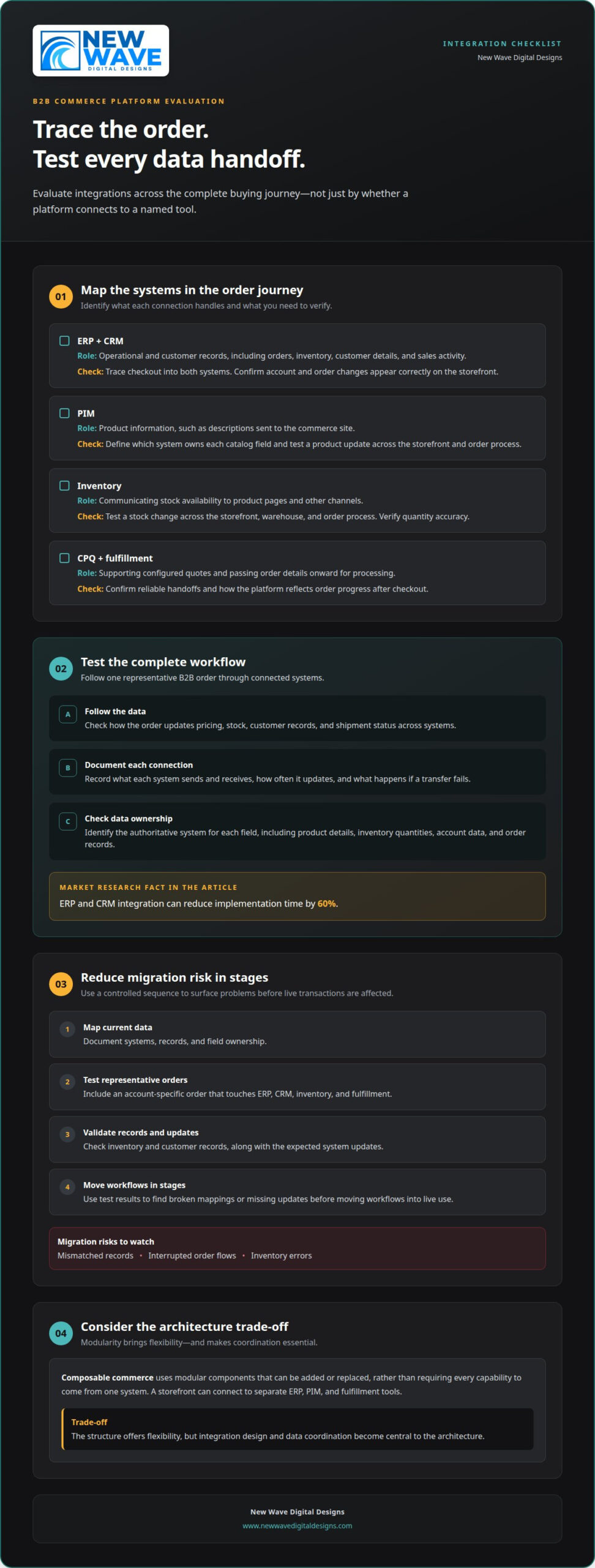
Evaluate integrations by tracing an order from the storefront through ERP, CRM, inventory, and fulfillment systems. Migration risks include mismatched records, interrupted order flows, and inventory errors. Mapping data in stages and testing the full journey can reveal problems before launch.
Integration quality also shapes daily work: a B2B order may need to update pricing, stock, customer records, and shipment status across several systems. Assess each connection against that complete workflow, not just whether a platform can connect to a named tool.
ERP and CRM integrations
An ERP integration connects commerce activity with operational records such as orders and inventory. A CRM integration links customer details and sales activity. During evaluation, trace an order from checkout into both systems, then confirm that account and order changes are reflected correctly on the storefront. Include ERP, CRM, and CPQ systems in your map if they are part of your operations.
These integrations differ from catalog connections because they coordinate transactions and customer context, not only product information. Poorly designed ERP connections can contribute to platform failures; ERP and CRM integration can reduce implementation time by 60%, according to the market research fact provided for this topic.
PIM and inventory integrations
A PIM integration manages product information, while an inventory integration communicates stock availability. For example, product descriptions may flow from the PIM to the e-commerce site, while available quantities flow from inventory systems to product pages. Compare how each platform handles these data types and identify the authoritative system for each field.
Unlike ERP and CRM integrations, PIM and inventory connections focus on keeping catalog details and stock information aligned. Test a product update and a stock change across the storefront, warehouse, and order process. Include fulfillment systems so you can see how the platform reflects order progress after checkout.
Other integrations can extend the same workflow. CPQ tools support configured quotes, while fulfillment connections pass order details onward for processing. During platform evaluation, document what each system sends and receives, how often it updates, and what happens if a transfer fails. This makes integration capabilities easier to compare.
| Integration option | Primary role | Key evaluation criterion |
|---|---|---|
| ERP and CRM | Operational and customer records | Order and account data flow |
| PIM | Product information | Catalog field ownership |
| Inventory | Stock availability | Quantity accuracy across channels |
| CPQ and fulfillment | Quotes and order processing | Reliable handoff between steps |
Choose a platform that supports the complete order journey and clearly defines ownership of each data field.
Composable commerce uses modular components that can be added or replaced, rather than requiring every capability to come from one system. For example, a business might connect a commerce storefront to separate ERP, PIM, and fulfillment tools. This structure offers flexibility, but it also makes integration design and data coordination central to the architecture.
Reduce migration risk with a controlled sequence: map current data, test integrations with representative orders, validate inventory and customer records, then move workflows in stages. Include an account-specific order that touches ERP, CRM, inventory, and fulfillment. This can reveal broken mappings or missing updates before they affect live transactions.
What makes an ecommerce platform “best”?
The best fit supports how your B2B business sells, serves buyers, and adapts. Compare buying capabilities with customer insight, platform flexibility, and the vendor’s product roadmap. Knowing how to choose a B2B e-commerce platform starts with the workflows your customers and staff actually use.
B2B ordering and pricing capabilities
B2B ordering features shape how each account sees products and places purchases. Look for customer-specific catalogs and pricing, bulk ordering, and contract purchases. For example, a distributor may need separate catalog access and negotiated prices for different business accounts.
Complex accounts may draw pricing from hundreds of separate price lists. Compare how clearly a platform assigns those prices and keeps them consistent through the order process. This differs from general storefront flexibility: the key test is whether each buyer sees the right terms and can order in the way their agreement requires.
Customer data, journeys, and analytics
A unified customer view brings interactions into one picture, helping teams understand a buyer’s journey across sales and commerce. A 360-degree view can reveal where customers encounter friction and inform decisions about the digital experience.
Compare segmentation, analytics, and reporting with a practical scenario: can a team distinguish repeat buyers from new accounts, review their activity, and use that insight to shape relevant promotions? Unlike ordering features, these tools help teams understand buyer behavior and refine the experience rather than process a purchase.
Pricing, integrations, and scalability comparisons
Compare total cost of ownership over a five-year window. Include subscription and transaction fees, implementation, integration work, and ongoing maintenance, then assess those costs against each platform’s capabilities. A second step in how to choose a B2B e-commerce platform is to test those costs against expected business changes.
Review integration fit and the vendor’s product roadmap alongside likely growth. A platform may suit current operations but require costly changes as order volume, catalog complexity, or connected systems expand. Consider whether it can support likely business changes over the next 3-5 years.
Platforms for small and mid-sized businesses
No single platform is best for every small or mid-sized business. A suitable choice provides the B2B capabilities the company needs without adding unnecessary complexity. A business with a focused catalog and straightforward account pricing may prioritize ease of management, while one with contract purchases may need advanced account controls.
Compare platforms against current workflows, then identify which capabilities support planned growth. Review each vendor’s B2B focus, roadmap, and implementation ecosystem alongside operational fit. This keeps the decision grounded in what buyers and staff need, rather than feature counts alone.
Presentation matters too: clear product imagery and consistent catalog materials can help buyers navigate a digital storefront. For businesses refining that visual layer, cohesive catalog visuals can complement a well-structured B2B buying experience.
Account-level pricing, catalogs, and payment terms
A B2B ecommerce platform should reflect the agreements that shape each customer relationship. Compare personalized catalogs, account pricing, payment terms, and the way platform charges change as online sales grow.
Account-specific catalogs, pricing, and payment terms
Account-level controls let each buyer see relevant products, negotiated prices, and agreed payment options. A complex customer account may need pricing from hundreds of separate price lists, so evaluate how the platform assigns the correct list to each account and maintains it through checkout.
Payment workflows matter just as much. Assess support for purchase orders, credit terms, and electronic funds transfer, including Net 30, Net 60, and Net 90 terms. For example, a contracted buyer might need to order against an agreed catalog using a purchase order, while another account pays by electronic funds transfer.
Unlike a general catalog, account-level access can vary by customer, including prices and payment conditions. Test a sample account from sign-in through order submission, including what the buyer sees when a product falls outside their assigned catalog.
Pricing models and total cost of ownership
Platform pricing may combine subscription charges, transaction fees, and costs tied to implementation or integrations. Compare total cost of ownership over a five-year window instead of judging an e-commerce platform by its initial charge alone. Include maintenance and the internal work required to manage account rules.
Growth can change the calculation. Forecast realistic online revenue over the next three to five years, then model how transaction fees affect the total. Before accepting a five-year managed service agreement, compare its transaction fees with alternatives and account for expected transaction volume.
An enterprise seller should also identify which charges rise with usage, such as fees tied to order volume or additional capabilities. A model that suits current sales may become less suitable as e-commerce becomes a larger channel. Compare platforms using the same revenue assumptions to make cost differences meaningful.
Dynamic pricing adds another layer. Establish which account, contract, or market conditions can change a displayed price, and define how those rules are governed. If AI informs personalization, keep recommendations distinct from negotiated prices; buyers should still receive terms consistent with their account agreements. Forrester found that 94% of business buyers use AI at some point in the shopping process, making relevant experiences an important evaluation point.
Use a practical comparison sequence: map account groups, assign each group a catalog and pricing rule, then test payment methods and order submission. Next, compare platform charges against the same three-to-five-year sales forecast. This shows whether the platform’s personalization capabilities align with its ownership costs.
Is the Platform Secure and Compliant?
Assess security as a connected system, not a single certification. Compare compliance support, access controls, payment security, platform protections, and vendor support.
Start with the data and workflows your commerce solution handles. A buyer account may include order history, negotiated terms, and contact details, while checkout processes payment information. Map these data flows, identify who can access each one, and determine which safeguards apply.
PCI DSS is a key security consideration for e-commerce, especially when payment data is involved. Compare how platforms support secure payment workflows and divide responsibilities between the platform and connected payment services. Document the payment journey from checkout through order confirmation, including where sensitive information is handled.
Review SOC 2 and ISO 27001 as security certification signals. SOC 2, or System and Organization Controls, measures data protection and operational integrity processes. A certification alone does not describe every safeguard in your specific setup, so compare the platform’s security ecosystem, including compliance, performance management, physical security, network security, and platform security.
Role-based access controls help match permissions to responsibilities. For example, a sales representative may need access to assigned customer accounts, while a finance user may need payment and invoice information. Evaluate how administrators assign, change, and remove permissions, and whether controls cover both staff accounts and customer roles. Test how to create a user, limit access, and remove it when responsibilities change.
Compliance needs depend on where your business operates and what data it handles. The European Union names GDPR as a regional data protection requirement to consider when a B2B business operates internationally. The platform should also support consideration of CCPA and other applicable regulations. Map customer locations and data flows to understand which requirements matter to your operations.
Vendor support is part of the security picture. Review how the provider communicates platform updates, manages incidents, and answers security-related questions. Tie each point to a practical workflow, such as responding to a suspicious account login or reviewing access after an employee leaves. Clear responsibilities help teams act without confusion.
Complex B2B workflows can expand the number of users, integrations, and permissions involved. A commerce solution might connect buyers, sales teams, finance staff, and external systems across one order journey. Check whether controls remain consistent across each role and connection, rather than testing storefront security alone.
Compare security requirements with your business’s exposure. A platform processing substantial revenue or sensitive customer records may need more detailed access reviews than a simple ordering site. Document required controls, assign an owner to each, and test the highest-risk workflows before launch. This gives you a concrete basis for evaluating platform security and compliance.
Cloud-based platform benefits
A cloud-native B2B ecommerce platform can adjust capacity automatically, helping maintain performance as demand changes. The advantage depends on architecture: assess how the platform handles traffic, integrations, updates, and growing operational complexity.
Start with a realistic demand scenario. Model a seasonal increase in visitors, product searches, and submitted orders, then assess whether capacity can scale automatically. This capability can help maintain performance as demand changes, but it does not replace testing page speed and key buying workflows under realistic conditions.
Cloud architecture can also support modular commerce. With interchangeable components, a business can add or replace capabilities without rebuilding the entire platform. That flexibility may reduce dependence on one vendor’s full technology stack, while making it essential to manage connections between components. Evaluate how data and workflows move between the storefront, ERP, and other systems.
Composable commerce does not have to begin with a complete replacement. A business can evaluate adoption through a prototype, a minimum viable product, or a proof of concept. For example, test a new digital buying workflow alongside existing infrastructure, then assess integration needs and operational impact before expanding it.
Cloud platforms can also change how teams handle maintenance and upgrades. Ask how upgrades are delivered, how they affect custom features, and what control the business retains over release timing. An outdated platform may require an expensive upgrade within three to five years, so consider upgrade paths when selecting a platform for the long term.
Keep performance visible throughout your evaluation. Content-heavy e-commerce pages need strong Core Web Vitals, which measure aspects of user experience such as loading, responsiveness, and visual stability. Test key pages, including product listings and checkout. A fast homepage alone does not show how the full buying journey performs.
Scalability also means more than handling traffic. Assess how the architecture supports new catalogs, customer groups, business models, and connected systems. A growing B2B seller, for example, may need to expand account-specific buying experiences while keeping existing order processes intact. Map the change, identify affected components, and test the workflow before broader adoption.
Technology timing can sharpen the decision. A survey found that 52% of business and financial leaders in B2B organizations expected their commerce technology stack to reach end of life within the next two years. For a platform nearing replacement, compare a full migration with incremental cloud adoption, using performance, integration effort, and upgrade needs as decision criteria.
Choose cloud architecture that can handle realistic growth while preserving room to evolve. To connect your commerce experience with customer acquisition, plan a cohesive digital strategy that aligns storefront and Google Ads activity.
New Wave Digital Designs
New Wave Digital Designs can turn your platform decision into a thoughtfully designed website through Shopify Website Design, WordPress Website Design, or SquareSpace Website Design. The team can help you build or refine your site around your business needs and customer experience.
Once your website is established, Website Maintenance can support it as your content and requirements evolve. The right next step depends on your chosen platform and what your site needs, from design and structure to ongoing upkeep.
Ready to discuss your website? Contact New Wave Digital Designs to take the next step.
Shape your platform decision into a clear next step
A clear plan for how to choose a B2B e-commerce platform begins with the experience you want to create. Translate your business priorities into a focused direction for the site, its customer journey, and the way it should grow. That gives the platform decision a purpose beyond comparing feature lists.
Use your findings to define success for both buyers and the people managing the business. A considered digital experience brings those needs together, expressing your brand while supporting the practical work behind each purchase. The next step is to turn that direction into a website shaped around your goals.
New Wave Digital Designs can help you move from platform considerations to a considered website plan. Share the priorities guiding your decision and explore the right design direction together. Start a conversation with New Wave Digital Designs, and take your next step with confidence.
Frequently Asked Questions
Does the Platform Support Composable Commerce?
A platform supports composable commerce when its architecture lets you combine or replace separate commerce components. This can suit a business that wants to test a new checkout experience without rebuilding its entire storefront. For example, define one contained project, such as a new product discovery feature, and assess its connections to existing systems before expanding. The key trade-off is flexibility: more independent components also require deliberate integration and coordination.
Does the Platform Support Globalization and Localization?
Look for ways to adapt the buying experience to the markets your business serves. Compare localized storefront content, regional product availability, and market-appropriate ordering information. Consider how teams will maintain those differences, so an update to a shared product description does not create inconsistent storefront experiences. For businesses operating internationally, the European Union names GDPR as a regional data protection requirement to consider.
How Customizable is the Platform for B2B Needs?
Customization is useful when it supports a distinct workflow without making routine changes difficult. For example, one supplier may need a quote request before checkout, while another account can place orders directly. Map the journey and assess how the platform supports its steps, permissions, and customer-facing pages. Consider who will maintain customizations and how they interact with platform updates, so tailored features remain manageable as the business evolves.
How does scalability influence platform choice?
Scalability matters when growth changes more than visitor traffic. A business might add customer groups, sales channels, or product lines, each affecting how teams manage the storefront. Assess how the platform accommodates these changes and whether new capabilities can be introduced without disrupting operations. For example, plan a new catalog for a distinct buyer group, then trace how its products and ordering experience fit current processes.
Is the Platform Optimized for Speed and Performance?
Assess performance across the pages buyers rely on, not just the homepage. Test product search, category pages, and checkout on the devices and networks your customers use. Content-heavy commerce pages should maintain strong Core Web Vitals, which measure aspects of user experience. Review whether third-party scripts or added features affect responsiveness. Evaluate performance with realistic content and workflows, not an empty demonstration storefront.
What features should a B2B e-commerce platform include?
Start with features that support the complete buyer journey: account access, product discovery, ordering, and post-purchase information. For example, a purchasing team may need several employees to work under one company account, with different permissions for creating and approving orders. Consider quote requests, reorder tools, and clear order status information when they fit your workflows. The right feature set depends on how customers buy and how staff handle each transaction.
How much does a B2B e-commerce platform cost, including setup and transaction fees?
Total cost depends on the platform’s pricing model and the work needed to configure, integrate, and maintain it. Estimate subscription charges, transaction fees, implementation, connected systems, and ongoing changes. Model expected online revenue against transaction-based charges, then compare the result with other pricing structures. Include internal effort, too: complex account rules or custom workflows may require more administration than a straightforward storefront.
Which B2B platforms support custom catalogs, account-based pricing, and bulk ordering?
Platform capabilities vary, so compare each option using a representative customer account rather than relying on feature labels. Create a scenario with a restricted product range, negotiated prices, and a large order with multiple quantities. Trace what the buyer can see and submit. This reveals whether catalog access, pricing, and bulk entry work together in one buying flow, or whether separate processes would be needed to complete the purchase.